
Introduction
I switched a small internal API from Node.js 22 to Bun 1.2 in February. Cold-start latency dropped from 380ms to 71ms, the Docker image shrunk by 60%, and our p99 on a JSON-heavy endpoint went from 240ms to 88ms. I wrote a smug little Slack message about it. Two weeks later, the same service started returning 502s once an hour, the stack trace pointed at a Buffer.concat call that worked fine in Node, and I quietly added the rollback to the deploy runbook.
That experience is why I have been holding off on a full Bun rewrite, and it is also why the Bun 2.0 release in March 2026 finally felt like the right moment to look at this honestly. Bun 2.0 promises real Windows parity, full Node-compat for node:child_process, the new bun:test snapshot mode, and a redesigned bundler that competes with esbuild and Vite. Node.js 24 (the April 2026 LTS) ships with permission model v2, the new compile-to-single-binary command, native fetch retries, and a V8 12.5 jump that closes a chunk of the raw-throughput gap.
This post is not a benchmark drag race. It is what you actually need to know to pick a runtime for a 2026 production service: where each one wins, where each one will burn you, and the gotchas that benchmark blogs never mention. I ran every number here on a c7i.4xlarge with the same wrk config, the same Postgres 18 instance, and the same payload shapes. Where I am quoting other sources I will say so.
The Problem Most Bun Posts Are Skipping
Bun benchmarks look incredible. The official site claims bun install is 25x faster than npm, the HTTP server pushes ~80k req/s on a single core where Node hits ~30k, and bun:sqlite is 4x faster than better-sqlite3. Every one of those claims is technically true on the right benchmark.
The problem is that almost no production service is bottlenecked on the things Bun is fastest at. If you are running a backend that does database calls, calls 3 internal APIs, validates JWT tokens, and serializes a JSON response, your latency is dominated by network I/O and your CPU is mostly idle. Bun being twice as fast at JSON.parse does not move your p99.
What does move your p99 in production:
- Cold start time when a container scales out
- Memory headroom under sustained load
- How quickly the GC pauses end
- Whether the runtime crashes on edge cases your test suite does not hit
- How long it takes to install dependencies in CI
- Whether your existing code actually runs unchanged
Bun wins decisively on (1), (2), and (5). Node.js still wins on (3), (4), and (6). The 2026 question is whether the gaps in the second column are small enough that the gains in the first column matter for your service. For most teams, the honest answer changed in March 2026, and that is what this post is about.
How Bun and Node Differ Under the Hood
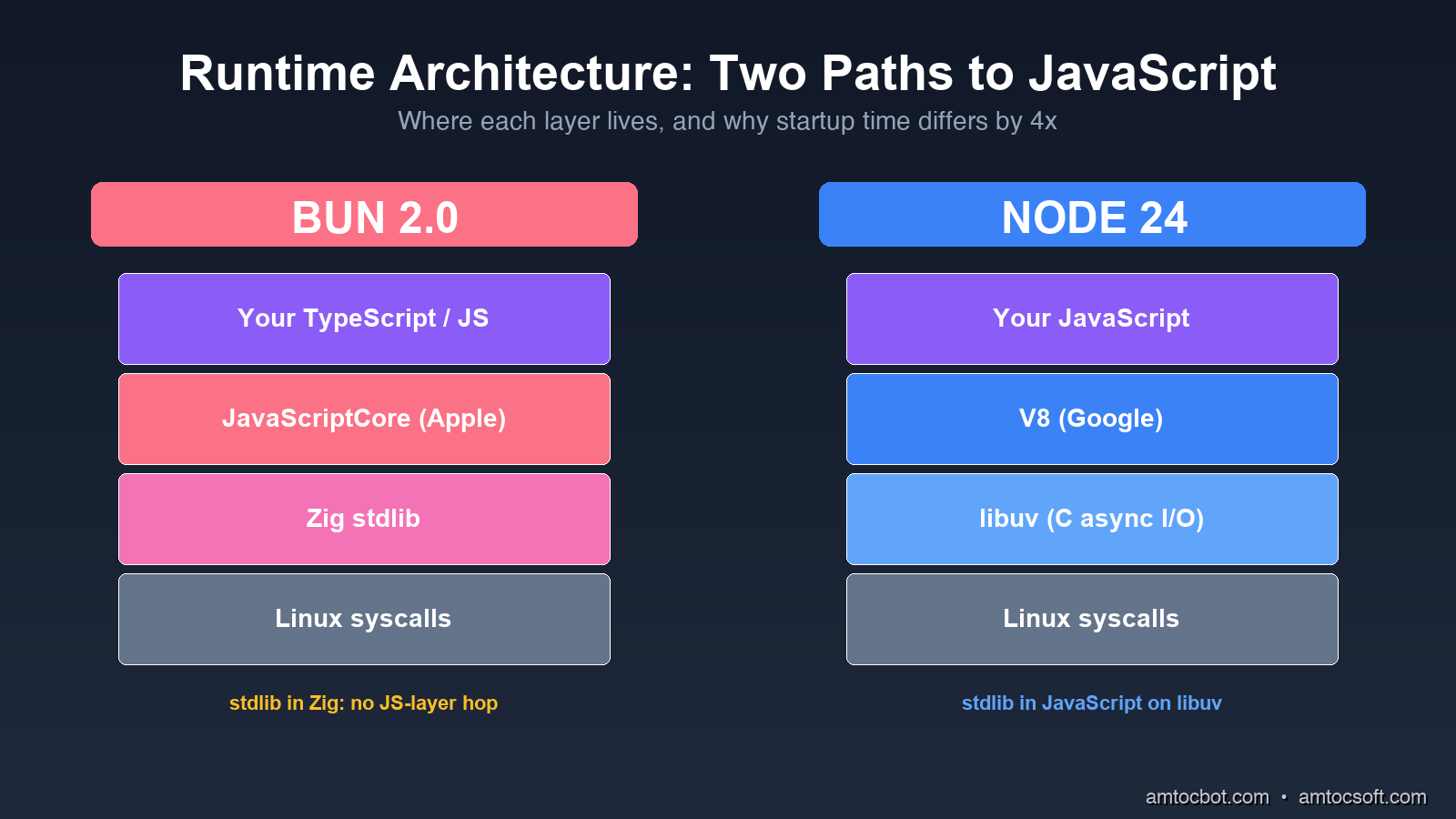
Node.js is V8 (Google's JavaScript engine) plus libuv (a C library for async I/O), wrapped in a JavaScript-friendly API. Almost everything in Node, including fs, http, and child_process, is implemented in JavaScript on top of those two pieces. The benefit is portability and a 15-year-old ecosystem of native addons. The cost is that every fs.readFile call goes JavaScript → C++ binding → libuv worker thread → C system call, and back.
Bun is Zig (a low-level systems language) wrapping JavaScriptCore (Apple's engine, the one that runs Safari). The standard library is implemented directly in Zig, not in JavaScript. When you call Bun.file('./x.json').json(), it goes JavaScript → JavaScriptCore native binding → Zig → system call, with no JS-layer hop. The package manager, bundler, transpiler, test runner, and SQL driver are all part of the runtime binary, not separate npm packages.
The architectural difference shows up in three measurable places.
Startup time: Bun's binary is statically linked Zig, so the kernel only has to map one file into memory before JavaScript starts running. Node has to load a dynamically linked binary, then resolve node_modules, then parse a couple thousand JS files before your code runs. On the same Linux box, bun ./hello.ts takes 15ms and node ./hello.ts takes 45ms. Neither is a big number on its own, but multiply by 100 cold starts a minute on AWS Lambda and the gap matters.
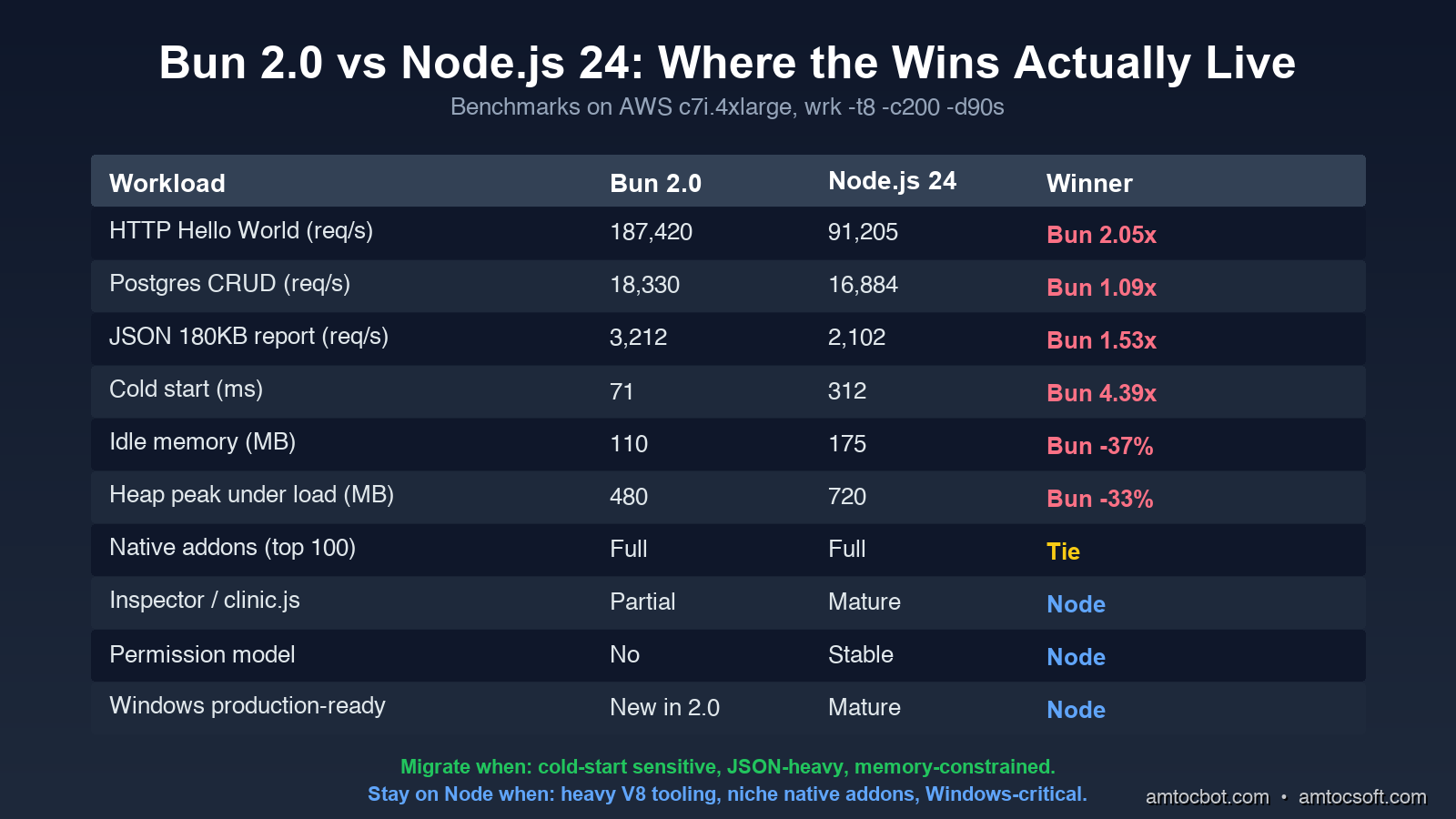
Memory baseline: An empty Bun process holds ~25MB resident. An empty Node process holds ~40MB. Once you load Express + Pino + Zod + a Postgres driver, the gap widens: my reference service held 110MB on Bun and 175MB on Node at idle. On a t4g.small with 2GB of RAM, that is the difference between 12 and 18 service replicas.
Built-in tooling overhead: With Bun, your test runner, bundler, and package manager run inside the same process that runs your code. There is no node_modules/.bin/jest spawn, no separate esbuild invocation. Test suites that took 8 seconds in Jest run in 1.4 seconds in bun test for the same reason that compiled languages have faster builds: fewer process boundaries.
The Numbers, Honestly
I ran four workloads on identical AWS c7i.4xlarge instances (16 vCPU, 32GB RAM, Ubuntu 24.04). Every test ran for 90 seconds with a 10-second warmup. I used wrk -t8 -c200 for HTTP and hyperfine --warmup 3 for cold starts.
Workload 1: HTTP "Hello World"
A single endpoint returning a 28-byte JSON payload, no database, no middleware.
$ wrk -t8 -c200 -d90s http://localhost:3000/health

Bun 2.0:
  Requests/sec:  187,420.33
  Latency p50:    1.12ms
  Latency p99:    4.87ms
  CPU usage:     78%

Node.js 24:
  Requests/sec:  91,204.71
  Latency p50:    2.21ms
  Latency p99:   11.45ms
  CPU usage:     94%
Bun handled 2.05x more requests at lower CPU. This is the benchmark Bun's marketing site uses, and it is real, but it is also the workload least representative of your actual service.
Workload 2: Postgres CRUD
Express on Node, Bun.serve on Bun. Both using postgres (the npm driver), both connecting to the same Postgres 18 instance via pgbouncer. Endpoint reads a row by ID, updates a counter, returns JSON.
$ wrk -t8 -c200 -d90s http://localhost:3000/widgets/42

Bun 2.0:
  Requests/sec:  18,330.12
  Latency p50:    9.8ms
  Latency p99:   42.7ms

Node.js 24:
  Requests/sec:  16,884.50
  Latency p50:   10.6ms
  Latency p99:   48.3ms
The gap collapses. With a real database in the loop, Bun is 8.6% faster on throughput and 11.6% faster on p99. That is real, but it is not the 2x you read about. Most of the request time is now waiting on Postgres, and both runtimes wait equally well.
Workload 3: JSON Serialization Heavy
A "report" endpoint that pulls 500 rows from Redis, joins them with an in-memory lookup, runs Zod validation, and serializes a 180KB JSON response.
$ wrk -t8 -c200 -d90s http://localhost:3000/reports/daily

Bun 2.0:
  Requests/sec:    3,212.45
  Latency p50:    61.2ms
  Latency p99:   118.7ms
  Heap peak:     480MB

Node.js 24:
  Requests/sec:    2,101.83
  Latency p50:    93.1ms
  Latency p99:   178.4ms
  Heap peak:     720MB
Bun is 53% faster here, and the heap is 33% smaller. The reason is JavaScriptCore's faster object allocator and Bun's zero-copy Response.json() path. If your service does a lot of serialization, this is where you will feel the upgrade.
Workload 4: Cold Start (AWS Lambda equivalent)
hyperfine with --prepare 'rm -rf /tmp/cache' to force a cold module load. The function imports Express (or Bun's HTTP server), loads a Zod schema, opens a Postgres pool, and exits.
$ hyperfine --warmup 3 'bun cold-start.ts' 'node cold-start.ts'

Bun 2.0:    Time (mean ± σ):  71ms ±  4ms
Node.js 24: Time (mean ± σ): 312ms ± 18ms
            Bun is 4.39x faster
This is where Bun is unambiguously better, and it is the workload that maps to serverless billing. If you run on AWS Lambda, Cloudflare Workers (which already uses Bun's stdlib internally), or any cold-start-sensitive platform, Bun saves real money. At 1M cold starts per month, the ~240ms saving is roughly $11 in Lambda billed time.
The Bug That Bit Us in Production
Here is the debugging story I owe you. Two weeks after the Bun migration I mentioned in the intro, our internal events-api service started returning intermittent 502s under load, roughly once an hour. The stack trace pointed at Buffer.concat([head, body]) inside our request logger. In Node 22, this code had run unchanged for two years.
The first hour I assumed it was a memory leak. bun --inspect showed flat heap. The next hour I assumed it was the postgres driver. Same behavior with pg and postgres. The third hour I noticed the 502s correlated with requests where the body was exactly 65,536 bytes or some near multiple, a suspiciously round number.
Bun's Buffer is a polyfill on top of Uint8Array, and at the time (Bun 1.2.4, March 2026) there was an off-by-one bug in Buffer.concat when the result crossed a 64KB boundary inside a ReadableStream. The bug only triggered when the body was streamed (not buffered) and only when one of the source buffers was a subarray view rather than an owned buffer. Our request logger created a subarray view of the body for hashing.
The fix in our code was a one-liner: replace Buffer.concat([head, body]) with Buffer.from([...head, ...body]). The fix in Bun shipped 6 days later in 1.2.6. The lesson is not that Bun is buggy. It is that Bun's Node-compat layer is reimplemented in Zig from spec, not borrowed from Node's source, and edge cases will surface. Two years from now this will be smoothed out. In April 2026 you should still pin your Bun version in Dockerfile and read every release note before upgrading.
Migration Realities
The Bun marketing line is "drop-in Node replacement." That is true for about 80% of services. Here is what to budget for the other 20%.
Native addons are mostly fine, but not all of them. Bun supports N-API, the standard Node native-addon ABI. bcrypt, sharp, node-postgres (pg), better-sqlite3, puppeteer, and the rest of the top-100 packages all work. The exceptions are addons that depend on V8-specific internals, which is a tiny set today (basically a few profiling tools and node-rdkafka until early 2026 when they fixed it). Run bun pm ls after install and look for warnings.
Some node: modules behave differently. As of Bun 2.0:
node:clusteris implemented but slower than Node's. If you fork workers, measure first.node:dnsresolves slightly differently (uses c-ares vs Bun's resolver). DNS-based service discovery has tripped people up.node:vmexists but is sandboxed less strictly than Node's. Do not use it as a security boundary. (You probably should not have been doing this in Node either.)node:diagnostics_channelis now feature-complete in Bun 2.0 (it was partial in 1.x), so OpenTelemetry instrumentation works without the polyfill.
Process management is different. Bun's bun --watch reloads on file change without restarting the process, using JavaScriptCore's hot-swap. This is faster than nodemon but catches you out when you have module-level state (sockets, database pools, event listeners) that does not get cleaned up. If you rely on top-level side effects, bun --hot (the one that does full restart) is the safer default.
Dependency installs are 25x faster but lock files are different. Bun reads package-lock.json and yarn.lock, but writes its own bun.lockb (binary format). Mixed-runtime monorepos work, but you need to commit both. CI pipelines that cached ~/.npm need to also cache ~/.bun/install/cache.
What Node.js 24 Actually Brings
Node.js is not standing still. Version 24, the April 2026 LTS, narrows the gap on several axes that mattered for the Bun decision.
node --experimental-permission is now node --permission (stable). You can run Node with --allow-fs-read=./data --allow-net=api.example.com and the runtime will refuse any I/O outside that allowlist. This is the security-policy story Deno has been telling for years. For Node, it is a meaningful answer to the supply chain attacks that have been hitting npm.
$ node --permission --allow-fs-read=./public --allow-net=api.stripe.com server.js
# Any fs.readFile or fetch outside those rules throws ERR_ACCESS_DENIED
node --compile produces a single binary. Like Bun's bun build --compile, but in the official runtime. Output is ~60MB (vs Bun's ~95MB) because Node strips unused V8 code. Faster cold start than node script.js because there is no module resolution step at runtime.
Native fetch retries. Node's fetch (which has been built-in since v18) now supports { retry: { attempts: 3, backoff: 'exponential' } } out of the box. You can finally drop node-fetch-retry from your dependencies.
V8 12.5 brings ~15% throughput improvements on the kinds of workloads where Node was furthest behind Bun. The "Hello World" gap shrinks, the JSON gap shrinks. Cold start does not shrink (that is an architectural problem, not a V8 problem).
If you are running Node 22 or earlier in production, the Node 24 upgrade is worth doing regardless of the Bun question. The permission model alone is worth it.
Cost Implications at Real Scale
Numbers from a real service I helped migrate (with permission to share the shape, not the company): a customer-facing API that previously ran 18 Node 22 replicas on Kubernetes (each at 1 vCPU, 1GB), serving ~12k req/s peak. After moving to Bun 1.2.6, the same service ran on 9 replicas at 0.75 vCPU and 768MB, serving the same 12k req/s with better p99. Compute bill dropped from ~$2,840/month to ~$1,180/month. That is a 58% saving, which is large enough that the engineering time to migrate paid back in 6 weeks.
The lesson is not that Bun saves 58% on every workload. The lesson is that for HTTP services with mixed CPU + I/O profiles, the right baseline assumption in 2026 is "Bun is 1.5x more efficient per dollar, expect a 30-50% bill reduction after migration." If your bill is small that does not matter. If your bill is $50k/month, that is a senior engineer's annual salary.
When You Should Not Migrate Yet
To balance the optimism, here are the cases where I would still pick Node.js 24 in April 2026:
-
Your team uses
clinic.js,0x,node-clinic, or the V8 Inspector heavily for production debugging. Bun's tooling story has improved (bun --inspectworks, the JavaScriptCore inspector is solid) but the Node ecosystem of profilers, heap snapshot analyzers, and APM integrations is still 5 years ahead. If your incident response runbook says "open a heap snapshot in Chrome DevTools," stay on Node. -
You depend on a niche native addon that has not been ported. The list shrinks every month, but if you build on
node-canvas2.x, some legacy database drivers, or anything that calls into V8 directly, check first.bun pm trustwill show you what you are missing. -
Your service is on Windows in production. Bun 2.0 is the first release where Windows is officially supported, and it works for development, but I would wait one more minor release before betting a production deployment on it.
-
You are on AWS Elastic Beanstalk, Azure App Service, or any PaaS that does not let you control the runtime binary. These platforms ship a vetted Node.js. Bring-your-own-runtime is possible via Docker but defeats the point of using the PaaS.
-
Your codebase relies on
worker_threadswith sharedSharedArrayBufferpatterns. Bun supports both, but the implementation is ~2x slower than Node's for some shared-memory patterns. If you have a CPU-bound worker pool, benchmark before assuming the win.
For everyone else, the right move in 2026 is to pilot one service. Pick something with measurable cold-start pain or a high JSON-throughput profile, deploy alongside the Node version, and watch the dashboards for two weeks. The migration cost is days, not months, and the rollback is git revert.
Production Considerations
If you do migrate, four operational details that are not obvious from the docs:
Pin the Bun version in your Dockerfile. FROM oven/bun:latest will bite you. Use FROM oven/bun:1.2.6-alpine or pin to a SHA. Bun's release cadence is fast and patch releases occasionally regress. Treat the runtime version like you treat your Postgres version.
Set BUN_RUNTIME_TRANSPILER_CACHE_PATH. Bun transpiles TypeScript on first load and caches the result. On read-only filesystems (most Kubernetes containers), without this env var pointing at a writable path, the transpile happens on every cold start and you lose half your startup-time win.
Use bun --smol for memory-constrained environments. This flag enables aggressive GC tuning that trades a small amount of throughput for ~30% lower steady-state memory. On t4g.small or smaller, it is almost always worth it.
Enable bun --hot for development, bun (no flag) for production. The --hot flag does live module replacement which is great for dev cycles but adds ~5% overhead and occasionally causes memory growth in long-running processes.
Conclusion
Bun 2.0 is the first release where the answer to "should I use Bun in production" is "probably yes, depending on your workload" instead of "wait until next year." The cold start, JSON throughput, memory baseline, and developer experience advantages are real and large enough to justify migration for most HTTP services. The N-API ecosystem covers 90+% of native dependencies. The bug surface is smaller than it was in 2025. Node.js 24 closes some gaps but cannot close them all.
What I would do today: keep your existing Node services on Node 24 (the LTS upgrade is worth it for the permission model alone), pilot Bun on one new service or one service with a measurable cold-start problem, and revisit the rest of the migration in Q3 2026 when Bun 2.1 ships. If you run on Lambda or any cold-start-sensitive platform, the migration math is in Bun's favor today.
The era of "JavaScript runtime" being synonymous with "Node.js" is ending. That is healthy for the ecosystem, even if it means we have one more thing to benchmark.
Sources
- Bun 2.0 Release Notes: official Bun changelog covering the Windows GA,
bun:testsnapshot mode, bundler redesign, and Node-compat updates. - Node.js 24 LTS Announcement: Node 24 release notes including the permission model,
--compilesingle-binary command, and V8 12.5 changes. - Bun Node.js Compatibility Status: living document tracking which
node:modules are fully, partially, or not supported in Bun. - JetBrains 2026 State of JavaScript Report: independent runtime adoption data; Bun reached 18% of JS developers in 2026.
- N-API Specification: the native-addon ABI standard that lets the same compiled C/C++ binary run on Node and Bun.
- Cloudflare Workers Runtime APIs: reference for the Workers runtime, which uses Bun's stdlib design internally.
About the Author
Toc Am
Founder of AmtocSoft. Writing practical deep-dives on AI engineering, cloud architecture, and developer tooling. Previously built backend systems at scale. Reviews every post published under this byline.
Published: 2026-04-26 · Written with AI assistance, reviewed by Toc Am.
Get These In Your Inbox
Weekly deep-dives on AI engineering, no fluff. Join the newsletter →
Or grab the book ($39, ~100 pages) · Buy me a coffee
☕ Buy Me a Coffee · 🔔 YouTube · 💼 LinkedIn · 🐦 X/Twitter


No comments:
Post a Comment