Showing posts with label kafka. Show all posts

Friday, April 17, 2026

Kafka Advanced Patterns: Partitioning, Consumer Groups, and Exactly-Once Semantics

Hero image

Introduction

Kafka at scale is not the same system as Kafka in tutorials. The tutorial version has one producer, one consumer, and no concern for ordering, durability, or throughput. The production version has partition strategies that determine your maximum parallelism, consumer group rebalancing that causes processing gaps, exactly-once semantics with non-trivial performance costs, and schema evolution that breaks consumers in subtle ways.

This post is for engineers operating Kafka in production — or designing systems that will. It covers the decisions that determine how your Kafka deployment scales: partition count and key selection strategy, consumer group semantics and the rebalancing problem, idempotent producers and transactional exactly-once processing, compacted topics for event sourcing, consumer lag monitoring, and the patterns that make Kafka reliable at hundreds of thousands of events per second.

Partitions: The Unit of Parallelism

Everything in Kafka's performance model flows from partitions. A topic's partitions are the unit of both parallelism and ordering. One consumer instance per partition is the maximum parallelism — you cannot parallelize more than the partition count. Ordering is guaranteed only within a partition, not across partitions.

Partition count is set at topic creation and is not reducible without data loss (only increase is possible). Choosing the right count requires estimating your peak throughput and your consumer processing rate:

Required partitions = ceil(peak_events_per_second / events_per_consumer_per_second)

Example:
Peak: 50,000 events/second
Consumer throughput: 2,000 events/second (complex processing)
Required partitions: ceil(50,000 / 2,000) = 25
Recommended: 30 (25% headroom for burst)

Under-partition and you cannot scale horizontally. Over-partition and you increase broker overhead (each partition has a log segment file, index files, and in-memory state), increase consumer group rebalancing time, and waste resources when utilization is low. For most workloads, 12-30 partitions is the right range. For very high throughput, 50-100.

The partition key determines which partition a message goes to (via consistent hash). This choice has significant consequences:

from confluent_kafka import Producer

producer = Producer({
    'bootstrap.servers': 'kafka:9092',
    'acks': 'all',           # wait for all replicas — durability
    'enable.idempotence': True,  # exactly-once at producer level
    'max.in.flight.requests.per.connection': 5,  # idempotence requirement
    'compression.type': 'lz4',  # 2-4× throughput improvement
    'linger.ms': 5,          # batch for 5ms — improves throughput
    'batch.size': 65536,     # 64KB batch size
})

# Strategy 1: partition by user_id — ordering per user, balanced load
producer.produce(
    topic='user_events',
    key=user_id.encode(),    # hash(user_id) % partition_count → partition
    value=json.dumps(event),
    callback=delivery_callback
)

# Strategy 2: partition by tenant_id — ordering per tenant
# Risk: hot partition if one tenant has 10× the volume

# Strategy 3: null key — round-robin, maximum throughput, no ordering
producer.produce(
    topic='audit_logs',
    key=None,                # round-robin across all partitions
    value=json.dumps(log_entry)
)

producer.flush()  # wait for all outstanding messages to deliver

Hot partition problem: if your key space is skewed (one user generating 90% of events), most messages route to the same partition. That partition's consumer instance becomes the bottleneck while others are idle. Monitor partition offset lag per-partition — uneven lag reveals hot partitions. Solution: composite keys (user_id + event_type) or a salted key (user_id + str(random.randint(0, 4))).

Architecture diagram

Consumer Groups: Parallelism and the Rebalancing Problem

A consumer group is a set of consumer instances that collectively consume a topic. Kafka assigns each partition to exactly one consumer in the group. When you scale to N consumers, Kafka assigns ceil(partitions/N) partitions per consumer.

from confluent_kafka import Consumer, KafkaException
import signal

consumer = Consumer({
    'bootstrap.servers': 'kafka:9092',
    'group.id': 'order_processor',
    'auto.offset.reset': 'earliest',
    'enable.auto.commit': False,   # manual commit = at-least-once
    'max.poll.interval.ms': 300000,  # 5 minutes for long processing
    'session.timeout.ms': 45000,
    'heartbeat.interval.ms': 15000,
    'partition.assignment.strategy': 'cooperative-sticky',  # reduces rebalance impact
})

consumer.subscribe(['order_events'])

def process_and_commit(consumer, message):
    """At-least-once processing: commit only after successful processing."""
    try:
        event = json.loads(message.value())
        process_order(event)  # your business logic

        # Commit this specific offset — not auto-commit
        consumer.commit(
            offsets=[TopicPartition(
                message.topic(),
                message.partition(),
                message.offset() + 1  # +1: next offset to read
            )],
            asynchronous=False  # synchronous for correctness
        )
    except ProcessingError as e:
        # Don't commit — message will be redelivered
        logger.error("processing_failed", 
                    offset=message.offset(),
                    error=str(e))
        send_to_dead_letter_queue(message)
        # Commit to DLQ offset so we don't block the partition
        consumer.commit(offsets=[...], asynchronous=False)

running = True
signal.signal(signal.SIGTERM, lambda s, f: globals().update(running=False))

try:
    while running:
        msg = consumer.poll(timeout=1.0)
        if msg is None:
            continue
        if msg.error():
            raise KafkaException(msg.error())
        process_and_commit(consumer, msg)
finally:
    consumer.close()  # triggers final offset commit and group leave

The rebalancing problem: when a consumer joins or leaves the group (deployment, crash, scaling), Kafka triggers a rebalance — all consumers stop, all partition assignments are revoked, and new assignments are distributed. During rebalance, processing stops. With the default eager assignment strategy, every consumer stops. With cooperative-sticky, only partitions being moved are briefly paused — a significant improvement for large groups.

Rebalance triggering conditions to avoid:
- max.poll.interval.ms exceeded: consumer calls poll() less frequently than configured (processing is too slow). Increase max.poll.interval.ms or reduce batch size.
- session.timeout.ms exceeded: consumer fails to send heartbeat (GC pause, I/O block). Increase session.timeout.ms but be aware this delays detection of crashed consumers.
- Consumer crash: unavoidable, but health checks and readiness probes in Kubernetes minimize undetected crashes.

Exactly-Once Semantics: The Transaction API

Kafka supports exactly-once semantics (EOS) for read-process-write workflows: read from one topic, process, write to another topic — atomically. Either both the write and the offset commit succeed, or neither does.

from confluent_kafka import Producer, Consumer, KafkaTransaction

# Producer with transactional ID (unique per producer instance)
producer = Producer({
    'bootstrap.servers': 'kafka:9092',
    'transactional.id': f'payment-processor-{instance_id}',
    'enable.idempotence': True,
    'acks': 'all',
})

consumer = Consumer({
    'bootstrap.servers': 'kafka:9092',
    'group.id': 'payment_processor',
    'enable.auto.commit': False,
    'isolation.level': 'read_committed',  # only read committed records
})

producer.init_transactions()  # required before any transactions

def process_with_eos(message):
    """Exactly-once: consume + produce + commit are atomic."""
    event = json.loads(message.value())
    result = process_payment(event)

    try:
        producer.begin_transaction()

        # Produce the result event
        producer.produce(
            topic='payment_results',
            key=event['order_id'].encode(),
            value=json.dumps(result)
        )

        # Commit the input offset within the same transaction
        # This atomically marks the input as consumed AND writes the output
        producer.send_offsets_to_transaction(
            offsets=[TopicPartition(
                message.topic(),
                message.partition(),
                message.offset() + 1
            )],
            group_metadata=consumer.consumer_group_metadata()
        )

        producer.commit_transaction()  # atomic: output written + offset committed

    except KafkaException as e:
        producer.abort_transaction()   # neither output written nor offset committed
        raise

EOS has a performance cost: approximately 20-30% throughput reduction compared to at-least-once, due to the two-phase commit protocol. Use EOS when:
- Your output topic drives financial or inventory state
- Duplicate writes cause incorrect results (double-charge, double-count)
- Your downstream systems don't have their own idempotency mechanisms

Don't use EOS when:
- Processing is idempotent (duplicate-safe) — at-least-once is sufficient
- You're writing to external systems (databases, APIs) — Kafka transactions don't span external systems
- Throughput is the primary constraint

Log Compaction: Kafka as an Event Store

Log compaction retains only the most recent message per key. A compacted topic is a perpetually updated changelog — useful for materializing the current state of an entity from its event history.

Use cases:
- Database CDC (Change Data Capture): each row update is a message keyed by row ID. Compacted topic = current DB snapshot
- Configuration store: service configs keyed by service name. New consumers read the latest config without replaying years of history
- Event sourcing state: order state keyed by order ID. Latest message per order = current order state

# Topic creation with compaction
from confluent_kafka.admin import AdminClient, NewTopic, ConfigResource

admin = AdminClient({'bootstrap.servers': 'kafka:9092'})

# Create compacted topic
admin.create_topics([
    NewTopic(
        topic='user_profiles',
        num_partitions=12,
        replication_factor=3,
        config={
            'cleanup.policy': 'compact',          # compaction enabled
            'min.cleanable.dirty.ratio': '0.1',   # compact when 10% dirty
            'segment.ms': '3600000',              # roll segment every hour
            'delete.retention.ms': '86400000',    # tombstones kept 1 day
        }
    )
])

# Delete a record: produce a tombstone (null value for the key)
producer.produce(
    topic='user_profiles',
    key=user_id.encode(),
    value=None  # tombstone: this key will be deleted during compaction
)

A compaction-friendly pattern for event sourcing: the primary event topic uses time-based retention (retain 7 days). A compacted "state" topic derived from the events topic contains only current state. New consumers bootstrap from the compacted topic (current state) rather than replaying the entire event history.

Schema Evolution with Schema Registry

Schema compatibility is the silent killer of Kafka-based systems. Producer deploys a new message format. Consumer is still running the old code. Consumer throws a deserialization error. Processing stops.

Confluent Schema Registry enforces compatibility rules at produce time:

from confluent_kafka.schema_registry import SchemaRegistryClient
from confluent_kafka.schema_registry.avro import AvroSerializer, AvroDeserializer
from confluent_kafka.serialization import SerializationContext, MessageField

schema_registry_client = SchemaRegistryClient({'url': 'http://schema-registry:8081'})

# Schema v1
user_event_schema_v1 = """
{
  "type": "record",
  "name": "UserEvent",
  "fields": [
    {"name": "user_id", "type": "string"},
    {"name": "event_type", "type": "string"},
    {"name": "timestamp", "type": "long"}
  ]
}"""

# Schema v2: backward compatible (new field with default)
user_event_schema_v2 = """
{
  "type": "record",
  "name": "UserEvent",
  "fields": [
    {"name": "user_id", "type": "string"},
    {"name": "event_type", "type": "string"},
    {"name": "timestamp", "type": "long"},
    {"name": "session_id", "type": ["null", "string"], "default": null}
  ]
}"""
# v1 consumers reading v2 messages: session_id absent → they use null default
# v2 consumers reading v1 messages: session_id absent → use null default
# Backward compatible: old consumers can read new messages

avro_serializer = AvroSerializer(
    schema_registry_client,
    user_event_schema_v2,
    conf={'auto.register.schemas': True}  # register schema if not exists
)

Schema Registry enforces compatibility at registration time — not at consume time. Attempting to register an incompatible schema fails immediately, blocking the deployment. The compatibility modes:
- BACKWARD: new schema can read old data (new consumers can process old messages)
- FORWARD: old schema can read new data (old consumers can process new messages)
- FULL: both directions (safest, most restrictive)

Rules for backward-compatible Avro schema evolution:
1. Add fields only with defaults (null or a sensible value)
2. Never remove required fields (remove with caution, add default first)
3. Never change field types
4. Never rename fields (add new, deprecate old)

Dead Letter Queue Patterns

Not all messages can be processed. Poison pills — malformed messages, schema violations, messages that trigger unrecoverable errors — will block partition processing if not handled explicitly.

DLQ_TOPIC = "order_events.dlq"

def safe_process(consumer, message):
    """Process with DLQ for unrecoverable errors."""
    try:
        event = json.loads(message.value())
        validate_schema(event)           # raises SchemaError on invalid
        result = process_order(event)    # raises ProcessingError on failure

        consumer.commit(asynchronous=False)
        return result

    except (json.JSONDecodeError, SchemaError) as e:
        # Non-retriable: schema/format errors won't fix themselves
        send_to_dlq(producer, message, error=str(e), error_type="schema_error")
        consumer.commit(asynchronous=False)  # commit to move past the bad message

    except ProcessingError as e:
        if e.is_retriable and retries_remaining > 0:
            # Retriable: exponential backoff via retry topics
            retry_topic = f"order_events.retry.{retry_count}"
            producer.produce(
                topic=retry_topic,
                headers={"retry_count": str(retry_count + 1)},
                key=message.key(),
                value=message.value()
            )
        else:
            send_to_dlq(producer, message, error=str(e), error_type="processing_error")
        consumer.commit(asynchronous=False)

def send_to_dlq(producer, original_message, error: str, error_type: str):
    """Preserve original message with error context in DLQ."""
    dlq_record = {
        "original_topic": original_message.topic(),
        "original_partition": original_message.partition(),
        "original_offset": original_message.offset(),
        "original_key": original_message.key().decode() if original_message.key() else None,
        "original_value": original_message.value().decode(errors='replace'),
        "error_message": error,
        "error_type": error_type,
        "failed_at": datetime.utcnow().isoformat(),
    }
    producer.produce(topic=DLQ_TOPIC, value=json.dumps(dlq_record))
    producer.flush()

The retry topic pattern uses a sequence of topics (retry.1, retry.2, retry.3) with increasing delay — a poor-man's exponential backoff without a dedicated retry queue service. Each retry topic has a consumer that delays processing based on the retry count in headers.

After N retries, messages land in the DLQ. A separate process monitors the DLQ: alerts on DLQ growth rate, provides a UI for inspecting failed messages, and allows manual replay once the root cause is fixed.

Kafka Streams: Stateful Stream Processing

For transformations that go beyond simple message routing — aggregations, joins, windowed computations — Kafka Streams provides a DSL for stateful processing on top of Kafka, without an external stream processor like Flink.

Kafka Streams applications are distributed by default: each instance processes a subset of partitions. State stores (RocksDB-backed by default) are partitioned alongside the input topics. Fault tolerance is automatic: state stores are backed by changelog topics.

# Kafka Streams in Python via faust (Faust is a Python stream processing library built on Kafka)
import faust
from datetime import timedelta

app = faust.App(
    'order_analytics',
    broker='kafka://kafka:9092',
    value_serializer='json',
)

class OrderEvent(faust.Record):
    order_id: str
    user_id: str
    amount_cents: int
    status: str
    timestamp: float

# Input topic
orders_topic = app.topic('order_events', value_type=OrderEvent)

# Output topic
order_summary_topic = app.topic('order_summaries')

# Stateful table: count + total per user
user_order_counts = app.Table('user_order_counts', default=int)
user_order_totals = app.Table('user_order_totals', default=int)

@app.agent(orders_topic)
async def process_orders(orders):
    """Count and sum orders per user."""
    async for order in orders.group_by(OrderEvent.user_id):
        if order.status == 'completed':
            user_order_counts[order.user_id] += 1
            user_order_totals[order.user_id] += order.amount_cents

            await order_summary_topic.send(
                key=order.user_id,
                value={
                    'user_id': order.user_id,
                    'order_count': user_order_counts[order.user_id],
                    'total_cents': user_order_totals[order.user_id],
                    'updated_at': time.time()
                }
            )

# Windowed aggregation: 5-minute tumbling window
@app.agent(orders_topic)
async def windowed_revenue(orders):
    """5-minute revenue aggregation."""
    async for window, order in orders.tumbling(timedelta(minutes=5)).items():
        # window = (start_time, end_time)
        # aggregate revenue per 5-minute window
        pass

Kafka Streams state is stored in RocksDB on the local disk of each instance, with a Kafka changelog topic as the source of truth. When an instance fails and is replaced, the new instance rehydrates its state from the changelog topic — at ~100MB/second for typical workloads, this can take minutes for large state stores. Pre-built state stores ("standby replicas") reduce this to near-zero failover time.

Consumer Lag Monitoring and Alerting

Consumer lag (the gap between the latest produced offset and the consumer's committed offset) is the primary operational metric for Kafka consumers.

from confluent_kafka.admin import AdminClient
from confluent_kafka import TopicPartition

def get_consumer_lag(group_id: str, topic: str) -> dict[int, int]:
    """Returns {partition: lag} for a consumer group on a topic."""
    admin = AdminClient({'bootstrap.servers': 'kafka:9092'})
    consumer = Consumer({'bootstrap.servers': 'kafka:9092', 'group.id': 'lag-checker'})

    # Get high watermarks (latest offsets)
    metadata = admin.list_topics(topic=topic)
    partitions = [
        TopicPartition(topic, p)
        for p in metadata.topics[topic].partitions
    ]

    # Get end offsets (latest written)
    end_offsets = consumer.get_watermark_offsets(partitions[0])

    # Get committed offsets for the group
    committed = admin.list_consumer_group_offsets(
        [ConsumerGroupTopicPartitions(group_id, partitions)]
    )

    lag = {}
    for partition in partitions:
        end_offset = end_offsets[1]  # high watermark
        committed_offset = committed.result()[group_id].topic_partitions[partition].offset
        lag[partition.partition] = max(0, end_offset - committed_offset)

    return lag

Alert thresholds for consumer lag:
- Warning: lag > 10,000 messages and growing (consumer not keeping up)
- Critical: lag > 100,000 messages (significant backlog building)
- Emergency: lag growth rate > 5,000 messages/minute sustained for 10 minutes

The standard tool for Kafka lag monitoring is Burrow (LinkedIn's open-source Kafka consumer lag monitoring service) or Prometheus kafka_consumer_group_lag metric via the Kafka JMX exporter.

Comparison visual

Kafka Cluster Operations: Topic Management and Replication

Operational knowledge that every engineer working with Kafka should have:

Replication factor and ISR (In-Sync Replicas): with replication factor 3, each partition has a leader and two follower replicas. The ISR is the set of replicas caught up to the leader. With acks=all, producers wait for all ISR members to acknowledge — if one replica falls behind and leaves the ISR, acks=all only waits for the remaining ISR members.

# Check partition state: leader, replicas, ISR
kafka-topics.sh --bootstrap-server kafka:9092 \
    --describe --topic order_events
# Topic: order_events Partition: 0 Leader: 1 Replicas: 1,2,0 Isr: 1,2,0
# Topic: order_events Partition: 1 Leader: 2 Replicas: 2,0,1 Isr: 2,0,1
# Under-replication: Isr count < replication factor = potential data loss risk

# Increase partitions (only increase, never decrease)
kafka-topics.sh --bootstrap-server kafka:9092 \
    --alter --topic order_events \
    --partitions 30
# WARNING: this changes the hash routing for existing keys

# Check consumer group offsets and lag
kafka-consumer-groups.sh --bootstrap-server kafka:9092 \
    --describe --group order_processor
# GROUP          TOPIC         PARTITION  CURRENT-OFFSET  LOG-END-OFFSET  LAG
# order_proc     order_events  0          48291           48291           0
# order_proc     order_events  1          48100           48291           191  ← lag

# Reset consumer offset (for replay or skip)
kafka-consumer-groups.sh --bootstrap-server kafka:9092 \
    --group order_processor \
    --topic order_events \
    --reset-offsets --to-earliest --execute  # replay from beginning

Partition leadership rebalancing: after a broker restart, partition leaders may be concentrated on the recovered broker (or absent from it). Run kafka-leader-election.sh to redistribute leadership evenly. Uneven leadership → uneven network/CPU load on brokers.

Under-replicated partitions: the most important broker metric. kafka.server:type=ReplicaManager,name=UnderReplicatedPartitions > 0 means one or more partitions don't have the configured replication factor in the ISR. This is a data durability alert — a second broker failure could cause data loss.

Production Configuration Reference

The configurations that matter most for production Kafka:

# Producer: durability + throughput balance
PRODUCER_CONFIG = {
    'bootstrap.servers': 'kafka-0:9092,kafka-1:9092,kafka-2:9092',
    'acks': 'all',                    # ISR must acknowledge (durability)
    'enable.idempotence': True,       # deduplication at broker
    'max.in.flight.requests.per.connection': 5,
    'retries': 2147483647,            # retry indefinitely (idempotence safe)
    'delivery.timeout.ms': 120000,    # 2-minute delivery window
    'compression.type': 'lz4',        # fast compression, good ratio
    'batch.size': 65536,              # 64KB batches
    'linger.ms': 10,                  # 10ms batching window
    'buffer.memory': 67108864,        # 64MB in-memory buffer
}

# Consumer: at-least-once with manual commit
CONSUMER_CONFIG = {
    'bootstrap.servers': 'kafka-0:9092,kafka-1:9092,kafka-2:9092',
    'group.id': 'my-consumer-group',
    'auto.offset.reset': 'earliest',
    'enable.auto.commit': False,
    'max.poll.interval.ms': 300000,   # 5min for slow processing
    'max.poll.records': 500,          # batch size per poll
    'fetch.min.bytes': 1024,          # wait for 1KB before returning
    'fetch.max.wait.ms': 500,         # or 500ms, whichever first
    'partition.assignment.strategy': 'cooperative-sticky',
    'isolation.level': 'read_committed',  # skip uncommitted transactions
}

Conclusion

Kafka's power and complexity are inseparable. The partition model that enables horizontal scaling also requires upfront capacity planning. The consumer group model that enables parallelism also introduces the rebalancing problem. The exactly-once semantics that ensure correctness also impose throughput costs.

The patterns in this post cover the decisions you'll face operating Kafka at scale: partition key selection (ordering vs. even distribution), cooperative rebalancing (minimize stop-the-world pauses), EOS only when idempotency is absent, log compaction for state materialization, schema registry for safe evolution, and consumer lag as the primary operational metric.

Kafka in 2026 remains the de facto standard for high-throughput event streaming. Its operational complexity is real — but with the right configuration choices and monitoring, it becomes manageable.

The key decisions at each layer: partition count (plan for peak, 20-30% headroom), partition key (ordering vs. even distribution — rarely both), consumer group strategy (cooperative-sticky to minimize rebalance pain), durability level (acks=all + idempotence for financial data, lower durability for analytics), and monitoring (consumer lag + under-replicated partitions as the two essential metrics). Get these right at the start, and Kafka's capacity for scale — hundreds of thousands of events per second, retained for days or weeks — becomes a reliable foundation rather than an operational burden.

Sources

About the Author

Toc Am

Founder of AmtocSoft. Writing practical deep-dives on AI engineering, cloud architecture, and developer tooling. Previously built backend systems at scale. Reviews every post published under this byline.

LinkedIn X / Twitter

Published: 2026-05-27 · Written with AI assistance, reviewed by Toc Am.

Get These In Your Inbox

Weekly deep-dives on AI engineering, no fluff. Join the newsletter →

Subscribe (free)

Or grab the book ($39, ~100 pages) · Buy me a coffee

☕ Buy Me a Coffee · 🔔 YouTube · 💼 LinkedIn · 🐦 X/Twitter

Monday, April 13, 2026

Event-Driven Architecture in 2026: Kafka, RabbitMQ, and Building Decoupled Systems

Event-Driven Architecture Hero

Introduction

Every sufficiently large distributed system eventually confronts the same fundamental tension: services need to communicate, but tight coupling between services makes the whole system fragile. When Service A directly calls Service B, and Service B calls Service C, you have built a chain. If any link in that chain is slow, unavailable, or returns an unexpected error, the failure propagates upstream. A slow payment processor causes your checkout service to time out. A slow checkout service causes your shopping cart to block. Now your entire application is degraded because of a single slow downstream dependency.

Event-driven architecture is the answer to this tension. Instead of Service A calling Service B directly, Service A emits an event — "OrderPlaced," "UserRegistered," "PaymentReceived" — onto a message bus. Service B, C, and D each consume events they care about and process them independently. Service A does not wait for the others. It does not care how many consumers exist, or whether they are online at the moment of publication. It just emits the event and moves on.

This decoupling changes the failure model of your system fundamentally. A slow consumer does not slow the producer. A temporarily unavailable consumer catches up from the message log when it comes back online. New consumers can be added without any changes to producers. The system becomes resilient, composable, and independently scalable.

In 2026, the two dominant technologies for building event-driven systems are Apache Kafka and RabbitMQ, and they solve fundamentally different versions of the problem. Understanding the distinction — message queuing vs event streaming — is the foundation for choosing correctly. We will also briefly cover Apache Pulsar, which occupies interesting territory between the two.

This post gives you the mental model, the architecture patterns, and the code to build production-ready event-driven systems.


The Problem: Tight Coupling and Synchronous Systems

To understand why event-driven architecture matters, consider a typical synchronous microservices architecture for an e-commerce checkout flow:

sequenceDiagram participant Client participant OrderService participant InventoryService participant PaymentService participant EmailService participant AnalyticsService Client->>OrderService: POST /checkout OrderService->>InventoryService: GET /reserve (HTTP) InventoryService-->>OrderService: 200 OK (150ms) OrderService->>PaymentService: POST /charge (HTTP) PaymentService-->>OrderService: 200 OK (800ms) OrderService->>EmailService: POST /send-confirmation (HTTP) EmailService-->>OrderService: 200 OK (300ms) OrderService->>AnalyticsService: POST /track (HTTP) AnalyticsService-->>OrderService: 503 Slow (2000ms) OrderService-->>Client: Response after 3250ms total note over OrderService,AnalyticsService: Total latency = sum of all downstream calls note over AnalyticsService: Analytics outage = checkout degraded

The total checkout latency is the sum of every downstream call: 150ms + 800ms + 300ms + 2000ms = 3.25 seconds, plus your own processing time. If Analytics is down or slow — something fundamentally non-critical to the checkout — your users experience a degraded checkout. If EmailService is temporarily overloaded, orders stop completing.

This is the synchronous coupling problem. The solutions:

  1. Async calls with circuit breakers — fire-and-forget for non-critical services, but now you have no confirmation. Did the email send? Did Analytics record the event?
  2. Event-driven decoupling — OrderService emits one "OrderCompleted" event and is done. Every other service processes it asynchronously, in their own time, without coupling the checkout latency to their performance.

How It Works: Message Queues vs Event Streaming

The terms "message queue" and "event streaming" are often used interchangeably, but they describe fundamentally different paradigms.

Message Queue Model (RabbitMQ)

In a message queue, a message is a task to be done. When a consumer processes a message, it is acknowledged and deleted from the queue. The queue is a work distribution mechanism: here is a list of jobs, workers pick them up and mark them done.

Key properties:
- Messages are consumed once — once processed and acknowledged, they are gone
- Multiple consumers on the same queue compete for messages (work queue pattern)
- The broker is responsible for routing, filtering, and delivering messages
- Push-based: the broker actively delivers messages to consumers
- Designed for task distribution, RPC, and workflows with complex routing logic

Event Stream Model (Kafka)

In an event stream, an event is a record of something that happened. When a consumer reads an event, it is not deleted — the event remains in the log indefinitely (subject to retention policy). Different consumer groups each get their own independent cursor (offset) into the log, allowing multiple independent consumers to read the same events.

Key properties:
- Events are retained and replayable — consumers can reread history
- Multiple consumer groups read the same events independently — no competition
- The broker is a dumb log — it stores events in order, consumers control their position
- Pull-based: consumers poll the broker for new events
- Designed for high-throughput event streaming, audit logs, and event sourcing

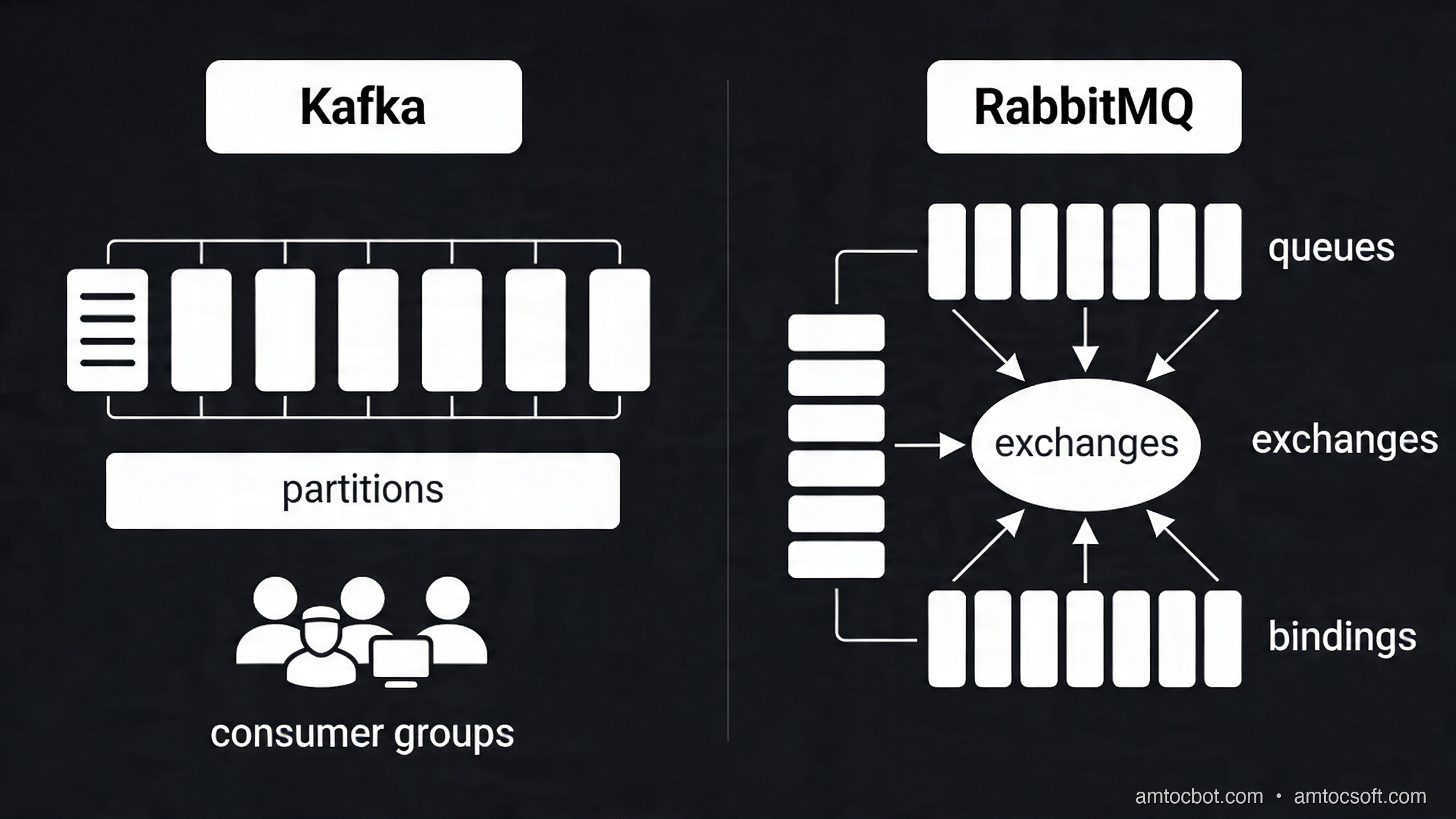
Kafka vs RabbitMQ Architecture

The Decision in One Sentence

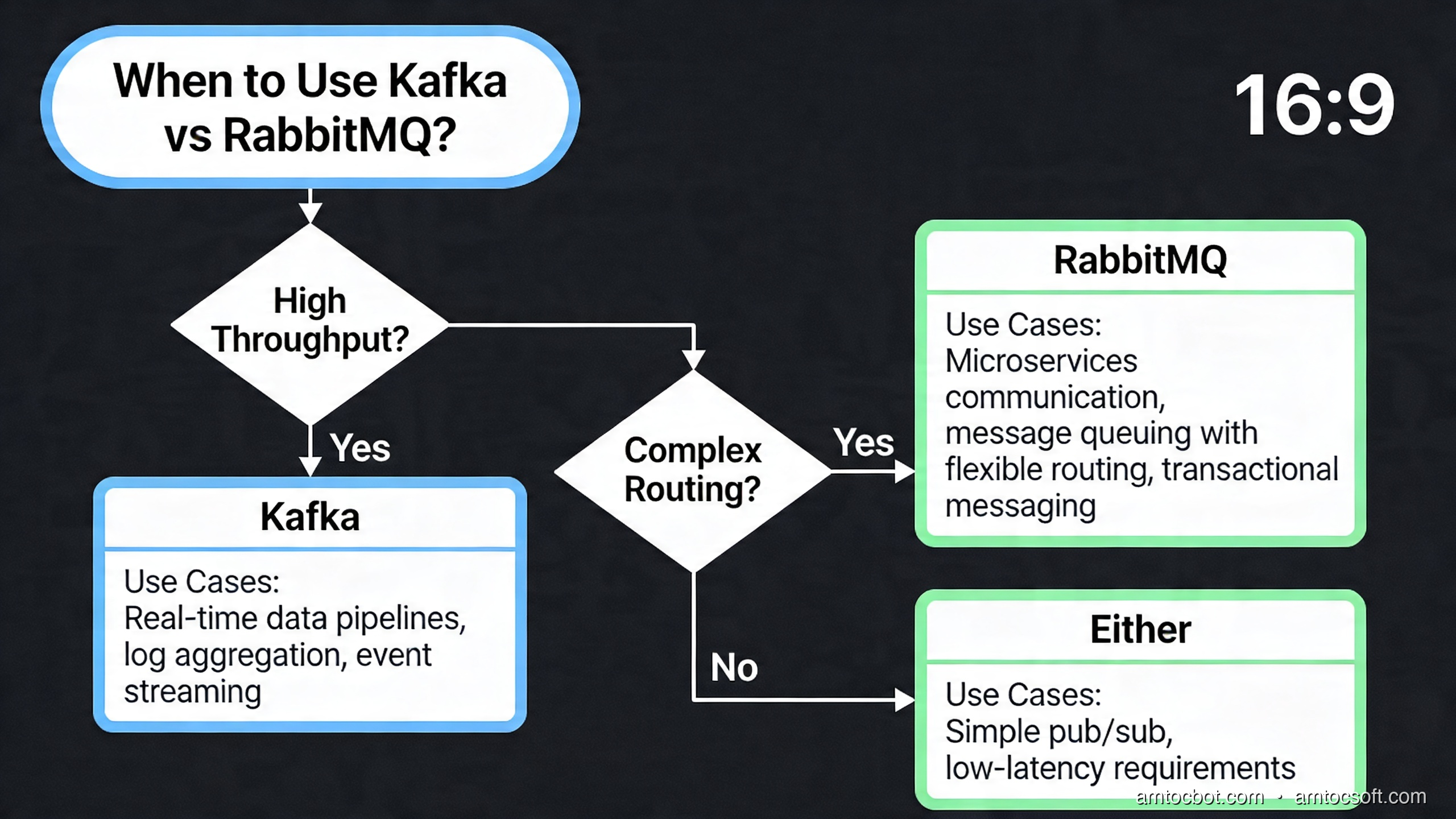
Use RabbitMQ when you have tasks to distribute among workers. Use Kafka when you have events that multiple independent systems need to know about.


Kafka Deep Dive: Topics, Partitions, and Consumer Groups

Apache Kafka organizes data into topics — named, append-only logs. Each topic is divided into partitions — shards that enable parallel processing. Events within a partition are ordered and immutable. Events across partitions have no ordering guarantee.

flowchart LR subgraph PROD["Producers"] P1[Order Service] P2[Payment Service] P3[Inventory Service] end subgraph TOPIC["Topic: order-events\n(3 partitions)"] PART0["Partition 0\noffset: 0→N\nkey: user_id % 3 == 0"] PART1["Partition 1\noffset: 0→N\nkey: user_id % 3 == 1"] PART2["Partition 2\noffset: 0→N\nkey: user_id % 3 == 2"] end subgraph CG1["Consumer Group: email-service\n(3 consumers, 1 per partition)"] C1A[Email Consumer 0] C1B[Email Consumer 1] C1C[Email Consumer 2] end subgraph CG2["Consumer Group: analytics-service\n(1 consumer, reads all partitions)"] C2A[Analytics Consumer] end P1 --> PART0 P1 --> PART1 P2 --> PART2 P3 --> PART0 PART0 --> C1A PART1 --> C1B PART2 --> C1C PART0 --> C2A PART1 --> C2A PART2 --> C2A style PART0 fill:#3498DB,color:#fff style PART1 fill:#27AE60,color:#fff style PART2 fill:#E74C3C,color:#fff

Partitioning and Ordering

The partition key determines which partition an event lands in. Kafka guarantees ordering within a partition. If you partition by user_id, all events for a given user arrive in order to the same consumer, enabling correct event processing (e.g., "apply these account transactions in sequence"). If you need global ordering across all events, you need a single partition — which caps your throughput at what one consumer can handle.

Producer Code (Python with confluent-kafka)

from confluent_kafka import Producer
import json
import logging
from datetime import datetime, timezone

logger = logging.getLogger(__name__)


class OrderEventProducer:
    """
    Produces order lifecycle events to the 'order-events' Kafka topic.

    Uses confluent-kafka, which wraps the high-performance librdkafka C library.
    This is the recommended Kafka client for Python in production — it handles
    batching, compression, and retry logic automatically.
    """

    def __init__(self, bootstrap_servers: str):
        self._producer = Producer({
            'bootstrap.servers': bootstrap_servers,

            # Acknowledge after all in-sync replicas have written the message.
            # 'all' is the safest setting — prevents data loss on broker failure.
            # '1' = just leader ack (faster, slightly higher risk of data loss)
            'acks': 'all',

            # Retry transient failures up to 3 times before raising an error
            'retries': 3,
            'retry.backoff.ms': 100,

            # Idempotent producer: prevents duplicate messages on retry
            # Requires acks='all' and retries > 0
            'enable.idempotence': True,

            # Compression reduces network and storage cost significantly
            # lz4 is fast to compress/decompress; snappy is also popular
            'compression.type': 'lz4',

            # Batching: collect up to 16KB before sending, or wait up to 5ms
            # Higher batch.size + linger.ms = better throughput, slightly higher latency
            'batch.size': 16384,
            'linger.ms': 5,
        })

    def publish_order_placed(self, order_id: str, user_id: str, total: float, items: list):
        """Publish an OrderPlaced event."""
        event = {
            'event_type': 'OrderPlaced',
            'order_id': order_id,
            'user_id': user_id,
            'total': total,
            'items': items,
            'timestamp': datetime.now(timezone.utc).isoformat(),
            'version': '1.0',
        }
        self._publish(
            topic='order-events',
            key=user_id,        # Partition by user_id for per-user ordering
            value=event,
        )

    def publish_order_completed(self, order_id: str, user_id: str):
        """Publish an OrderCompleted event."""
        event = {
            'event_type': 'OrderCompleted',
            'order_id': order_id,
            'user_id': user_id,
            'timestamp': datetime.now(timezone.utc).isoformat(),
            'version': '1.0',
        }
        self._publish(topic='order-events', key=user_id, value=event)

    def _publish(self, topic: str, key: str, value: dict):
        """
        Internal publish method with delivery confirmation callback.
        The produce() call is non-blocking — it enqueues the message locally.
        poll() flushes the delivery callback queue.
        """
        def delivery_callback(err, msg):
            if err:
                logger.error(
                    'Message delivery failed: topic=%s key=%s error=%s',
                    topic, key, err
                )
            else:
                logger.debug(
                    'Message delivered: topic=%s partition=%d offset=%d',
                    msg.topic(), msg.partition(), msg.offset()
                )

        self._producer.produce(
            topic=topic,
            key=key.encode('utf-8'),
            value=json.dumps(value).encode('utf-8'),
            callback=delivery_callback,
        )
        # poll() triggers delivery callbacks — call frequently to avoid buffer buildup
        self._producer.poll(0)

    def flush(self, timeout_seconds: float = 10.0):
        """
        Wait for all outstanding messages to be delivered.
        Call before application shutdown or in batch scenarios.
        """
        remaining = self._producer.flush(timeout=timeout_seconds)
        if remaining > 0:
            logger.warning('%d messages were not delivered within timeout', remaining)

    def __del__(self):
        self.flush()

Consumer Code (Python with confluent-kafka)

from confluent_kafka import Consumer, KafkaError, KafkaException
import json
import logging
import signal
import sys

logger = logging.getLogger(__name__)


class OrderEventConsumer:
    """
    Consumes order events and dispatches them to handlers.

    Key design decisions:
    1. Manual offset commit after successful processing (at-least-once delivery)
    2. Graceful shutdown on SIGTERM/SIGINT
    3. Dead letter queue for messages that fail after max retries
    """

    def __init__(
        self,
        bootstrap_servers: str,
        group_id: str,
        topics: list[str],
        max_retries: int = 3,
        dlq_topic: str = 'order-events-dlq',
    ):
        self._consumer = Consumer({
            'bootstrap.servers': bootstrap_servers,
            'group.id': group_id,

            # Start from the beginning of the topic if this group has no committed offset.
            # Use 'latest' for consumers that only care about new messages.
            'auto.offset.reset': 'earliest',

            # Disable auto-commit — we commit manually after successful processing
            # to guarantee at-least-once delivery semantics.
            'enable.auto.commit': False,

            # Session timeout: if the consumer doesn't send a heartbeat within this
            # window, the broker considers it dead and triggers a rebalance.
            'session.timeout.ms': 30000,
            'heartbeat.interval.ms': 10000,

            # Maximum records returned in a single poll()
            'max.poll.records': 100,
        })
        self._consumer.subscribe(topics)
        self._topics = topics
        self._max_retries = max_retries
        self._dlq_producer = Producer({'bootstrap.servers': bootstrap_servers})
        self._dlq_topic = dlq_topic
        self._running = True

        # Handle graceful shutdown on SIGTERM/SIGINT
        signal.signal(signal.SIGTERM, self._shutdown)
        signal.signal(signal.SIGINT, self._shutdown)

    def _shutdown(self, signum, frame):
        logger.info('Shutdown signal received, stopping consumer...')
        self._running = False

    def _send_to_dlq(self, msg, error_reason: str, attempt: int):
        """Send a failed message to the dead letter queue with error metadata."""
        dlq_payload = {
            'original_topic': msg.topic(),
            'original_partition': msg.partition(),
            'original_offset': msg.offset(),
            'original_key': msg.key().decode('utf-8') if msg.key() else None,
            'original_value': msg.value().decode('utf-8') if msg.value() else None,
            'error_reason': error_reason,
            'failed_at': attempt,
        }
        self._dlq_producer.produce(
            topic=self._dlq_topic,
            value=json.dumps(dlq_payload).encode('utf-8'),
        )
        self._dlq_producer.poll(0)
        logger.warning('Message sent to DLQ: %s', error_reason)

    def run(self, handler):
        """
        Main consume loop. Calls handler(event_dict) for each message.
        Commits offset only after successful handling.
        Sends to DLQ after max_retries failures.
        """
        logger.info('Starting consumer for topics: %s, group: %s', self._topics, self._consumer)

        try:
            while self._running:
                # poll() blocks for up to 1 second waiting for messages
                msg = self._consumer.poll(timeout=1.0)

                if msg is None:
                    continue  # No message within timeout — loop again

                if msg.error():
                    if msg.error().code() == KafkaError._PARTITION_EOF:
                        # Reached end of partition — not an error, just informational
                        logger.debug('Reached partition EOF: %s [%d]', msg.topic(), msg.partition())
                    else:
                        raise KafkaException(msg.error())
                    continue

                # Deserialize the event
                try:
                    event = json.loads(msg.value().decode('utf-8'))
                except json.JSONDecodeError as e:
                    logger.error('Failed to decode message: %s', e)
                    self._send_to_dlq(msg, f'JSON decode error: {e}', attempt=0)
                    self._consumer.commit(message=msg)
                    continue

                # Process with retry logic
                last_error = None
                for attempt in range(self._max_retries + 1):
                    try:
                        handler(event)
                        last_error = None
                        break
                    except Exception as e:
                        last_error = e
                        if attempt < self._max_retries:
                            logger.warning(
                                'Handler failed (attempt %d/%d): %s',
                                attempt + 1, self._max_retries, e
                            )
                        # Exponential backoff between retries (basic implementation)
                        import time
                        time.sleep(min(2 ** attempt * 0.1, 5.0))

                if last_error:
                    # All retries exhausted — send to DLQ
                    self._send_to_dlq(msg, str(last_error), attempt=self._max_retries)

                # Commit offset after processing (whether succeeded or sent to DLQ)
                # This ensures we never reprocess unless intentionally replaying from DLQ
                self._consumer.commit(message=msg)

        finally:
            logger.info('Closing consumer...')
            self._consumer.close()


# Example handler function
def handle_order_event(event: dict):
    """Route order events to the appropriate handler."""
    event_type = event.get('event_type')

    if event_type == 'OrderPlaced':
        # Send confirmation email
        logger.info('Sending confirmation email for order %s', event['order_id'])
        # email_service.send_order_confirmation(event['user_id'], event['order_id'])

    elif event_type == 'OrderCompleted':
        # Track in analytics
        logger.info('Recording order completion in analytics: %s', event['order_id'])
        # analytics.track('order_completed', event)

    else:
        logger.warning('Unknown event type: %s', event_type)


# Usage
if __name__ == '__main__':
    consumer = OrderEventConsumer(
        bootstrap_servers='kafka-broker-1:9092,kafka-broker-2:9092',
        group_id='email-service-consumers',
        topics=['order-events'],
        dlq_topic='order-events-dlq',
    )
    consumer.run(handle_order_event)

RabbitMQ Deep Dive: Exchanges, Queues, and Routing

RabbitMQ uses a richer routing model than Kafka. Producers publish messages to exchanges, not directly to queues. Exchanges route messages to queues based on routing keys and bindings. This gives you flexible fan-out, topic-based filtering, and direct routing — all configurable without code changes.

Exchange Types

Exchange Type Routing Behavior Use Case
Direct Route by exact routing key match Task distribution to specific queues
Fanout Broadcast to all bound queues Notifications to multiple services
Topic Route by pattern matching (order.*, *.created) Flexible event routing with wildcards
Headers Route by message header attributes Complex routing without key-based patterns

RabbitMQ Producer and Consumer (Python with pika)

import pika
import json
import logging
from datetime import datetime, timezone
from typing import Callable

logger = logging.getLogger(__name__)


class RabbitMQEventBus:
    """
    Simple event bus built on RabbitMQ using a topic exchange.

    Routing key convention: <domain>.<entity>.<event>
    Examples: orders.order.placed, orders.order.completed, users.user.registered

    Consumers bind queues with wildcards:
    - 'orders.*.*'      = all order events
    - '*.*.placed'      = all 'placed' events across all domains
    - 'orders.order.#'  = all order entity events (# matches zero or more words)
    """

    EXCHANGE_NAME = 'amtocsoft.events'
    EXCHANGE_TYPE = 'topic'

    def __init__(self, amqp_url: str):
        self._url = amqp_url
        self._connection = None
        self._channel = None

    def connect(self):
        """Establish connection and declare the exchange."""
        params = pika.URLParameters(self._url)
        # Enable heartbeats to detect dead connections
        params.heartbeat = 60
        params.blocked_connection_timeout = 300

        self._connection = pika.BlockingConnection(params)
        self._channel = self._connection.channel()

        # Declare the topic exchange — durable means it survives broker restart
        self._channel.exchange_declare(
            exchange=self.EXCHANGE_NAME,
            exchange_type=self.EXCHANGE_TYPE,
            durable=True,
        )
        logger.info('Connected to RabbitMQ and declared exchange: %s', self.EXCHANGE_NAME)

    def publish(self, routing_key: str, event_data: dict):
        """
        Publish an event to the topic exchange.

        routing_key: dot-separated path, e.g. 'orders.order.placed'
        event_data: dict that will be JSON-serialized
        """
        body = json.dumps({
            **event_data,
            'routing_key': routing_key,
            'timestamp': datetime.now(timezone.utc).isoformat(),
        }).encode('utf-8')

        self._channel.basic_publish(
            exchange=self.EXCHANGE_NAME,
            routing_key=routing_key,
            body=body,
            properties=pika.BasicProperties(
                delivery_mode=pika.DeliveryMode.Persistent,  # Survive broker restart
                content_type='application/json',
                content_encoding='utf-8',
            ),
        )
        logger.debug('Published event: routing_key=%s', routing_key)

    def subscribe(
        self,
        queue_name: str,
        binding_pattern: str,
        handler: Callable[[dict], None],
        prefetch_count: int = 10,
    ):
        """
        Subscribe to events matching a routing key pattern.

        queue_name: unique name for this consumer's queue (persistent)
        binding_pattern: topic pattern, e.g. 'orders.*.*' or '*.*.placed'
        handler: function called for each message
        prefetch_count: max unacknowledged messages (backpressure control)
        """
        # Declare a durable queue — survives broker restart
        result = self._channel.queue_declare(
            queue=queue_name,
            durable=True,
            arguments={
                # Dead letter exchange: failed messages go here
                'x-dead-letter-exchange': f'{self.EXCHANGE_NAME}.dlx',
                # After 5 failed deliveries, message goes to DLQ
                'x-dead-letter-routing-key': queue_name,
                # Messages expire after 7 days if not consumed
                'x-message-ttl': 7 * 24 * 60 * 60 * 1000,
            }
        )

        # Bind queue to exchange with the routing key pattern
        self._channel.queue_bind(
            exchange=self.EXCHANGE_NAME,
            queue=queue_name,
            routing_key=binding_pattern,
        )

        # Prefetch: don't deliver more than N messages before receiving acks
        # Prevents one slow consumer from holding all messages
        self._channel.basic_qos(prefetch_count=prefetch_count)

        def _on_message(ch, method, properties, body):
            try:
                event = json.loads(body.decode('utf-8'))
                handler(event)
                # Acknowledge: message is done, remove from queue
                ch.basic_ack(delivery_tag=method.delivery_tag)
            except Exception as e:
                logger.error('Handler failed for routing key %s: %s', method.routing_key, e)
                # Negative acknowledge with requeue=False: send to DLQ after max retries
                # (x-death header tracks retry count — check it in handler for custom logic)
                ch.basic_nack(delivery_tag=method.delivery_tag, requeue=False)

        self._channel.basic_consume(
            queue=queue_name,
            on_message_callback=_on_message,
        )

        logger.info(
            'Subscribed: queue=%s, pattern=%s',
            queue_name, binding_pattern
        )

    def start_consuming(self):
        """Block and process incoming messages until connection closes."""
        logger.info('Starting to consume messages...')
        try:
            self._channel.start_consuming()
        except KeyboardInterrupt:
            self._channel.stop_consuming()
        finally:
            if self._connection and not self._connection.is_closed:
                self._connection.close()


# Example usage: Email service subscribes to order events
def send_email_for_order_event(event: dict):
    """Handle order events that require email notifications."""
    event_type = event.get('event_type')

    if event_type == 'OrderPlaced':
        logger.info('Sending order confirmation for %s', event.get('order_id'))
    elif event_type == 'OrderShipped':
        logger.info('Sending shipping notification for %s', event.get('order_id'))


if __name__ == '__main__':
    bus = RabbitMQEventBus(amqp_url='amqp://user:pass@rabbitmq:5672/')
    bus.connect()

    # Subscribe to ALL order events using wildcard
    bus.subscribe(
        queue_name='email-service.order-events',
        binding_pattern='orders.order.*',
        handler=send_email_for_order_event,
    )

    # Also subscribe to user registration events
    bus.subscribe(
        queue_name='email-service.user-events',
        binding_pattern='users.user.registered',
        handler=lambda event: logger.info('Welcome email for %s', event.get('user_id')),
    )

    bus.start_consuming()

Delivery Semantics: At-Least-Once vs Exactly-Once

One of the most misunderstood topics in distributed messaging is delivery guarantees. There are three levels:

flowchart TD subgraph AMO["At-Most-Once\n(fire and forget)"] AMO_P[Producer] -->|publish + forget| AMO_B[(Broker)] AMO_B -->|deliver once, no retry| AMO_C[Consumer] AMO_NOTE["Messages may be lost\nif broker/consumer crashes\nUse for: metrics, non-critical logs"] end subgraph ALO["At-Least-Once\n(most common)"] ALO_P[Producer] -->|publish + wait for ack| ALO_B[(Broker)] ALO_B -->|deliver, retry on nack| ALO_C[Consumer] ALO_C -->|ack after processing| ALO_B ALO_NOTE["Messages never lost\nbut may be delivered 2+ times\nConsumers must be idempotent\nUse for: most event-driven systems"] end subgraph EO["Exactly-Once\n(complex)"] EO_P[Producer] -->|idempotent produce\ntransactional API| EO_B[(Broker)] EO_B -->|transactional deliver| EO_C[Consumer] EO_C -->|consume + produce in\nsame transaction| EO_B EO_NOTE["Never lost, never duplicated\nRequires transactions on both sides\nKafka: enable.idempotence + transactions\nUse for: financial, billing systems"] end style ALO_B fill:#27AE60,color:#fff style EO_B fill:#3498DB,color:#fff style AMO_B fill:#E74C3C,color:#fff

At-least-once is what most systems implement and what you should default to. The key implication: your consumers must be idempotent — processing the same event twice must produce the same result as processing it once.

Making consumers idempotent:

def handle_order_placed_idempotent(event: dict, db_conn):
    """
    Idempotent handler: safe to call multiple times with the same event.
    Uses PostgreSQL's INSERT ... ON CONFLICT DO NOTHING with event_id as unique key.
    """
    event_id = event['event_id']  # Must be included by producer — a UUID
    order_id = event['order_id']

    with db_conn.cursor() as cur:
        # The processed_events table acts as a deduplication log
        cur.execute("""
            INSERT INTO processed_events (event_id, processed_at)
            VALUES (%s, NOW())
            ON CONFLICT (event_id) DO NOTHING
        """, (event_id,))

        if cur.rowcount == 0:
            # This event_id was already processed — skip
            logger.info('Skipping duplicate event: %s', event_id)
            return

        # First time seeing this event — process it
        cur.execute("""
            INSERT INTO order_notifications (order_id, notified_at)
            VALUES (%s, NOW())
            ON CONFLICT (order_id) DO NOTHING
        """, (order_id,))

        db_conn.commit()
        logger.info('Processed event %s for order %s', event_id, order_id)

Apache Pulsar: The Middle Ground

Apache Pulsar deserves a brief mention as a third option that combines elements of both Kafka and RabbitMQ. It separates the serving layer (brokers) from the storage layer (BookKeeper), enabling independent scaling of compute and storage. Key Pulsar differentiators:

  • Multi-tenancy built in: namespaces with per-tenant quotas and isolation
  • Geo-replication native: built-in cross-datacenter replication
  • Tiered storage: automatically offloads older segments to S3/GCS
  • Flexible subscription modes: exclusive (like RabbitMQ), shared (round-robin), key-shared (partitioned), failover

Pulsar is compelling for organizations running multi-region deployments or needing geo-replication without manual Kafka MirrorMaker configuration. However, its operational complexity (managing BookKeeper + Zookeeper + brokers) is higher than Kafka, which itself is already substantial.


Comparison and Tradeoffs

Kafka vs RabbitMQ Decision Guide
Feature Kafka RabbitMQ Pulsar
Model Event log (pull) Message queue (push) Both
Ordering Per-partition Per-queue Per-partition/key
Retention Time/size based Until consumed (+ TTL) Tiered (S3 offload)
Throughput Very high (millions/sec) High (hundreds of thousands/sec) Very high
Routing flexibility Topic + partition Exchange types + wildcards Topic + subscription
Replay Native (seek to offset) No (message consumed = gone) Native
Ops complexity Medium (Kafka + ZK/KRaft) Low (single binary cluster) High (3 tiers)
Best for Event streaming, audit, analytics Task queues, RPC, workflows Multi-region, SaaS

When to Choose Kafka

  • Multiple independent consumers need to read the same events
  • You need event replay (reprocessing history with new logic)
  • High throughput: millions of events per second
  • Event sourcing or CQRS architectures
  • Stream processing with Kafka Streams or Flink

When to Choose RabbitMQ

  • Work queue pattern: N consumers competing for tasks
  • Complex routing logic with topic matching and headers
  • Request-reply (RPC over messaging)
  • Lower operational complexity is a priority
  • Mixed task types that benefit from priority queues

Production Considerations

Kafka Operational Checklist

# Monitor consumer lag — how far behind are consumers?
kafka-consumer-groups.sh \
  --bootstrap-server kafka:9092 \
  --describe \
  --group email-service-consumers

# Output shows: TOPIC, PARTITION, CURRENT-OFFSET, LOG-END-OFFSET, LAG
# LAG > 0 means the consumer is falling behind — investigate throughput

Key metrics to alert on:
- Consumer lag > threshold: consumers cannot keep up with production rate
- Under-replicated partitions > 0: a broker may be down or slow
- ISR (In-Sync Replicas) shrinking: replica is falling behind, risk of data loss on failure
- Request rate on leader vs. follower fetch rate: imbalance indicates hot partitions

Schema Management with Avro and Schema Registry

Without schema management, a producer deploying a breaking schema change will crash all consumers. Use Confluent Schema Registry (or AWS Glue Schema Registry) to version and validate event schemas:

from confluent_kafka.schema_registry import SchemaRegistryClient
from confluent_kafka.schema_registry.avro import AvroSerializer, AvroDeserializer

# Schema Registry enforces compatibility modes:
# BACKWARD: new schema can read data written with previous schema
# FORWARD: previous schema can read data written with new schema
# FULL: both backward and forward compatible

ORDER_SCHEMA_STR = """
{
  "type": "record",
  "name": "OrderPlaced",
  "namespace": "com.amtocsoft.orders",
  "fields": [
    {"name": "order_id", "type": "string"},
    {"name": "user_id", "type": "string"},
    {"name": "total", "type": "double"},
    {"name": "timestamp", "type": "string"},
    {"name": "version", "type": "string", "default": "1.0"}
  ]
}
"""

RabbitMQ High Availability

Run RabbitMQ in a cluster with quorum queues (the modern replacement for mirrored queues):

# Declare a quorum queue — replicated across N nodes for HA
channel.queue_declare(
    queue='critical-orders',
    durable=True,
    arguments={
        'x-queue-type': 'quorum',  # Quorum queue: Raft-based replication
        # x-quorum-initial-group-size defaults to cluster size
    }
)

Quorum queues use Raft consensus to ensure a message is written to a majority of nodes before acking. This prevents data loss on broker failure.


Conclusion

Event-driven architecture is not a silver bullet — it introduces operational complexity, eventual consistency, and the need for idempotent consumers. But for systems beyond a certain scale, it is the only way to achieve genuine decoupling and independent scalability.

The choice between Kafka and RabbitMQ is not about which is better — it is about which model fits your problem. Task distribution with complex routing logic? RabbitMQ. High-throughput event streaming where multiple independent consumers need the full event history? Kafka. Both? Run both — many mature systems use Kafka for the event backbone and RabbitMQ for internal task queues.

The most important thing to get right is your delivery guarantee and idempotency story. Almost every event-driven system operates at-least-once, which means your consumers will occasionally process the same event twice. Build that assumption into your design from day one, and use a deduplication table keyed on event IDs to handle it cleanly.


Building event-driven systems and have questions about Kafka vs RabbitMQ for your use case? Drop a comment below or connect on LinkedIn. Follow AmtocSoft Tech Insights for more deep-dives into distributed systems architecture.


Sources

About the Author

Toc Am

Founder of AmtocSoft. Writing practical deep-dives on AI engineering, cloud architecture, and developer tooling. Previously built backend systems at scale. Reviews every post published under this byline.

LinkedIn X / Twitter

Published: 2026-04-14 · Written with AI assistance, reviewed by Toc Am.

Get These In Your Inbox

Weekly deep-dives on AI engineering, no fluff. Join the newsletter →

Subscribe (free)

Or grab the book ($39, ~100 pages) · Buy me a coffee

☕ Buy Me a Coffee · 🔔 YouTube · 💼 LinkedIn · 🐦 X/Twitter

What Happens When You Hit "Regenerate"

You tap regenerate like it's a cheap retry. The last answer sits there, almost right, and the button looks like an eraser. It isn't....