Introduction
Authentication is the most-exploited surface in web applications. It sits at the intersection of cryptography, protocol design, and application logic — and misconfiguration at any layer can be catastrophic. JWT algorithm confusion, broken OAuth flows, and session fixation attacks collectively account for a disproportionate share of real-world breaches. The 2021 Coinbase breach, the 2022 Okta hack, and countless smaller incidents all trace back to authentication logic that was almost right.
In 2026, the attack surface has expanded. Applications run in edge environments where stateless tokens are preferred. Single-page applications consume tokens directly in the browser. Mobile apps use native OAuth flows. Microservices validate tokens at every service boundary. Each of these scenarios introduces new ways to get authentication wrong.
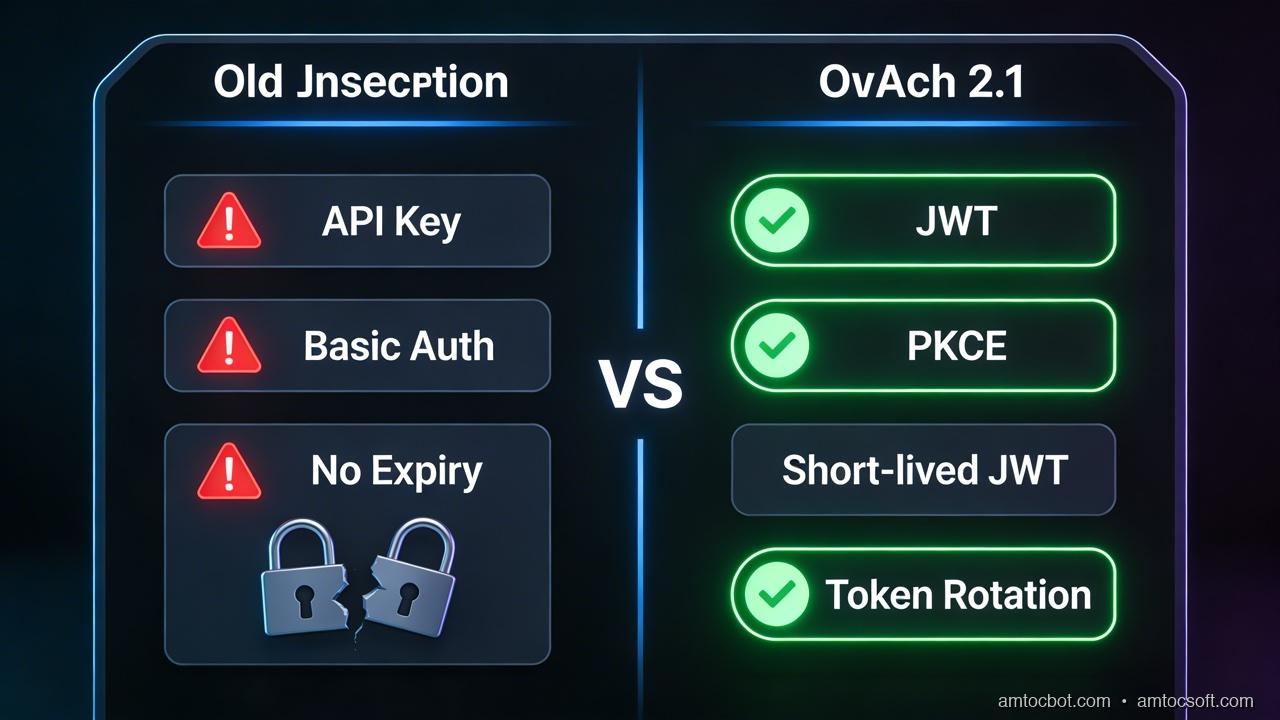
At the same time, the defensive toolkit has matured. PKCE is now a non-negotiable standard for all OAuth clients, not just public ones. Passkeys and WebAuthn have crossed the adoption threshold from "experimental" to "production-ready for consumer apps." Token binding proposals are gaining traction. Short-lived access tokens with refresh token rotation are understood as the correct baseline. And Redis-backed server-side sessions remain the gold standard when stateful control is required.
This post covers the full 2026 authentication stack for production applications. We will go deep on each layer: the JWT vulnerabilities that still catch teams off guard, the only correct OAuth flow for browser clients, refresh token rotation with theft detection, server-side session management with Redis, and WebAuthn/passkey integration with the SimpleWebAuthn library. Every code example is complete and production-oriented, with comments explaining the security rationale behind each decision.
The goal is not a survey — it is an opinionated implementation guide. By the end, you will have the patterns for a hardened authentication system you can deploy today.
1. JWT Security: The Vulnerabilities Teams Miss
JSON Web Tokens are everywhere. They are also misimplemented everywhere. The format is simple — a base64-encoded header, payload, and signature — but the attack surface is larger than it looks. Let us walk through the vulnerabilities that appear repeatedly in security audits, with code showing how to close each one.
The "none" Algorithm Attack
The JWT specification includes an algorithm value of none, which means the token carries no signature. A server that accepts this value trusts whatever is in the payload without cryptographic verification. This sounds too obvious to be a real vulnerability, but the CVE list includes multiple JWT libraries that accepted none by default: node-jsonwebtoken before 4.2.2 (CVE-2015-9235), python-jwt (CVE-2022-39227), and others.
The attack is straightforward: take a valid token, change the algorithm to none, strip the signature, modify the payload to elevate privileges, and send it. If the server does not explicitly reject none, it trusts the forged token.
Algorithm Confusion: RS256 Public Key as HS256 Secret
This is a subtler and more dangerous vulnerability. RS256 uses an asymmetric key pair: the server signs with a private key and verifies with a public key. HS256 uses a single symmetric secret for both signing and verification. The attack: an attacker obtains the RS256 public key (often exposed at a JWKS endpoint), then crafts a token signed with HS256 using the public key as the secret. If the verification code blindly uses the algorithm from the token header rather than asserting the expected algorithm, it will call the HS256 verifier with the public key as the secret — and the verification succeeds.
Fix: always specify the expected algorithm explicitly. Never trust the algorithm from the token header.
Weak HS256 Secrets
HS256 HMAC-SHA256 can be brute-forced if the secret is short or guessable. jwt_tool and hashcat can crack common secrets offline against a captured token in seconds. The fix is straightforward: use a cryptographically random secret of at least 256 bits (32 bytes). In practice, crypto.randomBytes(32).toString('hex') gives you a 64-character hex string that is unguessable.
Missing exp, aud, and iss Validation
A token without an expiry (exp claim) is valid forever. A token without audience validation (aud claim) can be used against any service that shares the same signing key. A token without issuer validation (iss claim) can be replayed from a different identity provider. These are all required claims that many implementations simply do not validate.
The practical consequence: a token stolen from a low-value service (maybe a dev environment) can be replayed against a production service if audience validation is absent. This exact pattern was part of the OAuth token confusion attacks documented in 2023 OAuth security workshop findings.
localStorage vs httpOnly Cookies
Storing JWTs in localStorage is wrong. Full stop. localStorage is accessible to any JavaScript running on the page, which means a single XSS vulnerability anywhere on the domain gives an attacker full token theft. The token exfiltrates silently, the session is hijacked, and the user has no idea.
The correct storage is an httpOnly; Secure; SameSite=Strict cookie. httpOnly means JavaScript cannot read it. Secure means it only transmits over HTTPS. SameSite=Strict prevents cross-site request forgery. The cookie is invisible to JavaScript, so XSS cannot steal it (though CSRF via cookie still requires the SameSite attribute, which you are setting).
The objection to cookies is usually "but I'm building a mobile app or SPA." For mobile: use the platform secure credential store, not localStorage. For SPAs served from the same domain as your API: httpOnly cookies work correctly. For cross-origin SPAs: set SameSite=None; Secure and handle the CORS preflight correctly, or use a backend-for-frontend (BFF) pattern.
JWT Revocation: The Stateless Trade-off
JWTs are stateless — you cannot revoke them without a lookup. The common solution of "just set a short expiry" is correct, but incomplete without refresh token rotation. The full pattern is:
- Access tokens: 15-minute expiry, no revocation needed
- Refresh tokens: 7-day expiry, stored server-side, rotated on every use
- On logout: delete the refresh token from the server
This gives you revocation control at the refresh token level. An attacker who steals an access token has 15 minutes. An attacker who steals a refresh token will be detected on next use if rotation is correctly implemented (see Section 3).
JWT Validation Middleware: Complete Implementation
import { Request, Response, NextFunction } from 'express';
import jwt, { JwtPayload } from 'jsonwebtoken';

// All expected values must be asserted explicitly —
// never derive them from the token itself.
interface TokenConfig {
  secret: string;           // HS256 secret (min 32 bytes random)
  issuer: string;           // e.g., "https://auth.example.com"
  audience: string;         // e.g., "https://api.example.com"
  algorithms: jwt.Algorithm[]; // Explicitly allowlist — never trust the header
}

interface AuthenticatedRequest extends Request {
  user?: JwtPayload;
}

export function createJwtMiddleware(config: TokenConfig) {
  return function jwtMiddleware(
    req: AuthenticatedRequest,
    res: Response,
    next: NextFunction
  ): void {
    // Extract from httpOnly cookie — NOT Authorization header for browser clients.
    // Authorization header is fine for server-to-server calls where cookies don't apply.
    const token = req.cookies?.access_token;

    if (!token) {
      res.status(401).json({ error: 'No token provided' });
      return;
    }

    try {
      const payload = jwt.verify(token, config.secret, {
        // Explicitly specify allowed algorithms.
        // This prevents the "none" algorithm attack and RS256/HS256 confusion.
        algorithms: config.algorithms,

        // Validate issuer — prevents tokens from a different IdP being accepted.
        issuer: config.issuer,

        // Validate audience — prevents token replay across services.
        audience: config.audience,

        // exp is validated automatically by jsonwebtoken when this is true (default).
        // Setting it explicitly as documentation of intent.
        ignoreExpiration: false,
      }) as JwtPayload;

      // Additional claim validation beyond what jsonwebtoken handles.
      if (!payload.sub) {
        // sub (subject) must be present — this is the user identifier.
        res.status(401).json({ error: 'Invalid token: missing subject' });
        return;
      }

      if (!payload.iat) {
        // Issued-at must be present for token age reasoning.
        res.status(401).json({ error: 'Invalid token: missing iat' });
        return;
      }

      // Attach validated payload to request for downstream handlers.
      req.user = payload;
      next();
    } catch (error) {
      if (error instanceof jwt.TokenExpiredError) {
        // Return a specific error code so the client knows to refresh.
        res.status(401).json({ error: 'Token expired', code: 'TOKEN_EXPIRED' });
        return;
      }
      if (error instanceof jwt.JsonWebTokenError) {
        // Covers: invalid signature, malformed token, algorithm mismatch.
        res.status(401).json({ error: 'Invalid token' });
        return;
      }
      // Unexpected error — do not leak details.
      res.status(500).json({ error: 'Internal server error' });
    }
  };
}

// Usage:
// app.use('/api', createJwtMiddleware({
//   secret: process.env.JWT_SECRET!, // 64-char hex from crypto.randomBytes(32)
//   issuer: 'https://auth.example.com',
//   audience: 'https://api.example.com',
//   algorithms: ['HS256'], // Only HS256 — never include 'none'
// }));

2. OAuth 2.0 + PKCE: The Correct Flow in 2026
Why the Implicit Flow Is Dead
The OAuth 2.0 implicit flow was designed for single-page applications in an era before CORS was well-supported. It delivered access tokens directly in the URL fragment (e.g., https://app.example.com/callback#access_token=eyJ...). This created two critical problems:
- Tokens in URLs end up in browser history, server logs, and referrer headers. Any server receiving a request from the app (analytics, CDN logs, third-party scripts) sees the access token in the referer.
- No refresh tokens. The implicit flow cannot issue refresh tokens because there is no back-channel. Users get logged out when the short-lived token expires.
RFC 9700 (OAuth 2.0 Security Best Current Practice) formally deprecated the implicit flow in 2025. It is gone. Do not use it.
Authorization Code + PKCE: The Only Correct Browser Flow
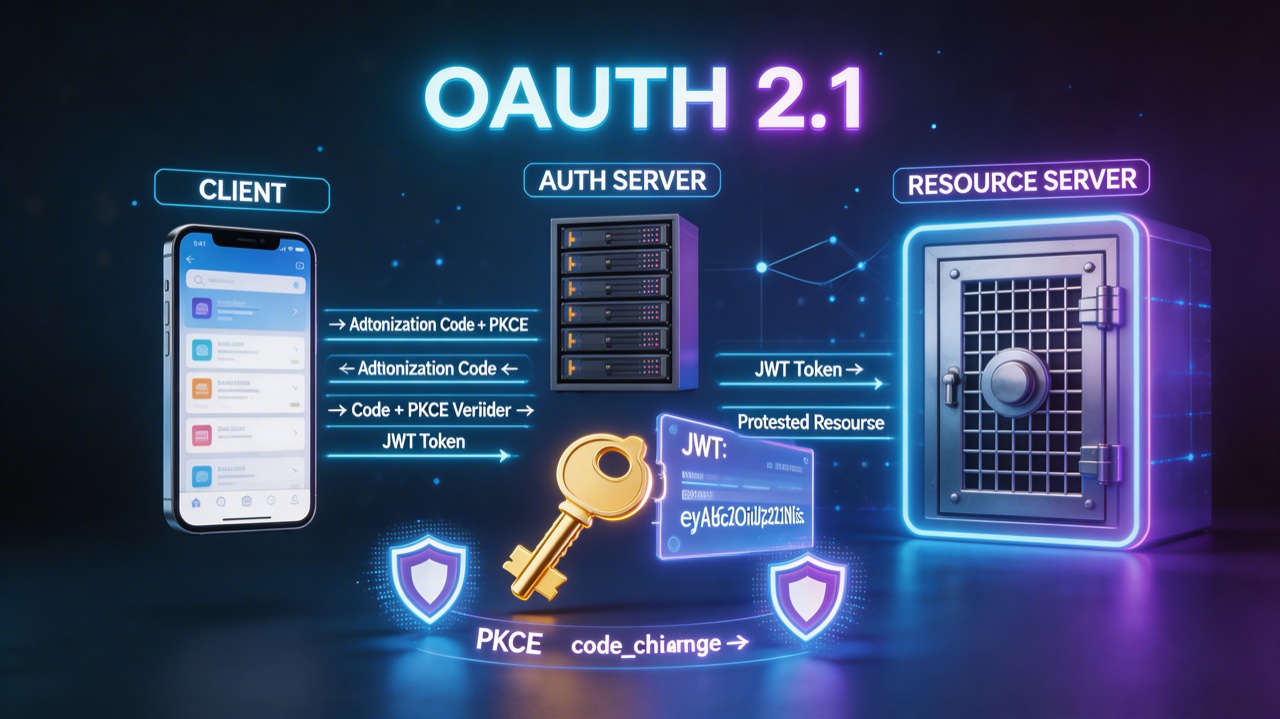
Proof Key for Code Exchange (PKCE, RFC 7636) was originally designed for mobile clients that cannot keep secrets. The insight: if you cannot have a static client secret, generate a per-request secret instead.
PKCE works as follows:
- The client generates a cryptographically random
code_verifier(43-128 characters, URL-safe). - The client computes
code_challenge = BASE64URL(SHA256(code_verifier)). - The authorization request includes
code_challengeandcode_challenge_method=S256. - The authorization server stores the challenge.
- The client receives an authorization code.
- The token exchange request includes the original
code_verifier. - The authorization server verifies
SHA256(code_verifier) == stored_challengebefore issuing tokens.
An attacker who intercepts the authorization code cannot exchange it for tokens — they do not have the code_verifier that was never transmitted. This closes the authorization code interception attack that motivated the original PKCE RFC.
In 2026, PKCE is required for all public clients and strongly recommended for confidential clients as defense-in-depth.
State and Nonce: CSRF and Replay Protection
The state parameter is how you prevent CSRF in OAuth flows. Generate a random value before redirecting to the authorization endpoint, store it in the session, and verify it on callback. If the state in the callback does not match what you stored, the request was forged.
The nonce is the OIDC equivalent for ID tokens — it prevents replay attacks. Include a random nonce in the authorization request; the authorization server embeds it in the ID token; you verify it on receipt.
Complete PKCE Implementation: TypeScript Client + Server
// === CLIENT SIDE (browser) ===
// crypto.subtle is available in all modern browsers and Node.js 18+

async function generatePKCE(): Promise<{ verifier: string; challenge: string }> {
  // Generate a cryptographically random code_verifier.
  // 32 bytes = 43 base64url characters (within the 43-128 required range).
  const randomBytes = crypto.getRandomValues(new Uint8Array(32));
  const verifier = base64urlEncode(randomBytes);

  // Compute SHA-256 of the verifier.
  const encoder = new TextEncoder();
  const data = encoder.encode(verifier);
  const digest = await crypto.subtle.digest('SHA-256', data);

  const challenge = base64urlEncode(new Uint8Array(digest));
  return { verifier, challenge };
}

function base64urlEncode(buffer: Uint8Array): string {
  // Standard base64, then convert to URL-safe variant.
  return btoa(String.fromCharCode(...buffer))
    .replace(/\+/g, '-')
    .replace(/\//g, '_')
    .replace(/=/g, '');
}

async function startOAuthFlow(config: {
  authEndpoint: string;
  clientId: string;
  redirectUri: string;
  scope: string;
}) {
  const { verifier, challenge } = await generatePKCE();

  // Generate state for CSRF protection.
  const stateBytes = crypto.getRandomValues(new Uint8Array(16));
  const state = base64urlEncode(stateBytes);

  // Generate nonce for OIDC replay protection.
  const nonceBytes = crypto.getRandomValues(new Uint8Array(16));
  const nonce = base64urlEncode(nonceBytes);

  // Store verifier, state, and nonce in sessionStorage.
  // sessionStorage is cleared on tab close — not persistent like localStorage.
  // These values are never sent to the server except via back-channel exchange.
  sessionStorage.setItem('pkce_verifier', verifier);
  sessionStorage.setItem('oauth_state', state);
  sessionStorage.setItem('oidc_nonce', nonce);

  const params = new URLSearchParams({
    response_type: 'code',
    client_id: config.clientId,
    redirect_uri: config.redirectUri,
    scope: config.scope,
    state,
    nonce,
    code_challenge: challenge,
    code_challenge_method: 'S256',
  });

  // Redirect to authorization server.
  window.location.href = `${config.authEndpoint}?${params}`;
}

async function handleOAuthCallback(): Promise<void> {
  const params = new URLSearchParams(window.location.search);
  const code = params.get('code');
  const returnedState = params.get('state');
  const error = params.get('error');

  if (error) {
    throw new Error(`OAuth error: ${error} — ${params.get('error_description')}`);
  }

  // Verify state to prevent CSRF.
  const storedState = sessionStorage.getItem('oauth_state');
  if (!returnedState || returnedState !== storedState) {
    throw new Error('State mismatch — possible CSRF attack');
  }

  const verifier = sessionStorage.getItem('pkce_verifier');
  if (!verifier || !code) {
    throw new Error('Missing PKCE verifier or authorization code');
  }

  // Exchange code for tokens via your backend (never from the browser directly —
  // the token endpoint exchange should happen server-side to avoid exposing
  // client credentials in browser requests if using a confidential client).
  const response = await fetch('/api/auth/token', {
    method: 'POST',
    headers: { 'Content-Type': 'application/json' },
    body: JSON.stringify({ code, verifier }),
    credentials: 'include', // Include cookies so server can set httpOnly tokens
  });

  if (!response.ok) {
    throw new Error('Token exchange failed');
  }

  // Tokens are set as httpOnly cookies by the server — no JS access.
  // Clean up sessionStorage.
  sessionStorage.removeItem('pkce_verifier');
  sessionStorage.removeItem('oauth_state');
  sessionStorage.removeItem('oidc_nonce');
}


// === SERVER SIDE (Node.js/Express) ===
import axios from 'axios';

interface TokenExchangeRequest {
  code: string;
  verifier: string;
}

async function exchangeCodeForTokens(
  req: Request & { body: TokenExchangeRequest },
  res: Response
): Promise<void> {
  const { code, verifier } = req.body;

  if (!code || !verifier) {
    res.status(400).json({ error: 'Missing code or verifier' });
    return;
  }

  try {
    // Exchange code + verifier at the authorization server token endpoint.
    // This is a back-channel request — the client secret never leaves the server.
    const tokenResponse = await axios.post(
      process.env.TOKEN_ENDPOINT!,
      new URLSearchParams({
        grant_type: 'authorization_code',
        client_id: process.env.OAUTH_CLIENT_ID!,
        client_secret: process.env.OAUTH_CLIENT_SECRET!, // Only for confidential clients
        redirect_uri: process.env.OAUTH_REDIRECT_URI!,
        code,
        code_verifier: verifier, // The authorization server verifies SHA256(verifier) == stored challenge
      }),
      { headers: { 'Content-Type': 'application/x-www-form-urlencoded' } }
    );

    const { access_token, refresh_token, expires_in } = tokenResponse.data;

    // Set tokens as httpOnly cookies — never return them in the response body.
    res.cookie('access_token', access_token, {
      httpOnly: true,   // Not accessible to JavaScript
      secure: true,     // HTTPS only
      sameSite: 'strict', // CSRF protection
      maxAge: expires_in * 1000,
    });

    res.cookie('refresh_token', refresh_token, {
      httpOnly: true,
      secure: true,
      sameSite: 'strict',
      maxAge: 7 * 24 * 60 * 60 * 1000, // 7 days
      path: '/api/auth/refresh', // Only sent to the refresh endpoint
    });

    res.json({ success: true });
  } catch (error) {
    res.status(401).json({ error: 'Token exchange failed' });
  }
}
3. Token Rotation and Refresh Strategy
The Baseline: Short Access Tokens + Long Refresh Tokens
A 15-minute access token expiry is the right balance for most applications. It limits the window of exposure if a token is stolen while keeping the user experience smooth (clients transparently refresh in the background). Refresh tokens live longer — 7 days is common — but they are stored server-side and rotated on every use.
The key insight is that refresh token rotation converts a stateless mechanism into a stateful one at the refresh layer. You get the scalability of JWT access tokens while retaining revocation control at the refresh layer.
Refresh Token Family Detection
Refresh token family detection is the theft-detection mechanism. Here is the logic:
- Every refresh token belongs to a "family" (a chain originating from the initial login).
- When a refresh token is used, it is invalidated and a new one is issued in the same family.
- If an already-invalidated refresh token is presented, it means either the client has a bug or the token was stolen and used by an attacker before the legitimate client could use it.
- On detecting a used-and-rotated token, invalidate the entire family — forcing re-authentication.
This is the pattern described in the Auth0 security whitepaper and implemented in most production identity platforms. It was formalized as a best practice in RFC 9700.
Sliding vs Absolute Expiry
Sliding expiry extends the refresh token lifetime on each use. Absolute expiry sets a hard deadline from initial issue. Sliding expiry improves UX for active users (they never get logged out while using the app) but can theoretically keep a token alive indefinitely if used consistently. Use absolute expiry for high-security applications (banking, healthcare) and sliding expiry for consumer apps where session continuity is more important than hard session limits.
Complete Refresh Rotation Implementation
import { createClient } from 'redis';
import crypto from 'crypto';
import jwt from 'jsonwebtoken';

interface RefreshToken {
  token: string;
  userId: string;
  familyId: string;    // All tokens in a rotation chain share a familyId
  parentToken: string | null; // The token this was rotated from (null for initial token)
  isValid: boolean;
  createdAt: number;
  expiresAt: number;
}

const redis = createClient({ url: process.env.REDIS_URL });

async function issueTokenPair(userId: string, existingFamilyId?: string): Promise<{
  accessToken: string;
  refreshToken: string;
}> {
  // Access token: short-lived JWT, no server-side storage needed.
  const accessToken = jwt.sign(
    {
      sub: userId,
      iss: process.env.JWT_ISSUER,
      aud: process.env.JWT_AUDIENCE,
      iat: Math.floor(Date.now() / 1000),
    },
    process.env.JWT_SECRET!,
    { expiresIn: '15m', algorithm: 'HS256' }
  );

  // Refresh token: opaque random value, stored in Redis.
  const refreshToken = crypto.randomBytes(40).toString('hex');
  const familyId = existingFamilyId ?? crypto.randomUUID();
  const expiresAt = Date.now() + 7 * 24 * 60 * 60 * 1000; // 7 days

  const tokenData: RefreshToken = {
    token: refreshToken,
    userId,
    familyId,
    parentToken: null,
    isValid: true,
    createdAt: Date.now(),
    expiresAt,
  };

  // Store with TTL so Redis auto-expires stale tokens.
  await redis.setEx(
    `refresh:${refreshToken}`,
    7 * 24 * 60 * 60, // 7 days in seconds
    JSON.stringify(tokenData)
  );

  return { accessToken, refreshToken };
}

async function rotateRefreshToken(incomingToken: string): Promise<{
  accessToken: string;
  refreshToken: string;
} | null> {
  const raw = await redis.get(`refresh:${incomingToken}`);

  if (!raw) {
    // Token not found — could be expired, already rotated, or never existed.
    // Do not leak which case this is.
    return null;
  }

  const tokenData: RefreshToken = JSON.parse(raw);

  if (!tokenData.isValid) {
    // CRITICAL: This token was already rotated. This is a theft signal.
    // Invalidate the entire family to force re-authentication.
    // The legitimate user will be logged out, but so will the attacker.
    await invalidateFamily(tokenData.familyId);
    console.warn(`Refresh token reuse detected — family ${tokenData.familyId} invalidated`, {
      userId: tokenData.userId,
      token: incomingToken.slice(0, 8) + '...',
    });
    return null;
  }

  if (Date.now() > tokenData.expiresAt) {
    // Token has expired — legitimate expiry, not an attack.
    return null;
  }

  // Mark the incoming token as used (invalid for future use).
  tokenData.isValid = false;
  await redis.setEx(`refresh:${incomingToken}`, 7 * 24 * 60 * 60, JSON.stringify(tokenData));

  // Issue a new token pair in the same family.
  return issueTokenPair(tokenData.userId, tokenData.familyId);
}

async function invalidateFamily(familyId: string): Promise<void> {
  // Scan for all tokens in this family and mark them invalid.
  // In production, maintain a separate family index for O(1) invalidation.
  // Here: use a family key that clients check, avoiding a full scan.
  await redis.setEx(
    `family:invalidated:${familyId}`,
    7 * 24 * 60 * 60,
    '1'
  );
}

// Refresh endpoint
async function refreshHandler(req: Request, res: Response): Promise<void> {
  const incomingToken = req.cookies?.refresh_token;

  if (!incomingToken) {
    res.status(401).json({ error: 'No refresh token' });
    return;
  }

  const newTokens = await rotateRefreshToken(incomingToken);

  if (!newTokens) {
    // Clear cookies on failure — client must re-authenticate.
    res.clearCookie('access_token');
    res.clearCookie('refresh_token', { path: '/api/auth/refresh' });
    res.status(401).json({ error: 'Invalid or expired refresh token' });
    return;
  }

  // Set new tokens as httpOnly cookies.
  res.cookie('access_token', newTokens.accessToken, {
    httpOnly: true, secure: true, sameSite: 'strict',
    maxAge: 15 * 60 * 1000,
  });
  res.cookie('refresh_token', newTokens.refreshToken, {
    httpOnly: true, secure: true, sameSite: 'strict',
    maxAge: 7 * 24 * 60 * 60 * 1000,
    path: '/api/auth/refresh',
  });

  res.json({ success: true });
}

4. Session Management
Server-Side Sessions vs JWTs: The Trade-off
The debate between server-side sessions and JWTs is often framed as "stateful vs stateless" but that framing misses the point. The real question is: how quickly do you need to revoke sessions, and can you absorb the latency of a database lookup per request?
| Dimension | Server-Side Sessions | JWTs (Stateless) |
|---|---|---|
| Revocation | Immediate | Requires token rotation or blocklist |
| Scalability | Requires shared session store (Redis) | Any server can verify without DB |
| Per-request latency | +1 Redis lookup (~0.5ms local) | No extra lookup |
| Audit visibility | Full session metadata in store | Claims only |
| Concurrent session limiting | Native | Requires server-side tracking |
| Logout granularity | Per-device possible | Requires refresh token DB |
For most applications, the correct answer is "both": JWTs for stateless API authentication (with short expiry), server-side sessions for the web authentication layer and admin interfaces where immediate revocation is required.
Session Fixation
Session fixation attacks work like this: an attacker obtains a session ID (by reading it from a URL, guessing it, or setting it via a subdomain cookie attack), tricks the victim into authenticating with that session ID, and then uses the now-authenticated session. The fix is mandatory and simple: always regenerate the session ID on privilege escalation — login, password change, MFA verification, role elevation.
If you are using express-session, call req.session.regenerate() after successful authentication. Failing to do this is a critical vulnerability that is trivially exploitable.
Redis Session Store with Concurrent Session Limiting
import session from 'express-session';
import RedisStore from 'connect-redis';
import { createClient } from 'redis';

const redisClient = createClient({ url: process.env.REDIS_URL });
await redisClient.connect();

// Configure session middleware with Redis store.
const sessionMiddleware = session({
  store: new RedisStore({
    client: redisClient,
    prefix: 'sess:',      // Namespace in Redis
    ttl: 86400,           // 24 hours in seconds (server-side TTL)
  }),
  secret: process.env.SESSION_SECRET!, // 32+ byte random value
  resave: false,          // Do not re-save unchanged sessions
  saveUninitialized: false, // Do not create sessions for unauthenticated requests
  cookie: {
    httpOnly: true,       // Not accessible to JavaScript
    secure: true,         // HTTPS only — set to false in dev
    sameSite: 'strict',   // CSRF protection
    maxAge: 24 * 60 * 60 * 1000, // 24 hours client-side
  },
  name: '__Host-session',  // __Host- prefix requires Secure + no Domain + Path=/
                           // Prevents subdomain cookie injection attacks
});

const MAX_SESSIONS_PER_USER = 5; // Maximum concurrent devices

async function loginHandler(req: Request, res: Response): Promise<void> {
  const { username, password } = req.body;

  const user = await validateCredentials(username, password);
  if (!user) {
    // Rate limiting should be applied before this point.
    // Same error message for invalid username and invalid password —
    // prevents username enumeration.
    res.status(401).json({ error: 'Invalid credentials' });
    return;
  }

  // CRITICAL: Regenerate session ID after authentication.
  // This prevents session fixation attacks.
  await new Promise<void>((resolve, reject) => {
    req.session.regenerate((err) => {
      if (err) reject(err);
      else resolve();
    });
  });

  // Enforce concurrent session limit: track all session IDs per user.
  const userSessionsKey = `user_sessions:${user.id}`;
  const existingSessions = await redisClient.lRange(userSessionsKey, 0, -1);

  if (existingSessions.length >= MAX_SESSIONS_PER_USER) {
    // Evict the oldest session (FIFO).
    const oldestSessionId = existingSessions[0];
    await redisClient.del(`sess:${oldestSessionId}`);
    await redisClient.lPop(userSessionsKey);
  }

  // Register this session for the user.
  await redisClient.rPush(userSessionsKey, req.session.id);
  await redisClient.expire(userSessionsKey, 7 * 24 * 60 * 60);

  // Store user info in session — not sensitive data, just what you need for auth.
  req.session.userId = user.id;
  req.session.userRole = user.role;
  req.session.loginAt = Date.now();
  req.session.deviceInfo = req.headers['user-agent']?.slice(0, 100);

  res.json({ success: true });
}

async function logoutHandler(req: Request, res: Response): Promise<void> {
  const userId = req.session.userId;
  const sessionId = req.session.id;

  // Remove session from user's session list.
  if (userId) {
    await redisClient.lRem(`user_sessions:${userId}`, 0, sessionId);
  }

  // Destroy the session in Redis.
  await new Promise<void>((resolve, reject) => {
    req.session.destroy((err) => {
      if (err) reject(err);
      else resolve();
    });
  });

  res.clearCookie('__Host-session');
  res.json({ success: true });
}

// On password change: invalidate all other sessions.
async function invalidateOtherSessions(userId: string, currentSessionId: string): Promise<void> {
  const userSessionsKey = `user_sessions:${userId}`;
  const allSessions = await redisClient.lRange(userSessionsKey, 0, -1);

  for (const sessionId of allSessions) {
    if (sessionId !== currentSessionId) {
      await redisClient.del(`sess:${sessionId}`);
    }
  }

  // Replace the list with only the current session.
  await redisClient.del(userSessionsKey);
  await redisClient.rPush(userSessionsKey, currentSessionId);
  await redisClient.expire(userSessionsKey, 7 * 24 * 60 * 60);
}
5. Passkeys and WebAuthn in 2026
What Passkeys Actually Are
A passkey is a FIDO2/WebAuthn credential stored in a platform authenticator — the device's secure enclave (Secure Enclave on Apple, TPM on Windows, StrongBox on Android). The credential consists of a private key that never leaves the secure enclave and a public key registered with the relying party (your server).
Authentication works via challenge-response: your server sends a random challenge, the authenticator signs it with the private key, and your server verifies the signature against the stored public key. There is no password, no shared secret, and no phishable information — the credential is cryptographically bound to your origin (rpId). A fake site at evil.example.com cannot trigger a passkey registered for example.com.
The Adoption Reality in 2026
Passkeys have crossed the mainstream threshold for consumer applications. Google, Apple, Microsoft, and GitHub all support passkeys as primary authentication. iCloud Keychain and Google Password Manager sync passkeys across devices, solving the "what if I get a new phone" problem that plagued hardware keys.
Enterprise adoption is behind. SSO via SAML/OIDC still dominates enterprise identity. Passkeys are gaining ground as a second factor (replacing TOTP) and for developer tooling, but full passwordless passkey authentication in enterprises is a 2027-2028 story.
For public-facing consumer applications built in 2026, passkeys should be your primary authentication target with password as the fallback for users who have not set up a passkey yet.
Complete WebAuthn Implementation with SimpleWebAuthn
import {
  generateRegistrationOptions,
  verifyRegistrationResponse,
  generateAuthenticationOptions,
  verifyAuthenticationResponse,
  type VerifiedRegistrationResponse,
} from '@simplewebauthn/server';
import type {
  RegistrationResponseJSON,
  AuthenticationResponseJSON,
} from '@simplewebauthn/types';

// Relying Party configuration — must match your domain exactly.
// Any mismatch and the authenticator will refuse to sign.
const RP_NAME = 'Example App';
const RP_ID = 'example.com'; // Must be the effective domain of the origin
const ORIGIN = 'https://example.com'; // Full origin including protocol

// === REGISTRATION ===

async function startRegistration(req: Request, res: Response): Promise<void> {
  const userId = req.session.userId;
  if (!userId) {
    res.status(401).json({ error: 'Not authenticated' });
    return;
  }

  const user = await getUserById(userId);

  // Get any existing credentials for this user (to exclude from re-registration).
  const existingCredentials = await getCredentialsByUserId(userId);

  const options = await generateRegistrationOptions({
    rpName: RP_NAME,
    rpID: RP_ID,
    // User ID must be a Uint8Array — use a stable hash of the user's DB ID.
    userID: new TextEncoder().encode(userId),
    userName: user.email,
    userDisplayName: user.displayName,
    // Exclude existing credentials so the user is not prompted to re-register
    // an already-registered authenticator.
    excludeCredentials: existingCredentials.map(cred => ({
      id: cred.credentialId,
      transports: cred.transports,
    })),
    // Require user verification (biometric or PIN) — not just device presence.
    // This is the difference between "passkey" (UV required) and a security key tap.
    authenticatorSelection: {
      userVerification: 'required',
      residentKey: 'required', // Resident key = discoverable credential = passkey
    },
    // Supported public key algorithms. ES256 (-7) is universal; RS256 (-257) for TPMs.
    supportedAlgorithmIDs: [-7, -257],
  });

  // Store the challenge for verification (ties response to this request).
  // Store in the session — not in a cookie the client can manipulate.
  req.session.registrationChallenge = options.challenge;

  res.json(options);
}

async function completeRegistration(req: Request, res: Response): Promise<void> {
  const userId = req.session.userId;
  const expectedChallenge = req.session.registrationChallenge;

  if (!userId || !expectedChallenge) {
    res.status(400).json({ error: 'No pending registration' });
    return;
  }

  const body: RegistrationResponseJSON = req.body;

  let verification: VerifiedRegistrationResponse;
  try {
    verification = await verifyRegistrationResponse({
      response: body,
      expectedChallenge,
      expectedOrigin: ORIGIN,
      expectedRPID: RP_ID,
      // Require user verification — ensures biometric/PIN was used.
      requireUserVerification: true,
    });
  } catch (error) {
    res.status(400).json({ error: 'Registration verification failed' });
    return;
  }

  if (!verification.verified || !verification.registrationInfo) {
    res.status(400).json({ error: 'Registration not verified' });
    return;
  }

  const { credential, credentialDeviceType, credentialBackedUp } =
    verification.registrationInfo;

  // Store the credential. credentialBackedUp indicates it is a synced passkey
  // (stored in iCloud Keychain / Google Password Manager) vs device-bound.
  await saveCredential({
    userId,
    credentialId: credential.id,
    publicKey: credential.publicKey,     // COSE-encoded public key
    counter: credential.counter,          // For cloned authenticator detection
    transports: credential.transports,
    deviceType: credentialDeviceType,
    backedUp: credentialBackedUp,         // true = synced passkey, false = device-bound
    createdAt: new Date(),
  });

  // Clear the challenge from the session.
  delete req.session.registrationChallenge;

  res.json({ verified: true });
}

// === AUTHENTICATION ===

async function startAuthentication(req: Request, res: Response): Promise<void> {
  // For discoverable credentials (passkeys), userId is optional —
  // the authenticator selects the matching credential itself.
  const options = await generateAuthenticationOptions({
    rpID: RP_ID,
    userVerification: 'required',
    // Do not pass allowCredentials for passkeys — let the authenticator
    // select from stored resident credentials.
  });

  req.session.authenticationChallenge = options.challenge;
  res.json(options);
}

async function completeAuthentication(req: Request, res: Response): Promise<void> {
  const expectedChallenge = req.session.authenticationChallenge;
  if (!expectedChallenge) {
    res.status(400).json({ error: 'No pending authentication' });
    return;
  }

  const body: AuthenticationResponseJSON = req.body;

  // Look up the credential by ID.
  const credential = await getCredentialById(body.id);
  if (!credential) {
    res.status(401).json({ error: 'Unknown credential' });
    return;
  }

  let verification;
  try {
    verification = await verifyAuthenticationResponse({
      response: body,
      expectedChallenge,
      expectedOrigin: ORIGIN,
      expectedRPID: RP_ID,
      credential: {
        id: credential.credentialId,
        publicKey: credential.publicKey,
        counter: credential.counter,         // Previous counter value
        transports: credential.transports,
      },
      requireUserVerification: true,
    });
  } catch (error) {
    res.status(401).json({ error: 'Authentication failed' });
    return;
  }

  if (!verification.verified) {
    res.status(401).json({ error: 'Authentication not verified' });
    return;
  }

  // Update the counter. SimpleWebAuthn verifies that the new counter
  // is greater than the stored counter — this detects cloned authenticators.
  await updateCredentialCounter(credential.credentialId, verification.authenticationInfo.newCounter);

  // Establish session — regenerate ID first (session fixation protection).
  await new Promise<void>((resolve, reject) => {
    req.session.regenerate((err) => { if (err) reject(err); else resolve(); });
  });
  req.session.userId = credential.userId;
  req.session.authMethod = 'passkey';
  req.session.loginAt = Date.now();

  delete req.session.authenticationChallenge;

  res.json({ verified: true });
}
6. Production Checklist
Rate Limiting Login and Token Endpoints
Authentication endpoints are the primary target for credential stuffing and brute force. A sliding window rate limiter per IP and per username is the minimum. The per-username limit catches distributed attacks from many IPs against one account. The per-IP limit catches single-IP attacks against many accounts.
import { RateLimiterRedis } from 'rate-limiter-flexible';

// Two-dimensional rate limiting: per IP and per username.
// Both must pass for a request to proceed.
const rateLimiterByIP = new RateLimiterRedis({
  storeClient: redisClient,
  keyPrefix: 'rl_ip',
  points: 10,          // 10 attempts
  duration: 60,        // per 60 seconds (sliding window)
  blockDuration: 300,  // block for 5 minutes on violation
});

const rateLimiterByUsername = new RateLimiterRedis({
  storeClient: redisClient,
  keyPrefix: 'rl_user',
  points: 5,           // 5 attempts per username
  duration: 300,       // per 5 minutes
  blockDuration: 900,  // 15-minute block on violation
});

async function loginRateLimitMiddleware(
  req: Request,
  res: Response,
  next: NextFunction
): Promise<void> {
  const ip = req.ip!;
  const username = (req.body.username || req.body.email || '').toLowerCase();

  try {
    await Promise.all([
      rateLimiterByIP.consume(ip),
      username ? rateLimiterByUsername.consume(username) : Promise.resolve(),
    ]);
    next();
  } catch {
    // Return Retry-After header so clients can back off gracefully.
    res.set('Retry-After', '60');
    res.status(429).json({ error: 'Too many attempts. Please try again later.' });
  }
}
Account Lockout vs CAPTCHA
Hard account lockout (lock after N failures) is a denial-of-service vector. An attacker who knows your username format can lock out every account with a single request per account. Prefer rate limiting (exponential backoff / sliding window) over lockout. If you must use lockout, pair it with a one-click unlock via email to avoid locking legitimate users out indefinitely.
CAPTCHA as a replacement for lockout is imperfect (Turk armies and ML-based solvers exist) but better than hard lockout. Use CAPTCHA at the point of rate limit violation rather than on every login.
Credential Stuffing Defense
Credential stuffing attacks replay username/password pairs from breached databases. Integration with the HaveIBeenPwned (HIBP) Pwned Passwords API lets you reject passwords known to be compromised — both at registration and at password change. The API uses a k-anonymity model (you send the first 5 characters of the SHA-1 hash, receive matching hashes back), so you never send the actual password to a third party.
Audit Logging Every Auth Event
Every authentication event must be logged with sufficient context to reconstruct a breach timeline: timestamp, user ID, event type (login, logout, token refresh, failed attempt, password change, MFA enroll, passkey register), IP address, user agent, success/failure, and failure reason. These logs should go to an immutable append-only store (CloudTrail, a write-once S3 bucket, or a SIEM) — not just application logs that can be rotated or modified.
MFA: TOTP Implementation
Time-based One-Time Passwords (RFC 6238) use HMAC-SHA1 with a shared secret and a 30-second time window. The security model: even if an attacker has the password, they cannot authenticate without access to the TOTP device.
import * as OTPAuth from 'otpauth';

function generateTOTPSecret(userEmail: string): { secret: string; uri: string } {
  const totp = new OTPAuth.TOTP({
    issuer: 'Example App',
    label: userEmail,
    algorithm: 'SHA1',
    digits: 6,
    period: 30,
    // Generate a 20-byte (160-bit) secret — minimum for RFC 6238 compliance.
    secret: OTPAuth.Secret.generate(20),
  });

  return {
    secret: totp.secret.base32,  // Store this (encrypted) in the database
    uri: totp.toString(),         // Display as QR code for authenticator app enrollment
  };
}

function validateTOTP(secret: string, token: string): boolean {
  const totp = new OTPAuth.TOTP({
    algorithm: 'SHA1',
    digits: 6,
    period: 30,
    secret: OTPAuth.Secret.fromBase32(secret),
  });

  // window: 1 allows the previous and next 30-second period.
  // This handles clock skew without creating a large replay window.
  const delta = totp.validate({ token, window: 1 });

  // delta is null if invalid, 0 if current period, ±1 if adjacent period.
  return delta !== null;
}
Backup codes should be pre-generated (8-10 single-use codes), hashed with bcrypt before storage, and delivered to the user once during MFA enrollment. Treat them like passwords — they are recovery credentials.
Conclusion
The 2026 authentication stack is well-defined. The principles have stabilized: PKCE everywhere for OAuth clients, passkeys for consumer authentication, short-lived JWTs with rotating refresh tokens for API access, and Redis-backed server-side sessions where immediate revocation is a requirement.
The vulnerabilities are also well-documented: algorithm confusion in JWT verification, implicit flow token leakage, localStorage exposure, missing audience validation, and session fixation on privilege escalation. These are not new findings — they are known patterns that still appear in production systems because teams copy examples that do not implement the full security context.
The code in this post covers each layer completely. JWT middleware that asserts algorithm, issuer, audience, and expiry. PKCE implementation with a proper back-channel token exchange. Refresh token rotation with family-based theft detection. Redis session management with concurrent session limiting and session fixation protection. WebAuthn registration and authentication with SimpleWebAuthn, including counter validation for cloned authenticator detection.
Start with the PKCE flow if you are implementing OAuth. Add refresh token rotation immediately — the incremental complexity is low and the protection against token theft is significant. Evaluate passkeys for your user population: if your users are on modern devices (iPhone, Android, Windows Hello), passkeys are production-ready today. And instrument every auth event from day one — you cannot investigate a breach without the log trail.
Sources
- RFC 7519: JSON Web Token (JWT)
- RFC 7636: Proof Key for Code Exchange (PKCE)
- RFC 9700: OAuth 2.0 Security Best Current Practice
- RFC 6238: TOTP: Time-Based One-Time Password Algorithm
- W3C WebAuthn Level 3 Specification
- SimpleWebAuthn Documentation
- OWASP Authentication Cheat Sheet
- OWASP Session Management Cheat Sheet
- HaveIBeenPwned Pwned Passwords API
- CVE-2015-9235: node-jsonwebtoken "none" algorithm vulnerability
About the Author
Toc Am
Founder of AmtocSoft. Writing practical deep-dives on AI engineering, cloud architecture, and developer tooling. Previously built backend systems at scale. Reviews every post published under this byline.
Published: 2026-06-16 · Updated: 2026-04-18 · Written with AI assistance, reviewed by Toc Am.
Get These In Your Inbox
Weekly deep-dives on AI engineering, no fluff. Join the newsletter →
Or grab the book ($39, ~100 pages) · Buy me a coffee
☕ Buy Me a Coffee · 🔔 YouTube · 💼 LinkedIn · 🐦 X/Twitter