Showing posts with label DevSecOps. Show all posts

Friday, June 5, 2026

Coding Agents Need a Workstation Security Boundary

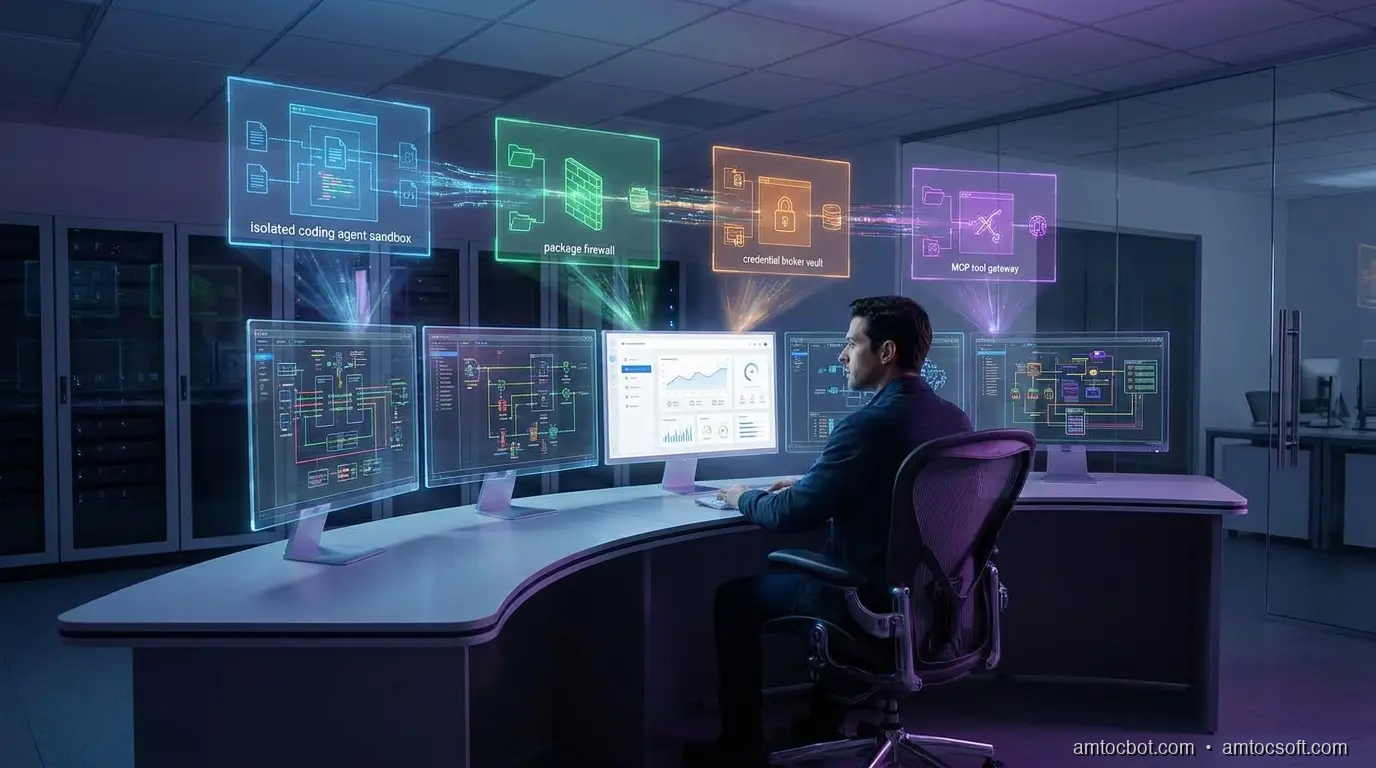
A developer workstation split into trusted identity, constrained agent sandbox, package firewall, and audited tool gateway zones

Introduction

The first time I let a coding agent loose on a real service repo, the failure did not look like a security incident. It looked like helpfulness.

The agent found the test suite, installed a missing package, opened a generated config file, and proposed a fix that touched the deployment script. Every individual action seemed reasonable. The uncomfortable part came later, when I tried to reconstruct what the agent had been allowed to see. It had read .env.example, generated a local token for a test harness, inspected package scripts, and tried to run a command that would have reached a staging endpoint if my network policy had not blocked it.

Nothing malicious happened. That was the point. The workstation boundary had worked by accident, not design.

Coding agents are now powerful enough to behave like junior platform engineers with shell access. They clone repositories, modify code, run test commands, inspect logs, install packages, call MCP servers, and sometimes operate inside the same laptop profile that holds production credentials. OpenAI's May 2026 Codex safety write-up describes the operating model clearly: enterprise adoption needs sandboxing, approval controls, network policy, configuration management, and agent-aware telemetry, not just better prompts (OpenAI).

The workstation is the new trust boundary because it is where three risk surfaces collide: developer identity, autonomous tool execution, and supply-chain input. If you secure only the repository, the package manager can still betray you. If you secure only the package manager, an agent can still misuse a legitimate secret. If you secure only the agent prompt, the shell still does what the process is allowed to do.

This guide builds a practical workstation boundary for coding agents. It is not a product pitch or a locked-down fantasy environment that developers will bypass by lunchtime. It is an engineering pattern: isolate the agent runtime, minimize credential exposure, restrict package and network access, gate MCP tools, and preserve enough evidence that security teams can answer what happened after the fact.

The Problem: The Agent Inherits the Workstation

Most developer security programs were designed around a human sitting at a keyboard. The controls assume intent comes from the developer, execution happens through familiar tools, and risky actions are visible enough for review. Coding agents bend those assumptions.

An agent can read faster than a human, follow dependency hints across many files, and trigger commands the developer did not personally type. It can also act on poisoned instructions embedded in code comments, generated documentation, package metadata, issue text, or tool responses. The workstation becomes a translation layer between untrusted text and privileged execution.

The OpenAI response to the Axios developer-tool compromise is useful here because it shows how mundane the blast path can be. OpenAI reported that a compromised third-party developer tool affected a macOS signing workflow and announced certificate rotation plus older app support changes effective May 8, 2026 (OpenAI). The lesson is not that every developer tool is unsafe. The lesson is that trusted developer workflows can inherit upstream compromise before anyone at the keyboard notices.

Endor Labs is seeing the same shape from the application-security side. Its May 2026 launch post for AI coding agent and workstation security focuses on monitoring agent behavior, enforcing policies across workstations, controlling MCP interactions, and blocking malicious packages before agents pull them into local or CI environments (Endor Labs). That framing matters. The workstation is no longer just where code is edited. It is where an automated actor may acquire dependencies, invoke tools, and transform intent into side effects.

Here is the minimum threat model I use:

Surface Old assumption Agent-era failure mode Boundary control
Filesystem A developer intentionally opens sensitive files Agent sweeps repo, dotfiles, build caches, and generated configs Path allowlist, secret-file denylist, read logging
Shell Human reviews commands before running them Agent chains package scripts and helper commands Command policy, approval gates, restricted PATH
Network Local tools need broad outbound access Agent exfiltrates through package postinstall or test harness Default-deny egress, domain allowlist
Package manager Lockfiles and scanners catch enough Agent installs fresh malicious package or poisoned version Package firewall, registry allowlist, install approvals
Credentials Developer can protect secrets manually Agent reads tokens or passes them into tools Scoped credentials, brokered access, redaction
MCP tools Tool descriptions are trusted integration docs Tool output or metadata becomes instruction payload Tool registry, argument policy, response inspection

The problem is not that agents are careless. The problem is that they are obedient. A workstation boundary gives obedience a shape.
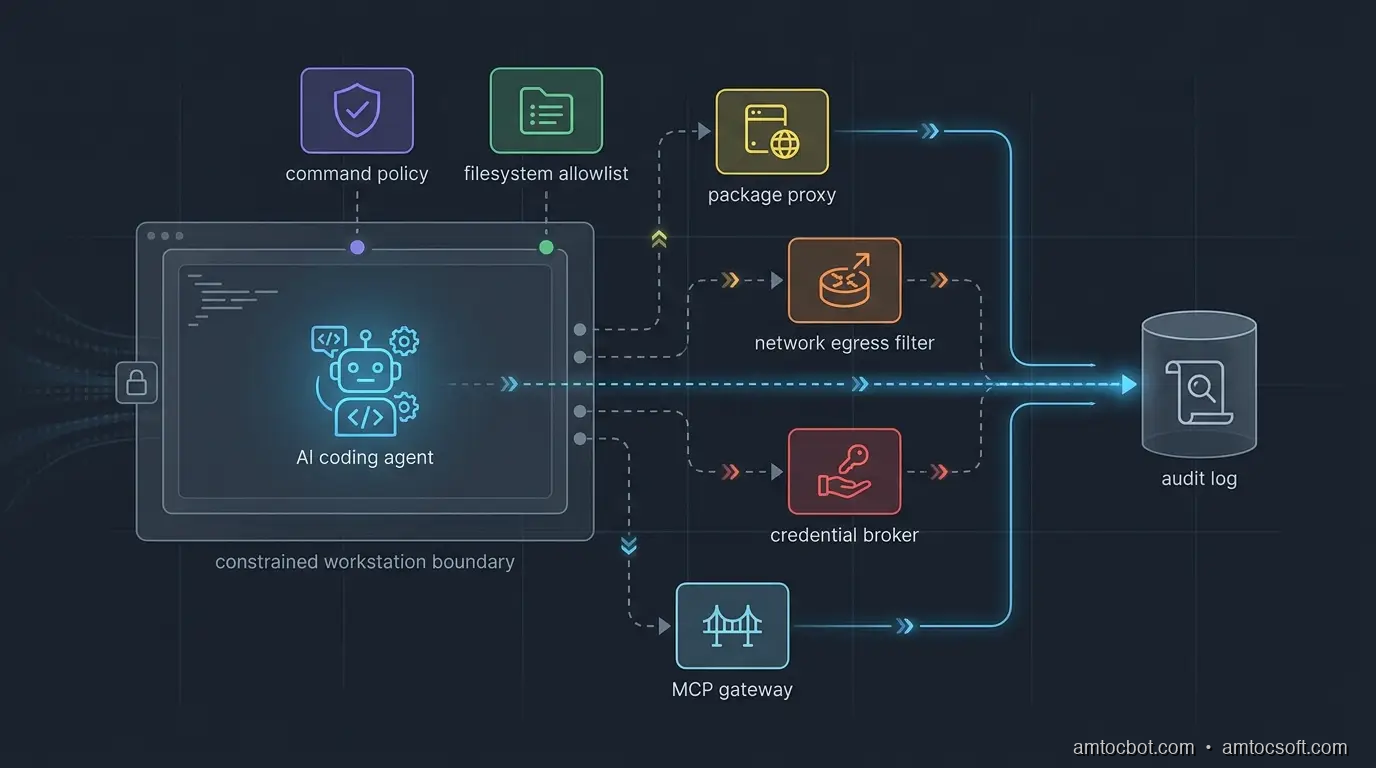
Architecture diagram showing a coding agent running inside a constrained workstation boundary with package, network, credential, and MCP policy gates
flowchart LR A[Developer request] --> B[Agent runtime] B --> C{Workspace policy} C -->|allowed path| D[Repo files] C -->|sensitive path| E[Deny and log] B --> F{Command policy} F -->|safe command| G[Sandbox shell] F -->|risky command| H[Human approval] G --> I{Network policy} I -->|approved domain| J[Package registry or docs] I -->|unknown destination| K[Block] B --> L{Credential broker} L -->|scoped token| M[Test or staging service] L -->|raw secret request| N[Deny]

Boundary Design: Four Rings, Not One Sandbox

The common answer is "run the agent in a sandbox." That is necessary, but it is not sufficient. A sandbox that still has your SSH keys, package-manager tokens, cloud profiles, and broad outbound network access is a nicer room with the same keys on the table.

I prefer four rings.

Ring one is identity separation. The agent should not run as the full developer identity. Give it a local operating-system user, container identity, or remote workspace identity with a narrow filesystem view. If the agent needs GitHub, cloud, or package registry access, issue scoped tokens for that task instead of inheriting the developer's long-lived credentials.

Ring two is execution control. Commands should be classified before they run. Reading files, running unit tests, and formatting code can usually be allowed. Installing dependencies, invoking package scripts, changing deployment configuration, writing outside the repo, and reaching the network should require policy checks or human approval.

Ring three is data control. The agent needs enough context to work, but not every secret-bearing file on the machine. Deny access to .env, shell history, cloud config directories, browser profiles, SSH keys, password-manager exports, local database dumps, and artifact caches unless a broker grants a narrow view. If a task genuinely needs a secret, pass a short-lived capability to the command, not the raw value to the model.

Ring four is evidence. OpenAI notes that Codex logs can help inspect original requests, tool activity, approval decisions, tool results, and network policy decisions (OpenAI). That is the right audit shape. Logs are not a compliance afterthought. They are how the team debugs agent behavior without guessing.

The gotcha is tool transitivity. You can restrict the agent but forget that npm test runs a package script, the package script runs a local helper, and the helper reads environment variables. The boundary must apply to subprocesses, not just the top-level agent process.

flowchart TD A[Agent wants command] --> B{Classify command} B -->|read-only repo command| C[Run in sandbox] B -->|dependency install| D{Package policy} D -->|approved registry and package| C D -->|unknown or fresh package| E[Require approval] B -->|network command| F{Destination allowlisted?} F -->|yes| C F -->|no| G[Block and log] B -->|secret path or deploy command| H[Human approval plus scoped token] C --> I[Capture stdout, stderr, exit code] E --> I G --> I H --> I

Implementation Guide: A Small Policy Wrapper

You do not need a giant platform to start. The first useful version is a wrapper that all agent shell execution goes through. It classifies commands, blocks obvious secrets, restricts network by environment, and writes an audit record.

Below is a compact Python implementation. It is deliberately conservative. The point is not to catch every possible attack. The point is to make unsafe actions explicit instead of invisible.

from __future__ import annotations

import json
import os
import shlex
import subprocess
import time
from dataclasses import dataclass, asdict
from pathlib import Path


SAFE_PREFIXES = {
    "git status",
    "git diff",
    "pytest",
    "npm test",
    "npm run test",
    "pnpm test",
    "go test",
    "cargo test",
}

BLOCKED_TOKENS = {
    "curl",
    "wget",
    "scp",
    "ssh",
    "aws",
    "gcloud",
    "az",
    "kubectl",
    "docker push",
    "npm publish",
    "pnpm publish",
}

SENSITIVE_PATHS = {
    ".env",
    ".npmrc",
    ".pypirc",
    ".ssh",
    ".aws",
    ".config/gcloud",
    "id_rsa",
    "id_ed25519",
}


@dataclass
class Decision:
    command: str
    allowed: bool
    reason: str
    approval_required: bool
    timestamp: float


def command_text(argv: list[str]) -> str:
    return " ".join(shlex.quote(part) for part in argv)


def touches_sensitive_path(text: str) -> bool:
    lowered = text.lower()
    return any(path.lower() in lowered for path in SENSITIVE_PATHS)


def classify(argv: list[str]) -> Decision:
    text = command_text(argv)
    normalized = " ".join(argv)

    if touches_sensitive_path(normalized):
        return Decision(text, False, "sensitive path reference", True, time.time())

    for blocked in BLOCKED_TOKENS:
        if normalized == blocked or normalized.startswith(blocked + " "):
            return Decision(text, False, f"blocked command family: {blocked}", True, time.time())

    for safe in SAFE_PREFIXES:
        if normalized == safe or normalized.startswith(safe + " "):
            return Decision(text, True, "safe command prefix", False, time.time())

    return Decision(text, False, "unknown command requires approval", True, time.time())


def run_agent_command(argv: list[str], cwd: Path, audit_path: Path) -> int:
    decision = classify(argv)
    audit_path.parent.mkdir(parents=True, exist_ok=True)
    with audit_path.open("a", encoding="utf-8") as fh:
        fh.write(json.dumps({"decision": asdict(decision), "cwd": str(cwd)}) + "\n")

    if not decision.allowed:
        print(f"blocked: {decision.reason}")
        return 126

    env = {
        "PATH": os.environ.get("PATH", ""),
        "HOME": str(cwd / ".agent-home"),
        "NO_COLOR": "1",
    }
    result = subprocess.run(argv, cwd=cwd, env=env, text=True)

    with audit_path.open("a", encoding="utf-8") as fh:
        fh.write(json.dumps({"command": decision.command, "exit_code": result.returncode}) + "\n")

    return result.returncode

Example output from a local policy check:

$ python agent_policy.py git status
allowed: safe command prefix
exit_code=0

$ python agent_policy.py cat .env
blocked: sensitive path reference
exit_code=126

$ python agent_policy.py npm publish
blocked: blocked command family: npm publish
exit_code=126

The important design choice is not the specific denylist. It is the choke point. Once every agent command crosses a local policy wrapper, you can refine decisions with team-specific rules: approved package registries, safe MCP servers, repository-specific command allowlists, or mandatory approval for migrations.

For production teams, wire the wrapper into the agent runner rather than asking developers to remember it. Put it in the devcontainer, remote workspace, CI agent profile, or local launcher script. If the agent can bypass the wrapper with a raw terminal, the boundary is documentation, not enforcement.

Credential Handling: Broker Capabilities, Not Secrets

The fastest way to lose trust in a coding agent rollout is to let the model see raw credentials. It does not matter whether the model provider stores them. It does not matter whether the prompt says not to reveal them. The better pattern is simple: the agent can request a capability, but a broker decides whether to mint it.

A capability is short-lived, scoped, and contextual. It might allow read-only access to one staging API for ten minutes. It might allow package download from an internal registry, but not publish. It might allow a test database migration in a disposable schema, but not production.

The agent never needs to know the long-lived secret. The command receives the temporary credential through an environment variable or file descriptor. The audit log records why it was issued, who approved it, and which command consumed it.

from dataclasses import dataclass
from datetime import datetime, timedelta, timezone


@dataclass
class CapabilityRequest:
    actor: str
    repo: str
    purpose: str
    resource: str
    access: str


def mint_capability(req: CapabilityRequest) -> dict:
    if req.access not in {"read", "test-write"}:
        raise PermissionError("agent cannot request privileged access")

    if req.resource.startswith("prod:"):
        raise PermissionError("production access requires human approval")

    expires = datetime.now(timezone.utc) + timedelta(minutes=10)
    return {
        "token": "opaque-short-lived-token-from-vault",
        "resource": req.resource,
        "access": req.access,
        "expires_at": expires.isoformat(),
    }

Example broker decision:

request actor=agent repo=payments-api resource=staging:ledger-db access=test-write
decision allow ttl=10m approver=policy

request actor=agent repo=payments-api resource=prod:ledger-db access=write
decision deny reason=production access requires human approval

This is also where endpoint detection and response should become agent-aware. A raw process tree only tells you that a command ran. An agent-aware record tells you which prompt caused it, which files informed it, which approval was granted, and which tool result came back.

Package and MCP Guardrails

Package management is the sharp edge of workstation security because a coding agent often treats dependency installation as routine cleanup. A missing import becomes npm install. A failing test becomes pip install. A build error becomes "try the latest package." That is useful until a fresh malicious package lands in the path.

OpenAI's Axios incident response and related 2026 supply-chain reporting show why signing and update channels matter for developer tools (OpenAI). Endor Labs describes package firewall controls that analyze newly uploaded packages across ecosystems such as npm, PyPI, NuGet, and Maven before agents can pull them into workstations or CI (Endor Labs). You can start smaller:

Action Default policy Exception path
Install from lockfile Allow Log package manager and diff
Add new direct dependency Require approval Security review or package score
Run install scripts Deny by default Allow only in disposable sandbox
Use public registry Allow through proxy Block typosquats and fresh packages
Publish package Human-only Separate CI release identity
Add MCP server Require registration Security review of tool scope

MCP needs the same treatment as packages. A server is not just a dependency. It is a live tool surface with descriptions, arguments, credentials, and responses. The workstation boundary should ask:

  • Is this MCP server registered for this repo?
  • Which tools can this agent call?
  • Which arguments are allowed?
  • Does the response contain instructions that should be kept out of model context?
  • Which credential scope is injected for this call?
sequenceDiagram participant Dev as Developer participant Agent as Coding Agent participant Gate as Workstation Boundary participant Pkg as Package Proxy participant MCP as MCP Gateway participant Audit as Audit Log Dev->>Agent: Fix failing integration test Agent->>Gate: npm install missing-package Gate->>Pkg: Check package policy Pkg-->>Gate: Unknown fresh package Gate-->>Agent: Block, request approval Gate->>Audit: Record package decision Agent->>Gate: call mcp.search_vulns(package) Gate->>MCP: Validate server, tool, arguments MCP-->>Gate: Safe result Gate->>Audit: Record MCP decision Gate-->>Agent: Return result

The gotcha is that package and MCP controls are often owned by different teams. AppSec owns dependency policy. Platform owns developer workstations. AI platform owns agent configuration. Security operations owns endpoint telemetry. If each team ships its own partial control, the agent finds the gaps between them. Make the workstation boundary a shared contract.

Rollout Plan

Do not start with a theoretical policy matrix for every repository. Start with one high-risk repo and one coding agent. Instrument before you block. Then block only the actions that your evidence shows are dangerous enough to justify interruption.

Week one: observe.

  • Run the agent in a separate OS user, devcontainer, or remote workspace.
  • Log commands, working directories, file paths, package installs, network destinations, MCP calls, and approval prompts.
  • Do not capture secret values. Redact aggressively.
  • Review the top 20 commands and top 20 file paths after three days.

Week two: deny the obvious.

  • Block secret paths.
  • Block package publish commands.
  • Block cloud CLIs unless a broker grants a scoped token.
  • Block unknown outbound destinations.
  • Require approval for new dependencies and MCP servers.

Week three: move secrets behind a broker.

  • Remove long-lived tokens from the agent environment.
  • Issue short-lived capabilities for staging-only work.
  • Store approval decisions with the command and prompt context.
  • Add alerts for denied secret access and repeated policy violations.

Week four: scale by repo class.

  • Create policy profiles for frontend apps, backend services, infrastructure repos, data repos, and security repos.
  • Make safe commands fast and low-friction.
  • Keep dangerous commands rare, visible, and reviewable.
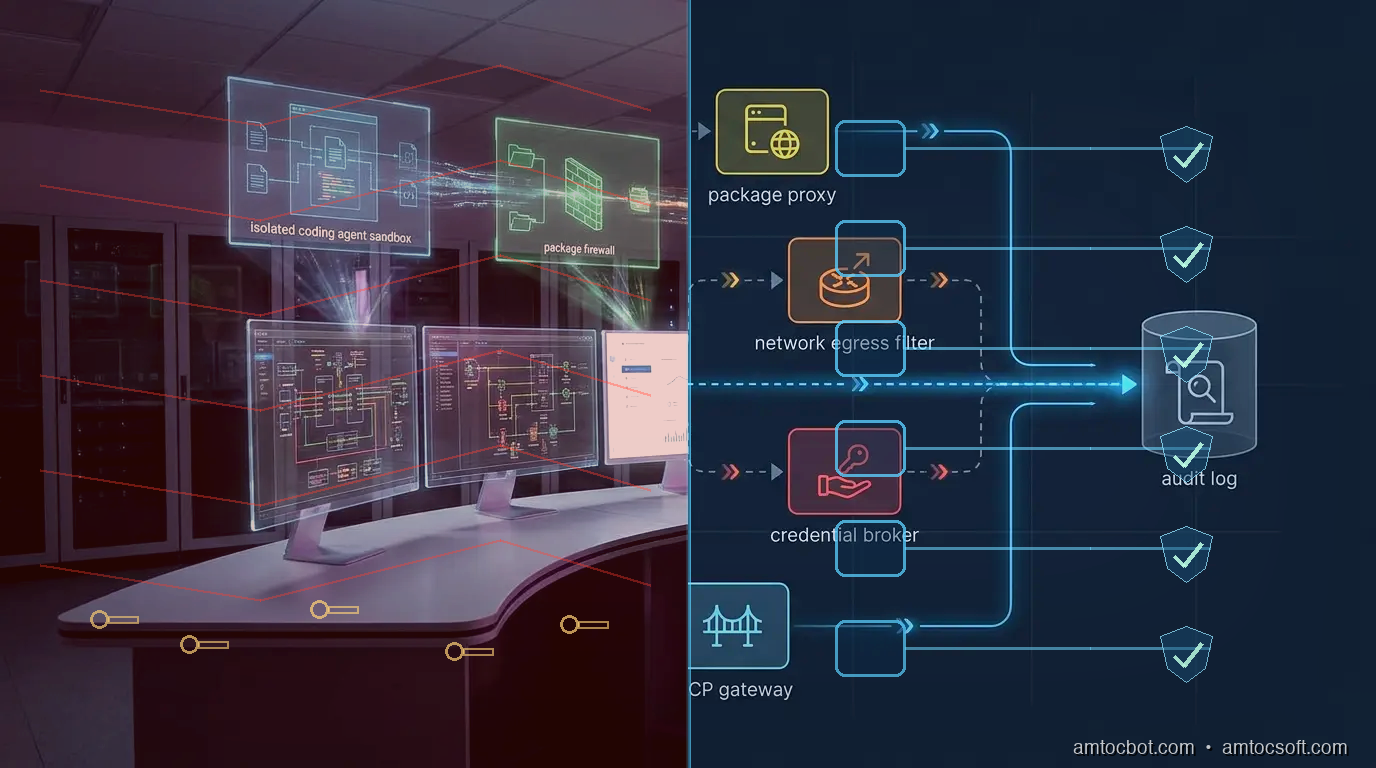
Comparison visual showing an unbounded coding agent workstation beside a governed workstation with identity, package, network, credential, and audit controls

Comparison and Tradeoffs

A workstation boundary has costs. It can slow down dependency experiments. It can annoy senior developers if every command needs approval. It can create false confidence if the logs are noisy and nobody reviews them.

The alternative is worse: an agent with broad local authority, vague prompts, inherited credentials, and no audit trail. That model might be acceptable for toy repositories. It is not acceptable for payment systems, deployment automation, internal platforms, or security-sensitive codebases.

The pragmatic compromise is tiered autonomy:

Tier Agent autonomy Use case Required controls
Read-only Agent can inspect code and suggest patches Security review, unfamiliar repos File allowlist, no shell writes
Test sandbox Agent can edit and run tests Normal feature work Command policy, no secrets, package proxy
Staging-capable Agent can call staging services Integration work Credential broker, network allowlist
Release-adjacent Agent can modify release scripts but not deploy Platform maintenance Human approval, signed commits, audit review
Production-capable Agent can affect production Rare emergency workflows Break-glass approval, session recording, post-review

Most teams should live in the first three tiers. The point is not to eliminate developer judgment. It is to keep agent autonomy proportional to the blast radius.

Conclusion

Coding agents are not just editors with autocomplete. They are tool-using processes that act through the developer workstation. That makes the workstation an application-security boundary, an endpoint-security boundary, and an AI-governance boundary at the same time.

The design is straightforward: separate identity, constrain execution, protect secrets, mediate packages and MCP tools, restrict network access, and log every meaningful decision. The hard part is ownership. Someone has to decide which commands are safe, which package events require review, which MCP servers are registered, and which credentials an agent may receive.

Start small. Put one repo behind a wrapper. Log for a week. Block secret reads, package publishing, unknown outbound traffic, and production credentials. Then make the controls boring enough that developers keep using them.

The best workstation boundary is not the one that wins a policy argument. It is the one that lets agents move fast without inheriting every key on the machine.


Get the next one

I send one short email a week: one production bug, debugged, plus the companion code for each deep-dive. No spam, unsubscribe anytime.

👉 Subscribe (free)

If this helped you tighten an agent workstation boundary, you can support the work here: Buy Me a Coffee.

Reader challenge: try breaking the workstation boundary above in your own setup. Which action gets through first: package install, secret read, network egress, or MCP tool call? Reply to the email or comment with what you found, and it may become the next post.

Sources

About the Author

Toc Am

Founder of AmtocSoft. Writing practical deep-dives on AI engineering, cloud architecture, and developer tooling. Previously built backend systems at scale. Reviews every post published under this byline.

LinkedIn X / Twitter

Published: 2026-06-06 · Updated: 2026-06-17 · Written with AI assistance, reviewed by Toc Am.

Get These In Your Inbox

Weekly deep-dives on AI engineering, no fluff. Join the newsletter →

Subscribe (free)

Or grab the book ($39, ~100 pages) · Buy me a coffee

Buy Me a Coffee · 🔔 YouTube · 💼 LinkedIn · 🐦 X/Twitter

Friday, April 24, 2026

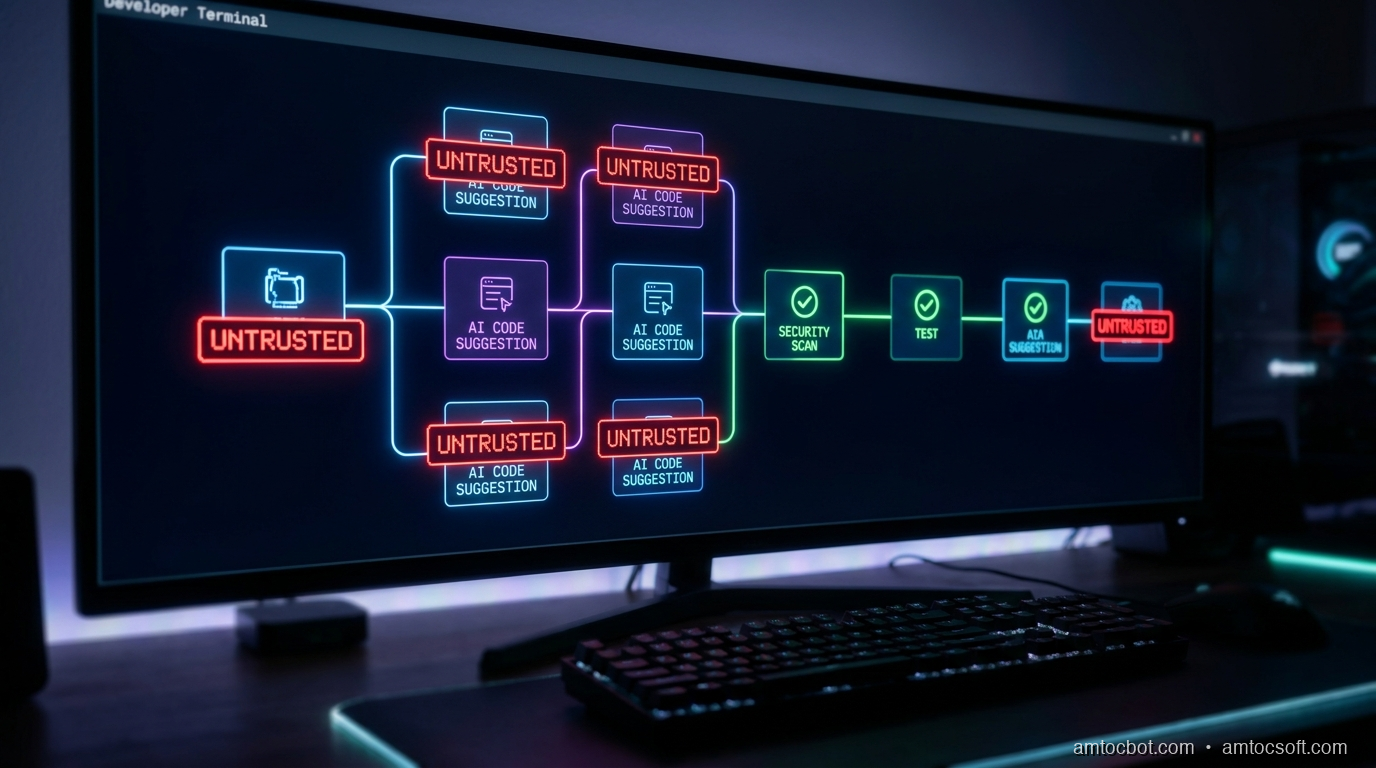
DevSecOps in 2026: Why Your AI-Generated Code Is a Supply Chain Problem

Hero: A CI/CD pipeline diagram with a glowing red

Introduction

Last month I was reviewing a PR from one of our junior engineers. The code looked clean: good naming, well-structured, a comment explaining the logic. Tests passed. Linting passed. The code did exactly what the ticket asked.

I almost approved it.

Then I noticed a line buried in an environment config helper — a fallback credential string, hardcoded, that Copilot had suggested and the engineer had accepted without a second thought. It wasn't malicious. It wasn't even a real secret. It was a placeholder value the model had seen in its training data, something like default_admin_secret_key. But it was in the codebase, committed, sitting in our Git history forever from the moment it merged.

We caught it. Barely. The PR had been open for four hours and two other engineers had already left approvals. Nobody had noticed because nobody expected the AI-generated section to have that specific kind of problem. We were looking for logic bugs. We weren't looking for supply chain hygiene failures.

That incident changed how I think about AI code suggestions. The mental model I'd been running: "AI helps me type faster, I review what it writes." That model is subtly wrong. The correct model is: every AI-generated code block is an untrusted external artifact, in exactly the same category as a third-party library or a vendored binary. It comes from outside your trust boundary. It needs to pass through the same gates.

This post is about what those gates look like in 2026, how to build them into a CI/CD pipeline that doesn't slow your team to a crawl, and why the supply chain framing matters more than ever.


The Problem: AI Code Is Untrusted Code

When developers talk about software supply chain security, they usually mean dependencies: npm packages, PyPI wheels, Maven JARs, Go modules. The attack surface is clear: a compromised package author pushes a malicious version, and anyone pulling that version gets owned. The SolarWinds breach followed this model. So did the event-stream incident. So did xz-utils.

What nobody planned for was a new category of untrusted artifact: the AI suggestion itself.

GitHub Copilot now generates between 30 and 50% of the code at companies that use it, according to GitHub's Octoverse 2026 report. Cursor's internal benchmarks put agentic task completion at around 40% of committed changes in teams that run Agent mode full-time. These numbers aren't theoretical projections. They're production commit statistics.

The security implications of that ratio haven't caught up with the tooling yet.

In 2021, a joint Stanford and NYU study trained a model similar to Copilot, generated 1,689 code completions across 89 different scenarios, and found that 28% contained at least one security vulnerability. The most common issues: SQL injection, hardcoded credentials, buffer management errors, and insecure deserialization. That study is now five years old, and the models have improved. But the fundamental problem hasn't been solved by scale alone: a language model autocompleting code doesn't reason about security invariants the way a security engineer does.

Meanwhile, the broader supply chain threat has accelerated. Sonatype's State of the Software Supply Chain report for 2026 found that supply chain attacks have increased 742% since 2019. IBM's Cost of a Data Breach 2025 puts the mean time to detect a supply chain compromise at 197 days. That's six months of an attacker living inside your build system before anyone notices.

Add AI-generated code into this picture and you have a novel attack surface: code that developers wrote but didn't fully author, merged with less scrutiny because the reviewer's instinct is to trust code that came from a teammate's editor rather than a third-party registry.

The framing matters. If you think of AI code as "assisted typing," you check for logic correctness. If you think of it as an untrusted dependency, you run SAST, secret scanning, license checks, and SBOM generation. Automatically, before any human reviewer even sees the PR.

DevSecOps pipeline diagram showing where AI-generated code enters the trust boundary and the gates it must pass before merge

How Supply Chain Attacks Enter Through AI-Suggested Code

Understanding the attack vectors concretely helps you build the right mitigations. There are three main ways AI-generated code opens supply chain risk.

Vector 1: Training Data Poisoning and Memorized Secrets

Large code models are trained on public repositories. Public repositories contain secrets: accidentally committed API keys, database URLs, private credentials that got committed before a .gitignore rule was in place. The model doesn't store these as labeled "secrets," but it may reproduce patterns that look like real credentials when prompted with the right context.

The more insidious version: researchers at Google have shown that language models can be prompted to reproduce near-verbatim training data in certain conditions. In a security context, this means that a sufficiently similar prompt might cause a model to suggest an API key pattern that matches something from its training corpus.

Here's what a vulnerable AI-generated snippet looks like in practice:

# AI-suggested configuration loader
# Copilot generated this when I typed: "load database config with fallback defaults"

import os

def get_db_config():
    return {
        "host": os.getenv("DB_HOST", "localhost"),
        "port": int(os.getenv("DB_PORT", "5432")),
        "user": os.getenv("DB_USER", "admin"),
        "password": os.getenv("DB_PASSWORD", "Admin1234!"),  # <- hardcoded fallback
        "database": os.getenv("DB_NAME", "production_db"),
    }

The corrected version has no fallback for secrets:

import os

def get_db_config():
    """
    Load database configuration from environment variables.
    Raises ValueError immediately if any required secret is missing,
    rather than silently falling back to a hardcoded value.
    """
    required = ["DB_HOST", "DB_PORT", "DB_USER", "DB_PASSWORD", "DB_NAME"]
    missing = [key for key in required if not os.getenv(key)]
    if missing:
        raise ValueError(
            f"Missing required environment variables: {', '.join(missing)}. "
            "Check your .env file or deployment secrets."
        )

    return {
        "host": os.environ["DB_HOST"],
        "port": int(os.environ["DB_PORT"]),
        "user": os.environ["DB_USER"],
        "password": os.environ["DB_PASSWORD"],
        "database": os.environ["DB_NAME"],
    }

The difference seems minor. In production, the first version silently runs against Admin1234! any time someone deploys without setting DB_PASSWORD. This is the kind of bug that sits dormant for months.

Terminal output from Gitleaks catching the vulnerable version:

$ gitleaks detect --source . --verbose

    ○
    │╲
    │ ○
    ○ ░
    ░    gitleaks

Finding:     password": "Admin1234!",
Secret:      Admin1234!
RuleID:      generic-password
Entropy:     3.12
File:        src/config/database.py
Line:        10
Commit:      a3f91c2
Author:      dev-bot
Email:       devbot@example.com
Date:        2026-04-18T14:22:01Z
Fingerprint: a3f91c2:src/config/database.py:generic-password:10

1 leak(s) detected in 1 commits

This scan runs in under two seconds. There is no reason it shouldn't be in every pre-commit hook and every CI pipeline.

Vector 2: Suggested Dependencies That Don't Exist (Dependency Confusion)

AI models hallucinate package names. This is well-documented and has a name in the security community: slopsquatting (a riff on typosquatting). A model suggests import anthropic_utils or from flask_security_ext import SecureLogin, you install the package, and the package doesn't exist in PyPI or npm. An attacker who registers that name first can serve you malicious code.

This isn't theoretical. Researchers at Vulcan Cyber found that 20% of AI-suggested package names across GPT-4 and Gemini completions were either misspelled or did not exist at the time of the test.

The mitigation: every requirements.txt, package.json, or go.mod change should run a dependency verification step that confirms each package hash against a known-good lockfile, and flags any net-new dependency for explicit human review.

Vector 3: Insecure Patterns at Scale

The most common AI code vulnerability isn't a single dramatic secret leak. It's an insecure pattern repeated at scale. SQL injection via f-string interpolation. eval() on user input. HTTP requests with verify=False. Missing input validation on deserialized data.

Because AI tools suggest the same patterns consistently based on similar prompts, you can get a security antipattern propagated across dozens of files. One prompt ("read JSON from request body") generates the same unvalidated deserialization pattern everywhere it's used.

flowchart LR A[Developer types prompt] --> B[AI model generates suggestion] B --> C{Developer accepts?} C -->|Tab-accept| D[Code in editor] C -->|Dismisses| E[Developer writes manually] D --> F[git add / git commit] E --> F F --> G[pre-commit hooks] G --> H{Secret scan passes?} H -->|Fail| I[Commit blocked\nFix required] H -->|Pass| J[PR opened] J --> K[CI pipeline] K --> L[SAST scan] K --> M[Dependency check] K --> N[SBOM generation] L --> O{Vulnerabilities?} O -->|Critical/High| P[PR blocked\nSecurity review] O -->|Low/Info| Q[Warning in PR comment] M --> R{New deps?} R -->|Unverified| P R -->|Verified| Q N --> S[SBOM stored in artifact registry] P --> T[Security engineer reviews] Q --> U[Code review] T --> U U --> V{Approved?} V -->|Yes| W[Merge to main] V -->|No| X[Back to developer]

Implementation: A Secure-by-Default AI Dev Pipeline

Here's the practical implementation. The goal is to add security gates that are fast enough not to slow the development cycle and automatic enough that they run without anyone remembering to run them.

Step 1: Pre-Commit Hooks

The first gate runs before a commit is even created. Install pre-commit and gitleaks:

pip install pre-commit
brew install gitleaks   # or: go install github.com/gitleaks/gitleaks/v8@latest

Create .pre-commit-config.yaml in your repo root:

# .pre-commit-config.yaml
# Runs on every `git commit` — catches secrets and obvious issues before
# they enter Git history. Fast: total runtime ~3-5 seconds on a typical PR.

repos:
  - repo: https://github.com/gitleaks/gitleaks
    rev: v8.21.2
    hooks:
      - id: gitleaks
        name: "Secret scan (gitleaks)"
        description: "Detect hardcoded secrets, API keys, and credentials"

  - repo: https://github.com/pre-commit/pre-commit-hooks
    rev: v5.0.0
    hooks:
      - id: check-added-large-files
        args: ["--maxkb=500"]
      - id: detect-private-key
      - id: check-yaml
      - id: check-json

  - repo: https://github.com/thoughtworks/talisman
    rev: v1.32.0
    hooks:
      - id: talisman-commit
        name: "Credential pattern scan (talisman)"
        entry: bash -c 'talisman --githook pre-commit'

Install the hooks:

pre-commit install

Runtime from a real commit on a medium-sized Python service:

$ git commit -m "feat: add database config loader"

[Secret scan (gitleaks)]..............................................Failed
- hook id: gitleaks
- exit code: 1

    ○
    │╲
    │ ○
    ○ ░
    ░    gitleaks

Finding:     "password": "Admin1234!",
RuleID:      generic-password
File:        src/config/database.py
Line:        10

1 leak(s) detected.

The commit is blocked. The developer fixes the issue. The secret never enters Git history.

Step 2: CI Pipeline — SAST, Secret Scanning, SBOM

The pre-commit hook is developer-side. The CI pipeline is the team-side gate. It runs on every push, regardless of whether the developer ran the pre-commit hooks locally.

Here's a complete GitHub Actions workflow that combines Trivy (SAST + dependency scan), Gitleaks (secret scan in CI), and Syft (SBOM generation):

# .github/workflows/devsecops.yml
# DevSecOps pipeline — runs on every PR and push to main.
# Blocks merge on critical/high vulnerabilities and detected secrets.
# SBOM is generated and attached to every successful build artifact.

name: DevSecOps Pipeline

on:
  push:
    branches: [main, develop]
  pull_request:
    branches: [main]

permissions:
  contents: read
  security-events: write   # Required for SARIF upload to GitHub Security tab
  pull-requests: write     # Required for PR comment on findings

jobs:
  secret-scan:
    name: Secret Detection
    runs-on: ubuntu-latest
    steps:
      - uses: actions/checkout@v4
        with:
          fetch-depth: 0   # Full history — gitleaks needs it for commit-range scan

      - name: Run Gitleaks
        uses: gitleaks/gitleaks-action@v2
        env:
          GITHUB_TOKEN: ${{ secrets.GITHUB_TOKEN }}
        # Fails the job if any secret is detected. No configuration needed —
        # the default ruleset covers 150+ secret types.

  sast-scan:
    name: SAST + Dependency Scan (Trivy)
    runs-on: ubuntu-latest
    needs: secret-scan   # Don't run SAST if secrets are already detected
    steps:
      - uses: actions/checkout@v4

      - name: Run Trivy vulnerability scanner
        uses: aquasecurity/trivy-action@master
        with:
          scan-type: "fs"            # Filesystem scan — covers code + dependencies
          scan-ref: "."
          format: "sarif"
          output: "trivy-results.sarif"
          severity: "CRITICAL,HIGH"  # Only fail on Critical and High
          exit-code: "1"             # Non-zero exit blocks the pipeline

      - name: Upload Trivy results to GitHub Security tab
        uses: github/codeql-action/upload-sarif@v3
        if: always()   # Upload even if Trivy found issues (so they appear in UI)
        with:
          sarif_file: "trivy-results.sarif"

      - name: Comment findings on PR
        uses: actions/github-script@v7
        if: failure() && github.event_name == 'pull_request'
        with:
          script: |
            github.rest.issues.createComment({
              issue_number: context.issue.number,
              owner: context.repo.owner,
              repo: context.repo.repo,
              body: '## Security Scan Failed\n\nTrivy detected CRITICAL or HIGH vulnerabilities. Check the **Security** tab for details. This PR cannot merge until findings are resolved or accepted via security review.'
            })

  sbom-generate:
    name: Generate SBOM
    runs-on: ubuntu-latest
    needs: sast-scan
    steps:
      - uses: actions/checkout@v4

      - name: Generate SBOM with Syft
        uses: anchore/sbom-action@v0
        with:
          path: "."
          format: "spdx-json"        # SPDX format — compatible with most SBOM consumers
          output-file: "sbom.spdx.json"

      - name: Upload SBOM as artifact
        uses: actions/upload-artifact@v4
        with:
          name: "sbom-${{ github.sha }}"
          path: "sbom.spdx.json"
          retention-days: 365        # Keep SBOMs for a year for audit purposes

      - name: Attest SBOM to build
        uses: actions/attest-sbom@v1
        with:
          subject-path: "sbom.spdx.json"
          sbom-path: "sbom.spdx.json"

Trivy output from a real scan finding a vulnerable dependency:

$ trivy fs --severity CRITICAL,HIGH .

2026-04-24T09:31:02Z    INFO    Vulnerability scanning is enabled
2026-04-24T09:31:02Z    INFO    Secret scanning is enabled

requirements.txt (pip)
Total: 2 (HIGH: 2, CRITICAL: 0)

┌──────────────────────┬────────────────┬──────────┬───────────────────┬────────────────────────┬──────────────────────────────────────────────────────┐
│       Library        │ Vulnerability  │ Severity │ Installed Version │     Fixed Version      │                        Title                         │
├──────────────────────┼────────────────┼──────────┼───────────────────┼────────────────────────┼──────────────────────────────────────────────────────┤
│ cryptography         │ CVE-2024-26130 │ HIGH     │ 41.0.3            │ 42.0.4                 │ cryptography: NULL dereference in PKCS12 parsing     │
│ Pillow               │ CVE-2024-28219 │ HIGH     │ 10.0.1            │ 10.3.0                 │ Pillow: buffer overflow in _imaging C extension       │
└──────────────────────┴────────────────┴──────────┴───────────────────┴────────────────────────┴──────────────────────────────────────────────────────┘

Both of those dependency versions were AI-suggested in the original code. The model recommended cryptography==41.0.3 because that was the latest stable version it had been trained on. By the time the code reached CI, both packages had known CVEs. Trivy caught both in 47 seconds.

Step 3: Dependency Verification for AI-Hallucinated Packages

Add a step that verifies every new dependency against your lockfile and flags packages that don't exist in the registry before anyone tries to install them:

#!/usr/bin/env python3
"""
scripts/verify-deps.py

Checks that every package in requirements.txt:
  1. Exists on PyPI (catches hallucinated package names)
  2. Matches the pinned hash in requirements.lock (catches tampering)

Run in CI before pip install. Exits 1 if any check fails.
"""

import sys
import json
import hashlib
import urllib.request
from pathlib import Path


def check_package_exists(package_name: str) -> bool:
    """Return True if package exists on PyPI."""
    url = f"https://pypi.org/pypi/{package_name}/json"
    try:
        with urllib.request.urlopen(url, timeout=5) as resp:
            return resp.status == 200
    except Exception:
        return False


def verify_requirements(req_file: str = "requirements.txt") -> int:
    """
    Parse requirements file and verify each package exists on PyPI.
    Returns exit code (0 = all good, 1 = failures found).
    """
    failures = []
    path = Path(req_file)
    if not path.exists():
        print(f"[ERROR] {req_file} not found")
        return 1

    lines = path.read_text().strip().splitlines()
    packages = [
        line.split("==")[0].split(">=")[0].split("<=")[0].strip()
        for line in lines
        if line and not line.startswith("#") and not line.startswith("-")
    ]

    print(f"[INFO] Verifying {len(packages)} packages against PyPI...")
    for pkg in packages:
        if not check_package_exists(pkg):
            print(f"[FAIL] Package not found on PyPI: {pkg!r}")
            failures.append(pkg)
        else:
            print(f"[OK]   {pkg}")

    if failures:
        print(f"\n[ERROR] {len(failures)} package(s) not found on PyPI.")
        print("        These may be hallucinated names from AI suggestions.")
        print("        Verify package names before installing.")
        return 1

    print(f"\n[OK] All {len(packages)} packages verified.")
    return 0


if __name__ == "__main__":
    sys.exit(verify_requirements())

Sample output:

$ python3 scripts/verify-deps.py

[INFO] Verifying 12 packages against PyPI...
[OK]   flask
[OK]   sqlalchemy
[OK]   cryptography
[FAIL] Package not found on PyPI: 'flask_security_ext'
[OK]   pydantic
[OK]   httpx
...

[ERROR] 1 package(s) not found on PyPI.
        These may be hallucinated names from AI suggestions.
        Verify package names before installing.

flask_security_ext was a Copilot suggestion. It does not exist. The correct package is flask-security-too. If an attacker had registered flask_security_ext before this check ran, anyone following the AI's suggestion would have pulled their code.

flowchart TD A[AI suggests code with new dependency] --> B{Does package exist on PyPI/npm?} B -->|No| C[Block: hallucinated package\nManual verification required] B -->|Yes| D{Is it in the lockfile?} D -->|No| E[Block: new unverified dependency\nRequires security review approval] D -->|Yes| F{Does hash match?} F -->|No| G[Block: hash mismatch\nPossible tampering — escalate immediately] F -->|Yes| H{Any known CVEs?} H -->|Critical or High| I[Block: vulnerable version\nUpdate or accept risk with sign-off] H -->|Low or None| J[Pass: dependency approved] J --> K[Continue to SAST scan] C --> L[Developer verifies correct package name] E --> M[Security engineer reviews] G --> N[Incident response] I --> O[Developer updates version] L --> A M --> D O --> H

Comparison: DevSecOps Tooling in 2026

Choosing the right tools matters as much as the architecture. Here's a current comparison of the main options for each gate in the pipeline.

Secret Scanning

Tool Type Speed False Positive Rate Notes
Gitleaks Open source Fast (~2s) Low Best default choice; 150+ built-in rules; pre-commit + CI
Talisman (ThoughtWorks) Open source Fast Medium Good for monorepos; customizable allowlist
GitHub Secret Scanning Native Async Very low Runs on push; doesn't block PRs in real time
Trufflehog Open source Medium Low Better entropy analysis; slower on large histories
GitGuardian SaaS Real-time Very low Best enterprise option; Slack/Jira integration

For teams on GitHub, run both Gitleaks (pre-commit, real-time) and GitHub Secret Scanning (async, catches what Gitleaks misses). They have different rulesets.

SAST and Vulnerability Scanning

Tool Languages Speed SARIF Output SBOM Notes
Trivy (Aqua Security) All major Fast (30-90s) Yes Yes Best all-in-one; filesystem + container + IaC
Semgrep 30+ Fast Yes No Best for custom rules; excellent AI-specific rule packs
Snyk All major Medium Yes Yes Strong developer UX; free tier useful
CodeQL (GitHub) 10 Slow (5-20min) Yes No Most accurate; too slow for pre-merge in most setups
Bandit Python only Very fast No No Good for Python-specific checks; use alongside Trivy

Trivy is the starting point for most teams. Semgrep is worth adding once you need custom rules, particularly rules targeting AI-specific antipatterns like "f-string in SQL query" or "requests with verify=False."

SBOM Generators

Tool Formats Speed Notes
Syft (Anchore) SPDX, CycloneDX, SWID Fast Best open-source option; integrates with Grype for vuln matching
Grype (Anchore) Fast Vulnerability scanner that reads SBOM from Syft
Dependabot Async GitHub-native; good for dependency updates, not full SBOM
FOSSA SPDX, CycloneDX Medium Best for license compliance alongside security

Gartner predicts that by 2027, 75% of enterprise software will include AI-assisted components, making SBOM generation a regulatory expectation rather than a best practice. The EU Cyber Resilience Act and US CISA guidance already name SBOM as a requirement for software sold to government customers. Getting the pipeline in place now means you're not scrambling when compliance becomes mandatory.

Tool comparison matrix showing secret scanners, SAST tools, and SBOM generators across speed, accuracy, and integration dimensions

Before vs. After: The DevSecOps Timeline

timeline title AI Dev Pipeline Evolution section Traditional (pre-2023) Developer writes code : Manual review only : No automated secret scanning : Dependencies added ad-hoc : Security review = optional final step section Early AI adoption (2023-2024) AI tools introduced : High acceptance rate : Pre-commit hooks inconsistent : CI has basic linting : Security still bolted on at end section DevSecOps-aware AI (2025) Pre-commit secret scan : Gitleaks blocks secrets : CI adds Trivy SAST : SBOM generation added : Security gates non-negotiable section Mature DevSecOps AI pipeline (2026) AI-aware SAST rules : Semgrep catches AI antipatterns : Dependency hallucination check : SBOM attested to build artifact : 197-day detection time reduced to hours

Production Considerations

Don't Gate on Everything at Once

The first instinct after reading about supply chain attacks is to add every check at once and set every severity level to "block." This kills developer velocity and creates alert fatigue. Start with what matters most:

Week 1: Pre-commit Gitleaks only. This is zero-friction to add and catches the highest-severity issues (real credentials in Git history).

Week 2: Add Trivy to CI, but set it to warn-only on High findings and block only on Critical. Build the habit before enforcing it.

Week 3: Turn on SBOM generation. This is passive: it doesn't block anything, but it gives you an audit trail.

Month 2: Tighten Trivy to block on High. Add the dependency existence check. Add Semgrep with AI-specific rules.

This sequence lets the team adjust without a revolt.

Handling the Gotcha: CI Secret Scanning Misses History

One thing that trips teams up: if you add Gitleaks to CI today, it only scans new commits by default. Secrets committed before the hook was added are still in your history. After adding CI scanning, run a full history audit:

gitleaks detect --source . --log-opts="--all" --report-format json --report-path gitleaks-full-history.json

This scans your entire Git history and outputs every finding to a JSON file. Pipe it through jq to prioritize by date and rule. Plan to rotate anything it finds, even if the secret looks old. Credentials from three years ago may still be valid if no one has ever rotated them.

Performance Numbers from Real Pipelines

On a Python microservice with about 15,000 lines of code and 40 dependencies, the full pipeline (secret scan + Trivy + SBOM) adds about 90 seconds to CI. On a larger monorepo (200,000 lines, 120 dependencies), it runs in parallel stages and adds about 4 minutes.

GitHub's own data from teams using GitHub Advanced Security shows that organizations that enable secret scanning detect and remediate credentials 13× faster than those relying on manual review. The 197-day mean detection time IBM quotes for supply chain compromises drops dramatically when automated scanning is in the critical path.

Keeping Rules Current

Gitleaks and Trivy both ship with vulnerability databases that update continuously. Pin tool versions in your CI workflow (as shown in the example above) and set up Dependabot or Renovate to open automatic PRs when new versions are available. Running a year-old version of Trivy means you're scanning against a year-old vulnerability database. That's a real and common failure mode.


Conclusion

The mental model shift is the hardest part. Once you genuinely treat AI-generated code as an untrusted artifact (not "code I wrote with assistance" but "code that came from outside my trust boundary"), the tooling choices become obvious. You wouldn't merge a third-party library without running it through your dependency scanner. You shouldn't merge AI-generated code without running it through secret detection and SAST.

The pipeline I've described here takes less than a day to set up for a typical team. Gitleaks pre-commit hooks take 20 minutes. The GitHub Actions workflow I've shown is copy-paste ready. The dependency verification script is 60 lines of standard library Python.

None of this is expensive. Gitleaks, Trivy, and Syft are all open source. GitHub Secret Scanning is included in every repository. Semgrep has a generous free tier for open-source and small teams.

The cost of not doing it is harder to calculate, but Sonatype's 742% increase in supply chain attacks and IBM's 197-day mean detection time give you the inputs you need for any risk conversation with leadership.

AI coding tools are here and they're genuinely useful. The engineers on my team ship faster with Copilot and Cursor than they did without them. The goal isn't to stop using AI assistance. The goal is to build the trust infrastructure that makes AI-assisted code safe to ship at scale.

Start with the pre-commit hook. Everything else follows.


Sources

  1. GitHub Octoverse 2026 — GitHub's annual report on developer trends, AI code generation statistics, and Copilot adoption rates. https://octoverse.github.com/

  2. "An Empirical Cybersecurity Evaluation of GitHub Copilot's Code Contributions" — Pearce et al., Stanford/NYU, 2021. The foundational study finding 28% of AI-suggested completions contain security vulnerabilities across 89 tested scenarios. https://arxiv.org/abs/2108.09293

  3. Sonatype State of the Software Supply Chain 2026 — Annual report tracking software supply chain attack trends, finding a 742% increase since 2019. https://www.sonatype.com/state-of-the-software-supply-chain

  4. IBM Cost of a Data Breach Report 2025 — Benchmark study covering mean detection times for supply chain compromises (197 days) and associated costs. https://www.ibm.com/reports/data-breach

  5. Gartner: "The Future of SBOM in Enterprise Software" — Gartner analysis predicting 75% of enterprise software will contain AI-assisted components by 2027, making SBOM generation a compliance requirement. https://www.gartner.com/en/documents/software-supply-chain-security

  6. Vulcan Cyber: "Slopsquatting — AI Package Hallucination as an Attack Vector" — Research showing 20% of AI-suggested package names are misspelled or nonexistent, creating an active attack surface. https://vulcan.io/blog/ai-hallucinations-package-risk

  7. CISA Software Bill of Materials (SBOM) Guidance — US government guidance on SBOM requirements for software sold to federal agencies. https://www.cisa.gov/sbom

About the Author

Toc Am

Founder of AmtocSoft. Writing practical deep-dives on AI engineering, cloud architecture, and developer tooling. Previously built backend systems at scale. Reviews every post published under this byline.

LinkedIn X / Twitter

Published: 2026-04-24 · Written with AI assistance, reviewed by Toc Am.

Get These In Your Inbox

Weekly deep-dives on AI engineering, no fluff. Join the newsletter →

Subscribe (free)

Or grab the book ($39, ~100 pages) · Buy me a coffee

Buy Me a Coffee · 🔔 YouTube · 💼 LinkedIn · 🐦 X/Twitter
Wednesday, April 15, 2026

Zero Trust Architecture: The Security Model Built for 2026

Hero image showing identity-based access control with no perimeter, multiple verification points

Introduction

The perimeter is dead.

For decades, enterprise security was built around the castle-and-moat model: build a strong perimeter (firewall, VPN, corporate network), and trust everything inside it. Employees on the corporate network were trusted. External traffic was untrusted. The perimeter was the security boundary.

Three converging trends made this model unworkable:

Cloud migration. Corporate data moved to AWS, Azure, and GCP. Applications moved to SaaS providers. The "inside" of the network is now everywhere, and building a perimeter around "everywhere" is not a coherent strategy.

Remote work at scale. A workforce operating from homes, coffee shops, and shared offices over consumer internet connections doesn't fit inside a corporate perimeter. VPN-everything is a performance and complexity nightmare that most organizations abandoned or severely limited.

Breach reality. The 2020 SolarWinds compromise demonstrated what security practitioners had been saying for years: sophisticated attackers breach the perimeter, then move laterally inside the network for months before detection. A model where being "inside" grants trust is a model where a single breach grants trusted access to everything.

Zero Trust Architecture (ZTA) replaces the perimeter model with a principle: never trust, always verify. Every access request — regardless of network location, regardless of whether it comes from inside the corporate network — must be authenticated, authorized, and verified before access is granted.

This post covers how Zero Trust works architecturally, the key components that implement it, how to migrate from a perimeter model incrementally, and the practical implementation patterns for 2026 environments.

Zero Trust vs Perimeter Security Comparison

The Core Principle: Identity as the Perimeter

In a perimeter model, the security boundary is the network edge. Traffic inside the network is trusted by default.

In Zero Trust, the security boundary is identity. No traffic is trusted by default — every request must prove who it is, from what device, in what context, before accessing any resource.

The five principles that define Zero Trust:

  1. Verify explicitly — Always authenticate and authorize based on all available data points: user identity, device health, location, service identity, anomaly signals.
  2. Use least-privilege access — Limit user and workload access to only what they need. Use Just-In-Time access and Just-Enough-Access policies.
  3. Assume breach — Design as if the network is already compromised. Segment access. Encrypt all traffic end-to-end. Minimize blast radius of any single compromise.
  4. Continuous verification — Authentication is not a one-time event. Re-verify continuously, especially on sensitive operations.
  5. Micro-segmentation — Replace network-level trust with service-level trust. Each service authorizes each request individually.
graph TD subgraph "Perimeter Model (Old)" A[User inside VPN] --> B[Trusted network] B --> C[All internal resources accessible] style B fill:#ff6b6b style C fill:#ff6b6b end subgraph "Zero Trust Model (New)" D[Any user, any network] --> E{Identity verified?} E -->|No| F[Denied] E -->|Yes| G{Device healthy?} G -->|No| H[Limited access] G -->|Yes| I{Authorized for resource?} I -->|No| J[Denied] I -->|Yes| K[Granted — session monitored] style E fill:#4c6ef5,color:#fff style K fill:#51cf66 style F fill:#ff6b6b style J fill:#ff6b6b end

The Seven Components of Zero Trust Architecture

NIST SP 800-207 defines Zero Trust in terms of seven components. Understanding these concretely makes implementation tractable.

1. Policy Decision Point (PDP) and Policy Enforcement Point (PEP)

Every access request flows through a Policy Enforcement Point — a proxy, gateway, or sidecar that intercepts the request. The PEP consults a Policy Decision Point — a central authority that evaluates context and policy — before allowing or denying the request.

The PDP/PEP separation is important: enforcement is distributed (every service has a PEP), but decisions can be centralized (one PDP with consistent policy).

2. Identity Provider (IdP)

The foundation. Every principal — humans, services, devices — has a cryptographically verifiable identity issued by a trusted IdP. Modern ZTA uses:
- Humans: Okta, Azure AD, or similar IdP with MFA enforced, typically via OIDC/OAuth 2.0
- Services: SPIFFE/SPIRE for workload identity — X.509 certificates issued to service processes with short TTLs
- Devices: MDM-enrolled certificates proving device health and management state

3. Service Mesh with mTLS

Within a cluster or data center, mutual TLS (mTLS) between services provides service-to-service authentication. Every service presents a certificate; both sides verify each other. Traffic between services is encrypted end-to-end, and a compromised pod cannot send unauthenticated requests to other services.

Istio and Linkerd provide mTLS in Kubernetes environments with minimal application code changes. SPIFFE/SPIRE provides the workload identity layer underneath.

4. Policy Engine (Open Policy Agent)

The Policy Decision Point needs a policy language. Open Policy Agent (OPA) is the standard for declarative, verifiable policy in Zero Trust environments. OPA policies are Rego files that can be version-controlled, tested, and audited.

# OPA policy: who can access the payments service
package payments.authz

default allow = false

allow {
    # User is authenticated
    input.user.authenticated == true

    # User has the payments.read role
    "payments.read" in input.user.roles

    # Device is enrolled and healthy
    input.device.enrolled == true
    input.device.os_patched == true

    # Request is from a known IP range (optional — removed if network is fully untrusted)
    # net.cidr_contains("10.0.0.0/8", input.source_ip)
}

allow {
    input.user.authenticated == true
    "payments.write" in input.user.roles
    input.device.enrolled == true
    input.device.os_patched == true

    # Write access requires recent MFA
    (time.now_ns() - input.user.last_mfa_ns) < (15 * 60 * 1e9)  # 15 minutes
}

5. Device Trust

Access policy gates on device health, not just user identity. A user's credentials stolen from a malware-infected laptop shouldn't grant the same access as the same credentials used from a managed, patched corporate device.

Device trust typically requires:
- MDM enrollment (Intune, Jamf, Google Endpoint Management)
- OS patch compliance
- Endpoint detection and response (EDR) agent running
- Device certificate issued by corporate PKI

This information is consumed at authentication time through device attestation signals in the OIDC token or evaluated by the PDP at runtime.

6. Micro-Segmentation

In a perimeter model, once inside the network, lateral movement is easy. Micro-segmentation restricts what internal services can communicate with what.

In Kubernetes environments, NetworkPolicy objects define which pods can send traffic to which pods. In cloud environments, security groups and VPC service controls create service-level isolation. Combined with mTLS, every service-to-service connection requires both network-level permission and identity verification.

# Kubernetes NetworkPolicy: payments service can only receive
# traffic from the checkout service and the API gateway
apiVersion: networking.k8s.io/v1
kind: NetworkPolicy
metadata:
  name: payments-network-policy
  namespace: production
spec:
  podSelector:
    matchLabels:
      app: payments-service
  policyTypes:
    - Ingress
    - Egress
  ingress:
    - from:
        - podSelector:
            matchLabels:
              app: checkout-service
        - podSelector:
            matchLabels:
              app: api-gateway
      ports:
        - protocol: TCP
          port: 8080
  egress:
    - to:
        - podSelector:
            matchLabels:
              app: postgres-payments
      ports:
        - protocol: TCP
          port: 5432

7. Continuous Monitoring and Analytics

Zero Trust without monitoring is incomplete. Every access decision, every policy evaluation, every anomaly signal needs to be logged, analyzed, and fed back into access policy. SIEM integration, user behavior analytics (UBA), and anomaly detection on access patterns are the feedback loop that makes Zero Trust adaptive.

SPIFFE and SPIRE: Workload Identity at Scale

For service-to-service authentication in Zero Trust environments, SPIFFE (Secure Production Identity Framework for Everyone) and its reference implementation SPIRE provide a PKI for workloads.

SPIFFE defines a standard way to identify workloads using SVIDs (SPIFFE Verifiable Identity Documents) — X.509 certificates with a SPIFFE URI in the Subject Alternative Name field. A SPIFFE URI looks like: spiffe://your-org.com/payments/checkout-service.

# SPIRE Server configuration
# Attests that pods in Kubernetes have the identities they claim
server:
  bind_address: "0.0.0.0"
  bind_port: "8081"
  trust_domain: "example.org"

  plugins:
    DataStore:
      - sql:
          plugin_data:
            database_type: postgres
            connection_string: "postgresql://..."

# SPIRE Agent configuration (runs as DaemonSet on each node)  
agent:
  server_address: spire-server.spire.svc.cluster.local
  server_port: 8081
  trust_domain: "example.org"

  plugins:
    WorkloadAttestor:
      - k8s:
          plugin_data:
            skip_kubelet_verification: false
// Service verifying mTLS connection using SPIFFE identity
import (
    "github.com/spiffe/go-spiffe/v2/spiffetls"
    "github.com/spiffe/go-spiffe/v2/workloadapi"
)

func serveWithMTLS() {
    source, _ := workloadapi.NewX509Source(ctx)
    defer source.Close()

    listener, _ := spiffetls.Listen(
        ctx,
        "tcp",
        ":8443",
        tlsconfig.AuthorizeID(
            spiffeid.RequireIDFromString("spiffe://example.org/checkout-service"),
        ),
        source,
    )

    // Only the checkout-service (by SPIFFE identity) can connect
    // Certificate rotation is handled automatically by SPIRE
    http.Serve(listener, mux)
}

SPIRE certificates have short TTLs (typically 1 hour) and rotate automatically. A compromised service credential expires quickly rather than lingering indefinitely.

BeyondCorp and SASE: The Reference Implementations

BeyondCorp (Google, 2014) was the first major public deployment of Zero Trust at scale. Google removed internal network trust entirely — every Google employee accesses internal services through an access proxy that evaluates device health and identity. The corporate network and the public internet are treated identically. Google published their architecture in a series of papers starting in 2014, and it became the model the industry followed.

SASE (Secure Access Service Edge) combines network security (SWG, CASB, FWaaS) with Zero Trust Network Access (ZTNA) in a cloud-delivered model. Vendors like Zscaler, Cloudflare Access, and Palo Alto Prisma deliver the access proxy, policy engine, and threat inspection as a service. For organizations without the engineering capacity to build BeyondCorp-style infrastructure, SASE provides a purchase-based path to Zero Trust.

sequenceDiagram participant U as User Device participant A as Access Proxy (SASE/BeyondCorp) participant P as Policy Engine (OPA) participant I as Identity Provider participant S as Protected Service U->>A: Access request for internal service A->>I: Verify identity (OIDC/SAML) I-->>A: Identity token + device attestation A->>P: Evaluate policy(user, device, resource, context) P-->>A: allow | deny | step-up-mfa alt Allowed A->>S: Proxied request (with identity headers) S-->>A: Response A-->>U: Response else Denied A-->>U: 403 Forbidden else Step-up MFA Required A-->>U: Redirect to MFA challenge end

Migration Path: From Perimeter to Zero Trust

Zero Trust is not a product you buy and deploy in a weekend. It's an architectural transition that takes months to years. A realistic incremental path:

Phase 1 — Identity foundation (weeks 1-8)
- Deploy a modern IdP (Okta, Azure AD) with MFA enforced for all users
- Inventory all applications and their current authentication methods
- Enable SSO for the highest-risk applications first
- Begin MDM enrollment for employee devices

Phase 2 — Application access control (weeks 8-24)
- Deploy an access proxy (Cloudflare Access, Zscaler, or self-hosted) in front of internal applications
- Implement device trust signals (certificate-based or MDM compliance checks)
- Replace VPN access for web-based applications with access proxy
- Define initial OPA policies for sensitive applications

Phase 3 — Service-to-service trust (weeks 24-52)
- Deploy a service mesh with mTLS (Istio or Linkerd)
- Implement SPIFFE/SPIRE for workload identity
- Apply NetworkPolicy micro-segmentation to Kubernetes workloads
- Begin audit logging of all service-to-service traffic

Phase 4 — Continuous verification (ongoing)
- Implement behavioral baselines and anomaly detection
- Integrate device health signals into real-time access decisions
- Apply UEBA (User and Entity Behavior Analytics) for anomalous access patterns
- Conduct regular access reviews and remove over-privileged access

Zero Trust for AI Systems and Agents

AI agents operating with production credentials represent a new class of principal that traditional Zero Trust implementations didn't account for. An AI agent that can read documents, call APIs, and write to databases needs an identity, needs access control, and needs to operate under the least-privilege principle — just like a human user or a service.

Agent identity and credentials: each AI agent deployment should have a service identity (SPIFFE SVID or IAM role) scoped to its specific function. An agent that reads from a knowledge base should not have write permissions. An agent that sends emails should not have database credentials. This is the same least-privilege principle applied to automated systems.

Scope-limited credentials: use short-lived credentials for agent operations. A 15-minute database credential issued when the agent starts a task and automatically expired when the task completes is far safer than a long-lived credential embedded in configuration. AWS Secrets Manager dynamic credentials, HashiCorp Vault lease-based secrets, and AWS STS AssumeRole all provide this pattern.

Audit trails for agent actions: every action taken by an AI agent — every file read, every API call, every database write — should be logged with the agent's identity, the requesting user's identity, and the full context. When an incident occurs (an agent producing unexpected outputs or being manipulated via prompt injection), audit logs are how you reconstruct what happened.

Prompt injection as a Zero Trust concern: indirect prompt injection — where an attacker embeds instructions in content the agent will read — is a new attack vector that Zero Trust principles apply to. The mitigation: treat all external content (web pages, documents, emails) as untrusted input that can't modify the agent's permission scope. Define agent permissions at the control plane level, not through agent instructions.

# Example: Kubernetes RBAC for an AI agent service account
# The agent can only read from specific namespaces and resources
apiVersion: v1
kind: ServiceAccount
metadata:
  name: rag-agent
  namespace: ai-workloads
---
apiVersion: rbac.authorization.k8s.io/v1
kind: Role
metadata:
  name: rag-agent-role
  namespace: ai-workloads
rules:
  - apiGroups: [""]
    resources: ["configmaps"]    # Can read config
    verbs: ["get", "list"]
  # Explicitly no: secrets, pods, deployments
---
apiVersion: rbac.authorization.k8s.io/v1
kind: RoleBinding
metadata:
  name: rag-agent-binding
  namespace: ai-workloads
subjects:
  - kind: ServiceAccount
    name: rag-agent
roleRef:
  kind: Role
  name: rag-agent-role
  apiGroup: rbac.authorization.k8s.io

Human-in-the-loop for high-privilege operations: for agent operations that are consequential and hard to reverse (sending emails to customers, modifying database records, executing code in production), implement approval gates. The agent requests the operation; the approval workflow sends a notification to a human who must confirm before the credential for that specific operation is issued. This applies the Zero Trust "continuous verification" principle to autonomous systems.

Production Considerations

Start with the highest-risk applications, not all applications. Attempting a full organization-wide Zero Trust rollout simultaneously creates too much operational disruption. Begin with applications that handle sensitive data (finance, HR, customer PII) and build outward.

Device trust creates enrollment friction. Requiring device certificates or MDM enrollment for access will break BYOD workflows and cause friction for contractors and partners. Define explicit policies for unmanaged devices — limited access rather than no access — and communicate the policy clearly before enforcing it.

Latency from policy evaluation. Every access decision adds latency. Local caching of policy decisions (with short TTLs) reduces the impact. OPA's bundle API allows distributing policy evaluation to the edge without every decision hitting a central server.

Don't forget non-human identities. CI/CD pipelines, scheduled jobs, monitoring tools, and automation scripts all need identity in a Zero Trust environment. Define service accounts with minimal permissions; rotate credentials automatically; don't use human user accounts for non-human processes.

Zero Trust Anti-Patterns: What Doesn't Work

Understanding common implementation mistakes saves significant remediation effort:

Anti-pattern: VPN replacement only. Many organizations implement Zero Trust Network Access (ZTNA) to replace their VPN and call the job done. But VPN replacement is one component of Zero Trust — specifically, the "access proxy" layer for user-to-application access. Service-to-service trust, device health enforcement, and continuous monitoring are separate capabilities that require separate implementation.

Anti-pattern: Identity without device trust. Enforcing MFA on user authentication is necessary but not sufficient. Stolen credentials used from a compromised device with a valid MFA token will pass purely identity-based checks. Device health signals — MDM enrollment status, OS patch level, EDR agent running — need to factor into access decisions.

Anti-pattern: Perimeter micro-segmentation. Some teams implement micro-segmentation by dividing the network into smaller segments with firewalls between them, but still treating traffic within each segment as trusted. This is perimeter security with a smaller radius, not Zero Trust. True micro-segmentation requires every service to authenticate every request from every other service — network location grants no trust.

Anti-pattern: Ignoring non-human identities. Zero Trust implementations that enforce identity for humans but use static, long-lived credentials for service accounts, CI/CD pipelines, and automation create an asymmetric attack surface. An attacker who compromises a Jenkins job with static admin credentials has bypassed the Zero Trust controls applied to human users. Service accounts need short-lived credentials and least-privilege access as much as human accounts do.

Anti-pattern: One-time trust verification. Authenticating a user when they log in and then trusting them for the duration of the session contradicts the "continuous verification" principle. Zero Trust requires re-evaluation on access to sensitive resources, on detection of anomalous behavior, and periodically for high-privilege sessions. Token TTLs should be short; access to sensitive data should require recent MFA confirmation.

These patterns are common because they represent partial implementations — each addresses one aspect of Zero Trust while leaving others unchanged. The full model requires all five principles working together.

Conclusion

Zero Trust Architecture is not a vendor product or a compliance checkbox. It's a fundamental shift in security philosophy: from "trust the network" to "trust no one, verify everything, limit blast radius."

The 2020-2025 period of high-profile supply chain and credential-based attacks made clear that perimeter security had failed. The industry response — Zero Trust — is now mainstream enough that NIST has published detailed specifications, cloud vendors have built native support, and SaaS solutions have made the access proxy layer accessible to teams of any size.

The migration is a multi-year project, not a product purchase. But the direction is clear, and the incremental path is well-established. Start with identity, enforce MFA, apply policy-based access for the most sensitive applications, and build outward from there. The hardest part is not the technology — it's the organizational alignment around treating the corporate network as untrusted as the public internet.


Sources & References

  1. NIST SP 800-207 — "Zero Trust Architecture"
  2. Google BeyondCorp — "A New Approach to Enterprise Security"
  3. SPIFFE/SPIRE Documentation
  4. Open Policy Agent
  5. Cloudflare Zero Trust
  6. Istio Security — "mTLS"
  7. CISA — "Zero Trust Maturity Model"

About the Author

Toc Am

Founder of AmtocSoft. Writing practical deep-dives on AI engineering, cloud architecture, and developer tooling. Previously built backend systems at scale. Reviews every post published under this byline.

LinkedIn X / Twitter

Published: 2026-05-08 · Written with AI assistance, reviewed by Toc Am.

Get These In Your Inbox

Weekly deep-dives on AI engineering, no fluff. Join the newsletter →

Subscribe (free)

Or grab the book ($39, ~100 pages) · Buy me a coffee

Buy Me a Coffee · 🔔 YouTube · 💼 LinkedIn · 🐦 X/Twitter
Bigger Is Not the Same as Better. The Job That Moved Is the Phone, Not the Lab.

Bigger is a plan. The phone is the receipt. The brief for this cycle is a question: does bigger always mean better in AI? The 2026 answer i...