Introduction
The first time I let a coding agent loose on a real service repo, the failure did not look like a security incident. It looked like helpfulness.
The agent found the test suite, installed a missing package, opened a generated config file, and proposed a fix that touched the deployment script. Every individual action seemed reasonable. The uncomfortable part came later, when I tried to reconstruct what the agent had been allowed to see. It had read .env.example, generated a local token for a test harness, inspected package scripts, and tried to run a command that would have reached a staging endpoint if my network policy had not blocked it.
Nothing malicious happened. That was the point. The workstation boundary had worked by accident, not design.
Coding agents are now powerful enough to behave like junior platform engineers with shell access. They clone repositories, modify code, run test commands, inspect logs, install packages, call MCP servers, and sometimes operate inside the same laptop profile that holds production credentials. OpenAI's May 2026 Codex safety write-up describes the operating model clearly: enterprise adoption needs sandboxing, approval controls, network policy, configuration management, and agent-aware telemetry, not just better prompts (OpenAI).
The workstation is the new trust boundary because it is where three risk surfaces collide: developer identity, autonomous tool execution, and supply-chain input. If you secure only the repository, the package manager can still betray you. If you secure only the package manager, an agent can still misuse a legitimate secret. If you secure only the agent prompt, the shell still does what the process is allowed to do.
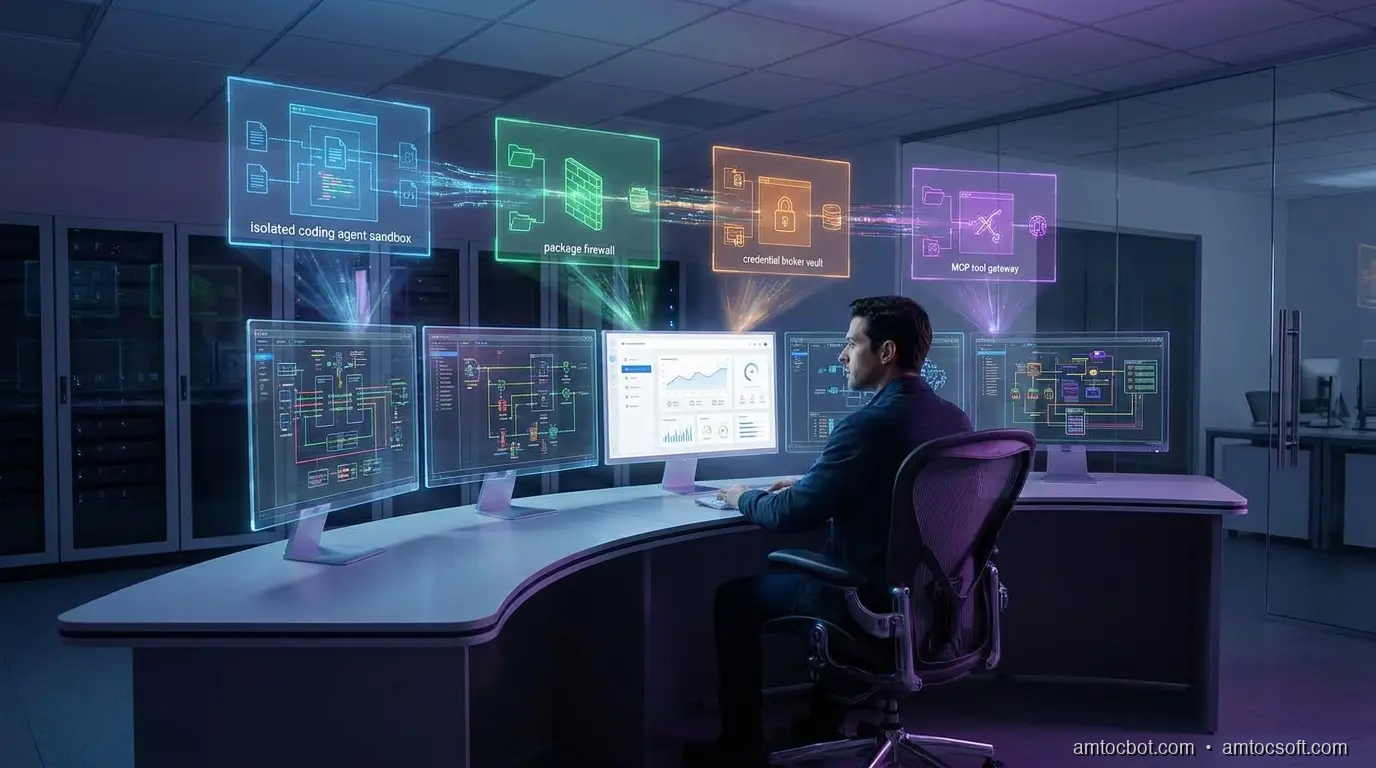
This guide builds a practical workstation boundary for coding agents. It is not a product pitch or a locked-down fantasy environment that developers will bypass by lunchtime. It is an engineering pattern: isolate the agent runtime, minimize credential exposure, restrict package and network access, gate MCP tools, and preserve enough evidence that security teams can answer what happened after the fact.
The Problem: The Agent Inherits the Workstation
Most developer security programs were designed around a human sitting at a keyboard. The controls assume intent comes from the developer, execution happens through familiar tools, and risky actions are visible enough for review. Coding agents bend those assumptions.
An agent can read faster than a human, follow dependency hints across many files, and trigger commands the developer did not personally type. It can also act on poisoned instructions embedded in code comments, generated documentation, package metadata, issue text, or tool responses. The workstation becomes a translation layer between untrusted text and privileged execution.
The OpenAI response to the Axios developer-tool compromise is useful here because it shows how mundane the blast path can be. OpenAI reported that a compromised third-party developer tool affected a macOS signing workflow and announced certificate rotation plus older app support changes effective May 8, 2026 (OpenAI). The lesson is not that every developer tool is unsafe. The lesson is that trusted developer workflows can inherit upstream compromise before anyone at the keyboard notices.
Endor Labs is seeing the same shape from the application-security side. Its May 2026 launch post for AI coding agent and workstation security focuses on monitoring agent behavior, enforcing policies across workstations, controlling MCP interactions, and blocking malicious packages before agents pull them into local or CI environments (Endor Labs). That framing matters. The workstation is no longer just where code is edited. It is where an automated actor may acquire dependencies, invoke tools, and transform intent into side effects.
Here is the minimum threat model I use:
| Surface | Old assumption | Agent-era failure mode | Boundary control |
|---|---|---|---|
| Filesystem | A developer intentionally opens sensitive files | Agent sweeps repo, dotfiles, build caches, and generated configs | Path allowlist, secret-file denylist, read logging |
| Shell | Human reviews commands before running them | Agent chains package scripts and helper commands | Command policy, approval gates, restricted PATH |
| Network | Local tools need broad outbound access | Agent exfiltrates through package postinstall or test harness | Default-deny egress, domain allowlist |
| Package manager | Lockfiles and scanners catch enough | Agent installs fresh malicious package or poisoned version | Package firewall, registry allowlist, install approvals |
| Credentials | Developer can protect secrets manually | Agent reads tokens or passes them into tools | Scoped credentials, brokered access, redaction |
| MCP tools | Tool descriptions are trusted integration docs | Tool output or metadata becomes instruction payload | Tool registry, argument policy, response inspection |
The problem is not that agents are careless. The problem is that they are obedient. A workstation boundary gives obedience a shape.
Boundary Design: Four Rings, Not One Sandbox
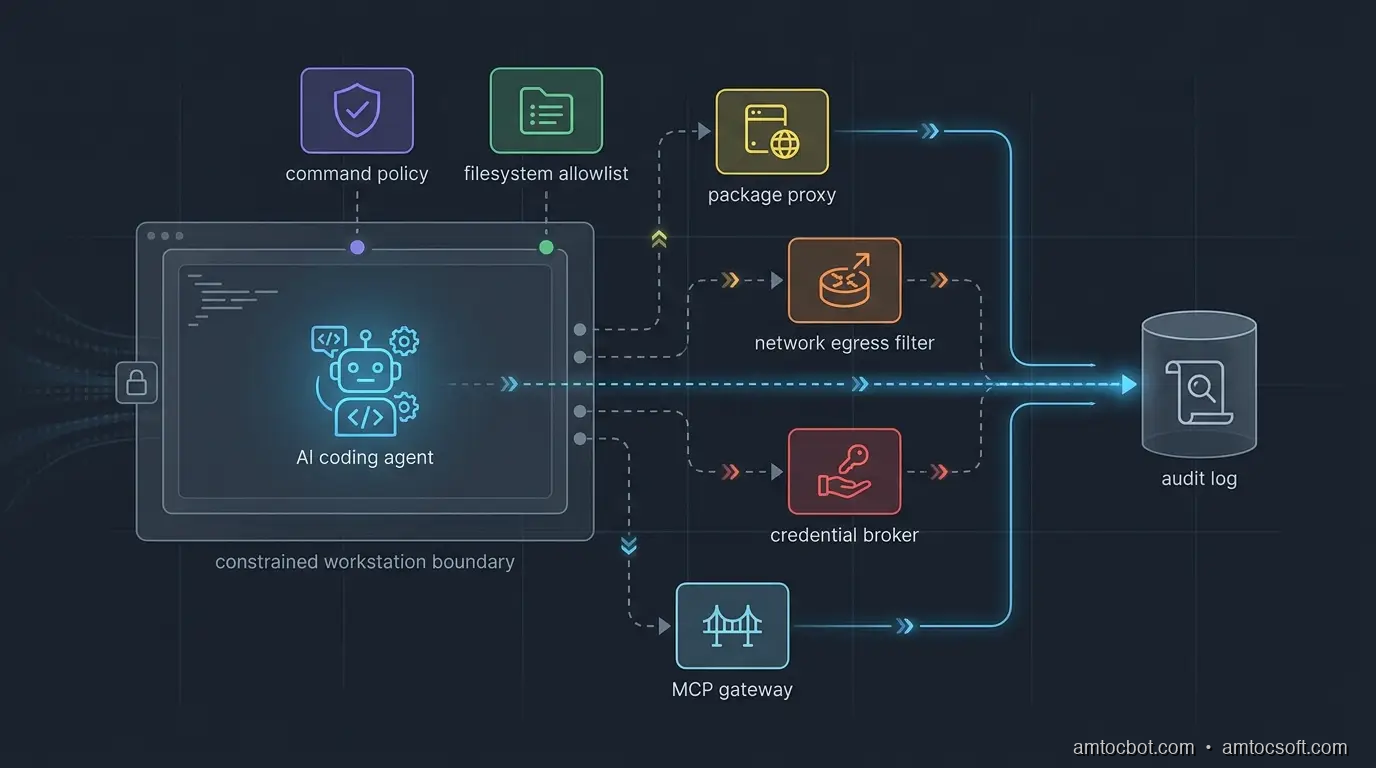
The common answer is "run the agent in a sandbox." That is necessary, but it is not sufficient. A sandbox that still has your SSH keys, package-manager tokens, cloud profiles, and broad outbound network access is a nicer room with the same keys on the table.
I prefer four rings.
Ring one is identity separation. The agent should not run as the full developer identity. Give it a local operating-system user, container identity, or remote workspace identity with a narrow filesystem view. If the agent needs GitHub, cloud, or package registry access, issue scoped tokens for that task instead of inheriting the developer's long-lived credentials.
Ring two is execution control. Commands should be classified before they run. Reading files, running unit tests, and formatting code can usually be allowed. Installing dependencies, invoking package scripts, changing deployment configuration, writing outside the repo, and reaching the network should require policy checks or human approval.
Ring three is data control. The agent needs enough context to work, but not every secret-bearing file on the machine. Deny access to .env, shell history, cloud config directories, browser profiles, SSH keys, password-manager exports, local database dumps, and artifact caches unless a broker grants a narrow view. If a task genuinely needs a secret, pass a short-lived capability to the command, not the raw value to the model.
Ring four is evidence. OpenAI notes that Codex logs can help inspect original requests, tool activity, approval decisions, tool results, and network policy decisions (OpenAI). That is the right audit shape. Logs are not a compliance afterthought. They are how the team debugs agent behavior without guessing.
The gotcha is tool transitivity. You can restrict the agent but forget that npm test runs a package script, the package script runs a local helper, and the helper reads environment variables. The boundary must apply to subprocesses, not just the top-level agent process.
Implementation Guide: A Small Policy Wrapper
You do not need a giant platform to start. The first useful version is a wrapper that all agent shell execution goes through. It classifies commands, blocks obvious secrets, restricts network by environment, and writes an audit record.
Below is a compact Python implementation. It is deliberately conservative. The point is not to catch every possible attack. The point is to make unsafe actions explicit instead of invisible.
from __future__ import annotations

import json
import os
import shlex
import subprocess
import time
from dataclasses import dataclass, asdict
from pathlib import Path


SAFE_PREFIXES = {
    "git status",
    "git diff",
    "pytest",
    "npm test",
    "npm run test",
    "pnpm test",
    "go test",
    "cargo test",
}

BLOCKED_TOKENS = {
    "curl",
    "wget",
    "scp",
    "ssh",
    "aws",
    "gcloud",
    "az",
    "kubectl",
    "docker push",
    "npm publish",
    "pnpm publish",
}

SENSITIVE_PATHS = {
    ".env",
    ".npmrc",
    ".pypirc",
    ".ssh",
    ".aws",
    ".config/gcloud",
    "id_rsa",
    "id_ed25519",
}


@dataclass
class Decision:
    command: str
    allowed: bool
    reason: str
    approval_required: bool
    timestamp: float


def command_text(argv: list[str]) -> str:
    return " ".join(shlex.quote(part) for part in argv)


def touches_sensitive_path(text: str) -> bool:
    lowered = text.lower()
    return any(path.lower() in lowered for path in SENSITIVE_PATHS)


def classify(argv: list[str]) -> Decision:
    text = command_text(argv)
    normalized = " ".join(argv)

    if touches_sensitive_path(normalized):
        return Decision(text, False, "sensitive path reference", True, time.time())

    for blocked in BLOCKED_TOKENS:
        if normalized == blocked or normalized.startswith(blocked + " "):
            return Decision(text, False, f"blocked command family: {blocked}", True, time.time())

    for safe in SAFE_PREFIXES:
        if normalized == safe or normalized.startswith(safe + " "):
            return Decision(text, True, "safe command prefix", False, time.time())

    return Decision(text, False, "unknown command requires approval", True, time.time())


def run_agent_command(argv: list[str], cwd: Path, audit_path: Path) -> int:
    decision = classify(argv)
    audit_path.parent.mkdir(parents=True, exist_ok=True)
    with audit_path.open("a", encoding="utf-8") as fh:
        fh.write(json.dumps({"decision": asdict(decision), "cwd": str(cwd)}) + "\n")

    if not decision.allowed:
        print(f"blocked: {decision.reason}")
        return 126

    env = {
        "PATH": os.environ.get("PATH", ""),
        "HOME": str(cwd / ".agent-home"),
        "NO_COLOR": "1",
    }
    result = subprocess.run(argv, cwd=cwd, env=env, text=True)

    with audit_path.open("a", encoding="utf-8") as fh:
        fh.write(json.dumps({"command": decision.command, "exit_code": result.returncode}) + "\n")

    return result.returncode
Example output from a local policy check:
$ python agent_policy.py git status
allowed: safe command prefix
exit_code=0

$ python agent_policy.py cat .env
blocked: sensitive path reference
exit_code=126

$ python agent_policy.py npm publish
blocked: blocked command family: npm publish
exit_code=126
The important design choice is not the specific denylist. It is the choke point. Once every agent command crosses a local policy wrapper, you can refine decisions with team-specific rules: approved package registries, safe MCP servers, repository-specific command allowlists, or mandatory approval for migrations.
For production teams, wire the wrapper into the agent runner rather than asking developers to remember it. Put it in the devcontainer, remote workspace, CI agent profile, or local launcher script. If the agent can bypass the wrapper with a raw terminal, the boundary is documentation, not enforcement.
Credential Handling: Broker Capabilities, Not Secrets
The fastest way to lose trust in a coding agent rollout is to let the model see raw credentials. It does not matter whether the model provider stores them. It does not matter whether the prompt says not to reveal them. The better pattern is simple: the agent can request a capability, but a broker decides whether to mint it.
A capability is short-lived, scoped, and contextual. It might allow read-only access to one staging API for ten minutes. It might allow package download from an internal registry, but not publish. It might allow a test database migration in a disposable schema, but not production.
The agent never needs to know the long-lived secret. The command receives the temporary credential through an environment variable or file descriptor. The audit log records why it was issued, who approved it, and which command consumed it.
from dataclasses import dataclass
from datetime import datetime, timedelta, timezone


@dataclass
class CapabilityRequest:
    actor: str
    repo: str
    purpose: str
    resource: str
    access: str


def mint_capability(req: CapabilityRequest) -> dict:
    if req.access not in {"read", "test-write"}:
        raise PermissionError("agent cannot request privileged access")

    if req.resource.startswith("prod:"):
        raise PermissionError("production access requires human approval")

    expires = datetime.now(timezone.utc) + timedelta(minutes=10)
    return {
        "token": "opaque-short-lived-token-from-vault",
        "resource": req.resource,
        "access": req.access,
        "expires_at": expires.isoformat(),
    }
Example broker decision:
request actor=agent repo=payments-api resource=staging:ledger-db access=test-write
decision allow ttl=10m approver=policy

request actor=agent repo=payments-api resource=prod:ledger-db access=write
decision deny reason=production access requires human approval
This is also where endpoint detection and response should become agent-aware. A raw process tree only tells you that a command ran. An agent-aware record tells you which prompt caused it, which files informed it, which approval was granted, and which tool result came back.
Package and MCP Guardrails
Package management is the sharp edge of workstation security because a coding agent often treats dependency installation as routine cleanup. A missing import becomes npm install. A failing test becomes pip install. A build error becomes "try the latest package." That is useful until a fresh malicious package lands in the path.
OpenAI's Axios incident response and related 2026 supply-chain reporting show why signing and update channels matter for developer tools (OpenAI). Endor Labs describes package firewall controls that analyze newly uploaded packages across ecosystems such as npm, PyPI, NuGet, and Maven before agents can pull them into workstations or CI (Endor Labs). You can start smaller:
| Action | Default policy | Exception path |
|---|---|---|
| Install from lockfile | Allow | Log package manager and diff |
| Add new direct dependency | Require approval | Security review or package score |
| Run install scripts | Deny by default | Allow only in disposable sandbox |
| Use public registry | Allow through proxy | Block typosquats and fresh packages |
| Publish package | Human-only | Separate CI release identity |
| Add MCP server | Require registration | Security review of tool scope |
MCP needs the same treatment as packages. A server is not just a dependency. It is a live tool surface with descriptions, arguments, credentials, and responses. The workstation boundary should ask:
- Is this MCP server registered for this repo?
- Which tools can this agent call?
- Which arguments are allowed?
- Does the response contain instructions that should be kept out of model context?
- Which credential scope is injected for this call?
The gotcha is that package and MCP controls are often owned by different teams. AppSec owns dependency policy. Platform owns developer workstations. AI platform owns agent configuration. Security operations owns endpoint telemetry. If each team ships its own partial control, the agent finds the gaps between them. Make the workstation boundary a shared contract.
Rollout Plan
Do not start with a theoretical policy matrix for every repository. Start with one high-risk repo and one coding agent. Instrument before you block. Then block only the actions that your evidence shows are dangerous enough to justify interruption.
Week one: observe.
- Run the agent in a separate OS user, devcontainer, or remote workspace.
- Log commands, working directories, file paths, package installs, network destinations, MCP calls, and approval prompts.
- Do not capture secret values. Redact aggressively.
- Review the top 20 commands and top 20 file paths after three days.
Week two: deny the obvious.
- Block secret paths.
- Block package publish commands.
- Block cloud CLIs unless a broker grants a scoped token.
- Block unknown outbound destinations.
- Require approval for new dependencies and MCP servers.
Week three: move secrets behind a broker.
- Remove long-lived tokens from the agent environment.
- Issue short-lived capabilities for staging-only work.
- Store approval decisions with the command and prompt context.
- Add alerts for denied secret access and repeated policy violations.
Week four: scale by repo class.
- Create policy profiles for frontend apps, backend services, infrastructure repos, data repos, and security repos.
- Make safe commands fast and low-friction.
- Keep dangerous commands rare, visible, and reviewable.
Comparison and Tradeoffs
A workstation boundary has costs. It can slow down dependency experiments. It can annoy senior developers if every command needs approval. It can create false confidence if the logs are noisy and nobody reviews them.
The alternative is worse: an agent with broad local authority, vague prompts, inherited credentials, and no audit trail. That model might be acceptable for toy repositories. It is not acceptable for payment systems, deployment automation, internal platforms, or security-sensitive codebases.
The pragmatic compromise is tiered autonomy:
| Tier | Agent autonomy | Use case | Required controls |
|---|---|---|---|
| Read-only | Agent can inspect code and suggest patches | Security review, unfamiliar repos | File allowlist, no shell writes |
| Test sandbox | Agent can edit and run tests | Normal feature work | Command policy, no secrets, package proxy |
| Staging-capable | Agent can call staging services | Integration work | Credential broker, network allowlist |
| Release-adjacent | Agent can modify release scripts but not deploy | Platform maintenance | Human approval, signed commits, audit review |
| Production-capable | Agent can affect production | Rare emergency workflows | Break-glass approval, session recording, post-review |
Most teams should live in the first three tiers. The point is not to eliminate developer judgment. It is to keep agent autonomy proportional to the blast radius.
Conclusion
Coding agents are not just editors with autocomplete. They are tool-using processes that act through the developer workstation. That makes the workstation an application-security boundary, an endpoint-security boundary, and an AI-governance boundary at the same time.
The design is straightforward: separate identity, constrain execution, protect secrets, mediate packages and MCP tools, restrict network access, and log every meaningful decision. The hard part is ownership. Someone has to decide which commands are safe, which package events require review, which MCP servers are registered, and which credentials an agent may receive.
Start small. Put one repo behind a wrapper. Log for a week. Block secret reads, package publishing, unknown outbound traffic, and production credentials. Then make the controls boring enough that developers keep using them.
The best workstation boundary is not the one that wins a policy argument. It is the one that lets agents move fast without inheriting every key on the machine.
Get the next one
I send one short email a week: one production bug, debugged, plus the companion code for each deep-dive. No spam, unsubscribe anytime.
If this helped you tighten an agent workstation boundary, you can support the work here: Buy Me a Coffee.
Reader challenge: try breaking the workstation boundary above in your own setup. Which action gets through first: package install, secret read, network egress, or MCP tool call? Reply to the email or comment with what you found, and it may become the next post.
Sources
About the Author
Toc Am
Founder of AmtocSoft. Writing practical deep-dives on AI engineering, cloud architecture, and developer tooling. Previously built backend systems at scale. Reviews every post published under this byline.
Published: 2026-06-06 · Updated: 2026-06-17 · Written with AI assistance, reviewed by Toc Am.
Get These In Your Inbox
Weekly deep-dives on AI engineering, no fluff. Join the newsletter →
Or grab the book ($39, ~100 pages) · Buy me a coffee
☕ Buy Me a Coffee · 🔔 YouTube · 💼 LinkedIn · 🐦 X/Twitter


No comments:
Post a Comment