Showing posts with label web-development. Show all posts

Friday, April 17, 2026

React Performance in 2026: Server Components, Caching, and Core Web Vitals

Hero image

Introduction

React 19 and Next.js 15 changed the performance model for React applications. Server Components render on the server with zero client JavaScript — not as a pre-render that ships a hydration bundle, but as true server-only components that never touch the client. The bundle size implications are significant: a markdown parser, a syntax highlighter, a data visualization library — all can run on the server and ship only HTML to the client.

But Server Components are one piece of a larger performance picture. This post covers the complete React performance toolkit for 2026: the Server Components mental model and when to use them, React 19's concurrent rendering and the use() hook, caching at multiple layers (component, request, data), bundle optimization with code splitting, and the Core Web Vitals metrics that determine how Google evaluates your app's user experience.

React Server Components: The Mental Model

Server Components execute on the server and return JSX that is serialized and streamed to the client. They can be async, access databases directly, read files, and use server-only secrets — because they never run in the browser.

// app/orders/page.tsx — Server Component (async by default in Next.js 15)
import { db } from '@/lib/db';
import { OrderList } from './order-list';  // Client Component

// This runs on the server — never shipped to the client
export default async function OrdersPage({ searchParams }: { 
  searchParams: { status?: string; cursor?: string } 
}) {
  // Direct database access — no API route needed
  const orders = await db.query(`
    SELECT id, total_cents, status, created_at
    FROM orders
    WHERE user_id = $1
    ${searchParams.status ? 'AND status = $2' : ''}
    ORDER BY created_at DESC
    LIMIT 20
  `, [getCurrentUserId(), searchParams.status].filter(Boolean));

  // The markdown parser runs on the server, ships only HTML
  // import 'marked' → 23KB stays on server, not in client bundle
  const formattedOrders = orders.map(order => ({
    ...order,
    total: formatCurrency(order.total_cents),
  }));

  return (
    <main>
      <h1>Your Orders</h1>
      {/* OrderList is a Client Component — receives serialized props */}
      <OrderList orders={formattedOrders} />
    </main>
  );
}
// app/orders/order-list.tsx — Client Component
'use client';  // directive marks this as a Client Component

import { useState } from 'react';

// This runs in the browser — has access to useState, event handlers, browser APIs
export function OrderList({ orders }: { orders: Order[] }) {
  const [expanded, setExpanded] = useState<string | null>(null);

  return (
    <ul>
      {orders.map(order => (
        <li key={order.id} onClick={() => setExpanded(order.id)}>
          {order.total} — {order.status}
          {expanded === order.id && <OrderDetail id={order.id} />}
        </li>
      ))}
    </ul>
  );
}

The key constraint: Server Components cannot use useState, useEffect, browser APIs, or event handlers. They can import Server-only modules (database clients, file system). Client Components can use all React hooks but cannot import server-only modules.

The correct mental model: push as much as possible up the tree into Server Components. Only the interactive pieces need to be Client Components. A product page with a static description, images, and price can be a Server Component; the "Add to Cart" button is the Client Component.

Architecture diagram

Next.js 15 Caching: Four Layers

Next.js 15 caches at four distinct layers. Understanding which cache applies when determines whether your users see stale data or make unnecessary server round-trips.

// Layer 1: Request memoization — deduplicates identical fetch() calls within one render
// Next.js automatically deduplicates fetch() calls with the same URL + options in one request
async function getUser(id: string) {
  const res = await fetch(`/api/users/${id}`, {
    // No cache option = request memoization only (within one render tree)
  });
  return res.json();
}
// Called in Header component AND in Profile component → one network request

// Layer 2: Data cache — persists between server requests
async function getProductPrice(productId: string) {
  const res = await fetch(`/api/prices/${productId}`, {
    next: { revalidate: 60 }  // cache for 60 seconds, then re-fetch
  });
  return res.json();
}

// Layer 3: Full route cache — HTML + RSC payload cached at the CDN
// export const revalidate = 3600;  // revalidate this page every hour (static)
// export const dynamic = 'force-dynamic';  // never cache (dynamic)

// Layer 4: Router cache — client-side, prefetched on <Link> hover
// Configured via prefetch prop on <Link>

// On-demand cache invalidation — clear specific cached data
import { revalidatePath, revalidateTag } from 'next/cache';

export async function updateProduct(id: string, data: ProductUpdate) {
  await db.products.update(id, data);
  revalidatePath(`/products/${id}`);       // clear page cache
  revalidateTag(`product-${id}`);         // clear all fetches tagged with this
}
// Tagging fetch requests for selective invalidation
async function getProduct(id: string) {
  const res = await fetch(`/api/products/${id}`, {
    next: { 
      revalidate: 3600,
      tags: [`product-${id}`, 'products']  // tag for selective invalidation
    }
  });
  return res.json();
}

// Invalidate all product caches on update
revalidateTag('products');  // clears all fetches tagged 'products'

The most important cache to understand is the data cache. It persists fetch() responses in the Next.js server's data store between requests. If 1,000 users request the same product page, the product data is fetched from the database once and served to all 1,000 users from cache until revalidate expires. Without this, each page request hits the database.

Streaming and Suspense: Progressive Loading

React 19's streaming renders parts of the page as they become ready, rather than waiting for all data before sending HTML. Combined with <Suspense>, this enables progressive loading — the shell arrives immediately, slower data streams in.

// app/dashboard/page.tsx
import { Suspense } from 'react';
import { OrderSummary } from './order-summary';
import { RecentActivity } from './recent-activity';
import { Skeleton } from '@/components/ui/skeleton';

export default function DashboardPage() {
  return (
    <div className="dashboard">
      {/* Fast: user info is cheap to fetch */}
      <UserHeader />

      {/* Slow: order summary requires aggregation query */}
      {/* Suspense boundary: render Skeleton while OrderSummary fetches */}
      <Suspense fallback={<Skeleton className="h-40 w-full" />}>
        <OrderSummary />   {/* async Server Component */}
      </Suspense>

      {/* Slower: activity feed requires multiple joins */}
      <Suspense fallback={<ActivitySkeleton />}>
        <RecentActivity />  {/* async Server Component */}
      </Suspense>
    </div>
  );
}

Without Suspense, the page waits for the slowest data fetch before sending any HTML. The Time to First Byte (TTFB) is bounded by the slowest query. With Suspense boundaries, the shell streams immediately (fast TTFB), and slower sections stream in as their data arrives. The user sees content progressively rather than a blank page.

React 19: use() Hook and Concurrent Features

React 19's use() hook reads a resource (Promise, Context) within a component, triggering Suspense:

'use client';
import { use, Suspense } from 'react';

function UserProfile({ userPromise }: { userPromise: Promise<User> }) {
  // use() reads the promise — suspends the component until resolved
  const user = use(userPromise);
  return <div>{user.name}</div>;
}

// Parent passes a promise (not an awaited value)
function ProfilePage() {
  const userPromise = fetchUser('123');  // starts fetch immediately

  return (
    <Suspense fallback={<Skeleton />}>
      <UserProfile userPromise={userPromise} />
    </Suspense>
  );
}

React 19 transitions with useTransition mark state updates as non-urgent, keeping the UI responsive during heavy re-renders:

'use client';
import { useTransition, useState } from 'react';

function SearchBar() {
  const [query, setQuery] = useState('');
  const [results, setResults] = useState([]);
  const [isPending, startTransition] = useTransition();

  function handleChange(e: React.ChangeEvent<HTMLInputElement>) {
    setQuery(e.target.value);  // urgent: update input immediately

    // Non-urgent: search results update can be interrupted by more typing
    startTransition(async () => {
      const data = await search(e.target.value);
      setResults(data);
    });
  }

  return (
    <>
      <input value={query} onChange={handleChange} />
      {isPending && <Spinner />}  {/* shows while transition is pending */}
      <ResultsList results={results} />
    </>
  );
}

The input stays responsive because setQuery is outside startTransition. The search results update is interruptible — if the user types faster, the pending search is abandoned for the new query.

Bundle Optimization: Code Splitting and Tree Shaking

Every kilobyte in the JavaScript bundle delays interactivity. The strategies:

// Dynamic imports: split rarely-used components out of the main bundle
import dynamic from 'next/dynamic';

// Rich text editor: 180KB — only load when user opens editor
const RichTextEditor = dynamic(
  () => import('@/components/rich-text-editor'),
  { 
    loading: () => <Textarea />,  // show placeholder while loading
    ssr: false                    // don't render on server (uses browser APIs)
  }
);

// Route-level code splitting: automatic in Next.js
// Each page/layout is its own bundle — users only load the code for the route they visit

// Analyzing bundle size:
// npx @next/bundle-analyzer
// Shows each module and its contribution to the bundle
// Tree shaking: import only what you use
// Bad: imports entire lodash (70KB)
import _ from 'lodash';
const unique = _.uniq(arr);

// Good: imports only the uniq function (3KB)
import uniq from 'lodash/uniq';

// Better: use native equivalents when available
const unique = [...new Set(arr)];  // 0KB — no import needed

// Barrel exports can defeat tree shaking:
// import { Button } from '@/components'  — may import all components
// import { Button } from '@/components/button'  — import only Button

Use @next/bundle-analyzer to identify large dependencies. Common culprits: moment.js (use date-fns), lodash (use native equivalents), full icon libraries (import specific icons).

Comparison visual

Core Web Vitals: The Metrics That Matter

Google's Core Web Vitals determine search ranking and user experience quality. Three metrics:

Largest Contentful Paint (LCP): time until the largest element (image or text block) in the viewport is rendered. Target: <2.5 seconds.

// LCP optimization: preload the hero image
// In Next.js: priority prop on the above-the-fold image
import Image from 'next/image';

<Image
  src="/hero.jpg"
  alt="Hero"
  width={1200}
  height={600}
  priority   // adds <link rel="preload"> — loads before other resources
  sizes="100vw"
/>

// Avoid: rendering LCP image from JavaScript (delays LCP)
// The browser can't preload images not in the initial HTML

Cumulative Layout Shift (CLS): total amount of unexpected layout shift. Target: <0.1.

// CLS: always specify width and height on images
// Without dimensions: image loads → page jumps
<Image
  src="/product.jpg"
  width={400}    // always specify
  height={300}   // always specify
  alt="Product"
/>

// CLS: reserve space for dynamic content
// Without min-height: content loads → page jumps
<div style={{ minHeight: '200px' }}>
  {isLoaded ? <DynamicContent /> : <Skeleton />}
</div>

// CLS: font loading — swap causes flash of unstyled text
// font-display: optional prevents layout shift at cost of first-load font miss

Interaction to Next Paint (INP): responsiveness to user interactions — replaced FID in 2024. Target: <200ms. Long tasks (>50ms on main thread) cause high INP.

// INP: move heavy computation off the main thread
// Web Workers run in a separate thread — don't block UI

// app/workers/search.worker.ts
self.onmessage = function(e) {
  const { query, items } = e.data;
  // Heavy fuzzy search — won't block the main thread
  const results = fuzzysearch(query, items);
  self.postMessage(results);
};

// Component
const worker = new Worker(new URL('./workers/search.worker.ts', import.meta.url));

function handleSearch(query: string) {
  worker.postMessage({ query, items: largeItemList });
  worker.onmessage = (e) => setResults(e.data);
}

// React 19: useOptimistic for instant UI feedback
const [optimisticCart, addToOptimisticCart] = useOptimistic(
  cart,
  (currentCart, newItem) => [...currentCart, newItem]
);
// Shows item immediately in cart while server request is in flight

Virtual Lists: Rendering 10,000 Items Without Freezing

Rendering 10,000 list items creates 10,000 DOM nodes. Scrolling through them is janky. Virtualization renders only the visible items — typically 20-50 — regardless of list length.

'use client';
import { useVirtualizer } from '@tanstack/react-virtual';
import { useRef } from 'react';

function OrderHistory({ orders }: { orders: Order[] }) {
  const parentRef = useRef<HTMLDivElement>(null);

  const virtualizer = useVirtualizer({
    count: orders.length,          // total number of items
    getScrollElement: () => parentRef.current,
    estimateSize: () => 64,        // estimated row height in pixels
    overscan: 5,                   // render 5 extra items above/below visible area
  });

  return (
    <div 
      ref={parentRef} 
      style={{ height: '600px', overflow: 'auto' }}
    >
      {/* Total scroll height = estimatedSize * count */}
      <div style={{ height: virtualizer.getTotalSize(), position: 'relative' }}>
        {virtualizer.getVirtualItems().map(virtualItem => (
          <div
            key={virtualItem.key}
            style={{
              position: 'absolute',
              top: 0,
              left: 0,
              width: '100%',
              height: `${virtualItem.size}px`,
              transform: `translateY(${virtualItem.start}px)`,  // position in virtual space
            }}
          >
            <OrderRow order={orders[virtualItem.index]} />
          </div>
        ))}
      </div>
    </div>
  );
}

With virtualization: 10,000 orders → 20 DOM nodes in the viewport. Without: 10,000 DOM nodes, 200MB+ memory, janky scrolling. The virtualizer maintains the full scroll height (so the scrollbar is accurate) but only renders and positions the visible rows.

React Query: Client-Side Data Fetching and Caching

For client-side data fetching (interactive dashboards, real-time updates), React Query (TanStack Query) provides caching, background refetch, optimistic updates, and stale-while-revalidate — without manual state management.

'use client';
import { useQuery, useMutation, useQueryClient } from '@tanstack/react-query';

function OrderDashboard() {
  const queryClient = useQueryClient();

  // Fetch with automatic caching, background refetch, and error state
  const { data: orders, isLoading, error } = useQuery({
    queryKey: ['orders', { status: 'pending' }],
    queryFn: () => api.orders.list({ status: 'pending' }),
    staleTime: 30_000,       // consider data fresh for 30 seconds
    refetchInterval: 60_000, // background refetch every 60 seconds
  });

  // Mutation with optimistic update
  const cancelMutation = useMutation({
    mutationFn: (orderId: string) => api.orders.cancel(orderId),

    // Optimistic update: update UI immediately before server confirms
    onMutate: async (orderId) => {
      await queryClient.cancelQueries({ queryKey: ['orders'] });
      const snapshot = queryClient.getQueryData(['orders', { status: 'pending' }]);

      queryClient.setQueryData(
        ['orders', { status: 'pending' }],
        (old: Order[]) => old.filter(o => o.id !== orderId)  // remove immediately
      );

      return { snapshot };  // for rollback
    },

    onError: (error, orderId, context) => {
      // Rollback on failure
      queryClient.setQueryData(['orders', { status: 'pending' }], context?.snapshot);
    },

    onSettled: () => {
      // Refetch to sync with server state
      queryClient.invalidateQueries({ queryKey: ['orders'] });
    },
  });

  if (isLoading) return <Skeleton />;
  if (error) return <ErrorMessage error={error} />;

  return (
    <ul>
      {orders?.map(order => (
        <OrderItem key={order.id} order={order}
          onCancel={() => cancelMutation.mutate(order.id)} />
      ))}
    </ul>
  );
}

The optimistic update pattern eliminates the perceived latency of server round-trips. The UI responds instantly; the server update happens in the background. If it fails, the UI rolls back. This is the difference between a snappy and a sluggish application at identical network latency.

Performance Measurement and Monitoring

Measuring before optimizing is essential — perceived performance issues often have non-obvious root causes.

// React DevTools Profiler: identifies slow components
// Enable in DevTools → Profiler tab → Record → Interact → Stop

// Measure render time in code
import { Profiler } from 'react';

<Profiler 
  id="OrderList"
  onRender={(id, phase, actualDuration) => {
    if (actualDuration > 16) {  // 16ms = 60fps threshold
      console.warn(`${id} took ${actualDuration}ms to render`);
    }
  }}
>
  <OrderList orders={orders} />
</Profiler>

// Web Vitals measurement in production
import { onLCP, onINP, onCLS } from 'web-vitals';

onLCP((metric) => {
  analytics.track('web_vital', {
    name: metric.name,
    value: metric.value,
    rating: metric.rating,  // 'good', 'needs-improvement', 'poor'
    id: metric.id,
  });
});

memo, useMemo, useCallback: prevent unnecessary re-renders, but each has overhead. Profile before applying — premature memoization adds complexity without benefit.

// memo: skip re-render if props haven't changed (reference equality)
const OrderItem = memo(function OrderItem({ order }: { order: Order }) {
  return <div>{order.total}</div>;
});

// useMemo: memoize expensive computation
const expensiveFilter = useMemo(
  () => orders.filter(o => complexFilter(o, criteria)),
  [orders, criteria]  // only recalculate when these change
);

// useCallback: stable function reference for memo'd children
const handleSelect = useCallback(
  (id: string) => setSelected(id),
  []  // stable forever — no dependencies
);

Rule: use memo on components that render frequently with the same props. Use useMemo for expensive computations that run on every render. Use useCallback for functions passed to memo'd children or used as useEffect dependencies.

Image and Font Optimization

Images and fonts are the two largest contributors to page weight in most React applications. Next.js Image handles most of this automatically.

import Image from 'next/image';

// Next.js Image automatically:
// - Serves WebP/AVIF (30-50% smaller than JPEG/PNG)
// - Generates multiple sizes (srcset for different viewports)
// - Lazy-loads below-the-fold images
// - Prevents layout shift (requires width + height or fill)
// - Caches at CDN edge

<Image
  src="/product-photo.jpg"
  alt="Product"
  width={800}
  height={600}
  sizes="(max-width: 768px) 100vw, (max-width: 1200px) 50vw, 800px"
  // sizes hint: tells browser which source to download at each viewport
/>

// Remote images: allow specific domains
// next.config.ts
const config: NextConfig = {
  images: {
    remotePatterns: [
      { hostname: 'cdn.example.com', protocol: 'https' }
    ],
  },
};

Font optimization with next/font: fonts are downloaded at build time, self-hosted, and loaded with font-display: optional to prevent layout shift. Google Fonts are fetched at build time — no runtime request to Google, no privacy leak, zero CLS from font swap.

// app/layout.tsx
import { Inter } from 'next/font/google';

const inter = Inter({
  subsets: ['latin'],
  display: 'swap',         // or 'optional' for zero CLS
  variable: '--font-inter',
  preload: true,
});

export default function RootLayout({ children }) {
  return (
    <html lang="en" className={inter.variable}>
      {children}
    </html>
  );
}

Self-hosted fonts with next/font/local eliminate the network round-trip to Google's CDN entirely — the font is served from your own CDN alongside your JavaScript.

Conclusion

React performance in 2026 is a layered problem. Server Components eliminate entire categories of client-side JavaScript — the correct architecture pushes UI logic to the server wherever possible. Next.js's four-layer caching model handles the data freshness vs. performance trade-off. Suspense boundaries enable progressive loading that makes slow pages feel fast. Core Web Vitals provide measurable targets (LCP <2.5s, CLS <0.1, INP <200ms) that tie engineering decisions to user experience outcomes.

The highest-impact changes in order: adopt Server Components for data-fetching components (largest bundle reduction), implement Suspense boundaries (fastest perceived loading), add priority to above-the-fold images (LCP improvement), move heavy computations to Web Workers (INP improvement), and use React Query's optimistic update pattern for interactive mutations. Each is a targeted fix for a measurable metric.

Measure before you optimize. Use Lighthouse (LCP, CLS, INP scores), React DevTools Profiler (slow component renders), and @next/bundle-analyzer (bundle contributors). A 20% LCP improvement and a 0.05 CLS reduction are concrete wins that translate directly to search ranking and user retention — not abstract "performance improvements."

Sources

About the Author

Toc Am

Founder of AmtocSoft. Writing practical deep-dives on AI engineering, cloud architecture, and developer tooling. Previously built backend systems at scale. Reviews every post published under this byline.

LinkedIn X / Twitter

Published: 2026-06-02 · Written with AI assistance, reviewed by Toc Am.

Get These In Your Inbox

Weekly deep-dives on AI engineering, no fluff. Join the newsletter →

Subscribe (free)

Or grab the book ($39, ~100 pages) · Buy me a coffee

Buy Me a Coffee · 🔔 YouTube · 💼 LinkedIn · 🐦 X/Twitter

Friday, April 10, 2026

TypeScript Surpassed Python: Why It's Now the #1 Language on GitHub

Hero: TypeScript adoption timeline showing growth from 2012-2026, a rising curve overtaking Python and JavaScript

Generated with Higgsfield GPT Image — 16:9

In 2025, something quietly historic happened in software development. TypeScript — Microsoft's typed superset of JavaScript — surpassed Python to become the #1 language on GitHub by repository count and active developer usage. The 2025 Stack Overflow Developer Survey confirmed it: TypeScript ranked first in usage among professional developers, with over 57% of respondents writing TypeScript regularly. Python held on at #2, still dominant in data science and machine learning, but no longer the overall king.

For many developers, this wasn't a surprise. For everyone else, it raised an obvious question: how did a language that didn't exist in 2010 become the most-used language on the planet's largest code-sharing platform in just 13 years?

The answer isn't really about TypeScript beating Python. These are two different languages solving different problems — Python wins in ML/AI, data pipelines, and scripting. TypeScript wins in the web, mobile backends, APIs, and full-stack applications. TypeScript's ascendance is really the story of JavaScript — the language that already ran everywhere — finally growing up. And it's the story of what happens when a language solves a real, expensive, daily-pain problem for millions of developers.

In this post we'll trace that journey: the problem TypeScript solved, how it grew, why it overtook everything, and what the TypeScript ecosystem looks like in 2026. Whether you're a JavaScript developer who's been avoiding types, a Python developer curious about the hype, or someone just starting out and wondering what to learn first — this post will give you the full picture.

The Problem TypeScript Solved

To understand why TypeScript won, you have to understand what JavaScript development at scale felt like before it.

JavaScript is dynamically typed. That means you never declare what type a variable is — you just create it and use it. For small scripts, this is wonderful. You can prototype fast, iterate quickly, and ship things without ceremony. This flexibility is exactly why JavaScript conquered the web.

But at scale, that same flexibility becomes a liability. When you're working in a codebase with hundreds of thousands of lines and dozens of engineers, the lack of types means:

  • You can't tell what a function expects just by reading its signature
  • Your editor can't help you autocomplete accurately
  • Bugs hide until runtime — often in production, on a user's machine, at 2am
  • Refactoring is terrifying — renaming a property means searching across files and hoping you didn't miss anything

Here's a concrete example. In JavaScript, this function looks fine:

// JavaScript — bug found at runtime
function processUser(user) {
  return user.name.toUpperCase(); // TypeError: Cannot read properties of null
}

// Called somewhere else in the codebase:
const result = processUser(null); // Crashes in production

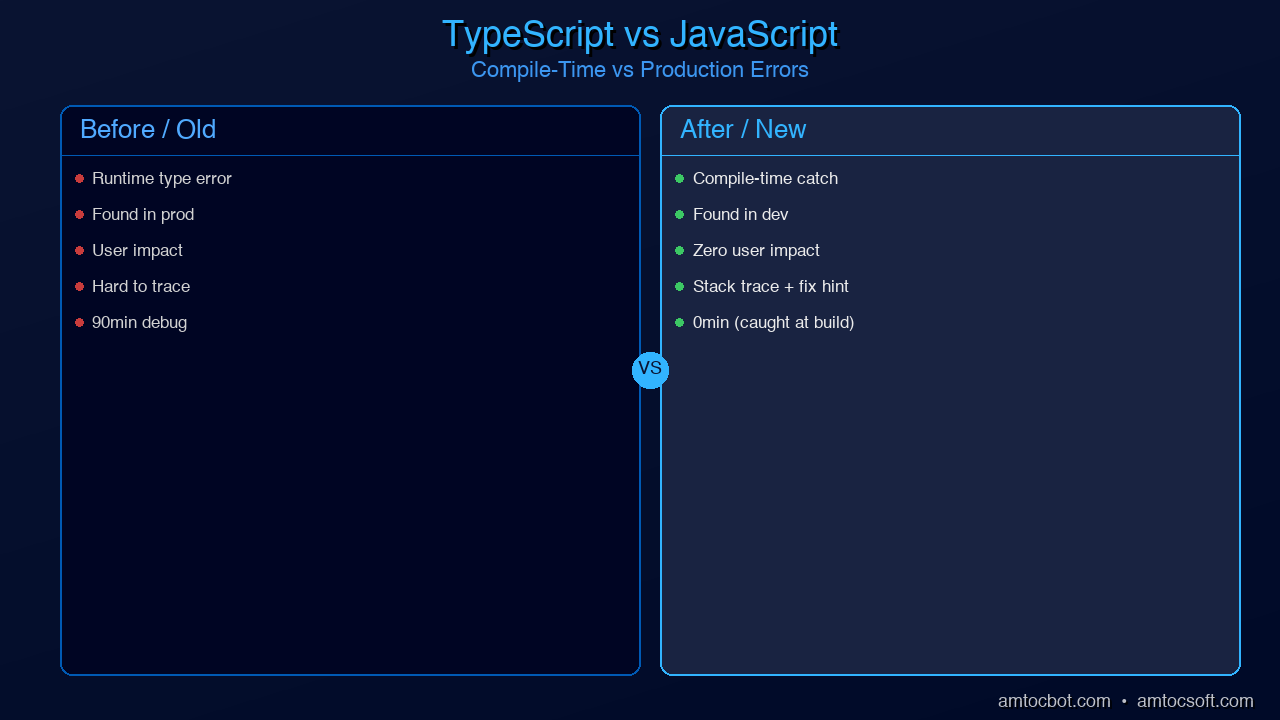
The bug is invisible until it explodes at runtime, possibly months after the code was written. With TypeScript:

// TypeScript — bug caught at compile time
interface User {
  name: string;
  email: string;
}

function processUser(user: User | null): string {
  if (!user) return 'Unknown';
  return user.name.toUpperCase(); // Safe — TypeScript forced the null check
}

// TypeScript error at the call site:
const result = processUser(null); // ✓ valid — handled
const result2 = processUser(undefined); // ✗ Type 'undefined' is not assignable to 'User | null'

TypeScript catches the class of bug where you pass the wrong thing to a function, forget to handle null, access a property that doesn't exist, or call a method on the wrong type — at compile time, before any code ever runs. In large teams, this category of bugs accounts for a huge share of production incidents.

The real-world impact of this shift has been documented extensively. Netflix migrated their frontend to TypeScript and reported a 15% reduction in production bugs related to type errors. Airbnb's engineering team published findings showing that 38% of their bugs in 2018 could have been prevented by TypeScript. Google has used TypeScript (or TypeScript-like tooling via the Closure Compiler) in large-scale projects for years. Slack, Asana, Lyft, Dropbox, and hundreds of other large engineering teams have shared similar migration stories.

The cost of JavaScript's type chaos isn't just in bugs — it's in developer confidence. In a typed codebase, you can rename a property and your editor instantly shows you every place that breaks. You can call a function and know exactly what it needs and what it returns. You can hand off code to another engineer and trust that the function signatures tell the truth. These productivity gains compound enormously at scale.

How TypeScript Grew

TypeScript's rise from Microsoft research project to #1 language in 13 years is one of the most remarkable adoption stories in programming language history. Here's the timeline:

timeline title TypeScript Adoption Timeline 2012 : Microsoft releases TypeScript 0.8 (open source) : Initial adoption in Microsoft internal projects 2015 : Angular 2 adopts TypeScript as default language : TypeScript 1.5 — major language features land 2016 : VS Code released — built with TypeScript, proves the tooling story 2017 : React adds official TypeScript JSX support (tsx files) : TypeScript enters top 10 on GitHub 2019 : Deno announces TypeScript as first-class language : Node.js community embraces TypeScript (ts-node, tsx) 2021 : TypeScript enters GitHub top 5 : Next.js, Remix default to TypeScript 2022 : The tipping point — TypeScript surpasses Java on GitHub : Bun ships with native TypeScript support 2024 : TypeScript surpasses JavaScript in new project creation 2025 : TypeScript becomes #1 on GitHub by repository count : Stack Overflow Survey: 57% professional usage

Each phase of growth had a catalyst. In 2012, Microsoft open-sourced TypeScript with a bet that JavaScript would eventually need types for enterprise development. The early adopters were Microsoft engineers and a small community of Angular developers.

The real inflection point came in 2015 when the Angular team announced that Angular 2 would be written in TypeScript and recommend TypeScript as the default for Angular applications. This dragged hundreds of thousands of enterprise Java and .NET developers — who were already comfortable with static typing — into the TypeScript ecosystem. Suddenly, TypeScript wasn't just a Microsoft curiosity; it was the language of enterprise web development.

The React community was slower to adopt. JavaScript with JSX was idiomatic React, and the community valued flexibility. But by 2017, as React applications grew into complex applications maintained by large teams, the pain of untyped JavaScript caught up. Facebook's Flow type checker had pointed the way, and TypeScript's superior tooling (especially in VS Code) made it the community's preferred choice.

By 2019, TypeScript had reached critical mass. The Deno runtime was announced with TypeScript as a first-class language. ts-node made it trivial to run TypeScript without a compilation step. New frameworks like tRPC were being built TypeScript-first. At this point, choosing JavaScript over TypeScript for a new project required conscious justification — TypeScript had become the default.

Why It Beat Python for #1

The framing of "TypeScript beat Python" is a bit misleading, and it's important to understand why. Python didn't lose a head-to-head competition. Python is still the dominant language for machine learning, data science, scientific computing, scripting, and automation. The 2025 Python ecosystem (PyTorch, NumPy, Pandas, scikit-learn, FastAPI, Jupyter) is thriving and continues to grow.

What happened is that TypeScript ate JavaScript's entire market — the frontend, the backend Node.js ecosystem, tooling, CLIs, mobile apps via React Native — and that market is simply enormous. The web runs on JavaScript. Every website you visit runs JavaScript in the browser. Every API that powers a mobile app is likely running Node.js. When TypeScript became the standard for JavaScript development, it inherited the largest runtime deployment surface area of any language.

Consider this: the JavaScript ecosystem alone has over 2 million packages on npm, making it the largest package registry in the world by orders of magnitude. TypeScript runs on all of it. When you add full-stack TypeScript — the ability to write type-safe code across browser, server, and database in a single language — the productivity advantage becomes overwhelming.

graph TD A[What should I learn first?] --> B{Primary goal?} B -->|Build websites / web apps| C[TypeScript] B -->|Machine learning / AI / data| D[Python] B -->|Mobile apps| E[TypeScript via React Native\nor Swift/Kotlin native] B -->|Backend APIs| F{Team preference?} F -->|JavaScript ecosystem| G[TypeScript / Node.js] F -->|Python ecosystem| H[Python / FastAPI] F -->|Performance critical| I[Go / Rust] C --> J[You can do full-stack:\nNext.js + tRPC + Prisma] D --> K[You can also do APIs:\nFastAPI + Pydantic] G --> J

The "lingua franca of the web" argument is perhaps the most compelling. If you want to build anything on the modern web stack — a website, a mobile app, a browser extension, a desktop app (Electron), a serverless function, a CLI tool — TypeScript can do it all. The ability to share types between frontend and backend with tRPC alone has converted entire teams from mixed-language stacks to full-stack TypeScript.

Python remains essential for ML/AI workloads, and that domain is booming. The result is a bifurcated world: TypeScript dominates general software development, Python dominates data and AI. Both are excellent choices. But by raw repository count and developer usage breadth, TypeScript's scope is now wider.

TypeScript's Killer Features in 2026

TypeScript has evolved significantly since its early days of "JavaScript with optional annotations." The current language in 2026 is a sophisticated type system that can express complex domain models with precision. Here are the features that separate competent TypeScript from expert TypeScript.

Structural Typing vs. Nominal Typing

TypeScript uses structural typing, which means type compatibility is determined by shape, not name. Two types are compatible if they have the same structure — even if they have different names.

interface Point2D {
  x: number;
  y: number;
}

interface Coordinate {
  x: number;
  y: number;
}

function plotPoint(p: Point2D): void {
  console.log(`(${p.x}, ${p.y})`);
}

const coord: Coordinate = { x: 3, y: 4 };
plotPoint(coord); // ✓ Works — same structure, TypeScript doesn't care about the name

This makes TypeScript incredibly flexible for working with third-party data and APIs — you don't need to import their types, you just need to describe the shape you care about.

Template Literal Types

Introduced in TypeScript 4.1, template literal types let you construct new string types at the type level. This is particularly powerful for type-safe event systems and API route definitions.

type HttpMethod = 'GET' | 'POST' | 'PUT' | 'DELETE';
type Route = '/users' | '/posts' | '/comments';

// Combines into all valid method+route combinations
type Endpoint = `${HttpMethod} ${Route}`;
// = "GET /users" | "GET /posts" | "GET /comments" | "POST /users" | ...

function fetchApi(endpoint: Endpoint): Promise<Response> {
  const [method, path] = endpoint.split(' ');
  return fetch(path, { method });
}

fetchApi('GET /users');    // ✓ Valid
fetchApi('PATCH /users');  // ✗ TypeScript error: 'PATCH /users' is not assignable to Endpoint

The satisfies Operator

Added in TypeScript 4.9, satisfies validates that an object literal satisfies a type without widening the inferred type. This solves a common problem with typed configuration objects.

type ColorScheme = 'red' | 'green' | 'blue';
type Theme = Record<string, ColorScheme | ColorScheme[]>;

// Before satisfies — you lose the specific string types
const oldTheme: Theme = {
  primary: 'red',
  secondary: 'blue',
  accent: ['green', 'red'],
};
// oldTheme.primary is typed as ColorScheme — you lose the literal 'red' type

// With satisfies — validates against Theme but keeps specific types
const theme = {
  primary: 'red',
  secondary: 'blue',
  accent: ['green', 'red'],
} satisfies Theme;

// theme.primary is typed as 'red' — the specific literal
// theme.accent is typed as ('green' | 'red')[] — the specific array type
console.log(theme.primary.toUpperCase()); // ✓ TypeScript knows it's a string

The using Keyword — Explicit Resource Management

TypeScript 5.2 added support for the TC39 Explicit Resource Management proposal via the using keyword. It's essentially RAII (Resource Acquisition Is Initialization) for JavaScript — automatic cleanup when a variable goes out of scope.

function createDatabaseConnection(): Disposable {
  const connection = openConnection(); // hypothetical DB connection

  return {
    [Symbol.dispose]() {
      connection.close();
      console.log('Connection closed automatically');
    }
  };
}

function processData(): void {
  using conn = createDatabaseConnection(); // automatically closed at end of block

  const result = conn.query('SELECT * FROM users');
  processResult(result);
  // conn is automatically disposed here — no finally block needed
}

// Async version with await using:
async function fetchAndProcess(): Promise<void> {
  await using conn = await createAsyncConnection();
  // conn is automatically awaited and disposed at end of scope
}

const Type Parameters

TypeScript 5.0 introduced const type parameters, which preserve literal types through generic inference — eliminating the need for as const assertions in many cases.

// Before const type parameters — type widens
function createConfig<T extends object>(config: T): T {
  return config;
}

const config1 = createConfig({ port: 3000, host: 'localhost' });
// config1 is typed as { port: number; host: string; } — literals lost

// With const type parameter — literals preserved
function createConstConfig<const T extends object>(config: T): T {
  return config;
}

const config2 = createConstConfig({ port: 3000, host: 'localhost' });
// config2 is typed as { port: 3000; host: 'localhost'; } — literals preserved!

These features together make TypeScript's type system one of the most expressive in any mainstream language. You're not just annotating types — you're using the type system to encode domain rules that the compiler enforces.

The TypeScript Ecosystem in 2026

The TypeScript ecosystem in 2026 is a cohesive, end-to-end story for building production applications. Here's how the pieces fit together.

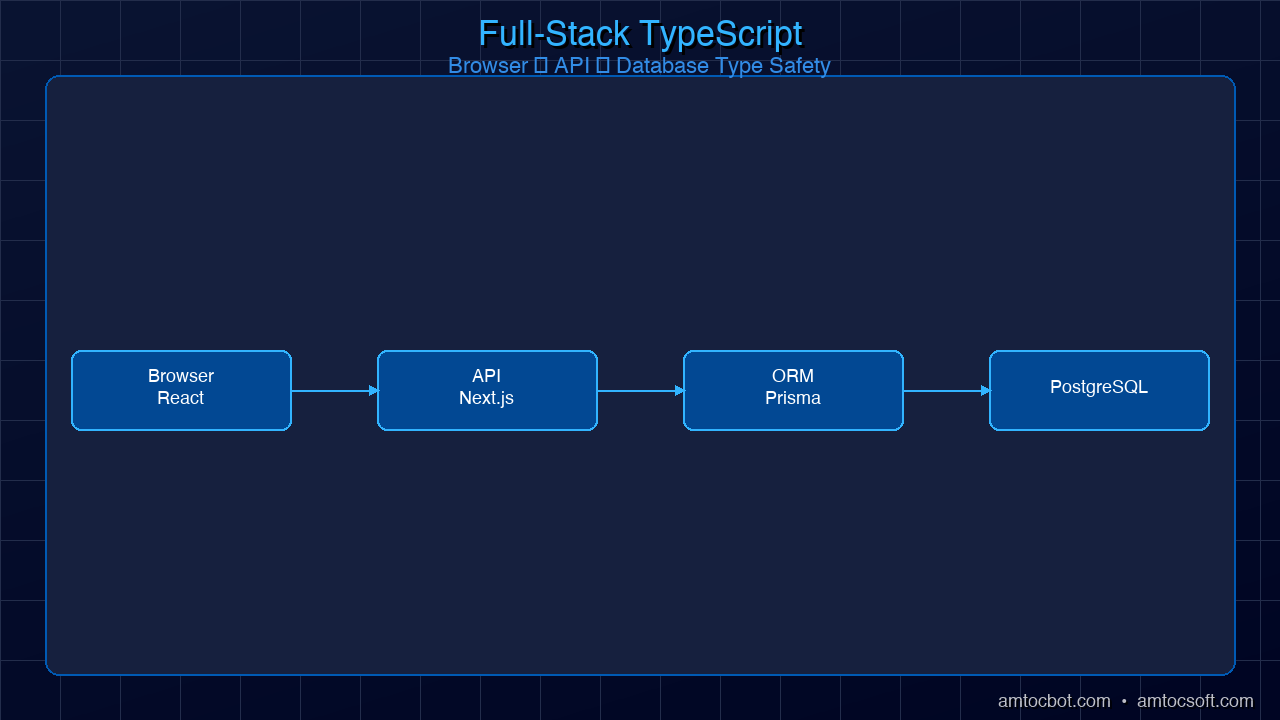
Architecture: Full-stack TypeScript ecosystem diagram showing browser through to database, with type safety arrows connecting each layer

Generated with Higgsfield GPT Image — 16:9

flowchart LR subgraph CLIENT["Browser / Mobile"] A[React / Next.js\nTypeScript components] B[Zod schemas\nForm validation] end subgraph SERVER["Server / Edge"] C[Next.js App Router\nor Hono / Fastify] D[tRPC Router\nEnd-to-end type safety] E[Zod validators\nRuntime validation] end subgraph DATA["Data Layer"] F[Prisma ORM\nType-safe queries] G[PostgreSQL\nor PlanetScale / Neon] end subgraph RUNTIME["Runtime Options"] H[Bun\nNative TS runtime] I[Deno 2\nPermission model] J[Node.js + tsx\nFor existing projects] end A -->|tRPC client\nfully typed API calls| D B -->|shared schemas| E D --> E D --> F F --> G C --> H C --> I C --> J

tRPC is arguably the most important innovation in the TypeScript ecosystem in the last few years. It lets you call server functions from the client with complete type safety — no API schema to maintain, no code generation, just TypeScript types flowing from server to client automatically. If you rename a server function, TypeScript immediately shows an error in every client call site.

Zod has become the standard for runtime schema validation. While TypeScript types disappear at runtime, Zod schemas validate real data at the API boundary — and Zod schemas can be derived from TypeScript types (or vice versa). This closes the loop between compile-time and runtime safety.

Prisma brings the same philosophy to database access. Prisma generates TypeScript types from your database schema, so your query results are fully typed. If a column doesn't exist, you get a TypeScript error. If you forget to select a required field, TypeScript warns you.

Bun and Deno 2 represent the new wave of TypeScript runtimes that eliminate the compilation step entirely. Bun executes TypeScript natively at speeds that match or exceed Node.js for most workloads, while also bundling, transpiling, and running tests. Deno 2 adds TypeScript support with an opinionated permission model and built-in toolchain.

effect-ts (now just "Effect") is the most ambitious TypeScript library in years — a full functional programming framework that brings algebraic effects, typed errors, dependency injection, and structured concurrency to TypeScript. It's not for every project, but for complex business logic with many failure modes, it provides a level of correctness that rivals Haskell.

Production Considerations

Strict Mode vs. Lax Mode

TypeScript ships with a tsconfig.json that controls how strict the type checking is. The most important setting is strict: true, which enables a bundle of strict checks:

{
  "compilerOptions": {
    "strict": true,                      // Enables all strict mode flags
    "noUncheckedIndexedAccess": true,    // Array access can return undefined
    "noImplicitReturns": true,           // All code paths must return
    "exactOptionalPropertyTypes": true   // Distinguish undefined from missing key
  }
}

If you're starting a new project, always enable strict: true. The additional safety pays dividends immediately. If you're migrating an existing JavaScript codebase, you can enable strict mode incrementally — start with noImplicitAny, then add strictNullChecks, and work your way up.

Build Times and Tooling

Plain tsc (the TypeScript compiler) does two things: type checking and code emission. For large projects, this can be slow. The modern solution is to separate them:

  • Use esbuild or swc for fast transpilation (strips types, emits JavaScript, no type checking)
  • Run tsc --noEmit in parallel or in CI for type checking only
  • Use Bun or tsx in development for zero-compilation TypeScript execution

Most modern bundlers (Vite, Turbopack, Webpack 5) use esbuild or swc under the hood for TypeScript transformation and only invoke the TypeScript compiler for type checking.

When NOT to Use TypeScript

TypeScript adds overhead in a few scenarios where it may not be worth it:

  • Quick scripts: A 50-line utility script that runs once is probably fine as JavaScript
  • Throwaway prototypes: If the code is going in the trash in 48 hours, types add friction
  • Configuration files: .js or .mjs config files (webpack config, etc.) are often clearer without types
  • Very small teams with shared context: If you wrote the entire codebase yourself and it's small, the benefits are real but smaller

For everything else — anything maintained over months, anything with multiple contributors, anything with non-trivial business logic — TypeScript's benefits far outweigh the initial setup cost.

Comparison: TypeScript vs JavaScript error detection — showing a bug caught at compile time vs the same bug surfacing as a production crash

Generated with Higgsfield GPT Image — 16:9

Declaration Files

When publishing a library, TypeScript uses .d.ts declaration files to expose type information to consumers. If you're publishing to npm, configure tsconfig.json with "declaration": true and "declarationMap": true. Most major packages now ship their own types, and the DefinitelyTyped (@types/*) ecosystem covers thousands of JavaScript packages that don't.

Conclusion

TypeScript's rise to #1 on GitHub isn't a fluke and it isn't hype. It's the result of solving a real, expensive problem — JavaScript's runtime type chaos — at exactly the right moment in history. As applications grew more complex, teams grew larger, and the JavaScript ecosystem expanded to cover more of the software development landscape, the need for typed JavaScript became undeniable.

The combination of factors that drove TypeScript's dominance: Microsoft's long-term commitment to the language, Angular's early adoption that brought enterprise developers in, React's eventual embrace that brought the frontend community, VS Code's tooling advantage, and the emergence of a full-stack TypeScript ecosystem (tRPC, Prisma, Zod, Next.js) that made TypeScript the rational default for new projects.

If you're a JavaScript developer who hasn't made the switch, 2026 is the time. The tooling is excellent, the learning curve is gentler than ever, and your career value increases immediately when you can say you write production TypeScript. If you're coming from Python, TypeScript is worth learning for web development work — the structural typing system is different from Python's type hints but just as capable.

Next up in this series: Advanced TypeScript Patterns Every Senior Developer Should Know in 2026 — where we go deep on discriminated unions, template literal types, branded types, and the patterns that turn "JavaScript with types" into a genuine design tool. Check out Blog 054 to continue.


AmtocSoft publishes deep-dive technical content on TypeScript, AI, security, and software engineering. Follow us on X @AmToc96282 or LinkedIn for new posts.

About the Author

Toc Am

Founder of AmtocSoft. Writing practical deep-dives on AI engineering, cloud architecture, and developer tooling. Previously built backend systems at scale. Reviews every post published under this byline.

LinkedIn X / Twitter

Published: 2026-04-10 · Written with AI assistance, reviewed by Toc Am.

Get These In Your Inbox

Weekly deep-dives on AI engineering, no fluff. Join the newsletter →

Subscribe (free)

Or grab the book ($39, ~100 pages) · Buy me a coffee

Buy Me a Coffee · 🔔 YouTube · 💼 LinkedIn · 🐦 X/Twitter

Bigger Is Not the Same as Better. The Job That Moved Is the Phone, Not the Lab.

Bigger is a plan. The phone is the receipt. The brief for this cycle is a question: does bigger always mean better in AI? The 2026 answer i...