Generated with Higgsfield GPT Image — 16:9
In 2025, something quietly historic happened in software development. TypeScript — Microsoft's typed superset of JavaScript — surpassed Python to become the #1 language on GitHub by repository count and active developer usage. The 2025 Stack Overflow Developer Survey confirmed it: TypeScript ranked first in usage among professional developers, with over 57% of respondents writing TypeScript regularly. Python held on at #2, still dominant in data science and machine learning, but no longer the overall king.
For many developers, this wasn't a surprise. For everyone else, it raised an obvious question: how did a language that didn't exist in 2010 become the most-used language on the planet's largest code-sharing platform in just 13 years?
The answer isn't really about TypeScript beating Python. These are two different languages solving different problems — Python wins in ML/AI, data pipelines, and scripting. TypeScript wins in the web, mobile backends, APIs, and full-stack applications. TypeScript's ascendance is really the story of JavaScript — the language that already ran everywhere — finally growing up. And it's the story of what happens when a language solves a real, expensive, daily-pain problem for millions of developers.
In this post we'll trace that journey: the problem TypeScript solved, how it grew, why it overtook everything, and what the TypeScript ecosystem looks like in 2026. Whether you're a JavaScript developer who's been avoiding types, a Python developer curious about the hype, or someone just starting out and wondering what to learn first — this post will give you the full picture.
The Problem TypeScript Solved
To understand why TypeScript won, you have to understand what JavaScript development at scale felt like before it.
JavaScript is dynamically typed. That means you never declare what type a variable is — you just create it and use it. For small scripts, this is wonderful. You can prototype fast, iterate quickly, and ship things without ceremony. This flexibility is exactly why JavaScript conquered the web.
But at scale, that same flexibility becomes a liability. When you're working in a codebase with hundreds of thousands of lines and dozens of engineers, the lack of types means:
- You can't tell what a function expects just by reading its signature
- Your editor can't help you autocomplete accurately
- Bugs hide until runtime — often in production, on a user's machine, at 2am
- Refactoring is terrifying — renaming a property means searching across files and hoping you didn't miss anything
Here's a concrete example. In JavaScript, this function looks fine:
// JavaScript — bug found at runtime
function processUser(user) {
  return user.name.toUpperCase(); // TypeError: Cannot read properties of null
}

// Called somewhere else in the codebase:
const result = processUser(null); // Crashes in production
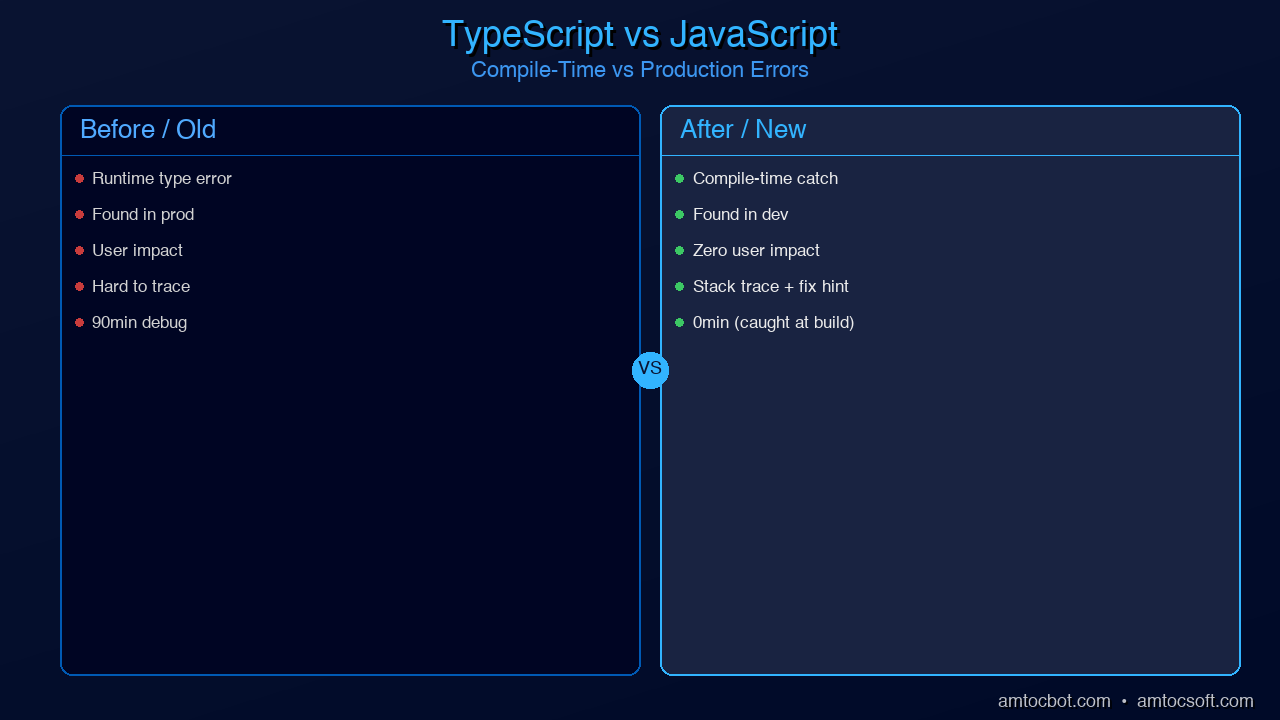
The bug is invisible until it explodes at runtime, possibly months after the code was written. With TypeScript:
// TypeScript — bug caught at compile time
interface User {
  name: string;
  email: string;
}

function processUser(user: User | null): string {
  if (!user) return 'Unknown';
  return user.name.toUpperCase(); // Safe — TypeScript forced the null check
}

// TypeScript error at the call site:
const result = processUser(null); // ✓ valid — handled
const result2 = processUser(undefined); // ✗ Type 'undefined' is not assignable to 'User | null'
TypeScript catches the class of bug where you pass the wrong thing to a function, forget to handle null, access a property that doesn't exist, or call a method on the wrong type — at compile time, before any code ever runs. In large teams, this category of bugs accounts for a huge share of production incidents.
The real-world impact of this shift has been documented extensively. Netflix migrated their frontend to TypeScript and reported a 15% reduction in production bugs related to type errors. Airbnb's engineering team published findings showing that 38% of their bugs in 2018 could have been prevented by TypeScript. Google has used TypeScript (or TypeScript-like tooling via the Closure Compiler) in large-scale projects for years. Slack, Asana, Lyft, Dropbox, and hundreds of other large engineering teams have shared similar migration stories.
The cost of JavaScript's type chaos isn't just in bugs — it's in developer confidence. In a typed codebase, you can rename a property and your editor instantly shows you every place that breaks. You can call a function and know exactly what it needs and what it returns. You can hand off code to another engineer and trust that the function signatures tell the truth. These productivity gains compound enormously at scale.
How TypeScript Grew
TypeScript's rise from Microsoft research project to #1 language in 13 years is one of the most remarkable adoption stories in programming language history. Here's the timeline:
Each phase of growth had a catalyst. In 2012, Microsoft open-sourced TypeScript with a bet that JavaScript would eventually need types for enterprise development. The early adopters were Microsoft engineers and a small community of Angular developers.
The real inflection point came in 2015 when the Angular team announced that Angular 2 would be written in TypeScript and recommend TypeScript as the default for Angular applications. This dragged hundreds of thousands of enterprise Java and .NET developers — who were already comfortable with static typing — into the TypeScript ecosystem. Suddenly, TypeScript wasn't just a Microsoft curiosity; it was the language of enterprise web development.
The React community was slower to adopt. JavaScript with JSX was idiomatic React, and the community valued flexibility. But by 2017, as React applications grew into complex applications maintained by large teams, the pain of untyped JavaScript caught up. Facebook's Flow type checker had pointed the way, and TypeScript's superior tooling (especially in VS Code) made it the community's preferred choice.
By 2019, TypeScript had reached critical mass. The Deno runtime was announced with TypeScript as a first-class language. ts-node made it trivial to run TypeScript without a compilation step. New frameworks like tRPC were being built TypeScript-first. At this point, choosing JavaScript over TypeScript for a new project required conscious justification — TypeScript had become the default.
Why It Beat Python for #1
The framing of "TypeScript beat Python" is a bit misleading, and it's important to understand why. Python didn't lose a head-to-head competition. Python is still the dominant language for machine learning, data science, scientific computing, scripting, and automation. The 2025 Python ecosystem (PyTorch, NumPy, Pandas, scikit-learn, FastAPI, Jupyter) is thriving and continues to grow.
What happened is that TypeScript ate JavaScript's entire market — the frontend, the backend Node.js ecosystem, tooling, CLIs, mobile apps via React Native — and that market is simply enormous. The web runs on JavaScript. Every website you visit runs JavaScript in the browser. Every API that powers a mobile app is likely running Node.js. When TypeScript became the standard for JavaScript development, it inherited the largest runtime deployment surface area of any language.
Consider this: the JavaScript ecosystem alone has over 2 million packages on npm, making it the largest package registry in the world by orders of magnitude. TypeScript runs on all of it. When you add full-stack TypeScript — the ability to write type-safe code across browser, server, and database in a single language — the productivity advantage becomes overwhelming.
The "lingua franca of the web" argument is perhaps the most compelling. If you want to build anything on the modern web stack — a website, a mobile app, a browser extension, a desktop app (Electron), a serverless function, a CLI tool — TypeScript can do it all. The ability to share types between frontend and backend with tRPC alone has converted entire teams from mixed-language stacks to full-stack TypeScript.
Python remains essential for ML/AI workloads, and that domain is booming. The result is a bifurcated world: TypeScript dominates general software development, Python dominates data and AI. Both are excellent choices. But by raw repository count and developer usage breadth, TypeScript's scope is now wider.
TypeScript's Killer Features in 2026
TypeScript has evolved significantly since its early days of "JavaScript with optional annotations." The current language in 2026 is a sophisticated type system that can express complex domain models with precision. Here are the features that separate competent TypeScript from expert TypeScript.
Structural Typing vs. Nominal Typing
TypeScript uses structural typing, which means type compatibility is determined by shape, not name. Two types are compatible if they have the same structure — even if they have different names.
interface Point2D {
  x: number;
  y: number;
}

interface Coordinate {
  x: number;
  y: number;
}

function plotPoint(p: Point2D): void {
  console.log(`(${p.x}, ${p.y})`);
}

const coord: Coordinate = { x: 3, y: 4 };
plotPoint(coord); // ✓ Works — same structure, TypeScript doesn't care about the name
This makes TypeScript incredibly flexible for working with third-party data and APIs — you don't need to import their types, you just need to describe the shape you care about.
Template Literal Types
Introduced in TypeScript 4.1, template literal types let you construct new string types at the type level. This is particularly powerful for type-safe event systems and API route definitions.
type HttpMethod = 'GET' | 'POST' | 'PUT' | 'DELETE';
type Route = '/users' | '/posts' | '/comments';

// Combines into all valid method+route combinations
type Endpoint = `${HttpMethod} ${Route}`;
// = "GET /users" | "GET /posts" | "GET /comments" | "POST /users" | ...

function fetchApi(endpoint: Endpoint): Promise<Response> {
  const [method, path] = endpoint.split(' ');
  return fetch(path, { method });
}

fetchApi('GET /users');    // ✓ Valid
fetchApi('PATCH /users');  // ✗ TypeScript error: 'PATCH /users' is not assignable to Endpoint
The satisfies Operator
Added in TypeScript 4.9, satisfies validates that an object literal satisfies a type without widening the inferred type. This solves a common problem with typed configuration objects.
type ColorScheme = 'red' | 'green' | 'blue';
type Theme = Record<string, ColorScheme | ColorScheme[]>;

// Before satisfies — you lose the specific string types
const oldTheme: Theme = {
  primary: 'red',
  secondary: 'blue',
  accent: ['green', 'red'],
};
// oldTheme.primary is typed as ColorScheme — you lose the literal 'red' type

// With satisfies — validates against Theme but keeps specific types
const theme = {
  primary: 'red',
  secondary: 'blue',
  accent: ['green', 'red'],
} satisfies Theme;

// theme.primary is typed as 'red' — the specific literal
// theme.accent is typed as ('green' | 'red')[] — the specific array type
console.log(theme.primary.toUpperCase()); // ✓ TypeScript knows it's a string
The using Keyword — Explicit Resource Management
TypeScript 5.2 added support for the TC39 Explicit Resource Management proposal via the using keyword. It's essentially RAII (Resource Acquisition Is Initialization) for JavaScript — automatic cleanup when a variable goes out of scope.
function createDatabaseConnection(): Disposable {
  const connection = openConnection(); // hypothetical DB connection

  return {
    [Symbol.dispose]() {
      connection.close();
      console.log('Connection closed automatically');
    }
  };
}

function processData(): void {
  using conn = createDatabaseConnection(); // automatically closed at end of block

  const result = conn.query('SELECT * FROM users');
  processResult(result);
  // conn is automatically disposed here — no finally block needed
}

// Async version with await using:
async function fetchAndProcess(): Promise<void> {
  await using conn = await createAsyncConnection();
  // conn is automatically awaited and disposed at end of scope
}
const Type Parameters
TypeScript 5.0 introduced const type parameters, which preserve literal types through generic inference — eliminating the need for as const assertions in many cases.
// Before const type parameters — type widens
function createConfig<T extends object>(config: T): T {
  return config;
}

const config1 = createConfig({ port: 3000, host: 'localhost' });
// config1 is typed as { port: number; host: string; } — literals lost

// With const type parameter — literals preserved
function createConstConfig<const T extends object>(config: T): T {
  return config;
}

const config2 = createConstConfig({ port: 3000, host: 'localhost' });
// config2 is typed as { port: 3000; host: 'localhost'; } — literals preserved!
These features together make TypeScript's type system one of the most expressive in any mainstream language. You're not just annotating types — you're using the type system to encode domain rules that the compiler enforces.
The TypeScript Ecosystem in 2026
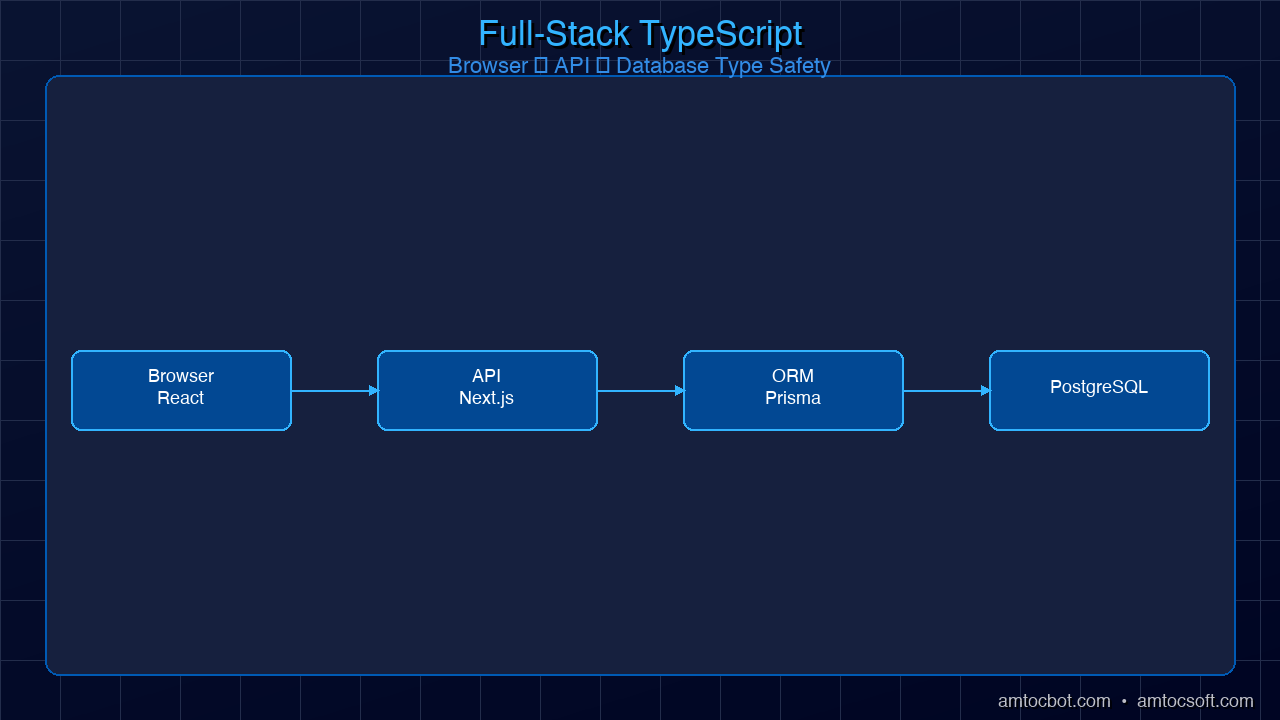
The TypeScript ecosystem in 2026 is a cohesive, end-to-end story for building production applications. Here's how the pieces fit together.
Generated with Higgsfield GPT Image — 16:9
tRPC is arguably the most important innovation in the TypeScript ecosystem in the last few years. It lets you call server functions from the client with complete type safety — no API schema to maintain, no code generation, just TypeScript types flowing from server to client automatically. If you rename a server function, TypeScript immediately shows an error in every client call site.
Zod has become the standard for runtime schema validation. While TypeScript types disappear at runtime, Zod schemas validate real data at the API boundary — and Zod schemas can be derived from TypeScript types (or vice versa). This closes the loop between compile-time and runtime safety.
Prisma brings the same philosophy to database access. Prisma generates TypeScript types from your database schema, so your query results are fully typed. If a column doesn't exist, you get a TypeScript error. If you forget to select a required field, TypeScript warns you.
Bun and Deno 2 represent the new wave of TypeScript runtimes that eliminate the compilation step entirely. Bun executes TypeScript natively at speeds that match or exceed Node.js for most workloads, while also bundling, transpiling, and running tests. Deno 2 adds TypeScript support with an opinionated permission model and built-in toolchain.
effect-ts (now just "Effect") is the most ambitious TypeScript library in years — a full functional programming framework that brings algebraic effects, typed errors, dependency injection, and structured concurrency to TypeScript. It's not for every project, but for complex business logic with many failure modes, it provides a level of correctness that rivals Haskell.
Production Considerations
Strict Mode vs. Lax Mode
TypeScript ships with a tsconfig.json that controls how strict the type checking is. The most important setting is strict: true, which enables a bundle of strict checks:
{
  "compilerOptions": {
    "strict": true,                      // Enables all strict mode flags
    "noUncheckedIndexedAccess": true,    // Array access can return undefined
    "noImplicitReturns": true,           // All code paths must return
    "exactOptionalPropertyTypes": true   // Distinguish undefined from missing key
  }
}
If you're starting a new project, always enable strict: true. The additional safety pays dividends immediately. If you're migrating an existing JavaScript codebase, you can enable strict mode incrementally — start with noImplicitAny, then add strictNullChecks, and work your way up.
Build Times and Tooling
Plain tsc (the TypeScript compiler) does two things: type checking and code emission. For large projects, this can be slow. The modern solution is to separate them:
- Use esbuild or swc for fast transpilation (strips types, emits JavaScript, no type checking)
- Run
tsc --noEmitin parallel or in CI for type checking only - Use Bun or tsx in development for zero-compilation TypeScript execution
Most modern bundlers (Vite, Turbopack, Webpack 5) use esbuild or swc under the hood for TypeScript transformation and only invoke the TypeScript compiler for type checking.
When NOT to Use TypeScript
TypeScript adds overhead in a few scenarios where it may not be worth it:
- Quick scripts: A 50-line utility script that runs once is probably fine as JavaScript
- Throwaway prototypes: If the code is going in the trash in 48 hours, types add friction
- Configuration files:
.jsor.mjsconfig files (webpack config, etc.) are often clearer without types - Very small teams with shared context: If you wrote the entire codebase yourself and it's small, the benefits are real but smaller
For everything else — anything maintained over months, anything with multiple contributors, anything with non-trivial business logic — TypeScript's benefits far outweigh the initial setup cost.
Generated with Higgsfield GPT Image — 16:9
Declaration Files
When publishing a library, TypeScript uses .d.ts declaration files to expose type information to consumers. If you're publishing to npm, configure tsconfig.json with "declaration": true and "declarationMap": true. Most major packages now ship their own types, and the DefinitelyTyped (@types/*) ecosystem covers thousands of JavaScript packages that don't.
Conclusion
TypeScript's rise to #1 on GitHub isn't a fluke and it isn't hype. It's the result of solving a real, expensive problem — JavaScript's runtime type chaos — at exactly the right moment in history. As applications grew more complex, teams grew larger, and the JavaScript ecosystem expanded to cover more of the software development landscape, the need for typed JavaScript became undeniable.
The combination of factors that drove TypeScript's dominance: Microsoft's long-term commitment to the language, Angular's early adoption that brought enterprise developers in, React's eventual embrace that brought the frontend community, VS Code's tooling advantage, and the emergence of a full-stack TypeScript ecosystem (tRPC, Prisma, Zod, Next.js) that made TypeScript the rational default for new projects.
If you're a JavaScript developer who hasn't made the switch, 2026 is the time. The tooling is excellent, the learning curve is gentler than ever, and your career value increases immediately when you can say you write production TypeScript. If you're coming from Python, TypeScript is worth learning for web development work — the structural typing system is different from Python's type hints but just as capable.
Next up in this series: Advanced TypeScript Patterns Every Senior Developer Should Know in 2026 — where we go deep on discriminated unions, template literal types, branded types, and the patterns that turn "JavaScript with types" into a genuine design tool. Check out Blog 054 to continue.
AmtocSoft publishes deep-dive technical content on TypeScript, AI, security, and software engineering. Follow us on X @AmToc96282 or LinkedIn for new posts.
About the Author
Toc Am
Founder of AmtocSoft. Writing practical deep-dives on AI engineering, cloud architecture, and developer tooling. Previously built backend systems at scale. Reviews every post published under this byline.
Published: 2026-04-10 · Written with AI assistance, reviewed by Toc Am.
Get These In Your Inbox
Weekly deep-dives on AI engineering, no fluff. Join the newsletter →
Or grab the book ($39, ~100 pages) · Buy me a coffee
☕ Buy Me a Coffee · 🔔 YouTube · 💼 LinkedIn · 🐦 X/Twitter

No comments:
Post a Comment