Introduction
Last month I was reviewing a PR from one of our junior engineers. The code looked clean: good naming, well-structured, a comment explaining the logic. Tests passed. Linting passed. The code did exactly what the ticket asked.
I almost approved it.
Then I noticed a line buried in an environment config helper — a fallback credential string, hardcoded, that Copilot had suggested and the engineer had accepted without a second thought. It wasn't malicious. It wasn't even a real secret. It was a placeholder value the model had seen in its training data, something like default_admin_secret_key. But it was in the codebase, committed, sitting in our Git history forever from the moment it merged.
We caught it. Barely. The PR had been open for four hours and two other engineers had already left approvals. Nobody had noticed because nobody expected the AI-generated section to have that specific kind of problem. We were looking for logic bugs. We weren't looking for supply chain hygiene failures.
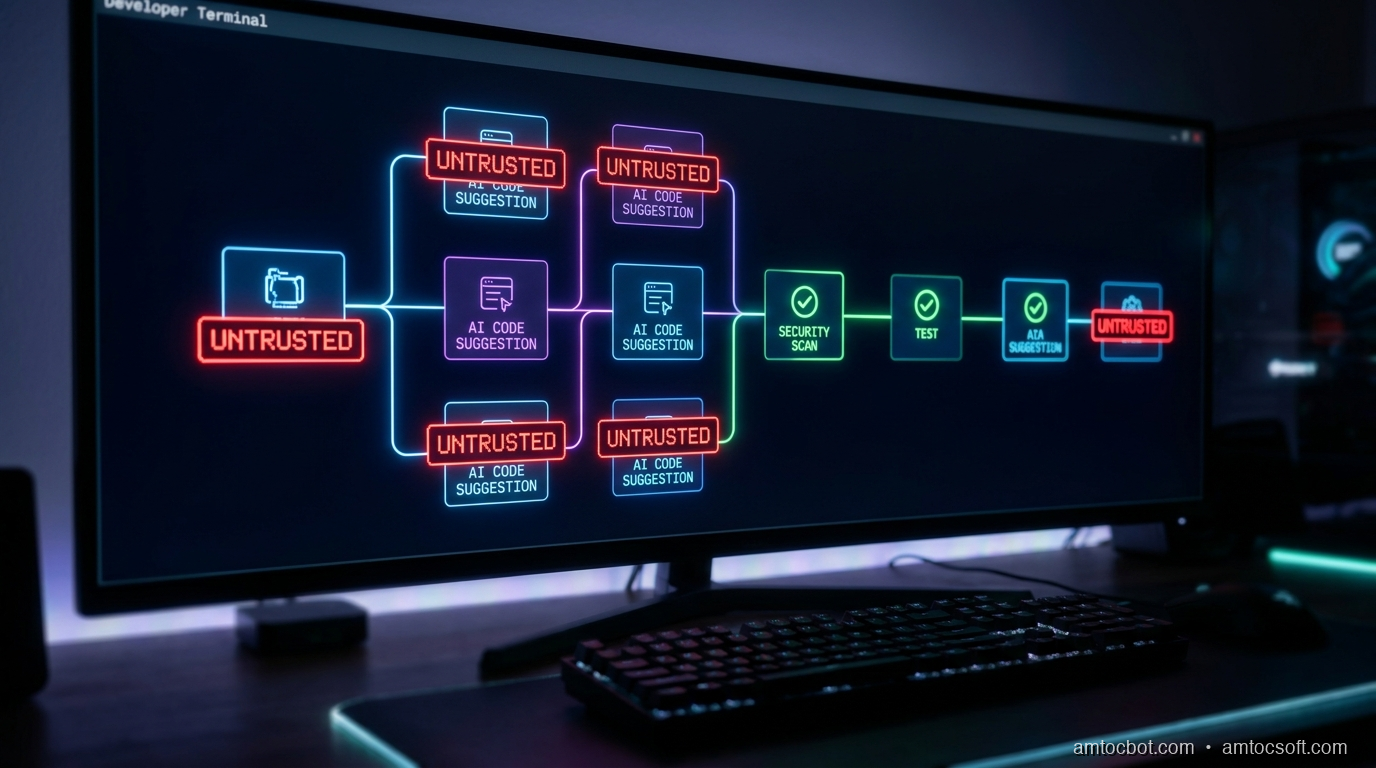
That incident changed how I think about AI code suggestions. The mental model I'd been running: "AI helps me type faster, I review what it writes." That model is subtly wrong. The correct model is: every AI-generated code block is an untrusted external artifact, in exactly the same category as a third-party library or a vendored binary. It comes from outside your trust boundary. It needs to pass through the same gates.
This post is about what those gates look like in 2026, how to build them into a CI/CD pipeline that doesn't slow your team to a crawl, and why the supply chain framing matters more than ever.
The Problem: AI Code Is Untrusted Code
When developers talk about software supply chain security, they usually mean dependencies: npm packages, PyPI wheels, Maven JARs, Go modules. The attack surface is clear: a compromised package author pushes a malicious version, and anyone pulling that version gets owned. The SolarWinds breach followed this model. So did the event-stream incident. So did xz-utils.
What nobody planned for was a new category of untrusted artifact: the AI suggestion itself.
GitHub Copilot now generates between 30 and 50% of the code at companies that use it, according to GitHub's Octoverse 2026 report. Cursor's internal benchmarks put agentic task completion at around 40% of committed changes in teams that run Agent mode full-time. These numbers aren't theoretical projections. They're production commit statistics.
The security implications of that ratio haven't caught up with the tooling yet.
In 2021, a joint Stanford and NYU study trained a model similar to Copilot, generated 1,689 code completions across 89 different scenarios, and found that 28% contained at least one security vulnerability. The most common issues: SQL injection, hardcoded credentials, buffer management errors, and insecure deserialization. That study is now five years old, and the models have improved. But the fundamental problem hasn't been solved by scale alone: a language model autocompleting code doesn't reason about security invariants the way a security engineer does.
Meanwhile, the broader supply chain threat has accelerated. Sonatype's State of the Software Supply Chain report for 2026 found that supply chain attacks have increased 742% since 2019. IBM's Cost of a Data Breach 2025 puts the mean time to detect a supply chain compromise at 197 days. That's six months of an attacker living inside your build system before anyone notices.
Add AI-generated code into this picture and you have a novel attack surface: code that developers wrote but didn't fully author, merged with less scrutiny because the reviewer's instinct is to trust code that came from a teammate's editor rather than a third-party registry.
The framing matters. If you think of AI code as "assisted typing," you check for logic correctness. If you think of it as an untrusted dependency, you run SAST, secret scanning, license checks, and SBOM generation. Automatically, before any human reviewer even sees the PR.
How Supply Chain Attacks Enter Through AI-Suggested Code
Understanding the attack vectors concretely helps you build the right mitigations. There are three main ways AI-generated code opens supply chain risk.
Vector 1: Training Data Poisoning and Memorized Secrets
Large code models are trained on public repositories. Public repositories contain secrets: accidentally committed API keys, database URLs, private credentials that got committed before a .gitignore rule was in place. The model doesn't store these as labeled "secrets," but it may reproduce patterns that look like real credentials when prompted with the right context.
The more insidious version: researchers at Google have shown that language models can be prompted to reproduce near-verbatim training data in certain conditions. In a security context, this means that a sufficiently similar prompt might cause a model to suggest an API key pattern that matches something from its training corpus.
Here's what a vulnerable AI-generated snippet looks like in practice:
# AI-suggested configuration loader
# Copilot generated this when I typed: "load database config with fallback defaults"

import os

def get_db_config():
    return {
        "host": os.getenv("DB_HOST", "localhost"),
        "port": int(os.getenv("DB_PORT", "5432")),
        "user": os.getenv("DB_USER", "admin"),
        "password": os.getenv("DB_PASSWORD", "Admin1234!"),  # <- hardcoded fallback
        "database": os.getenv("DB_NAME", "production_db"),
    }
The corrected version has no fallback for secrets:
import os

def get_db_config():
    """
    Load database configuration from environment variables.
    Raises ValueError immediately if any required secret is missing,
    rather than silently falling back to a hardcoded value.
    """
    required = ["DB_HOST", "DB_PORT", "DB_USER", "DB_PASSWORD", "DB_NAME"]
    missing = [key for key in required if not os.getenv(key)]
    if missing:
        raise ValueError(
            f"Missing required environment variables: {', '.join(missing)}. "
            "Check your .env file or deployment secrets."
        )

    return {
        "host": os.environ["DB_HOST"],
        "port": int(os.environ["DB_PORT"]),
        "user": os.environ["DB_USER"],
        "password": os.environ["DB_PASSWORD"],
        "database": os.environ["DB_NAME"],
    }
The difference seems minor. In production, the first version silently runs against Admin1234! any time someone deploys without setting DB_PASSWORD. This is the kind of bug that sits dormant for months.
Terminal output from Gitleaks catching the vulnerable version:
$ gitleaks detect --source . --verbose

    ○
    │╲
    │ ○
    ○ ░
    ░    gitleaks

Finding:     password": "Admin1234!",
Secret:      Admin1234!
RuleID:      generic-password
Entropy:     3.12
File:        src/config/database.py
Line:        10
Commit:      a3f91c2
Author:      dev-bot
Email:       devbot@example.com
Date:        2026-04-18T14:22:01Z
Fingerprint: a3f91c2:src/config/database.py:generic-password:10

1 leak(s) detected in 1 commits
This scan runs in under two seconds. There is no reason it shouldn't be in every pre-commit hook and every CI pipeline.
Vector 2: Suggested Dependencies That Don't Exist (Dependency Confusion)
AI models hallucinate package names. This is well-documented and has a name in the security community: slopsquatting (a riff on typosquatting). A model suggests import anthropic_utils or from flask_security_ext import SecureLogin, you install the package, and the package doesn't exist in PyPI or npm. An attacker who registers that name first can serve you malicious code.
This isn't theoretical. Researchers at Vulcan Cyber found that 20% of AI-suggested package names across GPT-4 and Gemini completions were either misspelled or did not exist at the time of the test.
The mitigation: every requirements.txt, package.json, or go.mod change should run a dependency verification step that confirms each package hash against a known-good lockfile, and flags any net-new dependency for explicit human review.
Vector 3: Insecure Patterns at Scale
The most common AI code vulnerability isn't a single dramatic secret leak. It's an insecure pattern repeated at scale. SQL injection via f-string interpolation. eval() on user input. HTTP requests with verify=False. Missing input validation on deserialized data.
Because AI tools suggest the same patterns consistently based on similar prompts, you can get a security antipattern propagated across dozens of files. One prompt ("read JSON from request body") generates the same unvalidated deserialization pattern everywhere it's used.
Implementation: A Secure-by-Default AI Dev Pipeline
Here's the practical implementation. The goal is to add security gates that are fast enough not to slow the development cycle and automatic enough that they run without anyone remembering to run them.
Step 1: Pre-Commit Hooks
The first gate runs before a commit is even created. Install pre-commit and gitleaks:
pip install pre-commit
brew install gitleaks   # or: go install github.com/gitleaks/gitleaks/v8@latest
Create .pre-commit-config.yaml in your repo root:
# .pre-commit-config.yaml
# Runs on every `git commit` — catches secrets and obvious issues before
# they enter Git history. Fast: total runtime ~3-5 seconds on a typical PR.

repos:
  - repo: https://github.com/gitleaks/gitleaks
    rev: v8.21.2
    hooks:
      - id: gitleaks
        name: "Secret scan (gitleaks)"
        description: "Detect hardcoded secrets, API keys, and credentials"

  - repo: https://github.com/pre-commit/pre-commit-hooks
    rev: v5.0.0
    hooks:
      - id: check-added-large-files
        args: ["--maxkb=500"]
      - id: detect-private-key
      - id: check-yaml
      - id: check-json

  - repo: https://github.com/thoughtworks/talisman
    rev: v1.32.0
    hooks:
      - id: talisman-commit
        name: "Credential pattern scan (talisman)"
        entry: bash -c 'talisman --githook pre-commit'
Install the hooks:
pre-commit install
Runtime from a real commit on a medium-sized Python service:
$ git commit -m "feat: add database config loader"

[Secret scan (gitleaks)]..............................................Failed
- hook id: gitleaks
- exit code: 1

    ○
    │╲
    │ ○
    ○ ░
    ░    gitleaks

Finding:     "password": "Admin1234!",
RuleID:      generic-password
File:        src/config/database.py
Line:        10

1 leak(s) detected.
The commit is blocked. The developer fixes the issue. The secret never enters Git history.
Step 2: CI Pipeline — SAST, Secret Scanning, SBOM
The pre-commit hook is developer-side. The CI pipeline is the team-side gate. It runs on every push, regardless of whether the developer ran the pre-commit hooks locally.
Here's a complete GitHub Actions workflow that combines Trivy (SAST + dependency scan), Gitleaks (secret scan in CI), and Syft (SBOM generation):
# .github/workflows/devsecops.yml
# DevSecOps pipeline — runs on every PR and push to main.
# Blocks merge on critical/high vulnerabilities and detected secrets.
# SBOM is generated and attached to every successful build artifact.

name: DevSecOps Pipeline

on:
  push:
    branches: [main, develop]
  pull_request:
    branches: [main]

permissions:
  contents: read
  security-events: write   # Required for SARIF upload to GitHub Security tab
  pull-requests: write     # Required for PR comment on findings

jobs:
  secret-scan:
    name: Secret Detection
    runs-on: ubuntu-latest
    steps:
      - uses: actions/checkout@v4
        with:
          fetch-depth: 0   # Full history — gitleaks needs it for commit-range scan

      - name: Run Gitleaks
        uses: gitleaks/gitleaks-action@v2
        env:
          GITHUB_TOKEN: ${{ secrets.GITHUB_TOKEN }}
        # Fails the job if any secret is detected. No configuration needed —
        # the default ruleset covers 150+ secret types.

  sast-scan:
    name: SAST + Dependency Scan (Trivy)
    runs-on: ubuntu-latest
    needs: secret-scan   # Don't run SAST if secrets are already detected
    steps:
      - uses: actions/checkout@v4

      - name: Run Trivy vulnerability scanner
        uses: aquasecurity/trivy-action@master
        with:
          scan-type: "fs"            # Filesystem scan — covers code + dependencies
          scan-ref: "."
          format: "sarif"
          output: "trivy-results.sarif"
          severity: "CRITICAL,HIGH"  # Only fail on Critical and High
          exit-code: "1"             # Non-zero exit blocks the pipeline

      - name: Upload Trivy results to GitHub Security tab
        uses: github/codeql-action/upload-sarif@v3
        if: always()   # Upload even if Trivy found issues (so they appear in UI)
        with:
          sarif_file: "trivy-results.sarif"

      - name: Comment findings on PR
        uses: actions/github-script@v7
        if: failure() && github.event_name == 'pull_request'
        with:
          script: |
            github.rest.issues.createComment({
              issue_number: context.issue.number,
              owner: context.repo.owner,
              repo: context.repo.repo,
              body: '## Security Scan Failed\n\nTrivy detected CRITICAL or HIGH vulnerabilities. Check the **Security** tab for details. This PR cannot merge until findings are resolved or accepted via security review.'
            })

  sbom-generate:
    name: Generate SBOM
    runs-on: ubuntu-latest
    needs: sast-scan
    steps:
      - uses: actions/checkout@v4

      - name: Generate SBOM with Syft
        uses: anchore/sbom-action@v0
        with:
          path: "."
          format: "spdx-json"        # SPDX format — compatible with most SBOM consumers
          output-file: "sbom.spdx.json"

      - name: Upload SBOM as artifact
        uses: actions/upload-artifact@v4
        with:
          name: "sbom-${{ github.sha }}"
          path: "sbom.spdx.json"
          retention-days: 365        # Keep SBOMs for a year for audit purposes

      - name: Attest SBOM to build
        uses: actions/attest-sbom@v1
        with:
          subject-path: "sbom.spdx.json"
          sbom-path: "sbom.spdx.json"
Trivy output from a real scan finding a vulnerable dependency:
$ trivy fs --severity CRITICAL,HIGH .

2026-04-24T09:31:02Z    INFO    Vulnerability scanning is enabled
2026-04-24T09:31:02Z    INFO    Secret scanning is enabled

requirements.txt (pip)
Total: 2 (HIGH: 2, CRITICAL: 0)

┌──────────────────────┬────────────────┬──────────┬───────────────────┬────────────────────────┬──────────────────────────────────────────────────────┐
│       Library        │ Vulnerability  │ Severity │ Installed Version │     Fixed Version      │                        Title                         │
├──────────────────────┼────────────────┼──────────┼───────────────────┼────────────────────────┼──────────────────────────────────────────────────────┤
│ cryptography         │ CVE-2024-26130 │ HIGH     │ 41.0.3            │ 42.0.4                 │ cryptography: NULL dereference in PKCS12 parsing     │
│ Pillow               │ CVE-2024-28219 │ HIGH     │ 10.0.1            │ 10.3.0                 │ Pillow: buffer overflow in _imaging C extension       │
└──────────────────────┴────────────────┴──────────┴───────────────────┴────────────────────────┴──────────────────────────────────────────────────────┘
Both of those dependency versions were AI-suggested in the original code. The model recommended cryptography==41.0.3 because that was the latest stable version it had been trained on. By the time the code reached CI, both packages had known CVEs. Trivy caught both in 47 seconds.
Step 3: Dependency Verification for AI-Hallucinated Packages
Add a step that verifies every new dependency against your lockfile and flags packages that don't exist in the registry before anyone tries to install them:
#!/usr/bin/env python3
"""
scripts/verify-deps.py

Checks that every package in requirements.txt:
  1. Exists on PyPI (catches hallucinated package names)
  2. Matches the pinned hash in requirements.lock (catches tampering)

Run in CI before pip install. Exits 1 if any check fails.
"""

import sys
import json
import hashlib
import urllib.request
from pathlib import Path


def check_package_exists(package_name: str) -> bool:
    """Return True if package exists on PyPI."""
    url = f"https://pypi.org/pypi/{package_name}/json"
    try:
        with urllib.request.urlopen(url, timeout=5) as resp:
            return resp.status == 200
    except Exception:
        return False


def verify_requirements(req_file: str = "requirements.txt") -> int:
    """
    Parse requirements file and verify each package exists on PyPI.
    Returns exit code (0 = all good, 1 = failures found).
    """
    failures = []
    path = Path(req_file)
    if not path.exists():
        print(f"[ERROR] {req_file} not found")
        return 1

    lines = path.read_text().strip().splitlines()
    packages = [
        line.split("==")[0].split(">=")[0].split("<=")[0].strip()
        for line in lines
        if line and not line.startswith("#") and not line.startswith("-")
    ]

    print(f"[INFO] Verifying {len(packages)} packages against PyPI...")
    for pkg in packages:
        if not check_package_exists(pkg):
            print(f"[FAIL] Package not found on PyPI: {pkg!r}")
            failures.append(pkg)
        else:
            print(f"[OK]   {pkg}")

    if failures:
        print(f"\n[ERROR] {len(failures)} package(s) not found on PyPI.")
        print("        These may be hallucinated names from AI suggestions.")
        print("        Verify package names before installing.")
        return 1

    print(f"\n[OK] All {len(packages)} packages verified.")
    return 0


if __name__ == "__main__":
    sys.exit(verify_requirements())
Sample output:
$ python3 scripts/verify-deps.py

[INFO] Verifying 12 packages against PyPI...
[OK]   flask
[OK]   sqlalchemy
[OK]   cryptography
[FAIL] Package not found on PyPI: 'flask_security_ext'
[OK]   pydantic
[OK]   httpx
...

[ERROR] 1 package(s) not found on PyPI.
        These may be hallucinated names from AI suggestions.
        Verify package names before installing.
flask_security_ext was a Copilot suggestion. It does not exist. The correct package is flask-security-too. If an attacker had registered flask_security_ext before this check ran, anyone following the AI's suggestion would have pulled their code.
Comparison: DevSecOps Tooling in 2026
Choosing the right tools matters as much as the architecture. Here's a current comparison of the main options for each gate in the pipeline.
Secret Scanning
| Tool | Type | Speed | False Positive Rate | Notes |
|---|---|---|---|---|
| Gitleaks | Open source | Fast (~2s) | Low | Best default choice; 150+ built-in rules; pre-commit + CI |
| Talisman (ThoughtWorks) | Open source | Fast | Medium | Good for monorepos; customizable allowlist |
| GitHub Secret Scanning | Native | Async | Very low | Runs on push; doesn't block PRs in real time |
| Trufflehog | Open source | Medium | Low | Better entropy analysis; slower on large histories |
| GitGuardian | SaaS | Real-time | Very low | Best enterprise option; Slack/Jira integration |
For teams on GitHub, run both Gitleaks (pre-commit, real-time) and GitHub Secret Scanning (async, catches what Gitleaks misses). They have different rulesets.
SAST and Vulnerability Scanning
| Tool | Languages | Speed | SARIF Output | SBOM | Notes |
|---|---|---|---|---|---|
| Trivy (Aqua Security) | All major | Fast (30-90s) | Yes | Yes | Best all-in-one; filesystem + container + IaC |
| Semgrep | 30+ | Fast | Yes | No | Best for custom rules; excellent AI-specific rule packs |
| Snyk | All major | Medium | Yes | Yes | Strong developer UX; free tier useful |
| CodeQL (GitHub) | 10 | Slow (5-20min) | Yes | No | Most accurate; too slow for pre-merge in most setups |
| Bandit | Python only | Very fast | No | No | Good for Python-specific checks; use alongside Trivy |
Trivy is the starting point for most teams. Semgrep is worth adding once you need custom rules, particularly rules targeting AI-specific antipatterns like "f-string in SQL query" or "requests with verify=False."
SBOM Generators
| Tool | Formats | Speed | Notes |
|---|---|---|---|
| Syft (Anchore) | SPDX, CycloneDX, SWID | Fast | Best open-source option; integrates with Grype for vuln matching |
| Grype (Anchore) | — | Fast | Vulnerability scanner that reads SBOM from Syft |
| Dependabot | — | Async | GitHub-native; good for dependency updates, not full SBOM |
| FOSSA | SPDX, CycloneDX | Medium | Best for license compliance alongside security |
Gartner predicts that by 2027, 75% of enterprise software will include AI-assisted components, making SBOM generation a regulatory expectation rather than a best practice. The EU Cyber Resilience Act and US CISA guidance already name SBOM as a requirement for software sold to government customers. Getting the pipeline in place now means you're not scrambling when compliance becomes mandatory.

Before vs. After: The DevSecOps Timeline
Production Considerations
Don't Gate on Everything at Once
The first instinct after reading about supply chain attacks is to add every check at once and set every severity level to "block." This kills developer velocity and creates alert fatigue. Start with what matters most:
Week 1: Pre-commit Gitleaks only. This is zero-friction to add and catches the highest-severity issues (real credentials in Git history).
Week 2: Add Trivy to CI, but set it to warn-only on High findings and block only on Critical. Build the habit before enforcing it.
Week 3: Turn on SBOM generation. This is passive: it doesn't block anything, but it gives you an audit trail.
Month 2: Tighten Trivy to block on High. Add the dependency existence check. Add Semgrep with AI-specific rules.
This sequence lets the team adjust without a revolt.
Handling the Gotcha: CI Secret Scanning Misses History
One thing that trips teams up: if you add Gitleaks to CI today, it only scans new commits by default. Secrets committed before the hook was added are still in your history. After adding CI scanning, run a full history audit:
gitleaks detect --source . --log-opts="--all" --report-format json --report-path gitleaks-full-history.json
This scans your entire Git history and outputs every finding to a JSON file. Pipe it through jq to prioritize by date and rule. Plan to rotate anything it finds, even if the secret looks old. Credentials from three years ago may still be valid if no one has ever rotated them.
Performance Numbers from Real Pipelines
On a Python microservice with about 15,000 lines of code and 40 dependencies, the full pipeline (secret scan + Trivy + SBOM) adds about 90 seconds to CI. On a larger monorepo (200,000 lines, 120 dependencies), it runs in parallel stages and adds about 4 minutes.
GitHub's own data from teams using GitHub Advanced Security shows that organizations that enable secret scanning detect and remediate credentials 13× faster than those relying on manual review. The 197-day mean detection time IBM quotes for supply chain compromises drops dramatically when automated scanning is in the critical path.
Keeping Rules Current
Gitleaks and Trivy both ship with vulnerability databases that update continuously. Pin tool versions in your CI workflow (as shown in the example above) and set up Dependabot or Renovate to open automatic PRs when new versions are available. Running a year-old version of Trivy means you're scanning against a year-old vulnerability database. That's a real and common failure mode.
Conclusion
The mental model shift is the hardest part. Once you genuinely treat AI-generated code as an untrusted artifact (not "code I wrote with assistance" but "code that came from outside my trust boundary"), the tooling choices become obvious. You wouldn't merge a third-party library without running it through your dependency scanner. You shouldn't merge AI-generated code without running it through secret detection and SAST.
The pipeline I've described here takes less than a day to set up for a typical team. Gitleaks pre-commit hooks take 20 minutes. The GitHub Actions workflow I've shown is copy-paste ready. The dependency verification script is 60 lines of standard library Python.
None of this is expensive. Gitleaks, Trivy, and Syft are all open source. GitHub Secret Scanning is included in every repository. Semgrep has a generous free tier for open-source and small teams.
The cost of not doing it is harder to calculate, but Sonatype's 742% increase in supply chain attacks and IBM's 197-day mean detection time give you the inputs you need for any risk conversation with leadership.
AI coding tools are here and they're genuinely useful. The engineers on my team ship faster with Copilot and Cursor than they did without them. The goal isn't to stop using AI assistance. The goal is to build the trust infrastructure that makes AI-assisted code safe to ship at scale.
Start with the pre-commit hook. Everything else follows.
Sources
-
GitHub Octoverse 2026 — GitHub's annual report on developer trends, AI code generation statistics, and Copilot adoption rates. https://octoverse.github.com/
-
"An Empirical Cybersecurity Evaluation of GitHub Copilot's Code Contributions" — Pearce et al., Stanford/NYU, 2021. The foundational study finding 28% of AI-suggested completions contain security vulnerabilities across 89 tested scenarios. https://arxiv.org/abs/2108.09293
-
Sonatype State of the Software Supply Chain 2026 — Annual report tracking software supply chain attack trends, finding a 742% increase since 2019. https://www.sonatype.com/state-of-the-software-supply-chain
-
IBM Cost of a Data Breach Report 2025 — Benchmark study covering mean detection times for supply chain compromises (197 days) and associated costs. https://www.ibm.com/reports/data-breach
-
Gartner: "The Future of SBOM in Enterprise Software" — Gartner analysis predicting 75% of enterprise software will contain AI-assisted components by 2027, making SBOM generation a compliance requirement. https://www.gartner.com/en/documents/software-supply-chain-security
-
Vulcan Cyber: "Slopsquatting — AI Package Hallucination as an Attack Vector" — Research showing 20% of AI-suggested package names are misspelled or nonexistent, creating an active attack surface. https://vulcan.io/blog/ai-hallucinations-package-risk
-
CISA Software Bill of Materials (SBOM) Guidance — US government guidance on SBOM requirements for software sold to federal agencies. https://www.cisa.gov/sbom
About the Author
Toc Am
Founder of AmtocSoft. Writing practical deep-dives on AI engineering, cloud architecture, and developer tooling. Previously built backend systems at scale. Reviews every post published under this byline.
Published: 2026-04-24 · Written with AI assistance, reviewed by Toc Am.
Get These In Your Inbox
Weekly deep-dives on AI engineering, no fluff. Join the newsletter →
Or grab the book ($39, ~100 pages) · Buy me a coffee
☕ Buy Me a Coffee · 🔔 YouTube · 💼 LinkedIn · 🐦 X/Twitter