Expert insights on software engineering, AI, machine learning, LLMs, security, performance optimization, and quantitative computing. Content for every level — from beginners to seasoned professionals. Tips, tutorials, and deep dives by AmtocSoft.
Last quarter, we deployed a 1.3B parameter language model to a fleet of Android tablets. At FP16, the model consumed 2.6 GB — half the available RAM on our target device. After INT8 quantization, it dropped to 650 MB and inference latency fell from 340 ms to 95 ms per token. The accuracy loss? Less than 1.2% on our evaluation set. That tradeoff is the entire promise of on-device quantization.
The Problem
Small language models (SLMs) in the 0.5B–3B parameter range are the sweet spot for on-device inference, but even "small" is relative. A 1B parameter model at FP32 needs 4 GB just for weights. Edge devices — phones, tablets, Raspberry Pi-class boards, industrial gateways — typically have 2–8 GB of shared RAM. The operating system, background processes, and the application itself claim most of it before your model even loads.
Quantization addresses this by representing weights and activations with fewer bits. But naive quantization destroys model quality. Crush everything to INT8 uniformly and you'll see perplexity spike, outputs degrade, and occasionally the model produces garbage. The art is in choosing the right scheme, calibrating properly, and knowing which layers to leave alone.
How Quantization Works
Think of quantization like converting a RAW photo to JPEG. The original captures 16-bit color depth per channel — far more than your eye can distinguish. JPEG reduces this using perceptual coding, throwing away information you can't easily detect. Done well, the image looks nearly identical at one-tenth the size. Done poorly, it's a blocky mess.
Neural network quantization works on a similar principle. A FP32 weight like `0.00372184` becomes an INT8 value like `12` through a computed scaling factor. The key insight: most weights in a trained model cluster tightly around zero, so you can allocate your limited integer range to capture that distribution with surprising precision.
There are three main approaches you'll encounter:
Post-Training Quantization (PTQ) converts a trained FP32 model to INT8 or INT4 after training. It's fast, requires no retraining, but can lose accuracy on layers with heavy outlier distributions. This is where most teams start.
Quantization-Aware Training (QAT) simulates quantization noise during fine-tuning so the model learns to compensate for reduced precision. It yields better accuracy, especially at INT4, but requires training infrastructure and representative data.
Dynamic Quantization keeps weights quantized but computes activations in FP16 at runtime. It's the simplest to implement and gives moderate speedup, though it doesn't help with activation memory.
For on-device SLMs, PTQ with calibration is usually the best starting point. Move to QAT only if you need INT4 and have the training data to support it.
A Minimal INT8 Quantizer in Python
Here's a symmetric INT8 quantizer in pure Python — no PyTorch, no TensorFlow. It demonstrates the core mechanics that production tools operate on under the hood:
import random
from typing import List, Tuple

def quantize_tensor(weights: List[float]) -> Tuple[List[int], float]:
    """
    Symmetric INT8 quantization.
    Maps float weights to integers in [-127, 127]
    using a single scale factor derived from the
    maximum absolute value in the tensor.
    """
    max_abs = max(abs(w) for w in weights)
    if max_abs == 0:
        return [0] * len(weights), 0.0

    scale = max_abs / 127.0
    quantized = [int(round(w / scale)) for w in weights]
    return quantized, scale

def dequantize_tensor(quantized: List[int], scale: float) -> List[float]:
    """Reconstruct approximate float values from INT8."""
    return [q * scale for q in quantized]

def compute_mse(original: List[float],
                reconstructed: List[float]) -> float:
    """Mean squared error between original and reconstructed weights."""
    n = len(original)
    return sum((o - r) ** 2
               for o, r in zip(original, reconstructed)) / n

def estimate_memory(num_params: int,
                    original_bytes: int = 4,
                    quant_bytes: int = 1) -> dict:
    """Estimate memory footprint before and after quantization."""
    original_mb = (num_params * original_bytes) / (1024 ** 2)
    quantized_mb = (num_params * quant_bytes) / (1024 ** 2)
    return {
        "original_mb": round(original_mb, 2),
        "quantized_mb": round(quantized_mb, 2),
        "reduction_pct": round((1 - quantized_mb / original_mb) * 100, 1),
        "speedup_estimate": f"{original_bytes / quant_bytes:.1f}x",
    }

if __name__ == "__main__":
    # Simulate 1000 weights from a trained transformer layer
    random.seed(42)
    weights = [random.gauss(0, 0.02) for _ in range(1000)]

    # Quantize and reconstruct
    q_weights, scale = quantize_tensor(weights)
    reconstructed = dequantize_tensor(q_weights, scale)

    # Measure quantization error
    mse = compute_mse(weights, reconstructed)
    max_error = max(abs(o - r) for o, r in zip(weights, reconstructed))

    print(f"Scale factor:    {scale:.8f}")
    print(f"MSE:             {mse:.12f}")
    print(f"Max abs error:   {max_error:.8f}")

    # Memory estimate for a 1B parameter model
    mem = estimate_memory(1_000_000_000)
    print(f"\n1B parameter model:")
    print(f"  FP32:  {mem['original_mb']} MB")
    print(f"  INT8:  {mem['quantized_mb']} MB")
    print(f"  Reduction: {mem['reduction_pct']}%")
    print(f"  Expected speedup: {mem['speedup_estimate']}")
Running this gives you a tangible sense of the error introduced. For production deployments, you'd use framework-specific tooling — `torch.ao.quantization` for PyTorch, ONNX Runtime's quantization toolkit, or llama.cpp's GGUF format for Llama-family models. But understanding what happens inside those tools makes you a far more effective debugger when quantized output quality drops unexpectedly.
Practical Deployment Recommendations
Over the past year of shipping on-device SLMs, here's what we've learned:
1. Start with INT8 PTQ plus calibration. Feed 100–500 representative input samples through the model to calibrate activation ranges. This typically preserves 98–99% of FP32 accuracy with a 4x memory reduction.
2. Use per-channel quantization for weights. Per-tensor scales let large layers dominate small ones. Per-channel gives each weight row its own scale factor, dramatically reducing error in transformer attention layers.
3. Keep the embedding layer in FP16. Embedding tables have extreme value ranges and are memory-bound but compute-light. Quantizing them hurts accuracy more than it saves in footprint.
4. Profile on real hardware before committing. Quantization can actually slow inference on devices lacking INT8 acceleration. Verify that your target SoC supports quantized matrix multiply — ARM NEON dot product instructions, Apple Neural Engine, or Qualcomm Hexagon DSP.
5. Consider INT4 for models above 2B parameters. A 3B model at INT4 fits in roughly 1.5 GB. GPTQ and AWQ are the current state-of-the-art for 4-bit PTQ. Expect a 2–4% accuracy drop compared to FP16, which may or may not be acceptable depending on your task.
6. Benchmark under sustained thermal load. Emulators lie. Thermal throttling on mobile devices can halve your throughput after 90 seconds of continuous inference. Test on physical hardware under realistic conditions.
Key Takeaways
INT8 quantization cuts SLM memory by 4x with typically under 2% accuracy loss.
PTQ with calibration is the fastest path to deployment; QAT is worth the effort for INT4.
Per-channel weight quantization significantly outperforms per-tensor for transformer architectures.
Hardware support for accelerated INT8 operations is non-negotiable — verify before shipping.
Embedding layers are quantization-sensitive; keep them at FP16.
Always benchmark on physical devices under thermal load, never trust emulator numbers alone.
Next Steps
If you're building an on-device AI pipeline, check out our edge inference toolkit and the companion repository for this post, which includes a full calibration pipeline and benchmarking scripts across three hardware targets.
Edge AI: Why Processing at the Source Changes Everything
The first edge AI model I deployed was a defect-detection CNN running on a Jetson Nano mounted above a small injection-moulding press. It inferred in 24 milliseconds. The press cycled every 1.8 seconds. On paper this was trivial. In practice, the model's accuracy dropped from 97% in lab testing to 71% in the factory on its first shift, and I spent the next week learning that everything I thought I knew about "inference latency" was the least important number in the system.
That experience is the reason this post exists. Edge AI is one of the genuinely transformative shifts in how we build intelligent systems, and it is also one of the easiest places to burn three months building something that works on your laptop and falls apart in the field. This post is the version I wish someone had handed me before that Jetson went on the production floor.
Imagine a factory robot that must decide in 5 milliseconds whether to stop a conveyor belt before a defective part causes damage. Or a self-driving car that detects a child running into the street. Or a smartwatch that recognizes an irregular heartbeat. In every one of these scenarios, there's no time to send data to a faraway server, wait for a response, and act on it. The decision has to happen right there, on the device itself.
That's edge AI — and it's quietly becoming one of the most important shifts in how we build intelligent systems.
What Is Edge AI?
Edge AI means running artificial intelligence models directly on the device where data is generated — instead of sending that data to the cloud for processing.
Think about how most AI works today. Your phone's voice assistant records audio, sends it to a server farm, the server transcribes it and runs the AI model, the response travels back to your phone, and then you hear the answer. That round-trip typically takes 300–600 milliseconds. For voice commands, that's fine. For a car detecting an obstacle, it's potentially fatal.
Edge AI flips this model. The AI model lives on the device — the camera, the sensor, the robot arm, the wearable. Data is processed locally. Decisions are made in milliseconds without any network dependency.
The "edge" refers to the network edge: the boundary between local devices and the wider internet. Edge computing (running compute at that boundary) has existed for years, but Edge AI adds intelligence to that local processing.
Why Now? What Changed?
Edge AI isn't a new idea — people have talked about running AI on devices for over a decade. What changed is that it's now actually practical.
Hardware got powerful enough. A modern smartphone has more compute than what NASA used to land the first moon missions. But more importantly, specialized AI chips have proliferated. NVIDIA's Jetson Orin series can run large neural networks on a small board that draws under 60 watts. Google's Coral USB Accelerator costs $59 and adds dedicated AI inference to any Linux device. Apple's Neural Engine in the M-series chips runs models at 38 trillion operations per second.
Models got small enough. Researchers developed techniques like quantization (shrinking model precision from 32-bit to 4-bit), pruning (removing unnecessary neurons), and distillation (training small "student" models to mimic large "teacher" models). A model that required a data center GPU in 2020 can now run on a microcontroller in 2026.
The IoT explosion created the need. There are now over 15 billion connected devices worldwide. Having all of them constantly stream data to cloud servers would cost a fortune and create massive latency. Running AI locally solves both problems.
The Three Killer Advantages of Edge AI
1. Latency: Decisions in Milliseconds, Not Seconds
Cloud AI latency has a hard floor. Even with perfect network conditions, you're looking at 50–200ms minimum for a round-trip to a data center. In practice, it's often 300–600ms or more.
Edge AI latency is measured in single-digit milliseconds — often 1–10ms. That's not just faster; it's a qualitatively different category of response.
This matters everywhere:
- Industrial automation: A defect detection system on a manufacturing line must react faster than the line moves. At 500ms cloud latency, defective parts are already 3 meters downstream before action can be taken.
- Autonomous vehicles: At 60 mph, a car travels 27 meters in one second. Edge inference at 5ms gives 5,400× more reaction time than 300ms cloud AI.
- Healthcare monitoring: A wearable ECG that detects atrial fibrillation locally can alert the wearer within seconds — not minutes after a cloud round-trip.
- AR/VR: Head-mounted displays need sub-20ms response to avoid motion sickness. Cloud AI makes this impossible.
2. Privacy: Data Never Leaves the Device
Cloud AI means sensitive data travels over networks and gets processed by third-party servers. For many applications, that's unacceptable.
Edge AI keeps data local. A facial recognition system for building access control doesn't need to send employee faces to Amazon or Microsoft. A medical imaging device doesn't need to upload patient scans to a cloud provider. A voice assistant can process "Hey [wake word]" entirely on-device, only activating a network connection when the user actually wants cloud features.
This matters especially in:
- Healthcare: Patient data regulations (HIPAA, GDPR) create strict rules about where health data can flow
- Manufacturing: Companies don't want to send proprietary production data to third-party cloud providers
- Consumer trust: Users increasingly want control over their data — edge AI makes it technically possible to guarantee it never leaves the device
3. Reliability: Works Without the Internet
Cloud AI requires cloud connectivity. Edge AI doesn't.
A smart factory can't afford production shutdowns every time the internet goes out. A drone performing an autonomous mission can't wait for Wi-Fi. An agricultural monitoring system in a remote field may have no connectivity at all.
Edge AI turns network outages from catastrophic failures into minor inconveniences. The device keeps working. Decisions keep getting made. Data can queue locally and sync when connectivity returns.
How Edge AI Actually Works
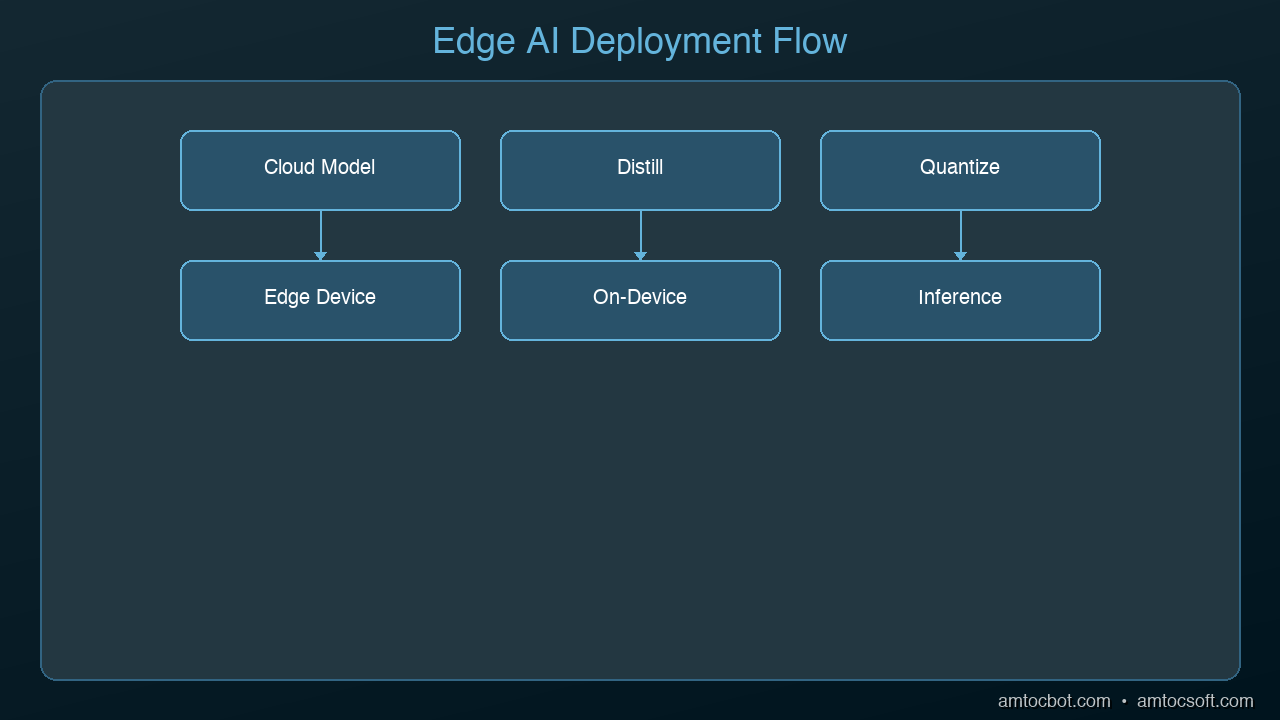
At its core, edge AI involves three steps: train the model, optimize it for the target device, then deploy and run inference on that device.
Training still happens in the cloud or on powerful servers. You train a neural network on large datasets using GPUs. This doesn't change with edge AI.
Optimization is where edge AI diverges from standard deployment. To run on constrained hardware, models go through:
Quantization: Converting weights from float32 (4 bytes per value) to int8 or int4 (1–0.5 bytes per value). This reduces model size by 4–8× with minimal accuracy loss.
Pruning: Removing neurons and connections that contribute little to output. A typical neural network has significant redundancy; pruning can reduce size by 50–90% with careful tuning.
Knowledge distillation: Training a small, fast model (the "student") to reproduce the outputs of a large, accurate model (the "teacher"). The student runs efficiently on edge hardware; the teacher stays in the lab.
Operator fusion: Combining multiple computational operations into single hardware-optimized kernels.
Deployment uses inference runtimes optimized for edge hardware. ONNX Runtime, TensorFlow Lite, and TensorRT convert optimized models into formats that run efficiently on specific chips. A model exported from PyTorch can be converted to TensorRT format and run on an NVIDIA Jetson at full hardware acceleration.
flowchart LR
A[PyTorch / TF Trained Model] --> B[Quantize fp32 -> int8]
B --> C[Prune remove low-weight neurons]
C --> D[Distill train smaller student]
D --> E{Target hardware?}
E -->|NVIDIA| F[TensorRT Engine]
E -->|Google Coral| G[Edge TPU compile]
E -->|Arm / Apple| H[Core ML / TFLite]
E -->|Microcontroller| I[TFLite Micro C++ bundle]
F --> Z[Deploy]
G --> Z
H --> Z
I --> Z
style A fill:#1e293b,color:#f8fafc
style Z fill:#16a34a,color:#fff
Here's what a minimal quantization-and-export pipeline looks like in practice. This takes a PyTorch image classifier, applies dynamic INT8 quantization, and exports it to ONNX so it can be loaded by ONNX Runtime on a Jetson, a Pi, or a laptop:
import torch
from torchvision.models import mobilenet_v3_small

# Load a pre-trained model and put it in eval mode
model = mobilenet_v3_small(weights="DEFAULT").eval()

# Apply dynamic INT8 quantization to all Linear and Conv2d layers
quantized = torch.quantization.quantize_dynamic(
    model,
    {torch.nn.Linear, torch.nn.Conv2d},
    dtype=torch.qint8,
)

# Dummy input for tracing — match the shape the device will send
example = torch.randn(1, 3, 224, 224)

# Export to ONNX for cross-runtime deployment
torch.onnx.export(
    quantized,
    example,
    "mobilenet_v3_edge.onnx",
    input_names=["image"],
    output_names=["logits"],
    dynamic_axes={"image": {0: "batch"}, "logits": {0: "batch"}},
    opset_version=17,
)

print("Model size:", round(torch.save(quantized, "tmp.pt") or 0, 2))
On a MobileNetV3-Small, that pipeline typically cuts the model from ~10 MB fp32 to ~2.5 MB int8 with a single-digit percentage drop in top-1 accuracy on ImageNet. On a Coral USB Accelerator, the same model runs at sub-10 ms per inference.
TinyML: AI on Microcontrollers
The extreme end of edge AI is TinyML — running machine learning models on microcontrollers with kilobytes of RAM and no operating system.
An Arduino or STM32 microcontroller with 256KB RAM can run a keyword detection model that wakes up when it hears a specific word. The same class of hardware can detect anomalies in vibration patterns (predictive maintenance), recognize gestures from accelerometer data, or classify simple images with ultra-low-power cameras.
TensorFlow Lite for Microcontrollers and Edge Impulse are the main frameworks. They target boards that run on milliwatts — a coin cell battery for months.
This enables AI in places that were previously unthinkable: disposable sensors, implantables, environmental monitors deployed at massive scale.
The Three-Tier Architecture
Real-world edge AI deployments typically use a three-tier architecture:
Tier 1 — Endpoints (Microcontrollers, Sensors): The smallest, cheapest, lowest-power devices. Run simple models for keyword detection, anomaly detection, gesture recognition. RAM measured in KB. Think TinyML on Arduino-class hardware.
Tier 2 — Edge Nodes (Smart Cameras, Gateways, Jetson-class boards): More capable devices that aggregate data from multiple endpoints and run more complex models. Object detection, speech recognition, video analytics. These are the workhorses of industrial and commercial edge AI.
Tier 3 — Edge Servers (On-premise servers, 5G MEC nodes): Full servers deployed near the point of use — in a factory, a hospital, a retail store — rather than in a distant cloud datacenter. Run the same models as cloud AI but with dramatically lower latency.
Data flows up this hierarchy, with each tier handling what it can locally and forwarding the rest upward.
flowchart TB
subgraph T1["Tier 1 — Endpoints"]
A1[Microcontroller Arduino / STM32 KB of RAM]
A2[Sensor Node Coin-cell powered]
end
subgraph T2["Tier 2 — Edge Nodes"]
B1[Smart Camera Jetson Orin Nano]
B2[Industrial Gateway Raspberry Pi + Coral]
end
subgraph T3["Tier 3 — Edge Servers"]
C1[On-prem Server GPU-backed]
C2[5G MEC Node]
end
A1 -->|events only| B1
A2 -->|summaries| B2
B1 -->|aggregated data| C1
B2 -->|aggregated data| C2
C1 -->|rare sync| Cloud[Cloud Training, retraining, long-term storage]
C2 -->|rare sync| Cloud
style T1 fill:#0f172a,stroke:#fb923c,color:#f8fafc
style T2 fill:#0f172a,stroke:#60a5fa,color:#f8fafc
style T3 fill:#0f172a,stroke:#34d399,color:#f8fafc
style Cloud fill:#1e293b,color:#f8fafc
Real-World Applications Right Now
Edge AI isn't theoretical. It's already operating at scale:
Smart Manufacturing: Vision systems on assembly lines detect defects in real time. Predictive maintenance sensors on motors detect bearing wear before failure. Quality control AI on packaging lines ensures 100% inspection at production speed.
Retail: Smart shelves use computer vision to detect out-of-stock items. Checkout-free stores (Amazon Go style) track customer selections using on-device AI across dozens of cameras.
Healthcare: Continuous glucose monitors use edge AI to predict hypoglycemic events. Wearable ECGs detect arrhythmias. Hospital cameras monitor patient falls without sending footage to external servers.
Agriculture: Autonomous tractors navigate fields using on-board computer vision. Drone-based crop monitoring processes imagery in flight. Irrigation controllers analyze soil sensor data locally.
Consumer Devices: Your phone's camera uses neural networks running entirely on-device for portrait mode, night mode, and real-time video stabilization. Your earbuds do noise cancellation with custom AI chips. Your smartwatch detects sleep stages.
The Challenges Worth Knowing
Edge AI isn't all upside. The constraints are real:
Limited compute: Edge devices have significantly less processing power than cloud servers. Complex models must be aggressively compressed, which can hurt accuracy.
Memory constraints: Even "capable" edge devices like the Jetson Orin have 16–64GB RAM. That sounds like a lot until you're running multiple models simultaneously for a multi-camera system.
Update complexity: Updating models on thousands of deployed edge devices is operationally harder than updating a cloud service. Over-the-air update mechanisms must be robust.
Heterogeneous hardware: Edge hardware is fragmented — NVIDIA GPUs, Google TPUs, Arm Cortex chips, Apple Neural Engine. Each has different optimization requirements. A model optimized for one may perform poorly on another.
Development complexity: Edge AI development requires more hardware-level knowledge than cloud AI. You're dealing with device drivers, inference runtime configuration, and power budgets — not just Python and a GPU.
Getting Started: What You Need to Know
If you want to explore edge AI, here's the practical entry point:
flowchart TD
Start["I want to build an edge AI project"] --> Q1{What's the task?}
Q1 -->|Keyword / sound / gesture| TinyML[Arduino Nano 33 BLE Sense + TFLite Micro or Edge Impulse]
Q1 -->|Computer vision| Q2{How much compute budget?}
Q1 -->|Large-model inference LLM-ish| Server[On-prem edge server + GPU / NPU]
Q2 -->|$100 or less| Pi[Raspberry Pi 5 + Coral USB Accelerator]
Q2 -->|$250-500| Jetson[NVIDIA Jetson Orin Nano]
Q2 -->|$500+| JetsonPro[Jetson Orin NX or AGX]
TinyML --> Ship[Prototype in a weekend]
Pi --> Ship2[Prototype in a weekend]
Jetson --> Ship3[CV production workloads]
JetsonPro --> Ship4[Multi-camera real-time]
Server --> Ship5[Edge LLM / complex models]
style Start fill:#1e293b,stroke:#fb923c,color:#f8fafc
style Ship fill:#16a34a,color:#fff
style Ship2 fill:#16a34a,color:#fff
style Ship3 fill:#16a34a,color:#fff
style Ship4 fill:#16a34a,color:#fff
style Ship5 fill:#16a34a,color:#fff
Pick a target hardware platform: Raspberry Pi 5 with a Coral USB Accelerator is a great beginner setup. NVIDIA Jetson Orin Nano ($249) is excellent for computer vision. Arduino Nano 33 BLE Sense is the TinyML starting point.
Choose a framework: TensorFlow Lite and its Micro variant for broad hardware support. ONNX Runtime for cross-framework flexibility. PyTorch Mobile if you're already in the PyTorch ecosystem.
Start with a pre-trained model: Don't train from scratch. MobileNetV3 for image classification, YOLOv8 Nano for object detection, Whisper Tiny for speech recognition. These are designed for edge deployment.
Use Edge Impulse (free for individuals): It handles the full workflow from data collection through model training, optimization, and deployment to edge hardware. Best learning environment for edge AI.
Deploy and measure: Profile your model's inference latency, power consumption, and accuracy on real hardware. Optimize iteratively.
The Gotchas I Wish I'd Known Before Shipping
The reason my first Jetson deployment dropped from 97% lab accuracy to 71% on the factory floor came down to four things, and I'd bet most first-time edge AI teams hit at least two of them.
Lighting was different. My training data was captured under the factory's daylight coming through skylights. Shipping meant running at night under yellowish sodium-vapour lights. The CNN had learned colour cues that no longer matched reality. The fix was collecting a second training set under the night lighting, doing domain adaptation fine-tuning, and normalizing the colour channel before inference. Lesson: always capture training data under every lighting regime the model will encounter, not just the convenient one.
Camera framerate drifted under thermal load. After 30 minutes of continuous operation, the Jetson got warm enough that the CSI camera's auto-exposure started reacting sluggishly, and frames arrived at 22 fps instead of 30 fps. Because I'd pipelined inference assuming a steady 30 fps, I was now processing stale frames. The fix was moving inference to a ring-buffer consumer thread that processes "latest frame" rather than "next frame," and adding a heatsink to the device. Lesson: thermal behaviour at hour 5 is not the same as minute 5; soak-test everything for at least 24 hours on real hardware.
The quantized model made different mistakes than the fp32 model. Post-training INT8 quantization is lossy in ways that are not uniformly distributed across the input space. My quantized model lost accuracy specifically on dark-coloured defects because the int8 dynamic range had less resolution in the low end. The fix was calibration-based quantization using a representative dataset with balanced classes, plus per-channel quantization for the convolution layers. Lesson: never benchmark your edge model using the fp32 validation set; always re-validate the quantized model end-to-end.
Deployment was harder than the training. The actual hardest part of the project wasn't building the model — it was setting up the over-the-air update mechanism, signed firmware boot, remote log collection, and rollback strategy for when something on the device broke at 3 AM. Budget 60% of your project time for MLOps and deployment engineering if you're going to production. A model that works great on a benchtop but cannot be safely updated at scale is not a product.
What's Next
Edge AI is moving fast. The next few years will bring:
More capable edge hardware: Next-gen NPUs (Neural Processing Units) will close the gap with data center chips further
Better compression techniques: LLM quantization research is already enabling GPT-class models to run on phones
Federated learning: Training models across thousands of edge devices without centralizing data — solving the privacy problem while improving model quality
AI standardization: ONNX and similar formats are converging toward true write-once-deploy-anywhere portability
The direction is clear: intelligence is moving to where the data is generated. The cloud will remain important for training and complex reasoning, but the front line of AI — the moment of action — will increasingly run at the edge.
Conclusion
Edge AI is the answer to a fundamental constraint: physics. Data takes time to travel. Networks fail. Privacy matters. And sometimes, milliseconds are the difference between a working system and a catastrophic failure.
The shift to edge processing isn't just a technical optimization — it's an architectural rethinking of where intelligence lives. As hardware gets cheaper and models get smaller, AI will proliferate into devices that were never considered "smart" before.
If you're building anything that interacts with the physical world — industrial systems, consumer devices, autonomous machines, healthcare tech — edge AI isn't optional reading. It's the foundation of where this field is going.
Ready to go deeper? Watch the companion video Edge AI: Run AI on Anything for a visual walkthrough of the hardware landscape, TinyML demos, and real deployment examples.
Part of the AmtocSoft Emerging Tech series. Follow for weekly deep dives into AI infrastructure, hardware, and developer tools.
Founder of AmtocSoft. Writing practical deep-dives on AI engineering, cloud architecture, and developer tooling. Previously built backend systems at scale. Reviews every post published under this byline.
The first edge AI model I deployed was a defect-detection CNN running on a Jetson Nano mounted above a small injection-moulding press. It inferred in 24 milliseconds. The press cycled every 1.8 seconds. On paper this was trivial. In practice, the model's accuracy dropped from 97% in lab testing to 71% in the factory on its first shift, and I spent the next week learning that everything I thought I knew about "inference latency" was the least important number in the system.
That experience is the reason this post exists. Edge AI is one of the genuinely transformative shifts in how we build intelligent systems, and it is also one of the easiest places to burn three months building something that works on your laptop and falls apart in the field. This post is the version I wish someone had handed me before that Jetson went on the production floor.
Imagine a factory robot that must decide in 5 milliseconds whether to stop a conveyor belt before a defective part causes damage. Or a self-driving car that detects a child running into the street. Or a smartwatch that recognizes an irregular heartbeat. In every one of these scenarios, there's no time to send data to a faraway server, wait for a response, and act on it. The decision has to happen right there, on the device itself.
That's edge AI — and it's quietly becoming one of the most important shifts in how we build intelligent systems.
What Is Edge AI?
Edge AI means running artificial intelligence models directly on the device where data is generated — instead of sending that data to the cloud for processing.
Think about how most AI works today. Your phone's voice assistant records audio, sends it to a server farm, the server transcribes it and runs the AI model, the response travels back to your phone, and then you hear the answer. That round-trip typically takes 300–600 milliseconds. For voice commands, that's fine. For a car detecting an obstacle, it's potentially fatal.
Edge AI flips this model. The AI model lives on the device — the camera, the sensor, the robot arm, the wearable. Data is processed locally. Decisions are made in milliseconds without any network dependency.
The "edge" refers to the network edge: the boundary between local devices and the wider internet. Edge computing (running compute at that boundary) has existed for years, but Edge AI adds intelligence to that local processing.
Why Now? What Changed?
Edge AI isn't a new idea — people have talked about running AI on devices for over a decade. What changed is that it's now actually practical.
Hardware got powerful enough. A modern smartphone has more compute than what NASA used to land the first moon missions. But more importantly, specialized AI chips have proliferated. NVIDIA's Jetson Orin series can run large neural networks on a small board that draws under 60 watts. Google's Coral USB Accelerator costs $59 and adds dedicated AI inference to any Linux device. Apple's Neural Engine in the M-series chips runs models at 38 trillion operations per second.
Models got small enough. Researchers developed techniques like quantization (shrinking model precision from 32-bit to 4-bit), pruning (removing unnecessary neurons), and distillation (training small "student" models to mimic large "teacher" models). A model that required a data center GPU in 2020 can now run on a microcontroller in 2026.
The IoT explosion created the need. There are now over 15 billion connected devices worldwide. Having all of them constantly stream data to cloud servers would cost a fortune and create massive latency. Running AI locally solves both problems.
The Three Killer Advantages of Edge AI
1. Latency: Decisions in Milliseconds, Not Seconds
Cloud AI latency has a hard floor. Even with perfect network conditions, you're looking at 50–200ms minimum for a round-trip to a data center. In practice, it's often 300–600ms or more.
Edge AI latency is measured in single-digit milliseconds — often 1–10ms. That's not just faster; it's a qualitatively different category of response.
This matters everywhere:
- Industrial automation: A defect detection system on a manufacturing line must react faster than the line moves. At 500ms cloud latency, defective parts are already 3 meters downstream before action can be taken.
- Autonomous vehicles: At 60 mph, a car travels 27 meters in one second. Edge inference at 5ms gives 5,400× more reaction time than 300ms cloud AI.
- Healthcare monitoring: A wearable ECG that detects atrial fibrillation locally can alert the wearer within seconds — not minutes after a cloud round-trip.
- AR/VR: Head-mounted displays need sub-20ms response to avoid motion sickness. Cloud AI makes this impossible.
2. Privacy: Data Never Leaves the Device
Cloud AI means sensitive data travels over networks and gets processed by third-party servers. For many applications, that's unacceptable.
Edge AI keeps data local. A facial recognition system for building access control doesn't need to send employee faces to Amazon or Microsoft. A medical imaging device doesn't need to upload patient scans to a cloud provider. A voice assistant can process "Hey [wake word]" entirely on-device, only activating a network connection when the user actually wants cloud features.
This matters especially in:
- Healthcare: Patient data regulations (HIPAA, GDPR) create strict rules about where health data can flow
- Manufacturing: Companies don't want to send proprietary production data to third-party cloud providers
- Consumer trust: Users increasingly want control over their data — edge AI makes it technically possible to guarantee it never leaves the device
3. Reliability: Works Without the Internet
Cloud AI requires cloud connectivity. Edge AI doesn't.
A smart factory can't afford production shutdowns every time the internet goes out. A drone performing an autonomous mission can't wait for Wi-Fi. An agricultural monitoring system in a remote field may have no connectivity at all.
Edge AI turns network outages from catastrophic failures into minor inconveniences. The device keeps working. Decisions keep getting made. Data can queue locally and sync when connectivity returns.
How Edge AI Actually Works
At its core, edge AI involves three steps: train the model, optimize it for the target device, then deploy and run inference on that device.
Training still happens in the cloud or on powerful servers. You train a neural network on large datasets using GPUs. This doesn't change with edge AI.
Optimization is where edge AI diverges from standard deployment. To run on constrained hardware, models go through:
Quantization: Converting weights from float32 (4 bytes per value) to int8 or int4 (1–0.5 bytes per value). This reduces model size by 4–8× with minimal accuracy loss.
Pruning: Removing neurons and connections that contribute little to output. A typical neural network has significant redundancy; pruning can reduce size by 50–90% with careful tuning.
Knowledge distillation: Training a small, fast model (the "student") to reproduce the outputs of a large, accurate model (the "teacher"). The student runs efficiently on edge hardware; the teacher stays in the lab.
Operator fusion: Combining multiple computational operations into single hardware-optimized kernels.
Deployment uses inference runtimes optimized for edge hardware. ONNX Runtime, TensorFlow Lite, and TensorRT convert optimized models into formats that run efficiently on specific chips. A model exported from PyTorch can be converted to TensorRT format and run on an NVIDIA Jetson at full hardware acceleration.
flowchart LR
A[PyTorch / TF Trained Model] --> B[Quantize fp32 -> int8]
B --> C[Prune remove low-weight neurons]
C --> D[Distill train smaller student]
D --> E{Target hardware?}
E -->|NVIDIA| F[TensorRT Engine]
E -->|Google Coral| G[Edge TPU compile]
E -->|Arm / Apple| H[Core ML / TFLite]
E -->|Microcontroller| I[TFLite Micro C++ bundle]
F --> Z[Deploy]
G --> Z
H --> Z
I --> Z
style A fill:#1e293b,color:#f8fafc
style Z fill:#16a34a,color:#fff
Here's what a minimal quantization-and-export pipeline looks like in practice. This takes a PyTorch image classifier, applies dynamic INT8 quantization, and exports it to ONNX so it can be loaded by ONNX Runtime on a Jetson, a Pi, or a laptop:
import torch
from torchvision.models import mobilenet_v3_small

# Load a pre-trained model and put it in eval mode
model = mobilenet_v3_small(weights="DEFAULT").eval()

# Apply dynamic INT8 quantization to all Linear and Conv2d layers
quantized = torch.quantization.quantize_dynamic(
    model,
    {torch.nn.Linear, torch.nn.Conv2d},
    dtype=torch.qint8,
)

# Dummy input for tracing — match the shape the device will send
example = torch.randn(1, 3, 224, 224)

# Export to ONNX for cross-runtime deployment
torch.onnx.export(
    quantized,
    example,
    "mobilenet_v3_edge.onnx",
    input_names=["image"],
    output_names=["logits"],
    dynamic_axes={"image": {0: "batch"}, "logits": {0: "batch"}},
    opset_version=17,
)

print("Model size:", round(torch.save(quantized, "tmp.pt") or 0, 2))
On a MobileNetV3-Small, that pipeline typically cuts the model from ~10 MB fp32 to ~2.5 MB int8 with a single-digit percentage drop in top-1 accuracy on ImageNet. On a Coral USB Accelerator, the same model runs at sub-10 ms per inference.
TinyML: AI on Microcontrollers
The extreme end of edge AI is TinyML — running machine learning models on microcontrollers with kilobytes of RAM and no operating system.
An Arduino or STM32 microcontroller with 256KB RAM can run a keyword detection model that wakes up when it hears a specific word. The same class of hardware can detect anomalies in vibration patterns (predictive maintenance), recognize gestures from accelerometer data, or classify simple images with ultra-low-power cameras.
TensorFlow Lite for Microcontrollers and Edge Impulse are the main frameworks. They target boards that run on milliwatts — a coin cell battery for months.
This enables AI in places that were previously unthinkable: disposable sensors, implantables, environmental monitors deployed at massive scale.
The Three-Tier Architecture
Real-world edge AI deployments typically use a three-tier architecture:
Tier 1 — Endpoints (Microcontrollers, Sensors): The smallest, cheapest, lowest-power devices. Run simple models for keyword detection, anomaly detection, gesture recognition. RAM measured in KB. Think TinyML on Arduino-class hardware.
Tier 2 — Edge Nodes (Smart Cameras, Gateways, Jetson-class boards): More capable devices that aggregate data from multiple endpoints and run more complex models. Object detection, speech recognition, video analytics. These are the workhorses of industrial and commercial edge AI.
Tier 3 — Edge Servers (On-premise servers, 5G MEC nodes): Full servers deployed near the point of use — in a factory, a hospital, a retail store — rather than in a distant cloud datacenter. Run the same models as cloud AI but with dramatically lower latency.
Data flows up this hierarchy, with each tier handling what it can locally and forwarding the rest upward.
flowchart TB
subgraph T1["Tier 1 — Endpoints"]
A1[Microcontroller Arduino / STM32 KB of RAM]
A2[Sensor Node Coin-cell powered]
end
subgraph T2["Tier 2 — Edge Nodes"]
B1[Smart Camera Jetson Orin Nano]
B2[Industrial Gateway Raspberry Pi + Coral]
end
subgraph T3["Tier 3 — Edge Servers"]
C1[On-prem Server GPU-backed]
C2[5G MEC Node]
end
A1 -->|events only| B1
A2 -->|summaries| B2
B1 -->|aggregated data| C1
B2 -->|aggregated data| C2
C1 -->|rare sync| Cloud[Cloud Training, retraining, long-term storage]
C2 -->|rare sync| Cloud
style T1 fill:#0f172a,stroke:#fb923c,color:#f8fafc
style T2 fill:#0f172a,stroke:#60a5fa,color:#f8fafc
style T3 fill:#0f172a,stroke:#34d399,color:#f8fafc
style Cloud fill:#1e293b,color:#f8fafc
Real-World Applications Right Now
Edge AI isn't theoretical. It's already operating at scale:
Smart Manufacturing: Vision systems on assembly lines detect defects in real time. Predictive maintenance sensors on motors detect bearing wear before failure. Quality control AI on packaging lines ensures 100% inspection at production speed.
Retail: Smart shelves use computer vision to detect out-of-stock items. Checkout-free stores (Amazon Go style) track customer selections using on-device AI across dozens of cameras.
Healthcare: Continuous glucose monitors use edge AI to predict hypoglycemic events. Wearable ECGs detect arrhythmias. Hospital cameras monitor patient falls without sending footage to external servers.
Agriculture: Autonomous tractors navigate fields using on-board computer vision. Drone-based crop monitoring processes imagery in flight. Irrigation controllers analyze soil sensor data locally.
Consumer Devices: Your phone's camera uses neural networks running entirely on-device for portrait mode, night mode, and real-time video stabilization. Your earbuds do noise cancellation with custom AI chips. Your smartwatch detects sleep stages.
The Challenges Worth Knowing
Edge AI isn't all upside. The constraints are real:
Limited compute: Edge devices have significantly less processing power than cloud servers. Complex models must be aggressively compressed, which can hurt accuracy.
Memory constraints: Even "capable" edge devices like the Jetson Orin have 16–64GB RAM. That sounds like a lot until you're running multiple models simultaneously for a multi-camera system.
Update complexity: Updating models on thousands of deployed edge devices is operationally harder than updating a cloud service. Over-the-air update mechanisms must be robust.
Heterogeneous hardware: Edge hardware is fragmented — NVIDIA GPUs, Google TPUs, Arm Cortex chips, Apple Neural Engine. Each has different optimization requirements. A model optimized for one may perform poorly on another.
Development complexity: Edge AI development requires more hardware-level knowledge than cloud AI. You're dealing with device drivers, inference runtime configuration, and power budgets — not just Python and a GPU.
Getting Started: What You Need to Know
If you want to explore edge AI, here's the practical entry point:
flowchart TD
Start["I want to build an edge AI project"] --> Q1{What's the task?}
Q1 -->|Keyword / sound / gesture| TinyML[Arduino Nano 33 BLE Sense + TFLite Micro or Edge Impulse]
Q1 -->|Computer vision| Q2{How much compute budget?}
Q1 -->|Large-model inference LLM-ish| Server[On-prem edge server + GPU / NPU]
Q2 -->|$100 or less| Pi[Raspberry Pi 5 + Coral USB Accelerator]
Q2 -->|$250-500| Jetson[NVIDIA Jetson Orin Nano]
Q2 -->|$500+| JetsonPro[Jetson Orin NX or AGX]
TinyML --> Ship[Prototype in a weekend]
Pi --> Ship2[Prototype in a weekend]
Jetson --> Ship3[CV production workloads]
JetsonPro --> Ship4[Multi-camera real-time]
Server --> Ship5[Edge LLM / complex models]
style Start fill:#1e293b,stroke:#fb923c,color:#f8fafc
style Ship fill:#16a34a,color:#fff
style Ship2 fill:#16a34a,color:#fff
style Ship3 fill:#16a34a,color:#fff
style Ship4 fill:#16a34a,color:#fff
style Ship5 fill:#16a34a,color:#fff
Pick a target hardware platform: Raspberry Pi 5 with a Coral USB Accelerator is a great beginner setup. NVIDIA Jetson Orin Nano ($249) is excellent for computer vision. Arduino Nano 33 BLE Sense is the TinyML starting point.
Choose a framework: TensorFlow Lite and its Micro variant for broad hardware support. ONNX Runtime for cross-framework flexibility. PyTorch Mobile if you're already in the PyTorch ecosystem.
Start with a pre-trained model: Don't train from scratch. MobileNetV3 for image classification, YOLOv8 Nano for object detection, Whisper Tiny for speech recognition. These are designed for edge deployment.
Use Edge Impulse (free for individuals): It handles the full workflow from data collection through model training, optimization, and deployment to edge hardware. Best learning environment for edge AI.
Deploy and measure: Profile your model's inference latency, power consumption, and accuracy on real hardware. Optimize iteratively.
The Gotchas I Wish I'd Known Before Shipping
The reason my first Jetson deployment dropped from 97% lab accuracy to 71% on the factory floor came down to four things, and I'd bet most first-time edge AI teams hit at least two of them.
Lighting was different. My training data was captured under the factory's daylight coming through skylights. Shipping meant running at night under yellowish sodium-vapour lights. The CNN had learned colour cues that no longer matched reality. The fix was collecting a second training set under the night lighting, doing domain adaptation fine-tuning, and normalizing the colour channel before inference. Lesson: always capture training data under every lighting regime the model will encounter, not just the convenient one.
Camera framerate drifted under thermal load. After 30 minutes of continuous operation, the Jetson got warm enough that the CSI camera's auto-exposure started reacting sluggishly, and frames arrived at 22 fps instead of 30 fps. Because I'd pipelined inference assuming a steady 30 fps, I was now processing stale frames. The fix was moving inference to a ring-buffer consumer thread that processes "latest frame" rather than "next frame," and adding a heatsink to the device. Lesson: thermal behaviour at hour 5 is not the same as minute 5; soak-test everything for at least 24 hours on real hardware.
The quantized model made different mistakes than the fp32 model. Post-training INT8 quantization is lossy in ways that are not uniformly distributed across the input space. My quantized model lost accuracy specifically on dark-coloured defects because the int8 dynamic range had less resolution in the low end. The fix was calibration-based quantization using a representative dataset with balanced classes, plus per-channel quantization for the convolution layers. Lesson: never benchmark your edge model using the fp32 validation set; always re-validate the quantized model end-to-end.
Deployment was harder than the training. The actual hardest part of the project wasn't building the model — it was setting up the over-the-air update mechanism, signed firmware boot, remote log collection, and rollback strategy for when something on the device broke at 3 AM. Budget 60% of your project time for MLOps and deployment engineering if you're going to production. A model that works great on a benchtop but cannot be safely updated at scale is not a product.
What's Next
Edge AI is moving fast. The next few years will bring:
More capable edge hardware: Next-gen NPUs (Neural Processing Units) will close the gap with data center chips further
Better compression techniques: LLM quantization research is already enabling GPT-class models to run on phones
Federated learning: Training models across thousands of edge devices without centralizing data — solving the privacy problem while improving model quality
AI standardization: ONNX and similar formats are converging toward true write-once-deploy-anywhere portability
The direction is clear: intelligence is moving to where the data is generated. The cloud will remain important for training and complex reasoning, but the front line of AI — the moment of action — will increasingly run at the edge.
Conclusion
Edge AI is the answer to a fundamental constraint: physics. Data takes time to travel. Networks fail. Privacy matters. And sometimes, milliseconds are the difference between a working system and a catastrophic failure.
The shift to edge processing isn't just a technical optimization — it's an architectural rethinking of where intelligence lives. As hardware gets cheaper and models get smaller, AI will proliferate into devices that were never considered "smart" before.
If you're building anything that interacts with the physical world — industrial systems, consumer devices, autonomous machines, healthcare tech — edge AI isn't optional reading. It's the foundation of where this field is going.
Ready to go deeper? Watch the companion video Edge AI: Run AI on Anything for a visual walkthrough of the hardware landscape, TinyML demos, and real deployment examples.
Part of the AmtocSoft Emerging Tech series. Follow for weekly deep dives into AI infrastructure, hardware, and developer tools.
Founder of AmtocSoft. Writing practical deep-dives on AI engineering, cloud architecture, and developer tooling. Previously built backend systems at scale. Reviews every post published under this byline.
Edge AI: Running Language Models on Phones and IoT Devices
Your phone has more compute power than the servers that trained GPT-2. So why are we still sending every AI request to the cloud?
Edge AI is changing that. In 2026, language models run directly on phones, tablets, laptops, and even embedded devices -- no internet required. Here's how it works and why it matters.
Why Edge AI Matters
Privacy: Your data never leaves your device. Medical questions, financial queries, personal messages -- processed locally, seen by no one.
Latency: No network round-trip. Responses start in milliseconds, not seconds. Critical for real-time applications like voice assistants and AR.
Cost: No API fees. No cloud compute bills. Once the model is on the device, inference is free.
Availability: Works offline. In airplanes, remote areas, or when your cloud provider has an outage.
graph LR
  A["Cloud Model"] -->|"quantize & optimize"| B["Convert to Edge Format"]
  B -->|"CoreML / TFLite / ONNX"| C["Deploy to Device"]
  C --> D["On-Device Inference"]
  D --> E["No Internet Needed"]
What's Possible Today
Phones (2026)
Modern smartphones are surprisingly capable AI devices:
iPhone 16 Pro: 16 GB unified memory, Apple Neural Engine (38 TOPS). Runs a 3B parameter model at ~15 tokens/second
Samsung Galaxy S26: 12 GB RAM, Snapdragon 8 Gen 4 NPU. Runs Gemma 2B at ~20 tokens/second
Google Pixel 10: 12 GB RAM, Tensor G5 with dedicated AI core. Runs Gemini Nano natively
These devices comfortably run 1-3B parameter models. With aggressive quantization (Q2-Q4), you can squeeze in a 7B model, though response times slow down.
Laptops (The Sweet Spot)
Apple Silicon Macs have become the default local AI development platform:
MacBook Air M3 (24 GB): Runs 7B Q4 at 30+ tokens/sec, 13B Q4 at 15 tokens/sec
MacBook Pro M4 Max (128 GB): Runs 70B Q4 at 20+ tokens/sec
Framework Laptop (32 GB, Intel/AMD): Runs 7B Q4 at 15-20 tokens/sec via llama.cpp
The Apple MLX framework deserves special mention. It's designed specifically for Apple Silicon's unified memory architecture, delivering 20-40% better performance than generic implementations.
IoT and Embedded
The frontier of edge AI:
Raspberry Pi 5 (8 GB): Runs TinyLlama 1.1B at ~3 tokens/sec. Slow, but it works
NVIDIA Jetson Orin Nano: 8 GB GPU memory, runs 3B models at 10+ tokens/sec. Perfect for robotics
Coral Edge TPU: Specialized for inference, runs small quantized models for classification and simple generation
The Edge AI Stack
Apple Ecosystem: MLX
MLX is Apple's machine learning framework optimized for Apple Silicon. Key advantages:
Leverages unified memory (no CPU-to-GPU data copying)
llama.cpp runs everywhere -- literally. It's written in pure C/C++ with optional acceleration for:
Apple Metal (Mac/iOS)
CUDA (NVIDIA GPUs)
Vulkan (AMD GPUs, Android)
OpenCL (broader GPU support)
CPU with SIMD optimizations (AVX2, NEON)
This makes it the go-to choice for cross-platform edge deployment.
Android: MediaPipe LLM
Google's MediaPipe now includes an LLM inference API for Android. It handles model loading, quantization, and hardware acceleration through a simple API:
val llmInference = LlmInference.createFromOptions(context, options)
val response = llmInference.generateResponse("What is edge AI?")
Optimization Techniques for Edge
Running models on constrained devices requires aggressive optimization:
1. Aggressive Quantization
Edge devices benefit most from Q2-Q4 quantization. The quality trade-off is worth it when the alternative is "doesn't fit in memory at all."
2. Knowledge Distillation
Train a small model (1-3B) to mimic a large model (70B). The small model captures 80-90% of the large model's capability at 1/20th the size. This is how Apple Intelligence and Google's on-device models are built.
3. Pruning
Remove unnecessary neurons and connections. Structured pruning can reduce model size by 30-50% with minimal quality loss. Unstructured pruning goes further but requires hardware support.
4. Model Architecture Optimization
Newer architectures designed for edge:
- Gemma 2B: Google's compact model designed for on-device use
- Phi-3 Mini: Microsoft's 3.8B model that punches above its weight
- TinyLlama: 1.1B model trained on 3 trillion tokens -- tiny but capable
5. KV-Cache Compression
On memory-constrained devices, the KV-cache (which grows with context length) is often the bottleneck. Techniques like sliding window attention and grouped-query attention reduce cache size by 4-8x.
Use Cases in Production
Smart Home Assistants: Process voice commands locally. No cloud dependency, instant responses, complete privacy.
Healthcare: Medical devices that analyze patient data on-device. HIPAA compliance is simpler when data never leaves the device.
Automotive: In-car AI for navigation, voice control, and driver assistance. Works in tunnels and dead zones.
Industrial IoT: Predictive maintenance on factory floors. Analyze sensor data locally, alert only when needed.
Education: Offline tutoring apps for students without reliable internet. Especially impactful in developing regions.
The Trade-offs
Edge AI isn't always the right choice:
Factor
Edge
Cloud
Model Size
1-7B
Unlimited
Response Quality
Good
Best
Latency
<100ms
200ms-2s
Privacy
Complete
Depends on provider
Cost per Query
Free
$0.001-0.01
Offline Support
Yes
No
Updates
Manual
Automatic
The emerging pattern is hybrid: use edge AI for simple, latency-sensitive, or privacy-critical tasks, and fall back to cloud for complex reasoning that requires larger models.
Getting Started
The fastest path to edge AI:
Mac users: Install Ollama, run ollama run llama3.2:3b
Mobile developers: Try MediaPipe LLM (Android) or Core ML (iOS)
IoT: Start with a Jetson Orin Nano and llama.cpp
Web: Use WebLLM to run models directly in the browser via WebGPU
Edge AI isn't a future technology. It's a today technology that's getting better every month. The models are getting smaller, the hardware is getting faster, and the tools are getting simpler.
Next: Putting it all together -- a complete guide to choosing your AI deployment strategy from development to production.
Founder of AmtocSoft. Writing practical deep-dives on AI engineering, cloud architecture, and developer tooling. Previously built backend systems at scale. Reviews every post published under this byline.