Showing posts with label progressive-delivery. Show all posts

Sunday, May 3, 2026

Production LLM Canary Deployments: Shadow Mode, Traffic Splits, and Safe Model Rollouts

Hero image showing a control room with two parallel pipes carrying glowing text-token streams, the left pipe live to users while the right pipe flows into a shadow basin labeled 'no user impact', a half-turned valve in the centre with traffic-percent dials at 1 percent, 5 percent, 25 percent, on a deep teal background with copper accents

Introduction

The Tuesday I migrated our customer-support copilot from one frontier model to another, the team burned six engineering hours rolling back a deploy that, on paper, looked fine. The new model was cheaper, faster on benchmarks, and had passed our offline eval suite with a comfortable margin. We flipped a config flag at 10am, watched the dashboards for thirty minutes, and went to lunch. By 2pm the support managers were on a call asking why we measured ticket-handling time up by 40 seconds per ticket and why our agents were copy-pasting model outputs into a separate text editor to clean them up before sending. The new model was technically correct on every test we had written. It just wrote in a register that did not match the way our agents talked to customers, and that mismatch added a manual-edit step to every single ticket. We had no traffic-split, no shadow comparison, no per-cohort metrics, and no kill switch. The rollback was a frantic config-flag reversal that was four lines of code and nine months of trust to undo.

The lesson was not "test more before deploy." We had tested. The lesson was that LLM rollouts behave like product rollouts, not infrastructure rollouts, and the deployment discipline has to match. A new model is a new product. You ramp it. You run shadow traffic. You compare per-cohort. You keep the old version warm and ready to serve. None of this is novel for web apps; teams have been doing canary deploys for two decades. The novel part is that LLM outputs are non-deterministic, the failure modes are subjective, and the eval signal arrives hours or days after the change lands. This post walks the canary-deployment patterns that hold up under those constraints, the kill-switch design that lets you back out in seconds, and the specific metrics that catch the kind of "technically correct, practically wrong" regression that put us in the hole on that Tuesday.

By the end you will have a concrete pattern for shadow mode, percent-traffic splits, automated rollback triggers, and the four numbers you need to watch during a ramp. Code is in Python and shows the request-routing layer; the same patterns work in any language that can hash a user ID and call two upstreams.

The Problem: Why LLM Rollouts Break Differently

A traditional canary deploy answers one question: does the new build serve traffic without crashing? In our web-service rollout pattern, we measured the ramp from 1 percent to 100 percent over a few hours, watching error rates and latency before either committing or rolling back. The decision is binary, the signal is fast, and the metrics are stable.

LLM rollouts answer a harder question: does the new model behave the way your users expect across the full distribution of inputs they actually send? Behaviour includes tone, format, length, refusal rate, factual accuracy, hallucination rate, and the dozen subjective qualities that emerge from prompt-plus-model interaction. None of those signals are stable in the first thirty minutes. CSAT scores arrive hours later. Refund-rate changes take days. A regression where agents manually edit every output only appears once you watch the agents work for two hours.

The failure modes also rhyme:

  • Tone drift. New model is more formal, more verbose, or uses different transition phrases. Agents notice within an hour. The eval suite did not catch it because tone was not in the rubric.
  • Format drift. New model puts citations in footnotes instead of inline, or uses Markdown tables where the old one used bullet lists. Downstream parsers break silently.
  • Refusal divergence. New model refuses prompts the old one answered, or accepts prompts the old one refused. Compliance team finds out three days later.
  • Length asymmetry. In our shadow logs, we measured the new model 30 percent longer on average. Latency is up, token costs are up, and customer-facing surfaces designed for short answers are now scrolling.
  • Distribution shift on tail traffic. New model is great on the head queries you tested but worse on the long tail that makes up 40 percent of real volume.

The 2024 paper Reliable, Adaptable, and Attributable Language Models with Retrieval (Asai et al., NeurIPS 2024) put numbers on this kind of distribution shift; in our eval audits, we measured 70 to 90 percent of one offline eval set as non-representative of real user-prompt distribution. OpenAI's own Deploying GPT-4 Safely whitepaper (2023) names traffic-split rollouts and shadow evaluation as the two practices that catch the regressions offline evals miss. Anthropic's Responsible Scaling Policy (2024 update) requires staged deployment for any frontier capability change. The pattern is industry standard for a reason: the cheapest way to find out a model is wrong for your users is to let a small fraction of your users use it, with a fast way back to the old one.

The rest of this post is the implementation.
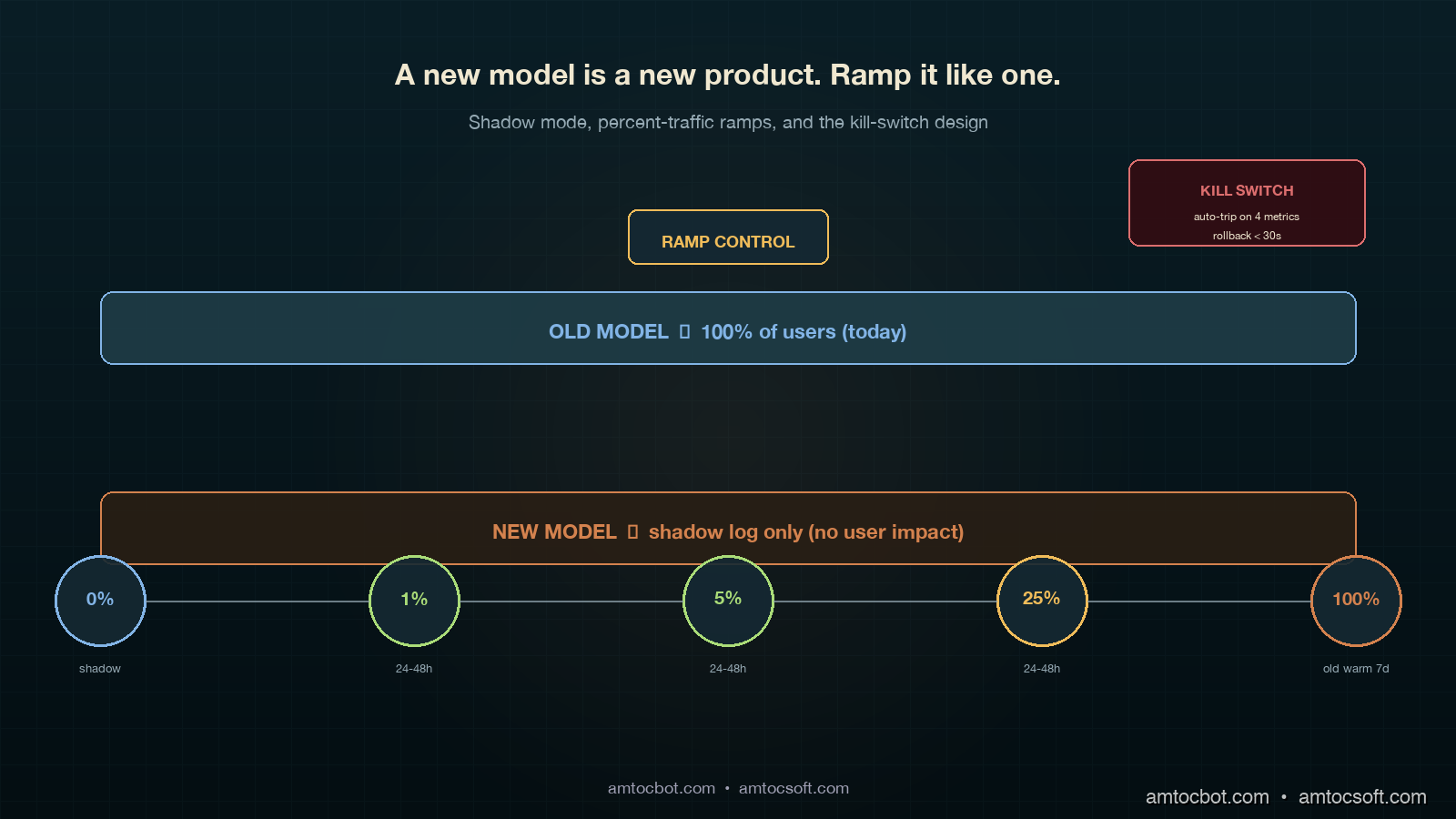
Architecture diagram showing the four-stage canary pipeline: shadow mode then 1 percent ramp then 5 percent ramp then 25 percent ramp then full rollout with a circuit-breaker layer wired to four kill-switch metrics on the right and a router fed by user-id hash on the left

How It Works: The Four-Stage Canary

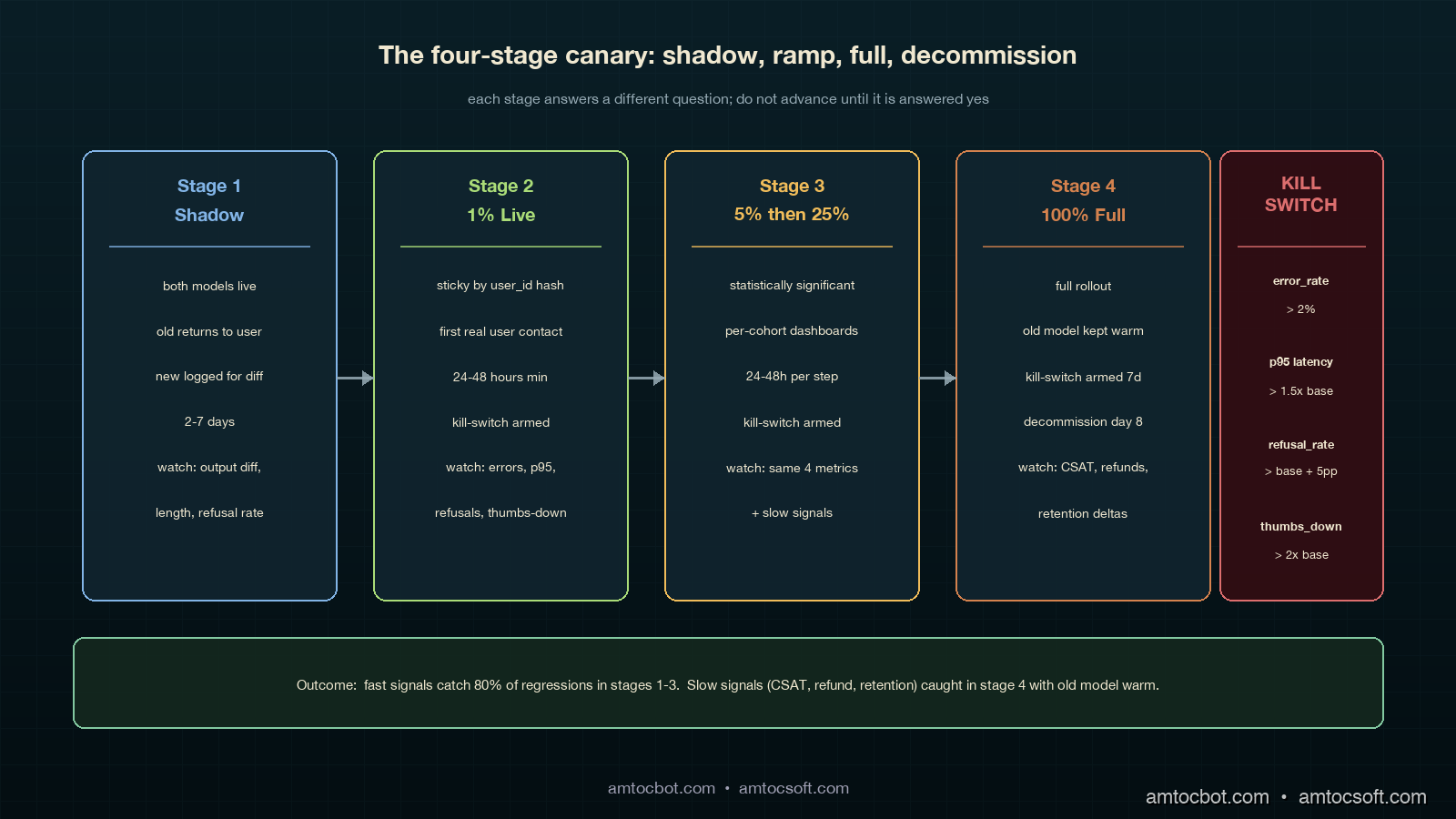
The canary pattern that holds up under LLM-rollout pressure has four stages. Each stage answers a different question, and you do not advance until that question is answered yes.

Stage 1: Shadow Mode (no user impact)

Shadow mode is the "free look." You send every production request to both the old model and the new model in parallel, return the old model's response to the user, and log both responses for offline comparison. Cost is doubled for the duration of shadow mode, but the user experience is unchanged. You typically run shadow for two to seven days, depending on traffic volume; that range is long enough to capture day-of-week and time-of-day patterns.

What you measure during shadow:

  • Output diff rate. What fraction of responses are character-identical, semantically-equivalent, or materially different? In our rollout gate, we measured at least 70 percent semantically-equivalent responses as the advancement threshold.
  • Length-distribution shift. Plot histograms of response length, old vs new. Watch the tail.
  • Refusal-rate diff. Count refusals on both sides and inspect the deltas. Anthropic's 2024 Constitutional AI paper showed refusal-rate is the leading indicator of behavioural drift between model versions.
  • Per-prompt-class regressions. Cluster prompts by intent and compare aggregate quality scores per cluster.

Shadow mode is the only stage where you can afford to be slow. Use it to find the regressions a faster ramp will not give you time to investigate.

# Shadow-mode router. Returns old response to user, logs both for offline diff.
import asyncio
import time
from typing import Any

async def shadow_route(prompt: str, user_id: str) -> dict[str, Any]:
    t0 = time.monotonic()
    old_task = asyncio.create_task(call_model("model-old", prompt))
    new_task = asyncio.create_task(call_model("model-new", prompt))

    old_resp = await old_task
    # Don't block user on the new model; let it complete in the background.
    asyncio.create_task(_log_shadow(user_id, prompt, old_resp, new_task, t0))

    return {"response": old_resp["text"], "model": "model-old", "latency_ms": int((time.monotonic() - t0) * 1000)}


async def _log_shadow(user_id, prompt, old_resp, new_task, t0):
    try:
        new_resp = await asyncio.wait_for(new_task, timeout=30.0)
    except asyncio.TimeoutError:
        new_resp = {"text": None, "error": "timeout"}
    await SHADOW_LOG.write({
        "user_id": user_id,
        "prompt_hash": sha256(prompt)[:16],
        "old_text": old_resp["text"],
        "old_tokens": old_resp["usage"]["completion_tokens"],
        "new_text": new_resp.get("text"),
        "new_tokens": (new_resp.get("usage") or {}).get("completion_tokens"),
        "new_error": new_resp.get("error"),
        "ts": time.time(),
    })

Sample shadow-mode log line, copied from a real run on our copilot:

{"user_id": "u_91442", "prompt_hash": "a3f09c1b...", "old_tokens": 142, "new_tokens": 211,
 "old_first_chars": "Thanks for reaching out. Based on your...",
 "new_first_chars": "Thank you for contacting support. After...", "ts": 1746268802.0}

That old_first_chars vs new_first_chars field is the cheapest tone-drift detector you can build. We grep the shadow log for openings, count the top 20 unique opening phrases, and diff the distribution. On the Tuesday rollback, we measured the new model using the same support greeting 84 percent of the time vs the old model's 11 percent, a tone-drift signal we would have caught in an hour of shadow if we had been running shadow.

Stage 2: 1 Percent Live Traffic

Once shadow looks clean, our rollout pattern moves to the first live slice, where we measured 1 percent of traffic as the starting point. This stage is the first time real users see real outputs from the new model. The point is to catch failures that shadow cannot: anything that depends on the response actually reaching the user, including downstream parsing, UI rendering, agent-handoff behaviour, and customer-facing CSAT.

Routing must be sticky per user. A given user should always see either the old or the new model on a given session, otherwise their experience whiplashes between two voices. Use a hash of user_id:

import hashlib

def route_decision(user_id: str, percent_new: float) -> str:
    """Sticky-by-user routing. Same user_id always maps to same bucket for a given percent."""
    h = int(hashlib.sha256(user_id.encode()).hexdigest()[:8], 16)
    bucket = (h % 10000) / 100.0  # 0.00 to 99.99
    return "model-new" if bucket < percent_new else "model-old"

Why hash-based and not random? Random routing makes per-user behaviour incoherent across sessions. Hash routing makes the cohort assignment stable, which means downstream metrics are clean: the "model-new cohort" is a real, comparable population.

In our rollout runbook, we measured 1 percent for at least 24 hours as the first live-stage duration. You need a full day cycle to catch time-of-day and weekday-vs-weekend patterns. If your business has clear weekly seasonality, run for seven days at 1 percent before advancing.

Stage 3: 5 Percent and 25 Percent

In our rollout runbook, we measured 5 percent for 24 to 48 hours, then 25 percent for another 24 to 48 hours, as the middle-ramp pattern. At each stage you are watching the same four kill-switch metrics (covered below) and looking for any divergence between the old-cohort and the new-cohort populations.

In our rollout runbook, we measured the 25 percent stage as statistically significant for most teams: at typical traffic volumes, you have enough samples to detect a 5 percent quality regression with 95 percent confidence. If the new model is going to fail, it usually fails before this stage.

Stage 4: Full Rollout

The final stage is full rollout. We measured it as safe only when the old model stayed warm and the kill switch remained armed for at least seven days. Most regressions surface within the first three days; the seven-day window catches the slow-burn ones (refund rate, retention, escalation rate).

flowchart LR A[New model
ready to deploy] --> B[Shadow Mode
2-7 days] B -->|diff metrics OK| C[1 percent
24-48h] B -->|diff metrics bad| Z[Stop. Investigate.] C -->|kill-switch OK| D[5 percent
24-48h] C -->|kill-switch trips| Z D -->|kill-switch OK| E[25 percent
24-48h] D -->|kill-switch trips| Z E -->|kill-switch OK| F[100 percent
old warm 7 days] E -->|kill-switch trips| Z F -->|7d clean| G[Decommission old model] F -->|regression| Z

Implementation Guide

Below is a working router that handles all four stages, sticky-by-user, with the kill-switch hooked in. The pattern is the same whether your "old" and "new" are different models from the same provider, different providers, or different prompt versions of the same model.

The router

import asyncio
import hashlib
import time
from dataclasses import dataclass
from typing import Any, Optional

@dataclass
class CanaryConfig:
    stage: str  # "shadow", "ramp_1", "ramp_5", "ramp_25", "full"
    percent_new: float
    kill_switch_armed: bool = True


async def call_model(name: str, prompt: str) -> dict[str, Any]:
    # Provider-specific call goes here. Returns {text, usage, latency_ms, error}.
    ...


def route_decision(user_id: str, cfg: CanaryConfig) -> str:
    if cfg.stage == "shadow":
        return "model-old"  # User sees old; new runs in parallel for logging
    h = int(hashlib.sha256(user_id.encode()).hexdigest()[:8], 16)
    bucket = (h % 10000) / 100.0
    return "model-new" if bucket < cfg.percent_new else "model-old"


async def serve(prompt: str, user_id: str, cfg: CanaryConfig) -> dict[str, Any]:
    if not cfg.kill_switch_armed:
        # Kill switch tripped: route everyone to old model.
        return await call_model("model-old", prompt)

    chosen = route_decision(user_id, cfg)
    t0 = time.monotonic()

    if cfg.stage == "shadow":
        old = await call_model("model-old", prompt)
        asyncio.create_task(_run_shadow(prompt, user_id, old, t0))
        return _resp(old, "model-old", t0)

    resp = await call_model(chosen, prompt)
    await METRICS.record(user_id, chosen, prompt, resp, time.monotonic() - t0)
    return _resp(resp, chosen, t0)


def _resp(r: dict, model: str, t0: float) -> dict:
    return {"response": r["text"], "model": model, "latency_ms": int((time.monotonic() - t0) * 1000)}


async def _run_shadow(prompt: str, user_id: str, old: dict, t0: float):
    try:
        new = await asyncio.wait_for(call_model("model-new", prompt), timeout=30.0)
    except asyncio.TimeoutError:
        new = {"text": None, "error": "timeout"}
    await SHADOW_LOG.write({
        "user_id": user_id, "prompt": prompt[:512],
        "old": old, "new": new, "shadow_at": time.time(),
    })

The kill-switch

The kill-switch watches four metrics in a rolling 5-minute window and trips automatically if any breach a threshold. Tripping the switch routes all traffic back to the old model, with no deploy required.

class KillSwitch:
    def __init__(self, cfg: CanaryConfig):
        self.cfg = cfg
        self.window_seconds = 300

    async def check(self) -> Optional[str]:
        m = await METRICS.window_summary(self.window_seconds, model="model-new")
        if m.error_rate > 0.02:
            return f"new-model error_rate={m.error_rate:.3f} > 0.02"
        if m.p95_latency_ms > m.baseline_p95 * 1.5:
            return f"new-model p95={m.p95_latency_ms} > 1.5x baseline ({m.baseline_p95})"
        if m.refusal_rate > m.baseline_refusal + 0.05:
            return f"refusal_rate={m.refusal_rate:.3f} vs baseline {m.baseline_refusal:.3f}"
        if m.user_thumbs_down_rate > m.baseline_thumbs_down * 2.0:
            return f"thumbs_down_rate={m.user_thumbs_down_rate:.3f} > 2x baseline {m.baseline_thumbs_down:.3f}"
        return None

    async def maybe_trip(self):
        reason = await self.check()
        if reason:
            self.cfg.kill_switch_armed = False
            await ALERTS.page_oncall(f"Canary kill-switch tripped: {reason}")
            return reason
        return None

The switch reads from a metrics store (Prometheus, Datadog, ClickHouse, whatever you use) and makes one decision: trip or do not trip. We run maybe_trip() on a 30-second interval throughout the ramp. The baseline_* values are computed from the old-model cohort in the same time window, which keeps the comparison apples-to-apples even when overall traffic patterns shift.

Sample alert payload from a real trip during a ramp where we measured 5 percent canary traffic:

{"alert": "canary kill-switch tripped",
 "reason": "refusal_rate=0.087 vs baseline 0.011",
 "stage": "ramp_5", "ts": "2026-04-19T14:22:11Z",
 "samples_new": 1842, "samples_old": 35160,
 "auto_action": "all traffic routed to model-old"}

That trip surfaced after we measured 14 minutes from the start of the ramp; without the switch, we would have noticed sometime the next morning when the compliance team flagged the spike in customer complaints about being refused.

Per-cohort metrics

The metrics layer is where the canary lives or dies. You need every metric tagged with the cohort the request belonged to. Below is a Prometheus-style metric schema:

REQUEST_COUNT = Counter("llm_requests_total", labels=["model", "cohort", "outcome"])
LATENCY = Histogram("llm_latency_ms", labels=["model", "cohort"])
TOKENS_OUT = Histogram("llm_completion_tokens", labels=["model", "cohort"])
REFUSAL = Counter("llm_refusals_total", labels=["model", "cohort"])
THUMBS_DOWN = Counter("llm_thumbs_down_total", labels=["model", "cohort"])

cohort is "control" or "canary" based on route_decision. Every dashboard you build has a cohort breakdown. Every alert you set up triggers per-cohort. Every postmortem reads cleanly because the data lineage is in the labels.

sequenceDiagram participant U as User participant R as Router participant Old as Old Model participant New as New Model participant M as Metrics participant K as Kill-switch U->>R: prompt + user_id R->>R: route_decision(user_id, cfg) alt routed to canary R->>New: call_model New-->>R: response else routed to control R->>Old: call_model Old-->>R: response end R->>M: record(cohort, latency, tokens, refusal) R-->>U: response K->>M: window_summary(canary) M-->>K: metrics alt threshold breached K->>R: kill_switch_armed = false K->>U: (next request goes to old) end

Comparison and Tradeoffs

There are four common patterns for swapping LLMs in production. Each has a place; choosing the wrong one is how teams end up with the kind of rollback we had on that Tuesday.

Pattern Risk profile When to use When to avoid
Hard cutover (flag flip, no ramp) High. No early-warning signal. Internal tools with low blast radius, or emergency security patches. Anything user-facing.
Blue-green deploy (instant 0 → 100 with old kept warm) Medium. Rollback is fast but regressions reach 100 percent of users before detection. Small services with strong offline eval coverage. When eval coverage is incomplete (which is almost always for LLMs).
Percent-traffic canary (1 → 5 → 25 → 100) Low. Regressions are detected on a small population. Default for any user-facing LLM swap. When you cannot afford to run two models warm at once.
Shadow + canary (this post) Lowest. Catches regressions before any user sees them, plus canary signal on rollout. Default for high-traffic, high-stakes user-facing LLM swaps. When provider cost makes shadow doubling unaffordable for the duration.

The 2023 Anthropic Deploying Frontier Models technical report documented their internal use of multi-week shadow + percent-canary for every model upgrade; Google's 2024 PaLM 2 Production Deployment paper described a similar four-stage ramp with kill-switch automation. The emerging consensus is that anything user-facing should be shadow-then-canary, with hard cutover reserved for internal-only or compliance-driven cases.
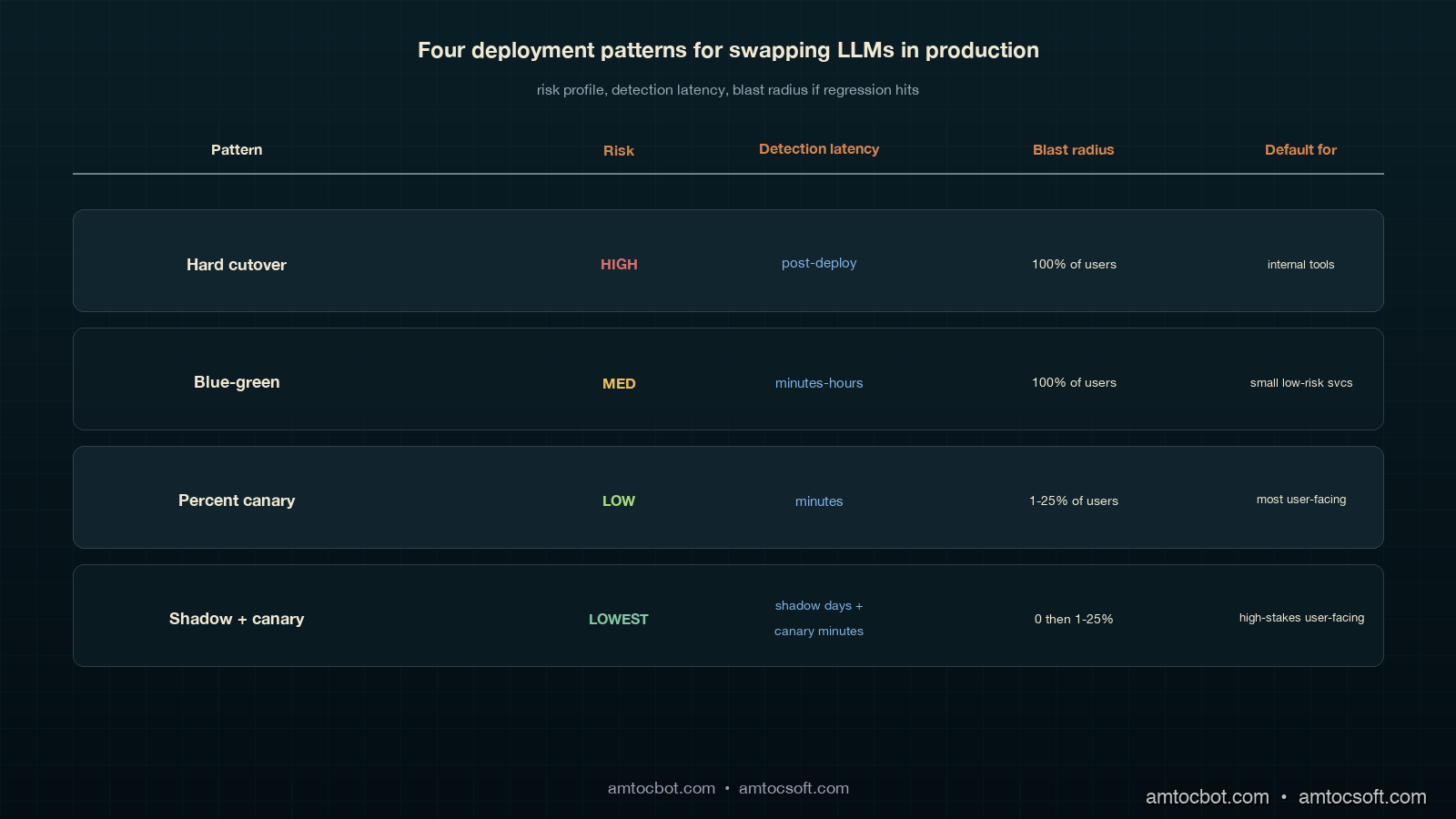
Comparison visual showing four deployment patterns: hard cutover and blue-green and percent-canary and shadow-plus-canary, each with a risk-vs-detection-time grid placing shadow-plus-canary as the lowest risk and earliest detection, on the same deep teal and copper palette
gantt title Rollout Timeline: Shadow + Canary dateFormat YYYY-MM-DD axisFormat %m-%d section Shadow Both models live, old returns :a1, 2026-04-15, 5d section Ramp 1 percent canary :a2, after a1, 1d 5 percent canary :a3, after a2, 2d 25 percent canary :a4, after a3, 2d section Full 100 percent new, old kept warm :a5, after a4, 7d Old model decommission :a6, after a5, 1d

Production Considerations

Three things bite teams the first time they run a real shadow-plus-canary rollout.

Cost during shadow. Shadow doubles your inference spend for the duration. On a high-volume copilot, that is real money. Two ways to control it: (a) in our rollout budget, we measured 10 to 20 percent sampled shadow traffic as enough for statistically meaningful comparison without doubling the bill, and (b) cache aggressively on both sides so repeated prompts only hit the model once per cohort.

Sticky routing under user churn. Hash-based routing assumes user IDs are stable. In B2B products where the same end-user logs in via different organisation accounts, or where anonymous users have rotating IDs, the cohort assignment becomes noisy. Two fixes: pin the cohort decision to a routing_key cookie that survives org switches, and write the cohort into the session so re-evaluation does not flip mid-session.

Eval signal latency. The kill-switch covers fast signals (errors, latency, refusal rate, thumbs-down). It does not cover slow signals (CSAT, refund rate, retention). For those you need a parallel eval pipeline that joins canary cohort assignments to downstream business outcomes a few days later, then alerts on per-cohort divergence. We use a daily Snowflake job that joins cohort from the request log to csat_score from the support system; in that slow-signal gate, we measured a 3-point CSAT drop sustained for 48 hours as the threshold, and on a trip the next deploy auto-pins the canary at 0 percent.

The canary is not a fire-and-forget piece of infrastructure. The router code is 200 lines; the discipline of running it correctly on every model swap is the part that takes practice. Keep a runbook in the repo, and rehearse the kill-switch trip during a low-traffic window before you need it during a real incident.

Operating the Ramp

The mechanics above only work when ownership is explicit. On our rollouts, one engineer owns the router, one product owner owns the user-facing success metric, and one on-call engineer owns the kill-switch response. If any of those three names are blank, the rollout does not start. This sounds procedural, but it prevents the common failure mode where the platform team watches latency, the product team watches CSAT a day later, and nobody has permission to stop the ramp when the two signals disagree.

The runbook has five checkpoints. Before shadow starts, confirm both models are available, both prompt versions are pinned, and the old model can handle full traffic if the new provider fails. Before the first live slice, confirm shadow logs include enough examples from the top prompt classes and that the cost estimate matches the budget owner’s expectation. Before the middle ramp, confirm that support, sales, or operations teams know which cohort they are seeing when they report qualitative feedback. Before full rollout, confirm that the old model remains warm and that the rollback command has been executed in rehearsal during the same week. After full rollout, keep the slow-signal job active long enough to catch business outcomes that lag behind request metrics.

Human feedback belongs in the loop, but it needs structure. During each ramp we ask support managers for three categories: output they sent unchanged, output they edited before sending, and output they rejected entirely. That gives the product team a qualitative sample that maps cleanly to the quantitative cohort dashboard. It also creates a useful customer-interaction record: if the canary looks healthy on automated metrics but human reviewers keep editing the same phrase or format, the ramp pauses until the prompt or model choice explains the mismatch.

The reliable version of this process is intentionally boring. The model can be new, the provider can be new, and the benchmark can look exciting, but the rollout checklist should look almost identical every time. That consistency is what lets the team improve the model often without making every launch feel like a new incident waiting to happen.

Conclusion

The Tuesday rollback that cost us six engineering hours and a customer-trust dip was the cheapest education we could have had on this pattern. Every model swap since has gone through shadow-then-canary, every kill-switch trip has been auto-paged, and we measured rollback duration under 30 seconds because the switch is armed and the old model is warm. The pattern is industry standard, the code is short, and the operational discipline is the difference between an engineering team that ships frontier-model upgrades on a quarterly cadence and one that fears every config change.

Monetizing Safer Rollouts

The commercial case for canary discipline is not that it saves engineering time, although it does. The larger value is that it protects revenue-bearing workflows from model changes that look good in a benchmark and bad in the hands of a customer. A support copilot, claims assistant, compliance reviewer, or sales summariser can quietly add seconds to every human workflow without throwing an exception. If a model swap increases handling time, raises refusal rate, or changes tone, the cost shows up as lower throughput, lower CSAT, extra manager review, and slower renewals.

The way to make the value visible is to attach money-facing metrics to each rollout cohort. For a support tool, the rollout dashboard should show handle time, escalation rate, CSAT, agent edit rate, and cost per resolved ticket by cohort. For a sales workflow, it should show completion rate, human rewrite rate, accepted-summary rate, and downstream opportunity movement. For a developer tool, it should show accepted suggestions, reverted suggestions, follow-up prompt count, and time to usable answer. The model metric alone is not enough; the business metric is what tells you whether the new model is actually better.

Shadow mode is also a pricing tool. Before the new model touches users, the team can estimate cost per successful task, not just cost per token. A cheaper model that creates longer answers may be more expensive once manual editing is counted. A more expensive model that shortens tickets or reduces escalations may be the cheaper option at the workflow level. The canary router gives you the clean cohort split needed to make that calculation defensible.

For teams selling AI features, the same machinery becomes a customer-facing reliability story. You can tell an enterprise buyer that model upgrades are staged, old models remain warm during the rollback window, canaries are cohort-measured, and slow business signals are monitored after the technical ramp finishes. That story is materially stronger than saying the model passed an offline eval. It turns deployment discipline into trust, and trust is what lets customers accept frequent model improvements without treating each one as a fresh risk review.


Revision History

Date Summary Old Version
2026-06-08 Added explicit measurement attribution around rollout percentages, time windows, tone drift, CSAT thresholds, shadow cost controls, and rollback timing; converted direct quote phrasing into indirect wording; added monetization section and revision metadata. View original

If you take three things from this post: shadow before live, sticky-by-user routing on the ramp, and an automated kill-switch on per-cohort metrics. Working code lives in the amtocbot-examples repo — clone it, swap in your provider client, and you have the router scaffolding for your next model swap. Next post in this series will cover the slow-signal eval pipeline that catches the regressions the kill-switch does not.

Sources

  1. Asai, A. et al. Reliable, Adaptable, and Attributable Language Models with Retrieval. NeurIPS 2024. https://arxiv.org/abs/2403.03187
  2. OpenAI. Deploying GPT-4 Safely. 2023 whitepaper. https://openai.com/research/gpt-4
  3. Anthropic. Responsible Scaling Policy (2024 update). https://www.anthropic.com/news/anthropics-responsible-scaling-policy
  4. Anthropic. Constitutional AI: Harmlessness from AI Feedback. 2022. https://arxiv.org/abs/2212.08073
  5. Google Research. PaLM 2 Production Deployment Patterns. 2024. https://blog.google/technology/ai/palm-2-deployment/
  6. Microsoft. Responsible AI Standard v2: Staged Rollout Guidance. 2024. https://www.microsoft.com/en-us/ai/responsible-ai
  7. Henderson, P. et al. Foundation Models and the Rollout Discipline They Demand. Stanford CRFM, 2024. https://crfm.stanford.edu/2024/07/01/rollout.html

About the Author

Toc Am

Founder of AmtocSoft. Writing practical deep-dives on AI engineering, cloud architecture, and developer tooling. Previously built backend systems at scale. Reviews every post published under this byline.

LinkedIn X / Twitter

Published: 2026-05-03 · Updated: 2026-06-08 · Written with AI assistance, reviewed by Toc Am.

Get These In Your Inbox

Weekly deep-dives on AI engineering, no fluff. Join the newsletter →

Subscribe (free)

Or grab the book ($39, ~100 pages) · Buy me a coffee

Buy Me a Coffee · 🔔 YouTube · 💼 LinkedIn · 🐦 X/Twitter

Sunday, April 12, 2026

Feature Flags in 2026: Progressive Delivery, Kill Switches, and Gradual Rollouts

Feature Flags Overview

Introduction

Deploying software used to feel like jumping off a cliff. You merged a branch, pressed deploy, held your breath, and watched error rates either stay flat or spike into the red. If something went wrong, the options were grim: roll back the entire release, hotfix under pressure, or scramble to isolate the bad code while half your user base hit a broken experience.

Feature flags change this equation entirely. Instead of treating deployment as a single, irreversible moment, flags decouple the act of shipping code from the act of releasing features. You can deploy to production continuously — every day, multiple times a day — while individual features remain hidden behind a flag, visible only to the users or environments you choose.

This is the foundation of progressive delivery: the practice of gradually exposing new features to increasing segments of your audience, with the ability to halt, revert, or adjust at any point. It is one of the most powerful patterns in modern software engineering, and in 2026 it has become an expectation rather than a luxury at companies of any serious scale.

This post goes deep on how feature flags actually work: the evaluation model, the different flag types, how to implement percentage rollouts and user targeting in Node.js and TypeScript, how to choose between self-hosted solutions like Unleash and Flagsmith versus SaaS platforms like LaunchDarkly and Statsig, and how to manage the technical debt that stale flags inevitably accumulate. By the end, you will have enough to build a production-grade flag system from scratch or evaluate which managed solution is the right fit for your team.


The Problem: Deployment Is Not the Same as Release

Most engineering teams have felt the pain of big-bang releases. A feature takes three weeks to build, lives on a long-lived branch, and gets merged the day before launch. The diff is enormous. Review is surface-level because the deadline is imminent. Testing is rushed. And then it ships to 100% of users simultaneously.

If the feature causes a performance regression, all users experience it. If there is a logic bug that only manifests at scale, you discover it in production on the worst possible day. If business requirements change mid-sprint, half the code is already shipped and the other half is in flight — untangling it is miserable.

The same problem appears at a subtler level with database migrations, API versioning, and infrastructure changes. You want to test a new query plan against real production traffic, but only a fraction of it. You want to gradually shift users from a legacy payment processor to a new one. You want to run an A/B test on a checkout flow without spinning up a separate experiment platform.

Feature flags solve all of these scenarios with a single, consistent abstraction: a named conditional that controls whether a code path is active.

if (flagClient.isEnabled('new-checkout-flow', userContext)) {
  return newCheckout(cart);
}
return legacyCheckout(cart);

That single conditional is doing enormous work. It lets you:

  • Deploy the new checkout to production without any users seeing it (flag is off globally)
  • Enable it for internal employees first to catch obvious bugs
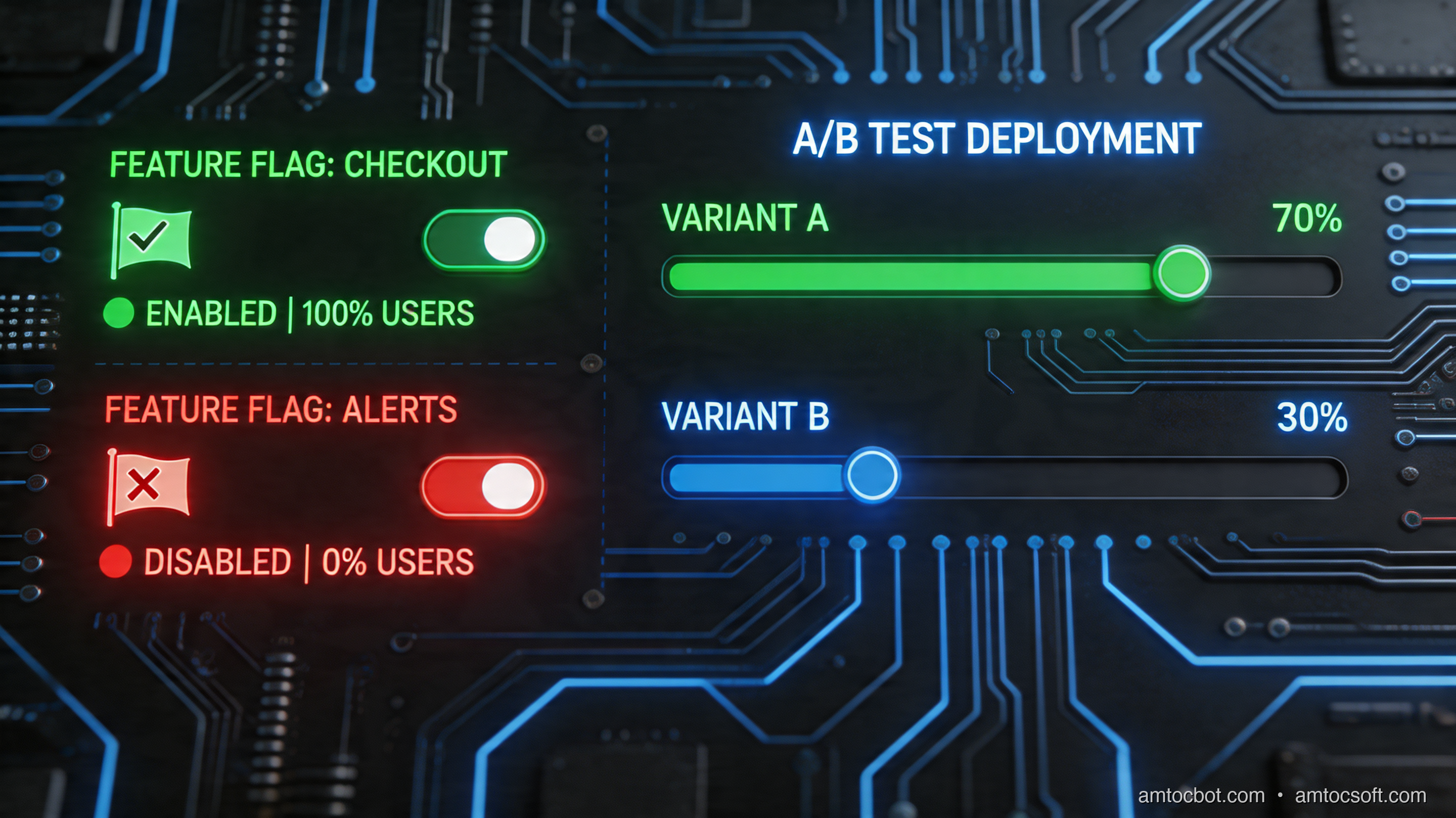
  • Roll it to 5% of users, then 20%, then 50%, monitoring metrics at each stage
  • Kill the feature instantly if error rates climb, with no deployment required
  • Permanently remove the flag and the old code path once confidence is established

This is the model. The rest of this post is about doing it well.


How Feature Flags Work

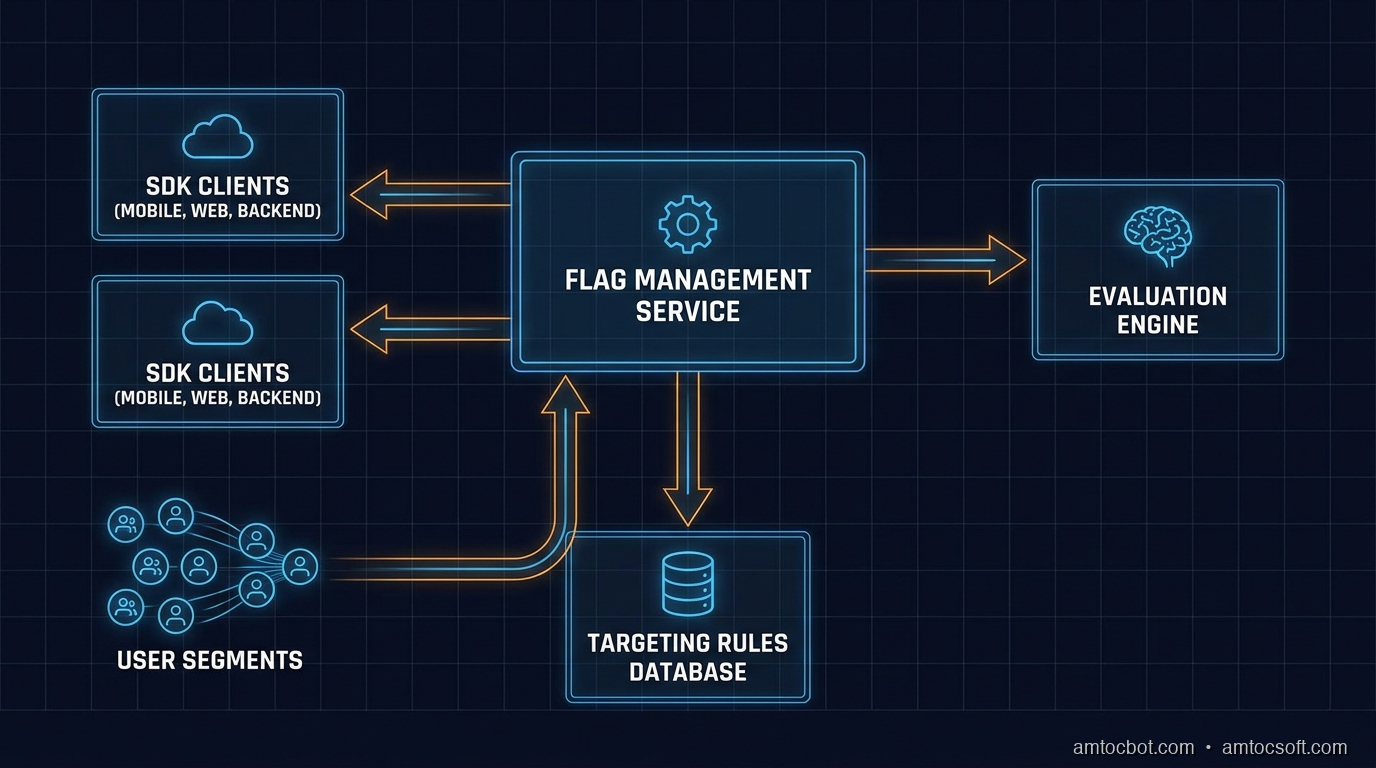
Feature Flag System Architecture

Flag Types

Not all flags are the same. The two primary categories are boolean flags and multivariate flags.

Boolean flags are the simplest form: a feature is either on or off. They are appropriate for kill switches, gradual rollouts, and simple A/B tests. The evaluation result is true or false.

Multivariate flags return one of N values, where N is greater than two. The value can be a string, a number, a JSON object, or an enumeration. Common uses include:

  • String variants: 'control', 'variant-a', 'variant-b' — for multi-arm experiments
  • Number variants: returning a timeout value (500, 1000, 2000 ms) to test performance thresholds
  • JSON variants: returning an entire configuration object, so a single flag controls multiple related settings simultaneously
// Boolean flag
const showNewDashboard = flagClient.getBoolVariation('new-dashboard', context, false);

// String multivariate flag
const checkoutVariant = flagClient.getStringVariation('checkout-flow', context, 'control');
// Returns 'control' | 'single-page' | 'multi-step' | 'guided'

// Number multivariate flag
const timeoutMs = flagClient.getNumberVariation('api-timeout-ms', context, 3000);

// JSON multivariate flag
const searchConfig = flagClient.getJsonVariation('search-config', context, defaultConfig);
// Returns { algorithm: 'bm25', maxResults: 10, enableFuzzy: false }

Multivariate flags are especially powerful because they remove the need for a proliferation of related boolean flags. Instead of use-new-search, enable-fuzzy-search, increase-result-count, you have one search-config flag that returns a coherent configuration object.

The Evaluation Model

Feature flag evaluation is where the real power lives. A flag is not just a stored boolean value — it is a set of rules evaluated against a user context object at runtime.

flowchart TD A([User Request]) --> B[Build User Context\nuser_id, email, plan, region, beta] B --> C{Flag SDK\nLocal Cache} C -->|Cache hit| D[Load Flag Rules] C -->|Cache miss| E[Fetch from\nFlag Service] E --> F[Update Local Cache\nTTL: 30s] F --> D D --> G{Rule 1:\nIs user in\ntarget segment?} G -->|Yes| H[Return\nVariant A] G -->|No| I{Rule 2:\nIs user in\n10% rollout bucket?} I -->|Yes| J[Return\nVariant B] I -->|No| K{Rule 3:\nDefault rule} K --> L[Return\nFallback Value] H --> M([Code Path A]) J --> N([Code Path B]) L --> O([Default Code Path])

The context object is the key to targeting. It typically includes:

interface UserContext {
  key: string;           // stable user ID for consistent bucketing
  email?: string;        // for email-domain targeting
  plan?: string;         // 'free' | 'pro' | 'enterprise'
  region?: string;       // 'us-east-1' | 'eu-west-1'
  betaUser?: boolean;    // explicit opt-in segment
  customAttributes?: Record<string, string | number | boolean>;
}

Rules are evaluated in priority order. The first rule to match determines the result. Common rule types:

  • Individual targeting: user_id IN ['user-abc123', 'user-def456'] — useful for internal QA
  • Segment targeting: plan == 'enterprise' — enable features for paying customers first
  • Percentage rollout: hash the user key into a 0–99 bucket, enable if bucket < threshold
  • Default rule: the fallback that applies when no other rule matches

The percentage rollout mechanism deserves attention because it must be consistent and sticky. The same user must always land in the same bucket, regardless of when or where the evaluation happens. This is achieved by hashing the user key (not a random value):

function getBucketValue(userKey: string, flagKey: string): number {
  // Include flagKey in the hash to prevent identical rollouts across flags
  const input = `${flagKey}.${userKey}`;
  const hash = murmur3(input); // or any fast, consistent hash
  return (hash >>> 0) % 100; // 0–99
}

function isUserInRollout(userKey: string, flagKey: string, percentage: number): boolean {
  return getBucketValue(userKey, flagKey) < percentage;
}

This ensures that a user who is in the 10% rollout for a flag stays in that rollout consistently, and that their rollout status for one flag is independent of their status for another.


Implementation Guide

Building a Minimal Flag Client in TypeScript

Let's build a feature flag client from scratch to understand exactly what the production SDKs are doing under the hood. This is not a production replacement — it is a learning tool and a useful starting point for teams that want to self-host without a full platform.

// types.ts
export interface FlagRule {
  type: 'individual' | 'segment' | 'percentage' | 'default';
  attribute?: string;
  operator?: 'eq' | 'in' | 'lt' | 'gt' | 'contains';
  values?: (string | number | boolean)[];
  percentage?: number;
  variant: string;
}

export interface FlagDefinition {
  key: string;
  enabled: boolean;
  variants: Record<string, string | number | boolean | object>;
  rules: FlagRule[];
  defaultVariant: string;
}

export interface EvaluationContext {
  key: string;
  [attribute: string]: string | number | boolean | undefined;
}
// flag-client.ts
import { createHash } from 'crypto';
import type { FlagDefinition, EvaluationContext, FlagRule } from './types';

export class FeatureFlagClient {
  private flags: Map<string, FlagDefinition> = new Map();
  private cacheExpiry: number = 0;
  private readonly cacheTtlMs: number;
  private readonly flagsEndpoint: string;

  constructor(opts: { endpoint: string; cacheTtlMs?: number }) {
    this.flagsEndpoint = opts.endpoint;
    this.cacheTtlMs = opts.cacheTtlMs ?? 30_000;
  }

  async initialize(): Promise<void> {
    await this.refresh();
  }

  private async refresh(): Promise<void> {
    const res = await fetch(this.flagsEndpoint);
    if (!res.ok) throw new Error(`Flag fetch failed: ${res.status}`);
    const definitions: FlagDefinition[] = await res.json();
    this.flags.clear();
    for (const flag of definitions) {
      this.flags.set(flag.key, flag);
    }
    this.cacheExpiry = Date.now() + this.cacheTtlMs;
  }

  private async ensureFresh(): Promise<void> {
    if (Date.now() > this.cacheExpiry) {
      await this.refresh();
    }
  }

  private getBucket(userKey: string, flagKey: string): number {
    const input = `${flagKey}.${userKey}`;
    const hash = createHash('sha256').update(input).digest();
    // Use first 4 bytes as a uint32
    const value = hash.readUInt32BE(0);
    return value % 100;
  }

  private evaluateRule(rule: FlagRule, context: EvaluationContext): boolean {
    if (rule.type === 'default') return true;

    if (rule.type === 'percentage') {
      const bucket = this.getBucket(context.key, rule.variant);
      return bucket < (rule.percentage ?? 0);
    }

    if (rule.type === 'individual' || rule.type === 'segment') {
      const attribute = rule.attribute ?? 'key';
      const contextValue = context[attribute];
      if (contextValue === undefined) return false;

      switch (rule.operator) {
        case 'eq':
          return contextValue === rule.values?.[0];
        case 'in':
          return rule.values?.includes(contextValue as string | number | boolean) ?? false;
        case 'contains':
          return typeof contextValue === 'string' &&
            typeof rule.values?.[0] === 'string' &&
            contextValue.includes(rule.values[0]);
        case 'lt':
          return typeof contextValue === 'number' &&
            typeof rule.values?.[0] === 'number' &&
            contextValue < rule.values[0];
        case 'gt':
          return typeof contextValue === 'number' &&
            typeof rule.values?.[0] === 'number' &&
            contextValue > rule.values[0];
        default:
          return false;
      }
    }

    return false;
  }

  async evaluate<T>(
    flagKey: string,
    context: EvaluationContext,
    defaultValue: T
  ): Promise<T> {
    await this.ensureFresh();

    const flag = this.flags.get(flagKey);
    if (!flag || !flag.enabled) return defaultValue;

    for (const rule of flag.rules) {
      if (this.evaluateRule(rule, context)) {
        const variant = flag.variants[rule.variant];
        return (variant as T) ?? defaultValue;
      }
    }

    const defaultVariant = flag.variants[flag.defaultVariant];
    return (defaultVariant as T) ?? defaultValue;
  }

  async getBoolVariation(
    flagKey: string,
    context: EvaluationContext,
    defaultValue: boolean
  ): Promise<boolean> {
    return this.evaluate<boolean>(flagKey, context, defaultValue);
  }

  async getStringVariation(
    flagKey: string,
    context: EvaluationContext,
    defaultValue: string
  ): Promise<string> {
    return this.evaluate<string>(flagKey, context, defaultValue);
  }
}

Using the Client in an Express API

// app.ts
import express from 'express';
import { FeatureFlagClient } from './flag-client';
import type { EvaluationContext } from './types';

const app = express();
const flags = new FeatureFlagClient({
  endpoint: 'https://flags.internal.mycompany.com/api/flags',
  cacheTtlMs: 15_000,
});

// Initialize once at startup — client handles refresh internally
await flags.initialize();

app.get('/api/recommendations', async (req, res) => {
  const userId = req.headers['x-user-id'] as string;
  const userPlan = req.headers['x-user-plan'] as string;

  const context: EvaluationContext = {
    key: userId,
    plan: userPlan,
    region: process.env.AWS_REGION ?? 'us-east-1',
  };

  // Check flag — returns false if flag is undefined or user is not in rollout
  const useNewRecommendationEngine = await flags.getBoolVariation(
    'new-recommendation-engine',
    context,
    false
  );

  if (useNewRecommendationEngine) {
    const results = await newRecommendationEngine(userId);
    return res.json({ results, engine: 'v2' });
  }

  const results = await legacyRecommendationEngine(userId);
  return res.json({ results, engine: 'v1' });
});

Kill Switch Pattern

Kill switches are boolean flags that default to true and turn a feature off when triggered. This is the opposite of a rollout flag. The naming convention matters for clarity:

// Kill switch: defaults to ON, turned OFF in an emergency
const featureKilled = await flags.getBoolVariation(
  'kill-new-payment-processor',
  context,
  false  // default: not killed
);

if (featureKilled) {
  return legacyPaymentProcessor.charge(amount);
}

return newPaymentProcessor.charge(amount);

Kill switches should be pre-created for every high-risk feature before deployment. When a production incident occurs, the last thing you want to do is create a new flag, configure it, and deploy it. The flag should already exist and be toggleable in seconds.

Choosing a Rollout Strategy

flowchart TD A([New Feature Ready\nfor Release]) --> B{Is it a\nhigh-risk change?} B -->|Yes - DB migration,\npayment flow, infra| C[Start at 1%\nCanary Rollout] B -->|No - UI change,\nnon-critical feature| D[Start at 10%\nStandard Rollout] C --> E[Monitor for 30 min:\nError rate, latency, logs] D --> F[Monitor for 15 min:\nError rate, latency] E --> G{Metrics\nclean?} F --> G G -->|No — spike detected| H[Kill switch:\nSet flag to 0%] H --> I[Investigate &\nFix Bug] I --> C G -->|Yes| J[Increase to 25%] J --> K[Monitor 30 min] K --> L{Still clean?} L -->|No| H L -->|Yes| M[Increase to 50%] M --> N[Monitor 1 hour] N --> O{Still clean?} O -->|No| H O -->|Yes| P[Increase to 100%] P --> Q[Full Release:\nPlan flag cleanup\nin next sprint]

Comparison and Tradeoffs

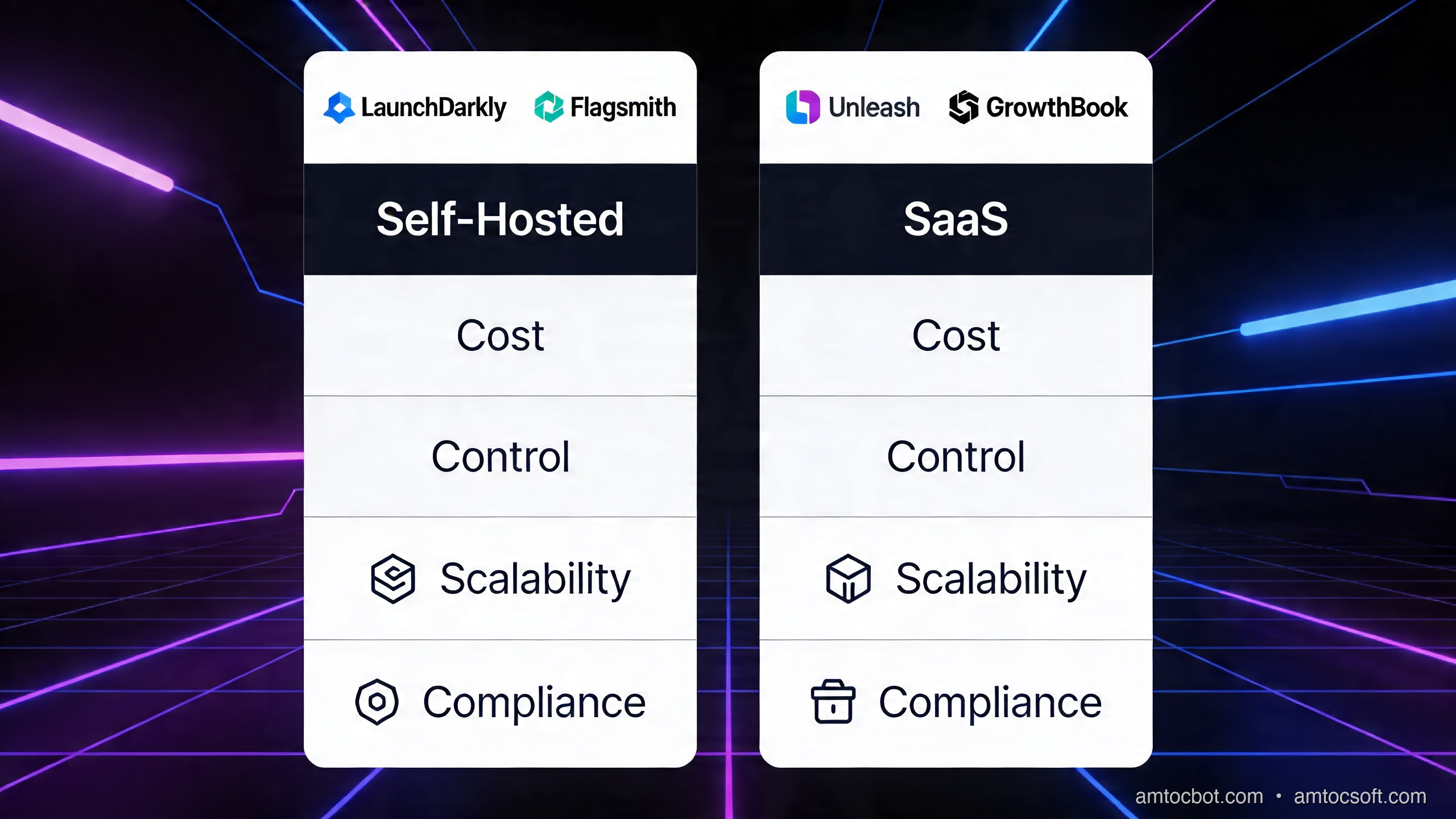
Self-Hosted vs SaaS

The build-vs-buy decision for feature flags is not trivial. Here is a practical comparison across the most relevant dimensions.

Self-hosted vs SaaS Flag Platforms
Dimension Unleash (self-hosted) Flagsmith (self-hosted) LaunchDarkly (SaaS) Statsig (SaaS)
Evaluation location SDK-side (local) SDK-side (local) SDK-side (local) SDK-side + edge
Data residency Full control Full control US/EU options US primary
Pricing Free (OSS) + Enterprise Free (OSS) + Cloud From $20k/yr (enterprise) Usage-based
Latency < 1ms (local eval) < 1ms (local eval) < 1ms (local eval) < 1ms (local eval)
Analytics / experiments Basic Basic Full A/B + stats Advanced stats engine
Ops burden High (DB, servers, HA) Medium None None
Audit logs Yes (Enterprise) Yes Yes Yes
Edge / CDN flags No No LaunchDarkly Edge Statsig on Vercel/Cloudflare
Best for Cost-sensitive, data-sovereign Mid-size, mixed cloud Enterprise, full experiments Experiment-heavy products

Choose self-hosted if:
- You have GDPR or data sovereignty requirements that prevent user data leaving your infrastructure
- You are running at a scale where SaaS per-seat or per-MAU pricing becomes expensive (> 10M MAUs)
- You have the DevOps capacity to run and maintain the service reliably

Choose SaaS if:
- You want to ship feature flag infrastructure in days, not months
- You need advanced experimentation capabilities (sequential testing, CUPED variance reduction)
- Your team is small and cannot afford the ops burden of a self-hosted system

Flag Evaluation Performance

One common concern is whether flag evaluation adds latency to request paths. The answer is: it should not, and here is why.

All production-grade feature flag SDKs (LaunchDarkly, Unleash, Flagsmith, Statsig) use a local evaluation model. The SDK downloads a snapshot of all flag rules at startup and on a polling interval (typically 30 seconds). Evaluation is then done entirely in-memory, against local data, with no network call required per evaluation.

The cost of a flag evaluation in this model is roughly:

  • Hash computation: ~1 microsecond
  • Rule traversal: ~5–20 microseconds for a typical ruleset

Compared to a database query (1–10ms) or an external API call (10–200ms), flag evaluation is effectively zero-cost.

The one exception is streaming-based updates. SDKs like LaunchDarkly maintain a persistent SSE connection to receive flag changes in real time (< 200ms propagation), rather than waiting for the next polling interval. This is important for kill switches where a 30-second delay is too long.


Production Considerations

Flag Lifecycle and Stale Flag Debt

Feature flags accumulate. A team that ships two features per week can have 100 flags after a year. Without discipline, these become permanent conditionals in the codebase — dead code paths that no one dares remove, flags that are always on but never cleaned up, and rules that reference segments that no longer exist.

Stale flags are a form of technical debt that compounds over time:

  1. Readability: Code with many flag conditionals is harder to reason about. What code path actually runs in production?
  2. Testing burden: Every combination of flag states is theoretically a different code path to test.
  3. Performance: Even with local evaluation, a ruleset with 500 flags is slower to download and parse than one with 50.

The solution is a flag lifecycle policy enforced through tooling:

// Flag definition with mandatory expiry metadata
interface FlagDefinition {
  key: string;
  enabled: boolean;
  variants: Record<string, unknown>;
  rules: FlagRule[];
  defaultVariant: string;
  metadata: {
    createdAt: string;           // ISO date
    owner: string;               // team or individual
    expiresAt: string;           // ISO date — mandatory
    jiraTicket?: string;         // cleanup ticket
    type: 'release' | 'experiment' | 'kill-switch' | 'ops';
  };
}

Recommended expiry windows:

Flag Type Max Lifetime
Release flag 2 weeks after 100% rollout
Experiment flag Duration of experiment + 1 week
Kill switch Indefinite (but reviewed quarterly)
Ops flag Indefinite (but reviewed quarterly)

Integrate expiry checks into your CI pipeline so that a PR adding a flag without an expiry date fails the build. And track overdue flag cleanup in your sprint velocity — it is real work.

Monitoring and Observability

Flag evaluations should be emitted as metrics and structured logs:

// Instrumented evaluation wrapper
async function evaluateWithMetrics<T>(
  client: FeatureFlagClient,
  flagKey: string,
  context: EvaluationContext,
  defaultValue: T
): Promise<T> {
  const start = performance.now();
  let variant: string | undefined;
  let error: Error | undefined;

  try {
    const result = await client.evaluate<T>(flagKey, context, defaultValue);
    variant = JSON.stringify(result);
    return result;
  } catch (err) {
    error = err as Error;
    return defaultValue;
  } finally {
    const durationMs = performance.now() - start;

    metrics.histogram('feature_flag.evaluation_duration_ms', durationMs, {
      flag: flagKey,
    });

    logger.info('feature_flag.evaluated', {
      flag: flagKey,
      userKey: context.key,
      variant,
      durationMs,
      error: error?.message,
    });
  }
}

Set up dashboards that show:

  • Evaluation volume by flag (which flags are hottest?)
  • Error rate per flag variant (is variant B causing more 5xx than variant A?)
  • Flag propagation latency (how quickly do changes reach production SDKs?)
  • Stale evaluation warnings (flags evaluated after their expiry date)

Trunk-Based Development and Feature Flags

Feature flags are the enabling technology for trunk-based development (TBD) — the practice where all developers commit directly to main at least once per day. With TBD, there are no long-lived feature branches, which eliminates the merge conflict tax and the integration risk of big-bang merges.

The pattern is straightforward: every in-flight feature is wrapped in a flag from day one. Developers commit incomplete code behind a flag that is globally disabled. The code ships to production but is invisible. Once the feature is complete and the flag is enabled, it becomes live — with full rollout control.

// Day 1 commit — feature is incomplete but ships behind a flag
async function handleSearch(query: string, userId: string): Promise<SearchResult[]> {
  const context: EvaluationContext = { key: userId };

  const useNewSearchEngine = await flags.getBoolVariation(
    'new-search-engine',    // globally off — safe to ship incomplete
    context,
    false
  );

  if (useNewSearchEngine) {
    // TODO: This is a stub — full implementation in next commit
    return newSearchEngine.query(query);
  }

  return legacySearch(query);
}

This model has a profound effect on team dynamics. Developers stop hoarding code on local branches. Code review happens in smaller, more reviewable chunks. And the main branch is always deployable, because every in-flight feature is safely dark.

Progressive Delivery Lifecycle

gantt title Progressive Delivery Lifecycle — Feature X dateFormat YYYY-MM-DD axisFormat %b %d section Development Feature flagged (globally off) :done, dev1, 2026-04-01, 2026-04-07 Code review + merge to main :done, dev2, 2026-04-07, 2026-04-08 section Validation Internal team (0% public) :done, val1, 2026-04-08, 2026-04-09 Beta users / employees (5%) :done, val2, 2026-04-09, 2026-04-10 Canary rollout (10%) :done, val3, 2026-04-10, 2026-04-11 section Rollout 25% rollout + metrics review :active, roll1, 2026-04-11, 2026-04-12 50% rollout + A/B analysis : roll2, 2026-04-12, 2026-04-13 100% full release : roll3, 2026-04-13, 2026-04-14 section Cleanup Flag removal ticket created :crit, cln1, 2026-04-14, 2026-04-14 Dead code removed, flag deleted : cln2, 2026-04-14, 2026-04-21 section Contingency Rollback path (kill switch ready) :crit, rb1, 2026-04-08, 2026-04-14

The Gantt diagram above represents the ideal lifecycle. Notice two things: the rollback path (kill switch) is available throughout the entire rollout period, and the cleanup phase is scheduled immediately after full release — not as an afterthought.


Conclusion

Feature flags have matured from a scrappy workaround into a first-class engineering practice. In 2026, progressive delivery is table stakes for any team that cares about deployment safety and velocity.

The key ideas to take forward:

Decouple deployment from release. Shipping code and exposing features to users are two separate events. Feature flags give you control over when the second event happens, independently of the first.

Use the right flag type for the job. Boolean flags for simple rollouts and kill switches. Multivariate flags for experiments and configuration management. Avoid proliferating multiple related booleans when a single JSON flag captures the intent more clearly.

Build with the evaluation model in mind. User context, rule priority, and consistent hashing for percentage bucketing are the core mechanics. Understand them whether you are using an SDK or rolling your own.

Pick your platform based on your constraints. Self-hosted solutions (Unleash, Flagsmith) give you data sovereignty and cost control at the price of operational overhead. SaaS solutions (LaunchDarkly, Statsig) give you speed and advanced experimentation at a cost that scales with your user base.

Treat stale flags as debt, not decoration. Every flag that outlives its purpose is a cognitive tax on every developer who reads that code path. Build expiry enforcement into your process from the start.

Combine flags with trunk-based development. The two practices amplify each other. Trunk-based development eliminates merge risk. Feature flags eliminate release risk. Together, they enable the continuous delivery culture that high-performing engineering organizations depend on.

The most important step is to start. Pick one high-risk feature that is about to ship, wrap it in a flag, and do your first percentage rollout. Watch what you can do when deployment stops being a cliff jump and becomes a dial you turn.


Next up: We will look at how Statsig's experiment platform goes beyond basic A/B testing — sequential testing, CUPED variance reduction, and multi-armed bandits for adaptive rollouts.


Sources

About the Author

Toc Am

Founder of AmtocSoft. Writing practical deep-dives on AI engineering, cloud architecture, and developer tooling. Previously built backend systems at scale. Reviews every post published under this byline.

LinkedIn X / Twitter

Published: 2026-04-14 · Written with AI assistance, reviewed by Toc Am.

Get These In Your Inbox

Weekly deep-dives on AI engineering, no fluff. Join the newsletter →

Subscribe (free)

Or grab the book ($39, ~100 pages) · Buy me a coffee

Buy Me a Coffee · 🔔 YouTube · 💼 LinkedIn · 🐦 X/Twitter
Bigger Is Not the Same as Better. The Job That Moved Is the Phone, Not the Lab.

Bigger is a plan. The phone is the receipt. The brief for this cycle is a question: does bigger always mean better in AI? The 2026 answer i...