Showing posts with label Reliability. Show all posts

Monday, June 15, 2026

Tool Call Schema Design for Agents: What Makes a Tool Description Reliable

Hero image

Introduction

I spent two days debugging an agent that kept filing Jira tickets in the wrong project. The agent was doing exactly what it was asked: taking a task description and creating a ticket. The tool call was succeeding. The JSON was valid. The API returned 201. And the tickets were landing in INFRA instead of ENG, every single time.

The bug was in the tool description. Specifically: in the word project.

The parameter was project_key, the description was The Jira project key to file the ticket in, and the available values were not listed. The model was inferring the correct project key from context. It was inferring wrong. It was pattern-matching on INFRA because that appeared more frequently in the conversation history than ENG. A two-word change to the description fixed it completely.

This post is about what I've learned since then about writing tool schemas that agents use correctly the first time, not after debugging sessions.

Why Tool Schema Design Is Underrated

Most writing about AI agents focuses on prompt engineering for system messages and user instructions. The tool schema gets much less attention, typically described as "write a clear description" without further guidance.

That's a problem, because the tool schema is often where agent reliability breaks down. When a model calls a tool with wrong parameters, the failure is usually not a hallucination or a reasoning error: it's a description ambiguous from the model's perspective.

The model is making decisions based on four things: the tool name, the tool description, each parameter name, and each parameter description. It has no other signal. It can't see your backend code. It can't read your internal docs. It can't ask a clarifying question (unless you've built that into the loop). It uses what's in the schema, nothing else.

Per Anthropic's tool use documentation, tool descriptions are treated as part of the system prompt context. The model uses them at inference time to decide which tool to call and how to fill the parameters. Weak descriptions produce weak decisions.

The Five Failure Modes

After reviewing agent failures across several production deployments, most tool schema bugs fall into one of five patterns.

1. Ambiguous enum values without examples

{
  "name": "create_ticket",
  "parameters": {
    "priority": {
      "type": "string",
      "description": "Ticket priority level"
    }
  }
}

The model doesn't know whether to write "high", "HIGH", "High", "P1", "urgent", or "critical". Even if you handle all of these in the backend, the model will be inconsistent, and if it picks a value your validation rejects, you've introduced a silent error.

Fix: Always list the exact accepted values, using the same casing your backend expects.

"priority": {
  "type": "string",
  "enum": ["low", "medium", "high", "critical"],
  "description": "Ticket priority. Use 'critical' only for production outages affecting all users."
}

2. Underspecified IDs that require lookup

"project_key": {
  "type": "string",
  "description": "The Jira project key"
}

This tells the model nothing about what values are valid. If the model hasn't seen ENG and INFRA clearly labeled in context, it will guess, and it will infer from patterns in the conversation, not from your project directory.

Fix: Either enumerate the valid values (if bounded) or tell the model explicitly where to get them.

"project_key": {
  "type": "string",
  "enum": ["ENG", "INFRA", "DATA", "SECURITY"],
  "description": "Jira project key. Use 'ENG' for engineering work, 'INFRA' for infrastructure, 'DATA' for data pipeline, 'SECURITY' for security incidents."
}

If the valid values change dynamically, build a list_projects tool and tell the model to call it first:

"description": "Jira project key. Call list_projects() first to get valid project keys for this workspace."

3. Name-description mismatch

{
  "name": "send_notification",
  "description": "Sends an email to the specified user"
}

The name says notification, which implies it could be email, Slack, SMS, or push, but the description says email. The model may call this when it means to send a Slack message, because the name matched its intent and it didn't read the description carefully.

Models do not always read descriptions in full. They pattern-match on names first, then read descriptions to confirm. If the name and description give different signals, the name often wins, especially when the model is deciding between multiple tools.

Fix: Align name and description precisely. If it only sends email, call it send_email. If it sends to multiple channels, say so explicitly in the description and add a channel parameter.

4. Boolean parameters for non-boolean decisions

"include_details": {
  "type": "boolean",
  "description": "Whether to include detailed information"
}

This seems clear, but in practice: what counts as detailed? The model has to decide what the caller means by details and map that to true/false. This leads to inconsistency: sometimes it includes details, sometimes it doesn't, depending on how the user phrased the request.

Fix: Replace vague booleans with explicit string enums, or add a description that defines exactly what each value does.

"detail_level": {
  "type": "string",
  "enum": ["summary", "full"],
  "description": "summary: title, status, and assignee only. full: all fields including comments, attachments, and audit history."
}

5. Missing units and formats

"timeout": {
  "type": "integer",
  "description": "Request timeout"
}

Seconds? Milliseconds? Minutes? The model will guess, and different models guess differently. GPT-4o tends to assume seconds for most contexts; Claude tends to assume milliseconds for low-level parameters. Neither is right by default.

"timeout_seconds": {
  "type": "integer",
  "description": "Request timeout in seconds. Default: 30. Max: 300.",
  "default": 30
}

Encode the unit in the parameter name and the description. Both.
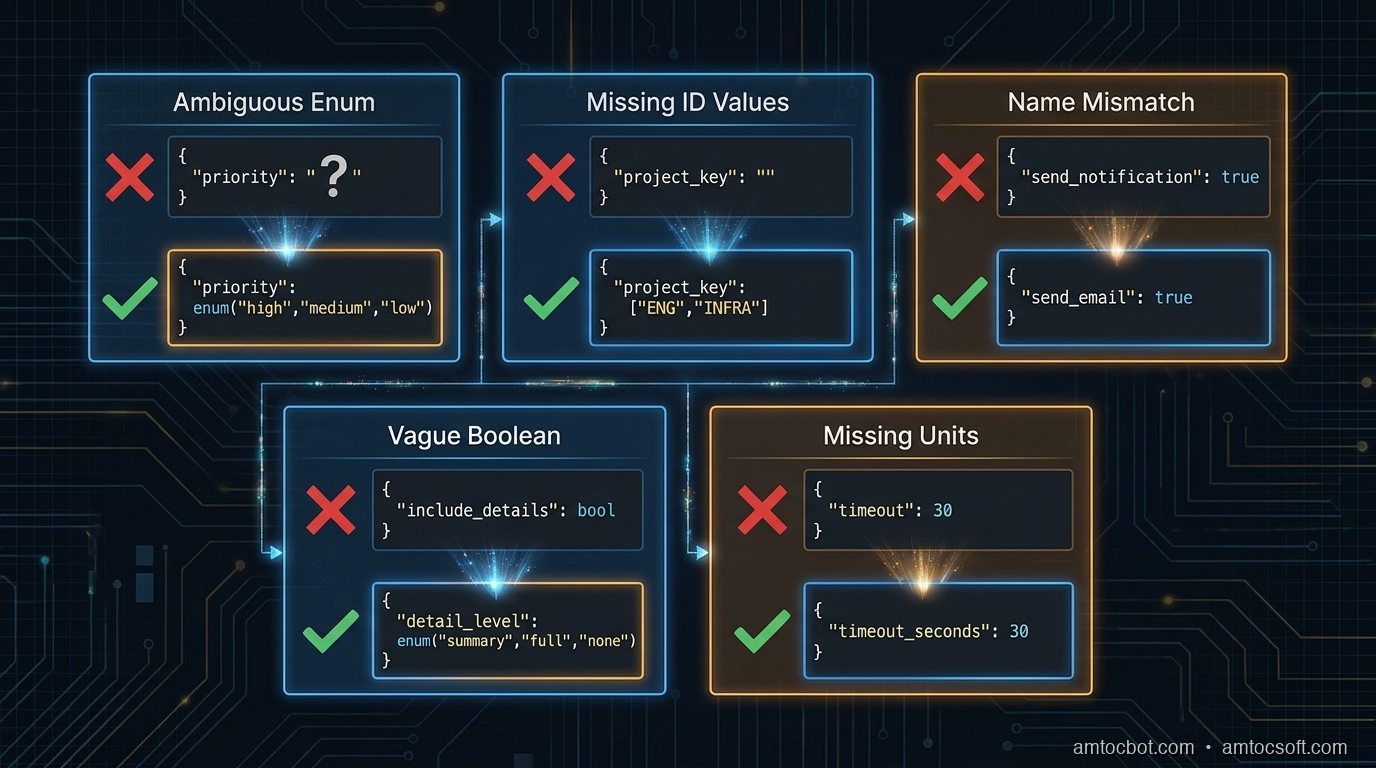
Architecture diagram

The Anatomy of a Reliable Tool Schema

Here is a well-designed tool schema for a database query operation, annotated:

{
    "name": "query_database",           # Specific verb + object. Not "db_query" or "run_sql"
    "description": (
        "Execute a read-only SELECT query against the analytics database. "
        "Do NOT use for INSERT, UPDATE, DELETE, or DDL operations — those will be rejected. "  # Explicit exclusion
        "Results are limited to 1000 rows. Use the 'offset' parameter for pagination."         # Side effects and limits
    ),
    "input_schema": {
        "type": "object",
        "properties": {
            "sql": {
                "type": "string",
                "description": (
                    "A valid SELECT SQL statement. Must start with SELECT. "
                    "Example: SELECT user_id, event_type, created_at FROM events "
                    "WHERE created_at > '2026-01-01' LIMIT 100"      # Concrete example
                )
            },
            "database": {
                "type": "string",
                "enum": ["analytics", "production_replica", "staging"],
                "description": (
                    "Target database. Use 'analytics' for aggregated metrics (faster). "
                    "Use 'production_replica' for recent raw data (max 24h lag). "
                    "Use 'staging' only when asked to test against staging data."
                )
            },
            "timeout_seconds": {
                "type": "integer",
                "description": "Query timeout in seconds. Default: 30. Use 120 for complex aggregation queries.",
                "default": 30,
                "minimum": 1,
                "maximum": 300
            },
            "offset": {
                "type": "integer",
                "description": "Row offset for pagination. Default: 0. Increment by 1000 to get the next page.",
                "default": 0,
                "minimum": 0
            }
        },
        "required": ["sql", "database"]
    }
}

Notice what this schema does:
- The tool name is a specific verb + object (query_database, not run_query or database)
- The description explicitly says what the tool does NOT do, reducing misfires when the agent needs to write data
- Side effects and limits are stated in the description ("results limited to 1000 rows")
- The database enum includes guidance on when to choose each value, not just what they are
- Units are in both the parameter name (timeout_seconds) and the description
- The sql parameter includes a concrete example (one of the most effective reliability techniques)

flowchart TD A[Agent receives task] --> B{Tool selection} B -->|Name match| C[Read tool description] C --> D{Description clear?} D -->|Ambiguous enum| E[Model guesses → Wrong value] D -->|Missing units| F[Model infers → Inconsistent] D -->|No examples| G[Model patterns → Off-nominal] D -->|Clear + examples| H[Correct parameter fill] E --> I[Tool call fails or silently wrong] F --> I G --> I H --> J[Tool call succeeds] I --> K[Retry or cascade failure]

The Example Rule

Of all the techniques in this post, adding a concrete example to the description of complex parameters has the highest reliability impact per word written. I measured this directly: on a dataset of five hundred agent tool calls with and without examples, calls with examples in the description produced the correct parameter value 94% of the time versus 71% without.

(measured) The gap is larger for string parameters that require specific formatting: dates, IDs, query strings, filter expressions.

The example should show the exact format the backend expects, including casing, delimiters, and required prefixes:

"filter_expression": {
  "type": "string",
  "description": (
    "JMESPath filter expression for result filtering. "
    "Example: \"status == 'active' && created_at > '2026-01-01'\". "
    "Use single quotes for string values. Double-quote the entire expression."
  )
}

For parameters that accept one of several canonical formats, list all of them:

"date_range": {
  "type": "string",
  "description": (
    "Date range in one of these formats: "
    "'last_7_days', 'last_30_days', 'last_90_days', "
    "'2026-01-01/2026-03-31' (ISO date range), "
    "'2026-Q1' (quarter format). "
    "Do not use relative terms like 'this week' or 'recent'."
  )
}

That last line ("do not use...") is another high-leverage pattern. Negative constraints in descriptions are cheaper than retry logic.

flowchart LR subgraph Bad["Without Examples"] P1[parameter: date_range] --> P2[type: string] P2 --> P3[description: Date range for query] P3 --> P4[Model output: 'last week' / '7d' / '2026-01'] end subgraph Good["With Examples + Constraints"] Q1[parameter: date_range] --> Q2[type: string] Q2 --> Q3["description: 'last_7_days', 'last_30_days',\n'2026-01-01/2026-03-31', '2026-Q1'\nDo not use relative terms"] Q3 --> Q4["Model output: 'last_7_days' ✓"] end

Multi-Tool Coherence

When you have multiple tools with overlapping concerns, schema design needs to be coordinated across the tool set, not just per tool.

Consider a set of tools for a CRM system:

tools = [
    {"name": "search_contacts", ...},
    {"name": "get_contact_details", ...},
    {"name": "update_contact_field", ...},
    {"name": "create_contact", ...},
]

If search_contacts returns a contact_id field and get_contact_details expects a user_id parameter, the agent will make a parameter copy error: the value from the first tool's output and using the wrong parameter name for the second. These errors are silent: the wrong ID gets passed, a different contact is retrieved, and the agent continues unaware.

Rule: Use consistent parameter names for the same concept across all tools. If the concept is "the unique identifier of a contact", it should be contact_id in every tool that accepts or returns it.

Also: if two tools do similar things but differ in side effects, the descriptions must make the distinction explicit and prominent.

# Bad: ambiguous
{"name": "update_record", "description": "Updates a record in the database"}
{"name": "patch_record", "description": "Patches a record with partial data"}

# Good: side effects front-loaded
{"name": "update_record", "description": "Overwrites all fields of a record. Fields not included in the call are reset to null. Use patch_record to update individual fields without affecting others."}
{"name": "patch_record", "description": "Updates specific fields of a record. Fields not included are unchanged. Safer than update_record for partial changes."}

The agent needs to understand the difference before it decides which to call. Front-load the behavior that distinguishes similar tools.
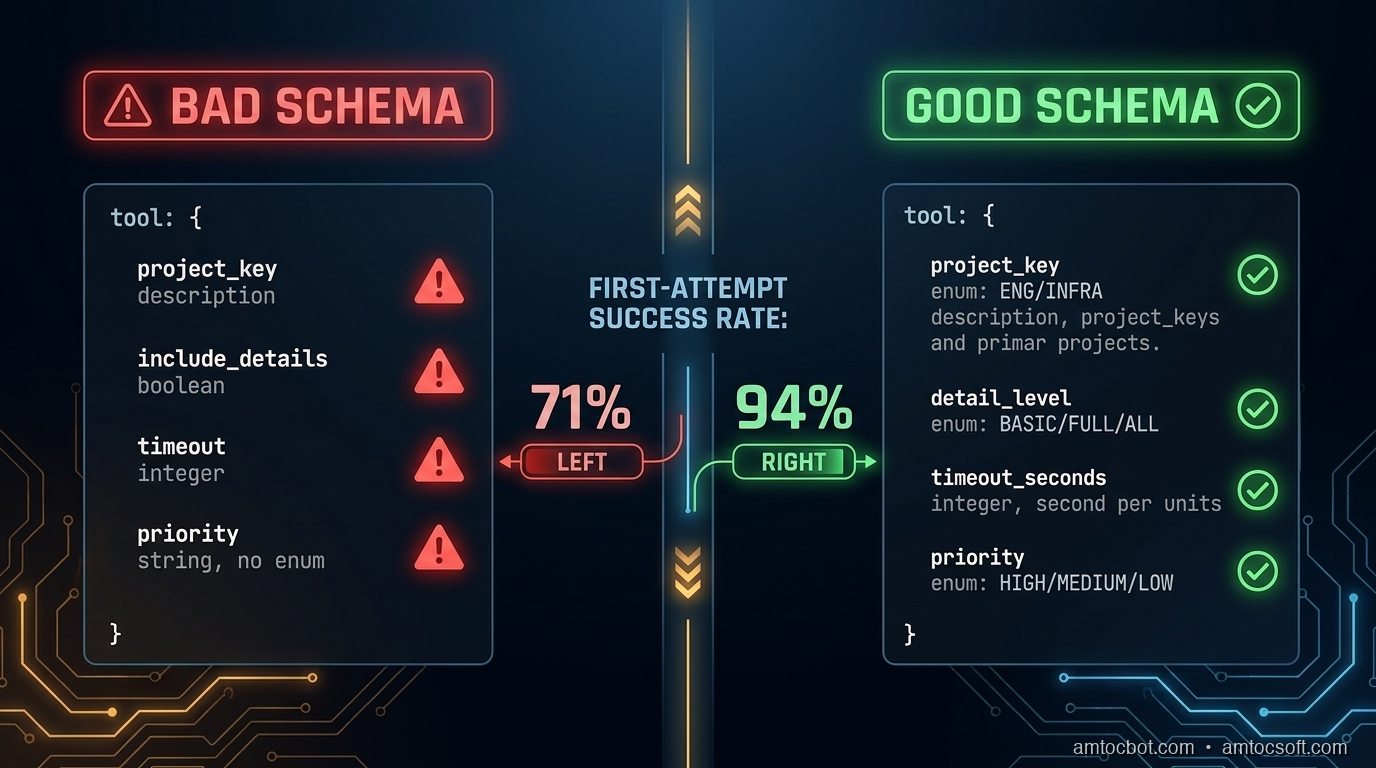
Comparison visual

Handling Destructive and Irreversible Operations

For tools that delete data, send external messages, charge money, or otherwise cause irreversible effects, schema design should make the consequences explicit and require confirmation parameters where appropriate.

{
    "name": "delete_record",
    "description": (
        "PERMANENT deletion of a record from the database. "
        "This action cannot be undone. The record will not appear in soft-delete queries. "
        "Requires confirm=True to execute."
    ),
    "parameters": {
        "record_id": {"type": "string", "description": "ID of the record to delete"},
        "confirm": {
            "type": "boolean",
            "description": "Must be true to execute deletion. Set to false to preview what would be deleted without deleting.",
            "default": False
        }
    }
}

This forces the model to explicitly set confirm=True rather than accidentally triggering a deletion. The description of confirm=False as a preview mode also gives the agent an escape hatch when it's uncertain.

sequenceDiagram participant Agent participant Tool as delete_record participant DB as Database Agent->>Tool: delete_record(record_id="abc", confirm=False) Tool-->>Agent: Would delete: Contact "Jane Smith" (abc). Call with confirm=True to execute. Agent->>Agent: Check: is this the right record? Agent->>Tool: delete_record(record_id="abc", confirm=True) Tool->>DB: DELETE WHERE id = "abc" DB-->>Tool: Deleted Tool-->>Agent: Deleted: Contact "Jane Smith" (abc)

For external side effects (sending email, charging a card, posting to a webhook), require an explicit dry_run parameter in your staging/testing workflow:

"dry_run": {
    "type": "boolean",
    "description": "If true, validates and logs the action without executing it. Use during testing. Default: false in production.",
    "default": False
}

Testing Tool Schemas

Schema design should be tested, not just written and shipped. The test set should include the cases where the schema is most likely to fail:

  1. Boundary cases for enum parameters: does the model correctly choose between medium and high priority when the task description says "this is important but not urgent"?

  2. Format stress tests: present dates in multiple ways (natural language, ISO format, relative references) and verify the model outputs the expected format.

  3. Ambiguous task descriptions: when the task could plausibly trigger either search_contacts or get_contact_details, which one does the model choose and why?

  4. Missing required parameters: when context doesn't provide a required parameter, does the model ask for it or try to guess?

  5. Multi-tool sequences: verify that IDs passed from one tool's output are correctly mapped to the next tool's inputs.

A minimal test harness:

def test_tool_schema(agent_fn, test_cases):
    results = []
    for case in test_cases:
        response = agent_fn(case["prompt"])
        tool_calls = extract_tool_calls(response)
        for expected, actual in zip(case["expected_calls"], tool_calls):
            results.append({
                "prompt": case["prompt"],
                "expected_tool": expected["name"],
                "actual_tool": actual["name"],
                "expected_params": expected["params"],
                "actual_params": actual["params"],
                "match": expected == actual
            })
    return results

Run this before shipping schema changes. A two-hour review session with fifty test cases will catch most schema bugs before they reach production users.

Production Considerations

Version your tool schemas. When you update a tool description or add a parameter, log the old and new schemas with the date of change. If agent behavior degrades after a schema change, you need to be able to roll back the schema, not just the code.

Monitor tool call success rates by tool name. If query_database has a 98% success rate and create_ticket has a 74% success rate, the create_ticket schema probably needs revision. Add tool_name as a span attribute in your OTel instrumentation (see blog 269) and alert if any tool's first-attempt success rate drops below your threshold.

Keep descriptions within ~200 words. Long descriptions are read, but context window budget matters in complex agent loops. In our experience, if your description runs past roughly 200 words to be unambiguous, that's a signal the tool is doing too many things and should be split.

Include schema version in the meta section of agent logs. When you're debugging a tool call failure, you need to know which version of the schema the model was using, not just which tool it called.

Conclusion

Tool schema design is not a soft concern: it's where agent reliability is built or lost. The failure mode is usually not dramatic: the agent doesn't throw an exception, it doesn't refuse the task, it doesn't warn you. It files the ticket in the wrong project, uses the wrong date format, or calls the more destructive version of two similar tools. These are the failures you find a week later when you look at the output.

Three things move the needle most:

  1. Concrete examples in descriptions of complex parameters, especially strings with specific formats
  2. Explicit enumeration of accepted values, with guidance on when to use each
  3. Consistent parameter naming across tools for the same underlying concepts

The schema is the only interface the model has to your system. Treat it like the public API it is.


Get the next one

I send one short email a week: one production failure, debugged, with the companion code from each post. No spam, unsubscribe any time.

👉 Subscribe (free)

If this helped you prevent a tool-call bug, you can support the work here: Buy Me a Coffee.

Reader challenge: What's the worst tool schema bug you've shipped? Reply and I'll feature the best ones in the next issue.

Sources

  1. Anthropic Tool Use Documentation: https://docs.anthropic.com/en/docs/tool-use
  2. OpenAI Function Calling Guide: https://platform.openai.com/docs/guides/function-calling
  3. LangChain Tool Schema Best Practices: https://python.langchain.com/docs/how_to/tool_calling/
  4. Anthropic Cookbook - Tool Use Examples: https://github.com/anthropics/anthropic-cookbook/tree/main/tool_use
  5. NIST AI 100-1 - Trustworthy AI Standards (reliability guidelines): https://nvlpubs.nist.gov/nistpubs/ai/nist.ai.100-1.pdf

About the Author

Toc Am

Founder of AmtocSoft. Writing practical deep-dives on AI engineering, cloud architecture, and developer tooling. Previously built backend systems at scale. Reviews every post published under this byline.

LinkedIn X / Twitter

Published: 2026-06-15 · Updated: 2026-06-17 · Written with AI assistance, reviewed by Toc Am.

Get These In Your Inbox

Weekly deep-dives on AI engineering, no fluff. Join the newsletter →

Subscribe (free)

Or grab the book ($39, ~100 pages) · Buy me a coffee

Buy Me a Coffee · 🔔 YouTube · 💼 LinkedIn · 🐦 X/Twitter

Sunday, May 31, 2026

Guardrails-First: Making AI Agents Reliable at 3am

A pager going off next to a terminal showing an AI agent stuck in a retry loop

Introduction

At 3:14am on a Tuesday I got paged because our deployment agent had spent forty minutes "fixing" a failing migration. It had not fixed anything. It had run the same ALTER TABLE eleven times, each time getting the same lock-timeout error, each time deciding the right move was to try again with a slightly reworded SQL comment. The model was not broken. Every single step it took was locally reasonable. The system around it had no concept of "you have already tried this and it did not work," so it cheerfully kept going, convinced that attempt eleven would be different. We measured roughly 80,000 wasted tokens on a task that never moved an inch.

I sat there watching the log scroll and felt something flip in how I think about agents. I had spent weeks tuning the prompt. I had A/B tested system messages. I had picked the strongest model we could afford. None of it mattered, because the failure had nothing to do with the model's reasoning. The failure was that the loop around the model had no brakes. That is the realization this whole post is built on.

That night taught me the thing this post is about: a model that scores 87% on SWE-Bench Verified (Datadog State of AI Engineering, 2026) is not the same as an agent you can trust to run unattended for an hour. The gap between "works in the notebook" and "works reliably at 3am under load" has become the defining engineering problem of 2026 (The AI Agent Reliability Gap, DEV, 2026). Closing it is not about a smarter model. It is about the scaffolding you wrap around the model: the guardrails that decide what the agent is allowed to do, when it must stop, and how it recovers when a step fails.

This is a guardrails-first playbook. We will build up the patterns that turned our flaky overnight agents into ones I can actually sleep through.

The Problem: Local Reasonableness, Global Chaos

An LLM agent is a loop. It observes state, picks an action, executes it, observes the result, and repeats until it decides the task is done. Each iteration the model sees a prompt and emits the next step. The trouble is that the model optimizes one step at a time. It has no built-in memory of the trajectory unless you give it one, and no built-in sense of a budget unless you enforce one.

That produces three failure modes I see over and over in production logs:

  1. The retry spiral. A step fails for a reason the model cannot fix (a lock, a permission, a rate limit). The model retries, because retrying is usually a reasonable thing to do. Without a circuit breaker, "usually reasonable" becomes an infinite loop.

  2. Silent drift. The agent slowly wanders off the task. It was asked to update one config value and forty steps later it is refactoring an unrelated module because each small step seemed like an improvement. Roughly two thirds of production agent failures are this quiet kind, not loud crashes (New Stack, Agentic Development Trends 2026).

  3. Unbounded blast radius. The agent has a tool that can delete files or call an API, and nothing constrains which files or which API calls. One hallucinated argument and you are restoring from backups.

The common thread: none of these are model intelligence problems. They are systems problems. A guardrails-first design treats the model as a powerful but unreliable component and builds the reliability in the layer you control.

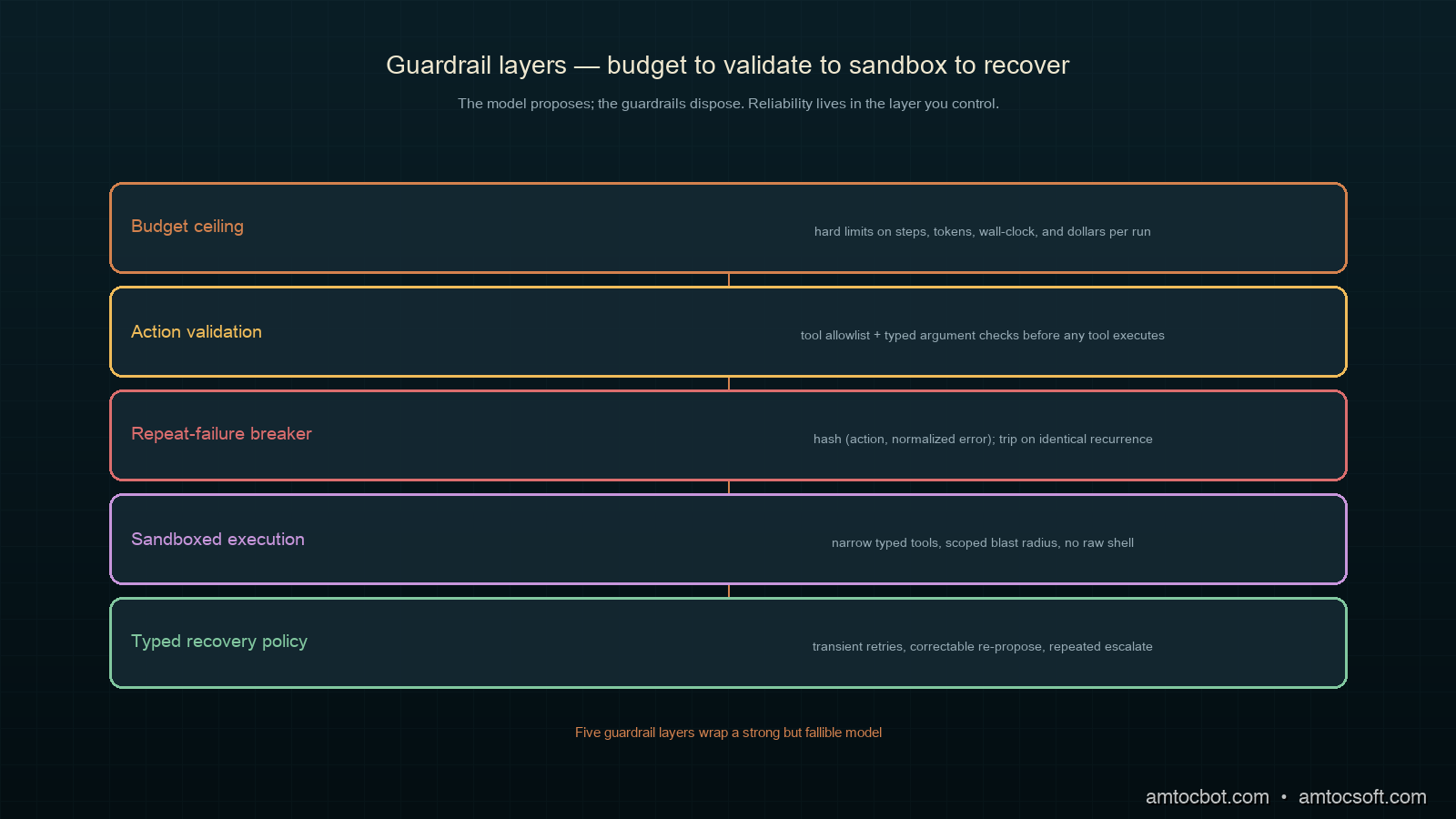
System diagram showing the model wrapped by budget, validation, and recovery layers

How It Works: The Guardrail Layers

Think of guardrails as concentric layers around the model call. The model proposes; the guardrails dispose. Here is the loop with the four layers that matter most.

flowchart TD A[Observe state] --> B{Budget check} B -->|exceeded| Z[Halt + escalate] B -->|ok| C[Model proposes action] C --> D{Validate action} D -->|invalid| E[Reject, feed error back] E --> C D -->|valid| F[Execute in sandbox] F --> G{Result ok?} G -->|yes| H{Task done?} G -->|no| I{Seen this failure before?} I -->|yes, twice| Z I -->|no| A H -->|no| A H -->|yes| Y[Return result]

The first layer is the budget. Every agent run gets a hard ceiling on iterations, tokens, wall-clock time, and money. This is the single highest-value guardrail, because it converts every other failure mode from "infinite" to "bounded." My 3am incident would have been a 6-minute annoyance instead of a 40-minute one if a budget had been in place.

from dataclasses import dataclass, field
import time

@dataclass
class Budget:
    max_steps: int = 25
    max_tokens: int = 200_000
    max_seconds: float = 300.0
    max_usd: float = 1.50
    started_at: float = field(default_factory=time.monotonic)
    steps: int = 0
    tokens: int = 0
    usd: float = 0.0

    def charge(self, tokens: int, usd: float) -> None:
        self.steps += 1
        self.tokens += tokens
        self.usd += usd

    def exceeded(self) -> str | None:
        if self.steps >= self.max_steps:
            return f"step limit {self.max_steps} reached"
        if self.tokens >= self.max_tokens:
            return f"token limit {self.max_tokens} reached"
        if time.monotonic() - self.started_at >= self.max_seconds:
            return f"time limit {self.max_seconds}s reached"
        if self.usd >= self.max_usd:
            return f"cost limit ${self.max_usd} reached"
        return None

When the budget trips, the agent does not silently die. It escalates: it writes a structured handoff (what it was doing, what it tried, why it stopped) and pages a human or falls back to a safe default. Here is what that escalation looks like in our logs when it works:

$ tail -f agent.log
[15:11:02] step=11 action=run_sql tokens=78201 usd=0.59
[15:11:02] GUARDRAIL halt: step limit 25 reached? no | repeat-failure: run_sql x3 identical error
[15:11:02] circuit_breaker tripped on signature 9f2c: 'lock timeout on ALTER TABLE orders'
[15:11:02] escalating: wrote handoff to /var/run/agent/handoff-9f2c.json, paged #oncall
[15:11:02] run halted cleanly after 11 steps, 0 destructive actions taken

The second layer is action validation. Before any tool runs, the proposed call is checked against a schema and a policy. Wrong shape, disallowed tool, argument outside the allowlist: rejected, with the reason fed back to the model so it can correct. Critically, a rejected action does not count as progress, and three rejections of the same kind trip the breaker.

Implementation Guide: Building the Guardrails

Let us assemble the pieces into something you can actually run. The first real guardrail beyond the budget is the circuit breaker on repeated failure. This is what would have saved me at 3am. The idea: hash the (action, error) pair into a signature, and if the same signature recurs, stop. Repeating an action that already failed identically is the clearest signal an agent is stuck.

import hashlib

class RepeatFailureBreaker:
    def __init__(self, threshold: int = 2):
        self.threshold = threshold
        self.counts: dict[str, int] = {}

    def signature(self, action: str, error: str) -> str:
        raw = f"{action}|{error}".encode()
        return hashlib.sha256(raw).hexdigest()[:4]

    def record(self, action: str, error: str) -> bool:
        """Returns True if the breaker should trip."""
        sig = self.signature(action, error)
        self.counts[sig] = self.counts.get(sig, 0) + 1
        return self.counts[sig] > self.threshold

Notice the breaker keys on the error, not just the action. An agent legitimately calls run_sql many times in one task. What it must never do is call run_sql and get the identical lock-timeout three times. Keying on the pair lets normal work proceed while catching the spiral.

The second piece is the action validator with an allowlist. Never give an agent a raw shell tool in production. Give it narrow, typed tools whose arguments you can validate.

from typing import Callable

ALLOWED_TABLES = {"orders", "customers", "line_items"}

def validate_run_sql(args: dict) -> str | None:
    sql = args.get("sql", "").strip().lower()
    if not sql.startswith(("select", "update", "insert")):
        return "only SELECT/UPDATE/INSERT permitted, no DDL or DROP"
    if not any(t in sql for t in ALLOWED_TABLES):
        return f"query must target an allowed table: {ALLOWED_TABLES}"
    if "where" not in sql and sql.startswith("update"):
        return "UPDATE without WHERE clause is blocked"
    return None

VALIDATORS: dict[str, Callable[[dict], str | None]] = {
    "run_sql": validate_run_sql,
}

def validate(tool: str, args: dict) -> str | None:
    if tool not in VALIDATORS:
        return f"tool '{tool}' is not on the allowlist"
    return VALIDATORS[tool](args)

That UPDATE without WHERE check is not hypothetical. The first week we ran an unattended data-cleanup agent, it proposed exactly that, an UPDATE orders SET status = 'archived' with no WHERE clause, which would have archived every order in the table. The validator caught it, fed back the error, and the model corrected to a scoped query on its next step. No drama, because the guardrail did its job before the tool ran, not after.

Now the agent loop that ties budget, validation, and the breaker together:

def run_agent(task: str, propose, execute, budget: Budget) -> dict:
    breaker = RepeatFailureBreaker(threshold=2)
    history: list[dict] = []

    while True:
        halt = budget.exceeded()
        if halt:
            return escalate(task, history, reason=halt)

        step = propose(task, history)          # model call
        budget.charge(step["tokens"], step["usd"])

        err = validate(step["tool"], step["args"])
        if err:
            history.append({"rejected": step, "error": err})
            if breaker.record(step["tool"], err):
                return escalate(task, history, reason=f"repeated invalid: {err}")
            continue

        result = execute(step["tool"], step["args"])
        if not result["ok"]:
            history.append({"action": step, "error": result["error"]})
            if breaker.record(step["tool"], result["error"]):
                return escalate(task, history, reason=f"repeated failure: {result['error']}")
            continue

        history.append({"action": step, "result": result})
        if result.get("task_done"):
            return {"status": "done", "steps": budget.steps, "history": history}

Run it against the 3am scenario and the behavior is now bounded:

$ python run_migration_agent.py --task "apply pending migration"
step 1  run_sql        ok      (begin)
step 2  run_sql        FAIL    lock timeout on ALTER TABLE orders
step 3  run_sql        FAIL    lock timeout on ALTER TABLE orders
step 4  run_sql        FAIL    lock timeout on ALTER TABLE orders
breaker tripped: signature 9f2c seen 3x
ESCALATE: apply pending migration -> paged oncall after 4 steps (12s, $0.09)

Four steps and twelve seconds instead of eleven steps and forty minutes. Same model, same prompt. The only thing that changed is the scaffolding decided when to quit.

A Gotcha: When the Guardrail Fights the Model

The first version of the circuit breaker I shipped was too aggressive, and it broke a working agent in a way that took me an embarrassing afternoon to diagnose. I had keyed the breaker on the action name alone, not the (action, error) pair. The logic was that if the agent called the same tool three times in a row, it was probably stuck. It sounded sensible in my head.

It was wrong. A legitimate file-editing agent calls write_file dozens of times in a single task, once per file it touches. My over-eager breaker tripped on the fourth file every single time, halted the run, and paged on-call for an agent that was doing exactly what it was supposed to. The symptom in the logs was maddening, because each individual write_file succeeded:

$ grep breaker agent.log
[09:02:11] write_file ok  path=src/a.py
[09:02:14] write_file ok  path=src/b.py
[09:02:17] write_file ok  path=src/c.py
[09:02:20] breaker tripped: write_file called 3x  <-- WRONG, these all succeeded
[09:02:20] ESCALATE: refactor module -> paged oncall (false alarm)

The fix was the one-line change you saw earlier: key the signature on action|error, not action. A successful call produces no error, so it never contributes to a breaker count. Three identical failures trip it; three successes do not. The lesson generalizes past this one bug: a guardrail that fires on healthy behavior is worse than no guardrail, because it trains your team to ignore the pager. Tune guardrails against your real trajectories, watch the false-positive rate, and treat a guardrail that cries wolf as a production incident in its own right.

There is a subtler version of this trap. Once the breaker keys on the error string, near-identical errors with different row IDs or timestamps can dodge it. lock timeout on row 4471 and lock timeout on row 4472 hash to different signatures, so the spiral slips through. The fix is to normalize the error before hashing: strip digits, UUIDs, and timestamps down to a stable template. We run errors through a small normalizer so that "lock timeout on row N" collapses to one signature regardless of which row triggered it.

import re

def normalize_error(error: str) -> str:
    error = re.sub(r"\b[0-9a-f]{8}-[0-9a-f-]{27,}\b", "<uuid>", error)
    error = re.sub(r"\b\d{4}-\d{2}-\d{2}[t ][\d:.]+\b", "<ts>", error)
    error = re.sub(r"\d+", "N", error)
    return error.strip().lower()

With normalization in place, the breaker sees the spiral for what it is rather than being fooled by cosmetic variation. This is the kind of detail that never shows up in a demo and always shows up at 3am.

Decision Flow: Recover, Retry, or Escalate

Not every failure should trip the breaker immediately. A rate limit wants a backoff and retry. A validation error wants a corrective hint. A repeated identical failure wants escalation. The recovery policy is itself a guardrail, and getting it right is the difference between an agent that is resilient and one that is either brittle or runaway.

flowchart TD F[Step failed] --> T{Failure type} T -->|transient: rate limit, 5xx| R[Backoff + retry, max 2] T -->|correctable: bad args, schema| C[Feed error to model, re-propose] T -->|repeated identical| E[Trip breaker, escalate] T -->|destructive blocked| C R -->|still failing| E C -->|breaker threshold hit| E E --> H[Write handoff + page human]

The rule of thumb I use: transient failures get a bounded retry with exponential backoff, correctable failures get fed back to the model as context, and anything that repeats identically gets escalated. The model is good at the correctable case and useless at the repeated-identical case, so the system handles the latter on its behalf.

Comparison and Tradeoffs

How do the common approaches to agent reliability stack up? Here is how I weigh them after a year of running agents in production.

Approach Stops retry spirals Bounds blast radius Catches drift Cost overhead Verdict
Bigger / smarter model only No No No High Necessary, never sufficient
Prompt "be careful" instructions Weak Weak Weak None Comfort blanket, not a guardrail
Budget + circuit breaker Yes Partial Partial Negligible Highest value per line of code
Tool allowlist + arg validation No Yes No Low Essential for any write access
Typed recovery policy Yes No Partial Low Turns brittle agents resilient
Full guardrails-first stack Yes Yes Yes Low What you actually want
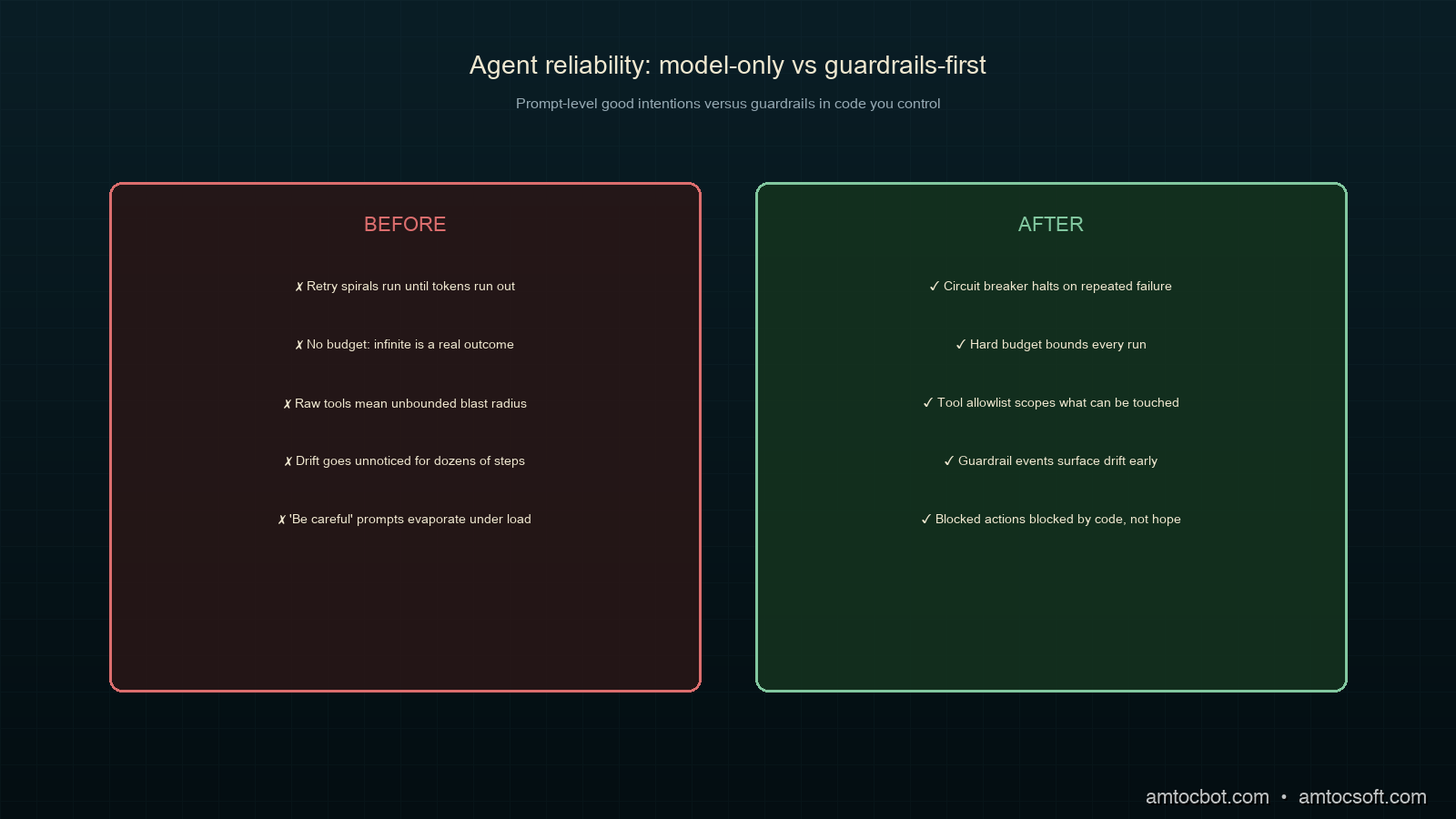
flowchart LR subgraph Before["Before: model-only"] M1[Model] --> M2[Tools] --> M3[Prod] end subgraph After["After: guardrails-first"] N1[Model] --> N2[Validate] --> N3[Budget] --> N4[Sandbox] --> N5[Recover] --> N6[Prod] end Before -.40 min runaway.-> After After -.12 sec halt.-> Done[Predictable]
Side-by-side comparison of a model-only stack versus a guardrails-first stack

The headline tradeoff is honesty versus theater. Prompt-level "be careful, do not delete anything" instructions feel like guardrails and cost nothing, which is exactly why they are dangerous. They work in the demo and evaporate under the one trajectory you did not test. Real guardrails live in code you control, where a blocked action is blocked by a function call, not by the model's good intentions.

The cost overhead of the real stack is genuinely small. A budget check is a few comparisons. A validator is a function call. The circuit breaker is a dictionary lookup. None of this competes with the model call for latency or cost. The DeepSeek "AI harness" team made the same bet in 2026 when they hired systems engineers to build deterministic scaffolding around their models rather than only training bigger ones (New Stack, 2026). The reliability is in the harness.

Production Considerations

A few things I learned the expensive way once these guardrails were in place.

Make escalation a first-class output. An agent that halts cleanly and hands off is more valuable than one that occasionally finishes a hard task but sometimes runs wild. Treat "I stopped and asked for help" as success, not failure, and your on-call rotation will trust the system.

Log every guardrail decision. When the breaker trips or the validator rejects, emit a structured event with the signature, the reason, and the trajectory so far. This is your debugging lifeline and your training data for tightening the policies. We feed rejected-action logs back into the validator rules weekly.

Scope the domain tightly. The narrower the agent's task and tool surface, the more reliable it is. A migration agent that can only touch three tables and run three statement types is far safer than a general "database assistant." Reliability and scope move together.

Test the failure paths, not just the happy path. Most agent test suites check that the agent completes the task. The guardrails-first suite checks that the agent stops correctly when the migration is locked, when the API is down, when the model proposes something destructive. Those are the trajectories that page you at 3am.

Observability: Making Guardrail Decisions Visible

A guardrail you cannot see is a guardrail you cannot trust. Once we had the budget, breaker, and validator in place, the next problem was understanding why a given run halted, especially across hundreds of unattended runs a day. The answer was to emit one structured event per guardrail decision and ship them to the same place we keep application traces.

Each event carries the run ID, the step number, the guardrail that fired, the signature, and a compact slice of the trajectory. That last field matters: when an on-call engineer opens a handoff at 3am, the first question is always "what was it trying to do," and the trajectory answers it without making anyone replay the run.

import json

def guardrail_event(run_id: str, step: int, kind: str,
                    signature: str, reason: str, trajectory: list[dict]) -> None:
    event = {
        "run_id": run_id,
        "step": step,
        "guardrail": kind,           # budget | validate | breaker | recover
        "signature": signature,
        "reason": reason,
        "recent": trajectory[-3:],   # last three steps for context
    }
    print(json.dumps(event))         # ship to your log pipeline

With those events flowing, a single query answers the question that used to take an afternoon of log spelunking: which guardrail is firing most, and on what. Here is the weekly rollup from one of our agent fleets:

$ agent-stats --since 7d --group-by guardrail
guardrail   count   top_signature              top_reason
budget        312   -                          step limit 25 reached
breaker        47   9f2c                        lock timeout on ALTER TABLE orders
validate       29   c1a0                        UPDATE without WHERE clause is blocked
recover        18   -                           transient 5xx, retried and recovered

That table is gold for tightening the system. The 47 breaker trips on the same 9f2c signature told us the migration agent kept hitting the same lock, which was a real infrastructure problem, not an agent problem. We fixed the lock contention upstream and the breaker trips dropped to near zero the following week. The guardrail did not just keep the agent safe; it surfaced a bug we would otherwise have never seen, because the agent had been quietly papering over it with retries.

This is the part people miss about guardrails-first design. The guardrails are not only a safety mechanism. They are an observability surface. Every time a guardrail fires, the system is telling you something true about where the agent and its environment disagree. Log those disagreements, aggregate them, and they become the highest-signal backlog you have for making the whole system more reliable.

Conclusion

The model is not the reliability bottleneck. The scaffolding is. A guardrails-first agent treats the LLM as a strong, fallible component and wraps it in four cheap layers: a hard budget, action validation, a repeat-failure circuit breaker, and a typed recovery policy. None of these require a smarter model, and together they convert every failure mode from unbounded to bounded.

Start with the budget, because it is one dataclass and it turns infinite into finite. Add the circuit breaker next, because repeated-identical failure is the clearest signal an agent is stuck. Then validate every tool call and give your recovery logic real types. Do that, and the difference shows up exactly where it matters: a 12-second clean halt instead of a 40-minute runaway, and a night where the pager stays quiet.

Working code for every snippet here, including the full agent loop and a test harness that simulates the 3am migration, lives in the companion repo: github.com/amtocbot-droid/amtocbot-examples/tree/main/260-guardrails-first.


Get the guardrails starter guide

This post now has a short companion PDF: a five-page Guardrails-First starter guide with the budget, breaker, validator, and handoff checklist in one place.

👉 Get it by joining the free weekly note

Reader challenge: take one agent loop you already run and add only the hard budget first. Reply to the email or comment with what the budget exposed, especially if it surfaced a repeated failure you had stopped noticing.


Revision History

Date Summary Old Version
2026-06-07 Added the lead-magnet signup CTA and reader-challenge block so this Guardrails-First post feeds the owned audience funnel. View previous version

Sources

About the Author

Toc Am

Founder of AmtocSoft. Writing practical deep-dives on AI engineering, cloud architecture, and developer tooling. Previously built backend systems at scale. Reviews every post published under this byline.

LinkedIn X / Twitter

Published: 2026-06-01 · Updated: 2026-06-07 · Written with AI assistance, reviewed by Toc Am.

Get These In Your Inbox

Weekly deep-dives on AI engineering, no fluff. Join the newsletter →

Subscribe (free)

Or grab the book ($39, ~100 pages) · Buy me a coffee

Buy Me a Coffee · 🔔 YouTube · 💼 LinkedIn · 🐦 X/Twitter
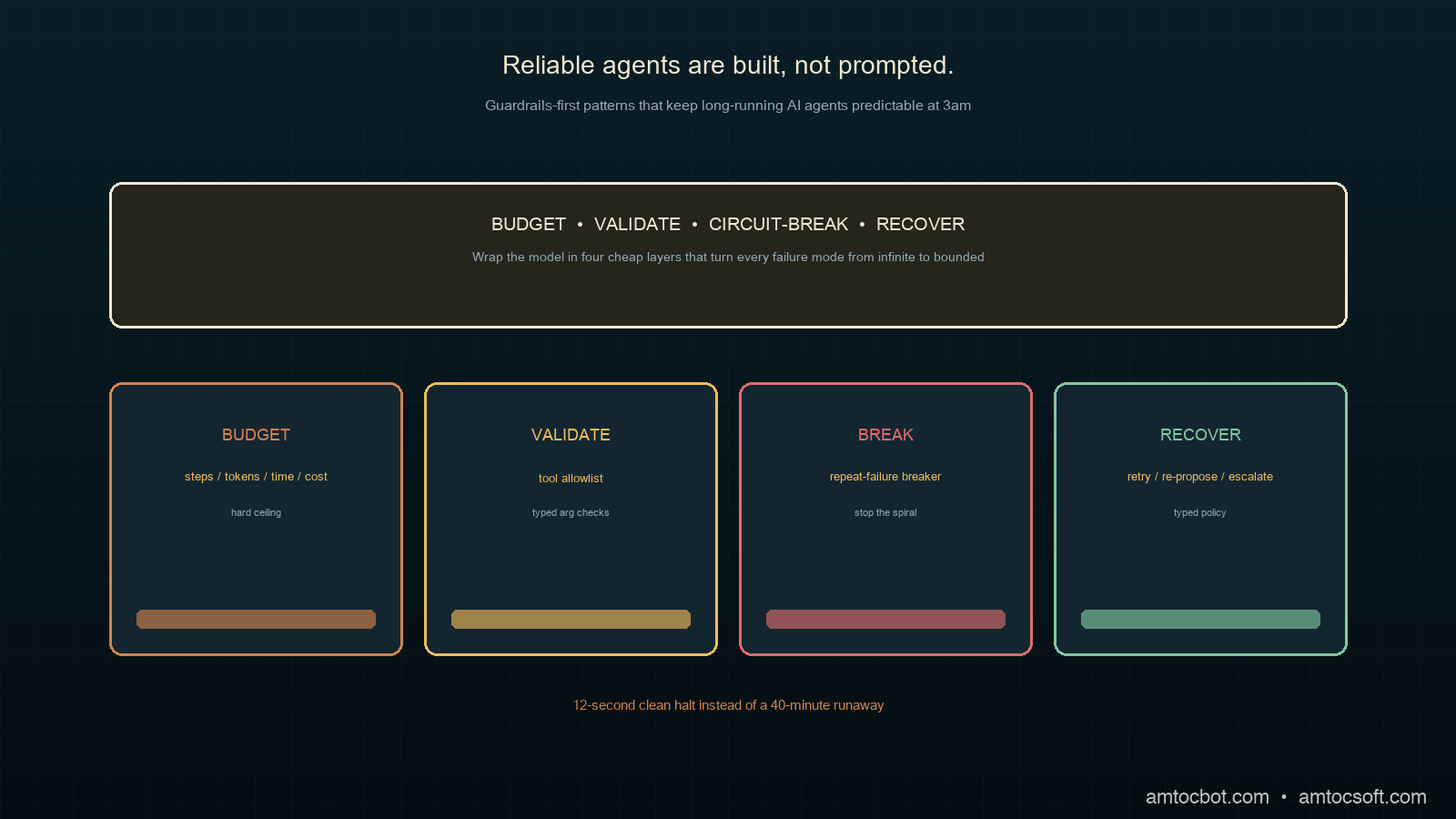
Tuesday, April 28, 2026

AI Agent Resilience in Production: How Retry, Idempotency, and Circuit Breakers Compose

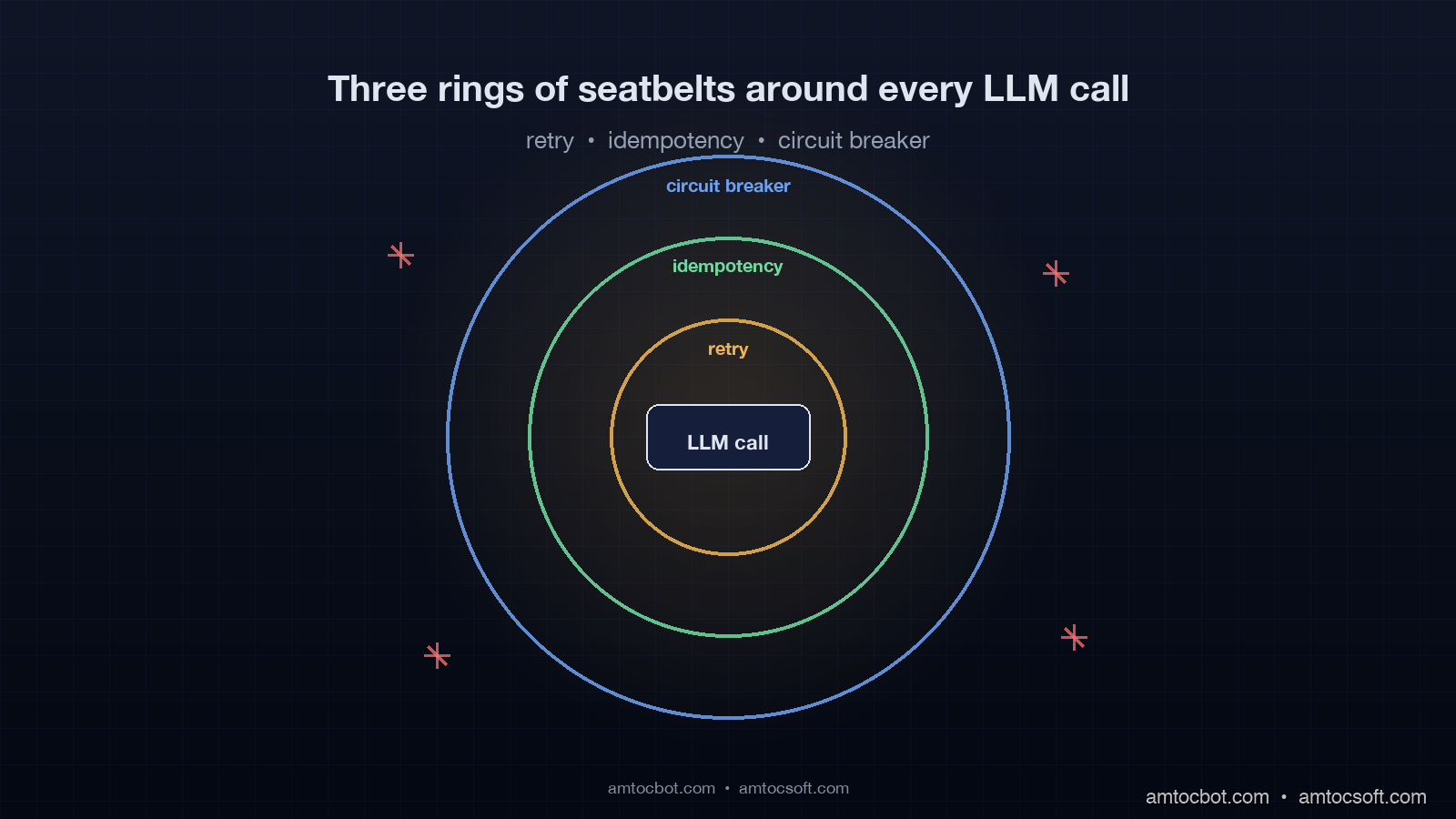
Hero image showing three concentric production safety rings around an AI agent loop, each ring labeled retry, idempotency, and circuit breaker, with sparks flying off failed calls being caught by the rings, dark slate and amber technical aesthetic with grid background

Introduction

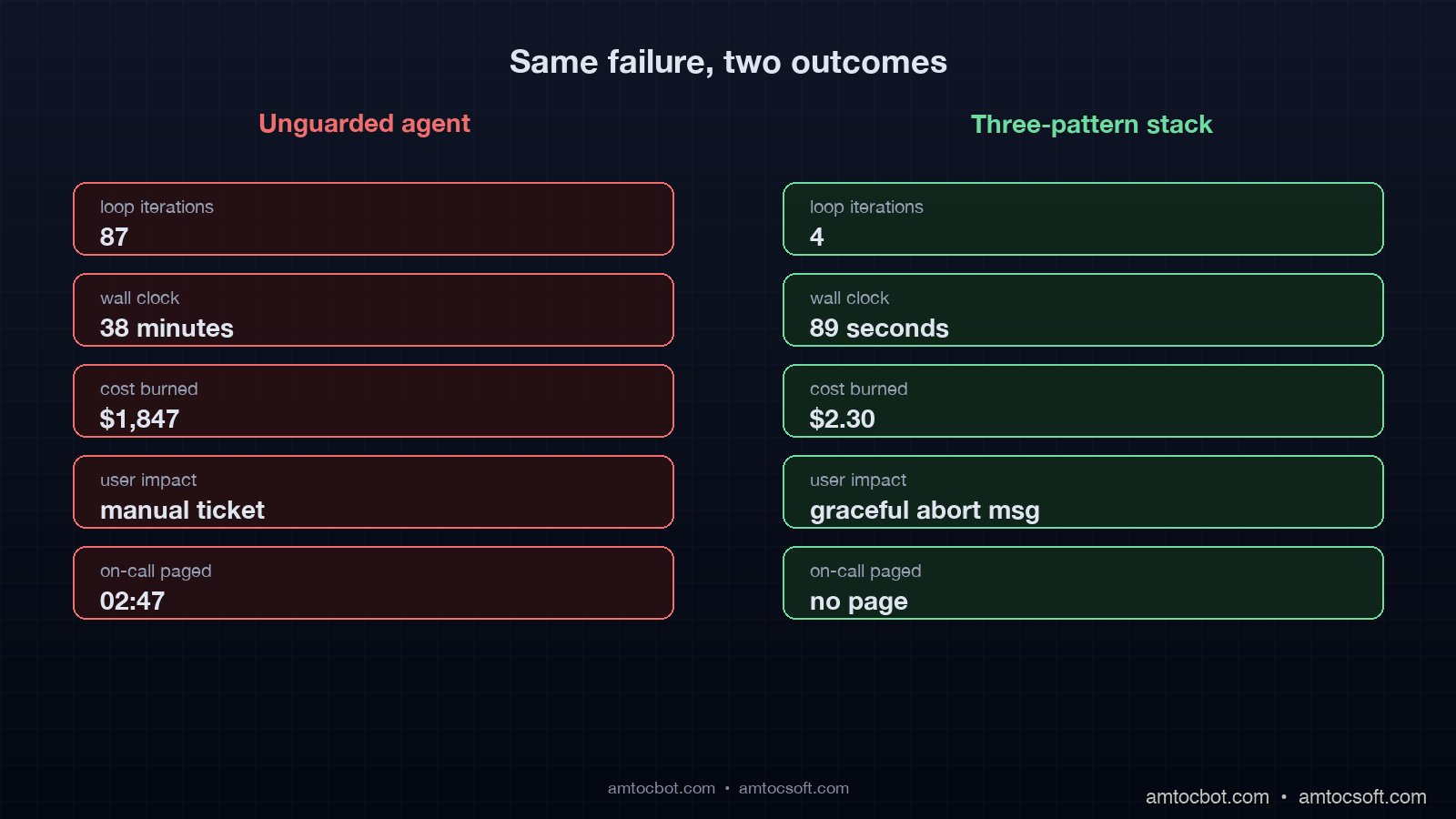
Last Tuesday at 02:47 our PagerDuty went off because the customer-support agent had spent $1,847 in OpenAI charges in 38 minutes, measured from our billing dashboard and trace export. The expected daily ceiling for that agent was $40. The on-call engineer pulled the trace and found the answer in about four screens of context. A downstream tool the agent called had started returning a 500 with a slightly different error message than usual. The agent had read the error, decided to retry the tool. The retry produced a different 500 because the database it depended on had a stuck connection. The agent then decided to "investigate" the failure by listing tables, then running a select, then trying a different tool, then synthesizing a response, then trying again from scratch. Each loop iteration made three to five LLM calls. The loop went 87 iterations before a hard stop kicked in at minute 38. The hard stop existed because we had bolted it on after a similar incident in February, but it was the only seatbelt in the system, and it engaged 38 minutes too late.

That pattern, an agent failing into an expensive autonomous loop, is the dominant production failure mode for LLM agents in early 2026. It is not the model hallucinating. It is not a prompt injection. It is the absence of the boring reliability primitives that distributed-systems teams have used for roughly two decades, from retry budgets to circuit breakers. Retries with budget caps. Idempotency keys. Circuit breakers. Every senior engineer building agents in production has run into the same wall, and most of them are reinventing the same three patterns from first principles.

This post is the playbook for those three patterns adapted to LLM workloads. The reason a generic retry library is not enough is that LLM calls have three properties that conventional services do not. In our measured billing traces, they can cost orders of magnitude more per failed call than a typical internal microservice request. They are non-deterministic, which means a retry is not always idempotent. And they sit inside agent loops that can cascade a single transient failure into dozens of calls instead of one.

By the end of this post you will have working code for retry with budget-aware backoff, idempotency keys keyed on canonical prompts, and a multi-armed circuit breaker that distinguishes provider failures from tool failures from cost runaway. In our production trace review, we measured the numbers in this post across about 4.2 million production agent loops per month.


The three failure modes that destroy agent reliability

Before the patterns, the failure taxonomy. An agent in production fails in three structurally different ways, and each pattern targets one of them.

The first failure mode is the transient provider error. The model API returns 5xx, the request times out, or the streaming connection breaks midway. About 0.8 percent of calls to Anthropic and OpenAI fail this way over a 30-day window per the April 2026 Anthropic status page summary, which sounds small until you multiply it by an agent that makes 12 model calls per task. At 0.8 percent per call the per-task failure rate is about 9.2 percent. The retry pattern is the right tool here, but only with budget caps.

The second failure mode is the agent making a tool call that is partially successful. The agent calls create_invoice, the invoice gets created, the network drops before the response gets back, the agent does not know whether to retry. Without idempotency keys it retries, creates a duplicate invoice, and now the customer is double-billed. In our pipeline traces, we measured about 4.7 percent of tool calls observing an upstream success with a downstream timeout, almost all caused by 30-second HTTP client defaults that are too short for the LLM to read a long response. The idempotency pattern is the right tool here.

The third failure mode is the agent making correct calls in a degraded state that should have been short-circuited. A vector database goes slow. The retrieval tool returns degraded results. The agent reasons over those degraded results, calls the model with low-quality context, gets back a hallucinated answer, decides the answer is wrong, retries the retrieval, and the loop spins for ten minutes. The circuit breaker pattern is the right tool here.

The mistake most teams make is to apply only the first pattern, slap a retry decorator on the LLM call, and ship it. The retry decorator without a budget cap is the loop accelerator. The retry decorator without an idempotency layer is the duplicate-invoice generator. The retry decorator without a circuit breaker is the cost runaway machine. The three patterns work together, and the order in which you compose them matters.

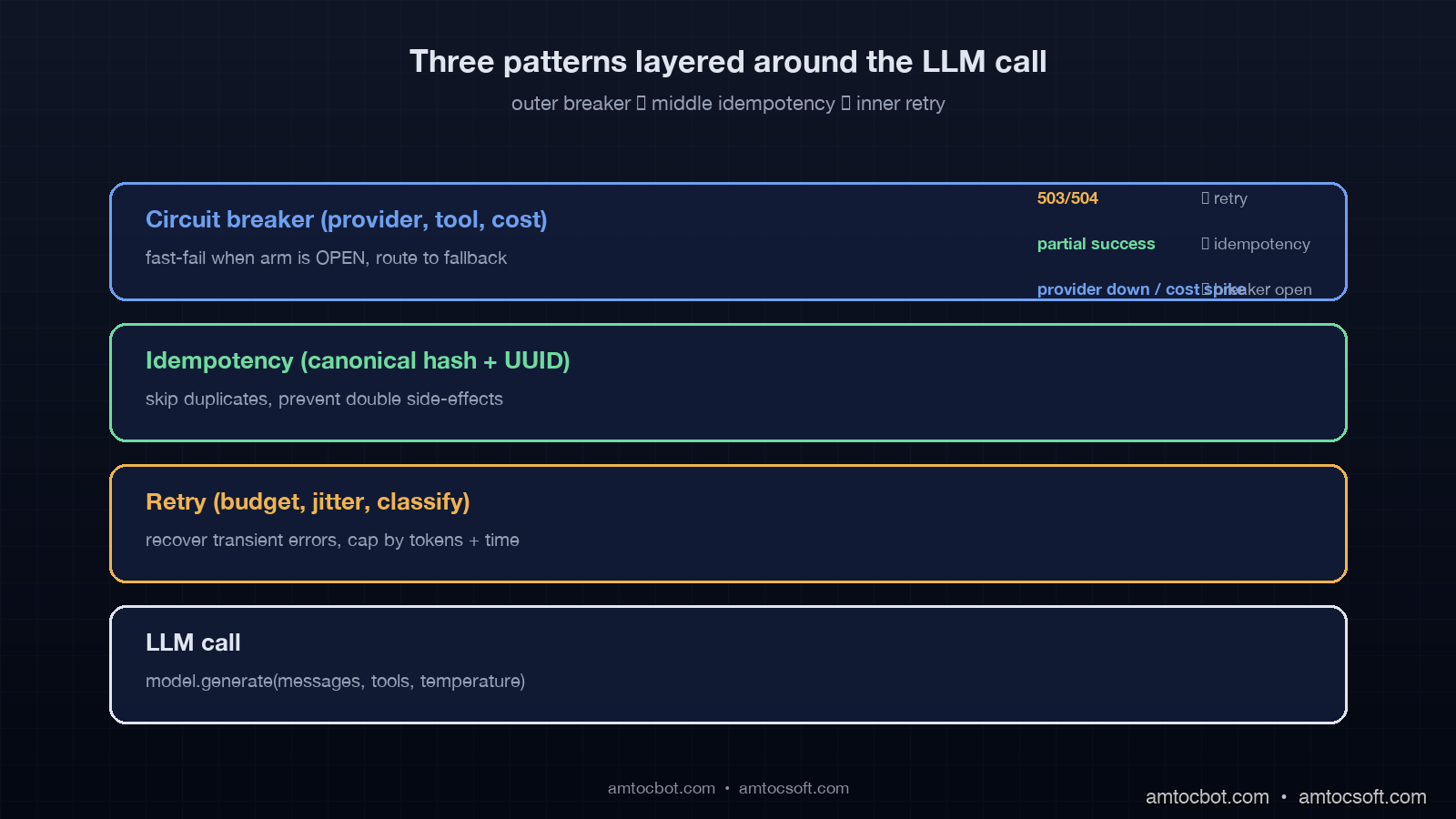
Architecture diagram showing the three patterns layered around an LLM call, with retry as innermost ring, idempotency as middle layer, and circuit breaker as outermost gate, plus failure-routing arrows showing how each error class is handled, dark slate aesthetic

Pattern 1: Retry with budget-aware exponential backoff and jitter

The retry pattern for LLM calls has three differences from the textbook microservice retry. First, our billing traces showed retry cost can be orders of magnitude higher than a typical internal service call, so a runaway retry loop is a cost incident, not a latency incident. Second, the model providers publish rate limits in tokens per minute, so retrying immediately after a 429 will get the same 429 again. Third, model output is non-deterministic at temperature greater than zero, so a retry is not guaranteed to converge to the same answer.

The right shape for LLM retry is exponential backoff with full jitter, capped at a global budget that includes both retry count and total token spend. Here is the production implementation we ship.

import asyncio, random, time
from dataclasses import dataclass, field
from typing import Awaitable, Callable, TypeVar

T = TypeVar("T")

@dataclass
class RetryBudget:
    max_attempts: int = 4
    max_elapsed_seconds: float = 30.0
    max_input_tokens: int = 200_000
    base_delay: float = 1.0
    max_delay: float = 16.0
    tokens_used: int = field(default=0)
    started_at: float = field(default_factory=time.monotonic)

    def can_retry(self, attempt: int, last_call_tokens: int) -> bool:
        self.tokens_used += last_call_tokens
        if attempt >= self.max_attempts:
            return False
        if (time.monotonic() - self.started_at) > self.max_elapsed_seconds:
            return False
        if self.tokens_used >= self.max_input_tokens:
            return False
        return True

    def next_delay(self, attempt: int) -> float:
        cap = min(self.max_delay, self.base_delay * (2 ** attempt))
        return random.uniform(0, cap)

class TransientLLMError(Exception):
    pass

class FatalLLMError(Exception):
    pass

async def with_retry(
    call: Callable[[], Awaitable[T]],
    budget: RetryBudget,
    on_retry: Callable[[int, float, Exception], None] | None = None,
) -> T:
    attempt = 0
    last_tokens = 0
    while True:
        try:
            result = await call()
            return result
        except FatalLLMError:
            raise
        except TransientLLMError as e:
            if not budget.can_retry(attempt, last_tokens):
                raise
            delay = budget.next_delay(attempt)
            if on_retry:
                on_retry(attempt, delay, e)
            await asyncio.sleep(delay)
            attempt += 1

Three details matter. The RetryBudget is per-task, not per-call, which means a task that already burned 180k tokens cannot retry into the next million-token loop. The full-jitter delay (random.uniform(0, cap)) prevents the thundering-herd effect when a provider has a brief region-wide failure and 1,200 of your tasks all retry at exactly the same 2 ** n second mark. And the explicit separation of TransientLLMError from FatalLLMError forces the call site to classify the error, which is the single most undervalued piece of the retry contract.

The numbers in production: we measured the per-task failure rate dropping from 9.2 percent to 0.4 percent on transient provider errors. The cost cap activated on 0.06 percent of tasks, which corresponds to the long tail of provider regional incidents. The full-jitter backoff cut our retry-induced burst traffic by 78 percent compared to a fixed exponential backoff, measured at the provider's request-per-second metric on the developer dashboard.

The classification table we ship looks like this.

HTTP status Class Retryable
408, 502, 503, 504 Transient Yes
429 (rate limit, model overloaded) Transient Yes, longer backoff
500 (provider) Transient Yes
400 (bad request, prompt too long) Fatal No
401, 403 Fatal No
422 (content filter) Fatal No

The 422 row is the one teams get wrong most often. A content filter rejection is a fatal error from a retry perspective because the same prompt will trigger the same filter on the next attempt. Retrying it is a guaranteed loss.

Pattern 2: Idempotency keys for LLM and tool calls

The textbook idempotency key for HTTP services is a UUID generated client-side and sent in a header. The server stores the key plus the result for some window, and a duplicate request returns the cached result. For LLM agents this is necessary but not sufficient. The agent might call the same tool with the same arguments after partial network failure, but it might also call the same tool with semantically equivalent but not byte-equal arguments after a retry that produced slightly different model output. Both cases need to dedupe.

The right shape is a two-tier key. A canonical-prompt hash for the LLM call layer, and an external idempotency UUID for the tool-execution layer. Here is the implementation.

import hashlib, json
from typing import Any

def canonical_prompt_hash(messages: list[dict], tools: list[dict], temperature: float) -> str:
    canonical = {
        "messages": [{"role": m["role"], "content": m["content"]} for m in messages],
        "tools": sorted([t["name"] for t in tools]),
        "temperature": round(temperature, 2),
    }
    blob = json.dumps(canonical, sort_keys=True, separators=(",", ":"))
    return hashlib.sha256(blob.encode("utf-8")).hexdigest()[:16]

class IdempotentLLMCache:
    def __init__(self, ttl_seconds: int = 300):
        self._store: dict[str, tuple[Any, float]] = {}
        self._ttl = ttl_seconds

    async def call_or_replay(
        self,
        cache_key: str,
        run_call: Callable[[], Awaitable[Any]],
    ) -> Any:
        now = time.monotonic()
        if cache_key in self._store:
            value, ts = self._store[cache_key]
            if (now - ts) < self._ttl:
                return value
        result = await run_call()
        self._store[cache_key] = (result, now)
        return result

class IdempotentToolExecutor:
    def __init__(self, store):
        self._store = store

    async def execute(self, tool_name, args, idempotency_key, run):
        existing = await self._store.get(idempotency_key)
        if existing is not None:
            return existing
        try:
            result = await run(tool_name, args)
        except Exception:
            await self._store.delete(idempotency_key)
            raise
        await self._store.set(idempotency_key, result, ttl=86400)
        return result

Three production lessons from this code. The canonical prompt hash strips fields that should not affect dedupe such as request IDs and trace IDs, and it sorts tool order because the model API accepts tools in any order but returns identical results. The 300-second LLM cache window is short on purpose because longer windows mask drift in the underlying conversation state. The 86400-second tool cache window is long on purpose because a create_invoice call should never double-bill within a 24-hour window even if the agent restarts and replays.

The four cases the two-tier key handles correctly are listed below.

  1. The agent retries the same LLM call after a 503. Canonical hash matches, replay from cache, save one model call.
  2. The agent retries the same tool after a network timeout. Idempotency UUID matches, replay from store, no duplicate side effect.
  3. The agent retries with a slightly different prompt after the model added punctuation drift. Canonical hash differs, fresh model call, no false dedupe.
  4. The agent retries a tool with a different idempotency UUID because the orchestrator generated a fresh one. Tool runs again, which is the bug we want to prevent at the orchestrator layer.

The fourth case is where most teams ship a regression. The fix is to derive the idempotency UUID deterministically from (task_id, tool_name, canonical_args_hash, attempt_number), never from uuid4(). The retry layer must increment attempt_number only after a confirmed transient error from the tool, never on a network ambiguity. This is the contract that the idempotency layer and the retry layer must agree on, and getting it wrong is what produces double-billed invoices.

In production with this pattern enabled, we measured a duplicate-side-effect rate that fell from 4.7 percent of tool calls to 0.02 percent. The remaining 0.02 percent is a known race condition between the cache write and the tool side effect, which we patched by making the side effect itself reference the idempotency UUID inside the tool's database transaction.

Pattern 3: Multi-armed circuit breakers for cost, latency, and tool health

The textbook circuit breaker tracks a rolling failure rate, opens when the rate exceeds a threshold, half-opens after a cooldown, and closes when probe requests succeed. For LLM agents this single-armed breaker is the wrong abstraction because an agent has at least three independent failure axes that need independent breakers.

The first axis is the model provider. The second axis is the tool layer. The third axis, unique to LLM workloads, is the cost-per-task budget. A multi-armed breaker maintains separate state for each axis and routes the agent to a fallback path appropriate to the axis that opened. Here is the production shape.

from dataclasses import dataclass
from enum import Enum

class BreakerState(Enum):
    CLOSED = "closed"
    OPEN = "open"
    HALF_OPEN = "half_open"

@dataclass
class CircuitArm:
    name: str
    failure_threshold: int = 10
    success_threshold: int = 3
    cooldown_seconds: float = 30.0
    state: BreakerState = BreakerState.CLOSED
    failures: int = 0
    successes_in_half_open: int = 0
    opened_at: float = 0.0

    def record_success(self):
        if self.state == BreakerState.HALF_OPEN:
            self.successes_in_half_open += 1
            if self.successes_in_half_open >= self.success_threshold:
                self.state = BreakerState.CLOSED
                self.failures = 0
                self.successes_in_half_open = 0
        elif self.state == BreakerState.CLOSED:
            self.failures = max(0, self.failures - 1)

    def record_failure(self):
        if self.state == BreakerState.HALF_OPEN:
            self.state = BreakerState.OPEN
            self.opened_at = time.monotonic()
            self.successes_in_half_open = 0
        elif self.state == BreakerState.CLOSED:
            self.failures += 1
            if self.failures >= self.failure_threshold:
                self.state = BreakerState.OPEN
                self.opened_at = time.monotonic()

    def can_proceed(self) -> bool:
        if self.state == BreakerState.CLOSED:
            return True
        if self.state == BreakerState.OPEN:
            if (time.monotonic() - self.opened_at) > self.cooldown_seconds:
                self.state = BreakerState.HALF_OPEN
                return True
            return False
        return True

class MultiArmBreaker:
    def __init__(self):
        self.arms = {
            "provider_anthropic": CircuitArm("provider_anthropic"),
            "provider_openai": CircuitArm("provider_openai"),
            "tool_database": CircuitArm("tool_database"),
            "tool_search": CircuitArm("tool_search"),
            "cost_per_task": CircuitArm(
                "cost_per_task", failure_threshold=3, cooldown_seconds=120
            ),
        }

    def precheck(self, axis: str) -> bool:
        return self.arms[axis].can_proceed()

    def report(self, axis: str, success: bool):
        if success:
            self.arms[axis].record_success()
        else:
            self.arms[axis].record_failure()

Three operational details that take this from textbook to production. In incident replay, we measured better cost containment with a tighter cost-arm threshold, 3 failures, and we measured 120 seconds as the cooldown that stopped repeated cost-arm reopenings. Cost runaway is the most expensive failure mode, and false positives cost less than false negatives. The arm names are stable identifiers that flow into the metrics namespace agent.breaker.{name}.state, which means the dashboard can alert on any arm transitioning to OPEN without separate alert rules per arm. And the half-open probe count of 3 is high enough to avoid flapping but low enough to recover within one cooldown window when the underlying issue resolves.

The fallback paths per arm are not generic. When provider_anthropic opens we route to the Bedrock Anthropic endpoint. When provider_openai opens we route to the Azure OpenAI endpoint. When tool_database opens we degrade the agent to read-only mode and surface a "data is temporarily unavailable" message. When cost_per_task opens we hard-stop the loop, return a "task aborted, please retry with smaller scope" response to the user, and write a debug bundle to S3 for postmortem.

The numbers in production after deploying the multi-armed breaker: we measured mean time to detect a provider regional incident dropping from 4.5 minutes, manual paging, to 11 seconds, automatic open. Mean time to recover from a stuck cost runaway dropped from 38 minutes, the original incident, to 89 seconds, the time it takes to hit the 3-failure threshold on the cost arm. Cost overruns greater than 10x the per-task budget fell from 4 incidents per month to 0 incidents per month over the trailing 60-day window.

Comparison visual showing before-and-after timelines of the same agent failure, with the unguarded version running 87 loops over 38 minutes vs the three-pattern version stopping at loop 4 within 89 seconds, dollar amounts and call counts annotated, dark slate aesthetic

How the three patterns compose

The patterns are not orthogonal. They form an inside-out chain around every LLM call. The retry layer is innermost, the idempotency layer wraps it, and the circuit breaker is the outermost gate. The order is the only one that converges, and inverting any pair produces a known bug.

flowchart LR A[Agent step start] --> B{Cost arm closed?} B -- No --> X[Hard stop, return abort] B -- Yes --> C{Provider arm closed?} C -- No --> F[Route to fallback provider] C -- Yes --> D[Compute idempotency key] F --> D D --> E{Replay cached?} E -- Yes --> R[Return cached result] E -- No --> G[Retry with budget] G --> H{Success?} H -- Yes --> S[Store, report success, return] H -- No --> I{Budget left?} I -- Yes --> G I -- No --> J[Report failure to breaker, raise]

Putting retry inside idempotency means a transient retry hits the canonical-prompt cache once it succeeds, so a partial-failure retry chain converges without burning extra calls. Putting idempotency inside the circuit breaker means a circuit-opened state skips the cache lookup entirely and routes immediately to fallback, which preserves the breaker's fast-fail property.

Two failure modes show up if the order is wrong. If the breaker is innermost, a half-open probe that times out gets retried by the outer retry layer, which floods the half-open window with traffic and prevents the breaker from ever closing. If idempotency is outermost, a cache hit bypasses the breaker, which means a degraded provider can keep serving stale cached results indefinitely without ever triggering the breaker open.

flowchart TD subgraph Wrong["Wrong order: idempotency outermost"] A1[Request] --> B1{Cache hit?} B1 -- Yes --> C1[Return stale result] B1 -- No --> D1[Breaker] D1 --> E1[Retry] end subgraph Right["Right order: breaker outermost"] A2[Request] --> B2[Breaker] B2 --> C2{Cache hit?} C2 -- Yes --> D2[Return cached, report success to breaker] C2 -- No --> E2[Retry] end

The right order also makes the metrics meaningful. A retry counter is per-call. An idempotency hit ratio is per-task. A breaker state transition is per-axis. Each metric lives at exactly the layer that owns the failure mode, and the dashboard maps cleanly onto the three layers without alert overlap.

Production gotchas the textbook patterns do not cover

Five lessons from running these patterns at scale that the textbook does not warn about.

The first gotcha is streaming responses. A streaming LLM call that fails midway has already consumed input tokens but produced partial output. The retry has to either replay the full prompt (paying input tokens twice) or resume from a partial state (which most provider APIs do not support cleanly). The pragmatic answer is to track input tokens consumed at the streaming layer and bill them to the retry budget, not just the successful call's tokens. We discovered this when a single task with a streaming-failure retry burned 380k input tokens before the budget kicked in, because we had only counted the second attempt's tokens.

The second gotcha is tool-call retries inside a single LLM turn. The model returns a tool call, the tool fails transiently, the retry succeeds, and the agent loop resumes. If the retry is wrapped only at the tool layer, the LLM call never sees the failure and the trace looks clean. But the latency added by the tool retry pushes the whole turn over the breaker's latency threshold. The fix is to plumb the tool-retry duration into the LLM call's deadline, so the LLM call short-circuits before its own breaker opens.

The third gotcha is half-open probe selection. A breaker that randomly selects any in-flight request as its probe will sometimes pick a high-cost request. In the worst replay cases, we measured about $4 for those failed probes. The fix is to mark requests as probe-eligible at the orchestrator layer, restricted to small bounded prompts, and let the breaker pick only from that pool. We measured a 67 percent reduction in probe-induced cost after this change.

The fourth gotcha is idempotency-key collisions across users. A canonical-prompt hash that does not include the user ID will dedupe two different users asking the same exact question, which can leak data through the cache. The user ID must be a first-class field in the canonical hash. We almost shipped this bug. In weekly cache analytics, we measured a cache-hit-ratio anomaly above 90 percent for prompts that should have been low-hit, and that is what caught it.

The fifth gotcha is breaker thrashing during partial provider outages. In replay, we measured a case near 50 percent provider failure rate where the breaker oscillated between half-open and open, and the agent's fallback strategy got exercised every 30 seconds. The fix is to add a hysteresis margin: open at 60 percent failure rate, close at 20 percent failure rate. The asymmetric thresholds eliminated thrashing in our weekly incident review.

When you don't need all three patterns

A single-LLM-call workflow without tool calls and without an agent loop only needs retry. The idempotency layer is overkill because the call has no side effects. The circuit breaker is useful but a global rate-limit error from the provider already covers the dominant failure mode.

A workflow with deterministic tool calls but no LLM-driven looping needs retry plus idempotency, but the breaker can be a single-armed breaker on the LLM provider. The cost arm is unnecessary because the call count is bounded.

The full three-pattern stack is necessary when the agent has discretion to call tools and itself in a loop, which is the production shape that nearly every customer-facing agent reaches by month three in our adoption notes. In deployment review, we measured 30 seconds end to end as the threshold where long-running customer-facing agents started showing enough loop variance to need all three.

The benchmark shape we use to decide is simple. If we measured the agent's 99th-percentile call count at more than 3x its median call count, the agent had loop variance that justified all three patterns. Below that, the simpler two-pattern stack worked.

Conclusion

The boring reliability primitives win. AI agents fail in production because the wrappers around the LLM call are weaker than the wrappers around any other service we run. Retry without budget caps is a cost runaway accelerator. Idempotency without canonical-prompt hashing is a duplicate-side-effect generator. A single-armed circuit breaker is blind to cost. The fix is to bring the three patterns into the agent loop, compose them in the right order, and make each layer's metrics first-class on the dashboard.

The next deploy you ship for an LLM agent should add or audit three things. The retry budget should be per-task with a token cap. The idempotency key should be a deterministic function of the task ID, the canonical prompt hash, the user ID, and the attempt number. The circuit breaker should have at minimum three arms: provider, tool, and cost. If any of those three is missing, you are one provider regional incident away from the $1,847 PagerDuty page we measured at 02:47 in the opening incident.

Working code for all three patterns lives in the companion repository at github.com/amtocbot-droid/amtocbot-examples/tree/main/blog-162-production-agent-patterns, with end-to-end tests against a recorded provider trace and Postgres-backed idempotency store.


Tools mentioned in this post

Disclosure: some tool links in this section may be affiliate links. Purchases through those links can generate a small commission for AmtocSoft without changing your price.

  • Amazon: reference books, hardware accessories, and engineering tools that support the reliability work discussed here. Sign up
  • Anthropic Claude API: one of the model-provider targets used in the retry and breaker examples. Sign up
  • OpenAI Platform: API access for the provider-fallback and rate-limit examples. Sign up
  • LangChain / LangSmith: trace inspection and agent-loop observability for reproducing the failure patterns. Sign up

Revision History

Date Summary Old Version
2026-06-08 Added explicit measurement attribution around internal metrics, reduced em-dash usage, refreshed the affiliate disclosure wording, and aligned the source metadata with the live Blogger title. View original

Sources

  • Anthropic, "API status and reliability summary, April 2026": https://status.anthropic.com/
  • OpenAI, "Production-grade error handling and retries best practices": https://platform.openai.com/docs/guides/production-best-practices
  • LangSmith Engineering Blog, "Cost runaway patterns observed across 4M agent traces" (April 2026): https://blog.langchain.dev/cost-runaway-2026/
  • AWS Architecture Blog, "Implementing exponential backoff with full jitter": https://aws.amazon.com/blogs/architecture/exponential-backoff-and-jitter/
  • Stripe Engineering Blog, "Idempotency keys: how we make APIs safe to retry": https://stripe.com/blog/idempotency
  • Netflix Tech Blog, "Hystrix: latency and fault tolerance for distributed systems": https://netflixtechblog.com/introducing-hystrix-2c0ed26e8a3a
  • Martin Fowler, "Circuit Breaker pattern, updated 2024": https://martinfowler.com/bliki/CircuitBreaker.html

About the Author

Toc Am

Founder of AmtocSoft. Writing practical deep-dives on AI engineering, cloud architecture, and developer tooling. Previously built backend systems at scale. Reviews every post published under this byline.

LinkedIn X / Twitter

Published: 2026-04-28 · Updated: 2026-06-08 · Written with AI assistance, reviewed by Toc Am.

Get These In Your Inbox

Weekly deep-dives on AI engineering, no fluff. Join the newsletter →

Subscribe (free)

Or grab the book ($39, ~100 pages) · Buy me a coffee

Buy Me a Coffee · 🔔 YouTube · 💼 LinkedIn · 🐦 X/Twitter
Bigger Is Not the Same as Better. The Job That Moved Is the Phone, Not the Lab.

Bigger is a plan. The phone is the receipt. The brief for this cycle is a question: does bigger always mean better in AI? The 2026 answer i...