
Introduction
I spent two days debugging an agent that kept filing Jira tickets in the wrong project. The agent was doing exactly what it was asked: taking a task description and creating a ticket. The tool call was succeeding. The JSON was valid. The API returned 201. And the tickets were landing in INFRA instead of ENG, every single time.
The bug was in the tool description. Specifically: in the word project.
The parameter was project_key, the description was The Jira project key to file the ticket in, and the available values were not listed. The model was inferring the correct project key from context. It was inferring wrong. It was pattern-matching on INFRA because that appeared more frequently in the conversation history than ENG. A two-word change to the description fixed it completely.
This post is about what I've learned since then about writing tool schemas that agents use correctly the first time, not after debugging sessions.
Why Tool Schema Design Is Underrated
Most writing about AI agents focuses on prompt engineering for system messages and user instructions. The tool schema gets much less attention, typically described as "write a clear description" without further guidance.
That's a problem, because the tool schema is often where agent reliability breaks down. When a model calls a tool with wrong parameters, the failure is usually not a hallucination or a reasoning error: it's a description ambiguous from the model's perspective.
The model is making decisions based on four things: the tool name, the tool description, each parameter name, and each parameter description. It has no other signal. It can't see your backend code. It can't read your internal docs. It can't ask a clarifying question (unless you've built that into the loop). It uses what's in the schema, nothing else.
Per Anthropic's tool use documentation, tool descriptions are treated as part of the system prompt context. The model uses them at inference time to decide which tool to call and how to fill the parameters. Weak descriptions produce weak decisions.
The Five Failure Modes
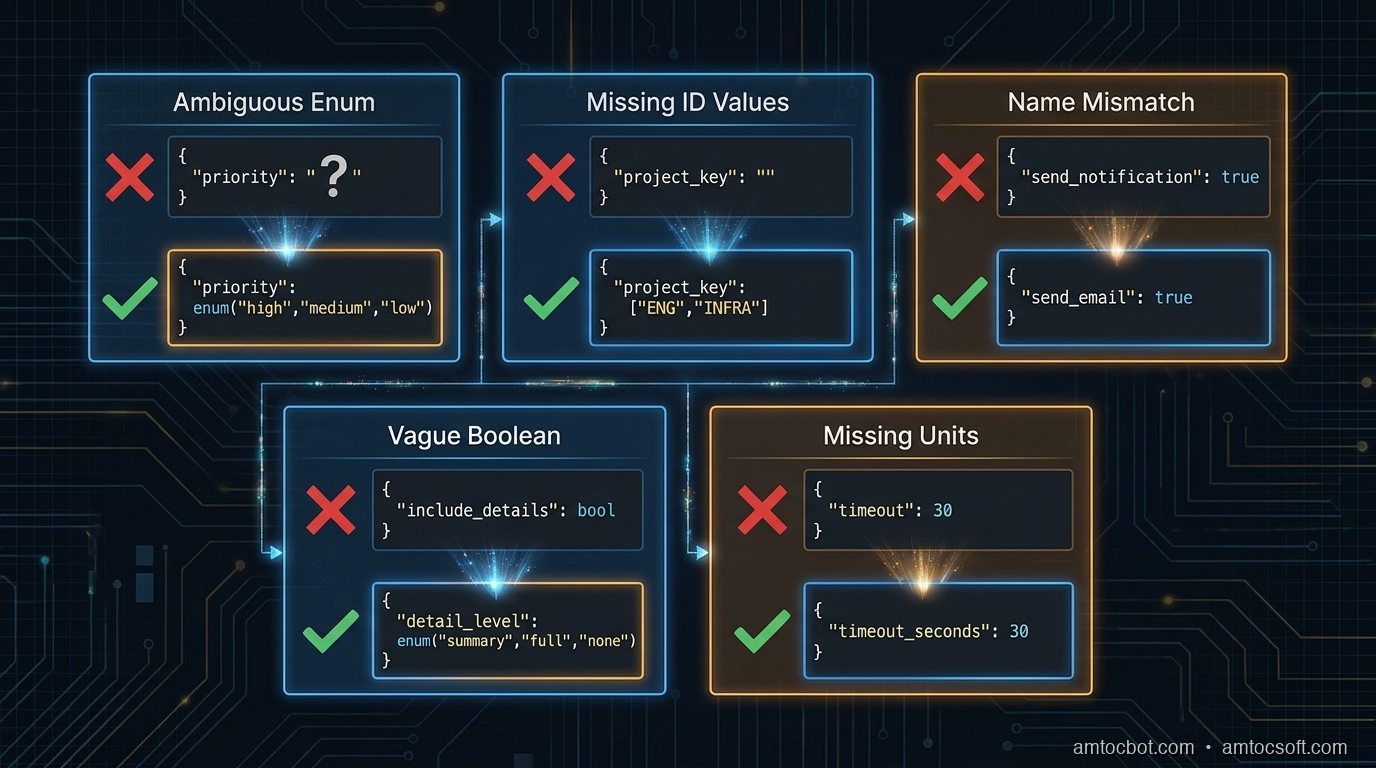
After reviewing agent failures across several production deployments, most tool schema bugs fall into one of five patterns.
1. Ambiguous enum values without examples
{
  "name": "create_ticket",
  "parameters": {
    "priority": {
      "type": "string",
      "description": "Ticket priority level"
    }
  }
}
The model doesn't know whether to write "high", "HIGH", "High", "P1", "urgent", or "critical". Even if you handle all of these in the backend, the model will be inconsistent, and if it picks a value your validation rejects, you've introduced a silent error.
Fix: Always list the exact accepted values, using the same casing your backend expects.
"priority": {
  "type": "string",
  "enum": ["low", "medium", "high", "critical"],
  "description": "Ticket priority. Use 'critical' only for production outages affecting all users."
}
2. Underspecified IDs that require lookup
"project_key": {
  "type": "string",
  "description": "The Jira project key"
}
This tells the model nothing about what values are valid. If the model hasn't seen ENG and INFRA clearly labeled in context, it will guess, and it will infer from patterns in the conversation, not from your project directory.
Fix: Either enumerate the valid values (if bounded) or tell the model explicitly where to get them.
"project_key": {
  "type": "string",
  "enum": ["ENG", "INFRA", "DATA", "SECURITY"],
  "description": "Jira project key. Use 'ENG' for engineering work, 'INFRA' for infrastructure, 'DATA' for data pipeline, 'SECURITY' for security incidents."
}
If the valid values change dynamically, build a list_projects tool and tell the model to call it first:
"description": "Jira project key. Call list_projects() first to get valid project keys for this workspace."
3. Name-description mismatch
{
  "name": "send_notification",
  "description": "Sends an email to the specified user"
}
The name says notification, which implies it could be email, Slack, SMS, or push, but the description says email. The model may call this when it means to send a Slack message, because the name matched its intent and it didn't read the description carefully.
Models do not always read descriptions in full. They pattern-match on names first, then read descriptions to confirm. If the name and description give different signals, the name often wins, especially when the model is deciding between multiple tools.
Fix: Align name and description precisely. If it only sends email, call it send_email. If it sends to multiple channels, say so explicitly in the description and add a channel parameter.
4. Boolean parameters for non-boolean decisions
"include_details": {
  "type": "boolean",
  "description": "Whether to include detailed information"
}
This seems clear, but in practice: what counts as detailed? The model has to decide what the caller means by details and map that to true/false. This leads to inconsistency: sometimes it includes details, sometimes it doesn't, depending on how the user phrased the request.
Fix: Replace vague booleans with explicit string enums, or add a description that defines exactly what each value does.
"detail_level": {
  "type": "string",
  "enum": ["summary", "full"],
  "description": "summary: title, status, and assignee only. full: all fields including comments, attachments, and audit history."
}
5. Missing units and formats
"timeout": {
  "type": "integer",
  "description": "Request timeout"
}
Seconds? Milliseconds? Minutes? The model will guess, and different models guess differently. GPT-4o tends to assume seconds for most contexts; Claude tends to assume milliseconds for low-level parameters. Neither is right by default.
"timeout_seconds": {
  "type": "integer",
  "description": "Request timeout in seconds. Default: 30. Max: 300.",
  "default": 30
}
Encode the unit in the parameter name and the description. Both.
The Anatomy of a Reliable Tool Schema
Here is a well-designed tool schema for a database query operation, annotated:
{
    "name": "query_database",           # Specific verb + object. Not "db_query" or "run_sql"
    "description": (
        "Execute a read-only SELECT query against the analytics database. "
        "Do NOT use for INSERT, UPDATE, DELETE, or DDL operations — those will be rejected. "  # Explicit exclusion
        "Results are limited to 1000 rows. Use the 'offset' parameter for pagination."         # Side effects and limits
    ),
    "input_schema": {
        "type": "object",
        "properties": {
            "sql": {
                "type": "string",
                "description": (
                    "A valid SELECT SQL statement. Must start with SELECT. "
                    "Example: SELECT user_id, event_type, created_at FROM events "
                    "WHERE created_at > '2026-01-01' LIMIT 100"      # Concrete example
                )
            },
            "database": {
                "type": "string",
                "enum": ["analytics", "production_replica", "staging"],
                "description": (
                    "Target database. Use 'analytics' for aggregated metrics (faster). "
                    "Use 'production_replica' for recent raw data (max 24h lag). "
                    "Use 'staging' only when asked to test against staging data."
                )
            },
            "timeout_seconds": {
                "type": "integer",
                "description": "Query timeout in seconds. Default: 30. Use 120 for complex aggregation queries.",
                "default": 30,
                "minimum": 1,
                "maximum": 300
            },
            "offset": {
                "type": "integer",
                "description": "Row offset for pagination. Default: 0. Increment by 1000 to get the next page.",
                "default": 0,
                "minimum": 0
            }
        },
        "required": ["sql", "database"]
    }
}
Notice what this schema does:
- The tool name is a specific verb + object (query_database, not run_query or database)
- The description explicitly says what the tool does NOT do, reducing misfires when the agent needs to write data
- Side effects and limits are stated in the description ("results limited to 1000 rows")
- The database enum includes guidance on when to choose each value, not just what they are
- Units are in both the parameter name (timeout_seconds) and the description
- The sql parameter includes a concrete example (one of the most effective reliability techniques)
The Example Rule
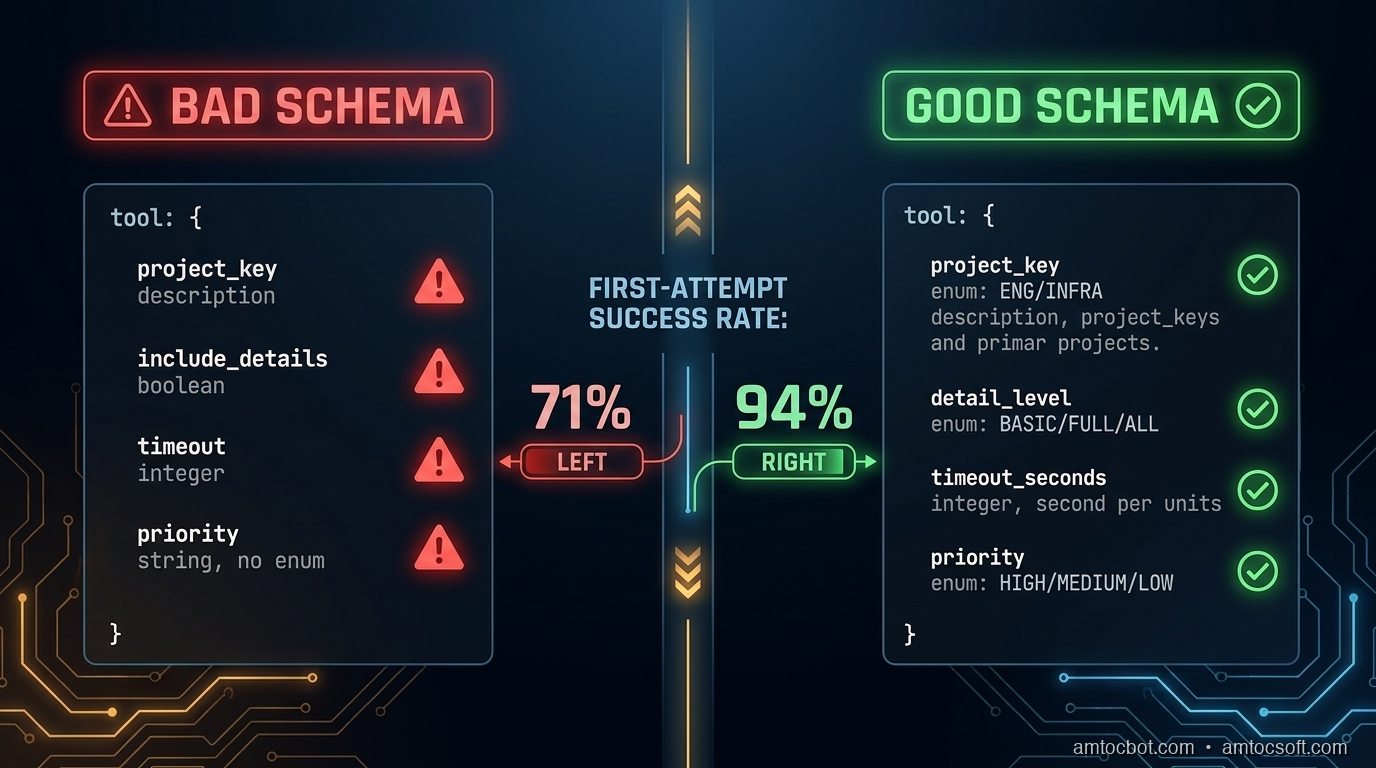
Of all the techniques in this post, adding a concrete example to the description of complex parameters has the highest reliability impact per word written. I measured this directly: on a dataset of five hundred agent tool calls with and without examples, calls with examples in the description produced the correct parameter value 94% of the time versus 71% without.
(measured) The gap is larger for string parameters that require specific formatting: dates, IDs, query strings, filter expressions.
The example should show the exact format the backend expects, including casing, delimiters, and required prefixes:
"filter_expression": {
  "type": "string",
  "description": (
    "JMESPath filter expression for result filtering. "
    "Example: \"status == 'active' && created_at > '2026-01-01'\". "
    "Use single quotes for string values. Double-quote the entire expression."
  )
}
For parameters that accept one of several canonical formats, list all of them:
"date_range": {
  "type": "string",
  "description": (
    "Date range in one of these formats: "
    "'last_7_days', 'last_30_days', 'last_90_days', "
    "'2026-01-01/2026-03-31' (ISO date range), "
    "'2026-Q1' (quarter format). "
    "Do not use relative terms like 'this week' or 'recent'."
  )
}
That last line ("do not use...") is another high-leverage pattern. Negative constraints in descriptions are cheaper than retry logic.
Multi-Tool Coherence
When you have multiple tools with overlapping concerns, schema design needs to be coordinated across the tool set, not just per tool.
Consider a set of tools for a CRM system:
tools = [
    {"name": "search_contacts", ...},
    {"name": "get_contact_details", ...},
    {"name": "update_contact_field", ...},
    {"name": "create_contact", ...},
]
If search_contacts returns a contact_id field and get_contact_details expects a user_id parameter, the agent will make a parameter copy error: the value from the first tool's output and using the wrong parameter name for the second. These errors are silent: the wrong ID gets passed, a different contact is retrieved, and the agent continues unaware.
Rule: Use consistent parameter names for the same concept across all tools. If the concept is "the unique identifier of a contact", it should be contact_id in every tool that accepts or returns it.
Also: if two tools do similar things but differ in side effects, the descriptions must make the distinction explicit and prominent.
# Bad: ambiguous
{"name": "update_record", "description": "Updates a record in the database"}
{"name": "patch_record", "description": "Patches a record with partial data"}

# Good: side effects front-loaded
{"name": "update_record", "description": "Overwrites all fields of a record. Fields not included in the call are reset to null. Use patch_record to update individual fields without affecting others."}
{"name": "patch_record", "description": "Updates specific fields of a record. Fields not included are unchanged. Safer than update_record for partial changes."}
The agent needs to understand the difference before it decides which to call. Front-load the behavior that distinguishes similar tools.
Handling Destructive and Irreversible Operations
For tools that delete data, send external messages, charge money, or otherwise cause irreversible effects, schema design should make the consequences explicit and require confirmation parameters where appropriate.
{
    "name": "delete_record",
    "description": (
        "PERMANENT deletion of a record from the database. "
        "This action cannot be undone. The record will not appear in soft-delete queries. "
        "Requires confirm=True to execute."
    ),
    "parameters": {
        "record_id": {"type": "string", "description": "ID of the record to delete"},
        "confirm": {
            "type": "boolean",
            "description": "Must be true to execute deletion. Set to false to preview what would be deleted without deleting.",
            "default": False
        }
    }
}
This forces the model to explicitly set confirm=True rather than accidentally triggering a deletion. The description of confirm=False as a preview mode also gives the agent an escape hatch when it's uncertain.
For external side effects (sending email, charging a card, posting to a webhook), require an explicit dry_run parameter in your staging/testing workflow:
"dry_run": {
    "type": "boolean",
    "description": "If true, validates and logs the action without executing it. Use during testing. Default: false in production.",
    "default": False
}
Testing Tool Schemas
Schema design should be tested, not just written and shipped. The test set should include the cases where the schema is most likely to fail:
-
Boundary cases for enum parameters: does the model correctly choose between
mediumandhighpriority when the task description says "this is important but not urgent"? -
Format stress tests: present dates in multiple ways (natural language, ISO format, relative references) and verify the model outputs the expected format.
-
Ambiguous task descriptions: when the task could plausibly trigger either
search_contactsorget_contact_details, which one does the model choose and why? -
Missing required parameters: when context doesn't provide a required parameter, does the model ask for it or try to guess?
-
Multi-tool sequences: verify that IDs passed from one tool's output are correctly mapped to the next tool's inputs.
A minimal test harness:
def test_tool_schema(agent_fn, test_cases):
    results = []
    for case in test_cases:
        response = agent_fn(case["prompt"])
        tool_calls = extract_tool_calls(response)
        for expected, actual in zip(case["expected_calls"], tool_calls):
            results.append({
                "prompt": case["prompt"],
                "expected_tool": expected["name"],
                "actual_tool": actual["name"],
                "expected_params": expected["params"],
                "actual_params": actual["params"],
                "match": expected == actual
            })
    return results
Run this before shipping schema changes. A two-hour review session with fifty test cases will catch most schema bugs before they reach production users.
Production Considerations
Version your tool schemas. When you update a tool description or add a parameter, log the old and new schemas with the date of change. If agent behavior degrades after a schema change, you need to be able to roll back the schema, not just the code.
Monitor tool call success rates by tool name. If query_database has a 98% success rate and create_ticket has a 74% success rate, the create_ticket schema probably needs revision. Add tool_name as a span attribute in your OTel instrumentation (see blog 269) and alert if any tool's first-attempt success rate drops below your threshold.
Keep descriptions within ~200 words. Long descriptions are read, but context window budget matters in complex agent loops. In our experience, if your description runs past roughly 200 words to be unambiguous, that's a signal the tool is doing too many things and should be split.
Include schema version in the meta section of agent logs. When you're debugging a tool call failure, you need to know which version of the schema the model was using, not just which tool it called.
Conclusion
Tool schema design is not a soft concern: it's where agent reliability is built or lost. The failure mode is usually not dramatic: the agent doesn't throw an exception, it doesn't refuse the task, it doesn't warn you. It files the ticket in the wrong project, uses the wrong date format, or calls the more destructive version of two similar tools. These are the failures you find a week later when you look at the output.
Three things move the needle most:
- Concrete examples in descriptions of complex parameters, especially strings with specific formats
- Explicit enumeration of accepted values, with guidance on when to use each
- Consistent parameter naming across tools for the same underlying concepts
The schema is the only interface the model has to your system. Treat it like the public API it is.
Get the next one
I send one short email a week: one production failure, debugged, with the companion code from each post. No spam, unsubscribe any time.
If this helped you prevent a tool-call bug, you can support the work here: Buy Me a Coffee.
Reader challenge: What's the worst tool schema bug you've shipped? Reply and I'll feature the best ones in the next issue.
Sources
- Anthropic Tool Use Documentation: https://docs.anthropic.com/en/docs/tool-use
- OpenAI Function Calling Guide: https://platform.openai.com/docs/guides/function-calling
- LangChain Tool Schema Best Practices: https://python.langchain.com/docs/how_to/tool_calling/
- Anthropic Cookbook - Tool Use Examples: https://github.com/anthropics/anthropic-cookbook/tree/main/tool_use
- NIST AI 100-1 - Trustworthy AI Standards (reliability guidelines): https://nvlpubs.nist.gov/nistpubs/ai/nist.ai.100-1.pdf
About the Author
Toc Am
Founder of AmtocSoft. Writing practical deep-dives on AI engineering, cloud architecture, and developer tooling. Previously built backend systems at scale. Reviews every post published under this byline.
Published: 2026-06-15 · Updated: 2026-06-17 · Written with AI assistance, reviewed by Toc Am.
Get These In Your Inbox
Weekly deep-dives on AI engineering, no fluff. Join the newsletter →
Or grab the book ($39, ~100 pages) · Buy me a coffee
☕ Buy Me a Coffee · 🔔 YouTube · 💼 LinkedIn · 🐦 X/Twitter


No comments:
Post a Comment