Showing posts with label graphql. Show all posts

Friday, April 17, 2026

GraphQL in Production 2026: Schema Design, DataLoader, Persisted Queries, and Federation

Hero image

Introduction

GraphQL turned ten in 2025, and the ecosystem has finally caught up to its ambitions. What was once an API curiosity driven by Facebook's mobile needs is now the default choice for any system where the client's data requirements are complex, varied, or rapidly evolving. In 2026, the conversation has shifted from "should we use GraphQL?" to "how do we run it properly at scale?"

The pitch is familiar: one endpoint, clients ask for exactly what they need, no over-fetching, no under-fetching. Compared to REST, GraphQL eliminates the proliferation of specialized endpoints — /users/:id/posts/recent-with-authors and friends — and puts the query structure in the client's hands. That matters most when you have mobile clients on slow networks, multiple frontends (web, iOS, Android, internal tools) with different data shapes, or a team structure where frontend and backend move independently.

Where GraphQL still loses to REST: simple CRUD APIs with predictable data shapes, systems where HTTP caching is non-negotiable, teams without the tooling investment to manage schema evolution, or anywhere the operational overhead of a schema registry and query planner is not justified by the complexity saved. REST with OpenAPI and a good client generator solves most of what REST developers reach for GraphQL to fix. Choose your weapons deliberately.

But for complex, multi-client, multi-team systems, GraphQL wins on ergonomics — and that is increasingly where production systems live. The patterns in this post reflect what actually works at load: schema design choices that age well, DataLoader as the mandatory antidote to the N+1 problem, persisted queries as the production security boundary, and federation as the path to scaling schema ownership across teams.

The N+1 problem is the fulcrum. If you deploy GraphQL without DataLoader and your schema has any relationship fields at all, you will hit it immediately in production. A list of 100 posts, each with an author resolved by a separate DB query, produces 101 database round-trips instead of 2. At scale that is the difference between a 40ms response and a 4-second one. Every other optimization in this post builds on getting that right first.


1. Schema Design for Production

A GraphQL schema is a long-lived contract. Unlike a REST endpoint you can quietly change, a schema is introspectable — clients query it to understand what is available. Decisions made on day one compound over years. These are the ones that matter.

Nullability Strategy

The GraphQL spec defaults fields to nullable. The community has divided itself into two camps: nullable-by-default (the spec's intent) versus non-null-by-default (the pragmatic camp).

The nullable-by-default argument: partial results are a first-class GraphQL feature. If one resolver fails, the query can still return the rest. Making fields non-null means one resolver error propagates up to the nearest nullable parent, potentially nulling out entire subtrees.

The non-null-by-default argument: nullable types in generated TypeScript clients produce T | null | undefined everywhere, and clients have to defensively null-check fields that will never actually be null. This erodes code quality fast.

The production answer: be deliberate, not dogmatic. Mark fields non-null when you can contractually guarantee they will always have a value. Mark nullable fields — especially relationship fields and computed fields — nullable so partial failure is handled gracefully. Never mark a field non-null if the resolver can legitimately return null due to data state or access control.

# Good: id is always present, name may be missing on legacy records
type User {
  id: ID!           # Non-null: always exists
  name: String      # Nullable: may be empty on legacy accounts
  email: String!    # Non-null: required at registration
  posts: [Post!]    # Nullable list: null means "failed to load", [] means "no posts"
}

The distinction between [Post!] (non-null items, nullable list), [Post]! (null items allowed, list itself non-null), and [Post!]! (nothing nullable) matters. Pick the one that reflects the actual contract.

Input Types vs Inline Arguments

For mutations with more than two or three arguments, always use input types:

# Bad: inline args don't compose, don't reuse, break on addition
mutation CreatePost(
  $title: String!
  $body: String!
  $authorId: ID!
  $publishAt: DateTime
  $tags: [String!]
) { ... }

# Good: input type is reusable, versionable, and documented
input CreatePostInput {
  title: String!
  body: String!
  authorId: ID!
  publishAt: DateTime
  tags: [String!]
}

mutation CreatePost($input: CreatePostInput!) {
  createPost(input: $input) {
    post { id title }
    errors { field message }
  }
}

The mutation result pattern — returning both the created object and a structured errors array — is critical. It lets clients handle validation errors without catching GraphQL errors, which are a separate concern.

Connection Pattern for Pagination

Never return raw arrays for paginated collections. The Relay Connection spec is the production standard:

type PostConnection {
  edges: [PostEdge!]!
  pageInfo: PageInfo!
  totalCount: Int!
}

type PostEdge {
  node: Post!
  cursor: String!
}

type PageInfo {
  hasNextPage: Boolean!
  hasPreviousPage: Boolean!
  startCursor: String
  endCursor: String
}

type Query {
  posts(first: Int, after: String, last: Int, before: String): PostConnection!
}

Cursor-based pagination is O(1) regardless of page depth. Offset-based (page: 3, limit: 20) breaks at page 500 on large tables and is inconsistent when records are inserted mid-browse. Cursors avoid both problems. The verbosity of the connection pattern pays off in client predictability.

Union Types and Interfaces

Use interfaces when types share fields and behavior. Use unions when types are fundamentally different but appear in the same position:

interface Node {
  id: ID!
}

interface Auditable {
  createdAt: DateTime!
  updatedAt: DateTime!
}

type User implements Node & Auditable {
  id: ID!
  createdAt: DateTime!
  updatedAt: DateTime!
  email: String!
}

# Union for a search result that can be multiple disjoint types
union SearchResult = User | Post | Comment | Tag

Schema Versioning with @deprecated

Never remove a field without a deprecation window. The @deprecated directive is your migration tool:

type User {
  id: ID!
  username: String! @deprecated(reason: "Use `handle` instead. Will be removed 2026-12-01.")
  handle: String!
  fullName: String @deprecated(reason: "Split into `firstName` and `lastName`.")
  firstName: String
  lastName: String
}

Introspection surfaces these deprecations. Client generators (GraphQL Codegen, Relay) can be configured to warn on deprecated field usage at build time, giving you a concrete migration signal without breaking existing clients.

Full Schema Example

type Query {
  user(id: ID!): User
  post(id: ID!): Post
  posts(first: Int, after: String): PostConnection!
  search(query: String!): [SearchResult!]!
}

type Mutation {
  createPost(input: CreatePostInput!): CreatePostPayload!
  updatePost(id: ID!, input: UpdatePostInput!): UpdatePostPayload!
  deletePost(id: ID!): DeletePostPayload!
  addComment(input: AddCommentInput!): AddCommentPayload!
}

type User implements Node & Auditable {
  id: ID!
  handle: String!
  email: String!
  firstName: String
  lastName: String
  posts(first: Int, after: String): PostConnection!
  createdAt: DateTime!
  updatedAt: DateTime!
}

type Post implements Node & Auditable {
  id: ID!
  title: String!
  body: String!
  author: User!
  comments(first: Int, after: String): CommentConnection!
  tags: [String!]!
  publishedAt: DateTime
  createdAt: DateTime!
  updatedAt: DateTime!
}

type Comment implements Node & Auditable {
  id: ID!
  body: String!
  author: User!
  post: Post!
  createdAt: DateTime!
  updatedAt: DateTime!
}

union SearchResult = User | Post | Comment
Architecture diagram
flowchart TD Client["Client\n(Browser / Mobile)"] -->|HTTP POST or GET| Server["GraphQL Server\n(Apollo / Yoga / Pothos)"] Server -->|Parse & validate| Schema["Schema Validation\n(SDL type checking)"] Schema -->|Execute| Resolvers["Resolver Chain\n(Query → Type resolvers)"] Resolvers -->|Batch IDs| DL["DataLoader\n(per-request instance)"] DL -->|Single batched query| DB["Database\n(PostgreSQL / MySQL)"] DB -->|Row set| DL DL -->|Resolved entities| Resolvers Resolvers -->|Assembled response| Client style DL fill:#2d6a4f,color:#fff style DB fill:#1d3557,color:#fff

2. The N+1 Problem and DataLoader

The N+1 problem is not a GraphQL-specific bug — it exists in any ORM with lazy loading. But GraphQL makes it worse because the resolver tree hides it. Each resolver is a small, isolated function that fetches data for one node. Composing them naively means each field on a list of N items fires its own query.

What N+1 Looks Like

// This looks innocent
const resolvers = {
  Query: {
    posts: () => db.query('SELECT * FROM posts LIMIT 100'),
  },
  Post: {
    // Called once per post — 100 posts = 100 separate author queries
    author: (post) => db.query('SELECT * FROM users WHERE id = $1', [post.authorId]),
  },
};

A request for 100 posts with their authors fires:
- 1 query: SELECT * FROM posts LIMIT 100
- 100 queries: SELECT * FROM users WHERE id = ? — once per post

Total: 101 queries. With DataLoader: 2 queries. At 100 posts, that is a 50x reduction in database round-trips. At 1,000 posts, it is 500x.

DataLoader Batching Mechanism

DataLoader works by deferring individual load calls until the end of the current event loop tick, collecting all requested IDs, then firing a single batch function. The per-request cache prevents duplicate fetches within the same request lifecycle.

import DataLoader from 'dataloader';
import { Pool } from 'pg';

// Batch function: receives array of IDs, returns array of results in same order
async function batchUsers(
  db: Pool,
  userIds: readonly string[]
): Promise<(User | Error)[]> {
  const { rows } = await db.query<User>(
    'SELECT * FROM users WHERE id = ANY($1::uuid[])',
    [userIds]
  );

  // DataLoader requires results in the SAME ORDER as input keys
  const userMap = new Map(rows.map(u => [u.id, u]));
  return userIds.map(id => userMap.get(id) ?? new Error(`User ${id} not found`));
}

// Factory: create a new DataLoader per request (never singleton)
export function createLoaders(db: Pool) {
  return {
    userById: new DataLoader<string, User>(
      (ids) => batchUsers(db, ids),
      {
        // Cache is scoped to this DataLoader instance (per-request)
        cache: true,
        // Maximum batch size — tune based on DB max_query_params
        maxBatchSize: 1000,
      }
    ),
    commentsByPostId: new DataLoader<string, Comment[]>(
      async (postIds) => {
        const { rows } = await db.query<Comment>(
          'SELECT * FROM comments WHERE post_id = ANY($1::uuid[])',
          [postIds]
        );
        // Group by post_id, return in input order
        const grouped = new Map<string, Comment[]>();
        for (const comment of rows) {
          const list = grouped.get(comment.postId) ?? [];
          list.push(comment);
          grouped.set(comment.postId, list);
        }
        return postIds.map(id => grouped.get(id) ?? []);
      }
    ),
  };
}

export type Loaders = ReturnType<typeof createLoaders>;

Per-Request Instantiation

This is the most common DataLoader mistake in production: creating DataLoader as a singleton. A singleton's cache persists across requests, which means:

  1. User A requests post 42. DataLoader caches it.
  2. User B requests post 42. Gets User A's cached result — even if permissions differ.
  3. Post 42 is updated. Cache returns the stale version indefinitely.

Always instantiate DataLoader inside request context:

// Apollo Server context function — runs once per request
const server = new ApolloServer({
  typeDefs,
  resolvers,
  context: ({ req }): AppContext => ({
    db,
    user: extractUser(req),
    loaders: createLoaders(db), // Fresh instance per request
  }),
});

Using DataLoader in Resolvers

const resolvers: Resolvers<AppContext> = {
  Query: {
    posts: async (_parent, { first = 20, after }, { db }) => {
      const { rows } = await db.query<Post>(
        `SELECT * FROM posts
         WHERE ($1::uuid IS NULL OR id < $1::uuid)
         ORDER BY id DESC
         LIMIT $2`,
        [decodeCursor(after), first + 1]
      );
      return buildConnection(rows, first);
    },
  },

  Post: {
    // No N+1: DataLoader batches all author loads from this request tick
    author: async (post, _args, { loaders }) => {
      return loaders.userById.load(post.authorId);
    },

    comments: async (post, { first = 10, after }, { loaders }) => {
      const comments = await loaders.commentsByPostId.load(post.id);
      return buildConnection(paginateComments(comments, after, first), first);
    },
  },

  Comment: {
    // Also batched — DataLoader catches this nested resolver too
    author: async (comment, _args, { loaders }) => {
      return loaders.userById.load(comment.authorId);
    },
  },
};

The key insight: loaders.userById.load() does not fire a query immediately. It schedules the load. After all synchronous resolver code for this tick completes, DataLoader calls the batch function with all accumulated IDs. This works across nested resolvers — the Post author loads and Comment author loads are batched together if they occur in the same event loop tick.

flowchart LR subgraph WITHOUT["Without DataLoader (N+1)"] direction TB Q1["Query: 100 posts"] --> P1["Post 1 → author query"] Q1 --> P2["Post 2 → author query"] Q1 --> P3["Post 3 → author query"] Q1 --> PN["... 97 more author queries"] style Q1 fill:#c1121f,color:#fff style P1 fill:#c1121f,color:#fff style P2 fill:#c1121f,color:#fff style P3 fill:#c1121f,color:#fff style PN fill:#c1121f,color:#fff end subgraph WITH["With DataLoader (Batched)"] direction TB Q2["Query: 100 posts"] --> DL["DataLoader\ncollects 100 IDs"] DL --> B1["1 batched query:\nSELECT WHERE id = ANY(...)"] B1 --> R["100 authors returned"] style Q2 fill:#2d6a4f,color:#fff style DL fill:#2d6a4f,color:#fff style B1 fill:#2d6a4f,color:#fff style R fill:#2d6a4f,color:#fff end WITHOUT -.->|"101 DB round-trips\n~4000ms"| COST1[" "] WITH -.->|"2 DB round-trips\n~40ms"| COST2[" "]

3. Persisted Queries and Security

A public GraphQL endpoint accepting arbitrary queries is an invitation for abuse. An attacker can send deeply nested queries, field explosion attacks, or resource-exhausting introspection queries. Persisted queries are the production answer.

The Arbitrary Query Problem

The developer experience of GraphQL — write any query, get exactly that data — is also the attack surface. Consider:

# Deeply nested query — exponential resolver tree
{
  user(id: "1") {
    friends {
      friends {
        friends {
          friends {
            posts { comments { author { posts { comments { author { id } } } } } }
          }
        }
      }
    }
  }
}

This resolves to a tree with thousands of nodes. Without protection, a single request like this can saturate your server.

Automatic Persisted Queries (APQ)

APQ (Apollo's protocol, supported by most clients) works in two phases:

  1. Client sends a hash of the query (SHA-256) without the query itself
  2. Server looks up the hash in its registry; if found, executes. If not, responds with PERSISTED_QUERY_NOT_FOUND
  3. Client re-sends with the full query + hash; server stores the hash and executes

After the first round-trip, subsequent requests send only the hash — smaller payloads, faster network round-trips, and critically: in production you can disable new query registration and only accept known hashes.

import { createServer } from '@graphql-yoga/node';
import { usePersistedOperations } from '@graphql-yoga/plugin-persisted-operations';

// In production: load from a static file generated at build time
const persistedQueries = new Map<string, string>(
  Object.entries(require('./persisted-queries.json'))
);

const server = createServer({
  schema,
  plugins: [
    usePersistedOperations({
      getPersistedOperation(sha256Hash: string) {
        return persistedQueries.get(sha256Hash) ?? null;
      },
      // In production: reject unknown queries entirely
      allowArbitraryOperations: process.env.NODE_ENV !== 'production',
    }),
  ],
});

Generate the persisted queries map at build time with GraphQL Codegen or Relay compiler, then deploy it alongside your server. New queries require a deploy — which is the right constraint. It means your production server only executes queries your own clients wrote.

Query Depth and Complexity Limiting

Even with APQ, defense in depth matters. For development environments and internal APIs that accept arbitrary queries:

import { createComplexityRule, fieldExtensionsEstimator, simpleEstimator } from 'graphql-query-complexity';
import depthLimit from 'graphql-depth-limit';

const server = createServer({
  schema,
  validationRules: [
    // Reject queries nested deeper than 7 levels
    depthLimit(7),

    // Reject queries scoring above 1000 complexity points
    createComplexityRule({
      maximumComplexity: 1000,
      estimators: [
        // List fields cost 10x their children per item
        fieldExtensionsEstimator(),
        // Default: 1 point per field
        simpleEstimator({ defaultComplexity: 1 }),
      ],
      onComplete(complexity) {
        console.log(`Query complexity: ${complexity}`);
      },
    }),
  ],
});

Mark expensive fields in the schema extensions:

const PostType = new GraphQLObjectType({
  name: 'Post',
  fields: {
    comments: {
      type: CommentConnectionType,
      extensions: {
        complexity: ({ childComplexity }) => childComplexity * 10,
      },
    },
  },
});

Disabling Introspection in Production

Introspection reveals your entire schema to anyone who can reach the endpoint. Disable it in production after your client tooling has generated its types:

import { NoSchemaIntrospectionCustomRule } from 'graphql';

const server = createServer({
  schema,
  validationRules: process.env.NODE_ENV === 'production'
    ? [NoSchemaIntrospectionCustomRule]
    : [],
});

Field-level authorization belongs in resolvers or middleware, not schema definitions. Use a pattern like:

const resolvers = {
  User: {
    email: (user, _args, { currentUser }) => {
      // Only the user themselves or admins can see email
      if (currentUser.id !== user.id && currentUser.role !== 'ADMIN') {
        return null; // Return null for nullable, throw for non-null
      }
      return user.email;
    },
  },
};

4. Federation and the Supergraph

When your company has multiple teams each owning a service, a monolithic GraphQL schema becomes a coordination problem. Federation solves this by composing independently deployed subgraphs into a single supergraph at the router layer — clients see one API, teams own their domains.

Subgraph Architecture

Each team owns a subgraph: a complete, independently deployable GraphQL service that handles one domain. The router (Apollo Router or GraphQL Hive Gateway) fetches from each subgraph and stitches results together:

Client → Router (supergraph) → Users Subgraph
                             → Products Subgraph
                             → Orders Subgraph

Each subgraph can reference entities from other subgraphs using the @key directive without importing the full schema.

The @key Directive and Entity References

# users-subgraph: owns the User type
type User @key(fields: "id") {
  id: ID!
  handle: String!
  email: String!
}

# orders-subgraph: references User without owning it
extend type User @key(fields: "id") {
  id: ID! @external
  orders(first: Int): OrderConnection!
}

type Order @key(fields: "id") {
  id: ID!
  userId: ID!
  user: User!
  totalAmount: Float!
  status: OrderStatus!
  createdAt: DateTime!
}

The orders subgraph declares User as an external entity it can extend. When a client queries order.user.handle, the router fetches Order from the orders subgraph, extracts the userId, then fetches User from the users subgraph — transparently to the client.

Reference Resolvers

Each subgraph that defines a @key type must implement a __resolveReference resolver:

// users-subgraph resolvers
const resolvers = {
  User: {
    // Called by the router when another subgraph references a User by id
    __resolveReference: async (reference: { id: string }, { loaders }: AppContext) => {
      return loaders.userById.load(reference.id);
    },

    // Normal field resolvers
    posts: async (user, { first = 20 }, { loaders }) => {
      return loaders.postsByUserId.load(user.id);
    },
  },
};

// orders-subgraph resolvers
const orderResolvers = {
  Order: {
    __resolveReference: async (ref: { id: string }, { db }) => {
      const { rows } = await db.query('SELECT * FROM orders WHERE id = $1', [ref.id]);
      return rows[0];
    },
    user: (order: Order) => ({ __typename: 'User', id: order.userId }),
  },

  User: {
    // Extends User with order data — runs in orders subgraph context
    orders: async (user: { id: string }, { first = 20 }, { loaders }) => {
      return loaders.ordersByUserId.load(user.id);
    },
  },
};

@external, @requires, @provides

These directives handle cases where a resolver in one subgraph needs a field owned by another:

# shipping-subgraph needs the user's address to calculate shipping
extend type User @key(fields: "id") {
  id: ID! @external
  address: String @external          # Owned by users-subgraph
  shippingEstimate: Float @requires(fields: "address")  # Needs address at resolve time
}

The @requires directive tells the router: before calling the shippingEstimate resolver on this subgraph, fetch address from the users subgraph and include it in the reference object.

@provides is the inverse — a subgraph can declare that it can provide certain fields from another entity, avoiding a round-trip to the owning subgraph when those fields are already available in the response.

When Federation Is Worth It

Federation adds real operational complexity: a router process, a schema registry, composition validation, and distributed tracing across subgraphs. It pays off when:

  • You have 3+ teams that need to evolve their schemas independently
  • You are experiencing merge conflicts and coordination overhead on a shared schema repo
  • Different subgraphs have meaningfully different scaling requirements

It does not pay off for a small team (under 5 engineers) or a single service. For single-service architectures, schema stitching with module separation (Pothos or NestJS GraphQL modules) gives you the organizational benefits without the operational overhead.

Comparison visual
flowchart TD Client["Client"] -->|Supergraph query| Router["Apollo Router\n(Supergraph)"] Router -->|user fields| US["Users Subgraph\n:4001"] Router -->|product fields| PS["Products Subgraph\n:4002"] Router -->|order fields| OS["Orders Subgraph\n:4003"] US --> UDB[("Users DB\nPostgreSQL")] PS --> PDB[("Products DB\nPostgreSQL")] OS --> ODB[("Orders DB\nPostgreSQL")] Router -->|Schema composition\n& validation| Registry["Schema Registry\n(Apollo Studio / Hive)"] style Router fill:#1d3557,color:#fff style Registry fill:#457b9d,color:#fff style US fill:#2d6a4f,color:#fff style PS fill:#2d6a4f,color:#fff style OS fill:#2d6a4f,color:#fff

5. Subscriptions and Real-Time

GraphQL subscriptions give clients a way to receive pushed updates using the same query language as regular operations. The two transport options differ significantly in production operational profile.

WebSocket-Based Subscriptions

The graphql-ws protocol (successor to the deprecated subscriptions-transport-ws) is the standard WebSocket implementation:

import { createServer } from '@graphql-yoga/node';
import { useServer } from 'graphql-ws/lib/use/ws';
import { WebSocketServer } from 'ws';

const yoga = createServer({ schema });
const httpServer = createHttpServer(yoga);

const wsServer = new WebSocketServer({
  server: httpServer,
  path: '/graphql',
});

useServer({ schema }, wsServer);

WebSockets are stateful connections — every open subscription holds a connection. At 10,000 concurrent subscribers, you are holding 10,000 TCP connections. This is manageable, but it means your GraphQL server cannot be stateless; load balancers must use sticky sessions or connection-aware routing.

Server-Sent Events (SSE) — Lighter Weight

SSE uses standard HTTP — unidirectional push from server to client over a long-lived HTTP response. It works through HTTP/2 multiplexing, does not require WebSocket upgrades, and is simpler to scale behind standard load balancers:

// GraphQL Yoga supports SSE subscriptions out of the box
// Client uses EventSource or fetch with stream reading
const yoga = createServer({
  schema,
  // Yoga defaults to SSE for subscriptions when client requests it
});

For most subscription use cases (notifications, feed updates, status changes), SSE is simpler to operate than WebSockets. Use WebSockets when you need bidirectional communication beyond what GraphQL subscriptions provide.

Subscription Resolver with Async Iterator

import { PubSub } from 'graphql-subscriptions';
import { withFilter } from 'graphql-subscriptions';

const pubsub = new PubSub();

const resolvers = {
  Subscription: {
    commentAdded: {
      // Filter: only send to subscribers watching this specific post
      subscribe: withFilter(
        () => pubsub.asyncIterator(['COMMENT_ADDED']),
        (payload: { commentAdded: Comment }, variables: { postId: string }) => {
          return payload.commentAdded.postId === variables.postId;
        }
      ),
      resolve: (payload: { commentAdded: Comment }) => payload.commentAdded,
    },
  },

  Mutation: {
    addComment: async (_parent, { input }, { db, loaders }) => {
      const { rows } = await db.query(
        'INSERT INTO comments (body, author_id, post_id) VALUES ($1, $2, $3) RETURNING *',
        [input.body, input.authorId, input.postId]
      );
      const comment = rows[0];

      // Publish to all subscribers
      pubsub.publish('COMMENT_ADDED', { commentAdded: comment });

      return { comment };
    },
  },
};

Scaling with Redis Pub/Sub

The in-memory PubSub above only works for single-instance deployments. With multiple server instances, a comment added via instance A never reaches subscribers connected to instance B. Redis pub/sub is the standard broadcast layer:

import { RedisPubSub } from 'graphql-redis-subscriptions';
import Redis from 'ioredis';

const pubsub = new RedisPubSub({
  publisher: new Redis({ host: process.env.REDIS_HOST }),
  subscriber: new Redis({ host: process.env.REDIS_HOST }),
});

// Replace the in-memory PubSub with RedisPubSub — same API
// Now publishes fan out to all server instances via Redis

Redis pub/sub is eventually consistent and at-most-once delivery. For strong guarantees (at-least-once, ordering), use Kafka or a message queue as the event backbone, with pub/sub only for the final WebSocket fan-out hop.

When Subscriptions Beat Polling

Polling at one-second intervals for 1,000 clients means 1,000 requests/second to your GraphQL server — 86.4 million requests/day — most of which return empty results. Subscriptions invert this: events flow only when data changes. For applications with change rates below 1 event per second per subscriber, subscriptions dramatically reduce server load. For high-frequency data (>10 updates/second per subscriber), consider whether WebSocket raw streaming or SSE with delta encoding is more appropriate than GraphQL subscriptions.


6. Production Considerations

Tracing with OpenTelemetry

Resolver-level tracing tells you exactly which field is slow — not just which request:

import { useOpenTelemetry } from '@envelop/opentelemetry';
import { NodeTracerProvider } from '@opentelemetry/node';

const provider = new NodeTracerProvider();
provider.register();

const server = createServer({
  schema,
  plugins: [
    useOpenTelemetry({
      resolvers: true,          // Span per resolver call
      variables: true,          // Include query variables in spans
      document: true,           // Include query document in spans
      result: false,            // Don't include result data (PII risk)
    }),
  ],
});

With resolver-level spans, your trace shows: query.posts (12ms)Post.author [DataLoader] (2ms batched)db.query (18ms). You can see at a glance whether slowness is in the resolver logic, the DataLoader batch, or the database query.

Caching Strategy

GraphQL's single-endpoint pattern breaks standard HTTP caching. The fix is multi-layered:

  1. Persisted queries + GET requests: APQ queries sent via HTTP GET can be cached by CDN. This only works for queries (not mutations), but it covers the majority of traffic.

  2. DataLoader: Per-request in-memory cache. Not cross-request, but eliminates duplicate fetches within a single response.

  3. Response cache plugin: Cache entire query results keyed by query + variables + user role. Use with care — cache invalidation is hard, and cached responses can leak data across users if the cache key does not account for authorization context.

import { useResponseCache } from '@graphql-yoga/plugin-response-cache';

useResponseCache({
  session: (request) => {
    // Cache key includes user role — never mix user-specific data
    const user = extractUser(request);
    return user?.role ?? 'anonymous';
  },
  ttl: 10_000, // 10 seconds default
  ttlPerSchemaCoordinate: {
    'Query.posts': 30_000,  // Posts list: 30s
    'Query.user': 5_000,    // User data: 5s
  },
});

Error Handling and Partial Results

GraphQL's error model is one of its most underused features. Unlike REST where a single failure means 500, GraphQL returns partial results:

{
  "data": {
    "posts": [
      { "id": "1", "title": "First Post", "author": { "id": "u1", "handle": "alice" } },
      { "id": "2", "title": "Second Post", "author": null }
    ]
  },
  "errors": [
    {
      "message": "User not found",
      "path": ["posts", 1, "author"],
      "extensions": { "code": "NOT_FOUND" }
    }
  ]
}

Post 2's author failed to resolve, but the rest of the response is valid. Clients should handle data and errors independently. Returning an error in errors while still returning data in data is correct GraphQL behavior — do not throw errors from resolvers when you can return null + an error entry.

Rate Limiting by Complexity

Traditional rate limiting counts requests. GraphQL requests are not equivalent — a simple { user(id:"1") { id } } and a deeply nested post/comments/authors traversal are wildly different in cost. Rate limit by query complexity:

// Track complexity per user, rate limit on complexity budget
const complexityBudget = new Map<string, number>();

createComplexityRule({
  maximumComplexity: 1000,
  onComplete(complexity) {
    const userId = context.user?.id ?? 'anonymous';
    const current = complexityBudget.get(userId) ?? 0;

    if (current + complexity > 10_000) {
      throw new GraphQLError('Rate limit exceeded', {
        extensions: { code: 'RATE_LIMITED', retryAfter: 60 },
      });
    }

    complexityBudget.set(userId, current + complexity);
    // Reset budget on a sliding window timer
  },
});

Monitoring Key Metrics

Fields to alert on:
- Resolver error rate per field: a spike in Post.author errors signals a data integrity issue
- Slow resolver p99: DataLoader batch queries should be under 20ms; anything over 100ms needs investigation
- Persisted query miss rate: rising misses indicate a client version deploying new queries not yet registered
- Subscription connection count: watch for connection leaks — clients that subscribe but never unsubscribe


Conclusion

GraphQL earns its place in production when your system has genuine complexity: multiple clients with different data needs, multi-team schema ownership, or intricate relationship graphs that would produce REST endpoint sprawl. When those conditions hold, the patterns in this post are what separate a GraphQL deployment that performs well at scale from one that collapses under its own weight.

The non-negotiables: DataLoader on every relationship field, persisted queries before you open traffic to the internet, and a clear nullability policy communicated to client developers. Federation is the right answer for multi-team schemas — but only after you have outgrown a single schema's organizational limits. Start with a modular monolith-style schema using Pothos or NestJS GraphQL, and migrate to federation when coordination pain becomes real rather than anticipated.

Where REST still wins: simple CRUD with predictable shapes, systems that depend heavily on HTTP caching semantics, and teams that do not yet have the tooling investment to manage schema evolution safely. GraphQL's power is proportional to the complexity it is solving — applied to simple problems, it adds overhead without benefit.

The production maturity of the GraphQL ecosystem in 2026 — stable federation spec, battle-tested DataLoader, OpenTelemetry resolver tracing, APQ support across all major clients — means the operational risk of adopting it is lower than ever. The patterns exist. The tooling exists. The question is whether your problem is complex enough to justify them.


Sources

About the Author

Toc Am

Founder of AmtocSoft. Writing practical deep-dives on AI engineering, cloud architecture, and developer tooling. Previously built backend systems at scale. Reviews every post published under this byline.

LinkedIn X / Twitter

Published: 2026-06-09 · Written with AI assistance, reviewed by Toc Am.

Get These In Your Inbox

Weekly deep-dives on AI engineering, no fluff. Join the newsletter →

Subscribe (free)

Or grab the book ($39, ~100 pages) · Buy me a coffee

Buy Me a Coffee · 🔔 YouTube · 💼 LinkedIn · 🐦 X/Twitter

Sunday, April 12, 2026

GraphQL vs REST vs gRPC in 2026: Which API Style Should You Choose?

API Styles Comparison

Introduction

Every engineering team building distributed systems eventually hits the same wall: the API design conversation. REST has been the industry default for over two decades. GraphQL emerged in 2015 from Facebook's internal frustrations with REST's rigidity. gRPC, born inside Google, became the backbone of most large-scale microservice meshes. By 2026, all three are mature, battle-tested, and still actively competing for the same mindshare.

The problem is that the debate never really ended — it just got noisier. You'll find passionate engineers on all sides, each armed with benchmarks and horror stories. REST veterans warn you about GraphQL's N+1 query problem. GraphQL advocates complain about REST's over-fetching on mobile. gRPC proponents will tell you protobuf is the only sane serialization format worth considering at scale.

This post cuts through the tribal loyalty and gives you a practical, technical comparison you can use to make the right call for your specific system. We'll look at real implementation patterns, performance characteristics, versioning strategies, and a use-case decision matrix so you can stop debating and start building.

Whether you're designing a public API consumed by third-party developers, building an internal service mesh, or shipping a mobile app that needs to squeeze every millisecond of latency out of its backend — this guide has a concrete answer for you.


The Problem: Why One Size Doesn't Fit All

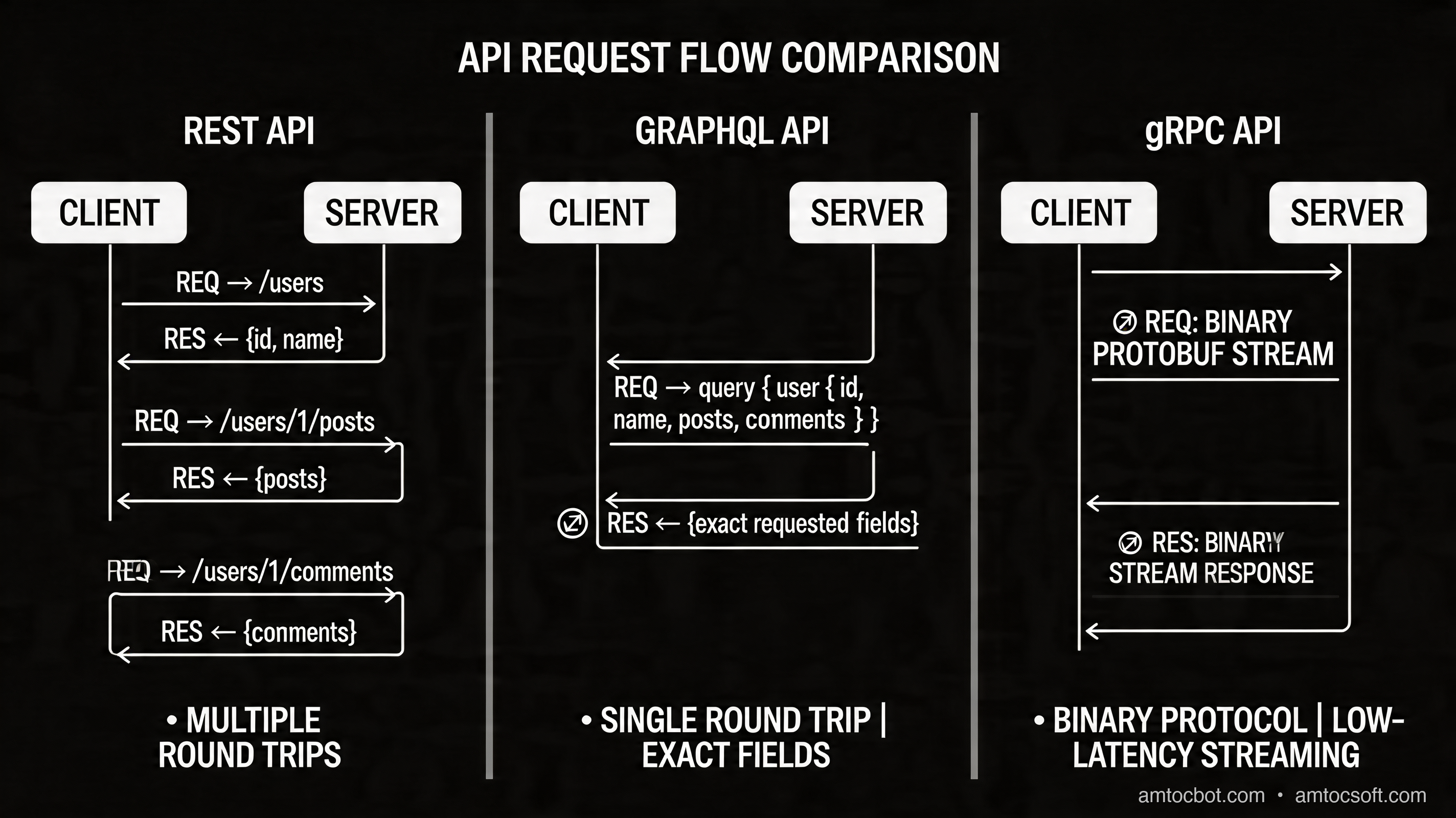
REST was designed around the concept of resources and uniform interfaces. It maps beautifully to CRUD operations and HTTP semantics. But real applications don't always model cleanly onto resources. A dashboard that needs user data, recent orders, notification counts, and product recommendations in a single render cycle is asking REST to do something it was never designed for elegantly — and the result is either massive over-fetching (returning too much data) or multiple round trips (under-fetching).

GraphQL solved those problems but introduced new ones. A flexible query language means clients can request arbitrary shapes of data, which is powerful — until a malicious or poorly written client sends a deeply nested query that hammers your database for minutes. The N+1 query problem, where each item in a list triggers a separate database lookup, has burned teams who didn't build DataLoader patterns from day one.

gRPC sidesteps much of this by using strongly typed contracts (Protocol Buffers) and HTTP/2's multiplexing. It's extremely fast for internal service-to-service calls. But it's nearly useless for browser-native consumption without additional tooling (grpc-web or Connect), and protobuf schemas have a learning curve that slows down exploratory API development.

The real problem engineers face in 2026 is not choosing the "best" API style — it's choosing the right one for the right context, and potentially using all three in the same system.

Request Flow Comparison

How It Works: Technical Deep Dive

REST: Resources, Verbs, and Stateless Contracts

REST (Representational State Transfer) operates on six architectural constraints: statelessness, client-server separation, cacheability, layered system, uniform interface, and optionally code on demand. In practice, REST APIs are defined by their resource URLs and HTTP verbs.

GET    /users/42           → Fetch user 42
POST   /users              → Create a new user
PUT    /users/42           → Replace user 42
PATCH  /users/42           → Partially update user 42
DELETE /users/42           → Delete user 42

The power of REST is that HTTP infrastructure already understands it. CDNs can cache GET responses. Load balancers route by path. API gateways apply rate limits per route. Every HTTP client in every language can speak it without special libraries.

A well-designed REST response for a user resource might look like this:

GET /users/42
{
  "id": 42,
  "name": "Alice Chen",
  "email": "alice@example.com",
  "role": "admin",
  "created_at": "2024-01-15T09:00:00Z",
  "organization_id": 7,
  "avatar_url": "https://cdn.example.com/avatars/42.png",
  "preferences": {
    "theme": "dark",
    "notifications": true
  }
}

The catch: if your mobile client only needs name and avatar_url, you've transmitted six unnecessary fields on every request. Multiply that across millions of calls and it's wasted bandwidth and parsing cost.

REST versioning is another pain point. The common approaches are URL versioning (/v1/users, /v2/users), header versioning (Accept: application/vnd.api+json;version=2), or query parameter versioning (/users?version=2). Each has tradeoffs. URL versioning duplicates routing logic. Header versioning is less visible. None of them prevent the proliferation of parallel API versions that all need to be maintained.

GraphQL: Schema-First, Client-Driven Queries

GraphQL flips the model. Instead of the server defining what data is available at which endpoint, the server defines a typed schema and the client asks for exactly what it needs.

# Schema definition (server-side)
type User {
  id: ID!
  name: String!
  email: String!
  orders(limit: Int, status: OrderStatus): [Order!]!
  organization: Organization!
}

type Order {
  id: ID!
  total: Float!
  status: OrderStatus!
  items: [OrderItem!]!
  createdAt: DateTime!
}

type Query {
  user(id: ID!): User
  users(role: String, limit: Int): [User!]!
}

type Mutation {
  updateUser(id: ID!, input: UpdateUserInput!): User!
  createOrder(input: CreateOrderInput!): Order!
}

The client now sends a single query that specifies exactly the shape it wants:

query GetDashboardData {
  user(id: "42") {
    name
    avatarUrl
    orders(limit: 5, status: PENDING) {
      id
      total
      status
      createdAt
    }
    organization {
      name
      plan
    }
  }
}

One HTTP request. One response. No over-fetching, no multiple round trips. The client gets a dashboard's worth of data in a single call.

The N+1 Problem and DataLoader

The dangerous failure mode in GraphQL is the N+1 query. If you resolve a list of 100 orders and each Order.user field triggers a separate database query, you've issued 101 queries where one would do. The solution is DataLoader — a batching and caching utility that collects all the individual lookup requests within a single execution tick and issues one batched query.

// Without DataLoader — N+1 problem
const resolvers = {
  Order: {
    user: async (order) => {
      // Called once per order — 100 queries for 100 orders!
      return db.users.findById(order.userId);
    }
  }
};

// With DataLoader — batched, one query
import DataLoader from 'dataloader';

const userLoader = new DataLoader(async (userIds) => {
  // Called ONCE with all userIds collected this tick
  const users = await db.users.findByIds(userIds);
  return userIds.map(id => users.find(u => u.id === id));
});

const resolvers = {
  Order: {
    user: async (order) => {
      return userLoader.load(order.userId); // batched automatically
    }
  }
};

GraphQL versioning is simpler than REST because you evolve the schema rather than creating new endpoints. Fields are deprecated with @deprecated(reason: "Use newField instead") and remain available until all clients migrate. This allows gradual evolution without breaking consumers.

graph TD Client["🖥️ GraphQL Client"] GW["API Gateway / GraphQL Server"] QP["Query Parser & Validator"] RE["Resolver Engine"] DL["DataLoader Batch Collector"] DB_Users["Users DB"] DB_Orders["Orders DB"] DB_Orgs["Organizations DB"] Cache["Response Cache"] Client -->|"POST /graphql\n{ query, variables }"| GW GW --> QP QP -->|"Validated AST"| RE RE -->|"user(id: 42)"| DL RE -->|"orders(userId: 42)"| DL RE -->|"organization(id: 7)"| DL DL -->|"Batch: SELECT * FROM users WHERE id IN (...)"| DB_Users DL -->|"Batch: SELECT * FROM orders WHERE user_id IN (...)"| DB_Orders DL -->|"Batch: SELECT * FROM orgs WHERE id IN (...)"| DB_Orgs DB_Users -->|"User rows"| DL DB_Orders -->|"Order rows"| DL DB_Orgs -->|"Org rows"| DL DL -->|"Resolved fields"| RE RE -->|"Assembled JSON"| Cache Cache -->|"{ data: {...} }"| Client

gRPC: Contracts, Protobuf, and HTTP/2 Streaming

gRPC uses Protocol Buffers (protobuf) as its interface definition language and serialization format, and runs over HTTP/2. The schema is defined in .proto files, and client/server code is generated from those definitions.

// user.proto
syntax = "proto3";

package users.v1;

service UserService {
  rpc GetUser (GetUserRequest) returns (User);
  rpc ListUsers (ListUsersRequest) returns (stream User);
  rpc UpdateUser (UpdateUserRequest) returns (User);
  rpc StreamUserActivity (GetUserRequest) returns (stream ActivityEvent);
}

message GetUserRequest {
  string user_id = 1;
}

message User {
  string id = 1;
  string name = 2;
  string email = 3;
  string role = 4;
  int64 created_at = 5;
  string organization_id = 6;
}

message ListUsersRequest {
  string role = 1;
  int32 limit = 2;
  string cursor = 3;
}

message ActivityEvent {
  string event_type = 1;
  int64 timestamp = 2;
  map<string, string> metadata = 3;
}

From this .proto file, protoc generates strongly typed client and server code in Go, Python, TypeScript, Java, Rust, and a dozen other languages. The generated client looks like a regular function call:

// Generated Go client usage
conn, err := grpc.Dial("user-service:50051", grpc.WithTransportCredentials(creds))
client := usersv1.NewUserServiceClient(conn)

// Unary call — just like a function
user, err := client.GetUser(ctx, &usersv1.GetUserRequest{
    UserId: "42",
})
fmt.Printf("Name: %s\n", user.Name)

// Server-side streaming — get users as they arrive
stream, err := client.ListUsers(ctx, &usersv1.ListUsersRequest{
    Role:  "admin",
    Limit: 100,
})
for {
    user, err := stream.Recv()
    if err == io.EOF {
        break
    }
    process(user)
}

// Bidirectional streaming — real-time activity feed
actStream, err := client.StreamUserActivity(ctx, &usersv1.GetUserRequest{UserId: "42"})
for {
    event, err := actStream.Recv()
    if err != nil { break }
    handleEvent(event)
}

Protobuf's binary encoding is roughly 3-10x smaller than equivalent JSON, and serialization/deserialization is significantly faster. For high-throughput internal services exchanging millions of messages per second, this is a meaningful advantage.

HTTP/2 multiplexing means multiple streams can share a single TCP connection without head-of-line blocking, and gRPC supports four call patterns: unary (one request, one response), server streaming, client streaming, and bidirectional streaming. This makes gRPC the natural choice for real-time event feeds, large file uploads, and long-lived connections.


Implementation Guide

REST: A Production-Ready Node.js Endpoint

// routes/users.js — Express + Zod validation
import express from 'express';
import { z } from 'zod';
import { db } from '../db/index.js';
import { cache } from '../cache/redis.js';
import { requireAuth, requireRole } from '../middleware/auth.js';

const router = express.Router();

const UpdateUserSchema = z.object({
  name: z.string().min(1).max(100).optional(),
  email: z.string().email().optional(),
  role: z.enum(['admin', 'member', 'viewer']).optional(),
});

// GET /v1/users/:id
// Cache-Control: max-age=60, stale-while-revalidate=300
router.get('/:id', requireAuth, async (req, res) => {
  const { id } = req.params;
  const cacheKey = `user:${id}`;

  const cached = await cache.get(cacheKey);
  if (cached) {
    res.set('X-Cache', 'HIT');
    return res.json(JSON.parse(cached));
  }

  const user = await db.users.findById(id);
  if (!user) {
    return res.status(404).json({
      error: 'NOT_FOUND',
      message: `User ${id} not found`,
    });
  }

  const response = {
    id: user.id,
    name: user.name,
    email: user.email,
    role: user.role,
    created_at: user.createdAt.toISOString(),
    organization_id: user.organizationId,
    _links: {
      self: { href: `/v1/users/${user.id}` },
      organization: { href: `/v1/organizations/${user.organizationId}` },
      orders: { href: `/v1/users/${user.id}/orders` },
    },
  };

  await cache.setex(cacheKey, 60, JSON.stringify(response));
  res.set('Cache-Control', 'max-age=60, stale-while-revalidate=300');
  res.set('X-Cache', 'MISS');
  res.json(response);
});

// PATCH /v1/users/:id
router.patch('/:id', requireAuth, requireRole('admin'), async (req, res) => {
  const { id } = req.params;
  const parsed = UpdateUserSchema.safeParse(req.body);

  if (!parsed.success) {
    return res.status(400).json({
      error: 'VALIDATION_ERROR',
      details: parsed.error.flatten(),
    });
  }

  const updated = await db.users.update(id, parsed.data);
  await cache.del(`user:${id}`); // Invalidate cache

  res.json(updated);
});

export default router;

GraphQL: Apollo Server with DataLoader and Auth

// graphql/resolvers/user.js
import DataLoader from 'dataloader';
import { AuthenticationError, ForbiddenError } from 'apollo-server-errors';
import { db } from '../../db/index.js';

// Create loaders per-request (not global — prevents cross-request cache pollution)
export function createLoaders() {
  return {
    userById: new DataLoader(async (ids) => {
      const users = await db.users.findByIds(ids);
      const map = new Map(users.map(u => [u.id, u]));
      return ids.map(id => map.get(id) ?? new Error(`User ${id} not found`));
    }),
    ordersByUserId: new DataLoader(async (userIds) => {
      const orders = await db.orders.findByUserIds(userIds);
      const grouped = new Map();
      for (const order of orders) {
        if (!grouped.has(order.userId)) grouped.set(order.userId, []);
        grouped.get(order.userId).push(order);
      }
      return userIds.map(id => grouped.get(id) ?? []);
    }),
  };
}

// typeDefs (schema)
export const typeDefs = `#graphql
  type User {
    id: ID!
    name: String!
    email: String!
    role: UserRole!
    createdAt: DateTime!
    organization: Organization!
    orders(limit: Int = 10, status: OrderStatus): [Order!]!
  }

  enum UserRole { ADMIN MEMBER VIEWER }
  enum OrderStatus { PENDING PROCESSING SHIPPED DELIVERED CANCELLED }

  type Query {
    user(id: ID!): User
    me: User!
  }

  type Mutation {
    updateUser(id: ID!, input: UpdateUserInput!): User!
  }

  input UpdateUserInput {
    name: String
    email: String
    role: UserRole
  }
`;

export const resolvers = {
  Query: {
    user: async (_, { id }, { user, loaders }) => {
      if (!user) throw new AuthenticationError('Not authenticated');
      return loaders.userById.load(id);
    },
    me: async (_, __, { user }) => {
      if (!user) throw new AuthenticationError('Not authenticated');
      return user;
    },
  },
  Mutation: {
    updateUser: async (_, { id, input }, { user, loaders }) => {
      if (!user) throw new AuthenticationError('Not authenticated');
      if (user.role !== 'ADMIN' && user.id !== id) {
        throw new ForbiddenError('Cannot update other users');
      }
      const updated = await db.users.update(id, input);
      loaders.userById.clear(id); // Clear specific loader cache
      return updated;
    },
  },
  User: {
    organization: (user, _, { loaders }) => {
      return loaders.organizationById.load(user.organizationId);
    },
    orders: async (user, { limit, status }, { loaders }) => {
      const orders = await loaders.ordersByUserId.load(user.id);
      const filtered = status ? orders.filter(o => o.status === status) : orders;
      return filtered.slice(0, limit);
    },
  },
};

gRPC: Go Server Implementation

// server/user_service.go
package server

import (
    "context"
    "database/sql"
    "time"

    "google.golang.org/grpc/codes"
    "google.golang.org/grpc/status"

    usersv1 "github.com/example/api/gen/users/v1"
)

type UserServiceServer struct {
    usersv1.UnimplementedUserServiceServer
    db    *sql.DB
    cache Cache
}

func NewUserServiceServer(db *sql.DB, cache Cache) *UserServiceServer {
    return &UserServiceServer{db: db, cache: cache}
}

// Unary RPC — GetUser
func (s *UserServiceServer) GetUser(
    ctx context.Context,
    req *usersv1.GetUserRequest,
) (*usersv1.User, error) {
    if req.UserId == "" {
        return nil, status.Error(codes.InvalidArgument, "user_id is required")
    }

    // Check cache
    if cached, ok := s.cache.Get(ctx, "user:"+req.UserId); ok {
        return cached.(*usersv1.User), nil
    }

    var user usersv1.User
    var createdAt time.Time

    err := s.db.QueryRowContext(ctx,
        `SELECT id, name, email, role, created_at, organization_id
         FROM users WHERE id = $1 AND deleted_at IS NULL`,
        req.UserId,
    ).Scan(&user.Id, &user.Name, &user.Email, &user.Role, &createdAt, &user.OrganizationId)

    if err == sql.ErrNoRows {
        return nil, status.Errorf(codes.NotFound, "user %s not found", req.UserId)
    }
    if err != nil {
        return nil, status.Errorf(codes.Internal, "database error: %v", err)
    }

    user.CreatedAt = createdAt.Unix()
    s.cache.Set(ctx, "user:"+req.UserId, &user, 60*time.Second)
    return &user, nil
}

// Server streaming RPC — ListUsers
func (s *UserServiceServer) ListUsers(
    req *usersv1.ListUsersRequest,
    stream usersv1.UserService_ListUsersServer,
) error {
    query := `SELECT id, name, email, role, created_at, organization_id
              FROM users WHERE deleted_at IS NULL`
    args := []any{}

    if req.Role != "" {
        query += " AND role = $1"
        args = append(args, req.Role)
    }
    if req.Limit > 0 {
        query += " LIMIT $2"
        args = append(args, req.Limit)
    }

    rows, err := s.db.QueryContext(stream.Context(), query, args...)
    if err != nil {
        return status.Errorf(codes.Internal, "query error: %v", err)
    }
    defer rows.Close()

    for rows.Next() {
        var user usersv1.User
        var createdAt time.Time

        if err := rows.Scan(
            &user.Id, &user.Name, &user.Email,
            &user.Role, &createdAt, &user.OrganizationId,
        ); err != nil {
            return status.Errorf(codes.Internal, "scan error: %v", err)
        }
        user.CreatedAt = createdAt.Unix()

        // Send each user as it's scanned — true streaming
        if err := stream.Send(&user); err != nil {
            return err // Client disconnected
        }
    }

    return rows.Err()
}
flowchart TD Start(["Start: API Design Decision"]) Q1{"Public API?\n(Third-party devs)"} Q2{"Mobile-heavy\nclient?"} Q3{"Real-time or\nstreaming needed?"} Q4{"Internal service\nto service?"} Q5{"Strict schema\ncontract needed?"} REST["✅ Use REST\n\n• Familiar to all HTTP clients\n• CDN caching works natively\n• Easy to document with OpenAPI\n• Wide tooling ecosystem"] GraphQL["✅ Use GraphQL\n\n• Client-driven queries\n• One endpoint, flexible shape\n• Solves over/under-fetching\n• Schema introspection built in"] gRPC_Stream["✅ Use gRPC\n(with streaming)\n\n• Bidirectional streaming\n• Low latency, binary protocol\n• HTTP/2 multiplexing\n• Ideal for real-time feeds"] gRPC_Internal["✅ Use gRPC\n(internal services)\n\n• Generated typed clients\n• ~3-10x faster than JSON/REST\n• Enforced contract via protobuf\n• Service mesh friendly"] Hybrid["⚡ Consider Hybrid\n\nREST for public\ngRPC internally\nGraphQL for BFF layer"] Start --> Q1 Q1 -->|Yes| REST Q1 -->|No| Q2 Q2 -->|Yes, complex data needs| GraphQL Q2 -->|No| Q3 Q3 -->|Yes, bidirectional| gRPC_Stream Q3 -->|No| Q4 Q4 -->|Yes| Q5 Q5 -->|Yes, high performance| gRPC_Internal Q5 -->|No, flexible iteration| GraphQL Q4 -->|No, mixed concerns| Hybrid

Comparison and Tradeoffs

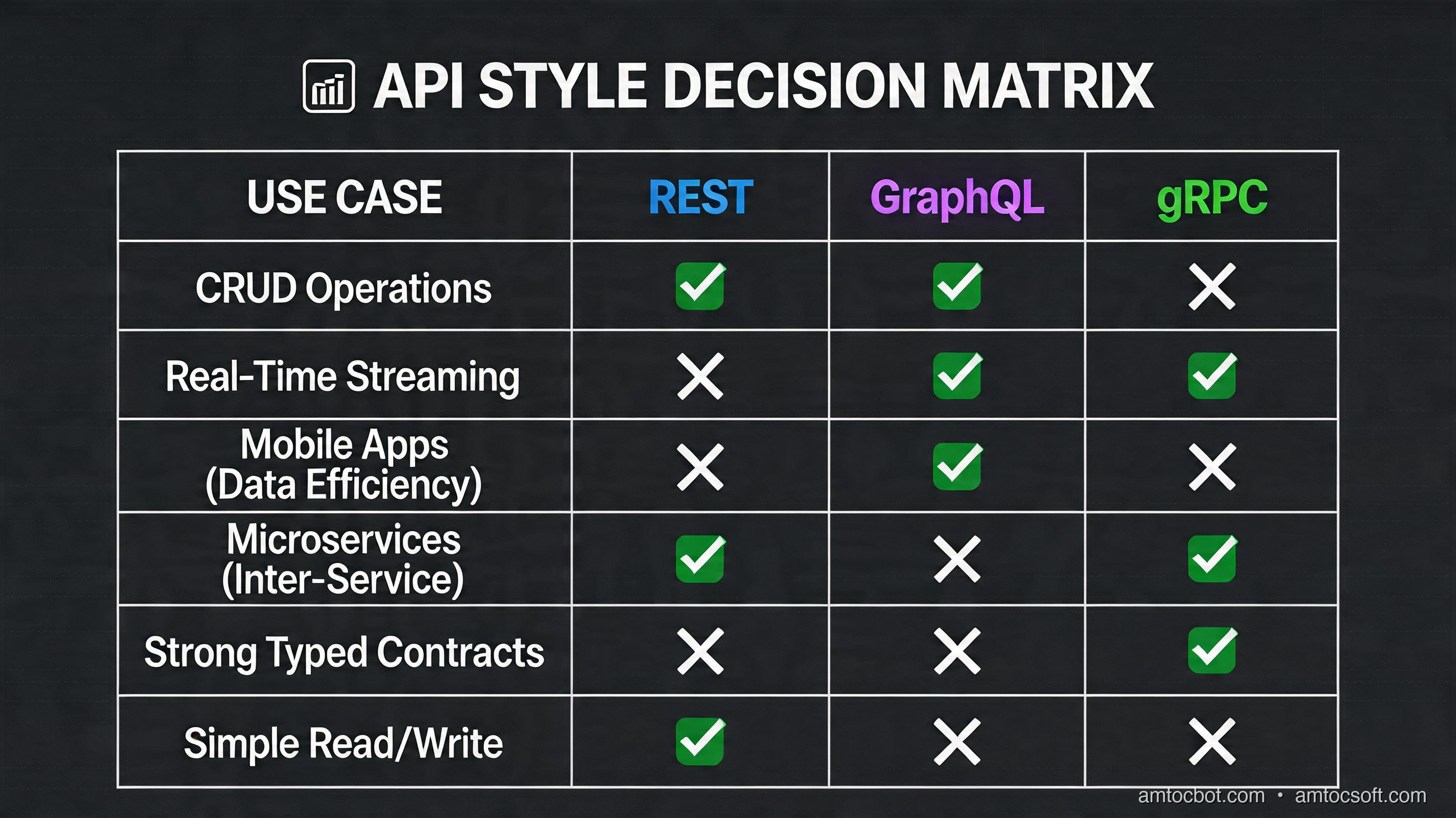
GraphQL vs REST vs gRPC Decision Matrix

The following table consolidates the major engineering tradeoffs across all three styles.

Dimension REST GraphQL gRPC
Protocol HTTP/1.1 + 2 HTTP/1.1 + 2 HTTP/2 only
Payload format JSON (typically) JSON Protobuf (binary)
Schema OpenAPI (optional) Mandatory SDL Mandatory .proto
Browser support Native Native Needs grpc-web/Connect
Streaming SSE / WebSocket (workaround) Subscriptions Native (4 modes)
Caching HTTP cache (CDN-friendly) Complex (POST by default) Not HTTP-cache-friendly
Versioning URL/Header-based Schema evolution + deprecation Package versioning in proto
Code generation Optional (OpenAPI gen) Optional (codegen tools) Required (protoc)
Learning curve Low Medium High
Over-fetching Common problem Eliminated Not applicable
N+1 problem Not applicable Real risk (DataLoader required) Not applicable
Tooling maturity Excellent Very good Good
Type safety Optional Schema-enforced Enforced via protobuf
Throughput Baseline ~5-15% overhead vs REST 2-10x faster than REST
Best for Public APIs, CRUD Mobile, BFF, complex graphs Internal services, streaming

Performance in Numbers (2026 Benchmarks)

In synthetic benchmarks on equivalent hardware (4-core, 16GB, 10Gbps network):

  • Simple GET (single resource, small payload):
  • REST/JSON: ~12,000 req/s
  • GraphQL: ~10,500 req/s (schema parsing overhead)
  • gRPC/protobuf: ~45,000 req/s

  • Complex query (5 related entities, large payload):

  • REST (5 round trips): ~1,800 req/s effective throughput
  • GraphQL (1 request): ~9,800 req/s
  • gRPC (streaming): ~38,000 msg/s

GraphQL's overhead on simple queries is real but small. Its advantage on complex, multi-entity queries is dramatic. gRPC wins on raw throughput in every scenario where it applies.

sequenceDiagram participant C as Client participant REST as REST API participant GQL as GraphQL API participant GRPC as gRPC Service participant DB as Database Note over C,DB: Same operation: fetch user + last 5 orders + organization rect rgb(255, 240, 240) Note over C,REST: REST — 3 round trips C->>REST: GET /v1/users/42 REST->>DB: SELECT * FROM users WHERE id=42 DB-->>REST: user row REST-->>C: { user object } C->>REST: GET /v1/users/42/orders?limit=5 REST->>DB: SELECT * FROM orders WHERE user_id=42 LIMIT 5 DB-->>REST: 5 order rows REST-->>C: [order array] C->>REST: GET /v1/organizations/7 REST->>DB: SELECT * FROM organizations WHERE id=7 DB-->>REST: org row REST-->>C: { org object } Note over C: 3 requests, 3 round trips, 3x latency end rect rgb(240, 255, 240) Note over C,GQL: GraphQL — 1 request, batched queries C->>GQL: POST /graphql { user(id:42) { name orders { ... } organization { ... } } } GQL->>DB: SELECT FROM users WHERE id=42 GQL->>DB: SELECT FROM orders WHERE user_id=42 LIMIT 5 (DataLoader batch) GQL->>DB: SELECT FROM organizations WHERE id=7 (DataLoader batch) DB-->>GQL: all results GQL-->>C: { data: { user: { name, orders, organization } } } Note over C: 1 request, parallel DB queries, minimal latency end rect rgb(240, 240, 255) Note over C,GRPC: gRPC — binary, multiplexed C->>GRPC: GetUserWithRelations(user_id: "42") [protobuf, HTTP/2 stream 1] GRPC->>DB: Batched JOIN query DB-->>GRPC: Binary result set GRPC-->>C: UserWithRelations message [protobuf, ~3x smaller than JSON] Note over C: 1 request, binary protocol, HTTP/2 multiplexing end

Versioning Strategy Deep Dive

REST versioning creates parallel codebases. /v1/ and /v2/ must both be maintained until all clients migrate. This is operationally expensive — every bug fix or security patch must be applied to every active version.

GraphQL versioning is fundamentally different. You never create /v2/graphql. Instead, you add fields, deprecate old ones, and remove them only after usage drops to zero (visible via field-level usage metrics). This allows continuous evolution without breaking existing clients.

type User {
  id: ID!
  name: String!
  # Deprecated — use `avatarUrl` instead
  avatar: String @deprecated(reason: "Use avatarUrl for CDN-optimized images")
  avatarUrl: String!
  # New field — clients opt in
  profileCompleteness: Int!
}

gRPC uses protobuf's field numbering rules for backward compatibility. You never remove or renumber fields; you only add new ones. Clients compiled against old .proto files ignore unknown fields. This allows independent deployment of services and clients, which is critical in a microservice mesh where you can't coordinate releases.

message User {
  string id = 1;
  string name = 2;
  string email = 3;
  // Field 4 was deprecated and removed — number 4 is reserved forever
  reserved 4;
  reserved "old_avatar_url";
  // New fields added safely — old clients ignore these
  string avatar_url = 5;
  int32 profile_completeness = 6;
}

Production Considerations

gRPC in Production

gRPC's main production challenge is observability. Protobuf binary payloads can't be read in standard network tools. Invest in proper tracing (OpenTelemetry, Jaeger) from day one. Envoy proxy with gRPC-JSON transcoding lets you expose gRPC services as REST endpoints for debugging and for clients that can't speak gRPC natively.

Health checking requires gRPC's own health protocol (grpc.health.v1.Health) — Kubernetes readiness probes need to be configured with grpc probe type (available since Kubernetes 1.24) or a sidecar.

# Kubernetes liveness probe for gRPC service
livenessProbe:
  grpc:
    port: 50051
  initialDelaySeconds: 10
  periodSeconds: 15

GraphQL in Production

Depth limiting and complexity analysis are non-negotiable in any GraphQL API exposed to the public or to third-party clients. A query like { users { orders { user { orders { user { ... } } } } } } can recurse infinitely.

import depthLimit from 'graphql-depth-limit';
import { createComplexityRule } from 'graphql-query-complexity';

const server = new ApolloServer({
  typeDefs,
  resolvers,
  validationRules: [
    depthLimit(7),  // Max query depth
    createComplexityRule({
      maximumComplexity: 1000,
      estimators: [
        fieldExtensionsEstimator(),
        simpleEstimator({ defaultComplexity: 1 }),
      ],
    }),
  ],
  plugins: [
    ApolloServerPluginLandingPageDisabledPlugin(), // Disable in prod
  ],
});

Persisted queries (storing query hashes server-side and having clients send only the hash) eliminate the attack surface of arbitrary query execution entirely and dramatically improve caching.

REST in Production

REST's production story is the most mature of the three. API gateways (Kong, AWS API Gateway, Cloudflare API Shield) understand HTTP semantics natively. Rate limiting by IP, user, or API key is built-in. CDN caching for GET endpoints is trivially enabled.

The main REST production pitfall is inconsistent error shapes. Define a standard error envelope and enforce it across all services:

{
  "error": {
    "code": "VALIDATION_ERROR",
    "message": "Request validation failed",
    "details": [
      { "field": "email", "message": "Must be a valid email address" }
    ],
    "request_id": "req_01HX7M3K2NQVP9WFZYX4B6R8C",
    "timestamp": "2026-04-15T10:30:00Z"
  }
}

Use OpenAPI 3.1 specifications as the source of truth for all REST APIs. Generate server stubs, client SDKs, and documentation from the spec rather than writing them separately. Tools like Speakeasy, OpenAPI Generator, and Redocly make this straightforward in 2026.

Choosing a Hybrid Architecture

The pragmatic answer for most production systems in 2026 is a hybrid. A common pattern:

  • Public API: REST (OpenAPI 3.1, versioned, CDN-cached)
  • BFF (Backend for Frontend): GraphQL (per-client schemas for web, iOS, Android)
  • Internal service mesh: gRPC (typed contracts, binary protocol, service discovery via Consul or Kubernetes)

This pattern lets each communication style do what it's best at. REST gives you a stable, well-understood public surface. GraphQL lets your frontend teams move fast without waiting for backend endpoint changes. gRPC keeps your internal services fast and contract-safe.


Conclusion

There is no universally correct answer to the GraphQL vs REST vs gRPC question in 2026 — but there are clearly correct answers for each context.

Choose REST when you're building a public API that needs to be usable by any HTTP client, when CDN caching is important, or when your team is small and tooling simplicity matters. It's not exciting, but it's proven, well-understood, and has the widest ecosystem support.

Choose GraphQL when your client teams (especially mobile) have complex, variable data needs. When over-fetching is hurting performance or developer productivity. When you have a graph-shaped data model. Budget time to implement DataLoader patterns correctly and add query complexity limits before going to production.

Choose gRPC for internal service-to-service communication where performance, streaming, and strict contracts matter more than browser compatibility. It's the right call for high-throughput pipelines, real-time event streams, and service meshes where the 3-10x performance advantage over JSON/REST pays for the protobuf learning curve many times over.

The most sophisticated systems — the ones at Google, Netflix, Shopify, and other high-scale organizations — use all three. REST faces the world. gRPC moves data internally. GraphQL sits at the boundary, composing internal data into exactly what each client needs.

Start with the one that fits your current constraints. Design your boundaries so switching or adding another style later is possible. The API layer is one of the few architectural decisions that's genuinely hard to reverse — get the fundamentals right from the start.


Tags: graphql, rest, grpc, api-design, microservices, software-engineering


Sources

About the Author

Toc Am

Founder of AmtocSoft. Writing practical deep-dives on AI engineering, cloud architecture, and developer tooling. Previously built backend systems at scale. Reviews every post published under this byline.

LinkedIn X / Twitter

Published: 2026-04-15 · Written with AI assistance, reviewed by Toc Am.

Get These In Your Inbox

Weekly deep-dives on AI engineering, no fluff. Join the newsletter →

Subscribe (free)

Or grab the book ($39, ~100 pages) · Buy me a coffee

Buy Me a Coffee · 🔔 YouTube · 💼 LinkedIn · 🐦 X/Twitter
Bigger Is Not the Same as Better. The Job That Moved Is the Phone, Not the Lab.

Bigger is a plan. The phone is the receipt. The brief for this cycle is a question: does bigger always mean better in AI? The 2026 answer i...