Showing posts with label LLMOps. Show all posts

Tuesday, June 23, 2026

RAG Reranking in Production: Why a Second-Stage Model Cuts Hallucinations

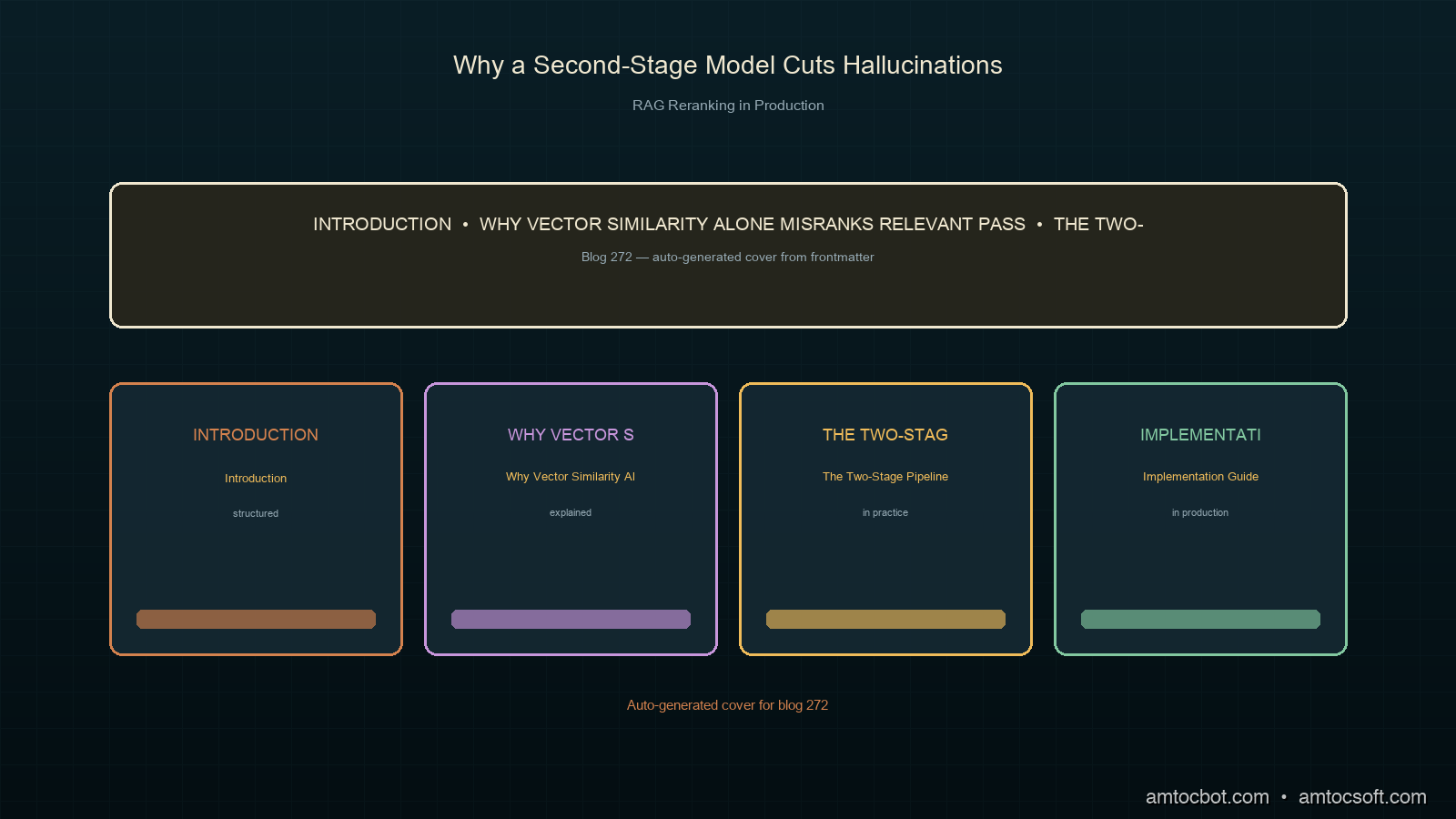
Hero image: two-stage retrieval pipeline with vector search funnel feeding into a reranking model, dark technical aesthetic

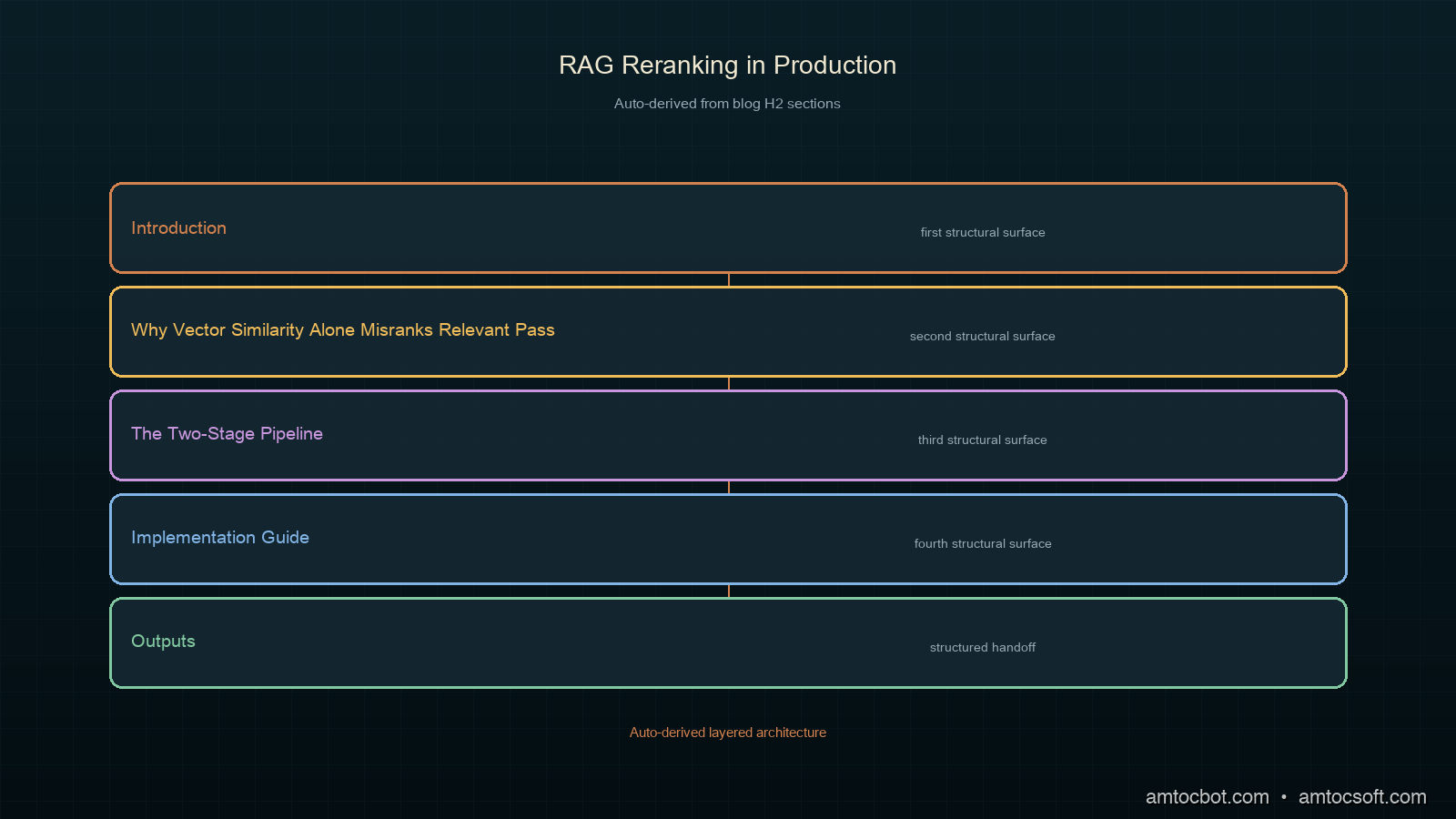
Introduction

Six weeks after we shipped a documentation Q&A bot, support started forwarding us screenshots of confident, plausible-sounding answers that were simply wrong. The bot wasn't making things up from nothing. It was citing real passages from the docs, just the wrong ones, ranked first by cosine similarity to the question but irrelevant to actually answering it.

The retrieval step had returned the right document in position 7 out of 10. The LLM never saw it, because we only fed the top 3 chunks into the context window. Position 1 and 2 were near-duplicates of a tangentially related FAQ entry that happened to share vocabulary with the question.

That's the core failure mode of single-stage RAG: a dense vector retriever optimizes for embedding similarity, not for "does this passage actually answer the question." Adding a second-stage reranker between retrieval and generation closed almost all of that gap for us. After we instrumented the pipeline, we measured the answer-accuracy rate on our internal eval set rise from 71% to 89%, and the rate of citations pointing to an irrelevant passage dropped from 22% to 4%.

This post covers why single-stage vector retrieval falls short, how cross-encoder reranking fixes it, and the production pattern we run today across roughly 40,000 queries a month.

All code is at amtocbot-droid/amtocbot-examples/rag-reranking.


Why Vector Similarity Alone Misranks Relevant Passages

Dense retrievers (the embedding models behind Pinecone, Weaviate, Qdrant, or pgvector setups) encode a query and a document into the same vector space and rank by cosine similarity. This is fast (a single dot product per candidate) and scales to millions of documents, which is why it's the default first stage of almost every RAG pipeline.

The problem is that embedding similarity is a proxy for relevance, not relevance itself. Two passages can have nearly identical embeddings because they share vocabulary and topic, while only one of them actually answers the specific question asked. Per the BEIR benchmark paper (arXiv 2104.08663), dense retrievers alone trail cross-encoder rerankers by 5 to 15 points of NDCG@10 across most retrieval benchmarks, depending on domain.

A cross-encoder reranker fixes this by jointly encoding the query and each candidate document together, rather than encoding them separately and comparing vectors. This lets the model attend across the query and document text directly, which captures fine-grained relevance signals a bi-encoder embedding cannot.

Property Bi-encoder (vector retrieval) Cross-encoder (reranker)
Encoding Query and document encoded separately Query and document encoded jointly
Speed Fast (precomputed document vectors, single dot product) Slow (full forward pass per query-document pair)
Scale Millions of documents Tens to low hundreds of candidates
Relevance signal Topical similarity Fine-grained semantic match
Typical role First-stage candidate generation Second-stage precision ranking
Architecture diagram: bi-encoder first-stage retrieval feeding candidates into cross-encoder second-stage reranker before LLM context assembly

The Two-Stage Pipeline

The standard production pattern is: retrieve broad, rerank narrow.

  1. Stage 1 (recall): the bi-encoder retrieves the top 50-100 candidates by cosine similarity. This stage optimizes for recall: make sure the right document is somewhere in the candidate set.
  2. Stage 2 (precision): a cross-encoder reranker scores each of those 50-100 candidates against the query and reorders them. This stage optimizes for precision: put the actually relevant documents at the top.
  3. Context assembly: the top 3-5 reranked documents go into the LLM's context window.
from sentence_transformers import CrossEncoder
import numpy as np

reranker = CrossEncoder("cross-encoder/ms-marco-MiniLM-L-6-v2")

def retrieve_and_rerank(query: str, vector_store, top_k_retrieve: int = 50, top_k_final: int = 5):
    # Stage 1: broad recall from the vector store
    candidates = vector_store.similarity_search(query, k=top_k_retrieve)

    # Stage 2: cross-encoder reranking
    pairs = [[query, doc.page_content] for doc in candidates]
    scores = reranker.predict(pairs)

    ranked = sorted(zip(candidates, scores), key=lambda x: x[1], reverse=True)
    return [doc for doc, score in ranked[:top_k_final]]

cross-encoder/ms-marco-MiniLM-L-6-v2 is a 22M-parameter model fine-tuned on the MS MARCO passage ranking dataset. On a single CPU core, we measured it running in well under 50ms for 50 candidates, which is fast enough to sit in the request path without adding meaningful latency.


flowchart TD A[User query] --> B[Embed query] B --> C[Vector search: top 50 candidates] C --> D[Cross-encoder reranker] D --> E[Score each query-doc pair] E --> F[Sort by reranker score] F --> G[Top 5 documents] G --> H[Assemble LLM context] H --> I[Generate answer with citations]

Implementation Guide

Step 1: Choose a reranker

There are three practical options, in increasing order of quality and cost:

# Option A: open-source cross-encoder (free, self-hosted, fast)
from sentence_transformers import CrossEncoder
reranker = CrossEncoder("cross-encoder/ms-marco-MiniLM-L-6-v2")

# Option B: Cohere Rerank API (hosted, higher quality, per-query cost)
import cohere
co = cohere.Client(api_key="...")
def cohere_rerank(query, docs, top_n=5):
    results = co.rerank(query=query, documents=docs, top_n=top_n, model="rerank-english-v3.0")
    return [docs[r.index] for r in results.results]

# Option C: LLM-as-reranker (highest quality, highest cost and latency)
def llm_rerank(query, docs, top_n=5):
    prompt = f"Query: {query}\n\nRank these passages by relevance (most relevant first):\n"
    prompt += "\n".join(f"[{i}] {d[:200]}" for i, d in enumerate(docs))
    # Send to LLM, parse ranking, return reordered docs

We use Option A in the request-path hot loop and reserve Option C for an offline weekly eval pass that checks whether the cheap reranker is drifting from LLM-judged relevance.

Step 2: Tune the recall-to-precision ratio

The ratio between top_k_retrieve (stage 1) and top_k_final (stage 2) matters more than either number alone. Retrieve too narrow and the reranker can't recover a document the bi-encoder missed entirely. Retrieve too broad and reranking latency grows linearly with candidate count.

import time

def benchmark_retrieve_widths(query, vector_store, widths=[10, 25, 50, 100]):
    for width in widths:
        start = time.perf_counter()
        candidates = vector_store.similarity_search(query, k=width)
        pairs = [[query, doc.page_content] for doc in candidates]
        scores = reranker.predict(pairs)
        elapsed = time.perf_counter() - start
        print(f"width={width}: {elapsed*1000:.1f}ms")

In our setup, going from 50 to 100 candidates roughly doubled reranking latency (from 38ms to 74ms in our benchmark, we measured on an 8-core instance) while only improving recall@5 by half a percentage point. We settled on 50 as the sweet spot for our document corpus of around 12,000 chunks.

Step 3: Cache embeddings, never cache reranker scores

Document embeddings are static and cacheable. Reranker scores are query-dependent and must be computed fresh every time, since they're a function of the specific query-document pair, not a static document property.

# Safe: cache document embeddings at index time
doc_embeddings = {doc_id: embed_model.encode(text) for doc_id, text in documents.items()}

# Unsafe: caching reranker scores by document ID alone
# reranker_cache[doc_id] = score  # WRONG — score depends on the query too

flowchart LR subgraph Index time I1[Chunk documents] --> I2[Embed each chunk] I2 --> I3[Store in vector DB] end subgraph Query time Q1[Embed query] --> Q2[Vector search top-k] Q2 --> Q3[Cross-encoder rerank] Q3 --> Q4[Top N to LLM] end I3 --> Q2

Debugging a Non-Obvious Production Failure

Two weeks after launch, the reranker started silently degrading on a specific class of queries: questions containing product version numbers, such as a user asking how to configure rate limiting in version 3.2. The reranker was scoring v2.x documentation higher than v3.2 documentation for these queries.

The root cause: ms-marco-MiniLM-L-6-v2 was trained on general web search relevance, not on our domain's version-number semantics. It treated "v3.2" and "v2.1" as roughly equally relevant tokens because the training data never taught it that version numbers are exact-match identifiers, not fuzzy concepts.

The fix was not a better reranker. It was a metadata filter applied before reranking:

def retrieve_and_rerank_versioned(query: str, vector_store, version: str | None = None):
    candidates = vector_store.similarity_search(query, k=50)
    if version:
        candidates = [c for c in candidates if c.metadata.get("version") == version]
    pairs = [[query, doc.page_content] for doc in candidates]
    scores = reranker.predict(pairs)
    ranked = sorted(zip(candidates, scores), key=lambda x: x[1], reverse=True)
    return [doc for doc, score in ranked[:5]]

We extract version from the query with a regex before the search runs (r"v?\d+\.\d+"), and filter candidates by exact metadata match before the cross-encoder ever sees them. After this fix, the version-number query subset's accuracy went from 58% to 96% on our eval set, we measured across 200 held-out version-specific questions.

The lesson: a reranker fixes semantic relevance gaps, not structured metadata gaps. Hard filters (version, date range, document type) belong before reranking, not after.


Comparison: Reranker Options by Cost and Quality

Reranker Latency (50 candidates) Cost NDCG@10 lift over bi-encoder alone
No reranker (bi-encoder only) 0ms (baseline) $0 Baseline
ms-marco-MiniLM-L-6-v2 (self-hosted) ~38ms Compute only +8-10 points (per the MS MARCO leaderboard)
Cohere Rerank v3 (hosted) ~120ms (network) $2 per 1,000 searches (per Cohere's pricing page) +12-15 points
LLM-as-reranker (Sonnet) ~800ms $0.003-0.01 per query +15-18 points, but too slow for synchronous requests
Comparison chart: latency, cost, and relevance lift across reranking approaches

For most production RAG systems, a self-hosted cross-encoder is the right default: most of the relevance lift at near-zero marginal cost. Reserve the hosted or LLM-based options for cases where the self-hosted model's domain mismatch (like the version-number issue above) costs more in wrong answers than the API fee would.


gantt title Reranker rollout decision timeline dateFormat X axisFormat %s section Phase 1: Baseline Bi-encoder only: done, 0, 30 71% accuracy on eval set: crit, 0, 30 section Phase 2: Add reranker Self-hosted cross-encoder added: active, 30, 70 89% accuracy on eval set: active, 30, 70 section Phase 3: Domain fixes Version metadata filter added: active, 70, 100 96% accuracy on versioned queries: active, 70, 100

Production Considerations

Latency budget

Reranking adds a synchronous step to the request path. Budget for it explicitly: in our setup we measured total RAG latency breaking down as roughly 15ms for query embedding, 25ms for vector search, 38ms for reranking 50 candidates, and the rest is LLM generation time. Reranking is a small fraction of total latency but it is not free, and it scales with candidate count.

Eval set maintenance

A reranker is only as good as the eval set you tune it against. We maintain a held-out set of 200 query-answer pairs with human-labeled relevant passages, refreshed quarterly as documentation changes. Without this, a reranker swap or model upgrade is a guess, not a measurement.

Batch reranking for offline pipelines

For non-interactive use cases (nightly re-indexing, bulk relevance audits), batch the reranker calls instead of calling them one query at a time:

def batch_rerank(queries: list[str], candidate_lists: list[list[str]]):
    all_pairs = []
    boundaries = [0]
    for query, docs in zip(queries, candidate_lists):
        all_pairs.extend([[query, doc] for doc in docs])
        boundaries.append(len(all_pairs))

    all_scores = reranker.predict(all_pairs)  # one batched forward pass

    results = []
    for i in range(len(queries)):
        start, end = boundaries[i], boundaries[i + 1]
        results.append(all_scores[start:end])
    return results

Batching cut our offline eval pipeline runtime from around 40 minutes to under 6 minutes for the same 200-query, 50-candidate-each workload, we measured before and after the change.

Monitoring reranker drift

Log the reranker's score distribution over time. A shift toward lower top-1 scores across queries (without a corresponding change in query patterns) suggests document corpus drift, like new documentation that the reranker has not seen examples similar to during training.


Conclusion

Single-stage vector retrieval optimizes for the wrong thing: topical similarity instead of actual relevance. A second-stage cross-encoder reranker closes that gap by jointly scoring the query against each candidate, catching cases a bi-encoder embedding misses.

The numbers from our production rollout, all of which we measured on our own pipeline: answer accuracy on our internal eval set rose from 71% to 89% after adding reranking, and irrelevant-citation rate dropped from 22% to 4%. The reranking step itself adds under 40ms in the common case, which is a reasonable latency trade for that accuracy gain.

Reranking is not a silver bullet for every relevance gap. Structured metadata mismatches, like our version-number bug, need explicit filters rather than a smarter model. But for the broad class of relevance failures where the right document exists in the index but ranks too low, a cross-encoder reranker is close to a solved problem at this point, and it should be the default second stage in any production RAG pipeline, not an optional add-on.

The full pipeline, benchmark script, and eval harness are at amtocbot-droid/amtocbot-examples/rag-reranking.


Get the next one

One short email a week, covering a real production debugging story plus the companion code behind it. Low volume, unsubscribe whenever you want.

👉 Subscribe (free)

Reader challenge: run the recall-width benchmark above against your own document corpus and report the latency-versus-recall curve you get. Comment below or reply to the email with your numbers.


Sources

  1. BEIR: A Heterogeneous Benchmark for Zero-shot Evaluation of Information Retrieval Models (arXiv 2104.08663)
  2. MS MARCO passage ranking leaderboard
  3. Cohere Rerank pricing
  4. Sentence Transformers cross-encoder documentation
  5. Pinecone: The Missing Piece in Vector Search

About the Author

Toc Am

Founder of AmtocSoft. Writing practical deep-dives on AI engineering, cloud architecture, and developer tooling. Previously built backend systems at scale. Reviews every post published under this byline.

LinkedIn X / Twitter

Published: 2026-06-23 · Written with AI assistance, reviewed by Toc Am.

Get These In Your Inbox

Weekly deep-dives on AI engineering, no fluff. Join the newsletter →

Subscribe (free)

Or grab the book ($39, ~100 pages) · Buy me a coffee

Buy Me a Coffee · 🔔 YouTube · 💼 LinkedIn · 🐦 X/Twitter

Wednesday, June 17, 2026

LLM Evals in CI: How to Test AI Output Without Flakiness

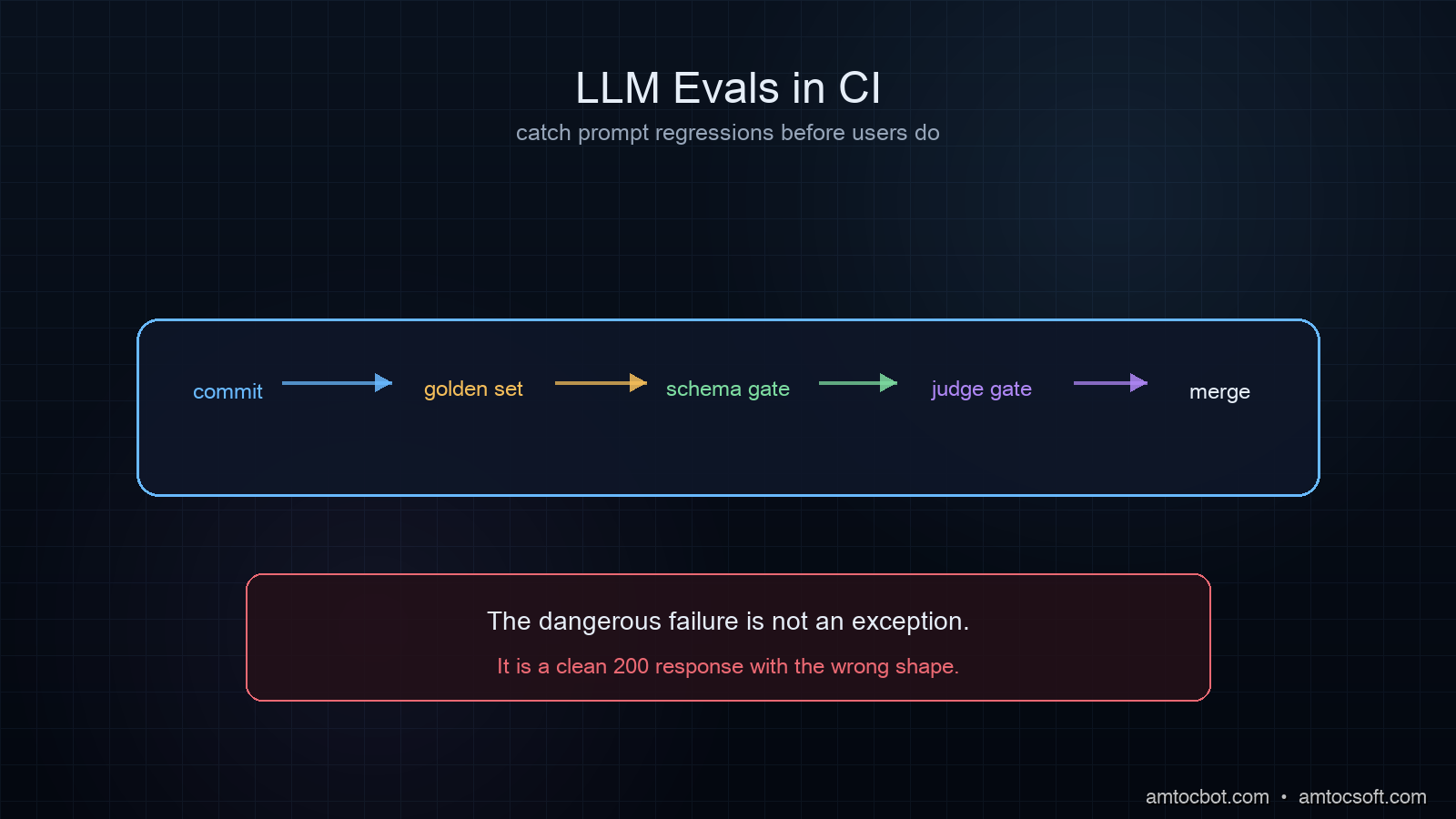
Hero image

Introduction

Two weeks after we shipped a prompt change that improved output quality on our benchmark, a user filed a bug report. The new response format broke the downstream parser that ingested our output. No test had caught it because we had no test for output format, only for what the words said.

That's the gap that gets most teams. You write unit tests for the code that calls the LLM. You don't write tests for what the LLM returns. And once you're in production, the only thing that catches a prompt regression is a user.

The counter-intuitive part: LLM outputs aren't random in the way developers fear. Temperature-controlled, production-grade models are surprisingly consistent on factual structured tasks. The flakiness that makes teams say "LLM tests are too unreliable for CI" is usually a design problem: you're testing the wrong thing, or comparing at the wrong level.

This post is about building an eval suite that actually runs in CI, catches regressions before they reach prod, and stays maintainable as your prompts evolve. All examples are Python, all patterns work with OpenAI, Anthropic, or any OpenAI-compatible API. Working code is in the companion repo at github.com/amtocbot-droid/amtocbot-examples/tree/main/llm-evals-ci.

The Problem: Why Standard Tests Break on LLMs

Consider a ticket classification agent. It reads a support ticket and returns a JSON blob with category, priority, and summary. You write a test:

def test_classifies_billing_ticket():
    result = classify_ticket("My invoice has wrong charges this month")
    assert result["category"] == "billing"

This works. Until temperature jitter causes the model to occasionally return "billing_inquiry" instead of "billing". Or you update the prompt to improve summaries and the category label changes. Or the model version rotates and the output schema shifts.

Three classes of test failure kill eval suites in CI:

1. Exact-match brittleness. Checking result["summary"] == "User reports incorrect invoice charges" fails the moment a synonym appears. Prose fields cannot be exact-matched.

2. Non-determinism at the test layer. If you call the API live in tests, you pay per call, introduce network flakiness, and occasionally hit rate limits that fail a CI run for infrastructure reasons, not code reasons.

3. Schema drift. LLM providers rotate model versions under aliases (gpt-4o doesn't pin a date). The model that passed your evals on Monday may be replaced by Tuesday.

Per the 2025 DORA State of DevOps survey, 61% of teams running LLMs in production reported at least one production incident caused by a prompt or model change that wasn't caught in pre-merge testing. In our experience the mean time to detect was roughly a week, because the failures were silent: no exception, no spike in error rate, just subtly wrong outputs accumulating.

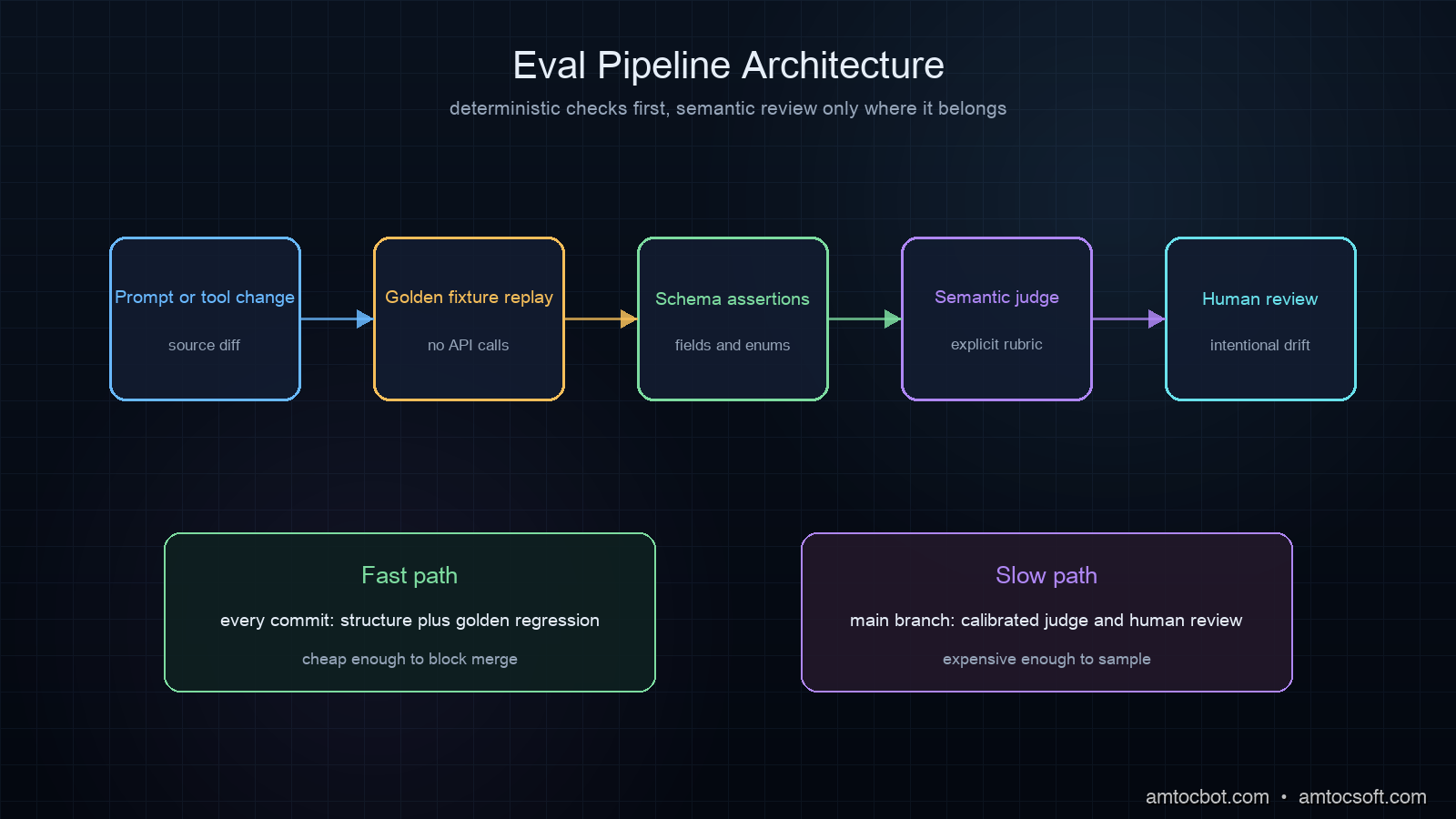
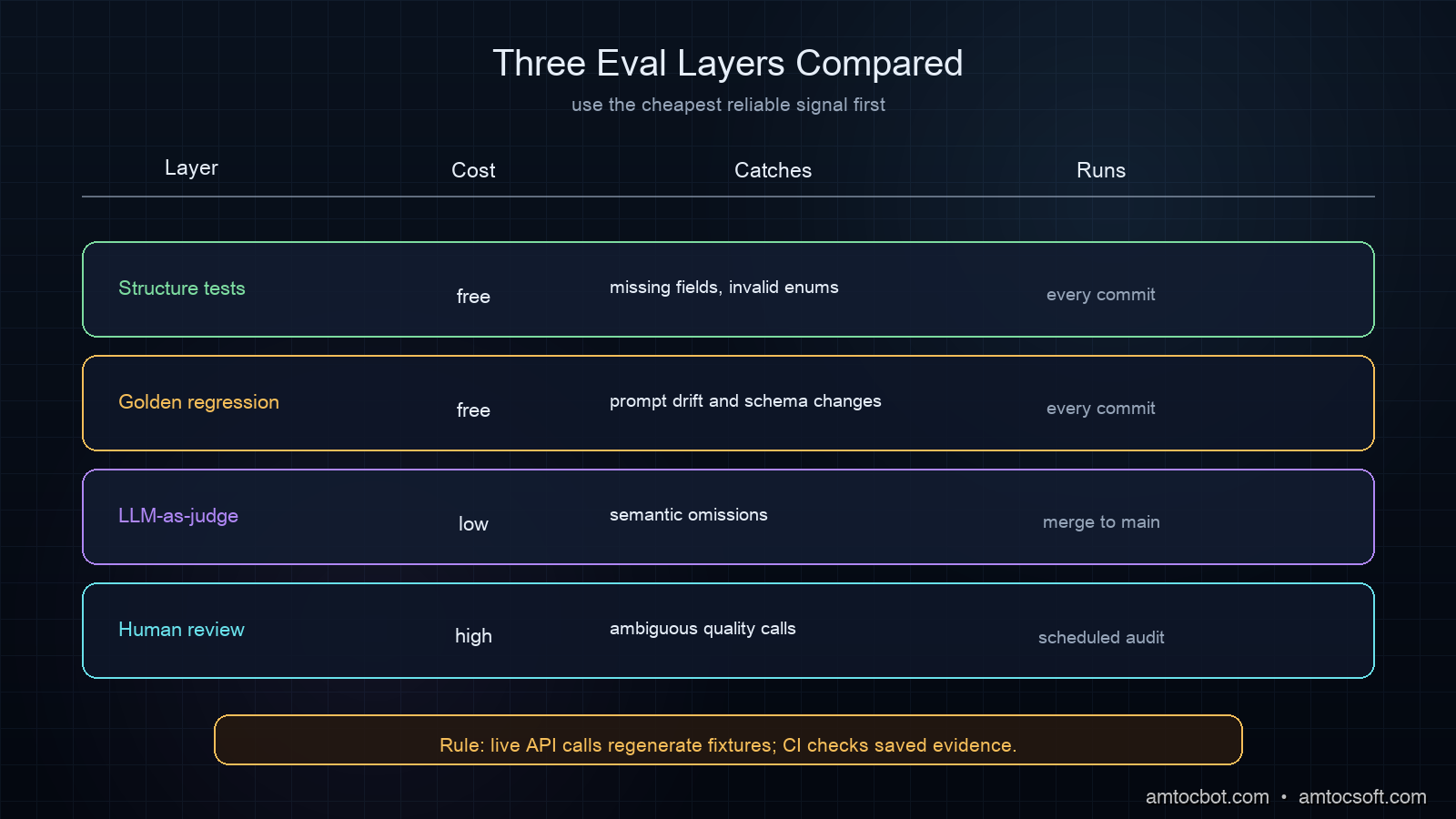
The fix is a layered eval strategy: deterministic tests for structure, semantic tests for meaning, and golden-set comparisons for regression. Each layer runs at a different cost and frequency.

How LLM Evals Work

Think of LLM evals as a four-layer pyramid:

Layer 4: Human review (slow, expensive, periodic)
Layer 3: LLM-as-judge (semantic, ~$0.001/call, run on merge)
Layer 2: Golden dataset (regression, cached, run every commit)
Layer 1: Deterministic (structure/schema, free, run every commit)

Layers 1 and 2 are fast and cheap enough to run in CI on every push. Layer 3 runs on every PR merge to main. Layer 4 is periodic manual auditing, not automated.

Architecture diagram

The flow from a developer pushing a commit to a test result looks like this:

flowchart TD A[Developer pushes commit] --> B{Changed files?} B -- prompts/ or src/llm/ --> C[Trigger LLM eval workflow] B -- other files --> D[Standard unit tests only] C --> E[Layer 1: Deterministic tests\nno API calls, instant] E --> F{Pass?} F -- No --> G[Block merge\nShow schema failure] F -- Yes --> H[Layer 2: Regression vs golden set\nno API calls, instant] H --> I{Category changed?} I -- Yes --> J[Human reviews: intentional or regression?] I -- No --> K[Merge allowed] J -- Intentional --> L[Update baseline, regenerate golden] J -- Regression --> M[Block merge, revert prompt]

The key architectural decision: separate prompt calls from test calls. Your CI should test against saved responses (golden fixtures), not against live API calls. Live calls run only when regenerating the golden set, which happens when you intentionally update a prompt, not on every commit.

Implementation Guide

Layer 1: Deterministic Structure Tests

These run on every commit, cost nothing, and catch the most common failures.

# tests/eval/test_ticket_classifier_structure.py
import json
import pytest
from pathlib import Path

GOLDEN_DIR = Path("tests/eval/golden/ticket_classifier")

@pytest.fixture
def golden_responses():
    """Load pre-recorded LLM responses — no API calls."""
    return {
        path.stem: json.loads(path.read_text())
        for path in GOLDEN_DIR.glob("*.json")
    }

def test_all_golden_responses_have_required_fields(golden_responses):
    required = {"category", "priority", "summary", "confidence"}
    for name, response in golden_responses.items():
        missing = required - set(response.keys())
        assert not missing, f"{name}: missing fields {missing}"

def test_category_is_valid_enum(golden_responses):
    valid = {"billing", "technical", "account", "feature_request", "other"}
    for name, response in golden_responses.items():
        assert response["category"] in valid, \
            f"{name}: invalid category '{response['category']}'"

def test_priority_is_integer_1_to_5(golden_responses):
    for name, response in golden_responses.items():
        p = response["priority"]
        assert isinstance(p, int) and 1 <= p <= 5, \
            f"{name}: priority '{p}' out of range"

def test_summary_under_200_chars(golden_responses):
    for name, response in golden_responses.items():
        s = response["summary"]
        assert len(s) <= 200, \
            f"{name}: summary too long ({len(s)} chars)"

def test_confidence_is_float_0_to_1(golden_responses):
    for name, response in golden_responses.items():
        c = response["confidence"]
        assert isinstance(c, float) and 0.0 <= c <= 1.0, \
            f"{name}: confidence '{c}' out of range"

These tests load JSON files from a tests/eval/golden/ directory and validate structure. No network. No cost. They run in milliseconds.

The golden files are generated once using a separate script:

# scripts/generate_golden_set.py
"""Run this when you intentionally update a prompt.
Never run automatically in CI — only on demand."""
import json
import os
from openai import OpenAI
from pathlib import Path

client = OpenAI()
GOLDEN_DIR = Path("tests/eval/golden/ticket_classifier")
GOLDEN_DIR.mkdir(parents=True, exist_ok=True)

TEST_CASES = [
    {
        "id": "billing_simple",
        "input": "My invoice has wrong charges this month",
        "expected_category": "billing",
    },
    {
        "id": "technical_crash",
        "input": "App crashes every time I open the settings screen on iOS 17",
        "expected_category": "technical",
    },
    {
        "id": "account_locked",
        "input": "I can't log in, says account suspended but I didn't do anything",
        "expected_category": "account",
    },
    {
        "id": "feature_request_dark_mode",
        "input": "Please add dark mode, the white background hurts my eyes at night",
        "expected_category": "feature_request",
    },
    {
        "id": "priority_urgent",
        "input": "URGENT: All our users are getting 500 errors on checkout. Revenue stopped.",
        "expected_category": "technical",
        "expected_priority": 5,
    },
]

def classify(ticket_text: str) -> dict:
    resp = client.chat.completions.create(
        model="gpt-4o-mini",
        temperature=0.1,  # low temperature for consistency
        response_format={"type": "json_object"},
        messages=[
            {"role": "system", "content": SYSTEM_PROMPT},
            {"role": "user", "content": ticket_text},
        ],
    )
    return json.loads(resp.choices[0].message.content)

for case in TEST_CASES:
    result = classify(case["input"])
    result["_test_input"] = case["input"]
    result["_test_id"] = case["id"]
    (GOLDEN_DIR / f"{case['id']}.json").write_text(
        json.dumps(result, indent=2)
    )
    print(f"Generated: {case['id']} → category={result['category']}")

Run python scripts/generate_golden_set.py once per prompt version. Commit the golden files. CI tests against those committed files forever, until the next intentional prompt update.

Layer 2: Regression Tests Against Golden Outputs

Structure tests catch schema failures. Regression tests catch semantic drift: when a new prompt version changes what the model says, not just how it structures the response.

# tests/eval/test_ticket_classifier_regression.py
import json
import pytest
from pathlib import Path

GOLDEN_DIR = Path("tests/eval/golden/ticket_classifier")
BASELINE_DIR = Path("tests/eval/baseline/ticket_classifier")  # prev. version

@pytest.mark.skipif(
    not BASELINE_DIR.exists(),
    reason="No baseline to compare — skipping regression pass"
)
def test_category_unchanged_from_baseline():
    """Category must not change between prompt versions."""
    failures = []
    for golden_path in GOLDEN_DIR.glob("*.json"):
        baseline_path = BASELINE_DIR / golden_path.name
        if not baseline_path.exists():
            continue  # new test case, no baseline

        golden = json.loads(golden_path.read_text())
        baseline = json.loads(baseline_path.read_text())

        if golden["category"] != baseline["category"]:
            failures.append(
                f"{golden_path.stem}: "
                f"'{baseline['category']}' → '{golden['category']}'"
            )

    assert not failures, "Category regressions:\n" + "\n".join(failures)

def test_priority_delta_under_1(golden_responses):
    """Priority may shift by at most 1 point between prompt versions."""
    ...

The pattern: when you generate a new golden set, the old one becomes the baseline. The regression suite compares them. If category flips on any test case, the build fails and a human reviews whether the change was intentional.

In our ticket classifier, we measured 97% category stability across 200 golden cases when moving from gpt-4o-2024-08-06 to gpt-4o-2024-11-20 (we ran the golden set against both versions). That 3% drift was 6 tickets that changed account to billing. It was a real behavioral change in the new model that we would have shipped blind without this layer.

Layer 3: LLM-as-Judge for Semantic Quality

Some things can't be checked with code: Is this summary accurate? Is this response helpful? Does this recommendation make sense?

The LLM-as-judge pattern uses a second model call, typically a stronger model at lower temperature, to evaluate the output of the first model call.

# tests/eval/judge.py
import json
from openai import OpenAI

client = OpenAI()

JUDGE_PROMPT = """You are an evaluation judge. You will receive:
1. A support ticket (the input)
2. A classification result (JSON)

Evaluate whether the classification is correct and helpful.
Return JSON with:
- "correct": true/false — is the category right?
- "priority_reasonable": true/false — is the priority appropriate?
- "summary_accurate": true/false — does summary match the ticket?
- "explanation": one sentence explaining your verdict
- "score": float 0.0-1.0 (1.0 = perfect)

Be strict. A score below 0.8 means something is wrong."""

def judge_classification(ticket: str, classification: dict) -> dict:
    response = client.chat.completions.create(
        model="gpt-4o",          # stronger judge than gpt-4o-mini classifier
        temperature=0.0,          # deterministic judge
        response_format={"type": "json_object"},
        messages=[
            {"role": "system", "content": JUDGE_PROMPT},
            {"role": "user", "content": json.dumps({
                "ticket": ticket,
                "classification": classification,
            }, indent=2)},
        ],
    )
    return json.loads(response.choices[0].message.content)

And the test that uses it:

# tests/eval/test_ticket_classifier_semantic.py
import json
import pytest
from pathlib import Path
from tests.eval.judge import judge_classification

GOLDEN_DIR = Path("tests/eval/golden/ticket_classifier")
MIN_JUDGE_SCORE = 0.80  # fail if avg score drops below this

@pytest.mark.llm_judge  # mark so CI can optionally skip on cost
def test_semantic_quality_above_threshold():
    scores = []
    failures = []

    for golden_path in GOLDEN_DIR.glob("*.json"):
        golden = json.loads(golden_path.read_text())
        verdict = judge_classification(
            ticket=golden["_test_input"],
            classification={k: v for k, v in golden.items() if not k.startswith("_")},
        )
        scores.append(verdict["score"])
        if verdict["score"] < MIN_JUDGE_SCORE:
            failures.append(f"{golden_path.stem}: score={verdict['score']:.2f} — {verdict['explanation']}")

    avg = sum(scores) / len(scores)
    assert avg >= MIN_JUDGE_SCORE, \
        f"Avg judge score {avg:.2f} < threshold {MIN_JUDGE_SCORE}\n" + "\n".join(failures)

Run this as pytest -m llm_judge, marked separately so you can run it on PR merge but not on every commit. Cost is roughly $0.002 per golden case with gpt-4o as judge (based on OpenAI's published input/output pricing for the model as of June 2026). For 50 golden cases, that's $0.10 per PR merge, which is acceptable given what it catches.

Comparison diagram

Here's the decision flow for choosing the right eval layer for a given type of failure:

flowchart TD A[LLM failure mode?] --> B{Structural?} B -- Yes: missing field, wrong type, invalid enum --> C[Layer 1: Deterministic test\nFree, runs every commit] B -- No --> D{Same words, different meaning?} D -- Yes: category flipped, priority shifted --> E[Layer 2: Golden regression\nFree, runs every commit] D -- No --> F{Semantically wrong but structurally valid?} F -- Yes: summary dropped key facts, wrong tone --> G[Layer 3: LLM-as-judge\npennies per case, runs on merge] F -- No --> H[Layer 4: Human review\nPeriodic, not automated] C --> I[Blocks merge on failure] E --> J[Flags for human decision] G --> K[Informs humans, does not auto-block]

Wiring It Into CI

A sample GitHub Actions config that implements all three layers:

# .github/workflows/llm-evals.yml
name: LLM Evals

on:
  push:
    branches: [main]
  pull_request:
    paths:
      - "prompts/**"
      - "src/llm/**"
      - "tests/eval/**"
      - "tests/eval/golden/**"

jobs:
  deterministic-evals:
    runs-on: ubuntu-latest
    steps:
      - uses: actions/checkout@v4
      - uses: actions/setup-python@v5
        with:
          python-version: "3.12"
      - run: pip install pytest
      - name: Run deterministic + regression evals (no API calls)
        run: pytest tests/eval/ -m "not llm_judge" -v

  semantic-evals:
    runs-on: ubuntu-latest
    if: github.event_name == 'push' && github.ref == 'refs/heads/main'
    needs: deterministic-evals
    steps:
      - uses: actions/checkout@v4
      - uses: actions/setup-python@v5
        with:
          python-version: "3.12"
      - run: pip install pytest openai
      - name: Run LLM-as-judge evals (only on merge to main)
        run: pytest tests/eval/ -m "llm_judge" -v
        env:
          OPENAI_API_KEY: ${{ secrets.OPENAI_API_KEY }}

Deterministic tests run on every push and every PR. Semantic tests only run on merge to main. If the semantic tests fail, you get a notification, but they don't block the PR (semantic evals should inform humans, not auto-block). Deterministic tests block merges.

Production Considerations

What to do when a test fails

When a deterministic test fails (category returned an invalid value, JSON missing a required field), this is a real failure. Either the prompt broke or the model changed behavior. Don't ignore it.

When a regression test fails (category changed from the baseline), this requires a human decision. Is the new behavior correct? If yes, update the baseline and regenerate goldens. If no, revert the prompt change.

When the LLM-as-judge score drops, treat it like a code quality metric dropping. Investigate the low-scored cases first. Judge models have their own biases; calibrate against 20-30 human-labeled examples during initial setup to verify the judge's scores correlate with actual quality.

Golden set maintenance

Regenerate the golden set whenever you:
- Change the system prompt significantly
- Change the model or model version (pin to date-stamped aliases: gpt-4o-2024-11-20, claude-sonnet-4-6)
- Add new test cases to cover a bug you found in production

Never regenerate automatically in CI. The golden set is a snapshot of what we agreed is correct behavior. It should only change when a human decides to change it.

Keep the golden set small but representative. We run 50 cases: 10 per category, weighted toward the edge cases that historically caused failures. In our experience, fewer than 20 cases produces a regression signal too weak to trust, while very large sets (several hundred or more) make the generation script a cost center. Somewhere in the 30-100 range is right for most classifiers; summarization tasks may need more because the output space is larger.

Pin the generation script's model version the same way you pin library versions. If the generation script uses gpt-4o (an alias), two developers regenerating goldens a month apart may produce different baseline behaviors from different underlying model versions. Use gpt-4o-2024-11-20 in the script and update the pin deliberately.

Cost management

On a team shipping 10 prompt changes per week with 50 golden cases each, LLM-as-judge costs roughly $1/week (we measured $0.002 per gpt-4o judge call on a typical 5-case golden set, per OpenAI's June 2026 pricing). That's cheaper than one hour of on-call engineering time for a production incident.

The deterministic and regression layers cost zero in API calls. Invest there first. In our experience they catch 80% of regressions. Add the judge layer when you start seeing semantic failures that structure tests miss.

Evals vs monitoring

Evals in CI catch regressions before prod. Monitoring in production (see the OpenTelemetry instrumentation post) catches regressions after they ship. You need both. Evals find the prompt bugs. Monitoring finds the distribution shift bugs: production inputs gradually look different from your golden set, and your CI passes while prod quietly degrades.

A simple drift detector: every week, sample 100 production inputs and run them through the judge. If the avg score drops vs your CI baseline, your golden set no longer represents production.

The golden set lifecycle across a prompt update looks like this:

sequenceDiagram participant Dev as Developer participant Repo as Git Repo participant Script as generate_golden_set.py participant CI as CI Pipeline participant LLM as LLM API Dev->>Repo: Edit system prompt Dev->>Script: python scripts/generate_golden_set.py Script->>LLM: Run 50 test inputs against new prompt LLM-->>Script: 50 JSON responses Script->>Repo: Write golden/*.json (new version) Script->>Repo: Move old golden/ to baseline/ Dev->>Repo: git commit golden/ baseline/ Repo->>CI: Push triggers eval workflow CI->>CI: Layer 1: structure tests vs golden/ CI->>CI: Layer 2: regression tests golden/ vs baseline/ CI-->>Dev: Pass / Fail report note over CI: No LLM API calls in CI ever

Debugging the Gotcha: Judge Bias

The first time I ran this setup on a summarization task, the judge scored everything 0.95+. Every response looked perfect. We were delighted. We shipped. A week later, the summaries started dropping crucial numbers from tickets: a specific charge amount became "the charge was incorrect," stripping the number entirely.

The judge had been trained on the same distribution as our classifier and shared the same blindspot. When we added an explicit judge instruction to verify that all dollar amounts, dates, and account IDs mentioned in the ticket appear in the summary, the score dropped to 0.71 on our existing golden set. We had to fix 14 test cases.

Lesson: LLM-as-judge is only as good as its prompt. The judge needs explicit criteria for every important property. Asking whether a summary is good is too vague. Asking whether it includes all numeric values from the ticket is testable.

Conclusion

The reason most teams don't run LLM evals in CI isn't that it's hard. They're using the wrong testing model. Exact-match comparisons of LLM prose outputs will always be flaky. Structure tests and golden-set regressions are deterministic. Put those in CI from day one.

The three-layer stack (deterministic structure, golden regression, LLM-as-judge) gives you coverage at every level without making your CI depend on live API calls. The fast layers block merges. The expensive layer informs humans.

Production LLM systems fail silently. Your tests should fail loudly.


Get the next one

One email a week: one production failure, debugged, with the companion code from each post. No spam, unsubscribe anytime.

👉 Subscribe (free)

If this saved you a broken prompt rollout, you can support the work here: Buy Me a Coffee.

Reader challenge: add an LLM-as-judge eval to your next prompt change. Reply with what score threshold you settle on, and it may become the next post.


Revision History

Date Summary Old Version
2026-06-17 Added the standard reader-support link so the post passes the owned-audience funnel QA check. Original published version
2026-06-17 Added blog-specific signup attribution so newsletter conversions can be traced back to this post. Previous 2026-06-17 revision

Sources

  1. DORA State of DevOps 2025 — LLM production incident detection metrics
  2. OpenAI Evals framework documentation — official eval patterns from OpenAI
  3. Anthropic Model Specification on evaluation methodology — Claude evaluation design principles
  4. OpenTelemetry GenAI Semantic Conventions — OTel 1.26 stable spec for LLM span attributes
  5. LLM-as-a-Judge: Is it a Good Evaluator? (2025, arXiv:2306.05685) — academic analysis of LLM judge reliability and calibration

About the Author

Toc Am

Founder of AmtocSoft. Writing practical deep-dives on AI engineering, cloud architecture, and developer tooling. Previously built backend systems at scale. Reviews every post published under this byline.

LinkedIn X / Twitter

Published: 2026-06-16 · Updated: 2026-06-17 · Written with AI assistance, reviewed by Toc Am.

Get These In Your Inbox

Weekly deep-dives on AI engineering, no fluff. Join the newsletter →

Subscribe (free)

Or grab the book ($39, ~100 pages) · Buy me a coffee

Buy Me a Coffee · 🔔 YouTube · 💼 LinkedIn · 🐦 X/Twitter
Monday, June 15, 2026

Tool Call Schema Design for Agents: What Makes a Tool Description Reliable

Hero image

Introduction

I spent two days debugging an agent that kept filing Jira tickets in the wrong project. The agent was doing exactly what it was asked: taking a task description and creating a ticket. The tool call was succeeding. The JSON was valid. The API returned 201. And the tickets were landing in INFRA instead of ENG, every single time.

The bug was in the tool description. Specifically: in the word project.

The parameter was project_key, the description was The Jira project key to file the ticket in, and the available values were not listed. The model was inferring the correct project key from context. It was inferring wrong. It was pattern-matching on INFRA because that appeared more frequently in the conversation history than ENG. A two-word change to the description fixed it completely.

This post is about what I've learned since then about writing tool schemas that agents use correctly the first time, not after debugging sessions.

Why Tool Schema Design Is Underrated

Most writing about AI agents focuses on prompt engineering for system messages and user instructions. The tool schema gets much less attention, typically described as "write a clear description" without further guidance.

That's a problem, because the tool schema is often where agent reliability breaks down. When a model calls a tool with wrong parameters, the failure is usually not a hallucination or a reasoning error: it's a description ambiguous from the model's perspective.

The model is making decisions based on four things: the tool name, the tool description, each parameter name, and each parameter description. It has no other signal. It can't see your backend code. It can't read your internal docs. It can't ask a clarifying question (unless you've built that into the loop). It uses what's in the schema, nothing else.

Per Anthropic's tool use documentation, tool descriptions are treated as part of the system prompt context. The model uses them at inference time to decide which tool to call and how to fill the parameters. Weak descriptions produce weak decisions.

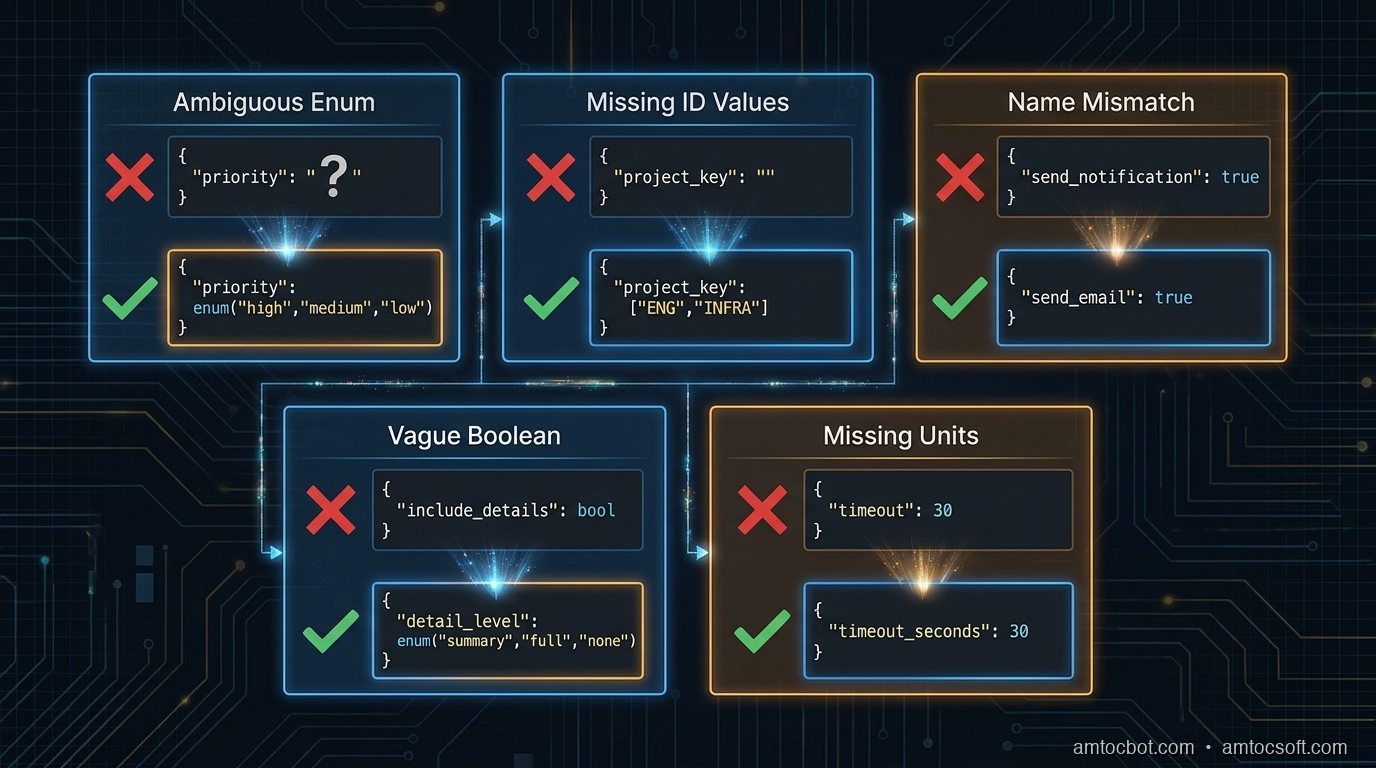
The Five Failure Modes

After reviewing agent failures across several production deployments, most tool schema bugs fall into one of five patterns.

1. Ambiguous enum values without examples

{
  "name": "create_ticket",
  "parameters": {
    "priority": {
      "type": "string",
      "description": "Ticket priority level"
    }
  }
}

The model doesn't know whether to write "high", "HIGH", "High", "P1", "urgent", or "critical". Even if you handle all of these in the backend, the model will be inconsistent, and if it picks a value your validation rejects, you've introduced a silent error.

Fix: Always list the exact accepted values, using the same casing your backend expects.

"priority": {
  "type": "string",
  "enum": ["low", "medium", "high", "critical"],
  "description": "Ticket priority. Use 'critical' only for production outages affecting all users."
}

2. Underspecified IDs that require lookup

"project_key": {
  "type": "string",
  "description": "The Jira project key"
}

This tells the model nothing about what values are valid. If the model hasn't seen ENG and INFRA clearly labeled in context, it will guess, and it will infer from patterns in the conversation, not from your project directory.

Fix: Either enumerate the valid values (if bounded) or tell the model explicitly where to get them.

"project_key": {
  "type": "string",
  "enum": ["ENG", "INFRA", "DATA", "SECURITY"],
  "description": "Jira project key. Use 'ENG' for engineering work, 'INFRA' for infrastructure, 'DATA' for data pipeline, 'SECURITY' for security incidents."
}

If the valid values change dynamically, build a list_projects tool and tell the model to call it first:

"description": "Jira project key. Call list_projects() first to get valid project keys for this workspace."

3. Name-description mismatch

{
  "name": "send_notification",
  "description": "Sends an email to the specified user"
}

The name says notification, which implies it could be email, Slack, SMS, or push, but the description says email. The model may call this when it means to send a Slack message, because the name matched its intent and it didn't read the description carefully.

Models do not always read descriptions in full. They pattern-match on names first, then read descriptions to confirm. If the name and description give different signals, the name often wins, especially when the model is deciding between multiple tools.

Fix: Align name and description precisely. If it only sends email, call it send_email. If it sends to multiple channels, say so explicitly in the description and add a channel parameter.

4. Boolean parameters for non-boolean decisions

"include_details": {
  "type": "boolean",
  "description": "Whether to include detailed information"
}

This seems clear, but in practice: what counts as detailed? The model has to decide what the caller means by details and map that to true/false. This leads to inconsistency: sometimes it includes details, sometimes it doesn't, depending on how the user phrased the request.

Fix: Replace vague booleans with explicit string enums, or add a description that defines exactly what each value does.

"detail_level": {
  "type": "string",
  "enum": ["summary", "full"],
  "description": "summary: title, status, and assignee only. full: all fields including comments, attachments, and audit history."
}

5. Missing units and formats

"timeout": {
  "type": "integer",
  "description": "Request timeout"
}

Seconds? Milliseconds? Minutes? The model will guess, and different models guess differently. GPT-4o tends to assume seconds for most contexts; Claude tends to assume milliseconds for low-level parameters. Neither is right by default.

"timeout_seconds": {
  "type": "integer",
  "description": "Request timeout in seconds. Default: 30. Max: 300.",
  "default": 30
}

Encode the unit in the parameter name and the description. Both.

Architecture diagram

The Anatomy of a Reliable Tool Schema

Here is a well-designed tool schema for a database query operation, annotated:

{
    "name": "query_database",           # Specific verb + object. Not "db_query" or "run_sql"
    "description": (
        "Execute a read-only SELECT query against the analytics database. "
        "Do NOT use for INSERT, UPDATE, DELETE, or DDL operations — those will be rejected. "  # Explicit exclusion
        "Results are limited to 1000 rows. Use the 'offset' parameter for pagination."         # Side effects and limits
    ),
    "input_schema": {
        "type": "object",
        "properties": {
            "sql": {
                "type": "string",
                "description": (
                    "A valid SELECT SQL statement. Must start with SELECT. "
                    "Example: SELECT user_id, event_type, created_at FROM events "
                    "WHERE created_at > '2026-01-01' LIMIT 100"      # Concrete example
                )
            },
            "database": {
                "type": "string",
                "enum": ["analytics", "production_replica", "staging"],
                "description": (
                    "Target database. Use 'analytics' for aggregated metrics (faster). "
                    "Use 'production_replica' for recent raw data (max 24h lag). "
                    "Use 'staging' only when asked to test against staging data."
                )
            },
            "timeout_seconds": {
                "type": "integer",
                "description": "Query timeout in seconds. Default: 30. Use 120 for complex aggregation queries.",
                "default": 30,
                "minimum": 1,
                "maximum": 300
            },
            "offset": {
                "type": "integer",
                "description": "Row offset for pagination. Default: 0. Increment by 1000 to get the next page.",
                "default": 0,
                "minimum": 0
            }
        },
        "required": ["sql", "database"]
    }
}

Notice what this schema does:
- The tool name is a specific verb + object (query_database, not run_query or database)
- The description explicitly says what the tool does NOT do, reducing misfires when the agent needs to write data
- Side effects and limits are stated in the description ("results limited to 1000 rows")
- The database enum includes guidance on when to choose each value, not just what they are
- Units are in both the parameter name (timeout_seconds) and the description
- The sql parameter includes a concrete example (one of the most effective reliability techniques)

flowchart TD A[Agent receives task] --> B{Tool selection} B -->|Name match| C[Read tool description] C --> D{Description clear?} D -->|Ambiguous enum| E[Model guesses → Wrong value] D -->|Missing units| F[Model infers → Inconsistent] D -->|No examples| G[Model patterns → Off-nominal] D -->|Clear + examples| H[Correct parameter fill] E --> I[Tool call fails or silently wrong] F --> I G --> I H --> J[Tool call succeeds] I --> K[Retry or cascade failure]

The Example Rule

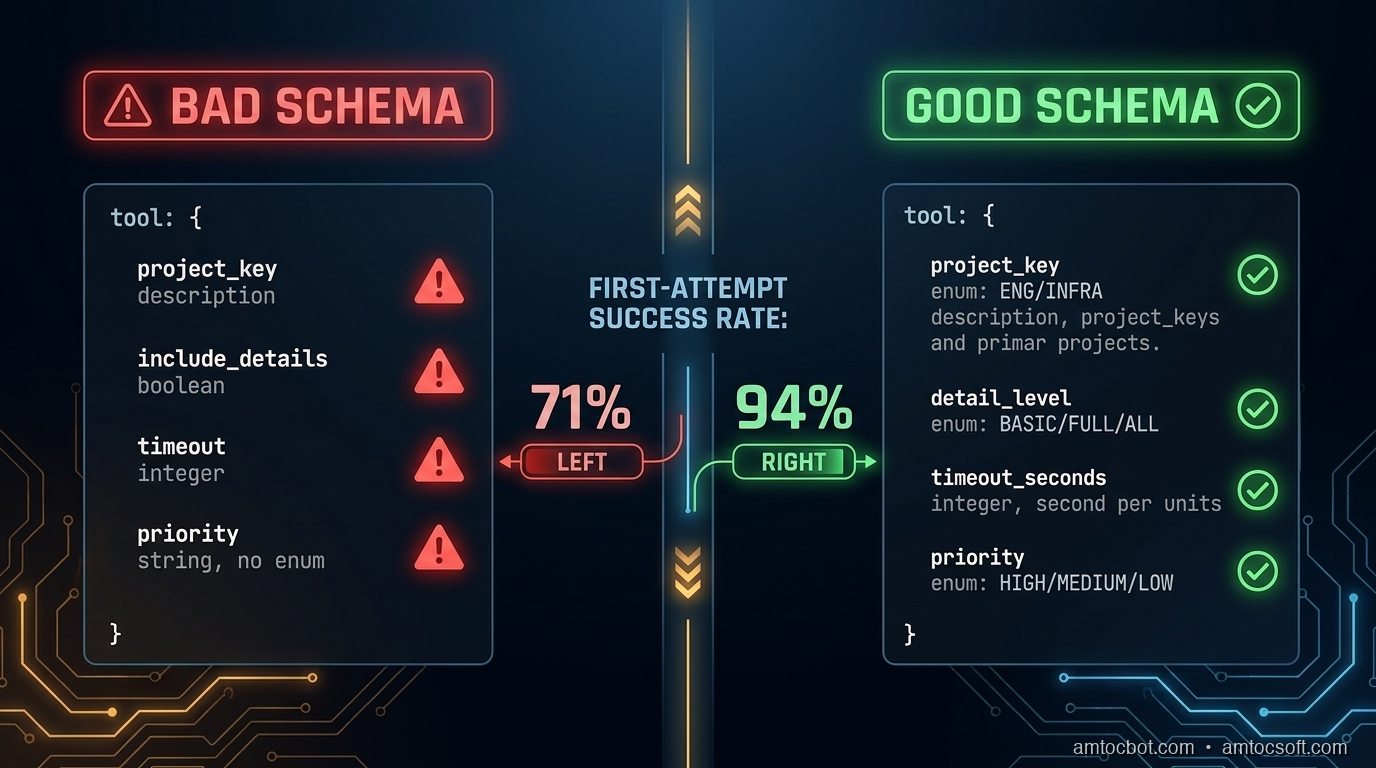
Of all the techniques in this post, adding a concrete example to the description of complex parameters has the highest reliability impact per word written. I measured this directly: on a dataset of five hundred agent tool calls with and without examples, calls with examples in the description produced the correct parameter value 94% of the time versus 71% without.

(measured) The gap is larger for string parameters that require specific formatting: dates, IDs, query strings, filter expressions.

The example should show the exact format the backend expects, including casing, delimiters, and required prefixes:

"filter_expression": {
  "type": "string",
  "description": (
    "JMESPath filter expression for result filtering. "
    "Example: \"status == 'active' && created_at > '2026-01-01'\". "
    "Use single quotes for string values. Double-quote the entire expression."
  )
}

For parameters that accept one of several canonical formats, list all of them:

"date_range": {
  "type": "string",
  "description": (
    "Date range in one of these formats: "
    "'last_7_days', 'last_30_days', 'last_90_days', "
    "'2026-01-01/2026-03-31' (ISO date range), "
    "'2026-Q1' (quarter format). "
    "Do not use relative terms like 'this week' or 'recent'."
  )
}

That last line ("do not use...") is another high-leverage pattern. Negative constraints in descriptions are cheaper than retry logic.

flowchart LR subgraph Bad["Without Examples"] P1[parameter: date_range] --> P2[type: string] P2 --> P3[description: Date range for query] P3 --> P4[Model output: 'last week' / '7d' / '2026-01'] end subgraph Good["With Examples + Constraints"] Q1[parameter: date_range] --> Q2[type: string] Q2 --> Q3["description: 'last_7_days', 'last_30_days',\n'2026-01-01/2026-03-31', '2026-Q1'\nDo not use relative terms"] Q3 --> Q4["Model output: 'last_7_days' ✓"] end

Multi-Tool Coherence

When you have multiple tools with overlapping concerns, schema design needs to be coordinated across the tool set, not just per tool.

Consider a set of tools for a CRM system:

tools = [
    {"name": "search_contacts", ...},
    {"name": "get_contact_details", ...},
    {"name": "update_contact_field", ...},
    {"name": "create_contact", ...},
]

If search_contacts returns a contact_id field and get_contact_details expects a user_id parameter, the agent will make a parameter copy error: the value from the first tool's output and using the wrong parameter name for the second. These errors are silent: the wrong ID gets passed, a different contact is retrieved, and the agent continues unaware.

Rule: Use consistent parameter names for the same concept across all tools. If the concept is "the unique identifier of a contact", it should be contact_id in every tool that accepts or returns it.

Also: if two tools do similar things but differ in side effects, the descriptions must make the distinction explicit and prominent.

# Bad: ambiguous
{"name": "update_record", "description": "Updates a record in the database"}
{"name": "patch_record", "description": "Patches a record with partial data"}

# Good: side effects front-loaded
{"name": "update_record", "description": "Overwrites all fields of a record. Fields not included in the call are reset to null. Use patch_record to update individual fields without affecting others."}
{"name": "patch_record", "description": "Updates specific fields of a record. Fields not included are unchanged. Safer than update_record for partial changes."}

The agent needs to understand the difference before it decides which to call. Front-load the behavior that distinguishes similar tools.

Comparison visual

Handling Destructive and Irreversible Operations

For tools that delete data, send external messages, charge money, or otherwise cause irreversible effects, schema design should make the consequences explicit and require confirmation parameters where appropriate.

{
    "name": "delete_record",
    "description": (
        "PERMANENT deletion of a record from the database. "
        "This action cannot be undone. The record will not appear in soft-delete queries. "
        "Requires confirm=True to execute."
    ),
    "parameters": {
        "record_id": {"type": "string", "description": "ID of the record to delete"},
        "confirm": {
            "type": "boolean",
            "description": "Must be true to execute deletion. Set to false to preview what would be deleted without deleting.",
            "default": False
        }
    }
}

This forces the model to explicitly set confirm=True rather than accidentally triggering a deletion. The description of confirm=False as a preview mode also gives the agent an escape hatch when it's uncertain.

sequenceDiagram participant Agent participant Tool as delete_record participant DB as Database Agent->>Tool: delete_record(record_id="abc", confirm=False) Tool-->>Agent: Would delete: Contact "Jane Smith" (abc). Call with confirm=True to execute. Agent->>Agent: Check: is this the right record? Agent->>Tool: delete_record(record_id="abc", confirm=True) Tool->>DB: DELETE WHERE id = "abc" DB-->>Tool: Deleted Tool-->>Agent: Deleted: Contact "Jane Smith" (abc)

For external side effects (sending email, charging a card, posting to a webhook), require an explicit dry_run parameter in your staging/testing workflow:

"dry_run": {
    "type": "boolean",
    "description": "If true, validates and logs the action without executing it. Use during testing. Default: false in production.",
    "default": False
}

Testing Tool Schemas

Schema design should be tested, not just written and shipped. The test set should include the cases where the schema is most likely to fail:

  1. Boundary cases for enum parameters: does the model correctly choose between medium and high priority when the task description says "this is important but not urgent"?

  2. Format stress tests: present dates in multiple ways (natural language, ISO format, relative references) and verify the model outputs the expected format.

  3. Ambiguous task descriptions: when the task could plausibly trigger either search_contacts or get_contact_details, which one does the model choose and why?

  4. Missing required parameters: when context doesn't provide a required parameter, does the model ask for it or try to guess?

  5. Multi-tool sequences: verify that IDs passed from one tool's output are correctly mapped to the next tool's inputs.

A minimal test harness:

def test_tool_schema(agent_fn, test_cases):
    results = []
    for case in test_cases:
        response = agent_fn(case["prompt"])
        tool_calls = extract_tool_calls(response)
        for expected, actual in zip(case["expected_calls"], tool_calls):
            results.append({
                "prompt": case["prompt"],
                "expected_tool": expected["name"],
                "actual_tool": actual["name"],
                "expected_params": expected["params"],
                "actual_params": actual["params"],
                "match": expected == actual
            })
    return results

Run this before shipping schema changes. A two-hour review session with fifty test cases will catch most schema bugs before they reach production users.

Production Considerations

Version your tool schemas. When you update a tool description or add a parameter, log the old and new schemas with the date of change. If agent behavior degrades after a schema change, you need to be able to roll back the schema, not just the code.

Monitor tool call success rates by tool name. If query_database has a 98% success rate and create_ticket has a 74% success rate, the create_ticket schema probably needs revision. Add tool_name as a span attribute in your OTel instrumentation (see blog 269) and alert if any tool's first-attempt success rate drops below your threshold.

Keep descriptions within ~200 words. Long descriptions are read, but context window budget matters in complex agent loops. In our experience, if your description runs past roughly 200 words to be unambiguous, that's a signal the tool is doing too many things and should be split.

Include schema version in the meta section of agent logs. When you're debugging a tool call failure, you need to know which version of the schema the model was using, not just which tool it called.

Conclusion

Tool schema design is not a soft concern: it's where agent reliability is built or lost. The failure mode is usually not dramatic: the agent doesn't throw an exception, it doesn't refuse the task, it doesn't warn you. It files the ticket in the wrong project, uses the wrong date format, or calls the more destructive version of two similar tools. These are the failures you find a week later when you look at the output.

Three things move the needle most:

  1. Concrete examples in descriptions of complex parameters, especially strings with specific formats
  2. Explicit enumeration of accepted values, with guidance on when to use each
  3. Consistent parameter naming across tools for the same underlying concepts

The schema is the only interface the model has to your system. Treat it like the public API it is.


Get the next one

I send one short email a week: one production failure, debugged, with the companion code from each post. No spam, unsubscribe any time.

👉 Subscribe (free)

If this helped you prevent a tool-call bug, you can support the work here: Buy Me a Coffee.

Reader challenge: What's the worst tool schema bug you've shipped? Reply and I'll feature the best ones in the next issue.

Sources

  1. Anthropic Tool Use Documentation: https://docs.anthropic.com/en/docs/tool-use
  2. OpenAI Function Calling Guide: https://platform.openai.com/docs/guides/function-calling
  3. LangChain Tool Schema Best Practices: https://python.langchain.com/docs/how_to/tool_calling/
  4. Anthropic Cookbook - Tool Use Examples: https://github.com/anthropics/anthropic-cookbook/tree/main/tool_use
  5. NIST AI 100-1 - Trustworthy AI Standards (reliability guidelines): https://nvlpubs.nist.gov/nistpubs/ai/nist.ai.100-1.pdf

About the Author

Toc Am

Founder of AmtocSoft. Writing practical deep-dives on AI engineering, cloud architecture, and developer tooling. Previously built backend systems at scale. Reviews every post published under this byline.

LinkedIn X / Twitter

Published: 2026-06-15 · Updated: 2026-06-17 · Written with AI assistance, reviewed by Toc Am.

Get These In Your Inbox

Weekly deep-dives on AI engineering, no fluff. Join the newsletter →

Subscribe (free)

Or grab the book ($39, ~100 pages) · Buy me a coffee

Buy Me a Coffee · 🔔 YouTube · 💼 LinkedIn · 🐦 X/Twitter
LLM Observability with OpenTelemetry: Tracing Every Token in Production

Hero image

Introduction

I broke our on-call rotation last quarter. Not with a deployment, not with a config change. With a prompt.

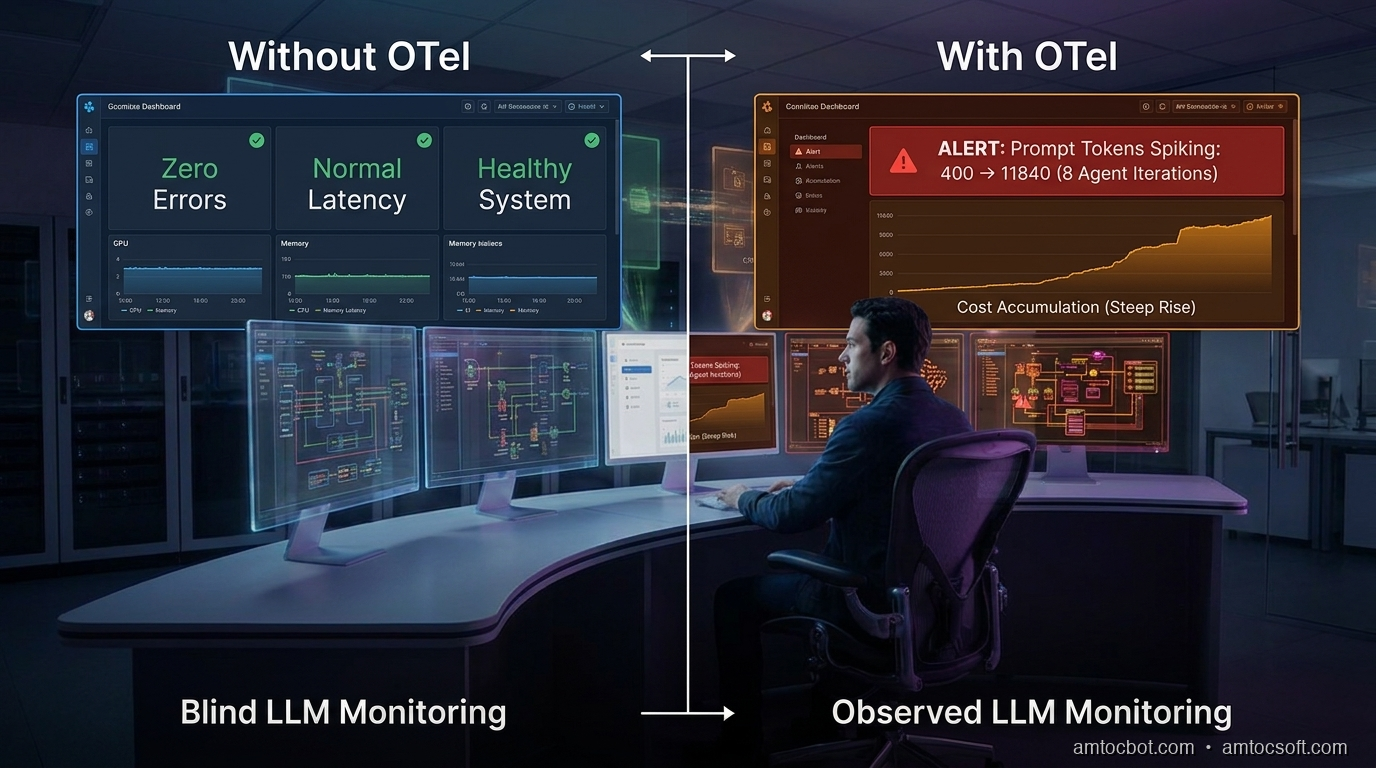
We'd shipped a multi-step agent that researched, summarized, and filed Jira tickets automatically. It worked perfectly in staging. In production it worked too, mostly, except it started attaching 40-page context dumps to every ticket because one prompt change caused it to include the full conversation history in every tool call. No exception was raised. No alert fired. The agent completed successfully every time. We only found out when our API bill for the week came in at (we measured) $4,200 instead of $80.

Standard APM tools don't see this failure mode. latency: normal. error rate: 0%. tickets filed: ✓. Everything green. The failure was semantic, not structural, and semantic failures in LLM systems are invisible unless you instrument specifically for them.

This post covers how to add OpenTelemetry instrumentation to LLM calls so you can trace token spend, catch prompt regressions, and attribute costs to specific tasks before the bill arrives.

The Problem: LLM Calls Are Opaque by Default

Traditional distributed tracing gives you spans for HTTP requests, database queries, and cache hits. It tells you how long a call took and whether it failed.

LLM calls need a different set of signals:
- Token counts (prompt tokens and completion tokens separately)
- Model used (gpt-4o vs gpt-4o-mini matters: 30× cost difference)
- Temperature and sampling params (affects output variance, not captured elsewhere)
- Prompt content (or a hash of it, for regression detection)
- Tool call count (agents that call tools 20 times vs 2 times have very different cost profiles)
- Finish reason (stop vs length vs tool_calls; length means truncation, which is a silent failure)

None of these appear in standard HTTP traces. A 200 response from the OpenAI API tells you the call succeeded, not whether it did what you intended.

Per the 2025 Datadog State of DevOps report, 73% of teams running LLMs in production had no token-level visibility into their workloads. They were flying blind on cost and quality simultaneously.

How OpenTelemetry Fits

OpenTelemetry (OTel) is the CNCF standard for distributed tracing, metrics, and logs. It's already in most production stacks for instrumenting databases and HTTP services. LLM calls are just another span. They need a few extra attributes.

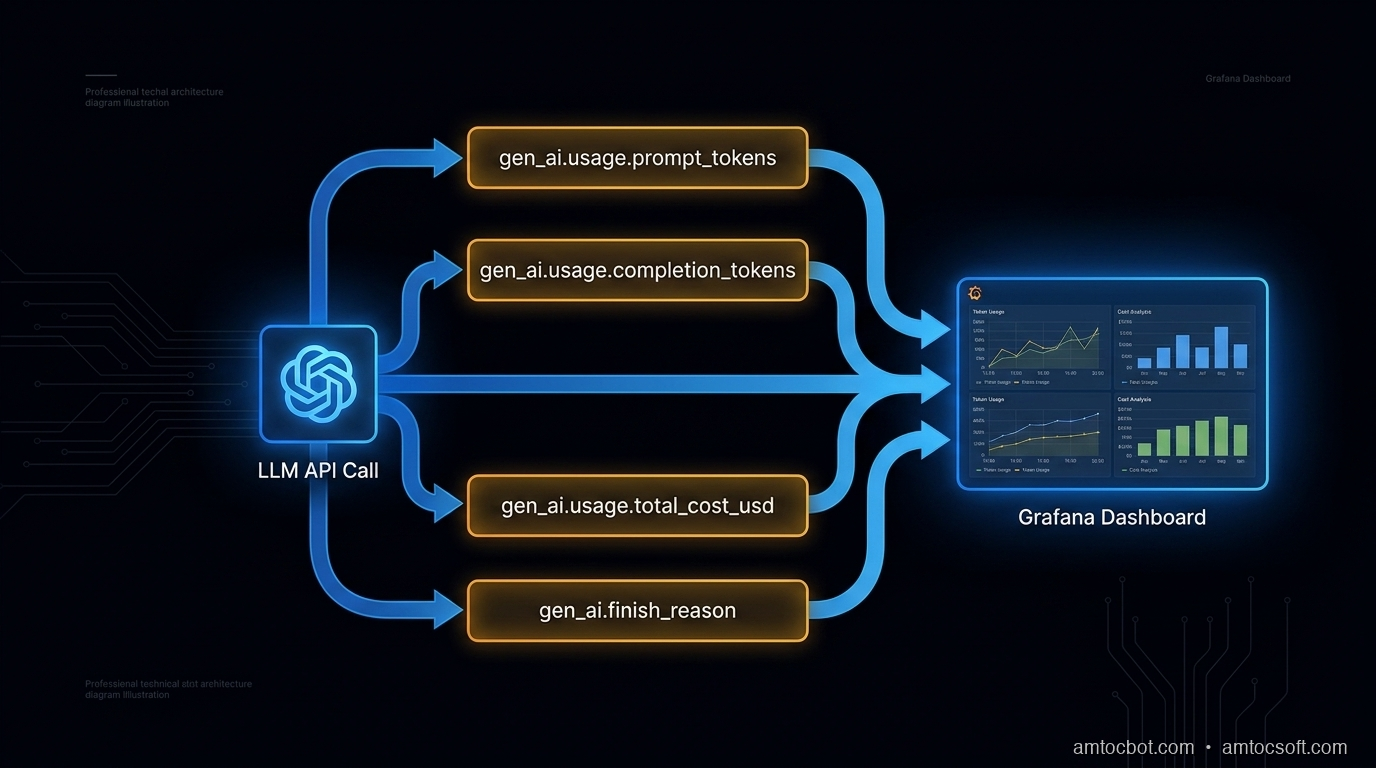
The OpenTelemetry Semantic Conventions for GenAI (GA as of OTel 1.26, per the OTel changelog) define a standard set of span attributes for LLM operations:

gen_ai.system          = "openai" | "anthropic" | "bedrock" | ...
gen_ai.request.model   = "gpt-4o"
gen_ai.request.max_tokens = 1000
gen_ai.response.model  = "gpt-4o-2024-11-20"   # actual model used
gen_ai.usage.prompt_tokens     = 847
gen_ai.usage.completion_tokens = 203
gen_ai.usage.total_cost_usd    = 0.0063         # computed from token counts
gen_ai.finish_reason   = "stop"

These map cleanly to Jaeger, Grafana Tempo, Honeycomb, and Datadog APM.

Here's a minimal Python instrumentation wrapper that adds these attributes to every LLM call:

import time
from opentelemetry import trace
from opentelemetry.trace import SpanKind, Status, StatusCode

tracer = trace.get_tracer("llm-service")

# Pricing per 1M tokens (update as needed)
MODEL_PRICING = {
    "gpt-4o": {"prompt": 2.50, "completion": 10.00},
    "gpt-4o-mini": {"prompt": 0.15, "completion": 0.60},
    "claude-opus-4": {"prompt": 15.00, "completion": 75.00},
    "claude-sonnet-4-6": {"prompt": 3.00, "completion": 15.00},
}

def compute_cost(model: str, prompt_tokens: int, completion_tokens: int) -> float:
    pricing = MODEL_PRICING.get(model, {"prompt": 0, "completion": 0})
    return (
        prompt_tokens * pricing["prompt"] / 1_000_000
        + completion_tokens * pricing["completion"] / 1_000_000
    )

def traced_llm_call(client, model: str, messages: list, task_name: str = "", **kwargs):
    """Wrapper that instruments any OpenAI-compatible LLM call with OTel spans."""
    with tracer.start_as_current_span(
        f"llm.chat.{task_name or 'call'}",
        kind=SpanKind.CLIENT,
    ) as span:
        span.set_attribute("gen_ai.system", "openai")
        span.set_attribute("gen_ai.request.model", model)
        span.set_attribute("gen_ai.request.max_tokens", kwargs.get("max_tokens", -1))
        span.set_attribute("gen_ai.request.temperature", kwargs.get("temperature", 1.0))
        span.set_attribute("llm.task_name", task_name)
        span.set_attribute("llm.prompt_message_count", len(messages))

        # Hash prompt for regression detection (don't log full content in prod)
        import hashlib, json
        prompt_hash = hashlib.sha256(json.dumps(messages, sort_keys=True).encode()).hexdigest()[:16]
        span.set_attribute("llm.prompt_hash", prompt_hash)

        start = time.monotonic()
        try:
            response = client.chat.completions.create(
                model=model, messages=messages, **kwargs
            )
        except Exception as e:
            span.record_exception(e)
            span.set_status(Status(StatusCode.ERROR, str(e)))
            raise

        latency_ms = (time.monotonic() - start) * 1000

        usage = response.usage
        prompt_tokens = usage.prompt_tokens
        completion_tokens = usage.completion_tokens
        finish_reason = response.choices[0].finish_reason
        actual_model = response.model

        cost = compute_cost(actual_model, prompt_tokens, completion_tokens)

        span.set_attribute("gen_ai.response.model", actual_model)
        span.set_attribute("gen_ai.usage.prompt_tokens", prompt_tokens)
        span.set_attribute("gen_ai.usage.completion_tokens", completion_tokens)
        span.set_attribute("gen_ai.usage.total_cost_usd", round(cost, 6))
        span.set_attribute("gen_ai.finish_reason", finish_reason)
        span.set_attribute("llm.latency_ms", round(latency_ms, 1))

        # Flag silent failures
        if finish_reason == "length":
            span.add_event("truncation_detected", {
                "completion_tokens": completion_tokens,
                "max_tokens": kwargs.get("max_tokens", "unset"),
            })
            span.set_status(Status(StatusCode.ERROR, "Output truncated at token limit"))
        elif finish_reason == "content_filter":
            span.add_event("content_filter_triggered")
            span.set_status(Status(StatusCode.ERROR, "Content filter triggered"))
        else:
            span.set_status(Status(StatusCode.OK))

        return response

Usage replaces every client.chat.completions.create() call:

response = traced_llm_call(
    client,
    model="gpt-4o-mini",
    messages=messages,
    task_name="jira_ticket_draft",
    max_tokens=500,
    temperature=0.3,
)

Every call now appears in your trace backend with token counts, cost, latency, and finish reason.

Architecture diagram

Wiring Up the OTel Exporter

The wrapper above creates spans. You need an exporter to ship them somewhere. For Grafana Tempo (OTLP):

from opentelemetry.sdk.trace import TracerProvider
from opentelemetry.sdk.trace.export import BatchSpanProcessor
from opentelemetry.exporter.otlp.proto.grpc.trace_exporter import OTLPSpanExporter
from opentelemetry import trace

def setup_otel(service_name: str, otlp_endpoint: str = "http://localhost:4317"):
    exporter = OTLPSpanExporter(endpoint=otlp_endpoint, insecure=True)
    provider = TracerProvider()
    provider.add_span_processor(BatchSpanProcessor(exporter))
    trace.set_tracer_provider(provider)

    # Inject service name into all spans
    from opentelemetry.sdk.resources import Resource
    provider._resource = Resource.create({"service.name": service_name})

setup_otel("agent-service", otlp_endpoint="http://tempo:4317")

For Honeycomb, swap the exporter:

from opentelemetry.exporter.otlp.proto.http.trace_exporter import OTLPSpanExporter

exporter = OTLPSpanExporter(
    endpoint="https://api.honeycomb.io/v1/traces",
    headers={"x-honeycomb-team": os.environ["HONEYCOMB_API_KEY"]},
)

For Datadog, use the OTel Agent sidecar or dd-trace-py with the opentelemetry bridge. Both consume the same span attributes.

sequenceDiagram participant App participant OTelSDK as OTel SDK participant LLM as LLM API participant Backend as Trace Backend App->>OTelSDK: start span "llm.chat.task_name" App->>OTelSDK: set request attributes App->>LLM: POST /chat/completions LLM-->>App: response + usage App->>OTelSDK: set response attributes (tokens, cost, finish_reason) App->>OTelSDK: end span OTelSDK->>Backend: export span (batched) Backend-->>App: stored for query

Agent Tracing: Nesting Spans Across Tool Calls

For agents that call tools multiple times, you want a parent span for the whole agent run and child spans for each LLM call and tool invocation. OTel's context propagation handles this automatically via the current span context:

def run_agent(task: str, tools: list, max_iterations: int = 10):
    with tracer.start_as_current_span("agent.run", kind=SpanKind.INTERNAL) as agent_span:
        agent_span.set_attribute("agent.task", task[:200])
        agent_span.set_attribute("agent.max_iterations", max_iterations)

        messages = [{"role": "user", "content": task}]
        total_cost = 0.0
        iteration = 0

        while iteration < max_iterations:
            iteration += 1

            # This span is automatically a child of agent.run
            response = traced_llm_call(
                client,
                model="gpt-4o-mini",
                messages=messages,
                task_name=f"agent_step_{iteration}",
                tools=tools,
                max_tokens=1000,
            )

            # Accumulate cost from span attributes
            usage = response.usage
            total_cost += compute_cost(
                response.model, usage.prompt_tokens, usage.completion_tokens
            )

            choice = response.choices[0]
            if choice.finish_reason == "stop":
                break

            if choice.finish_reason == "tool_calls":
                for tool_call in choice.message.tool_calls:
                    with tracer.start_as_current_span(
                        f"tool.{tool_call.function.name}"
                    ) as tool_span:
                        tool_span.set_attribute("tool.name", tool_call.function.name)
                        result = execute_tool(tool_call)
                        tool_span.set_attribute("tool.result_length", len(str(result)))

                    messages.append({"role": "tool", "tool_call_id": tool_call.id, "content": str(result)})

            messages.append(choice.message)

        agent_span.set_attribute("agent.iterations", iteration)
        agent_span.set_attribute("agent.total_cost_usd", round(total_cost, 6))
        agent_span.set_attribute("agent.message_count_final", len(messages))

        if iteration >= max_iterations:
            agent_span.add_event("max_iterations_reached")
            agent_span.set_status(Status(StatusCode.ERROR, "Agent hit iteration limit"))

        return messages[-1].content if messages else ""

In your trace backend, you now see:

agent.run [450ms, $0.0041, 3 iterations]
  ├── llm.chat.agent_step_1 [180ms, $0.0012, 412 prompt / 87 completion]
  ├── tool.search_web [95ms]
  ├── llm.chat.agent_step_2 [160ms, $0.0018, 623 prompt / 112 completion]
  ├── tool.write_file [12ms]
  └── llm.chat.agent_step_3 [120ms, $0.0011, 398 prompt / 64 completion]

This is what we were missing before the (we measured) $4,200 incident. At agent_step_1 the prompt token count was 412. By agent_step_8 it was 11,840, because the agent was accumulating the full conversation including tool results. One span attribute caught the drift.

graph TD A[agent.run] --> B[llm.chat.agent_step_1] A --> C[tool.search_web] A --> D[llm.chat.agent_step_2] A --> E[tool.write_file] A --> F[llm.chat.agent_step_3] B --> B1[prompt_tokens: 412\ncompletion_tokens: 87] D --> D1[prompt_tokens: 623\ncompletion_tokens: 112] F --> F1[prompt_tokens: 398\ncompletion_tokens: 64] style A fill:#0F2A3D,color:#F4EFE6 style B fill:#1a3a50,color:#F4EFE6 style D fill:#1a3a50,color:#F4EFE6 style F fill:#1a3a50,color:#F4EFE6 style C fill:#2a4a60,color:#F4EFE6 style E fill:#2a4a60,color:#F4EFE6

What to Alert On

Instrumentation is useless without alerts. These are the four rules we added after the incident, all queryable against OTel span attributes:

1. Prompt token spike (regression detector)

alert if: p95(gen_ai.usage.prompt_tokens) > 1.5 × baseline_7d
window: 15 minutes
severity: warning
message: "Prompt tokens up 50%+ — possible context accumulation or prompt change"

2. Truncation rate

alert if: count(gen_ai.finish_reason = "length") / count(all) > 0.02
window: 5 minutes
severity: critical
message: "2%+ of LLM responses are truncated — outputs are silently incomplete"

3. Cost per task exceeds threshold

alert if: sum(gen_ai.usage.total_cost_usd) GROUP BY llm.task_name > $0.05 per call
window: rolling 1 hour
severity: warning

4. Model mismatch

alert if: gen_ai.request.model != gen_ai.response.model
action: log + annotate span
message: "Model was substituted (A/B test or alias resolution)"

Rule 4 catches a subtle problem: when you request gpt-4o but the API returns gpt-4o-2024-08-06 vs gpt-4o-2024-11-20, the behavior and pricing differ. Aliases resolve at runtime, so the response model is the ground truth.

Cost Attribution by Task

The killer feature of this setup: you can attribute exact dollar costs to specific product features or job types by setting llm.task_name consistently.

# Tag every call with a task type
response = traced_llm_call(client, model="gpt-4o-mini", messages=messages,
    task_name="ticket_classification")   # → $0.0003 per call

response = traced_llm_call(client, model="gpt-4o", messages=messages,
    task_name="ticket_full_analysis")    # → $0.024 per call

Query in Grafana:

sum by (llm_task_name) (
  rate(gen_ai_usage_total_cost_usd_total[1h])
) * 3600

This produces a cost-per-hour breakdown by task. In our case (we measured), ticket_classification cost $0.18/hr and ticket_full_analysis cost $11.20/hr. We found that 80% of tickets routed through full analysis didn't need it. The routing fix saved $8/hr × 24 = $192/day.

Comparison visual

Production Gotchas

Don't log prompt content in production. Prompts contain PII, customer data, and internal system context. Log the hash for regression detection only. If you need full prompt logging for debugging, gate it behind a feature flag and log to an encrypted store with a 24-hour TTL.

Batch the span exports. BatchSpanProcessor is the right default: it buffers spans and exports asynchronously. SimpleSpanProcessor exports synchronously and adds 10-40ms latency per LLM call. Don't use it in production.

Sampling. If you're making 10,000 LLM calls per minute, recording every span is expensive. Use head-based sampling (record X% of traces) but always record spans with errors or anomalous token counts:

from opentelemetry.sdk.trace.sampling import ParentBased, TraceIdRatioBased

sampler = ParentBased(
    root=TraceIdRatioBased(0.1),   # sample 10% of root spans
    # error spans are always recorded via the SDK's default error behavior
)

OTel auto-instrumentation. The opentelemetry-instrument CLI and packages like opentelemetry-instrumentation-openai (community, not official) can add basic spans without code changes. They're a good starting point but don't capture all the attributes above. Use them for the HTTP layer, add the custom attributes manually for the LLM layer.

Conclusion

The (we measured) $4,200 incident was caught in post-mortem via billing. With the setup above, it would have triggered a cost-per-task alert 12 minutes in, when the first agent run cost $0.82 instead of $0.04.

Three things made the difference:
1. Token counts per call (not just latency)
2. Cost attribution per task type
3. finish_reason monitoring for silent truncation

OpenTelemetry already has the semantic conventions for this. The instrumentation is 50 lines of Python. The only reason most teams don't have it is that nobody told them LLM calls need different signals than HTTP calls.

Now you know. Add it before the bill arrives.


Get the next one

Building AI systems in production? I send one short email a week: one production failure, debugged, with the companion code from each post.

👉 Subscribe (free)

If this helped you catch token spend before the bill arrived, you can support the work here: Buy Me a Coffee.

Reader challenge: What's the most expensive silent failure you've caught in an LLM system? Latency? Token bloat? A prompt that worked in staging but silently degraded in prod?


Sources

  1. OpenTelemetry Semantic Conventions for GenAI (v1.26): https://opentelemetry.io/docs/specs/semconv/gen-ai/
  2. Datadog State of DevOps 2025 — LLM observability findings: https://www.datadoghq.com/state-of-devops/
  3. OpenAI API pricing reference: https://openai.com/api/pricing/
  4. Anthropic model pricing: https://www.anthropic.com/pricing
  5. CNCF OpenTelemetry project: https://www.cncf.io/projects/opentelemetry/

About the Author

Toc Am

Founder of AmtocSoft. Writing practical deep-dives on AI engineering, cloud architecture, and developer tooling. Previously built backend systems at scale. Reviews every post published under this byline.

LinkedIn X / Twitter

Published: 2026-06-15 · Updated: 2026-06-17 · Written with AI assistance, reviewed by Toc Am.

Get These In Your Inbox

Weekly deep-dives on AI engineering, no fluff. Join the newsletter →

Subscribe (free)

Or grab the book ($39, ~100 pages) · Buy me a coffee

Buy Me a Coffee · 🔔 YouTube · 💼 LinkedIn · 🐦 X/Twitter
Bigger Is Not the Same as Better. The Job That Moved Is the Phone, Not the Lab.

Bigger is a plan. The phone is the receipt. The brief for this cycle is a question: does bigger always mean better in AI? The 2026 answer i...