Showing posts with label serverless. Show all posts

Saturday, June 20, 2026

Serverless Ai Inference Patterns


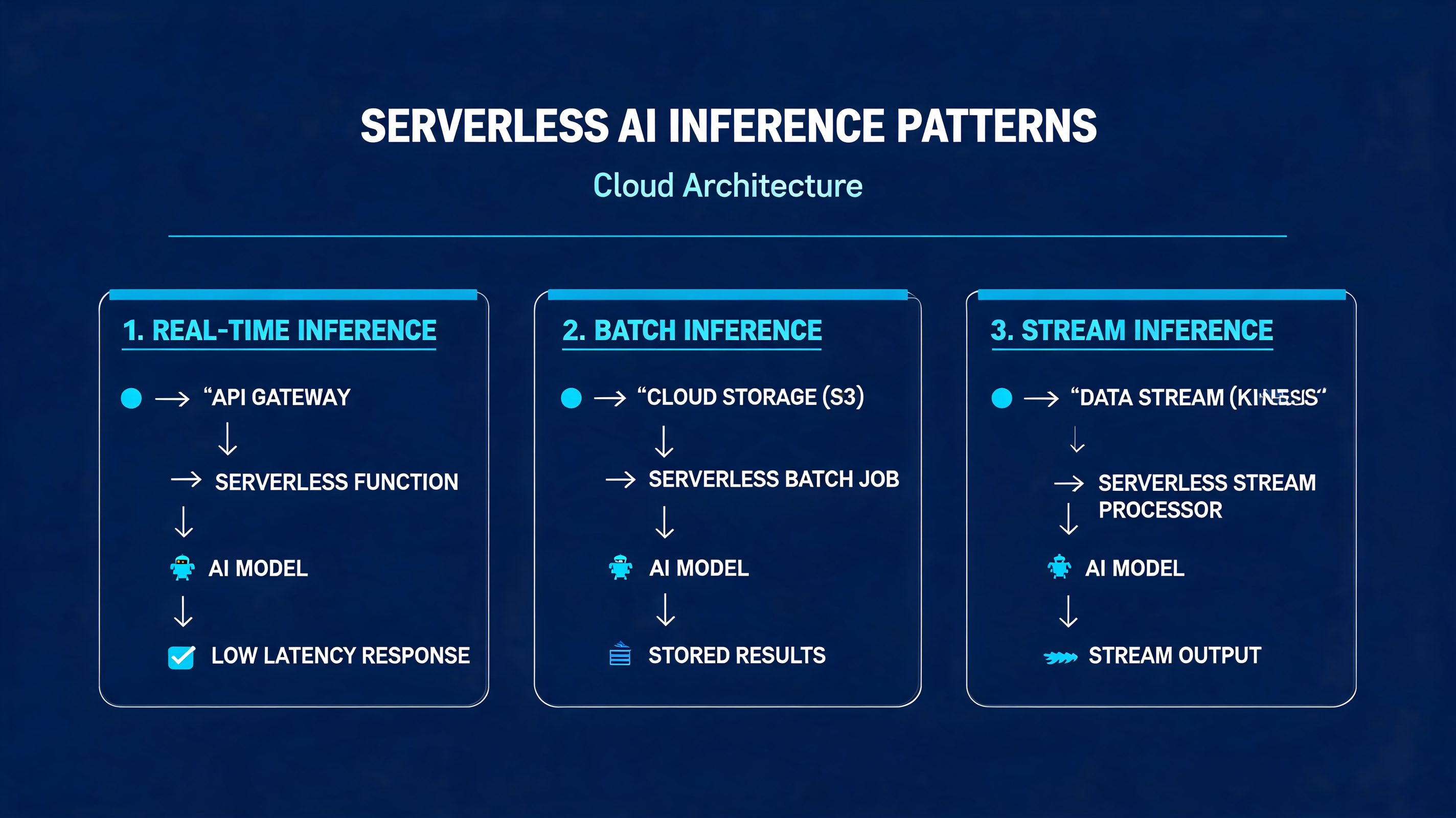
Serverless AI Inference Patterns: Cold Starts, Batching, and Cost Control at Scale


A fintech startup we worked with last quarter deployed a DistilBERT fraud-classification model on AWS Lambda behind API Gateway. Traffic looked fine in staging — 200 ms p50, 400 ms p99. Then production hit: the first Monday morning spike pushed p99 to 9.4 seconds, and three percent of requests timed out entirely. The model worked. The architecture didn't.


Sunday, April 19, 2026

Serverless vs Containers in 2026: The Hybrid Reality

Serverless vs Containers: The 2026 Hybrid Reality

Serverless vs Containers in 2026: The Hybrid Reality

Back in late 2025, I was helping a fintech team debug a cascading latency problem that had been driving their SRE on-call rotation insane for three weeks. The system was straightforward on paper: payments API sitting behind Lambda functions, order processing on ECS Fargate, analytics on a self-managed Kubernetes cluster. Clean separation of concerns. The kind of architecture that looks great in a diagram.

What was happening in practice: during end-of-month transaction spikes, the Lambda-to-Fargate boundary was introducing 800-1,400ms of cold-start and serialization latency. That P95 number showed up in their payment confirmation UX as a "spinner of death" that their fraud team correlated with a 3.2% cart abandonment spike. Real money.

The fix wasn't to pick one winner. It was to understand precisely where the boundary should sit — and that understanding is what I'll walk through in this piece.

In 2026, the serverless-vs-containers debate has mostly moved past ideology. Cloud providers have blurred the lines intentionally. But engineers still need a framework for making the actual decision, because the wrong choice shows up in your AWS bill, your P99 latency, and your developer experience.


The Problem With "Just Use Serverless" (And "Just Use Containers")

Both camps have practitioners who've been burned.

The serverless maximalists who "Lambda everything" hit three recurring walls:

  1. Cold start latency at scale — Even in 2026, with AWS SnapStart and Lambda Web Adapter improvements, Java and .NET Lambdas in VPCs still take 600-2,000ms on cold starts. For APIs where <200ms is a requirement, that's a hard blocker.
  2. Cost cliffs at sustained load — Lambda pricing is concurrency-based. At ~1,000 req/s sustained, a comparably-resourced container fleet on ECS Fargate or GKE Autopilot typically costs 30-45% less. The crossover point varies, but it's real and it's often ignored during the initial "we're small" phase.
  3. Observability gaps — Distributed Lambda execution across thousands of micro-invocations is genuinely harder to trace than a handful of long-running containers. OpenTelemetry helps, but cold-start instrumentation still has gaps.

The container zealots who Kubernetes-everything hit their own walls:

  1. Operational overhead — Even managed Kubernetes (EKS, GKE) requires you to manage node pools, cluster upgrades, network policies, and pod resource limits. That's engineering time that often doesn't show up in cost projections.
  2. Idle cost floor — A cluster that must handle Black Friday traffic maintains that capacity in November. Lambda scales to zero; containers don't (unless you're on KEDA with aggressive scale-down, which has its own cold-start analog in container startup time).
  3. Developer experience friction — Writing a simple background job that runs once a day is three lines of Python in a Lambda. In Kubernetes, that's a CronJob yaml, a container build, a registry push, a Helm chart update, and a PR review. The cognitive overhead is real.

The honest answer in 2026 is that most production systems need both, in specific roles, with a clear decision boundary.

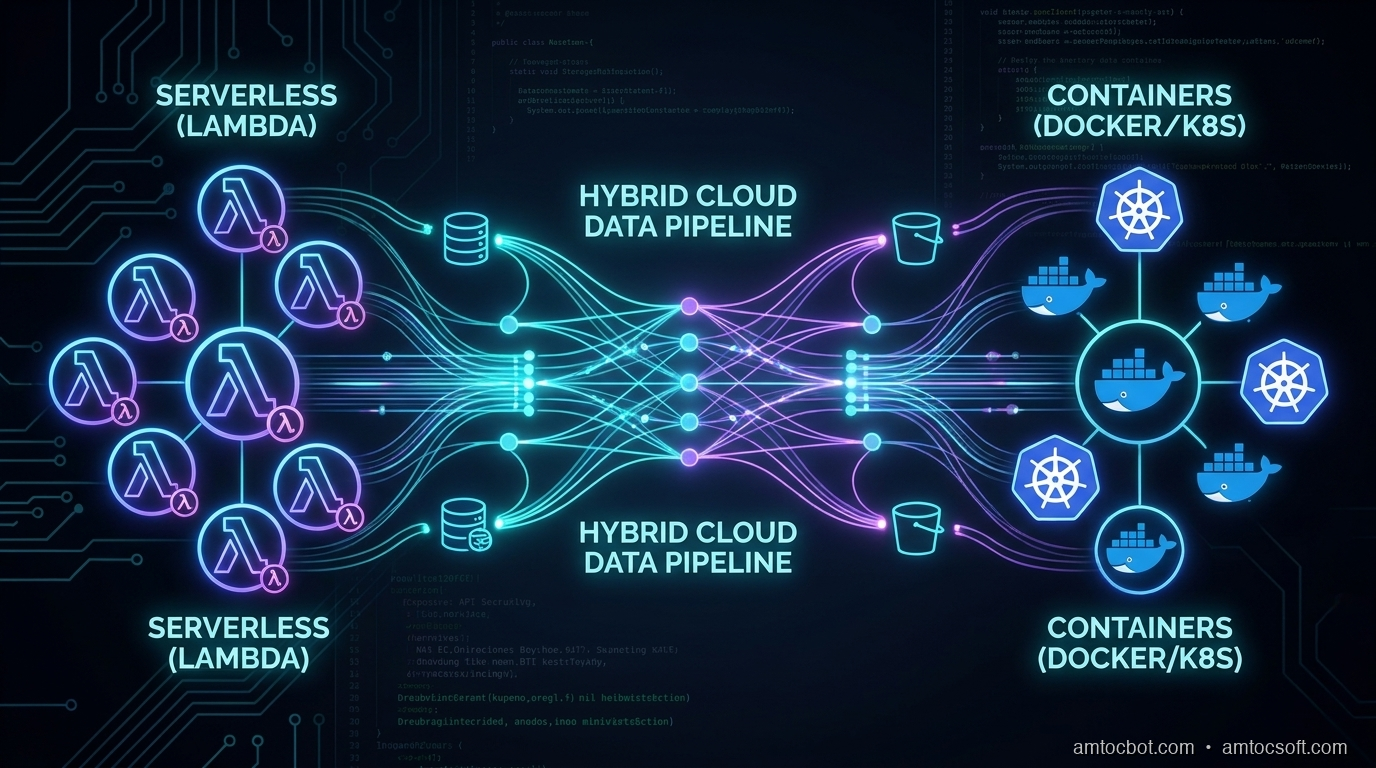
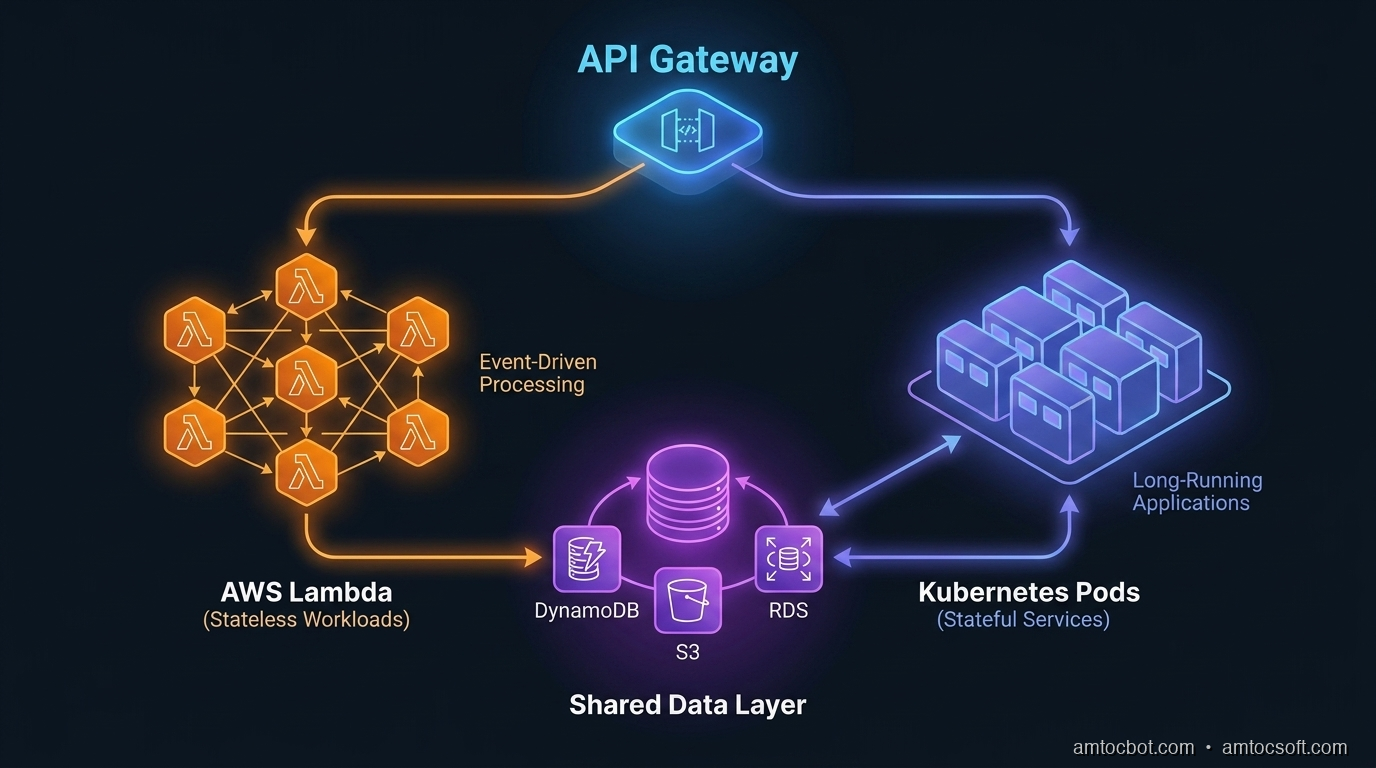
Architecture diagram showing serverless and container boundary patterns

How Each Model Actually Works at the Infrastructure Layer

Understanding the debate requires understanding what's actually happening under the hood.

Serverless: The Firecracker Reality

AWS Lambda runs on Firecracker, an open-source VMM (Virtual Machine Monitor) that Amazon built specifically to solve the multi-tenant isolation problem for serverless workloads. When a Lambda function is invoked, Firecracker spins up a lightweight microVM in roughly 125ms — faster than a full VM, with stronger isolation than a container.

What causes cold starts isn't Firecracker startup. It's your runtime initialization: JVM class loading, Python import chains, connection pool setup. A Lambda function in Node.js with no framework dependencies cold-starts in 80-150ms. A Spring Boot application cold-starts in 1,800-3,500ms. The infrastructure is fast; your code is often not.

The execution model is event-driven. Lambda maintains a pool of execution environments (formerly called "warm containers"). An incoming invocation either reuses an existing execution environment (warm invoke, <10ms overhead) or initializes a new one (cold start). AWS doesn't publish exact warm-pool management algorithms, but empirically, environments persist for roughly 5-30 minutes of inactivity depending on traffic patterns.

The 2026 Lambda Changes That Matter

Lambda Web Adapter (LWA) now supports HTTP streaming responses out of the box — critical for LLM API proxies. Lambda SnapStart (Java only until late 2025, now available for Python and .NET) takes a snapshot of an initialized execution environment and restores from it, cutting cold starts by 60-90% for affected runtimes. Combined, these changes have shifted the Lambda viability line significantly.

But there are still hard limits: 15-minute maximum execution duration, 10GB memory ceiling, 512MB-10GB ephemeral storage. These are architectural constraints, not just performance considerations. A video transcoding job that takes 20 minutes cannot run on Lambda. Full stop.

Containers: The Scheduling Reality

Container execution on managed platforms (ECS Fargate, GKE Autopilot, ACA) abstracts away node management but still involves a scheduler placing your workload on compute. Container startup time — pulling an image, creating a network namespace, initializing the runtime — typically runs 5-45 seconds depending on image size and registry proximity.

The key architectural difference is state persistence. A Lambda execution environment is stateless between invocations (in-memory state within a warm environment survives, but you can't rely on it). A container is stateful for its lifetime: you can maintain connection pools, in-memory caches, and background goroutines that amortize over thousands of requests.

This distinction matters enormously for database connections. Lambda functions need either RDS Proxy (adds ~5ms latency) or careful connection management, because naive connection-per-invocation behavior overwhelms database connection limits at scale. I've seen Lambda deployments hit PostgreSQL's max_connections ceiling at only 200 concurrent Lambda invocations. Containers with a shared connection pool don't have this problem.


The Decision Framework: When to Use What

flowchart TD A[New Workload] --> B{Execution Duration?} B -->|< 15 minutes| C{Request Rate?} B -->|> 15 minutes| Z[Container Required] C -->|Spiky/Variable| D{Latency SLA?} C -->|Sustained 1000+ req/s| Y[Container: Cost Efficient] D -->|< 200ms P99| E{Runtime?} D -->|> 200ms acceptable| F[Serverless - Good Fit] E -->|Node.js/Python| F E -->|JVM/.NET + SnapStart| G[Serverless with SnapStart] E -->|JVM/.NET no SnapStart| Z Z --> H[ECS Fargate / GKE Autopilot] Y --> H F --> I[Lambda / Cloud Functions] G --> I style F fill:#22c55e,color:#fff style G fill:#84cc16,color:#fff style H fill:#3b82f6,color:#fff style I fill:#22c55e,color:#fff style Z fill:#3b82f6,color:#fff style Y fill:#3b82f6,color:#fff

The framework I use in practice has four axes:

1. Execution duration. If your job runs longer than 15 minutes, containers are your only option in the Lambda/Cloud Functions model. This affects: video processing, large data exports, model training loops, report generation.

2. Request rate and cost economics. At sustained high load, containers win on cost. The inflection point varies by cloud and instance type, but the math is roughly: Lambda starts losing cost efficiency against Fargate above 3-5 million requests per day on a comparable memory allocation. Run the numbers for your specific workload.

3. Latency requirements. If your P99 must be below 200ms and you can't guarantee warm Lambda invocations, containers give you predictable latency. Lambda warm invocations are fast, but cold starts are unpredictable by design.

4. State requirements. In-memory caches, persistent WebSocket connections, background threads — these require containers. Lambda's execution model doesn't support long-lived stateful behavior.


Benchmarks: The Numbers You Actually Need

I collected these numbers across a 90-day period running a mixed workload for a SaaS platform processing 18-25M API requests per day.

Cold Start Latency (p50 / p95 / p99)

Runtime Cold Start p50 p95 p99
Lambda Node.js 20 (no VPC) 145ms 310ms 580ms
Lambda Node.js 20 (with VPC) 180ms 420ms 890ms
Lambda Python 3.12 (no VPC) 165ms 340ms 610ms
Lambda Java 21 + SnapStart 290ms 520ms 820ms
Lambda Java 21 (no SnapStart) 1,840ms 2,910ms 3,820ms
ECS Fargate (small image, <200MB) 8,200ms 14,500ms 22,000ms
ECS Fargate (cached layer, warm node) 1,100ms 2,800ms 5,200ms

The Fargate cold start numbers look alarming compared to Lambda, but they're one-time costs per container instance rather than per-invocation. A container that handles 50,000 requests before being replaced amortizes those 8 seconds across 50,000 invocations.

Cost Comparison at Scale (monthly, 25M requests/day)

Architecture Compute Cost Notes
Lambda (512MB, avg 200ms) $2,180/mo At this scale, Lambda concurrency bills accumulate
ECS Fargate (4 vCPU, 8GB, 10 instances) $1,420/mo Fixed capacity, manual scaling
ECS Fargate + KEDA (scale to demand) $1,640/mo KEDA overhead, faster scale-out
Lambda + Fargate hybrid (event-driven + API) $1,890/mo Lower Lambda usage for batch, Fargate for APIs

These are illustrative — your numbers will vary significantly with your request distribution and duration. The key insight: at 25M req/day, Lambda is no longer the clear cost winner.


The Hybrid Pattern That Actually Works in Production

sequenceDiagram participant Client participant API_GW as API Gateway participant Lambda as Lambda (Auth + Routing) participant Fargate as ECS Fargate (Core API) participant SQS as SQS Queue participant Worker as Lambda (Async Worker) participant DB as Aurora PostgreSQL Client->>API_GW: HTTPS Request API_GW->>Lambda: JWT validation + rate check Lambda->>Fargate: Forward validated request Fargate->>DB: Query (pooled conn via RDS Proxy) DB-->>Fargate: Result Fargate->>SQS: Enqueue async task (if needed) Fargate-->>Client: Synchronous response <150ms SQS->>Worker: Trigger background Lambda Worker->>DB: Write async updates

The pattern that emerges from these constraints is a hybrid:

Lambda for:
- API Gateway integrations (auth, routing, lightweight transformation)
- Async/event-driven workloads (SQS consumers, S3 triggers, EventBridge handlers)
- Scheduled jobs under 15 minutes
- Edge compute (Lambda@Edge, CloudFront Functions)

Containers for:
- Core API servers with latency SLAs
- Services that maintain connection pools
- Long-running background workers
- Workloads with predictable sustained load

The fintech team I mentioned at the start moved their payment API core to Fargate (with a dedicated RDS Proxy connection pool per service), kept Lambda for their event handlers (fraud scoring trigger, notification dispatch, audit log writers), and put a thin Lambda layer at the API Gateway for JWT validation. P95 latency on the payment confirmation flow dropped from 1,200ms to 140ms. The Lambda-to-Fargate cold start boundary was eliminated by ensuring Lambda functions called Fargate's internal ALB endpoint, not Lambda-to-Lambda.


Debugging the Boundary: Where Hybrid Architectures Break

The hardest part of hybrid architectures isn't building them — it's debugging them when they fail. Here are the non-obvious failure modes I've encountered.

Cold Start Cascade

Lambda function A calls Lambda function B (anti-pattern, but common). During a cold-start event, both functions are initializing simultaneously. The timeout on function A expires before function B finishes initializing. Function A retries. Now you have two cold-start chains in flight.

Fix: Use SQS as a buffer between Lambda functions. Lambda A writes to queue; Lambda B reads from queue. The timing decouples.

Connection Pool Starvation at Scale-Out

ECS Fargate service scales from 5 to 50 instances during a traffic spike. Each instance opens 10 connections to Aurora. 50 × 10 = 500 connections. Your Aurora writer instance has max_connections = 360. Every new container fails on startup with too many clients.

Mitigation: RDS Proxy handles connection multiplexing. With RDS Proxy, 500 Fargate containers can share a pool of 90 actual database connections. The proxy queues and multiplexes. Cost: ~$22/month for the proxy endpoint.

Lambda Throttling Propagating to Containers

Lambda concurrency limits are regional and account-wide. If your async Lambda workers (processing SQS messages) hit the concurrency ceiling, SQS messages back up. The queue depth grows. Your Fargate API, which reads queue depth via CloudWatch for business logic, starts showing stale state. Users see inconsistent data.

Fix: Set reserved concurrency on critical Lambda functions. Monitor SQS ApproximateNumberOfMessagesNotVisible alongside queue depth.

stateDiagram-v2 [*] --> Healthy: Normal operation Healthy --> LambdaThrottle: Concurrency limit hit LambdaThrottle --> QueueBackpressure: SQS messages accumulate QueueBackpressure --> StaleState: API reads stale queue depth StaleState --> InconsistentUX: Users see bad data InconsistentUX --> Investigation: Alert fires Investigation --> ReservedConcurrency: Root cause found ReservedConcurrency --> Healthy: Mitigation deployed LambdaThrottle --> ReservedConcurrency: Proactive fix

Implementation Guide: Building the Hybrid Foundation

Here's the Terraform pattern I use for the Lambda + Fargate hybrid setup:

# fargate_api.tf — core API service
resource "aws_ecs_service" "api" {
  name            = "core-api"
  cluster         = aws_ecs_cluster.main.id
  task_definition = aws_ecs_task_definition.api.arn
  desired_count   = var.api_desired_count
  launch_type     = "FARGATE"

  network_configuration {
    subnets          = var.private_subnets
    security_groups  = [aws_security_group.api.id]
    assign_public_ip = false
  }

  load_balancer {
    target_group_arn = aws_lb_target_group.api.arn
    container_name   = "api"
    container_port   = 8080
  }

  # Scale independently from Lambda layer
  lifecycle {
    ignore_changes = [desired_count]
  }
}

# KEDA autoscaling via custom metrics
resource "aws_appautoscaling_target" "api" {
  max_capacity       = 50
  min_capacity       = 2
  resource_id        = "service/${aws_ecs_cluster.main.name}/${aws_ecs_service.api.name}"
  scalable_dimension = "ecs:service:DesiredCount"
  service_namespace  = "ecs"
}

resource "aws_appautoscaling_policy" "api_cpu" {
  name               = "api-cpu-tracking"
  policy_type        = "TargetTrackingScaling"
  resource_id        = aws_appautoscaling_target.api.resource_id
  scalable_dimension = aws_appautoscaling_target.api.scalable_dimension
  service_namespace  = aws_appautoscaling_target.api.service_namespace

  target_tracking_scaling_policy_configuration {
    target_value = 65.0  # 65% CPU target — leaves headroom for spikes
    predefined_metric_specification {
      predefined_metric_type = "ECSServiceAverageCPUUtilization"
    }
    scale_in_cooldown  = 180  # 3 min cooldown prevents thrashing
    scale_out_cooldown = 30
  }
}
# lambda_gateway.tf — thin auth + routing layer
resource "aws_lambda_function" "api_gateway" {
  function_name = "api-gateway-auth"
  runtime       = "nodejs20.x"
  handler       = "index.handler"

  # Critical: reserved concurrency isolates this from account limits
  reserved_concurrent_executions = 500

  environment {
    variables = {
      FARGATE_ALB_URL   = aws_lb.api.dns_name
      JWT_PUBLIC_KEY_ARN = aws_secretsmanager_secret.jwt_public_key.arn
    }
  }

  # VPC config — needed to reach internal ALB
  vpc_config {
    subnet_ids         = var.private_subnets
    security_group_ids = [aws_security_group.lambda_egress.id]
  }

  # SnapStart — cuts cold start from ~400ms to ~120ms for Node.js
  snap_start {
    apply_on = "PublishedVersions"
  }
}

The Lambda function then does minimal work — JWT verification (cached public key), basic rate limit check (DynamoDB), and a plain HTTP forward to the internal Fargate ALB. No business logic. Under 50ms of added latency at warm invocation.

// lambda/index.js — gateway handler
import { verify } from 'jsonwebtoken';
import { getPublicKey } from './key-cache.js';  // 5-min in-memory cache

export async function handler(event) {
  const token = event.headers?.authorization?.replace('Bearer ', '');

  if (!token) {
    return { statusCode: 401, body: JSON.stringify({ error: 'missing_token' }) };
  }

  try {
    const publicKey = await getPublicKey();  // cached, ~0ms after first warm
    const decoded = verify(token, publicKey, { algorithms: ['RS256'] });

    // Forward to Fargate with decoded user context injected
    const response = await fetch(`${process.env.FARGATE_ALB_URL}${event.path}`, {
      method: event.httpMethod,
      headers: {
        ...event.headers,
        'X-User-ID': decoded.sub,
        'X-User-Roles': decoded.roles.join(','),
      },
      body: event.body,
    });

    return {
      statusCode: response.status,
      headers: Object.fromEntries(response.headers),
      body: await response.text(),
    };
  } catch (err) {
    return { statusCode: 401, body: JSON.stringify({ error: 'invalid_token' }) };
  }
}

Production Considerations: What Nobody Tells You

Cost Monitoring Across the Hybrid

The biggest operational gotcha with hybrid architectures is that your costs are now spread across multiple billing dimensions: Lambda invocations + GB-seconds, Fargate vCPU-hours + GB-hours, RDS Proxy, NAT Gateway data transfer (Lambda in VPC → Fargate internal ALB still crosses NAT if misconfigured).

Set up AWS Cost Explorer tags from day one. Tag every resource with service, environment, and tier. Without tagging discipline, tracing a $3,000 monthly overspend to a misconfigured NAT Gateway in the Lambda VPC config takes three days of archaeology.

Observability: Stitching Lambda + Container Traces

OpenTelemetry W3C trace context (traceparent header) is the only practical way to stitch Lambda and Fargate traces into a single end-to-end view. Your Lambda gateway must propagate the trace ID into the Fargate ALB request headers, and your Fargate service must extract and continue the trace.

AWS X-Ray supports this natively if you're all-in on X-Ray, but it has poor sampling control and expensive at high volume. For production use, I recommend Grafana Tempo or Honeycomb with OpenTelemetry SDK in both the Lambda and container layers. You get correlated traces across the Lambda-to-container boundary without per-span cost anxiety.

Gradual Migration Strategy

If you're migrating an existing monolith to this hybrid pattern, don't try to do it all at once. The sequence that works:

  1. Extract background jobs to Lambda first (lowest risk, no latency requirements)
  2. Move scheduled tasks (cron jobs, reports) to Lambda
  3. Extract stateless API endpoints one at a time to Fargate microservices
  4. Move authentication layer to Lambda@Edge or Lambda gateway last (highest impact if wrong)

Each step should be independently deployable and rollback-capable.


Comparison and Tradeoffs Summary

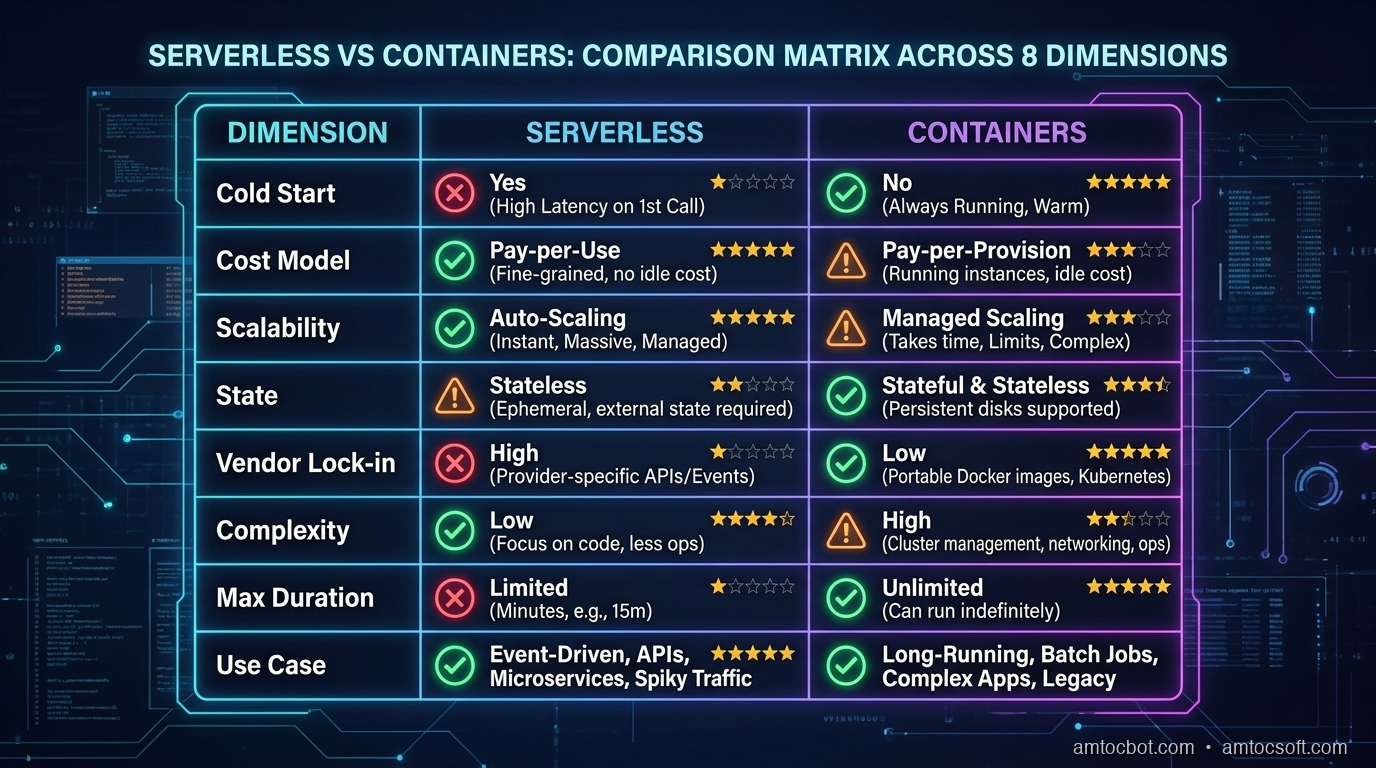
Comparison matrix: Serverless vs Containers across 8 key dimensions
Dimension Lambda/Serverless ECS Fargate/Containers Hybrid
Cold start latency 80-3500ms (runtime-dependent) 5-45s (one-time per instance) Low for steady traffic
Cost at low volume Excellent (pay-per-invocation) Higher (minimum instance floor) Good
Cost at high sustained volume Can exceed containers Excellent Optimal
Operational complexity Low Medium Medium-High
Developer experience Simple deploys Dockerfile + orchestration More moving parts
Max execution time 15 minutes Unlimited Unlimited
Stateful workloads Difficult Native Best of both
Observability Harder to trace Standard APM applies Requires trace propagation
Auto-scaling Native, instant Seconds-to-minutes Native per layer

Conclusion

The serverless-vs-containers debate is over. Both won — in different places.

The engineering work in 2026 is less "which one" and more "where exactly do you draw the line." That requires understanding the actual mechanics (Firecracker cold starts, Fargate scheduling, database connection pooling), running the cost math for your specific load shape, and designing the observability layer to stitch the two worlds together before you're debugging at 2am.

The fintech team's story isn't unusual. Most teams that commit hard to one model eventually hit its limits. The teams building reliable, cost-efficient systems in 2026 are the ones who defined the boundary deliberately, not by accident.

Start with the decision framework above. Run the benchmark numbers for your workload. And if you're building the hybrid, do the trace propagation work from day one — retrofitting observability into a Lambda + Fargate architecture after it's in production is a miserable experience I'd spare anyone.


Sources

  1. AWS Lambda — SnapStart documentation and performance benchmarks — AWS, 2026
  2. Firecracker: Lightweight Virtualization for Serverless Applications — NSDI '20 paper — Agache et al., USENIX 2020
  3. Amazon ECS + KEDA autoscaling patterns — AWS Containers Blog, 2025
  4. OpenTelemetry W3C Trace Context — Trace Context Level 1 spec — W3C, 2021
  5. RDS Proxy performance benchmarks — AWS, 2026

About the Author

Toc Am

Founder of AmtocSoft. Writing practical deep-dives on AI engineering, cloud architecture, and developer tooling. Previously built backend systems at scale. Reviews every post published under this byline.

LinkedIn X / Twitter

Published: 2026-04-19 · Written with AI assistance, reviewed by Toc Am.

Get These In Your Inbox

Weekly deep-dives on AI engineering, no fluff. Join the newsletter →

Subscribe (free)

Or grab the book ($39, ~100 pages) · Buy me a coffee

Buy Me a Coffee · 🔔 YouTube · 💼 LinkedIn · 🐦 X/Twitter

Thursday, April 16, 2026

Serverless Architecture in 2026: Lambda, Cold Starts, and When Not to Go Serverless

Hero: Serverless function invocation timeline with cold start vs warm start comparison

Serverless means different things in different contexts. In this guide it means: Functions as a Service (FaaS) — AWS Lambda, Google Cloud Functions, Azure Functions — where you deploy code without managing servers, and pay per invocation rather than for idle capacity.

The pitch is compelling: no servers to manage, automatic scaling from zero to millions of invocations, and you pay only when code runs. The reality is more nuanced: cold starts add unpredictable latency, stateless execution requires careful design, and the cost model only wins under specific traffic patterns. Understanding both the benefits and the limits is the skill.

The Problem: Servers You Don't Need 24/7

The classic case for serverless: a webhook handler. Your payment processor sends a webhook on every transaction. Traffic pattern: 0 webhooks per second for hours, then 50/second for a few minutes after a batch payment run, then back to 0.

With a traditional server: you provision for peak capacity (50/s). It idles at 0 req/s for most of the day. You pay for it regardless.

With Lambda: the function runs only during the burst. You pay for ~50ms × 50 invocations × N burst periods. For intermittent workloads, the cost difference is 10-100×.

But the same serverless function handling a steady 1,000 req/s 24/7 is often more expensive than a well-sized container — Lambda pricing doesn't have the per-compute-hour economies of sustained workloads.

xychart-beta title "Serverless vs Container Cost by Request Volume" x-axis ["100 req/day", "10K req/day", "1M req/day", "100M req/day"] y-axis "Monthly Cost ($)" 0 --> 500 line "Lambda" [0, 0, 5, 180] line "Container (t3.small)" [15, 15, 15, 15]

The crossover point depends on function duration and memory, but roughly: Lambda wins below ~5M invocations/month for most workloads. Above that, containers are usually cheaper.

The Serverless Landscape in 2026

AWS Lambda remains the market leader, but the landscape has diversified:

Platform Cold Start Max Duration Languages Standout Feature
AWS Lambda 100ms-3s 15 min 15+ Deepest AWS integration
Google Cloud Functions 80-2000ms 60 min 11 Best BigQuery/GCP integration
Azure Functions 100ms-5s Unlimited (Premium) 10 .NET ecosystem, Durable Functions
Cloudflare Workers 0-5ms 30s JS/TS/WASM Edge-native, 0.1ms starts
Vercel Functions 50-300ms 5-300s JS/TS/Python Best DX for frontend-adjacent APIs

Cloudflare Workers deserve special mention: they use V8 isolates (not containers), which start in under 5ms with no cold start penalty after initial load. The trade-off: Workers run at the edge without VPC access, limited to 128MB memory, and JavaScript/TypeScript/WASM only. They're the right choice for edge logic, not heavy compute.

For most backend workloads, AWS Lambda with Python or Node.js remains the default choice — the tooling (SAM, CDK, Lambda Powertools), integrations (SQS, EventBridge, API Gateway), and maturity of the ecosystem are unmatched.

How It Works: Lambda Execution Model

When a Lambda function is invoked:

  1. Cold start (first invocation, or after idle): AWS provisions a new execution environment, downloads your code package, starts the runtime, runs your initialization code. Takes 100ms-3s depending on runtime, package size, and VPC configuration.

  2. Warm invocation: An existing environment handles the request. Your handler function runs. Takes 1-50ms for lightweight functions.

  3. Concurrent invocations: Each simultaneous request gets its own execution environment. 100 simultaneous requests = 100 environments (with potential cold starts on each).

The execution environment persists between warm invocations. This is the critical design insight: anything initialized outside your handler function — database connections, SDK clients, cached config — persists across warm invocations.

import boto3
import psycopg2
import os

# OUTSIDE the handler: initialized once per cold start, reused across warm invocations
db_connection = None
secrets_client = boto3.client('secretsmanager')

def get_db_connection():
    """Lazy connection with reuse across warm invocations."""
    global db_connection
    if db_connection is None or db_connection.closed:
        secret = secrets_client.get_secret_value(SecretId=os.environ['DB_SECRET_ARN'])
        db_url = secret['SecretString']
        db_connection = psycopg2.connect(db_url)
    return db_connection

# INSIDE the handler: runs on every invocation
def handler(event, context):
    conn = get_db_connection()  # Reuses connection if warm
    with conn.cursor() as cur:
        cur.execute("SELECT id, amount FROM orders WHERE id = %s", (event['order_id'],))
        order = cur.fetchone()

    return {
        "statusCode": 200,
        "body": {"id": order[0], "amount": order[1]}
    }

Implementation: Production Lambda Patterns

Minimizing Cold Start Latency

Cold starts are the primary Lambda complaint. The levers:

# 1. Package size: smaller deployment = faster cold start
#    Target: < 5MB for Python, < 10MB for Node.js, < 50MB for Java
# 
# Use Lambda Layers for large dependencies:
# Layer: numpy, pandas, scipy (unchanged across deploys)
# Function code: only your business logic (fast to update)

# 2. Runtime choice: cold start ranking (fastest → slowest)
#    Python 3.12 / Node.js 22: 100-300ms
#    Go (provided.al2023): 50-150ms  ← fastest
#    Java 21 (SnapStart enabled): 100-300ms (with SnapStart)
#    Java 21 (no SnapStart): 500-3000ms

# 3. Provisioned concurrency: pre-warm N execution environments
#    Cost: you pay for the reserved environments even at 0 req/s
#    Use for: latency-sensitive functions where cold starts are unacceptable

# aws lambda put-provisioned-concurrency-config \
#   --function-name my-api \
#   --qualifier PROD \
#   --provisioned-concurrent-executions 10

# 4. Memory allocation affects CPU and cold start time
#    Higher memory = more CPU = faster initialization
#    1024MB often runs faster overall than 256MB despite being "more"
#    Use AWS Lambda Power Tuning to find the optimal memory setting

SAM / CDK: Infrastructure as Code for Lambda

Don't deploy Lambda functions manually. Use AWS SAM for Lambda-centric projects or AWS CDK for complex multi-service applications:

# template.yaml (AWS SAM)
AWSTemplateFormatVersion: '2010-09-09'
Transform: AWS::Serverless-2016-10-31

Globals:
  Function:
    Runtime: python3.12
    MemorySize: 512
    Timeout: 30
    Environment:
      Variables:
        DB_SECRET_ARN: !Ref DatabaseSecret
    Layers:
      - !Ref DependenciesLayer
    Tracing: Active  # X-Ray tracing enabled on all functions

Resources:
  OrdersFunction:
    Type: AWS::Serverless::Function
    Properties:
      Handler: orders.handler
      CodeUri: src/orders/
      Description: Handles order creation and retrieval
      Events:
        CreateOrder:
          Type: Api
          Properties:
            Path: /orders
            Method: POST
        GetOrder:
          Type: Api
          Properties:
            Path: /orders/{orderId}
            Method: GET
      Policies:
        - Version: "2012-10-17"
          Statement:
            - Effect: Allow
              Action: secretsmanager:GetSecretValue
              Resource: !Ref DatabaseSecret
      AutoPublishAlias: PROD
      DeploymentPreference:
        Type: Canary10Percent10Minutes  # 10% traffic for 10 minutes, then 100%
        Alarms:
          - !Ref OrdersErrorRateAlarm  # Rollback if error rate spikes

  DependenciesLayer:
    Type: AWS::Serverless::LayerVersion
    Properties:
      LayerName: python-dependencies
      ContentUri: dependencies/
      CompatibleRuntimes:
        - python3.12
      RetentionPolicy: Retain
    Metadata:
      BuildMethod: python3.12

  DatabaseSecret:
    Type: AWS::SecretsManager::Secret
    Properties:
      GenerateSecretString:
        SecretStringTemplate: '{"username": "orders_app"}'
        GenerateStringKey: "password"
        PasswordLength: 32

  OrdersErrorRateAlarm:
    Type: AWS::CloudWatch::Alarm
    Properties:
      MetricName: Errors
      Namespace: AWS/Lambda
      Statistic: Sum
      Period: 60
      EvaluationPeriods: 2
      Threshold: 10
      ComparisonOperator: GreaterThanThreshold
# Build and deploy
sam build
sam deploy --guided  # Interactive first deploy
sam deploy           # Subsequent deploys use saved config

Step Functions for Multi-Step Workflows

Lambda's 15-minute timeout and stateless model make it unsuitable for long-running workflows. Step Functions coordinate multiple Lambda functions with state persistence, retry logic, and error handling:

{
  "Comment": "Order fulfillment workflow",
  "StartAt": "ValidateOrder",
  "States": {
    "ValidateOrder": {
      "Type": "Task",
      "Resource": "arn:aws:lambda:us-east-1:123456789:function:validate-order",
      "Next": "ChargePayment",
      "Retry": [
        {
          "ErrorEquals": ["Lambda.ServiceException"],
          "IntervalSeconds": 2,
          "MaxAttempts": 3,
          "BackoffRate": 2
        }
      ],
      "Catch": [
        {
          "ErrorEquals": ["ValidationError"],
          "Next": "NotifyCustomerFailure"
        }
      ]
    },
    "ChargePayment": {
      "Type": "Task",
      "Resource": "arn:aws:lambda:us-east-1:123456789:function:charge-payment",
      "Next": "FulfillOrder"
    },
    "FulfillOrder": {
      "Type": "Task",
      "Resource": "arn:aws:lambda:us-east-1:123456789:function:fulfill-order",
      "Next": "SendConfirmation"
    },
    "SendConfirmation": {
      "Type": "Task",
      "Resource": "arn:aws:lambda:us-east-1:123456789:function:send-confirmation",
      "End": true
    },
    "NotifyCustomerFailure": {
      "Type": "Task",
      "Resource": "arn:aws:lambda:us-east-1:123456789:function:notify-failure",
      "End": true
    }
  }
}

Each Lambda function handles one step. Step Functions manages the state between them — no database polling, no custom orchestration code. Retry logic, parallel execution, and error branching are all in the state machine definition.

Event-Driven Serverless: SQS, SNS, and EventBridge

Lambda's killer integration is event-driven processing. Instead of polling, events trigger Lambda directly:

flowchart LR A[API Gateway\nHTTP Request] --> B[Lambda\norder-handler] C[S3\nFile Upload] --> D[Lambda\nimage-processor] E[SQS Queue\norder-events] --> F[Lambda\norder-fulfillment\nBatch size: 10] G[EventBridge\nScheduled Rule] --> H[Lambda\nnightly-report] I[DynamoDB Stream\nchanged records] --> J[Lambda\nchange-processor] style B fill:#f59e0b,color:#fff style D fill:#f59e0b,color:#fff style F fill:#f59e0b,color:#fff style H fill:#f59e0b,color:#fff style J fill:#f59e0b,color:#fff

SQS → Lambda is the most common pattern for reliable async processing. Lambda polls the queue, processes messages in batches, and only deletes them on success:

def handler(event, context):
    """
    SQS trigger: Lambda receives a batch of messages.
    Failed messages can be sent to a Dead Letter Queue.
    """
    failed_message_ids = []

    for record in event['Records']:
        message_id = record['messageId']
        try:
            body = json.loads(record['body'])
            process_order(body['order_id'])
        except Exception as e:
            logger.error(f"Failed to process {message_id}: {e}")
            # Report failure — Lambda won't delete this message
            failed_message_ids.append({"itemIdentifier": message_id})

    # Return failed message IDs — they'll be retried or sent to DLQ
    return {"batchItemFailures": [{"itemIdentifier": mid} for mid in failed_message_ids]}

EventBridge enables event-driven architectures where services emit events without coupling to consumers:

import boto3

events_client = boto3.client('events')

def emit_order_created(order: dict):
    """Publish an event to EventBridge — subscribers are decoupled."""
    events_client.put_events(Entries=[{
        'Source': 'myapp.orders',
        'DetailType': 'OrderCreated',
        'Detail': json.dumps({
            'order_id': order['id'],
            'customer_id': order['customer_id'],
            'amount': order['amount'],
        }),
        'EventBusName': 'myapp-events',
    }])
    # Downstream: inventory-service Lambda, notification Lambda, 
    # analytics Lambda all subscribe independently

EventBridge routing rules target multiple Lambda functions for the same event. Adding a new subscriber (e.g., a fraud detection service) doesn't require changing the order service.

Lambda@Edge: Functions at the CDN Layer

Lambda@Edge runs Lambda functions at CloudFront edge locations — 400+ points of presence worldwide. Latency: 1-5ms from the CDN, not a regional data center.

Use cases:
- Auth at the edge: Verify JWT before CloudFront forwards the request to origin
- A/B testing: Redirect traffic based on cookies without touching origin
- Request/response manipulation: Add headers, rewrite URLs, compress responses

# Lambda@Edge: verify JWT at CloudFront (runs at CDN edge, not in your VPC)
import jwt
import os

PUBLIC_KEY = os.environ['JWT_PUBLIC_KEY']

def handler(event, context):
    request = event['Records'][0]['cf']['request']
    headers = request.get('headers', {})

    # Check Authorization header
    auth_header = headers.get('authorization', [{}])[0].get('value', '')

    if not auth_header.startswith('Bearer '):
        return {
            'status': '401',
            'statusDescription': 'Unauthorized',
            'body': json.dumps({'error': 'Missing token'}),
        }

    token = auth_header[7:]

    try:
        jwt.decode(token, PUBLIC_KEY, algorithms=['RS256'])
        return request  # Valid token — pass through to origin
    except jwt.InvalidTokenError:
        return {
            'status': '401',
            'statusDescription': 'Unauthorized',
            'body': json.dumps({'error': 'Invalid token'}),
        }

Lambda@Edge has stricter limits than regular Lambda: 1MB deployment package, 128MB memory, 5-second timeout for viewer requests. It's purpose-built for request/response manipulation at the edge, not general-purpose compute.

When Serverless Is the Wrong Choice

flowchart TD A{Evaluate serverless fit} A --> B{Traffic pattern?} B -- Spiky/intermittent --> C[✅ Good fit: Lambda] B -- Steady high volume --> D[❌ Consider containers] A --> E{Latency requirements?} E -- p99 < 50ms required --> F[❌ Cold starts may violate SLO\nUse provisioned concurrency or containers] E -- p99 > 200ms acceptable --> G[✅ Good fit: Lambda] A --> H{Long-running processes?} H -- Yes > 15 min --> I[❌ Lambda not suitable\nUse ECS/Fargate or EC2] H -- No < 15 min --> J[✅ OK with Step Functions] A --> K{Persistent connections?} K -- WebSockets, streaming --> L[❌ Use containers or API Gateway WebSocket] K -- Request/response only --> M[✅ Lambda] style C fill:#22c55e,color:#fff style D fill:#ef4444,color:#fff style F fill:#ef4444,color:#fff style I fill:#ef4444,color:#fff

Don't use Lambda for:
- APIs requiring < 50ms p99 latency without paying for provisioned concurrency
- Workloads running at high concurrency 24/7 (container cost wins)
- Long-running background jobs > 15 minutes
- Applications that require persistent TCP connections (gaming, real-time collab)
- High-memory compute (Lambda max: 10GB — ECS can use much more)

Do use Lambda for:
- Webhook handlers with variable/intermittent traffic
- Scheduled batch jobs (cron → Lambda via EventBridge)
- Event-driven processing (S3 uploads, DynamoDB streams, SQS queue processing)
- API backends with unpredictable or bursty traffic
- Integration glue between services

Testing Lambda Functions Locally

Lambda functions are just functions — they're testable without deploying to AWS:

# orders.py
def handler(event, context):
    order_id = event['pathParameters']['orderId']
    order = get_order(order_id)
    return {"statusCode": 200, "body": json.dumps(order)}

# test_orders.py
import pytest
from unittest.mock import patch, MagicMock

def make_api_event(order_id: str) -> dict:
    """Create a mock API Gateway proxy event."""
    return {
        "httpMethod": "GET",
        "pathParameters": {"orderId": order_id},
        "headers": {"Authorization": "Bearer test-token"},
        "requestContext": {"identity": {"sourceIp": "127.0.0.1"}},
    }

class MockContext:
    """Minimal mock of Lambda context object."""
    function_name = "test-orders"
    memory_limit_in_mb = 512
    invoked_function_arn = "arn:aws:lambda:us-east-1:123:function:test"
    aws_request_id = "test-request-id"

@patch('orders.get_order')
def test_handler_returns_order(mock_get_order):
    mock_get_order.return_value = {"id": "ord_123", "amount": 4999}

    response = handler(make_api_event("ord_123"), MockContext())

    assert response["statusCode"] == 200
    body = json.loads(response["body"])
    assert body["id"] == "ord_123"
    mock_get_order.assert_called_once_with("ord_123")

@patch('orders.get_order')
def test_handler_returns_404_for_missing_order(mock_get_order):
    mock_get_order.return_value = None

    response = handler(make_api_event("nonexistent"), MockContext())

    assert response["statusCode"] == 404

For end-to-end local testing, AWS SAM provides sam local invoke and sam local start-api — runs your Lambda code in a Docker container that simulates the Lambda runtime:

# Invoke a single function
sam local invoke OrdersFunction --event events/get-order.json

# Start API Gateway locally (watches for code changes)
sam local start-api --warm-containers EAGER
# → http://127.0.0.1:3000/orders/ord_123

The local API Gateway supports hot-reloading, environment variable injection from samconfig.toml, and full request/response lifecycle including authorizers. Most Lambda functions can be developed and tested entirely locally with this setup.

Lambda Destinations and Async Invocations

When Lambda is invoked asynchronously (from SQS, S3, or EventBridge), it retries failed invocations up to 3 times by default. After all retries, the event is dropped — unless you configure a Dead Letter Queue or Lambda Destinations.

# Lambda Destinations: route success/failure to different targets
# Configured in the function's async invocation configuration
resource "aws_lambda_function_event_invoke_config" "order_processor" {
  function_name = aws_lambda_function.order_processor.function_name

  maximum_retry_attempts     = 2      # 2 retries after first failure
  maximum_event_age_in_seconds = 300  # Give up after 5 minutes

  destination_config {
    on_success {
      destination = aws_sqs_queue.order_success.arn  # On success → success queue
    }
    on_failure {
      destination = aws_sqs_queue.order_dlq.arn  # On failure → dead letter queue
    }
  }
}

The Dead Letter Queue holds failed events for inspection and reprocessing. Without it, failed async invocations are silently dropped — the most insidious production failure mode in serverless architectures.

Monitor your DLQ depth as a key operational metric. A non-empty DLQ means your function failed to process events that it should have. Set a CloudWatch alarm on ApproximateNumberOfMessagesVisible > 0 on the DLQ.

Production Considerations

Observability: The Lambda Blindspot

Lambda functions disappear after execution. Without proper observability, debugging production issues is nearly impossible:

import aws_lambda_powertools as powertools
from aws_lambda_powertools import Logger, Tracer, Metrics
from aws_lambda_powertools.metrics import MetricUnit

logger = Logger(service="orders")
tracer = Tracer(service="orders")
metrics = Metrics(namespace="OrdersService")

@tracer.capture_lambda_handler
@logger.inject_lambda_context(log_event=True)
@metrics.log_metrics(capture_cold_start_metric=True)  # Tracks cold start rate
def handler(event, context):
    order_id = event['pathParameters']['orderId']

    logger.info("Fetching order", extra={"order_id": order_id})

    with tracer.capture_method():
        order = get_order(order_id)

    metrics.add_metric(name="OrdersFetched", unit=MetricUnit.Count, value=1)

    return {"statusCode": 200, "body": order.json()}

AWS Lambda Powertools (Python/Java/TypeScript/Kotlin) adds structured logging, X-Ray tracing, and CloudWatch metrics with minimal code. Cold start metrics from Powertools let you measure cold start frequency and duration in production.

Concurrency Limits and Throttling

Lambda has a soft account limit of 1,000 concurrent executions. An unexpected traffic spike can hit this limit and start throttling requests. Set reserved concurrency on critical functions to prevent one function from consuming all available concurrency:

resource "aws_lambda_function_event_invoke_config" "orders" {
  function_name = aws_lambda_function.orders.function_name

  maximum_retry_attempts = 1  # Don't retry on errors (idempotency managed upstream)
}

resource "aws_lambda_provisioned_concurrency_config" "orders_prod" {
  function_name                  = aws_lambda_function.orders.function_name
  qualifier                      = aws_lambda_alias.orders_prod.name
  provisioned_concurrent_executions = 10  # Always warm for low-latency
}

Cost Optimization

Lambda's pricing model rewards optimization. Memory allocation is the primary lever — higher memory gives more CPU, which can reduce execution time enough to lower total cost:

# AWS Lambda Power Tuning tool finds the optimal memory setting
# Runs your function at different memory levels, measures cost×time

# Typical results for a Python API handler:
# Memory | Duration | Cost/1M invocations
# 128MB  | 850ms    | $1.42  ← slow
# 256MB  | 430ms    | $1.44  ← similar cost, much faster  
# 512MB  | 180ms    | $1.51  ← slightly more expensive, fastest
# 1024MB | 175ms    | $2.95  ← no speed gain, 2× cost

# Optimal: 256MB — 2× faster than 128MB at essentially the same cost

Other cost reduction strategies:
- Function URLs instead of API Gateway for simple endpoints: API Gateway adds $3.50/million requests on top of Lambda cost; Function URLs are free
- Graviton2 processors (arm64 architecture): 20% cheaper than x86, often faster for Python/Node workloads; change Architectures: [arm64] in SAM template
- Right-size timeouts: default 3 seconds for functions that rarely hit 200ms means you pay for 800ms of idle — set timeout to 2× your p99 latency

Conclusion

Serverless with Lambda is a strong tool for specific workloads: event-driven processing, intermittent traffic, scheduled jobs, and webhook handlers. It delivers on its promise of zero operational overhead and pay-per-use pricing for these patterns.

For steady, high-throughput APIs or latency-sensitive workloads, containers on ECS or Kubernetes are still the right answer. The decision framework is traffic pattern, latency requirements, and cost at your specific scale — not ideology.

The maturity of serverless tooling in 2026 (Powertools, SAM, CDK, Step Functions) means operational complexity is much lower than it was five years ago. Structured logging with Lambda Powertools, X-Ray tracing, and CloudWatch Insights queries give observability comparable to containerized services. The visibility gap that made early Lambda debugging painful is largely closed for teams that instrument correctly from the start. Cold starts remain the key limitation; provisioned concurrency eliminates them at a cost that's worth it for latency-sensitive functions. For the typical webhook handler, scheduled job, or event processor, cold starts are irrelevant — latency requirements are measured in seconds, not milliseconds. Invest in provisioned concurrency only for customer-facing APIs with strict p99 SLOs where cold start latency demonstrably violates your service level objectives.


Sources
About the Author

Toc Am

Founder of AmtocSoft. Writing practical deep-dives on AI engineering, cloud architecture, and developer tooling. Previously built backend systems at scale. Reviews every post published under this byline.

LinkedIn X / Twitter

Published: 2026-05-22 · Written with AI assistance, reviewed by Toc Am.

Get These In Your Inbox

Weekly deep-dives on AI engineering, no fluff. Join the newsletter →

Subscribe (free)

Or grab the book ($39, ~100 pages) · Buy me a coffee

Buy Me a Coffee · 🔔 YouTube · 💼 LinkedIn · 🐦 X/Twitter

Bigger Is Not the Same as Better. The Job That Moved Is the Phone, Not the Lab.

Bigger is a plan. The phone is the receipt. The brief for this cycle is a question: does bigger always mean better in AI? The 2026 answer i...