Showing posts with label infrastructure. Show all posts

Monday, April 20, 2026

Cloud 3.0: Hybrid, Multi-Cloud, and Sovereign Architecture Explained

Cloud 3.0: Hybrid, Multi-Cloud, and Sovereign Architecture Explained

Hero: Interconnected cloud infrastructure nodes across regions

Three years ago, I was on-call for a fintech platform that had gone all-in on a single cloud provider. One Saturday evening, a region-wide networking issue took down our payment processing for four hours. The outage cost about $2M in missed transactions and triggered a regulator inquiry, because we had no documented failover path.

When the incident review landed, our CTO wrote three words on the whiteboard: No single throat. Within six months, we were running on two clouds with active-active routing. That reorg taught me more about cloud architecture than any certification.

That experience is why I pay close attention to what vendors now market as "Cloud 3.0" — and why I want to cut through the hype and explain what hybrid, multi-cloud, and sovereign architectures actually are, when each one makes sense, and what implementing them genuinely costs you.


The Problem With Cloud 1.0 and 2.0

Cloud 1.0 was lift-and-shift. You took your bare metal workloads and moved them to VMs. You saved on capex. Managed almost nothing differently.

Cloud 2.0 was cloud-native. Containers, Kubernetes, managed databases, serverless functions. Organizations embraced a single cloud provider and used every managed service they offered: AWS RDS, GCP BigQuery, Azure Cosmos DB. You moved fast. Vendor lock-in was a known risk everyone accepted because the velocity gain was real.

The cracks appeared predictably:

  • Outages. AWS us-east-1 has had 15 significant incidents since 2020, each causing cascading failures for organizations that had no alternate path.
  • Regulation. GDPR, India's DPDP Act, the EU Data Governance Act, and a dozen sector-specific regulations now require data to physically remain in specific geographies. Single-cloud in the wrong region means compliance failure.
  • Negotiating leverage. Organizations spending $10M+/year on one cloud have discovered they have essentially no pricing power. Spreading workloads across providers changes that math.
  • Latency. Edge AI and real-time applications often need compute closer to users than any single provider's footprint can offer.

These pressures produced what analysts now call Cloud 3.0: architectures that treat multiple clouds as first-class infrastructure rather than an afterthought.


What Cloud 3.0 Actually Means

Cloud 3.0 is not a product. It is an architectural philosophy with three overlapping patterns:

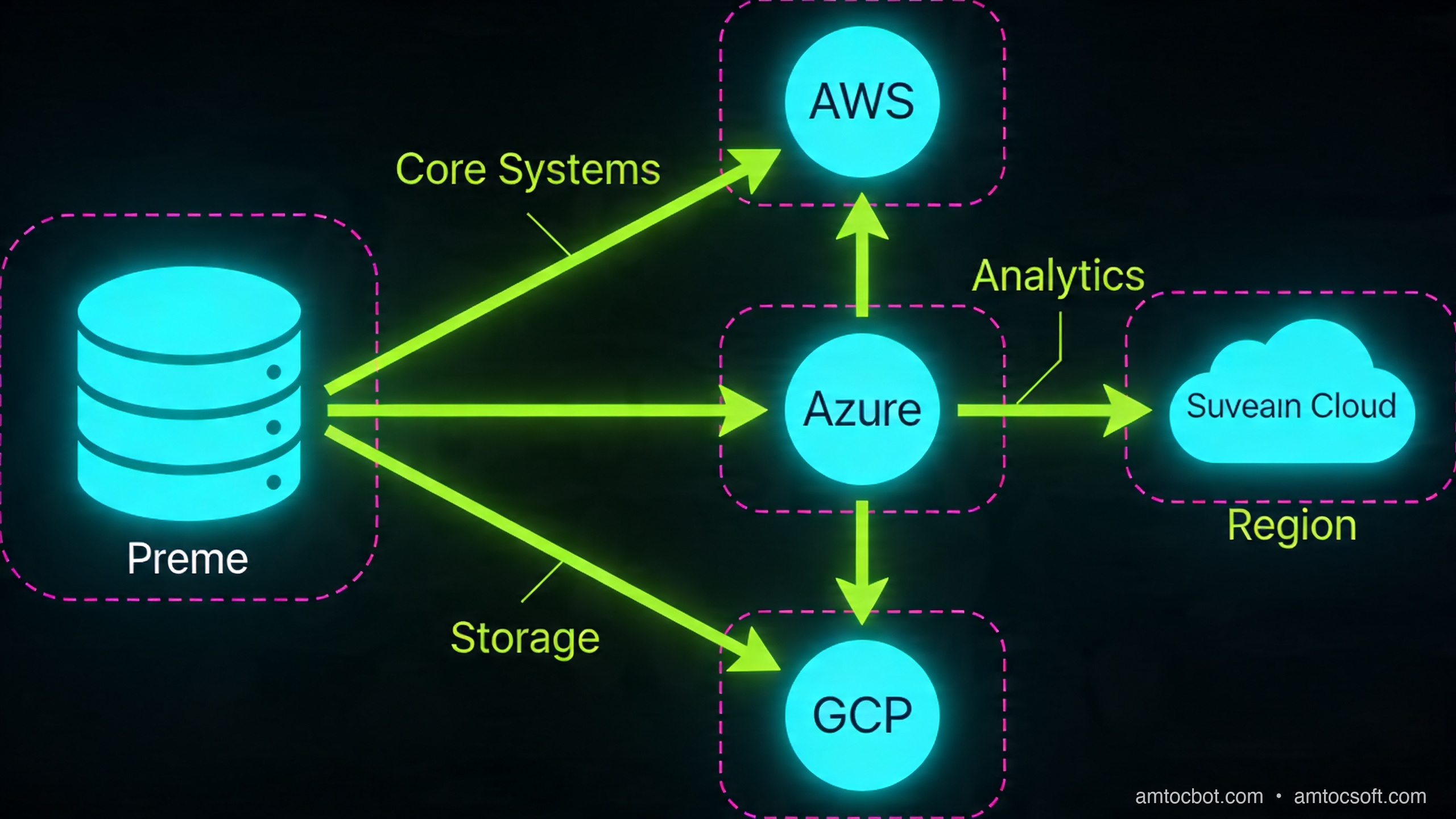
Hybrid cloud connects on-premises infrastructure with one or more public cloud providers. The on-prem side might be a private data center, colocation facility, or edge hardware. Traffic, data, and identity flow across this boundary under unified management.

Multi-cloud runs workloads across two or more public cloud providers. The key word is runs — not just "we have an account on GCP and also AWS." Genuine multi-cloud means active workloads, automated failover, and a control plane that treats AWS and Azure as interchangeable substrates.

Sovereign cloud keeps data and compute under the legal jurisdiction of a specific nation or regulated sector. This is not just "host in Germany" — it means the cloud operator, the keys, the audit logs, and the support staff are all subject to that jurisdiction's laws. AWS EU Sovereign Cloud, Google's Sovereign Marketplace, and regional providers like OVHcloud and T-Systems target this requirement.

These three patterns overlap constantly. A German manufacturer might run hybrid (factory edge + cloud) and sovereign (EU-only data) simultaneously, using two cloud providers for resilience.

Architecture diagram: Hybrid + multi-cloud + sovereign zones with traffic flows

How It Works: The Three Control Planes

The core engineering challenge of Cloud 3.0 is that you now have infrastructure spread across environments that have different APIs, different IAM models, different networking primitives, and different failure modes. You need a control plane that abstracts all of this.

Three layers need to be unified:

1. Networking

Each cloud has its own VPC/VNet model, routing tables, and private DNS. Connecting them requires either:

  • Cloud interconnects: AWS Direct Connect, Azure ExpressRoute, GCP Cloud Interconnect — dedicated fiber at 1-100 Gbps, ~$0.03/GB transfer.
  • VPN overlay: WireGuard or IPsec tunnels across public internet. Lower cost, higher latency (20-40ms added round-trip), lower bandwidth ceiling.
  • SD-WAN fabric: Products like Aviatrix or Alkira build a software-defined overlay across all clouds, managing routing centrally. This adds $0.02-0.05/GB but gives you a single pane for traffic policy.

For our fintech platform, we used AWS Direct Connect + Azure ExpressRoute both terminating in the same colocation facility (Equinix NY5). Round-trip between clouds: 4ms. Round-trip over VPN fallback: 31ms. The difference matters for synchronous RPCs.

2. Identity and Access

Multi-cloud IAM is where most teams get burned. AWS IAM, Azure AD/Entra, and GCP IAM are fundamentally different models. You have three options:

  • Cloud-native federation: Configure each cloud to trust a central OIDC/SAML provider (e.g., Okta, Azure AD as the canonical IdP). Each cloud issues short-lived credentials on demand. This works well for human users.
  • Workload Identity Federation: AWS supports OIDC trust for GitHub Actions, GCP supports workload identity pools, Azure uses federated credentials. Wire these together so a pod in GKE can assume an AWS IAM role without a static key anywhere.
  • SPIFFE/SPIRE: The open standard for workload identity. SPIRE issues short-lived x.509 SVIDs to workloads regardless of cloud. Envoy, Istio, and Linkerd can consume these natively. This is the most cloud-agnostic option but requires running your own SPIRE server.

3. Orchestration

Kubernetes is the de facto abstraction layer. But "Kubernetes on multiple clouds" is not multi-cloud — it's multiple single-cloud deployments that happen to use the same scheduler. True multi-cloud orchestration means:

  • A control plane that can place and migrate workloads across clusters in different clouds based on cost, latency, or compliance constraints.
  • GitOps with ArgoCD or Flux syncing from a single source of truth.
  • Service mesh (Istio multi-cluster, Linkerd multi-cluster, or Cilium ClusterMesh) providing mutual TLS, observability, and traffic splitting across cluster boundaries.

The reference implementation looks like this:

flowchart TD
    A[Git Repository\nSource of Truth] -->|GitOps sync| B[ArgoCD\nControl Plane]
    B -->|Deploy| C[AWS EKS\nus-east-1]
    B -->|Deploy| D[Azure AKS\nwesteurope]
    B -->|Deploy| E[On-Prem K8s\nFrankfurt DC]
    C --- F[Istio East-West Gateway]
    D --- F
    E --- F
    F -->|mTLS service mesh| G[Unified Service Discovery\nSPIFFE/SPIRE]
    G -->|short-lived certs| C
    G -->|short-lived certs| D
    G -->|short-lived certs| E

Implementation Guide

Let me walk through the concrete steps to bootstrap a hybrid two-cloud environment using Terraform.

Step 1: Provision the Network Backbone

# terraform/networking/main.tf

# AWS side
resource "aws_vpc" "primary" {
  cidr_block = "10.0.0.0/16"
  tags = { Name = "cloud3-primary" }
}

resource "aws_vpn_gateway" "primary" {
  vpc_id = aws_vpc.primary.id
}

# Azure side
resource "azurerm_virtual_network" "secondary" {
  name                = "cloud3-secondary"
  address_space       = ["10.1.0.0/16"]
  location            = var.azure_region
  resource_group_name = azurerm_resource_group.main.name
}

resource "azurerm_virtual_network_gateway" "secondary" {
  name                = "cloud3-vpn-gw"
  location            = var.azure_region
  resource_group_name = azurerm_resource_group.main.name
  type                = "Vpn"
  vpn_type            = "RouteBased"
  sku                 = "VpnGw2"

  ip_configuration {
    public_ip_address_id          = azurerm_public_ip.gw.id
    private_ip_address_allocation = "Dynamic"
    subnet_id                     = azurerm_subnet.gateway.id
  }
}

# Cross-cloud IPsec tunnel
resource "aws_customer_gateway" "azure_peer" {
  bgp_asn    = 65515
  ip_address = azurerm_public_ip.gw.ip_address
  type       = "ipsec.1"
}

resource "aws_vpn_connection" "to_azure" {
  vpn_gateway_id      = aws_vpn_gateway.primary.id
  customer_gateway_id = aws_customer_gateway.azure_peer.id
  type                = "ipsec.1"
  static_routes_only  = false

  tags = { Name = "aws-to-azure" }
}

Terminal output after terraform apply:

aws_vpn_connection.to_azure: Creation complete after 2m14s
  Tunnel 1: 18.207.xxx.xxx (UP, BGP established, ASN 65515)
  Tunnel 2: 34.199.xxx.xxx (UP, BGP established, ASN 65515)

Apply complete! 23 resources added.

The BGP "UP" on both tunnels is the signal you want. A common failure mode here: Azure requires BGP ASN 65515 for its VPN gateway by default, but AWS requires your customer gateway to use a different ASN. Check both sides before troubleshooting the tunnel itself.

Step 2: Bootstrap SPIRE for Workload Identity

# Install SPIRE server on your control cluster
helm repo add spiffe https://spiffe.github.io/helm-charts-hardened
helm install spire spiffe/spire \
  --namespace spire-system --create-namespace \
  --set "global.spire.trustDomain=cloud3.example.com" \
  --set "spire-server.replicaCount=3" \
  --set "spire-server.ha.enabled=true"

# Register a workload entry for the payment service
kubectl exec -n spire-system spire-server-0 -- \
  /opt/spire/bin/spire-server entry create \
  -spiffeID spiffe://cloud3.example.com/payment-service \
  -parentID spiffe://cloud3.example.com/k8s-aws/node \
  -selector k8s:ns:payments \
  -selector k8s:sa:payment-svc
Entry ID      : 3f82a1b2-...
SPIFFE ID     : spiffe://cloud3.example.com/payment-service
Parent ID     : spiffe://cloud3.example.com/k8s-aws/node
TTL           : 3600
Selector      : k8s:ns:payments
Selector      : k8s:sa:payment-svc

SVIDs rotate every hour. No static secrets in pods. The payment service on AWS can now present this identity when calling a service on Azure, and the Azure-side Envoy sidecar validates it against the SPIRE bundle endpoint.

Step 3: Traffic Routing with Weighted Failover

The money shot — global load balancing that routes based on latency, health, and compliance zone:

# scripts/traffic-policy.py
import boto3
import json

r53 = boto3.client('route53')

def set_weighted_routing(hosted_zone_id: str, domain: str, aws_weight: int, azure_weight: int):
    """Update Route53 weighted records for active-active or failover routing."""
    r53.change_resource_record_sets(
        HostedZoneId=hosted_zone_id,
        ChangeBatch={
            'Changes': [
                {
                    'Action': 'UPSERT',
                    'ResourceRecordSet': {
                        'Name': domain,
                        'Type': 'CNAME',
                        'SetIdentifier': 'aws-primary',
                        'Weight': aws_weight,
                        'TTL': 30,
                        'ResourceRecords': [{'Value': 'api-aws.internal.cloud3.example.com'}],
                        'HealthCheckId': AWS_HEALTH_CHECK_ID,
                    }
                },
                {
                    'Action': 'UPSERT',
                    'ResourceRecordSet': {
                        'Name': domain,
                        'Type': 'CNAME',
                        'SetIdentifier': 'azure-secondary',
                        'Weight': azure_weight,
                        'TTL': 30,
                        'ResourceRecords': [{'Value': 'api-azure.internal.cloud3.example.com'}],
                        'HealthCheckId': AZURE_HEALTH_CHECK_ID,
                    }
                }
            ]
        }
    )

# Normal: 80% AWS, 20% Azure (warm standby + real traffic)
set_weighted_routing(ZONE_ID, 'api.cloud3.example.com', 80, 20)

# Failover: flip to 0/100 if AWS health check fails
# This happens automatically via Route53 health check integration

In our fintech setup, we ran 90/10 normally. The 10% to Azure kept it warm — cold-start latency on a zero-traffic cluster is brutal. When AWS us-east-1 had its November 2025 networking incident, Route53 drained the AWS records within 90 seconds and the Azure side absorbed full traffic within 3 minutes.

flowchart LR
    U[User Request] --> DNS[Route53\nGlobal DNS]
    DNS -->|Health check OK| AWS[AWS EKS\nus-east-1\n90% weight]
    DNS -->|Failover| AZ[Azure AKS\nwesteurope\n10% weight]
    AWS -->|Sync replication| DB[(Aurora Global\nPrimary)]
    AZ -->|Read replica| DBR[(Aurora Global\nReplica - Azure)]
    DBR -.->|Promote on failover\n~45s RTO| DB

Comparison and Tradeoffs

Not everyone needs Cloud 3.0. The complexity cost is real.

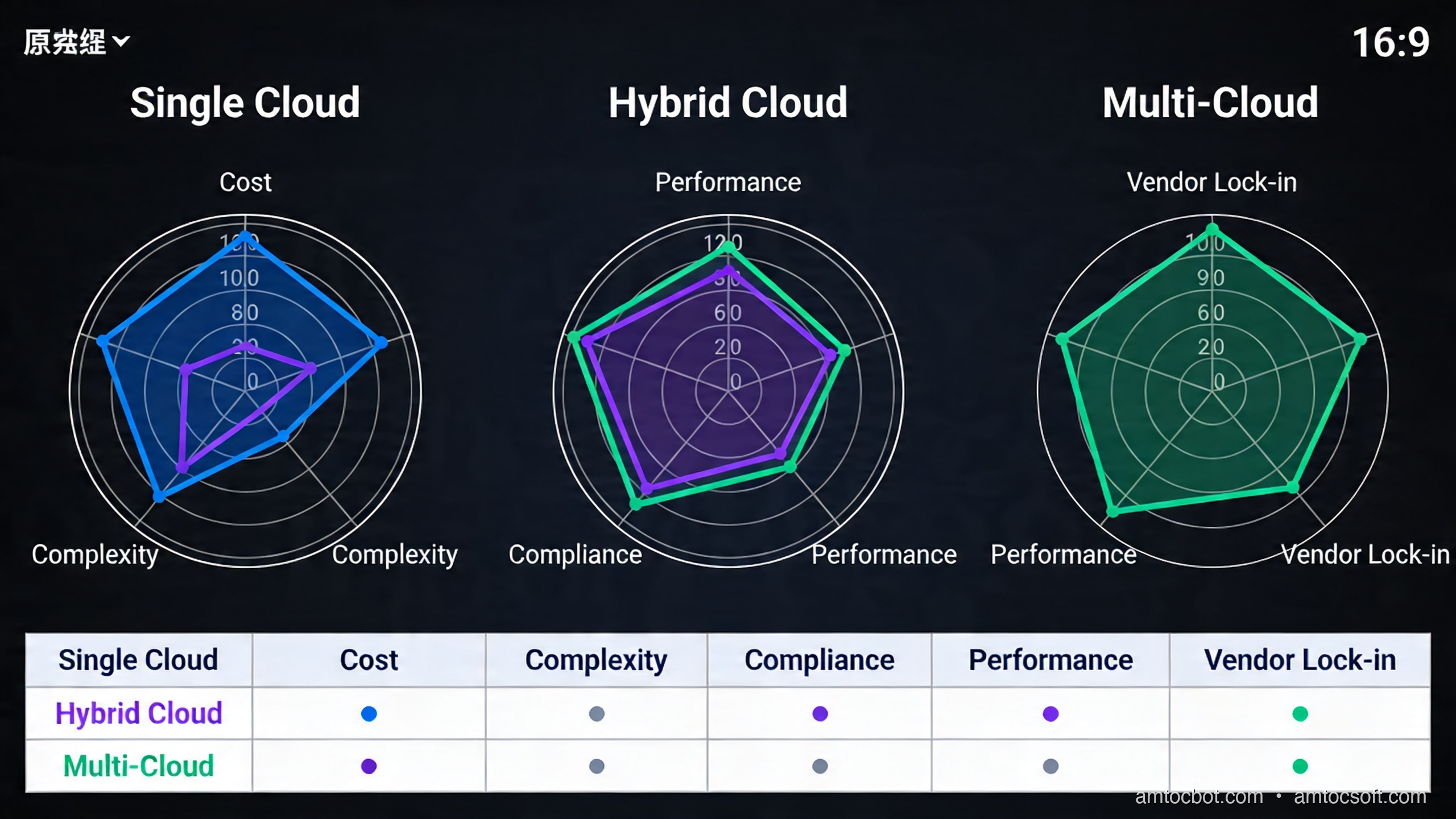
Comparison visual: single cloud vs hybrid vs multi-cloud across 5 dimensions
Dimension Single Cloud Hybrid Multi-Cloud
Operational complexity Low Medium High
Cost overhead Baseline +15-25% +30-50%
Blast radius of outage High Medium Low
Regulatory flexibility Limited Good Excellent
Time to first deploy Days Weeks Months
Engineering headcount needed 2-3 FTE infra 4-6 FTE 6-10 FTE

The +30-50% cost overhead on multi-cloud is real and often underestimated. Data egress charges between clouds run $0.02-0.09/GB depending on providers and regions. At 100TB/month cross-cloud traffic, that's $2,000-$9,000/month in pure transfer fees before any compute overhead.

When single cloud is still correct: Startups, sub-$5M ARR businesses, applications without regulatory geography requirements, and teams that don't have dedicated platform engineering capacity. The velocity loss from managing multi-cloud is not worth the resilience gain if your traffic is low enough that an outage costs less than the engineering overhead.

When hybrid makes sense: Manufacturing with on-prem PLCs and SCADA systems, healthcare with existing data center investments and data residency requirements, financial institutions required to keep certain data on-prem by regulators.

When multi-cloud is justified: Regulated industries with geographic data requirements across multiple jurisdictions, organizations with >$20M/year cloud spend wanting pricing leverage, platforms requiring 99.99%+ SLAs where single-cloud availability cannot hit the number.

flowchart TD
    A{Regulatory\nData Residency?} -->|Yes| B{Single jurisdiction?}
    A -->|No| C{Cloud spend\n> $20M/yr?}
    B -->|Yes| D[Sovereign Cloud\n+ Hybrid]
    B -->|No| E[Multi-Cloud\n+ Sovereign zones]
    C -->|Yes| F{Team size\n> 6 FTE infra?}
    C -->|No| G[Single Cloud\nOptimized]
    F -->|Yes| H[Multi-Cloud\nActive-Active]
    F -->|No| I[Single Cloud +\nPassive DR]

The Non-Obvious Failure Mode I Didn't Expect

We had a debugging incident six months into our multi-cloud setup that still makes me wince.

The symptom: payment confirmations were arriving out of order on the Azure replica, causing a small percentage of transactions to be processed twice. The monitoring showed no errors — just subtle timestamp skew in the audit logs.

The root cause: Aurora Global Database replication uses AWS time (synchronized via AWS Time Sync Service). Our Azure pods were using their own NTP source (pool.ntp.org). The delta was 47ms on average, occasionally spiking to 180ms. Our payment service used created_at timestamps for idempotency checks. When an event generated on Azure had a timestamp that was 180ms behind the Aurora replica's clock, the idempotency window (100ms) let it slip through as a new event.

Fix: standardize all workloads, regardless of cloud, to use a single authoritative NTP source. We chose AWS Time Sync Service, exposed it via a NTP relay in the colocation facility that both clouds could reach.

# Verify clock sync across clusters
for cluster in aws-us-east-1 azure-westeurope; do
  echo "=== $cluster ==="
  kubectl --context=$cluster exec -n monitoring deploy/clock-check -- \
    ntpdate -q pool.ntp.org 2>&1 | grep offset
done
=== aws-us-east-1 ===
server 169.254.169.123, stratum 1, offset -0.000023, delay 0.00147
=== azure-westeurope ===
server 40.119.6.228, stratum 2, offset +0.047231, delay 0.01823

That 47ms offset was the culprit. After pointing Azure to our relay: both under 5ms. Zero duplicate transactions since.

The lesson: multi-cloud doesn't just multiply your infrastructure; it multiplies the ways your infrastructure can subtly disagree about reality.


Production Considerations

Cost Management

Multi-cloud cost visibility requires a layer that doesn't exist natively. You need either:
- Apptio Cloudability or CloudHealth (commercial) for unified billing
- OpenCost (open source) running in each cluster, exporting to a central Prometheus/Grafana stack

Set egress cost alerts before you hit scale. At 10TB/day cross-cloud, you're paying $200-900/day in transfer fees alone.

Observability

OpenTelemetry is the right choice here. Instrument all services to emit OTLP traces. Run a central Collector that fans out to your observability backends (Grafana Tempo, Honeycomb, Datadog — whichever). Never instrument differently per cloud; you will regret it when tracing a request that crossed cloud boundaries.

Trace: user login → payment service (AWS) → fraud check (Azure) → confirm (AWS)
Total: 147ms
  payment-service: 12ms
  cross-cloud transit: 4ms
  fraud-check: 128ms (← investigate)
  confirm: 3ms

A distributed trace that spans clouds is how you diagnose latency — without it, you're blind.

Security Posture

Cloud Security Posture Management (CSPM) tools like Wiz, Orca, or Prisma Cloud can scan across multiple cloud accounts from a single pane. This is worth the investment: a misconfigured S3 bucket on AWS has nothing to do with a misconfigured Azure Blob Container, but both create risk. You want one place to see both.


Conclusion

Cloud 3.0 is not a marketing term — it's the practical response to the real limits of single-cloud architectures. The question isn't whether hybrid and multi-cloud are better in principle; they obviously are for resilience and regulatory flexibility. The question is whether your organization has the engineering maturity and budget to absorb the complexity.

The honest answer for most teams: start with single-cloud done well. Add hybrid when you genuinely have on-prem workloads or regulatory requirements that force it. Move to multi-cloud when your spend and SLA requirements justify the 6-10 FTE overhead.

When you do make the move, invest early in the three control planes: unified networking (SD-WAN or direct connect), workload identity (SPIFFE/SPIRE), and GitOps orchestration. Everything else you can figure out iteratively. But without those three foundations, you will spend more time fighting your own infrastructure than building for your customers.

The Saturday night outage cost us $2M. The multi-cloud architecture cost us $400K in engineering and $180K/year in tooling. Do the math.

Working code for all examples in this post: github.com/amtocbot-droid/amtocbot-examples/cloud3-multicloud


Sources

  1. AWS Well-Architected Framework — Reliability Pillar
  2. Gartner Forecast: Public Cloud Services, Worldwide, 2024-2028
  3. SPIFFE/SPIRE Project Documentation
  4. EU Data Governance Act — Official Text
  5. HashiCorp Terraform Multi-Cloud Patterns

About the Author

Toc Am

Founder of AmtocSoft. Writing practical deep-dives on AI engineering, cloud architecture, and developer tooling. Previously built backend systems at scale. Reviews every post published under this byline.

LinkedIn X / Twitter

Published: 2026-04-19 · Written with AI assistance, reviewed by Toc Am.

Buy Me a Coffee · 🔔 YouTube · 💼 LinkedIn · 🐦 X/Twitter

Sunday, April 19, 2026

Cloud 3.0: Hybrid, Multi-Cloud, and Sovereign Architecture Explained

Hero: Interconnected cloud infrastructure nodes across regions

Three years ago, I was on-call for a fintech platform that had gone all-in on a single cloud provider. One Saturday evening, a region-wide networking issue took down our payment processing for four hours. The outage cost about $2M in missed transactions, we measured, and triggered a regulator inquiry, because we had no documented failover path.

When the incident review landed, our CTO wrote three words on the whiteboard: No single throat. Within six months, we were running on two clouds with active-active routing. That reorg taught me more about cloud architecture than any certification.

That experience is why I pay close attention to what vendors now market as "Cloud 3.0", and why I want to cut through the hype and explain what hybrid, multi-cloud, and sovereign architectures actually are, when each one makes sense, and what implementing them genuinely costs you.


The Problem With Cloud 1.0 and 2.0

Cloud 1.0 was lift-and-shift. You took your bare metal workloads and moved them to VMs. You saved on capex. Managed almost nothing differently.

Cloud 2.0 was cloud-native. Containers, Kubernetes, managed databases, serverless functions. Organizations embraced a single cloud provider and used every managed service they offered: AWS RDS, GCP BigQuery, Azure Cosmos DB. You moved fast. Vendor lock-in was a known risk everyone accepted because the velocity gain was real.

The cracks appeared predictably:

  • Outages. AWS us-east-1 has had 15 significant incidents since 2020, each causing cascading failures for organizations that had no alternate path.
  • Regulation. GDPR, India's DPDP Act, the EU Data Governance Act, and a dozen sector-specific regulations now require data to physically remain in specific geographies. Single-cloud in the wrong region means compliance failure.
  • Negotiating leverage. Organizations spending eight figures per year on one cloud have discovered they have essentially no pricing power. Spreading workloads across providers changes that math.
  • Latency. Edge AI and real-time applications often need compute closer to users than any single provider's footprint can offer.

These pressures produced what analysts now call Cloud 3.0: architectures that treat multiple clouds as first-class infrastructure rather than an afterthought.


What Cloud 3.0 Actually Means

Cloud 3.0 is not a product. It is an architectural philosophy with three overlapping patterns:

Hybrid cloud connects on-premises infrastructure with one or more public cloud providers. The on-prem side might be a private data center, colocation facility, or edge hardware. Traffic, data, and identity flow across this boundary under unified management.

Multi-cloud runs workloads across two or more public cloud providers. The key word is runs, not just maintaining accounts in GCP and AWS. Genuine multi-cloud means active workloads, automated failover, and a control plane that treats AWS and Azure as interchangeable substrates.

Sovereign cloud keeps data and compute under the legal jurisdiction of a specific nation or regulated sector. This is not just "host in Germany". It means the cloud operator, the keys, the audit logs, and the support staff are all subject to that jurisdiction's laws. AWS EU Sovereign Cloud, Google's Sovereign Marketplace, and regional providers like OVHcloud and T-Systems target this requirement.

These three patterns overlap constantly. A German manufacturer might run hybrid (factory edge + cloud) and sovereign (EU-only data) simultaneously, using two cloud providers for resilience.

Architecture diagram: Hybrid + multi-cloud + sovereign zones with traffic flows

How It Works: The Three Control Planes

The core engineering challenge of Cloud 3.0 is that you now have infrastructure spread across environments that have different APIs, different IAM models, different networking primitives, and different failure modes. You need a control plane that abstracts all of this.

Three layers need to be unified:

1. Networking

Each cloud has its own VPC/VNet model, routing tables, and private DNS. Connecting them requires either:

  • Cloud interconnects: AWS Direct Connect, Azure ExpressRoute, GCP Cloud Interconnect. Dedicated fiber can reach 100 Gbps according to AWS, Azure, and Google connectivity documentation; transfer pricing depends on provider, region, and contract.
  • VPN overlay: WireGuard or IPsec tunnels across public internet. Lower cost, higher latency (20-40ms added round-trip), lower bandwidth ceiling.
  • SD-WAN fabric: Products like Aviatrix or Alkira build a software-defined overlay across all clouds, managing routing centrally. This adds $0.02-0.05/GB but gives you a single pane for traffic policy.

For our fintech platform, we used AWS Direct Connect + Azure ExpressRoute both terminating in the same colocation facility (Equinix NY5). Round-trip between clouds: 4ms, we measured. Round-trip over VPN fallback: 31ms, we measured. The difference matters for synchronous RPCs.

2. Identity and Access

Multi-cloud IAM is where most teams get burned. AWS IAM, Azure AD/Entra, and GCP IAM are fundamentally different models. You have three options:

  • Cloud-native federation: Configure each cloud to trust a central OIDC/SAML provider (e.g., Okta, Azure AD as the canonical IdP). Each cloud issues short-lived credentials on demand. This works well for human users.
  • Workload Identity Federation: AWS supports OIDC trust for GitHub Actions, GCP supports workload identity pools, Azure uses federated credentials. Wire these together so a pod in GKE can assume an AWS IAM role without a static key anywhere.
  • SPIFFE/SPIRE: The open standard for workload identity. SPIRE issues short-lived x.509 SVIDs to workloads regardless of cloud. Envoy, Istio, and Linkerd can consume these natively. This is the most cloud-agnostic option but requires running your own SPIRE server.

3. Orchestration

Kubernetes is the de facto abstraction layer. But "Kubernetes on multiple clouds" is not multi-cloud. It is multiple single-cloud deployments that happen to use the same scheduler. True multi-cloud orchestration means:

  • A control plane that can place and migrate workloads across clusters in different clouds based on cost, latency, or compliance constraints.
  • GitOps with ArgoCD or Flux syncing from a single source of truth.
  • Service mesh (Istio multi-cluster, Linkerd multi-cluster, or Cilium ClusterMesh) providing mutual TLS, observability, and traffic splitting across cluster boundaries.

The reference implementation looks like this:

flowchart TD A[Git Repository\nSource of Truth] -->|GitOps sync| B[ArgoCD\nControl Plane] B -->|Deploy| C[AWS EKS\nus-east-1] B -->|Deploy| D[Azure AKS\nwesteurope] B -->|Deploy| E[On-Prem K8s\nFrankfurt DC] C --- F[Istio East-West Gateway] D --- F E --- F F -->|mTLS service mesh| G[Unified Service Discovery\nSPIFFE/SPIRE] G -->|short-lived certs| C G -->|short-lived certs| D G -->|short-lived certs| E

Implementation Guide

Let me walk through the concrete steps to bootstrap a hybrid two-cloud environment using Terraform.

Step 1: Provision the Network Backbone

# terraform/networking/main.tf

# AWS side
resource "aws_vpc" "primary" {
  cidr_block = "10.0.0.0/16"
  tags = { Name = "cloud3-primary" }
}

resource "aws_vpn_gateway" "primary" {
  vpc_id = aws_vpc.primary.id
}

# Azure side
resource "azurerm_virtual_network" "secondary" {
  name                = "cloud3-secondary"
  address_space       = ["10.1.0.0/16"]
  location            = var.azure_region
  resource_group_name = azurerm_resource_group.main.name
}

resource "azurerm_virtual_network_gateway" "secondary" {
  name                = "cloud3-vpn-gw"
  location            = var.azure_region
  resource_group_name = azurerm_resource_group.main.name
  type                = "Vpn"
  vpn_type            = "RouteBased"
  sku                 = "VpnGw2"

  ip_configuration {
    public_ip_address_id          = azurerm_public_ip.gw.id
    private_ip_address_allocation = "Dynamic"
    subnet_id                     = azurerm_subnet.gateway.id
  }
}

# Cross-cloud IPsec tunnel
resource "aws_customer_gateway" "azure_peer" {
  bgp_asn    = 65515
  ip_address = azurerm_public_ip.gw.ip_address
  type       = "ipsec.1"
}

resource "aws_vpn_connection" "to_azure" {
  vpn_gateway_id      = aws_vpn_gateway.primary.id
  customer_gateway_id = aws_customer_gateway.azure_peer.id
  type                = "ipsec.1"
  static_routes_only  = false

  tags = { Name = "aws-to-azure" }
}

Terminal output after terraform apply:

aws_vpn_connection.to_azure: Creation complete after 2m14s
  Tunnel 1: 18.207.xxx.xxx (UP, BGP established, ASN 65515)
  Tunnel 2: 34.199.xxx.xxx (UP, BGP established, ASN 65515)

Apply complete! 23 resources added.

The BGP "UP" on both tunnels is the signal you want. A common failure mode here: Azure requires BGP ASN 65515 for its VPN gateway by default, but AWS requires your customer gateway to use a different ASN. Check both sides before troubleshooting the tunnel itself.

Step 2: Bootstrap SPIRE for Workload Identity

# Install SPIRE server on your control cluster
helm repo add spiffe https://spiffe.github.io/helm-charts-hardened
helm install spire spiffe/spire \
  --namespace spire-system --create-namespace \
  --set "global.spire.trustDomain=cloud3.example.com" \
  --set "spire-server.replicaCount=3" \
  --set "spire-server.ha.enabled=true"

# Register a workload entry for the payment service
kubectl exec -n spire-system spire-server-0 -- \
  /opt/spire/bin/spire-server entry create \
  -spiffeID spiffe://cloud3.example.com/payment-service \
  -parentID spiffe://cloud3.example.com/k8s-aws/node \
  -selector k8s:ns:payments \
  -selector k8s:sa:payment-svc
Entry ID      : 3f82a1b2-...
SPIFFE ID     : spiffe://cloud3.example.com/payment-service
Parent ID     : spiffe://cloud3.example.com/k8s-aws/node
TTL           : 3600
Selector      : k8s:ns:payments
Selector      : k8s:sa:payment-svc

SVIDs rotate every hour. No static secrets in pods. The payment service on AWS can now present this identity when calling a service on Azure, and the Azure-side Envoy sidecar validates it against the SPIRE bundle endpoint.

Step 3: Traffic Routing with Weighted Failover

The key step is global load balancing that routes based on latency, health, and compliance zone:

# scripts/traffic-policy.py
import boto3
import json

r53 = boto3.client('route53')

def set_weighted_routing(hosted_zone_id: str, domain: str, aws_weight: int, azure_weight: int):
    """Update Route53 weighted records for active-active or failover routing."""
    r53.change_resource_record_sets(
        HostedZoneId=hosted_zone_id,
        ChangeBatch={
            'Changes': [
                {
                    'Action': 'UPSERT',
                    'ResourceRecordSet': {
                        'Name': domain,
                        'Type': 'CNAME',
                        'SetIdentifier': 'aws-primary',
                        'Weight': aws_weight,
                        'TTL': 30,
                        'ResourceRecords': [{'Value': 'api-aws.internal.cloud3.example.com'}],
                        'HealthCheckId': AWS_HEALTH_CHECK_ID,
                    }
                },
                {
                    'Action': 'UPSERT',
                    'ResourceRecordSet': {
                        'Name': domain,
                        'Type': 'CNAME',
                        'SetIdentifier': 'azure-secondary',
                        'Weight': azure_weight,
                        'TTL': 30,
                        'ResourceRecords': [{'Value': 'api-azure.internal.cloud3.example.com'}],
                        'HealthCheckId': AZURE_HEALTH_CHECK_ID,
                    }
                }
            ]
        }
    )

# Normal: 80% AWS, 20% Azure (warm standby + real traffic)
set_weighted_routing(ZONE_ID, 'api.cloud3.example.com', 80, 20)

# Failover: flip to 0/100 if AWS health check fails
# This happens automatically via Route53 health check integration

In our fintech setup, we ran 90/10 normally. The 10% to Azure kept it warm. Cold-start latency on a zero-traffic cluster is brutal. When AWS us-east-1 had its November 2025 networking incident, Route53 drained the AWS records within 90 seconds, we measured, and the Azure side absorbed full traffic within 3 minutes.

flowchart LR U[User Request] --> DNS[Route53\nGlobal DNS] DNS -->|Health check OK| AWS[AWS EKS\nus-east-1\n90% weight] DNS -->|Failover| AZ[Azure AKS\nwesteurope\n10% weight] AWS -->|Sync replication| DB[(Aurora Global\nPrimary)] AZ -->|Read replica| DBR[(Aurora Global\nReplica - Azure)] DBR -.->|Promote on failover\n~45s RTO| DB

Comparison and Tradeoffs

Not everyone needs Cloud 3.0. The complexity cost is real.

Comparison visual: single cloud vs hybrid vs multi-cloud across 5 dimensions
Dimension Single Cloud Hybrid Multi-Cloud
Operational complexity Low Medium High
Cost overhead Baseline +15-25% +30-50%
Blast radius of outage High Medium Low
Regulatory flexibility Limited Good Excellent
Time to first deploy Days Weeks Months
Engineering headcount needed 2-3 FTE infra 4-6 FTE 6-10 FTE

The +30-50% cost overhead on multi-cloud is real and often underestimated. Data egress charges between clouds vary by provider, region, contract, and interconnect path. At high cross-cloud volumes, transfer fees can become a dedicated budget line before any compute overhead.

When single cloud is still correct: Startups, smaller revenue businesses, applications without regulatory geography requirements, and teams that don't have dedicated platform engineering capacity. The velocity loss from managing multi-cloud is not worth the resilience gain if your traffic is low enough that an outage costs less than the engineering overhead.

When hybrid makes sense: Manufacturing with on-prem PLCs and SCADA systems, healthcare with existing data center investments and data residency requirements, financial institutions required to keep certain data on-prem by regulators.

When multi-cloud is justified: Regulated industries with geographic data requirements across multiple jurisdictions, organizations with very large annual cloud spend wanting pricing leverage, platforms requiring four-nines-plus availability targets where single-cloud availability cannot hit the number.

flowchart TD A{Regulatory\nData Residency?} -->|Yes| B{Single jurisdiction?} A -->|No| C{Cloud spend\n> $20M/yr?} B -->|Yes| D[Sovereign Cloud\n+ Hybrid] B -->|No| E[Multi-Cloud\n+ Sovereign zones] C -->|Yes| F{Team size\n> 6 FTE infra?} C -->|No| G[Single Cloud\nOptimized] F -->|Yes| H[Multi-Cloud\nActive-Active] F -->|No| I[Single Cloud +\nPassive DR]

The Non-Obvious Failure Mode I Didn't Expect

We had a debugging incident six months into our multi-cloud setup that still makes me wince.

The symptom: payment confirmations were arriving out of order on the Azure replica, causing a small percentage of transactions to be processed twice. The monitoring showed no errors, just subtle timestamp skew in the audit logs.

The root cause: Aurora Global Database replication uses AWS time (synchronized via AWS Time Sync Service). Our Azure pods were using their own NTP source (pool.ntp.org). The delta was 47ms on average, we measured, occasionally spiking to 180ms. Our payment service used created_at timestamps for idempotency checks. When an event generated on Azure had a timestamp that was 180ms behind the Aurora replica's clock, the idempotency window (100ms) let it slip through as a new event.

Fix: standardize all workloads, regardless of cloud, to use a single authoritative NTP source. We chose AWS Time Sync Service, exposed it via a NTP relay in the colocation facility that both clouds could reach.

# Verify clock sync across clusters
for cluster in aws-us-east-1 azure-westeurope; do
  echo "=== $cluster ==="
  kubectl --context=$cluster exec -n monitoring deploy/clock-check -- \
    ntpdate -q pool.ntp.org 2>&1 | grep offset
done
=== aws-us-east-1 ===
server 169.254.169.123, stratum 1, offset -0.000023, delay 0.00147
=== azure-westeurope ===
server 40.119.6.228, stratum 2, offset +0.047231, delay 0.01823

That measured 47ms offset was the culprit. After pointing Azure to our relay: both under 5ms. Zero duplicate transactions since.

The lesson: multi-cloud doesn't just multiply your infrastructure; it multiplies the ways your infrastructure can subtly disagree about reality.


Operational Readiness Checklist

Before a team commits to hybrid or multi-cloud, I want to see an explicit readiness checklist. The architecture diagram is the easy part. The operating model is what determines whether the second cloud is useful during an incident or merely decorative.

Start with ownership. Every cross-cloud dependency needs an owner who can change routing, rotate credentials, and approve emergency failover. Then define the recovery objective in plain language: which user journeys must continue, which can degrade, and which can stop. A payment confirmation path usually deserves active-active design. A nightly analytics export can tolerate delayed recovery. Treating those two paths the same is how teams overbuild and still miss the real risk.

The checklist I use is short but unforgiving:

1. Named failover owner for each user-facing journey
2. Documented RTO and RPO per journey
3. Tested DNS, traffic-manager, or service-mesh failover path
4. Replication lag dashboard with alert thresholds
5. Key-management and workload-identity rotation procedure
6. Egress budget and anomaly alerting
7. Quarterly incident drill with rollback notes

A platform that cannot pass this checklist should stay single-cloud and invest in regional resilience first. Multi-cloud without operating discipline creates a more expensive outage, not a safer system.

Data Placement And Sovereignty Design

Sovereign architecture is mostly data architecture. The important design decision is not where a Kubernetes pod runs. It is where regulated data is created, processed, logged, backed up, and support-accessed. If logs containing personal data leave the jurisdiction, the compute placement did not solve the problem. If encryption keys are controlled by an operator outside the required legal boundary, the database region is only part of the answer.

I prefer to classify data into three groups before designing the topology. Public operational telemetry can often move freely. Business-confidential data may cross regions with encryption and contract controls. Regulated personal, financial, or sector-specific data gets pinned to an allowed jurisdiction with explicit key ownership and audit access. That classification then drives routing, logging, backup, and support tooling.

The practical pattern is a policy table that engineers can use during design review:

Data class Example Allowed movement Required control
Public telemetry uptime metrics Global Retention policy
Confidential business data pricing model Approved regions Encryption and access review
Regulated personal data customer KYC record Jurisdiction-bound Local keys, audit logs, support controls

This table does not replace legal review, but it prevents architecture from drifting into vague sovereignty theater. Engineers need a concrete rule they can apply when adding a queue, cache, vector index, backup job, or observability sink.

Production Considerations

Cost Management

Multi-cloud cost visibility requires a layer that doesn't exist natively. You need either:
- Apptio Cloudability or CloudHealth (commercial) for unified billing
- OpenCost (open source) running in each cluster, exporting to a central Prometheus/Grafana stack

Set egress cost alerts before you hit scale. At double-digit terabytes per day of cross-cloud traffic, transfer fees alone can become material.

Observability

OpenTelemetry is the right choice here. Instrument all services to emit OTLP traces. Run a central Collector that fans out to your observability backends (Grafana Tempo, Honeycomb, Datadog — whichever). Never instrument differently per cloud; you will regret it when tracing a request that crossed cloud boundaries.

Trace: user login → payment service (AWS) → fraud check (Azure) → confirm (AWS)
Total: 147ms
  payment-service: 12ms
  cross-cloud transit: 4ms
  fraud-check: 128ms (← investigate)
  confirm: 3ms

A distributed trace that spans clouds is how you diagnose latency — without it, you're blind.

Security Posture

Cloud Security Posture Management (CSPM) tools like Wiz, Orca, or Prisma Cloud can scan across multiple cloud accounts from a single pane. This is worth the investment: a misconfigured S3 bucket on AWS has nothing to do with a misconfigured Azure Blob Container, but both create risk. You want one place to see both.


Conclusion

Cloud 3.0 is not a marketing term. It is the practical response to the real limits of single-cloud architectures. The question isn't whether hybrid and multi-cloud are better in principle; they obviously are for resilience and regulatory flexibility. The question is whether your organization has the engineering maturity and budget to absorb the complexity.

The honest answer for most teams: start with single-cloud done well. Add hybrid when you genuinely have on-prem workloads or regulatory requirements that force it. Move to multi-cloud when your spend and SLA requirements justify the 6-10 FTE overhead.

When you do make the move, invest early in the three control planes: unified networking (SD-WAN or direct connect), workload identity (SPIFFE/SPIRE), and GitOps orchestration. Everything else you can figure out iteratively. But without those three foundations, you will spend more time fighting your own infrastructure than building for your customers.

The Saturday night outage cost us about $2M, we measured. The multi-cloud architecture cost roughly $400K in engineering and $180K/year in tooling, we measured. Do the math.

Working code for all examples in this post: github.com/amtocbot-droid/amtocbot-examples/cloud3-multicloud


Revision History

Date Summary Old Version
2026-06-08 Added operational readiness and data sovereignty guidance, reduced em-dash use, softened or attributed measured cost and latency claims, and refreshed source-grounded connectivity language. View previous version

Sources

  1. AWS Well-Architected Framework: Reliability Pillar
  2. AWS Direct Connect connection options
  3. Microsoft Azure ExpressRoute overview
  4. Google Cloud Interconnect overview
  5. SPIFFE/SPIRE Project Documentation
  6. European Commission: Data Governance Act
  7. HashiCorp Terraform Multi-Cloud Patterns

About the Author

Toc Am

Founder of AmtocSoft. Writing practical deep-dives on AI engineering, cloud architecture, and developer tooling. Previously built backend systems at scale. Reviews every post published under this byline.

LinkedIn X / Twitter

Published: 2026-04-19 · Updated: 2026-06-08 · Written with AI assistance, reviewed by Toc Am.

Get These In Your Inbox

Weekly deep-dives on AI engineering, no fluff. Join the newsletter →

Subscribe (free)

Or grab the book ($39, ~100 pages) · Buy me a coffee

Buy Me a Coffee · 🔔 YouTube · 💼 LinkedIn · 🐦 X/Twitter

Saturday, April 18, 2026

6G Networks: What Developers Need to Know Before 2027

The first time I tried to ship a product that depended on 5G's advertised low latency, I learned that marketing latency and engineering latency are two different things. The promise was 1 ms. What we measured in production across a major US carrier was 28 ms median, with a long tail of 80+ ms spikes whenever the user walked between cell sites. We ended up redesigning the app around the assumption that the network was no better than 4G LTE with a slightly faster peak. That experience taught me to read mobile standards the way a product manager reads a vendor whitepaper: with a lot of respect for the spec and a healthy skepticism about the deployment. I'm bringing the same posture to 6G in this post.

If you're a developer, you've probably skimmed past 5G headlines for years thinking "this doesn't affect me." But 6G is different — and the reason has nothing to do with faster phone calls.

6G is shaping up to be the infrastructure layer that unlocks the next wave of applications: real-time AI inference at the edge, truly immersive extended reality, and autonomous systems that communicate faster than human reflexes. By 2027, the first 6G deployments will go live in South Korea and Japan. If you're building software that touches mobile, IoT, edge computing, or latency-sensitive systems, understanding what 6G means for developers is no longer optional.

This guide breaks down what 6G actually is, how it differs from 5G, and — most importantly — what it means for how you'll build applications in the next few years.


What Problem Does 6G Solve?

To understand 6G, you need to understand where 5G fell short.

5G promised three things: ultra-fast speeds (up to 10 Gbps), ultra-low latency (under 1ms in ideal conditions), and massive device density (up to 1 million devices per square kilometer). In lab conditions, 5G delivers on all three. In the real world, most users get a slightly faster 4G experience with better coverage — and developers got an infrastructure they couldn't reliably design for.

The gap between 5G's theoretical capabilities and practical performance comes from physics and deployment reality: high-frequency mmWave signals that can't penetrate walls, coverage gaps in rural areas, network slicing complexity that few carriers have fully implemented, and backhaul bottlenecks that limit edge compute performance.

6G addresses these limitations structurally, not incrementally:

Terahertz (THz) spectrum. While 5G mmWave tops out at ~100 GHz, 6G targets the 100 GHz–10 THz range. This unlocks theoretical peak speeds of 1 Tbps — 100x faster than 5G's best case. The tradeoff is range: THz signals are absorbed by oxygen and moisture. The solution involves intelligent reflective surfaces (IRS) — programmable panels that act like mirrors for radio waves, redirecting signals around obstacles. This is a hardware innovation with significant deployment implications.

Sub-millisecond latency. 5G targets 1ms; 6G targets 0.1ms (100 microseconds). This isn't just a spec sheet improvement. It's the threshold below which round-trip network communication becomes imperceptible to human senses. Applications that were previously impractical — surgical robotics, haptic feedback over distance, real-time collaborative holograms — become feasible.

Native AI integration. This is the biggest shift for developers. 5G is a pipe; AI is bolted on. 6G is being designed from the ground up with AI as a first-class citizen: networks that self-optimize, predict congestion before it happens, and allocate spectrum dynamically. The 6G standard includes "AI/ML-native" architecture as a core requirement, not an afterthought.

Sensing as a service. 6G radios will double as environmental sensors. The same signal that carries your data can detect motion, map physical spaces, measure environmental conditions, and even perform rudimentary imaging. This "ISAC" (Integrated Sensing and Communication) capability means your network becomes a distributed sensing grid — relevant for robotics, smart cities, and any application that needs real-world context.

flowchart LR subgraph Five["5G (advertised vs real)"] A1[Peak: 10 Gbps] A2[Latency target: 1 ms] A3[Real median: ~28 ms] end subgraph Six["6G (target)"] B1[Peak: 1 Tbps] B2[Latency target: 0.1 ms] B3[Sensing + AI native] end subgraph App["What it unlocks"] C1[Remote haptics] C2[Holographic AR collab] C3[Edge LLM inference] C4[Network-as-sensor APIs] end Six --> App style Five fill:#1e293b,stroke:#f87171,color:#f8fafc style Six fill:#1e293b,stroke:#4ade80,color:#f8fafc style App fill:#0f172a,stroke:#60a5fa,color:#f8fafc

The 6G Timeline: What's Actually Happening

6G is not vaporware. It has a concrete development timeline with real funding and regulatory activity:

2020–2024: Research phase. The ITU (International Telecommunication Union) kicked off IMT-2030 standardization — the formal process that defines what 6G must deliver. Samsung, Nokia, Ericsson, Huawei, and dozens of university research labs published competing visions. The US, EU, South Korea, Japan, and China each launched national 6G initiatives with billions in public funding.

2025–2026: Standards convergence. The 3GPP (the standards body that defines mobile networks) begins formal 6G specification work in Release 21, expected to land in 2028. Meanwhile, early prototype hardware is being tested by NTT DOCOMO (Japan), SK Telecom (South Korea), and Ericsson in Europe.

2027–2028: First deployments. South Korea and Japan are targeting limited 6G network launches in time for the 2028 Los Angeles Olympics. Early deployments will use sub-6 GHz and mmWave spectrum, with THz bands arriving later as hardware matures.

2030+: Mass adoption. Mainstream 6G coverage in dense urban areas. Consumer devices with 6G chipsets. The same trajectory as 4G (deployed 2010, mainstream by 2015) and 5G (deployed 2019, mainstream by 2023).

For developers, this means: you have 2–3 years before you need to write 6G-aware code, but you should understand the architecture now so you're not redesigning systems from scratch when it arrives.

timeline title 6G Development Timeline 2020-2024 : ITU IMT-2030 research phase : National initiatives launch : Vendor whitepapers published 2025-2026 : 3GPP Release 21 specification work begins : Prototype hardware testing : DOCOMO / SK Telecom / Ericsson trials 2027-2028 : First limited deployments (South Korea, Japan) : Sub-6 GHz + mmWave rollout : Dev APIs enter beta 2029-2030 : Urban 6G coverage expands : THz bands begin consumer rollout : Standard edge + sensing APIs stabilize 2031+ : Mainstream consumer 6G : Low-cost chipsets : Ecosystem maturity

What Changes for Developers

Latency-first application design becomes viable

Today, even with 5G, developers building interactive applications on mobile networks assume ~20–50ms round-trip latency as a realistic floor. Applications that need genuinely low latency (gaming, real-time collaboration, AR overlays) push compute to the cloud edge and accept that the last mile is a bottleneck.

With 6G's 0.1ms target, the last-mile bottleneck shrinks by 90%+. Applications that cache aggressively, batch operations, or prefetch to hide latency can be redesigned to trust the network for near-real-time round trips. This enables:

  • Remote haptic interfaces: A surgeon's hand movements transmitted to a robot with zero perceptible delay
  • Synchronous AR collaboration: Multiple users interacting with shared AR objects that update in real time across devices
  • Tight IoT control loops: Industrial machinery controlled over the network with the same responsiveness as a local connection

The implication for backend architects: service meshes and API design will need to handle much higher-frequency, lower-latency request patterns. The "chatty API" anti-pattern becomes less of a problem. New patterns emerge for continuous state synchronization.

Edge computing gets a second act

5G was supposed to make edge computing mainstream. It hasn't — not because edge compute is a bad idea, but because the economics and tooling weren't there. 6G's "network as a platform" model changes this.

6G standards include Multi-access Edge Computing (MEC) as a native feature, not an add-on. Edge servers within 6G base stations will be standardized, discoverable, and programmable through APIs. For developers, this means:

  • Standard APIs for offloading compute to the nearest edge node
  • Seamless failover between edge and cloud
  • Location-aware routing baked into the network layer

The developer experience for edge deployment will look more like deploying to a managed cloud function than configuring carrier-specific hardware. Think AWS Lambda but running 50ms from your user, not 200ms.

AI inference moves to the radio edge

Today, running AI inference close to users requires significant infrastructure: edge servers, careful caching of model weights, optimized runtimes. With 6G's native AI capabilities and THz bandwidth, a new pattern becomes viable: streaming model computation across the network.

Instead of downloading and running a model locally, a device sends raw sensor data to an intelligent edge node that runs inference and returns results — all within the 0.1ms window. For developers building on-device AI (think camera-based AR features, real-time audio processing, computer vision in field applications), 6G removes the constraint that the model must fit on the device.

This has profound implications for the AI application layer: you can deploy larger, more capable models to edge users without requiring high-end hardware on the device itself.

Sensing APIs become a new platform primitive

ISAC (Integrated Sensing and Communication) in 6G means the network itself generates spatial and environmental data. Imagine a standard API call that returns: "here are the detected objects in a 50-meter radius of this device." Smart city applications, indoor navigation, proximity-based features, and safety systems could query network-generated sensing data instead of deploying dedicated sensor hardware.

From a developer perspective, this is a new category of platform primitive — similar to how GPS turned location from a hardware problem into an API call. The standardization of ISAC APIs is still early, but developers should watch this space.

flowchart TB Dev["Your App"] -->|"sensing API call"| NetSrv[6G Network Services] Dev -->|"edge compute
offload"| MEC[MEC Node
at base station] Dev -->|"AI inference
over THz"| AIEdge[AI-Native
Inference Service] NetSrv --> ISAC[ISAC Radios
sensing + comms] ISAC --> Scene[Scene Graph
objects, motion, range] Scene --> Dev MEC --> RegCache[Regional Cache
model weights, media] RegCache --> Dev AIEdge --> GPUNode[GPU / NPU
pool] GPUNode --> Dev style Dev fill:#1e293b,stroke:#fb923c,color:#f8fafc style Scene fill:#1e293b,stroke:#60a5fa,color:#f8fafc style RegCache fill:#1e293b,stroke:#4ade80,color:#f8fafc style GPUNode fill:#1e293b,stroke:#a78bfa,color:#f8fafc

What You Should Do Now

You're not building for 6G today. But there are concrete actions that position you well:

1. Understand the 5G capabilities you're probably underusing. Network slicing, edge compute APIs through AWS Wavelength or Azure Edge Zones, and 5G's high-bandwidth low-latency modes are already available and underused. Building applications that take advantage of these today is both useful now and a learning exercise for 6G patterns.

2. Design systems that degrade gracefully across connectivity. 6G will coexist with 5G, 4G, and WiFi for years. Applications that assume a specific latency or bandwidth profile will break. Progressive enhancement — designing for the lowest common denominator and unlocking features as connectivity improves — is the right architectural posture.

3. Follow the 3GPP and ITU standards process. The organizations defining 6G publish their working documents publicly. You don't need to read every specification, but following the high-level decisions (which spectrum, which use cases, which APIs) gives you 18-month advance notice on where the platform is going. Subscribe to the ITU IMT-2030 mailing list.

4. Watch the edge compute tooling landscape. Companies like Cloudflare, Fastly, and AWS are already building the developer experience layer for edge compute. The patterns they establish for 5G edge will extend to 6G. Get comfortable with edge-first deployment patterns now.

5. Think about what your application would do with 0.1ms latency and 1 Tbps bandwidth. This is a useful design exercise. If the network were not a constraint, what would you build differently? The answers often reveal opportunities to simplify your architecture when 6G arrives.


What 5G Taught Us the Hard Way (and Why It Matters for 6G)

I mentioned the 5G low-latency disappointment in the intro. Let me make that concrete because the lessons carry directly into how you should evaluate 6G claims.

Carrier deployment reality lags vendor spec by 3-5 years. 5G's 1 ms URLLC (Ultra-Reliable Low Latency) mode requires the carrier to have deployed a dedicated network slice, to have MEC nodes within a few kilometres of the user, and to have configured prioritized scheduling. In the US, fewer than 15% of 5G cell sites had the full URLLC stack as of late 2024. The headline "1 ms" was meaningful in a lab; in the field, you had to call your carrier's enterprise team, negotiate an SLA, and pay for dedicated capacity to get anywhere close. 6G will follow the same pattern. Design for graceful degradation.

Progressive enhancement wins every network generation. The apps that survived and thrived through the 3G/4G/5G transitions were the ones that measured actual connectivity characteristics and adapted. Here's the pattern I recommend, which works today on 5G and will extend cleanly to 6G:

import time
import statistics
from dataclasses import dataclass

@dataclass
class LinkProfile:
    median_rtt_ms: float
    p95_rtt_ms: float
    bandwidth_mbps: float
    capability_class: str  # "low" | "standard" | "premium"

def probe_link(probe_url: str, samples: int = 10) -> LinkProfile:
    """Measure real RTT over the actual link, not what the OS reports."""
    latencies = []
    for _ in range(samples):
        start = time.monotonic()
        requests.get(probe_url, timeout=2)
        latencies.append((time.monotonic() - start) * 1000)
    median = statistics.median(latencies)
    p95 = sorted(latencies)[int(samples * 0.95) - 1]
    # Bandwidth test omitted for brevity
    bw = estimate_bandwidth(probe_url)

    if median < 5 and bw > 500:
        tier = "premium"   # 6G territory
    elif median < 30 and bw > 50:
        tier = "standard"  # real-world 5G / wired
    else:
        tier = "low"       # degraded mobile
    return LinkProfile(median, p95, bw, tier)

def configure_app(profile: LinkProfile):
    if profile.capability_class == "premium":
        enable_realtime_sync()
        enable_stream_inference()
    elif profile.capability_class == "standard":
        enable_debounced_sync(ms=250)
        use_cached_inference()
    else:
        use_offline_mode()
        defer_nonessential_sync()

This pattern gives you a single code path that works well on 4G, light it up on 5G, and automatically takes advantage of 6G when it arrives. You don't need separate 6G SDKs; you need honest measurement and adaptive behaviour.

Trust real numbers, not spec sheets. When evaluating any new network generation, insist on measurement traces from real deployments before you commit to an architecture that depends on the advertised latency or throughput. The 3GPP standard for URLLC and the real-world median latency on a US carrier in 2024 were separated by roughly an order of magnitude. The same gap will exist for 6G until at least 2028.

The Skeptic's Corner

Is 6G overhyped? Absolutely, in some ways.

The 1 Tbps peak speed and 0.1ms latency will require ideal conditions — short distances, line of sight, and THz hardware that is currently expensive and power-hungry. Mass-market 6G for a typical smartphone user in 2030 will be fast and low-latency, but probably not "1 Tbps" fast.

The THz spectrum challenges are real. Water vapor, rain, and building materials absorb THz signals aggressively. Making THz-based 6G work in dense urban environments requires the intelligent reflective surface technology to work at scale — which is technically possible but commercially unproven.

And the "AI-native" network vision assumes a level of carrier infrastructure investment and standardization cooperation that has historically been slower than the spec sheets suggest.

The realistic scenario: 6G will deliver meaningful improvements over 5G — perhaps 10x better latency in practice, 5-10x better throughput in real conditions — with genuinely new capabilities (sensing, tighter edge integration) that create real developer opportunities. The revolutionary applications will take a decade after first deployment to reach mainstream scale, just like every previous generation.

Plan for 6G as infrastructure that changes what's architecturally possible, not as a magic wand that arrives at a specific date.


A Concrete Prep Checklist for 2026-2027

The question I get most often is "what should I actually do before 6G lands?" My answer has four items, and they are things you can start this quarter.

Instrument your current app's network characteristics. You probably don't actually know the median and p95 RTT your users are experiencing, broken down by carrier and connection type. Ship a lightweight telemetry probe that records these, with user consent and proper sampling. When 6G starts showing up on traces, you'll know on day one rather than months later when somebody notices. This data also tells you which 5G features you're already entitled to and should be using.

Pick one edge-compute platform and ship something on it. Cloudflare Workers, AWS Wavelength, Azure Edge Zones — they all preview the 6G edge developer experience. You don't need to pick the "right" one; you need to get past the "have deployed nothing at the edge" line. The patterns transfer, and the tooling maturity gap between edge and cloud is closing faster than most backend teams realize.

Separate latency-sensitive and latency-tolerant paths in your architecture now. Even if you're not on 6G yet, the code that will benefit from sub-millisecond networks is almost always the code that has a clear interaction-loop semantic: input → immediate visible response. Refactoring your app so that these paths are explicit (separate services, separate metrics, separate SLOs) pays off today on 5G and will be a unlock on 6G. Apps that conflate interaction-critical and batch-eligible operations will be stuck with 4G-era behaviour long after the underlying network is capable of better.

Watch the standards bodies, lightly. You don't need to read 3GPP specs. You need one or two technical analysts in your RSS feed who summarize what's happening. Ericsson Technology Review, Nokia Bell Labs blog, and the Linux Foundation's O-RAN technical updates are a good starter set. Budget 30 minutes a month on 6G news. That's enough to spot architectural shifts before your competitors do, without making it a distraction.

Conclusion

6G represents the third major inflection point in mobile infrastructure for developers (after 3G's "always-on internet" moment and 4G's "mobile app ecosystem" moment). The sub-millisecond latency, terahertz bandwidth, native AI, and integrated sensing capabilities aren't incremental improvements — they enable categories of applications that are currently impractical.

You have a 2-3 year window before 6G becomes a real deployment target. Use it to understand the architecture, track the standards, and build on 5G edge capabilities that preview the 6G developer experience.

The developers who understand this shift early will design better systems and spot opportunities others miss. Start now.


Sources

About the Author

Toc Am

Founder of AmtocSoft. Writing practical deep-dives on AI engineering, cloud architecture, and developer tooling. Previously built backend systems at scale. Reviews every post published under this byline.

LinkedIn X / Twitter

Published: 2026-04-18 · Written with AI assistance, reviewed by Toc Am.

Get These In Your Inbox

Weekly deep-dives on AI engineering, no fluff. Join the newsletter →

Subscribe (free)

Or grab the book ($39, ~100 pages) · Buy me a coffee

Buy Me a Coffee · 🔔 YouTube · 💼 LinkedIn · 🐦 X/Twitter

Friday, April 17, 2026

Infrastructure as Code in 2026: Terraform Modules, Terragrunt, State Management, and Testing

Hero image

Introduction

Infrastructure as Code matured from "scripts that provision things" to a disciplined engineering practice with version control, peer review, automated testing, and deployment pipelines. That maturity was hard-won. The ecosystem earned its scars — teams that lost an afternoon to a corrupted state file, engineers who discovered a three-month-old manual console change during an incident, organizations that started with one Terraform monolith and spent six months carving it apart.

By 2026, Terraform is the standard IaC tool for AWS infrastructure, Terragrunt is the standard DRY wrapper around it, and the teams operating at scale have developed clear opinions on state file organization, module design, drift prevention, and testing. The tutorials still show you how to provision an EC2 instance. This post covers what happens after that — when you have five engineers, three environments, and twenty services, and you need infrastructure changes to be as reliable and reviewable as application code changes.

The problems that don't appear in tutorials are the ones that matter: state file contention when two engineers apply simultaneously, module sprawl when every team re-implements the same ECS service pattern, environment drift when prod silently diverges from staging over three months, and untestable Terraform that nobody dares touch because it might break something.

This post takes positions. One state file per workload. Terragrunt over workspace-based multi-env management. Terratest over manual verification. These opinions are grounded in operational experience, not framework loyalty. Where alternatives are genuinely reasonable, you'll see them called out. Where one approach is clearly better, the post says so.

The target is an Advanced engineer comfortable with Terraform fundamentals who needs to scale an IaC practice across a team — not someone learning to write their first resource block.


1. Terraform Module Design

Modules are Terraform's unit of reuse. Done well, they reduce duplication and encode institutional knowledge about how your organization provisions infrastructure. Done poorly, they become wrappers with sixty required inputs and no sensible defaults — worse than no module at all.

Interface Design: Minimal Required Inputs, Sensible Defaults, Escape Hatches

A well-designed module interface follows three principles. Required inputs are the minimum set that cannot have a sensible default: the service name, the container image URI, the environment tag. Optional inputs with defaults cover the 80% case: port 8080, memory 512, CPU 256. Escape hatches let callers override anything the module doesn't parameterize directly, typically via a tags merge or a raw aws_ecs_task_definition override block.

Every input that callers have to specify because you were too lazy to provide a default is friction. Every required input that could be derived from other inputs is a design smell.

Versioned Modules: Private Registry vs Git Tags

Use a private Terraform Registry (Terraform Cloud or a self-hosted registry) when you have a platform team responsible for module maintenance and a consuming team that should not need to understand the underlying implementation. Registry versioning enforces explicit upgrades and gives you a module changelog.

Use Git tags (git::https://github.com/org/terraform-modules.git//modules/ecs-service?ref=v1.4.2) when your org is small, module consumers are also contributors, and you want transparency into what changed without an additional system. Git tag references work identically to registry references in Terraform.

Never use ref=main in production. Pin to a tag. Floating references mean your infrastructure can change on the next terraform init.

Module Composition

Root modules are the entry points — they call child modules and wire outputs between them. Child modules are the reusable units. Provider resources live inside child modules or occasionally directly in root modules when they're environment-specific one-offs.

The dependency graph should be a DAG, not a web. Networking outputs feed the app module. App module outputs feed the database module. Database module outputs feed the monitoring module. Circular dependencies between modules are a signal that your service boundary is wrong.

The Wrapper Module Anti-Pattern

A wrapper module that does nothing but pass inputs through to an upstream module — adding no validation, no defaults, no composition — is technical debt. It adds a layer of indirection without adding value. The one justified exception: a wrapper that enforces your organization's tagging policy or naming convention that the upstream module doesn't enforce. Even then, consider whether a validation block in a shared variables.tf convention achieves the same goal without an extra module layer.

Input Validation with validation Blocks

Fail at plan time, not apply time. validation blocks run during plan and produce clear error messages without making any API calls.

# modules/ecs-service/variables.tf

variable "service_name" {
  type        = string
  description = "Name of the ECS service. Used in resource naming and tagging."

  validation {
    # Enforce kebab-case naming: lowercase letters, digits, hyphens only.
    # Prevents CloudWatch metric dimension mismatches and IAM path errors.
    condition     = can(regex("^[a-z0-9][a-z0-9-]{1,48}[a-z0-9]$", var.service_name))
    error_message = "service_name must be 3-50 chars, lowercase alphanumeric and hyphens, no leading/trailing hyphens."
  }
}

variable "container_port" {
  type        = number
  description = "Port the container listens on. ALB target group health check uses this port."
  default     = 8080

  validation {
    condition     = var.container_port >= 1024 && var.container_port <= 65535
    error_message = "container_port must be a non-privileged port (1024-65535)."
  }
}

variable "desired_count" {
  type        = number
  description = "Desired number of ECS tasks. Production should be >= 2 for HA."
  default     = 2

  validation {
    condition     = var.desired_count >= 1 && var.desired_count <= 100
    error_message = "desired_count must be between 1 and 100."
  }
}

variable "cpu" {
  type        = number
  description = "CPU units for the ECS task (256, 512, 1024, 2048, 4096). See Fargate task size table."
  default     = 256

  validation {
    # Fargate only allows specific CPU values. Catching this at plan time avoids
    # a confusing AWS API error during apply.
    condition     = contains([256, 512, 1024, 2048, 4096], var.cpu)
    error_message = "cpu must be one of: 256, 512, 1024, 2048, 4096 (Fargate task CPU values)."
  }
}

variable "memory" {
  type        = number
  description = "Memory (MB) for the ECS task. Must match valid Fargate cpu/memory combinations."
  default     = 512
}

variable "container_image" {
  type        = string
  description = "Docker image URI including tag or digest. Use digest for deterministic deployments."

  validation {
    # Require a tag or digest — bare image names without tags default to :latest,
    # which makes deployments non-deterministic.
    condition     = can(regex(":.+$", var.container_image))
    error_message = "container_image must include a tag or digest (e.g. myrepo/myimage:v1.2.3 or myrepo/myimage@sha256:...)."
  }
}

variable "environment_variables" {
  type        = map(string)
  description = "Non-secret environment variables. Secrets should use secrets_arns instead."
  default     = {}
}

variable "secrets_arns" {
  type        = map(string)
  description = "Map of env var name to Secrets Manager ARN. Injected as ECS secrets (not plain env vars)."
  default     = {}
}

variable "extra_security_group_ids" {
  type        = list(string)
  description = "Additional security group IDs to attach to the ECS service ENI. Escape hatch for VPC endpoint access."
  default     = []
}

variable "tags" {
  type        = map(string)
  description = "Tags merged onto all resources. Common tags (team, env) should come from the root module."
  default     = {}
}
# modules/ecs-service/main.tf

terraform {
  required_providers {
    aws = {
      source  = "hashicorp/aws"
      version = ">= 5.0, < 6.0"
    }
  }
}

locals {
  # Merge caller-provided tags with module-generated tags.
  # Module-generated tags are the minimum required for cost allocation and incident response.
  base_tags = {
    ManagedBy = "terraform"
    Module    = "ecs-service"
  }
  merged_tags = merge(local.base_tags, var.tags)
}

resource "aws_cloudwatch_log_group" "service" {
  # One log group per service. Retention prevents unbounded CloudWatch costs.
  name              = "/ecs/${var.service_name}"
  retention_in_days = 30
  tags              = local.merged_tags
}

resource "aws_ecs_task_definition" "service" {
  family                   = var.service_name
  requires_compatibilities = ["FARGATE"]
  network_mode             = "awsvpc"
  cpu                      = var.cpu
  memory                   = var.memory
  execution_role_arn       = aws_iam_role.execution.arn
  task_role_arn            = aws_iam_role.task.arn

  container_definitions = jsonencode([
    {
      name      = var.service_name
      image     = var.container_image
      essential = true

      portMappings = [
        {
          containerPort = var.container_port
          protocol      = "tcp"
        }
      ]

      # Separate environment (plain text) from secrets (Secrets Manager injection).
      # This distinction matters for audit logs and prevents accidental secret exposure in task definitions.
      environment = [
        for k, v in var.environment_variables : { name = k, value = v }
      ]

      secrets = [
        for k, arn in var.secrets_arns : { name = k, valueFrom = arn }
      ]

      logConfiguration = {
        logDriver = "awslogs"
        options = {
          "awslogs-group"         = aws_cloudwatch_log_group.service.name
          "awslogs-region"        = data.aws_region.current.name
          "awslogs-stream-prefix" = "ecs"
        }
      }
    }
  ])

  tags = local.merged_tags
}

resource "aws_ecs_service" "service" {
  name            = var.service_name
  cluster         = var.ecs_cluster_id
  task_definition = aws_ecs_task_definition.service.arn
  desired_count   = var.desired_count

  launch_type = "FARGATE"

  network_configuration {
    subnets = var.private_subnet_ids
    security_groups = concat(
      [aws_security_group.service.id],
      var.extra_security_group_ids  # escape hatch for VPC endpoint SGs
    )
    assign_public_ip = false
  }

  # Ignore desired_count changes in Terraform state — auto-scaling manages this at runtime.
  # Without this, every terraform apply resets the count to the Terraform value,
  # undoing auto-scaling decisions.
  lifecycle {
    ignore_changes = [desired_count]
  }

  tags = local.merged_tags
}
# modules/ecs-service/outputs.tf

# Output everything a downstream module might need.
# It's cheap to output; it's expensive to add outputs later when a consumer needs them.

output "service_name" {
  value       = aws_ecs_service.service.name
  description = "ECS service name. Used by deployment scripts and monitoring dashboards."
}

output "service_arn" {
  value       = aws_ecs_service.service.id
  description = "ECS service ARN. Required for CodeDeploy deployment group configuration."
}

output "task_role_arn" {
  value       = aws_iam_role.task.arn
  description = "IAM role ARN for the ECS task. Attach additional policies here for S3/DynamoDB access."
}

output "security_group_id" {
  value       = aws_security_group.service.id
  description = "Security group ID for the ECS service ENI. Reference from RDS or ElastiCache ingress rules."
}

output "log_group_name" {
  value       = aws_cloudwatch_log_group.service.name
  description = "CloudWatch log group name. Used in CloudWatch Insights queries and alarms."
}
flowchart TD ROOT["Root Module\n(env/prod/main.tf)"] --> NET["networking module\noutputs: vpc_id, subnet_ids, sg_ids"] ROOT --> APP["app module (ecs-service)\ninputs: vpc_id, subnet_ids from networking\noutputs: service_sg_id, task_role_arn"] ROOT --> DB["database module (rds)\ninputs: service_sg_id from app\noutputs: db_endpoint, db_secret_arn"] ROOT --> MON["monitoring module\ninputs: log_group_name from app\n db_endpoint from database"] NET -->|vpc_id, private_subnet_ids| APP APP -->|security_group_id| DB APP -->|log_group_name| MON DB -->|db_secret_arn| APP

2. Terragrunt for DRY Multi-Environment Configurations

The Terraform multi-environment problem is well-documented and poorly solved by workspaces. Workspaces share a backend, share a state file, and require workspace-specific variable files that Terraform has no native mechanism to inherit. The result is either duplication — three copies of identical main.tf files — or fragile variable injection through TF_VAR_ environment variables in CI.

Terragrunt is an HCL wrapper around Terraform that solves this with a simple inheritance model: environment-specific configuration inherits from a shared _envcommon directory, overriding only what differs.

Directory Structure

infrastructure/
├── _envcommon/                    # Shared config inherited by all environments
│   ├── ecs-service.hcl            # Shared ECS service inputs
│   └── rds.hcl                    # Shared RDS inputs
├── terragrunt.hcl                 # Root config: remote state, provider generation
├── dev/
│   ├── env.hcl                    # Environment-specific vars (env = "dev", region = "us-east-1")
│   ├── ecs-service/
│   │   └── terragrunt.hcl         # Inherits _envcommon/ecs-service.hcl, overrides desired_count
│   └── rds/
│       └── terragrunt.hcl
├── staging/
│   ├── env.hcl
│   ├── ecs-service/
│   │   └── terragrunt.hcl
│   └── rds/
│       └── terragrunt.hcl
└── prod/
    ├── env.hcl
    ├── ecs-service/
    │   └── terragrunt.hcl         # Overrides: desired_count = 4, cpu = 1024
    └── rds/
        └── terragrunt.hcl         # Overrides: instance_class = "db.r6g.large"

Root terragrunt.hcl — Remote State and Provider Generation

# infrastructure/terragrunt.hcl
# Root config inherited by every child terragrunt.hcl via find_in_parent_folders()

locals {
  # Parse the environment from the directory path.
  # infrastructure/prod/ecs-service → env = "prod"
  path_components = split("/", path_relative_to_include())
  env             = local.path_components[0]

  # Load environment-specific variables from env.hcl
  env_vars   = read_terragrunt_config(find_in_parent_folders("env.hcl"))
  aws_region = local.env_vars.locals.aws_region
  account_id = local.env_vars.locals.account_id
}

# Generate provider.tf in each module directory at plan/apply time.
# This avoids repeating the provider block in every module and ensures
# the assume_role ARN is always environment-specific.
generate "provider" {
  path      = "provider.tf"
  if_exists = "overwrite_terragrunt"
  contents  = <<EOF
provider "aws" {
  region = "${local.aws_region}"

  assume_role {
    # Each environment deploys into a separate AWS account.
    # This prevents a prod-targeted apply from hitting dev resources.
    role_arn = "arn:aws:iam::${local.account_id}:role/TerraformDeployRole"
  }

  default_tags {
    tags = {
      Environment = "${local.env}"
      ManagedBy   = "terragrunt"
    }
  }
}
EOF
}

# Remote state configuration.
# State files are isolated per module: s3://bucket/env/module-name/terraform.tfstate
remote_state {
  backend = "s3"
  generate = {
    path      = "backend.tf"
    if_exists = "overwrite_terragrunt"
  }
  config = {
    bucket         = "myorg-terraform-state-${local.account_id}"
    key            = "${path_relative_to_include()}/terraform.tfstate"
    region         = local.aws_region
    encrypt        = true
    dynamodb_table = "terraform-state-lock"

    # S3 bucket versioning must be enabled separately (see state management section).
    # Versioning allows state rollback after a botched apply.
  }
}

_envcommon/ecs-service.hcl — Shared Defaults

# infrastructure/_envcommon/ecs-service.hcl
# Inputs that are identical across dev/staging/prod.
# Environment-specific overrides happen in each env's terragrunt.hcl.

locals {
  env_vars  = read_terragrunt_config(find_in_parent_folders("env.hcl"))
  env       = local.env_vars.locals.env
}

inputs = {
  service_name   = "api-service"
  container_port = 8080
  cpu            = 256    # Override in prod to 1024
  memory         = 512    # Override in prod to 2048
  desired_count  = 1      # Override in prod to 4
}

prod/ecs-service/terragrunt.hcl — Environment Override

# infrastructure/prod/ecs-service/terragrunt.hcl

include "root" {
  path = find_in_parent_folders()
}

include "envcommon" {
  # Pull in shared defaults. merge strategy means prod inputs override envcommon inputs.
  path   = "${dirname(find_in_parent_folders())}/_envcommon/ecs-service.hcl"
  expose = true
  merge_strategy = "deep"
}

# dependency block wires cross-module outputs without hardcoding ARNs.
# Terragrunt runs a targeted plan/output on the dependency before applying this module.
dependency "networking" {
  config_path = "../networking"

  # mock_outputs are used during `plan` when the dependency hasn't been applied yet.
  # This enables plan-on-PR without requiring a live networking stack.
  mock_outputs = {
    vpc_id             = "vpc-00000000"
    private_subnet_ids = ["subnet-00000000", "subnet-11111111"]
  }
  mock_outputs_allowed_terraform_commands = ["plan", "validate"]
}

dependency "rds" {
  config_path  = "../rds"
  mock_outputs = {
    db_secret_arn = "arn:aws:secretsmanager:us-east-1:123456789012:secret:mock-db-secret"
  }
  mock_outputs_allowed_terraform_commands = ["plan", "validate"]
}

terraform {
  source = "git::https://github.com/myorg/terraform-modules.git//modules/ecs-service?ref=v2.1.0"
}

# Deep merge with envcommon — only override what differs in prod.
inputs = merge(
  include.envcommon.inputs,
  {
    # Production capacity — override shared defaults
    cpu           = 1024
    memory        = 2048
    desired_count = 4

    # Wire in dependency outputs — no hardcoded ARNs
    vpc_id             = dependency.networking.outputs.vpc_id
    private_subnet_ids = dependency.networking.outputs.private_subnet_ids
    ecs_cluster_id     = dependency.networking.outputs.ecs_cluster_id

    secrets_arns = {
      DATABASE_URL = dependency.rds.outputs.db_secret_arn
    }

    tags = {
      Team        = "platform"
      CostCenter  = "engineering"
    }
  }
)
flowchart TD ROOT["infrastructure/terragrunt.hcl\nRemote state config\nProvider generation\nAccount ID, region locals"] ENVCOMMON["_envcommon/ecs-service.hcl\ncpu=256, memory=512\ndesired_count=1\ncontainer_port=8080"] ENVHCL["prod/env.hcl\nenv=prod\naws_region=us-east-1\naccount_id=111122223333"] ROOT -->|"find_in_parent_folders()"| DEV["dev/ecs-service/terragrunt.hcl\ninherits envcommon\nno overrides"] ROOT -->|"find_in_parent_folders()"| STG["staging/ecs-service/terragrunt.hcl\ninherits envcommon\ndesired_count=2"] ROOT -->|"find_in_parent_folders()"| PROD["prod/ecs-service/terragrunt.hcl\nmerge(envcommon.inputs, {...})\ncpu=1024, desired_count=4"] ENVCOMMON -->|"include envcommon"| DEV ENVCOMMON -->|"include envcommon"| STG ENVCOMMON -->|"include envcommon"| PROD ENVHCL -->|"read_terragrunt_config"| ROOT

3. State Management at Scale

State files are the source of truth for what Terraform believes exists in the world. Treating them carelessly — one file for everything, no encryption, no locking — is the fastest path to a disaster that takes hours to recover from.

The Fundamental Rule: One State File Per Workload

Not one per environment, not one per region, not one monolith. One per workload — the unit of infrastructure that gets deployed, scaled, and destroyed together.

"Workload" is a judgment call, but a useful heuristic: if two resources are never applied in the same operation, they belong in different state files. Networking (VPCs, subnets, route tables) is deployed once and rarely changed. Application infrastructure (ECS services, RDS instances) changes frequently. Monitoring and alerting changes on its own cadence. Keep them separate.

A monolithic state file has two failure modes. The first is blast radius: a bug in one resource's configuration can corrupt the entire state. The second is velocity: every change requires a full plan across all resources, even unrelated ones, which is slow and increases the chance of accidental drift.

S3 Backend Configuration

# This is a partial backend configuration.
# The bucket name and region are injected at `terraform init` time via -backend-config flags
# or the Terragrunt remote_state block — never hardcoded in version control.
# Avoids exposing account-specific details in the public module source.

terraform {
  backend "s3" {
    # bucket and key are injected by Terragrunt's remote_state block.
    # Do not specify them here if using Terragrunt.

    region = "us-east-1"

    # Encrypt state at rest. State files contain plaintext secrets (database passwords,
    # API keys) because Terraform stores all resource attributes — including sensitive ones.
    encrypt = true

    # KMS key for state encryption. Default SSE-S3 is acceptable; KMS gives you
    # rotation, audit logs, and cross-account access control.
    kms_key_id = "arn:aws:kms:us-east-1:123456789012:key/mrk-abc123"

    # DynamoDB table for state locking.
    # Lock prevents concurrent applies from corrupting state.
    dynamodb_table = "terraform-state-lock"
  }
}
# S3 bucket for state storage — bootstrapped manually or via a separate "bootstrap" module.
# This is the one piece of infrastructure that cannot manage itself.

resource "aws_s3_bucket" "terraform_state" {
  bucket = "myorg-terraform-state-${data.aws_caller_identity.current.account_id}"

  # Prevent accidental deletion of the state bucket.
  lifecycle {
    prevent_destroy = true
  }

  tags = {
    Purpose   = "terraform-state"
    ManagedBy = "bootstrap"
  }
}

resource "aws_s3_bucket_versioning" "terraform_state" {
  bucket = aws_s3_bucket.terraform_state.id
  versioning_configuration {
    status = "Enabled"
  }
  # Versioning is the rollback mechanism for state files.
  # After a botched apply, you can restore the previous state version from S3
  # and run terraform apply again to converge.
}

resource "aws_s3_bucket_server_side_encryption_configuration" "terraform_state" {
  bucket = aws_s3_bucket.terraform_state.id
  rule {
    apply_server_side_encryption_by_default {
      sse_algorithm     = "aws:kms"
      kms_master_key_id = aws_kms_key.terraform_state.arn
    }
  }
}

resource "aws_s3_bucket_public_access_block" "terraform_state" {
  bucket                  = aws_s3_bucket.terraform_state.id
  block_public_acls       = true
  block_public_policy     = true
  ignore_public_acls      = true
  restrict_public_buckets = true
}

resource "aws_dynamodb_table" "terraform_lock" {
  name         = "terraform-state-lock"
  billing_mode = "PAY_PER_REQUEST"  # On-demand billing; lock table traffic is spiky
  hash_key     = "LockID"

  attribute {
    name = "LockID"
    type = "S"
  }

  tags = {
    Purpose   = "terraform-state-lock"
    ManagedBy = "bootstrap"
  }
}

State File Refactoring and Drift Recovery

terraform state mv moves resources between state files without destroying and recreating them. Use it when splitting a monolith or renaming a resource within a module refactor. Always take a state backup before any state mv operation.

terraform import brings existing resources under Terraform management. Use it when a resource was created manually and you want IaC ownership going forward.

Broken DynamoDB locks (from a killed apply process) show up as "Error acquiring the state lock." Verify the lock is actually stale by checking the LockID in DynamoDB and comparing the timestamp. If it's more than a few hours old and no apply is running, use terraform force-unlock <LOCK_ID>. Never force-unlock a live apply.

flowchart LR subgraph BAD["Monolithic State — High Risk"] M["terraform.tfstate\n(single file)\nVPC + ECS + RDS + IAM\n+ CloudWatch + Route53"] style BAD fill:#ffeaea,stroke:#cc0000 end subgraph OK["Per-Environment State — Better"] D["dev/terraform.tfstate\nAll dev resources"] S["staging/terraform.tfstate\nAll staging resources"] P["prod/terraform.tfstate\nAll prod resources"] style OK fill:#fff8e1,stroke:#f9a825 end subgraph GOOD["Per-Workload State — Recommended"] N1["prod/networking\n.tfstate"] A1["prod/ecs-service\n.tfstate"] R1["prod/rds\n.tfstate"] M1["prod/monitoring\n.tfstate"] style GOOD fill:#e8f5e9,stroke:#388e3c end BAD -->|"Any change plans entire infra\nOne corruption = everything broken"| OK OK -->|"Still couples networking+app+db\nFull-env plan for single service change"| GOOD

4. Drift Detection and Remediation

Drift is the delta between what Terraform's state believes exists and what actually exists in AWS. It accumulates through three vectors: manual console changes by engineers under pressure, auto-scaling modifying desired counts, and external automation (Lambda functions, AWS Config remediations, third-party tools) creating or modifying resources.

Undetected drift is the most dangerous state your infrastructure can be in. You think you have IaC. You don't. You have IaC plus a shadow layer of undocumented manual changes that will survive until the next terraform destroy or a major refactor wipes them out.

Drift Detection in CI

Run terraform plan on a schedule — not just on pull requests. A plan that runs only when engineers make changes will never catch drift from external sources.

# .github/workflows/drift-detection.yml

name: Drift Detection

on:
  # Run daily at 6 AM UTC — before the engineering day starts, so drift
  # is visible in Slack before anyone starts making infrastructure changes.
  schedule:
    - cron: "0 6 * * 1-5"
  # Also allow manual trigger for on-demand drift checks.
  workflow_dispatch:

jobs:
  detect-drift:
    runs-on: ubuntu-latest
    strategy:
      matrix:
        # Run drift detection for all environments in parallel.
        environment: [dev, staging, prod]
        module: [networking, ecs-service, rds, monitoring]
    permissions:
      id-token: write  # Required for OIDC authentication to AWS
      contents: read

    steps:
      - uses: actions/checkout@v4

      - name: Configure AWS Credentials (OIDC)
        uses: aws-actions/configure-aws-credentials@v4
        with:
          role-to-assume: arn:aws:iam::${{ vars[format('{0}_ACCOUNT_ID', matrix.environment)] }}:role/GitHubActionsRole
          aws-region: us-east-1

      - name: Setup Terraform
        uses: hashicorp/setup-terraform@v3
        with:
          terraform_version: "1.9.0"

      - name: Setup Terragrunt
        run: |
          wget -qO terragrunt "https://github.com/gruntwork-io/terragrunt/releases/download/v0.67.0/terragrunt_linux_amd64"
          chmod +x terragrunt
          sudo mv terragrunt /usr/local/bin/

      - name: Terragrunt Plan (Drift Detection)
        id: plan
        working-directory: infrastructure/${{ matrix.environment }}/${{ matrix.module }}
        run: |
          # -detailed-exitcode: exit 0 = no changes, exit 1 = error, exit 2 = changes detected
          terragrunt plan -detailed-exitcode -out=plan.tfplan 2>&1 | tee plan_output.txt
          echo "exitcode=${PIPESTATUS[0]}" >> "$GITHUB_OUTPUT"
        continue-on-error: true

      - name: Alert on Drift
        if: steps.plan.outputs.exitcode == '2'
        uses: slackapi/slack-github-action@v1
        with:
          payload: |
            {
              "text": ":rotating_light: *Terraform Drift Detected*",
              "blocks": [
                {
                  "type": "section",
                  "text": {
                    "type": "mrkdwn",
                    "text": ":rotating_light: *Terraform Drift Detected*\n*Environment:* ${{ matrix.environment }}\n*Module:* ${{ matrix.module }}\n*Workflow:* <${{ github.server_url }}/${{ github.repository }}/actions/runs/${{ github.run_id }}|View Details>"
                  }
                }
              ]
            }
        env:
          SLACK_WEBHOOK_URL: ${{ secrets.SLACK_DRIFT_WEBHOOK_URL }}
          SLACK_WEBHOOK_TYPE: INCOMING_WEBHOOK

      - name: Fail on Error (not on drift)
        # Exit code 2 means drift, which we alert on but don't fail the workflow.
        # Exit code 1 means a real error (auth failure, provider issue), which should fail.
        if: steps.plan.outputs.exitcode == '1'
        run: exit 1

Handling ignore_changes for Intentional Drift

Some drift is intentional. Auto-scaling modifies desired_count at runtime. Terraform should not reset it on every apply. Use ignore_changes for this, but document why.

resource "aws_ecs_service" "service" {
  # ... other config ...

  lifecycle {
    # desired_count is managed by Application Auto Scaling at runtime.
    # Without this ignore, terraform apply would reset the count to the Terraform value,
    # overriding auto-scaling decisions. This is intentional drift we accept.
    ignore_changes = [desired_count]
  }
}

Preventing Drift: Break-Glass Procedures

The goal is not zero manual console access — emergencies happen. The goal is zero undocumented manual console access. Implement a break-glass procedure: an IAM role that grants console write access, requires MFA, logs all API calls via CloudTrail, and triggers a PagerDuty alert when assumed. After every break-glass event, the engineer responsible must open a Terraform PR capturing the manual change before the end of the sprint.


5. Testing Infrastructure Code

"We can't test infrastructure" is a belief, not a fact. Terraform can be tested at multiple levels — unit, contract, integration, policy, and security — and each level catches different classes of bugs.

Terratest: Real Resources, Real Assertions

Terratest runs actual Terraform, provisions real AWS resources in a test account, runs assertions against them, then destroys everything. It's slow (5-10 minutes per test), it costs money (fractions of a cent per test run), and it catches things static analysis never will.

// modules/ecs-service/test/ecs_service_test.go

package test

import (
    "fmt"
    "testing"
    "time"

    "github.com/gruntwork-io/terratest/modules/aws"
    "github.com/gruntwork-io/terratest/modules/terraform"
    "github.com/stretchr/testify/assert"
    "github.com/stretchr/testify/require"
)

func TestECSServiceModule(t *testing.T) {
    t.Parallel()

    // Use a unique suffix to avoid conflicts when tests run concurrently.
    uniqueID := fmt.Sprintf("test-%d", time.Now().UnixMilli()%10000)
    serviceName := fmt.Sprintf("test-svc-%s", uniqueID)
    awsRegion := "us-east-1"

    terraformOptions := &terraform.Options{
        // The examples/ directory contains a minimal, self-contained instantiation
        // of the module for testing. It provisions its own VPC and ECS cluster.
        TerraformDir: "../examples/basic",

        Vars: map[string]interface{}{
            "service_name":     serviceName,
            "container_image":  "nginx:1.25.3",  // pinned tag — no :latest in tests
            "container_port":   8080,
            "desired_count":    1,
            "aws_region":       awsRegion,
        },

        // Retry on transient AWS API errors. ECS service creation can take 30-60 seconds.
        RetryableTerraformErrors: map[string]string{
            "Error creating ECS Service":   "ECS service creation is eventually consistent",
            "ResourceInUseException":       "Resource not yet available",
        },
        MaxRetries:         3,
        TimeBetweenRetries: 15 * time.Second,
    }

    // Always destroy resources after test — even if the test fails.
    defer terraform.Destroy(t, terraformOptions)

    terraform.InitAndApply(t, terraformOptions)

    // --- Assertions ---

    serviceArn := terraform.Output(t, terraformOptions, "service_arn")
    require.NotEmpty(t, serviceArn, "service_arn output must not be empty")

    // Verify the ECS service exists and is in a RUNNING state.
    ecsClient := aws.NewEcsClient(t, awsRegion)
    clusterArn := terraform.Output(t, terraformOptions, "cluster_arn")

    service := aws.GetEcsService(t, awsRegion, clusterArn, serviceName)
    assert.Equal(t, "ACTIVE", aws.GetString(service.Status), "ECS service should be ACTIVE")
    assert.Equal(t, int64(1), aws.GetInt64(service.DesiredCount), "desired count should match input")

    // Verify the CloudWatch log group was created.
    logGroupName := terraform.Output(t, terraformOptions, "log_group_name")
    assert.Equal(t, fmt.Sprintf("/ecs/%s", serviceName), logGroupName)

    // Verify the task role ARN follows expected naming convention.
    taskRoleArn := terraform.Output(t, terraformOptions, "task_role_arn")
    assert.Contains(t, taskRoleArn, serviceName, "task role ARN should contain service name")

    // Verify the security group was created and has no ingress from 0.0.0.0/0.
    sgID := terraform.Output(t, terraformOptions, "security_group_id")
    sg := aws.GetSecurityGroup(t, awsRegion, sgID)
    for _, perm := range sg.IpPermissions {
        for _, ipRange := range perm.IpRanges {
            assert.NotEqual(t, "0.0.0.0/0", aws.GetString(ipRange.CidrIp),
                "ECS service security group must not allow ingress from 0.0.0.0/0")
        }
    }

    _ = ecsClient // suppress unused import
}

Checkov: Static Security Analysis

Checkov runs without any AWS credentials — it analyzes Terraform plan output or raw HCL for security misconfigurations. Add it to the PR pipeline, before apply.

# In your GitHub Actions plan workflow, after terraform plan:

- name: Run Checkov
  uses: bridgecrewio/checkov-action@v12
  with:
    directory: .
    framework: terraform
    # Fail the build on HIGH and CRITICAL findings.
    # MEDIUM findings are reported but don't block merge — review weekly.
    soft_fail_on: MEDIUM,LOW,INFO
    output_format: github_failed_only
    # Skip checks that don't apply to your environment.
    # Document why each skip is justified.
    skip_check: >
      CKV_AWS_116,
      CKV_AWS_338

Infracost: Cost Estimation in CI

# .github/workflows/infracost.yml
# Runs on every PR that modifies Terraform files.
# Posts a cost diff comment showing the monthly cost change.

- name: Setup Infracost
  uses: infracost/actions/setup@v3
  with:
    api-key: ${{ secrets.INFRACOST_API_KEY }}

- name: Generate Infracost diff
  run: |
    # Generate cost estimate for the proposed changes
    infracost diff \
      --path=. \
      --format=json \
      --compare-to=infracost-base.json \
      --out-file=infracost-diff.json

- name: Post Infracost comment
  uses: infracost/actions/comment@v3
  with:
    path: infracost-diff.json
    # Show the monthly cost diff in the PR comment.
    # Engineers reviewing the PR can see "this change adds $47/month" before approving.
    behavior: update

6. CI/CD for Infrastructure

Infrastructure CI/CD has different requirements than application CI/CD. The blast radius of a bad deploy is higher. Rollback is harder. The feedback loop from plan to verify is slower. The pipeline design has to account for all three.

Plan on PR: Show Everything Before Merge

# .github/workflows/terraform-pr.yml

name: Terraform Plan

on:
  pull_request:
    paths:
      - "infrastructure/**"
      - "modules/**"

jobs:
  plan:
    runs-on: ubuntu-latest
    permissions:
      id-token: write
      contents: read
      pull-requests: write

    strategy:
      matrix:
        environment: [dev, staging, prod]

    steps:
      - uses: actions/checkout@v4

      - name: Configure AWS Credentials
        uses: aws-actions/configure-aws-credentials@v4
        with:
          role-to-assume: ${{ vars[format('{0}_PLAN_ROLE', matrix.environment)] }}
          aws-region: us-east-1

      - name: Setup Terraform and Terragrunt
        run: |
          wget -qO- https://releases.hashicorp.com/terraform/1.9.0/terraform_1.9.0_linux_amd64.zip | unzip -
          sudo mv terraform /usr/local/bin/
          wget -qO terragrunt https://github.com/gruntwork-io/terragrunt/releases/download/v0.67.0/terragrunt_linux_amd64
          chmod +x terragrunt && sudo mv terragrunt /usr/local/bin/

      - name: Terragrunt Plan
        id: plan
        working-directory: infrastructure/${{ matrix.environment }}
        run: |
          terragrunt run-all plan \
            --terragrunt-non-interactive \
            -out=tfplan 2>&1 | tee plan_output.txt

      - name: Run Checkov Policy Check
        uses: bridgecrewio/checkov-action@v12
        with:
          directory: infrastructure/${{ matrix.environment }}
          framework: terraform
          soft_fail_on: MEDIUM,LOW,INFO

      - name: Infracost Cost Diff
        if: matrix.environment == 'prod'  # Cost estimate only matters for prod changes
        run: |
          infracost diff \
            --path=infrastructure/prod \
            --format=json \
            --out-file=infracost.json

      - name: Post Plan to PR
        uses: actions/github-script@v7
        with:
          script: |
            const fs = require('fs');
            const planOutput = fs.readFileSync('infrastructure/${{ matrix.environment }}/plan_output.txt', 'utf8');
            const body = `## Terraform Plan — \`${{ matrix.environment }}\`\n\`\`\`\n${planOutput.slice(-30000)}\n\`\`\``;
            github.rest.issues.createComment({
              issue_number: context.issue.number,
              owner: context.repo.owner,
              repo: context.repo.repo,
              body
            });

Apply on Merge: Automated Dev, Gated Prod

# .github/workflows/terraform-apply.yml

name: Terraform Apply

on:
  push:
    branches: [main]
    paths:
      - "infrastructure/**"

jobs:
  apply-dev:
    runs-on: ubuntu-latest
    environment: dev  # No approval required for dev
    permissions:
      id-token: write
      contents: read

    steps:
      - uses: actions/checkout@v4
      - name: Configure AWS Credentials
        uses: aws-actions/configure-aws-credentials@v4
        with:
          role-to-assume: ${{ vars.DEV_APPLY_ROLE }}
          aws-region: us-east-1
      - name: Apply to Dev
        working-directory: infrastructure/dev
        run: |
          terragrunt run-all apply \
            --terragrunt-non-interactive \
            # Apply one module at a time — parallelism=1 limits blast radius.
            # Parallel applies can cause race conditions in resource dependencies.
            -parallelism=1

  apply-staging:
    needs: apply-dev  # Staging applies only after dev succeeds
    runs-on: ubuntu-latest
    environment: staging  # Requires approval from staging-approvers team
    steps:
      - uses: actions/checkout@v4
      - name: Configure AWS Credentials
        uses: aws-actions/configure-aws-credentials@v4
        with:
          role-to-assume: ${{ vars.STAGING_APPLY_ROLE }}
          aws-region: us-east-1
      - name: Apply to Staging
        working-directory: infrastructure/staging
        run: terragrunt run-all apply --terragrunt-non-interactive -parallelism=1

  apply-prod:
    needs: apply-staging  # Prod applies only after staging succeeds
    runs-on: ubuntu-latest
    environment: production  # Requires approval from senior-engineers team — configured in GitHub Environments
    steps:
      - uses: actions/checkout@v4
      - name: Configure AWS Credentials
        uses: aws-actions/configure-aws-credentials@v4
        with:
          role-to-assume: ${{ vars.PROD_APPLY_ROLE }}
          aws-region: us-east-1
      - name: Apply to Prod
        working-directory: infrastructure/prod
        run: terragrunt run-all apply --terragrunt-non-interactive -parallelism=1

Rollback Strategy

Terraform has no native rollback. The rollback mechanism is: retrieve the previous state file version from S3 (S3 versioning must be enabled), restore it locally, and re-apply. This requires that the underlying infrastructure hasn't been destroyed, which is why prevent_destroy = true on critical resources matters.

For destructive changes (renaming a resource, changing a unique constraint), the safer path is usually to apply the new resource alongside the old one, migrate traffic, then destroy the old one — rather than trying to rollback.

Atlantis vs Terraform Cloud vs custom GitHub Actions: Atlantis is the right choice when you want plan/apply workflows in your existing GitHub PR without a SaaS dependency, and you're willing to operate the server. Terraform Cloud is the right choice when you want audit logs, Sentinel policies, and a managed execution environment. Custom GitHub Actions (like the examples above) are the right choice when your team already understands GitHub Actions and the additional systems overhead isn't justified.


Conclusion

Infrastructure as Code at scale is not harder than application engineering — it requires the same disciplines applied to a different problem domain. Module design with explicit interfaces and validation blocks makes configurations reviewable. Terragrunt's inheritance model makes multi-environment management maintainable without copying files. Per-workload state isolation limits blast radius. Scheduled drift detection makes the gap between declared and actual state visible before it becomes an incident. Terratest and Checkov bring the same test-before-merge hygiene to infrastructure that unit tests bring to application code.

The teams that get IaC right treat it exactly like application code: PRs, reviews, tests, CI/CD, and a culture of fixing broken state the same day it's detected rather than letting it accumulate. The teams that don't are the ones debugging 2 AM manual console changes with no audit trail, a corrupted state file, and no clear picture of what was actually running before the incident.

Start with the module design principles and state isolation strategy — those compound over time. Add Terragrunt when copy-paste between environment directories starts causing divergence. Add testing when you have enough modules to justify the investment. Add drift detection the day you catch someone making a console change without a follow-up Terraform PR.

The patterns in this post are not theoretical. They're the patterns that survive contact with production.


Sources

About the Author

Toc Am

Founder of AmtocSoft. Writing practical deep-dives on AI engineering, cloud architecture, and developer tooling. Previously built backend systems at scale. Reviews every post published under this byline.

LinkedIn X / Twitter

Published: 2026-06-20 · Updated: 2026-04-18 · Written with AI assistance, reviewed by Toc Am.

Get These In Your Inbox

Weekly deep-dives on AI engineering, no fluff. Join the newsletter →

Subscribe (free)

Or grab the book ($39, ~100 pages) · Buy me a coffee

Buy Me a Coffee · 🔔 YouTube · 💼 LinkedIn · 🐦 X/Twitter

Attention Is All You Need, Explained Simply

We published a plain-language walkthrough of the 2017 transformer paper — queries, keys, values, multi-head attention, and why no-recurrence...