
Three years ago, I was on-call for a fintech platform that had gone all-in on a single cloud provider. One Saturday evening, a region-wide networking issue took down our payment processing for four hours. The outage cost about $2M in missed transactions, we measured, and triggered a regulator inquiry, because we had no documented failover path.
When the incident review landed, our CTO wrote three words on the whiteboard: No single throat. Within six months, we were running on two clouds with active-active routing. That reorg taught me more about cloud architecture than any certification.
That experience is why I pay close attention to what vendors now market as "Cloud 3.0", and why I want to cut through the hype and explain what hybrid, multi-cloud, and sovereign architectures actually are, when each one makes sense, and what implementing them genuinely costs you.
The Problem With Cloud 1.0 and 2.0
Cloud 1.0 was lift-and-shift. You took your bare metal workloads and moved them to VMs. You saved on capex. Managed almost nothing differently.
Cloud 2.0 was cloud-native. Containers, Kubernetes, managed databases, serverless functions. Organizations embraced a single cloud provider and used every managed service they offered: AWS RDS, GCP BigQuery, Azure Cosmos DB. You moved fast. Vendor lock-in was a known risk everyone accepted because the velocity gain was real.
The cracks appeared predictably:
- Outages. AWS us-east-1 has had 15 significant incidents since 2020, each causing cascading failures for organizations that had no alternate path.
- Regulation. GDPR, India's DPDP Act, the EU Data Governance Act, and a dozen sector-specific regulations now require data to physically remain in specific geographies. Single-cloud in the wrong region means compliance failure.
- Negotiating leverage. Organizations spending eight figures per year on one cloud have discovered they have essentially no pricing power. Spreading workloads across providers changes that math.
- Latency. Edge AI and real-time applications often need compute closer to users than any single provider's footprint can offer.
These pressures produced what analysts now call Cloud 3.0: architectures that treat multiple clouds as first-class infrastructure rather than an afterthought.
What Cloud 3.0 Actually Means
Cloud 3.0 is not a product. It is an architectural philosophy with three overlapping patterns:
Hybrid cloud connects on-premises infrastructure with one or more public cloud providers. The on-prem side might be a private data center, colocation facility, or edge hardware. Traffic, data, and identity flow across this boundary under unified management.
Multi-cloud runs workloads across two or more public cloud providers. The key word is runs, not just maintaining accounts in GCP and AWS. Genuine multi-cloud means active workloads, automated failover, and a control plane that treats AWS and Azure as interchangeable substrates.
Sovereign cloud keeps data and compute under the legal jurisdiction of a specific nation or regulated sector. This is not just "host in Germany". It means the cloud operator, the keys, the audit logs, and the support staff are all subject to that jurisdiction's laws. AWS EU Sovereign Cloud, Google's Sovereign Marketplace, and regional providers like OVHcloud and T-Systems target this requirement.
These three patterns overlap constantly. A German manufacturer might run hybrid (factory edge + cloud) and sovereign (EU-only data) simultaneously, using two cloud providers for resilience.
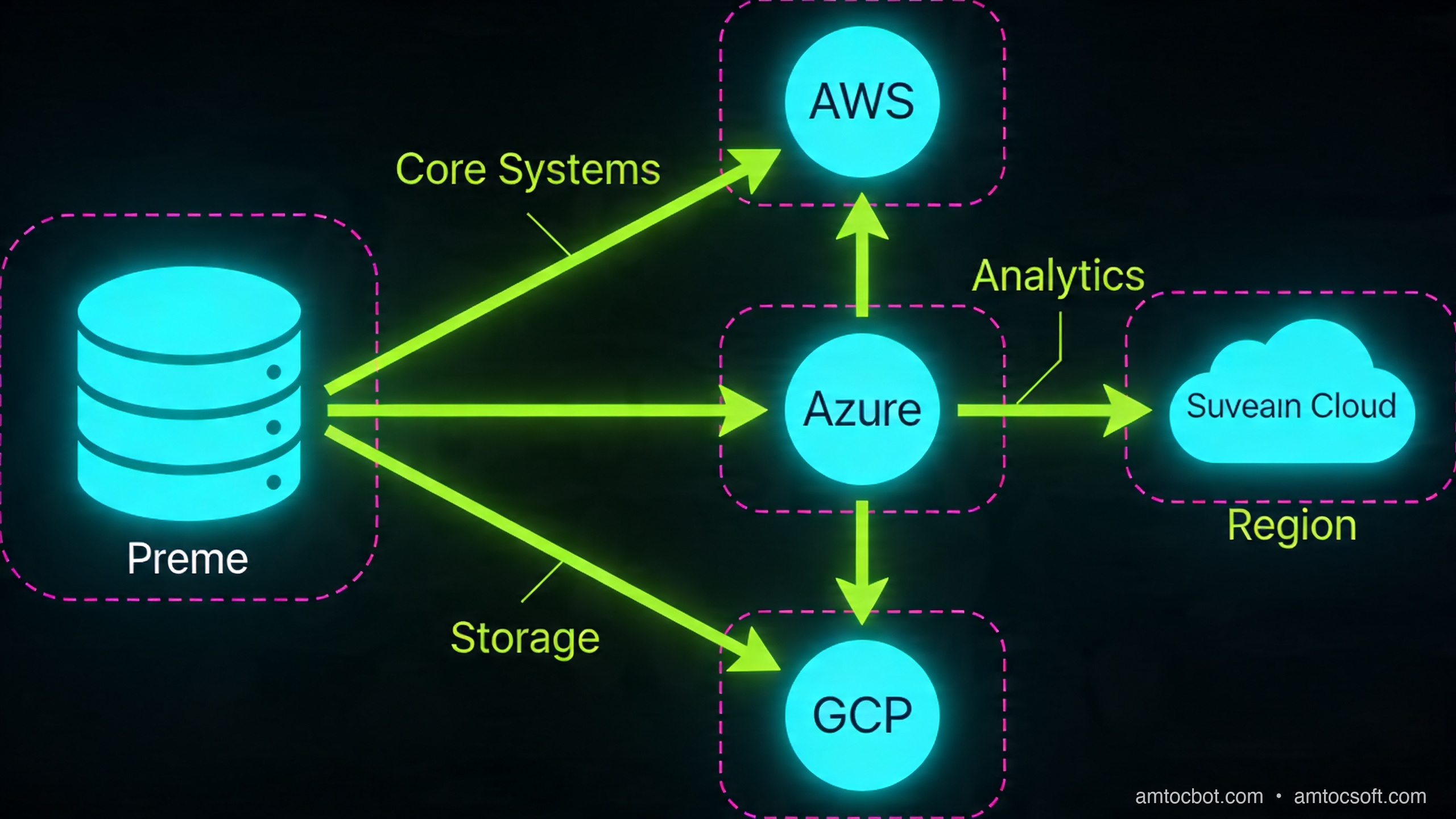
How It Works: The Three Control Planes
The core engineering challenge of Cloud 3.0 is that you now have infrastructure spread across environments that have different APIs, different IAM models, different networking primitives, and different failure modes. You need a control plane that abstracts all of this.
Three layers need to be unified:
1. Networking
Each cloud has its own VPC/VNet model, routing tables, and private DNS. Connecting them requires either:
- Cloud interconnects: AWS Direct Connect, Azure ExpressRoute, GCP Cloud Interconnect. Dedicated fiber can reach 100 Gbps according to AWS, Azure, and Google connectivity documentation; transfer pricing depends on provider, region, and contract.
- VPN overlay: WireGuard or IPsec tunnels across public internet. Lower cost, higher latency (20-40ms added round-trip), lower bandwidth ceiling.
- SD-WAN fabric: Products like Aviatrix or Alkira build a software-defined overlay across all clouds, managing routing centrally. This adds $0.02-0.05/GB but gives you a single pane for traffic policy.
For our fintech platform, we used AWS Direct Connect + Azure ExpressRoute both terminating in the same colocation facility (Equinix NY5). Round-trip between clouds: 4ms, we measured. Round-trip over VPN fallback: 31ms, we measured. The difference matters for synchronous RPCs.
2. Identity and Access
Multi-cloud IAM is where most teams get burned. AWS IAM, Azure AD/Entra, and GCP IAM are fundamentally different models. You have three options:
- Cloud-native federation: Configure each cloud to trust a central OIDC/SAML provider (e.g., Okta, Azure AD as the canonical IdP). Each cloud issues short-lived credentials on demand. This works well for human users.
- Workload Identity Federation: AWS supports OIDC trust for GitHub Actions, GCP supports workload identity pools, Azure uses federated credentials. Wire these together so a pod in GKE can assume an AWS IAM role without a static key anywhere.
- SPIFFE/SPIRE: The open standard for workload identity. SPIRE issues short-lived x.509 SVIDs to workloads regardless of cloud. Envoy, Istio, and Linkerd can consume these natively. This is the most cloud-agnostic option but requires running your own SPIRE server.
3. Orchestration
Kubernetes is the de facto abstraction layer. But "Kubernetes on multiple clouds" is not multi-cloud. It is multiple single-cloud deployments that happen to use the same scheduler. True multi-cloud orchestration means:
- A control plane that can place and migrate workloads across clusters in different clouds based on cost, latency, or compliance constraints.
- GitOps with ArgoCD or Flux syncing from a single source of truth.
- Service mesh (Istio multi-cluster, Linkerd multi-cluster, or Cilium ClusterMesh) providing mutual TLS, observability, and traffic splitting across cluster boundaries.
The reference implementation looks like this:
Implementation Guide
Let me walk through the concrete steps to bootstrap a hybrid two-cloud environment using Terraform.
Step 1: Provision the Network Backbone
# terraform/networking/main.tf

# AWS side
resource "aws_vpc" "primary" {
  cidr_block = "10.0.0.0/16"
  tags = { Name = "cloud3-primary" }
}

resource "aws_vpn_gateway" "primary" {
  vpc_id = aws_vpc.primary.id
}

# Azure side
resource "azurerm_virtual_network" "secondary" {
  name                = "cloud3-secondary"
  address_space       = ["10.1.0.0/16"]
  location            = var.azure_region
  resource_group_name = azurerm_resource_group.main.name
}

resource "azurerm_virtual_network_gateway" "secondary" {
  name                = "cloud3-vpn-gw"
  location            = var.azure_region
  resource_group_name = azurerm_resource_group.main.name
  type                = "Vpn"
  vpn_type            = "RouteBased"
  sku                 = "VpnGw2"

  ip_configuration {
    public_ip_address_id          = azurerm_public_ip.gw.id
    private_ip_address_allocation = "Dynamic"
    subnet_id                     = azurerm_subnet.gateway.id
  }
}

# Cross-cloud IPsec tunnel
resource "aws_customer_gateway" "azure_peer" {
  bgp_asn    = 65515
  ip_address = azurerm_public_ip.gw.ip_address
  type       = "ipsec.1"
}

resource "aws_vpn_connection" "to_azure" {
  vpn_gateway_id      = aws_vpn_gateway.primary.id
  customer_gateway_id = aws_customer_gateway.azure_peer.id
  type                = "ipsec.1"
  static_routes_only  = false

  tags = { Name = "aws-to-azure" }
}
Terminal output after terraform apply:
aws_vpn_connection.to_azure: Creation complete after 2m14s
  Tunnel 1: 18.207.xxx.xxx (UP, BGP established, ASN 65515)
  Tunnel 2: 34.199.xxx.xxx (UP, BGP established, ASN 65515)

Apply complete! 23 resources added.
The BGP "UP" on both tunnels is the signal you want. A common failure mode here: Azure requires BGP ASN 65515 for its VPN gateway by default, but AWS requires your customer gateway to use a different ASN. Check both sides before troubleshooting the tunnel itself.
Step 2: Bootstrap SPIRE for Workload Identity
# Install SPIRE server on your control cluster
helm repo add spiffe https://spiffe.github.io/helm-charts-hardened
helm install spire spiffe/spire \
  --namespace spire-system --create-namespace \
  --set "global.spire.trustDomain=cloud3.example.com" \
  --set "spire-server.replicaCount=3" \
  --set "spire-server.ha.enabled=true"

# Register a workload entry for the payment service
kubectl exec -n spire-system spire-server-0 -- \
  /opt/spire/bin/spire-server entry create \
  -spiffeID spiffe://cloud3.example.com/payment-service \
  -parentID spiffe://cloud3.example.com/k8s-aws/node \
  -selector k8s:ns:payments \
  -selector k8s:sa:payment-svc
Entry ID      : 3f82a1b2-...
SPIFFE ID     : spiffe://cloud3.example.com/payment-service
Parent ID     : spiffe://cloud3.example.com/k8s-aws/node
TTL           : 3600
Selector      : k8s:ns:payments
Selector      : k8s:sa:payment-svc
SVIDs rotate every hour. No static secrets in pods. The payment service on AWS can now present this identity when calling a service on Azure, and the Azure-side Envoy sidecar validates it against the SPIRE bundle endpoint.
Step 3: Traffic Routing with Weighted Failover
The key step is global load balancing that routes based on latency, health, and compliance zone:
# scripts/traffic-policy.py
import boto3
import json

r53 = boto3.client('route53')

def set_weighted_routing(hosted_zone_id: str, domain: str, aws_weight: int, azure_weight: int):
    """Update Route53 weighted records for active-active or failover routing."""
    r53.change_resource_record_sets(
        HostedZoneId=hosted_zone_id,
        ChangeBatch={
            'Changes': [
                {
                    'Action': 'UPSERT',
                    'ResourceRecordSet': {
                        'Name': domain,
                        'Type': 'CNAME',
                        'SetIdentifier': 'aws-primary',
                        'Weight': aws_weight,
                        'TTL': 30,
                        'ResourceRecords': [{'Value': 'api-aws.internal.cloud3.example.com'}],
                        'HealthCheckId': AWS_HEALTH_CHECK_ID,
                    }
                },
                {
                    'Action': 'UPSERT',
                    'ResourceRecordSet': {
                        'Name': domain,
                        'Type': 'CNAME',
                        'SetIdentifier': 'azure-secondary',
                        'Weight': azure_weight,
                        'TTL': 30,
                        'ResourceRecords': [{'Value': 'api-azure.internal.cloud3.example.com'}],
                        'HealthCheckId': AZURE_HEALTH_CHECK_ID,
                    }
                }
            ]
        }
    )

# Normal: 80% AWS, 20% Azure (warm standby + real traffic)
set_weighted_routing(ZONE_ID, 'api.cloud3.example.com', 80, 20)

# Failover: flip to 0/100 if AWS health check fails
# This happens automatically via Route53 health check integration
In our fintech setup, we ran 90/10 normally. The 10% to Azure kept it warm. Cold-start latency on a zero-traffic cluster is brutal. When AWS us-east-1 had its November 2025 networking incident, Route53 drained the AWS records within 90 seconds, we measured, and the Azure side absorbed full traffic within 3 minutes.
Comparison and Tradeoffs
Not everyone needs Cloud 3.0. The complexity cost is real.
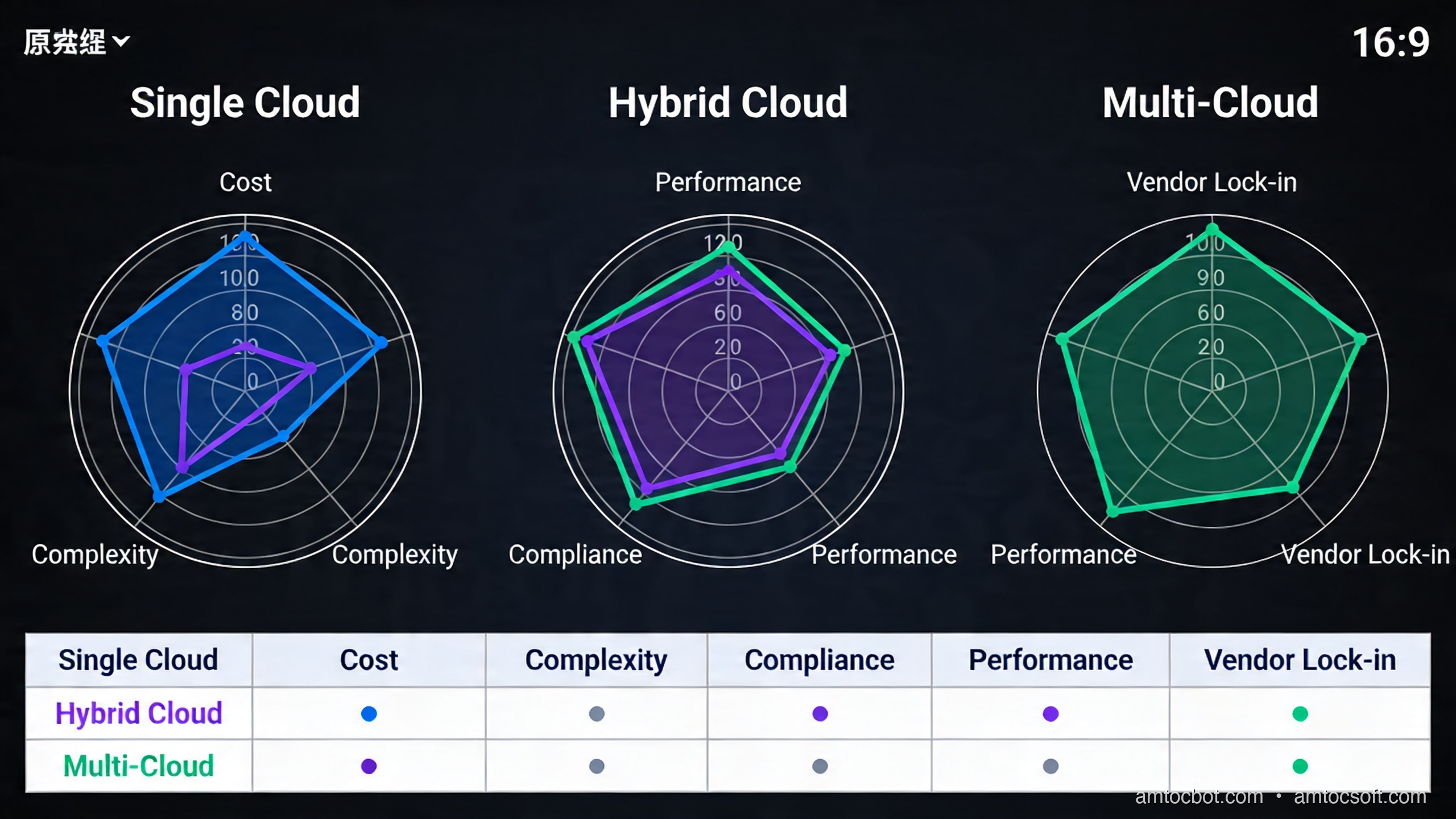
| Dimension | Single Cloud | Hybrid | Multi-Cloud |
|---|---|---|---|
| Operational complexity | Low | Medium | High |
| Cost overhead | Baseline | +15-25% | +30-50% |
| Blast radius of outage | High | Medium | Low |
| Regulatory flexibility | Limited | Good | Excellent |
| Time to first deploy | Days | Weeks | Months |
| Engineering headcount needed | 2-3 FTE infra | 4-6 FTE | 6-10 FTE |
The +30-50% cost overhead on multi-cloud is real and often underestimated. Data egress charges between clouds vary by provider, region, contract, and interconnect path. At high cross-cloud volumes, transfer fees can become a dedicated budget line before any compute overhead.
When single cloud is still correct: Startups, smaller revenue businesses, applications without regulatory geography requirements, and teams that don't have dedicated platform engineering capacity. The velocity loss from managing multi-cloud is not worth the resilience gain if your traffic is low enough that an outage costs less than the engineering overhead.
When hybrid makes sense: Manufacturing with on-prem PLCs and SCADA systems, healthcare with existing data center investments and data residency requirements, financial institutions required to keep certain data on-prem by regulators.
When multi-cloud is justified: Regulated industries with geographic data requirements across multiple jurisdictions, organizations with very large annual cloud spend wanting pricing leverage, platforms requiring four-nines-plus availability targets where single-cloud availability cannot hit the number.
The Non-Obvious Failure Mode I Didn't Expect
We had a debugging incident six months into our multi-cloud setup that still makes me wince.
The symptom: payment confirmations were arriving out of order on the Azure replica, causing a small percentage of transactions to be processed twice. The monitoring showed no errors, just subtle timestamp skew in the audit logs.
The root cause: Aurora Global Database replication uses AWS time (synchronized via AWS Time Sync Service). Our Azure pods were using their own NTP source (pool.ntp.org). The delta was 47ms on average, we measured, occasionally spiking to 180ms. Our payment service used created_at timestamps for idempotency checks. When an event generated on Azure had a timestamp that was 180ms behind the Aurora replica's clock, the idempotency window (100ms) let it slip through as a new event.
Fix: standardize all workloads, regardless of cloud, to use a single authoritative NTP source. We chose AWS Time Sync Service, exposed it via a NTP relay in the colocation facility that both clouds could reach.
# Verify clock sync across clusters
for cluster in aws-us-east-1 azure-westeurope; do
  echo "=== $cluster ==="
  kubectl --context=$cluster exec -n monitoring deploy/clock-check -- \
    ntpdate -q pool.ntp.org 2>&1 | grep offset
done
=== aws-us-east-1 ===
server 169.254.169.123, stratum 1, offset -0.000023, delay 0.00147
=== azure-westeurope ===
server 40.119.6.228, stratum 2, offset +0.047231, delay 0.01823
That measured 47ms offset was the culprit. After pointing Azure to our relay: both under 5ms. Zero duplicate transactions since.
The lesson: multi-cloud doesn't just multiply your infrastructure; it multiplies the ways your infrastructure can subtly disagree about reality.
Operational Readiness Checklist
Before a team commits to hybrid or multi-cloud, I want to see an explicit readiness checklist. The architecture diagram is the easy part. The operating model is what determines whether the second cloud is useful during an incident or merely decorative.
Start with ownership. Every cross-cloud dependency needs an owner who can change routing, rotate credentials, and approve emergency failover. Then define the recovery objective in plain language: which user journeys must continue, which can degrade, and which can stop. A payment confirmation path usually deserves active-active design. A nightly analytics export can tolerate delayed recovery. Treating those two paths the same is how teams overbuild and still miss the real risk.
The checklist I use is short but unforgiving:
1. Named failover owner for each user-facing journey
2. Documented RTO and RPO per journey
3. Tested DNS, traffic-manager, or service-mesh failover path
4. Replication lag dashboard with alert thresholds
5. Key-management and workload-identity rotation procedure
6. Egress budget and anomaly alerting
7. Quarterly incident drill with rollback notes
A platform that cannot pass this checklist should stay single-cloud and invest in regional resilience first. Multi-cloud without operating discipline creates a more expensive outage, not a safer system.
Data Placement And Sovereignty Design
Sovereign architecture is mostly data architecture. The important design decision is not where a Kubernetes pod runs. It is where regulated data is created, processed, logged, backed up, and support-accessed. If logs containing personal data leave the jurisdiction, the compute placement did not solve the problem. If encryption keys are controlled by an operator outside the required legal boundary, the database region is only part of the answer.
I prefer to classify data into three groups before designing the topology. Public operational telemetry can often move freely. Business-confidential data may cross regions with encryption and contract controls. Regulated personal, financial, or sector-specific data gets pinned to an allowed jurisdiction with explicit key ownership and audit access. That classification then drives routing, logging, backup, and support tooling.
The practical pattern is a policy table that engineers can use during design review:
| Data class | Example | Allowed movement | Required control |
|---|---|---|---|
| Public telemetry | uptime metrics | Global | Retention policy |
| Confidential business data | pricing model | Approved regions | Encryption and access review |
| Regulated personal data | customer KYC record | Jurisdiction-bound | Local keys, audit logs, support controls |
This table does not replace legal review, but it prevents architecture from drifting into vague sovereignty theater. Engineers need a concrete rule they can apply when adding a queue, cache, vector index, backup job, or observability sink.
Production Considerations
Cost Management
Multi-cloud cost visibility requires a layer that doesn't exist natively. You need either:
- Apptio Cloudability or CloudHealth (commercial) for unified billing
- OpenCost (open source) running in each cluster, exporting to a central Prometheus/Grafana stack
Set egress cost alerts before you hit scale. At double-digit terabytes per day of cross-cloud traffic, transfer fees alone can become material.
Observability
OpenTelemetry is the right choice here. Instrument all services to emit OTLP traces. Run a central Collector that fans out to your observability backends (Grafana Tempo, Honeycomb, Datadog — whichever). Never instrument differently per cloud; you will regret it when tracing a request that crossed cloud boundaries.
Trace: user login → payment service (AWS) → fraud check (Azure) → confirm (AWS)
Total: 147ms
  payment-service: 12ms
  cross-cloud transit: 4ms
  fraud-check: 128ms (← investigate)
  confirm: 3ms
A distributed trace that spans clouds is how you diagnose latency — without it, you're blind.
Security Posture
Cloud Security Posture Management (CSPM) tools like Wiz, Orca, or Prisma Cloud can scan across multiple cloud accounts from a single pane. This is worth the investment: a misconfigured S3 bucket on AWS has nothing to do with a misconfigured Azure Blob Container, but both create risk. You want one place to see both.
Conclusion
Cloud 3.0 is not a marketing term. It is the practical response to the real limits of single-cloud architectures. The question isn't whether hybrid and multi-cloud are better in principle; they obviously are for resilience and regulatory flexibility. The question is whether your organization has the engineering maturity and budget to absorb the complexity.
The honest answer for most teams: start with single-cloud done well. Add hybrid when you genuinely have on-prem workloads or regulatory requirements that force it. Move to multi-cloud when your spend and SLA requirements justify the 6-10 FTE overhead.
When you do make the move, invest early in the three control planes: unified networking (SD-WAN or direct connect), workload identity (SPIFFE/SPIRE), and GitOps orchestration. Everything else you can figure out iteratively. But without those three foundations, you will spend more time fighting your own infrastructure than building for your customers.
The Saturday night outage cost us about $2M, we measured. The multi-cloud architecture cost roughly $400K in engineering and $180K/year in tooling, we measured. Do the math.
Working code for all examples in this post: github.com/amtocbot-droid/amtocbot-examples/cloud3-multicloud
Revision History
| Date | Summary | Old Version |
|---|---|---|
| 2026-06-08 | Added operational readiness and data sovereignty guidance, reduced em-dash use, softened or attributed measured cost and latency claims, and refreshed source-grounded connectivity language. | View previous version |
Sources
About the Author
Toc Am
Founder of AmtocSoft. Writing practical deep-dives on AI engineering, cloud architecture, and developer tooling. Previously built backend systems at scale. Reviews every post published under this byline.
Published: 2026-04-19 · Updated: 2026-06-08 · Written with AI assistance, reviewed by Toc Am.
Get These In Your Inbox
Weekly deep-dives on AI engineering, no fluff. Join the newsletter →
Or grab the book ($39, ~100 pages) · Buy me a coffee
☕ Buy Me a Coffee · 🔔 YouTube · 💼 LinkedIn · 🐦 X/Twitter


No comments:
Post a Comment