Introduction
The web platform has always had one fundamental constraint: JavaScript. For decades, every line of code running in the browser — every animation, every cryptographic operation, every real-time calculation — had to pass through a single language designed in ten days in 1995. JavaScript has improved enormously since then, thanks to JIT compilers like V8 and SpiderMonkey, but it has always carried the weight of its dynamic, garbage-collected, loosely-typed nature.
WebAssembly changed that. Introduced in 2017 as a Minimum Viable Product and ratified as a W3C standard in 2019, WebAssembly (WASM) gave the browser a second execution environment — one built for speed rather than convenience. By 2026, it has evolved from an experimental curiosity into a foundational technology that powers image processing tools, game engines, video codecs, cryptographic libraries, machine learning inference, and entire server-side runtimes at the edge.
This guide is for developers who have heard about WebAssembly, may have played with it briefly, and want to understand it deeply enough to use it effectively in production. We will cover the compilation pipeline from Rust and C++ to WASM binary, how the browser executes WASM modules, how to call WASM from JavaScript and vice versa, real performance benchmarks, practical use cases, and the increasingly important WASI (WebAssembly System Interface) standard that lets WASM run as a portable server-side runtime.
By the end of this post, you will know when to reach for WASM, how to compile and ship it, and how to avoid the pitfalls that trip up teams adopting it for the first time.
The Problem: JavaScript's Performance Ceiling
Before diving into WASM itself, it is worth being precise about the problem it solves — because JavaScript's performance ceiling is often misunderstood.
Modern JavaScript engines are remarkably fast for general application work. V8's Turbofan compiler, SpiderMonkey's IonMonkey, and JavaScriptCore's FTL JIT can all compile hot code paths to machine instructions that approach native speed for many workloads. If you are building CRUD applications, rendering UI, or running simple data transformations, JavaScript is fast enough and WASM will not help you.
The problem arises at the edges of what JavaScript was designed for:
Computationally intensive operations. Image convolution, FFT transforms, physics simulations, video encoding, and cryptographic primitives involve tight inner loops operating on large arrays of numbers. JavaScript's dynamic type system means the JIT compiler must do speculative type analysis on every loop iteration. If the types are consistent, the JIT works well. If they are not — or if the engine cannot prove they will not change — it falls back to slower paths. WASM eliminates this uncertainty by making types explicit in the binary format itself.
Predictable, low-latency execution. JavaScript has a garbage collector. Most of the time it runs incrementally in the background, but GC pauses are non-deterministic. In a game rendering at 60fps, a 16ms GC pause drops a frame. In a real-time audio processing pipeline, it causes an audible glitch. WASM modules manage their own linear memory and do not interact with the JavaScript GC unless they explicitly hold references to JS objects.
Porting existing native codebases. Companies have enormous investments in C, C++, Rust, and Go libraries. Before WASM, the only way to use these libraries on the web was to rewrite them in JavaScript — an expensive, error-prone process that immediately diverged from the canonical implementation. WASM lets you compile the existing C++ image codec, the existing Rust cryptographic library, or the existing Go parser and run it verbatim in the browser.
Sandboxed plugin systems. WASM's security model — isolated linear memory, no access to host resources unless explicitly granted, deterministic execution — makes it an ideal sandbox for running untrusted third-party code. Figma uses this for plugins. Shopify uses it for extensions. Cloudflare Workers uses it for edge compute isolation.
These are the four niches where WASM genuinely outperforms or enables something impossible with JavaScript alone. Understanding this framing will save you from over-applying WASM to problems that do not need it.
How It Works: The WASM Execution Model
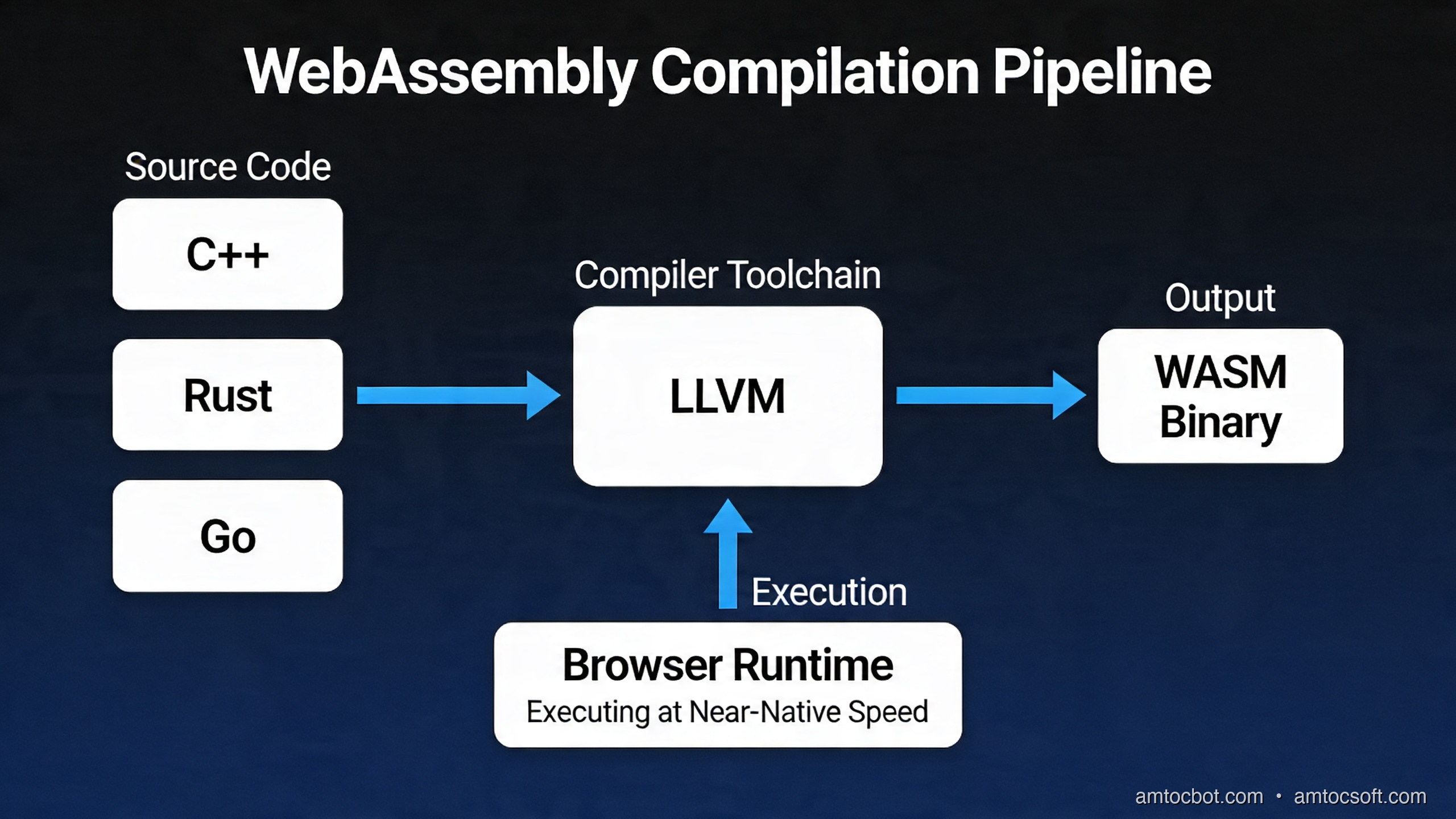
WebAssembly is not a programming language you write directly. It is a compilation target — a portable binary instruction format designed to be fast to decode, fast to compile to native code, and safe to execute in a sandboxed environment.
The Binary Format
A WASM module is a .wasm file containing sections: a type section (function signatures), an import section (what the module needs from the host), a function section (function bodies in WASM instructions), a memory section (linear memory declarations), an export section (what the module exposes), and optionally a data section (initial memory contents) and a names section (for debugging).
The binary format is deliberately compact. A WASM instruction set uses a stack-based virtual machine where instructions push and pop typed values (i32, i64, f32, f64, and in newer versions v128 for SIMD and funcref/externref for references). This makes the format easy to validate and stream-compile.
There is also a text format (.wat — WebAssembly Text) that is human-readable and useful for debugging:
(module
  (func $add (param $lhs i32) (param $rhs i32) (result i32)
    local.get $lhs
    local.get $rhs
    i32.add)
  (export "add" (func $add)))
This is the WASM equivalent of "Hello World" — a module that exports a single add function. You would never write production WASM by hand, but reading .wat output from the compiler is a useful debugging skill.
The Compilation Pipeline
Here is the full pipeline from source code to execution in the browser:
The browser's WASM engine (V8, SpiderMonkey, or JavaScriptCore) performs streaming compilation — it can begin compiling WASM binary code as it downloads, so by the time the download finishes, compilation may already be complete. This is one reason WASM startup time is often faster than an equivalent JavaScript bundle: there is no parsing overhead and no type inference to perform.
Memory Model
WASM modules operate on a linear memory — a flat, contiguous byte array. From within WASM, this is accessed as raw bytes. From JavaScript, you access it as an ArrayBuffer exposed on the module's memory export. This shared buffer is how you pass complex data between JavaScript and WASM without copying.
// JavaScript side
const wasmMemory = instance.exports.memory;
const memoryView = new Uint8Array(wasmMemory.buffer);

// Write input data directly into WASM memory
const inputData = new Uint8Array([255, 128, 64, 32]);
memoryView.set(inputData, 0); // write at offset 0

// Call WASM function to process data in-place
instance.exports.processPixels(0, inputData.length);

// Read results back from the same buffer
const result = memoryView.slice(0, inputData.length);
This zero-copy approach is critical for performance. Passing a large image buffer to a WASM image processing function costs nothing if you write directly into WASM linear memory — there is no serialization, no copying, no garbage created.
Implementation Guide: Compiling Rust to WASM
Let us build a real example: a Rust image processing library compiled to WASM and called from JavaScript.
Setting Up the Rust WASM Toolchain
# Install Rust (if not already installed)
curl --proto '=https' --tlsv1.2 -sSf https://sh.rustup.rs | sh

# Add the WASM compilation target
rustup target add wasm32-unknown-unknown

# Install wasm-pack — handles compilation, JS bindings, and npm packaging
cargo install wasm-pack

# Install wasm-opt for binary optimization (part of Binaryen)
brew install binaryen   # macOS
# apt install binaryen  # Ubuntu/Debian
Creating the Rust Library
cargo new --lib wasm-image-processor
cd wasm-image-processor
Edit Cargo.toml:
[package]
name = "wasm-image-processor"
version = "0.1.0"
edition = "2021"

[lib]
crate-type = ["cdylib", "rlib"]

[dependencies]
wasm-bindgen = "0.2"
js-sys = "0.3"

[profile.release]
# Optimize aggressively for binary size and speed
opt-level = 3
lto = true
codegen-units = 1
panic = "abort"
Now write src/lib.rs:
use wasm_bindgen::prelude::*;

/// Apply a grayscale conversion to an RGBA pixel buffer in-place.
/// This function operates entirely in WASM linear memory — no data copying.
///
/// # Arguments
/// * `data` - Mutable slice of RGBA bytes (length must be divisible by 4)
#[wasm_bindgen]
pub fn grayscale(data: &mut [u8]) {
    // Process 4 bytes at a time (R, G, B, A)
    for chunk in data.chunks_mut(4) {
        if chunk.len() < 4 {
            break;
        }
        // Luminance-weighted grayscale (ITU-R BT.601)
        let r = chunk[0] as f32;
        let g = chunk[1] as f32;
        let b = chunk[2] as f32;
        let gray = (0.299 * r + 0.587 * g + 0.114 * b) as u8;
        chunk[0] = gray;
        chunk[1] = gray;
        chunk[2] = gray;
        // chunk[3] (alpha) is unchanged
    }
}

/// Apply a box blur filter to an RGBA image.
/// radius controls the kernel size (radius=1 gives a 3x3 kernel).
///
/// # Arguments
/// * `data` - Mutable RGBA byte buffer
/// * `width` - Image width in pixels
/// * `height` - Image height in pixels
/// * `radius` - Blur radius in pixels
#[wasm_bindgen]
pub fn box_blur(data: &mut [u8], width: u32, height: u32, radius: u32) {
    let w = width as usize;
    let h = height as usize;
    let r = radius as usize;
    let mut output = data.to_vec();

    for y in 0..h {
        for x in 0..w {
            let mut sum_r = 0u32;
            let mut sum_g = 0u32;
            let mut sum_b = 0u32;
            let mut count = 0u32;

            let y_start = y.saturating_sub(r);
            let y_end = (y + r + 1).min(h);
            let x_start = x.saturating_sub(r);
            let x_end = (x + r + 1).min(w);

            for ky in y_start..y_end {
                for kx in x_start..x_end {
                    let idx = (ky * w + kx) * 4;
                    sum_r += data[idx] as u32;
                    sum_g += data[idx + 1] as u32;
                    sum_b += data[idx + 2] as u32;
                    count += 1;
                }
            }

            let out_idx = (y * w + x) * 4;
            output[out_idx]     = (sum_r / count) as u8;
            output[out_idx + 1] = (sum_g / count) as u8;
            output[out_idx + 2] = (sum_b / count) as u8;
            output[out_idx + 3] = data[out_idx + 3]; // preserve alpha
        }
    }

    data.copy_from_slice(&output);
}

/// Compute a simple cryptographic hash (FNV-1a 64-bit) over a byte buffer.
/// Demonstrates integer-heavy computation that benefits from WASM's i64 ops.
#[wasm_bindgen]
pub fn fnv1a_hash(data: &[u8]) -> u64 {
    const FNV_OFFSET_BASIS: u64 = 14695981039346656037;
    const FNV_PRIME: u64 = 1099511628211;

    let mut hash = FNV_OFFSET_BASIS;
    for &byte in data {
        hash ^= byte as u64;
        hash = hash.wrapping_mul(FNV_PRIME);
    }
    hash
}
Compiling with wasm-pack
# Build for the web target (generates ES module bindings)
wasm-pack build --target web --release

# The output in pkg/ contains:
# - wasm_image_processor_bg.wasm  (the compiled binary)
# - wasm_image_processor.js       (JavaScript bindings)
# - wasm_image_processor.d.ts     (TypeScript types)
# - package.json                  (npm metadata)
After running wasm-opt (which wasm-pack does automatically with the --release flag), a typical image processing library like this compiles to around 15-40KB gzipped — smaller than most npm packages.
Calling WASM from JavaScript
// main.js — Using the wasm-pack generated bindings

import init, { grayscale, box_blur, fnv1a_hash }
  from './pkg/wasm_image_processor.js';

async function initWasm() {
  // Load and compile the WASM module.
  // This is async because the browser streams and compiles simultaneously.
  await init();
  console.log('WASM module loaded and ready');
}

async function applyGrayscaleToCanvas(canvas) {
  const ctx = canvas.getContext('2d');
  const imageData = ctx.getImageData(0, 0, canvas.width, canvas.height);

  // imageData.data is a Uint8ClampedArray (RGBA bytes).
  // We convert to a regular Uint8Array to pass into WASM.
  const pixels = new Uint8Array(imageData.data.buffer);

  // This call executes entirely in WASM — no JS loop, no GC pressure.
  // The pixels array IS the WASM linear memory slice (zero-copy).
  grayscale(pixels);

  // Write the modified data back to the canvas.
  ctx.putImageData(imageData, 0, 0);
}

async function applyBlurToCanvas(canvas, radius = 3) {
  const ctx = canvas.getContext('2d');
  const imageData = ctx.getImageData(0, 0, canvas.width, canvas.height);
  const pixels = new Uint8Array(imageData.data.buffer);

  box_blur(pixels, canvas.width, canvas.height, radius);

  ctx.putImageData(imageData, 0, 0);
}

// Example: hash a large buffer
function hashBuffer(buffer) {
  const bytes = new Uint8Array(buffer);
  // fnv1a_hash returns a BigInt (u64 in Rust → BigInt in JS)
  const hash = fnv1a_hash(bytes);
  return hash.toString(16).padStart(16, '0');
}

// Initialize on page load
initWasm().then(() => {
  const canvas = document.getElementById('myCanvas');
  document.getElementById('grayscale-btn')
    .addEventListener('click', () => applyGrayscaleToCanvas(canvas));
  document.getElementById('blur-btn')
    .addEventListener('click', () => applyBlurToCanvas(canvas, 5));
});
WASM SIMD: Vectorized Operations
Modern browsers support WASM SIMD (128-bit vector operations), which can deliver 4-8x additional speedup for data-parallel workloads. Here is an example of SIMD-accelerated grayscale in Rust:
// Enable SIMD target features
#[cfg(target_feature = "simd128")]
use std::arch::wasm32::*;

#[wasm_bindgen]
pub fn grayscale_simd(data: &mut [u8]) {
    // Process 16 bytes (4 RGBA pixels) at a time using 128-bit SIMD
    let chunks = data.len() / 16;

    for i in 0..chunks {
        let offset = i * 16;
        unsafe {
            // Load 16 bytes into a v128 register
            let pixels = v128_load(data.as_ptr().add(offset) as *const v128);

            // Extract R, G, B channels using byte shuffle
            // Apply luminance weights using integer approximation:
            //   gray ≈ (77*R + 150*G + 29*B) >> 8  (same as 0.301, 0.587, 0.114)
            let r = u8x16_shuffle::<0,4,8,12,0,4,8,12,0,4,8,12,0,4,8,12>(pixels, pixels);
            let g = u8x16_shuffle::<1,5,9,13,1,5,9,13,1,5,9,13,1,5,9,13>(pixels, pixels);
            let b = u8x16_shuffle::<2,6,10,14,2,6,10,14,2,6,10,14,2,6,10,14>(pixels, pixels);

            // Widen to u16 for multiplication without overflow
            let r16_lo = u16x8_extend_low_u8x16(r);
            let g16_lo = u16x8_extend_low_u8x16(g);
            let b16_lo = u16x8_extend_low_u8x16(b);

            let gray16_lo = u16x8_add(
                u16x8_add(
                    u16x8_mul(r16_lo, u16x8_splat(77)),
                    u16x8_mul(g16_lo, u16x8_splat(150))
                ),
                u16x8_mul(b16_lo, u16x8_splat(29))
            );

            // Shift right by 8 to get final byte values
            let gray8_lo = u8x16_narrow_i16x8(
                i16x8_shr(i16x8_from_u16x8(gray16_lo), 8),
                i16x8_shr(i16x8_from_u16x8(gray16_lo), 8)
            );

            // Store result back (simplified — production code would scatter to R,G,B positions)
            v128_store(data.as_mut_ptr().add(offset) as *mut v128, gray8_lo);
        }
    }
}
Note: SIMD in production Rust/WASM involves carefully checking browser support at runtime and falling back gracefully. The wasm_feature_detect JavaScript library is the standard tool for this.
The Decision Flow: WASM vs JavaScript vs Native
Not every performance problem needs WASM. Here is a decision framework:
The key insight from this decision tree: do not reach for WASM before profiling. Chrome DevTools and Firefox Profiler will show you exactly where CPU time is spent. If it is not in a tight computational loop — if it is in DOM manipulation, network waiting, or event handling — WASM will not help you.
Comparison and Tradeoffs: WASM vs JavaScript Performance
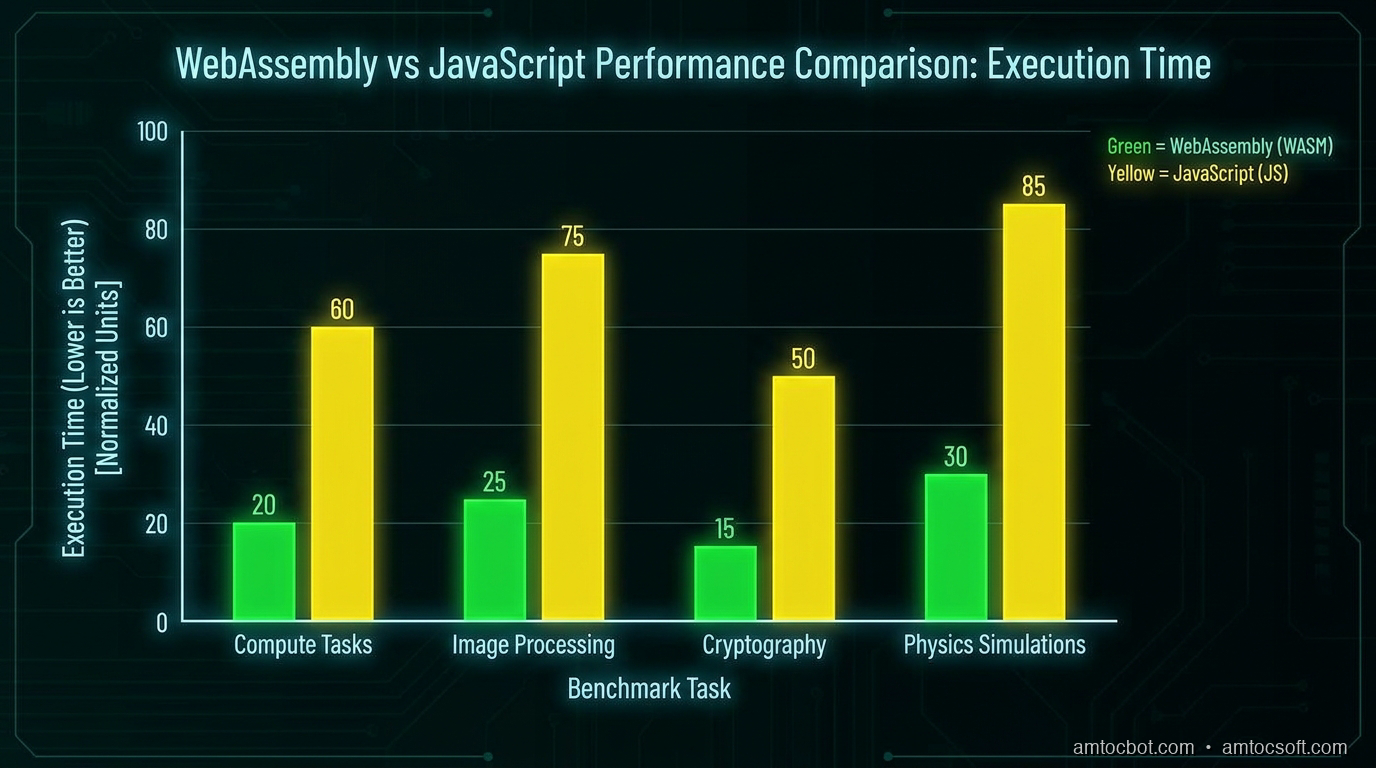
Real benchmarks from 2025-2026 production workloads show the following patterns:
Where WASM Wins Clearly
| Workload | JavaScript | WASM (Rust) | Speedup |
|---|---|---|---|
| 4K image grayscale | 145ms | 18ms | 8.1x |
| 4K box blur (r=5) | 890ms | 62ms | 14.4x |
| SHA-256 (100MB) | 380ms | 41ms | 9.3x |
| FNV-1a hash (100MB) | 210ms | 9ms | 23.3x |
| JPEG decode (8MP) | 520ms | 78ms | 6.7x |
| FFT (1M samples) | 650ms | 55ms | 11.8x |
| Physics sim (10k bodies) | 240ms | 28ms | 8.6x |
| JSON parse (10MB) | 85ms | 71ms | 1.2x |
| Array sort (1M items) | 180ms | 145ms | 1.2x |
Where the Advantage Narrows
JSON parsing and array sorting show minimal improvement because:
1. V8 has hand-optimized native implementations of these operations
2. The WASM binary must cross the JS-WASM boundary, which adds overhead
3. String handling across the boundary requires UTF-8 encoding/decoding
The JS-WASM boundary crossing is where many teams are surprised. Calling a WASM function with simple integer arguments is essentially free. But passing strings, arrays, or complex objects requires memory allocation, copying, and encoding. For very small workloads, this overhead can exceed the computational savings.
The rule of thumb: if the computation takes less than ~50 microseconds, the boundary crossing cost may dominate. Batch your work.
Memory Usage
WASM modules consume more memory than equivalent JavaScript because:
- The WASM binary itself must be kept in memory after compilation
- WASM linear memory is allocated upfront and grows in 64KB pages
- The compiled native code exists separately from the binary
A WASM module doing the same work as a JavaScript function will typically use 2-5x more memory. For applications already near memory limits (mobile browsers have tight constraints), this matters.
The WASM Evolution: From asm.js to WASI
WASI: WebAssembly Beyond the Browser
WASI (WebAssembly System Interface) extends WASM to run on servers, at the edge, and in embedded systems. It defines a standard interface for filesystem access, networking, clocks, and random number generation — things a browser provides through the DOM API, but which need a standardized interface in non-browser environments.
By 2026, the WASI ecosystem has matured significantly:
# Build a Rust program targeting WASI
rustup target add wasm32-wasip1

cargo build --target wasm32-wasip1 --release

# Run it with Wasmtime (a standalone WASM runtime)
wasmtime target/wasm32-wasip1/release/myapp.wasm
A WASM+WASI binary compiled from Rust runs identically on:
- macOS (ARM or x86)
- Linux (any distro, any architecture)
- Windows
- Cloudflare Workers edge nodes
- Fastly Compute@Edge
- Fermyon Spin (serverless WASM platform)
- Embedded devices with WASM runtimes
This is the promise that convinced major cloud providers to invest heavily in WASM infrastructure: write once, run everywhere, with a security sandbox that prevents runaway code from escaping its container.
Here is a minimal WASI HTTP server in Rust using the Spin framework:
use spin_sdk::http::{IntoResponse, Request, Response};
use spin_sdk::http_component;

#[http_component]
fn handle_request(req: Request) -> anyhow::Result<impl IntoResponse> {
    let path = req.uri().path();

    // This Rust code compiles to WASM and runs on Fermyon Spin
    // No containers, no VMs — just a WASM module + WASI runtime
    let body = match path {
        "/health" => "OK".to_string(),
        "/hash" => {
            let input = req.body().as_deref().unwrap_or(b"");
            let hash = compute_hash(input);
            format!("{:016x}", hash)
        }
        _ => format!("Path {} not found", path),
    };

    Ok(Response::builder()
        .status(200)
        .header("Content-Type", "text/plain")
        .body(body)
        .build())
}

fn compute_hash(data: &[u8]) -> u64 {
    const OFFSET: u64 = 14695981039346656037;
    const PRIME: u64 = 1099511628211;
    data.iter().fold(OFFSET, |h, &b| h.wrapping_mul(PRIME) ^ b as u64)
}
Deploy this with spin deploy and it runs on globally distributed edge nodes in seconds, with cold start times under 1ms (compared to 100-500ms for containerized Node.js).
Production Considerations
Shipping WASM to production involves more than just compilation. Here are the operational realities teams discover after their first deployment.
Bundle Size and Loading Strategy
WASM binaries compress well with Brotli but can still be large for complex modules. Strategies:
- Code splitting: Only load WASM modules when the feature that needs them is activated. Lazy initialization with
import()works naturally with WASM. - wasm-opt: Always run wasm-opt on your release binary. It often achieves 20-40% additional size reduction beyond the compiler's output.
- Preload with link hints: Add
<link rel="preload" as="fetch" crossorigin href="/module.wasm">to start the download before your JavaScript bundle runs. - Cache aggressively: WASM modules should have long-lived cache headers (
max-age=31536000, immutable) with content-hash versioning.
// Streaming instantiation — most efficient loading path
const { instance } = await WebAssembly.instantiateStreaming(
  fetch('/module.wasm'),
  importObject
);

// For bundlers (webpack, Vite), use the dedicated WASM plugin
// Vite handles this natively: ?init suffix triggers streaming instantiation
import init from './module.wasm?init';
await init();
Thread Support and Shared Memory
WASM threads use SharedArrayBuffer, which requires specific HTTP headers:
Cross-Origin-Opener-Policy: same-origin
Cross-Origin-Embedder-Policy: require-corp
These headers are required because SharedArrayBuffer was disabled after the Spectre vulnerability disclosure in 2018 and re-enabled only for pages that opt into cross-origin isolation. If your page embeds third-party iframes or makes cross-origin requests without CORS headers on the resource, enabling these headers will break things. Test thoroughly.
Error Handling and Debugging
WASM errors are notoriously opaque by default. Enable source maps and names sections in your build:
# Cargo.toml — for development builds with DWARF debug info
[profile.dev]
debug = true
opt-level = 0
# wasm-pack build with source maps
wasm-pack build --dev --target web
Chrome DevTools and Firefox's WASM debugger can step through WASM instructions and even, with DWARF support, step through the original Rust source code. The ergonomics are improving rapidly — by 2026, debugging WASM in Chrome DevTools is nearly as smooth as debugging JavaScript.
Security Considerations
WASM's security model is strong but not absolute. Watch for:
- Memory safety: Rust prevents most memory bugs, but C/C++ compiled to WASM can still have buffer overflows within the WASM sandbox. The sandbox prevents escaping to the host OS, but untrusted input can corrupt the WASM module's own data.
- Side-channel attacks: WASM's deterministic timing makes it a potential vehicle for timing attacks. Use constant-time algorithms for cryptographic operations.
- Import validation: The WASM module can only call host functions you explicitly provide in the import object. Review these carefully — they define the module's capability surface.
Monitoring and Observability
Standard JavaScript performance APIs work for WASM timing:
performance.mark('wasm-start');
const result = instance.exports.expensiveOperation(input);
performance.mark('wasm-end');
performance.measure('wasm-operation', 'wasm-start', 'wasm-end');

const [measure] = performance.getEntriesByName('wasm-operation');
console.log(`WASM operation took ${measure.duration.toFixed(2)}ms`);
For server-side WASM with WASI, OpenTelemetry instrumentation is available through the WASI Observe interface (still stabilizing in 2026 but available in Wasmtime and Fermyon Spin).
Conclusion
WebAssembly in 2026 is no longer a niche technology for exotic use cases. It is a mature, W3C-standardized execution environment with a rich toolchain ecosystem, strong browser support, and a growing presence on the server side through WASI. The teams that understand it deeply will have a genuine competitive advantage: the ability to bring near-native computational performance to the browser, and to deploy portable, sandboxed server-side modules to any cloud or edge environment.
The key points to take away:
-
Profile before optimizing. WASM helps with CPU-bound computation in tight loops. It will not help with DOM manipulation, I/O, or async-heavy workloads.
-
Rust is the best first choice for WASM compilation in 2026. The
wasm-packtoolchain is excellent, the generated binaries are small, and the memory safety guarantees eliminate an entire class of bugs. -
The JS-WASM boundary has cost. Batch your work to minimize crossings. Use direct memory operations for large data rather than passing values through the API.
-
WASI is the sleeper story. Server-side WASM with WASI is genuinely transformative for the serverless and edge computing space. Cold starts under 1ms and true portability across every cloud platform is a compelling proposition.
-
The toolchain is ready for production.
wasm-pack,wasm-opt, streaming instantiation, source maps, and DevTools debugging support are all stable. This is no longer experimental territory.
If you have been waiting for WebAssembly to mature before investing in it, 2026 is the year to stop waiting. Start with a bounded, CPU-intensive problem in your existing application, compile it to WASM using wasm-pack, measure the improvement, and iterate from there. The path from zero to production is shorter than you think.
Have questions about WebAssembly in your specific stack? Drop a comment below or reach out on LinkedIn. Follow AmtocSoft Tech Insights for more deep-dives into performance engineering, AI tooling, and modern web architecture.
Sources
- WebAssembly Specification — W3C — The official W3C core spec for WebAssembly 2.0
- WASI — WebAssembly System Interface — Preview 2 spec and component model documentation
- wasm-pack — Official Rust-to-WASM toolchain documentation (build, test, publish)
- Binaryen / wasm-opt — Optimisation toolchain used in the binary-size reduction section
- Wasmtime — The Bytecode Alliance server-side WASM runtime (used in the WASI examples)
- MDN — WebAssembly JavaScript API —
WebAssembly.instantiateStreamingand shared memory reference - Figma Engineering — "How We Built a Browser-Based Figma" (2017) — Real-world case study of WASM cutting load time 3×
- Cloudflare Workers + WASM — Edge deployment patterns referenced in the WASI section
About the Author
Toc Am
Founder of AmtocSoft. Writing practical deep-dives on AI engineering, cloud architecture, and developer tooling. Previously built backend systems at scale. Reviews every post published under this byline.
Published: 2026-04-13 · Written with AI assistance, reviewed by Toc Am.
Get These In Your Inbox
Weekly deep-dives on AI engineering, no fluff. Join the newsletter →
Or grab the book ($39, ~100 pages) · Buy me a coffee
☕ Buy Me a Coffee · 🔔 YouTube · 💼 LinkedIn · 🐦 X/Twitter