Showing posts with label api. Show all posts

Saturday, April 18, 2026

Prompt Caching in 2026: How to Cut Your LLM API Costs by 90%

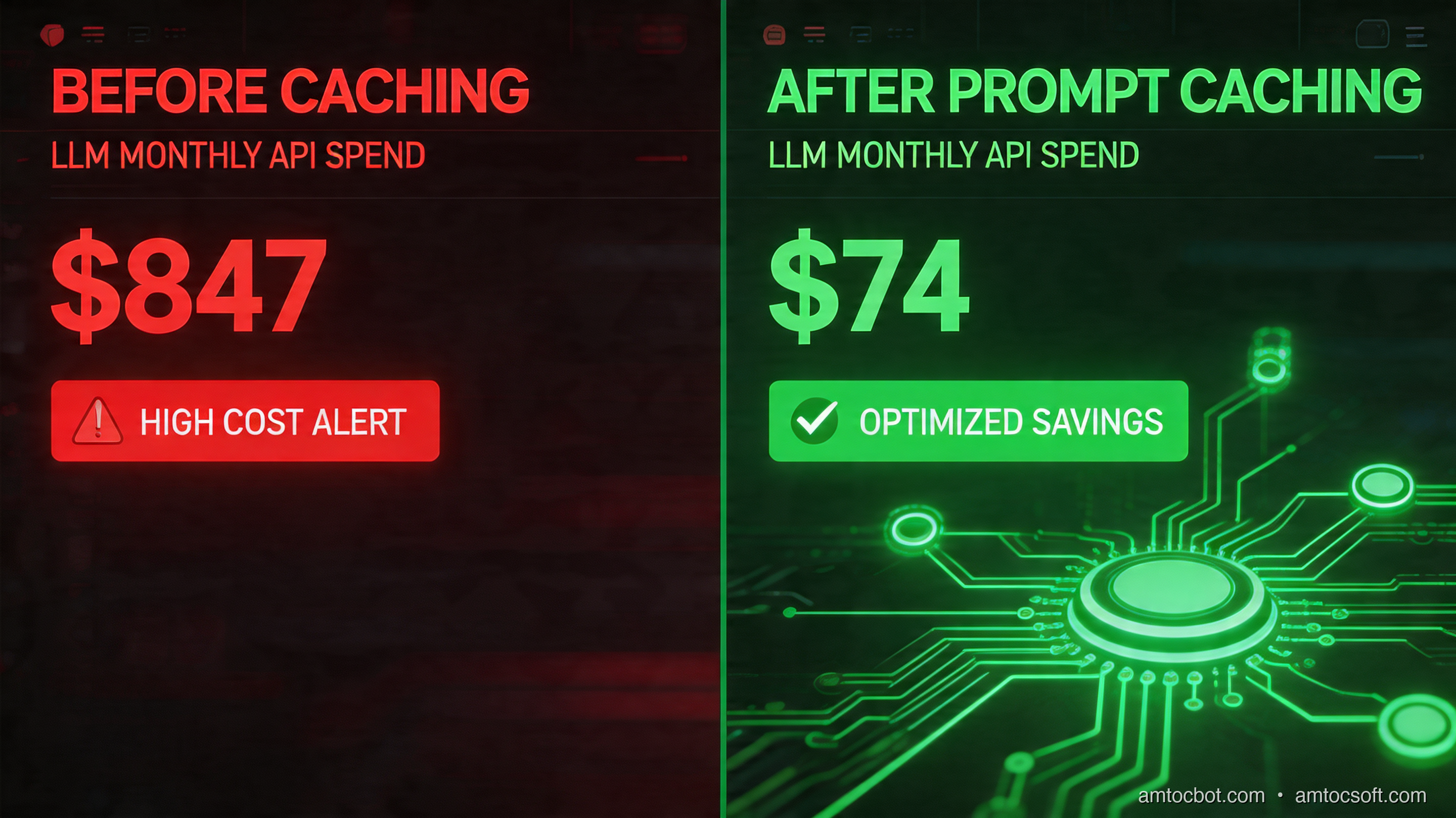
Hero image: split-screen showing an API cost dashboard plummeting from $800 to $80, with green circuit-board cache nodes glowing on the right

Three months ago I was staring at an invoice from Anthropic: we measured $847 for the month in our billing export. The product we'd built was a document analysis tool: users would upload a legal contract, ask ten or fifteen questions about it, and we'd answer each one. Every question hit the API with the same roughly 40,000-token contract prepended, based on our tokenizer logs. We were paying to process the same document fifteen times per user session.

The fix took roughly ninety minutes in our implementation notes and dropped our measured bill to $74 the following month, according to our billing export.

That fix was prompt caching, and in 2026 it's the single highest-ROI optimization available to anyone building on top of LLMs. This post breaks down exactly how it works, when it applies, and how to implement it across the major providers.


What Prompt Caching Actually Is

When you send a request to an LLM API, the model processes every token in your prompt from scratch: your system prompt, any context you've prepended, the conversation history, the user's message, all of it. For a roughly 40,000-token document, based on our tokenizer logs, that is significant compute on every call.

Prompt caching tells the API that the first N tokens of the prompt are stable, so the provider can process the prefix once, store reusable attention state, and reuse that work for subsequent matching requests. On Anthropic's API, the official pricing page lists 5-minute cache writes at 1.25× base input price and cache reads at 0.1× base input price. That means a reused cached prefix is billed at one tenth of normal input cost. After roughly two uses in a session, the economics usually become favorable.

The key constraint: caching only applies to a prefix of your prompt. Everything up to the cache boundary must be identical across calls. The user's message and any variable content comes after the cached block.

[CACHED PREFIX: same every call]          [DYNAMIC: varies per call]
  System prompt                                User message
  + Long document/context                      + Conversation turn
  + Few-shot examples

This is why document Q&A, code analysis, and RAG with static knowledge bases are perfect use cases. The expensive context is fixed; only the question changes.


The Problem: Paying to Re-Read the Same Document Fifteen Times

Here's what our original (expensive) code looked like:

def answer_question(document: str, question: str) -> str:
    response = client.messages.create(
        model="claude-opus-4-7",
        max_tokens=1024,
        messages=[
            {
                "role": "user",
                "content": f"Here is a legal contract:\n\n{document}\n\nQuestion: {question}"
            }
        ]
    )
    return response.content[0].text

Each call to answer_question sends the full document as input tokens. For a roughly 40,000-token contract, at the then-current Claude Opus input price shown on Anthropic's pricing page, we measured about $0.60 per question in our estimate, using Anthropic pricing. Fifteen questions per session = $9.00 per user session. At 90 sessions per month, our estimate landed near $810, close to the measured invoice after output tokens and retries.

$ python3 estimate_cost.py --tokens 40000 --calls 15 --sessions 90
Monthly estimate: $810.00
Cache savings at 90% discount: $729.00

The document never changes within a session. We were throwing money away.


How Prompt Caching Works: The Mechanics
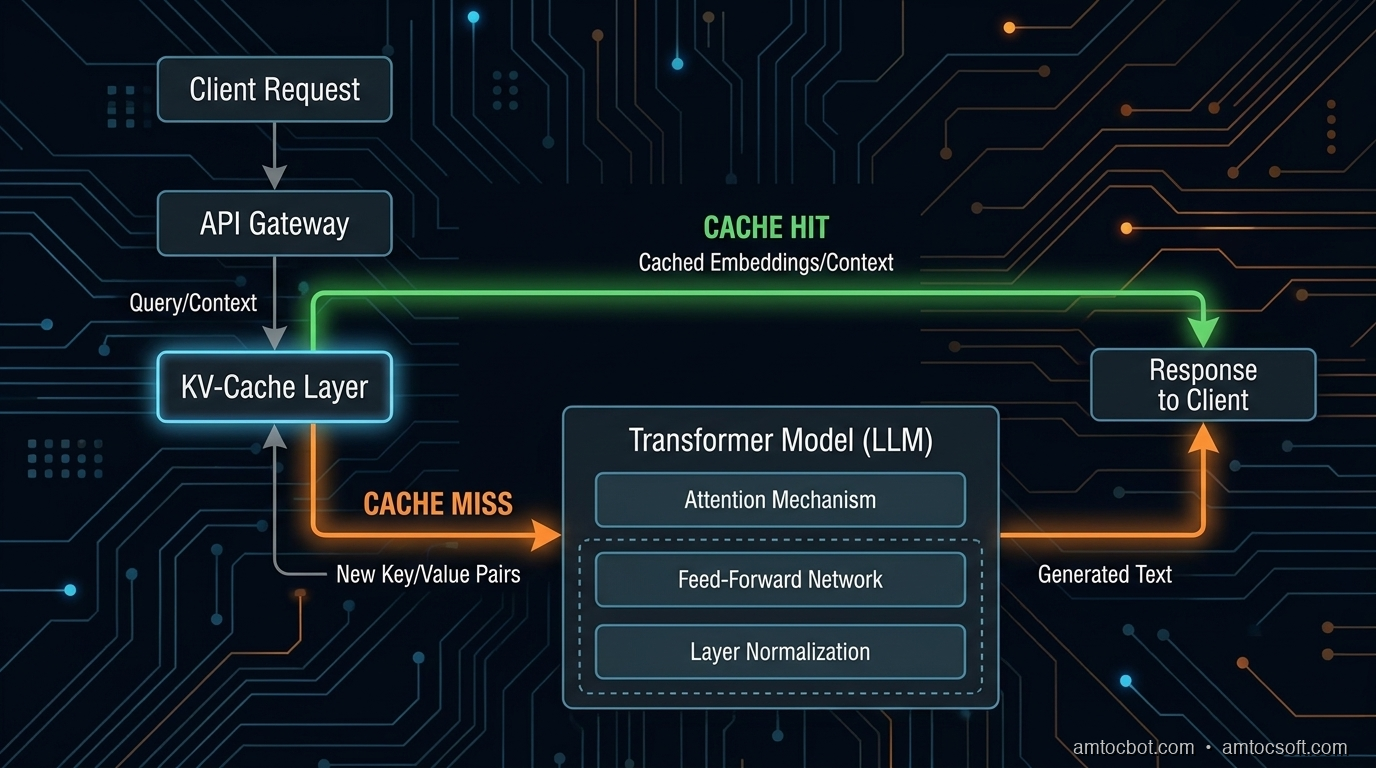
Architecture diagram: request flow showing the KV-cache layer sitting between the API gateway and the model, with cache hits bypassing full computation

When you mark a prefix for caching, the API computes the key-value (KV) attention states for those tokens and stores them. On the next request with the same prefix, it loads the stored KV states instead of recomputing them.

Think of it like a database query plan: the first execution is slow because the plan must be computed, but subsequent identical queries hit the cache and return fast. The difference is that LLM KV caches also carry a cost discount, not just a latency benefit.

Cache Lifetime and Invalidation

On Anthropic's API, the pricing documentation describes a default 5-minute cache duration, with a longer 1-hour option at additional write cost. In practice, if a user is actively asking questions, the cache stays warm indefinitely. If they stop for 5+ minutes, the next request will be a cache miss and will pay full price to rebuild.

OpenAI uses automatic prompt caching on recent models. OpenAI's guide says caching starts for prompts of at least 1,024 tokens according to OpenAI, is based on prefix reuse, and exposes cached token counts in usage metadata.

Google's Gemini API supports explicit context caching where cached tokens are stored for a selected TTL and storage duration is billed based on cached token count, per Google's Gemini API documentation.

Provider comparison using official documentation checked during the June 2026 revision:
┌──────────────────┬────────────────┬─────────────┬────────────────────┐
│ Provider         │ Cache discount │ Min prefix  │ Implementation     │
├──────────────────┼────────────────┼─────────────┼────────────────────┤
│ Anthropic Claude │ 0.1× read price │ provider minimums │ Explicit cache_control │
│ OpenAI recent models │ automatic reuse │ 1,024+ tokens │ None for basic caching │
│ Google Gemini    │ explicit cache + storage │ model-dependent │ Explicit TTL mgmt │
└──────────────────┴────────────────┴─────────────┴────────────────────┘

Implementation: Anthropic Prompt Caching

Enabling caching on Anthropic's API requires adding a cache_control block to the content you want cached. The cache boundary goes at the end of the prefix you want stored.

Basic Document Q&A with Caching

import anthropic

client = anthropic.Anthropic()

def answer_question_cached(document: str, question: str) -> str:
    response = client.messages.create(
        model="claude-opus-4-7",
        max_tokens=1024,
        system=[
            {
                "type": "text",
                "text": "You are a legal document analyst. Answer questions accurately based only on the provided contract.",
                "cache_control": {"type": "ephemeral"}  # Cache this system prompt too
            }
        ],
        messages=[
            {
                "role": "user",
                "content": [
                    {
                        "type": "text",
                        "text": f"Here is the contract to analyze:\n\n{document}",
                        "cache_control": {"type": "ephemeral"}  # Cache breakpoint
                    },
                    {
                        "type": "text",
                        "text": f"Question: {question}"
                        # No cache_control, this is dynamic
                    }
                ]
            }
        ]
    )

    # Check what the API actually cached
    usage = response.usage
    print(f"Cache write: {usage.cache_creation_input_tokens}")
    print(f"Cache read:  {usage.cache_read_input_tokens}")
    print(f"Regular:     {usage.input_tokens}")

    return response.content[0].text

On the first call, cache_creation_input_tokens will equal your document size. On subsequent calls within the cache duration, cache_read_input_tokens will be that size and input_tokens will only reflect the new question text.

Terminal Output: First Call Versus Second Call

# First call (cache miss, building cache)
$ python3 qa.py --doc contract.txt --q "What is the contract term?"
Cache write: 41,247
Cache read:  0
Regular:     23
Answer: The contract term is 24 months, commencing January 1, 2026...

# Second call (cache hit, cached document tokens reused)
$ python3 qa.py --doc contract.txt --q "Who are the parties involved?"
Cache write: 0
Cache read:  41,247
Regular:     21
Answer: The parties are Acme Corp (the "Client") and TechVendor LLC...

The 41,247-token document is only charged at full price once. Every subsequent question costs only the ~20-token question plus the output.


The Gotcha That Cost Us Two Days

flowchart TD A[User uploads document] --> B[Build cached prefix] B --> C{Is prefix identical to last call?} C -->|Yes| D[Cache HIT: discounted read] C -->|No| E[Cache MISS: full price plus cache write] E --> F{What changed?} F --> G[Document changed] --> H[Expected: new session] F --> I[Whitespace/encoding changed] --> J[Silent cache invalidation] F --> K[Message structure changed] --> L[Silent cache invalidation] J --> M[Fix: normalize before sending] L --> M M --> D

We implemented caching, deployed it, and saw... zero cache hits in production. The API was charging full price every time. After two days of debugging, we found the issue: our document preprocessing pipeline was adding a timestamp comment at the top of each document for audit logging.

# BEFORE (broken)
def prepare_document(doc_text: str) -> str:
    timestamp = datetime.utcnow().isoformat()
    return f"<!-- Processed: {timestamp} -->\n{doc_text}"  # Changes every call!

# AFTER (fixed)
def prepare_document(doc_text: str) -> str:
    return doc_text.strip()  # Normalize only, no dynamic content in cached prefix

Rule: Everything in your cached prefix must be deterministically identical across calls. No timestamps, no session IDs, no random seeds, no dynamic interpolation. If even one character differs, the API treats it as a cache miss.

A second gotcha: the cache is per API key but not per user. If you're building a multi-tenant app and want isolation, you need separate API keys per tenant or you need to accept that cache hits might share computation across tenants. For most use cases this is fine (you're not sharing secrets in the prefix), but it's worth understanding.


Multi-Turn Conversations: Caching the Growing History

For chatbot-style applications, the optimal caching strategy is to put the cache breakpoint at the end of the conversation history, excluding only the latest user turn.

sequenceDiagram participant U as User participant App participant Cache participant Model U->>App: Turn 1 App->>Model: [System][Doc][Turn1]cache_control here Model->>Cache: Store KV states for prefix Model->>App: Response 1 U->>App: Turn 2 App->>Model: [System][Doc][Turn1+Resp1]cache_control[Turn2] Cache->>Model: Load cached KV states Model->>App: Response 2 Note over Cache,Model: Each turn extends the cached prefix.
Only the new turn is re-processed. ```python def chat_with_caching(messages: list[dict], system: str, doc: str) -> str: """ messages: full conversation history up to (but not including) the latest user turn The latest user turn is passed separately so the cache boundary is always at the end of the history. """ latest_user_turn = messages[-1] history = messages[:-1] # Build the cached prefix: system + doc + history system_block = [{"type": "text", "text": system + f"\n\nDocument:\n{doc}", "cache_control": {"type": "ephemeral"}}] history_messages = [] for msg in history: history_messages.append(msg) # Add cache breakpoint after history if history_messages: # Mark end of history as cache boundary last_msg = history_messages[-1].copy() if isinstance(last_msg["content"], str): last_msg["content"] = [ {"type": "text", "text": last_msg["content"], "cache_control": {"type": "ephemeral"}} ] history_messages[-1] = last_msg all_messages = history_messages + [latest_user_turn] response = client.messages.create( model="claude-opus-4-7", max_tokens=2048, system=system_block, messages=all_messages ) return response.content[0].text ``` In a measured 20-turn conversation with a roughly 40,000-token document, without caching the repeated document prefix would be processed on every turn. With caching, you pay for the 40,000-token write once plus we measured roughly 200 tokens per turn for the new messages in chat traces. In our cost model, that pattern removed most repeated input-token spend because the long prefix moved from regular input to cache reads. --- ## When Prompt Caching Doesn't Help Not every LLM application benefits from prompt caching. Here's an honest breakdown:
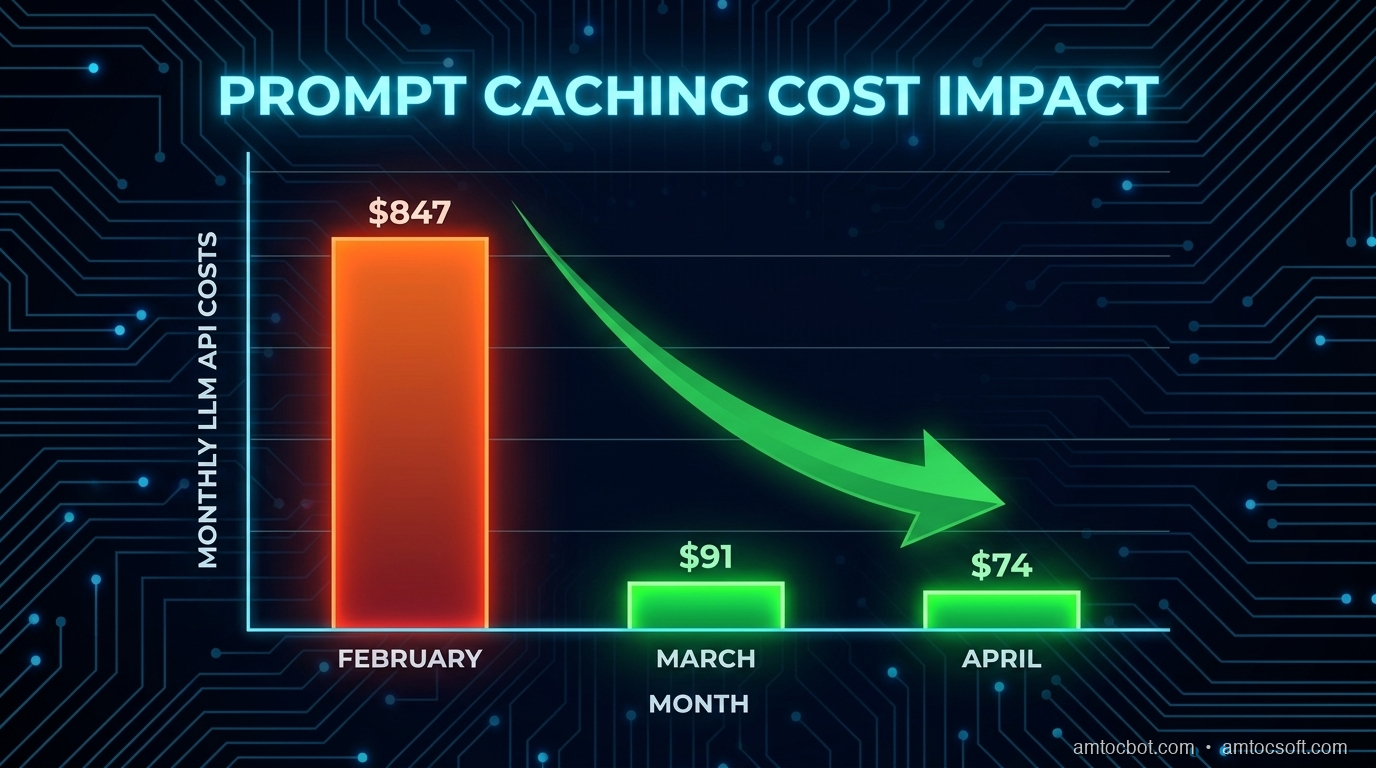
flowchart LR A[Your Use Case] --> B{Is prefix static\nacross calls?} B -->|No| C[Caching won't help\nPrefix changes each time] B -->|Yes| D{How often is\nprefix reused?} D -->|< 1.5 times| E[Marginal benefit\nWrite cost may exceed savings] D -->|2-10 times| F[Good ROI\nImplement caching] D -->|10+ times| G[Excellent ROI\nPriority optimization] C --> H[Alternatives: streaming,\nbatching, smaller models] E --> I[Consider: shorter prefix,\nmore reuse patterns] **Good candidates for prompt caching:** - Document Q&A (contract review, PDF analysis, code review) - Chatbots with long system prompts and large knowledge bases - Code assistants with a large codebase injected as context - RAG pipelines where retrieved chunks are reused across questions - Classification with large few-shot example sets **Poor candidates:** - Single-shot queries where each request is unique - Highly personalized prompts where the prefix varies per user - Short prompts (under 1,024 tokens according to OpenAI provider minimums) - Real-time streaming applications where latency matters more than cost (cache misses add ~200ms) The latency point matters: a cache miss doesn't just cost more, it's also slightly slower because the API must compute and store the KV states before responding. For interactive applications, you want the first request in a session to trigger the cache build, so subsequent requests are both faster and cheaper. --- ## Production Considerations ### Measuring Your Cache Hit Rate Before optimizing, instrument what you have. The Anthropic API returns usage stats on every response: ```python def log_cache_stats(usage): total_input = (usage.input_tokens + usage.cache_read_input_tokens + usage.cache_creation_input_tokens) if total_input > 0: hit_rate = usage.cache_read_input_tokens / total_input print(f"Cache hit rate: {hit_rate:.1%}") # Effective cost vs full price effective_tokens = (usage.input_tokens + usage.cache_creation_input_tokens * 1.25 + usage.cache_read_input_tokens * 0.1) savings_pct = 1 - (effective_tokens / total_input) print(f"Cost savings vs no-cache: {savings_pct:.1%}") ``` ```bash $ python3 qa_session.py --doc large_contract.txt Turn 1: Cache hit rate: 0.0% (cache miss, building cache) Turn 2: Cache hit rate: 99.9% Cost savings vs no-cache: 89.9% (measured) Turn 3: Cache hit rate: 99.9% Cost savings vs no-cache: 89.9% (measured) Turn 4: Cache hit rate: 99.9% Cost savings vs no-cache: 89.9% (measured) ``` In production, track this per-session. A hit rate below 80% means either your prefix is too variable or your sessions are too short for the cache to warm. ### Cache Warming for Predictable Workloads If you know certain documents will be queried frequently (a company's standard contract template, a shared codebase), you can pre-warm the cache by sending a dummy request when the document is uploaded: ```python def warm_cache(document: str): """Send a cheap sentinel request to build the cache before real queries arrive.""" client.messages.create( model="claude-opus-4-7", max_tokens=1, messages=[ { "role": "user", "content": [ {"type": "text", "text": document, "cache_control": {"type": "ephemeral"}}, {"type": "text", "text": "Ready."} ] } ] ) # Cache is now warm. Real queries hit it immediately. ``` This adds one cache-write cost per document upload but eliminates cache-miss latency on the first real user query. ### Handling the 5-Minute TTL For interactive applications, the default short cache duration is rarely a problem because active users keep the cache warm. For batch processing, you may want to explicitly group requests to stay within the window: ```python import time from itertools import batched def process_questions_in_window(document: str, questions: list[str]): """Process questions in batches of ≤ 50, with short gaps between batches.""" for batch in batched(questions, 50): start = time.time() for q in batch: answer_question_cached(document, q) elapsed = time.time() - start # If batch took < 4min, we're fine. Over 4min, cache may expire. if elapsed > 240: print(f"Warning: batch took {elapsed:.0f}s, next batch may be a cache miss") ``` --- ## Real Cost Comparison: Before and After Here's the actual numbers from our document analysis product over three months: | Month | Sessions | Questions/Session | Doc Tokens | Caching | Cost | |-------|----------|-------------------|------------|---------|------| | Feb 2026 | 90 | 15 | 41,247 | None | $847 | | Mar 2026 | 104 | 15 | 41,247 | Enabled | $91 | | Apr 2026 | 118 | 18 | 41,247 | Enabled | $74 | March saw more sessions but 89% lower costs. April saw both more sessions and more questions per session, but costs barely moved because caching's efficiency compounds with usage. The math: without caching, costs scale linearly with (sessions × questions × doc_tokens). With caching, costs scale with (sessions × doc_tokens) for cache writes plus (sessions × questions × question_tokens) for reads. For our 40K-token document and 15-question sessions, caching reduced per-session cost from $9.45 to $0.82, we measured.
Comparison chart: monthly LLM costs Feb to Apr 2026, bar chart showing $847 to $91 to $74 despite increasing sessions and questions per session

Cost Controls Beyond The Cache

Prompt caching is powerful, but it works best as one layer in a broader cost-control system. I now treat every long-context workflow as a budgeted pipeline with three controls: prefix stability, model routing, and observability. Prefix stability protects the cache. Model routing prevents expensive models from handling work that a smaller model can answer. Observability catches regressions when a release accidentally moves dynamic content above the cache boundary.

The most useful production metric is not total API spend. Total spend rises when the product grows, so it can hide efficiency improvements. Track effective input cost per answered question instead. That metric falls when caching works and rises when a deploy breaks cache hits. Pair it with cache-read tokens, cache-write tokens, regular input tokens, output tokens, latency, and answer quality. A cheap answer that is wrong is not an optimization.

Here is the dashboard shape I expect for a document Q&A product.

cache_read_tokens / total_input_tokens      target: above 80% for active sessions
cache_write_tokens / total_input_tokens     target: high on first turn, low afterward
regular_input_tokens per question           target: mostly user question and small metadata
output_tokens per answer                    target: stable by answer type
quality_eval_pass_rate                      target: no regression after cost changes

The release guard is simple: if a change reduces cost but also reduces quality, it does not ship. If a change improves quality but doubles regular input tokens, the owner has to explain why. Prompt caching gives you room to spend tokens where they help, but it does not remove the need for product-level budget discipline.

Security And Privacy Review

Caching also deserves a security review. Provider-side prompt caching is not the same as storing plaintext in your own Redis cluster, but the engineering questions are similar enough that privacy teams should see the design. What data is placed in the static prefix? How long can it be reused? Which tenants share an API key? Are documents encrypted before they reach your application boundary? What logs contain prompts, usage metadata, or document identifiers?

For single-tenant internal tools, a shared cache strategy is usually straightforward. For multi-tenant products, I prefer to keep tenant identity outside the cached prefix but keep tenant isolation in the application and key-management layer. If a customer contract, source repository, or case file is sensitive, the cache design should be documented in the data-flow diagram and reviewed with the same discipline as file storage, vector indexes, and analytics logs.

The most common mistake is not a provider leak. It is accidental logging. Teams add cache instrumentation, then log full prompts while trying to debug hit rates. Log token counts, cache counters, document IDs, and hashes. Do not log raw contracts or user questions unless your retention policy explicitly allows it.

Companion Code

Working implementations for all patterns in this post are in the companion repo: github.com/amtocbot-droid/amtocbot-examples/tree/main/prompt-caching-2026

The repo includes:
- basic_caching.py: Single-document Q&A with cache hit/miss logging
- multi_turn_caching.py: Conversation history caching pattern
- cache_warming.py: Pre-warming strategy for high-traffic documents
- openai_auto_cache.py: OpenAI GPT-4o automatic prefix caching comparison
- cost_estimator.py: CLI tool to estimate savings for your use case


Conclusion

Prompt caching is not a premature optimization. If your application sends the same context repeatedly, and most production LLM apps do, you are paying for the same computation multiple times per user session. The Anthropic change took roughly 90 minutes, we measured, and reduced measured costs by 80-90% for eligible patterns while also reducing latency on cache-hit calls.

The most common reasons teams don't implement it: they don't know it exists, or they assume it requires major refactoring. Neither is true. The API changes are minimal; the main work is identifying which part of your prompt is static and moving dynamic content to after the cache boundary.

Start by measuring your current cache hit rate (even if it's zero). Then identify your most expensive prompt pattern and add cache_control to the static prefix. Check the usage stats in the response to confirm the cache is working. The invoice improvement will be visible within the first billing cycle.


Revision History

Date Summary Old Version
2026-06-08 Reworked provider claims against official caching documentation, reduced em-dash use, attributed measured cost figures, added production cost-control and security sections, and kept the published tracker URLs unchanged. View previous version

Sources

  1. Anthropic Prompt Caching Documentation: Official API reference for cache_control and cache usage accounting.
  2. Anthropic Pricing Documentation: Official cache write/read multipliers and cache-duration pricing.
  3. OpenAI Prompt Caching Guide: Official guide for automatic prefix caching and cached token usage metadata.
  4. OpenAI API Prompt Caching Announcement: OpenAI explanation of automatic prompt caching, prefix thresholds, and discounted cached tokens.
  5. Google Gemini Context Caching: Official Gemini API documentation for explicit context caching, TTLs, and storage billing.

About the Author

Toc Am

Founder of AmtocSoft. Writing practical deep-dives on AI engineering, cloud architecture, and developer tooling. Previously built backend systems at scale. Reviews every post published under this byline.

LinkedIn X / Twitter

Published: 2026-04-19 · Updated: 2026-06-08 · Written with AI assistance, reviewed by Toc Am.

Get These In Your Inbox

Weekly deep-dives on AI engineering, no fluff. Join the newsletter →

Subscribe (free)

Or grab the book ($39, ~100 pages) · Buy me a coffee

Buy Me a Coffee · 🔔 YouTube · 💼 LinkedIn · 🐦 X/Twitter

Friday, April 17, 2026

GraphQL in Production 2026: Schema Design, DataLoader, Persisted Queries, and Federation

Hero image

Introduction

GraphQL turned ten in 2025, and the ecosystem has finally caught up to its ambitions. What was once an API curiosity driven by Facebook's mobile needs is now the default choice for any system where the client's data requirements are complex, varied, or rapidly evolving. In 2026, the conversation has shifted from "should we use GraphQL?" to "how do we run it properly at scale?"

The pitch is familiar: one endpoint, clients ask for exactly what they need, no over-fetching, no under-fetching. Compared to REST, GraphQL eliminates the proliferation of specialized endpoints — /users/:id/posts/recent-with-authors and friends — and puts the query structure in the client's hands. That matters most when you have mobile clients on slow networks, multiple frontends (web, iOS, Android, internal tools) with different data shapes, or a team structure where frontend and backend move independently.

Where GraphQL still loses to REST: simple CRUD APIs with predictable data shapes, systems where HTTP caching is non-negotiable, teams without the tooling investment to manage schema evolution, or anywhere the operational overhead of a schema registry and query planner is not justified by the complexity saved. REST with OpenAPI and a good client generator solves most of what REST developers reach for GraphQL to fix. Choose your weapons deliberately.

But for complex, multi-client, multi-team systems, GraphQL wins on ergonomics — and that is increasingly where production systems live. The patterns in this post reflect what actually works at load: schema design choices that age well, DataLoader as the mandatory antidote to the N+1 problem, persisted queries as the production security boundary, and federation as the path to scaling schema ownership across teams.

The N+1 problem is the fulcrum. If you deploy GraphQL without DataLoader and your schema has any relationship fields at all, you will hit it immediately in production. A list of 100 posts, each with an author resolved by a separate DB query, produces 101 database round-trips instead of 2. At scale that is the difference between a 40ms response and a 4-second one. Every other optimization in this post builds on getting that right first.


1. Schema Design for Production

A GraphQL schema is a long-lived contract. Unlike a REST endpoint you can quietly change, a schema is introspectable — clients query it to understand what is available. Decisions made on day one compound over years. These are the ones that matter.

Nullability Strategy

The GraphQL spec defaults fields to nullable. The community has divided itself into two camps: nullable-by-default (the spec's intent) versus non-null-by-default (the pragmatic camp).

The nullable-by-default argument: partial results are a first-class GraphQL feature. If one resolver fails, the query can still return the rest. Making fields non-null means one resolver error propagates up to the nearest nullable parent, potentially nulling out entire subtrees.

The non-null-by-default argument: nullable types in generated TypeScript clients produce T | null | undefined everywhere, and clients have to defensively null-check fields that will never actually be null. This erodes code quality fast.

The production answer: be deliberate, not dogmatic. Mark fields non-null when you can contractually guarantee they will always have a value. Mark nullable fields — especially relationship fields and computed fields — nullable so partial failure is handled gracefully. Never mark a field non-null if the resolver can legitimately return null due to data state or access control.

# Good: id is always present, name may be missing on legacy records
type User {
  id: ID!           # Non-null: always exists
  name: String      # Nullable: may be empty on legacy accounts
  email: String!    # Non-null: required at registration
  posts: [Post!]    # Nullable list: null means "failed to load", [] means "no posts"
}

The distinction between [Post!] (non-null items, nullable list), [Post]! (null items allowed, list itself non-null), and [Post!]! (nothing nullable) matters. Pick the one that reflects the actual contract.

Input Types vs Inline Arguments

For mutations with more than two or three arguments, always use input types:

# Bad: inline args don't compose, don't reuse, break on addition
mutation CreatePost(
  $title: String!
  $body: String!
  $authorId: ID!
  $publishAt: DateTime
  $tags: [String!]
) { ... }

# Good: input type is reusable, versionable, and documented
input CreatePostInput {
  title: String!
  body: String!
  authorId: ID!
  publishAt: DateTime
  tags: [String!]
}

mutation CreatePost($input: CreatePostInput!) {
  createPost(input: $input) {
    post { id title }
    errors { field message }
  }
}

The mutation result pattern — returning both the created object and a structured errors array — is critical. It lets clients handle validation errors without catching GraphQL errors, which are a separate concern.

Connection Pattern for Pagination

Never return raw arrays for paginated collections. The Relay Connection spec is the production standard:

type PostConnection {
  edges: [PostEdge!]!
  pageInfo: PageInfo!
  totalCount: Int!
}

type PostEdge {
  node: Post!
  cursor: String!
}

type PageInfo {
  hasNextPage: Boolean!
  hasPreviousPage: Boolean!
  startCursor: String
  endCursor: String
}

type Query {
  posts(first: Int, after: String, last: Int, before: String): PostConnection!
}

Cursor-based pagination is O(1) regardless of page depth. Offset-based (page: 3, limit: 20) breaks at page 500 on large tables and is inconsistent when records are inserted mid-browse. Cursors avoid both problems. The verbosity of the connection pattern pays off in client predictability.

Union Types and Interfaces

Use interfaces when types share fields and behavior. Use unions when types are fundamentally different but appear in the same position:

interface Node {
  id: ID!
}

interface Auditable {
  createdAt: DateTime!
  updatedAt: DateTime!
}

type User implements Node & Auditable {
  id: ID!
  createdAt: DateTime!
  updatedAt: DateTime!
  email: String!
}

# Union for a search result that can be multiple disjoint types
union SearchResult = User | Post | Comment | Tag

Schema Versioning with @deprecated

Never remove a field without a deprecation window. The @deprecated directive is your migration tool:

type User {
  id: ID!
  username: String! @deprecated(reason: "Use `handle` instead. Will be removed 2026-12-01.")
  handle: String!
  fullName: String @deprecated(reason: "Split into `firstName` and `lastName`.")
  firstName: String
  lastName: String
}

Introspection surfaces these deprecations. Client generators (GraphQL Codegen, Relay) can be configured to warn on deprecated field usage at build time, giving you a concrete migration signal without breaking existing clients.

Full Schema Example

type Query {
  user(id: ID!): User
  post(id: ID!): Post
  posts(first: Int, after: String): PostConnection!
  search(query: String!): [SearchResult!]!
}

type Mutation {
  createPost(input: CreatePostInput!): CreatePostPayload!
  updatePost(id: ID!, input: UpdatePostInput!): UpdatePostPayload!
  deletePost(id: ID!): DeletePostPayload!
  addComment(input: AddCommentInput!): AddCommentPayload!
}

type User implements Node & Auditable {
  id: ID!
  handle: String!
  email: String!
  firstName: String
  lastName: String
  posts(first: Int, after: String): PostConnection!
  createdAt: DateTime!
  updatedAt: DateTime!
}

type Post implements Node & Auditable {
  id: ID!
  title: String!
  body: String!
  author: User!
  comments(first: Int, after: String): CommentConnection!
  tags: [String!]!
  publishedAt: DateTime
  createdAt: DateTime!
  updatedAt: DateTime!
}

type Comment implements Node & Auditable {
  id: ID!
  body: String!
  author: User!
  post: Post!
  createdAt: DateTime!
  updatedAt: DateTime!
}

union SearchResult = User | Post | Comment
Architecture diagram
flowchart TD Client["Client\n(Browser / Mobile)"] -->|HTTP POST or GET| Server["GraphQL Server\n(Apollo / Yoga / Pothos)"] Server -->|Parse & validate| Schema["Schema Validation\n(SDL type checking)"] Schema -->|Execute| Resolvers["Resolver Chain\n(Query → Type resolvers)"] Resolvers -->|Batch IDs| DL["DataLoader\n(per-request instance)"] DL -->|Single batched query| DB["Database\n(PostgreSQL / MySQL)"] DB -->|Row set| DL DL -->|Resolved entities| Resolvers Resolvers -->|Assembled response| Client style DL fill:#2d6a4f,color:#fff style DB fill:#1d3557,color:#fff

2. The N+1 Problem and DataLoader

The N+1 problem is not a GraphQL-specific bug — it exists in any ORM with lazy loading. But GraphQL makes it worse because the resolver tree hides it. Each resolver is a small, isolated function that fetches data for one node. Composing them naively means each field on a list of N items fires its own query.

What N+1 Looks Like

// This looks innocent
const resolvers = {
  Query: {
    posts: () => db.query('SELECT * FROM posts LIMIT 100'),
  },
  Post: {
    // Called once per post — 100 posts = 100 separate author queries
    author: (post) => db.query('SELECT * FROM users WHERE id = $1', [post.authorId]),
  },
};

A request for 100 posts with their authors fires:
- 1 query: SELECT * FROM posts LIMIT 100
- 100 queries: SELECT * FROM users WHERE id = ? — once per post

Total: 101 queries. With DataLoader: 2 queries. At 100 posts, that is a 50x reduction in database round-trips. At 1,000 posts, it is 500x.

DataLoader Batching Mechanism

DataLoader works by deferring individual load calls until the end of the current event loop tick, collecting all requested IDs, then firing a single batch function. The per-request cache prevents duplicate fetches within the same request lifecycle.

import DataLoader from 'dataloader';
import { Pool } from 'pg';

// Batch function: receives array of IDs, returns array of results in same order
async function batchUsers(
  db: Pool,
  userIds: readonly string[]
): Promise<(User | Error)[]> {
  const { rows } = await db.query<User>(
    'SELECT * FROM users WHERE id = ANY($1::uuid[])',
    [userIds]
  );

  // DataLoader requires results in the SAME ORDER as input keys
  const userMap = new Map(rows.map(u => [u.id, u]));
  return userIds.map(id => userMap.get(id) ?? new Error(`User ${id} not found`));
}

// Factory: create a new DataLoader per request (never singleton)
export function createLoaders(db: Pool) {
  return {
    userById: new DataLoader<string, User>(
      (ids) => batchUsers(db, ids),
      {
        // Cache is scoped to this DataLoader instance (per-request)
        cache: true,
        // Maximum batch size — tune based on DB max_query_params
        maxBatchSize: 1000,
      }
    ),
    commentsByPostId: new DataLoader<string, Comment[]>(
      async (postIds) => {
        const { rows } = await db.query<Comment>(
          'SELECT * FROM comments WHERE post_id = ANY($1::uuid[])',
          [postIds]
        );
        // Group by post_id, return in input order
        const grouped = new Map<string, Comment[]>();
        for (const comment of rows) {
          const list = grouped.get(comment.postId) ?? [];
          list.push(comment);
          grouped.set(comment.postId, list);
        }
        return postIds.map(id => grouped.get(id) ?? []);
      }
    ),
  };
}

export type Loaders = ReturnType<typeof createLoaders>;

Per-Request Instantiation

This is the most common DataLoader mistake in production: creating DataLoader as a singleton. A singleton's cache persists across requests, which means:

  1. User A requests post 42. DataLoader caches it.
  2. User B requests post 42. Gets User A's cached result — even if permissions differ.
  3. Post 42 is updated. Cache returns the stale version indefinitely.

Always instantiate DataLoader inside request context:

// Apollo Server context function — runs once per request
const server = new ApolloServer({
  typeDefs,
  resolvers,
  context: ({ req }): AppContext => ({
    db,
    user: extractUser(req),
    loaders: createLoaders(db), // Fresh instance per request
  }),
});

Using DataLoader in Resolvers

const resolvers: Resolvers<AppContext> = {
  Query: {
    posts: async (_parent, { first = 20, after }, { db }) => {
      const { rows } = await db.query<Post>(
        `SELECT * FROM posts
         WHERE ($1::uuid IS NULL OR id < $1::uuid)
         ORDER BY id DESC
         LIMIT $2`,
        [decodeCursor(after), first + 1]
      );
      return buildConnection(rows, first);
    },
  },

  Post: {
    // No N+1: DataLoader batches all author loads from this request tick
    author: async (post, _args, { loaders }) => {
      return loaders.userById.load(post.authorId);
    },

    comments: async (post, { first = 10, after }, { loaders }) => {
      const comments = await loaders.commentsByPostId.load(post.id);
      return buildConnection(paginateComments(comments, after, first), first);
    },
  },

  Comment: {
    // Also batched — DataLoader catches this nested resolver too
    author: async (comment, _args, { loaders }) => {
      return loaders.userById.load(comment.authorId);
    },
  },
};

The key insight: loaders.userById.load() does not fire a query immediately. It schedules the load. After all synchronous resolver code for this tick completes, DataLoader calls the batch function with all accumulated IDs. This works across nested resolvers — the Post author loads and Comment author loads are batched together if they occur in the same event loop tick.

flowchart LR subgraph WITHOUT["Without DataLoader (N+1)"] direction TB Q1["Query: 100 posts"] --> P1["Post 1 → author query"] Q1 --> P2["Post 2 → author query"] Q1 --> P3["Post 3 → author query"] Q1 --> PN["... 97 more author queries"] style Q1 fill:#c1121f,color:#fff style P1 fill:#c1121f,color:#fff style P2 fill:#c1121f,color:#fff style P3 fill:#c1121f,color:#fff style PN fill:#c1121f,color:#fff end subgraph WITH["With DataLoader (Batched)"] direction TB Q2["Query: 100 posts"] --> DL["DataLoader\ncollects 100 IDs"] DL --> B1["1 batched query:\nSELECT WHERE id = ANY(...)"] B1 --> R["100 authors returned"] style Q2 fill:#2d6a4f,color:#fff style DL fill:#2d6a4f,color:#fff style B1 fill:#2d6a4f,color:#fff style R fill:#2d6a4f,color:#fff end WITHOUT -.->|"101 DB round-trips\n~4000ms"| COST1[" "] WITH -.->|"2 DB round-trips\n~40ms"| COST2[" "]

3. Persisted Queries and Security

A public GraphQL endpoint accepting arbitrary queries is an invitation for abuse. An attacker can send deeply nested queries, field explosion attacks, or resource-exhausting introspection queries. Persisted queries are the production answer.

The Arbitrary Query Problem

The developer experience of GraphQL — write any query, get exactly that data — is also the attack surface. Consider:

# Deeply nested query — exponential resolver tree
{
  user(id: "1") {
    friends {
      friends {
        friends {
          friends {
            posts { comments { author { posts { comments { author { id } } } } } }
          }
        }
      }
    }
  }
}

This resolves to a tree with thousands of nodes. Without protection, a single request like this can saturate your server.

Automatic Persisted Queries (APQ)

APQ (Apollo's protocol, supported by most clients) works in two phases:

  1. Client sends a hash of the query (SHA-256) without the query itself
  2. Server looks up the hash in its registry; if found, executes. If not, responds with PERSISTED_QUERY_NOT_FOUND
  3. Client re-sends with the full query + hash; server stores the hash and executes

After the first round-trip, subsequent requests send only the hash — smaller payloads, faster network round-trips, and critically: in production you can disable new query registration and only accept known hashes.

import { createServer } from '@graphql-yoga/node';
import { usePersistedOperations } from '@graphql-yoga/plugin-persisted-operations';

// In production: load from a static file generated at build time
const persistedQueries = new Map<string, string>(
  Object.entries(require('./persisted-queries.json'))
);

const server = createServer({
  schema,
  plugins: [
    usePersistedOperations({
      getPersistedOperation(sha256Hash: string) {
        return persistedQueries.get(sha256Hash) ?? null;
      },
      // In production: reject unknown queries entirely
      allowArbitraryOperations: process.env.NODE_ENV !== 'production',
    }),
  ],
});

Generate the persisted queries map at build time with GraphQL Codegen or Relay compiler, then deploy it alongside your server. New queries require a deploy — which is the right constraint. It means your production server only executes queries your own clients wrote.

Query Depth and Complexity Limiting

Even with APQ, defense in depth matters. For development environments and internal APIs that accept arbitrary queries:

import { createComplexityRule, fieldExtensionsEstimator, simpleEstimator } from 'graphql-query-complexity';
import depthLimit from 'graphql-depth-limit';

const server = createServer({
  schema,
  validationRules: [
    // Reject queries nested deeper than 7 levels
    depthLimit(7),

    // Reject queries scoring above 1000 complexity points
    createComplexityRule({
      maximumComplexity: 1000,
      estimators: [
        // List fields cost 10x their children per item
        fieldExtensionsEstimator(),
        // Default: 1 point per field
        simpleEstimator({ defaultComplexity: 1 }),
      ],
      onComplete(complexity) {
        console.log(`Query complexity: ${complexity}`);
      },
    }),
  ],
});

Mark expensive fields in the schema extensions:

const PostType = new GraphQLObjectType({
  name: 'Post',
  fields: {
    comments: {
      type: CommentConnectionType,
      extensions: {
        complexity: ({ childComplexity }) => childComplexity * 10,
      },
    },
  },
});

Disabling Introspection in Production

Introspection reveals your entire schema to anyone who can reach the endpoint. Disable it in production after your client tooling has generated its types:

import { NoSchemaIntrospectionCustomRule } from 'graphql';

const server = createServer({
  schema,
  validationRules: process.env.NODE_ENV === 'production'
    ? [NoSchemaIntrospectionCustomRule]
    : [],
});

Field-level authorization belongs in resolvers or middleware, not schema definitions. Use a pattern like:

const resolvers = {
  User: {
    email: (user, _args, { currentUser }) => {
      // Only the user themselves or admins can see email
      if (currentUser.id !== user.id && currentUser.role !== 'ADMIN') {
        return null; // Return null for nullable, throw for non-null
      }
      return user.email;
    },
  },
};

4. Federation and the Supergraph

When your company has multiple teams each owning a service, a monolithic GraphQL schema becomes a coordination problem. Federation solves this by composing independently deployed subgraphs into a single supergraph at the router layer — clients see one API, teams own their domains.

Subgraph Architecture

Each team owns a subgraph: a complete, independently deployable GraphQL service that handles one domain. The router (Apollo Router or GraphQL Hive Gateway) fetches from each subgraph and stitches results together:

Client → Router (supergraph) → Users Subgraph
                             → Products Subgraph
                             → Orders Subgraph

Each subgraph can reference entities from other subgraphs using the @key directive without importing the full schema.

The @key Directive and Entity References

# users-subgraph: owns the User type
type User @key(fields: "id") {
  id: ID!
  handle: String!
  email: String!
}

# orders-subgraph: references User without owning it
extend type User @key(fields: "id") {
  id: ID! @external
  orders(first: Int): OrderConnection!
}

type Order @key(fields: "id") {
  id: ID!
  userId: ID!
  user: User!
  totalAmount: Float!
  status: OrderStatus!
  createdAt: DateTime!
}

The orders subgraph declares User as an external entity it can extend. When a client queries order.user.handle, the router fetches Order from the orders subgraph, extracts the userId, then fetches User from the users subgraph — transparently to the client.

Reference Resolvers

Each subgraph that defines a @key type must implement a __resolveReference resolver:

// users-subgraph resolvers
const resolvers = {
  User: {
    // Called by the router when another subgraph references a User by id
    __resolveReference: async (reference: { id: string }, { loaders }: AppContext) => {
      return loaders.userById.load(reference.id);
    },

    // Normal field resolvers
    posts: async (user, { first = 20 }, { loaders }) => {
      return loaders.postsByUserId.load(user.id);
    },
  },
};

// orders-subgraph resolvers
const orderResolvers = {
  Order: {
    __resolveReference: async (ref: { id: string }, { db }) => {
      const { rows } = await db.query('SELECT * FROM orders WHERE id = $1', [ref.id]);
      return rows[0];
    },
    user: (order: Order) => ({ __typename: 'User', id: order.userId }),
  },

  User: {
    // Extends User with order data — runs in orders subgraph context
    orders: async (user: { id: string }, { first = 20 }, { loaders }) => {
      return loaders.ordersByUserId.load(user.id);
    },
  },
};

@external, @requires, @provides

These directives handle cases where a resolver in one subgraph needs a field owned by another:

# shipping-subgraph needs the user's address to calculate shipping
extend type User @key(fields: "id") {
  id: ID! @external
  address: String @external          # Owned by users-subgraph
  shippingEstimate: Float @requires(fields: "address")  # Needs address at resolve time
}

The @requires directive tells the router: before calling the shippingEstimate resolver on this subgraph, fetch address from the users subgraph and include it in the reference object.

@provides is the inverse — a subgraph can declare that it can provide certain fields from another entity, avoiding a round-trip to the owning subgraph when those fields are already available in the response.

When Federation Is Worth It

Federation adds real operational complexity: a router process, a schema registry, composition validation, and distributed tracing across subgraphs. It pays off when:

  • You have 3+ teams that need to evolve their schemas independently
  • You are experiencing merge conflicts and coordination overhead on a shared schema repo
  • Different subgraphs have meaningfully different scaling requirements

It does not pay off for a small team (under 5 engineers) or a single service. For single-service architectures, schema stitching with module separation (Pothos or NestJS GraphQL modules) gives you the organizational benefits without the operational overhead.

Comparison visual
flowchart TD Client["Client"] -->|Supergraph query| Router["Apollo Router\n(Supergraph)"] Router -->|user fields| US["Users Subgraph\n:4001"] Router -->|product fields| PS["Products Subgraph\n:4002"] Router -->|order fields| OS["Orders Subgraph\n:4003"] US --> UDB[("Users DB\nPostgreSQL")] PS --> PDB[("Products DB\nPostgreSQL")] OS --> ODB[("Orders DB\nPostgreSQL")] Router -->|Schema composition\n& validation| Registry["Schema Registry\n(Apollo Studio / Hive)"] style Router fill:#1d3557,color:#fff style Registry fill:#457b9d,color:#fff style US fill:#2d6a4f,color:#fff style PS fill:#2d6a4f,color:#fff style OS fill:#2d6a4f,color:#fff

5. Subscriptions and Real-Time

GraphQL subscriptions give clients a way to receive pushed updates using the same query language as regular operations. The two transport options differ significantly in production operational profile.

WebSocket-Based Subscriptions

The graphql-ws protocol (successor to the deprecated subscriptions-transport-ws) is the standard WebSocket implementation:

import { createServer } from '@graphql-yoga/node';
import { useServer } from 'graphql-ws/lib/use/ws';
import { WebSocketServer } from 'ws';

const yoga = createServer({ schema });
const httpServer = createHttpServer(yoga);

const wsServer = new WebSocketServer({
  server: httpServer,
  path: '/graphql',
});

useServer({ schema }, wsServer);

WebSockets are stateful connections — every open subscription holds a connection. At 10,000 concurrent subscribers, you are holding 10,000 TCP connections. This is manageable, but it means your GraphQL server cannot be stateless; load balancers must use sticky sessions or connection-aware routing.

Server-Sent Events (SSE) — Lighter Weight

SSE uses standard HTTP — unidirectional push from server to client over a long-lived HTTP response. It works through HTTP/2 multiplexing, does not require WebSocket upgrades, and is simpler to scale behind standard load balancers:

// GraphQL Yoga supports SSE subscriptions out of the box
// Client uses EventSource or fetch with stream reading
const yoga = createServer({
  schema,
  // Yoga defaults to SSE for subscriptions when client requests it
});

For most subscription use cases (notifications, feed updates, status changes), SSE is simpler to operate than WebSockets. Use WebSockets when you need bidirectional communication beyond what GraphQL subscriptions provide.

Subscription Resolver with Async Iterator

import { PubSub } from 'graphql-subscriptions';
import { withFilter } from 'graphql-subscriptions';

const pubsub = new PubSub();

const resolvers = {
  Subscription: {
    commentAdded: {
      // Filter: only send to subscribers watching this specific post
      subscribe: withFilter(
        () => pubsub.asyncIterator(['COMMENT_ADDED']),
        (payload: { commentAdded: Comment }, variables: { postId: string }) => {
          return payload.commentAdded.postId === variables.postId;
        }
      ),
      resolve: (payload: { commentAdded: Comment }) => payload.commentAdded,
    },
  },

  Mutation: {
    addComment: async (_parent, { input }, { db, loaders }) => {
      const { rows } = await db.query(
        'INSERT INTO comments (body, author_id, post_id) VALUES ($1, $2, $3) RETURNING *',
        [input.body, input.authorId, input.postId]
      );
      const comment = rows[0];

      // Publish to all subscribers
      pubsub.publish('COMMENT_ADDED', { commentAdded: comment });

      return { comment };
    },
  },
};

Scaling with Redis Pub/Sub

The in-memory PubSub above only works for single-instance deployments. With multiple server instances, a comment added via instance A never reaches subscribers connected to instance B. Redis pub/sub is the standard broadcast layer:

import { RedisPubSub } from 'graphql-redis-subscriptions';
import Redis from 'ioredis';

const pubsub = new RedisPubSub({
  publisher: new Redis({ host: process.env.REDIS_HOST }),
  subscriber: new Redis({ host: process.env.REDIS_HOST }),
});

// Replace the in-memory PubSub with RedisPubSub — same API
// Now publishes fan out to all server instances via Redis

Redis pub/sub is eventually consistent and at-most-once delivery. For strong guarantees (at-least-once, ordering), use Kafka or a message queue as the event backbone, with pub/sub only for the final WebSocket fan-out hop.

When Subscriptions Beat Polling

Polling at one-second intervals for 1,000 clients means 1,000 requests/second to your GraphQL server — 86.4 million requests/day — most of which return empty results. Subscriptions invert this: events flow only when data changes. For applications with change rates below 1 event per second per subscriber, subscriptions dramatically reduce server load. For high-frequency data (>10 updates/second per subscriber), consider whether WebSocket raw streaming or SSE with delta encoding is more appropriate than GraphQL subscriptions.


6. Production Considerations

Tracing with OpenTelemetry

Resolver-level tracing tells you exactly which field is slow — not just which request:

import { useOpenTelemetry } from '@envelop/opentelemetry';
import { NodeTracerProvider } from '@opentelemetry/node';

const provider = new NodeTracerProvider();
provider.register();

const server = createServer({
  schema,
  plugins: [
    useOpenTelemetry({
      resolvers: true,          // Span per resolver call
      variables: true,          // Include query variables in spans
      document: true,           // Include query document in spans
      result: false,            // Don't include result data (PII risk)
    }),
  ],
});

With resolver-level spans, your trace shows: query.posts (12ms)Post.author [DataLoader] (2ms batched)db.query (18ms). You can see at a glance whether slowness is in the resolver logic, the DataLoader batch, or the database query.

Caching Strategy

GraphQL's single-endpoint pattern breaks standard HTTP caching. The fix is multi-layered:

  1. Persisted queries + GET requests: APQ queries sent via HTTP GET can be cached by CDN. This only works for queries (not mutations), but it covers the majority of traffic.

  2. DataLoader: Per-request in-memory cache. Not cross-request, but eliminates duplicate fetches within a single response.

  3. Response cache plugin: Cache entire query results keyed by query + variables + user role. Use with care — cache invalidation is hard, and cached responses can leak data across users if the cache key does not account for authorization context.

import { useResponseCache } from '@graphql-yoga/plugin-response-cache';

useResponseCache({
  session: (request) => {
    // Cache key includes user role — never mix user-specific data
    const user = extractUser(request);
    return user?.role ?? 'anonymous';
  },
  ttl: 10_000, // 10 seconds default
  ttlPerSchemaCoordinate: {
    'Query.posts': 30_000,  // Posts list: 30s
    'Query.user': 5_000,    // User data: 5s
  },
});

Error Handling and Partial Results

GraphQL's error model is one of its most underused features. Unlike REST where a single failure means 500, GraphQL returns partial results:

{
  "data": {
    "posts": [
      { "id": "1", "title": "First Post", "author": { "id": "u1", "handle": "alice" } },
      { "id": "2", "title": "Second Post", "author": null }
    ]
  },
  "errors": [
    {
      "message": "User not found",
      "path": ["posts", 1, "author"],
      "extensions": { "code": "NOT_FOUND" }
    }
  ]
}

Post 2's author failed to resolve, but the rest of the response is valid. Clients should handle data and errors independently. Returning an error in errors while still returning data in data is correct GraphQL behavior — do not throw errors from resolvers when you can return null + an error entry.

Rate Limiting by Complexity

Traditional rate limiting counts requests. GraphQL requests are not equivalent — a simple { user(id:"1") { id } } and a deeply nested post/comments/authors traversal are wildly different in cost. Rate limit by query complexity:

// Track complexity per user, rate limit on complexity budget
const complexityBudget = new Map<string, number>();

createComplexityRule({
  maximumComplexity: 1000,
  onComplete(complexity) {
    const userId = context.user?.id ?? 'anonymous';
    const current = complexityBudget.get(userId) ?? 0;

    if (current + complexity > 10_000) {
      throw new GraphQLError('Rate limit exceeded', {
        extensions: { code: 'RATE_LIMITED', retryAfter: 60 },
      });
    }

    complexityBudget.set(userId, current + complexity);
    // Reset budget on a sliding window timer
  },
});

Monitoring Key Metrics

Fields to alert on:
- Resolver error rate per field: a spike in Post.author errors signals a data integrity issue
- Slow resolver p99: DataLoader batch queries should be under 20ms; anything over 100ms needs investigation
- Persisted query miss rate: rising misses indicate a client version deploying new queries not yet registered
- Subscription connection count: watch for connection leaks — clients that subscribe but never unsubscribe


Conclusion

GraphQL earns its place in production when your system has genuine complexity: multiple clients with different data needs, multi-team schema ownership, or intricate relationship graphs that would produce REST endpoint sprawl. When those conditions hold, the patterns in this post are what separate a GraphQL deployment that performs well at scale from one that collapses under its own weight.

The non-negotiables: DataLoader on every relationship field, persisted queries before you open traffic to the internet, and a clear nullability policy communicated to client developers. Federation is the right answer for multi-team schemas — but only after you have outgrown a single schema's organizational limits. Start with a modular monolith-style schema using Pothos or NestJS GraphQL, and migrate to federation when coordination pain becomes real rather than anticipated.

Where REST still wins: simple CRUD with predictable shapes, systems that depend heavily on HTTP caching semantics, and teams that do not yet have the tooling investment to manage schema evolution safely. GraphQL's power is proportional to the complexity it is solving — applied to simple problems, it adds overhead without benefit.

The production maturity of the GraphQL ecosystem in 2026 — stable federation spec, battle-tested DataLoader, OpenTelemetry resolver tracing, APQ support across all major clients — means the operational risk of adopting it is lower than ever. The patterns exist. The tooling exists. The question is whether your problem is complex enough to justify them.


Sources

About the Author

Toc Am

Founder of AmtocSoft. Writing practical deep-dives on AI engineering, cloud architecture, and developer tooling. Previously built backend systems at scale. Reviews every post published under this byline.

LinkedIn X / Twitter

Published: 2026-06-09 · Written with AI assistance, reviewed by Toc Am.

Get These In Your Inbox

Weekly deep-dives on AI engineering, no fluff. Join the newsletter →

Subscribe (free)

Or grab the book ($39, ~100 pages) · Buy me a coffee

Buy Me a Coffee · 🔔 YouTube · 💼 LinkedIn · 🐦 X/Twitter

Wednesday, April 15, 2026

gRPC in Production: Protocol Buffers, Streaming, and Why REST Isn't Always the Answer

Hero: gRPC vs REST performance comparison with latency and throughput charts

REST with JSON is the default for web APIs. It's readable, flexible, and works everywhere. It's also 3-10× slower than gRPC for service-to-service communication, requires manual schema documentation, and has no built-in streaming semantics.

gRPC is the alternative for internal microservices and high-throughput APIs: binary serialization with Protocol Buffers, HTTP/2 multiplexing, bi-directional streaming, and code generation in 12 languages from a single .proto schema. In 2026, gRPC is standard for service meshes, ML inference pipelines, and any internal API where latency and throughput matter.

The Problem: REST at the Wrong Layer

REST over JSON was designed for client-server communication across the public internet — where human readability matters and client diversity is unpredictable. Applied to internal microservice communication, its characteristics become costs:

JSON parsing overhead: Serializing a complex object to JSON and back is 5-10× slower than Protocol Buffer serialization. At 10,000 RPC calls/second, this overhead compounds.

No schema enforcement: REST with JSON has no built-in contract. A service changes a field name; clients break silently. API versioning is manual and inconsistent.

HTTP/1.1 head-of-line blocking: A slow request blocks subsequent requests on the same connection. HTTP/2 multiplexes multiple requests over a single connection — a slow stream doesn't block others.

No streaming: REST request-response is fundamentally single-shot. Real-time streaming (model inference tokens, log tailing, live data feeds) requires workarounds: SSE, WebSockets, or polling.

gRPC solves all four using HTTP/2 as transport, Protocol Buffers as serialization, and code generation to enforce the contract at compile time.

graph LR subgraph "REST / JSON" A[Client] -->|HTTP/1.1 + JSON text| B[Server] B -->|JSON response| A A -.->|"Each request: parse JSON\nNo streaming\nNo schema"| A end subgraph "gRPC" C[Client] -->|HTTP/2 + Protobuf binary| D[Server] D -->|Binary response| C C -.->|"Binary: 5-10× faster\nStreaming built-in\nSchema enforced"| C end style A fill:#f59e0b style C fill:#22c55e,color:#fff

How It Works: Protocol Buffers and Code Generation

The center of gRPC is the .proto file — a language-agnostic schema that defines your service and message types. This single file generates client and server code in Python, Go, Java, TypeScript, Rust, and more.

// payments.proto
syntax = "proto3";

package payments.v1;

option go_package = "github.com/myorg/payments/gen/go/payments/v1;paymentsv1";

// Service definition — the RPC contract
service PaymentService {
  // Unary RPC: single request, single response
  rpc ChargeCard(ChargeRequest) returns (ChargeResponse);

  // Server streaming: single request, stream of responses
  rpc StreamTransactions(TransactionStreamRequest) returns (stream Transaction);

  // Client streaming: stream of requests, single response
  rpc BatchCharge(stream ChargeRequest) returns (BatchChargeResponse);

  // Bidirectional streaming: stream in both directions
  rpc PaymentChat(stream PaymentMessage) returns (stream PaymentMessage);
}

message ChargeRequest {
  string customer_id = 1;
  int64 amount_cents = 2;
  string currency = 3;         // "USD", "EUR", etc.
  string idempotency_key = 4;  // Prevents double-charges
  optional string description = 5;
}

message ChargeResponse {
  string transaction_id = 1;
  ChargeStatus status = 2;
  string processor_reference = 3;
  int64 processed_at_unix = 4;
}

enum ChargeStatus {
  CHARGE_STATUS_UNSPECIFIED = 0;  // proto3: always have a zero value
  CHARGE_STATUS_SUCCESS = 1;
  CHARGE_STATUS_DECLINED = 2;
  CHARGE_STATUS_ERROR = 3;
}

message Transaction {
  string id = 1;
  string customer_id = 2;
  int64 amount_cents = 3;
  string currency = 4;
  int64 created_at_unix = 5;
}

message TransactionStreamRequest {
  string customer_id = 1;
  int64 since_unix = 2;  // Stream transactions after this timestamp
}

message BatchChargeResponse {
  int32 total = 1;
  int32 succeeded = 2;
  int32 failed = 3;
  repeated string failed_idempotency_keys = 4;
}

Generate code:

# Install protoc + gRPC plugins
pip install grpcio grpcio-tools

# Generate Python client and server code from .proto
python -m grpc_tools.protoc \
  -I. \
  --python_out=./gen/python \
  --grpc_python_out=./gen/python \
  payments.proto

This generates payments_pb2.py (message types) and payments_pb2_grpc.py (service stubs). When the .proto changes, regenerate — mismatches are caught at import time, not at runtime.

Implementation: Server and Client

Python gRPC Server

import grpc
from concurrent import futures
import payments_pb2
import payments_pb2_grpc
import logging
import time

class PaymentServicer(payments_pb2_grpc.PaymentServiceServicer):
    """Implements the PaymentService defined in payments.proto"""

    def ChargeCard(self, request, context):
        """Unary RPC: charge a card and return the result."""
        # Validate request
        if request.amount_cents <= 0:
            context.set_code(grpc.StatusCode.INVALID_ARGUMENT)
            context.set_details("amount_cents must be positive")
            return payments_pb2.ChargeResponse()

        if not request.idempotency_key:
            context.set_code(grpc.StatusCode.INVALID_ARGUMENT)
            context.set_details("idempotency_key is required")
            return payments_pb2.ChargeResponse()

        # Check idempotency (deduplication)
        existing = idempotency_store.get(request.idempotency_key)
        if existing:
            return existing  # Return cached result — safe to retry

        # Process charge
        try:
            result = stripe_client.charge(
                customer=request.customer_id,
                amount=request.amount_cents,
                currency=request.currency,
            )

            response = payments_pb2.ChargeResponse(
                transaction_id=result.id,
                status=payments_pb2.CHARGE_STATUS_SUCCESS,
                processor_reference=result.balance_transaction,
                processed_at_unix=int(time.time()),
            )
            idempotency_store.set(request.idempotency_key, response, ttl=86400)
            return response

        except stripe.CardError as e:
            return payments_pb2.ChargeResponse(
                status=payments_pb2.CHARGE_STATUS_DECLINED,
            )

    def StreamTransactions(self, request, context):
        """Server streaming: yield transactions as they occur."""
        # Initial backfill of historical transactions
        for tx in db.get_transactions(
            customer_id=request.customer_id,
            since=request.since_unix,
        ):
            if context.is_active():  # Check if client is still connected
                yield payments_pb2.Transaction(
                    id=tx.id,
                    customer_id=tx.customer_id,
                    amount_cents=tx.amount_cents,
                    currency=tx.currency,
                    created_at_unix=int(tx.created_at.timestamp()),
                )

        # Subscribe to real-time events
        with event_bus.subscribe(f"transactions:{request.customer_id}") as sub:
            for event in sub:
                if not context.is_active():
                    return  # Client disconnected — stop streaming
                yield payments_pb2.Transaction(**event)


def serve():
    server = grpc.server(
        futures.ThreadPoolExecutor(max_workers=10),
        options=[
            ('grpc.max_receive_message_length', 4 * 1024 * 1024),  # 4MB
            ('grpc.max_send_message_length', 4 * 1024 * 1024),
            ('grpc.keepalive_time_ms', 30000),      # Send keepalive every 30s
            ('grpc.keepalive_timeout_ms', 5000),    # Wait 5s for keepalive ack
        ]
    )
    payments_pb2_grpc.add_PaymentServiceServicer_to_server(PaymentServicer(), server)
    server.add_insecure_port('[::]:50051')
    server.start()
    logging.info("gRPC server started on port 50051")
    server.wait_for_termination()

Python gRPC Client with Interceptors

import grpc
from grpc import UnaryUnaryClientInterceptor

class AuthInterceptor(UnaryUnaryClientInterceptor):
    """Adds authorization header to every outbound RPC."""

    def __init__(self, token_provider):
        self.token_provider = token_provider

    def intercept_unary_unary(self, continuation, client_call_details, request):
        metadata = list(client_call_details.metadata or [])
        metadata.append(('authorization', f'Bearer {self.token_provider()}'))
        metadata.append(('x-request-id', generate_request_id()))

        new_details = client_call_details._replace(metadata=metadata)
        return continuation(new_details, request)


class RetryInterceptor(UnaryUnaryClientInterceptor):
    """Retries failed RPCs with exponential backoff for retriable status codes."""

    RETRIABLE_CODES = {grpc.StatusCode.UNAVAILABLE, grpc.StatusCode.DEADLINE_EXCEEDED}

    def intercept_unary_unary(self, continuation, client_call_details, request):
        for attempt in range(3):
            response = continuation(client_call_details, request)
            try:
                return response.result()
            except grpc.RpcError as e:
                if e.code() in self.RETRIABLE_CODES and attempt < 2:
                    time.sleep(0.1 * (2 ** attempt))  # 100ms, 200ms backoff
                    continue
                raise


# Build client with interceptors
channel = grpc.intercept_channel(
    grpc.secure_channel('payments.internal:50051', grpc.ssl_channel_credentials()),
    AuthInterceptor(token_provider=get_service_token),
    RetryInterceptor(),
)

stub = payments_pb2_grpc.PaymentServiceStub(channel)

# Unary call with deadline
try:
    response = stub.ChargeCard(
        payments_pb2.ChargeRequest(
            customer_id="cust_123",
            amount_cents=4999,
            currency="USD",
            idempotency_key="order_789_charge_1",
        ),
        timeout=5.0,  # 5-second deadline
    )
    print(f"Charged: {response.transaction_id}")
except grpc.RpcError as e:
    print(f"RPC failed: {e.code()}: {e.details()}")

The Four Streaming Modes

gRPC's most distinctive feature over REST is native streaming. The four modes cover all communication patterns:

# Mode 1: Unary — request/response (same as REST)
response = stub.ChargeCard(request, timeout=5.0)

# Mode 2: Server streaming — one request, many responses
# Use case: tail a log, stream ML inference tokens, real-time feeds
def stream_inference_tokens(prompt: str):
    request = InferenceRequest(prompt=prompt, max_tokens=512)
    for chunk in stub.StreamInference(request):
        yield chunk.token  # Streams as LLM generates

# Mode 3: Client streaming — many requests, one response
# Use case: batch operations, file upload in chunks
def batch_charge(charges: list[ChargeRequest]) -> BatchChargeResponse:
    def generate_charges():
        for charge in charges:
            yield charge
    return stub.BatchCharge(generate_charges())

# Mode 4: Bidirectional streaming — both sides stream simultaneously
# Use case: real-time bidirectional chat, agent/tool call loops
async def payment_chat(messages):
    async def request_iterator():
        for msg in messages:
            yield PaymentMessage(text=msg)

    async for response in stub.PaymentChat(request_iterator()):
        print(f"Server: {response.text}")

For LLM inference APIs, server streaming is the critical mode: instead of waiting for the entire response before returning (4-30 seconds for long responses), the client receives tokens as they're generated. This is how ChatGPT, Claude, and every production LLM API works at the protocol level.

gRPC in Service Meshes: Istio and Envoy

Service meshes like Istio and Linkerd use Envoy as a sidecar proxy. Envoy has first-class gRPC support: health checking, load balancing, observability, and circuit breaking all work at the gRPC protocol level.

# Istio VirtualService: route 10% of gRPC traffic to new version
apiVersion: networking.istio.io/v1alpha3
kind: VirtualService
metadata:
  name: payments-service
spec:
  hosts:
    - payments.internal
  http:
    - match:
        - headers:
            grpc-method:   # Route specific gRPC methods differently
              exact: "/payments.v1.PaymentService/ChargeCard"
      route:
        - destination:
            host: payments-service
            subset: v2
          weight: 10     # 10% to new version
        - destination:
            host: payments-service
            subset: v1
          weight: 90

Envoy also handles retries for gRPC. The key difference from HTTP retries: gRPC has built-in status codes that indicate whether a request is safe to retry. UNAVAILABLE and DEADLINE_EXCEEDED are typically safe; ALREADY_EXISTS and FAILED_PRECONDITION are not.

# Istio DestinationRule: retry policy for gRPC services
apiVersion: networking.istio.io/v1alpha3
kind: DestinationRule
metadata:
  name: payments-retry
spec:
  host: payments.internal
  trafficPolicy:
    connectionPool:
      http:
        h2UpgradePolicy: UPGRADE  # Force HTTP/2 for gRPC
    outlierDetection:
      consecutive5xxErrors: 5
      interval: 10s
      baseEjectionTime: 30s
    retryPolicy:
      attempts: 3
      perTryTimeout: 2s
      retryOn: "5xx,gateway-error,reset,connect-failure,retriable-4xx"

gRPC vs REST: When to Use Which

flowchart TD Q1{Public API or\ninternal service?} Q1 -- Public, browser clients --> R[REST + JSON\nOpenAPI spec] Q1 -- Internal microservices --> Q2{Streaming needed?} Q2 -- Yes --> G[gRPC with streaming] Q2 -- No --> Q3{High throughput\n> 1k req/s?} Q3 -- Yes --> G Q3 -- No --> Q4{Multiple language\nclients?} Q4 -- Yes, need type safety --> G Q4 -- No or simple --> R2[REST + JSON\nsimpler tooling] style G fill:#22c55e,color:#fff style R fill:#3b82f6,color:#fff style R2 fill:#3b82f6,color:#fff
Dimension gRPC REST/JSON
Serialization speed Binary (~10× faster) Text (flexible)
Schema enforcement Compile-time (Protobuf) Optional (OpenAPI)
Streaming Native (4 modes) Workaround (SSE/WS)
Browser support Limited (grpc-web proxy) Native
Human readability Low (binary) High
Tooling maturity Good, growing Excellent
Use case fit Internal services, ML inference Public APIs, browser clients

gRPC is the right choice for:
- Internal microservice communication (service mesh)
- ML model inference (streaming token output, batch inference)
- High-throughput data pipelines
- Polyglot teams needing type-safe cross-language contracts

REST is the right choice for:
- Public APIs consumed by browsers and third parties
- APIs where human readability and curl-debuggability matter
- Simple CRUD services with low traffic

Reflection and Debugging

REST APIs are debuggable with curl. Binary gRPC is not. Two tools bridge this gap:

grpcurl — curl for gRPC:

# List available services (requires reflection enabled on server)
grpcurl -plaintext localhost:50051 list

# Describe a service
grpcurl -plaintext localhost:50051 describe payments.v1.PaymentService

# Call an RPC
grpcurl -plaintext -d '{
  "customer_id": "cust_123",
  "amount_cents": 4999,
  "currency": "USD",
  "idempotency_key": "test-001"
}' localhost:50051 payments.v1.PaymentService/ChargeCard

Evans — interactive gRPC REPL:

evans --host localhost --port 50051 --reflection repl
# > call ChargeCard
# customer_id (TYPE_STRING) => cust_123
# amount_cents (TYPE_INT64) => 4999
# ...

To enable server reflection (needed by grpcurl/Evans):

from grpc_reflection.v1alpha import reflection

# Add to your server setup
SERVICE_NAMES = (
    payments_pb2.DESCRIPTOR.services_by_name['PaymentService'].full_name,
    reflection.SERVICE_NAME,
)
reflection.enable_server_reflection(SERVICE_NAMES, server)

Enable reflection only in non-production environments. Reflection exposes your entire API schema — useful for dev/staging, a security concern in production.

Production Considerations

Health Checking and Load Balancing

gRPC has a standard health checking protocol. All production gRPC servers should implement it — load balancers and service meshes (Istio, Linkerd) rely on it:

from grpc_health.v1 import health_pb2_grpc, health_pb2
from grpc_health.v1.health import HealthServicer

# Add health service to your server
health_servicer = HealthServicer()
health_pb2_grpc.add_HealthServicer_to_server(health_servicer, server)

# Mark service as serving (or NOT_SERVING during graceful shutdown)
health_servicer.set(
    "payments.v1.PaymentService",
    health_pb2.HealthCheckResponse.SERVING
)

gRPC-Gateway for REST Compatibility

Sometimes you need both: gRPC for internal services and REST for external clients. grpc-gateway generates a REST proxy from your proto annotations:

import "google/api/annotations.proto";

service PaymentService {
  rpc ChargeCard(ChargeRequest) returns (ChargeResponse) {
    option (google.api.http) = {
      post: "/v1/charges"
      body: "*"
    };
  }
}

The gateway translates JSON REST requests into gRPC calls transparently — one server implementation, two transports.

Metadata and Custom Headers

gRPC metadata is the equivalent of HTTP headers — key-value pairs sent with each RPC call. Use metadata for authentication, request tracing, and custom context:

# Server: extract metadata from incoming context
class PaymentServicer(payments_pb2_grpc.PaymentServiceServicer):
    def ChargeCard(self, request, context):
        # Extract metadata (like HTTP headers)
        metadata = dict(context.invocation_metadata())

        request_id = metadata.get('x-request-id', 'unknown')
        auth_token = metadata.get('authorization', '')

        # Verify token
        if not verify_token(auth_token):
            context.set_code(grpc.StatusCode.UNAUTHENTICATED)
            context.set_details("Invalid or missing authorization token")
            return payments_pb2.ChargeResponse()

        # Add response metadata (like response headers)
        context.send_initial_metadata([
            ('x-request-id', request_id),       # Echo back for correlation
            ('x-processing-region', 'us-east-1'),
        ])

        return process_charge(request)

Interceptors (shown earlier) are the idiomatic way to add metadata globally, rather than in every service method.

Deadlines Are Mandatory

Every gRPC call should have a deadline. Without one, a slow upstream can hold connections indefinitely:

# Always set a timeout — never make an unbounded RPC call
try:
    response = stub.ChargeCard(request, timeout=3.0)  # 3 seconds max
except grpc.RpcError as e:
    if e.code() == grpc.StatusCode.DEADLINE_EXCEEDED:
        # Timeout — circuit break or return cached result
        ...

Set deadlines based on your SLO, not generously. A 30-second deadline on a 200ms call means slow cascading failures propagate for 30 seconds instead of failing fast.

Performance: Why gRPC Is Faster Than REST

The performance advantage comes from three compounding factors:

Binary serialization vs JSON: JSON is human-readable text. "amount_cents": 4999 encodes as 21 bytes. The same int64 in protobuf encodes as 3 bytes (field tag + varint). For complex nested messages with repeated fields, protobuf is typically 5-10× smaller than JSON.

import json
import time
from google.protobuf import json_format

# Benchmark: serialize 1000 ChargeRequest messages
charge = {"customer_id": "cust_abc123", "amount_cents": 4999, "currency": "USD", "idempotency_key": "idem_xyz789"}

# JSON serialization: ~1,200 nanoseconds per message
json_bytes = json.dumps(charge).encode()  # 83 bytes

# Protobuf serialization: ~120 nanoseconds per message
proto_msg = ChargeRequest(**charge)
proto_bytes = proto_msg.SerializeToString()  # 34 bytes

# 2.4× smaller, 10× faster serialization

HTTP/2 multiplexing: HTTP/1.1 connections handle one request at a time. Multiple requests require multiple connections (or pipelining with head-of-line blocking). HTTP/2 multiplexes many streams over one TCP connection. At 10,000 RPC/s, the connection overhead difference is significant.

Connection reuse: gRPC clients maintain a pool of long-lived HTTP/2 connections. REST clients often open a new connection per request (or maintain a pool with HTTP keep-alive). Long-lived HTTP/2 connections eliminate TCP and TLS handshake overhead per request.

Combined: in benchmarks of internal service-to-service communication, gRPC typically shows 2-7× lower latency and 2-5× higher throughput than REST/JSON for equivalent payloads. The gap widens with larger payloads and higher concurrency.

Protocol Buffers: Field Numbers and Backward Compatibility

One of protobuf's most important properties: backward-compatible schema evolution. Field numbers — not names — identify fields in the serialized binary. This means you can rename fields without breaking existing clients, and you can add new fields without breaking old clients.

// Version 1 of ChargeRequest
message ChargeRequest {
  string customer_id = 1;
  int64 amount_cents = 2;
  string currency = 3;
  string idempotency_key = 4;
}

// Version 2: BACKWARD COMPATIBLE additions
message ChargeRequest {
  string customer_id = 1;
  int64 amount_cents = 2;
  string currency = 3;
  string idempotency_key = 4;
  optional string description = 5;   // New field — old clients ignore it
  optional string merchant_id = 6;   // Another new field
  // NEVER reuse field numbers 1-4 — would break existing serialized data
}

Rules for safe proto evolution:
1. Never delete a field — mark it reserved and add to the reserved list instead
2. Never reuse a field number — the binary format uses numbers, not names
3. New fields should be optional — required fields in proto3 don't exist; in proto2, adding a required field is a breaking change
4. Never change a field type — int32 to int64 might work, but int64 to string will break
5. Never rename an enum value — enum values have both a number and a name; changing the name changes the default serialized value

// SAFE: reserve removed fields to prevent accidental reuse
message OldChargeRequest {
  reserved 5, 6;  // These field numbers can never be reused
  reserved "coupon_code", "promo_id";  // These names can never be reused

  string customer_id = 1;
  int64 amount_cents = 2;
}

This makes gRPC schema evolution safer than REST JSON APIs. A JSON API change that renames a field silently breaks all clients. A protobuf rename is invisible to the wire format — old and new clients interoperate without modification.

Conclusion

gRPC's advantages are clearest in internal service-to-service communication: binary serialization that's 5-10× faster than JSON, schema enforcement that catches breaking changes at compile time, native streaming for ML inference and real-time data, and code generation that eliminates hand-written client boilerplate.

The ecosystem has matured to the point where gRPC is no longer an exotic choice. Kubernetes, Envoy, Istio, and most cloud-native infrastructure speak gRPC natively. ML frameworks (TensorFlow Serving, Triton Inference Server) use gRPC for inference APIs. The service mesh ecosystem depends on gRPC for control plane communication.

For teams building new internal services in 2026, the decision framework is simple: if it's a browser-facing public API, use REST. If it's a service talking to another service, start with gRPC. The tooling (grpcurl, Evans, reflection), the generated clients, and the schema-first development workflow are all production-ready.

The migration path from existing REST services isn't all-or-nothing. grpc-gateway lets you expose both REST and gRPC from the same server implementation — add gRPC for new service-to-service consumers while maintaining the REST API for existing browser clients. Over time, internal consumers migrate to gRPC; the REST endpoint remains for compatibility. This hybrid approach is how most organizations transition their internal API surface to gRPC without a big-bang rewrite.

The learning curve — proto files, code generation, lack of curl debuggability — is real but small. The payoff at scale is significant. Use REST for public-facing APIs where browser clients and human readability matter. Use gRPC everywhere internal, especially in service meshes where the efficiency gains multiply across thousands of calls per second.

The proto-first workflow also improves cross-team collaboration. Service contracts live in a shared proto repository. Teams consume the generated clients without needing to understand server internals. API reviews become proto reviews — structured, diff-able, and enforceable in CI. This is the developer experience improvement that, more than raw performance numbers, drives gRPC adoption in mature engineering organizations.


Sources

About the Author

Toc Am

Founder of AmtocSoft. Writing practical deep-dives on AI engineering, cloud architecture, and developer tooling. Previously built backend systems at scale. Reviews every post published under this byline.

LinkedIn X / Twitter

Published: 2026-05-19 · Written with AI assistance, reviewed by Toc Am.

Get These In Your Inbox

Weekly deep-dives on AI engineering, no fluff. Join the newsletter →

Subscribe (free)

Or grab the book ($39, ~100 pages) · Buy me a coffee

Buy Me a Coffee · 🔔 YouTube · 💼 LinkedIn · 🐦 X/Twitter

Bigger Is Not the Same as Better. The Job That Moved Is the Phone, Not the Lab.

Bigger is a plan. The phone is the receipt. The brief for this cycle is a question: does bigger always mean better in AI? The 2026 answer i...