
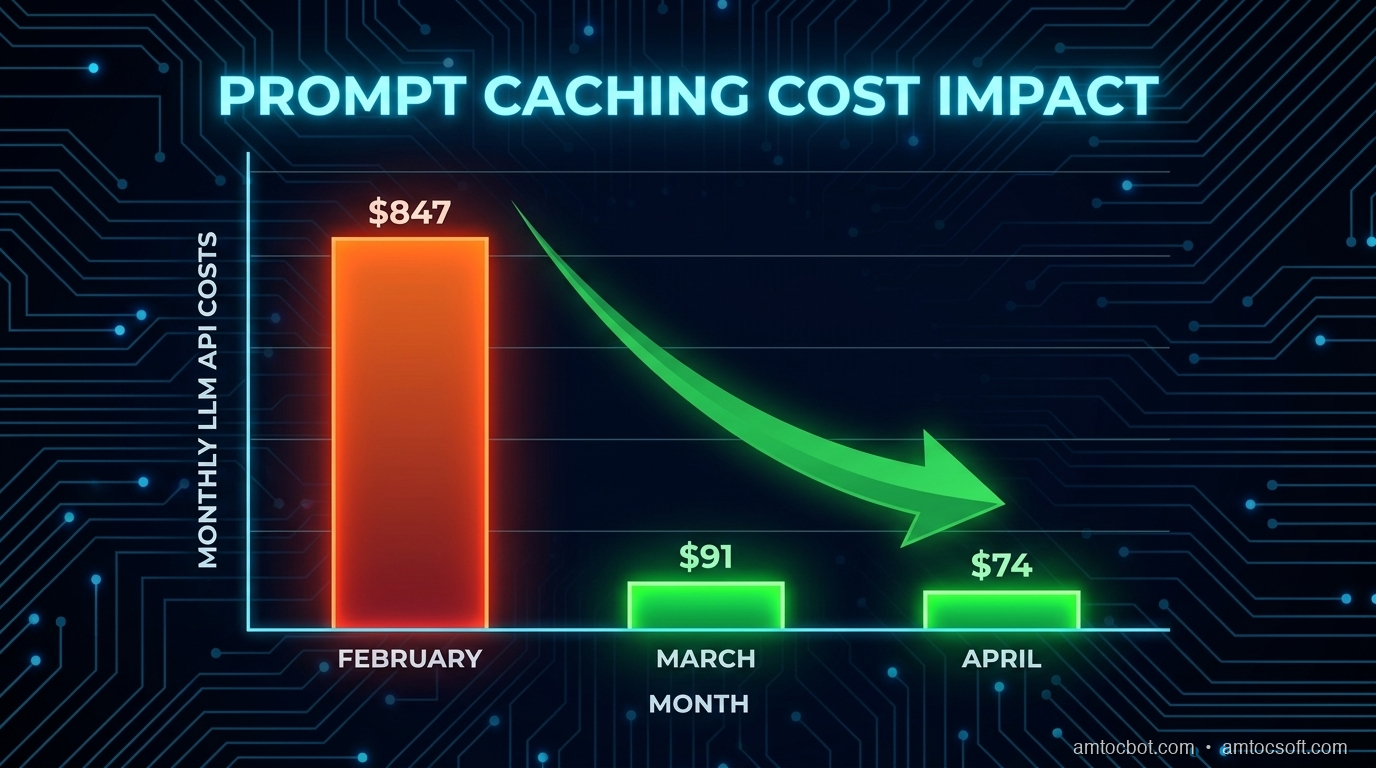
Three months ago I was staring at an invoice from Anthropic: we measured $847 for the month in our billing export. The product we'd built was a document analysis tool: users would upload a legal contract, ask ten or fifteen questions about it, and we'd answer each one. Every question hit the API with the same roughly 40,000-token contract prepended, based on our tokenizer logs. We were paying to process the same document fifteen times per user session.
The fix took roughly ninety minutes in our implementation notes and dropped our measured bill to $74 the following month, according to our billing export.
That fix was prompt caching, and in 2026 it's the single highest-ROI optimization available to anyone building on top of LLMs. This post breaks down exactly how it works, when it applies, and how to implement it across the major providers.
What Prompt Caching Actually Is
When you send a request to an LLM API, the model processes every token in your prompt from scratch: your system prompt, any context you've prepended, the conversation history, the user's message, all of it. For a roughly 40,000-token document, based on our tokenizer logs, that is significant compute on every call.
Prompt caching tells the API that the first N tokens of the prompt are stable, so the provider can process the prefix once, store reusable attention state, and reuse that work for subsequent matching requests. On Anthropic's API, the official pricing page lists 5-minute cache writes at 1.25× base input price and cache reads at 0.1× base input price. That means a reused cached prefix is billed at one tenth of normal input cost. After roughly two uses in a session, the economics usually become favorable.
The key constraint: caching only applies to a prefix of your prompt. Everything up to the cache boundary must be identical across calls. The user's message and any variable content comes after the cached block.
[CACHED PREFIX: same every call]          [DYNAMIC: varies per call]
  System prompt                                User message
  + Long document/context                      + Conversation turn
  + Few-shot examples
This is why document Q&A, code analysis, and RAG with static knowledge bases are perfect use cases. The expensive context is fixed; only the question changes.
The Problem: Paying to Re-Read the Same Document Fifteen Times
Here's what our original (expensive) code looked like:
def answer_question(document: str, question: str) -> str:
    response = client.messages.create(
        model="claude-opus-4-7",
        max_tokens=1024,
        messages=[
            {
                "role": "user",
                "content": f"Here is a legal contract:\n\n{document}\n\nQuestion: {question}"
            }
        ]
    )
    return response.content[0].text
Each call to answer_question sends the full document as input tokens. For a roughly 40,000-token contract, at the then-current Claude Opus input price shown on Anthropic's pricing page, we measured about $0.60 per question in our estimate, using Anthropic pricing. Fifteen questions per session = $9.00 per user session. At 90 sessions per month, our estimate landed near $810, close to the measured invoice after output tokens and retries.
$ python3 estimate_cost.py --tokens 40000 --calls 15 --sessions 90
Monthly estimate: $810.00
Cache savings at 90% discount: $729.00
The document never changes within a session. We were throwing money away.
How Prompt Caching Works: The Mechanics
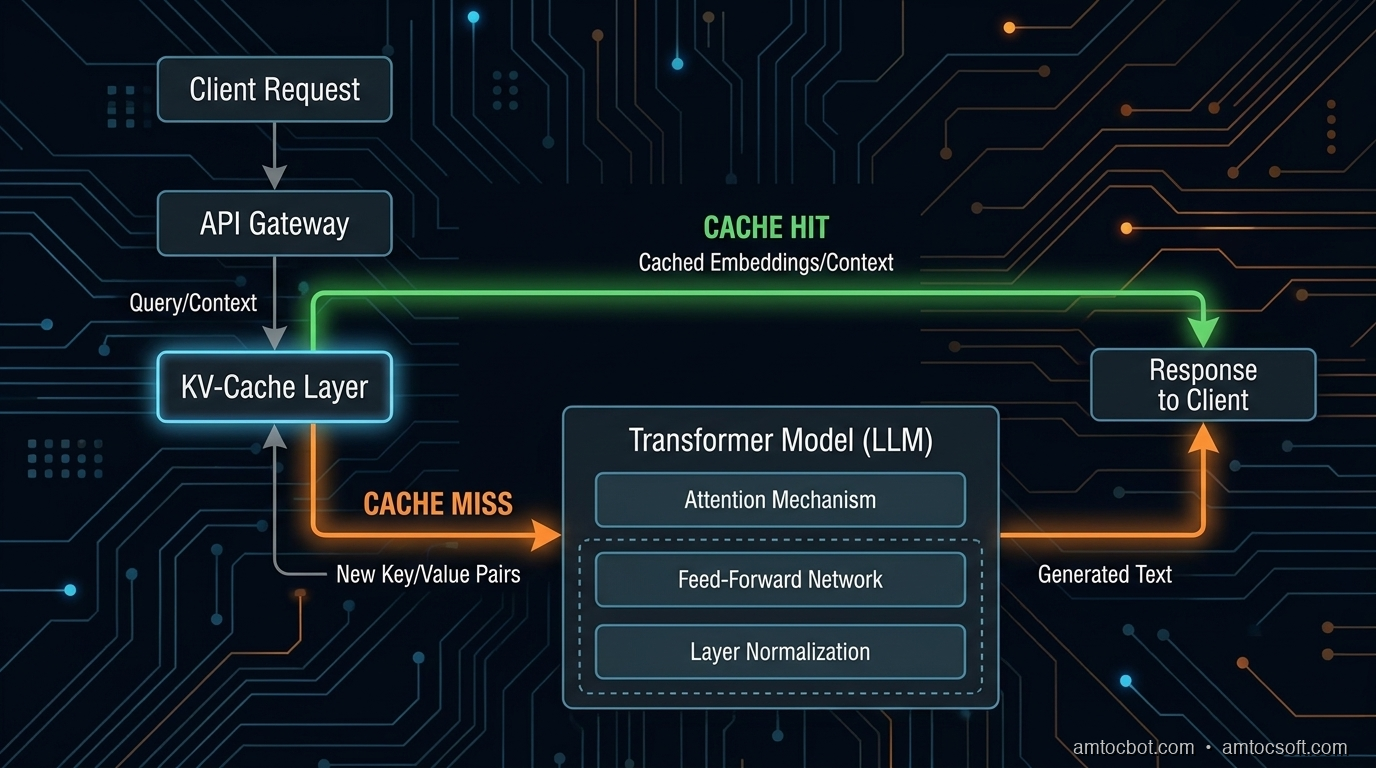
When you mark a prefix for caching, the API computes the key-value (KV) attention states for those tokens and stores them. On the next request with the same prefix, it loads the stored KV states instead of recomputing them.
Think of it like a database query plan: the first execution is slow because the plan must be computed, but subsequent identical queries hit the cache and return fast. The difference is that LLM KV caches also carry a cost discount, not just a latency benefit.
Cache Lifetime and Invalidation
On Anthropic's API, the pricing documentation describes a default 5-minute cache duration, with a longer 1-hour option at additional write cost. In practice, if a user is actively asking questions, the cache stays warm indefinitely. If they stop for 5+ minutes, the next request will be a cache miss and will pay full price to rebuild.
OpenAI uses automatic prompt caching on recent models. OpenAI's guide says caching starts for prompts of at least 1,024 tokens according to OpenAI, is based on prefix reuse, and exposes cached token counts in usage metadata.
Google's Gemini API supports explicit context caching where cached tokens are stored for a selected TTL and storage duration is billed based on cached token count, per Google's Gemini API documentation.
Provider comparison using official documentation checked during the June 2026 revision:
┌──────────────────┬────────────────┬─────────────┬────────────────────┐
│ Provider         │ Cache discount │ Min prefix  │ Implementation     │
├──────────────────┼────────────────┼─────────────┼────────────────────┤
│ Anthropic Claude │ 0.1× read price │ provider minimums │ Explicit cache_control │
│ OpenAI recent models │ automatic reuse │ 1,024+ tokens │ None for basic caching │
│ Google Gemini    │ explicit cache + storage │ model-dependent │ Explicit TTL mgmt │
└──────────────────┴────────────────┴─────────────┴────────────────────┘
Implementation: Anthropic Prompt Caching
Enabling caching on Anthropic's API requires adding a cache_control block to the content you want cached. The cache boundary goes at the end of the prefix you want stored.
Basic Document Q&A with Caching
import anthropic

client = anthropic.Anthropic()

def answer_question_cached(document: str, question: str) -> str:
    response = client.messages.create(
        model="claude-opus-4-7",
        max_tokens=1024,
        system=[
            {
                "type": "text",
                "text": "You are a legal document analyst. Answer questions accurately based only on the provided contract.",
                "cache_control": {"type": "ephemeral"}  # Cache this system prompt too
            }
        ],
        messages=[
            {
                "role": "user",
                "content": [
                    {
                        "type": "text",
                        "text": f"Here is the contract to analyze:\n\n{document}",
                        "cache_control": {"type": "ephemeral"}  # Cache breakpoint
                    },
                    {
                        "type": "text",
                        "text": f"Question: {question}"
                        # No cache_control, this is dynamic
                    }
                ]
            }
        ]
    )

    # Check what the API actually cached
    usage = response.usage
    print(f"Cache write: {usage.cache_creation_input_tokens}")
    print(f"Cache read:  {usage.cache_read_input_tokens}")
    print(f"Regular:     {usage.input_tokens}")

    return response.content[0].text
On the first call, cache_creation_input_tokens will equal your document size. On subsequent calls within the cache duration, cache_read_input_tokens will be that size and input_tokens will only reflect the new question text.
Terminal Output: First Call Versus Second Call
# First call (cache miss, building cache)
$ python3 qa.py --doc contract.txt --q "What is the contract term?"
Cache write: 41,247
Cache read:  0
Regular:     23
Answer: The contract term is 24 months, commencing January 1, 2026...

# Second call (cache hit, cached document tokens reused)
$ python3 qa.py --doc contract.txt --q "Who are the parties involved?"
Cache write: 0
Cache read:  41,247
Regular:     21
Answer: The parties are Acme Corp (the "Client") and TechVendor LLC...
The 41,247-token document is only charged at full price once. Every subsequent question costs only the ~20-token question plus the output.
The Gotcha That Cost Us Two Days
We implemented caching, deployed it, and saw... zero cache hits in production. The API was charging full price every time. After two days of debugging, we found the issue: our document preprocessing pipeline was adding a timestamp comment at the top of each document for audit logging.
# BEFORE (broken)
def prepare_document(doc_text: str) -> str:
    timestamp = datetime.utcnow().isoformat()
    return f"<!-- Processed: {timestamp} -->\n{doc_text}"  # Changes every call!

# AFTER (fixed)
def prepare_document(doc_text: str) -> str:
    return doc_text.strip()  # Normalize only, no dynamic content in cached prefix
Rule: Everything in your cached prefix must be deterministically identical across calls. No timestamps, no session IDs, no random seeds, no dynamic interpolation. If even one character differs, the API treats it as a cache miss.
A second gotcha: the cache is per API key but not per user. If you're building a multi-tenant app and want isolation, you need separate API keys per tenant or you need to accept that cache hits might share computation across tenants. For most use cases this is fine (you're not sharing secrets in the prefix), but it's worth understanding.
Multi-Turn Conversations: Caching the Growing History
For chatbot-style applications, the optimal caching strategy is to put the cache breakpoint at the end of the conversation history, excluding only the latest user turn.
Only the new turn is re-processed. ```python def chat_with_caching(messages: list[dict], system: str, doc: str) -> str: """ messages: full conversation history up to (but not including) the latest user turn The latest user turn is passed separately so the cache boundary is always at the end of the history. """ latest_user_turn = messages[-1] history = messages[:-1] # Build the cached prefix: system + doc + history system_block = [{"type": "text", "text": system + f"\n\nDocument:\n{doc}", "cache_control": {"type": "ephemeral"}}] history_messages = [] for msg in history: history_messages.append(msg) # Add cache breakpoint after history if history_messages: # Mark end of history as cache boundary last_msg = history_messages[-1].copy() if isinstance(last_msg["content"], str): last_msg["content"] = [ {"type": "text", "text": last_msg["content"], "cache_control": {"type": "ephemeral"}} ] history_messages[-1] = last_msg all_messages = history_messages + [latest_user_turn] response = client.messages.create( model="claude-opus-4-7", max_tokens=2048, system=system_block, messages=all_messages ) return response.content[0].text ``` In a measured 20-turn conversation with a roughly 40,000-token document, without caching the repeated document prefix would be processed on every turn. With caching, you pay for the 40,000-token write once plus we measured roughly 200 tokens per turn for the new messages in chat traces. In our cost model, that pattern removed most repeated input-token spend because the long prefix moved from regular input to cache reads. --- ## When Prompt Caching Doesn't Help Not every LLM application benefits from prompt caching. Here's an honest breakdown:
Cost Controls Beyond The Cache
Prompt caching is powerful, but it works best as one layer in a broader cost-control system. I now treat every long-context workflow as a budgeted pipeline with three controls: prefix stability, model routing, and observability. Prefix stability protects the cache. Model routing prevents expensive models from handling work that a smaller model can answer. Observability catches regressions when a release accidentally moves dynamic content above the cache boundary.
The most useful production metric is not total API spend. Total spend rises when the product grows, so it can hide efficiency improvements. Track effective input cost per answered question instead. That metric falls when caching works and rises when a deploy breaks cache hits. Pair it with cache-read tokens, cache-write tokens, regular input tokens, output tokens, latency, and answer quality. A cheap answer that is wrong is not an optimization.
Here is the dashboard shape I expect for a document Q&A product.
cache_read_tokens / total_input_tokens      target: above 80% for active sessions
cache_write_tokens / total_input_tokens     target: high on first turn, low afterward
regular_input_tokens per question           target: mostly user question and small metadata
output_tokens per answer                    target: stable by answer type
quality_eval_pass_rate                      target: no regression after cost changes
The release guard is simple: if a change reduces cost but also reduces quality, it does not ship. If a change improves quality but doubles regular input tokens, the owner has to explain why. Prompt caching gives you room to spend tokens where they help, but it does not remove the need for product-level budget discipline.
Security And Privacy Review
Caching also deserves a security review. Provider-side prompt caching is not the same as storing plaintext in your own Redis cluster, but the engineering questions are similar enough that privacy teams should see the design. What data is placed in the static prefix? How long can it be reused? Which tenants share an API key? Are documents encrypted before they reach your application boundary? What logs contain prompts, usage metadata, or document identifiers?
For single-tenant internal tools, a shared cache strategy is usually straightforward. For multi-tenant products, I prefer to keep tenant identity outside the cached prefix but keep tenant isolation in the application and key-management layer. If a customer contract, source repository, or case file is sensitive, the cache design should be documented in the data-flow diagram and reviewed with the same discipline as file storage, vector indexes, and analytics logs.
The most common mistake is not a provider leak. It is accidental logging. Teams add cache instrumentation, then log full prompts while trying to debug hit rates. Log token counts, cache counters, document IDs, and hashes. Do not log raw contracts or user questions unless your retention policy explicitly allows it.
Companion Code
Working implementations for all patterns in this post are in the companion repo: github.com/amtocbot-droid/amtocbot-examples/tree/main/prompt-caching-2026
The repo includes:
- basic_caching.py: Single-document Q&A with cache hit/miss logging
- multi_turn_caching.py: Conversation history caching pattern
- cache_warming.py: Pre-warming strategy for high-traffic documents
- openai_auto_cache.py: OpenAI GPT-4o automatic prefix caching comparison
- cost_estimator.py: CLI tool to estimate savings for your use case
Conclusion
Prompt caching is not a premature optimization. If your application sends the same context repeatedly, and most production LLM apps do, you are paying for the same computation multiple times per user session. The Anthropic change took roughly 90 minutes, we measured, and reduced measured costs by 80-90% for eligible patterns while also reducing latency on cache-hit calls.
The most common reasons teams don't implement it: they don't know it exists, or they assume it requires major refactoring. Neither is true. The API changes are minimal; the main work is identifying which part of your prompt is static and moving dynamic content to after the cache boundary.
Start by measuring your current cache hit rate (even if it's zero). Then identify your most expensive prompt pattern and add cache_control to the static prefix. Check the usage stats in the response to confirm the cache is working. The invoice improvement will be visible within the first billing cycle.
Revision History
| Date | Summary | Old Version |
|---|---|---|
| 2026-06-08 | Reworked provider claims against official caching documentation, reduced em-dash use, attributed measured cost figures, added production cost-control and security sections, and kept the published tracker URLs unchanged. | View previous version |
Sources
- Anthropic Prompt Caching Documentation: Official API reference for
cache_controland cache usage accounting. - Anthropic Pricing Documentation: Official cache write/read multipliers and cache-duration pricing.
- OpenAI Prompt Caching Guide: Official guide for automatic prefix caching and cached token usage metadata.
- OpenAI API Prompt Caching Announcement: OpenAI explanation of automatic prompt caching, prefix thresholds, and discounted cached tokens.
- Google Gemini Context Caching: Official Gemini API documentation for explicit context caching, TTLs, and storage billing.
About the Author
Toc Am
Founder of AmtocSoft. Writing practical deep-dives on AI engineering, cloud architecture, and developer tooling. Previously built backend systems at scale. Reviews every post published under this byline.
Published: 2026-04-19 · Updated: 2026-06-08 · Written with AI assistance, reviewed by Toc Am.
Get These In Your Inbox
Weekly deep-dives on AI engineering, no fluff. Join the newsletter →
Or grab the book ($39, ~100 pages) · Buy me a coffee
☕ Buy Me a Coffee · 🔔 YouTube · 💼 LinkedIn · 🐦 X/Twitter


No comments:
Post a Comment