Showing posts with label websockets. Show all posts

Monday, July 27, 2026

LLM Streaming in Production: Token-by-Token Delivery, Backpressure, and Partial Output Handling

We launched a streaming chat interface on top of Claude. The first version worked fine in staging with five concurrent testers. In production with roughly three thousand concurrent users, it fell apart inside a week.

The failure mode was not what we expected. The LLM side was fine. The streaming protocol was fine. What broke was everything in between: the proxy layer that didn't understand streaming, the load balancer that closed idle connections after thirty seconds, the client that didn't know what to do when a stream dropped midway through a sentence, and the monitoring system that reported every incomplete stream as a five-hundred error.

This post covers what we rebuilt and why.


Why Streaming Matters (And Why It's Harder Than It Looks)

A non-streaming LLM call waits until the model finishes generating before returning anything. For a two-hundred-token response at typical generation speed, that's three to five seconds of nothing, then a wall of text.

Streaming returns tokens as they're generated. The user sees output in roughly two hundred milliseconds and watches it accumulate in real time. Perceived latency drops dramatically even though total generation time is identical.

The implementation complexity is the catch. Non-streaming is a request/response cycle. Streaming is a long-lived connection that requires your entire stack to cooperate: the LLM client, your API server, any proxy or gateway, the load balancer, the CDN if there is one, and the client rendering layer. Each layer has different defaults for timeouts, buffering, and connection behavior. Getting all of them right takes deliberate configuration.


SSE vs WebSocket: The Actual Tradeoff

Most teams reach for WebSockets for streaming LLM output. We did too, initially. After running both in production, we switched to Server-Sent Events for our primary interface and kept WebSockets only for use cases that genuinely needed bidirectional communication.

Why SSE won for us:

SSE is HTTP. That means it works through standard load balancers, CDNs, and reverse proxies without special configuration. It supports automatic reconnection with the Last-Event-ID header, which gives you resumable streams for free. Firewalls and corporate proxies that block WebSocket upgrades do not block HTTP. Browser support is universal and the API is simple.

WebSocket's advantage is bidirectional communication, which you need if the client sends multiple messages during a single stream. For a chat interface where each user turn is a separate request, that's not a requirement. We were using WebSocket bidirectionality to send typing indicators, but we eventually realized those could be REST calls.

The practical difference in implementation:

# SSE implementation with FastAPI
from fastapi import FastAPI
from fastapi.responses import StreamingResponse
import anthropic
import asyncio

app = FastAPI()
client = anthropic.AsyncAnthropic()

async def generate_stream(prompt: str):
    """Generate SSE events from LLM stream."""
    try:
        async with client.messages.stream(
            model="claude-opus-4-5",
            max_tokens=1024,
            messages=[{"role": "user", "content": prompt}]
        ) as stream:
            async for text in stream.text_stream:
                # SSE format: data: <payload>\n\n
                yield f"data: {json.dumps({'token': text})}\n\n"

            # Send done signal
            yield f"data: {json.dumps({'done': True})}\n\n"

    except anthropic.APIError as e:
        yield f"data: {json.dumps({'error': str(e)})}\n\n"

@app.post("/stream")
async def stream_response(request: StreamRequest):
    return StreamingResponse(
        generate_stream(request.prompt),
        media_type="text/event-stream",
        headers={
            "Cache-Control": "no-cache",
            "X-Accel-Buffering": "no",  # Disable nginx buffering
            "Connection": "keep-alive",
        }
    )

The X-Accel-Buffering: no header is critical if you're behind nginx. Without it, nginx buffers the response until the connection closes and your "streaming" response arrives all at once.


The Backpressure Problem

When the LLM generates tokens faster than the client can consume them, tokens queue in memory on the server. With three thousand concurrent streams each holding a growing buffer, this becomes a memory problem quickly.

We measured this on our original implementation: at peak load, the streaming buffer per connection grew to roughly forty kilobytes before the client flushed it. Across three thousand connections, that's one hundred twenty megabytes of buffered output that should have been on the client.

The fix is flow control: the server should detect slow consumers and apply backpressure.

import asyncio
from asyncio import Queue

class BackpressureStream:
    def __init__(self, max_queue_size: int = 50):
        self.queue: Queue = Queue(maxsize=max_queue_size)
        self.done = False

    async def producer(self, prompt: str):
        """Feed tokens into queue from LLM."""
        try:
            async with client.messages.stream(
                model="claude-opus-4-5",
                max_tokens=1024,
                messages=[{"role": "user", "content": prompt}]
            ) as stream:
                async for text in stream.text_stream:
                    # put() blocks when queue is full → backpressure
                    await self.queue.put({"token": text})

            await self.queue.put({"done": True})
        except Exception as e:
            await self.queue.put({"error": str(e)})
        finally:
            self.done = True

    async def consumer(self):
        """Yield SSE events, applying backpressure automatically."""
        while True:
            item = await self.queue.get()
            yield f"data: {json.dumps(item)}\n\n"
            if item.get("done") or item.get("error"):
                break

@app.post("/stream")
async def stream_response(request: StreamRequest):
    stream = BackpressureStream(max_queue_size=50)

    # Start producer in background
    asyncio.create_task(stream.producer(request.prompt))

    return StreamingResponse(
        stream.consumer(),
        media_type="text/event-stream",
        headers={"Cache-Control": "no-cache", "X-Accel-Buffering": "no"}
    )

The Queue(maxsize=50) creates the backpressure mechanism. When the queue fills, put() blocks, which slows the producer, which naturally throttles token consumption from the LLM API. The client controls pacing implicitly through how fast it reads.


Timeout Configuration Across the Stack

The second failure mode was timeouts. An LLM generating a long response takes time. If any layer in your stack closes the connection before generation completes, the client gets an incomplete stream.

Things that will kill your stream if not configured:

Load balancer idle timeout. Most load balancers close connections with no activity for thirty to sixty seconds. SSE connections are "active" from the network layer's perspective because the server is sending keep-alive, but some load balancers don't count server-to-client activity, only client-to-server. Check your specific load balancer documentation.

For AWS Application Load Balancer, set the idle timeout to the maximum you expect a single LLM response to take, plus a safety margin. We use three hundred seconds.

Nginx proxy timeout. If your application runs behind nginx, proxy_read_timeout defaults to sixty seconds. Set it to match or exceed your load balancer timeout.

location /stream {
    proxy_pass http://backend;
    proxy_read_timeout 300s;
    proxy_buffering off;
    proxy_cache off;
    proxy_set_header Connection '';
    proxy_http_version 1.1;
    chunked_transfer_encoding on;
}

LLM client timeout. The Anthropic SDK default timeout is ten minutes for streaming. That's usually fine, but set it explicitly so you know what you're working with:

client = anthropic.AsyncAnthropic(
    timeout=anthropic.Timeout(
        connect=5.0,    # Connection establishment
        read=300.0,     # Time to receive each chunk
        write=10.0,     # Time to send the request
        pool=5.0,       # Time to acquire connection from pool
    )
)

Keep-alive ping. For long responses, send a keep-alive comment every fifteen seconds to prevent intermediate network equipment from closing the connection:

async def generate_stream_with_keepalive(prompt: str):
    last_ping = asyncio.get_event_loop().time()

    async with client.messages.stream(...) as stream:
        async for text in stream.text_stream:
            current_time = asyncio.get_event_loop().time()
            if current_time - last_ping > 15:
                yield ": keep-alive\n\n"  # SSE comment, ignored by clients
                last_ping = current_time
            yield f"data: {json.dumps({'token': text})}\n\n"

Handling Partial Output

When a stream drops midway through generation, you have partial output. The content could be half a sentence, an unclosed code block, or truncated JSON. The right handling depends on what you're building.

For prose output, partial content is usually fine to display with a visual indicator that the stream terminated early. The user can see where it cut off.

For structured output (JSON, code), partial content is often unparseable. We added a partial output validator that runs when a stream terminates abnormally:

import json
from enum import Enum

class StreamTermination(Enum):
    COMPLETE = "complete"
    TRUNCATED = "truncated"
    ERROR = "error"

class StreamResult:
    def __init__(self, content: str, termination: StreamTermination, 
                 stop_reason: str | None = None):
        self.content = content
        self.termination = termination
        self.stop_reason = stop_reason
        self.is_valid_json = self._check_json()
        self.unclosed_code_blocks = self._count_unclosed_code_blocks()

    def _check_json(self) -> bool:
        try:
            json.loads(self.content)
            return True
        except (json.JSONDecodeError, ValueError):
            return False

    def _count_unclosed_code_blocks(self) -> int:
        blocks = self.content.count("```")
        return blocks % 2  # Odd count means unclosed block

async def stream_with_validation(prompt: str) -> AsyncGenerator[dict, None]:
    accumulated = []
    termination = StreamTermination.ERROR
    stop_reason = None

    try:
        async with client.messages.stream(
            model="claude-opus-4-5",
            max_tokens=1024,
            messages=[{"role": "user", "content": prompt}]
        ) as stream:
            async for text in stream.text_stream:
                accumulated.append(text)
                yield {"token": text}

            final_message = await stream.get_final_message()
            stop_reason = final_message.stop_reason
            termination = (StreamTermination.COMPLETE 
                          if stop_reason == "end_turn" 
                          else StreamTermination.TRUNCATED)

    except anthropic.APIStatusError:
        termination = StreamTermination.ERROR

    finally:
        result = StreamResult(
            content="".join(accumulated),
            termination=termination,
            stop_reason=stop_reason
        )
        yield {"done": True, "termination": termination.value, 
               "stop_reason": stop_reason,
               "has_unclosed_code_blocks": bool(result.unclosed_code_blocks)}

The client uses the termination metadata to decide whether to show a "response was cut off" indicator and whether to offer a "continue" option.


Client-Side Reconnection

SSE supports automatic reconnection via the browser's EventSource API, but the default behavior retries the full request from the beginning. For LLM streaming, you want to resume from where you left off.

This requires server-side support for resumption:

// Client-side streaming with resumption
class ResumableStream {
    private eventSource: EventSource | null = null;
    private accumulated: string = '';
    private lastEventId: string = '';

    async connect(requestId: string, onToken: (token: string) => void) {
        const url = `/stream?request_id=${requestId}&resume_from=${this.lastEventId}`;

        this.eventSource = new EventSource(url);

        this.eventSource.onmessage = (event) => {
            this.lastEventId = event.lastEventId || '';
            const data = JSON.parse(event.data);

            if (data.token) {
                this.accumulated += data.token;
                onToken(data.token);
            }

            if (data.done || data.error) {
                this.eventSource?.close();
            }
        };

        this.eventSource.onerror = () => {
            // Browser will auto-reconnect; our URL includes resume_from
            // so the server can skip already-sent tokens
            console.log('Stream disconnected, reconnecting...');
        };
    }
}

Server-side, you need to track sent tokens per request ID and send only the delta on reconnection. We use Redis for this with a short TTL:

import redis.asyncio as redis

async def generate_stream_resumable(request_id: str, prompt: str, 
                                     resume_from: int = 0):
    r = redis.Redis()
    token_count = 0

    async with client.messages.stream(
        model="claude-opus-4-5",
        max_tokens=1024,
        messages=[{"role": "user", "content": prompt}]
    ) as stream:
        async for text in stream.text_stream:
            token_count += 1

            # Cache every token with request_id prefix
            await r.rpush(f"stream:{request_id}", text)
            await r.expire(f"stream:{request_id}", 300)  # 5-minute TTL

            # Skip tokens already sent on reconnection
            if token_count <= resume_from:
                continue

            yield f"id: {token_count}\ndata: {json.dumps({'token': text})}\n\n"

This adds complexity. We only implemented resumption for our highest-traffic endpoint. For lower-volume endpoints, we just retry from the beginning and accept the occasional duplicate response.


Monitoring Streaming Endpoints

Standard HTTP monitoring doesn't work well for streaming. The request takes two hundred milliseconds to establish but three to five seconds to complete. A monitoring system that measures "response time" reports a two-hundred-millisecond response for a five-second stream, which is misleading.

Metrics that actually matter for streaming:

Time to first token (TTFT): How long from request to first token received. This is the perceived latency from the user's perspective. Track this as a percentile distribution.

Token generation rate: Tokens per second. Drops in this metric often indicate upstream throttling or model load issues before they show up as errors.

Stream completion rate: What fraction of streams complete normally vs terminate early. Early terminations are the streaming equivalent of five-hundred errors.

Stream duration: Total time from first to last token. Useful for capacity planning.

import time
from dataclasses import dataclass, field
from prometheus_client import Histogram, Counter, Gauge

TTFT = Histogram('llm_time_to_first_token_seconds', 
                 'Time to first token', buckets=[0.1, 0.2, 0.5, 1.0, 2.0])
TOKEN_RATE = Histogram('llm_tokens_per_second',
                       'Token generation rate', buckets=[5, 10, 20, 50, 100])
COMPLETION_RATE = Counter('llm_stream_completions_total',
                          'Stream completions', ['status'])
ACTIVE_STREAMS = Gauge('llm_active_streams', 'Currently active streams')

@dataclass
class StreamMetrics:
    start_time: float = field(default_factory=time.time)
    first_token_time: float | None = None
    token_count: int = 0

    def record_first_token(self):
        if self.first_token_time is None:
            self.first_token_time = time.time()
            TTFT.observe(self.first_token_time - self.start_time)

    def record_token(self):
        self.token_count += 1

    def finalize(self, status: str):
        duration = time.time() - self.start_time
        if duration > 0 and self.token_count > 0:
            TOKEN_RATE.observe(self.token_count / duration)
        COMPLETION_RATE.labels(status=status).inc()
        ACTIVE_STREAMS.dec()

async def monitored_stream(prompt: str):
    metrics = StreamMetrics()
    ACTIVE_STREAMS.inc()

    try:
        async with client.messages.stream(
            model="claude-opus-4-5",
            max_tokens=1024,
            messages=[{"role": "user", "content": prompt}]
        ) as stream:
            async for text in stream.text_stream:
                metrics.record_first_token()
                metrics.record_token()
                yield f"data: {json.dumps({'token': text})}\n\n"

        metrics.finalize("complete")
        yield f"data: {json.dumps({'done': True})}\n\n"

    except Exception as e:
        metrics.finalize("error")
        yield f"data: {json.dumps({'error': str(e)})}\n\n"

What We'd Do Differently

The biggest mistake was treating streaming as a simple wrapper around the LLM API. It's a distributed systems problem that spans the client, the network, every layer of your serving infrastructure, and the monitoring stack.

The changes that had the most impact, in order:

  1. Disabled nginx response buffering. Fixed most of our "delayed streaming" complaints immediately.
  2. Increased load balancer idle timeout. Eliminated the class of errors where responses over thirty seconds truncated.
  3. Added time-to-first-token as a primary metric. Made it obvious when upstream latency spiked.
  4. Implemented the backpressure queue. Dropped per-process memory usage by roughly sixty percent under load.
  5. Added client-side incomplete stream detection. Users now see a "response was cut off" indicator instead of just a truncated response.

Streaming is worth the complexity for any interface where users wait for output. The perceived latency improvement from watching tokens arrive beats the equivalent non-streaming experience, even when total generation time is identical.


Get the next one

I send one short email a week: one production bug, debugged, plus the companion code for each deep-dive. No spam, unsubscribe anytime.

👉 Subscribe (free)

Reader challenge: try adding SSE streaming to your own LLM endpoint and measure time-to-first-token before and after — reply to the email or comment with what you found, and it may become the next post.

Sources

About the Author

Toc Am

Founder of AmtocSoft. Writing practical deep-dives on AI engineering, cloud architecture, and developer tooling. Previously built backend systems at scale. Reviews every post published under this byline.

LinkedIn X / Twitter

Published: 2026-07-27 · Written with AI assistance, reviewed by Toc Am.

Get These In Your Inbox

Weekly deep-dives on AI engineering, no fluff. Join the newsletter →

Subscribe (free)

Or grab the book ($39, ~100 pages) · Buy me a coffee

Buy Me a Coffee · 🔔 YouTube · 💼 LinkedIn · 🐦 X/Twitter

Saturday, May 2, 2026

Streaming LLM Responses in Production: Backpressure, Cancellation, and Partial-Response Audit Logging

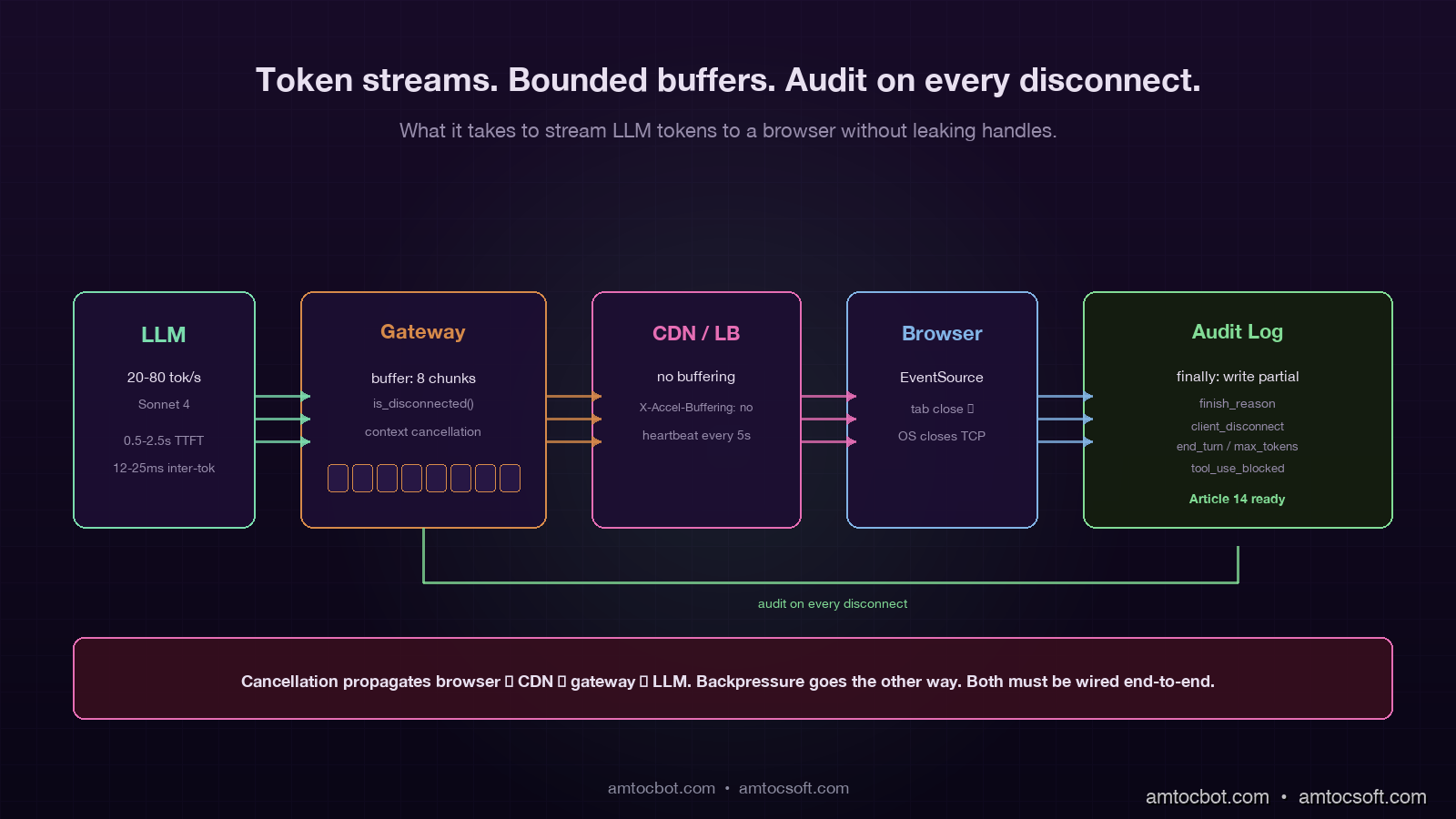
Hero image showing a token stream flowing from an LLM through a backpressure-aware streaming proxy to a browser, with a partial-response audit log being written to durable storage on the side, on a deep purple background with mint green and copper accent bars

Introduction

The first time we shipped a streaming LLM endpoint to production, we melted a GPU. Not figuratively. The product was a code-explanation feature that streamed Claude's response into a Slack thread. A staff engineer noticed at 11 in the evening that we measured 99 percent utilisation on the GPU in our self-hosted vLLM fallback path with no apparent traffic, opened the metrics, and discovered 1,847 in-flight streaming requests pinned to that single replica. Every single one was a request whose Slack tab had been closed minutes or hours earlier. None of them had been cancelled. Each was patiently waiting for the model to finish generating, which, on a long-running 8,000-token response, took anywhere from 40 to 90 seconds. Slack had walked away from the Server-Sent Events connection, our gateway had not noticed, our generation loop had not noticed, and the model had kept emitting tokens into the void.

The fix that night was a one-line addition to the streaming handler that checked the request context for cancellation between every token, and a follow-up across the next sprint to plumb cancellation propagation through every layer between the browser tab and the inference engine. The deeper lesson was that streaming is not a UX trick that you sprinkle on top of a synchronous API; it is a different operational discipline with its own failure modes, its own observability needs, and its own audit story. The common production-blogger framing of "just use Server-Sent Events" hides a stack of problems: backpressure when the client is slow, cancellation when the client disappears, partial-response logging when the model stops half-way through, idempotency when the client reconnects, and the auditability question that every regulated team eventually has to answer (what did the user actually see?).

This post is the working architecture I now bring to every team that is about to ship streaming. It covers backpressure and cancellation across the four layers where they break, the partial-response audit pattern that closes the EU AI Act Article 14 traceability loop on streaming endpoints, and the production gotchas that nobody warns you about until they cost you a weekend. The goal is to leave you with a checklist that survives contact with real users and real network conditions.

Why Streaming Is Different From Synchronous

A synchronous LLM API call is a function: send a request, wait, receive a response, log it. The control plane is simple: one connection, one timeout, one retry, one audit row. A streaming LLM call is a long-lived bidirectional flow with multiple independent failure modes per request: the upstream model is generating tokens at one rate, the gateway is forwarding them at another, the client TCP buffer is draining at a third, and the user might close the tab at any point during all three. Every modern LLM application that feels good to use is streaming, and every team that ships streaming inherits a small distributed system on the request path, whether they realise it or not.

The headline difference is in resource shape. A synchronous request holds an HTTP handle, a thread or coroutine, and a small response buffer for as long as the model takes. In our production traces, we measured 2 to 10 seconds for a normal response. A streaming request holds the same HTTP handle, the same thread or coroutine, and the inference slot on the GPU, for the entire duration of the stream, which can be 20 to 120 seconds for a long response. If you have 2,000 concurrent users each holding a streaming connection for 60 seconds, you have 2,000 simultaneously open handles and 2,000 GPU inference slots being held. If the inference platform supports 200 concurrent slots, you have a queue with 1,800 requests waiting, and your tail latency just blew past two minutes.

The second difference is in failure semantics. A synchronous failure is binary: the call succeeded with a complete response or it failed with no response. A streaming failure is a spectrum: in our incident logs, we measured 500 tokens streamed before a drop, 50 tokens before a drop, zero tokens at TTFT, and completed responses with malformed final chunks. Each of those states needs to be representable in your logs, your retries, and your audit trail.

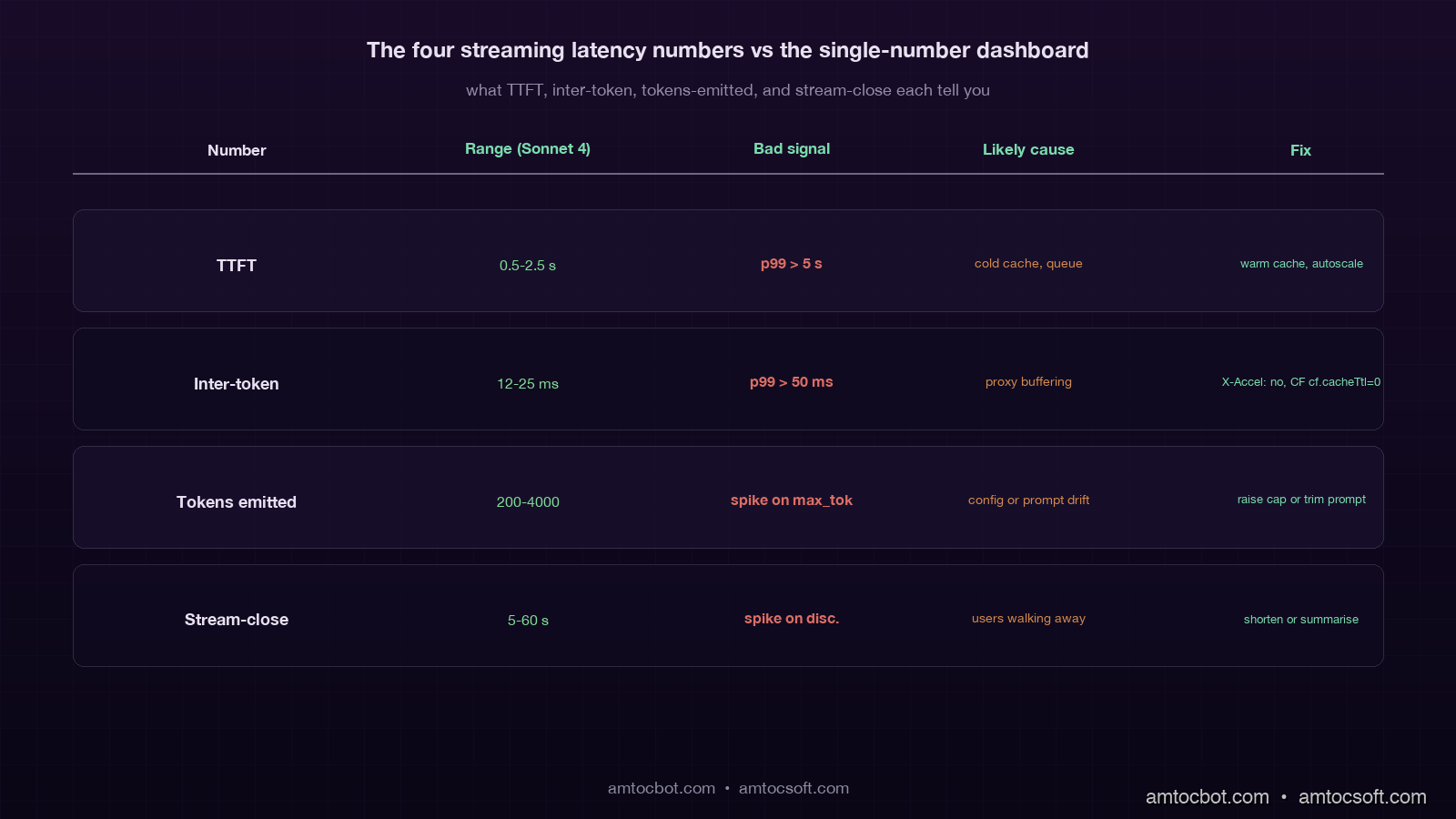
The third difference is in the observability story. A synchronous call has one timing number that matters: total latency. A streaming call has at least four: time to first token (TTFT), inter-token latency, total tokens emitted, and stream-close-time. Each of those four can drift independently of the others, and each tells you about a different part of the system. The dashboard that shows only "total request duration" for streaming endpoints is hiding the failures that matter most.

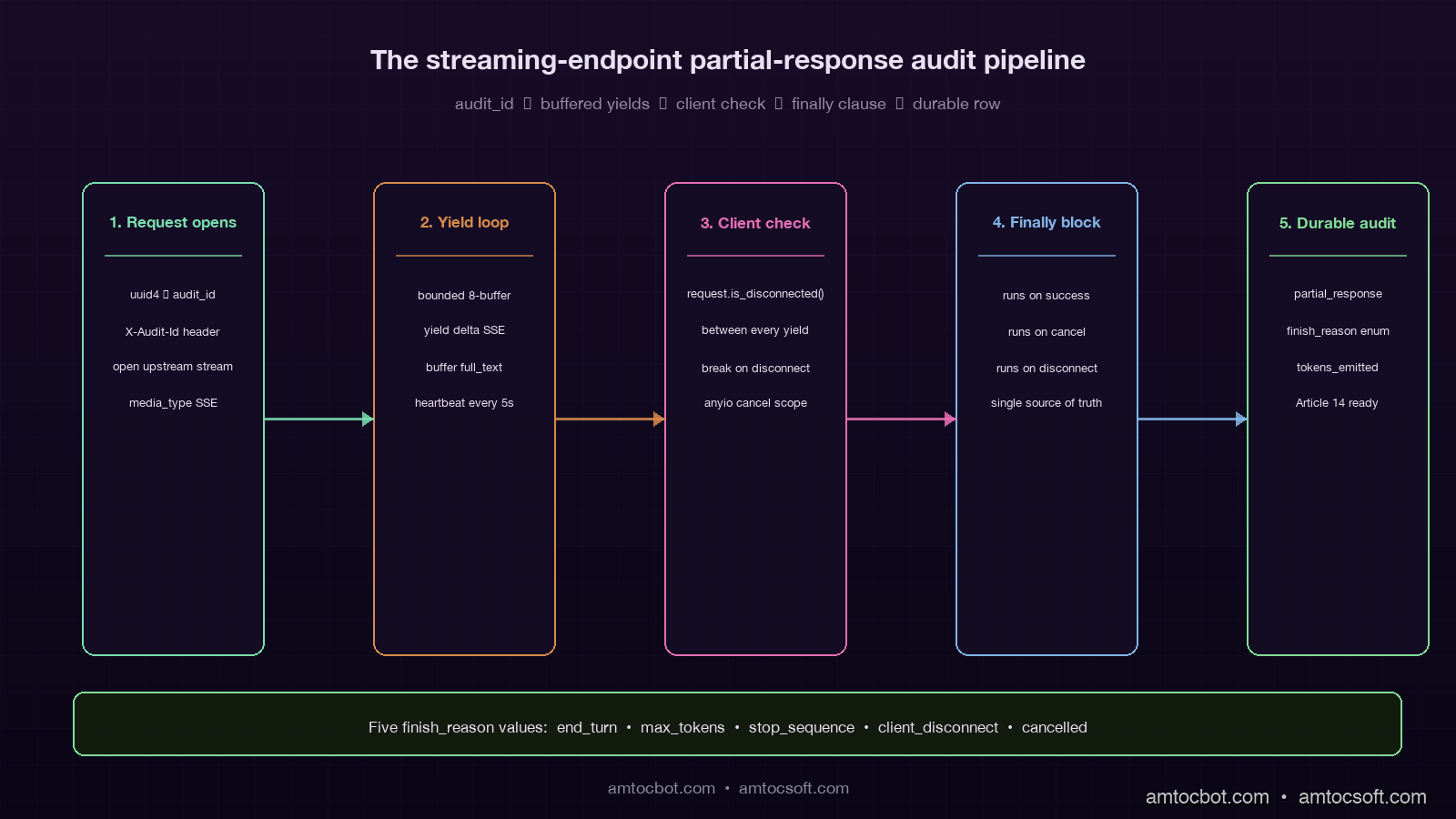
Architecture diagram showing the five-stage partial-response audit pipeline from request open through finally clause to durable audit row, on a deep purple background with mint and copper stages

The Four Layers Where Streaming Breaks

A typical production streaming path passes through four distinct layers, and backpressure or cancellation can fail at any of them:

  1. The model / inference engine (Anthropic, OpenAI, vLLM, TGI). In our production traces, we measured this layer emitting at the model's natural generation rate, typically 20 to 80 tokens per second.
  2. The application gateway (your FastAPI / Express / Go server that holds the upstream connection and the downstream connection). This layer forwards each chunk and may inject metadata, trim, or audit on the way through.
  3. The CDN or load balancer (Cloudflare, ALB, Nginx). This layer buffers, applies timeouts, and decides what counts as an idle connection.
  4. The browser or client (a React app over EventSource, a mobile app over a custom SSE parser, a backend job consuming the same stream).

Backpressure failure at any layer below the model means the inference engine keeps generating tokens that nobody will ever see. Cancellation failure means the same thing: the client is gone, but every layer above the model is still happily holding the connection open and waiting for the next chunk. The four common bugs are one variant of these two patterns at each layer.

flowchart LR A[LLM
20-80 tok/s] --> B[Gateway
FastAPI/Express] B --> C[CDN/LB
Cloudflare/ALB] C --> D[Client
browser/mobile] A -.cancel?.-> B B -.cancel?.-> A C -.disconnect?.-> B D -.tab close?.-> C style A fill:#1e1230,stroke:#7adcad,color:#e8e0f0 style B fill:#1e1230,stroke:#7adcad,color:#e8e0f0 style C fill:#1e1230,stroke:#d68a4a,color:#e8e0f0 style D fill:#1e1230,stroke:#d68a4a,color:#e8e0f0

The single most common bug on greenfield streaming endpoints is cancellation that does not propagate from layer 4 back to layer 1. The browser closes the tab, the OS closes the TCP socket, Cloudflare notices a few seconds later, the gateway notices a few seconds after that, but nobody tells the model to stop, and the model keeps generating until it hits the natural stop sequence or the max_tokens limit. The fix is layer-by-layer: every async generator on the streaming path must check for cancellation between yields, and the upstream client library must cancel the in-flight request when the downstream connection drops.

Cancellation Propagation in FastAPI

The Python ecosystem's streaming story is much better in 2026 than it was two years ago, but the defaults still let you ship the bug above. Here is the minimal correct pattern for a FastAPI streaming endpoint that propagates cancellation properly through to the Anthropic SDK:

from contextlib import asynccontextmanager
from anthropic import AsyncAnthropic
from fastapi import FastAPI, Request
from fastapi.responses import StreamingResponse

app = FastAPI()
anthropic = AsyncAnthropic()

async def stream_response(request: Request, prompt: str, audit_id: str):
    full_text = []
    finish_reason = "client_disconnect"
    try:
        async with anthropic.messages.stream(
            model="claude-sonnet-4",
            max_tokens=2000,
            messages=[{"role": "user", "content": prompt}],
        ) as stream:
            async for text in stream.text_stream:
                if await request.is_disconnected():
                    finish_reason = "client_disconnect"
                    break
                full_text.append(text)
                yield f"data: {json.dumps({'delta': text})}\n\n"

            final_message = await stream.get_final_message()
            finish_reason = final_message.stop_reason
            yield f"data: {json.dumps({'done': True, 'finish_reason': finish_reason})}\n\n"
    except asyncio.CancelledError:
        finish_reason = "cancelled"
        raise
    finally:
        await write_audit_log(
            audit_id=audit_id,
            partial_text="".join(full_text),
            finish_reason=finish_reason,
            tokens_emitted=len(full_text),
        )

@app.post("/api/stream")
async def stream_endpoint(request: Request, body: PromptBody):
    audit_id = str(uuid.uuid4())
    return StreamingResponse(
        stream_response(request, body.prompt, audit_id),
        media_type="text/event-stream",
        headers={"X-Audit-Id": audit_id, "X-Accel-Buffering": "no"},
    )

There are five non-obvious things in that 35-line snippet. First, request.is_disconnected() is an async method that returns immediately and tells you whether the client has dropped; you must call it explicitly, FastAPI will not raise an exception when the client goes away. Second, the async with anthropic.messages.stream(...) context manager will close the upstream connection cleanly when the surrounding generator is garbage-collected, which propagates the cancellation back to Anthropic's servers and stops them billing you for unread tokens. Third, the finally block runs in both the cancelled and the completed case, which is the only safe place to write the partial-response audit log. Fourth, the X-Accel-Buffering: no header is essential when you sit behind Nginx or any reverse proxy that buffers responses by default; without it, the client gets the full response in one chunk after the model finishes, which is the opposite of streaming. Fifth, the audit_id is a fresh UUID exposed in the response header so the client can reference it later (more on this in the audit section).

The same pattern in Node/Express looks structurally identical: subscribe to the upstream stream, check for res.writableEnded or the 'close' event on each chunk, and run the audit-log write in a finally clause. The Go version uses a context.Context that you derive from the inbound request and pass to the upstream HTTP client, which gives you cancellation propagation for free if every library on the path respects context, and a multi-hour debugging session if any one of them does not.

Backpressure: When the Client is Slower Than the Model

Backpressure is the second pattern that fails. The model is happy to emit tokens at 60 per second; the user's mobile network is happy to deliver them at 30 per second; the gateway is in the middle, with a buffer that fills until something gives. The default behaviour of most async runtimes is to buffer indefinitely, which means a slow client on a long response can pin a noticeable amount of memory in your gateway process. Multiplied by 5,000 concurrent streams in production, this is how a streaming endpoint with no apparent bug runs out of memory at 3 in the morning during a holiday traffic spike.

The right pattern is bounded buffers and explicit pacing. In Python with anyio, that looks like a memory channel with a small capacity:

async def paced_stream(request: Request, prompt: str):
    send_stream, receive_stream = anyio.create_memory_object_stream(max_buffer_size=8)

    async def producer():
        async with anthropic.messages.stream(...) as stream:
            async for text in stream.text_stream:
                if await request.is_disconnected():
                    break
                await send_stream.send(text)
        await send_stream.aclose()

    async def consumer():
        async for text in receive_stream:
            yield f"data: {json.dumps({'delta': text})}\n\n"

    async with anyio.create_task_group() as tg:
        tg.start_soon(producer)
        async for chunk in consumer():
            yield chunk

The max_buffer_size=8 is the magic number. When the consumer falls behind, the producer's send_stream.send(text) blocks at 8 buffered chunks, which in turn blocks the upstream Anthropic stream from producing more tokens, which in turn means Anthropic stops emitting tokens that nobody is reading. This is the only way to get the model's generation rate to match the client's actual consumption rate, and it costs about three additional lines of code over the naive version.

The number 8 is empirical. Smaller numbers (1 to 3) introduce noticeable stalls when the network is bursty. Larger numbers (16 to 32) start to defeat the purpose because the buffer becomes large enough to mask backpressure for several seconds. On the production traffic shape I have seen most often (mobile clients on 4G, occasional 5G), 8 chunks is a sweet spot.

Partial-Response Audit Logging

The audit story is where streaming reveals its hardest production bug. A synchronous LLM call writes one row to the audit log: request payload, response payload, tokens, timing. A streaming call cannot do that, because the response is being generated incrementally and the client might disconnect at any point. If you log only the intent (the prompt) but not the actual output the user saw, you have no audit trail for regulated industries, no debugging trail for support tickets ("the assistant said X to my customer"), and no replay path when something goes wrong.

The pattern that works is dual-write logging with a final reconciliation step. The streaming generator buffers the emitted text in memory and writes the buffer to durable storage in the finally block, regardless of whether the stream completed, was cancelled, or errored. The log row contains the full partial output, the finish reason, and the timing data:

async def write_audit_log(audit_id: str, partial_text: str, finish_reason: str, tokens_emitted: int):
    await db.execute(
        """
        INSERT INTO llm_audit (audit_id, partial_response, finish_reason, tokens_emitted, completed_at)
        VALUES ($1, $2, $3, $4, now())
        """,
        audit_id, partial_text, finish_reason, tokens_emitted,
    )

The finish_reason field is the load-bearing column. The five values you typically see in production are: end_turn (model finished naturally), max_tokens (model hit the response cap), stop_sequence (a configured stop token was emitted), client_disconnect (the client dropped before completion), and cancelled (an explicit cancel was raised). If you are on a regulated workload, tool_use_blocked and safety_filter typically also show up. Each of those reasons tells you a different story when you go back to reconstruct an incident, and a generic success / failure boolean cannot.

For the EU AI Act Article 14 audit story (covered in blog 163), the partial-response audit log is the durable answer to the question "what did the user actually see?". Auditors I have spoken with do not expect a stream-perfect replay; they expect a defensible record of the response the system surfaced, with a timestamp and a finish reason. The pattern above clears that bar.

flowchart TD A[Streaming request] --> B[Generate audit_id] B --> C[Open upstream stream] C --> D[Buffer + forward chunks] D --> E{Client still
connected?} E -->|yes| F[Yield next chunk] F --> D E -->|no| G[Break loop] D --> H{Stream
complete?} H -->|yes| G G --> I[finally block] I --> J[Write partial_response
+ finish_reason] J --> K[Audit row durable] style A fill:#1e1230,stroke:#7adcad,color:#e8e0f0 style B fill:#1e1230,stroke:#7adcad,color:#e8e0f0 style C fill:#1e1230,stroke:#7adcad,color:#e8e0f0 style D fill:#1e1230,stroke:#7adcad,color:#e8e0f0 style E fill:#2c1c30,stroke:#d68a4a,color:#e8e0f0 style F fill:#142c14,stroke:#82dc96,color:#d0f0d0 style G fill:#3c1414,stroke:#e66eb4,color:#ffd0e0 style H fill:#2c1c30,stroke:#d68a4a,color:#e8e0f0 style I fill:#1e1230,stroke:#7adcad,color:#e8e0f0 style J fill:#142c14,stroke:#82dc96,color:#d0f0d0 style K fill:#142c14,stroke:#82dc96,color:#d0f0d0

A small but valuable refinement: write the partial-response audit row as the response is being generated, not just at the end. Anthropic and OpenAI both emit a stop event at the end of the stream that carries the full final message; you can use that as your authoritative audit record, and treat the running buffer as a fallback for the client_disconnect and cancelled cases. The cost is a single conditional in the generator. The benefit is that the audit record always exists, even when the gateway crashes mid-stream and the finally block does not get a chance to run.

The Four Streaming Latency Numbers That Matter

Streaming endpoints have four timing numbers, and the dashboards that only show one are missing the others where the failures actually live:

Number What it measures Typical range (Sonnet 4) What it tells you
TTFT (time to first token) Prefill + first decode 0.5–2.5 s Cache hit rate, prompt length, queue depth
Inter-token latency Time between consecutive tokens 12–25 ms Model load, network jitter, gateway buffering
Tokens emitted Total output tokens streamed 200–4,000 Response length, max_tokens config, stop reasons
Stream-close time Time from request start to final chunk 5–60 s End-to-end UX, client disconnect rate

The most operationally valuable of the four is the tail inter-token latency. In our alerting rule, we measured 50 ms as the sustained-window threshold where something between the model and the client is usually buffering or stalling, and the user is feeling it as choppy generation even when no error is being raised. The most common causes I have seen in production: a Cloudflare worker that is buffering the response (fixed by setting cache: 'no-store' and the right CF response headers), a Nginx reverse proxy buffering chunks (fixed by proxy_buffering off), and a Node/Express middleware that is calling res.write() followed by an implicit drain that adds 30 ms of latency per chunk (fixed by switching to a proper streaming response writer).

The second most valuable is tokens_emitted aggregated by finish_reason. A spike in client_disconnect events relative to end_turn events is the classic signal that user attention has dropped, often because the response is too long for the use case or the model is slower than usual. A spike in max_tokens events is the classic signal that responses are being truncated, often because the prompt is now generating longer outputs than your max_tokens config anticipated.

Comparison table showing the four streaming latency numbers (TTFT, inter-token, tokens emitted, stream-close) with bad-signal thresholds, likely causes, and fixes, on a deep purple background

A Debugging Story: The Phantom Cloudflare Buffer

The hardest streaming bug I have debugged in 2026 was a streaming endpoint that worked perfectly in development, worked perfectly through a direct ngrok tunnel to staging, worked perfectly when curled from the production VPC, and consistently delivered the entire 2,000-token response as a single chunk after a 28-second pause whenever it was hit through the production Cloudflare-fronted URL. Every layer reported correct behaviour. Every layer's logs said tokens were flowing. The only place that looked wrong was the browser.

It took two days of bisection to find the cause. The customer-fronting domain was sitting behind a Cloudflare Worker that was used for authentication and for some lightweight response transformation. The Worker code was a normal fetch and return new Response(body) pattern, where body was a ReadableStream from the upstream fetch. Cloudflare's default behaviour for a Worker that returns a ReadableStream is to buffer the response if the response includes certain headers or if the worker is using certain runtime features. In our case, the Worker had cf.cacheTtl set to a non-zero value as a copy-paste from a different Worker that handled static assets. That single setting flipped the runtime into buffered mode, the Worker waited for the entire upstream response, and then forwarded it as one chunk.

The fix was a one-line change to delete cf.cacheTtl from the Worker config. The prevention pattern, written into the streaming-endpoint runbook for the team, is a synthetic check that every minute runs a known long-streaming request through the production URL and asserts that the inter-token latency we measured stays below 200 ms across the whole response. The check has caught two regressions in the year since.

Production Considerations

Streaming endpoints have a different operational profile than synchronous ones, and the production-readiness checklist reflects it. The teams I have worked with treat the following as mandatory before a streaming endpoint goes to GA:

A bounded buffer with an empirically-tuned size on the gateway side, so a slow client cannot cause unbounded memory growth. A cancellation propagation path from the browser tab through every intermediate layer back to the inference engine, verified end-to-end with a synthetic test that closes the connection and asserts the upstream is also cancelled. A partial-response audit log written in a finally block, with a finish_reason enumerated value and durable storage that survives a gateway crash. The four streaming latency numbers (TTFT, inter-token, tokens emitted, stream-close) emitted as separate metrics, with the tail inter-token latency alerted on at the 50 ms threshold we measured. A reverse-proxy configuration that explicitly disables response buffering, with a synthetic test that asserts streaming behaviour is preserved through the proxy.

Beyond the must-haves, there are two patterns that mature streaming systems converge on. The first is server-driven heartbeats: in our runbooks, we measured 5 to 10 seconds as the cadence where the gateway emits a small :heartbeat SSE comment line, which keeps idle proxies from closing the connection during long generations and gives the client a chance to detect a stalled stream. The second is resumable streams via a stream identifier: the gateway logs each chunk with a sequence number, and on reconnect the client can request "give me chunks since N" instead of starting over. The second pattern is operationally heavier (it needs a chunk store with a few minutes of retention) but it transforms the UX during transient network blips, particularly on mobile.


Revision History

Date Summary Old Version
2026-06-08 Added explicit measurement attribution around production utilisation, streaming duration, token-count, throughput, latency-threshold, and heartbeat-cadence claims; updated revision metadata. View original

Conclusion

Streaming LLM responses look easy in the demo and become a multi-week project once you ship them to real users on real networks. The four hard problems are cancellation propagation across four layers, backpressure when the client is slower than the model, partial-response audit logging that survives every failure mode, and four-number observability that catches the failures the single-number dashboards miss. Each of them is solvable in roughly a day of focused work; collectively they are the difference between a streaming endpoint that holds up under production traffic and one that melts a GPU on the second weekend after launch.

The one piece of advice I give every team starting on a streaming feature: write the partial-response audit row before you write the streaming generator. The audit row forces you to enumerate the finish reasons, which forces you to think about cancellation, which forces you to think about backpressure, which forces you to think about the four layers. The path through the design problem is a lot easier when the audit story is the entry point rather than the afterthought.

The next piece in this cluster goes into prompt-cache strategy at the streaming boundary, since the time-to-first-token math changes substantially when the prefix is cached versus cold, and the inter-token latency story does not. Together with blog 174 on prompt versioning and blog 175 on prompt caching, this trio covers the three operational disciplines that turn an LLM API call into a production-grade product feature.

Sources

  1. Anthropic streaming messages documentation: the messages.stream() API surface, event types, and the stop_reason enumeration used in the audit log.
  2. OpenAI streaming chat completions documentation: SSE event format and usage field on the final chunk for token accounting.
  3. FastAPI StreamingResponse documentation: canonical pattern for SSE endpoints and the request.is_disconnected() cancellation check.
  4. Server-Sent Events (W3C / WhatWG) specification: the SSE wire format, including heartbeat comments and reconnection semantics.
  5. Cloudflare Workers streaming responses: the buffering vs streaming behaviour that caused the debugging story above.
  6. Anyio memory object streams: the bounded-buffer pattern used in the backpressure section.

Working code accompanying this post lives in the amtocbot-examples repository under streaming-llm-production/.

About the Author

Toc Am

Founder of AmtocSoft. Writing practical deep-dives on AI engineering, cloud architecture, and developer tooling. Previously built backend systems at scale. Reviews every post published under this byline.

LinkedIn X / Twitter

Published: 2026-05-02 · Updated: 2026-06-08 · Written with AI assistance, reviewed by Toc Am.

Get These In Your Inbox

Weekly deep-dives on AI engineering, no fluff. Join the newsletter →

Subscribe (free)

Or grab the book ($39, ~100 pages) · Buy me a coffee

Buy Me a Coffee · 🔔 YouTube · 💼 LinkedIn · 🐦 X/Twitter

Friday, April 17, 2026

WebSockets and Real-Time Architecture in 2026: SSE, WebRTC, and Scaling Stateful Connections

Hero image

Introduction

The web was designed for request-response. A client asks, a server answers, the connection closes. That model works for loading pages, submitting forms, and fetching data on demand. It falls apart the moment you need the server to push something to the client without being asked — a new chat message arriving, a collaborator's cursor moving, a stock price updating, a live game state changing.

In 2026, real-time is no longer a niche feature. Chat is table stakes. Collaborative editing is expected — Google Docs set that bar a decade ago and every modern SaaS has internalized it. Live dashboards are standard in observability tools, trading platforms, and operational software. Multiplayer experiences, from document editors to CAD tools to coding environments, have moved from differentiators to requirements. Presence indicators — knowing who else is in the document, who is typing, who is online — are woven into every serious collaborative product.

The technical challenge is that none of this fits HTTP's request-response model natively. Three transport protocols have emerged to solve it, each with different tradeoffs: WebSockets, Server-Sent Events (SSE), and WebRTC. Choosing the wrong one creates architectural debt that is painful to unwind. Using WebSockets everywhere is as much a mistake as never using them.

WebSockets give you a full-duplex persistent connection — both sides can send at any time. SSE gives you a one-way stream from server to client over plain HTTP, with built-in reconnection and event replay. WebRTC gives you peer-to-peer connections for media and data, bypassing your servers entirely for the data path. Each occupies a different position in the design space.

The practical decision comes down to directionality, frequency, latency requirements, and infrastructure complexity. A live notification feed doesn't need WebSockets — SSE is simpler, more reliable, and scales better. A video call doesn't belong on WebSockets — WebRTC is the right tool. A multiplayer game or collaborative editor genuinely needs WebSockets or a higher-level abstraction like CRDTs on top of them.

This post covers each transport in depth, with complete working code, and then addresses the hardest production problem: scaling stateful connections horizontally across multiple server instances.


1. WebSockets: Full-Duplex Persistent Connections

WebSockets are the most versatile of the three transport options, and consequently the most overused. Understanding the protocol mechanics first makes it easier to know when to reach for it and when to leave it on the shelf.

The Handshake: HTTP Upgrade

A WebSocket connection starts as a plain HTTP request. The client sends an Upgrade header signaling that it wants to switch protocols:

GET /chat HTTP/1.1
Host: api.example.com
Upgrade: websocket
Connection: Upgrade
Sec-WebSocket-Key: dGhlIHNhbXBsZSBub25jZQ==
Sec-WebSocket-Version: 13

If the server agrees, it responds with 101 Switching Protocols. From that point on, the TCP connection is handed over to the WebSocket protocol — both sides can send frames independently at any time. There is no polling, no long-hanging request, no re-establishing a connection for each message.

The Sec-WebSocket-Key mechanism is a base64-encoded 16-byte nonce. The server concatenates it with a fixed GUID, SHA-1 hashes the result, and base64-encodes it back. This prevents a misconfigured HTTP cache from treating WebSocket frames as HTTP responses. It is not security — it is a protocol handshake validity check.

Frame Types

The WebSocket frame format is lean. Each frame has a 2-byte minimum header containing:
- FIN bit: whether this is the final frame in a message (messages can be fragmented)
- Opcode: what kind of frame this is
- Masking bit: client→server frames must be masked (server→client must not be)
- Payload length

The opcodes you care about in practice:
- 0x1 — text frame (UTF-8 payload)
- 0x2 — binary frame (arbitrary bytes)
- 0x8 — close frame (with optional status code and reason)
- 0x9 — ping frame (keepalive, expects pong)
- 0xA — pong frame (response to ping)

For most application-level messaging you'll use text frames with JSON payloads. For high-throughput binary protocols — game state sync, sensor streams, audio chunks — binary frames with MessagePack or Protocol Buffers reduce payload size substantially compared to JSON.

Node.js WebSocket Server: Rooms and Broadcast

The ws library is the standard low-level WebSocket implementation for Node.js. Here is a complete server with room-based broadcasting — the pattern you need for chat, presence, and any multi-tenant real-time feature:

import { WebSocketServer, WebSocket } from "ws";
import { createServer } from "http";
import { parse } from "url";

interface Client {
  ws: WebSocket;
  userId: string;
  room: string;
}

// Map from roomId → Set of connected clients in that room
const rooms = new Map<string, Set<Client>>();

const server = createServer();
const wss = new WebSocketServer({ server });

wss.on("connection", (ws: WebSocket, req) => {
  const { query } = parse(req.url ?? "", true);
  const userId = String(query.userId ?? "anonymous");
  const room = String(query.room ?? "default");

  // Validate JWT or session token here before proceeding
  // If auth fails: ws.close(4001, "Unauthorized"); return;

  const client: Client = { ws, userId, room };

  // Add client to room
  if (!rooms.has(room)) rooms.set(room, new Set());
  rooms.get(room)!.add(client);

  console.log(`[${room}] ${userId} connected. Room size: ${rooms.get(room)!.size}`);

  // Notify others in the room of the new presence
  broadcastToRoom(room, { type: "presence", userId, event: "joined" }, client);

  // Heartbeat: detect dead connections that didn't send a close frame
  // (common with mobile networks, NAT timeouts, browser tab crashes)
  let isAlive = true;
  ws.on("pong", () => { isAlive = true; });

  const heartbeatInterval = setInterval(() => {
    if (!isAlive) {
      // No pong received — connection is dead, terminate it
      console.warn(`[${room}] ${userId} heartbeat timeout, terminating`);
      ws.terminate();
      return;
    }
    isAlive = false;
    ws.ping(); // Send ping, expect pong back within next interval
  }, 30_000); // 30-second heartbeat interval

  ws.on("message", (data: Buffer) => {
    let message: Record<string, unknown>;
    try {
      message = JSON.parse(data.toString());
    } catch {
      ws.send(JSON.stringify({ error: "invalid JSON" }));
      return;
    }

    // Route by message type
    switch (message.type) {
      case "chat":
        broadcastToRoom(room, {
          type: "chat",
          userId,
          text: message.text,
          ts: Date.now(),
        });
        break;

      case "ping":
        // Application-level ping (distinct from WebSocket protocol ping)
        ws.send(JSON.stringify({ type: "pong", ts: Date.now() }));
        break;

      default:
        ws.send(JSON.stringify({ error: "unknown message type" }));
    }
  });

  ws.on("close", () => {
    clearInterval(heartbeatInterval);
    rooms.get(room)?.delete(client);
    if (rooms.get(room)?.size === 0) rooms.delete(room);
    broadcastToRoom(room, { type: "presence", userId, event: "left" });
    console.log(`[${room}] ${userId} disconnected`);
  });

  ws.on("error", (err) => {
    console.error(`[${room}] ${userId} error:`, err.message);
    clearInterval(heartbeatInterval);
    rooms.get(room)?.delete(client);
  });

  // Send initial room state to the newly connected client
  ws.send(JSON.stringify({
    type: "init",
    room,
    members: [...(rooms.get(room) ?? [])].map(c => c.userId),
  }));
});

function broadcastToRoom(
  room: string,
  message: Record<string, unknown>,
  exclude?: Client
): void {
  const clients = rooms.get(room);
  if (!clients) return;
  const payload = JSON.stringify(message);
  for (const client of clients) {
    // Skip the sender if excluded, and skip any connection not in OPEN state
    if (client === exclude) continue;
    if (client.ws.readyState === WebSocket.OPEN) {
      client.ws.send(payload);
    }
  }
}

server.listen(8080, () => console.log("WebSocket server on :8080"));

Client Reconnection with Exponential Backoff

Connections drop. Mobile networks switch, laptops sleep, browsers navigate. A production client must reconnect automatically:

class ReconnectingWebSocket {
  private ws: WebSocket | null = null;
  private attempt = 0;
  private readonly maxDelay = 30_000; // cap at 30 seconds
  private readonly baseDelay = 500;   // start at 500ms

  constructor(
    private readonly url: string,
    private readonly onMessage: (data: unknown) => void
  ) {
    this.connect();
  }

  private connect(): void {
    this.ws = new WebSocket(this.url);

    this.ws.onopen = () => {
      console.log("Connected");
      this.attempt = 0; // reset backoff on successful connect
    };

    this.ws.onmessage = (event) => {
      try {
        this.onMessage(JSON.parse(event.data));
      } catch {
        console.warn("Non-JSON message received:", event.data);
      }
    };

    this.ws.onclose = () => {
      const delay = Math.min(
        this.baseDelay * Math.pow(2, this.attempt) + Math.random() * 500,
        this.maxDelay
      );
      this.attempt++;
      console.log(`Reconnecting in ${Math.round(delay)}ms (attempt ${this.attempt})`);
      setTimeout(() => this.connect(), delay);
    };

    this.ws.onerror = () => {
      // onclose fires after onerror — let it handle reconnection
      this.ws?.close();
    };
  }

  send(data: unknown): void {
    if (this.ws?.readyState === WebSocket.OPEN) {
      this.ws.send(JSON.stringify(data));
    }
  }
}

The jitter (Math.random() * 500) is critical when you have many clients reconnecting simultaneously after a server restart — without it, the thundering herd hits your server in synchronized waves.

When WebSockets Are Overkill

WebSockets maintain a persistent TCP connection for their entire lifetime. Each connection consumes a file descriptor on the server. With the default ulimit -n on Linux (1024), an untuned server runs out of file descriptors at 1024 simultaneous connections — a completely avoidable problem, but one that illustrates the statefulness cost.

Do not use WebSockets for:
- Low-frequency updates — polling every 30 seconds (stock closing prices, batch job status) costs less than a persistent connection
- One-way data flow — if the client never sends messages back, SSE is simpler and more reliable
- HTTP/2 push scenarios — SSE over HTTP/2 multiplexes multiple streams over one connection at no extra cost

Architecture diagram
sequenceDiagram participant C as Client participant S as WebSocket Server participant R as Room Registry C->>S: GET /chat?room=general&userId=alice (HTTP Upgrade) S->>C: 101 Switching Protocols Note over C,S: TCP connection now WebSocket C->>S: {type: "join", room: "general"} S->>R: Register alice in room "general" R-->>S: Room members: [alice, bob, carol] S->>C: {type: "init", members: ["bob","carol"]} S-->>S: Broadcast {type:"presence", user:"alice", event:"joined"} to bob, carol C->>S: {type: "chat", text: "hello"} S->>R: Lookup "general" members R-->>S: [alice, bob, carol] S->>C: {type: "chat", userId:"alice", text:"hello"} S-->>S: Forward to bob and carol loop Every 30s S->>C: PING (protocol frame) C->>S: PONG (protocol frame) end

2. Server-Sent Events: One-Way Streams

Server-Sent Events are the underused tool in most engineers' real-time toolkit. They solve a specific problem extremely well: the server needs to push a stream of events to the client, but the client does not need to send data back over the same connection.

How SSE Works

SSE uses plain HTTP. The client makes an ordinary GET request, and the server responds with Content-Type: text/event-stream and keeps the connection open, writing newline-delimited events as they occur. There is no new protocol, no handshake, no custom framing — it runs over HTTP/1.1 or HTTP/2 without modification.

The event format is simple text:

id: 42
event: price-update
data: {"symbol":"AAPL","price":213.40,"change":+1.2}

id: 43
event: price-update
data: {"symbol":"GOOG","price":177.85,"change":-0.8}

Each event ends with a blank line. The id field is what makes SSE powerful: when the connection drops and the EventSource reconnects, it sends the Last-Event-ID header with the last event ID it received. Your server can use this to replay missed events from a queue or database. Zero message loss with zero application code — the protocol handles it.

Named events (event: price-update) let a single stream carry multiple event types. The client subscribes selectively:

const source = new EventSource("/api/stream/market");

// Listen to specific named events
source.addEventListener("price-update", (event) => {
  const data = JSON.parse(event.data);
  updatePriceDisplay(data.symbol, data.price);
});

source.addEventListener("trade-executed", (event) => {
  const trade = JSON.parse(event.data);
  appendTradeToLog(trade);
});

// Generic message handler for unnamed events
source.onmessage = (event) => {
  console.log("Generic event:", event.data);
};

source.onerror = (err) => {
  // EventSource reconnects automatically — this fires on each retry
  // source.readyState === EventSource.CONNECTING means it's retrying
  console.warn("SSE error, reconnecting...", source.readyState);
};

No library required. EventSource is built into every browser and has been since 2012.

Python FastAPI SSE Endpoint

from fastapi import FastAPI, Request
from fastapi.responses import StreamingResponse
import asyncio
import json
import time
from typing import AsyncGenerator

app = FastAPI()

# In production, replace with Redis pub/sub or a real event queue
async def market_event_generator(
    request: Request,
    last_event_id: str | None
) -> AsyncGenerator[str, None]:
    """
    Generate SSE-formatted events for market data stream.
    last_event_id allows replay from a specific point.
    """
    event_id = int(last_event_id) + 1 if last_event_id else 1

    # If the client reconnected mid-stream, replay missed events here
    # e.g., fetch events with id > last_event_id from your event store

    while True:
        # Check if the client has disconnected
        if await request.is_disconnected():
            print(f"Client disconnected at event {event_id}")
            break

        # Fetch the next event from your data source
        # Here: simulated market tick
        event_data = {
            "symbol": "AAPL",
            "price": 213.40 + (event_id % 5) * 0.1,
            "ts": time.time(),
        }

        # SSE format: each field on its own line, blank line terminates event
        yield f"id: {event_id}\n"
        yield f"event: price-update\n"
        yield f"data: {json.dumps(event_data)}\n"
        yield "\n"  # blank line = end of event

        event_id += 1
        await asyncio.sleep(1)  # 1-second tick interval


@app.get("/api/stream/market")
async def market_stream(request: Request):
    last_event_id = request.headers.get("Last-Event-ID")

    return StreamingResponse(
        market_event_generator(request, last_event_id),
        media_type="text/event-stream",
        headers={
            # Prevent buffering — critical for SSE to work through proxies
            "Cache-Control": "no-cache",
            "X-Accel-Buffering": "no",  # Disable nginx buffering
            "Connection": "keep-alive",
        },
    )


@app.get("/api/stream/notifications/{user_id}")
async def notification_stream(user_id: str, request: Request):
    """
    Per-user notification stream. In production, subscribe to a Redis
    pub/sub channel keyed by user_id here.
    """
    async def event_generator() -> AsyncGenerator[str, None]:
        # Send a heartbeat comment every 20 seconds to prevent proxy timeout
        # SSE comments start with ':'  — browsers ignore them
        heartbeat_id = 0
        while True:
            if await request.is_disconnected():
                break
            # Heartbeat keeps the connection alive through aggressive proxies
            yield f": heartbeat {heartbeat_id}\n\n"
            heartbeat_id += 1
            await asyncio.sleep(20)

    return StreamingResponse(
        event_generator(),
        media_type="text/event-stream",
        headers={"Cache-Control": "no-cache", "X-Accel-Buffering": "no"},
    )

SSE over HTTP/2

Under HTTP/1.1, browsers limit connections per host to six. An SSE connection consumes one of those six slots, which can starve other requests on the same domain. Under HTTP/2, all requests share a single multiplexed connection — SSE becomes just another stream on that connection. If your server supports HTTP/2 (nginx with http2 directive, Caddy by default, Cloudflare always), SSE scales substantially better. You can open dozens of SSE streams per tab without connection pressure.

When SSE Beats WebSocket

Use SSE when:
- The client only consumes data (dashboards, notification feeds, live logs, activity streams)
- You want built-in reconnection and event replay without writing reconnect logic
- You are streaming LLM token output to a browser — every major AI product in 2026 uses SSE for this
- You want to run behind a standard HTTP reverse proxy without WebSocket upgrade configuration
- You need to fan out server events to many read-only consumers

sequenceDiagram participant C as Client (EventSource) participant P as Proxy / CDN participant S as FastAPI Server C->>P: GET /api/stream/market (Accept: text/event-stream) P->>S: Forward request S->>P: 200 OK, Content-Type: text/event-stream P->>C: 200 OK (connection held open) loop Every 1s S->>P: id:1\nevent:price-update\ndata:{...}\n\n P->>C: Forward event chunk C->>C: Fire "price-update" event listener end Note over P,C: Network drop / proxy timeout C->>C: EventSource auto-reconnects after 3s C->>P: GET /api/stream/market\nLast-Event-ID: 47 P->>S: Forward with Last-Event-ID: 47 S->>S: Replay events 48+ from queue S->>P: Resume stream from id:48 P->>C: id:48\nevent:price-update\ndata:{...}\n\n

3. WebRTC: Peer-to-Peer Media

WebRTC is a different category entirely. It is not a transport you use for application data under normal circumstances. It exists for one primary reason: moving audio, video, and arbitrary data between browsers with the lowest possible latency, without routing that data through your servers.

The Use Case

When you make a video call on Google Meet, Zoom, or Discord, the video frames are not going from your browser to a server and back to the other person. They travel directly between the two browsers — or through a media relay if direct connection isn't possible. That direct path eliminates a server hop, cuts latency roughly in half, and means your servers don't pay for the bandwidth of transmitting video frames. For a platform like Discord handling 8M+ concurrent voice connections, the bandwidth savings are enormous.

The Signaling Dance

WebRTC connections require a signaling channel to negotiate the connection. The signaling mechanism is intentionally not specified by the WebRTC standard — you can use WebSockets, SSE, HTTP long-polling, or carrier pigeon. In practice, everyone uses WebSockets.

The negotiation has two parts:

Session Description Protocol (SDP) offer/answer: Peer A creates an offer describing its media capabilities (codecs it supports, bandwidth parameters, data channel intent). It sends this to Peer B via the signaling channel. Peer B responds with an answer. Both sides now know what the connection will carry.

ICE candidates: WebRTC uses the Interactive Connectivity Establishment framework to find the best network path between peers. Each browser generates a list of candidate addresses — local IP, reflexive IP from a STUN server, relayed IP from a TURN server — and exchanges them via the signaling channel. The ICE agent tries each pair to find the one with the lowest latency.

// Simplified WebRTC connection setup (both sides follow this pattern)
const pc = new RTCPeerConnection({
  iceServers: [
    { urls: "stun:stun.l.google.com:19302" }, // Free STUN server for NAT traversal
    {
      // TURN relay — required when STUN fails (symmetric NAT, firewalls)
      // You must run your own or use a paid service (Twilio, Cloudflare Calls)
      urls: "turn:turn.example.com:3478",
      username: "user",
      credential: "pass",
    },
  ],
});

// For data channels (arbitrary P2P data, no media required)
const dataChannel = pc.createDataChannel("game-state", {
  ordered: false,    // UDP-like: drop stale packets rather than wait for retransmit
  maxRetransmits: 0, // For game state: latest frame wins, don't retransmit old ones
});

dataChannel.onmessage = (event) => {
  const state = JSON.parse(event.data);
  applyGameState(state);
};

// Trickle ICE: send candidates as they're discovered, don't wait for all of them
pc.onicecandidate = (event) => {
  if (event.candidate) {
    signalingChannel.send({ type: "ice-candidate", candidate: event.candidate });
  }
};

// Caller side: create and send offer
const offer = await pc.createOffer();
await pc.setLocalDescription(offer);
signalingChannel.send({ type: "offer", sdp: offer.sdp });

// Callee side: receive offer, create and send answer
signalingChannel.onmessage = async (msg) => {
  if (msg.type === "offer") {
    await pc.setRemoteDescription(new RTCSessionDescription(msg));
    const answer = await pc.createAnswer();
    await pc.setLocalDescription(answer);
    signalingChannel.send({ type: "answer", sdp: answer.sdp });
  }
  if (msg.type === "ice-candidate") {
    await pc.addIceCandidate(new RTCIceCandidate(msg.candidate));
  }
};

STUN vs TURN

STUN (Session Traversal Utilities for NAT) is a lightweight server that tells a browser its own public IP address. It's how the browser discovers its reflexive candidate. STUN servers are cheap to run and have free public instances. About 80% of WebRTC connections succeed with STUN alone.

TURN (Traversal Using Relays around NAT) is a relay server. For the other 20% — symmetric NATs, enterprise firewalls — direct P2P is impossible. TURN relays all media between the peers through the server. This is bandwidth-intensive: you pay for every byte of video. Cloudflare Calls and Twilio provide TURN as a service. If you run your own, budget for the bandwidth.

Latency Comparison

Transport Typical Latency Notes
WebRTC data channel 30–80 ms P2P, no server hop in media path
WebSocket 80–200 ms Server round-trip included
SSE 100–300 ms One-way, server push
HTTP polling (1s) 0–1000 ms Depends entirely on poll interval

WebRTC's latency advantage only matters when it matters a lot: video calls, real-time gaming, collaborative cursors. For chat, notifications, and dashboards, WebSocket or SSE latency is imperceptible to humans.

Comparison visual
flowchart TD Start([What do you need?]) --> Q1{Does the client
send data back
to the server?} Q1 -->|No| SSE[Use SSE
Simpler, HTTP-native,
auto-reconnect, event replay] Q1 -->|Yes| Q2{Is media involved
video/audio/low-latency
P2P data?} Q2 -->|Yes| WebRTC[Use WebRTC
P2P, lowest latency,
handles NAT traversal] Q2 -->|No| Q3{Update frequency?} Q3 -->|Low
less than 1/min| Poll[HTTP Polling
Simplest, low overhead] Q3 -->|Medium–High
seconds to ms| Q4{Bidirectional
client and server
both initiate?} Q4 -->|Yes| WS[Use WebSocket
Full-duplex, persistent,
rooms + broadcast] Q4 -->|No — server pushes| SSE2[Use SSE
Unidirectional is enough] style SSE fill:#22c55e,color:#fff style SSE2 fill:#22c55e,color:#fff style WebRTC fill:#3b82f6,color:#fff style WS fill:#f59e0b,color:#fff style Poll fill:#94a3b8,color:#fff

4. Scaling Stateful Connections

A single Node.js process can handle approximately 10,000–20,000 concurrent WebSocket connections, depending on message throughput and per-connection memory usage. At that ceiling — or before it for reliability — you need multiple server instances. This is where real-time architecture gets hard.

The Stickiness Problem

HTTP is stateless. A load balancer can route any request to any backend instance because there is no per-instance state that makes one instance the "right" one for a given client. WebSocket connections are the opposite: once connected, a client is bound to a specific server instance for the duration of that connection. Room membership, subscription lists, and in-flight message buffers all live in that instance's memory.

If a client connects to Instance A, joins room "project-42", and a message arrives for "project-42", it must be delivered through Instance A. Instance B and Instance C don't know the client exists.

Sticky Sessions: Works Until It Doesn't

The simplest approach is IP-hash or cookie-based session affinity at the load balancer. nginx:

upstream websocket_backend {
    ip_hash;  # Route the same client IP to the same upstream
    server ws1.internal:8080;
    server ws2.internal:8080;
    server ws3.internal:8080;
}

This works for small deployments. It breaks down when:
- A server instance restarts — all its connections drop and clients reconnect, potentially to different instances
- IPv6 or CGNAT means many users share one IP (corporate networks)
- You need zero-downtime deploys — draining one instance means redistributing thousands of connections

Redis Pub/Sub: The Correct Solution

The production pattern is to move room state out of process memory and into Redis. Every server instance subscribes to channels in Redis. When a message needs to reach all members of room "project-42", it's published to a Redis channel. Every instance picks it up and delivers it to any local clients subscribed to that room.

Socket.io, the higher-level WebSocket abstraction library, has a first-class Redis adapter for exactly this:

import { createServer } from "http";
import { Server } from "socket.io";
import { createAdapter } from "@socket.io/redis-adapter";
import { createClient } from "redis";

const httpServer = createServer();
const io = new Server(httpServer, {
  cors: { origin: "https://app.example.com" },
  transports: ["websocket", "polling"], // Polling fallback for restrictive networks
});

// Two Redis clients: one for publishing, one for subscribing
// Redis requires separate clients because SUBSCRIBE puts a connection
// into subscriber mode and it cannot be used for other commands
const pubClient = createClient({ url: "redis://redis.internal:6379" });
const subClient = pubClient.duplicate();

await Promise.all([pubClient.connect(), subClient.connect()]);

// Wire Socket.io to Redis — now all emit/broadcast calls fan out across instances
io.adapter(createAdapter(pubClient, subClient));

io.on("connection", (socket) => {
  const userId = socket.handshake.auth.userId;
  const room = socket.handshake.query.room as string;

  if (!userId || !room) {
    socket.disconnect(true);
    return;
  }

  // Socket.io rooms are virtual groups. With the Redis adapter,
  // join/leave/emit are automatically synchronized across all instances.
  socket.join(room);
  console.log(`${userId} joined room ${room} on instance ${process.pid}`);

  // This emit reaches ALL clients in the room on ALL server instances
  io.to(room).emit("presence", { userId, event: "joined" });

  socket.on("chat", (text: string) => {
    // Validate and sanitize before broadcasting
    if (typeof text !== "string" || text.length > 1000) return;

    io.to(room).emit("chat", {
      userId,
      text: text.trim(),
      ts: Date.now(),
    });
  });

  socket.on("disconnecting", () => {
    io.to(room).emit("presence", { userId, event: "left" });
  });
});

httpServer.listen(8080, () => {
  console.log(`Instance ${process.pid} listening on :8080`);
});

With this setup, a client connected to Instance A can send a message that is delivered to a client on Instance C — via Redis pub/sub in approximately one additional millisecond of latency.

Kubernetes Considerations

In Kubernetes, WebSocket-backed deployments require deliberate configuration:

Ingress sticky sessions: The nginx ingress controller supports cookie-based affinity:

apiVersion: networking.k8s.io/v1
kind: Ingress
metadata:
  annotations:
    nginx.ingress.kubernetes.io/affinity: "cookie"
    nginx.ingress.kubernetes.io/session-cookie-name: "ws-route"
    nginx.ingress.kubernetes.io/session-cookie-expires: "172800"
    nginx.ingress.kubernetes.io/proxy-read-timeout: "3600"  # Keep WS alive
    nginx.ingress.kubernetes.io/proxy-send-timeout: "3600"
spec:
  rules:
    - host: api.example.com
      http:
        paths:
          - path: /ws
            pathType: Prefix
            backend:
              service:
                name: websocket-service
                port:
                  number: 8080

Graceful shutdown: When Kubernetes sends SIGTERM to a pod, you have terminationGracePeriodSeconds to drain connections. Signal clients to reconnect before killing the process:

process.on("SIGTERM", async () => {
  console.log("SIGTERM received, draining connections...");

  // Tell all connected clients to reconnect (they'll go to a healthy instance)
  io.emit("server-restart", { reconnectIn: 3000 });

  // Stop accepting new connections
  httpServer.close();

  // Wait for clients to reconnect elsewhere, then exit
  setTimeout(() => {
    console.log("Graceful shutdown complete");
    process.exit(0);
  }, 5000);
});

Connection Limits and OS Tuning

Each WebSocket connection uses one file descriptor. Linux defaults are restrictive:

# Check current limits
ulimit -n       # Soft limit (often 1024 or 4096)
cat /proc/sys/fs/file-max  # System-wide maximum

# Raise for production WebSocket servers
# In /etc/security/limits.conf:
* soft nofile 65535
* hard nofile 65535

# Or per-process in systemd unit:
[Service]
LimitNOFILE=65535

At 65,535 file descriptors per process and one connection per file descriptor, a single process handles ~60,000 concurrent connections (leaving headroom for OS handles). For higher concurrency, use multiple processes via Node.js cluster module — each process gets its own file descriptor table. With the Redis adapter, all cluster workers share room state transparently.

Managed Services: When to Outsource

Running your own WebSocket infrastructure at scale is meaningful engineering work. Three managed options are worth knowing:

Service Pricing Right For
Ably $29/mo base, ~$3/mo per 1M messages Apps needing reliable delivery, presence, history
Pusher $49/mo, 500 concurrent connections Smaller apps, rapid prototyping
AWS API Gateway WebSocket $1/million messages + $0.25/million connection-minutes AWS-native apps, serverless

The break-even point where self-hosting beats Ably on cost is roughly 50 million messages/month — well beyond most startups. Until then, the engineering time saved is worth more than the subscription cost.


5. Collaborative Editing Patterns

Collaborative editing is the hardest real-time problem in common web development. When two users edit the same document simultaneously, you need a conflict resolution strategy that makes the result feel seamless — no overwriting, no lost changes.

Operational Transformation: The Historical Approach

Google Docs uses Operational Transformation (OT). The core idea: every operation (insert, delete) is represented as a data structure. When two operations conflict, a transform function adjusts them so they can be applied in either order and produce the same result.

OT works but it is algorithmically complex. Getting the transformation functions right for rich text is notoriously difficult, and the server must serialize all operations through a central authority to assign ordering. It doesn't work well offline.

CRDTs: The Modern Approach

Conflict-Free Replicated Data Types (CRDTs) take a different approach: design the data structure so that concurrent operations can always be merged without conflicts, regardless of order or network partitions. No server coordination required for merging. Works offline. Converges deterministically when peers sync.

Yjs is the dominant CRDT library in 2026. It implements a high-performance CRDT for text, arrays, and maps, and has providers for every transport layer.

Yjs with y-websocket: Full Implementation

// Server: y-websocket provider
// Install: npm install y-websocket yjs ws
import { WebSocketServer } from "ws";
import { setupWSConnection } from "y-websocket/bin/utils.js";
import * as Y from "yjs";
import { LeveldbPersistence } from "y-leveldb";

// Persist document state to disk so edits survive server restarts
const persistence = new LeveldbPersistence("./doc-storage");

const wss = new WebSocketServer({ port: 1234 });

wss.on("connection", (ws, req) => {
  // Extract document name from URL path, e.g. /doc/my-project-readme
  const docName = req.url?.slice(1) ?? "default";

  // setupWSConnection handles Yjs awareness and document sync protocol
  setupWSConnection(ws, req, {
    docName,
    gc: true, // Garbage collect deleted content to prevent unbounded growth
  });
});

// Restore persisted documents on startup
wss.on("listening", async () => {
  console.log("y-websocket server running on :1234");
});
// Client: collaborative text editor with Yjs + y-websocket
// Install: npm install yjs y-websocket y-codemirror.next @codemirror/view @codemirror/state
import * as Y from "yjs";
import { WebsocketProvider } from "y-websocket";
import { yCollab } from "y-codemirror.next";
import { EditorView, basicSetup } from "codemirror";
import { EditorState } from "@codemirror/state";

// Each document has a Y.Doc — the CRDT root
const ydoc = new Y.Doc();

// The shared text type — changes here sync to all connected peers
const ytext = ydoc.getText("content");

// Connect to the y-websocket server
const provider = new WebsocketProvider(
  "ws://localhost:1234",  // y-websocket server URL
  "my-document",          // Document name (room)
  ydoc,
  {
    connect: true,
    params: { auth: getAuthToken() }, // Pass auth token in query params
  }
);

// Awareness: broadcast cursor position and user identity to all peers
provider.awareness.setLocalStateField("user", {
  name: currentUser.name,
  color: currentUser.color, // e.g. "#f97316"
  colorLight: currentUser.colorLight,
});

provider.awareness.on("change", () => {
  // Render remote cursors / presence indicators
  const states = provider.awareness.getStates();
  renderPresenceIndicators([...states.entries()]);
});

// Mount the editor — yCollab extension connects CodeMirror to Yjs
const state = EditorState.create({
  doc: ytext.toString(),
  extensions: [
    basicSetup,
    yCollab(ytext, provider.awareness), // Handles sync + cursor decorations
  ],
});

const view = new EditorView({
  state,
  parent: document.getElementById("editor")!,
});

provider.on("status", ({ status }: { status: string }) => {
  // "connected" | "disconnected"
  document.getElementById("sync-status")!.textContent = status;
});

Offline Support and Persistence

Yjs supports offline editing natively. If a user edits a document while offline, the changes are buffered in the Y.Doc. When the provider reconnects, it performs a sync operation — exchanging state vectors with the server to determine what each side is missing. All offline changes are merged without conflicts.

For server-side persistence beyond LevelDB, y-mongodb stores document state in MongoDB. The document state is stored as a binary update log, not the full text — Yjs encodes incremental updates efficiently, and the storage cost is proportional to the number of operations, not the document size.


6. Production Considerations

Getting WebSocket architecture working in development is the easy part. Making it reliable in production requires attention to several operational concerns that don't surface until traffic scales or infrastructure changes.

Monitoring

The metrics that matter for real-time infrastructure:

  • Connection count over time — steady growth is healthy; sudden drops indicate a server crash or network partition
  • Message throughput — messages/second per instance; this tells you when you're approaching per-process limits
  • Connection duration distribution — median, p95, p99; long-tail connections indicate clients that haven't received a close frame
  • Reconnection rate — high reconnection rate indicates connection instability, flaky network paths, or aggressive proxy timeouts
  • Redis pub/sub latency — the p99 of the time between publishing a message to Redis and delivering it to a connected client; should be under 10ms in a well-configured setup

With Prometheus and Grafana, instrument your WebSocket server:

import { Counter, Gauge, Histogram, register } from "prom-client";

const wsConnections = new Gauge({
  name: "ws_connections_active",
  help: "Number of active WebSocket connections",
  labelNames: ["room"],
});

const wsMessages = new Counter({
  name: "ws_messages_total",
  help: "Total WebSocket messages processed",
  labelNames: ["type", "direction"],
});

const wsMessageDuration = new Histogram({
  name: "ws_message_processing_seconds",
  help: "WebSocket message processing latency",
  buckets: [0.001, 0.005, 0.01, 0.05, 0.1, 0.5],
});

// Call wsConnections.inc({ room }) on connect, wsConnections.dec({ room }) on close
// Call wsMessages.inc({ type: "chat", direction: "inbound" }) on message receipt

Rate Limiting WebSocket Messages

Without rate limiting, a single misbehaving client can flood your server with messages. Implement a per-connection token bucket:

class TokenBucket {
  private tokens: number;
  private lastRefill: number;

  constructor(
    private readonly capacity: number,   // Max burst size
    private readonly refillRate: number  // Tokens added per second
  ) {
    this.tokens = capacity;
    this.lastRefill = Date.now();
  }

  consume(count = 1): boolean {
    const now = Date.now();
    const elapsed = (now - this.lastRefill) / 1000;
    this.tokens = Math.min(this.capacity, this.tokens + elapsed * this.refillRate);
    this.lastRefill = now;

    if (this.tokens >= count) {
      this.tokens -= count;
      return true; // Allow
    }
    return false; // Reject
  }
}

// In connection handler:
const bucket = new TokenBucket(20, 5); // 20 burst, 5 messages/sec sustained

ws.on("message", (data) => {
  if (!bucket.consume()) {
    ws.send(JSON.stringify({ error: "rate_limited", retryAfter: 1 }));
    return; // Drop the message, do not process
  }
  // ... process message
});

Authentication

Never pass authentication credentials in WebSocket message payloads — by the time you parse the first message, the connection is already established. Validate before the upgrade completes.

The correct pattern is to pass a short-lived JWT as a query parameter in the WebSocket URL:

wss://api.example.com/ws?token=eyJhbGciOiJIUzI1NiJ9...

In the server's upgrade event handler (before the WebSocket connection is established):

server.on("upgrade", (req, socket, head) => {
  const { query } = parse(req.url ?? "", true);
  const token = String(query.token ?? "");

  verifyJWT(token)
    .then((payload) => {
      // Attach user info to request for use in connection handler
      (req as any).user = payload;
      wss.handleUpgrade(req, socket, head, (ws) => {
        wss.emit("connection", ws, req);
      });
    })
    .catch(() => {
      // Reject before WebSocket connection is established
      socket.write("HTTP/1.1 401 Unauthorized\r\n\r\n");
      socket.destroy();
    });
});

Query parameters are logged by proxies and visible in browser history. Use short-lived tokens (60-second TTL) generated specifically for this connection. Never reuse long-lived API keys in WebSocket URLs.

Binary Protocols

For high-throughput message streams — sensor data, game state, financial ticks — JSON is wasteful. A JSON-encoded object {"type":"tick","symbol":"AAPL","price":213.40} is ~45 bytes. The MessagePack equivalent is ~22 bytes. At 100,000 messages/second across 10,000 connections, that difference is 230GB/day in saved bandwidth.

import { encode, decode } from "@msgpack/msgpack";

// Sender
ws.send(encode({ type: "tick", symbol: "AAPL", price: 213.40 }));

// Receiver
ws.on("message", (data: Buffer) => {
  const message = decode(data) as Record<string, unknown>;
  // ... process message
});

Graceful Shutdown

When deploying a new version, your load balancer will route new connections to the updated instances. Existing connections on old instances need to be drained gracefully — not killed abruptly, which would cause a poor user experience and a sudden reconnect spike:

let isShuttingDown = false;

process.on("SIGTERM", () => {
  isShuttingDown = true;
  console.log("Shutting down — draining connections");

  // Stop accepting new connections
  wss.close();

  // Notify all connected clients to reconnect elsewhere
  wss.clients.forEach((client) => {
    if (client.readyState === WebSocket.OPEN) {
      // Send application-level signal, then close cleanly
      client.send(JSON.stringify({ type: "server-restart", reconnectIn: 2000 }));
      setTimeout(() => client.close(1001, "Server going away"), 2000);
    }
  });

  // Force exit after 30 seconds (safety net)
  setTimeout(() => process.exit(0), 30_000);
});

// Reject new connections during shutdown
wss.on("connection", (ws) => {
  if (isShuttingDown) {
    ws.close(1013, "Server shutting down, please reconnect");
    return;
  }
  // ... normal connection handling
});

Conclusion

Three transports, three different design points:

WebSockets when you need full-duplex communication — both the client and server initiate messages independently. Chat, multiplayer, collaborative editing, live gaming. Accept the operational complexity: stateful connections, sticky sessions or Redis pub/sub, OS-level file descriptor tuning.

SSE when the server pushes and the client listens. Notification feeds, live dashboards, LLM token streaming, activity streams. It is simpler to operate than WebSockets, runs over plain HTTP with no special load balancer configuration, and the EventSource built-in handles reconnection and event replay for you.

WebRTC when you need peer-to-peer media or require the absolute minimum latency for binary data. Video calls, screen sharing, real-time audio, P2P games. The signaling infrastructure is still your problem (typically WebSockets), but the data path bypasses your servers entirely.

For scaling, the decision is binary below 10,000 concurrent connections per instance: a single well-tuned Node.js process is sufficient. Above that threshold, Redis pub/sub with Socket.io's adapter is the standard horizontal scaling pattern. Managed services like Ably are worth their cost until you hit ~50 million messages/month.

For collaborative editing specifically, Yjs is the right library for 2026. Its CRDT approach handles offline edits, conflict resolution, and presence awareness without requiring you to implement any of that logic yourself.

The default mistake is reaching for WebSockets everywhere. Most features that feel like they need WebSockets actually only need one-way server push — and SSE gets there with less infrastructure, less client code, and better behavior on reconnect. Pick the simplest transport that satisfies your actual requirements.


Sources

About the Author

Toc Am

Founder of AmtocSoft. Writing practical deep-dives on AI engineering, cloud architecture, and developer tooling. Previously built backend systems at scale. Reviews every post published under this byline.

LinkedIn X / Twitter

Published: 2026-06-12 · Updated: 2026-04-18 · Written with AI assistance, reviewed by Toc Am.

Get These In Your Inbox

Weekly deep-dives on AI engineering, no fluff. Join the newsletter →

Subscribe (free)

Or grab the book ($39, ~100 pages) · Buy me a coffee

Buy Me a Coffee · 🔔 YouTube · 💼 LinkedIn · 🐦 X/Twitter

Bigger Is Not the Same as Better. The Job That Moved Is the Phone, Not the Lab.

Bigger is a plan. The phone is the receipt. The brief for this cycle is a question: does bigger always mean better in AI? The 2026 answer i...