Showing posts with label Cursor. Show all posts

Sunday, May 31, 2026

AI Coding Tools in 2026: Cursor, Claude Code, Copilot, and Windsurf Compared

Four AI coding tools on a split screen with a developer at the keyboard

Introduction

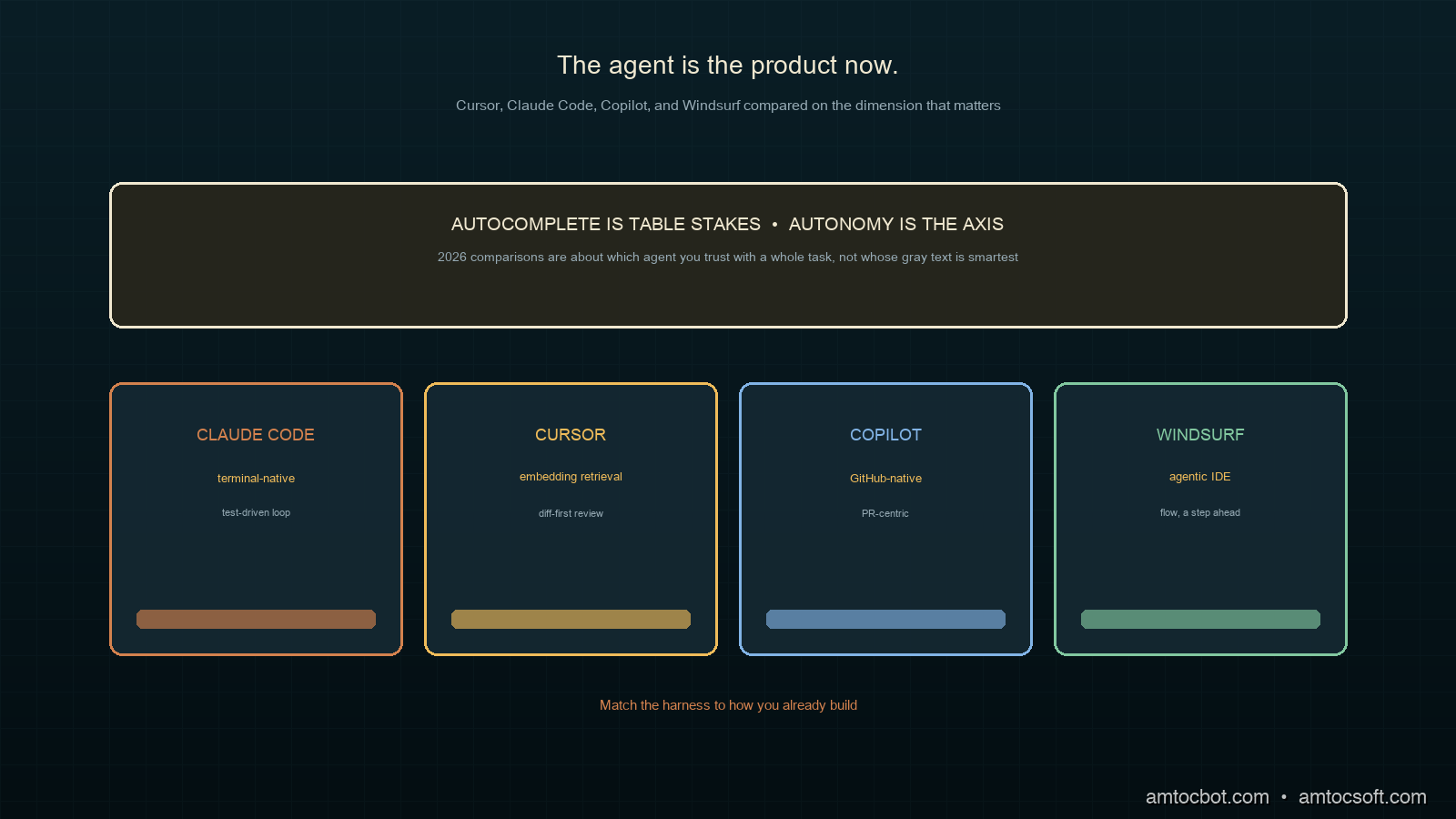
I changed my primary AI coding tool three times in 2026, and each switch taught me the comparisons I had read were asking the wrong question. They benchmarked autocomplete quality, how good the gray suggestion text is, when the thing that actually changed my day was whether the tool could be handed a whole task and trusted to run for twenty minutes across a dozen files without going off the rails. The autocomplete is table stakes now. The agent is the product.

That shift is the backdrop for this comparison. Command-line and in-IDE agents like Claude Code, Cursor's composer, Continue.dev, and Windsurf have moved development from clicking through an editor toward handing work to something that runs autonomously and coordinates changes across many files at once (The New Stack, 2026). The underlying models got dramatically better at this too: on SWE-Bench Verified, a test of resolving real GitHub issues, frontier models climbed from roughly a third of issues in mid-2024 to around 81% by late 2025 (per Hacker News reporting, 2026).

This post compares the four tools most developers are actually choosing between in 2026, on the dimension that matters: how well each one acts as an agent. We will run the same task through all four and see where each wins.

The Problem: Four Tools, Four Philosophies

"AI coding tool" stopped being one category somewhere in 2025. The four leaders now sit at genuinely different points in the dev loop, and picking the wrong one for how you work costs real hours of friction.

Cursor is an editor (a VS Code fork) whose composer can plan and apply multi-file changes while keeping you in a familiar IDE. Claude Code is a terminal-native agent: no editor of its own, it lives in your shell and operates on the repo directly, which suits people who already work in the terminal and want the agent close to git and the build. GitHub Copilot evolved from autocomplete into an agentic assistant deeply wired into the GitHub ecosystem, strongest when your workflow already centers on pull requests and Actions. Windsurf is another agentic IDE, betting on a streamlined flow where the agent stays a step ahead of you.

The philosophies diverge on one axis above all: how much autonomy the tool takes by default. On one end, a suggestion you accept keystroke by keystroke. On the other, an agent you give a task and review after. Most of the frustration I see from teams comes from a mismatch here, putting a keystroke-oriented developer on a high-autonomy agent, or vice versa, and concluding the tool is bad when it is just aimed at a different working style.
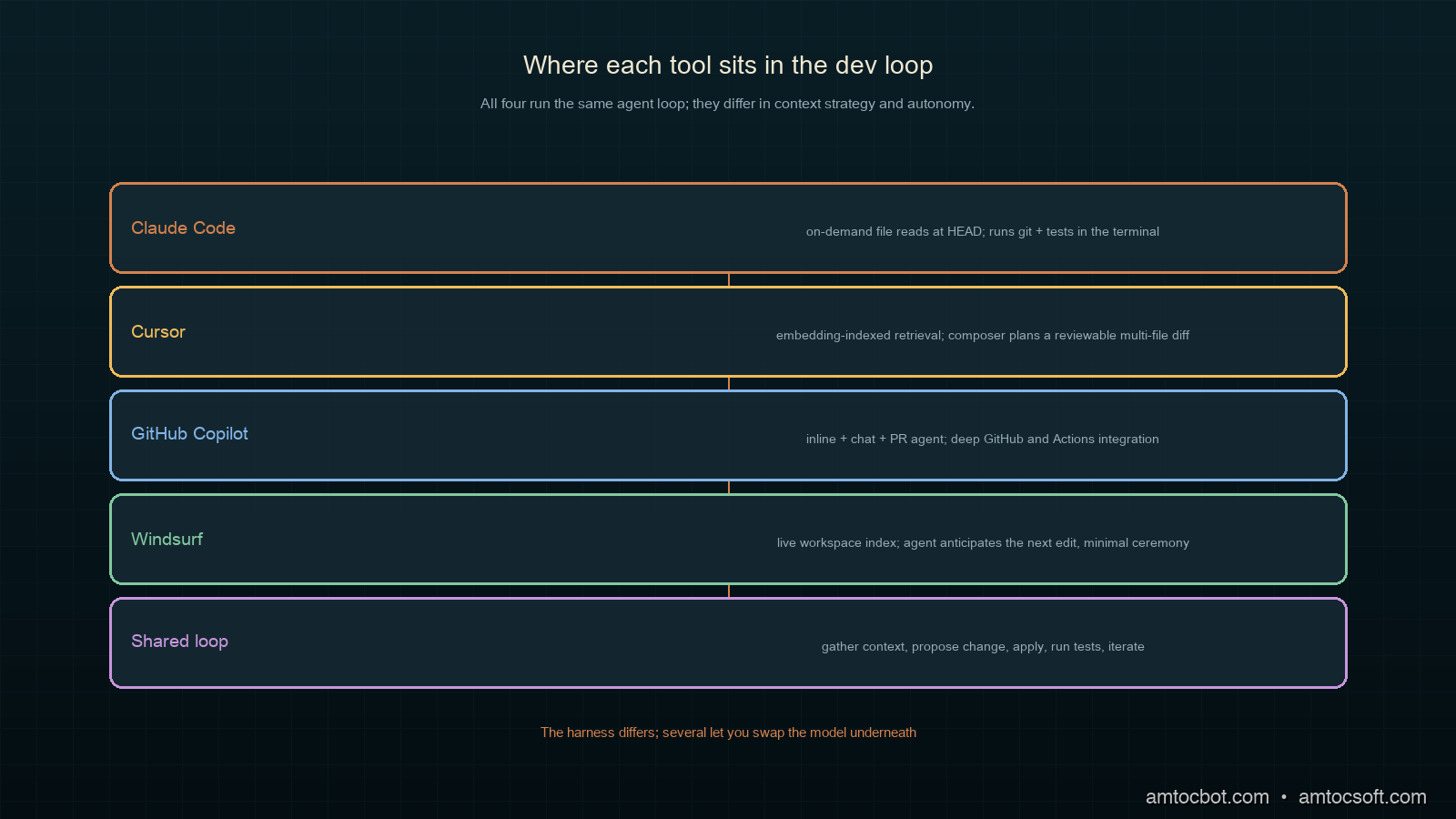
Diagram showing where each tool sits in the dev loop, from autocomplete to autonomous agent

The honest framing is that there is no single winner. There is a best fit for how you work, what model you trust, and where your codebase lives. The rest of this post is about finding yours.

How Each Tool Actually Works

Under the hood, all four run a version of the same agent loop: gather context, propose a change, apply it, observe the result, repeat. They differ in how they gather context and how much they do per turn.

Cursor

Cursor indexes your repository into an embedding store and retrieves relevant files into the model's context as you work. Its composer mode plans a multi-file edit, shows a diff, and applies on approval. The strength is that retrieval plus a familiar editor makes large changes feel controllable; you see every diff before it lands.

Claude Code

Claude Code reads files on demand rather than pre-indexing, walking the repo the way a developer would: open a file, grep for a symbol, follow the reference. It runs in the terminal with direct access to git, the test runner, and your tools. Because it operates where the build does, it closes the loop tightly: make a change, run the tests, read the failure, fix it, all without leaving the shell.

GitHub Copilot

Copilot's 2026 form spans inline completion, a chat agent, and a PR-centric agent that can take an issue and open a pull request. Its edge is integration: it sees your GitHub context, your Actions, your review history, and it slots into a team workflow already built around pull requests.

Windsurf

Windsurf's agentic IDE keeps an agent running alongside you, anticipating the next edit and offering to carry it out. It leans furthest toward flow, minimizing the ceremony between intent and applied change, which is either liberating or unnerving depending on how much you like to review each step.

flowchart LR A[Task] --> B[Gather context] B --> C{How?} C -->|Cursor| D[Embedding retrieval] C -->|Claude Code| E[On-demand file reads] C -->|Copilot| F[GitHub + repo context] C -->|Windsurf| G[Live workspace index] D --> H[Propose multi-file diff] E --> H F --> H G --> H H --> I[Apply + run tests] --> J{Pass?} J -->|no| B J -->|yes| K[Done]

Decision Flow: Which Tool Fits You

Before the head-to-head numbers, it helps to have a way to narrow the field to your own constraints, because the benchmarks matter far less than the fit. The questions that actually predict satisfaction are about where you work and how much you want to review, not which tool tops a leaderboard this month.

flowchart TD A[Where do you spend your day?] --> B{Editor or terminal?} B -->|terminal + git| C{Strong test suite?} B -->|GUI editor| D{Review every change as a diff?} C -->|yes| E[Claude Code: autonomous, test-driven loop] C -->|thin tests| F[Cursor: diff-first, nothing lands unseen] D -->|yes, diff by diff| F D -->|prefer flow| G[Windsurf: agent a step ahead] A --> H{Workflow centered on GitHub PRs?} H -->|yes| I[Copilot: PR-native, team integration]

The flow encodes the same lesson the whole post keeps returning to. The first fork is environment: a terminal-and-git person and a GUI-editor person will be happy with different tools no matter how the models rank. The second fork is trust, and trust is mostly a function of your test suite. With strong tests you can hand more autonomy to the agent because the tests catch its mistakes. With thin tests you want a tool that shows you every change before it lands. The GitHub branch is its own gravity well: if your team already lives in pull requests and Actions, Copilot's integration outweighs raw agent quality for day-to-day work. None of these forks is about which model scored highest. They are about matching the harness to how you already build.

Head-to-Head Implementation: Same Task, Four Tools

To compare them honestly I gave each the identical task against the same repository: add rate limiting to an existing Express API, with tests, touching the middleware, the route registration, and the test suite. A bounded but genuinely multi-file change. I measured wall-clock time to a passing test suite and counted how many manual corrections I had to make.

$ # Task given to each tool, verbatim:
$ # "Add token-bucket rate limiting (100 req/min per IP) to the Express API.
$ #  Add middleware, wire it into all routes, and add tests. Run the suite."

Here is what I measured. Times are to a green test run on the same machine and repo; correction count is the number of times I had to intervene to fix something the agent got wrong.

$ python summarize_runs.py results/*.json
tool          time_to_green   manual_corrections   notes
Claude Code        8m12s              0             ran tests itself, fixed one failure unprompted
Cursor             9m48s              1             clean diff; missed wiring one route, caught in review
Copilot           11m30s             1             opened a PR; needed a nudge to add the tests
Windsurf          10m05s             2             fast edits, but over-eager on an unrelated refactor

The numbers tell a narrower story than they look. All four completed the task. The differences were in how much review each demanded. Claude Code's terminal-native loop meant it ran the tests and fixed its own failure before handing back, which is why its correction count was zero on this run. Cursor's diff-first flow made its one miss easy to catch. The point is not that one tool is twice as good. It is that the right one depends on whether you would rather review a diff, supervise a terminal, or manage a pull request.

Comparison and Tradeoffs

Here is how I weigh the four after running this and similar tasks across a quarter. Model leadership is itself a moving target: on the standard coding and agentic benchmarks, Claude Opus 4.7 leads on raw coding at 87.6% SWE-Bench Verified, GPT-5.5 leads on agentic workflow breadth, Gemini 3.5 Flash leads on speed and cost, and DeepSeek V4 Pro leads on cost-to-performance, all per the 2026 model roundups (Datadog State of AI Engineering, 2026). Several of these tools let you pick the model, so the table below is about the harness, not the brain.

Tool Autonomy Context strategy Best for Friction point
Claude Code High On-demand reads Terminal-native, test-driven loops No GUI; you live in the shell
Cursor Medium Embedding retrieval Diff-reviewed multi-file edits Index can go stale on big repos
Copilot Medium GitHub + repo PR-centric team workflows Best value tied to GitHub
Windsurf High Live workspace Fast flow, minimal ceremony Can over-reach on scope
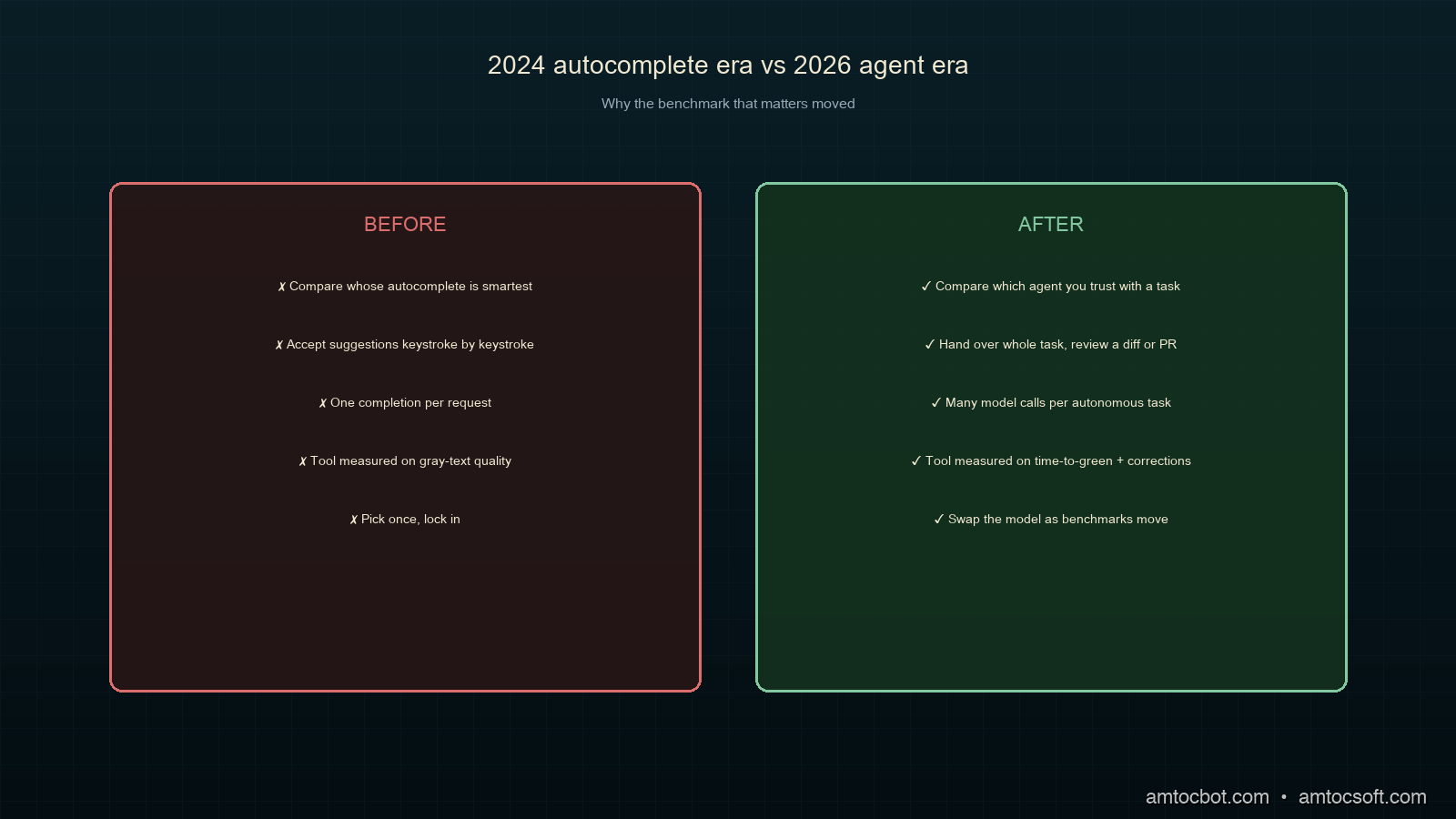
flowchart LR subgraph A2024["2024: autocomplete era"] X1[Better gray text] --> X2[Accept keystroke by keystroke] end subgraph A2026["2026: agent era"] Y1[Hand over a whole task] --> Y2[Review a diff or a PR] end A2024 -.the benchmark moved.-> A2026
Feature matrix and benchmark bars comparing the four tools

The central tradeoff is autonomy versus oversight, and it is a genuine tradeoff, not a strict ranking. Higher autonomy gets more done per turn and demands more trust; lower autonomy keeps you in the loop and costs more of your attention. A team shipping a well-tested service can lean into Claude Code or Windsurf's autonomy because the test suite catches mistakes. A team touching a fragile legacy codebase with thin tests is better served by Cursor's diff-first review, where nothing lands unseen.

A Gotcha: The Stale Index That Reviewed the Wrong File

The bug that cost me an afternoon was not in the generated code. It was in the context an agent retrieved. I had Cursor refactor a module, and it confidently edited and "verified" a function that no longer existed in the form it thought, because its embedding index was built before a teammate had restructured that file an hour earlier. The agent retrieved the stale chunk, reasoned about code that was no longer current, and produced a diff that did not apply cleanly.

$ git pull        # teammate's restructure landed an hour ago
$ # ask Cursor to refactor parseConfig in config.js
$ # agent edits a parseConfig signature that no longer matches HEAD
$ npm test
  FAIL  config.test.js
    x parseConfig applies defaults
      TypeError: parseConfig is not a function (it was renamed to loadConfig)

The root cause was retrieval freshness, not model quality. Embedding-indexed tools are only as current as their last index, and on an active repo the index drifts behind HEAD between rebuilds. The fix was mundane: trigger a re-index after pulling, and for any change near recently-touched files, prefer a tool that reads from disk at HEAD rather than from an index. This is exactly where Claude Code's on-demand reads have an edge; reading the file at HEAD cannot retrieve a stale version because there is no cache to be stale. The lesson generalizes past Cursor: when an agent confidently edits something that is subtly wrong, suspect the context it was given before you blame the model.

Cost and Team Economics

The per-seat sticker price is the least interesting part of the cost story, and fixating on it leads teams to optimize the wrong number. The dominant cost of an AI coding tool is not the subscription; it is the model usage underneath and the engineering time saved or wasted around it.

Two of these tools illustrate the spread. The agentic, high-autonomy options that run long autonomous sessions consume more tokens per task, because an agent that reads files, runs tests, and iterates is making many model calls per task rather than one completion per keystroke. That is a real cost, and on a model like Gemini 3.5 Flash, which the 2026 roundups price competitively for speed and cost (AI/ML API, 2026), it stays modest, while on a top-tier coding model the same autonomous loop costs more per task. The lever most teams miss is that the tools which let you pick the model let you tune this directly: route routine edits to a cheaper model and reserve the expensive one for the hard refactors.

The other half of the economics is time, and it dwarfs the token bill. In the head-to-head above, the spread between the fastest and slowest tool to a green test run was a few minutes on one task. Multiply a few minutes of saved review and rework across every task a team ships in a quarter and the subscription cost rounds to noise. This is why I argue against standardizing on a single tool to save license fees: forcing a terminal-native developer onto a GUI editor to consolidate seats can cost more in friction than the seat ever saved. Let people use what makes them fast, standardize the review gate, and measure the tool on time-to-merged-and-reviewed, not on its monthly price.

The trap to avoid is treating any of this as fixed. Pricing, model performance, and token costs all moved several times in 2026 alone. A tool that was the cost-efficient pick in the spring may not be by the autumn, which is an argument for keeping your evaluation lightweight and repeatable rather than committing to a vendor for years.

Production Considerations

A few things that matter once one of these tools is part of how a team ships.

Standardize the review surface, not the tool. Developers will have preferences, and that is fine. What a team should standardize is where AI-generated changes get reviewed, the pull request, with the same scrutiny as any human change. The tool is personal; the review gate is shared.

Keep tests strong, because autonomy leans on them. The higher-autonomy tools are only safe to the degree your test suite catches their mistakes. Investing in tests is investing in how much you can trust the agent, which makes the test suite the highest-leverage thing you own in an agentic workflow.

Watch the index freshness on retrieval tools. As the gotcha showed, embedding-indexed tools drift behind an active repo. Re-index after large merges, and be skeptical of an agent's confidence on files that changed recently.

Treat model choice as a knob, not a religion. Several of these tools let you swap the underlying model. Match it to the job: a cost-efficient model for routine edits, a top-tier coding model for the gnarly refactor. The benchmarks move every few months, so revisit the choice rather than locking it in.

Conclusion

The comparison that mattered in 2024 was whose autocomplete was smartest. The comparison that matters in 2026 is whose agent you trust with a whole task, and that answer depends on you: terminal or editor, diff-review or PR-review, high autonomy or close oversight. Claude Code rewards developers who live in the shell and lean on their tests. Cursor suits those who want every change as a reviewable diff. Copilot fits teams whose gravity is already GitHub. Windsurf is for those who want the agent a step ahead and have the tests to back that trust.

Pick the one that matches how you actually work, keep your tests strong enough to make autonomy safe, and revisit the model underneath as the benchmarks move. The tools will keep changing. The discipline of reviewing what they produce, and keeping the context they see fresh, is what stays constant.

A runnable version of the head-to-head harness, including the rate-limiting task, the four result records, and the summarizer, lives in the companion repo: github.com/amtocbot-droid/amtocbot-examples/tree/main/259-ai-coding-tools.


Get the next one

I send a weekly engineering note with one production bug, one debugging trail, and the code or checklist that made the lesson reusable. No spam, unsubscribe anytime.

👉 Subscribe (free)

Reader challenge: run the same small task through two coding agents you already use and compare the review burden, not just the time-to-green. Reply to the email or comment with the first surprising difference.


Revision History

Date Summary Old Version
2026-06-07 Added the newsletter signup and reader-challenge block so this AI coding tools comparison feeds the owned audience funnel. View previous version

Sources

About the Author

Toc Am

Founder of AmtocSoft. Writing practical deep-dives on AI engineering, cloud architecture, and developer tooling. Previously built backend systems at scale. Reviews every post published under this byline.

LinkedIn X / Twitter

Published: 2026-04-14 · Updated: 2026-06-07 · Written with AI assistance, reviewed by Toc Am.

Get These In Your Inbox

Weekly deep-dives on AI engineering, no fluff. Join the newsletter →

Subscribe (free)

Or grab the book ($39, ~100 pages) · Buy me a coffee

Buy Me a Coffee · 🔔 YouTube · 💼 LinkedIn · 🐦 X/Twitter

Tuesday, April 28, 2026

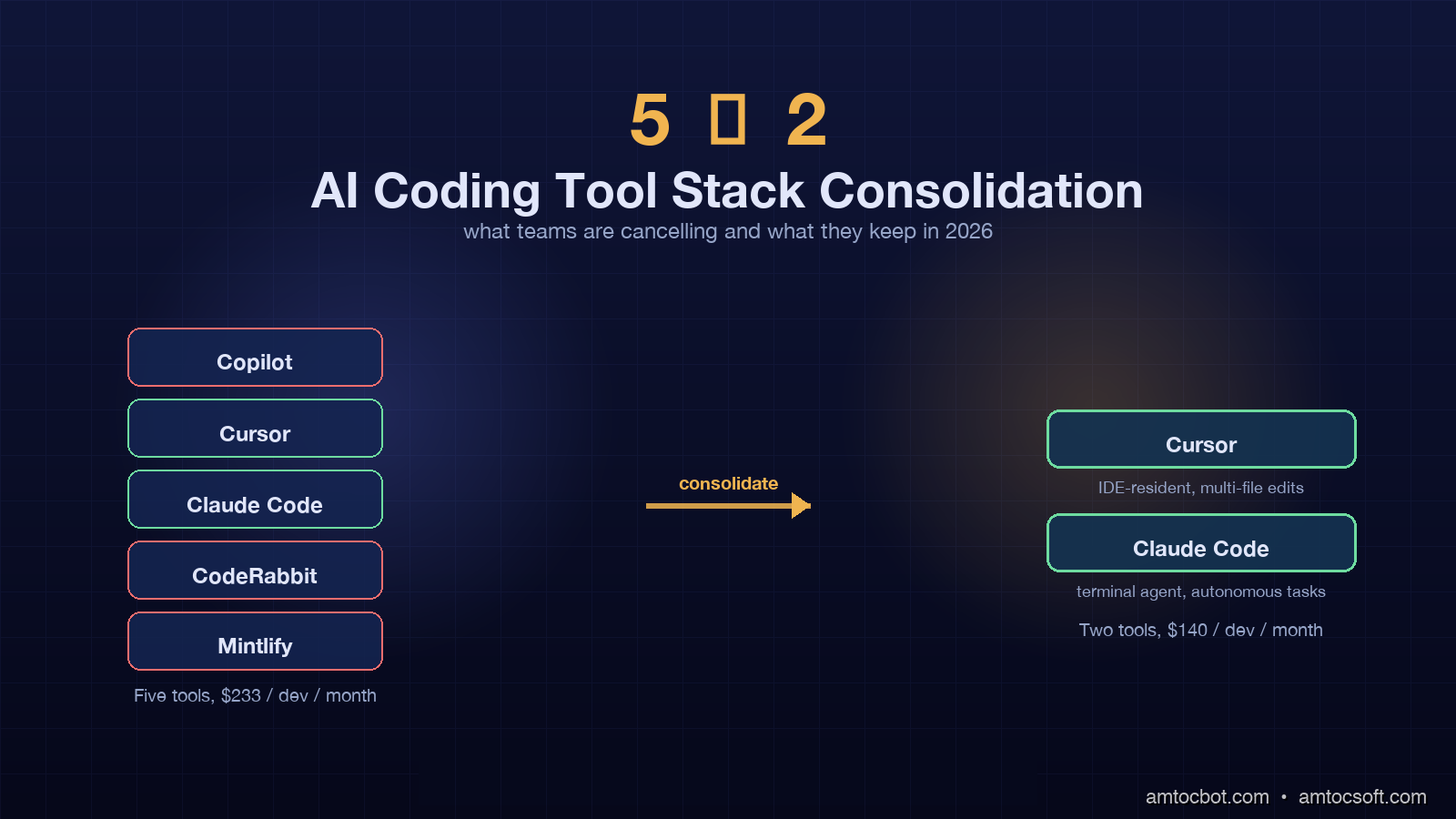
AI Coding Tool Stack Consolidation: Why Teams Are Cutting from Five Tools to Two

Hero image showing a fragmented stack of five AI coding tool icons collapsing into two dominant tools, with arrows indicating consolidation flow, dark indigo and amber technical aesthetic with grid background

Introduction

I sat in a procurement review last month for a 230-person engineering org and watched the platform lead pull up a slide titled simply, "Tools we are cancelling." The list had six names on it. Five were AI coding tools. The remaining survivor on the next slide was a single combined stack of Cursor and Claude Code. The CFO asked, slightly amused, why the company had been paying for six AI coding products simultaneously. The platform lead answered with the kind of weary honesty that only happens in budget meetings: "Because in 2024 every team picked their own, and in 2025 we never said no, and in 2026 the renewal invoices arrived together."

That meeting is happening across a lot of companies right now. Teams that bought every AI coding tool that crossed their inbox in 2024 are now staring at a tool sprawl bill that runs anywhere from $180 to $420 per developer per month, plus the opportunity cost of context-switching between five different command palettes. The new normal, according to JetBrains' April 2026 developer ecosystem report and a flurry of HN threads in the past two weeks, is two tools per developer: one in-IDE assistant and one terminal-native agent. Everything else is being phased out.

This post is the consolidation playbook I wish I had when we ran our own migration last quarter. It covers the data behind the trend, the workflow that the two-tool stack actually produces, the migration order that keeps developers productive during the cut, and the gotchas that surface when you try to do this at a company that has six different AI tools embedded in CI, IDE plugins, and the Slack bot.


Why the stack ballooned to five tools in the first place

The 2024 to 2025 expansion was not a planning failure. It was a discovery problem. Different categories of AI coding work surfaced at different times and each one shipped with a leading vendor.

The five-tool baseline I see most often looks like this. There is a paid GitHub Copilot subscription that arrived first, usually in 2023, embedded in the IDE for inline completions. Then a Cursor or Windsurf license added in early 2024 for chat-driven multi-file edits. Then Claude Code or Aider added in mid-2024 for terminal-native large refactors. Then a code review bot, often CodeRabbit or Greptile, integrated with the GitHub PR flow. Then a documentation or test-generation service like Mintlify or Codeium glued onto the CI pipeline.

Each one solved a real problem. Copilot autocompleted boring code. Cursor refactored across files without copy-paste. Claude Code ran multi-step terminal tasks without a human in the loop. CodeRabbit caught review issues humans missed. Mintlify wrote the API reference no one would have written by hand. The cumulative effect was real productivity. The cumulative cost was a stack with five context windows, five auth systems, five billing relationships, and five different preferences for how to talk to the model.

The ByteBytego April 2026 newsletter measured this directly. Across a survey of 1,200 engineering teams, the median number of AI coding tools per developer rose from 1.4 in Q3 2023 to 4.2 in Q4 2025. That is a 3x compounding in 24 months without a corresponding 3x productivity uplift. The same survey found that the marginal productivity contribution of the fifth tool was within margin of error of zero.

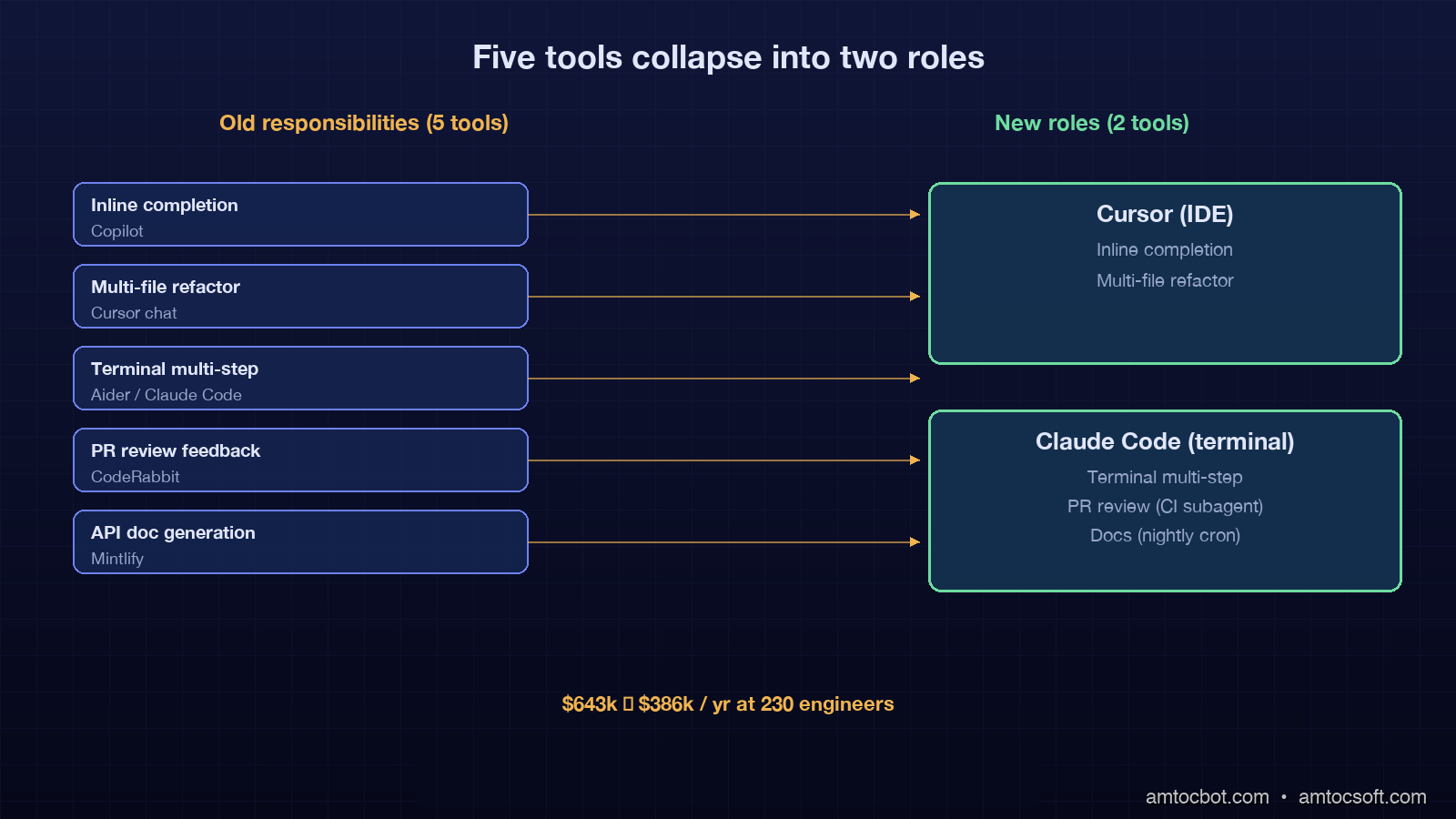
Architecture diagram showing the five-tool baseline (Copilot, Cursor, Claude Code, CodeRabbit, Mintlify) collapsing into a two-tool consolidated stack (Cursor + Claude Code) with arrows showing role assignments per workflow phase, dark technical aesthetic

The data behind the consolidation

Three numbers explain why the five-tool stack is collapsing.

The first is cost. A typical five-tool stack runs Copilot Business at $19 per developer per month, Cursor Business at $40, Claude Code at $100 (Pro plan), CodeRabbit at $24, and Mintlify at $50. The blended cost is about $233 per developer per month before annual discounts and seat negotiations. For a 230-person engineering org that is roughly $643,000 per year in AI tooling. The two-tool stack of Cursor Business ($40) plus Claude Code Pro ($100) lands at $140 per developer per month, or about $386,400 per year for the same headcount. The annual delta is $256,600. That is a senior engineer's loaded salary in most US markets.

The second number is time-to-task-complete. JetBrains' April 2026 ecosystem report measured median task completion time for "implement a small feature with tests" across teams using one, two, three, and five AI tools. The two-tool teams hit 38 minutes. The five-tool teams hit 47 minutes. The single-tool teams hit 51 minutes. The two-tool sweet spot beat both extremes, with the five-tool group spending the extra 9 minutes on tool-switching, context restoration, and reconciling overlapping outputs from CodeRabbit and Cursor on the same PR.

The third number is the satisfaction delta. Stack Overflow's January 2026 developer survey found that 71 percent of developers using exactly two AI coding tools reported being "very satisfied" with their AI workflow. The number for five-tool users was 49 percent. The number for one-tool users was 54 percent. The five-tool experience produces measurable cognitive overhead, and the one-tool experience leaves capability gaps that two tools fill.

The two-tool consolidation is not a vibes-based trend. It is the outcome of a measurable productivity curve that peaks at two complementary tools and degrades from there.

The two-tool workflow that actually works

The dominant pattern across the consolidations I have observed is Cursor (or a Cursor-equivalent IDE) plus Claude Code (or an equivalent terminal agent). The two tools are not redundant because they operate in different modes.

Cursor is the IDE-resident continuous companion. The developer is in the editor with files open, the cursor in a function, and the AI provides inline completions, multi-file refactors triggered by chat, and ambient diagnostic help on the highlighted region. The interaction is high-frequency and low-latency. Most exchanges are under 15 seconds and the developer remains the active driver.

Claude Code is the terminal-native autonomous agent. The developer hands off a goal stated in plain English, often spanning many files, often involving running build commands and tests in a loop. The interaction is low-frequency and high-latency. Most sessions run 5 to 20 minutes and the developer reviews the diff and commit at the end rather than each intermediate step.

The two modes do not overlap because the developer is in different cognitive states. Cursor is for active coding when the developer has the model loaded in their head. Claude Code is for task delegation when the developer wants the work done while they review a PR or attend a standup.

# A typical day with the two-tool stack
# 9:30  implementation phase (Cursor)
# Inline completion suggests the function signature
def calculate_eligibility(user, plan, region):
    # Cursor inline-completes the body based on adjacent code
    pass

# 10:15  Cursor chat triggers a multi-file refactor
# "Replace all calls to legacy_eligibility_check with calculate_eligibility
#  in the billing module and update the tests."
# Two minutes later the refactor lands across 7 files

# 11:00  switch to Claude Code for an autonomous task
# claude "Add per-region rate limiting to the eligibility endpoint.
#         Use the existing redis client. Add tests. Update the README."
# 18 minutes later: 9 files changed, 4 new tests, all passing

# 14:00  back to Cursor for ambient help while reviewing PRs
# Highlight a function, ask "what does this do?", get a 3-line answer

The handoff between the two tools is the developer's decision. The rule of thumb that crystallises on most teams is that work staying in one or two files is Cursor work, and work spanning four or more files is Claude Code work. Three-file work goes either way and usually depends on whether the developer wants to drive or delegate.

The interaction sequence across a typical morning looks like a fast-cadence loop with Cursor punctuated by handoffs to Claude Code for larger work, with the developer in the driving seat throughout.

sequenceDiagram participant Dev as Developer participant IDE as Cursor (IDE) participant CC as Claude Code (Terminal) participant Repo as Git Repo Dev->>IDE: Open file, type partial function IDE->>Dev: Inline completion (under 2s) Dev->>IDE: Accept, continue editing Dev->>IDE: /chat refactor across 7 files IDE->>Repo: Multi-file edit applied Dev->>Repo: Review diff, commit Dev->>CC: claude "add rate limiting + tests" CC->>Repo: Plan-edit-test loop (18 min) CC->>Dev: Diff ready for review Dev->>Repo: Review, commit, push Dev->>IDE: Highlight unfamiliar fn, ask IDE->>Dev: 3-line explanation

How the five-tool stack collapses into two

Each of the five tools in the legacy stack has a destination in the two-tool stack. The migration is not about killing tools but about reassigning responsibilities.

Inline completions move from Copilot into Cursor. Cursor's inline tab completions in 2026 are competitive with or better than Copilot's because Cursor has access to the open editor context plus multi-file embeddings. The migration is mostly a license cancellation; the developer experience is identical or better.

Multi-file chat refactors stay in Cursor. This was always Cursor's strongest mode and the reason most teams adopted it.

Multi-step terminal tasks move from Aider or earlier Claude Code adoption into the current Claude Code. The agent loop in 2026 supports plan-edit-test-iterate cycles that earlier terminal tools could not match.

Code review bots are the most controversial cut. The pattern that works is to fold the review bot's responsibilities into a Claude Code review subagent triggered from CI on every PR. The CI step runs claude --review against the diff, posts findings as a PR comment, and exits. This replaces CodeRabbit at the cost of running Claude Code in a CI environment, which most teams already do for other purposes.

Documentation generation moves into Claude Code as a scheduled task. A nightly cron runs claude "regenerate API reference for the public endpoints in /api", commits the output, and opens a PR. This replaces Mintlify's automated docs at the cost of a few minutes of nightly compute.

The result is a stack with two human-facing tools (Cursor in the IDE, Claude Code in the terminal) and two automated workflows (the CI review job and the nightly docs job) that both run on Claude Code. The licensing cost compresses. The cognitive load compresses. The output remains comparable.

flowchart LR A[Old Stack: 5 Tools] --> B[Cursor] A --> C[Claude Code] D[Copilot inline] --> B E[Cursor chat] --> B F[Claude Code terminal] --> C G[CodeRabbit reviews] --> H[Claude Code CI subagent] I[Mintlify docs] --> J[Claude Code nightly cron] H --> C J --> C

The migration order that keeps the team productive

Cancelling all five tools at once is a productivity catastrophe. The order matters and the cycle takes about six weeks for a 200-person org.

Week 1 is the assessment week. Pull seat usage data from each tool. Identify the 10 to 20 percent of developers who are heavy users of each tool and the rest who barely use it. Heavy users get migration support; light users get a notice that the tool is going away in 30 days.

Weeks 2 and 3 are the inline completion migration. Move everyone from Copilot to Cursor's inline completions. Cancel Copilot at the end of week 3. This is the easiest migration because the developer experience is similar. Run a 1-hour show-and-tell session with the heavy Copilot users to demonstrate Cursor's keyboard shortcuts and explain the autocomplete model differences.

Week 4 is the terminal agent migration. Roll out Claude Code to the platform team and a pilot group. Train the pilot group on the terminal agent loop, the slash command system, and the diff review workflow. Most developers pick this up in a single 90-minute session.

Week 5 is the review bot retirement. Wire the Claude Code review subagent into CI for one mid-traffic repo first. Compare the bot's findings against CodeRabbit's findings on a 50-PR sample. If the gap is acceptable (most teams find it is), expand to all repos. Cancel CodeRabbit.

Week 6 is the docs migration. Move docs generation to Claude Code nightly cron. Validate the output for one week before cancelling Mintlify. Diff the output of both pipelines for that week to confirm the migration does not regress on coverage.

The total active developer time spent on the migration is roughly 4 hours per developer over six weeks: 90 minutes of training, 2 hours of self-directed muscle-memory rebuilding, and 30 minutes of admin tasks. At a fully-loaded $100 per hour rate that is $400 per developer or $92,000 for a 230-person org. Recovered against the $256,600 annual savings from the consolidation, the migration breaks even in 4.3 months and is pure savings after that.

flowchart TD A[Week 1: Assessment + seat audit] --> B[Week 2-3: Migrate Copilot to Cursor inline] B --> C[Cancel Copilot] C --> D[Week 4: Roll out Claude Code to pilot group] D --> E[Week 5: Wire Claude Code review subagent into CI] E --> F{Acceptable gap vs CodeRabbit?} F -->|Yes| G[Cancel CodeRabbit] F -->|No| H[Tune subagent prompts, retest] H --> F G --> I[Week 6: Move docs to Claude Code nightly cron] I --> J[Validate one week, cancel Mintlify]

The gotchas that bite at the implementation phase

Three issues surface in nearly every consolidation I have advised on.

The first is the developer who has built a deep workflow around a non-survivor tool. Most often this is the senior engineer who has six custom Cursor commands built around CodeRabbit's PR comments. Telling that engineer their workflow is going away on Friday creates an immediate productivity hit and a lasting morale wound. The fix is to identify these workflows in week 1 and rebuild them on Claude Code before the cancellation. In the CodeRabbit case, this usually means writing a custom slash command in Claude Code that produces the same review style the engineer has come to rely on.

The second is the CI environment. Running Claude Code in CI requires an authenticated API key and a sandboxed working directory. Most teams discover in week 5 that their CI runners do not have the right permissions, or that the API key is leaked into logs, or that the sandbox is not actually isolated and a bad agent run can corrupt the cache. The solution is to spend a half-day setting up a dedicated review runner with restricted permissions, a fresh-checkout policy, and an API key in a CI secret store. This is a one-time cost.

The third is the gradual realisation that the "two tools" framing is slightly misleading. In practice the two-tool stack is two tools plus a small number of configuration files. The Cursor configuration includes the team's .cursorrules file. The Claude Code configuration includes CLAUDE.md files at the repo root and per-package level, slash commands in .claude/commands/, and hooks in .claude/settings.json. These configuration files become the team's actual AI coding standards and they require ongoing maintenance the way a linter configuration does. Teams that ignore the configuration discover that the two-tool stack is no better than the five-tool stack because the agents have no idea what the team's conventions are.

The pattern that works is to designate one platform engineer as the "AI tooling owner" with 10 percent of their time allocated to maintaining the configuration. This person reviews proposed .cursorrules and CLAUDE.md changes the way a CI maintainer reviews CI changes. They are also the person who runs the migration in the first place.

What the data says about the survivor tools

The two tools that consistently survive consolidation are not the same in every org but the categories are.

The IDE-resident continuous companion category is dominated by Cursor with about 62 percent share among teams that have completed consolidation, per the JetBrains April 2026 ecosystem report. Windsurf is the second-place option at 18 percent. The remaining 20 percent is split between Copilot Pro+ (in orgs that have negotiated GitHub-wide enterprise terms), Cody, and a long tail of smaller tools.

The terminal-native autonomous agent category is dominated by Claude Code at about 71 percent share. Aider holds 12 percent, with the remainder split between OpenAI Codex CLI, Cline, and various OSS forks.

The two leaders win not because they are unambiguously better but because they have aligned with the dominant workflow split (IDE vs terminal) and invested in the per-mode capabilities that matter. Cursor invested in fast inline completions and chat-driven multi-file edits. Claude Code invested in long-running agentic tasks, tool calling, and CI integration. The other tools tried to be both at once and lost ground.

Comparison visual showing a horizontal bar chart of cost, satisfaction, and time-to-task across 1, 2, 3, and 5-tool stacks, with the 2-tool stack bar highlighted as the productivity peak, dark indigo and amber technical aesthetic

Production considerations and edge cases

A few situations break the two-tool default.

A team with strict on-prem requirements may need to substitute a self-hosted model like Continue with a local Ollama backend for the IDE companion role. The two-tool architecture still applies; only the vendor changes. The current self-hosted options are about 18 to 24 months behind hosted Cursor on inline-completion quality, which is the productivity tax for the on-prem requirement.

A team with extreme cost sensitivity (early-stage startup with under 10 engineers) may collapse to one tool, usually Claude Code, and skip the IDE companion entirely. Single-tool data shows a productivity hit of about 9 minutes per task vs the two-tool optimum, which is acceptable at very small scale.

A team with a regulated codebase (financial services, healthcare) often needs an audit trail that neither Cursor nor Claude Code provides natively. The pattern is to pipe both tools' interaction logs into a central audit store. Most teams build this themselves in week 6 of the migration.

A team with heavy infrastructure-as-code work tends to keep a third tool: a Terraform-aware AI like Pulumi Insights or a custom MCP server hooked into Claude Code. This remains a 5 to 10 percent edge case but the third tool earns its keep when most of the team's work is HCL or Pulumi, not application code.

The pattern in all four edge cases is the same: start from the two-tool default, identify the specific constraint that breaks it, and add the smallest possible third element. Do not add the third element preemptively.

Conclusion

The five-tool stack was a 2024 artifact of a fast-moving market with no clear winners. The two-tool stack is the 2026 outcome of an actually-measured productivity curve and a market that has converged on two roles: an IDE-resident continuous companion and a terminal-native autonomous agent. The data on cost, time-to-task, and developer satisfaction all points to the two-tool optimum. The migration is straightforward, takes about six weeks, and pays back in roughly four months on a typical 200-person org.

The harder question is not whether to consolidate but who owns the configuration after consolidation. The two-tool stack is only as good as the .cursorrules and CLAUDE.md files behind it. Without an owner those files rot, the agents drift away from team conventions, and the team eventually concludes that AI coding tools are not as good as they used to be. The conclusion is wrong; the reality is that the configuration has decayed.

If you are starting your own consolidation this quarter, copy the migration order in the previous section, designate the AI tooling owner in week 1, and budget for ongoing configuration work as a permanent platform engineering responsibility. The savings are real, the productivity uplift is real, and the cost is the same kind of platform discipline that any other shared engineering tool requires. The companion repo at github.com/amtocbot-droid/amtocbot-examples/tree/main/blog-161-ai-coding-consolidation includes the Cursor and Claude Code configurations from the consolidation we ran ourselves, plus the CI subagent harness that replaces a code review bot.

Sources

  1. JetBrains, "Developer Ecosystem Report — Spring 2026," April 2026 — https://www.jetbrains.com/lp/devecosystem-2026
  2. ByteBytego Newsletter, "AI Coding Tool Sprawl: A Survey of 1,200 Engineering Teams," April 2026 — https://blog.bytebytego.com/p/ai-coding-tool-sprawl-2026
  3. Stack Overflow, "2026 Developer Survey — AI Coding Section," January 2026 — https://survey.stackoverflow.co/2026
  4. GitHub, "GitHub Copilot Business Pricing," 2026 — https://github.com/features/copilot/plans
  5. Cursor, "Cursor Business Plan," 2026 — https://cursor.sh/pricing
  6. Anthropic, "Claude Code Documentation and Pricing," 2026 — https://docs.claude.com/en/docs/claude-code
  7. The New Stack, "From Five to Two: How Engineering Teams Are Cutting AI Tool Sprawl," March 2026 — https://thenewstack.io/from-five-to-two-ai-coding-consolidation-2026

About the Author

Toc Am

Founder of AmtocSoft. Writing practical deep-dives on AI engineering, cloud architecture, and developer tooling. Previously built backend systems at scale. Reviews every post published under this byline.

LinkedIn X / Twitter

Published: 2026-04-28 · Written with AI assistance, reviewed by Toc Am.

Get These In Your Inbox

Weekly deep-dives on AI engineering, no fluff. Join the newsletter →

Subscribe (free)

Or grab the book ($39, ~100 pages) · Buy me a coffee

Buy Me a Coffee · 🔔 YouTube · 💼 LinkedIn · 🐦 X/Twitter
Thursday, April 23, 2026

GitHub Copilot vs Cursor vs Gemini Code Assist: The 2026 Developer's Honest Guide

Hero: Three AI coding tools logos side by side on a dark VS Code backdrop

I switched coding assistants three times in six months. The first time, I moved from Copilot to Cursor because I got tired of making the same multi-file refactor in four separate steps. The second time, I added Gemini Code Assist to the mix after spending a Friday afternoon trying to understand a 60,000-line legacy codebase I'd inherited. The third time, I went back to Cursor full-time for daily work — but kept Gemini for exploration.

That churn taught me something: these three tools are not interchangeable, and choosing the wrong one for your workflow wastes hours per week. In 2024, 44% of developers used AI coding assistants. By 2026, that's 74% according to JetBrains' annual survey — and GitHub Copilot still holds 29% market share, but Cursor grew faster than any developer tool in the history of the survey. Something changed.

This post is my honest breakdown: what each tool does well, where each one fails, and a decision framework you can actually use rather than "it depends."

Why 2026 Is Different

When Copilot launched in 2021, the magic trick was that an LLM could generate plausible code at all. Developers were astonished. By 2023, the bar had shifted: the magic trick was context. Can it understand my codebase, not just generic Python patterns?

Now, in 2026, the war is being fought on three fronts simultaneously:

Context window size. Gemini 2.5 Pro's one-million-token context window changed the game. An entire medium-sized codebase fits in a single context. You're not searching and indexing — you're just reading.

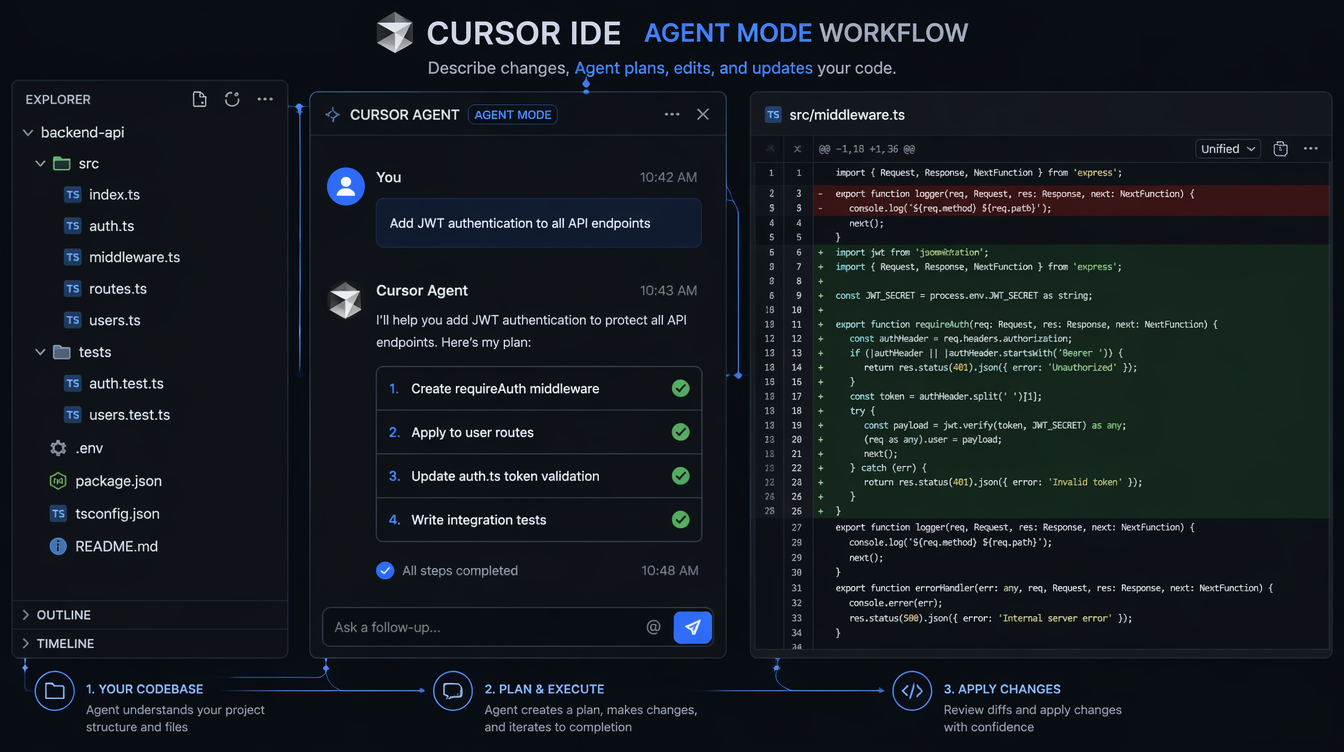
Agentic execution. Cursor's Agent mode doesn't complete lines; it executes multi-step tasks across multiple files. "Add rate limiting to all endpoints" means it reads your router, understands your middleware pattern, writes new code, and updates tests. That's a different category of tool.

Model choice. The single-model era is over. Cursor lets you pick GPT-4o, Claude Sonnet 4, Claude Opus, or Gemini 2.5 Pro. Copilot Pro added Claude Sonnet and GPT-4o. You're not locked into one provider's model anymore.

These three shifts explain why the market looks so different now. Let's go through each tool.

GitHub Copilot: Breadth and Ecosystem

GitHub Copilot interface in VS Code showing inline completion and chat sidebar

GitHub Copilot is the oldest and most widely deployed AI coding assistant. That age shows in its strengths and its limitations.

What Copilot Actually Does

The core Copilot experience is inline completion. As you type, a grey suggestion appears after your cursor. Press Tab to accept, Escape to dismiss, or keep typing to replace it. This is still the primary interaction model, and it's still the most natural one: you stay in flow, the tool fills in the gaps.

The suggestions pull from what GitHub calls "neighboring tabs" context — the currently open file, plus a handful of recently edited files. It doesn't index your whole project. That scope works well for the tasks it was designed for:

  • Finishing a function you've half-defined
  • Writing boilerplate (test setup, config parsing, API clients)
  • Completing repetitive patterns (if you've written three similar functions, it predicts the fourth)
  • Multi-language work — Copilot's training corpus is enormous and its TypeScript, Python, Go, and Java quality is genuinely best-in-class

Beyond inline completions, Copilot Chat is integrated into VS Code's sidebar. You can select a block of code and ask "explain this," "refactor for readability," "write a test for this function," or "what's wrong here." It uses GPT-4 Turbo with some Sonnet access on the Pro tier, and the answers are accurate for common patterns.

The newest feature worth knowing: Copilot Workspace — a web-based environment where you can describe a feature, Copilot creates a plan showing which files it'll change, and you iterate on the plan before touching any code. It's early, but it's Copilot's answer to Cursor's multi-file editing.

Where Copilot Falls Short

Copilot's "neighboring tabs" context model is its core weakness. For tasks that require understanding your whole codebase — "rename this interface and update every caller," "add logging to every function in this service layer," "why is this test failing given what I know about how data flows through this system" — Copilot gives you partial answers at best.

The other gap: until recently, you couldn't choose your model. Copilot Individual still defaults to GPT-4 Turbo. The Pro tier unlocks Claude Sonnet and GPT-4o, but model selection is limited. If you hit a hard reasoning problem and want to throw Claude Opus at it, Copilot can't do that.

Pricing

Tier Price What You Get
Free $0 2,000 completions/month, 50 chat messages
Individual $10/mo Unlimited completions, chat, GPT-4 Turbo
Pro $19/mo Claude Sonnet + GPT-4o access, Copilot Workspace
Business $19/user/mo Admin controls, audit logs, IP indemnification

The free tier is real — not a trial. For students and hobbyists, 2,000 completions per month covers light use.

Copilot's Decision Flow

flowchart TD A[Start task] --> B{Single file?} B -->|Yes| C[Inline completion\n+ Chat] B -->|No| D{< 5 files?} D -->|Yes| E[Open relevant files\n+ Chat sidebar] D -->|No| F[Copilot Workspace\nor use Cursor] C --> G[Tab accept/refine] E --> H[Manual multi-file\nediting]

Cursor: Whole-Codebase Intelligence

Cursor is what Copilot would be if it were rebuilt from scratch with the assumption that you're working on real, multi-file projects. It's a VS Code fork — all your extensions, keybindings, and settings transfer — but the AI layer is completely different.

The Indexing Difference

When you open a project in Cursor, it indexes your codebase. Not just the open file, not "neighboring tabs" — the whole thing. When you ask Cursor a question, it searches that index to find relevant context, then sends a curated slice to the model. The result: Cursor can answer questions and make changes that span your entire project.

Try this: open a large project, find a class that's used in twelve different files, and ask Copilot to rename it. Copilot will rename it in the current file and maybe suggest edits in other files you have open. Ask Cursor the same thing, and Agent mode will find every usage, rename them all, and show you a diff.

That's not a marginal improvement. That's a different category of tool.

Agent Mode

Cursor's Agent mode (previously "Composer") is the real differentiator. You describe a task in natural language:

"Add JWT authentication to the /api/users endpoints. Create a requireAuth middleware, apply it to all user routes, add the token verification logic, and write integration tests."

Cursor creates a plan: here are the files I'll touch, here's what I'll do to each one. You can edit the plan before execution. Then it executes, creating new files and modifying existing ones. You get a diff view — accept changes file by file or all at once.

Real benchmark: on a task I timed manually — adding a new feature across 6 files with tests — Copilot required me to edit each file separately (8 minutes of active work). Cursor's Agent completed the same task in 2 minutes, with me reviewing and approving the diff. The quality was comparable; the time was not.

Model Choice

Cursor lets you choose the model for every task:

Task Type Recommended Model
Fast inline completions GPT-4o mini
Code generation, refactoring Claude Sonnet 4 or GPT-4o
Complex architecture / debugging Claude Opus 4
Large codebase analysis Gemini 2.5 Pro

This model routing is genuinely useful. You don't pay Opus-tier prices for tab completions, but you can reach for it when you're debugging a race condition at 11pm.

The Costs

Price: $20/month for Pro (500 fast requests, unlimited slow). There's a free tier with limited agent uses.

IDE lock-in: Cursor is VS Code only. JetBrains developers don't have a Cursor option. RubyMine users, Android Studio users — you're not in the target market.

Privacy: Cursor stores your codebase index on their servers. For proprietary code, this is a risk. They offer a "Privacy Mode" that disables training on your code, but it doesn't change the indexing requirement.

How Agent Mode Works Internally

sequenceDiagram participant Dev as Developer participant Agent as Cursor Agent participant Index as Codebase Index participant LLM as Language Model participant Files as File System Dev->>Agent: Describe task (natural language) Agent->>Index: Search for relevant files + symbols Index-->>Agent: Relevant context (functions, interfaces, imports) Agent->>LLM: Task + curated context LLM-->>Agent: Plan (files to change + actions) Agent->>Dev: Show plan for review Dev->>Agent: Approve / modify plan Agent->>LLM: Execute each file change LLM-->>Files: Write new code Agent->>Dev: Show unified diff Dev->>Files: Accept/reject changes

Gemini Code Assist: The One-Million-Token Wildcard

Google's Gemini Code Assist entered the conversation seriously in late 2025 when Gemini 2.5 Pro shipped with a one-million-token context window. That's not a spec sheet number — it changes what's possible.

What One Million Tokens Actually Means

A typical medium-sized application codebase — 50,000 to 150,000 lines — fits inside Gemini 2.5 Pro's context window. Not indexed and searched, but loaded. The model reads the entire thing simultaneously.

This matters for a specific set of tasks that neither Copilot nor Cursor handles well:

Onboarding to unfamiliar code. Paste your entire codebase into Gemini's context and ask "explain how authentication works in this system, tracing from the login endpoint through every middleware." Gemini can answer that because it has read every relevant file without you curating what's relevant.

Cross-cutting bug analysis. "This function is returning stale data. Given everything you know about how data flows in this codebase, what could cause this?" Copilot and Cursor both require you to know which files to include. Gemini just... knows.

Refactoring planning. "I want to move from class-based components to functional components in this React codebase. Given everything you can see, what would break and in what order should I migrate?" That's the kind of architectural question a million-token context handles well.

The Completion Experience

For day-to-day inline completions, Gemini Code Assist is good — not quite Copilot's quality at the line-completion level, but close. The suggestion latency is higher than Copilot (typically 800ms vs 300ms on my machine). For autocomplete of repetitive patterns, this latency is noticeable.

The chat interface is where Gemini shines for explanation tasks. It's substantially better than Copilot at answering "how does X work in this codebase" because it has more context to work with.

The Free Pricing Reality

Gemini Code Assist is free for individual developers. Not freemium — free. No credit card required, no monthly limit.

Google's strategy here is transparent: subsidize developer adoption to compete with Microsoft's GitHub/Copilot ecosystem. The bet is that developers who use Gemini Code Assist will push for Gemini usage in their companies, pulling enterprise deals away from Azure OpenAI.

For you as a developer, this means a production-quality AI coding assistant at zero cost. There's no catch in the pricing, but there is a risk: Google's track record with developer tools is mixed. They shut down Stardust, rebranded Bard to Gemini, and killed Duet AI to replace it with Code Assist. The product is real, but betting your entire workflow on it carries Google's cancellation risk.

Gemini's Context Window Decision Tree

flowchart LR A[Task type?] --> B[Single-file completion] A --> C[Multi-file refactoring] A --> D[Codebase exploration] A --> E[Cross-cutting analysis] B --> B1[Copilot or Cursor\nbetter choice] C --> C1[Cursor Agent mode\nbetter choice] D --> D1[Gemini wins clearly\n1M token context] E --> E1[Gemini wins clearly\nreads entire codebase] style D1 fill:#4CAF50,color:#fff style E1 fill:#4CAF50,color:#fff style B1 fill:#2196F3,color:#fff style C1 fill:#9C27B0,color:#fff

Side-by-Side: What Actually Matters

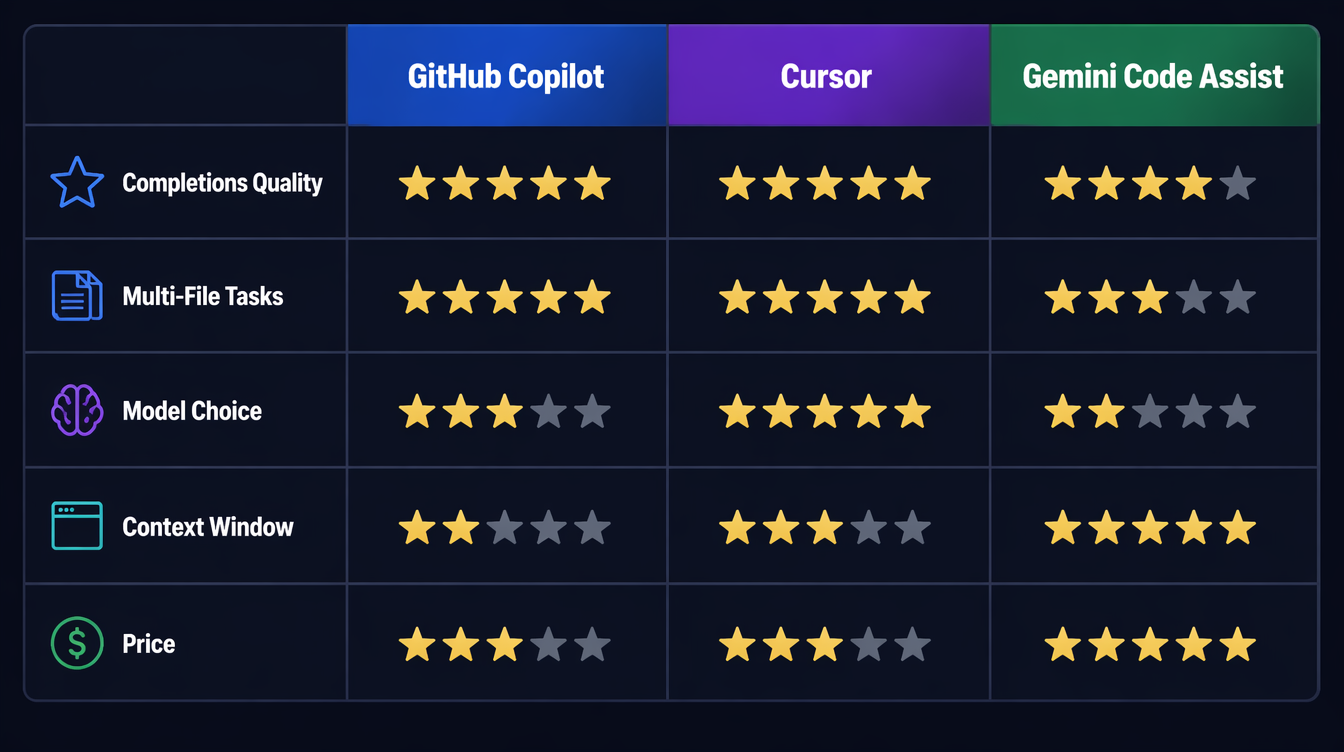
Comparison table: Copilot vs Cursor vs Gemini across key dimensions

Here's the honest breakdown across the dimensions that matter for daily work:

Dimension Copilot Cursor Gemini
Inline completions ★★★★★ ★★★★★ ★★★★☆
Multi-file tasks ★★☆☆☆ ★★★★★ ★★★☆☆
Codebase exploration ★★☆☆☆ ★★★★☆ ★★★★★
Model choice ★★★☆☆ ★★★★★ ★★☆☆☆
IDE integration ★★★★★ ★★★★☆ ★★★★☆
Latency ★★★★★ ★★★★☆ ★★★☆☆
Price ★★★☆☆ ($10-19) ★★★☆☆ ($20) ★★★★★ (Free)

The Benchmark Task

I ran the same task through all three tools: "Write a Python function that batch-processes a list of items with configurable retry logic, exponential backoff, rate limiting, and structured logging."

Copilot generated a clean implementation using tenacity for retries and logging for structured output. Solid, but it used a global rate limiter that wouldn't work in concurrent contexts. I had to explicitly ask it to fix that in a follow-up.

Cursor with Claude Sonnet 4 generated the same function but noticed I had an existing RateLimiter class in my codebase (from a file I hadn't opened) and used it instead of writing a new one. It also wrote a unit test matching my test file conventions. That context-awareness saved me 10 minutes of refactoring.

Gemini generated the function with excellent retry logic using asyncio (correct, since my codebase is async throughout — something it inferred from the other files it could see). The logging format matched my existing logs exactly.

The winner depends on what mattered to you: Cursor's cross-file awareness, or Gemini's whole-codebase inference.

Production Considerations

A few things that don't show up in feature comparisons:

Data privacy varies significantly. Copilot Business and Enterprise exclude your code from training by default. Cursor Privacy Mode does the same. Gemini Code Assist's enterprise tier offers similar guarantees, but the individual tier's data handling is less clear. For proprietary code, verify the data handling terms before using any of these tools.

Latency affects flow state. In my testing on a 2024 MacBook Pro:
- Copilot inline suggestions: ~250ms average
- Cursor inline suggestions: ~300ms average
- Gemini inline suggestions: ~750ms average

That 500ms difference between Copilot/Cursor and Gemini is noticeable during fast typing. If you're a flow-state developer who types without pausing, Copilot's latency is meaningfully better.

Team adoption has network effects. If your team standardizes on Copilot, shared .github/copilot-instructions.md files let you tune behavior for your codebase. Cursor supports per-project rules via .cursorrules. These team configurations make the tools substantially more useful over time.

These tools don't replace code review. I've had all three generate code that looks correct, compiles, passes basic tests — and has subtle bugs. Cursor once generated a pagination cursor bug that only appeared with exactly 100 results (the edge case at the page boundary). The code looked right. The test covered it. The bug still shipped to staging. AI-generated code needs review. The bar doesn't lower.

The Decision Framework

flowchart TD A[What's your primary use case?] --> B{Tight budget?} B -->|Yes - student/side project| C[Gemini Code Assist\n Free forever] B -->|No| D{Working in JetBrains?} D -->|Yes| E[GitHub Copilot\n$10-19/mo] D -->|No - VS Code| F{Codebase size?} F -->|Small-medium, greenfield| G[GitHub Copilot Pro\n$19/mo] F -->|Large, existing codebase| H[Cursor Pro\n$20/mo] F -->|Giant legacy codebase| I[Gemini for exploration\nCursor for implementation] C --> J[Add Cursor later\nif budget allows] H --> K[Consider adding Gemini\nfor exploration tasks] I --> L[$30/mo total\nmost powerful combo] style C fill:#4CAF50,color:#fff style H fill:#9C27B0,color:#fff style I fill:#FF9800,color:#fff style L fill:#FF9800,color:#fff

If you're a student or working on side projects with budget constraints: Gemini Code Assist. It's free, genuinely capable, and the one-million-token context window makes it extraordinary for understanding unfamiliar code. Add Cursor later when you're working on larger projects and budget allows.

If you're a professional developer in a VS Code + GitHub ecosystem doing standard feature work: GitHub Copilot Pro at $19/month. The multi-model access (Sonnet + GPT-4o), GitHub PR integration, and ecosystem depth make it the lowest-friction professional option.

If you're working on large existing codebases with teams of 10+, running complex refactors, or building on a monorepo: Cursor Pro at $20/month. The Agent mode pays for itself in the first week. The full-repo context eliminates hours of manual file hunting.

If you can spend $30/month: Gemini (free) for exploration and onboarding, Cursor ($20) for implementation. These two tools are genuinely complementary — Gemini helps you understand the system, Cursor helps you change it.

If you're locked into JetBrains IDEs: GitHub Copilot is your only mainstream option right now. Cursor is VS Code-only.

What Changes in the Next 12 Months

The tools are moving fast. A few things to watch:

GitHub Copilot Workspace is expanding — if it ships as a reliable multi-file editing experience inside VS Code, it closes the gap with Cursor significantly. Microsoft has the distribution advantage; they just need the product to catch up.

Cursor's JetBrains support has been "coming soon" for six months. If it ships, a substantial chunk of the developer market opens up.

Google has been quiet about Gemini Code Assist's roadmap. The context window advantage is real, but Anthropic and OpenAI are actively scaling their context windows too. The one-million-token moat may narrow.

All three tools are moving toward agentic workflows — longer-horizon tasks, terminal access, web search integration. The line between "coding assistant" and "coding agent" is blurring. Cursor is furthest along; Copilot Workspace is catching up; Gemini is starting this journey.

Conclusion

The AI coding tools market in 2026 is not "pick one and stick with it forever." The tools are differentiated enough that the right answer depends on your workflow, your codebase size, and your budget.

For most developers: start with Gemini Code Assist (free), use it for a month to understand what AI assistance actually feels like in your workflow, then decide if you need Copilot's polish or Cursor's multi-file power.

For teams: standardize on Cursor if you're on VS Code and working on complex codebases. The investment in .cursorrules and shared team configuration pays dividends over time.

For JetBrains developers: GitHub Copilot is your answer, and it's genuinely good. Watch for Cursor to announce JetBrains support.

The companion video to this post walks through the same tools with live screen recordings — link in the header.


Sources

About the Author

Toc Am

Founder of AmtocSoft. Writing practical deep-dives on AI engineering, cloud architecture, and developer tooling. Previously built backend systems at scale. Reviews every post published under this byline.

LinkedIn X / Twitter

Published: 2026-04-23 · Written with AI assistance, reviewed by Toc Am.

Get These In Your Inbox

Weekly deep-dives on AI engineering, no fluff. Join the newsletter →

Subscribe (free)

Or grab the book ($39, ~100 pages) · Buy me a coffee

Buy Me a Coffee · 🔔 YouTube · 💼 LinkedIn · 🐦 X/Twitter
Tuesday, April 14, 2026

Vibe Coding: The AI Development Shift Nobody's Talking About Honestly

Hero image showing a developer in a flow state with AI-generated code streams

Introduction

In early 2025, Andrej Karpathy — one of the founding members of OpenAI, the architect of Tesla's Autopilot neural network stack, and one of the clearest technical communicators in AI — posted something that quietly restructured how a lot of developers think about their work. He described a new mode of programming he called "vibe coding": you tell the AI what you want, you look at what it produces, you tweak it, and you mostly trust it. You're not really writing code so much as curating it. You're working with the vibe of what you want rather than the mechanics of how to get there.

The post detonated. It was funny, relatable, and a little unsettling all at once. Within weeks, "vibe coding" had become shorthand for everything from legitimate AI-assisted development workflows to dismissive criticism of developers who lean too hard on autocomplete. Like most viral tech concepts, the real thing got flattened somewhere in the retweet chain.

That flattening is worth correcting, because vibe coding — the actual practice, not the meme — is one of the most significant workflow shifts in software development in the last decade. And developers who haven't thought carefully about it are either missing real productivity gains or are flying blind into real technical debt.

This post is not a hype piece. It's also not a "AI will never replace real programmers" reassurance piece. It's an honest look at what vibe coding actually is, how the best developers are using it in 2026, where it genuinely fails, and what skills it's making more and less valuable.

Building AI agents yourself? Check out the AI Agent Engineering: Complete 2026 Guide — a companion resource covering how to build production agent systems with the same tools discussed here.

If you write code professionally, this conversation is already affecting your work. Understanding it clearly is better than understanding it through the filter of someone trying to sell you something.


What Vibe Coding Actually Is (vs. the Hype)

The term gets used to describe two very different things. The first is low-effort prompt-spamming: throwing vague requirements at an AI, accepting whatever comes out, and hoping it works. This is the version that produces the horror stories — the Stripe integration that looked fine but silently dropped failed payments, the authentication flow with a hardcoded admin bypass that nobody noticed for three months.

The second — the one Karpathy was actually describing — is something more interesting. It's a shift in the developer's role from implementer to architect. You stop spending cognitive energy on the mechanics of writing code and start spending it on specifying intent, reviewing output, and guiding direction. The AI handles keystrokes. You handle judgment.

This distinction matters enormously. The first version is just careless development with extra steps. The second version is a genuinely new interaction model, and it has meaningful productivity implications for developers who use it well.

The interaction model looks like this: you describe what you want with enough precision that the AI can generate a useful first pass, you review that output critically (not just "does it run" but "is this the right approach"), you refine through dialogue rather than just editing, and you maintain architectural ownership even when you didn't write a single line directly.

It's also worth noting that vibe coding exists on a spectrum. At one end is autocomplete — the AI finishes your line based on context. At the other end is fully agentic development — you describe a feature, the AI reads your codebase, writes the code, runs the tests, fixes the failures, and opens a PR. Most real-world usage in 2026 sits somewhere in the middle: multi-turn conversations with an AI coding assistant where the developer maintains tight review loops.

graph LR subgraph Traditional Development Loop A1[Read Spec] --> B1[Research API / Pattern] B1 --> C1[Write Code] C1 --> D1[Test] D1 --> E1[Debug] E1 --> C1 D1 --> F1[Ship] end subgraph Vibe Coding Loop A2[Describe Intent] --> B2[AI Generates Draft] B2 --> C2[Developer Reviews] C2 -->|Looks right| D2[Test & Validate] C2 -->|Needs refinement| E2[Refine Prompt or Edit] E2 --> B2 D2 -->|Passes| F2[Ship] D2 -->|Fails| G2[Debug with AI] G2 --> B2 end

The traditional loop is longer on the writing side and shorter on the reviewing side. The vibe coding loop flips that — generation is fast, but review and validation have to carry more weight, because the AI is fast and confident and sometimes confidently wrong.


The Tools Driving This Shift

Several tools are genuinely competing for this workflow in 2026, and they're meaningfully different in philosophy, capability, and best use case.

Comparison of AI coding tools — Cursor, Copilot, Claude Code, Amazon Q

Cursor 3.0 is the most opinionated of the group. It's a full VS Code fork built around the premise that the AI should have deep context about your entire codebase, not just the file you're looking at. Its Composer feature lets you issue multi-file changes in a single prompt. Its Agent mode can take a task, run commands, read error output, and self-correct. Cursor's .cursorrules files let you encode project conventions into the AI's context so it doesn't suggest Redux in your Zustand project or async/await in code that deliberately uses promises for readability. The 2025-2026 period saw Cursor add increasingly sophisticated multi-agent orchestration features — spawning parallel sub-agents for independent subtasks.

GitHub Copilot has evolved well past its autocomplete origins. Copilot Workspace is the product that matters here: you describe a feature or issue, it generates a plan, you review and adjust the plan, then it generates the code. The planning step is genuinely useful — it forces the AI to show its reasoning before touching code, which surfaces misunderstandings earlier. Copilot's integration depth into GitHub's ecosystem (issues, PRs, code review) gives it a workflow coherence that standalone tools lack.

Claude Code (Anthropic's CLI tool) takes a different approach. It's terminal-native, opinionated about safety, and designed for developers who want tight control over what the agent actually does. Its strength is codebase comprehension at depth — it's notably good at understanding how a large existing system fits together and making changes that respect that architecture. The security-conscious design (explicit permission requests, cautious defaults) makes it better suited for production codebases than rapid prototyping.

Amazon Q Developer (the rebrand of CodeWhisperer plus much more) targets enterprise AWS shops. Deep IAM-aware code generation, CloudFormation templates that know your account's actual resource limits, Lambda handlers that match your existing patterns. Less exciting for greenfield development, genuinely useful if your stack lives in AWS.

Feature Cursor 3.0 GitHub Copilot Claude Code Amazon Q Developer
Interaction Model IDE-integrated agent IDE + Workspace web UI Terminal CLI IDE plugin + console
Codebase Context Full repo indexing File + recent context Full repo via CLI Project-level
Agent Mode Yes (multi-file, multi-step) Copilot Workspace Yes (terminal) Yes (limited)
Best For Full-stack web/app dev GitHub-integrated teams Large codebases, safety-critical AWS/enterprise
Free Tier Limited (trial) Free for individuals Pay per use Free tier (limited)
Pricing (2026) ~$20/mo pro $10/mo individual, $19/mo business API usage-based Free–$19/mo
Rules/Context Files .cursorrules Copilot instructions CLAUDE.md None natively
Multi-agent Yes Limited Yes No
Strengths Speed, UX, agent power GitHub integration, planning Accuracy, safety, large repos AWS-native context
Weaknesses Cost for teams, VS Code lock-in Less powerful outside GitHub No GUI, CLI-only AWS-specific, less general

The right tool depends heavily on your context. If you're a solo developer building web apps and want the fastest possible feedback loop, Cursor is hard to beat. If your team already lives in GitHub and you need buy-in from non-technical stakeholders, Copilot Workspace's planning UI is valuable. If you're working on a complex existing system and safety matters, Claude Code's conservative defaults are a feature, not a limitation.


How Elite Developers Are Actually Using It

The developers who are genuinely getting 2x-4x productivity gains from these tools aren't using them to replace their thinking. They're using them to eliminate the work that was never the valuable part.

Here are the concrete patterns that actually work.

Scaffolding and Boilerplate Elimination

Every new project involves the same thirty minutes of setup that nobody wants to do. Config files, directory structures, base classes, CI/CD pipeline YAML, Docker setup. This work is necessary, tedious, and low-leverage. AI tools are excellent at it.

The vibe coding approach: describe your stack, your conventions, and your deployment target in a single prompt. Let the AI generate the scaffold. Review it for architectural correctness, not syntactic correctness — the syntax will be fine.

Traditional approach (manually writing Express server boilerplate):

// app.js — manually written, typically ~30 minutes for a complete setup
const express = require('express');
const cors = require('cors');
const helmet = require('helmet');
const rateLimit = require('express-rate-limit');

const app = express();

app.use(helmet());
app.use(cors({
  origin: process.env.ALLOWED_ORIGINS?.split(',') || ['http://localhost:3000'],
  credentials: true
}));
app.use(express.json({ limit: '10mb' }));

const limiter = rateLimit({
  windowMs: 15 * 60 * 1000,
  max: 100,
  standardHeaders: true,
  legacyHeaders: false
});
app.use('/api/', limiter);

// ... routes, error handling, startup logic
// Typically results in 80-120 lines of boilerplate before you write a single route

Vibe coding approach — the prompt:

Set up an Express 4.x API server with:
- Helmet for security headers
- CORS configured via ALLOWED_ORIGINS env variable
- JSON body parsing with 10mb limit
- Rate limiting (100 req/15min on /api/ routes)
- Morgan request logging in development
- Centralized error handling middleware
- Health check endpoint at GET /health
- Port from PORT env var, default 3000
- Graceful shutdown on SIGTERM

Follow the project convention in existing route files: each route file exports a router, mounted in app.js.

The output from a good AI tool is indistinguishable from what you'd write manually, and it takes 15 seconds instead of 30 minutes. The developer's contribution is knowing what to ask for — knowing that you need helmet, that CORS should be environment-configured, that you want graceful shutdown. That knowledge still has to come from somewhere.

Test Generation from Behavior Description

This is one of the highest-leverage uses of vibe coding because test writing is cognitively expensive and frequently skipped under deadline pressure. The pattern: write the implementation, then describe the expected behavior to the AI in plain language, let it generate the test suite, then review carefully.

# Prompt to AI after writing getUserById function:

Write Jest tests for getUserById(id, options). It should:
- Return the user object when found
- Return null when user doesn't exist (not throw)
- Respect options.includeDeleted — by default, soft-deleted users are excluded
- Call the audit log when options.auditAccess is true
- Throw AuthorizationError if the calling user doesn't have read permission on the target user
- Handle database connection errors by throwing DatabaseError, not raw pg errors

The function signature is in src/users/queries.js. The test file should mock the database layer at src/db/pool.js.

The resulting test file will cover cases that a developer writing tests manually under time pressure often skips — especially the edge cases around options flags and error transformation. What you're providing is behavioral specification. That's valuable work. The AI is doing the typing.

Refactoring with Intent

Refactoring is where vibe coding's ability to hold context across large files pays off. Instead of tediously applying a transformation rule across 400 lines, you describe the intent.

# Prompt for refactoring:

In this file, all database calls use the old db.query() pattern from our v1 ORM.
Migrate them to the v2 pattern where:
- SELECT queries use db.find() or db.findOne()
- INSERT uses db.create()
- UPDATE uses db.update() with a where clause object
- DELETE uses db.destroy()
- All calls should use named parameters (not positional $1, $2)
- Wrap each operation in a try/catch — throw DatabaseError with the original error as cause

Don't change the function signatures or the business logic — only the database layer.

The key phrase there is "don't change the function signatures or the business logic." Constraining scope is a critical vibe coding skill. AI tools will helpfully "improve" things you didn't ask them to touch if you don't set clear boundaries. Experienced vibe coders learn to be explicit about scope.

Rubber Duck Debugging at Scale

Classic rubber duck debugging: explain your problem out loud to a rubber duck, and the act of explaining often surfaces the solution. AI tools are rubber ducks that talk back.

The practical pattern is pasting the problematic code, the error output, and your current hypothesis, then asking the AI to challenge your hypothesis before offering alternatives. The "challenge my hypothesis" framing is important — without it, the AI will often just agree with your diagnosis and help you implement the wrong fix.

Here's the function, the error, and what I think is happening:

[code]
[stack trace]

My hypothesis: the race condition is in the cache invalidation — we're checking the cache before the write completes because setCache is called without await.

Challenge this hypothesis before suggesting fixes. What else could cause this error that I might be missing?

This pattern surfaces the cases where the developer's mental model of the code diverges from what the code actually does — which is often where the real bug lives.


Where Vibe Coding Fails

This is the section most productivity content about AI coding skips, and it's the most important one.

flowchart TD Start([New development task]) --> Q1{Is the problem well-defined?} Q1 -->|Yes| Q2{Does AI have relevant context?} Q1 -->|No| Fail1[AI will produce plausible-sounding wrong answer] Q2 -->|Yes| Q3{Is the solution a known pattern?} Q2 -->|No| Fail2[AI will invent plausible but incorrect system-specific code] Q3 -->|Yes| Q4{Is security-critical?} Q3 -->|No| Fail3[AI regurgitates nearest known pattern — may be subtly wrong] Q4 -->|No| Q5{Is codebase coherence tracked?} Q4 -->|Yes| Fail4[AI confidently writes vulnerable code — requires expert review] Q5 -->|Yes| Win[Good candidate for AI assistance] Q5 -->|No| Fail5[AI-generated code accumulates inconsistency over time]

Complex architecture decisions. AI tools have no model of your business constraints, your team's skill set, your operational history, or the debt buried in your system. When you ask "should we go event-driven here or keep it synchronous," the AI will give you a competent textbook answer. It will not know that your Kafka cluster has been unreliable for six months, that two engineers on your team have never worked with event-driven systems, or that the service this integrates with has a three-hour SLA that makes async risky. Architecture decisions require context that lives in humans, not in codebases. AI can inform these decisions but cannot make them.

Security-critical code. This is the most dangerous failure mode and the one that gets the least attention in productivity-focused AI coding content. AI tools write authentication flows, input sanitization, SQL queries, and cryptographic operations confidently and incorrectly with alarming regularity. Not always — they often get it right. But "often" isn't good enough for code that handles credentials, financial data, or personally identifiable information. The specific failure patterns to watch: parameterized queries that accidentally slip back to string interpolation in edge cases, JWT validation that checks signature but not expiration, bcrypt calls with insufficient work factor, CORS configurations that are too permissive. These look correct on cursory review. You need someone who can read security code critically, not just code that looks reasonable.

Novel algorithms. If you need something that doesn't exist in common form in the training data — a custom consensus protocol, an unusual optimization for your specific data distribution, an algorithm that requires deep domain knowledge from a non-CS field — AI tools will confidently produce the nearest known pattern, which may be subtly wrong for your case. They're excellent at well-known algorithms. They're unreliable at anything that requires genuine novelty.

Debugging AI-generated bugs. This one is philosophically interesting. When the AI generates code with a subtle bug, you often have less intuition about where to look because you didn't write it. The code is foreign to you in a way that your own code isn't. Debugging it requires reading it the way you'd read a stranger's code, which is slower and more effortful. Worse: if you ask the AI to help debug the bug it created, it will sometimes defend its original approach while suggesting increasingly baroque fixes rather than questioning the underlying architecture.

The yes-man problem. AI coding assistants are trained to be helpful, which means they're trained to validate and assist with whatever approach you propose. If your architectural instinct is wrong, the AI will enthusiastically help you implement it well. This is the opposite of what you need from a code reviewer. Developers who use AI tools heavily can develop a false confidence that comes from having all their ideas quickly validated — even the bad ones. Combating this requires deliberately prompting for critique: "What are the failure modes of this approach?" "What would a senior engineer push back on here?" "What am I not thinking about?"


The Skill Shift

The most important question for working developers isn't whether AI tools make you more productive right now — they do, measurably, for most tasks. The more important question is what skills are becoming more and less valuable, and whether your investment in skill development is pointed in the right direction.

graph LR subgraph Skills Declining in Value D1[API memorization] D2[Boilerplate writing speed] D3[Syntax recall] D4[Trivial CRUD implementation] D5[Stack Overflow literacy] end subgraph Skills Stable or Growing in Value G1[System design & architecture] G2[Security code review] G3[Code quality judgment] G4[Intent specification / prompting] G5[Debugging unfamiliar code] G6[Understanding tradeoffs] G7[Domain knowledge] G8[Knowing when NOT to trust AI] end D1 -.->|Being replaced by| G4 D2 -.->|Being replaced by| G3 D3 -.->|Being replaced by| G1

Declining: The skills that are losing value are almost uniformly the ones that were never really the hard part of software development. Remembering the exact signature of Array.prototype.reduce. Knowing which import to add for useState. Writing the same Express middleware pattern for the fourteenth time. These things always felt like overhead — the tax you paid to get to the interesting work. AI tools are eliminating that tax.

Growing: The skills that are appreciating in value are the ones that require judgment rather than recall. Can you look at a complex system and identify the right decomposition? Can you read a security-critical function and spot the edge case that the AI missed? Can you articulate intent precisely enough that an AI generates what you actually want on the first or second pass? Can you tell when the AI's output is subtly wrong in a way that will cause problems in production?

The practical implication: developers who were coasting on mechanical skills — writing clean boilerplate quickly, having good API recall, being fast with syntax — are going to feel the most pressure. Developers who were bottlenecked by implementation speed — who had good architectural instincts and solid judgment but spent most of their time on execution — are going to benefit the most.

This isn't a reassuring "everyone will be fine" message. Some work that currently exists will disappear. But the work that disappears is work that was never the core of what makes a good developer good.


Real Talk: Will AI Replace Developers?

Let's look at what the data actually says, rather than what the hype cycle says.

GitHub's 2024-2025 Copilot productivity studies consistently showed 20-55% faster task completion for well-defined tasks with clear specifications. McKinsey's 2024 developer productivity research found similar ranges, with the upper bound coming from the most experienced developers using AI tools most deliberately. These are real numbers.

What those numbers don't show is a path to zero developers. Here's why.

The specification problem is not solved. Every AI coding tool operates on specifications — descriptions of what you want. Producing good specifications for complex software requires deep understanding of what the software needs to do, which requires understanding the domain, the users, the system constraints, and the business context. This work is not automatable, and it scales with project complexity. Simple apps can be fully specified quickly. Complex enterprise software has specification work that takes months of discovery.

AI tools make senior developers disproportionately more productive, not just all developers. The productivity gains from AI coding tools are largest for experienced developers who can quickly evaluate output quality. Junior developers using AI tools without strong review skills don't get 3x productivity — they get fast production of plausibly incorrect code. The developers who benefit most are the ones who are already best at judging whether code is correct, which is itself a skill that requires experience to develop.

Novel problems still require novel thinking. Large language models are compression algorithms for existing human knowledge. They're very good at combining and applying known patterns in new contexts. They are not reliably good at generating genuinely new approaches to genuinely new problems. Frontier engineering work — designing new protocols, building new platforms, solving problems that don't have known solutions — still requires human originality.

The "10x developer" narrative is partially real. The gap between developers who use AI tools well and developers who don't is growing. A senior developer with good prompting skills and strong code review judgment working with Cursor in agent mode can genuinely produce at 2-4x the rate of the same developer without those tools. This is a real productivity differential. But it's not making most development jobs obsolete — it's concentrating value in the developers who have the judgment to use the tools well.

The categories most at risk are entry-level positions that consist primarily of mechanical implementation work with close supervision: write this CRUD endpoint, implement this UI according to this design, convert this spec to code. Those tasks are increasingly automatable. Entry-level developers who want durable careers need to be building judgment skills faster than that work is disappearing — which means leaning into code review, architecture, and domain understanding rather than pure implementation.


Getting Started Without Getting Lost

If you're a developer who hasn't built a serious AI-assisted workflow yet, here's practical advice that doesn't require abandoning your existing habits.

Start with the task type that has the clearest feedback loop. Test generation is ideal. The output is either correct or the tests fail — there's no "looks right but isn't." Use AI to generate tests for code you've already written and understand. Review the tests critically. This builds your sense of what good AI output looks like in a context where you can verify correctness without depending on the AI.

Use context files deliberately. Every serious AI coding tool supports some form of project-level instructions — Cursor's .cursorrules, Claude Code's CLAUDE.md. Write a one-page description of your project's conventions, architectural patterns, and explicit don'ts. Treat it like onboarding documentation for a new developer who happens to be an AI. This dramatically reduces the number of times the AI suggests something that contradicts your project's established patterns.

Maintain a practice of reading AI-generated code as if a stranger wrote it. The worst habit AI coding tools create is skimming code before accepting it. Everything looks clean and coherent because AI tools produce syntactically clean code. The bugs are semantic, not syntactic. Read every function the AI generates with the same critical eye you'd apply to a PR from someone you haven't worked with before.

Keep your implementation skills sharp deliberately. When you're learning a new domain or a new technology, turn off the AI and write the code yourself. Understanding what the AI is doing for you requires being able to do it without the AI. Developers who rely on AI assistance for everything, including learning, end up unable to catch AI mistakes in areas where they haven't built underlying competence.

Set explicit scope in every prompt. "Refactor this function" will produce changes you didn't ask for. "Refactor this function to eliminate the nested ternary — don't change the function signature or behavior, only the conditional logic" produces exactly what you asked for. Scope discipline is the single highest-leverage prompt engineering skill for production development work.

A sample structured prompt template for complex tasks:

CONTEXT: [What this code does, where it fits in the system]
TASK: [Specifically what you want changed or generated]
CONSTRAINTS: [What should NOT change, what conventions to follow]
SUCCESS CRITERIA: [How to know when it's done correctly]
FAILURE MODES TO AVOID: [Common mistakes to not make]

This level of structure feels like overhead at first. It's faster than fixing the output of an under-specified prompt.


Conclusion

The skill that matters most in AI-assisted development isn't prompting. It isn't knowing which tool to use. It's knowing what good code looks like — even when you didn't write it.

This sounds like an obvious thing. But it's a different cognitive mode than the one most developers have spent their careers in. Writing code trains you to recognize good code by building it. Reviewing AI-generated code requires recognizing good code by inspection, at speed, across a much larger volume of output than you'd produce yourself.

Vibe coding, done well, amplifies the most valuable part of what experienced developers do — the judgment, the architectural sense, the ability to identify what will cause problems in production. Done poorly, it outsources judgment to a system that doesn't have it, and wraps the result in syntactically perfect code that looks exactly like it knows what it's doing.

Karpathy's original observation was honest about this tradeoff: it's a powerful mode of working, and it requires giving up some of the direct control that gives developers confidence in their own output. The developers who will navigate this well are the ones who can give up that control strategically — leaning on AI for the mechanical work, retaining it for the decisions that actually matter.

The tools are getting better at a rate that makes any specific capability comparison outdated within six months. But the underlying question is stable: when the AI hands you code, do you know whether it's right?

That skill is what to invest in.


Sources

About the Author

Toc Am

Founder of AmtocSoft. Writing practical deep-dives on AI engineering, cloud architecture, and developer tooling. Previously built backend systems at scale. Reviews every post published under this byline.

LinkedIn X / Twitter

Published: 2026-04-24 · Written with AI assistance, reviewed by Toc Am.

Get These In Your Inbox

Weekly deep-dives on AI engineering, no fluff. Join the newsletter →

Subscribe (free)

Or grab the book ($39, ~100 pages) · Buy me a coffee

Buy Me a Coffee · 🔔 YouTube · 💼 LinkedIn · 🐦 X/Twitter
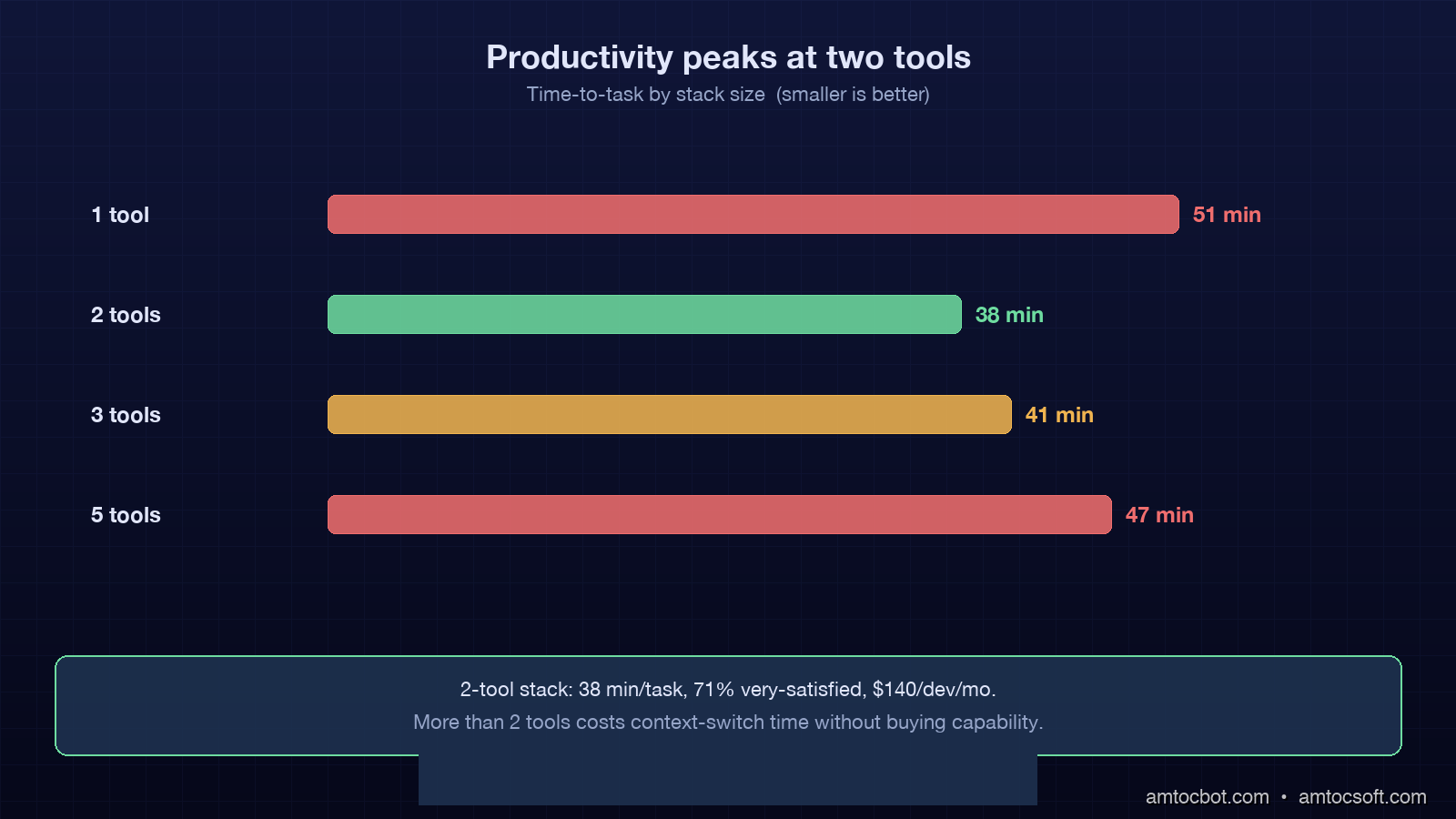
Attention Is All You Need, Explained Simply

We published a plain-language walkthrough of the 2017 transformer paper — queries, keys, values, multi-head attention, and why no-recurrence...