Introduction
In early 2025, Andrej Karpathy — one of the founding members of OpenAI, the architect of Tesla's Autopilot neural network stack, and one of the clearest technical communicators in AI — posted something that quietly restructured how a lot of developers think about their work. He described a new mode of programming he called "vibe coding": you tell the AI what you want, you look at what it produces, you tweak it, and you mostly trust it. You're not really writing code so much as curating it. You're working with the vibe of what you want rather than the mechanics of how to get there.
The post detonated. It was funny, relatable, and a little unsettling all at once. Within weeks, "vibe coding" had become shorthand for everything from legitimate AI-assisted development workflows to dismissive criticism of developers who lean too hard on autocomplete. Like most viral tech concepts, the real thing got flattened somewhere in the retweet chain.
That flattening is worth correcting, because vibe coding — the actual practice, not the meme — is one of the most significant workflow shifts in software development in the last decade. And developers who haven't thought carefully about it are either missing real productivity gains or are flying blind into real technical debt.
This post is not a hype piece. It's also not a "AI will never replace real programmers" reassurance piece. It's an honest look at what vibe coding actually is, how the best developers are using it in 2026, where it genuinely fails, and what skills it's making more and less valuable.
Building AI agents yourself? Check out the AI Agent Engineering: Complete 2026 Guide — a companion resource covering how to build production agent systems with the same tools discussed here.
If you write code professionally, this conversation is already affecting your work. Understanding it clearly is better than understanding it through the filter of someone trying to sell you something.
What Vibe Coding Actually Is (vs. the Hype)
The term gets used to describe two very different things. The first is low-effort prompt-spamming: throwing vague requirements at an AI, accepting whatever comes out, and hoping it works. This is the version that produces the horror stories — the Stripe integration that looked fine but silently dropped failed payments, the authentication flow with a hardcoded admin bypass that nobody noticed for three months.
The second — the one Karpathy was actually describing — is something more interesting. It's a shift in the developer's role from implementer to architect. You stop spending cognitive energy on the mechanics of writing code and start spending it on specifying intent, reviewing output, and guiding direction. The AI handles keystrokes. You handle judgment.
This distinction matters enormously. The first version is just careless development with extra steps. The second version is a genuinely new interaction model, and it has meaningful productivity implications for developers who use it well.
The interaction model looks like this: you describe what you want with enough precision that the AI can generate a useful first pass, you review that output critically (not just "does it run" but "is this the right approach"), you refine through dialogue rather than just editing, and you maintain architectural ownership even when you didn't write a single line directly.
It's also worth noting that vibe coding exists on a spectrum. At one end is autocomplete — the AI finishes your line based on context. At the other end is fully agentic development — you describe a feature, the AI reads your codebase, writes the code, runs the tests, fixes the failures, and opens a PR. Most real-world usage in 2026 sits somewhere in the middle: multi-turn conversations with an AI coding assistant where the developer maintains tight review loops.
The traditional loop is longer on the writing side and shorter on the reviewing side. The vibe coding loop flips that — generation is fast, but review and validation have to carry more weight, because the AI is fast and confident and sometimes confidently wrong.
The Tools Driving This Shift
Several tools are genuinely competing for this workflow in 2026, and they're meaningfully different in philosophy, capability, and best use case.
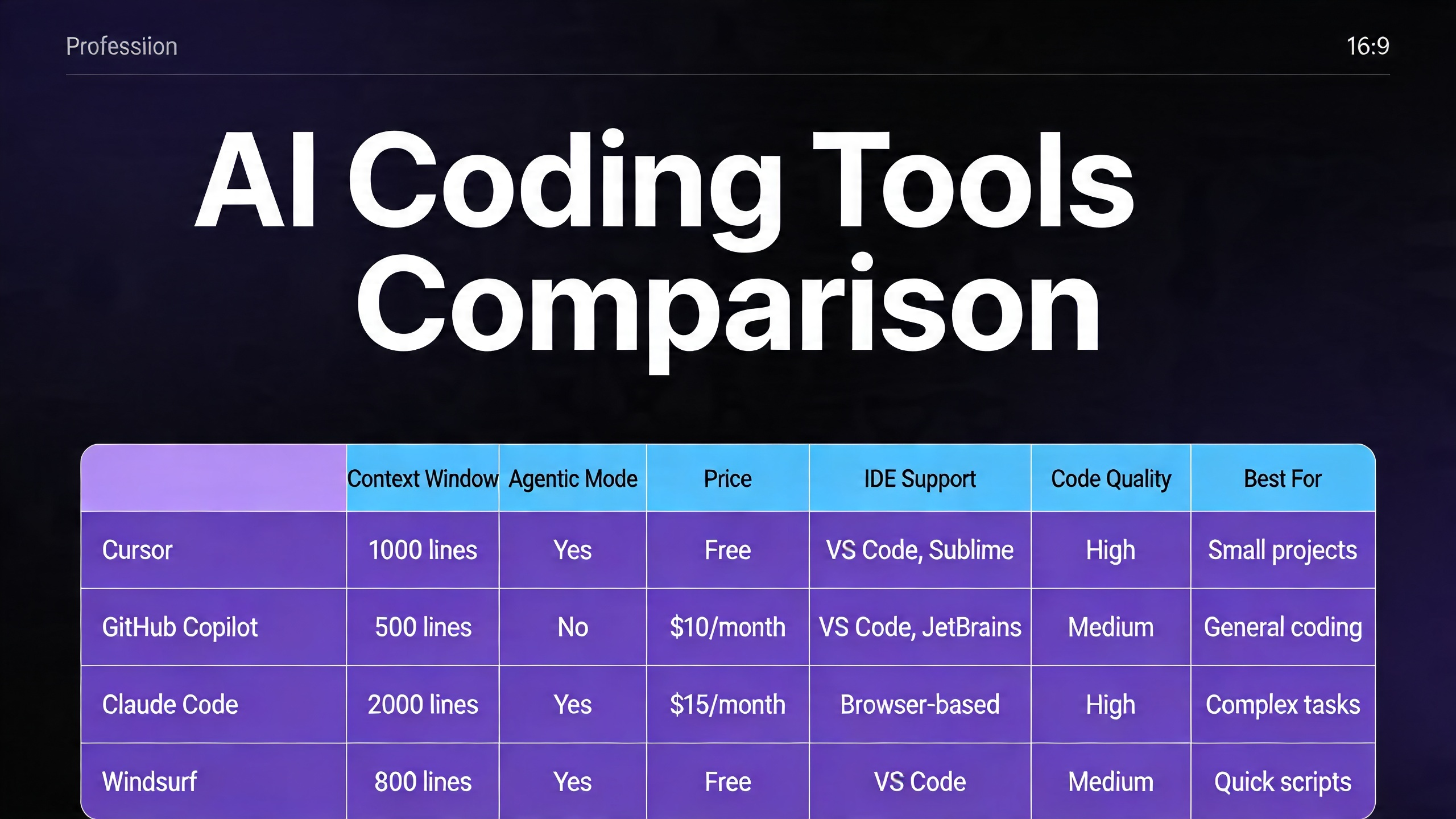
Cursor 3.0 is the most opinionated of the group. It's a full VS Code fork built around the premise that the AI should have deep context about your entire codebase, not just the file you're looking at. Its Composer feature lets you issue multi-file changes in a single prompt. Its Agent mode can take a task, run commands, read error output, and self-correct. Cursor's .cursorrules files let you encode project conventions into the AI's context so it doesn't suggest Redux in your Zustand project or async/await in code that deliberately uses promises for readability. The 2025-2026 period saw Cursor add increasingly sophisticated multi-agent orchestration features — spawning parallel sub-agents for independent subtasks.
GitHub Copilot has evolved well past its autocomplete origins. Copilot Workspace is the product that matters here: you describe a feature or issue, it generates a plan, you review and adjust the plan, then it generates the code. The planning step is genuinely useful — it forces the AI to show its reasoning before touching code, which surfaces misunderstandings earlier. Copilot's integration depth into GitHub's ecosystem (issues, PRs, code review) gives it a workflow coherence that standalone tools lack.
Claude Code (Anthropic's CLI tool) takes a different approach. It's terminal-native, opinionated about safety, and designed for developers who want tight control over what the agent actually does. Its strength is codebase comprehension at depth — it's notably good at understanding how a large existing system fits together and making changes that respect that architecture. The security-conscious design (explicit permission requests, cautious defaults) makes it better suited for production codebases than rapid prototyping.
Amazon Q Developer (the rebrand of CodeWhisperer plus much more) targets enterprise AWS shops. Deep IAM-aware code generation, CloudFormation templates that know your account's actual resource limits, Lambda handlers that match your existing patterns. Less exciting for greenfield development, genuinely useful if your stack lives in AWS.
| Feature | Cursor 3.0 | GitHub Copilot | Claude Code | Amazon Q Developer |
|---|---|---|---|---|
| Interaction Model | IDE-integrated agent | IDE + Workspace web UI | Terminal CLI | IDE plugin + console |
| Codebase Context | Full repo indexing | File + recent context | Full repo via CLI | Project-level |
| Agent Mode | Yes (multi-file, multi-step) | Copilot Workspace | Yes (terminal) | Yes (limited) |
| Best For | Full-stack web/app dev | GitHub-integrated teams | Large codebases, safety-critical | AWS/enterprise |
| Free Tier | Limited (trial) | Free for individuals | Pay per use | Free tier (limited) |
| Pricing (2026) | ~$20/mo pro | $10/mo individual, $19/mo business | API usage-based | Free–$19/mo |
| Rules/Context Files | .cursorrules | Copilot instructions | CLAUDE.md | None natively |
| Multi-agent | Yes | Limited | Yes | No |
| Strengths | Speed, UX, agent power | GitHub integration, planning | Accuracy, safety, large repos | AWS-native context |
| Weaknesses | Cost for teams, VS Code lock-in | Less powerful outside GitHub | No GUI, CLI-only | AWS-specific, less general |
The right tool depends heavily on your context. If you're a solo developer building web apps and want the fastest possible feedback loop, Cursor is hard to beat. If your team already lives in GitHub and you need buy-in from non-technical stakeholders, Copilot Workspace's planning UI is valuable. If you're working on a complex existing system and safety matters, Claude Code's conservative defaults are a feature, not a limitation.
How Elite Developers Are Actually Using It
The developers who are genuinely getting 2x-4x productivity gains from these tools aren't using them to replace their thinking. They're using them to eliminate the work that was never the valuable part.
Here are the concrete patterns that actually work.
Scaffolding and Boilerplate Elimination
Every new project involves the same thirty minutes of setup that nobody wants to do. Config files, directory structures, base classes, CI/CD pipeline YAML, Docker setup. This work is necessary, tedious, and low-leverage. AI tools are excellent at it.
The vibe coding approach: describe your stack, your conventions, and your deployment target in a single prompt. Let the AI generate the scaffold. Review it for architectural correctness, not syntactic correctness — the syntax will be fine.
Traditional approach (manually writing Express server boilerplate):
// app.js — manually written, typically ~30 minutes for a complete setup
const express = require('express');
const cors = require('cors');
const helmet = require('helmet');
const rateLimit = require('express-rate-limit');

const app = express();

app.use(helmet());
app.use(cors({
  origin: process.env.ALLOWED_ORIGINS?.split(',') || ['http://localhost:3000'],
  credentials: true
}));
app.use(express.json({ limit: '10mb' }));

const limiter = rateLimit({
  windowMs: 15 * 60 * 1000,
  max: 100,
  standardHeaders: true,
  legacyHeaders: false
});
app.use('/api/', limiter);

// ... routes, error handling, startup logic
// Typically results in 80-120 lines of boilerplate before you write a single route
Vibe coding approach — the prompt:
Set up an Express 4.x API server with:
- Helmet for security headers
- CORS configured via ALLOWED_ORIGINS env variable
- JSON body parsing with 10mb limit
- Rate limiting (100 req/15min on /api/ routes)
- Morgan request logging in development
- Centralized error handling middleware
- Health check endpoint at GET /health
- Port from PORT env var, default 3000
- Graceful shutdown on SIGTERM

Follow the project convention in existing route files: each route file exports a router, mounted in app.js.
The output from a good AI tool is indistinguishable from what you'd write manually, and it takes 15 seconds instead of 30 minutes. The developer's contribution is knowing what to ask for — knowing that you need helmet, that CORS should be environment-configured, that you want graceful shutdown. That knowledge still has to come from somewhere.
Test Generation from Behavior Description
This is one of the highest-leverage uses of vibe coding because test writing is cognitively expensive and frequently skipped under deadline pressure. The pattern: write the implementation, then describe the expected behavior to the AI in plain language, let it generate the test suite, then review carefully.
# Prompt to AI after writing getUserById function:

Write Jest tests for getUserById(id, options). It should:
- Return the user object when found
- Return null when user doesn't exist (not throw)
- Respect options.includeDeleted — by default, soft-deleted users are excluded
- Call the audit log when options.auditAccess is true
- Throw AuthorizationError if the calling user doesn't have read permission on the target user
- Handle database connection errors by throwing DatabaseError, not raw pg errors

The function signature is in src/users/queries.js. The test file should mock the database layer at src/db/pool.js.
The resulting test file will cover cases that a developer writing tests manually under time pressure often skips — especially the edge cases around options flags and error transformation. What you're providing is behavioral specification. That's valuable work. The AI is doing the typing.
Refactoring with Intent
Refactoring is where vibe coding's ability to hold context across large files pays off. Instead of tediously applying a transformation rule across 400 lines, you describe the intent.
# Prompt for refactoring:

In this file, all database calls use the old db.query() pattern from our v1 ORM.
Migrate them to the v2 pattern where:
- SELECT queries use db.find() or db.findOne()
- INSERT uses db.create()
- UPDATE uses db.update() with a where clause object
- DELETE uses db.destroy()
- All calls should use named parameters (not positional $1, $2)
- Wrap each operation in a try/catch — throw DatabaseError with the original error as cause

Don't change the function signatures or the business logic — only the database layer.
The key phrase there is "don't change the function signatures or the business logic." Constraining scope is a critical vibe coding skill. AI tools will helpfully "improve" things you didn't ask them to touch if you don't set clear boundaries. Experienced vibe coders learn to be explicit about scope.
Rubber Duck Debugging at Scale
Classic rubber duck debugging: explain your problem out loud to a rubber duck, and the act of explaining often surfaces the solution. AI tools are rubber ducks that talk back.
The practical pattern is pasting the problematic code, the error output, and your current hypothesis, then asking the AI to challenge your hypothesis before offering alternatives. The "challenge my hypothesis" framing is important — without it, the AI will often just agree with your diagnosis and help you implement the wrong fix.
Here's the function, the error, and what I think is happening:

[code]
[stack trace]

My hypothesis: the race condition is in the cache invalidation — we're checking the cache before the write completes because setCache is called without await.

Challenge this hypothesis before suggesting fixes. What else could cause this error that I might be missing?
This pattern surfaces the cases where the developer's mental model of the code diverges from what the code actually does — which is often where the real bug lives.
Where Vibe Coding Fails
This is the section most productivity content about AI coding skips, and it's the most important one.
Complex architecture decisions. AI tools have no model of your business constraints, your team's skill set, your operational history, or the debt buried in your system. When you ask "should we go event-driven here or keep it synchronous," the AI will give you a competent textbook answer. It will not know that your Kafka cluster has been unreliable for six months, that two engineers on your team have never worked with event-driven systems, or that the service this integrates with has a three-hour SLA that makes async risky. Architecture decisions require context that lives in humans, not in codebases. AI can inform these decisions but cannot make them.
Security-critical code. This is the most dangerous failure mode and the one that gets the least attention in productivity-focused AI coding content. AI tools write authentication flows, input sanitization, SQL queries, and cryptographic operations confidently and incorrectly with alarming regularity. Not always — they often get it right. But "often" isn't good enough for code that handles credentials, financial data, or personally identifiable information. The specific failure patterns to watch: parameterized queries that accidentally slip back to string interpolation in edge cases, JWT validation that checks signature but not expiration, bcrypt calls with insufficient work factor, CORS configurations that are too permissive. These look correct on cursory review. You need someone who can read security code critically, not just code that looks reasonable.
Novel algorithms. If you need something that doesn't exist in common form in the training data — a custom consensus protocol, an unusual optimization for your specific data distribution, an algorithm that requires deep domain knowledge from a non-CS field — AI tools will confidently produce the nearest known pattern, which may be subtly wrong for your case. They're excellent at well-known algorithms. They're unreliable at anything that requires genuine novelty.
Debugging AI-generated bugs. This one is philosophically interesting. When the AI generates code with a subtle bug, you often have less intuition about where to look because you didn't write it. The code is foreign to you in a way that your own code isn't. Debugging it requires reading it the way you'd read a stranger's code, which is slower and more effortful. Worse: if you ask the AI to help debug the bug it created, it will sometimes defend its original approach while suggesting increasingly baroque fixes rather than questioning the underlying architecture.
The yes-man problem. AI coding assistants are trained to be helpful, which means they're trained to validate and assist with whatever approach you propose. If your architectural instinct is wrong, the AI will enthusiastically help you implement it well. This is the opposite of what you need from a code reviewer. Developers who use AI tools heavily can develop a false confidence that comes from having all their ideas quickly validated — even the bad ones. Combating this requires deliberately prompting for critique: "What are the failure modes of this approach?" "What would a senior engineer push back on here?" "What am I not thinking about?"
The Skill Shift
The most important question for working developers isn't whether AI tools make you more productive right now — they do, measurably, for most tasks. The more important question is what skills are becoming more and less valuable, and whether your investment in skill development is pointed in the right direction.
Declining: The skills that are losing value are almost uniformly the ones that were never really the hard part of software development. Remembering the exact signature of Array.prototype.reduce. Knowing which import to add for useState. Writing the same Express middleware pattern for the fourteenth time. These things always felt like overhead — the tax you paid to get to the interesting work. AI tools are eliminating that tax.
Growing: The skills that are appreciating in value are the ones that require judgment rather than recall. Can you look at a complex system and identify the right decomposition? Can you read a security-critical function and spot the edge case that the AI missed? Can you articulate intent precisely enough that an AI generates what you actually want on the first or second pass? Can you tell when the AI's output is subtly wrong in a way that will cause problems in production?
The practical implication: developers who were coasting on mechanical skills — writing clean boilerplate quickly, having good API recall, being fast with syntax — are going to feel the most pressure. Developers who were bottlenecked by implementation speed — who had good architectural instincts and solid judgment but spent most of their time on execution — are going to benefit the most.
This isn't a reassuring "everyone will be fine" message. Some work that currently exists will disappear. But the work that disappears is work that was never the core of what makes a good developer good.
Real Talk: Will AI Replace Developers?
Let's look at what the data actually says, rather than what the hype cycle says.
GitHub's 2024-2025 Copilot productivity studies consistently showed 20-55% faster task completion for well-defined tasks with clear specifications. McKinsey's 2024 developer productivity research found similar ranges, with the upper bound coming from the most experienced developers using AI tools most deliberately. These are real numbers.
What those numbers don't show is a path to zero developers. Here's why.
The specification problem is not solved. Every AI coding tool operates on specifications — descriptions of what you want. Producing good specifications for complex software requires deep understanding of what the software needs to do, which requires understanding the domain, the users, the system constraints, and the business context. This work is not automatable, and it scales with project complexity. Simple apps can be fully specified quickly. Complex enterprise software has specification work that takes months of discovery.
AI tools make senior developers disproportionately more productive, not just all developers. The productivity gains from AI coding tools are largest for experienced developers who can quickly evaluate output quality. Junior developers using AI tools without strong review skills don't get 3x productivity — they get fast production of plausibly incorrect code. The developers who benefit most are the ones who are already best at judging whether code is correct, which is itself a skill that requires experience to develop.
Novel problems still require novel thinking. Large language models are compression algorithms for existing human knowledge. They're very good at combining and applying known patterns in new contexts. They are not reliably good at generating genuinely new approaches to genuinely new problems. Frontier engineering work — designing new protocols, building new platforms, solving problems that don't have known solutions — still requires human originality.
The "10x developer" narrative is partially real. The gap between developers who use AI tools well and developers who don't is growing. A senior developer with good prompting skills and strong code review judgment working with Cursor in agent mode can genuinely produce at 2-4x the rate of the same developer without those tools. This is a real productivity differential. But it's not making most development jobs obsolete — it's concentrating value in the developers who have the judgment to use the tools well.
The categories most at risk are entry-level positions that consist primarily of mechanical implementation work with close supervision: write this CRUD endpoint, implement this UI according to this design, convert this spec to code. Those tasks are increasingly automatable. Entry-level developers who want durable careers need to be building judgment skills faster than that work is disappearing — which means leaning into code review, architecture, and domain understanding rather than pure implementation.
Getting Started Without Getting Lost
If you're a developer who hasn't built a serious AI-assisted workflow yet, here's practical advice that doesn't require abandoning your existing habits.
Start with the task type that has the clearest feedback loop. Test generation is ideal. The output is either correct or the tests fail — there's no "looks right but isn't." Use AI to generate tests for code you've already written and understand. Review the tests critically. This builds your sense of what good AI output looks like in a context where you can verify correctness without depending on the AI.
Use context files deliberately. Every serious AI coding tool supports some form of project-level instructions — Cursor's .cursorrules, Claude Code's CLAUDE.md. Write a one-page description of your project's conventions, architectural patterns, and explicit don'ts. Treat it like onboarding documentation for a new developer who happens to be an AI. This dramatically reduces the number of times the AI suggests something that contradicts your project's established patterns.
Maintain a practice of reading AI-generated code as if a stranger wrote it. The worst habit AI coding tools create is skimming code before accepting it. Everything looks clean and coherent because AI tools produce syntactically clean code. The bugs are semantic, not syntactic. Read every function the AI generates with the same critical eye you'd apply to a PR from someone you haven't worked with before.
Keep your implementation skills sharp deliberately. When you're learning a new domain or a new technology, turn off the AI and write the code yourself. Understanding what the AI is doing for you requires being able to do it without the AI. Developers who rely on AI assistance for everything, including learning, end up unable to catch AI mistakes in areas where they haven't built underlying competence.
Set explicit scope in every prompt. "Refactor this function" will produce changes you didn't ask for. "Refactor this function to eliminate the nested ternary — don't change the function signature or behavior, only the conditional logic" produces exactly what you asked for. Scope discipline is the single highest-leverage prompt engineering skill for production development work.
A sample structured prompt template for complex tasks:
CONTEXT: [What this code does, where it fits in the system]
TASK: [Specifically what you want changed or generated]
CONSTRAINTS: [What should NOT change, what conventions to follow]
SUCCESS CRITERIA: [How to know when it's done correctly]
FAILURE MODES TO AVOID: [Common mistakes to not make]
This level of structure feels like overhead at first. It's faster than fixing the output of an under-specified prompt.
Conclusion
The skill that matters most in AI-assisted development isn't prompting. It isn't knowing which tool to use. It's knowing what good code looks like — even when you didn't write it.
This sounds like an obvious thing. But it's a different cognitive mode than the one most developers have spent their careers in. Writing code trains you to recognize good code by building it. Reviewing AI-generated code requires recognizing good code by inspection, at speed, across a much larger volume of output than you'd produce yourself.
Vibe coding, done well, amplifies the most valuable part of what experienced developers do — the judgment, the architectural sense, the ability to identify what will cause problems in production. Done poorly, it outsources judgment to a system that doesn't have it, and wraps the result in syntactically perfect code that looks exactly like it knows what it's doing.
Karpathy's original observation was honest about this tradeoff: it's a powerful mode of working, and it requires giving up some of the direct control that gives developers confidence in their own output. The developers who will navigate this well are the ones who can give up that control strategically — leaning on AI for the mechanical work, retaining it for the decisions that actually matter.
The tools are getting better at a rate that makes any specific capability comparison outdated within six months. But the underlying question is stable: when the AI hands you code, do you know whether it's right?
That skill is what to invest in.
Sources
- Andrej Karpathy, "Vibe coding" (original post, February 2025): x.com/karpathy/status/1886192184808149209
- GitHub Research — "Quantifying GitHub Copilot's impact on developer productivity and happiness" (2022 longitudinal study)
- McKinsey & Company — "Unleashing developer productivity with generative AI" (2023)
- Cursor documentation: docs.cursor.com
- GitHub Copilot Workspace docs: githubnext.com
- Anthropic Claude Code documentation: docs.anthropic.com/claude-code
- Amazon Q Developer: aws.amazon.com/q/developer
About the Author
Toc Am
Founder of AmtocSoft. Writing practical deep-dives on AI engineering, cloud architecture, and developer tooling. Previously built backend systems at scale. Reviews every post published under this byline.
Published: 2026-04-24 · Written with AI assistance, reviewed by Toc Am.
Get These In Your Inbox
Weekly deep-dives on AI engineering, no fluff. Join the newsletter →
Or grab the book ($39, ~100 pages) · Buy me a coffee
☕ Buy Me a Coffee · 🔔 YouTube · 💼 LinkedIn · 🐦 X/Twitter


No comments:
Post a Comment