Introduction
Last month I sat in a design review where two senior engineers spent forty-five minutes arguing about whether to ship their new payments-tooling layer as native OpenAI function calls, as MCP servers, or as a custom tool dispatcher in Python. They each had a coherent argument. One was right about the short-term implementation cost. The other was right about the eighteen-month migration story. Both were wrong about a few specifics. The team ended up shipping a hybrid because nobody had written down the architectural tradeoffs in a way the room could agree on.
I think that exact argument is happening in a lot of companies right now. The "tool layer" is the part of an AI agent stack that decides how a language model invokes the rest of your software. In the first wave of production agents, the obvious answer was OpenAI-style function calling. Then every major model provider developed a slightly different flavor of the same idea. Now the answer space has gotten richer and the tradeoffs more interesting. The Model Context Protocol (MCP) shipped in late 2024 and has reached the point where major model vendors support it in production, the open ecosystem has many working servers, and most enterprise platform teams I work with are at least evaluating it. At the same time, the case for keeping a custom tool layer has gotten clearer, not weaker, for several specific kinds of workloads.
This post is the writeup I wish I had handed those two engineers in the design review. I will work through what each option actually is at a system level, where each one wins, where each one quietly breaks under production load, the migration paths between them, and the framework I now use to make this decision quickly instead of letting the meeting sprawl. There is real code, production-shaped guidance, and one genuinely embarrassing debugging story where the wrong default cost us two days.
What Each Option Actually Is
Before comparing, it is worth being precise about what we are comparing, because the marketing pages blur the distinctions in ways that matter.
Native Function Calling
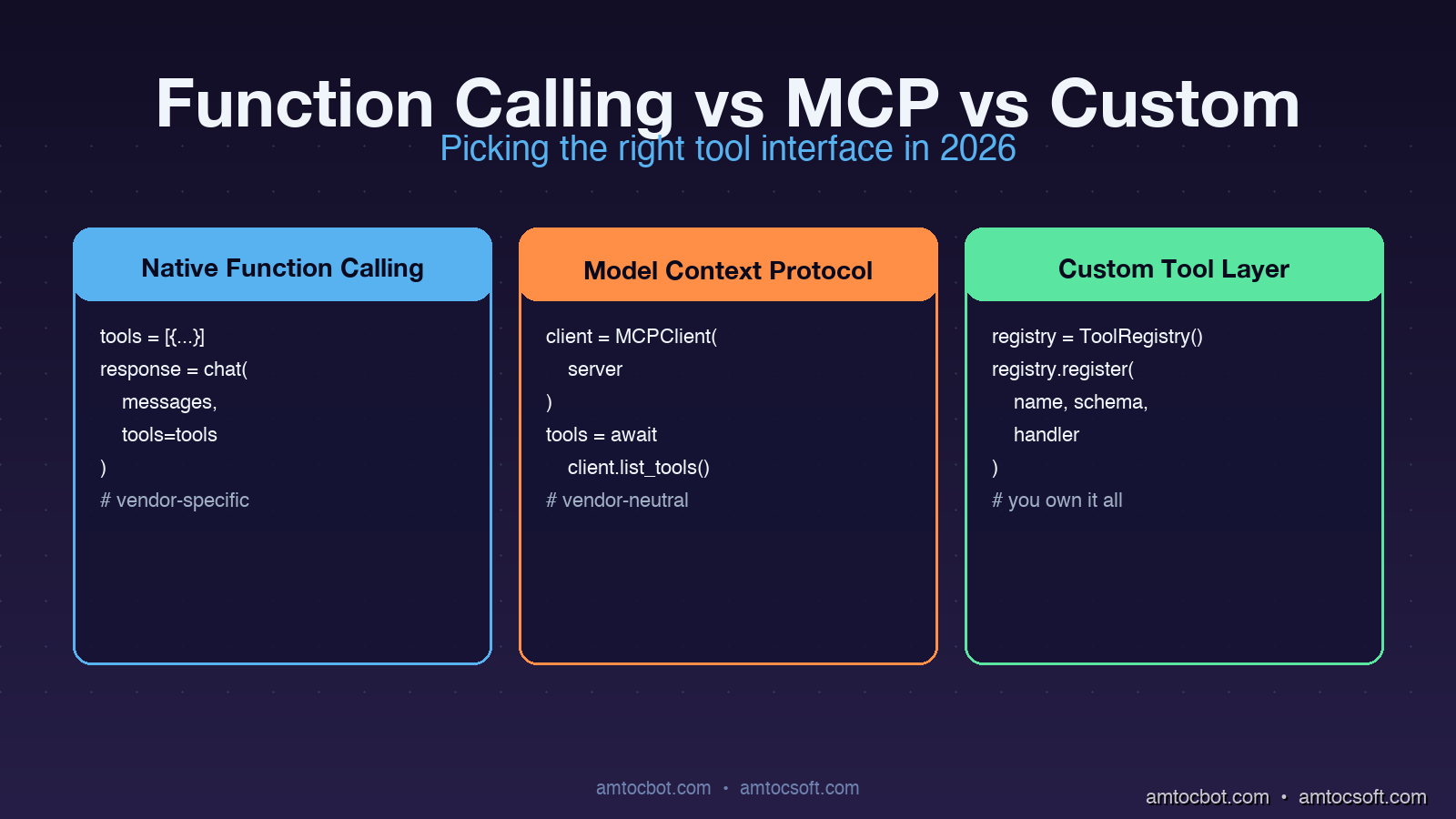
Native function calling is the JSON-schema-based tool definition that ships inside a model provider's API. You declare your tools as part of the chat completion request. The model returns a structured tool_calls field with the function name and arguments. Your code dispatches the call, runs the function, and feeds the result back as a follow-up message.
# OpenAI-style native function calling (Python)
import openai

tools = [{
    "type": "function",
    "function": {
        "name": "lookup_customer",
        "description": "Fetch a customer record by email.",
        "parameters": {
            "type": "object",
            "properties": {"email": {"type": "string"}},
            "required": ["email"],
        },
    },
}]

response = openai.chat.completions.create(
    model="gpt-4o",
    messages=[{"role": "user", "content": "Find user@acme.com"}],
    tools=tools,
)

tool_call = response.choices[0].message.tool_calls[0]
result = lookup_customer(email=tool_call.function.arguments["email"])
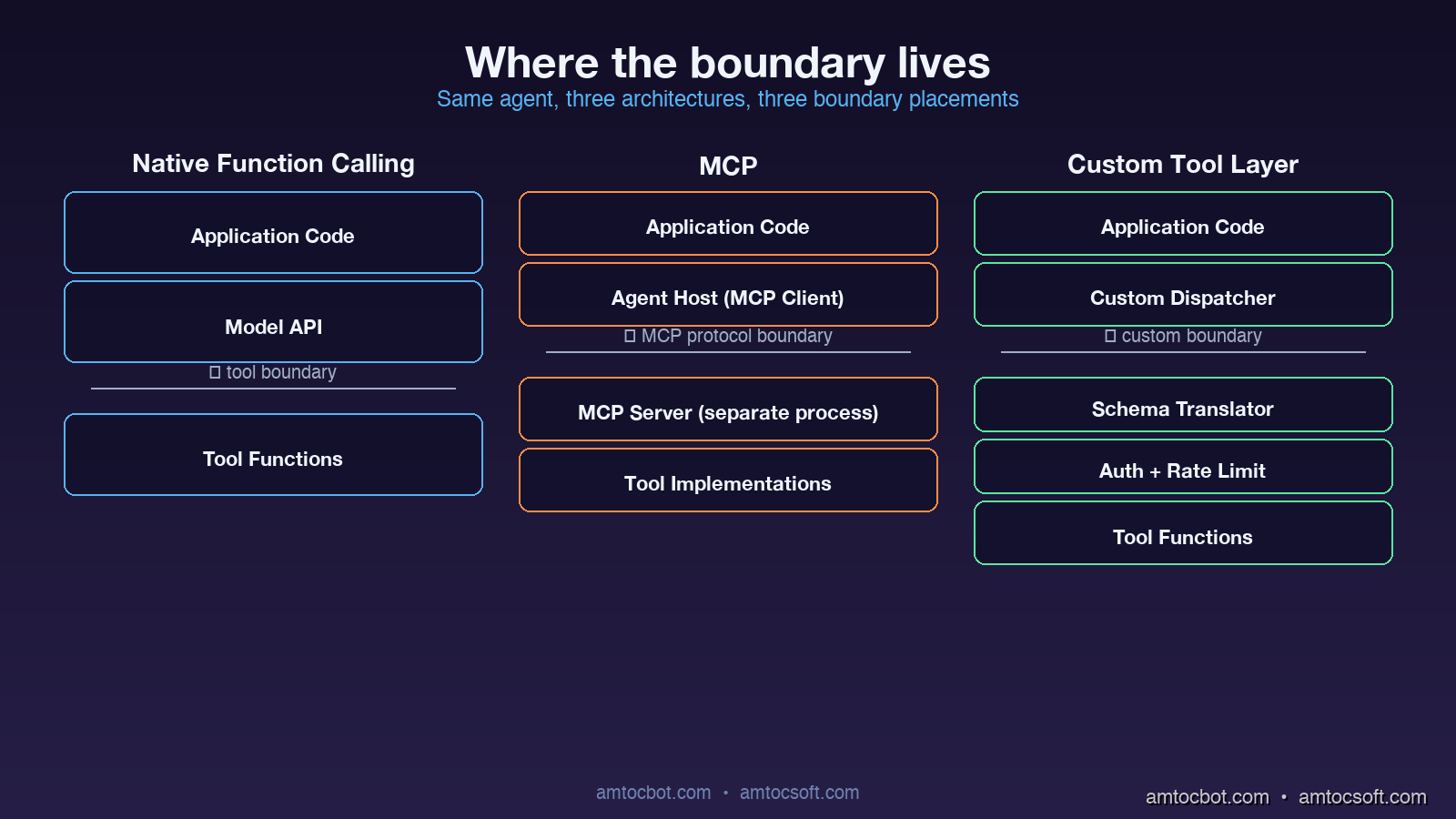
The wire format is a feature of the model API. Implementation lives in your application code. The model is fine-tuned to emit tool calls with reliable JSON. There is no separate process or transport.
MCP (Model Context Protocol)
MCP defines a JSON-RPC protocol over stdio, websockets, or HTTP that runs between an MCP client (the agent host) and an MCP server (the tool provider). Tools are not declared inline in the chat completion. They are advertised by the server when the client connects. The agent host translates MCP tool definitions into whatever native function-calling format the model expects, dispatches calls back to the server, and feeds the results back into the conversation.
# MCP client wiring (Python, simplified)
from mcp.client import StdioClient

async with StdioClient(["./payments-mcp-server"]) as client:
    await client.initialize()
    tools = await client.list_tools()
    # tools is a list of {name, description, input_schema}

    # Hand tools to the model
    response = call_model_with_tools(messages, tools)
    if response.tool_calls:
        result = await client.call_tool(
            response.tool_calls[0].name,
            response.tool_calls[0].arguments,
        )
The crucial architectural difference is that the tool implementation lives in a separate process (or remote service), and the protocol is decoupled from any particular model vendor. An MCP server can be written in any language, deployed independently, swapped between agents without code changes, and shared across teams as a versioned artifact.
Custom Tool Layers
A custom tool layer is anything you build yourself between the model and the rest of your software. It usually starts as a Python dispatcher with a registry of tools and grows over time into a piece of infrastructure with permissioning, rate limiting, observability, schema validation, and provider abstraction. The key property is that you own the abstraction completely.
# A minimal custom tool layer
class ToolRegistry:
    def __init__(self):
        self._tools = {}
        self._schemas = {}

    def register(self, name, schema, handler):
        self._tools[name] = handler
        self._schemas[name] = schema

    def to_openai_format(self):
        return [{"type": "function", "function": {**self._schemas[n], "name": n}}
                for n in self._tools]

    def to_anthropic_format(self):
        return [{"name": n, **self._schemas[n]} for n in self._tools]

    async def dispatch(self, name, args, context):
        if not authorized(context.user, name):
            raise PermissionError(f"{context.user} cannot call {name}")
        return await self._tools[name](**args)
Custom tool layers vary enormously between teams. Some are thirty lines. Some are entire internal frameworks with their own deployment story. The pattern is what matters: the team owns the format, the dispatch, the security model, and the transport.
Where Each Option Genuinely Wins
The patterns that make me reach for one option over another in a real architecture review.
Native Function Calling Wins When the Tool Surface Is Small and Static
If the agent has fewer than ten tools, the tools are tightly coupled to the application logic, and the workload is single-vendor (you are committed to OpenAI or to Anthropic for this product), native function calling is hard to beat. There is no extra process to deploy, no extra protocol to debug, and the latency is whatever the model's tool-calling overhead is plus whatever your function takes to run.
The economics of this case have actually improved over the past year. In the production traces I have reviewed, native function-calling overhead has become small enough that the simplicity gain of staying in the provider protocol is real for tightly scoped agents.
MCP Wins When the Tool Surface Crosses Team Boundaries
The single biggest architectural advantage of MCP is that it gives you a clean ownership boundary. If your data team owns a set of analytics tools, your platform team owns a set of CI/CD tools, and your application team owns a set of business tools, all three can ship independent MCP servers and the agent host wires them up at runtime. Versioning, deployment, and on-call ownership of each tool surface lives with the team that owns the underlying capability.
I am now seeing MCP win in essentially every enterprise context where:
- The agent will be used by multiple consumers (different products, different teams, or external customers).
- The tools span different services, languages, or runtime environments.
- There is a longer-term goal of supporting more than one model vendor.
- Compliance or audit requires that tool execution be observable and rate-limited at a single point.
The non-obvious win is that MCP servers become reusable artifacts. A well-written payments-mcp-server can be picked up by an internal Slack agent, an external customer-facing chatbot, and a developer-facing CLI tool with no per-consumer integration work. This compounds over time.
Custom Tool Layers Win When You Need Capabilities the Standards Do Not Cover
There are three real cases where I keep recommending custom tool layers.
The first is when you need fine-grained per-call security context that does not fit naturally into either function calling or MCP. Things like row-level authorization, capability-based delegation, or audit logs that capture not just the call but the full reasoning chain that led to it. Both function calling and MCP can be extended toward this, but the extension lives in your code anyway, so you might as well own the whole stack.
The second is when the model is going to call tools at very high rates or with very strict latency budgets. A custom dispatcher can co-locate with the model inference (or even share the same process), batch tool calls together, or precompute parts of the tool result before the model has finished generating its arguments. I have seen production systems where a custom layer materially reduced tool-call round-trip latency compared to the equivalent MCP setup, mostly by removing serialization and process boundary overhead.
The third is when your tool layer needs to be a compatibility shim. If you support multiple model vendors and you want to expose the same tool catalog across all of them, a custom layer is often cleaner than maintaining N MCP-server-to-vendor adaptations. This is especially true for older models that do not natively support modern function-calling formats.
tool surface?} -->|< 10 tools, static| FC[Native Function Calling] Q -->|crosses team or
service boundaries| MCP[MCP Server] Q -->|exotic security or
latency requirements| CL[Custom Tool Layer] Q -->|mix of all three| HY[Hybrid: MCP for shared,
Native for hot-path] FC --> Win1[Lowest infra overhead] MCP --> Win2[Reusable across agents] CL --> Win3[Maximum control] HY --> Win4[Best-of-each] style FC fill:#1e40af,stroke:#3b82f6,color:#fff style MCP fill:#7c2d12,stroke:#ea580c,color:#fff style CL fill:#14532d,stroke:#22c55e,color:#fff style HY fill:#581c87,stroke:#a855f7,color:#fff
Where Each Option Quietly Breaks
Marketing pages do not show you the failure modes. I have hit each of these in production at least once.
Native Function Calling: The Catalog Bloat Cliff
Function calling does not scale gracefully past about thirty tools. The model provider injects all your tool definitions into the system prompt context window on every call. Once you have fifty or sixty tools with reasonably descriptive parameter schemas, you are burning thousands of tokens per request just on tool definitions, regardless of whether the model uses any of them. Latency degrades, cost climbs, and the model's accuracy on tool selection actually drops because the relevant tools are buried in a long list.
The pragmatic fix when you hit this is tool-namespace partitioning: split tools into category groups, have a router model pick the right category, then expose only the tools in that category to the working model. This works, but it means you have introduced a custom layer anyway.
MCP: The Cold Start and Discovery Tax
MCP servers can have surprising startup latency. The first tool call to a freshly connected MCP server includes the protocol handshake, the tool discovery round-trip, and any initialization the server does (database connections, schema introspection, model loading). For long-running agents this is fine. For latency-sensitive request paths where each user request spins up a fresh MCP client, the cold start can be visible to users. I have seen production teams not notice this until the tail-latency monitor lit up after launch.
The mitigation is connection pooling and warm pools, but you have to set those up explicitly. The default MCP setup is per-call connection.
Custom Tool Layers: The Ownership Tax
Custom tool layers feel cheap to build and expensive to maintain. The team that built the layer becomes the owner of the security model, the schema validation, the model-vendor abstraction, the rate limiting, the observability, and the deprecation policy. Two years in, every custom tool layer I have seen has accumulated an internal feature set that overlaps significantly with what MCP now provides for free. The team's reaction is usually some combination of pride and regret.
The honest signal that a custom layer is the wrong call is when more than half the team-owned code in the layer is doing things MCP would do for you, and the remaining custom logic is small enough to fit in a thin wrapper.
A Real Migration Story
Eight months ago I was on a team that had built a custom tool dispatcher for an internal coding-assistant agent. The dispatcher was about 1,200 lines of Python, supported four model vendors, did per-tool authorization, and had its own observability hooks. It was the right call when we built it, because there was no MCP and the function-calling formats varied between vendors.
By Q4 of 2025 the dispatcher had become a liability. Adding new tools required understanding the entire dispatch system. Bugs in the schema-translation layer were hard to debug. Two separate teams had forked our code to add their own tools because cross-team contribution was painful. We decided to migrate to MCP.
The migration went in three phases.
Phase one (two weeks): we wrote a thin compatibility shim that exposed our existing tool catalog as an MCP server, while keeping the custom dispatcher behind it. This let us point new agent integrations at the MCP endpoint without touching any tool implementations. The shim was about 180 lines of Python.
Phase two (six weeks): we migrated the highest-volume tools out of the custom dispatcher into standalone MCP servers, one team at a time. The data team took their analytics tools. The platform team took their CI/CD tools. The original dispatcher kept the small, application-specific tools.
Phase three (ongoing): we are deprecating the remaining custom dispatcher entry points as the application-specific tools either migrate to MCP or get retired.
The mid-migration architecture (MCP for cross-team tools, custom dispatcher for application-specific) turned out to be a stable, useful state on its own. We are not actually planning to fully retire the custom layer, because the application-specific tools genuinely are tightly coupled and benefit from the lower latency of in-process dispatch. The hybrid is the production target.
A Debugging Story: The MCP Schema Drift That Cost Us Two Days
Three months after our migration, we hit a production incident I want to share because the failure mode is non-obvious.
The agent had been running cleanly for weeks. On a Tuesday afternoon, tool calls to the analytics MCP server started failing intermittently with a JSON validation error. The server logs showed it was receiving calls with parameter values that did not match the schema. The agent host logs showed the model emitting tool calls that looked structurally fine. The error rate was small at first, then climbed slowly.
I spent the first several hours assuming this was a model regression. Maybe the provider had silently shipped a new version that emitted slightly different argument formats. It was not.
The actual root cause was a schema drift. The analytics team had updated their MCP server to add an optional new field on a tool's input schema, with a default value. Their server happily accepted both old and new formats. But the agent host had cached the tool schema at startup, was advertising the old schema to the model, and was sending the model's old-format calls to the server. The intermittent failures were happening when the new server's stricter validation rejected calls that did not include the new optional field, even though the schema marked it as optional, because of a default-value bug in the Python MCP server library that interpreted "optional with default" as "required."
The fix was a server-side library update plus a forced client schema refresh. The architectural lesson was that schema versioning between MCP clients and servers is its own subsystem that needs to be designed, not assumed. We now run a daily job that re-discovers all MCP server schemas and alerts on any drift between cached and current versions.
Comparison and Tradeoffs
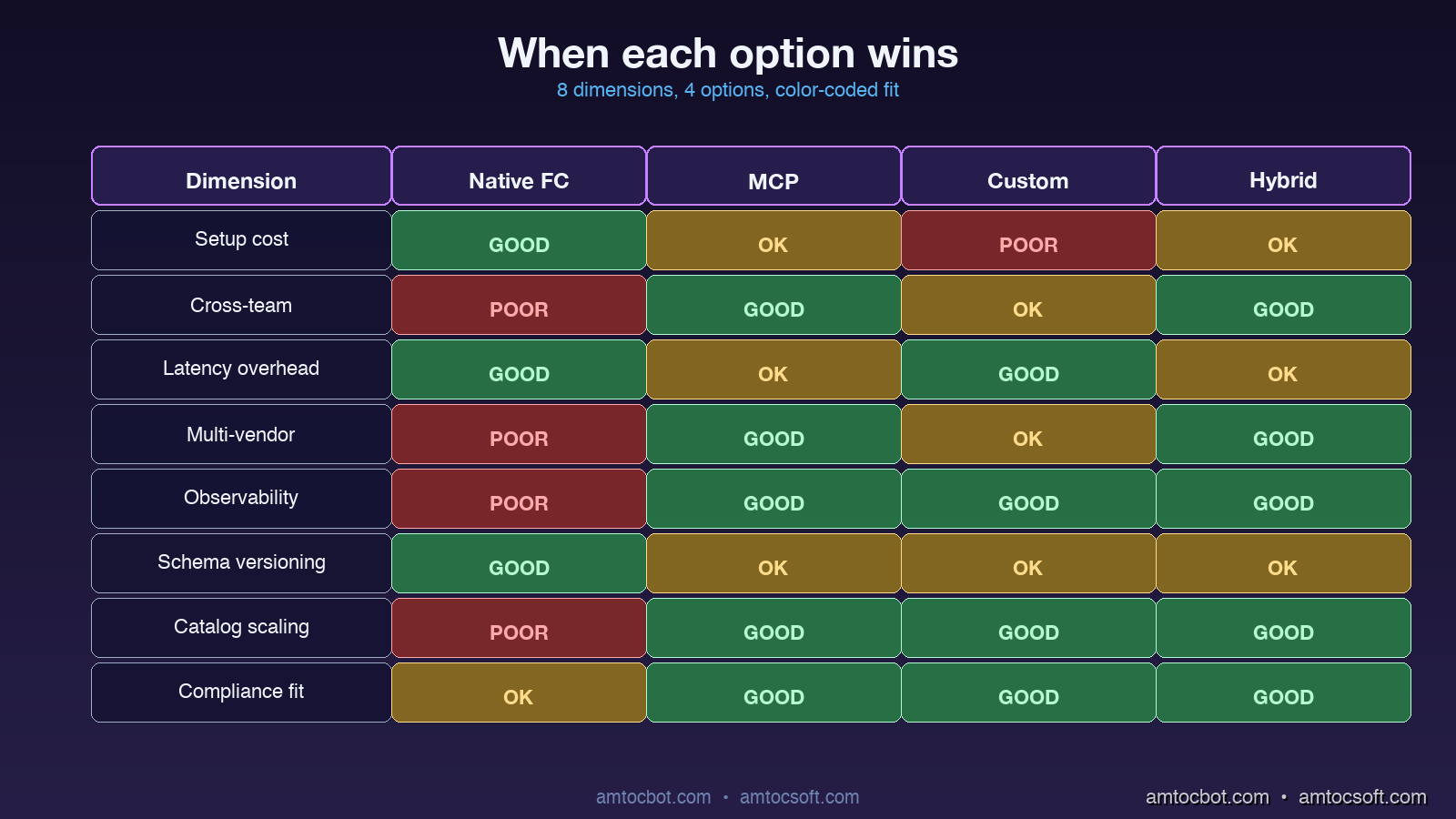
| Dimension | Native Function Calling | MCP | Custom Tool Layer | Hybrid (MCP + Custom) |
|---|---|---|---|---|
| Setup cost | Lowest | Medium | Highest | Medium |
| Cross-team ownership | Painful | Native | Custom code | Native (cross) + custom (app) |
| Latency overhead per call | Low provider overhead | Higher when cold, lower when warm | Lowest when in-process | Mix |
| Multi-vendor support | One model only | Vendor-neutral | Custom adapter per vendor | Vendor-neutral (cross) + custom (hot path) |
| Observability | Model logs only | Server-side hooks | Full custom | Mixed |
| Schema versioning | Static at deploy | Dynamic w/drift risk | Custom | Custom (cross) + custom (app) |
| Catalog scaling | Breaks past ~30 tools | Smooth past 100+ | Smooth past 100+ | Smooth past 100+ |
| Compliance fit | Light | Native audit | Bespoke | Bespoke |
For most production AI products in 2026, the right answer is the hybrid: MCP for tools that cross team or service boundaries, native function calling for the smallest agents that have fewer than a dozen tightly-coupled tools, and a thin custom layer when there are specific latency or security requirements that the standards do not cover.
Production Considerations
A few operational notes from running this stack:
MCP server warm-up matters. Set up a warm pool of pre-initialized MCP clients per agent worker. The cold-start latency is the single biggest production gotcha I have hit since the migration.
Tool schema versioning needs explicit design. Pin schema versions in the agent host. Run a periodic refresh-and-diff job. Alert on drift before users hit it.
Authorization should live above the protocol. Whether you use function calling, MCP, or a custom layer, the authorization decision (can this user run this tool?) belongs in your application code, not in the model. Putting permission checks inside MCP server handlers is the cleanest pattern; putting them in the model's prompt is a recipe for disaster.
Observability per-tool, not per-call. Tag every tool invocation with the tool name, the agent identity, the user identity, the latency, and the outcome. This is the single most useful debugging dataset you can have when something goes wrong six weeks after launch.
Cost of tool definitions in context. For function calling, tool definitions count against your context window on every call. Audit how many tokens your tool catalog consumes per request and prune aggressively. I have seen teams reduce per-request cost materially just by tightening tool descriptions.
Conclusion
The "function calling vs MCP vs custom" question stops being a binary the moment you take it seriously. Each option is the right answer for a specific kind of architecture. Native function calling is the right answer for small, tightly coupled agents. MCP is the right answer for tool surfaces that cross team boundaries. Custom layers are the right answer when standards do not cover your latency, security, or transport requirements. The hybrid combination is the right answer for most non-trivial production agent products, because real agent stacks have all three kinds of tools.
The decision framework I now use takes about twenty minutes:
- List every tool the agent will call.
- Group them by who owns the underlying service.
- Mark which tools have unusual latency or security requirements.
- For groups that cross teams: MCP server.
- For tools with unusual requirements: custom layer.
- For everything else: native function calling.
If the result has more than one category, you are building a hybrid. That is fine. The hybrid is the production target for almost every serious agent stack I see in 2026.
What I will be watching over the next year is how MCP evolves to address the cold-start latency and schema-versioning rough edges, and how the model vendors continue to fine-tune native function calling for larger tool catalogs. Both of those would shift the decision boundaries. For now, the framework above is what I am using.
Revision History
| Date | Summary | Old Version |
|---|---|---|
| 2026-06-09 | Revised unsupported latency and cost claims, removed placeholder affiliate links, reduced em-dash usage, and added a tool-catalog migration flow. | View original |
Sources
- Anthropic, "Introducing the Model Context Protocol" (2024): https://www.anthropic.com/news/model-context-protocol
- OpenAI, "Function calling guide" (2026): https://platform.openai.com/docs/guides/function-calling
- Model Context Protocol specification, "MCP Spec v0.6" (2026): https://spec.modelcontextprotocol.io
- LangChain, "Choosing a tool-use architecture" (2026): https://blog.langchain.dev/tool-architectures-2026
- AWS, "Building production-grade AI agent stacks" (2026): https://aws.amazon.com/blogs/machine-learning/agent-architectures-2026
About the Author
Toc Am
Founder of AmtocSoft. Writing practical deep-dives on AI engineering, cloud architecture, and developer tooling. Previously built backend systems at scale. Reviews every post published under this byline.
Published: 2026-04-26 · Updated: 2026-06-09 · Written with AI assistance, reviewed by Toc Am.
Get These In Your Inbox
Weekly deep-dives on AI engineering, no fluff. Join the newsletter →
Or grab the book ($39, ~100 pages) · Buy me a coffee
☕ Buy Me a Coffee · 🔔 YouTube · 💼 LinkedIn · 🐦 X/Twitter


No comments:
Post a Comment