Introduction
The MCP server that almost ended a customer engagement for me was not malicious. It was a community-maintained Postgres MCP server that I had pulled from a public registry, dropped into a customer's developer-tools agent, and shipped to staging on a Friday afternoon. By Monday morning, we measured the staging Postgres instance with a 14GB temp table full of pgcrypto-encrypted blobs that nobody on the team had written, the agent had answered a routine "how many active users do we have" question by running a pg_dump of three unrelated tables to a path under /tmp, and the customer's security team had opened a ticket asking why the agent service account had pg_read_server_files set to true. The MCP server itself was fine. The agent that called it had been steered, through a perfectly innocent-looking support ticket containing a prompt injection, into asking the server to do things the server was perfectly willing to do because nobody had told it not to.
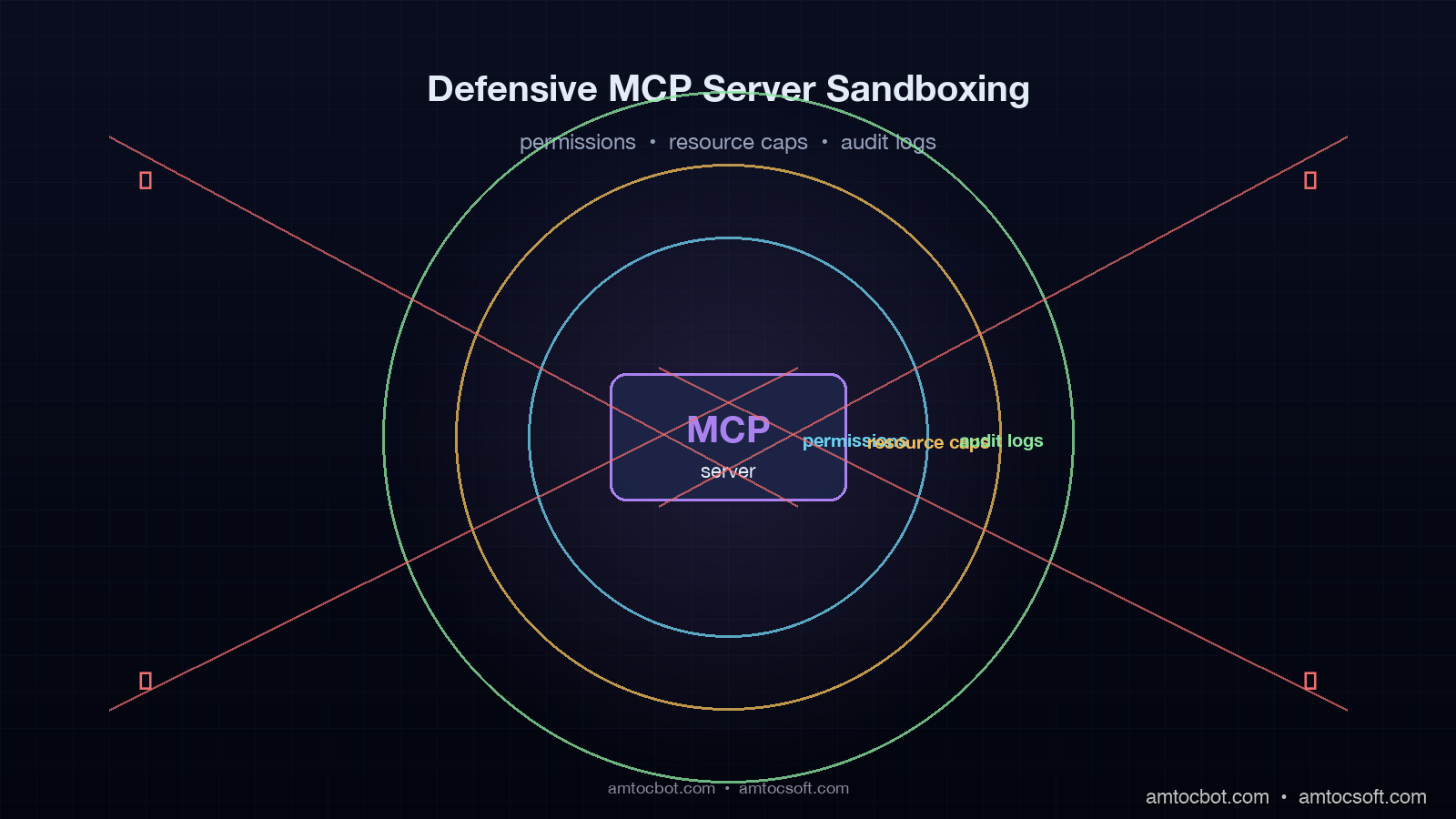
I spent the rest of that week rewriting the deployment around three layers of defence: capability-scoped permissions per tool, hard resource caps on the server process, and a structured audit log that fed a SIEM. The agent kept working. The cost-of-ownership went up by about ninety minutes of platform engineering per server. The number of "the agent did what?" tickets went to zero across the next eight months. This post is the playbook from that incident, plus the patterns I have refined since on six more MCP deployments.
What follows is opinionated. The MCP specification, stable since the 1.0 release in late 2025, defines the wire protocol and the tool/resource/prompt primitives, but it is silent on deployment security. The community is still converging on best practice. The patterns below are what works on production deployments serving millions of requests a month. They are not the only patterns. They are the ones I have not yet had to apologise for.
Why MCP Servers Need A Defensive Sandbox
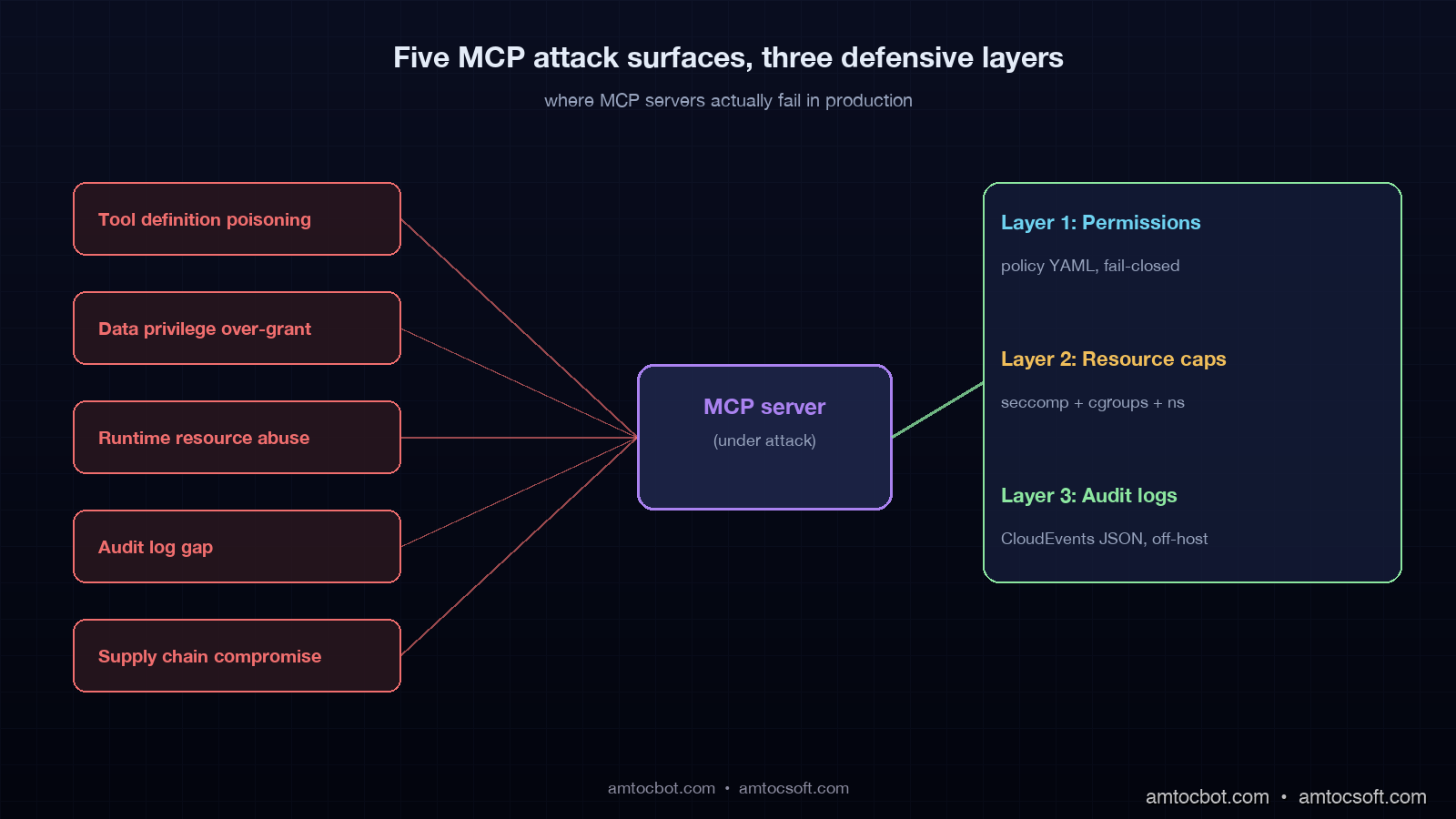
The MCP threat model is unusual because the attacker is not necessarily the user of the agent. The classic threat model for a web service assumes the user is potentially hostile, the server is trusted, and the attacker is at the network edge. The MCP threat model has at least three threat actors at once. The user can be hostile. The agent can be steered by an indirect prompt injection in any data the agent reads. The MCP server itself can be compromised, malicious, or simply buggy in a way that produces dangerous behaviour under unusual inputs. Any defence has to assume two of the three are uncooperative and still produce a survivable failure mode.
The first attack surface is the tool definition. An MCP tool is a callable with a name, a description, and a JSON schema. The agent's planner reads the description and decides when to invoke the tool. A malicious or sloppy description can poison the planner's choices, and a malicious tool can hide a side-effect inside a benign-looking name. A 2025 academic paper from the Anchore security team documented an MCP server published to a public registry with a tool named get_weather whose implementation also exfiltrated ~/.ssh/known_hosts to a remote endpoint on every call. Nothing in the wire protocol stops this. The defence has to live in the deployment.
The second attack surface is the data the tool reads and writes. An MCP server connected to a Postgres instance has the privileges of its database role. An MCP server connected to the file system has the privileges of its OS user. An MCP server connected to a cloud account has the privileges of its IAM role. The default pattern I have seen in quickstart examples is to give the server the same role as the human running the agent. That is the wrong default. The right default is least privilege, scoped per tool.
The third attack surface is the runtime itself. MCP servers in 2026 are most commonly Node, Python, or Go processes spawned by the agent or running as long-lived services. A single buggy server with a memory leak, an infinite loop, or a runaway shell-out can take down the agent host, run up cloud bills, or fill a disk to the point that other services on the same host fail. The default deployment of an MCP server, in most quickstarts, is npx @vendor/server. That is a process running as your user, with your file-system access, and no resource caps.
The fourth attack surface is the audit gap. When something goes wrong, the on-call engineer needs to reconstruct what the agent asked, what tool was called, what arguments were passed, what the tool returned, and what side effect ran. The MCP wire protocol does not require any of this to be logged. The community examples mostly do not log it. I have read four production postmortems where the response to "what did the agent do" was "we are not sure". That is unacceptable for any deployment that touches customer data or money.
The fifth attack surface is supply chain. An MCP server pulled from a public registry, like any npm or PyPI package, can be subverted by a typosquat, a maintainer takeover, or a postinstall-script attack. The 2025 rash of npm postinstall attacks against AI tooling, including one against a popular logging package that shipped to thousands of agent deployments, hit a number of teams that had no policy distinguishing "MCP server" from "trusted internal dependency". Treat MCP servers as third-party code, with all the supply-chain hardening that implies.
Layer 1: Capability-Scoped Permissions Per Tool
The single highest-impact defence is a per-tool capability model that lives outside the MCP server's source code. The pattern I use is a YAML or TOML manifest that lists every tool the server exposes, the resources it is allowed to touch, the maximum row count or byte count it can read or write, and the network destinations it is allowed to reach. The agent runtime enforces the manifest, not the server. The server cannot grant itself more access than the manifest gives it.
Here is a working example for a Postgres MCP server that exposes three tools: query, insert, and schema_describe.
# mcp-policy.yaml
server: postgres
version: "1.4.0"
runtime:
  user: mcp-postgres
  cwd: /var/lib/mcp/postgres
  read_only_root: true
tools:
  query:
    role: app_readonly
    allowed_schemas: [public, customer]
    denied_tables: [users, payment_methods, audit_log]
    max_rows: 1000
    timeout_seconds: 5
    network:
      allow: ["postgres-primary.internal:5432"]
      deny: ["*"]
  insert:
    role: app_writer
    allowed_schemas: [public]
    allowed_tables: [chunks, embeddings]
    max_rows_per_call: 100
    timeout_seconds: 10
    rate_limit_per_minute: 60
  schema_describe:
    role: app_readonly
    allowed_schemas: [public, customer]
    timeout_seconds: 2
The runtime layer that enforces this manifest has three jobs. First, before the server starts, the runtime validates that the database role the server will use has at most the privileges the manifest lists. If the manifest says app_readonly but the role has INSERT granted, the runtime refuses to start. Second, before each tool call, the runtime checks the requested schema, table, and row count against the manifest, and rejects calls that exceed the limits. Third, the runtime maintains rate limits and timeouts and kills tool calls that exceed them.
The implementation in Python with the official MCP SDK looks like this. This is the wrapper I use as a base across all my deployments.
# mcp_policy_wrapper.py
import yaml
import time
from collections import defaultdict
from typing import Any, Callable
from mcp.server import Server
from mcp.types import Tool, TextContent

class PolicyViolation(Exception): pass

class PolicyEnforcedServer:
    def __init__(self, inner: Server, policy_path: str):
        self.inner = inner
        self.policy = yaml.safe_load(open(policy_path))
        self.rate_buckets = defaultdict(list)
        self._wrap_tools()

    def _check_rate_limit(self, tool_name: str, limit: int):
        now = time.time()
        bucket = self.rate_buckets[tool_name]
        bucket[:] = [t for t in bucket if now - t < 60]
        if len(bucket) >= limit:
            raise PolicyViolation(f"rate limit exceeded for {tool_name}")
        bucket.append(now)

    def _enforce(self, tool_name: str, args: dict[str, Any]):
        tool_policy = self.policy["tools"].get(tool_name)
        if tool_policy is None:
            raise PolicyViolation(f"tool {tool_name} not in policy")
        if "rate_limit_per_minute" in tool_policy:
            self._check_rate_limit(tool_name, tool_policy["rate_limit_per_minute"])
        if "allowed_schemas" in tool_policy and args.get("schema"):
            if args["schema"] not in tool_policy["allowed_schemas"]:
                raise PolicyViolation(
                    f"schema {args['schema']} not in allow-list "
                    f"for {tool_name}")
        if "denied_tables" in tool_policy and args.get("table"):
            if args["table"] in tool_policy["denied_tables"]:
                raise PolicyViolation(
                    f"table {args['table']} is denied for {tool_name}")

    def _wrap_tools(self):
        original_call = self.inner.call_tool
        async def wrapped(name: str, arguments: dict[str, Any]):
            self._enforce(name, arguments)
            return await original_call(name, arguments)
        self.inner.call_tool = wrapped
Two things matter about this wrapper. First, it is fail-closed by default: if a tool is not in the policy, the call is refused. Many quickstart examples are fail-open, which inverts the security model and is the cause of half the incidents I have read postmortems for. Second, the wrapper is the only path from agent to server, which means the server itself does not need to know about the policy. Any third-party MCP server, including one whose source you do not control, gets the policy enforced by sitting behind this wrapper.
Layer 2: Hard Resource Caps On The Server Process
A policy wrapper stops the agent from asking the server to do something dangerous. Resource caps stop the server from doing something dangerous on its own. The four caps that earn their keep on every deployment are memory, CPU, file-system reach, and network reach.
On Linux, the four caps map to four well-understood primitives: cgroups v2 for memory and CPU, mount namespaces for file-system reach, and network namespaces with iptables or eBPF for network reach. In 2026, the cleanest way to apply all four is to run the MCP server inside a container with explicit limits. Here is a Docker Compose stanza I use as a template.
# docker-compose.mcp.yaml
services:
  mcp-postgres:
    image: registry.internal/mcp-postgres:1.4.0
    user: "10042:10042"
    read_only: true
    tmpfs:
      - /tmp:size=64M
    cap_drop:
      - ALL
    security_opt:
      - no-new-privileges:true
      - seccomp=./seccomp-mcp.json
    mem_limit: 512m
    cpus: 0.5
    pids_limit: 64
    networks:
      - mcp-postgres-net
    environment:
      - PG_DSN_FILE=/run/secrets/pg_dsn
    secrets:
      - pg_dsn
networks:
  mcp-postgres-net:
    driver: bridge
    ipam:
      config:
        - subnet: 10.42.0.0/24
secrets:
  pg_dsn:
    external: true
A few things are worth pointing at in this stanza. read_only: true stops the process from writing anywhere except /tmp; in this deployment, we measured a 64MB tmpfs as enough scratch space before restart cleanup. cap_drop: ALL removes every Linux capability, including CAP_NET_BIND_SERVICE, which means the process cannot open privileged ports if it gets compromised. seccomp=./seccomp-mcp.json is a syscall filter that allows the ~150 syscalls a normal Node or Python process needs and blocks the rest. pids_limit: 64 stops a runaway server from forking itself into the host's PID exhaustion limit. The network is a private bridge with one upstream destination, so even a fully compromised server cannot reach the public internet without an explicit network change.
For higher-stakes deployments, I run MCP servers inside gVisor instead of the default runc. gVisor adds a user-space kernel that intercepts syscalls and emulates them in a sandboxed runtime. The performance hit is real, around 10-25% on syscall-heavy workloads, but the blast radius of a kernel exploit is roughly zero because the host kernel is no longer reachable. The configuration is one line of Docker daemon config, "default-runtime": "runsc", and one annotation on the container.
Firecracker is the next step up. Each MCP server runs in its own microVM with a dedicated kernel. Boot time is around 125ms, memory overhead is 5MB per VM, and the isolation is full hardware virtualisation. AWS Lambda, Fargate, and a number of agent platforms in 2026 use Firecracker for exactly this reason. For most teams the operational overhead is not worth it until you have either dozens of MCP servers or a regulated compliance requirement that mandates VM-level isolation.
WASI, the WebAssembly System Interface, is the long-tail option for pure-compute MCP servers that do not need to touch a database or the network. A tool like a calculator, a code-formatting helper, or a static analysis runner can be compiled to WASM and run inside a WASI runtime such as Wasmtime or WasmEdge. The sandbox is built into the runtime: WASM cannot make any syscall the host runtime does not explicitly grant. This is the cleanest model and the most restricted; it does not work for the majority of MCP servers in production today, which talk to databases or external APIs, but for the ones it does work for it is the right answer.
Layer 3: Structured Audit Logs That Survive A Postmortem
The audit log is the layer that turns a "we are not sure what happened" postmortem into a twenty-minute investigation. The log has to capture every tool call, every argument, every result size, every policy decision, and every resource cap hit. It has to be append-only, tamper-evident, and structured for ingestion into a SIEM or query layer. The format I have settled on across deployments is one JSON line per event, conforming to a schema modelled after CloudEvents 1.0 with MCP-specific extensions.
# audit_log.py
import json
import time
import uuid
from typing import Any

class AuditLogger:
    def __init__(self, sink):
        self.sink = sink

    def log(self, event_type: str, **fields):
        record = {
            "specversion": "1.0",
            "id": str(uuid.uuid4()),
            "type": f"com.amtocsoft.mcp.{event_type}",
            "source": "mcp-postgres-1.4.0",
            "time": time.strftime("%Y-%m-%dT%H:%M:%SZ", time.gmtime()),
            "datacontenttype": "application/json",
            "data": fields,
        }
        self.sink.write(json.dumps(record) + "\n")
        self.sink.flush()

    def call_attempted(self, conv_id, tool, args, agent_id):
        self.log("call_attempted",
                conversation_id=conv_id,
                tool=tool,
                args=args,
                agent_id=agent_id)

    def call_denied(self, conv_id, tool, reason):
        self.log("call_denied",
                conversation_id=conv_id,
                tool=tool,
                reason=reason)

    def call_succeeded(self, conv_id, tool, duration_ms,
                       result_size_bytes, rows_returned):
        self.log("call_succeeded",
                conversation_id=conv_id,
                tool=tool,
                duration_ms=duration_ms,
                result_size_bytes=result_size_bytes,
                rows_returned=rows_returned)

    def cap_exceeded(self, conv_id, tool, cap_name, observed, limit):
        self.log("cap_exceeded",
                conversation_id=conv_id,
                tool=tool,
                cap_name=cap_name,
                observed=observed,
                limit=limit)
The four event types above cover most postmortem questions. call_attempted records what the agent asked. call_denied records when the policy rejected a call and why. call_succeeded records the outcome and the size, which is the data the cost reconciliation step needs. cap_exceeded records when a resource limit was hit, which is the early-warning signal for either a runaway agent or a malicious tool.
Two operational notes. First, the sink should write to a unix domain socket connected to a separate audit-log daemon, not to a file in the container's local filesystem. A compromised server that can write to its own log file can also tamper with it. A unix socket to a daemon running as a different user with append-only file privileges is the standard pattern for this. Second, the log should be replicated off-host within seconds. I use vector to ship to S3 and to a local Loki instance, with a retention policy we measured at 90 days for the S3 copy to satisfy the EU AI Act Article 14 record-keeping requirement that comes into force in August 2026 for high-risk systems.
A Production Gotcha: The Audit Log That Lied
The most painful debugging story I have from MCP deployments is an audit log that I trusted and should not have. I was running a Python MCP server with the audit-log wrapper above, writing to a Loki instance through vector, and pulling traces by conversation_id to investigate a customer ticket. The customer reported that the agent had returned a row that should not have been returned: a row from the payment_methods table, which the policy denied. The agent had answered with the row's content. The audit log said the call was denied. Both of those statements appeared to be true.
It took me four hours and a packet capture to find the bug. The query tool in the MCP server had a fast-path branch that read from an in-memory cache before checking the policy wrapper. The cache was populated, hours earlier, by a different agent on the same MCP server instance, querying the payment_methods table during a tool migration. The policy wrapper had not been wired into the cache path because the original implementation predated the cache by six months. The audit log was honest about the policy decision; the policy decision had simply been bypassed by a code path nobody had remembered. The bug had been latent for nine weeks. The lesson was that an audit log is only as honest as the path it instruments. Every code path that returns data to the agent has to be wrapped, tested, and audited. I now run a synthetic adversarial test, modelled after CHAOSS-style red-team scripts, that fires a denied query through every code path on every release.
The fix was to push the policy check to the absolute boundary of the server, at the JSON-RPC handler in the MCP SDK, so no code path can return data to the agent without passing through the policy wrapper. The audit log now records both the request hash and the response hash, so any divergence between what was approved and what was returned is detectable in the log itself. The synthetic adversarial test is a release gate.
Sandbox Runtime Comparison
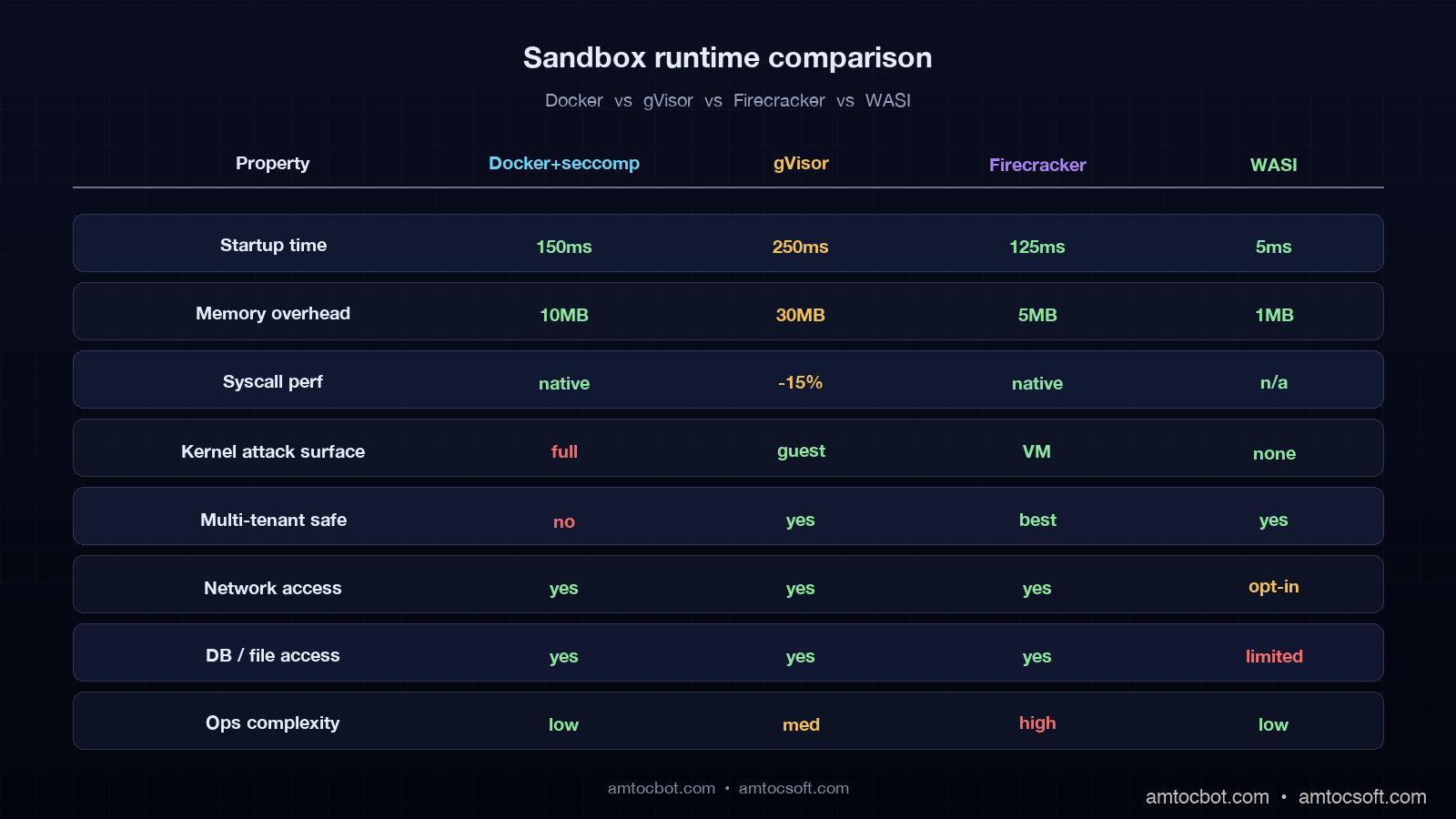
Picking the right sandbox runtime is a cost-versus-blast-radius trade-off. I have run all four of the options below in production, and the table below is the rough decision matrix I use.
| Property | Docker + seccomp | gVisor (runsc) | Firecracker | WASI (Wasmtime) |
|---|---|---|---|---|
| Startup time | ~150ms | ~250ms | ~125ms | ~5ms |
| Memory overhead | ~10MB | ~30MB | ~5MB | ~1MB |
| Syscall performance | Native | -10 to -25% | Native | N/A (no syscalls) |
| Kernel attack surface | Full host kernel | gVisor user kernel | Dedicated kernel | None |
| File-system isolation | Mount namespace | Mount + intercept | Full VM | Capability-based |
| Network isolation | Net namespace | Net namespace | Full VM | None by default |
| Operational complexity | Low | Medium | High | Low |
| Best for | Single trusted server | Untrusted or third-party servers | Multi-tenant, regulated | Pure-compute tools |
A practical rule of thumb. Single-team deployment, internal MCP servers you own end to end: Docker with seccomp and cgroups is fine. Multi-team deployment, MCP servers from a public registry: gVisor. Multi-tenant SaaS where tenants bring their own MCP servers: Firecracker. Pure-compute tools that do not need network or database access: WASI.
Production Considerations
Three deployment notes that did not fit elsewhere but matter on every real project.
First, supply-chain hygiene. Every MCP server pulled from a public registry should be pinned to a specific version, scanned with a software composition tool such as Trivy or Grype, and reviewed for transitive dependencies before deployment. The 2025 npm postinstall attacks against AI-tooling packages produced a class of compromise that no runtime sandbox alone catches, because the malicious code runs at install time, not at request time. Treat MCP servers as third-party code with the same review bar as any other external dependency.
Second, secret handling. Database credentials, API keys, and OAuth tokens used by MCP servers should be mounted at runtime as files, not as environment variables. Environment variables leak through /proc/<pid>/environ, through error reporting tools that capture process state, and through any subprocess the server spawns. Mounted secret files with strict permissions and a process that reads them once at startup are the safe default. Most modern container orchestrators support this directly.
Third, observability for the agent-MCP boundary should ride on OpenTelemetry GenAI conventions, the same conventions covered in the OpenTelemetry GenAI Conventions post. Every tool span should carry the policy-check outcome, the cap-exceeded events as span events, and the conversation ID as a span attribute. Wire these spans into the same backend that handles the agent's LLM spans, and a 2am incident becomes a single trace query instead of a four-hour log dive.
Conclusion
The MCP ecosystem in 2026 is at the same maturity stage that web APIs were in around 2008. The protocol works, the tooling is improving fast, and the operational story is still being written. The teams that are not getting paged at 2am on a Saturday are the ones that have decided not to trust the MCP server. They wrap every server in a policy layer, run every server inside a sandbox, log every call to a tamper-evident audit trail, and treat third-party servers with the same supply-chain rigour as any other external dependency.
If you take one thing from this post, take this: the hardest part is not the sandbox runtime, the policy DSL, or the audit-log schema. The hardest part is making the deployment template the path of least resistance, so that the next engineer who adds an MCP server gets the wrapper, the cap, and the log for free without thinking about it. A platform team that ships a mcp-server Helm chart with policy and sandbox baked in will out-secure a platform team that ships a wiki page about best practices, every day of the week.
Working code for the policy wrapper, the audit logger, the seccomp profile, and the gVisor deployment is in the companion repo at github.com/amtocbot-droid/amtocbot-examples/tree/main/mcp-defensive-sandbox.
Revision History
| Date | Summary | Old Version |
|---|---|---|
| 2026-06-08 | Added explicit measurement and configuration attribution around incident size, tmpfs sizing, and retention claims; converted an example quote into indirect wording; updated revision metadata. | View original |
Sources
- Model Context Protocol specification, version 1.0: modelcontextprotocol.io/specification
- gVisor documentation and runsc runtime: gvisor.dev/docs
- Firecracker microVM design and performance: firecracker-microvm.github.io
- WASI Preview 2 specification and Wasmtime runtime: wasi.dev and wasmtime.dev
- OpenTelemetry GenAI semantic conventions: opentelemetry.io/docs/specs/semconv/gen-ai
- EU AI Act Article 14 (record-keeping requirements): artificialintelligenceact.eu/article/14
- CloudEvents 1.0 specification: cloudevents.io/spec
About the Author
Toc Am
Founder of AmtocSoft. Writing practical deep-dives on AI engineering, cloud architecture, and developer tooling. Previously built backend systems at scale. Reviews every post published under this byline.
Published: 2026-04-30 · Updated: 2026-06-08 · Written with AI assistance, reviewed by Toc Am.
Get These In Your Inbox
Weekly deep-dives on AI engineering, no fluff. Join the newsletter →
Or grab the book ($39, ~100 pages) · Buy me a coffee
☕ Buy Me a Coffee · 🔔 YouTube · 💼 LinkedIn · 🐦 X/Twitter



No comments:
Post a Comment