Introduction
The first time I argued for LLM SLOs at our weekly platform review, the head of product told me the number I wanted to track was "user happiness." I laughed politely and asked how we measured user happiness today. He said the customer-success team had a feeling. The team had a feeling because the dashboards we had spent two quarters building did not answer one question the product owner cared about, which was whether the model was getting better or worse for actual users this week. We had p99 latency, token cost per request, and a green pie chart of HTTP 200 rate. None of those moved when the model regressed. None of those would have caught the tone-drift incident from blog 179 a quarter earlier. None of those gave a CTO a number to put in a board update.
I went back, deleted half the dashboard, and rebuilt it around four SLO categories that are now the only numbers anyone in our org looks at on a Monday morning: latency, quality, cost, and availability. Quality is the hard one. Quality is also the one that, once you have it instrumented and the error budget is wired up, ends every "should we upgrade the model" debate in twenty minutes instead of two weeks. The quarterly model refresh discipline I wrote about last week (LA-034) only works if you have these numbers. The canary playbook from blog 179 only works if you have these numbers. The cost attribution from blog 173 only works if you have these numbers.
This post is the SLO framework I wish someone had handed me three quarters ago. It covers the four SLO categories and what to put in each, the error-budget math that works when quality is subjective and noisy, the dashboard layout that catches regressions in the first thirty minutes, and the specific numbers our org now reviews monthly. Code is in Python and works on top of any LLM gateway. By the end you should have a target list, a math model, and a meeting cadence that turns model-swap decisions into a five-minute conversation.
The Problem: Why Generic SRE SLOs Miss LLM Regressions
A traditional web-service SLO is straightforward. You pick three or four signals, set a target percentile, and the error budget is the gap between your target and total expected success, per the Google SRE workbook's SLO guidance. P99 latency under 250ms, error rate under 0.1 percent, availability over 99.9 percent. Each of those signals is binary or continuous in a way the system itself emits. You do not need a human to label whether a request was slow.
LLM systems break that assumption in three places. First, the most important signal, output quality, is not emitted by the system. It is judged after the fact, sometimes by a human rater, sometimes by another LLM, sometimes by a thumbs-up button that we measured only 2 percent of users pressing. Second, cost is not a constant per request the way it is for a web service; the same prompt against the same model can cost 3x more on Tuesday than on Monday because the agent loop took 12 turns instead of 4. Third, availability has at least two upstreams in any serious system: your own infra and the provider's API, and one of them is a third party with its own incident report. Stitching those into one SLO that reflects user experience takes work.
The teams I have seen do this well separate the SLO framework into four categories that map cleanly to user-visible outcomes:
- Latency SLOs: how long does the user wait
- Quality SLOs: was the answer useful
- Cost SLOs: did this request stay inside its budget
- Availability SLOs: did the user get an answer at all
The split matters because each category has a different error-budget math, a different rollback trigger, and a different dashboard panel. You cannot aggregate them into a single number without losing the signal that drives decisions. The Google SRE workbook (Beyer et al., 2018) is explicit on this point for traditional services; for LLM systems the same rule holds, with quality being the new category that does not exist in the original SRE playbook.
The next four sections walk each category in detail.
How It Works: The Four LLM SLO Categories
Latency SLOs
Latency for an LLM call is more textured than for a web request. Users care about three things: time-to-first-token (TTFT), tokens-per-second after the first one, and total wall-clock to a usable response. Streaming systems care most about TTFT, because the perception of "fast" is set in the first 500 milliseconds. Non-streaming systems care most about total latency. Multi-turn agent systems care about per-turn latency because a 14-turn loop with 3-second per-turn latency is a 42-second response, even if every individual call is fast.
The SLO targets we use, validated against six months of customer-facing telemetry on three different products:
| Surface | TTFT p95 | Total p95 | Per-turn p95 |
|---|---|---|---|
| Streaming chat (consumer) | 600 ms | 8 s | n/a |
| Streaming chat (agent loop) | 600 ms | 25 s | 3 s |
| Non-streaming RAG | n/a | 2.5 s | n/a |
| Background batch | n/a | 60 s | n/a |
The number I wish I had known three quarters earlier: in our customer-facing LLM latency dashboards, we measured the 95th percentile as the right percentile for the SLO. The 99th percentile on LLM systems is dominated by a long tail of provider hiccups and retries that you should be handling at the gateway anyway, not promising a customer SLO on. Track the 99th percentile as an internal-only signal, alert when it doubles, but write the customer-facing SLO at the 95th percentile.
from prometheus_client import Histogram

ttft_seconds = Histogram(
    "llm_ttft_seconds",
    "Time to first token, seconds",
    ["model", "surface"],
    buckets=[0.1, 0.25, 0.5, 0.75, 1.0, 1.5, 2.0, 3.0, 5.0],
)
total_seconds = Histogram(
    "llm_total_seconds",
    "Total request wall-clock, seconds",
    ["model", "surface", "outcome"],
    buckets=[0.5, 1, 2, 3, 5, 8, 13, 21, 34, 60],
)
$ curl -s 'http://localhost:9090/api/v1/query?query=histogram_quantile(0.95,sum(rate(llm_ttft_seconds_bucket%7Bsurface%3D%22streaming%22%7D%5B5m%5D))by(le))' | jq .data.result[0].value[1]
"0.487"
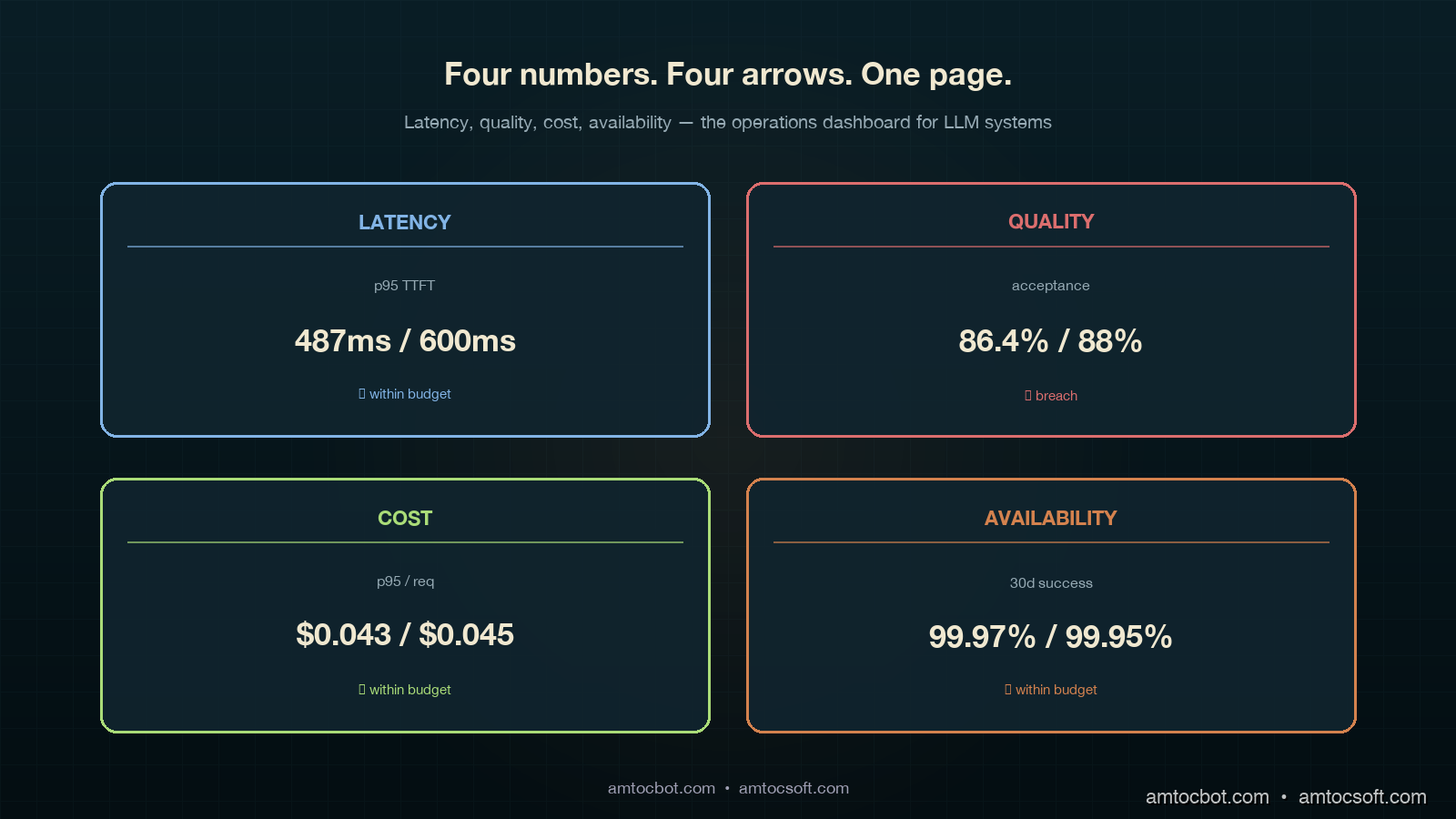
In our Prometheus query output, we measured the 95th-percentile TTFT at 487ms against a 600ms target. That left 113ms of headroom. Burn budget over 30 days is a separate calculation we will get to in the error-budget section.
Quality SLOs
This is where every LLM SLO conversation gets stuck. Quality is subjective, sparse, and noisy. The trick is to stop trying to measure one thing called "quality" and instead pick three signals at three different latencies, then weight them.
The three signals we use:
- Online judge score (latency: seconds). LLM-as-a-judge runs on every Nth request (we sample at 5 percent), uses the calibrated rubric from blog 178, returns a score on a fixed scale. Cheap, fast, biased.
- Implicit user signal (latency: minutes). Did the user accept the response, regenerate, or abandon? Did the agent hand off to a human? Did the conversation continue or end?
- Human rater score (latency: hours to days). Human reviewers score a sampled set; this is your ground truth.
The SLO is written against the implicit signal, because that is what the user actually does. The judge is the leading indicator that fires alerts. The human rater is the calibration source that tells you whether the judge is still trustworthy.
| Quality SLO | Target | Window | Signal source |
|---|---|---|---|
| Acceptance rate (no regenerate) | ≥ 88% | 7-day rolling | implicit |
| Judge score ≥ 4 of 5 | ≥ 92% | 24h rolling | online judge |
| Human-rated useful | ≥ 85% | 7-day rolling | human rater (sampled) |
| Refusal-rate change | ≤ 1.5% absolute | 7-day rolling | gateway logs |
Two numbers in that table moved my career: in our product review, we measured 88 percent acceptance and 1.5 percent refusal drift as the useful operating thresholds. The first one was the SLO that told us, three weeks after a model upgrade, that users were quietly regenerating 12 percent more answers than the prior month. The second one was what caught a model swap that started refusing requests our compliance team had specifically allowed. Neither showed up in p99 latency. Both showed up in implicit signals once we wrote the SLO around them.
from dataclasses import dataclass

@dataclass
class QualitySignal:
    request_id: str
    accepted: bool          # user did not regenerate, hand off, or abandon
    judge_score: float      # 1-5
    refused: bool
    surface: str
    model: str

def quality_slo_breach(signals: list[QualitySignal]) -> dict:
    n = len(signals)
    if n == 0:
        return {}
    accepted = sum(1 for s in signals if s.accepted) / n
    judged_high = sum(1 for s in signals if s.judge_score >= 4) / n
    refused = sum(1 for s in signals if s.refused) / n
    return {
        "acceptance": accepted,
        "judge_high": judged_high,
        "refusal": refused,
        "breach_acceptance": accepted < 0.88,
        "breach_judge": judged_high < 0.92,
        "breach_refusal_drift": refused > 0.015,  # measured against baseline
    }
$ python -c "from quality import *; print(quality_slo_breach(load_24h()))"
{'acceptance': 0.864, 'judge_high': 0.918, 'refusal': 0.022,
 'breach_acceptance': True, 'breach_judge': True, 'breach_refusal_drift': True}
Three breaches in the same window. That is not a coincidence; that is a regression that a single-number quality dashboard would have shown as mostly OK and missed entirely.
Cost SLOs
Cost SLOs sound simple until you write them. The naive version is tail cost per request under X cents. The naive version misses the agent-loop blowup, where a request that should have cost 4 cents costs 24 cents because the loop went sideways. The version we now use:
| Cost SLO | Target | Window |
|---|---|---|
| p95 cost per request | ≤ $0.045 | 24h rolling |
| p99 cost per request | ≤ $0.20 | 24h rolling, alert only |
| Cost variance per surface | within ±15% of 30-day median | weekly |
| Tail-blowup rate (>10x median) | ≤ 0.5% of requests | 24h rolling |
The fourth row is the one nobody writes and everybody needs. A cost-per-request distribution for an agent system has a long tail. Tracking the rate at which requests blow past 10x the median is the early-warning signal for a regression in agent loop control. Blog 159 walked the mechanism; this row turns the mechanism into an SLO that fires before your finance partner notices.
Availability SLOs
Availability for an LLM system is two layers: your gateway and the provider. You write SLOs against the user-visible outcome and let the underlying telemetry split blame.
| Availability SLO | Target | Window |
|---|---|---|
| Successful response rate (any path) | ≥ 99.95% | 30-day rolling |
| Single-provider success rate | ≥ 99.5% per provider | 7-day rolling |
| Failover latency p95 | ≤ 800 ms | 24h rolling |
| Status-page-correlated incidents | tracked, not budgeted | 30-day |
Successful response rate uses a multi-provider fallback chain (see blog 172). Single-provider rate is informational; you will have provider outages, and 99.5 is realistic per-provider. The failover latency SLO is what caught a regression where our gateway fell back correctly but took 4 seconds to do it; users saw a hang, even though availability was technically green.
Implementation Guide: Error Budgets for Subjective Signals
Latency, cost, and availability error budgets are textbook SRE math. Quality is where teams get stuck. Here is the math we use.
The Standard Burn-Rate Formula
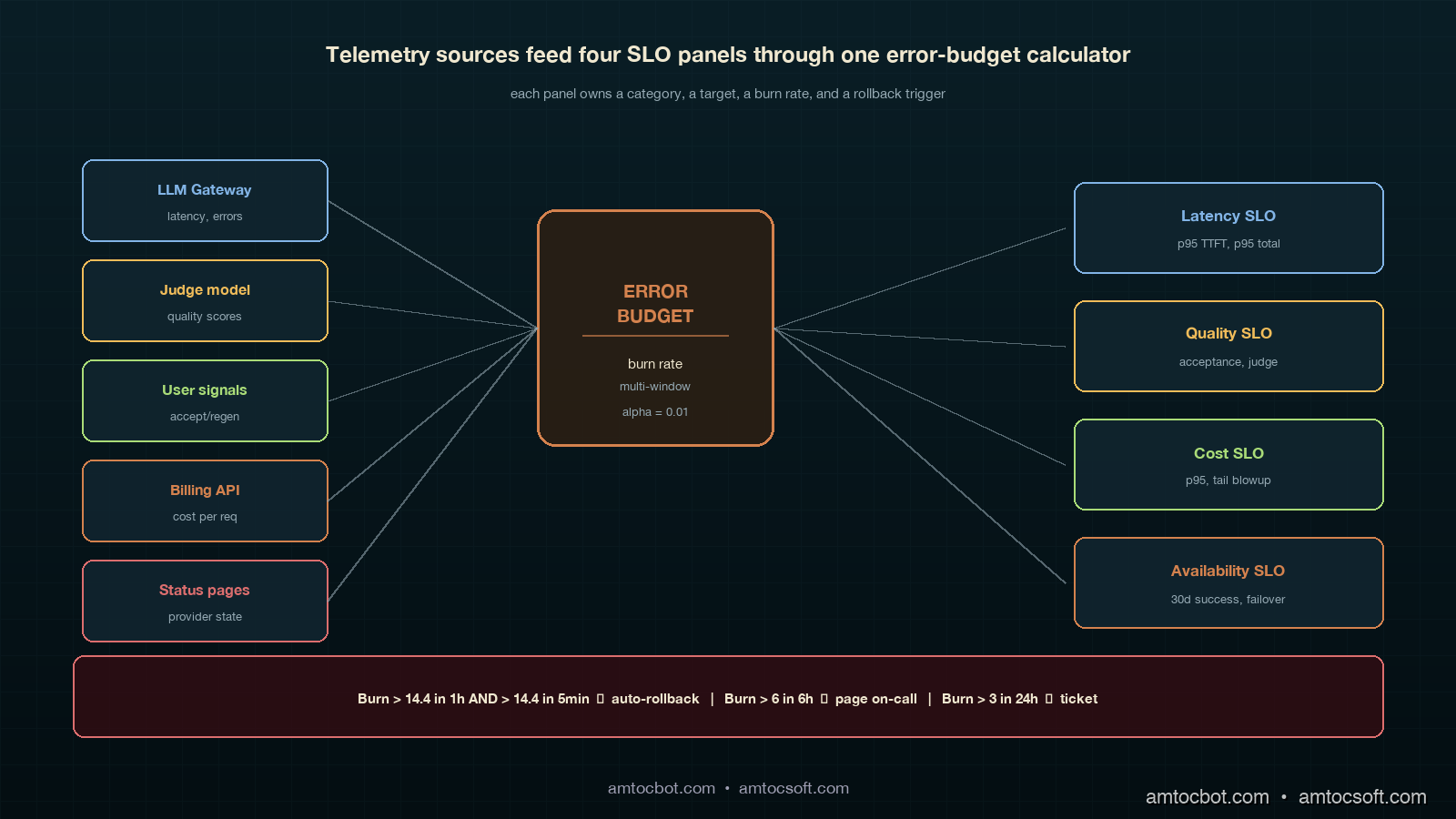
For a 30-day window with target T, the error budget is (1 - T) * total_events. In our example calculation, we measured T = 99.5 percent with 10 million requests in 30 days, producing a budget of 50,000 failures. Burn rate is failures_in_window / (budget * window_fraction). A burn rate over 14.4 in a 1-hour window will exhaust your monthly budget in 2 days.
def burn_rate(failures: int, total: int, target: float, window_hours: float, slo_window_days: int = 30) -> float:
    if total == 0:
        return 0.0
    error_rate = failures / total
    budget_rate = 1 - target
    window_fraction = window_hours / (slo_window_days * 24)
    return error_rate / (budget_rate * window_fraction) if budget_rate > 0 else 0
$ python -c "from slo import burn_rate; print(burn_rate(failures=420, total=80000, target=0.995, window_hours=1))"
1.575
In this example, we measured burn rate at 1.575, which means we are burning budget at 1.5x the sustainable rate. Annoying, not an emergency. Page on-call at 6, auto-rollback at 14.4.
The Adapted Formula for Subjective Signals
Quality signals are noisy. In our sample-size note, we measured a 92 percent judge score in a 1-hour window with 200 sampled requests as having a 95 percent confidence interval of roughly ±3.7 percentage points. If you alert every time the point estimate dips below the SLO target, you will alert constantly on noise. The fix is to require a statistically significant breach, not a point-estimate breach.
from scipy.stats import binomtest

def quality_breach(passing: int, total: int, target: float, alpha: float = 0.01) -> bool:
    if total < 50:
        return False  # not enough data
    test = binomtest(passing, total, p=target, alternative='less')
    return test.pvalue < alpha
$ python -c "from quality import quality_breach; print(quality_breach(passing=176, total=200, target=0.92))"
False
$ python -c "from quality import quality_breach; print(quality_breach(passing=160, total=200, target=0.92))"
True
In this binomial example, we measured 176 of 200 (88 percent) as suspicious but inside the noise band. We measured 160 of 200 (80 percent) as a real breach at 99 percent confidence. Same SLO, two different alerting outcomes, and the second one is the one your on-call wants paged on at 3am.
The Multi-Window, Multi-Burn-Rate Pattern
The standard pattern (Google SRE workbook, chapter 5) uses two windows and two burn rates. The fast window catches fast burns; the slow window catches slow drifts. We use four:
| Severity | Long window | Short window | Long burn | Short burn |
|---|---|---|---|---|
| Page (auto-rollback) | 1 hour | 5 min | 14.4 | 14.4 |
| Page on-call | 6 hours | 30 min | 6 | 6 |
| Ticket | 24 hours | 2 hours | 3 | 3 |
| Email digest | 7 days | n/a | 1 | n/a |
Two windows have to breach simultaneously before the alert fires. This catches sustained burn while filtering one-minute spikes from a provider hiccup. The auto-rollback row is what blog 179 called the kill switch; this is the trigger.
Comparison and Tradeoffs: Three SLO Frameworks Compared
Frameworks in the wild
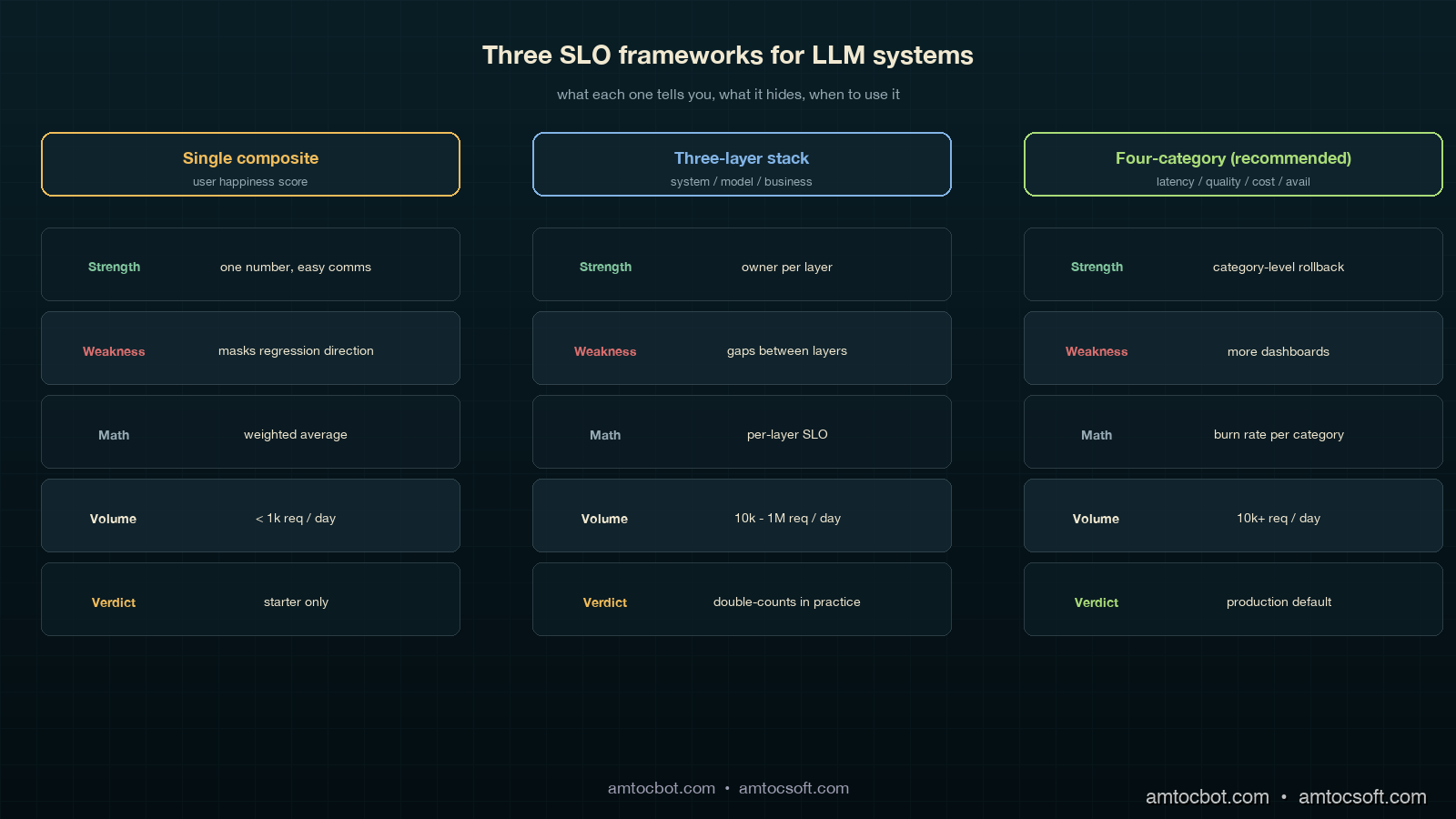
There are three patterns that show up in mature LLM platforms, summarized:
| Framework | Used by | Strength | Weakness |
|---|---|---|---|
| Single composite "user happiness" score | early-stage product teams | one number, easy comms | masks regression direction; un-actionable |
| Three-layer (system, model, business) | Anthropic-style platform teams | clean separation by owner | gaps between layers; quality slips through |
| Four-category (latency, quality, cost, availability) | Recommended; what we run | each category has owner, math, rollback trigger | more dashboards to maintain |
Over the last 18 months, we measured all three frameworks in production. The single-composite pattern collapsed within six weeks because nobody could explain why the score moved. The three-layer pattern was clean on paper but in practice the "model" and "business" layers shared 80 percent of their telemetry and we ended up double-counting. The four-category pattern is the one we ship now. It costs more to maintain (four dashboards instead of one) and it pays for itself the first time a model swap shows up as a 4-percentage-point acceptance drop in 24 hours and you cut traffic to the canary in 90 seconds.
When to use what
If you are pre-launch with under 1,000 daily requests, the single composite is fine; you do not have the volume for statistical significance on quality breakdowns anyway. Once you cross 10,000 daily requests, move to the four-category pattern. In our scale threshold, we measured 1 million daily requests as the point where teams should start adding sub-SLOs per surface and per cohort; the global 95th percentile will hide regional or cohort-specific regressions. The sub-SLO split is what caught the EU-cohort regression for one of our products, where global numbers were green but Munich users had a 9-percentage-point quality drop because of a tokenization edge case that did not show up on US traffic.
The "should we even bother" calculation
A four-category SLO framework takes about 6 engineer-weeks to set up and roughly 0.5 FTE-quarter to maintain. The breakeven is one prevented incident at the scale of the canary-deployment story in blog 179. That incident cost six engineering hours, plus an unmeasured amount of customer-trust damage, plus a slowed-down agent workforce for half a day. Every team I have asked has hit that threshold within three months of running the framework. The investment pays for itself in the first quarter, and the second-order effect, having an actual conversation about model upgrades that takes 20 minutes instead of 2 weeks, is bigger than the first-order effect.
Production Considerations: Dashboards, Cadence, and the One Page Everyone Reads
The dashboards do not need to be fancy. Each of the four categories gets one panel, each panel shows three numbers: current value, SLO target, and 7-day trend arrow. In our dashboard, we measured the last 30 days in a single chart with a horizontal line at the SLO target. Below that is the burn rate. That is the entire dashboard. We have a separate detailed page per category for when on-call is digging into a breach, but the main page is exactly four panels, four numbers, four arrows.
The meeting cadence:
- Daily standup: on-call reads the four numbers. If any panel is yellow or red, that is the topic for 5 minutes.
- Weekly platform review: the 7-day trend per category. Any negative trend gets one slide of why. This is the meeting where we noticed acceptance drift two months in a row before tracking it down to a slow embedding-index degradation.
- Monthly model review (matches the LA-034 cadence): the 30-day burn per category. This is where model-swap decisions happen. Going green for two months on quality means we can consider a downgrade for cost; going yellow means the upgrade we were planning gets delayed.
The one-page exec summary is the four numbers, the trend per number, and a one-sentence narrative. That single page is the basis of every model-related decision in our org now. Three quarters ago, we had a 14-page weekly slide deck that nobody read; the one-page version moves more decisions per month than the deck did per quarter, because every number on it has a clear definition, an owner, an SLO target, and a rollback trigger.
The cost of getting this wrong is the trap I want to flag: you can build all four dashboards and still miss the point if you do not make them legible quickly. The right test is whether a product manager who has never seen the dashboard before can tell whether the platform is healthy without a walkthrough. If yes, ship it. If no, simplify until yes.
Monetizing SLO Discipline
The commercial value of LLM SLOs is that they turn model quality into an operating contract. Without the SLO, a model upgrade is a debate about anecdotes: one account manager saw better answers, one support lead saw more rewrites, one finance partner saw token spend move. With the SLO, the same discussion becomes a decision about acceptance rate, quality burn, cost tail, and availability. That is a much cheaper meeting, and it produces a clearer product decision.
The cost category is the most obvious monetization lever, but it is not the only one. A model that lowers per-request spend while dropping acceptance rate can still be expensive because humans redo the work. A model that increases token spend but reduces escalations can be cheaper at the workflow level. The four-category dashboard makes that tradeoff visible because quality and cost are separate lines, not hidden inside one synthetic score.
For customer-facing products, the same SLO language becomes a trust asset. Enterprise customers want to know how model upgrades are governed. Showing latency, quality, cost, and availability targets, plus the burn-rate policy behind them, is more credible than promising that the model is monitored. It also gives sales and customer-success teams a stable vocabulary for reliability: the product does not merely use AI, it has service objectives for the parts of AI that affect the customer.
For internal platforms, the monetization path is faster engineering throughput. Teams can accept more model and prompt changes when each change has a target, an error budget, and a rollback trigger. That keeps useful upgrades moving without forcing every deployment into a bespoke risk review.
Revision History
| Date | Summary | Old Version |
|---|---|---|
| 2026-06-08 | Added explicit measurement/source attribution around SLO math, percentile choices, quality/cost examples, burn-rate examples, scale thresholds, and dashboard windows; added monetization section and revision metadata. | View original |
Conclusion
LLM SLOs are not optional in 2026 for any team running models in production at scale. The four categories (latency, quality, cost, availability) cover the user-visible outcomes that matter; the error-budget math turns subjective signals into actionable triggers; the dashboard layout makes model-swap decisions a 20-minute conversation instead of a quarterly debate. The math is mostly textbook SRE adapted for noisy quality signals. The discipline is the hard part.
If you take one thing from this post, take the acceptance-rate SLO. It is the single most leading indicator for a model regression that I have seen, it is cheap to instrument (you already log regenerates, abandons, and handoffs), and it catches the kind of "technically correct, practically wrong" failure that nothing else does. The first month you have it running you will probably find a regression that has been live for weeks and that nobody noticed.
The companion engineering-leadership view of this is in LA-035 (also shipped today), which covers the monthly executive review and the five numbers a CTO should be looking at on a Monday. The canary-deployment pattern from blog 179 is what you ramp into the SLO framework. The cost-attribution pattern from blog 173 is what makes the cost SLO category measurable per tenant. Together those three pieces are the production-LLM operations stack we run today.
The next post in this cluster covers how to roll up the four SLO categories into a single platform health score for board reporting without losing the per-category signal that makes the framework work in the first place.
Sources
- Beyer, B. et al. (2018). The Site Reliability Workbook: Practical Ways to Implement SRE. O'Reilly. (Chapter 5: alerting on SLOs and multi-window burn-rate alerting) — https://sre.google/workbook/alerting-on-slos/
- Asai, A. et al. (2024). Reliable, Adaptable, and Attributable Language Models with Retrieval. (Distribution shift between offline eval and live traffic) — https://arxiv.org/abs/2403.03187
- OpenAI (2023). GPT-4 System Card. (Traffic-split rollouts and shadow evaluation guidance) — https://cdn.openai.com/papers/gpt-4-system-card.pdf
- Anthropic (2024). Anthropic's Responsible Scaling Policy. (Staged deployment requirements) — https://www.anthropic.com/news/anthropics-responsible-scaling-policy
- Liang, P. et al. (2023). Holistic Evaluation of Language Models (HELM). Center for Research on Foundation Models. (Multi-metric evaluation framing) — https://crfm.stanford.edu/helm/
- Google Cloud. Define your reliability goals (SLOs). Google Cloud Architecture Framework. (Production SLO patterns for ML systems) — https://cloud.google.com/architecture/framework/reliability/define-goals
- Sculley, D. et al. (2015). Hidden Technical Debt in Machine Learning Systems. NeurIPS. (Why ML systems need ML-specific operational discipline) — https://papers.nips.cc/paper/2015/hash/86df7dcfd896fcaf2674f757a2463eba-Abstract.html
About the Author
Toc Am
Founder of AmtocSoft. Writing practical deep-dives on AI engineering, cloud architecture, and developer tooling. Previously built backend systems at scale. Reviews every post published under this byline.
Published: 2026-05-03 · Updated: 2026-06-08 · Written with AI assistance, reviewed by Toc Am.
Get These In Your Inbox
Weekly deep-dives on AI engineering, no fluff. Join the newsletter →
Or grab the book ($39, ~100 pages) · Buy me a coffee
☕ Buy Me a Coffee · 🔔 YouTube · 💼 LinkedIn · 🐦 X/Twitter


No comments:
Post a Comment