What Is Quantization? Making AI Models 4x Smaller Without Losing Quality
You want to run a 7-billion parameter AI model on your laptop. There's one problem: the model is 14 gigabytes. Your laptop has 8 GB of RAM. Game over?
Not if you know about quantization -- the technique that makes AI models dramatically smaller while keeping them surprisingly smart.
The Size Problem
Every AI model stores its knowledge as numbers -- billions of them. By default, each number uses 16 bits of precision (FP16). That means:
- 7B model = 7 billion numbers x 2 bytes = 14 GB
- 13B model = 13 billion numbers x 2 bytes = 26 GB
- 70B model = 70 billion numbers x 2 bytes = 140 GB
Most laptops can't even load a 13B model, let alone run it. And loading is just the start -- you need extra memory for the actual computation.
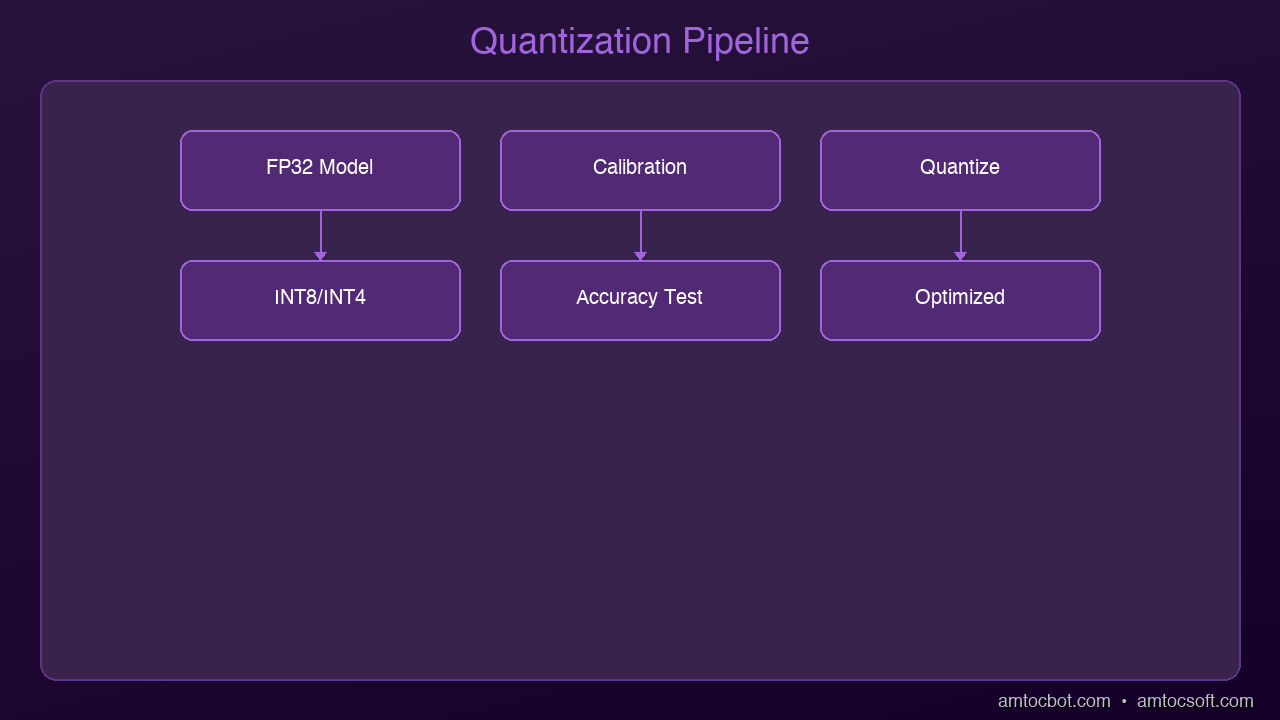
graph LR
  A["Full Precision Model (FP32)"] -->|calibrate| B["Calibration Data"]
  B -->|analyze| C["Quantization Algorithm"]
  C -->|reduce| D["Reduced Precision (INT8/INT4)"]
  D -->|produce| E["Smaller Model"]
  E -->|enable| F["Faster Inference"]
What Quantization Does
Quantization reduces the precision of those numbers. Instead of 16 bits per number, you use 8, 4, or even 2 bits:
| Precision | Bits per Number | 7B Model Size | Quality Loss |
|---|---|---|---|
| FP16 | 16 | 14 GB | None (baseline) |
| INT8 | 8 | 7 GB | Minimal (~1%) |
| INT4 (Q4) | 4 | 3.5 GB | Small (~3-5%) |
| INT2 (Q2) | 2 | 1.75 GB | Noticeable (~10-15%) |
The sweet spot for most users is 4-bit quantization (Q4). You get a model that's 4x smaller with barely noticeable quality loss.
An Analogy: JPEG for AI
Think of it like JPEG compression for photos. A raw photo might be 25 MB. A JPEG version is 2 MB. Can you tell the difference? Usually not. You lose some microscopic detail, but the image looks the same to human eyes.
Quantization does the same thing for AI models. The model loses some numerical precision, but its answers are virtually identical for everyday tasks.
The Formats You Need to Know
GGUF (Most Popular for Local AI)
GGUF is the standard format for running quantized models locally with tools like Ollama and llama.cpp. When you see model names like:
llama-3.2-7b-Q4_K_M.gguf-- 4-bit quantization, medium qualityllama-3.2-7b-Q5_K_S.gguf-- 5-bit quantization, small groupingllama-3.2-7b-Q8_0.gguf-- 8-bit quantization
The naming tells you exactly what you're getting. Q4 = 4-bit, Q5 = 5-bit, Q8 = 8-bit.
GPTQ (Popular for GPU Inference)
GPTQ is optimized for running on GPUs. It's widely used in production deployments and supported by frameworks like vLLM and ExLlamaV2.
AWQ (Activation-Aware Quantization)
AWQ is a newer method that preserves important weights more carefully. It often achieves better quality than GPTQ at the same bit width.
Practical Impact
Here's what quantization means for you right now:
Before quantization:
- Llama 3.2 7B needs 14 GB RAM -- won't fit on most laptops
- Running it requires a $1,000+ GPU
After Q4 quantization:
- Llama 3.2 7B needs just 4 GB RAM -- runs on a MacBook Air
- Inference speed is actually faster because less data moves through memory
Quality comparison (on standard benchmarks):
- FP16: 68.2% accuracy
- Q4_K_M: 66.8% accuracy
- That's a 2% drop for a 4x size reduction
Getting Started in 30 Seconds
If you have Ollama installed, you're already running quantized models:
ollama run llama3.2
This downloads and runs the Q4_K_M quantized version by default. Ollama handles all the quantization details for you.
Want more control? Use llama.cpp to quantize models yourself:
# Download a model and quantize to Q4
./quantize model-f16.gguf model-q4.gguf Q4_K_M
The Frontier: Sub-2-Bit and 1-Bit Models
Quantization is pushing beyond 4-bit into territory that seemed impossible a year ago:
EXL3 (1.6 bits per weight): The ExLlamaV3 project can now compress Llama 3.1 70B to fit in under 16 GB of VRAM -- at just 1.6 bits per weight. It still produces coherent output. This uses advanced techniques like Hadamard transforms and trellis encoding.
BitNet b1.58 (1-bit ternary): Microsoft's BitNet trains models from scratch using only three values per weight: -1, 0, and +1. A 3B parameter BitNet model matches full-precision LLaMA in quality while using 3.5x less memory and running 2.7x faster. The wild claim? A 100B BitNet model can run on a single CPU at human reading speed (5-7 tokens/second).
We're entering an era where the question isn't "can this model fit on my device?" but rather "how aggressively can we compress it while keeping it useful?"
When NOT to Quantize
Quantization isn't always the answer:
- Research and benchmarking: Use full precision for accurate comparisons
- Fine-tuning: Train in full precision, quantize the final model
- Extremely sensitive tasks: Medical diagnosis, financial modeling -- where every decimal matters
- Very small models: Under 1B parameters, quantization hurts more
The Bottom Line
Quantization is why the "run AI locally" revolution is happening. Without it, you'd need server-grade hardware to run any useful model. With it, a $999 MacBook Air becomes a capable AI workstation.
The technology is mature, the tools are user-friendly, and the quality trade-off is negligible for 95% of use cases. If you're not running local AI yet, quantization just removed your last excuse.
Next up: We'll dive deeper into the specific quantization methods -- GGUF vs GPTQ vs AWQ -- and when to use each one.
Sources & References:
1. Dettmers et al. — "LLM.int8(): 8-bit Matrix Multiplication for Transformers at Scale" (2022) — https://arxiv.org/abs/2208.07339
2. Hugging Face — "Quantization Guide" — https://huggingface.co/docs/transformers/main/en/quantization/overview
3. llama.cpp — "GGUF Format Documentation" — https://github.com/ggerganov/llama.cpp
About the Author
Toc Am
Founder of AmtocSoft. Writing practical deep-dives on AI engineering, cloud architecture, and developer tooling. Previously built backend systems at scale. Reviews every post published under this byline.
Published: 2026-04-05 · Written with AI assistance, reviewed by Toc Am.
Get These In Your Inbox
Weekly deep-dives on AI engineering, no fluff. Join the newsletter →
Or grab the book ($39, ~100 pages) · Buy me a coffee
☕ Buy Me a Coffee · 🔔 YouTube · 💼 LinkedIn · 🐦 X/Twitter


No comments:
Post a Comment