Level: Intermediate
Topic: Voice AI, TTS, STT
In the previous posts, we explored TTS engines and STT models individually. Now it's time to wire them together into something that actually talks back. In this tutorial, you'll build a voice agent from scratch using Python and Pipecat -- an open-source framework for building real-time voice and multimodal AI pipelines.
By the end, you'll have a working voice agent that listens to your microphone, processes your speech through an LLM, and speaks the response back to you -- all in real time. We'll start with the simplest possible agent (under 80 lines), then progressively add function calling, conversation memory, error handling, and phone connectivity.
Pipecat has grown into a mature framework with 60+ provider integrations, client SDKs for JavaScript, React, iOS, Android, and C++, and a managed cloud hosting option. It's the most popular open-source choice for voice agent development in 2026.
What Is Pipecat?
Pipecat is an open-source Python framework created by Daily.co for building real-time voice and multimodal AI applications. It provides a pipeline-based architecture where you chain together processors -- STT, LLM, TTS, transport -- and data flows through them automatically.
Why Pipecat Over Building From Scratch?
- Pipeline abstraction: Chain STT, LLM, and TTS together declaratively -- no manual threading or async coordination
- Turn-taking: Built-in support for interruptions, barge-in, and conversational flow
- Transport layer: Handles WebRTC, WebSocket, and local audio I/O
- Provider-agnostic: Swap STT/LLM/TTS providers without rewriting your pipeline (60+ integrations including Deepgram, OpenAI, Anthropic, ElevenLabs, Cartesia, Kokoro, and more)
- Real-time optimized: Frame-based processing designed for sub-second latency
- Client SDKs: JavaScript, React, React Native, iOS, Android, C++ for building front-ends
Microphone/WebRTC] --> B[STT
Deepgram Nova-3] B --> C[Context Aggregator
User Message] C --> D[LLM
GPT-4o / Claude] D --> E[TTS
OpenAI / ElevenLabs] E --> F[Transport Output
Speaker/WebRTC] F --> G[Context Aggregator
Assistant Message] end style A fill:#4CAF50,color:#fff style D fill:#FF9800,color:#fff style F fill:#2196F3,color:#fff
Prerequisites
Before we start, make sure you have:
- Python 3.10 or higher
- A microphone and speakers (or headphones -- recommended to avoid echo)
- API keys for:
- OpenAI (for the LLM and TTS) -- platform.openai.com
- Deepgram (for STT) -- free tier gives you $200 in credits at console.deepgram.com
- Basic Python async/await knowledge
Step 1: Set Up the Project
Create a new project directory and install dependencies:
mkdir voice-agent && cd voice-agent
python -m venv venv
source venv/bin/activate  # On Windows: venv\Scripts\activate

# Install Pipecat with the providers we need
pip install "pipecat-ai[daily,openai,deepgram,silero]"

# Install PyAudio for local microphone access
pip install pyaudio

# If PyAudio fails on macOS:
# brew install portaudio
# pip install pyaudio
Create a .env file for your API keys:
OPENAI_API_KEY=your-openai-key
DEEPGRAM_API_KEY=your-deepgram-key
Project structure:
voice-agent/
  .env
  agent.py           # Basic agent (Step 3)
  agent_tools.py     # Agent with function calling (Step 5)
  agent_full.py      # Production-ready agent (Step 8)
  venv/
Step 2: Understand the Pipeline Architecture
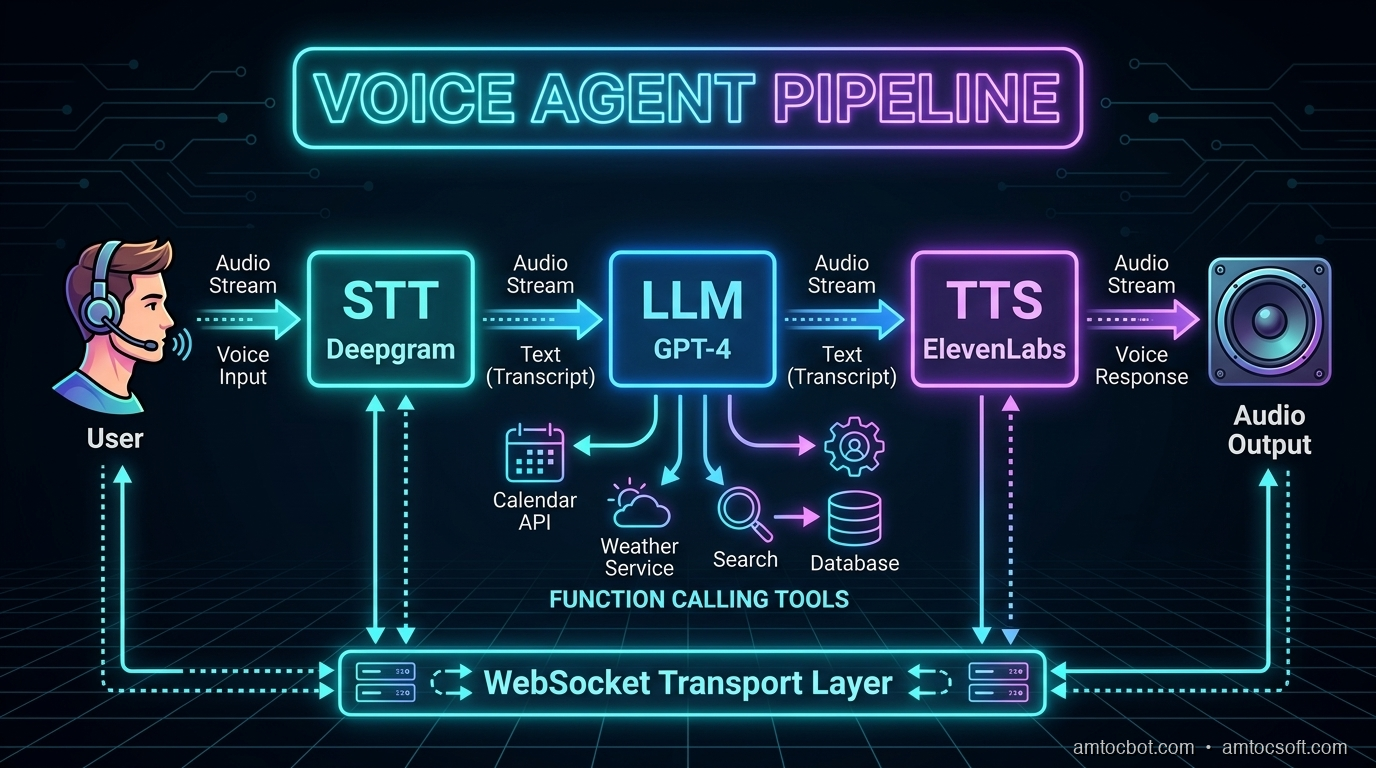
A voice agent pipeline has four stages that process data in sequence:
Microphone Audio
      |
      v
[1. STT] -- Deepgram Nova-3 converts speech to text
      |
      v
[2. LLM] -- GPT-4o processes text and generates response
      |
      v
[3. TTS] -- OpenAI TTS converts response to speech audio
      |
      v
Speaker Output
In Pipecat, each stage is a processor that receives frames (units of data) and outputs new frames. Audio frames flow in, text frames flow between processors, and audio frames flow out.
The key insight: everything streams. The STT starts outputting text before you finish speaking. The LLM starts generating tokens before the full input arrives. The TTS starts producing audio from the first sentence while the LLM is still generating the rest. This streaming overlap is what makes sub-second response times possible.
Latency Budget
Here's where time is spent in a well-optimized pipeline:
| Stage | Latency | Optimization |
|---|---|---|
| VAD (end-of-speech detection) | 50-100ms | Silero VAD with tuned thresholds |
| STT finalization | 100-300ms | Deepgram streaming with endpointing |
| LLM time-to-first-token | 150-400ms | GPT-4o-mini for speed, GPT-4o for quality |
| TTS time-to-first-byte | 100-300ms | OpenAI tts-1 or ElevenLabs Flash |
| Network + buffering | 50-150ms | Connection pooling, edge deployment |
| Total | 450-1250ms | Target: <800ms P95 |
Step 3: Build a Minimal Voice Agent
Here's the simplest possible voice agent with Pipecat. Create a file called agent.py:
import asyncio
import os
from dotenv import load_dotenv

from pipecat.frames.frames import EndFrame, LLMMessagesFrame
from pipecat.pipeline.pipeline import Pipeline
from pipecat.pipeline.runner import PipelineRunner
from pipecat.pipeline.task import PipelineParams, PipelineTask
from pipecat.processors.aggregators.openai_llm_context import OpenAILLMContext
from pipecat.services.deepgram import DeepgramSTTService
from pipecat.services.openai import OpenAILLMService, OpenAITTSService
from pipecat.transports.local.audio import LocalAudioTransport
from pipecat.vad.silero import SileroVADAnalyzer

load_dotenv()

async def main():
    # --- Transport: handles microphone input and speaker output ---
    transport = LocalAudioTransport(
        mic_enabled=True,
        speaker_enabled=True,
        vad_analyzer=SileroVADAnalyzer()  # Detects when you're speaking
    )

    # --- STT: Deepgram Nova-3 for real-time transcription ---
    stt = DeepgramSTTService(
        api_key=os.getenv("DEEPGRAM_API_KEY"),
        model="nova-3",
        language="en"
    )

    # --- LLM: OpenAI GPT-4o for conversation ---
    llm = OpenAILLMService(
        api_key=os.getenv("OPENAI_API_KEY"),
        model="gpt-4o"
    )

    # --- TTS: OpenAI TTS for speech output ---
    tts = OpenAITTSService(
        api_key=os.getenv("OPENAI_API_KEY"),
        voice="nova",
        model="tts-1"
    )

    # --- Conversation context ---
    messages = [
        {
            "role": "system",
            "content": (
                "You are a helpful voice assistant. Keep your responses "
                "concise -- aim for 1-2 sentences. You're having a real-time "
                "voice conversation, so be natural and conversational. "
                "Don't use markdown, lists, or formatting in your responses."
            ),
        }
    ]

    context = OpenAILLMContext(messages)
    context_aggregator = llm.create_context_aggregator(context)

    # --- Build the pipeline ---
    pipeline = Pipeline([
        transport.input(),       # Microphone audio in
        stt,                     # Speech to text
        context_aggregator.user(),  # Add user message to context
        llm,                     # Generate response
        tts,                     # Text to speech
        transport.output(),      # Speaker audio out
        context_aggregator.assistant()  # Add assistant message to context
    ])

    task = PipelineTask(
        pipeline,
        PipelineParams(
            allow_interruptions=True,  # Let user interrupt the AI
            enable_metrics=True        # Track latency metrics
        )
    )

    # --- Run ---
    runner = PipelineRunner()

    # Send initial greeting
    await task.queue_frames([
        LLMMessagesFrame(messages),
    ])

    print("Voice agent is running! Speak into your microphone.")
    print("Press Ctrl+C to stop.")

    await runner.run(task)

if __name__ == "__main__":
    asyncio.run(main())
Run it:
python agent.py
Speak into your microphone, and the agent will respond through your speakers. That's a working voice agent in under 80 lines of code.
Step 4: Add Turn-Taking and Interruptions
The basic agent already supports interruptions thanks to allow_interruptions=True. But let's understand how turn-taking works and how to customize it for your use case.
How Pipecat Handles Turns
Customizing VAD Sensitivity
The Voice Activity Detection (VAD) parameters control when the agent thinks you've started and stopped speaking:
from pipecat.vad.silero import SileroVADAnalyzer, VADParams

# Configure VAD sensitivity
vad_analyzer = SileroVADAnalyzer(
    params=VADParams(
        threshold=0.5,              # Speech detection sensitivity (0-1)
                                     # Lower = more sensitive, higher = less false positives
        min_speech_duration_ms=250,  # Minimum speech to trigger (ignore brief sounds)
        max_speech_duration_s=30,    # Maximum single utterance before forced turn end
        min_silence_duration_ms=500, # Silence before end-of-turn
                                     # THIS IS THE MOST IMPORTANT PARAMETER
        speech_pad_ms=100            # Padding around detected speech
    )
)

transport = LocalAudioTransport(
    mic_enabled=True,
    speaker_enabled=True,
    vad_analyzer=vad_analyzer
)
Tuning min_silence_duration_ms
This parameter determines how long the agent waits after you stop talking before it responds:
| Value | Behavior | Best For |
|---|---|---|
| 200-300ms | Very responsive, but interrupts natural pauses | Quick Q&A, command-driven agents |
| 400-600ms | Good balance for most conversations | General-purpose voice agents |
| 700-1000ms | Very patient, lets user collect thoughts | Therapy bots, elderly users, complex topics |
| 1000-2000ms | Extremely patient | Dictation, users with speech difficulties |
Start with 500ms and adjust based on user feedback.
Step 5: Add Function Calling
A voice agent becomes truly useful when it can take actions. Let's add function calling so our agent can check the weather, set reminders, or look up information.
import json
from datetime import datetime, timedelta

# Define tools the agent can use
tools = [
    {
        "type": "function",
        "function": {
            "name": "get_weather",
            "description": "Get the current weather for a location",
            "parameters": {
                "type": "object",
                "properties": {
                    "location": {
                        "type": "string",
                        "description": "City name, e.g. 'San Francisco'"
                    }
                },
                "required": ["location"]
            }
        }
    },
    {
        "type": "function",
        "function": {
            "name": "set_reminder",
            "description": "Set a reminder for the user",
            "parameters": {
                "type": "object",
                "properties": {
                    "message": {
                        "type": "string",
                        "description": "The reminder message"
                    },
                    "minutes": {
                        "type": "integer",
                        "description": "Minutes from now"
                    }
                },
                "required": ["message", "minutes"]
            }
        }
    },
    {
        "type": "function",
        "function": {
            "name": "search_knowledge_base",
            "description": "Search internal documentation or knowledge base",
            "parameters": {
                "type": "object",
                "properties": {
                    "query": {
                        "type": "string",
                        "description": "The search query"
                    }
                },
                "required": ["query"]
            }
        }
    }
]

# Handler for function calls
async def handle_function_call(function_name, tool_call_id, args, llm, context, result_callback):
    if function_name == "get_weather":
        location = args["location"]
        # In production, call a real weather API (OpenWeatherMap, etc.)
        result = json.dumps({
            "location": location,
            "temperature": 72,
            "condition": "sunny",
            "humidity": 45
        })
        await result_callback(result)

    elif function_name == "set_reminder":
        message = args["message"]
        minutes = args["minutes"]
        reminder_time = datetime.now() + timedelta(minutes=minutes)
        # In production, schedule via APScheduler, Celery, or system cron
        result = json.dumps({
            "status": "set",
            "message": message,
            "trigger_at": reminder_time.isoformat()
        })
        await result_callback(result)

    elif function_name == "search_knowledge_base":
        query = args["query"]
        # In production, call your RAG pipeline (Pinecone, Weaviate, etc.)
        result = json.dumps({
            "results": [
                {"title": "Getting Started Guide", "relevance": 0.95},
                {"title": "API Reference", "relevance": 0.87}
            ],
            "query": query
        })
        await result_callback(result)

# Register handlers with the LLM
llm = OpenAILLMService(
    api_key=os.getenv("OPENAI_API_KEY"),
    model="gpt-4o"
)
llm.register_function("get_weather", handle_function_call)
llm.register_function("set_reminder", handle_function_call)
llm.register_function("search_knowledge_base", handle_function_call)

# Update context to include tools
messages = [
    {
        "role": "system",
        "content": (
            "You are a helpful voice assistant with access to tools. "
            "You can check the weather, set reminders, and search a knowledge base. "
            "Keep responses concise and conversational. Never use markdown."
        ),
    }
]

context = OpenAILLMContext(messages, tools)
Now you can say "What's the weather in Tokyo?" and the agent will call the function and speak the result naturally.
Step 6: Add Conversation Memory
Pipecat's context aggregator automatically tracks conversation history. Every user message and assistant response is added to the context window. But for longer conversations, you need a strategy to manage context size.
from pipecat.processors.frame_processor import FrameProcessor
from pipecat.frames.frames import Frame, LLMMessagesFrame

class ConversationMemoryManager(FrameProcessor):
    """Manages conversation context to prevent token overflow.

    Strategy: Keep system message + summary of old messages + last N messages.
    This preserves important context while staying within token limits.
    """

    def __init__(self, max_messages: int = 20, summary_threshold: int = 15):
        super().__init__()
        self.max_messages = max_messages
        self.summary_threshold = summary_threshold
        self.conversation_summary = ""

    async def process_frame(self, frame: Frame, direction):
        if isinstance(frame, LLMMessagesFrame):
            messages = frame.messages

            if len(messages) > self.max_messages:
                system_msg = messages[0]  # Always keep system message

                # Summarize older messages (in production, use the LLM for this)
                old_messages = messages[1:-(self.summary_threshold)]
                topics = set()
                for msg in old_messages:
                    content = msg.get("content", "")
                    if len(content) > 20:
                        topics.add(content[:50])

                self.conversation_summary = (
                    f"Earlier in this conversation, the following topics "
                    f"were discussed: {', '.join(list(topics)[:5])}. "
                    f"Continue naturally from the recent context."
                )

                summary_msg = {
                    "role": "system",
                    "content": self.conversation_summary
                }

                recent = messages[-(self.summary_threshold):]
                frame.messages = [system_msg, summary_msg] + recent

        await self.push_frame(frame, direction)
Token Budget Planning
| LLM | Context Window | Recommended Conversation Limit |
|---|---|---|
| GPT-4o | 128K tokens | ~50-100 exchanges before summarizing |
| GPT-4o-mini | 128K tokens | ~50-100 exchanges (cheaper per token) |
| Claude Sonnet | 200K tokens | ~100-200 exchanges before summarizing |
For most voice agents, conversations last 5-15 exchanges. Context overflow is mainly a concern for long customer service calls or ongoing assistant sessions.
Step 7: Add Error Handling and Resilience
Real voice agents need to handle failures gracefully. Users can't see error logs -- they only hear silence or confusion. Every failure mode needs a spoken recovery.
from pipecat.processors.frame_processor import FrameProcessor
from pipecat.frames.frames import Frame, TextFrame, ErrorFrame
import logging

logger = logging.getLogger(__name__)

class VoiceErrorHandler(FrameProcessor):
    """Catches errors in the pipeline and converts them to spoken feedback.

    Without this, errors cause dead silence -- the worst possible UX.
    """

    def __init__(self):
        super().__init__()
        self.consecutive_errors = 0
        self.max_retries = 3

    async def process_frame(self, frame: Frame, direction):
        if isinstance(frame, ErrorFrame):
            self.consecutive_errors += 1
            logger.error(f"Pipeline error ({self.consecutive_errors}): {frame.error}")

            if self.consecutive_errors >= self.max_retries:
                # Too many errors -- graceful shutdown
                error_response = TextFrame(
                    "I'm experiencing technical difficulties and need to restart. "
                    "Please try again in a moment."
                )
                await self.push_frame(error_response, direction)
                # In production: alert on-call, restart pipeline
            else:
                # Recoverable error -- ask user to repeat
                error_response = TextFrame(
                    "I'm sorry, I ran into a brief issue. "
                    "Could you please repeat that?"
                )
                await self.push_frame(error_response, direction)
        else:
            # Reset error counter on successful frames
            self.consecutive_errors = 0
            await self.push_frame(frame, direction)


class LatencyMonitor(FrameProcessor):
    """Tracks and logs latency between pipeline stages.

    Critical for production monitoring -- alerts when TTFB exceeds targets.
    """

    def __init__(self, stage_name: str, warn_threshold_ms: float = 500):
        super().__init__()
        self.stage_name = stage_name
        self.warn_threshold_ms = warn_threshold_ms
        self.frame_count = 0
        self.total_latency = 0

    async def process_frame(self, frame: Frame, direction):
        import time
        start = time.monotonic()
        await self.push_frame(frame, direction)
        elapsed_ms = (time.monotonic() - start) * 1000

        self.frame_count += 1
        self.total_latency += elapsed_ms

        if elapsed_ms > self.warn_threshold_ms:
            logger.warning(
                f"[{self.stage_name}] High latency: {elapsed_ms:.0f}ms "
                f"(threshold: {self.warn_threshold_ms}ms)"
            )

    @property
    def avg_latency_ms(self) -> float:
        return self.total_latency / max(self.frame_count, 1)


# Add to pipeline
pipeline = Pipeline([
    transport.input(),
    stt,
    LatencyMonitor("stt", warn_threshold_ms=300),
    context_aggregator.user(),
    llm,
    LatencyMonitor("llm", warn_threshold_ms=500),
    VoiceErrorHandler(),         # Catch errors before TTS
    tts,
    LatencyMonitor("tts", warn_threshold_ms=300),
    transport.output(),
    context_aggregator.assistant()
])
Step 8: Connect to WebRTC (Phone & Web)
To make your voice agent accessible beyond your local machine -- via a web browser or phone -- replace the local audio transport with Daily's WebRTC transport.
from pipecat.transports.services.daily import DailyTransport, DailyParams

# Replace LocalAudioTransport with DailyTransport
transport = DailyTransport(
    room_url="https://your-domain.daily.co/your-room",
    token="your-daily-token",
    bot_name="AmtocBot",
    params=DailyParams(
        audio_in_enabled=True,
        audio_out_enabled=True,
        vad_enabled=True,
        vad_analyzer=SileroVADAnalyzer(
            params=VADParams(
                threshold=0.5,
                min_silence_duration_ms=500
            )
        )
    )
)
Web Browser Integration
Daily provides a JavaScript SDK for embedding voice agents in web pages:
// Frontend: Connect to the voice agent via WebRTC
import DailyIframe from '@daily-co/daily-js';

const callFrame = DailyIframe.createFrame();
await callFrame.join({
    url: 'https://your-domain.daily.co/your-room',
    token: 'your-participant-token'
});

// Audio is automatically routed to/from the voice agent
Phone Connectivity
Connect a Twilio phone number to a Daily room for telephone access:
# Twilio webhook handler (Flask example)
from flask import Flask, request
from twilio.twiml.voice_response import VoiceResponse, Connect

app = Flask(__name__)

@app.route("/incoming-call", methods=["POST"])
def handle_incoming_call():
    response = VoiceResponse()
    connect = Connect()
    # Route the phone call to the Daily room where your agent lives
    connect.stream(
        url="wss://your-domain.daily.co/your-room/stream",
        name="phone-caller"
    )
    response.append(connect)
    return str(response)
Step 9: Swap Providers Without Rewriting
One of Pipecat's biggest strengths is provider swappability. Here's how to switch between different STT, LLM, and TTS providers with minimal code changes:
# --- STT Options ---
# Deepgram (best for real-time streaming)
from pipecat.services.deepgram import DeepgramSTTService
stt = DeepgramSTTService(api_key=os.getenv("DEEPGRAM_API_KEY"), model="nova-3")

# Google (best for enterprise/multilingual)
from pipecat.services.google import GoogleSTTService
stt = GoogleSTTService(credentials=os.getenv("GOOGLE_CREDENTIALS"))

# AssemblyAI (best streaming accuracy)
from pipecat.services.assemblyai import AssemblyAISTTService
stt = AssemblyAISTTService(api_key=os.getenv("ASSEMBLYAI_API_KEY"))

# --- LLM Options ---
# OpenAI GPT-4o
from pipecat.services.openai import OpenAILLMService
llm = OpenAILLMService(api_key=os.getenv("OPENAI_API_KEY"), model="gpt-4o")

# Anthropic Claude
from pipecat.services.anthropic import AnthropicLLMService
llm = AnthropicLLMService(api_key=os.getenv("ANTHROPIC_API_KEY"), model="claude-sonnet-4-20250514")

# Groq (ultra-fast inference)
from pipecat.services.groq import GroqLLMService
llm = GroqLLMService(api_key=os.getenv("GROQ_API_KEY"), model="llama-3.3-70b")

# --- TTS Options ---
# OpenAI TTS (simple, reliable)
from pipecat.services.openai import OpenAITTSService
tts = OpenAITTSService(api_key=os.getenv("OPENAI_API_KEY"), voice="nova")

# ElevenLabs (highest quality)
from pipecat.services.elevenlabs import ElevenLabsTTSService
tts = ElevenLabsTTSService(api_key=os.getenv("ELEVENLABS_API_KEY"), voice_id="...")

# Cartesia (lowest latency -- 40ms)
from pipecat.services.cartesia import CartesiaTTSService
tts = CartesiaTTSService(api_key=os.getenv("CARTESIA_API_KEY"), voice_id="...")

# Kokoro (self-hosted, free)
from pipecat.services.kokoro import KokoroTTSService
tts = KokoroTTSService(voice="af_heart")
The pipeline code stays exactly the same -- only the service initialization changes.
The Complete Production-Ready Agent
Here's the full agent combining everything we've built:
import asyncio
import os
import json
import logging
from datetime import datetime, timedelta
from dotenv import load_dotenv

from pipecat.frames.frames import LLMMessagesFrame
from pipecat.pipeline.pipeline import Pipeline
from pipecat.pipeline.runner import PipelineRunner
from pipecat.pipeline.task import PipelineParams, PipelineTask
from pipecat.processors.aggregators.openai_llm_context import OpenAILLMContext
from pipecat.services.deepgram import DeepgramSTTService
from pipecat.services.openai import OpenAILLMService, OpenAITTSService
from pipecat.transports.local.audio import LocalAudioTransport
from pipecat.vad.silero import SileroVADAnalyzer, VADParams

load_dotenv()
logging.basicConfig(level=logging.INFO)

# --- Tools ---
tools = [
    {
        "type": "function",
        "function": {
            "name": "get_weather",
            "description": "Get the current weather for a location",
            "parameters": {
                "type": "object",
                "properties": {
                    "location": {"type": "string", "description": "City name"}
                },
                "required": ["location"]
            }
        }
    },
    {
        "type": "function",
        "function": {
            "name": "set_reminder",
            "description": "Set a reminder for the user",
            "parameters": {
                "type": "object",
                "properties": {
                    "message": {"type": "string"},
                    "minutes": {"type": "integer"}
                },
                "required": ["message", "minutes"]
            }
        }
    }
]

async def handle_function_call(function_name, tool_call_id, args, llm, context, result_callback):
    if function_name == "get_weather":
        result = json.dumps({
            "temperature": 72, "condition": "sunny",
            "location": args["location"]
        })
        await result_callback(result)
    elif function_name == "set_reminder":
        trigger = datetime.now() + timedelta(minutes=args["minutes"])
        result = json.dumps({
            "status": "set", "message": args["message"],
            "trigger_at": trigger.strftime("%I:%M %p")
        })
        await result_callback(result)

async def main():
    # Transport with tuned VAD
    transport = LocalAudioTransport(
        mic_enabled=True,
        speaker_enabled=True,
        vad_analyzer=SileroVADAnalyzer(
            params=VADParams(
                threshold=0.5,
                min_silence_duration_ms=500,
                min_speech_duration_ms=250
            )
        )
    )

    # Services
    stt = DeepgramSTTService(
        api_key=os.getenv("DEEPGRAM_API_KEY"),
        model="nova-3",
        language="en"
    )

    llm = OpenAILLMService(
        api_key=os.getenv("OPENAI_API_KEY"),
        model="gpt-4o"
    )
    llm.register_function("get_weather", handle_function_call)
    llm.register_function("set_reminder", handle_function_call)

    tts = OpenAITTSService(
        api_key=os.getenv("OPENAI_API_KEY"),
        voice="nova",
        model="tts-1"
    )

    # Context
    messages = [
        {
            "role": "system",
            "content": (
                "You are a friendly voice assistant called Amtoc. "
                "Keep responses to 1-3 sentences. Be conversational "
                "and natural. You can check the weather and set reminders. "
                "Never use markdown, lists, or formatting. "
                "If you're not sure about something, say so honestly."
            ),
        }
    ]
    context = OpenAILLMContext(messages, tools)
    context_aggregator = llm.create_context_aggregator(context)

    # Pipeline
    pipeline = Pipeline([
        transport.input(),
        stt,
        context_aggregator.user(),
        llm,
        tts,
        transport.output(),
        context_aggregator.assistant()
    ])

    task = PipelineTask(
        pipeline,
        PipelineParams(
            allow_interruptions=True,
            enable_metrics=True
        )
    )

    runner = PipelineRunner()
    await task.queue_frames([LLMMessagesFrame(messages)])

    print("=" * 50)
    print("  Amtoc Voice Agent is Running!")
    print("  Speak into your microphone.")
    print("  Press Ctrl+C to stop.")
    print("=" * 50)

    await runner.run(task)

if __name__ == "__main__":
    asyncio.run(main())
Troubleshooting Common Issues
"No audio input detected"
- Check microphone permissions in your OS settings
- Verify PyAudio can see your microphone:
python -c "import pyaudio; p = pyaudio.PyAudio(); print(p.get_device_count())" - On macOS: grant Terminal/IDE microphone permission in System Settings > Privacy
- Try specifying a device index in the transport configuration
High latency (>1 second response time)
- Switch from
tts-1-hdtotts-1(quality vs speed trade-off) - Use
gpt-4o-miniinstead ofgpt-4ofor the LLM (2-3x faster) - Reduce
min_silence_duration_msto detect end-of-turn faster (try 300ms) - Check network: API calls need low latency (<50ms round trip)
- Use Cartesia TTS (40ms TTFA) instead of OpenAI (200-400ms)
Agent interrupts you mid-sentence
- Increase
min_silence_duration_ms(try 700-800ms) - Increase
min_speech_duration_msto avoid triggering on brief sounds (try 300ms) - Adjust VAD
thresholdhigher (0.6-0.7) to require stronger speech signal
Echo or feedback loop
- Use headphones -- this is the #1 fix
- Enable acoustic echo cancellation in your OS audio settings
- In production, use WebRTC transport (Daily) which has built-in echo cancellation
API rate limits
- Implement exponential backoff for retries
- Use connection pooling (Pipecat does this automatically)
- For high-volume: negotiate enterprise API rates or self-host STT/TTS
Cost of Running This Agent
For a typical deployment handling 1,000 minutes of conversation per month:
| Component | Provider | Cost/Month |
|---|---|---|
| STT | Deepgram Nova-3 (streaming) | $7.70 |
| LLM | GPT-4o | $10-30 (varies by conversation length) |
| TTS | OpenAI tts-1 | ~$15 |
| Total | ~$33-53/month |
For budget optimization, swap GPT-4o for GPT-4o-mini ($3-10/month) and you're under $30/month for 1,000 minutes.
Next Steps
You now have a working voice agent. From here, you can:
- Add more tools: Connect to calendars, databases, CRMs -- anything your agent needs
- Swap providers: Try ElevenLabs TTS for higher quality, or self-hosted Kokoro for zero API costs
- Deploy to the cloud: Use Daily rooms and Twilio for phone access, or Pipecat Cloud for managed hosting
- Add a personality: Tune the system prompt for your specific use case
- Build a web interface: Use the React or JavaScript SDK to embed the agent in a web page
- Add analytics: Track conversation metrics, user satisfaction, and task completion rates
In the next post, we'll go deeper into voice agent architectures -- comparing the pipeline approach we just built to end-to-end models like GPT-4o Voice and managed platforms like Retell and VAPI.
Sources & References:
1. Pipecat — "Voice Agent Framework" — https://github.com/pipecat-ai/pipecat
2. OpenAI — "Whisper API" — https://platform.openai.com/docs/guides/speech-to-text
3. Deepgram — "Streaming Speech-to-Text" — https://developers.deepgram.com/
This is part 4 of the AmtocSoft Voice AI series. Full source code is available in the examples above -- copy, paste, and start experimenting.
Tools mentioned in this post
Disclosure: the links below are affiliate links. If you sign up via them, we earn a small commission at no extra cost to you. This helps fund the writing of more posts like this one.
About the Author
Toc Am
Founder of AmtocSoft. Writing practical deep-dives on AI engineering, cloud architecture, and developer tooling. Previously built backend systems at scale. Reviews every post published under this byline.
Published: 2026-04-06 · Written with AI assistance, reviewed by Toc Am.
Get These In Your Inbox
Weekly deep-dives on AI engineering, no fluff. Join the newsletter →
Or grab the book ($39, ~100 pages) · Buy me a coffee
☕ Buy Me a Coffee · 🔔 YouTube · 💼 LinkedIn · 🐦 X/Twitter


No comments:
Post a Comment