Multimodal RAG: Searching Images, Audio, and Video
Text-based RAG is a solved problem at this point. You chunk documents, embed them, store vectors, and retrieve relevant passages. But the real world isn't text-only. Your knowledge base includes product photos, architecture diagrams, recorded meetings, training videos, and scanned PDFs with charts that no OCR can faithfully extract. Traditional RAG ignores all of it.
Multimodal RAG extends retrieval-augmented generation to work across modalities: text, images, audio, and video. Instead of converting everything to text and hoping for the best, you embed each modality in a shared vector space where a text query can find a relevant image, and an image query can surface related audio clips.
The Architecture
Multimodal RAG adds two layers on top of standard RAG: modality-specific preprocessing and a unified embedding space.
Standard RAG Pipeline
Text → Chunk → Embed → Store → Query → Retrieve → Generate
Multimodal RAG Pipeline
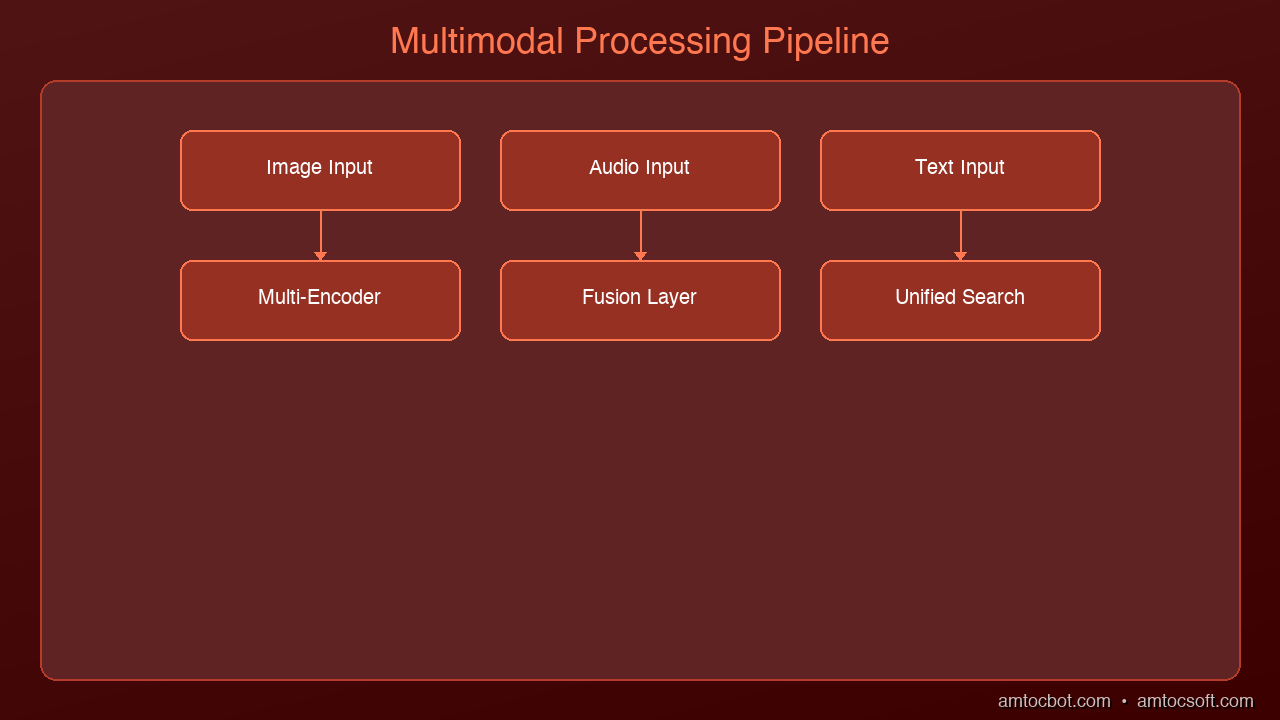
Text   → Chunk         → Embed (text encoder)   ─┐
Images → Caption/Embed → Embed (vision encoder)  ├→ Unified Vector Store
Audio  → Transcribe    → Embed (audio encoder)   │
Video  → Frame+Audio   → Embed (multi encoder)  ─┘
                                                   ↓
                              Query → Multi-modal retrieve → Generate
The critical insight: all modalities must map to a shared embedding space so that cross-modal similarity search works. A text query like "system architecture diagram" should find the actual architecture diagram image, not just text that mentions architecture.
graph LR
  T["Text"] -->|chunk & encode| E["Multimodal Embeddings"]
  I["Images"] -->|caption & encode| E
  AU["Audio"] -->|transcribe & encode| E
  V["Video"] -->|frame + audio| E
  E -->|store| U["Unified Vector Store"]
  U -->|search| R["Cross-Modal Retrieval"]
  R -->|augment| M["Multimodal LLM"]
  M -->|deliver| O["Rich Response"]
Embedding Models for Each Modality
Text + Image: CLIP and Successors
OpenAI's CLIP (and successors like SigLIP, EVA-CLIP) maps text and images into the same 512/768-dimensional space. This enables zero-shot cross-modal search:
from sentence_transformers import SentenceTransformer
from PIL import Image

model = SentenceTransformer('clip-ViT-L-14')

# Embed text and images into the same space
text_embedding = model.encode("architecture diagram showing microservices")
image_embedding = model.encode(Image.open("system_arch.png"))

# Cosine similarity works across modalities
from numpy import dot
from numpy.linalg import norm
similarity = dot(text_embedding, image_embedding) / (
    norm(text_embedding) * norm(image_embedding)
)
Audio: Whisper + Text Embeddings
For audio, the pragmatic approach is two-stage: transcribe with Whisper, then embed the transcript. This loses tonal information but captures semantic content:
import whisper

model = whisper.load_model("large-v3")

def embed_audio(audio_path, text_embedder):
    """Transcribe audio, then embed the transcript."""
    result = model.transcribe(audio_path)
    segments = []
    for seg in result["segments"]:
        segments.append({
            "text": seg["text"],
            "start": seg["start"],
            "end": seg["end"],
            "embedding": text_embedder.encode(seg["text"])
        })
    return segments
For use cases where acoustic features matter (music similarity, speaker identification, emotion detection), use dedicated audio embeddings like CLAP (Contrastive Language-Audio Pretraining), which maps audio and text into a shared space similar to how CLIP handles images.
Video: Keyframe Extraction + Dual Embedding
Video is the most complex modality because it combines visual and audio streams over time. The standard approach:
- Extract keyframes at regular intervals or on scene changes
- Transcribe the audio track with Whisper
- Embed keyframes with CLIP/SigLIP
- Embed transcript segments with text embedder
- Store both with timestamps so you can retrieve the exact moment
import cv2

def extract_keyframes(video_path, interval_seconds=5):
    """Extract frames at fixed intervals."""
    cap = cv2.VideoCapture(video_path)
    fps = cap.get(cv2.CAP_PROP_FPS)
    frames = []
    frame_count = 0

    while cap.isOpened():
        ret, frame = cap.read()
        if not ret:
            break
        if frame_count % int(fps * interval_seconds) == 0:
            timestamp = frame_count / fps
            frames.append({
                "frame": frame,
                "timestamp": timestamp,
                "frame_number": frame_count
            })
        frame_count += 1

    cap.release()
    return frames
Unified Vector Store Design
The vector store needs to handle multiple modalities while maintaining fast retrieval. Here's a schema that works:
# Each document in the vector store
{
    "id": "doc_001_img_03",
    "modality": "image",          # text | image | audio | video
    "source_file": "report.pdf",
    "page_or_timestamp": 5,       # page number or seconds
    "content_text": "Q3 revenue chart showing 15% YoY growth",
    "embedding": [0.12, -0.34, ...],  # unified space vector
    "metadata": {
        "original_path": "/docs/report.pdf",
        "extracted_from": "pdf_page_5_figure_2",
        "dimensions": "800x600",
        "modality_specific": {}
    }
}
Indexing Strategy
For each modality, you index differently:
| Modality | Preprocessing | Embedding Model | Chunk Size |
|---|---|---|---|
| Text | Sentence/paragraph chunking | text-embedding-3-large | 512-1024 tokens |
| Images | Caption generation + raw embed | CLIP ViT-L/14 | 1 per image |
| Audio | Whisper transcription + segmenting | text embedder on transcript | 30s segments |
| Video | Keyframe extraction + transcription | CLIP (frames) + text (transcript) | 5s intervals |
| PDF charts | Vision model description + raw embed | CLIP + text embedder | 1 per figure |
Retrieval: Cross-Modal Search
The power of multimodal RAG is cross-modal retrieval. A single query can return results from any modality:
def multimodal_search(query, vector_store, top_k=10, modality_filter=None):
    """Search across all modalities with optional filtering."""
    query_embedding = unified_embedder.encode(query)

    results = vector_store.search(
        vector=query_embedding,
        top_k=top_k,
        filter={"modality": modality_filter} if modality_filter else None
    )

    # Group by modality for the LLM
    grouped = {"text": [], "image": [], "audio": [], "video": []}
    for result in results:
        grouped[result["modality"]].append(result)

    return grouped
Building the Augmented Prompt
When you retrieve results from multiple modalities, the prompt to the LLM needs to handle each type:
def build_multimodal_prompt(query, retrieved):
    """Build a prompt that includes text, image descriptions, and timestamps."""
    context_parts = []

    for text_result in retrieved["text"]:
        context_parts.append(f"[Text] {text_result['content_text']}")

    for img_result in retrieved["image"]:
        context_parts.append(
            f"[Image from {img_result['source_file']}] "
            f"{img_result['content_text']}"
        )

    for audio_result in retrieved["audio"]:
        context_parts.append(
            f"[Audio at {audio_result['page_or_timestamp']}s] "
            f"{audio_result['content_text']}"
        )

    context = "\n\n".join(context_parts)

    return f"""Answer the question using the following multimodal context.
Each piece of context is labeled with its source type (Text, Image, Audio).

Context:
{context}

Question: {query}"""
For models that support vision (Claude, GPT-4o), you can pass the actual images alongside text for richer understanding. This is significantly more powerful than passing image descriptions alone.
Production Considerations
Cost
Multimodal RAG is more expensive than text-only RAG:
| Component | Text RAG | Multimodal RAG | Multiplier |
|---|---|---|---|
| Storage | 1x | 5-20x (images, audio) | High |
| Embedding compute | 1x | 3-5x (multiple models) | Medium |
| Ingestion time | 1x | 10-50x (transcription, extraction) | High |
| Query latency | 100-200ms | 200-500ms | Low |
| LLM token cost | 1x | 2-4x (longer contexts) | Medium |
When It's Worth the Cost
Multimodal RAG pays for itself when:
- Knowledge lives in non-text formats: engineering diagrams, medical images, recorded presentations
- OCR isn't enough: charts, handwritten notes, complex layouts lose meaning when converted to text
- Audio/video archives are large: meeting recordings, training videos, podcast libraries
- Cross-modal queries are common: "show me the diagram from the Q3 meeting" requires linking audio context to visual content
When to Skip It
Standard text RAG is sufficient when:
- Your knowledge base is primarily text documents
- Images are decorative rather than informational
- Audio/video content is already transcribed and the transcripts capture the full value
- Budget constraints make multimodal embedding impractical
Frameworks and Tools
| Tool | Strengths | Modalities |
|---|---|---|
| LlamaIndex | Best multimodal RAG support, MultiModalVectorStoreIndex | Text, Image, Audio |
| LangChain | Good text RAG, growing multimodal support | Text, Image |
| Unstructured.io | Best document parsing (PDFs, images, tables) | Text, Image, Table |
| Twelve Labs | Video-native embeddings and search | Video, Audio |
| Pinecone | Fast vector search, metadata filtering | Any (bring your embeddings) |
What's Next
Multimodal RAG is still maturing rapidly. The frontier is moving toward native multimodal embeddings — single models that embed text, images, audio, and video into one space without separate encoders. Models like ImageBind (Meta) and forthcoming unified encoders will simplify the architecture significantly.
The other major development is agentic multimodal retrieval, where the AI system doesn't just search a fixed index but actively decides which modalities to query, how to combine results, and when to request additional context. We explored the decision-making aspect in our Self-RAG post — applying that pattern to multimodal retrieval is the logical next step.
Sources & References:
1. OpenAI — "CLIP: Connecting Text and Images" — https://openai.com/index/clip/
2. Meta — "ImageBind: One Embedding Space To Bind Them All" (2023) — https://arxiv.org/abs/2305.05665
3. Google — "SigLIP: Sigmoid Loss for Language Image Pre-Training" — https://arxiv.org/abs/2303.15343
Part of the RAG Deep Dive series on AmtocSoft. Follow us on LinkedIn and X for daily AI engineering insights.
Tools mentioned in this post
Disclosure: the links below are affiliate links. If you sign up via them, we earn a small commission at no extra cost to you. This helps fund the writing of more posts like this one.
About the Author
Toc Am
Founder of AmtocSoft. Writing practical deep-dives on AI engineering, cloud architecture, and developer tooling. Previously built backend systems at scale. Reviews every post published under this byline.
Published: 2026-04-02 · Written with AI assistance, reviewed by Toc Am.
Get These In Your Inbox
Weekly deep-dives on AI engineering, no fluff. Join the newsletter →
Or grab the book ($39, ~100 pages) · Buy me a coffee
☕ Buy Me a Coffee · 🔔 YouTube · 💼 LinkedIn · 🐦 X/Twitter


No comments:
Post a Comment