Level: Professional
Topic: Voice AI, MLOps, Production
Your voice agent works perfectly in the demo. One user, low latency, great responses. Then you ship it. A hundred users connect simultaneously, latency triples, the TTS queue backs up, and your monthly bill hits five figures.
Production voice AI is fundamentally an infrastructure problem. The AI part -- choosing models, writing prompts, tuning responses -- is the easy part. The hard part is keeping everything fast, reliable, and affordable at scale. The industry median response time is 1.4-1.7 seconds, and 10% of production calls exceed 3-5 seconds. The companies that win are the ones who engineer their way below the 300ms threshold that humans expect from natural conversation.
This guide covers the operational realities of running voice agents in production: infrastructure sizing, the three metrics that actually matter, cost modeling with real numbers, compliance requirements that most teams discover too late, and the operational runbooks that keep systems alive at scale.
Infrastructure Sizing
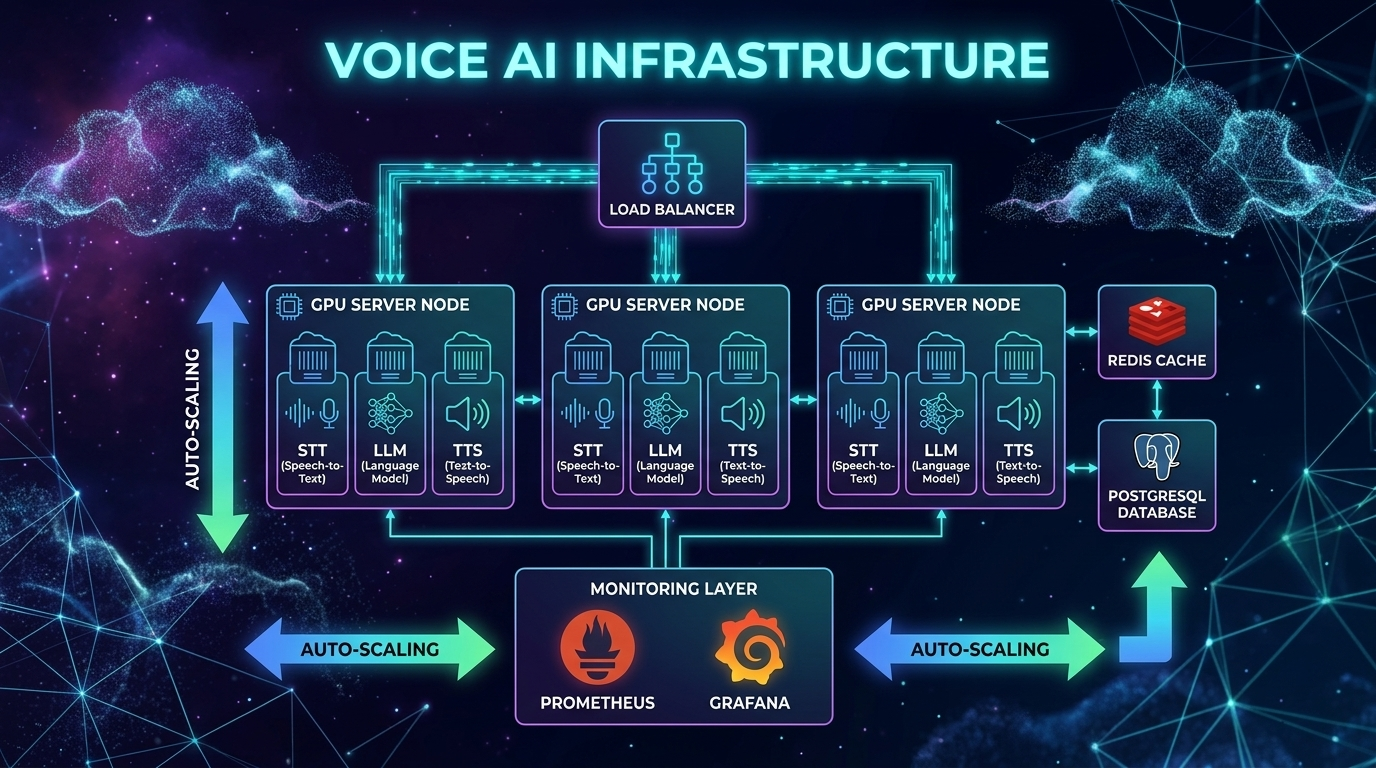
Voice agents are uniquely resource-intensive. Unlike text chatbots where a single server can handle thousands of concurrent conversations, voice agents consume real-time compute for every active call -- audio processing, model inference, and media routing all happen simultaneously and continuously.
Compute Requirements per Concurrent Call
Each active voice call requires:
| Resource | API-Based Pipeline | Self-Hosted Pipeline |
|---|---|---|
| STT processing | 1 API call per utterance | ~0.3 vCPU (streaming Whisper) |
| LLM inference | 1 API call per turn | 1-4 vCPU (small models) or GPU (large) |
| TTS synthesis | 1 API call per response | ~0.5 vCPU (Kokoro) or GPU (ElevenLabs-quality) |
| Audio routing | ~0.1 vCPU | ~0.1 vCPU |
| Memory | 200-500MB per session | 200-500MB per session |
| Network | ~64kbps per direction | ~64kbps per direction |
Scaling Targets
| Concurrent Calls | API-Based Infrastructure | Self-Hosted Infrastructure |
|---|---|---|
| 10 | Standard web server (4 vCPU) | 1x 8-vCPU server + 1x T4 GPU |
| 100 | 2x web servers behind load balancer | 4x 8-vCPU servers + 2x A10 GPUs |
| 1,000 | 4x web servers, connection pooling | Auto-scaling group + 8x A10 GPUs |
| 10,000 | Dedicated API tier, rate limit management | Kubernetes cluster + GPU pool |
The GPU Utilization Insight
GPU utilization for TTS (and self-hosted STT) is bursty. Calls don't generate speech continuously -- there are pauses, listening periods, and processing gaps. A well-designed batching system can achieve 70-80% GPU utilization by queuing TTS requests across concurrent calls.
import asyncio
from collections import deque

class TTSBatchQueue:
    """Batch TTS requests across concurrent calls for better GPU utilization.

    Instead of processing one TTS request at a time, collect requests
    and process them in batches. This increases throughput by 3-5x.
    """

    def __init__(self, model, batch_size: int = 8, max_wait_ms: float = 50):
        self.model = model
        self.batch_size = batch_size
        self.max_wait_ms = max_wait_ms
        self.queue: deque = deque()
        self.processing = False

    async def enqueue(self, text: str, voice: str) -> bytes:
        """Add a TTS request to the batch queue."""
        future = asyncio.get_event_loop().create_future()
        self.queue.append({"text": text, "voice": voice, "future": future})

        if not self.processing:
            asyncio.create_task(self._process_batch())

        return await future

    async def _process_batch(self):
        """Process queued requests in batches."""
        self.processing = True

        while self.queue:
            # Wait briefly to accumulate more requests
            await asyncio.sleep(self.max_wait_ms / 1000)

            # Collect up to batch_size requests
            batch = []
            while self.queue and len(batch) < self.batch_size:
                batch.append(self.queue.popleft())

            # Process batch on GPU
            texts = [r["text"] for r in batch]
            voices = [r["voice"] for r in batch]
            results = await self.model.batch_synthesize(texts, voices)

            # Return results to callers
            for request, audio in zip(batch, results):
                request["future"].set_result(audio)

        self.processing = False
Connection Management
WebRTC connections are stateful and expensive. Each connection maintains DTLS encryption context, SRTP session keys, ICE candidate state, and codec negotiation state.
Plan for ~100 concurrent WebRTC connections per media server instance. Beyond that, you need a distributed architecture with a signaling layer that routes connections to available media servers.
For telephony (SIP/PSTN), each trunk supports a fixed number of concurrent calls. Plan capacity with your telephony provider (Twilio, Vonage) and implement graceful rejection when capacity is reached.
The Three Metrics That Matter
Voice AI monitoring requires fundamentally different metrics than traditional web services. Response time and error rate aren't enough. You need voice-specific observability.
1. Time-to-First-Byte (TTFB)
This is the interval between the user finishing their utterance and the first audio byte of the response reaching their speaker. It's the single most important metric for user experience.
| Threshold | Impact | Action |
|---|---|---|
| < 300ms | Feels like natural conversation | Gold standard |
| 300-500ms | Users notice slight delay but tolerate | Target for production |
| 500-800ms | Noticeable lag, users start talking over AI | Needs optimization |
| > 800ms | Users hang up or repeat themselves | Critical -- page on-call |
The 300ms rule: Human conversation has a natural pause of about 300ms between turns. This is neurologically hardwired -- exceeding it triggers stress. The industry median is 1.4-1.7 seconds, which is 5x slower than human expectation.
Production leaders are achieving sub-200ms by combining Cartesia TTS (40ms TTFA), optimized STT streaming, and fast LLMs. Some teams report sub-97ms TTS with Qwen3-TTS-Flash and sub-138ms with ElevenLabs Flash.
Break TTFB into sub-components and alert on each independently:
import time
import logging
from dataclasses import dataclass, field

@dataclass
class TTFBTracker:
    """Track TTFB broken down by pipeline stage.

    Each component reports its latency. Alerts fire when any stage
    exceeds its individual threshold OR when total TTFB exceeds target.
    """
    stt_ms: float = 0
    llm_ms: float = 0
    tts_ms: float = 0
    network_ms: float = 0

    # Thresholds per component
    stt_threshold: float = 200
    llm_threshold: float = 350
    tts_threshold: float = 200
    total_threshold: float = 500

    @property
    def total_ms(self) -> float:
        return self.stt_ms + self.llm_ms + self.tts_ms + self.network_ms

    def check_alerts(self) -> list[str]:
        alerts = []
        if self.stt_ms > self.stt_threshold:
            alerts.append(f"STT latency {self.stt_ms:.0f}ms > {self.stt_threshold}ms")
        if self.llm_ms > self.llm_threshold:
            alerts.append(f"LLM latency {self.llm_ms:.0f}ms > {self.llm_threshold}ms")
        if self.tts_ms > self.tts_threshold:
            alerts.append(f"TTS latency {self.tts_ms:.0f}ms > {self.tts_threshold}ms")
        if self.total_ms > self.total_threshold:
            alerts.append(f"Total TTFB {self.total_ms:.0f}ms > {self.total_threshold}ms")
        return alerts

    def log_metrics(self, call_id: str):
        """Emit structured metrics for dashboarding."""
        logging.info(
            f"TTFB call={call_id} "
            f"stt={self.stt_ms:.0f}ms "
            f"llm={self.llm_ms:.0f}ms "
            f"tts={self.tts_ms:.0f}ms "
            f"net={self.network_ms:.0f}ms "
            f"total={self.total_ms:.0f}ms"
        )
2. Word Error Rate (WER)
How accurately the STT component transcribes user speech. High WER means the LLM receives garbled input and generates irrelevant responses.
| WER | Quality | Impact |
|---|---|---|
| < 5% | Excellent (near human parity) | 1 error per 20-word sentence |
| 5-10% | Good, highly usable | 1 error per 10-word sentence |
| 10-20% | Fair, needs review | 2 errors per 10-word sentence |
| > 20% | Poor, needs additional training | Unusable for production |
WER varies dramatically by segment. A 3% overall WER might hide a 15% WER for non-native speakers or a 25% WER for callers on noisy phone lines. Monitor WER by:
- Audio quality (clean vs phone vs noisy)
- Speaker accent (native vs non-native)
- Domain vocabulary (general vs technical/medical/legal)
- Audio codec (opus vs G.711 -- phone codecs are lossy)
# Simple WER calculation for production monitoring
def word_error_rate(reference: str, hypothesis: str) -> float:
    """Calculate WER between reference (ground truth) and hypothesis (STT output).

    Uses dynamic programming (Levenshtein distance on word level).
    In production, sample ~1% of calls and have humans verify transcripts.
    """
    ref_words = reference.lower().split()
    hyp_words = hypothesis.lower().split()

    # Dynamic programming matrix
    d = [[0] * (len(hyp_words) + 1) for _ in range(len(ref_words) + 1)]
    for i in range(len(ref_words) + 1):
        d[i][0] = i
    for j in range(len(hyp_words) + 1):
        d[0][j] = j

    for i in range(1, len(ref_words) + 1):
        for j in range(1, len(hyp_words) + 1):
            if ref_words[i-1] == hyp_words[j-1]:
                d[i][j] = d[i-1][j-1]
            else:
                d[i][j] = 1 + min(d[i-1][j], d[i][j-1], d[i-1][j-1])

    return d[len(ref_words)][len(hyp_words)] / max(len(ref_words), 1)
3. Conversation Drop-Off Rate
The percentage of conversations where the user disconnects prematurely -- they didn't get what they needed.
| Drop-Off | Severity | Action |
|---|---|---|
| < 10% | Healthy | Monitor trends |
| 10-20% | Warning | Investigate UX issues |
| > 20% | Critical | System is failing users, escalate |
Correlate drop-offs with latency spikes. In most production systems, there's a clear threshold -- when TTFB exceeds 600-800ms, drop-off rate spikes exponentially. Track the correlation:
import numpy as np

def analyze_dropoff_correlation(call_records: list[dict]) -> dict:
    """Analyze relationship between TTFB and drop-off rate.

    Returns the TTFB threshold above which drop-off rate spikes.
    """
    # Group calls by TTFB bucket (100ms increments)
    buckets = {}
    for call in call_records:
        bucket = int(call["avg_ttfb_ms"] / 100) * 100
        if bucket not in buckets:
            buckets[bucket] = {"total": 0, "dropped": 0}
        buckets[bucket]["total"] += 1
        if call["dropped"]:
            buckets[bucket]["dropped"] += 1

    # Calculate drop-off rate per bucket
    rates = {}
    for bucket, counts in sorted(buckets.items()):
        rate = counts["dropped"] / max(counts["total"], 1)
        rates[bucket] = rate

    # Find the inflection point (where drop-off rate > 2x baseline)
    baseline = rates.get(300, rates.get(400, 0.05))
    threshold = None
    for bucket, rate in sorted(rates.items()):
        if rate > baseline * 2 and threshold is None:
            threshold = bucket

    return {
        "rates_by_bucket": rates,
        "inflection_threshold_ms": threshold,
        "baseline_dropoff": baseline
    }
Cost Modeling: APIs vs Self-Hosted
The cost difference between API-based and self-hosted voice AI is staggering at scale. Understanding the trade-offs is critical for budgeting.
API-Based Costs (Per Minute of Conversation)
| Component | Budget Option | Mid-Tier | Premium |
|---|---|---|---|
| STT | GPT-4o Mini Transcribe $0.003 | Deepgram Nova-3 $0.0077 | Google Chirp Enhanced $0.036 |
| LLM | GPT-4o-mini ~$0.005 | GPT-4o ~$0.02 | Claude Opus ~$0.05 |
| TTS | OpenAI tts-1 ~$0.015 | ElevenLabs Flash ~$0.07 | ElevenLabs v3 ~$0.10 |
| Telephony | Twilio ~$0.015 | Twilio ~$0.015 | Twilio ~$0.015 |
| Total | ~$0.04/min | ~$0.11/min | ~$0.20/min |
At Scale: 100,000 Minutes/Month
| Architecture | Monthly Cost | Notes |
|---|---|---|
| Budget API pipeline | $4,000 | GPT-4o-mini + OpenAI TTS |
| Standard API pipeline | $11,000 | GPT-4o + Deepgram + ElevenLabs |
| OpenAI Realtime API | $30,000 | All-in-one end-to-end |
| Bland AI (managed) | $9,000 | $0.09/min, everything included |
| Retell AI (managed) | $5,000-15,000 | Volume discounts at enterprise |
| Self-hosted (full stack) | $10,000 | Fixed infrastructure cost |
The Self-Hosted Break-Even
Self-hosted infrastructure (faster-whisper + Llama 70B quantized + Kokoro TTS):
| Infrastructure | Monthly Cost | Capacity |
|---|---|---|
| 2x A10 GPU (STT) | ~$2,400 | ~500K min/month |
| 4x A10 GPU (LLM) | ~$4,800 | ~500K min/month |
| 1x A10 GPU (TTS) | ~$1,200 | ~500K min/month |
| 4x 16-vCPU servers | ~$1,600 | Networking + routing |
| Total | ~$10,000/month | ~500K min/month |
That's $0.02/minute -- 5-15x cheaper than API-based approaches. But you need an engineering team (2-3 people) to maintain it. The break-even including engineering cost is approximately 100,000-150,000 minutes/month.
The Hybrid Strategy
The smartest approach combines both:
class CostOptimizedRouter:
    """Route to self-hosted or API based on current load and cost efficiency.

    Self-host the expensive components (TTS at scale).
    Use APIs for components where reliability matters most (STT for streaming).
    """

    def __init__(self):
        self.self_hosted_tts_capacity = 100  # concurrent requests
        self.current_tts_load = 0

    def get_tts_provider(self) -> str:
        # If self-hosted has capacity, use it ($0.001/min)
        if self.current_tts_load < self.self_hosted_tts_capacity * 0.8:
            return "kokoro_self_hosted"
        # Overflow to API ($0.07/min) -- still cheaper than dropping calls
        return "elevenlabs_api"

    def get_stt_provider(self) -> str:
        # Always use API for STT -- reliability matters most for first stage
        return "deepgram_api"

    def get_llm_provider(self, complexity: str) -> str:
        if complexity == "simple":
            return "gpt-4o-mini"   # $0.005/min
        elif complexity == "complex":
            return "gpt-4o"        # $0.02/min
        else:
            return "claude-sonnet"  # $0.01/min
$0.001/min] B -->|Over 80% capacity| D[API TTS Overflow
$0.07/min] C --> E[Audio Out] D --> E F[STT] -->|Always API| G[Deepgram Nova-3
Reliability priority] H{Query Complexity} -->|Simple| I[GPT-4o-mini
$0.005/min] H -->|Complex| J[GPT-4o
$0.02/min] style C fill:#4CAF50,color:#fff style D fill:#FF9800,color:#fff style I fill:#4CAF50,color:#fff style J fill:#2196F3,color:#fff
Compliance: The Requirements Most Teams Discover Too Late
Voice AI introduces compliance requirements that text-based systems don't have. Voice data is biometric data under many privacy frameworks, and enforcement is getting serious.
BIPA (Illinois Biometric Information Privacy Act)
BIPA applies when your voice AI extracts voiceprints (speaker embeddings, diarization, speaker profiles).
Requirements:
- Written notice of purpose and duration BEFORE collection
- Written release/consent from each individual
- Publicly posted retention and destruction schedule
- Retention limit: no longer than 3 years (or when initial purpose is satisfied)
- Security: robust encryption, access controls, "reasonable standard of care"
Penalties:
- $1,000 per negligent violation
- $5,000 per reckless or intentional violation
- Per person, per incident
Enforcement is real: In December 2025, Fireflies.AI Corp was hit with a class action for BIPA violations with their AI meeting assistant. The DOJ also issued a December 2024 rule restricting transactions involving Americans' bulk biometric data, with a broad definition that includes voice prints.
GDPR (EU/EEA)
Under GDPR, voice recordings are always personal data. Biometric voiceprints are special category data (Article 9), requiring the highest level of protection.
Requirements:
- Explicit consent (not legitimate interest, not contractual necessity)
- Consent must be: freely given, specific, informed, unambiguous
- Silence or pre-ticked boxes do NOT qualify as consent
- Must disclose: what data collected, why, how used, how long stored
- Right to deletion -- users can request all voice data be destroyed
Penalties: Up to 4% of annual global turnover or 20 million EUR (whichever is greater)
EU AI Act (effective August 2, 2026):
- Limited risk (most customer service agents): Must inform users they're talking to AI
- High risk (hiring, credit, legal agents): Detailed documentation, conformity assessment required
- Transparency obligations are mandatory -- no opt-out
US State Laws Expanding
- Texas CUBI Act: Similar to BIPA, covers biometric data
- Washington State: Biometric identifier protections
- California CCPA/CPRA: Voice data as personal information, right to deletion
- TCPA: Applies to outbound AI calling -- consent requirements for automated calls
Implementation Checklist
class ComplianceManager:
    """Ensure voice AI pipeline meets compliance requirements.

    Call check_compliance() before starting any voice session.
    """

    def __init__(self):
        self.consent_store = {}  # user_id -> consent record
        self.retention_days = 90  # Max retention period

    def check_compliance(self, user_id: str, user_state: str) -> dict:
        """Pre-call compliance checks."""
        issues = []

        # 1. AI disclosure -- ALWAYS required
        must_disclose_ai = True

        # 2. Consent check
        consent = self.consent_store.get(user_id)
        if not consent:
            issues.append("No consent on file -- must obtain before processing")
        elif consent.get("expired"):
            issues.append("Consent expired -- must re-obtain")

        # 3. BIPA check (Illinois callers)
        if user_state == "IL":
            if not consent or not consent.get("bipa_written_release"):
                issues.append("BIPA: Written release required for Illinois callers")

        # 4. Recording consent (two-party consent states)
        two_party_states = ["CA", "CT", "FL", "IL", "MD", "MA", "MT",
                           "NH", "PA", "WA"]
        if user_state in two_party_states:
            if not consent or not consent.get("recording_consent"):
                issues.append(f"Two-party consent required in {user_state}")

        # 5. GDPR (EU callers)
        eu_countries = ["DE", "FR", "IT", "ES", "NL", "BE", "AT", "SE",
                       "PL", "DK", "FI", "IE", "PT", "CZ", "RO", "HU"]
        if user_state in eu_countries:
            if not consent or not consent.get("gdpr_explicit"):
                issues.append("GDPR: Explicit consent required for EU callers")

        return {
            "compliant": len(issues) == 0,
            "issues": issues,
            "must_disclose_ai": must_disclose_ai,
            "disclosure_text": (
                "This call is being handled by an AI assistant "
                "and may be recorded for quality purposes."
            )
        }

    def schedule_data_deletion(self, user_id: str):
        """Schedule voice data deletion per retention policy."""
        # In production: use a task queue (Celery, Cloud Tasks)
        # to delete recordings after retention_days
        pass
Operational Runbook
Scaling Triggers
| Metric | Threshold | Action |
|---|---|---|
| TTFB P95 | > 400ms | Scale up TTS instances |
| GPU utilization | > 75% sustained (5 min) | Add GPU capacity |
| Connection count | > 80% of limit | Scale media servers |
| Error rate | > 1% | Page on-call, investigate |
| Drop-off rate | > 15% | Emergency -- investigate latency/quality |
| API rate limit hits | Any | Implement backoff, upgrade plan |
Common Failure Modes and Fixes
1. TTS Queue Saturation
- Symptom: Response latency increases linearly with concurrent calls
- Cause: Too many concurrent synthesis requests for available GPU/API capacity
- Fix: Increase TTS replicas, implement request prioritization, add API overflow
2. STT Timeout on Long Utterances
- Symptom: Transcription fails or returns empty for users speaking 30+ seconds
- Cause: Whisper's 30-second chunk boundary, or API timeout
- Fix: Implement chunked streaming with partial results, increase timeout
3. LLM Cold Start
- Symptom: First request after scaling takes 5-10 seconds
- Cause: Model loading into GPU memory, JIT compilation
- Fix: Keep warm instances, implement health checks that load models on startup
4. WebRTC ICE Failure
- Symptom: Some users can't connect, especially on corporate networks
- Cause: NAT traversal fails for restrictive firewalls
- Fix: Ensure TURN server availability, monitor ICE candidate types, offer WebSocket fallback
5. Echo Loop
- Symptom: Agent hears its own output and responds to itself in a loop
- Cause: Acoustic echo cancellation (AEC) not working, speaker audio leaking into microphone
- Fix: Enable WebRTC AEC, reduce speaker volume, add echo detection to pipeline
6. Token Overflow on Long Calls
- Symptom: LLM starts hallucinating or ignoring context after 20+ minute call
- Cause: Conversation context exceeds LLM context window
- Fix: Implement conversation summarization, trim old messages, track token count
Incident Response Template
## Voice AI Incident Report

**Severity**: P1/P2/P3
**Duration**: Start -> End (total minutes)
**Impact**: X% of calls affected, Y calls dropped

### Timeline
- HH:MM - Alert triggered: [metric] exceeded [threshold]
- HH:MM - On-call acknowledged
- HH:MM - Root cause identified: [description]
- HH:MM - Mitigation applied: [action taken]
- HH:MM - Metrics returned to normal

### Root Cause
[Technical description of what failed and why]

### Metrics During Incident
- TTFB P95: XXms -> XXms (normal: XXms)
- Drop-off rate: XX% -> XX% (normal: XX%)
- Error rate: XX% -> XX% (normal: XX%)

### Action Items
- [ ] Short-term fix: [description]
- [ ] Long-term fix: [description]
- [ ] Monitoring improvement: [new alert or dashboard]
The End-to-End Latency Budget
Here's how to allocate your latency budget across the pipeline to hit the 800ms P95 target (the threshold before drop-off rates spike):
Total Budget: 800ms P95
==============================================
Network edge hop:           40ms   ( 5%)
Audio buffering + decoding: 55ms   ( 7%)
STT (streaming):           200ms   (25%)  <- Use Deepgram with 300ms endpointing
LLM inference:             350ms   (44%)  <- Biggest component, use GPT-4o-mini
TTS:                       105ms   (13%)  <- Use Cartesia (40ms) or ElevenLabs Flash (75ms)
Service hops:               50ms   ( 6%)  <- Connection pooling, colocated services
==============================================
Total:                     800ms   (100%)
Optimization Strategies by Stage
| Stage | Current | Optimization | After |
|---|---|---|---|
| STT | 300ms | Switch from batch to streaming, reduce endpointing | 150ms |
| LLM | 500ms | GPT-4o -> GPT-4o-mini, shorter system prompt | 250ms |
| TTS | 250ms | OpenAI TTS -> Cartesia Sonic (40ms) | 90ms |
| Network | 100ms | Colocate services, connection pooling | 40ms |
| Total | 1,150ms | 530ms |
Streaming optimization can save an additional 300-600ms by overlapping stages:
- Start LLM while STT is finalizing
- Start TTS on the first LLM sentence (don't wait for full response)
- Start audio playback on the first TTS chunk
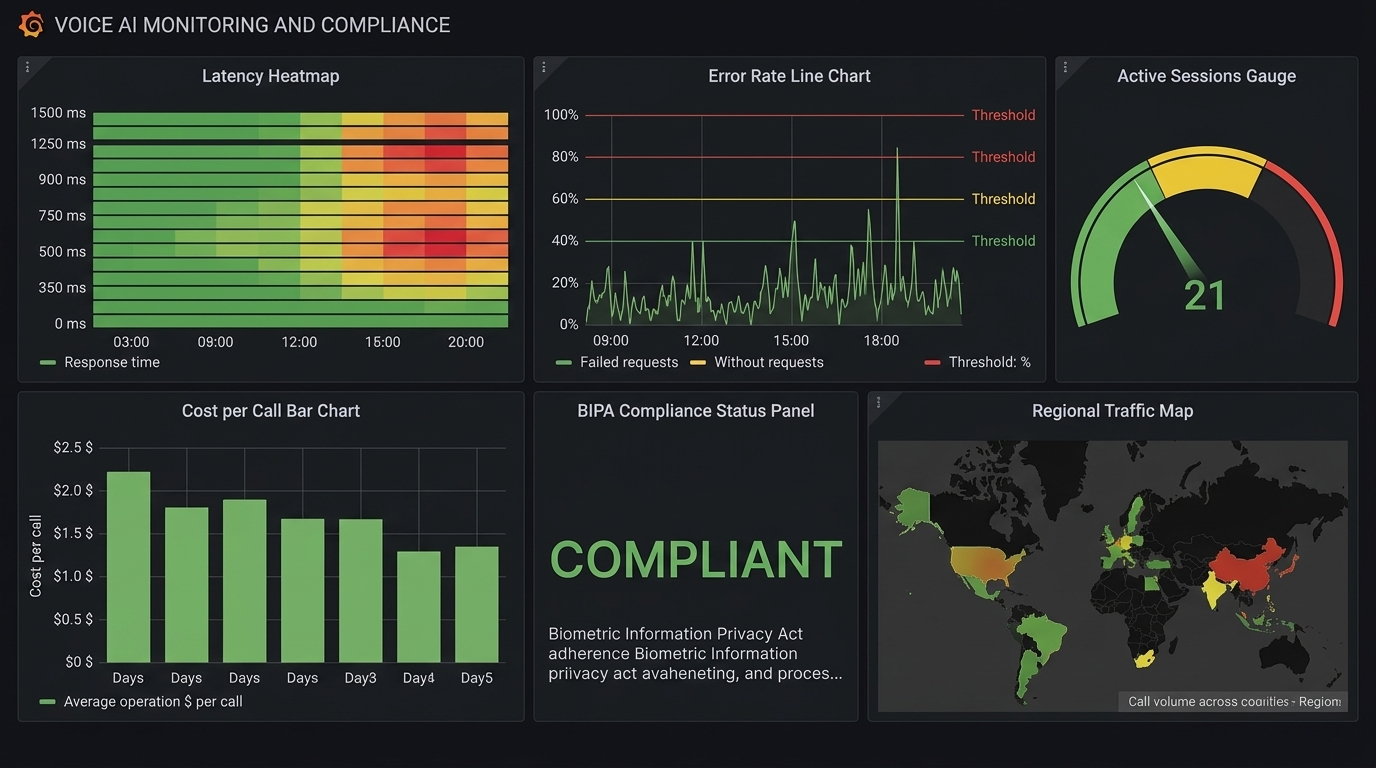
Monitoring Dashboard
Every production voice AI system needs these dashboards:
Real-Time Dashboard (refreshes every 10s)
- Active concurrent calls (with capacity utilization %)
- TTFB P50/P95/P99 (last 5 minutes)
- Error rate (last 5 minutes)
- GPU utilization per instance
Hourly Dashboard
- Call volume by hour (with day-over-day comparison)
- TTFB distribution histogram
- WER by audio quality segment
- Drop-off rate trend
- Cost per minute trend
Daily Dashboard
- Total calls, total minutes, total cost
- WER broken down by accent/language/audio quality
- Top 10 function calling errors
- Compliance audit: consent rate, disclosure delivered rate
- Cost breakdown by component (STT/LLM/TTS/telephony)
The Bottom Line
Production voice AI is a systems engineering challenge. The AI models are good enough. The frameworks are mature. What separates successful deployments from failed ones is the operational foundation:
-
Size infrastructure for peaks, not averages. Voice traffic is bursty -- Monday morning call volume can be 5x Sunday afternoon.
-
Monitor the right metrics: TTFB, WER, and drop-off rate. Not just CPU and memory. A system with perfect uptime but 2-second TTFB is failing its users.
-
Model your costs before you scale. The difference between TTS providers can be 10-100x. Self-hosting saves 5-15x above 100K minutes/month.
-
Handle compliance early. Retrofitting consent and privacy controls is expensive and legally risky. BIPA penalties are $1,000-$5,000 per incident. The EU AI Act is mandatory starting August 2026.
-
Build for hybrid. Self-host the expensive components (TTS), use APIs for the critical ones (STT), and overflow to APIs when self-hosted capacity is exhausted.
-
Hit the 300ms target or get as close as possible. Every millisecond above 300ms increases drop-off. The industry median is 1.4 seconds -- beating that is your competitive advantage.
Voice AI is moving from novelty to infrastructure. The teams that treat it as an infrastructure problem -- not just an AI problem -- will build the products that win.
Sources & References:
1. Twilio — "Voice API Documentation" — https://www.twilio.com/docs/voice
2. EU AI Act — "Regulation (EU) 2024/1689" — https://eur-lex.europa.eu/eli/reg/2024/1689/oj
3. Daily.co — "Real-Time Voice Infrastructure" — https://www.daily.co/
This is the final post in the AmtocSoft Voice AI series. We've covered TTS engines, STT models, building voice agents with Pipecat, architecture decisions, and now production operations. The full series gives you everything you need to go from zero to a production voice agent.
About the Author
Toc Am
Founder of AmtocSoft. Writing practical deep-dives on AI engineering, cloud architecture, and developer tooling. Previously built backend systems at scale. Reviews every post published under this byline.
Published: 2026-04-06 · Written with AI assistance, reviewed by Toc Am.
Get These In Your Inbox
Weekly deep-dives on AI engineering, no fluff. Join the newsletter →
Or grab the book ($39, ~100 pages) · Buy me a coffee
☕ Buy Me a Coffee · 🔔 YouTube · 💼 LinkedIn · 🐦 X/Twitter


No comments:
Post a Comment