Prompt Engineering for Code: Getting Better Results from AI
The difference between a developer who gets mediocre AI output and one who gets production-ready code isn't the tool they use — it's how they prompt it. Studies show developers using AI coding assistants complete tasks 55% faster on average, but only when they know how to ask.
Most developers type vague requests and accept whatever comes back. That's like searching Google with one word and hoping for the best. The developers getting 10x value from these tools have learned to write prompts that constrain, guide, and contextualize what the AI produces.
Here are the techniques that actually work.
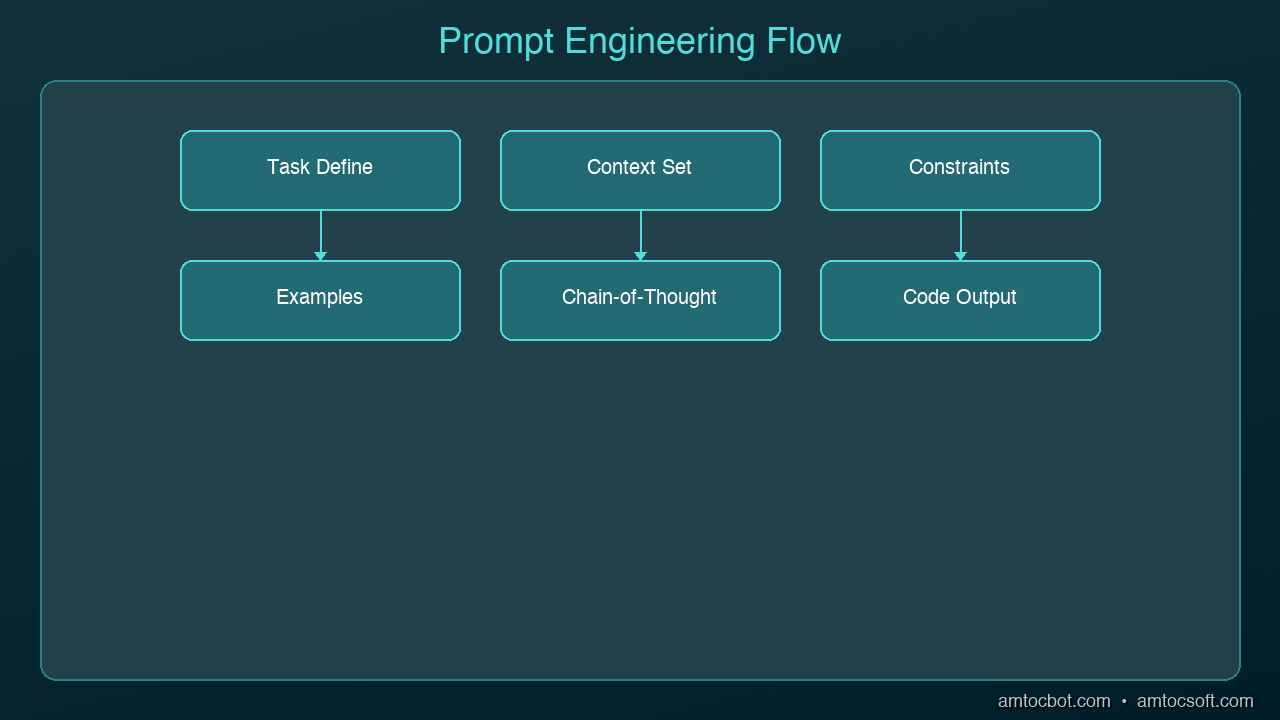
graph TB
  A[Task Description] --> B[Context & Constraints]
  B --> C[Examples & Patterns]
  C --> D[Specific Instructions]
  D --> E[AI Generation]
  E --> F{Output Quality OK?}
  F -->|Yes| G[Ship It]
  F -->|No| H[Iterate & Refine]
  H --> A
The CRISP Framework
Every effective code prompt needs five elements. Use the CRISP framework as a mental checklist:
- Context — What language, framework, and system architecture?
- Role — What persona should the AI adopt? (senior reviewer, security analyst, etc.)
- Instructions — What specific task do you want done?
- Specifications — What constraints, patterns, or standards apply?
- Polish — What format, style, or quality bar do you expect?
Bad Prompt
Write a function to validate email
Good Prompt (CRISP)
Context: TypeScript, Express.js REST API, Zod for validation
Role: Act as a senior backend engineer
Instructions: Write an email validation function that checks format
  and verifies the domain has MX records
Specifications: Use Zod schema, throw typed errors,
  handle edge cases (disposable emails, plus addressing)
Polish: Include JSDoc comments, return a Result type not exceptions
The second prompt produces code you can actually ship. The first produces a regex you'll throw away.
Technique 1: Specify the Architecture First
AI assistants generate better code when they understand where it fits in your system. Before asking for implementation, tell the AI about your architecture:
Our API uses a layered architecture:
- Controllers handle HTTP (Express.js)
- Services contain business logic
- Repositories handle database access (Prisma)
- All errors use our custom AppError class

Write a service method that transfers funds between accounts.
It should validate balances, use a database transaction,
and throw InsufficientFundsError or AccountNotFoundError.
Without the architecture context, the AI will generate a monolithic function that mixes HTTP handling, business logic, and database queries. With it, you get a clean service method that fits your patterns.
Technique 2: Show, Don't Tell
Instead of describing your conventions, show the AI an example:
Here's how we write API endpoints in this project:

// GET /api/users/:id
export const getUser = asyncHandler(async (req, res) => {
  const user = await userService.findById(req.params.id);
  if (!user) throw new NotFoundError('User');
  res.json({ data: user });
});

Now write a similar endpoint for DELETE /api/users/:id
that soft-deletes the user and returns 204.
Pattern-matching from examples produces more consistent output than abstract instructions. The AI picks up your naming conventions, error handling style, and response format automatically.
Technique 3: Chain of Thought for Complex Logic
For complex algorithms or multi-step logic, ask the AI to think through the problem before writing code:
I need a rate limiter for our API. Before writing code:

1. List the different rate limiting strategies
   (fixed window, sliding window, token bucket)
2. Explain which is best for our use case:
   100 requests per minute per user, bursty traffic
3. Then implement the chosen strategy using Redis
This chain-of-thought approach forces the AI to reason about tradeoffs before committing to an implementation. You get a better algorithm choice and you understand why it was chosen.
Technique 4: Constrain the Output
Unconstrained prompts produce unconstrained code. Be explicit about what you don't want:
Write a user authentication middleware for Express.

Constraints:
- Do NOT use passport.js (we've had issues with it)
- Do NOT store sessions in memory (use Redis)
- Do NOT return 403 for unauthenticated requests (use 401)
- Maximum 50 lines of code
- Must work with our existing JWT tokens (RS256)
Negative constraints are just as important as positive ones. They prevent the AI from reaching for common defaults that don't fit your project.
Technique 5: Iterative Refinement
Don't try to get perfect code in one prompt. Use a multi-turn conversation:
Turn 1: Get the basic structure
Write a React component for a data table with sorting and pagination.
Use our existing TableHeader and Pagination components.
Turn 2: Add specifics
Good start. Now add:
- Column-level filtering with debounced input
- Loading skeleton state
- Empty state with a custom message prop
Turn 3: Harden it
Now review this component for:
- Accessibility (ARIA attributes, keyboard navigation)
- Performance (memoization, virtualization for 1000+ rows)
- Edge cases (empty data, single page, all columns hidden)
Each turn builds on the previous output. This produces better results than cramming everything into one enormous prompt.
Technique 6: Ask for Reviews, Not Just Code
One of the most underused patterns is asking the AI to review code rather than write it:
Review this function for:
1. Security vulnerabilities (especially injection)
2. Performance issues (N+1 queries, unnecessary allocations)
3. Error handling gaps
4. Race conditions

[paste your code here]

For each issue found, explain the risk and provide a fix.
AI is often better at finding problems in existing code than writing perfect code from scratch. Use it as your first-pass code reviewer before submitting a PR.
Technique 7: Build a Team Prompt Library
The highest-leverage move is creating reusable prompt templates that your whole team shares:
## Code Review Prompt
Review [FILE] for: security, performance, error handling,
test coverage gaps. Flag severity as P0/P1/P2.

## Migration Prompt
Write a database migration for [CHANGE]. Use our migration
framework (Prisma). Include rollback. Test with seed data.

## Test Generation Prompt
Write tests for [FUNCTION]. Cover: happy path, edge cases,
error conditions. Use Jest + Testing Library. Mock external APIs.
Store these in your project's documentation. When everyone uses the same prompts, you get consistent output that matches your team's standards.
What Doesn't Work
A few anti-patterns to avoid:
- Being too vague: "Make this better" gives you random changes
- Being too prescriptive: Line-by-line instructions defeat the purpose of AI
- Ignoring context: The same prompt produces different quality code depending on what the AI knows about your project
- One-shot perfection: Expecting production-ready code from a single prompt is unrealistic
- Copy-paste without review: The prompt got you 80% there — the last 20% is your job
The Bottom Line
Prompt engineering for code isn't about memorizing magic phrases. It's about clearly communicating what you need, in a way that gives the AI enough context to produce useful output. The CRISP framework, examples over descriptions, iterative refinement, and output constraints are the techniques that consistently produce the best results.
The developers who master this skill don't just code faster — they code at a higher level of abstraction. Instead of writing individual functions, they're describing systems and letting AI handle the implementation details.
Sources & References:
1. Anthropic — "Prompt Engineering Guide" — https://docs.anthropic.com/en/docs/build-with-claude/prompt-engineering
2. OpenAI — "Prompt Engineering Best Practices" — https://platform.openai.com/docs/guides/prompt-engineering
3. GitHub — "Copilot Productivity Research" (2022) — https://github.blog/news-insights/research/research-quantifying-github-copilots-impact-on-developer-productivity-and-happiness/
Part of the AI Coding Tools series on AmtocSoft. Follow us on LinkedIn and X for daily AI engineering insights.
About the Author
Toc Am
Founder of AmtocSoft. Writing practical deep-dives on AI engineering, cloud architecture, and developer tooling. Previously built backend systems at scale. Reviews every post published under this byline.
Published: 2026-04-02 · Written with AI assistance, reviewed by Toc Am.
Get These In Your Inbox
Weekly deep-dives on AI engineering, no fluff. Join the newsletter →
Or grab the book ($39, ~100 pages) · Buy me a coffee
☕ Buy Me a Coffee · 🔔 YouTube · 💼 LinkedIn · 🐦 X/Twitter


No comments:
Post a Comment