Vector Databases Explained: The Engine Behind RAG
You've heard of RAG — Retrieval-Augmented Generation. You know it lets AI pull real information before answering. But here's the question nobody asks: how does the AI find the right information in milliseconds, across millions of documents?
The answer is vector databases. And once you understand them, the entire RAG pipeline clicks into place.
The Problem: Traditional Search Doesn't Understand Meaning
Let's say you're building a customer support bot. A user asks: "My order never showed up."
A traditional keyword search looks for exact matches — documents containing "order," "never," and "showed." But the most helpful document in your knowledge base might say "handling delayed shipments" or "missing delivery troubleshooting." No keyword overlap. Zero results.
This is the fundamental limitation: keyword search matches words, not meaning. And meaning is what matters.
graph TB
  A["Raw Text"] -->|split| B["Chunking"]
  B -->|encode| C["Embedding Model"]
  C -->|store| D["Vector Store"]
  subgraph Query Time
    E["Query"] -->|embed & compare| F["Similarity Search"]
    F -->|rank| G["Top-K Results"]
  end
  D --- E
What Makes Vector Databases Different
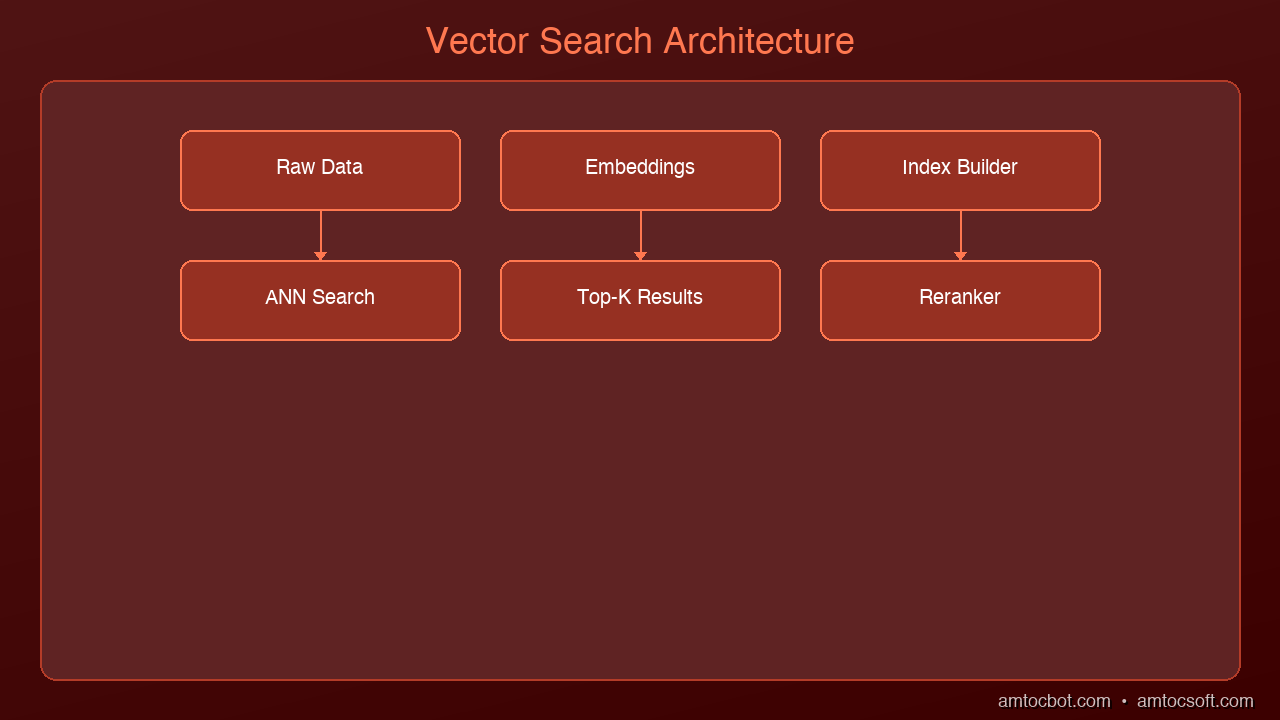
A vector database stores data as embeddings — numerical representations of meaning. Instead of indexing words, it indexes concepts.
Here's the key insight: an embedding model converts text (or images, or audio) into a list of numbers — a vector — where similar meanings produce similar numbers.
"My order never showed up"    → [0.23, -0.87, 0.45, 0.12, ...]
"Missing delivery support"    → [0.21, -0.85, 0.44, 0.15, ...]
"How to bake sourdough bread" → [-0.92, 0.33, -0.67, 0.88, ...]
Notice: the first two vectors are nearly identical (same meaning), while the bread query is completely different. A vector database finds the closest vectors to your query — and "closest" means "most semantically similar."
How Vector Search Actually Works
Step 1: Indexing (Ahead of Time)
Before any queries happen, you prepare your data:
- Chunk your documents into passages (typically 200-500 tokens each)
- Embed each chunk using a model like OpenAI's
text-embedding-3-smallor Cohere'sembed-v4 - Store the vector + original text + metadata in the database
import chromadb
from chromadb.utils import embedding_functions

# Create a collection with an embedding function
ef = embedding_functions.SentenceTransformerEmbeddingFunction(
    model_name="all-MiniLM-L6-v2"
)
client = chromadb.Client()
collection = client.create_collection("support_docs", embedding_function=ef)

# Add documents -- ChromaDB handles embedding automatically
collection.add(
    documents=[
        "To handle a missing delivery, first check the tracking number...",
        "Refund policy: customers may request a refund within 30 days...",
        "Setting up two-factor authentication on your account...",
    ],
    ids=["doc1", "doc2", "doc3"],
    metadatas=[
        {"category": "shipping"},
        {"category": "billing"},
        {"category": "security"},
    ]
)
Step 2: Querying (At Search Time)
When a user asks a question:
- Embed the query using the same model
- Search for the nearest vectors (most similar meaning)
- Return the top-K results with their original text
results = collection.query(
    query_texts=["My order never showed up"],
    n_results=3
)

# Returns the shipping doc first -- semantically closest
# Even though "missing delivery" != "never showed up" in keywords
print(results["documents"][0])
Step 3: Feed to LLM (RAG Completion)
Pass the retrieved chunks as context to your language model:
import anthropic

client = anthropic.Anthropic()
context = "\n".join(results["documents"][0])

response = client.messages.create(
    model="claude-sonnet-4-6-20250514",
    max_tokens=1024,
    messages=[{
        "role": "user",
        "content": f"Using this context:\n{context}\n\nAnswer: My order never showed up"
    }]
)
The AI now answers using your actual documentation, not hallucinated facts.
The Math Behind It: Distance Metrics
When the database searches for "nearest" vectors, it needs a way to measure distance. Three common approaches:
| Metric | How It Works | Best For |
|---|---|---|
| Cosine Similarity | Measures the angle between vectors (ignores magnitude) | Text search, general purpose |
| Euclidean (L2) | Measures straight-line distance between points | Image search, spatial data |
| Dot Product | Combines direction and magnitude | When vector norms carry meaning |
Cosine similarity is the default for most text-based RAG systems. Two vectors pointing in the same direction score 1.0 (identical meaning), perpendicular vectors score 0.0 (unrelated), and opposite directions score -1.0.
Why Not Just Use a Regular Database?
Fair question. Here's the comparison:
| Feature | PostgreSQL + LIKE | Elasticsearch | Vector Database |
|---|---|---|---|
| Query type | Exact keyword match | Full-text + fuzzy | Semantic meaning |
| "order didn't arrive" finds "missing delivery" | No | Maybe (with synonyms) | Yes |
| Scales to 10M+ docs | Yes | Yes | Yes (with ANN) |
| Multilingual | No | With analyzers | Natively (embeddings are language-agnostic) |
| Handles images/audio | No | No | Yes (multimodal embeddings) |
The killer feature: vector search works across languages automatically. A query in English can find relevant documents written in Japanese, because the embedding model maps both to the same vector space.
Approximate Nearest Neighbor (ANN): The Speed Trick
Searching through millions of vectors one-by-one would be impossibly slow. Vector databases use Approximate Nearest Neighbor algorithms to make this fast:
- HNSW (Hierarchical Navigable Small World): Builds a multi-layer graph. Starts searching at the top (coarse) layer and drills down. Used by Pinecone, Weaviate, and pgvector.
- IVF (Inverted File Index): Clusters vectors into buckets, only searches nearby buckets. Used by FAISS.
- ScaNN (Scalable Nearest Neighbors): Google's approach using quantized dot products. Extremely fast at scale.
The tradeoff: ANN finds results that are approximately the closest, not guaranteed closest. In practice, the accuracy is 95-99% — good enough for RAG.
Popular Vector Databases Compared
| Database | Type | Best For | Pricing |
|---|---|---|---|
| ChromaDB | Open-source, embedded | Prototyping, small projects | Free |
| Pinecone | Managed cloud | Production RAG, zero ops | Free tier + pay per use |
| Weaviate | Open-source + cloud | Multimodal, GraphQL API | Free (self-hosted) or cloud |
| Qdrant | Open-source + cloud | High performance, filtering | Free (self-hosted) or cloud |
| pgvector | PostgreSQL extension | Already using Postgres | Free |
Start here: If you're prototyping, use ChromaDB (runs in-process, no server needed). If you need production scale, Pinecone or Qdrant are strong choices. If you already run PostgreSQL, pgvector adds vector search without a new dependency.
Common Pitfalls
1. Chunks too large or too small: If your chunks are entire documents, the embedding averages out too many concepts. If they're single sentences, you lose context. Sweet spot: 200-500 tokens with 50-token overlap between chunks.
2. Wrong embedding model: Your query embedding model must match your document embedding model. Mixing models produces meaningless distances.
3. Ignoring metadata filters: Vector search alone isn't always enough. Combining it with metadata filters (date ranges, categories, user IDs) dramatically improves relevance.
4. Not reindexing: When your documents change, the embeddings become stale. Build a reindexing pipeline.
What's Next
Vector databases are the infrastructure layer that makes RAG possible. Without them, your AI is either hallucinating or doing painfully slow keyword searches.
In the next post, we'll explore GraphRAG — what happens when you combine vector search with knowledge graphs for even deeper understanding.
Ready to build? Start with ChromaDB and 10 documents. You'll have a working semantic search in under 20 lines of code.
Tools mentioned in this post
Disclosure: the links below are affiliate links. If you sign up via them, we earn a small commission at no extra cost to you. This helps fund the writing of more posts like this one.
- Pinecone — production vector database. Sign up
- Anthropic Claude API — production LLM access. Sign up
- OpenAI Platform — GPT-4 and embedding APIs. Sign up
Sources
- Pinecone — "What is a Vector Database?" — https://www.pinecone.io/learn/vector-database/
- Weaviate — "Vector Database Documentation" — https://weaviate.io/developers/weaviate
- Chroma — "Getting Started" — https://docs.trychroma.com/
Part of the RAG & Retrieval Systems series on AmtocSoft. Follow us on LinkedIn and X for daily AI engineering insights.
About the Author
Toc Am
Founder of AmtocSoft. Writing practical deep-dives on AI engineering, cloud architecture, and developer tooling. Previously built backend systems at scale. Reviews every post published under this byline.
Published: 2026-04-02 · Written with AI assistance, reviewed by Toc Am.
Get These In Your Inbox
Weekly deep-dives on AI engineering, no fluff. Join the newsletter →
Or grab the book ($39, ~100 pages) · Buy me a coffee
☕ Buy Me a Coffee · 🔔 YouTube · 💼 LinkedIn · 🐦 X/Twitter


No comments:
Post a Comment