What is RAG? Retrieval-Augmented Generation for Beginners
LLMs like Claude and GPT are incredibly powerful — but they have a fundamental problem: their knowledge is frozen at a point in time. They don't know what happened last week. They can't read your company's internal documents. They don't have access to your database.
Retrieval-Augmented Generation — RAG — is the solution. It's the technique that lets AI models answer questions using information they were never trained on.
This post explains exactly what RAG is, how it works, and why it's become one of the most important patterns in AI development today.
The Problem RAG Solves
Imagine asking an LLM: "What does our refund policy say?"
Without RAG, the model either makes something up (hallucination) or admits it doesn't know. Either way, you get an unreliable answer.
With RAG, the system first retrieves your actual refund policy from a document store, then feeds that text to the model alongside the question. The model answers based on real, current information — not a guess.
That's RAG in one sentence: retrieve relevant information first, then generate an answer using it.
graph LR
  A["User Query"] -->|embed| B["Embedding"]
  B -->|search| C["Vector Search"]
  C -->|match| D["Retrieve Documents"]
  D -->|inject| E["Augment Prompt"]
  E -->|generate| F["LLM Generation"]
  F -->|deliver| G["Response"]
How RAG Works — Step by Step
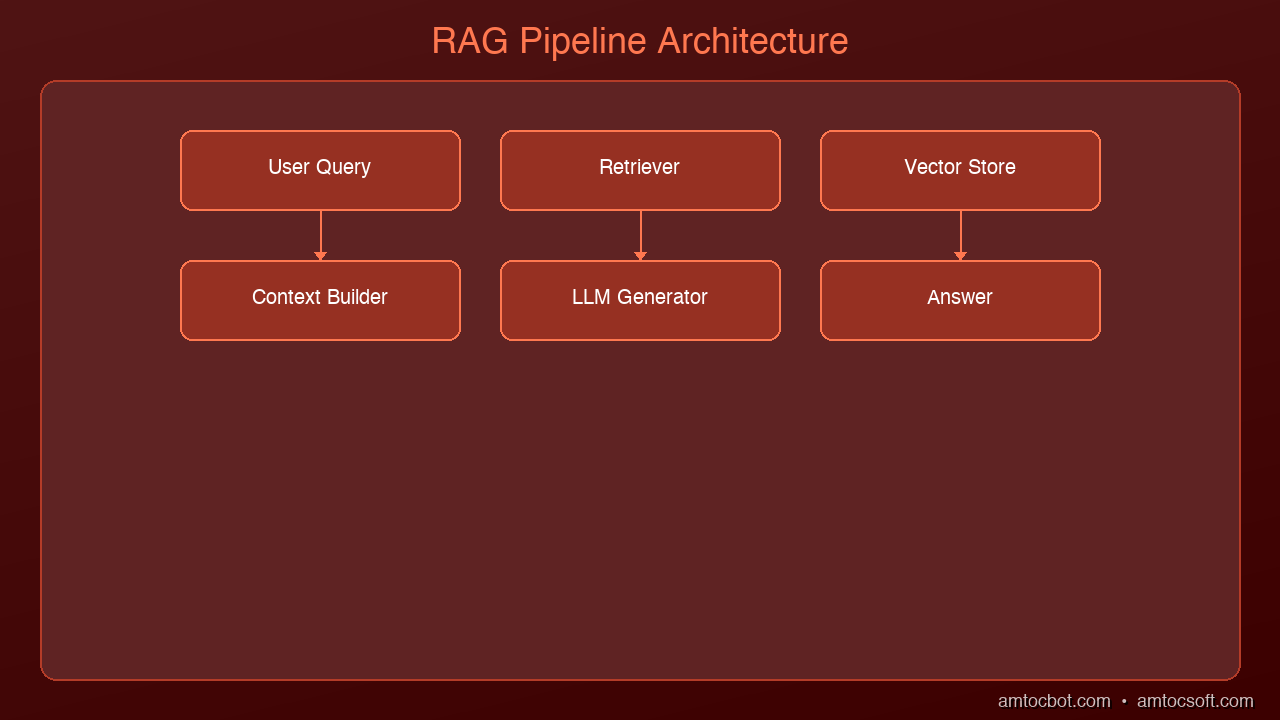
RAG has two phases: an indexing phase (done once) and a query phase (done every time a user asks a question).
Phase 1: Indexing Your Knowledge Base
Before RAG can retrieve anything, your documents need to be indexed.
-
Chunk your documents — Split large documents into smaller passages (typically 256–512 tokens each). A 50-page PDF becomes hundreds of small chunks.
-
Embed each chunk — An embedding model converts each chunk into a vector (a list of numbers that captures the meaning of the text). Similar chunks get similar vectors.
-
Store in a vector database — The vectors (and the original text they represent) are stored in a database designed for similarity search — like Pinecone, Weaviate, Chroma, or pgvector.
Phase 2: Answering a Question
When a user asks a question:
-
Embed the question — The same embedding model converts the question into a vector.
-
Search for similar chunks — The vector database finds the chunks whose vectors are most similar to the question vector. These are the most relevant passages.
-
Build a prompt — The retrieved chunks are inserted into the LLM prompt alongside the user's question.
-
Generate the answer — The LLM reads the context and generates a grounded, accurate response.
User: "What's our Q2 budget for tooling?"

  → Embed question → vector search → retrieve "Budget Q2: $50,000 approved for tooling"
  → Prompt: "Answer based on this context: [retrieved text]\n\nQuestion: What's our Q2 budget for tooling?"
  → LLM: "Your Q2 budget for tooling is $50,000."
The model isn't guessing. It's reading.
Why Vectors? A Simple Explanation
The magic of RAG is that vector search finds semantically similar content — not just keyword matches.
If you search for "budget for engineering tools", a keyword search might miss a document that says "tooling allocation for Q2". Vector search finds it because both phrases mean the same thing.
Embedding models convert text into vectors in a high-dimensional space where meaning determines proximity. "Dog" and "puppy" end up close together. "Dog" and "quarterly report" end up far apart.
This is why RAG works so much better than simple keyword search for unstructured text.
What RAG Is Good At
RAG is the right tool when:
- Your data changes frequently — news, internal wikis, databases, customer records
- You need answers grounded in specific documents — legal, compliance, HR policies
- Hallucinations are unacceptable — the model is constrained to only what you retrieved
- Your knowledge base is too large to fit in a context window — retrieve the relevant 1% instead
Common use cases:
- Customer support chatbots that answer from a knowledge base
- Internal document Q&A ("What does our employee handbook say about PTO?")
- Code assistants that reference your codebase
- Research tools that synthesize information from multiple sources
RAG vs. Fine-Tuning: What's the Difference?
People often ask: should I use RAG or fine-tune the model?
They solve different problems.
| RAG | Fine-Tuning | |
|---|---|---|
| What it does | Adds external knowledge at query time | Bakes knowledge/behavior into the model |
| Best for | Frequently updated data, document Q&A | Teaching a specific style, format, or skill |
| Cost | Low (no training required) | High (GPU training runs) |
| Updatable | Yes — just update the index | No — requires retraining |
| Hallucination risk | Lower (grounded in retrieved text) | Higher (relies on baked-in weights) |
For most enterprise use cases — especially where data changes or you need grounded answers — RAG is the right starting point. Fine-tuning is for when you need to change how the model behaves, not what it knows.
A Minimal RAG Example in Python
Here's the simplest possible RAG system using ChromaDB (local vector store) and Claude:
import anthropic
import chromadb

# Initialize
client = anthropic.Anthropic()
chroma = chromadb.Client()
collection = chroma.create_collection("knowledge_base")

# Index some documents
docs = [
    "Project Alpha: Due April 15. Owner: Sarah.",
    "Project Beta: Due May 1. Owner: James.",
    "Budget Q2: $50,000 approved for tooling.",
    "Refund policy: Full refunds within 30 days, store credit after 30 days."
]
collection.add(
    documents=docs,
    ids=[f"doc_{i}" for i in range(len(docs))]
)

def rag_query(question: str) -> str:
    # Retrieve relevant chunks
    results = collection.query(query_texts=[question], n_results=2)
    context = "\n".join(results["documents"][0])

    # Generate answer using retrieved context
    response = client.messages.create(
        model="claude-opus-4-5",
        max_tokens=512,
        messages=[{
            "role": "user",
            "content": f"Answer the question using only the context below.\n\nContext:\n{context}\n\nQuestion: {question}"
        }]
    )
    return response.content[0].text

# Test it
print(rag_query("What's the Q2 tooling budget?"))
# → "The Q2 budget for tooling is $50,000."

print(rag_query("What's the refund policy?"))
# → "Full refunds are available within 30 days. After 30 days, store credit is provided."
ChromaDB handles embedding and vector search automatically. In production you'd use a dedicated vector database like Pinecone or pgvector and a more sophisticated chunking strategy.
Key Concepts to Remember
Chunking matters. Too large and you retrieve irrelevant context. Too small and you lose important context. 256–512 tokens per chunk is a common starting point.
Embedding model quality matters. The retrieval is only as good as the embeddings. OpenAI's text-embedding-3-small and Cohere's embed-v3 are strong general-purpose choices.
Retrieval is not generation. These are two separate steps. A great retrieval system with a weak LLM still produces weak answers. A weak retrieval system with a great LLM produces hallucinated answers. Both matter.
RAG doesn't eliminate hallucinations. It reduces them significantly when the retrieved context is relevant and accurate. But models can still misinterpret context. Always validate for high-stakes use cases.
What's Next
RAG is just the beginning. From here:
- Hybrid search — combine vector search with keyword search (BM25) for better recall
- Re-ranking — use a cross-encoder model to re-score retrieved chunks for precision
- GraphRAG — use a knowledge graph to capture relationships between concepts
- Self-RAG — teach the model to decide when to retrieve and whether the retrieved content is relevant
We'll cover all of these in upcoming posts.
Tools mentioned in this post
Disclosure: the links below are affiliate links. If you sign up via them, we earn a small commission at no extra cost to you. This helps fund the writing of more posts like this one.
- Pinecone — production vector database. Sign up
- Anthropic Claude API — production LLM access. Sign up
- OpenAI Platform — GPT-4 and embedding APIs. Sign up
- LangChain — LangSmith observability tier. Sign up
Sources
- Lewis et al. — "Retrieval-Augmented Generation for Knowledge-Intensive NLP Tasks" (2020) — https://arxiv.org/abs/2005.11401
- Pinecone — "What is RAG?" — https://www.pinecone.io/learn/retrieval-augmented-generation/
- LangChain — "RAG Documentation" — https://python.langchain.com/docs/concepts/rag/
📖 Related posts: What Are AI Agents? | What Is MCP? | Building Your First AI Agent
About the Author
Toc Am
Founder of AmtocSoft. Writing practical deep-dives on AI engineering, cloud architecture, and developer tooling. Previously built backend systems at scale. Reviews every post published under this byline.
Published: 2026-04-02 · Written with AI assistance, reviewed by Toc Am.
Get These In Your Inbox
Weekly deep-dives on AI engineering, no fluff. Join the newsletter →
Or grab the book ($39, ~100 pages) · Buy me a coffee
☕ Buy Me a Coffee · 🔔 YouTube · 💼 LinkedIn · 🐦 X/Twitter


No comments:
Post a Comment