
Introduction
Databases are where most application scaling plans fall apart. Your API tier is stateless and horizontally scalable — adding more containers is straightforward. Your CDN handles static assets globally. Your message queue absorbs traffic spikes. But your database sits at the bottom of the stack, stateful and stubborn, fielding every read and write that every other component eventually needs.
At small scale, a single PostgreSQL instance with 16GB of RAM and fast SSDs handles thousands of requests per second without complaint. But growth is non-linear. Traffic doubles, and your query latency doubles too — because the working set no longer fits in the buffer pool. You add indexes, the writes slow down. You optimize queries, the connection count climbs. One day you hit a wall: 500 open connections, each holding a 2MB memory allocation in PostgreSQL, and your 16GB database server is spending 40% of its resources just managing connections rather than executing queries.
This post is about that wall, and how to get past it. We will cover the three primary database scaling strategies: read replicas for distributing read load, connection pooling for managing the connection multiplexing problem, and sharding for when a single database instance — no matter how powerful — cannot hold all your data or handle all your writes. We will look at real configuration examples for PgBouncer, Python code with psycopg2, and Node.js with pg, and we will walk through the decision framework for knowing when to apply each technique.
By the end of this post, you will have a concrete mental model for diagnosing database scaling bottlenecks and a toolkit of production-grade solutions.
The Problem: How Single-Database Systems Break Under Load
Before reaching for any scaling technique, it helps to understand exactly how and why a single-database architecture fails. There are three distinct failure modes, and they require different solutions.
Failure Mode 1: Read Saturation
The most common failure mode is read saturation. Most production web applications have a read-to-write ratio of 80:20 or higher — sometimes 95:5 for content-heavy sites. Product pages, user profiles, search results, analytics dashboards: all reads. Your database is spending the vast majority of its CPU time serving queries that do not modify any data.
A single PostgreSQL primary can handle substantial read throughput, but it has limits. Sequential scans, hash joins, and sort operations are CPU-intensive. When query parallelism saturates your CPU cores, latency climbs even for simple indexed lookups because queries queue behind long-running analytical queries.
The instinct to "just add an index" only goes so far. Each additional index speeds up reads but slows writes (PostgreSQL must maintain every index on every INSERT, UPDATE, and DELETE). You reach a point where indexing cannot save you and you need physical read capacity — more CPUs, more memory, more disk I/O — which means spreading reads across multiple machines.
Failure Mode 2: The Connection Limit Crisis
PostgreSQL is a process-per-connection database. Each connection spawns a backend process that consumes roughly 5-10MB of RAM just for overhead, before any query data is allocated. With 500 connections, you have 2.5-5GB of RAM consumed by idle processes. With 1,000 connections — a number easily reached by a moderately successful Node.js application with a connection pool per container — you have consumed 10GB of RAM on process overhead alone.
PostgreSQL's default max_connections is 100. Most production deployments raise this to 500 or 1,000, but the problem compounds: at 1,000 connections, PostgreSQL's shared memory structures (particularly the lock tables) start showing contention that degrades throughput for everyone.
The cruel irony is that most of those connections are idle at any given moment. A web server with 100 concurrent users might hold 400 database connections, of which 390 are waiting for the next request to arrive. The connections exist because each application thread or process needs its own. This is the connection multiplexing problem, and it is why connection poolers like PgBouncer exist.
Failure Mode 3: Write Saturation and Storage Limits
The third failure mode is less common but more severe: you outgrow a single machine's write throughput or storage capacity. If you are writing millions of events per second, archiving time-series sensor data, or storing petabytes of user-generated content, even the largest available cloud database instance cannot keep up. This is where sharding becomes unavoidable.
Write saturation manifests as WAL (Write-Ahead Log) throughput limits, replication lag on replicas, and long-running vacuum operations that cannot keep up with the rate of dead tuple accumulation. Storage limits are more obvious: when your dataset exceeds what fits on a single instance, you must partition it.
How It Works: Read Replicas and Replication
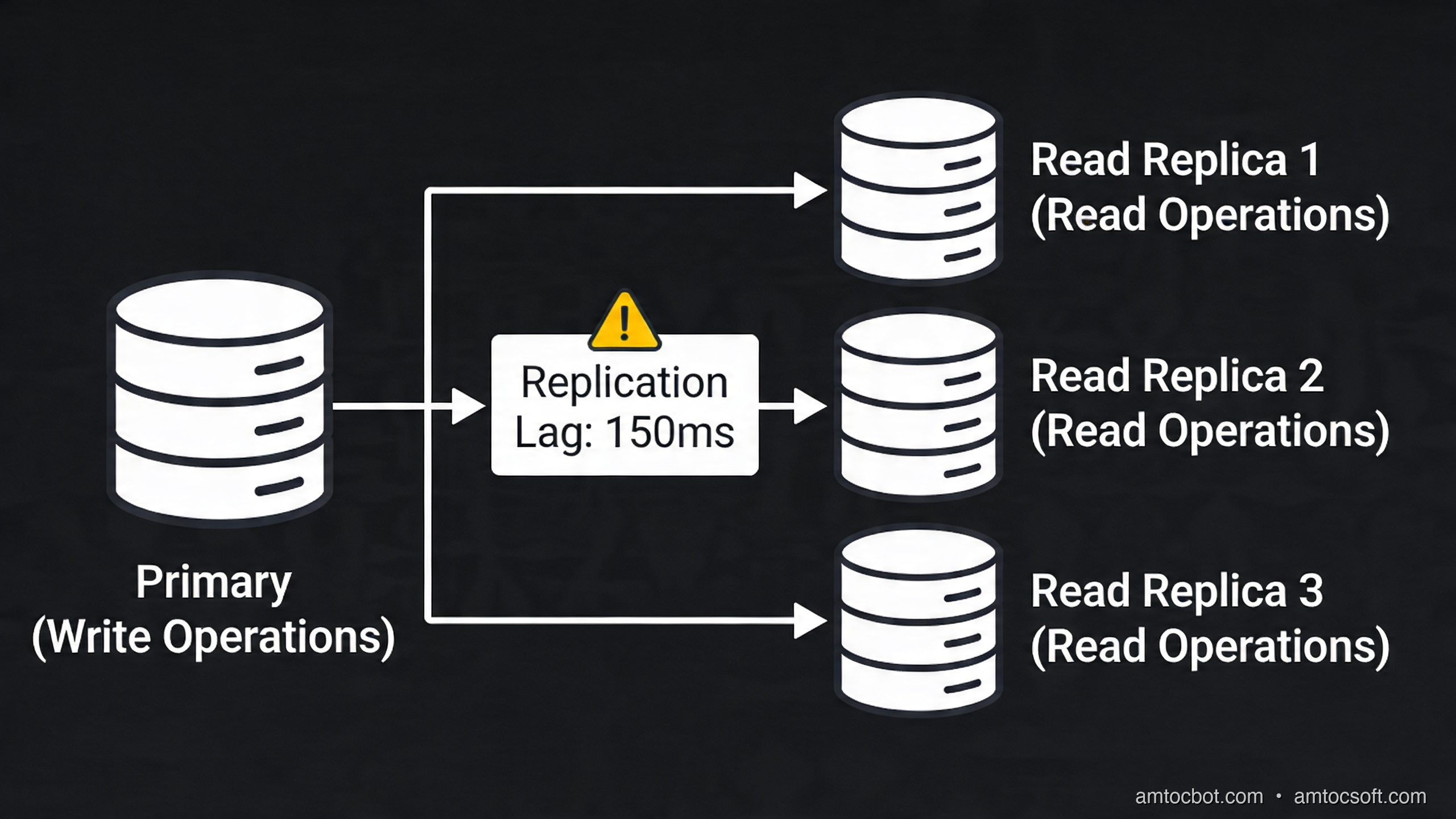
PostgreSQL's built-in streaming replication solves read saturation by maintaining one or more replica instances that stay synchronized with the primary in near-real-time. The primary writes all changes to the WAL (Write-Ahead Log), and replicas stream and apply those WAL records continuously.
The key architectural decision is how your application routes queries. Read replicas are useless if all your application code sends every query to the primary. You need explicit read/write splitting.
Implementing Read/Write Splitting in Python
Here is a production-ready Python database client that routes reads and writes automatically:
import random
import contextlib
import psycopg2
import psycopg2.pool
from typing import Optional
import logging

logger = logging.getLogger(__name__)


class DatabaseRouter:
    """
    Routes database queries to primary (writes) or replica pool (reads).

    Usage:
        router = DatabaseRouter(primary_dsn, replica_dsns)

        # Writes always go to primary
        with router.write_connection() as conn:
            conn.cursor().execute("INSERT INTO events ...")

        # Reads distributed across replicas
        with router.read_connection() as conn:
            conn.cursor().execute("SELECT * FROM users WHERE ...")
    """

    def __init__(
        self,
        primary_dsn: str,
        replica_dsns: list[str],
        min_connections: int = 2,
        max_connections: int = 10,
    ):
        # Primary pool: used for all writes and transactions that mix reads and writes
        self._primary_pool = psycopg2.pool.ThreadedConnectionPool(
            minconn=min_connections,
            maxconn=max_connections,
            dsn=primary_dsn,
        )

        # One pool per replica, for horizontal read scaling
        self._replica_pools = [
            psycopg2.pool.ThreadedConnectionPool(
                minconn=min_connections,
                maxconn=max_connections,
                dsn=dsn,
            )
            for dsn in replica_dsns
        ] if replica_dsns else []

        logger.info(
            "DatabaseRouter initialized: 1 primary, %d replicas",
            len(self._replica_pools),
        )

    def _get_replica_pool(self) -> Optional[psycopg2.pool.ThreadedConnectionPool]:
        """Select a replica pool using round-robin with random starting point."""
        if not self._replica_pools:
            return None
        # Random selection provides load distribution without coordinated state
        return random.choice(self._replica_pools)

    @contextlib.contextmanager
    def write_connection(self):
        """
        Yield a connection to the primary database.
        The connection is returned to the pool on context exit.
        Always use this for: INSERT, UPDATE, DELETE, DDL, BEGIN transactions.
        """
        conn = self._primary_pool.getconn()
        try:
            yield conn
            conn.commit()
        except Exception:
            conn.rollback()
            raise
        finally:
            self._primary_pool.putconn(conn)

    @contextlib.contextmanager
    def read_connection(self):
        """
        Yield a connection to a replica database.
        Falls back to primary if no replicas are configured.

        IMPORTANT: Only use for pure SELECT queries.
        Any query that needs fresh-off-the-write data should use write_connection()
        to avoid replication lag issues.
        """
        replica_pool = self._get_replica_pool()
        pool = replica_pool if replica_pool else self._primary_pool

        conn = pool.getconn()
        try:
            # Replicas are read-only; set autocommit to avoid
            # "cannot run in a transaction block" errors on read-only connections
            conn.set_session(readonly=True, autocommit=True)
            yield conn
        except Exception:
            # Read-only connections don't need rollback, but reset session state
            conn.set_session(readonly=False, autocommit=False)
            raise
        finally:
            conn.set_session(readonly=False, autocommit=False)
            pool.putconn(conn)

    def close(self):
        """Close all connection pools. Call on application shutdown."""
        self._primary_pool.closeall()
        for pool in self._replica_pools:
            pool.closeall()


# Example usage in a web application
def get_user_profile(router: DatabaseRouter, user_id: int) -> dict:
    """Fetch a user profile — read-only, goes to replica."""
    with router.read_connection() as conn:
        with conn.cursor() as cur:
            cur.execute(
                "SELECT id, username, email, created_at FROM users WHERE id = %s",
                (user_id,)
            )
            row = cur.fetchone()
            if row is None:
                return {}
            return {
                "id": row[0],
                "username": row[1],
                "email": row[2],
                "created_at": row[3].isoformat(),
            }


def update_user_email(router: DatabaseRouter, user_id: int, new_email: str) -> bool:
    """Update user email — write, goes to primary."""
    with router.write_connection() as conn:
        with conn.cursor() as cur:
            cur.execute(
                "UPDATE users SET email = %s, updated_at = NOW() WHERE id = %s",
                (new_email, user_id)
            )
            return cur.rowcount == 1
Replication Lag: The Read Replica Gotcha
Streaming replication is asynchronous by default. When you write to the primary and immediately read from a replica, there is a window (typically 10-100ms, sometimes more under load) where the replica has not yet applied the write. For many workloads this is acceptable. For others — like showing a user their own just-submitted form — it causes bugs that are extremely difficult to reproduce.
The standard solution is read-your-writes consistency: after any write operation, route the subsequent reads for that session to the primary for a short window (typically 1-5 seconds). Here is how to implement this:
import time
from threading import local

# Thread-local storage for tracking recent writes
_thread_local = local()

def mark_recent_write():
    """Call this after every write. Forces reads to primary for 2 seconds."""
    _thread_local.last_write_time = time.monotonic()

def should_use_primary_for_read() -> bool:
    """Returns True if we had a recent write and should read from primary."""
    last_write = getattr(_thread_local, 'last_write_time', 0)
    # 2-second window after any write: go to primary to avoid lag
    return (time.monotonic() - last_write) < 2.0

def get_connection(router: DatabaseRouter, write: bool = False):
    """Smart connection getter that handles read-your-writes consistency."""
    if write or should_use_primary_for_read():
        return router.write_connection()
    return router.read_connection()
Connection Pooling: PgBouncer in Production
The connection crisis described in the Problem section has a well-established solution: PgBouncer, a lightweight connection pooler that sits between your application and PostgreSQL. Instead of your 500 application threads each holding a direct PostgreSQL connection, they all connect to PgBouncer, which maintains a small pool of actual PostgreSQL connections and multiplexes them.
PgBouncer supports three pooling modes:
| Mode | How it works | Use case |
|---|---|---|
| Session | One server connection per client session | Legacy apps that use session-level features (SET, temporary tables) |
| Transaction | Server connection held only during a transaction | Most modern web apps — the sweet spot |
| Statement | Server connection released after each statement | High-frequency, simple queries; no multi-statement transactions |
Transaction pooling is what most teams need. With it, 1,000 application connections can share a pool of 50-100 actual PostgreSQL server connections with almost no loss in throughput, because most connections are idle between requests.
PgBouncer Configuration
Here is a production-grade PgBouncer configuration (pgbouncer.ini):
[databases]
# Route connections from app_user@myapp to the actual PostgreSQL server
# The application connects to PgBouncer on port 6432
myapp = host=postgres-primary port=5432 dbname=myapp

# Separate pool for replicas (optional — some teams run a second PgBouncer)
myapp_read = host=postgres-replica1 port=5432 dbname=myapp

[pgbouncer]
# Listen for client connections
listen_port = 6432
listen_addr = 0.0.0.0

# Authentication mode: md5 is widely compatible, scram-sha-256 is more secure
auth_type = scram-sha-256
auth_file = /etc/pgbouncer/userlist.txt

# Pooling mode: transaction is the best choice for modern web apps
pool_mode = transaction

# Server connection limits
# max_client_conn: how many clients PgBouncer accepts
max_client_conn = 2000
# default_pool_size: how many real PostgreSQL connections per database+user pair
default_pool_size = 50
# min_pool_size: keep at least this many connections warm
min_pool_size = 10
# reserve_pool_size: extra connections for bursts
reserve_pool_size = 10
# reserve_pool_timeout: wait this many seconds before using reserve pool
reserve_pool_timeout = 5.0

# Connection limits per database
max_db_connections = 100

# Timeouts
server_idle_timeout = 600      # Close idle server connections after 10 min
client_idle_timeout = 0        # Never close idle client connections (app manages this)
server_connect_timeout = 15    # Fail fast if PostgreSQL is unreachable
query_timeout = 0              # No query timeout at pooler level (set in app)
query_wait_timeout = 120       # Client waits max 2 min for a free server connection

# Performance
server_reset_query = DISCARD ALL   # Reset state between transaction-pool reuses
server_check_delay = 30            # Verify server connections are alive every 30s
server_check_query = SELECT 1      # Simple liveness check

# Logging
log_connections = 0    # 0 = off, 1 = on (noisy in production)
log_disconnections = 0
log_pooler_errors = 1
stats_period = 60      # Log stats every 60 seconds

# Admin interface (useful for monitoring)
admin_users = pgbouncer_admin
stats_users = pgbouncer_monitor
Connecting Through PgBouncer from Node.js
const { Pool } = require('pg');

/**
 * Database pool configuration for use with PgBouncer.
 * Key differences from direct PostgreSQL connection:
 * 1. No prepared statements in transaction pool mode
 * 2. No LISTEN/NOTIFY (breaks with transaction pooling)
 * 3. No SET commands that need to persist across queries
 */
const pool = new Pool({
  host: 'pgbouncer-host',
  port: 6432,                    // PgBouncer port, not PostgreSQL's 5432
  database: 'myapp',
  user: 'app_user',
  password: process.env.DB_PASSWORD,

  // With PgBouncer in transaction mode, the pool here should be small.
  // PgBouncer does the heavy multiplexing — you just need enough to
  // parallelize your own application's concurrent queries.
  max: 10,
  min: 2,

  idleTimeoutMillis: 30000,
  connectionTimeoutMillis: 5000,

  // CRITICAL: disable prepared statements when using PgBouncer transaction pooling.
  // Prepared statements are session-scoped in PostgreSQL. When PgBouncer switches
  // server connections between transactions, the new server doesn't know about
  // statements prepared on the old one. This causes "prepared statement does not exist" errors.
  // pg-specific option to use simple query protocol instead of extended (prepared) protocol:
  // Set statement_timeout at the application level, not in connection setup.
});

pool.on('error', (err) => {
  console.error('Unexpected error on idle database client:', err);
});

/**
 * Execute a query with automatic connection management.
 * @param {string} text - SQL query text
 * @param {Array} params - Query parameters
 * @returns {Promise<Object>} Query result
 */
async function query(text, params) {
  const start = Date.now();
  try {
    const result = await pool.query(text, params);
    const duration = Date.now() - start;

    if (duration > 1000) {
      console.warn('Slow query detected:', { text, duration, rows: result.rowCount });
    }

    return result;
  } catch (error) {
    console.error('Database query error:', { text, error: error.message });
    throw error;
  }
}

/**
 * Execute multiple queries in a single transaction.
 * All queries in the callback run on the same server connection,
 * which is safe even with PgBouncer transaction pooling.
 */
async function withTransaction(callback) {
  const client = await pool.connect();
  try {
    await client.query('BEGIN');
    const result = await callback(client);
    await client.query('COMMIT');
    return result;
  } catch (error) {
    await client.query('ROLLBACK');
    throw error;
  } finally {
    client.release();
  }
}

// Example usage
async function transferBalance(fromUserId, toUserId, amount) {
  return withTransaction(async (client) => {
    // Both queries run on the same connection within BEGIN/COMMIT
    const { rows: [sender] } = await client.query(
      'SELECT balance FROM accounts WHERE user_id = $1 FOR UPDATE',
      [fromUserId]
    );

    if (sender.balance < amount) {
      throw new Error('Insufficient balance');
    }

    await client.query(
      'UPDATE accounts SET balance = balance - $1 WHERE user_id = $2',
      [amount, fromUserId]
    );

    await client.query(
      'UPDATE accounts SET balance = balance + $1 WHERE user_id = $2',
      [amount, toUserId]
    );

    return { success: true, newBalance: sender.balance - amount };
  });
}

module.exports = { query, withTransaction };
Sharding: Partitioning Data Across Multiple Databases
Read replicas and connection pooling solve read saturation and connection limits. But they do not solve write saturation or the problem of outgrowing a single machine's storage. For those problems, you need sharding: partitioning your data across multiple independent database instances, each responsible for a subset of the total dataset.
Sharding is complex. It introduces distributed system problems — cross-shard queries, distributed transactions, resharding — that have no clean solutions. Before sharding, exhaust every alternative: vertical scaling, query optimization, caching (Redis), read replicas, and table partitioning (PostgreSQL's built-in declarative partitioning).
When you do need to shard, there are three strategies:
Range Sharding
Each shard is responsible for a contiguous range of keys. Simple to implement and reason about, but prone to hotspots: if new records always have incrementing IDs, all writes go to the last shard while others sit idle.
Hash Sharding
The shard is determined by hash(key) % num_shards. Distributes load evenly and eliminates hotspots. The downside: range queries that span a meaningful key range must hit every shard. Also, resharding (adding a new shard) requires rehashing and migrating a large fraction of all data.
Directory (Lookup) Sharding
A separate metadata table records which shard each logical entity lives on. Most flexible — you can migrate individual tenants between shards, handle uneven distributions, and add shards without rehashing. The cost: an extra lookup per query (usually cached in Redis).
Application-Level Shard Router
Here is a Python shard router implementation using consistent hashing:
import hashlib
import psycopg2
import psycopg2.pool
from typing import Any


class ShardRouter:
    """
    Routes database operations to the correct shard based on a shard key.
    Uses consistent hashing to distribute load and minimize resharding impact.

    Each 'shard' is an independent PostgreSQL instance (or PgBouncer endpoint).
    Replicas can be added per-shard independently.
    """

    def __init__(self, shard_configs: list[dict]):
        """
        shard_configs: list of dicts with keys:
            - shard_id: int, unique identifier
            - dsn: str, connection string for this shard's primary
        """
        self._shards = {}
        for config in shard_configs:
            shard_id = config['shard_id']
            self._shards[shard_id] = psycopg2.pool.ThreadedConnectionPool(
                minconn=2,
                maxconn=10,
                dsn=config['dsn'],
            )
        self._shard_ids = sorted(self._shards.keys())
        self._num_shards = len(self._shard_ids)

    def _get_shard_id(self, shard_key: Any) -> int:
        """
        Determine which shard a given key belongs to.
        Uses MD5 for fast, uniform hashing (not for security).

        Returns a shard_id from self._shard_ids.
        """
        # Hash the key to a 32-bit integer
        key_bytes = str(shard_key).encode('utf-8')
        hash_int = int(hashlib.md5(key_bytes).hexdigest(), 16)

        # Map to a shard using modulo
        shard_index = hash_int % self._num_shards
        return self._shard_ids[shard_index]

    def get_pool(self, shard_key: Any) -> psycopg2.pool.ThreadedConnectionPool:
        """Get the connection pool for the shard that owns this key."""
        shard_id = self._get_shard_id(shard_key)
        return self._shards[shard_id]

    def execute_on_shard(self, shard_key: Any, query: str, params=None):
        """Execute a query on the shard that owns the given shard_key."""
        pool = self.get_pool(shard_key)
        conn = pool.getconn()
        try:
            with conn.cursor() as cur:
                cur.execute(query, params)
                conn.commit()
                if cur.description:
                    return cur.fetchall()
                return cur.rowcount
        except Exception:
            conn.rollback()
            raise
        finally:
            pool.putconn(conn)

    def execute_on_all_shards(self, query: str, params=None) -> list:
        """
        Execute a query on ALL shards and merge results.
        Use for cross-shard queries — expensive, avoid in hot paths.
        """
        results = []
        for shard_id, pool in self._shards.items():
            conn = pool.getconn()
            try:
                with conn.cursor() as cur:
                    cur.execute(query, params)
                    if cur.description:
                        results.extend(cur.fetchall())
            finally:
                pool.putconn(conn)
        return results

    def close(self):
        for pool in self._shards.values():
            pool.closeall()


# Example: sharded user database
shard_router = ShardRouter([
    {'shard_id': 0, 'dsn': 'postgresql://app:pass@shard0:5432/userdb'},
    {'shard_id': 1, 'dsn': 'postgresql://app:pass@shard1:5432/userdb'},
    {'shard_id': 2, 'dsn': 'postgresql://app:pass@shard2:5432/userdb'},
    {'shard_id': 3, 'dsn': 'postgresql://app:pass@shard3:5432/userdb'},
])

def get_user(user_id: int) -> dict | None:
    """Fetch user by ID — routes to the correct shard automatically."""
    rows = shard_router.execute_on_shard(
        shard_key=user_id,
        query="SELECT id, username, email FROM users WHERE id = %s",
        params=(user_id,)
    )
    if not rows:
        return None
    row = rows[0]
    return {"id": row[0], "username": row[1], "email": row[2]}

def create_user(user_id: int, username: str, email: str) -> bool:
    """Insert a user — goes to the shard determined by user_id."""
    shard_router.execute_on_shard(
        shard_key=user_id,
        query="INSERT INTO users (id, username, email) VALUES (%s, %s, %s)",
        params=(user_id, username, email)
    )
    return True
Comparison and Tradeoffs
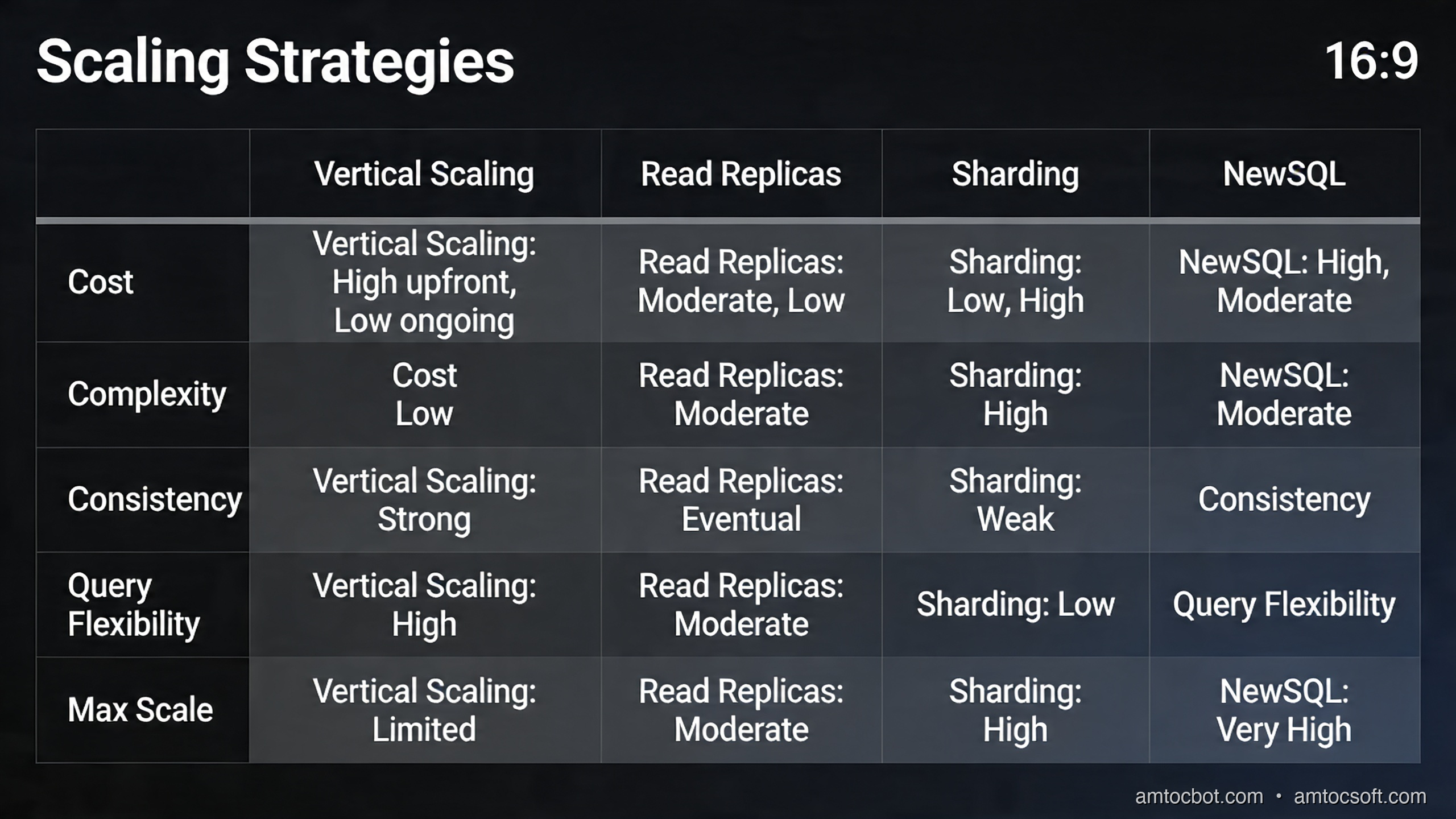
Understanding when to apply each strategy is as important as knowing how to implement it. Here is a comprehensive comparison:
| Strategy | Solves | Complexity | Consistency | Cost |
|---|---|---|---|---|
| Read replicas | Read saturation | Low | Eventual (replication lag) | Medium (extra instances) |
| PgBouncer | Connection limits | Low | Strong (same DB) | Very low (tiny process) |
| Table partitioning | Storage, query pruning | Low-Medium | Strong | Low (same instance) |
| Vertical scaling | All bottlenecks (temporarily) | None | Strong | High (diminishing returns) |
| Sharding | Write saturation, massive scale | High | Eventual / complex | High |
| Caching layer | Read hot spots | Medium | Eventual (TTL-based) | Medium |
The N+1 Query Problem
One scaling problem that no infrastructure change fixes: the N+1 query pattern. It happens when your code runs one query to fetch N rows, then runs N additional queries to fetch related data for each row:
# BAD: N+1 query pattern
# This runs 1 + N queries (1 to get users, N to get their orders)
users = db.execute("SELECT id, username FROM users LIMIT 100")
for user in users:
    orders = db.execute("SELECT * FROM orders WHERE user_id = %s", (user['id'],))
    user['orders'] = orders

# GOOD: single query with JOIN
users_with_orders = db.execute("""
    SELECT
        u.id,
        u.username,
        json_agg(json_build_object(
            'id', o.id,
            'total', o.total,
            'created_at', o.created_at
        )) FILTER (WHERE o.id IS NOT NULL) AS orders
    FROM users u
    LEFT JOIN orders o ON o.user_id = u.id
    GROUP BY u.id, u.username
    LIMIT 100
""")

# Also good: batch query with IN clause
user_ids = [u['id'] for u in users]
orders_by_user = {}
all_orders = db.execute(
    "SELECT user_id, id, total FROM orders WHERE user_id = ANY(%s)",
    (user_ids,)
)
for order in all_orders:
    orders_by_user.setdefault(order['user_id'], []).append(order)
No amount of read replicas or sharding compensates for N+1 queries. Identify them with query logging (log_min_duration_statement = 100 in PostgreSQL to log all queries over 100ms) before investing in infrastructure.
Production Considerations
Scaling Decision Flowchart
Before touching infrastructure, use this flowchart to identify the right intervention:
Monitoring What Matters
Deploy these PostgreSQL queries as scheduled jobs (every 1 minute) to feed your monitoring system:
-- Connection count by state
SELECT state, count(*)
FROM pg_stat_activity
WHERE datname = 'myapp'
GROUP BY state;

-- Long-running queries (> 5 seconds)
SELECT pid, now() - query_start AS duration, query
FROM pg_stat_activity
WHERE datname = 'myapp'
  AND state = 'active'
  AND now() - query_start > interval '5 seconds'
ORDER BY duration DESC;

-- Replication lag (run on primary)
SELECT
    client_addr,
    state,
    sent_lsn,
    write_lsn,
    flush_lsn,
    replay_lsn,
    (sent_lsn - replay_lsn) AS replication_lag_bytes
FROM pg_stat_replication;

-- Cache hit ratio (should be > 95%)
SELECT
    sum(heap_blks_hit) / (sum(heap_blks_hit) + sum(heap_blks_read) + 0.001) AS cache_hit_ratio
FROM pg_statio_user_tables;

-- Top tables by sequential scan (candidates for new indexes)
SELECT relname, seq_scan, seq_tup_read, idx_scan
FROM pg_stat_user_tables
WHERE seq_scan > 100
ORDER BY seq_tup_read DESC
LIMIT 10;
PgBouncer Health Monitoring
# Connect to PgBouncer admin console
psql -h pgbouncer-host -p 6432 -U pgbouncer_admin pgbouncer

# Key monitoring commands:
SHOW POOLS;       -- Connection counts: cl_active, cl_waiting, sv_active, sv_idle
SHOW STATS;       -- Query rates, avg latency
SHOW CLIENTS;     -- Connected application clients
SHOW SERVERS;     -- Actual PostgreSQL server connections
SHOW CONFIG;      -- Current configuration values
Alert on cl_waiting > 0 in SHOW POOLS for more than a few seconds — it means clients are queuing for a server connection, which indicates your default_pool_size is too small.
Disaster Recovery and Failover
With read replicas, you need automated failover for when the primary fails. In AWS RDS, this is handled automatically with Multi-AZ. For self-managed PostgreSQL, tools like Patroni (with etcd or Consul for distributed consensus) handle automatic failover:
# patroni.yml (simplified)
scope: myapp-cluster
name: postgres-primary

restapi:
  listen: 0.0.0.0:8008

etcd:
  hosts: etcd1:2379,etcd2:2379,etcd3:2379

bootstrap:
  dcs:
    ttl: 30
    loop_wait: 10
    retry_timeout: 10
    maximum_lag_on_failover: 1048576  # 1MB max replica lag before refusing to promote

postgresql:
  listen: 0.0.0.0:5432
  connect_address: postgres-primary:5432
  parameters:
    max_connections: 200
    shared_buffers: 4GB
    wal_level: replica
    max_wal_senders: 10
    max_replication_slots: 10
Patroni ensures only one node is primary at a time (using etcd as the distributed lock) and automatically promotes the most up-to-date replica when the primary fails.
Conclusion
Database scaling is not one problem — it is three distinct problems with different solutions. Read replicas solve read saturation. PgBouncer solves the connection crisis. Sharding solves write saturation and storage limits.
The path of least resistance is: tune first, then pool, then replicate, then shard. Vertical scaling and query optimization have no operational complexity. PgBouncer is a single binary with minimal configuration. Read replicas add operational overhead but are well-supported by managed database services. Sharding is a last resort that you should exhaust all other options before adopting.
The most common mistake teams make is reaching for sharding when their actual problem is connection pooling or N+1 queries. Profile first. Add pg_stat_statements to your PostgreSQL instance today if it is not already there — it costs almost nothing and reveals exactly which queries are consuming your database's resources. Armed with that data, every scaling decision becomes easier.
Building something with PostgreSQL at scale? Questions about PgBouncer configuration or sharding strategies? Drop a comment below or connect on LinkedIn. Follow AmtocSoft Tech Insights for more deep-dives into backend performance engineering.
Sources
- PostgreSQL — Streaming Replication — Synchronous/asynchronous replication config used in the read-replica section
- PgBouncer documentation — Pool mode configuration (
session,transaction,statement) and connection limits - pg_stat_statements — PostgreSQL — Query-level performance profiling extension referenced throughout
- Citus Data — Distributed PostgreSQL — Horizontal sharding extension used in the sharding examples
- Vitess — Database Clustering System — MySQL horizontal scaling at YouTube/Slack scale (used as comparison)
- Amazon RDS Proxy — Managed connection pooling for Aurora/RDS, serverless use case
- Brandur Leach — "Connection Pooling with PgBouncer" — Deep-dive on the connection-per-query problem and pgbouncer transaction mode
About the Author
Toc Am
Founder of AmtocSoft. Writing practical deep-dives on AI engineering, cloud architecture, and developer tooling. Previously built backend systems at scale. Reviews every post published under this byline.
Published: 2026-04-14 · Written with AI assistance, reviewed by Toc Am.
Get These In Your Inbox
Weekly deep-dives on AI engineering, no fluff. Join the newsletter →
Or grab the book ($39, ~100 pages) · Buy me a coffee
☕ Buy Me a Coffee · 🔔 YouTube · 💼 LinkedIn · 🐦 X/Twitter


No comments:
Post a Comment