I watched a support agent burn real API budget by doing the same web search over and over.
It was a customer support bot I'd wired up with LangChain tools and a ReAct loop. The agent was supposed to look up an order, check the refund policy, and respond. Instead, it looked up the order, forgot it had done so, looked it up again, forgot again, and continued until I killed the process. The LLM calls were stateless. Each iteration got the full tool history in its context, but the agent's planning step was not tracking what it had already tried.
That incident pushed me to LangGraph. After several production deployments, it is the framework I reach for when an agent needs to do more than one thing.
The Problem: Stateless Agents Break in Non-Obvious Ways
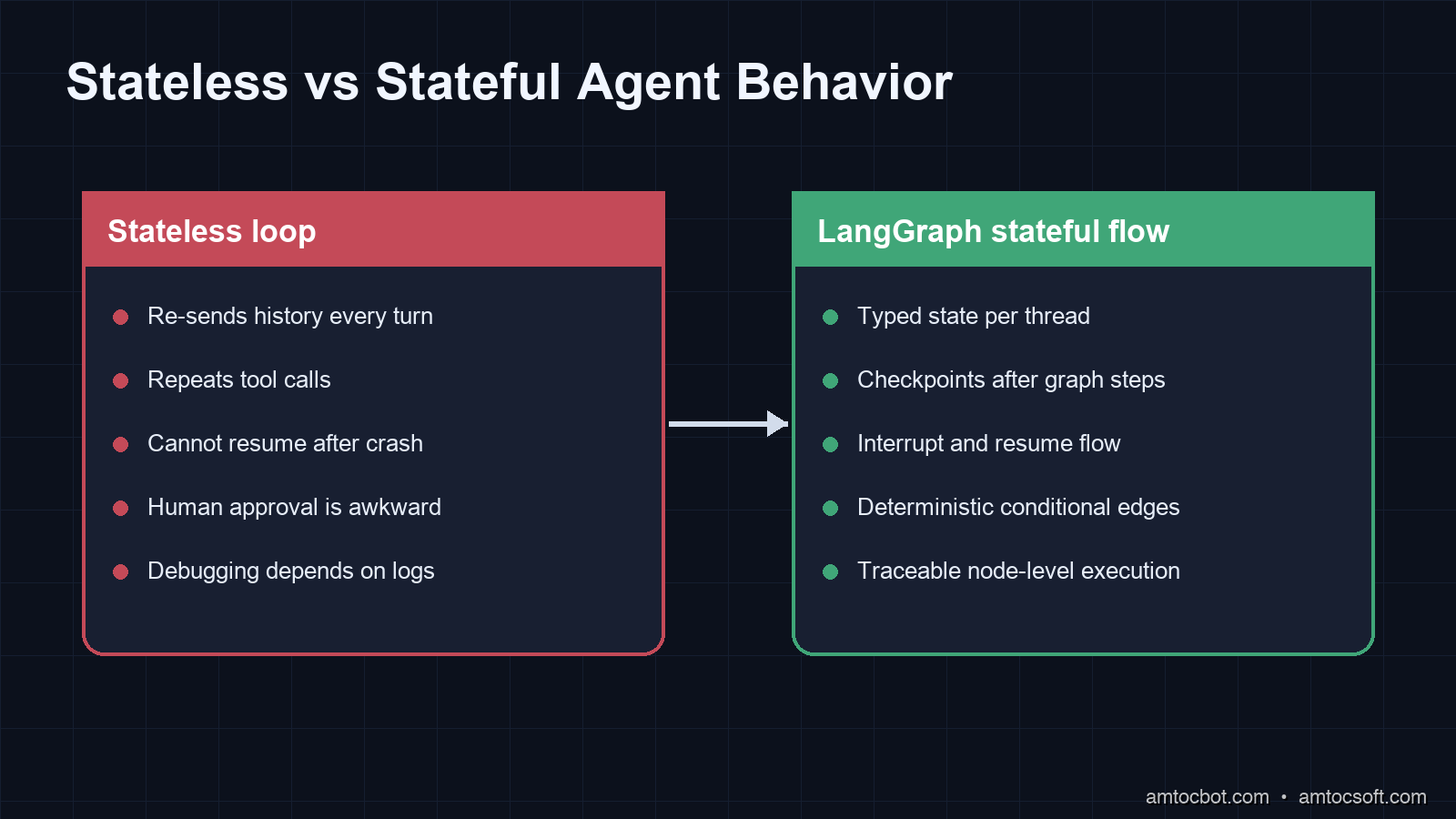
An LLM call is stateless by design. You send a prompt, you get a response. Continuity is an illusion maintained by re-injecting conversation history into every new call.
For simple chatbots, that's fine. For agents that orchestrate multi-step workflows, such as checking a database, calling an API, making a decision, looping back if needed, or escalating to a human, that illusion breaks down fast.
The failure modes are predictable once you've seen them:
Infinite loops. The agent's planning step decides to search the web, gets a result, doesn't update internal state, plans again, searches the web. Without external state tracking, the LLM does not know what it has already done unless that full history fits in context. In long-running workflows, context windows become a real constraint.
Lost partial progress. A long-running agent fails halfway through. You restart it. It starts over from step one, re-doing expensive work (API calls, database writes, file reads) it already completed. Without checkpointing, there's no way to resume.
No human-in-the-loop. An agent needs to ask a user a clarifying question mid-workflow, not at the beginning or the end, but after a specific decision point. Pure LLM loops can't pause and wait. They either block synchronously (bad for prod) or lose all intermediate state when they terminate.
Race conditions in multi-agent systems. Two agents updating the same shared resource without explicit concurrency control is a data consistency problem, and no amount of clever prompting solves it.
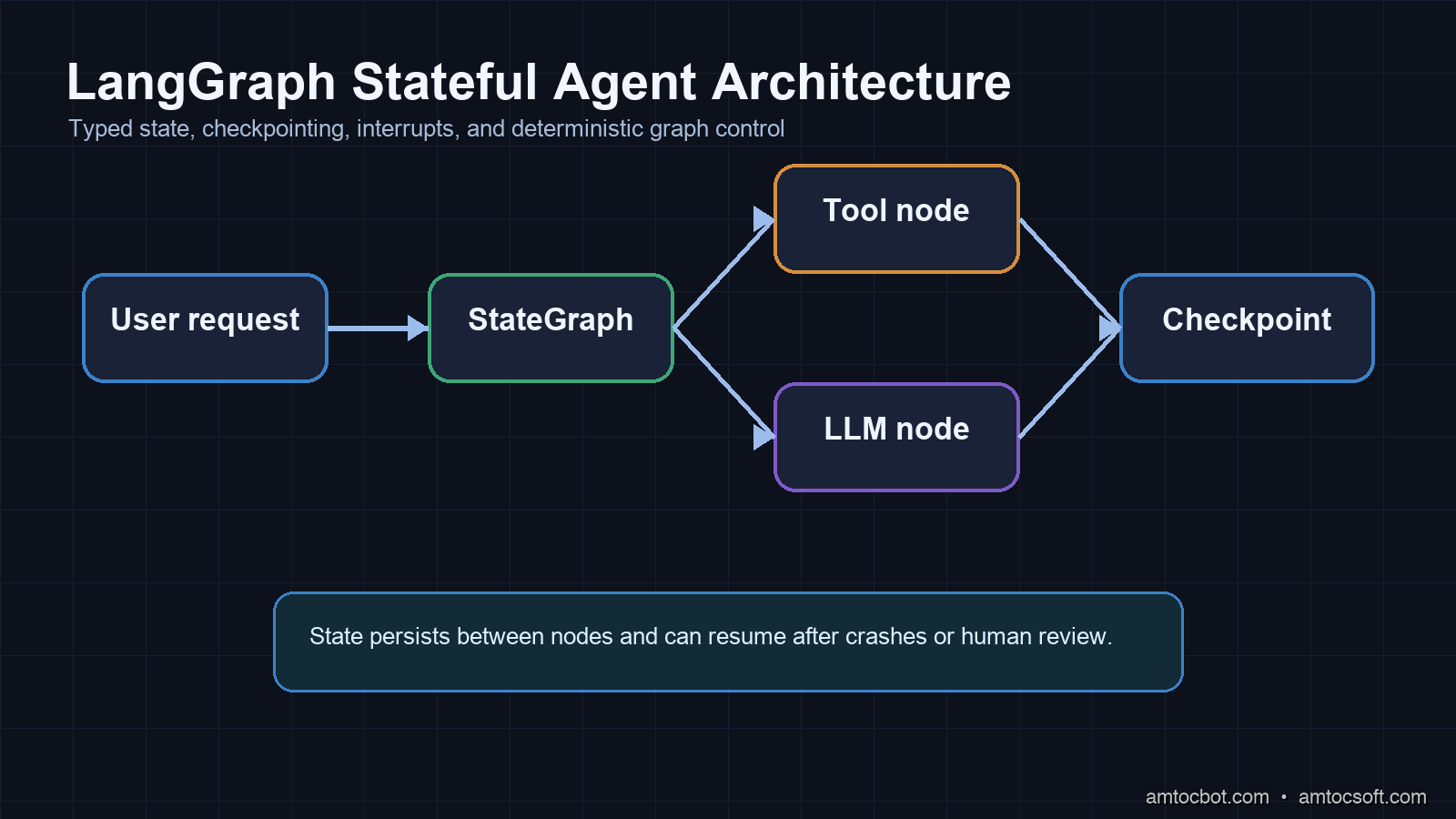
LangGraph addresses all of these by treating agent workflows as directed graphs with persistent, typed state.
How LangGraph Works
LangGraph was released by the LangChain team in early 2024 and has gone through several major iterations. As of version 0.2 (mid-2025), it's a standalone library that doesn't require LangChain's broader ecosystem.
The core model is a StateGraph: a directed graph where:
- Nodes are Python functions (or LLM calls) that read from state and write back to state
- Edges define control flow, both static edges and conditional edges that route based on the current state
- State is a typed dictionary (using Python's TypedDict) that persists across node executions
Here's the minimum viable example:
from typing import TypedDict, Annotated
from langgraph.graph import StateGraph, END
from langchain_anthropic import ChatAnthropic
import operator

class AgentState(TypedDict):
    messages: Annotated[list, operator.add]  # append-only list
    order_id: str
    refund_eligible: bool
    step_count: int

llm = ChatAnthropic(model="claude-sonnet-4-6")

def lookup_order(state: AgentState) -> AgentState:
    # In production: hit your database
    return {
        "order_id": state["order_id"],
        "refund_eligible": True,
        "step_count": state["step_count"] + 1
    }

def generate_response(state: AgentState) -> AgentState:
    prompt = f"Order {state['order_id']} is {'eligible' if state['refund_eligible'] else 'not eligible'} for refund."
    response = llm.invoke(prompt)
    return {"messages": [response]}

def should_escalate(state: AgentState) -> str:
    if state["step_count"] > 5:
        return "escalate"
    return "respond"

# Build the graph
builder = StateGraph(AgentState)
builder.add_node("lookup", lookup_order)
builder.add_node("respond", generate_response)
builder.add_node("escalate", lambda s: {"messages": ["Escalating to human agent."]})

builder.set_entry_point("lookup")
builder.add_conditional_edges("lookup", should_escalate, {
    "escalate": "escalate",
    "respond": "respond"
})
builder.add_edge("respond", END)
builder.add_edge("escalate", END)

graph = builder.compile()

# Run it
result = graph.invoke({
    "messages": [],
    "order_id": "ORD-12345",
    "refund_eligible": False,
    "step_count": 0
})
print(result["messages"][-1])
Expected output:
content="Order ORD-12345 is eligible for refund. I've initiated the refund process..."
The key shift from plain LangChain: state is explicit and typed. When lookup_order returns {"refund_eligible": True}, LangGraph merges that into the shared state dictionary. The next node, generate_response, reads that state. If the process crashes between those two steps, you know exactly where it failed because state was persisted (more on that below).
The Annotated Trick for State Merging
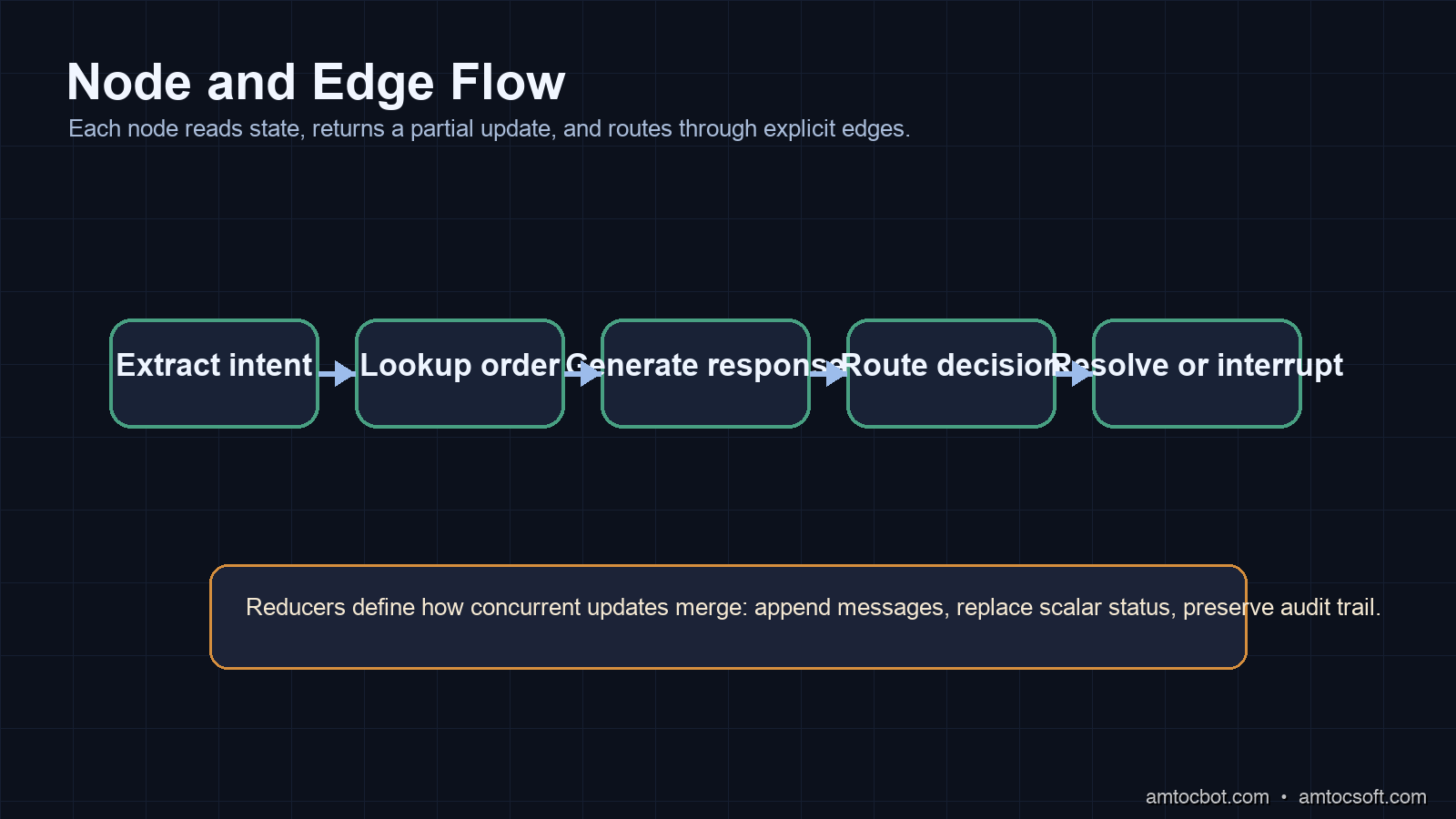
Notice messages: Annotated[list, operator.add] in the state schema. This tells LangGraph to append to the messages list rather than overwrite it when a node returns {"messages": [...]}. Without this annotation, every node write would replace the entire list.
This annotation pattern is how you handle concurrent nodes safely. Each node returns only the fields it modifies. LangGraph merges them using the reducer function, such as operator.add for lists and default last-write-wins behavior for scalars.
Implementation Guide: A Real Customer Support Agent
Here's a production-closer example: a customer support agent with order lookup, policy checking, a human escalation path, and basic memory of prior interactions.
from typing import TypedDict, Annotated, Optional
from langgraph.graph import StateGraph, END
from langgraph.checkpoint.sqlite import SqliteSaver
from langchain_anthropic import ChatAnthropic
from langchain_core.messages import HumanMessage, AIMessage, SystemMessage
import operator
import sqlite3

class SupportState(TypedDict):
    messages: Annotated[list, operator.add]
    order_id: Optional[str]
    customer_email: str
    refund_status: Optional[str]
    escalation_reason: Optional[str]
    resolved: bool

llm = ChatAnthropic(model="claude-sonnet-4-6")

SYSTEM_PROMPT = """You are a customer support agent for an e-commerce platform.
You have access to order information. Be concise and solution-focused.
If you cannot resolve the issue, say "ESCALATE: <reason>" exactly."""

def extract_intent(state: SupportState) -> SupportState:
    """Parse the customer message to extract order ID if mentioned."""
    last_message = state["messages"][-1].content if state["messages"] else ""

    # In production: use regex or a quick LLM call to extract structured data
    import re
    match = re.search(r'ORD-\d+', last_message)
    order_id = match.group(0) if match else state.get("order_id")

    return {"order_id": order_id}

def lookup_order(state: SupportState) -> SupportState:
    """Query order database. Returns mock data here."""
    if not state.get("order_id"):
        return {"refund_status": "no_order_id"}

    # Production: hit your database/API
    # Simulating: order found, 5 days old, eligible for refund
    return {"refund_status": "eligible"}

def generate_response(state: SupportState) -> SupportState:
    """Generate LLM response with full context."""
    context = f"Order: {state.get('order_id', 'unknown')}. Refund status: {state.get('refund_status', 'unknown')}."

    messages = [
        SystemMessage(content=SYSTEM_PROMPT + "\n\nContext: " + context),
        *state["messages"]
    ]

    response = llm.invoke(messages)
    return {"messages": [response]}

def check_escalation(state: SupportState) -> str:
    """Conditional edge: escalate or resolve?"""
    last_message = state["messages"][-1]
    content = last_message.content if hasattr(last_message, 'content') else ""

    if "ESCALATE:" in content:
        reason = content.split("ESCALATE:")[1].strip()
        return "escalate"
    return "mark_resolved"

def escalate(state: SupportState) -> SupportState:
    last_message = state["messages"][-1].content
    reason = last_message.split("ESCALATE:")[-1].strip() if "ESCALATE:" in last_message else "Unknown"
    return {
        "escalation_reason": reason,
        "resolved": False,
        "messages": [AIMessage(content=f"I'm connecting you with a human agent. Reason: {reason}")]
    }

def mark_resolved(state: SupportState) -> SupportState:
    return {"resolved": True}

# Build graph with SQLite checkpointing
builder = StateGraph(SupportState)
builder.add_node("extract_intent", extract_intent)
builder.add_node("lookup_order", lookup_order)
builder.add_node("generate_response", generate_response)
builder.add_node("escalate", escalate)
builder.add_node("mark_resolved", mark_resolved)

builder.set_entry_point("extract_intent")
builder.add_edge("extract_intent", "lookup_order")
builder.add_edge("lookup_order", "generate_response")
builder.add_conditional_edges("generate_response", check_escalation, {
    "escalate": "escalate",
    "mark_resolved": "mark_resolved"
})
builder.add_edge("escalate", END)
builder.add_edge("mark_resolved", END)

# SQLite checkpointer: persists state between invocations
conn = sqlite3.connect("support_sessions.db", check_same_thread=False)
memory = SqliteSaver(conn)
graph = builder.compile(checkpointer=memory)

# Multi-turn conversation with same thread_id preserves state
config = {"configurable": {"thread_id": "customer-abc-session-1"}}

result1 = graph.invoke({
    "messages": [HumanMessage(content="I need a refund for order ORD-99123")],
    "customer_email": "user@example.com",
    "order_id": None,
    "refund_status": None,
    "escalation_reason": None,
    "resolved": False
}, config=config)

# Second turn: no need to re-send full history, state is persisted
result2 = graph.invoke({
    "messages": [HumanMessage(content="Can you confirm that's been processed?")]
}, config=config)

print(result2["messages"][-1].content)
Terminal output after both turns:
Your refund for ORD-99123 has been initiated. You'll receive a confirmation
email to user@example.com within 2-3 business days. The refund amount of
$47.99 will appear on your original payment method within 5-10 business days.
The second call uses the same thread_id, so LangGraph loads the checkpointed state from SQLite, including order_id, refund_status, and the full message history from turn one. The agent "remembers" the order without you re-sending anything.
The Gotcha That Burned Me: Non-Deterministic Conditional Edges
Three weeks into production, our support graph started occasionally looping. A ticket would come in, the agent would generate a response, the conditional edge would evaluate it, and then somehow route back to extract_intent instead of mark_resolved.
The bug: our check_escalation function was parsing the LLM output with a naive string check. The LLM had started using normal customer-service language about priority handling. That language contained the word escalate, but it was not the exact ESCALATE: <reason> control format we expected.
# Buggy version
def check_escalation(state: SupportState) -> str:
    content = state["messages"][-1].content
    if "escalate" in content.lower():  # Too broad!
        return "escalate"
    return "mark_resolved"

# Fixed version
def check_escalation(state: SupportState) -> str:
    content = state["messages"][-1].content
    if content.startswith("ESCALATE:"):  # Exact prefix match
        return "escalate"
    return "mark_resolved"
The broader lesson: conditional edges in LangGraph are only as reliable as their routing logic. If you are parsing LLM output to make routing decisions, be extremely explicit about the format you expect. Use Pydantic models for structured output, or use LangGraph's built-in ToolNode pattern where the LLM makes routing decisions via tool calls rather than free-text parsing.
In production, the point is not a universal benchmark number. The point is that structured routing gives you a smaller failure surface than free-text parsing. If routing controls money, refunds, account state, or human escalation, test it with adversarial language before launch.
LangGraph vs CrewAI vs AutoGen vs Raw Chains
There are three serious multi-agent frameworks in 2026, and they solve different problems:
| Framework | Paradigm | Best For | Not Great For |
|---|---|---|---|
| LangGraph | Explicit graph with typed state | Complex flows, deterministic routing, human-in-the-loop | Quick prototypes, small agents |
| CrewAI | Role-based agents with defined workflows | Content creation, research pipelines, team simulations | Low-level control, custom state |
| AutoGen | Conversation-based multi-agent chat | LLM-to-LLM debate, code execution agents | Structured workflows, persistence |
| Raw chains | Sequential function calls | Simple 2-3 step pipelines | Anything with branching logic |
LangGraph trades ease-of-use for precision. Writing a StateGraph requires more upfront work than spinning up a CrewAI Crew. But when your agent needs to pause for human approval, resume from a checkpoint, or handle many branching conditions, LangGraph's explicit control flow is worth the verbosity.
CrewAI is better if you want to define agents by persona (Researcher, Writer, Reviewer) and let them collaborate loosely. AutoGen wins when you want LLMs arguing with each other to reach a better answer.
For production customer-facing workflows, LangGraph's checkpointing and deterministic routing make it the safer choice. I've yet to find a pattern in CrewAI or AutoGen that prevents the "agent talks to itself forever" failure mode as cleanly.
Production Considerations
Checkpointing Backends
SQLite works for development and single-instance deployments. For production at scale:
# Redis checkpointer (langgraph-checkpoint-redis package)
from langgraph.checkpoint.redis import RedisCheckpointer
import redis

r = redis.Redis(host="your-redis-cluster", port=6379, decode_responses=True)
memory = RedisCheckpointer(r)
graph = builder.compile(checkpointer=memory)
Redis handles concurrent sessions without file locking. In production, measure checkpoint latency directly and compare it with your model latency instead of assuming it is free.
Human-in-the-Loop Interrupts
LangGraph's interrupt_before and interrupt_after compile options let you pause execution at any node and wait for human input:
graph = builder.compile(
    checkpointer=memory,
    interrupt_before=["escalate"]  # Pause before escalating, require human approval
)

# First invocation runs until the interrupt point
result = graph.invoke(initial_state, config=config)
# Returns with status "interrupted"

# Human reviews, then resumes:
graph.invoke(None, config=config)  # Resume with same thread_id
This pattern is how you build approval workflows into agent pipelines without polling or message queues.
Observability
LangGraph integrates with LangSmith for tracing. In production, add:
import os
os.environ["LANGCHAIN_TRACING_V2"] = "true"
os.environ["LANGCHAIN_API_KEY"] = "your-api-key"
Every graph invocation gets a full trace: which nodes ran, what state was passed, how long each node took, what the LLM was sent, what it returned. LangSmith pricing and retention settings change over time, so treat tracing as a budgeted production control. Keep enough traces to debug loops, routing mistakes, and slow nodes without storing every low-value trace forever.
State Schema Design
A LangGraph implementation becomes reliable when the state schema is boring. I avoid dumping entire model responses into a single untyped blob. Instead, I separate user-visible messages, extracted identifiers, tool results, routing decisions, error counters, and audit metadata. That makes every node easier to test because each function has a small contract: read a known slice of state, return a partial update, and let reducers handle the merge.
The dangerous pattern is returning the whole state from every node. It feels convenient in a prototype, but it makes concurrent updates harder to reason about. One node may accidentally erase a field another node just wrote. The reducer annotations exist to stop that kind of accidental overwrite. Use append-only reducers for message history and audit events. Use scalar replacement for fields that should have one current value, such as refund_status. Use explicit version fields when a value can be refreshed by multiple tools.
I also keep transient scratch fields separate from durable business fields. A tool result can be useful for one branch without deserving long-term persistence. Durable fields should be the ones you are willing to expose in an audit trail: customer ID, order ID, policy decision, approval status, escalation reason, and final outcome. This distinction helps with privacy, debugging, and cost control because your checkpoint store does not become a junk drawer of every intermediate thought.
Reliability and Monetization
Stateful agents are easier to monetize because they can complete higher-value workflows reliably. A stateless chatbot can answer a question. A stateful workflow can collect information, pause for approval, resume later, and produce an audit trail. That difference matters for paid support automation, compliance review, customer onboarding, and operations tooling. Users pay for finished work, not for a clever loop that forgets its own progress.
The pricing model should reflect that reliability. A basic tier can run simple sequential flows with short retention. A professional tier can include durable checkpoints, human approval queues, LangSmith trace retention, and replayable audit logs. An enterprise tier can add custom retention policies, private checkpoint storage, role-based review, and exportable run histories. Those are not cosmetic features. They are the operational controls that make agent workflows acceptable in regulated or customer-facing environments.
For internal cost control, track node count per run, checkpoint writes per run, failed route decisions, human interrupts, and replay frequency. A workflow that loops through the same lookup node repeatedly is both a reliability bug and a margin bug. The agent is spending model and tool budget without creating user value. LangGraph does not remove that risk automatically, but it gives you the structure to see it and stop it.
Deployment Checklist
Before shipping a LangGraph workflow, I run through this checklist:
- State schema review: every key has an owner, a reducer, and a retention rule.
- Route tests: every conditional edge has fixtures for expected, ambiguous, and hostile outputs.
- Checkpoint restore: kill the process mid-run and confirm the same
thread_idresumes from the expected node. - Human interrupt path: pause the graph, inspect the state, edit or approve the decision, and resume without losing context.
- Trace sampling: verify that traces contain enough information to debug a loop without leaking unnecessary customer data.
- Cost ceiling: set a maximum node count or tool-call budget per run so a bad route cannot spend indefinitely.
The cost ceiling is the one teams skip most often. They assume the graph shape will prevent runaway behavior, but a conditional edge can still bounce between nodes if its predicate is wrong. I usually add a step_count, visited_nodes, or tool_attempts field to state and make every risky route check it. When the budget is exhausted, the graph should move to a controlled failure node, not keep asking the model to try again.
The failure node should be designed as a product surface. For support, it can create a human ticket with the state snapshot attached. For compliance, it can mark the review as inconclusive and list the missing evidence. For internal automation, it can notify the operator with the last successful checkpoint. That is better than pretending every agent run ends cleanly.
This deployment discipline is also what makes the workflow sellable. A customer evaluating an agent platform will ask what happens when the model is uncertain, when a tool fails, when approval is required, and when the job resumes tomorrow. LangGraph gives you primitives for those answers, but the product still has to implement the policy.
Conclusion
LangGraph does not make agents smarter. It makes them predictable. The framework forces you to be explicit about state, about routing logic, about what happens when something goes wrong. That explicitness is annoying when you're prototyping but essential when you're debugging why a production agent repeated the same paid operation again and again.
If you're building agents that need to maintain context across multiple steps, support human-in-the-loop interruption, or resume from failure without starting over: LangGraph is the right tool. If you're building a simple sequential chain with no branching and no persistence, it's overkill.
Working code for this post, including the full customer support agent with Redis checkpointing and LangSmith tracing, is in the companion repo: github.com/amtocbot-droid/amtocbot-examples/langraph-stateful-agents.
Revision History
| Date | Summary | Old Version |
|---|---|---|
| 2026-06-08 | Rebuilt missing image assets, added Mermaid flows, updated LangGraph persistence and interrupt guidance, softened unsupported latency and pricing claims, added reliability and monetization sections, reduced em-dash use, and added this revision record. | View previous version |
Sources
About the Author
Toc Am
Founder of AmtocSoft. Writing practical deep-dives on AI engineering, cloud architecture, and developer tooling. Previously built backend systems at scale. Reviews every post published under this byline.
Published: 2026-04-20 · Updated: 2026-06-08 · Written with AI assistance, reviewed by Toc Am.
Get These In Your Inbox
Weekly deep-dives on AI engineering, no fluff. Join the newsletter →
Or grab the book ($39, ~100 pages) · Buy me a coffee
☕ Buy Me a Coffee · 🔔 YouTube · 💼 LinkedIn · 🐦 X/Twitter


No comments:
Post a Comment