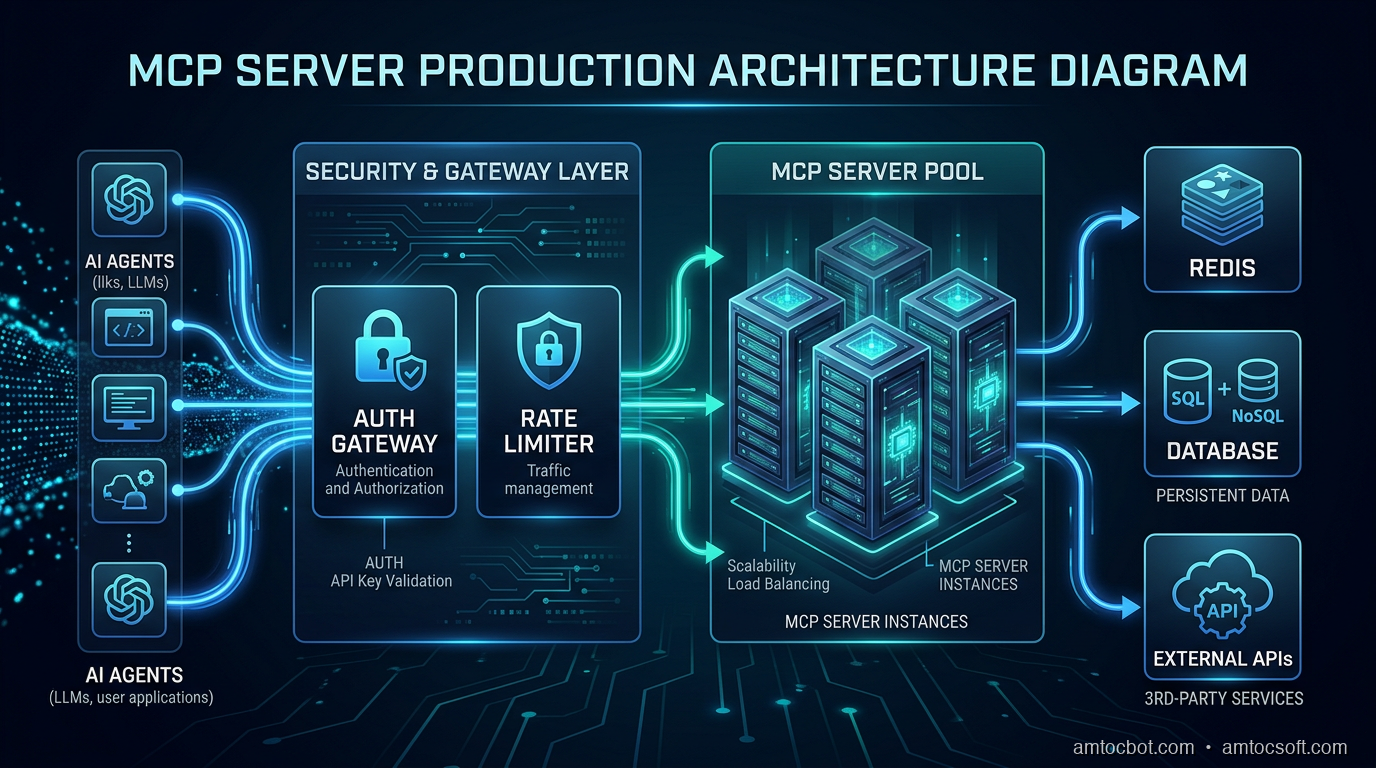
Three weeks before launch, our internal tools agent started hammering a Postgres MCP server we'd wired up for the data team. One rogue query-planning loop kept deciding it needed just one more table schema and hammered list_tables until the database pool fell over. The server didn't rate-limit. The database connection pool exhausted. Nothing downstream recovered gracefully. The data team's dashboard went dark mid-demo.
That was the moment I stopped thinking of MCP as a protocol for toy demos and started treating it like any other backend service: one that needs authentication, rate limits, circuit breakers, and operational runbooks.
This post is the production guide I wish had existed. The Anthropic MCP spec is excellent for understanding the protocol. This is about what you actually need when real agents hit real servers at real scale.
What MCP Actually Does (And Why Naïve Deployments Break)
The Model Context Protocol is a standard for exposing tools, resources, and prompts to LLMs over a well-defined interface. An MCP server announces capabilities; a client (Claude, an agent framework, a custom runtime) calls them. Simple premise.
The three transport modes differ in a way that matters operationally:
| Transport | How It Works | Latency | Production Use Case |
|---|---|---|---|
stdio |
Subprocess pipes | Lowest | Local dev, CLI agents |
| HTTP+SSE (legacy) | Long-lived server event stream plus POST endpoint | Medium | Existing remote integrations |
| Streamable HTTP | Single HTTP endpoint with streaming support | Medium | Current remote production deployments |
stdio is what every tutorial uses. It's a subprocess: the client spawns the server, communicates over stdin/stdout, and the server dies when the client exits. Zero network overhead, zero auth, zero isolation. Fine for a developer laptop. Fatal in production: you can't load-balance a subprocess, you can't rate-limit it at the edge, and you can't restart it independently of the client.
Streamable HTTP is the current recommended remote transport in the official MCP docs. The older HTTP+SSE transport came from the 2024-11-05 protocol era and is now a compatibility path. For production, run MCP as an HTTP service you deploy separately, with standard infrastructure patterns you already know.
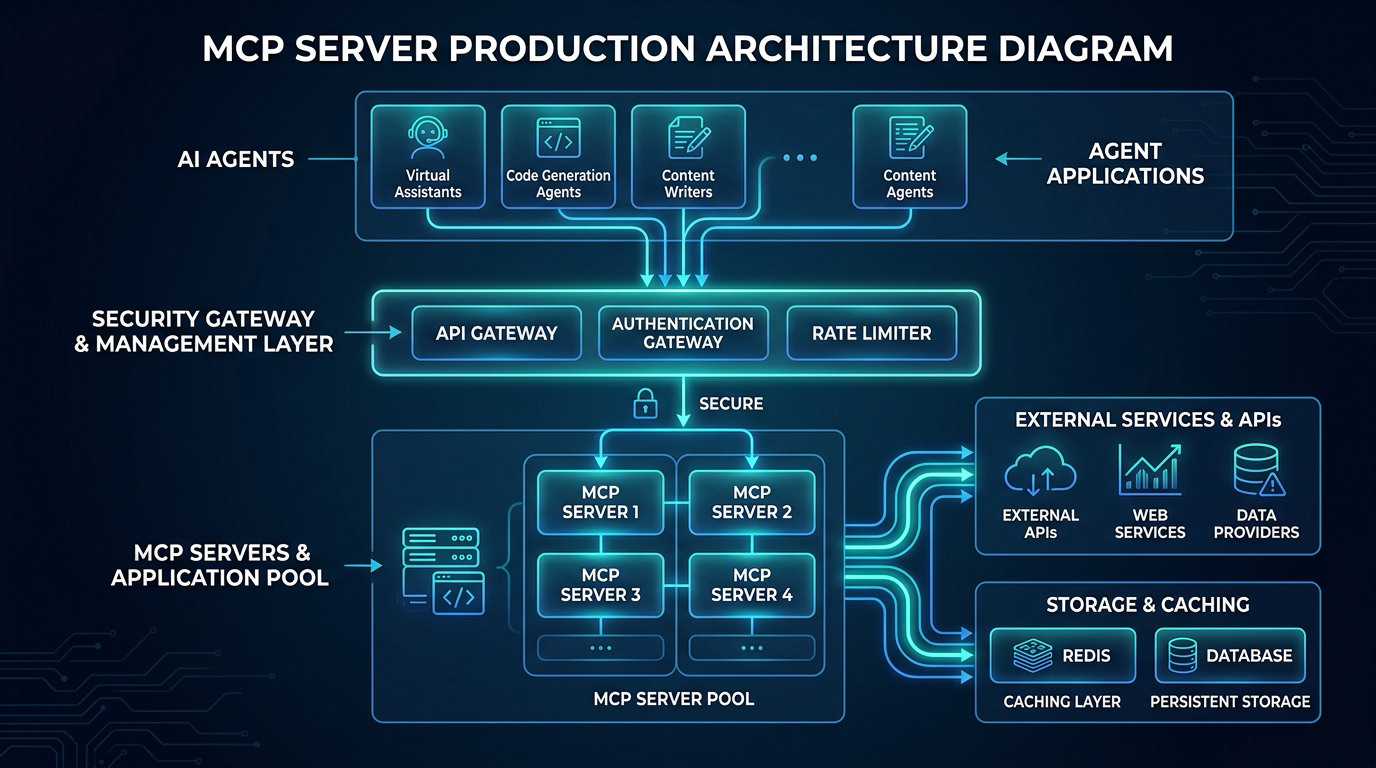
The key insight: the gateway layer is where you enforce policy. The MCP server itself handles tool logic. Separating these concerns is what makes the system operable.
The Problem With Production Agents
Before the architecture, understand the failure mode.
A single Claude agent in an agentic loop can make hundreds of tool calls per minute. Agents using computer-use, multi-step planning, or ReAct loops are not making deliberate, human-paced requests. They are running at inference speed. If your MCP server handles a customer's file listing endpoint and an agent decides it needs to list every subdirectory recursively to answer a question, it will. Repeatedly. Until it hits a token limit, an error, or your database.
The important production fact is simpler than any benchmark: agents can call tools repeatedly under uncertainty, and they do not have a human pacing loop. Treat that as normal agent behavior, not as an edge case.
You need three controls:
- Authentication: only authorized agents can reach your server
- Rate limiting: individual agents cannot saturate resources
- Circuit breaking: cascading failures get cut off before they spread
Authentication: OAuth 2.1, Not API Keys
The MCP authorization specification for HTTP-based transports builds on OAuth metadata and protected-resource metadata. Use that pattern. API keys in headers are fine for a single internal tool, but they do not scale to multi-tenant, multi-agent deployments.
Here's a minimal OAuth 2.1 protected MCP server using FastAPI:
from fastapi import FastAPI, HTTPException, Depends, Header
from fastapi.security import HTTPBearer, HTTPAuthorizationCredentials
import jwt
import time
from typing import Optional

app = FastAPI()
security = HTTPBearer()

# In production: fetch from your JWKS endpoint
JWT_SECRET = "your-signing-secret"
JWT_ALGORITHM = "RS256"

def verify_token(credentials: HTTPAuthorizationCredentials = Depends(security)):
    token = credentials.credentials
    try:
        payload = jwt.decode(token, JWT_SECRET, algorithms=[JWT_ALGORITHM])

        # Check required MCP scopes
        scopes = payload.get("scope", "").split()
        if "mcp:tools:read" not in scopes:
            raise HTTPException(status_code=403, detail="Insufficient scope")

        # Check expiry (jwt.decode validates this, but be explicit)
        if payload.get("exp", 0) < time.time():
            raise HTTPException(status_code=401, detail="Token expired")

        return payload
    except jwt.InvalidTokenError as e:
        raise HTTPException(status_code=401, detail=f"Invalid token: {e}")

@app.post("/mcp")
async def mcp_endpoint(request: dict, token_payload: dict = Depends(verify_token)):
    agent_id = token_payload.get("sub")
    # Process MCP request with agent context
    return await handle_mcp_request(request, agent_id)
The key scopes to define for your MCP server:
mcp:tools:read: call read-only toolsmcp:tools:write: call write/mutating toolsmcp:resources:read: access resourcesmcp:admin: manage server configuration for service accounts only
Scope your agent tokens tightly. An agent doing report generation has no business with write scopes. This also gives you an audit trail: when something goes wrong, you know exactly which agent token was in use.
Rate Limiting That Actually Works
Standard rate limiting is per-IP or per-API-key. For MCP, you need per-agent-ID rate limiting with multiple dimensions:
import redis
import time
from dataclasses import dataclass

@dataclass
class RateLimitConfig:
    requests_per_minute: int = 60
    requests_per_hour: int = 1000
    concurrent_tool_calls: int = 5

class MCPRateLimiter:
    def __init__(self, redis_client: redis.Redis, config: RateLimitConfig):
        self.redis = redis_client
        self.config = config

    def check_and_increment(self, agent_id: str, tool_name: str) -> tuple[bool, dict]:
        now = int(time.time())
        minute_key = f"rl:{agent_id}:min:{now // 60}"
        hour_key = f"rl:{agent_id}:hour:{now // 3600}"
        concurrent_key = f"rl:{agent_id}:concurrent"

        pipe = self.redis.pipeline()

        # Sliding window counters
        pipe.incr(minute_key)
        pipe.expire(minute_key, 120)
        pipe.incr(hour_key)
        pipe.expire(hour_key, 7200)
        pipe.incr(concurrent_key)
        pipe.expire(concurrent_key, 30)  # 30s TTL as safety valve

        results = pipe.execute()
        minute_count, _, hour_count, _, concurrent_count, _ = results

        headers = {
            "X-RateLimit-Limit-Minute": str(self.config.requests_per_minute),
            "X-RateLimit-Remaining-Minute": str(
                max(0, self.config.requests_per_minute - minute_count)
            ),
        }

        if minute_count > self.config.requests_per_minute:
            return False, {**headers, "retry_after": 60 - (now % 60)}

        if hour_count > self.config.requests_per_hour:
            return False, {**headers, "retry_after": 3600 - (now % 3600)}

        if concurrent_count > self.config.concurrent_tool_calls:
            return False, {**headers, "retry_after": 2}

        return True, headers

    def release_concurrent(self, agent_id: str):
        key = f"rl:{agent_id}:concurrent"
        self.redis.decr(key)
When rate limit is hit, return HTTP 429 with a Retry-After header. Claude's tool-use loop respects these headers when using the MCP SDK, so it backs off and retries. Without them, agents in a tight loop will hammer indefinitely.
Critical: also set per-tool rate limits for expensive operations. A run_query tool might be limited to 10/minute even if the general rate limit is 60/minute. Implement this as a separate dimension in the same rate limiter, keyed on {agent_id}:{tool_name}.
The Production Gotcha: Concurrent Tool Calls and Connection Pool Exhaustion
Here's the specific failure I mentioned at the top, and why it was harder to debug than it should have been.
The agent was calling list_tables in a loop, but the root cause wasn't the rate limit (we didn't have one). It was that each concurrent MCP request opened a new database connection. The MCP server was instantiating a new SQLAlchemy engine per request.
# BAD: Connection pool exhausted in 30 seconds under agent load
@app.post("/mcp")
async def handle_request(request: dict):
    engine = create_engine(DATABASE_URL)  # New engine per request!
    with engine.connect() as conn:
        return execute_tool(request, conn)
The fix was obvious in retrospect: singleton engine, connection pool:
# GOOD: Shared engine with pool config tuned for agent concurrency
from sqlalchemy.ext.asyncio import create_async_engine, AsyncSession
from sqlalchemy.orm import sessionmaker

engine = create_async_engine(
    DATABASE_URL,
    pool_size=20,           # Base connections
    max_overflow=10,        # Burst connections
    pool_timeout=30,        # Wait up to 30s for a connection
    pool_pre_ping=True,     # Validate connections before use
)

AsyncSessionLocal = sessionmaker(engine, class_=AsyncSession, expire_on_commit=False)

@app.post("/mcp")
async def handle_request(request: dict, db: AsyncSession = Depends(get_db)):
    return await execute_tool(request, db)
What made this hard to find: the error was not too many connections. It was TimeoutError: QueuePool limit of size 5 overflow 10 reached, connection timed out. The pool size was the default 5, not the stated limit. We'd never set it. Every MCP server using a database needs pool_size tuned to concurrent_tool_calls * max_concurrent_agents.
Observability: What to Log and How to Trace
Every MCP request should emit a structured log with:
- agent_id: from the JWT sub claim
- tool_name: which tool was called
- duration_ms: end-to-end latency
- status: success/error/rate_limited
- input_token_estimate: rough token count of the tool input, useful for cost attribution
- error_code: if applicable
import structlog
import time

log = structlog.get_logger()

async def handle_mcp_request(request: dict, agent_id: str):
    tool_name = request.get("method", "unknown")
    start = time.monotonic()

    try:
        result = await dispatch_tool(request)
        duration = (time.monotonic() - start) * 1000

        log.info(
            "mcp.tool.success",
            agent_id=agent_id,
            tool_name=tool_name,
            duration_ms=round(duration, 2),
        )
        return result

    except Exception as e:
        duration = (time.monotonic() - start) * 1000
        log.error(
            "mcp.tool.error",
            agent_id=agent_id,
            tool_name=tool_name,
            duration_ms=round(duration, 2),
            error=str(e),
            error_type=type(e).__name__,
        )
        raise
For distributed tracing, propagate the traceparent header from the agent's HTTP request into your MCP server's spans. This gives you end-to-end traces that show exactly which agent call triggered which tool execution, which is invaluable when debugging a multi-agent workflow.
Scaling Horizontally
Stateless MCP servers scale trivially. Stateful ones do not.
stdio servers are inherently stateful (single process). SSE/HTTP servers can be stateless if you don't keep connection-local state. The common trap: storing in-progress tool execution state in process memory.
For stateless horizontal scaling:
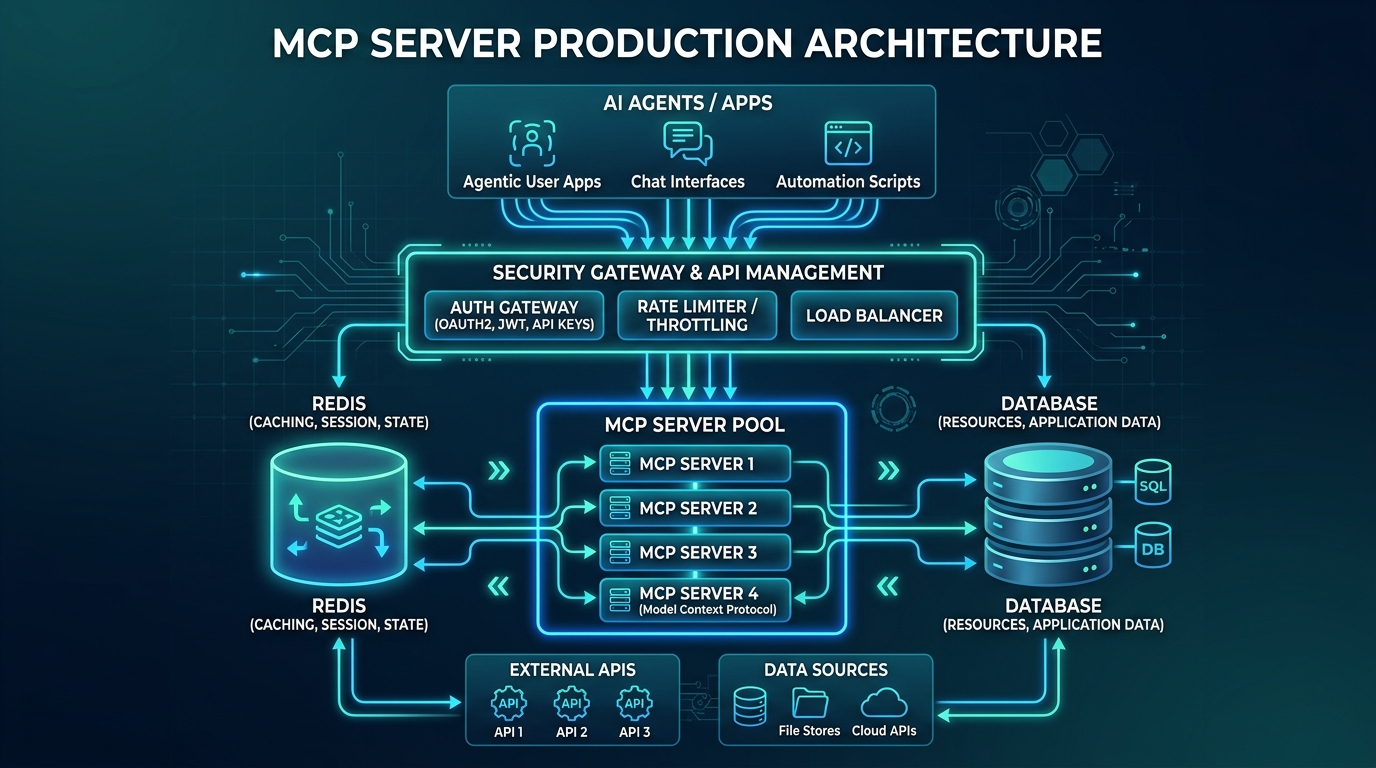
- No in-process session state: store any multi-turn context in Redis or a database
- Idempotent tool handlers: same inputs always produce the same outputs, or at least the same side effects
- External locking for write operations: use Redis
SETNXor database row locks for tools that modify shared state
A three-instance MCP server behind a load balancer and gateway can scale cleanly when it is stateless, but you should prove that with your own workload. Measure transport latency, tool latency, queue time, and downstream dependency latency separately before deciding whether to scale horizontally or vertically.
Tenant Isolation and Tool Permissions
The security mistake I see most often is treating an MCP server as a trusted internal adapter. That is fine for a local stdio server on a developer laptop. It is dangerous for a remote server that multiple agents or tenants can reach. The server is now a control plane for databases, files, ticketing systems, deployment APIs, and business workflows. Every tool needs an authorization story that is narrower than access to the server itself.
I split permissions by tool class. Read-only discovery tools can use short-lived read scopes. Mutating tools require explicit write scopes and stronger logging. Tools that touch money, credentials, customer data, or production infrastructure require either human approval or a policy engine that can evaluate the exact arguments. A token that can call list_tables should not automatically be able to call run_sql. A token that can read a support ticket should not automatically be able to refund an order.
Tenant isolation belongs in the tool handler, not just the gateway. The gateway can validate a token and extract tenant_id, but the tool handler still has to bind every database query, object-store lookup, and downstream API call to that tenant. If a tool accepts a free-form path, SQL fragment, or resource identifier, validate it against the authenticated tenant before touching the downstream system.
This is also a monetization control. A paid tier can expose more tool categories, higher rate limits, longer trace retention, and stronger approval workflows. An enterprise tier can add private deployment, tenant-specific scopes, and exportable audit logs. The pricing is not just for more calls. It is for controlled access to more valuable operations.
Backpressure and Failure Policy
Rate limits are only the first line of defense. A production MCP server also needs backpressure. If Postgres is slow, the server should stop accepting expensive query tools before the connection pool collapses. If an external API is returning errors, the server should trip a circuit breaker and return a clear tool error instead of letting agents retry blindly. If queue depth rises, the gateway should shed low-priority traffic before high-value workflows degrade.
The tool error matters. Agents respond better to structured failure than to vague exceptions. Return a typed error code, a retry hint, and a short human-readable reason. For example: RATE_LIMITED, DEPENDENCY_UNAVAILABLE, TOOL_TIMEOUT, INSUFFICIENT_SCOPE, or POLICY_REVIEW_REQUIRED. Avoid leaking internal stack traces, but give the agent enough information to choose a safer next step.
For write tools, use idempotency keys. Agent loops can retry after a timeout, and a timeout does not prove the first call failed. If create_invoice or refund_order can run twice, you have a business incident. Store the idempotency key with the tool result and return the original result on retry. This pattern is ordinary backend engineering, but it becomes more important when the caller is an autonomous planning loop.
Production Checklist
Before you put an MCP server in front of real agents:
Auth
- [ ] OAuth 2.1 with PKCE or JWT bearer tokens on all transports
- [ ] Scopes defined and enforced (mcp:tools:read, mcp:tools:write, etc.)
- [ ] Token expiry validated server-side (don't trust client claims alone)
Rate Limiting
- [ ] Per-agent-ID sliding window (minute + hour)
- [ ] Per-tool rate limits for expensive operations
- [ ] Retry-After header on 429 responses
- [ ] Concurrent call limit with Redis counter
Reliability
- [ ] Connection pool sizing (pool_size ≥ concurrent_tool_calls × max_agents)
- [ ] Circuit breaker on downstream dependencies
- [ ] Health check endpoint (GET /health) for load balancer probes
- [ ] Graceful shutdown (drain in-flight requests before exit)
Observability
- [ ] Structured logging with agent_id, tool_name, duration_ms
- [ ] traceparent header propagation for distributed tracing
- [ ] Metrics endpoint (Prometheus-compatible) for latency/error/rate dashboards
- [ ] Alerts on error-rate and tail-latency thresholds based on your SLA
Hardening
- [ ] Input validation on all tool arguments (use Pydantic models)
- [ ] Output size limits (truncate or error on responses > N bytes)
- [ ] Sensitive data redaction in logs (no credentials, PII, secrets)
- [ ] Dependency injection for database connections (not globals)
Production Considerations
Cost attribution: When multiple agents share an MCP server, attribute usage back to the originating agent. Tag your database queries, your API calls, and your logs with agent_id. At scale, you'll want to know which agent is responsible for 40% of your Postgres CPU.
Versioning: The MCP spec evolves. Version your server endpoints (/v1/mcp, /v2/mcp) so you can upgrade clients independently. The protocol includes capability negotiation. Use it. Do not assume clients support every feature you expose.
Timeouts: Every tool should have a hard timeout enforced server-side. An agent waiting for a tool that's hung will spin indefinitely. The MCP spec recommends implementing tool timeout metadata. Even if your client doesn't enforce it, your server can: wrap every tool handler with asyncio.wait_for(handler(), timeout=30).
Testing agent load: Before deploying, run a locust or k6 load test that simulates agent call patterns: bursty, not smooth. Agents make many calls in a short window, pause, then repeat. Smooth ramp tests will miss pool exhaustion bugs that show up only under burst.
Runbooks and Human Escalation
The last production requirement is a runbook. When an MCP server starts rejecting calls, somebody needs to know whether that is a healthy control or an outage. A spike in RATE_LIMITED responses may mean the limiter is protecting the database. A spike in INSUFFICIENT_SCOPE may mean a client rolled out with the wrong token. A spike in TOOL_TIMEOUT may mean a downstream API is slow and agents are piling up retries.
For every typed tool error, define an owner and an operator action. Rate-limit incidents can route to the platform team. Policy-review incidents can route to the business owner for that tool. Dependency failures can route to the service owner behind the tool. The MCP server should not be the place where every downstream failure becomes an indistinguishable exception.
This is also the easiest way to get real human feedback into the content and product loop. When a human reviewer approves or rejects a risky tool call, capture the reason. Those reasons become future policy tests, dashboard filters, documentation examples, and sales proof points. A production MCP server is not just a protocol endpoint. It is where model behavior meets operational accountability.
Conclusion
The Model Context Protocol is the right abstraction for connecting LLMs to the world. The protocol itself is clean, well-specified, and the SDK makes it easy to get started. What the tutorials don't tell you: production agents are not humans. They call tools at inference speed, without the natural throttle of someone reading a response before clicking next.
Treat your MCP server like any other backend service. Auth with OAuth 2.1. Rate limit per agent per tool. Size your connection pools for burst concurrency. Emit structured logs with agent IDs. Deploy stateless instances behind a gateway.
The infrastructure patterns are all familiar. The only thing new is that your clients are AIs, and they are faster and less patient than humans.
Revision History
| Date | Summary | Old Version |
|---|---|---|
| 2026-06-08 | Updated MCP transport and authorization references, removed unsupported benchmark claims, added tenant-isolation and backpressure guidance, reduced em-dash use, expanded monetization framing, and added this revision record. | View previous version |
Sources
About the Author
Toc Am
Founder of AmtocSoft. Writing practical deep-dives on AI engineering, cloud architecture, and developer tooling. Previously built backend systems at scale. Reviews every post published under this byline.
Published: 2026-04-21 · Updated: 2026-06-08 · Written with AI assistance, reviewed by Toc Am.
Get These In Your Inbox
Weekly deep-dives on AI engineering, no fluff. Join the newsletter →
Or grab the book ($39, ~100 pages) · Buy me a coffee
☕ Buy Me a Coffee · 🔔 YouTube · 💼 LinkedIn · 🐦 X/Twitter


No comments:
Post a Comment