Generated with Higgsfield GPT Image — 16:9
Cypress was the darling of frontend testing in 2020. Selenium was the dinosaur everyone tolerated because they had no better option. Then Playwright arrived from Microsoft, quietly, in January 2020 — and within four years it had become the most downloaded browser testing tool on npm and the most wanted testing tool in the Stack Overflow Developer Survey for three consecutive years.
That trajectory is remarkable for any developer tool, let alone one entering a market with deeply entrenched incumbents. Selenium had been the default choice since 2004. Cypress had built enormous brand recognition and an enthusiastic community through the mid-2010s. Playwright had no head start, no installed base, and no marketing machine. It won on technical merit alone.
The question worth asking is not just "what is Playwright" but "what problem did it solve that the others couldn't?" Because the answer explains not only why Playwright took over, but what good browser testing looks like in 2026 — and what separates test suites that are actually reliable from the ones that your team treats as background noise because they fail too often to be trusted.
This post covers everything you need to go from zero to a production-grade Playwright setup: architecture, core concepts, real test examples, Page Object Model patterns, CI configuration, and an honest comparison with Cypress and Selenium. If you're currently running Selenium or Cypress and wondering whether to migrate, this post gives you the information to make that call.
The Problem with Browser Testing Before Playwright
Before Playwright, browser testing was dominated by two tools with fundamentally different but equally frustrating failure modes.
Selenium was built in 2004 and runs on the WebDriver protocol — a standardized HTTP API that tells a browser to do things. You send an HTTP request saying "click this element," the browser does it (or tries to), and sends a response. The protocol introduces a network round-trip for every single interaction: click, wait, find element, wait, type text, wait. In a test with fifty interactions, you have fifty round-trips, each introducing latency and a potential point of failure.
The deeper problem was that Selenium had no concept of "is this element actually ready to interact with?" You asked it to click a button, and it clicked the button the instant the element existed in the DOM — regardless of whether the button was still loading, animating, or hidden behind a spinner. The standard solution was sleep() calls and explicit waits scattered throughout the test code. Every test file became a graveyard of driver.wait(until.elementLocated(...), 5000) calls, each number chosen by guessing how long the page would probably take to be ready on most machines on most days.
This is the root cause of Selenium's notorious flakiness. The tests weren't flaky because the application was unreliable. They were flaky because the timing assumptions baked into every sleep() call were wrong some percentage of the time — and that percentage grew as CI machines had variable load, networks slowed down, and applications got more complex.
// The Selenium reality: explicit waits everywhere
const driver = await new Builder().forBrowser('chrome').build();

await driver.get('https://myapp.com/login');

// Pray the email field is ready
await driver.wait(until.elementLocated(By.css('[name="email"]')), 5000);
await driver.findElement(By.css('[name="email"]')).sendKeys('user@example.com');

// Pray the password field is ready
await driver.wait(until.elementLocated(By.css('[name="password"]')), 5000);
await driver.findElement(By.css('[name="password"]')).sendKeys('password123');

// Click and then wait for URL to change
await driver.findElement(By.css('[type="submit"]')).click();
await driver.wait(until.urlContains('/dashboard'), 10000);

// Pray the heading is visible
await driver.wait(until.elementLocated(By.css('h1')), 5000);
const heading = await driver.findElement(By.css('h1'));
await driver.wait(until.elementTextContains(heading, 'Welcome'), 3000);
Cypress solved the flakiness problem more elegantly. It runs inside the browser process itself rather than communicating over a network protocol, which gives it direct access to the application's JavaScript runtime and the ability to retry assertions automatically. A Cypress test that finds an element waits for it to appear, not for a fixed time. This made Cypress significantly more reliable than Selenium.
But Cypress had its own fundamental limitation: it could only test pages on the same origin. If your authentication flow involved a redirect to a third-party SSO provider, a different subdomain, or an OAuth popup, Cypress couldn't follow it. Multi-tab scenarios were completely out of reach. And while Cypress supported Chrome, Firefox support was always second-class, and Safari was never supported at all — meaning you couldn't run your tests in the browser that half your users actually used.
The protocol architecture also meant Cypress tests could only ever run one thing at a time. Parallelism required a paid Cypress Cloud subscription. And Cypress's architecture made it difficult to test scenarios that involved things outside the browser: file downloads, native browser dialogs, service workers, and anything that required CDP (Chrome DevTools Protocol) access.
How Playwright Solves It
Playwright was built by the same team that created Puppeteer at Google, then moved to Microsoft. They had already solved the Chrome automation problem. The question was how to extend that to a reliable cross-browser test framework.
The answer was to go lower in the stack. Rather than using WebDriver (Selenium's protocol) or injecting into the browser process (Cypress's approach), Playwright communicates with each browser using the browser's own native debugging protocol. For Chrome and Chromium-based browsers, that's CDP. For Firefox, it's the Firefox Remote Protocol. For WebKit (Safari), it's a custom protocol the Playwright team developed in collaboration with Apple engineers.
This gives Playwright three things that neither Selenium nor Cypress can match:
True cross-browser support. Not "we run on Firefox but it's slower and some things don't work" — Playwright runs the same test on all three engines with the same reliability. Your CI runs tests on Chrome, Firefox, and WebKit in parallel, and failures on WebKit actually tell you something about Safari behavior rather than being noise you ignore.
Auto-waiting built into every action. When you call page.click('#submit'), Playwright doesn't click the button immediately. It first waits for the element to be attached to the DOM, visible, stable (not animating), enabled, and not obscured by another element. Every single action runs this auto-wait check. If the condition isn't met within the timeout, the test fails with a clear message explaining exactly what condition wasn't satisfied. There are no sleep() calls in Playwright test code. There are no arbitrary timeout numbers to tune.
Browser contexts for isolation. A browser context is like a fresh browser profile: its own cookies, local storage, service workers, and permissions. You can create ten browser contexts inside a single browser process and run ten independent tests in parallel inside them. Context creation takes about 5ms. This is how Playwright achieves both isolation and speed simultaneously.
// Old Selenium approach — explicit waits everywhere
await driver.wait(until.elementLocated(By.id('submit')), 5000);
await driver.findElement(By.id('submit')).click();
await driver.wait(until.urlContains('/dashboard'), 5000);

// Playwright — auto-waits, no timeouts needed
await page.click('#submit');
await page.waitForURL('**/dashboard');
// That's it. Playwright handles all the waiting.
The performance difference is significant in practice. A typical Playwright test suite runs three to five times faster than the equivalent Selenium suite, not primarily because Playwright is faster per action, but because it doesn't waste time on sleep() calls and because parallelism across browser contexts is cheap.
Playwright also provides network interception, request/response mocking, trace recording (a full timeline of everything that happened during the test, including screenshots, network traffic, and console logs), video capture, and a built-in test runner with a visual UI mode. None of these require external plugins or paid plans.
Generated with Higgsfield GPT Image — 16:9
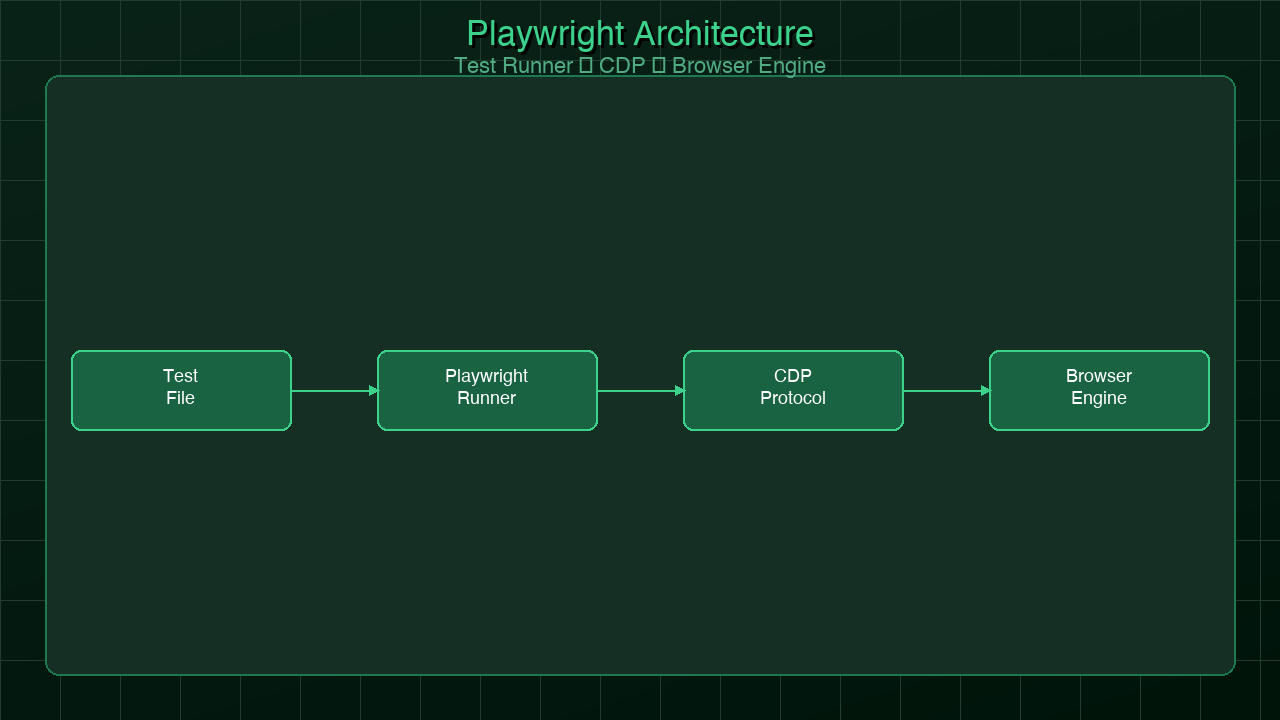
Here is the architecture of a Playwright test run:
@playwright/test] --> B[Worker Process 1] A --> C[Worker Process 2] A --> D[Worker Process N] B --> E[Chromium Browser] C --> F[Firefox Browser] D --> G[WebKit Browser] E --> H[Browser Context 1] E --> I[Browser Context 2] H --> J[Page / Tab] I --> K[Page / Tab] J --> L[Auto-Wait Engine] L --> M{Element Actionable?} M -->|Visible + Enabled + Stable| N[Execute Action] M -->|Not Ready| O[Retry with backoff] O --> M N --> P[Assertion Check] P --> Q[Pass / Fail] style A fill:#1a73e8,color:#fff style L fill:#34a853,color:#fff style M fill:#fbbc04,color:#000 style N fill:#34a853,color:#fff
Getting Started: Your First Real Test
Install Playwright and it scaffolds a project for you:
npm init playwright@latest
This creates a playwright.config.ts, an example test, and installs the browser binaries. The browsers are vendored binaries — Playwright downloads specific versions of Chromium, Firefox, and WebKit so your tests run against a known, consistent browser version regardless of what's installed on the machine.
Here is a complete, working test for a login flow that covers both success and failure paths:
import { test, expect } from '@playwright/test';

test.describe('Authentication', () => {
  test.beforeEach(async ({ page }) => {
    // Navigate to login before each test in this block
    await page.goto('/login');
  });

  test('user can log in and see dashboard', async ({ page }) => {
    // Fill form fields — auto-waits for each to be ready
    await page.fill('[name="email"]', 'user@example.com');
    await page.fill('[name="password"]', 'password123');

    // Submit and wait for navigation
    await page.click('[type="submit"]');

    // Assert we ended up on the right page
    await expect(page).toHaveURL('/dashboard');
    await expect(page.locator('h1')).toContainText('Welcome');
    await expect(page.locator('[data-testid="user-menu"]')).toBeVisible();
  });

  test('shows error for invalid credentials', async ({ page }) => {
    await page.fill('[name="email"]', 'bad@example.com');
    await page.fill('[name="password"]', 'wrongpass');
    await page.click('[type="submit"]');

    // We should stay on the login page
    await expect(page).toHaveURL('/login');
    await expect(page.locator('.error')).toBeVisible();
    await expect(page.locator('.error')).toContainText('Invalid credentials');
  });

  test('redirects to dashboard if already authenticated', async ({ page, context }) => {
    // Inject auth state directly instead of going through the login UI
    await context.addCookies([{
      name: 'session',
      value: 'valid-session-token',
      domain: 'localhost',
      path: '/',
    }]);

    await page.goto('/login');

    // Should redirect away from login immediately
    await expect(page).toHaveURL('/dashboard');
  });

  test('tab order follows logical sequence', async ({ page }) => {
    // Accessibility test: Tab through the login form
    await page.keyboard.press('Tab');
    await expect(page.locator('[name="email"]')).toBeFocused();

    await page.keyboard.press('Tab');
    await expect(page.locator('[name="password"]')).toBeFocused();

    await page.keyboard.press('Tab');
    await expect(page.locator('[type="submit"]')).toBeFocused();
  });
});
Every line of this test does exactly what it reads. No helper functions to manage timeouts. No waitFor scattered throughout. The expect(page.locator('.error')).toBeVisible() assertion will automatically retry until the element appears or the timeout expires — which means tests don't fail because they checked too early.
The playwright.config.ts for this project:
import { defineConfig, devices } from '@playwright/test';

export default defineConfig({
  testDir: './tests',
  fullyParallel: true,
  forbidOnly: !!process.env.CI,
  retries: process.env.CI ? 2 : 0,
  workers: process.env.CI ? 4 : undefined,
  reporter: [['html'], ['list']],

  use: {
    baseURL: process.env.BASE_URL || 'http://localhost:3000',
    trace: 'on-first-retry',
    video: 'on-first-retry',
    screenshot: 'only-on-failure',
  },

  projects: [
    {
      name: 'chromium',
      use: { ...devices['Desktop Chrome'] },
    },
    {
      name: 'firefox',
      use: { ...devices['Desktop Firefox'] },
    },
    {
      name: 'webkit',
      use: { ...devices['Desktop Safari'] },
    },
    {
      name: 'mobile-chrome',
      use: { ...devices['Pixel 5'] },
    },
    {
      name: 'mobile-safari',
      use: { ...devices['iPhone 13'] },
    },
  ],

  webServer: {
    command: 'npm run dev',
    url: 'http://localhost:3000',
    reuseExistingServer: !process.env.CI,
  },
});
The webServer configuration tells Playwright to start your application before running tests and wait until it's responding. On CI, it always starts fresh. Locally, it reuses an existing dev server if one is running. This eliminates the "is my app running?" test failure class entirely.
Playwright's Killer Features
Playwright ships with a set of capabilities that used to require significant additional tooling or paid plans in other frameworks. These are not add-ons — they're part of the core package.
Codegen: Record Tests by Clicking
npx playwright codegen https://myapp.com
This opens your application in a browser with a recording overlay. As you click through your application, Playwright generates the test code in real time. The generated code uses Playwright's best-practice locators — getByRole, getByLabel, getByTestId — rather than fragile CSS selectors. It's not a replacement for writing tests thoughtfully, but it's an excellent starting point for new test coverage and a useful way to quickly capture a flow.
Trace Viewer: Forensic Test Failure Analysis
When a test fails on CI, you usually get a stack trace that tells you what assertion failed but not why. Playwright's Trace Viewer gives you a full forensic record of everything that happened during the test: every action, every screenshot at the moment of each action, all network requests and responses, console logs, and the DOM state at any point in the timeline.
With trace: 'on-first-retry' in your config, Playwright captures a trace whenever a test fails on retry. You download the trace artifact from CI, open it with npx playwright show-trace trace.zip, and see exactly what the browser was doing at the moment things went wrong. This eliminates the "it works locally but fails in CI" debugging spiral that consumes so much engineering time with other frameworks.
Network Mocking: Isolate Your UI from Your API
test('displays user list from API', async ({ page }) => {
  const mockUsers = [
    { id: 1, name: 'Alice Johnson', role: 'admin' },
    { id: 2, name: 'Bob Smith', role: 'user' },
  ];

  // Intercept the API call and return mock data
  await page.route('**/api/users', async route => {
    await route.fulfill({
      status: 200,
      contentType: 'application/json',
      body: JSON.stringify(mockUsers),
    });
  });

  await page.goto('/users');

  await expect(page.locator('[data-testid="user-row"]')).toHaveCount(2);
  await expect(page.getByText('Alice Johnson')).toBeVisible();
  await expect(page.getByText('Bob Smith')).toBeVisible();
});

test('shows empty state when no users exist', async ({ page }) => {
  await page.route('**/api/users', async route => {
    await route.fulfill({
      status: 200,
      contentType: 'application/json',
      body: JSON.stringify([]),
    });
  });

  await page.goto('/users');

  await expect(page.locator('[data-testid="empty-state"]')).toBeVisible();
  await expect(page.getByText('No users found')).toBeVisible();
});

test('handles API errors gracefully', async ({ page }) => {
  await page.route('**/api/users', async route => {
    await route.fulfill({ status: 500, body: 'Internal Server Error' });
  });

  await page.goto('/users');

  await expect(page.locator('[data-testid="error-banner"]')).toBeVisible();
  await expect(page.getByText('Failed to load users')).toBeVisible();
});
Network mocking lets you test every UI state — empty states, error states, slow loading states — without needing a backend that can produce all those conditions reliably. Your tests run faster and are no longer dependent on backend data fixtures staying in sync.
Multi-Context: Test Multi-User Scenarios
test('admin can see actions that regular users cannot', async ({ browser }) => {
  // Create two independent browser sessions
  const adminContext = await browser.newContext();
  const userContext = await browser.newContext();

  const adminPage = await adminContext.newPage();
  const userPage = await userContext.newPage();

  // Log in as admin in one context
  await adminPage.goto('/login');
  await adminPage.fill('[name="email"]', 'admin@example.com');
  await adminPage.fill('[name="password"]', 'adminpass');
  await adminPage.click('[type="submit"]');

  // Log in as regular user in another
  await userPage.goto('/login');
  await userPage.fill('[name="email"]', 'user@example.com');
  await userPage.fill('[name="password"]', 'userpass');
  await userPage.click('[type="submit"]');

  // Navigate both to the same resource
  await adminPage.goto('/users/123');
  await userPage.goto('/users/123');

  // Admin sees delete button, regular user does not
  await expect(adminPage.locator('[data-testid="delete-user"]')).toBeVisible();
  await expect(userPage.locator('[data-testid="delete-user"]')).not.toBeVisible();

  await adminContext.close();
  await userContext.close();
});
Built-In API Testing
import { test, expect, request } from '@playwright/test';

test('health check endpoint returns 200', async ({ request }) => {
  const response = await request.get('/api/health');
  expect(response.status()).toBe(200);

  const body = await response.json();
  expect(body.status).toBe('ok');
  expect(body.version).toMatch(/^\d+\.\d+\.\d+$/);
});

test('create user via API and verify in UI', async ({ request, page }) => {
  // Use the API to set up test data
  const createResponse = await request.post('/api/users', {
    data: { name: 'Test User', email: 'test@example.com', role: 'user' },
    headers: { 'Authorization': `Bearer ${process.env.API_TEST_TOKEN}` },
  });
  expect(createResponse.status()).toBe(201);
  const { id } = await createResponse.json();

  // Verify the user appears in the UI
  await page.goto('/users');
  await expect(page.getByText('Test User')).toBeVisible();

  // Clean up via API
  await request.delete(`/api/users/${id}`, {
    headers: { 'Authorization': `Bearer ${process.env.API_TEST_TOKEN}` },
  });
});
The test execution flow with auto-waiting looks like this:
Page Object Model: Scaling Your Test Suite
Direct test code works fine for small test suites. As a project grows, you end up with the same selectors, interactions, and assertions duplicated across dozens of test files. When the login form changes its field names, you update it in forty places. The Page Object Model (POM) solves this by encapsulating page interactions behind classes.
// tests/pages/LoginPage.ts
import { Page, Locator, expect } from '@playwright/test';

export class LoginPage {
  readonly page: Page;
  readonly emailInput: Locator;
  readonly passwordInput: Locator;
  readonly submitButton: Locator;
  readonly errorMessage: Locator;
  readonly forgotPasswordLink: Locator;

  constructor(page: Page) {
    this.page = page;
    this.emailInput = page.locator('[name="email"]');
    this.passwordInput = page.locator('[name="password"]');
    this.submitButton = page.locator('[type="submit"]');
    this.errorMessage = page.locator('[data-testid="error-message"]');
    this.forgotPasswordLink = page.getByRole('link', { name: 'Forgot password?' });
  }

  async goto() {
    await this.page.goto('/login');
    await expect(this.emailInput).toBeVisible();
  }

  async login(email: string, password: string) {
    await this.emailInput.fill(email);
    await this.passwordInput.fill(password);
    await this.submitButton.click();
  }

  async expectErrorMessage(text: string) {
    await expect(this.errorMessage).toBeVisible();
    await expect(this.errorMessage).toContainText(text);
  }

  async expectLoginPage() {
    await expect(this.page).toHaveURL('/login');
    await expect(this.emailInput).toBeVisible();
  }
}
// tests/pages/DashboardPage.ts
import { Page, Locator, expect } from '@playwright/test';

export class DashboardPage {
  readonly page: Page;
  readonly heading: Locator;
  readonly userMenu: Locator;
  readonly navigationLinks: Locator;
  readonly notificationBadge: Locator;

  constructor(page: Page) {
    this.page = page;
    this.heading = page.locator('h1');
    this.userMenu = page.locator('[data-testid="user-menu"]');
    this.navigationLinks = page.locator('nav a');
    this.notificationBadge = page.locator('[data-testid="notification-badge"]');
  }

  async expectLoaded() {
    await expect(this.page).toHaveURL('/dashboard');
    await expect(this.heading).toBeVisible();
  }

  async expectWelcomeMessage(name: string) {
    await expect(this.heading).toContainText(`Welcome, ${name}`);
  }

  async openUserMenu() {
    await this.userMenu.click();
    await expect(this.page.locator('[data-testid="user-menu-dropdown"]')).toBeVisible();
  }

  async logout() {
    await this.openUserMenu();
    await this.page.getByRole('menuitem', { name: 'Sign out' }).click();
  }
}
// tests/auth.spec.ts — using the page objects
import { test, expect } from '@playwright/test';
import { LoginPage } from './pages/LoginPage';
import { DashboardPage } from './pages/DashboardPage';

test.describe('Authentication flows', () => {
  let loginPage: LoginPage;
  let dashboardPage: DashboardPage;

  test.beforeEach(async ({ page }) => {
    loginPage = new LoginPage(page);
    dashboardPage = new DashboardPage(page);
    await loginPage.goto();
  });

  test('successful login navigates to dashboard', async ({ page }) => {
    await loginPage.login('alice@example.com', 'correctpassword');
    await dashboardPage.expectLoaded();
    await dashboardPage.expectWelcomeMessage('Alice');
  });

  test('invalid credentials show error', async ({ page }) => {
    await loginPage.login('alice@example.com', 'wrongpassword');
    await loginPage.expectLoginPage();
    await loginPage.expectErrorMessage('Invalid credentials');
  });

  test('user can log out', async ({ page }) => {
    await loginPage.login('alice@example.com', 'correctpassword');
    await dashboardPage.expectLoaded();
    await dashboardPage.logout();
    await loginPage.expectLoginPage();
  });
});
The payoff of POM becomes clear when product changes. Rename the [name="email"] input to [name="username"]? Update LoginPage.ts in one place and all thirty tests that use it stay working. Add a new assertion to expectLoaded()? Every test that calls it gets the new check for free.
CI Integration and Parallelism
Playwright has first-class GitHub Actions support:
# .github/workflows/playwright.yml
name: Playwright Tests

on:
  push:
    branches: [main, develop]
  pull_request:
    branches: [main]

jobs:
  test:
    timeout-minutes: 30
    runs-on: ubuntu-latest

    strategy:
      fail-fast: false
      matrix:
        # Split tests across 4 shards for faster CI
        shardIndex: [1, 2, 3, 4]
        shardTotal: [4]

    steps:
      - uses: actions/checkout@v4

      - uses: actions/setup-node@v4
        with:
          node-version: '20'
          cache: 'npm'

      - name: Install dependencies
        run: npm ci

      - name: Install Playwright browsers
        run: npx playwright install --with-deps

      - name: Run Playwright tests
        run: npx playwright test --shard=${{ matrix.shardIndex }}/${{ matrix.shardTotal }}
        env:
          BASE_URL: http://localhost:3000
          CI: true

      - name: Upload test report
        uses: actions/upload-artifact@v4
        if: always()
        with:
          name: playwright-report-shard-${{ matrix.shardIndex }}
          path: playwright-report/
          retention-days: 7

  merge-reports:
    needs: test
    runs-on: ubuntu-latest
    if: always()

    steps:
      - uses: actions/checkout@v4
      - uses: actions/setup-node@v4
        with:
          node-version: '20'
          cache: 'npm'
      - run: npm ci

      - name: Download all shard reports
        uses: actions/download-artifact@v4
        with:
          pattern: playwright-report-shard-*
          merge-multiple: true
          path: all-blob-reports

      - name: Merge reports
        run: npx playwright merge-reports --reporter html ./all-blob-reports

      - name: Upload merged report
        uses: actions/upload-artifact@v4
        with:
          name: playwright-report-merged
          path: playwright-report/
          retention-days: 30
With four shards, a test suite that takes 20 minutes to run sequentially completes in about 5-6 minutes — wall clock time. Each shard runs a quarter of the tests in parallel, and the merge step combines the results into a single HTML report.
Playwright's internal parallelism (multiple workers within a single shard) is configured in playwright.config.ts:
workers: process.env.CI ? 4 : undefined,
// undefined = use logical CPU count locally
// 4 = four parallel workers on CI (good for 4-core runners)
Playwright vs Cypress vs Selenium in 2026
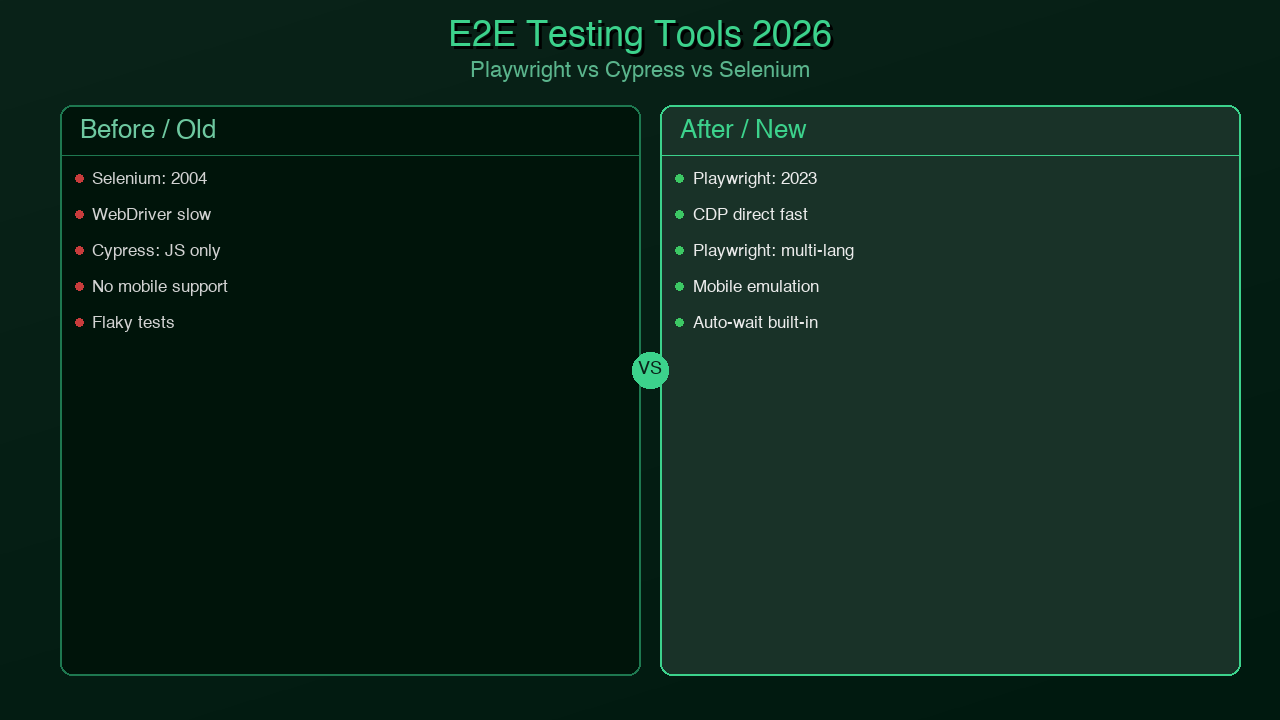
The honest comparison:
| Feature | Playwright | Cypress | Selenium |
|---|---|---|---|
| Browser support | Chrome, Firefox, WebKit (Safari) | Chrome, Firefox, Edge | Chrome, Firefox, Safari, Edge |
| Safari testing | WebKit (not real Safari) | Not supported | Real Safari via WebDriver |
| Auto-waiting | Built in, every action | Built in, assertions only | Manual, explicit waits required |
| Flakiness | Very low | Low | High (without careful setup) |
| Multi-tab support | Full support | Not supported | Supported |
| Cross-origin | Full support | Not supported | Supported |
| Parallelism | Built in, free | Paid (Cypress Cloud) | External tools required |
| Network mocking | Built in | Built in | External libraries |
| Component testing | Experimental | Stable | Not applicable |
| TypeScript support | First-class, native | Good | Good |
| Trace viewer | Built in | Dashboard only (paid) | External tools |
| CI performance | Excellent | Good | Slow |
| Community (2026) | Largest (npm downloads) | Large | Legacy (declining) |
| License | Apache 2.0 | MIT | Apache 2.0 |
The decision tree for choosing a browser testing tool:
The default choice for new projects in 2026 is Playwright. The only exceptions are teams with large existing Cypress suites where migration cost isn't justified, or teams that specifically need real Safari testing rather than WebKit (an edge case for most applications).
Generated with Higgsfield GPT Image — 16:9
Production Tips
These patterns separate test suites that stay maintainable from ones that slowly rot:
Reuse authentication state across tests. Logging in through the UI for every test is slow and creates unnecessary load. Log in once, save the browser storage state, and load it for tests that need an authenticated session:
// tests/auth.setup.ts — runs before the test suite
import { test as setup, expect } from '@playwright/test';
import path from 'path';

const authFile = path.join(__dirname, '../.auth/user.json');

setup('authenticate', async ({ page }) => {
  await page.goto('/login');
  await page.fill('[name="email"]', process.env.TEST_EMAIL!);
  await page.fill('[name="password"]', process.env.TEST_PASSWORD!);
  await page.click('[type="submit"]');
  await expect(page).toHaveURL('/dashboard');

  // Save auth state so it can be reused
  await page.context().storageState({ path: authFile });
});
// playwright.config.ts — add the setup project
projects: [
  {
    name: 'setup',
    testMatch: /auth\.setup\.ts/,
  },
  {
    name: 'authenticated-tests',
    use: {
      storageState: '.auth/user.json',
    },
    dependencies: ['setup'],
  },
],
Use expect.soft() for non-blocking assertions. A hard assertion failure stops the test immediately, which means you miss all subsequent assertion results. Soft assertions let the test continue and report all failures at once:
test('dashboard shows all expected elements', async ({ page }) => {
  await page.goto('/dashboard');

  // Non-blocking — test continues even if these fail
  await expect.soft(page.locator('[data-testid="stats-widget"]')).toBeVisible();
  await expect.soft(page.locator('[data-testid="recent-activity"]')).toBeVisible();
  await expect.soft(page.locator('[data-testid="notifications"]')).toBeVisible();

  // This one is critical — hard assertion
  await expect(page.locator('nav')).toBeVisible();
});
Filter tests with --grep during development. Running a full suite to test one feature wastes time:
# Run only tests with "authentication" in the name
npx playwright test --grep "authentication"

# Run only the chromium project
npx playwright test --project chromium

# Run a specific file
npx playwright test tests/auth.spec.ts
Use data-testid attributes for stability. CSS selectors based on class names or structure break when styling changes. data-testid attributes exist solely for testing and don't change with visual redesigns:
// Fragile — breaks if class names or HTML structure changes
page.locator('.sidebar > ul > li:first-child > a')

// Stable — only changes if you change the testid
page.locator('[data-testid="nav-dashboard-link"]')

// Also good — semantic and accessible
page.getByRole('link', { name: 'Dashboard' })
Configure base URL via environment variable. Never hardcode URLs:
// playwright.config.ts
use: {
  baseURL: process.env.BASE_URL || 'http://localhost:3000',
},
# Local
npx playwright test

# Staging
BASE_URL=https://staging.myapp.com npx playwright test

# Production smoke tests
BASE_URL=https://myapp.com npx playwright test --grep "@smoke"
Conclusion
Playwright won the browser testing market because it solved the actual problem, not the superficial one. The superficial problem was "Selenium is hard to use." The actual problem was "browser tests are unreliable, which means developers stop trusting them, which means the test suite stops catching real bugs."
Auto-waiting didn't just make tests easier to write. It made the tests reliable by construction — not because of careful timeout tuning, but because Playwright doesn't take action until the application is genuinely ready. That single architectural decision changed what browser testing feels like: from a source of friction and false alarms to a fast, trustworthy feedback loop.
For teams already on Selenium, the migration path is straightforward. Playwright can run alongside Selenium tests during a gradual migration. The APIs are different but the concepts map cleanly. For teams on Cypress, the migration question is one of cost versus benefit — if you have a large, stable Cypress suite, the pain of migration may not be justified. For greenfield projects, there is no decision to make: start with Playwright.
The next post in this series covers Temporal for durable workflows — what to do when your background jobs are silently losing data and you need a system that can survive crashes, restarts, and network failures without replaying side effects.
Keywords: playwright testing, browser testing 2026, playwright vs cypress, playwright vs selenium, e2e testing typescript, playwright page object model, playwright CI github actions
About the Author
Toc Am
Founder of AmtocSoft. Writing practical deep-dives on AI engineering, cloud architecture, and developer tooling. Previously built backend systems at scale. Reviews every post published under this byline.
Published: 2026-04-12 · Written with AI assistance, reviewed by Toc Am.
Get These In Your Inbox
Weekly deep-dives on AI engineering, no fluff. Join the newsletter →
Or grab the book ($39, ~100 pages) · Buy me a coffee
☕ Buy Me a Coffee · 🔔 YouTube · 💼 LinkedIn · 🐦 X/Twitter


No comments:
Post a Comment