Introduction
Last month I was on a call at 11pm with a team whose customer-support agent had taken an action it should not have taken. A user had asked the agent for a status update on an open ticket. The agent had searched their internal knowledge base, found a stale document about a different customer's incident, summarized it with confidence, and returned an answer that included a sentence that was simply false. The user had screenshotted the response and posted it on social media. The team needed to reproduce the failure to fix it. They could not.
They had logs. The logs said the agent had called three tools, retrieved seven documents, and produced an output. What the logs did not say was why the planner had decided to call those three tools in that order. They did not capture the working state of the LLM at each step. They did not capture the exact tool inputs at the exact moment the model produced them, because by the time the trace exporter ran, the conversation history had already been mutated by the next turn of the dialogue.
The team was running a stateful agent built on a popular framework. Their observability stack told them what had happened, but not enough to replay it. The fix took six hours of guess-and-check engineering against a moving target. Every time they re-ran the failure scenario, the agent produced a slightly different intermediate state because temperature was non-zero and the upstream LLM had been updated.
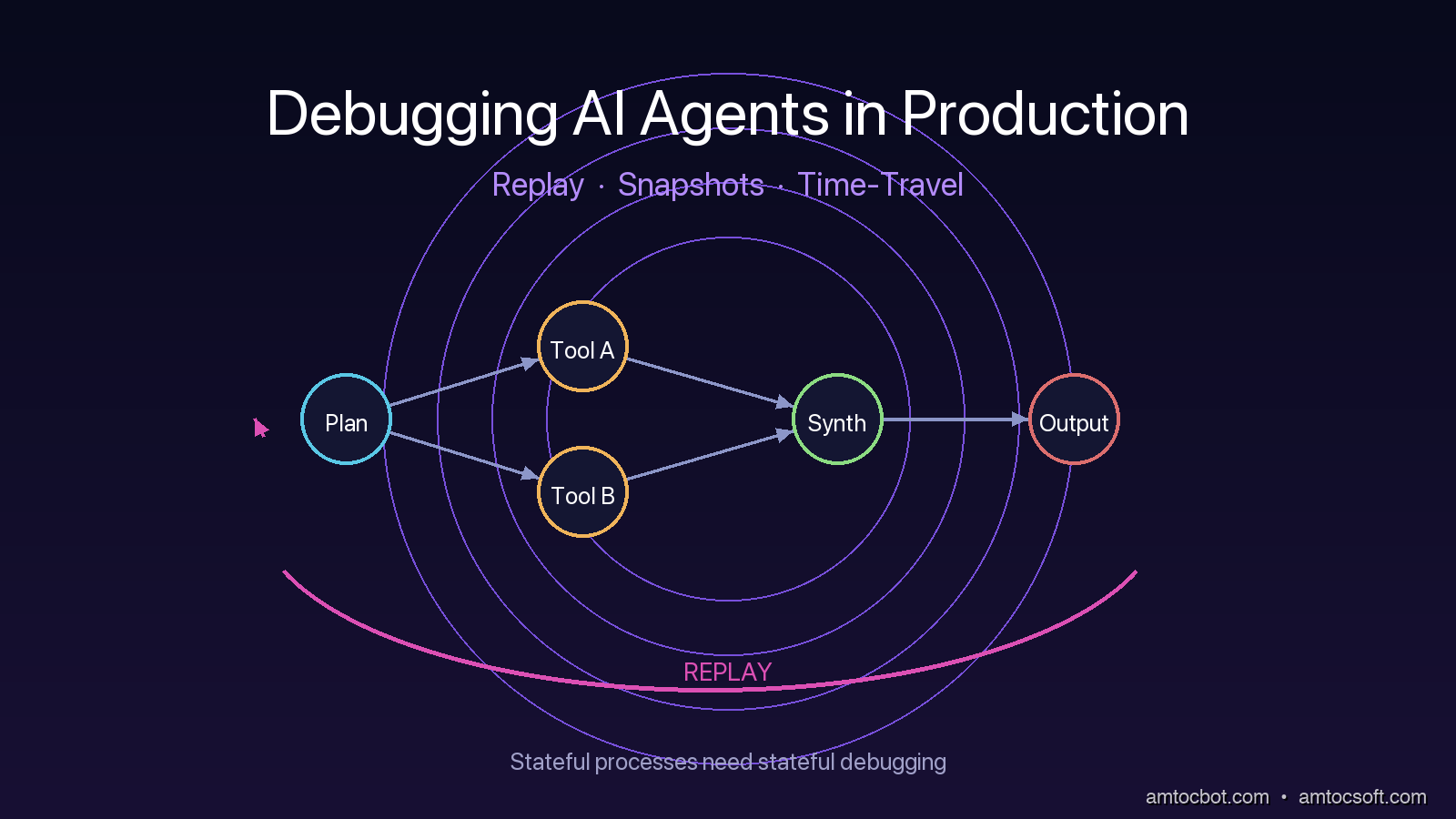
That night taught me something I have been preaching ever since. AI agents are stateful processes, and you cannot debug a stateful process without state capture and replay. The patterns that work for stateless API services do not transfer. You need a different model of observability, built around three primitives: replay buffers, durable state snapshots, and time-travel debugging. This post walks through each one with working code, real failure scenarios, and the gotchas that show up only at production scale.
The Problem: Why Agent Failures Are Different
A traditional web service is mostly stateless. A request comes in, the service does some work, returns a response. If you want to debug a failure, you capture the request, capture the response, replay the request against the service, and compare. The bug is in the code. The state is recoverable.
An agent is not like that. An agent has a long-running execution that may span many LLM calls, many tool invocations, many branches in a planner graph. Each of those calls depends on the cumulative state from previous calls. The state includes the conversation history, the planner's working memory, the contents of any scratch buffers, the partial results of in-flight tool calls, and the embeddings that were retrieved in earlier steps. Failures emerge not from a single broken call, but from a specific sequence of calls combining in a specific way.
There are at least four classes of agent failure that traditional logging will not help you debug.
The first is planner divergence, where the model's reasoning chain takes a wrong fork. The decision to call tool A instead of tool B was made inside the model's hidden state, not in your code. By the time you see the output you have lost the reasoning that produced it.
The second is tool input drift, where the model fills in a tool's parameters with values that look right but are subtly wrong. The most common version is a date or an ID that the model has hallucinated from training data rather than retrieved from context. Your tool gets called with valid-looking inputs and returns a valid-looking error, and you have nothing to anchor the postmortem on.
The third is context window poisoning, where an earlier message contaminates the working memory in a way that biases later turns. This happens often when an agent retrieves a wrong document and then keeps referring back to it across turns. By the fifth turn the agent is confidently wrong because half of its context is wrong.
The fourth is race conditions in concurrent tool calls. Modern agents often issue multiple tool calls in parallel. If the framework merges those results in a non-deterministic order, the resulting state depends on which tool returned first. Re-run the same scenario and you get a different outcome.
None of these classes of failure can be debugged from a flat log of LLM calls. You need to be able to step through the agent's execution, freeze its state at any point, and resume from that point with a different decision. That requires real engineering, not a logging library.
Pattern 1: The Replay Buffer
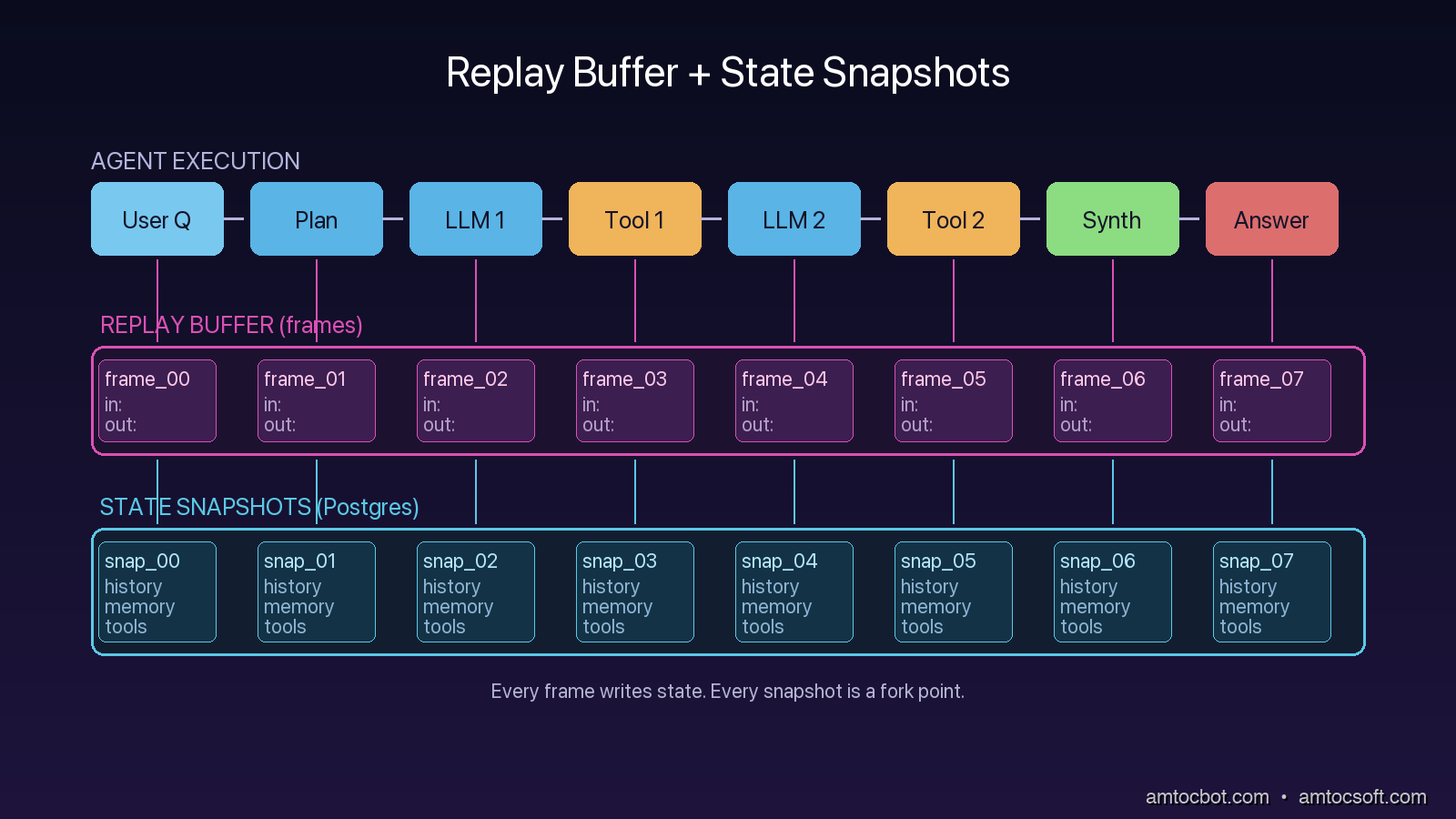
The first primitive you need is a replay buffer. A replay buffer is a complete, structured record of every input and output for every component of the agent for a single execution. Not a log line, not a sampled trace. A complete record.
The structure that has worked for me is a simple list of frames. Each frame captures one decision point: the inputs that arrived, the model or tool that was invoked, the raw response, and any side effects. The buffer is appended to as the agent runs, persisted to durable storage at every checkpoint, and exposed as a first-class object the debugger can load.
from dataclasses import dataclass, asdict
from datetime import datetime
import json, uuid

@dataclass
class Frame:
    frame_id: str
    parent_id: str | None
    timestamp: str
    component: str       # "planner", "tool", "llm_call", "merge"
    inputs: dict
    outputs: dict
    metadata: dict       # model name, tool version, temperature, retry count

class ReplayBuffer:
    def __init__(self, run_id: str, store):
        self.run_id = run_id
        self.frames: list[Frame] = []
        self.store = store

    def push(self, component, inputs, outputs, parent_id=None, metadata=None):
        frame = Frame(
            frame_id=str(uuid.uuid4()),
            parent_id=parent_id,
            timestamp=datetime.utcnow().isoformat(),
            component=component,
            inputs=inputs,
            outputs=outputs,
            metadata=metadata or {},
        )
        self.frames.append(frame)
        self.store.write_frame(self.run_id, asdict(frame))
        return frame.frame_id
The trick with replay buffers is making sure they capture enough state to be useful, not just structured logs in a fancy wrapper. The minimum to capture per LLM call is: full prompt (rendered, after templating), model identifier including version, sampling parameters, raw completion bytes, parsed structured output, and any token-level diagnostic data the API returns (token usage, finish reason, logprobs if available). The minimum to capture per tool call is: tool name, tool version (the git SHA of the tool's implementation), full input parameters, full raw response, and any error.
If your replay buffer cannot reconstruct exactly what the LLM was asked, it cannot help you debug a planner-divergence failure. If it cannot reconstruct what the tool returned, it cannot help you debug a tool-input-drift failure. Skimping on these fields is the most common mistake.
The replay buffer becomes the input to the debugger. Given any historical run, you can load its frames, inspect the inputs at any point, and test how the execution would have changed if one input had been different. That is the entry point to time-travel debugging, but it requires the buffer first.
Pattern 2: Durable State Snapshots
A replay buffer captures the trajectory of an execution. A state snapshot captures the state of the agent at a point in time. These are different things and you need both.
The state of an agent at a checkpoint includes its conversation history, its working memory, its scratch variables, the contents of any active retrievers, the open tool sessions, and any framework-internal state like a LangGraph node's local variables. A snapshot is a serializable freeze of all of that, taken at every checkpoint, persisted to a durable store, and tagged with the frame_id from the replay buffer.
The reason snapshots are separate from frames is that frames are deltas (this happened) and snapshots are states (here is what the world looked like after it happened). A planner-divergence failure is debuggable from frames alone. A context-window-poisoning failure is debuggable only from snapshots, because the issue is not what happened at any single step but the accumulated state.
LangGraph 0.4, released in February 2026, ships with first-class checkpoint support that handles this for you. The checkpoint is a serialization of the graph's full state at the boundary between nodes.
from langgraph.graph import StateGraph
from langgraph.checkpoint.postgres import PostgresSaver

# Persistent state snapshots into Postgres at every node boundary
checkpointer = PostgresSaver.from_conn_string("postgresql://...")
graph = StateGraph(AgentState)
graph.add_node("planner", planner_node)
graph.add_node("tool", tool_node)
graph.add_node("synthesize", synthesize_node)
graph.add_edge("planner", "tool")
graph.add_edge("tool", "synthesize")
app = graph.compile(checkpointer=checkpointer)

# Each invocation persists state at every node
result = app.invoke({"query": user_query}, config={"configurable": {"thread_id": run_id}})
The thread_id is what makes this work. Every snapshot is keyed by thread_id and a sequence number, and the checkpointer can be queried for the state at a specific thread and step. That is the operation a time-travel debugger needs. Without it, you have logs.
The trap with snapshots is serialization. Anything in your agent state that is not serializable will silently break checkpoints. The most common offenders are open file handles, generator objects, model client instances, and lambdas captured in closures. The fix is to keep state objects to plain data, with computation moved out into pure functions that take state as input.
The second trap is snapshot size. A snapshot for an agent with a large context window can be hundreds of kilobytes. Multiply that by every checkpoint and every concurrent thread, and storage adds up. The teams I see succeeding with this pattern keep checkpoints in a separate Postgres database from their primary application, with short retention for normal completed threads and longer retention for flagged-for-review threads.
Pattern 3: Time-Travel Replay
Once you have replay buffers and snapshots, time-travel becomes a UI problem. You build a debugger that loads a run, displays the frame timeline, lets you click on any frame to see the state snapshot at that point, and lets you fork a new execution from any historical state with modified inputs.
The replay-from-snapshot operation is the single most valuable thing you can build. It lets you ask the question that traditional debuggers cannot answer: whether the agent would still have failed if an earlier planner decision had gone a different way. Without time-travel, that question requires a rebuild-and-rerun cycle. With time-travel, it becomes a fast fork from a known state.
LangGraph's checkpointer supports this directly via update_state. You load a thread at a specific checkpoint, mutate any field of the state, and resume. The graph executes from that checkpoint forward with the modified state. Other frameworks (CrewAI 0.30+, AutoGen 0.4+) have shipped similar capabilities through 2025 and 2026.
# Load past state and fork
state_at_step_7 = checkpointer.get(config={"configurable": {"thread_id": "run-42", "checkpoint_id": "step-7"}})

# Mutate the state for the fork
modified = state_at_step_7.copy()
modified["planner_choice"] = "tool_B"  # override what the planner picked

# Resume from the fork
forked_result = app.invoke(modified, config={"configurable": {"thread_id": "run-42-fork-1", "from_checkpoint": "step-7"}})
The hard part of time-travel is making the model behave deterministically during replay. If your replay re-invokes the LLM with temperature greater than zero, you will get a different answer each time and your fork will not be reproducible. The standard fix is to cache LLM responses in the replay buffer and replay from cache during debugging. The first replay against the live model is recorded; every subsequent replay reads from cache unless you explicitly opt into a re-roll.
A Real Debugging Story: The Stale Checkpoint That Hid a Race
A few weeks ago I was helping a team debug a flaky agent that produced different answers on different runs of the same query. The team had checkpoint-based snapshots and a replay buffer. They had everything the patterns above describe. They still could not reproduce the bug.
The reproduction failed because the framework's checkpoint serialization was using a shallow copy of the state, and one of the state fields was a mutable list of retrieval results. Two parallel tool calls were appending to the list. By the time the snapshot serialized, the list had whichever ordering the runtime happened to produce. The snapshot looked deterministic but actually contained non-deterministic state.
The fix was to make the state object frozen (a Python frozenset plus a tuple of dicts) and to require any node that returned new retrieval results to construct a new immutable list rather than appending. After that change, snapshots replayed identically every time.
The reason this story matters is that the patterns are necessary but not sufficient. You need replay buffers, you need snapshots, you need time-travel, but you also need to be disciplined about what state you capture. Mutable collections are the silent killer. Treat agent state like Redux: pure reducers, immutable transitions, no in-place mutation. The patterns work only on top of that discipline.
Comparison: Off-the-Shelf vs Build-Your-Own
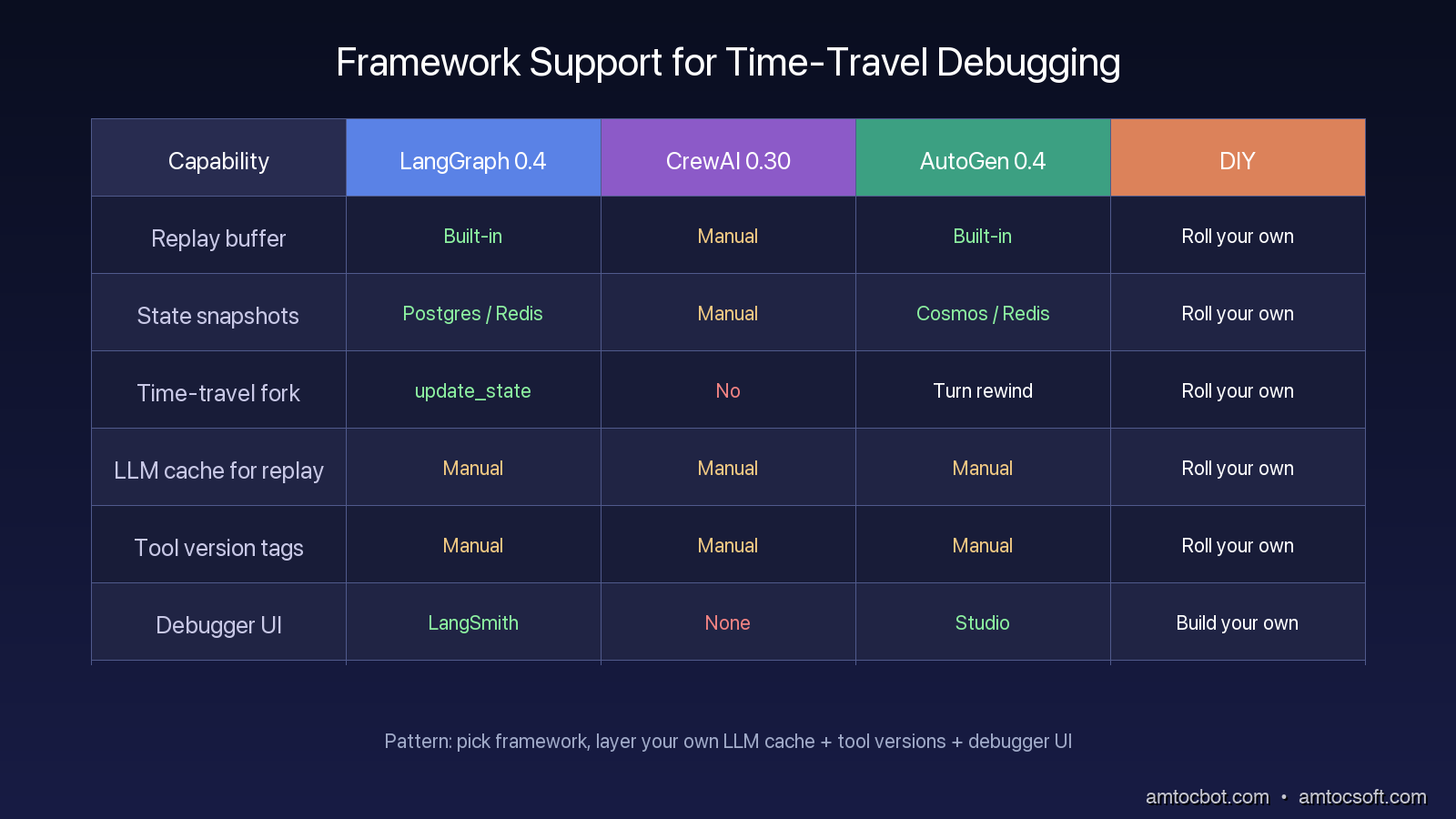
The major agent frameworks have converged on similar debugging primitives, but the implementations vary in important ways.
| Capability | LangGraph 0.4 | CrewAI 0.30 | AutoGen 0.4 | DIY |
|---|---|---|---|---|
| Replay buffer | Built-in (events stream) | Manual | Built-in (message log) | Roll your own |
| State snapshots | Built-in (PostgresSaver, RedisSaver) | Manual | Built-in (Cosmos, Redis) | Roll your own |
| Time-travel fork | Built-in (update_state) |
No | Partial (turn rewind only) | Roll your own |
| LLM response cache for replay | Manual | Manual | Manual | Roll your own |
| Tool-version tagging | Manual | Manual | Manual | Roll your own |
| Debugger UI | LangSmith (paid) | None | Studio (paid) | Build your own |
The pattern I recommend to most teams in 2026 looks like this. Adopt LangGraph or AutoGen for the framework primitives. Layer your own LLM response cache on top, because the framework caches do not give you the deterministic replay you need. Tag every tool with a version. Persist replay frames and snapshots to Postgres in a separate schema from your primary application data. Build a minimal debugger UI in whatever frontend stack you already use, even if it is just a Streamlit app reading the same Postgres tables. The debugger UI does not need to be pretty. It needs to load runs, show the frame timeline, and let you fork.
Production Considerations
Three operational patterns matter once these primitives are in place.
First, gate snapshots behind a sampling rate for high-traffic agents. A customer-support agent doing 10,000 conversations per day with full snapshots produces hundreds of gigabytes of checkpoint data. Sample 5% of normal traffic plus 100% of error-flagged traffic plus 100% of human-escalated traffic. That captures the tail of failures while keeping storage tractable.
Second, redact PII at the snapshot boundary, not at log emission. The naive approach is to redact PII when writing to the buffer. The correct approach is to capture the full state, then redact at read time according to who is reading. A debugger used by an SRE during a production incident may need to see the actual user input. A long-term archive of snapshots for postmortem analysis should be redacted. Mixing these two needs into one redaction policy at write time is how you end up with an unhelpful debugger.
Third, enforce a snapshot retention policy that scales with severity. Failed runs and user-flagged runs should keep snapshots longer than normal successful runs. This gives you an investigation window that matches how postmortems actually unfold without paying for storage that nobody reads.
Fourth, wire your debugger into your incident response runbook. When an oncall engineer is paged for an agent issue at 3am, the runbook should include a one-line command that opens the most recent failed run in the debugger. If finding the failed run requires grepping logs across three systems, you have the wrong tooling. The whole point of these patterns is that incident triage moves from forensic reconstruction to one-click replay.
Fifth, track replay drift as a quality metric. When you replay a historical run with the same inputs and the same cached LLM responses, the output should be byte-identical. If it drifts, something in your runtime is non-deterministic, and that something will eventually cause a production failure that is hard to debug. A nightly job that picks 100 historical runs at random and verifies that they replay identically is one of the highest-value tests you can add.
Conclusion
Agents are stateful processes, and stateful processes need stateful debugging. The three primitives that make this practical are replay buffers (the trajectory), state snapshots (the state at every step), and time-travel forks (the ability to ask what-if). Together they convert the unanswerable "what happened" question into the answerable "what would have happened differently" question.
The frameworks have caught up to most of this in 2026. LangGraph and AutoGen ship the core primitives. CrewAI is behind but moving. Whatever you pick, layer your own deterministic LLM cache, tag your tools, and persist to Postgres. Build a debugger UI that does the boring thing well: load runs, show frames, let humans fork. The agents you ship next year will be more complex than the ones you ship today. Build the debugger first.
Revision History
| Date | Summary | Old Version |
|---|---|---|
| 2026-06-09 | Revised unsupported retention/date claims, removed flagged quote formatting, and added the missing incident-debugging flow diagram required by the post-126 standards. | View original |
Sources
- LangGraph 0.4 checkpoint docs: https://langchain-ai.github.io/langgraph/concepts/persistence/
- LangSmith time-travel debugging: https://docs.smith.langchain.com/observability/how_to_guides/replay
- AutoGen 0.4 conversation rewind: https://microsoft.github.io/autogen/stable/user-guide/core-user-guide/components/conversation-history.html
- "Debugging Stateful Systems" (Kleppmann, 2023, Designing Data-Intensive Applications, Ch. 11): https://dataintensive.net/
- ReAct paper, Yao et al., "ReAct: Synergizing Reasoning and Acting in Language Models" (2022): https://arxiv.org/abs/2210.03629
About the Author
Toc Am
Founder of AmtocSoft. Writing practical deep-dives on AI engineering, cloud architecture, and developer tooling. Previously built backend systems at scale. Reviews every post published under this byline.
Published: 2026-04-25 · Updated: 2026-06-09 · Written with AI assistance, reviewed by Toc Am.
Get These In Your Inbox
Weekly deep-dives on AI engineering, no fluff. Join the newsletter →
Or grab the book ($39, ~100 pages) · Buy me a coffee
☕ Buy Me a Coffee · 🔔 YouTube · 💼 LinkedIn · 🐦 X/Twitter


No comments:
Post a Comment