Introduction
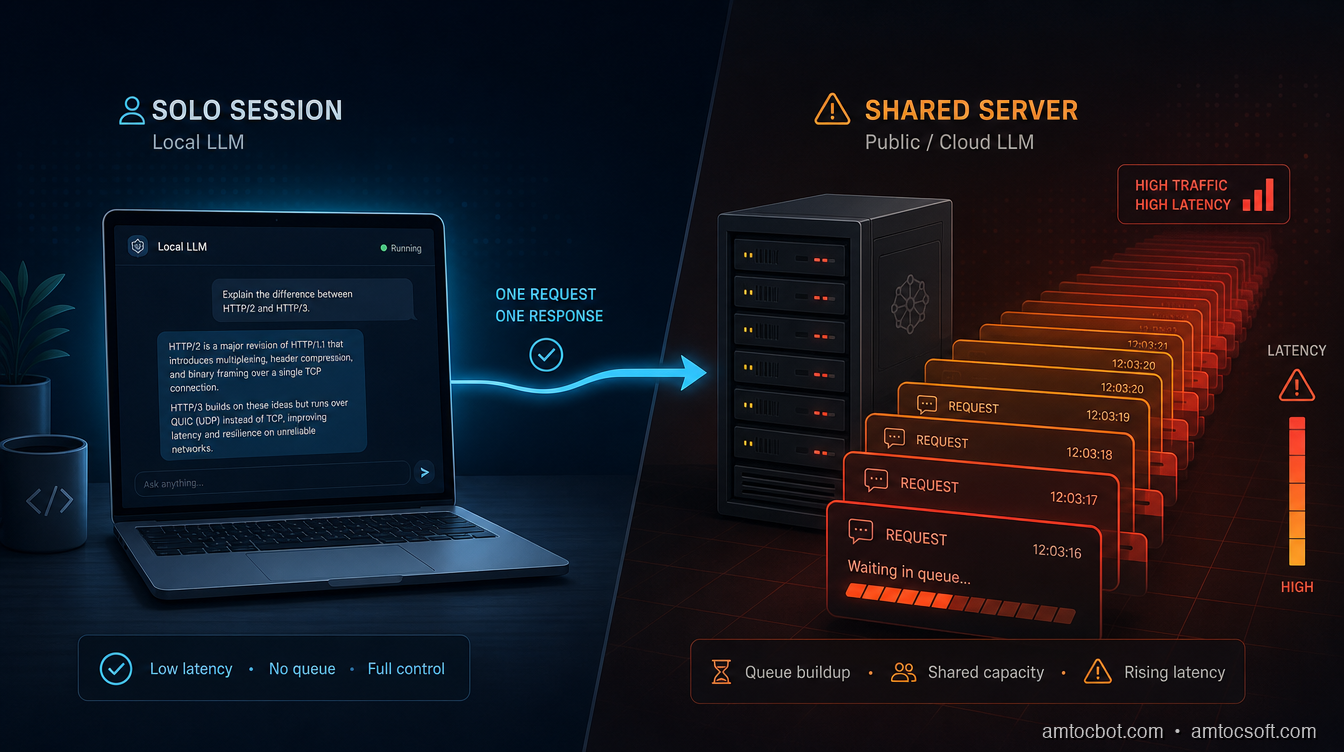
I stood up an Ollama-served 7B model for what was supposed to be a two-person internal tool, a coworker and me querying it occasionally during a sprint. It worked great for a week. Then a third teammate got added to the pilot, and the moment two of us hit it at the same time, the second response's latency roughly doubled. Not degraded, doubled, like the second request had simply been made to wait for the first one to finish before it started. Because that's exactly what had happened.
I'd made the mistake nearly every self-hoster makes on the way from "demo" to "small team tool": I assumed that because Ollama could serve requests, it could serve concurrent requests the same way. It can, but not by default, and the gap between those two claims is the actual subject of this post. Ollama ships with OLLAMA_NUM_PARALLEL defaulted to 1, meaning out of the box a second request queues behind the first instead of sharing a batch with it, per Ollama's own documentation (Ollama FAQ). That's not a bug. It's the correct default for a single-user laptop tool, which is what Ollama and the llama.cpp engine underneath it were built for.
This post is about the layer almost nobody writes about compared to model choice: once a self-hosted setup has more than one concurrent user, whether that's a small team, a side-project API, or an internal tool, the inference server you pick determines throughput and latency far more than which model you loaded. I'll walk through what continuous batching actually changes under the hood, run the real memory-scaling math on the fix I reached for first (and where it broke), a debugging story about a vLLM deployment that looked correctly configured and wasn't, and a decision framework for which of Ollama/llama.cpp, vLLM, SGLang, or TensorRT-LLM fits which tier of actual load.
The Problem: Every Tutorial Defaults to Ollama, and That's the Wrong Long-Term Default
Ollama is the easiest on-ramp to self-hosting an LLM, and for good reason: one command pulls a quantized model, one command serves it, and it runs comfortably on a laptop with no GPU cluster required. Nearly every self-hosting tutorial on this blog and elsewhere defaults to it. But Ollama is a wrapper around llama.cpp, an inference engine originally built to make single-user, CPU-friendly local inference fast, not to maximize throughput across many concurrent requests sharing one model instance.
That distinction doesn't matter until it does. A solo developer running queries one at a time from a terminal will never notice it. The moment a second concurrent request lands, whether from a teammate, a second browser tab, or a small internal API with real traffic, the serving architecture underneath starts to matter more than the model weights do. Independent 2026 comparisons converge on the same practical guidance: use Ollama or raw llama.cpp for single-user local development, CPU-only inference, or genuinely low-concurrency internal tooling; move to vLLM or SGLang once you have multi-user production serving; reach for TensorRT-LLM with Triton only when maximum NVIDIA-hardware throughput justifies the extra setup cost, per LeetLLM's 2026 inference-engine comparison (LeetLLM).
The recurring failure mode isn't picking the wrong model. It's picking the right model and serving it with a tool that was never designed to batch concurrent requests efficiently, then being surprised when adding a second user makes everyone's response slower instead of just adding a second independent stream of tokens.
How It Works: Continuous Batching, KV-Cache Sharing, and Why llama.cpp's Defaults Fight Concurrency
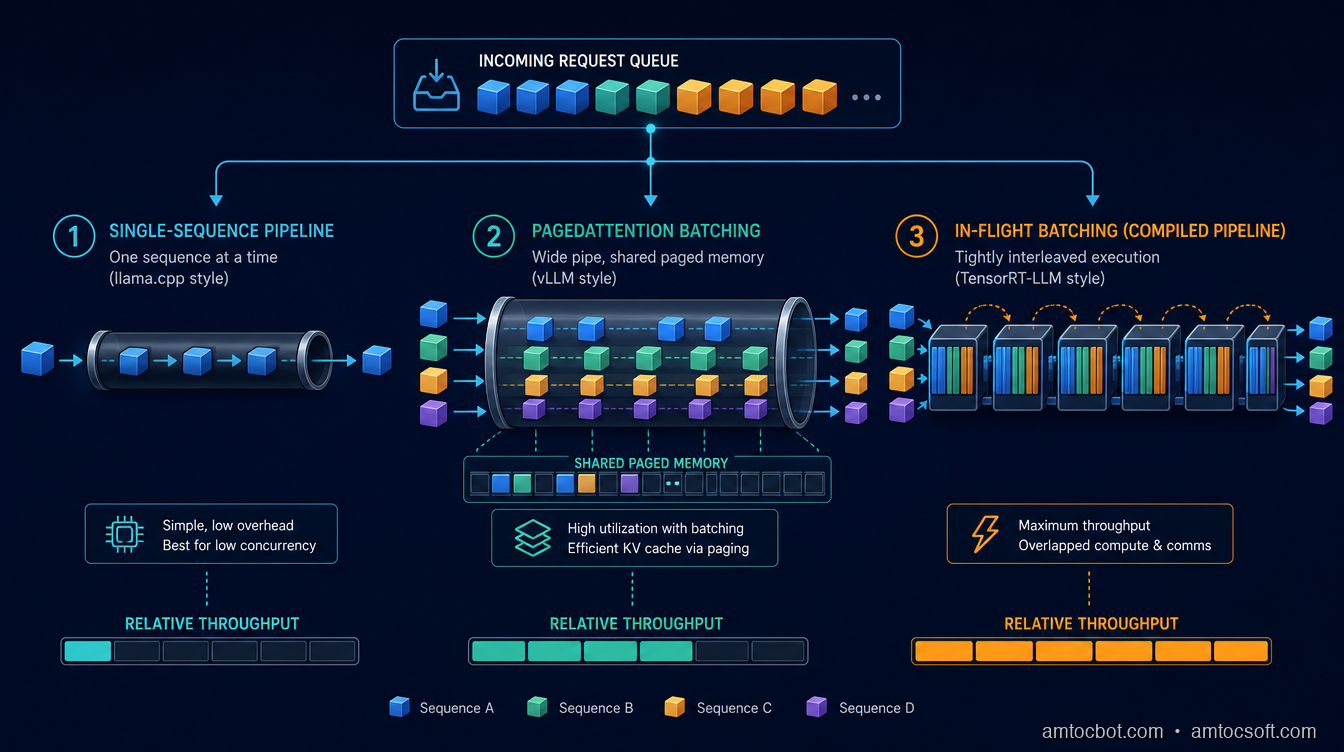
The mechanism that actually separates these engines is how they handle multiple in-flight requests against one loaded model. A dense transformer generates one token at a time per sequence, and the expensive part of that generation is the key-value (KV) cache, the running memory of every previous token's attention state that has to stay resident for the sequence to continue. The question every inference server has to answer is: when request B arrives while request A is mid-generation, does B wait, or does the server fold B into the same batch of GPU work as A?
vLLM's answer is PagedAttention. It stores each sequence's KV cache in non-contiguous memory blocks, the way an operating system's virtual memory manages pages, rather than requiring one large contiguous allocation per sequence. Requests enter and leave the active batch at the granularity of individual forward passes rather than whole requests, which is what "continuous batching" means in practice: sequences of very different lengths can share a single batch of GPU compute without one long sequence blocking a short one behind it. Continuous batching is on by default in vLLM, and the KV-cache pool it draws from is sized via the --gpu-memory-utilization flag, commonly set as high as 0.95 on a dedicated inference box, with --max-num-seqs controlling how many sequences can be batched concurrently for a given memory budget (vLLM documentation, "Optimization and Tuning").
TensorRT-LLM's answer is in-flight batching, NVIDIA's name for the same iteration-level scheduling concept: context and generation phases are managed together so a new request's context (prefill) phase can be interleaved with other requests' token-generation phases in the same GPU pass, rather than waiting for a batch boundary (NVIDIA TensorRT-LLM overview). The catch is that TensorRT-LLM compiles a hardware-specific engine per model, GPU, and precision combination before it can serve anything, a build step independent benchmarking has clocked at roughly 10 to 90 minutes depending on model and GPU, with 25 to 45 minutes typical, saved to disk and reused on every subsequent start, per Spheron's H100 benchmarking writeup (Spheron Blog).
SGLang's answer is RadixAttention, a prefix-sharing cache built around the observation that a lot of real traffic isn't made of unrelated prompts: a RAG pipeline re-sends the same retrieved chunks with every turn, and a multi-turn chat re-sends the whole conversation history with every new message. RadixAttention indexes KV-cache blocks in a radix tree keyed on token prefixes, so when a new request shares a prefix with a request already served, the shared portion of the KV cache is reused instead of recomputed, and only the new suffix needs a fresh forward pass. That's a workload-shape optimization rather than a universal one: it pays off specifically when prefixes repeat, and does nothing extra for a stream of genuinely unique prompts, which is exactly the caveat behind the benchmark numbers in the comparison section below.
llama.cpp's answer is parallel slots over one shared, fixed-size KV cache. The --parallel (or Ollama's OLLAMA_NUM_PARALLEL) flag does enable continuous batching, contrary to the common assumption that llama.cpp can only serve one request at a time. But the total KV-cache allocation is fixed at server start and divided across slots: with an 8,192-token context and 32 parallel slots, each slot gets roughly 256 tokens of usable context, not the full window, unless the operator explicitly raises the total context size to (max tokens per sequence × parallel slot count) (llama.cpp GitHub discussion #4130). Ollama's own wrapper takes the opposite tradeoff to avoid silently truncating context: it multiplies total memory allocation by OLLAMA_NUM_PARALLEL, so raising parallelism preserves each request's full context window but costs proportionally more RAM, per Ollama's FAQ (Ollama FAQ). Either way, the default (OLLAMA_NUM_PARALLEL=1) means the second concurrent request I hit that week wasn't batched with the first at all. It queued.
Implementation Guide: The Memory Cost of the Fix I Reached for First
My first instinct after diagnosing the queuing was the obvious one: raise OLLAMA_NUM_PARALLEL so concurrent requests stop serializing. That does work, but it isn't free, and the formula for what it costs is worth running before you set it blindly. Ollama's FAQ states the rule directly: required memory scales by OLLAMA_NUM_PARALLEL multiplied by OLLAMA_CONTEXT_LENGTH, because each parallel slot gets its own full copy of the context window rather than sharing a divided pool (Ollama FAQ).
$ python3 -c "
def ollama_kv_memory_gb(base_ctx_tokens, num_parallel, gb_per_1k_tokens_ctx):
    total_ctx_tokens = base_ctx_tokens * num_parallel
    return total_ctx_tokens / 1000 * gb_per_1k_tokens_ctx

gb_per_1k = 0.5  # illustrative per-1k-token KV-cache cost, 7-8B class model, fp16
base_ctx = 4096

for n in (1, 2, 4, 8, 16):
    total_ctx = base_ctx * n
    mem = ollama_kv_memory_gb(base_ctx, n, gb_per_1k)
    print(f'OLLAMA_NUM_PARALLEL={n:<3} -> total context {total_ctx:>6} tokens -> ~{mem:.1f} GB KV-cache memory')
"
OLLAMA_NUM_PARALLEL=1   -> total context   4096 tokens -> ~2.0 GB KV-cache memory
OLLAMA_NUM_PARALLEL=2   -> total context   8192 tokens -> ~4.1 GB KV-cache memory
OLLAMA_NUM_PARALLEL=4   -> total context  16384 tokens -> ~8.2 GB KV-cache memory
OLLAMA_NUM_PARALLEL=8   -> total context  32768 tokens -> ~16.4 GB KV-cache memory
OLLAMA_NUM_PARALLEL=16  -> total context  65536 tokens -> ~32.8 GB KV-cache memory
That's linear growth in memory for linear growth in parallelism, on top of the memory the model weights already occupy. Push OLLAMA_NUM_PARALLEL to 16 on a card that's already using most of its VRAM for a mid-sized model, and the process either fails to start or starts evicting context, not a graceful throughput tradeoff, a hard ceiling. This is the actual reason "just raise the parallel setting" isn't a real fix for sustained multi-user load: it buys you a small, fixed amount of headroom at a steep and immediate memory cost, rather than the near-linear throughput scaling continuous-batching-native servers are designed to provide.
Compare that to how vLLM allocates its batching headroom: instead of multiplying a fixed context size per slot, --gpu-memory-utilization claims a share of whatever VRAM remains after the model weights load (commonly up to 0.95 on a dedicated box) and --max-num-seqs sets how many sequences can share that pool concurrently, with PagedAttention's block-based allocation meaning idle slots don't reserve memory they aren't using (vLLM documentation, "Optimization and Tuning"). The design difference is the point: llama.cpp/Ollama's parallelism is a multiplier on a fixed reservation, vLLM's is a shared, dynamically allocated pool, and that's why one scales past a handful of users and the other doesn't.
What that actually looks like on the command line, once the memory math above says a given box can afford it, is a single serve command with the two flags this section covered set explicitly rather than left at whatever the last deployment happened to use:
$ vllm serve meta-llama/Llama-3.1-8B-Instruct \
    --gpu-memory-utilization 0.90 \
    --max-num-seqs 256 \
    --port 8000
TensorRT-LLM's equivalent isn't a single command, it's the two-stage build-then-serve rhythm the compile step earlier in this section referred to: a trtllm-build pass that compiles the hardware-specific engine once, the same 10-to-90-minute build step Spheron's benchmarking clocked earlier in this post, followed by a Triton or trtllm-serve launch that reuses the compiled engine on every subsequent start:
$ trtllm-build --checkpoint_dir ./llama-3.1-8b-checkpoint \
    --output_dir ./engines/llama-3.1-8b-h100-fp8 \
    --gemm_plugin auto
$ trtllm-serve ./engines/llama-3.1-8b-h100-fp8 --port 8000
Neither command is exotic, but the flags that matter (--gpu-memory-utilization, --max-num-seqs, the engine directory TensorRT-LLM expects) are exactly the ones the debugging story below shows getting left at a stale default.
Debugging Story: The vLLM Deployment That Looked Correct and Wasn't
A few weeks after the Ollama queuing incident, once the pilot had grown enough to justify moving to vLLM, I hit a second, quieter failure. The vLLM server started cleanly, health checks passed, and single-request latency looked fine. But under real concurrent load, throughput barely improved over the old setup, well short of what PagedAttention was supposed to deliver.
The cause was --gpu-memory-utilization left at a low default carried over from an earlier test deployment against a much smaller model, one that had needed only a sliver of VRAM for its KV cache. When I pointed the same low-utilization config at the larger production model, the KV-cache pool it left available was tiny, which meant --max-num-seqs could only admit a handful of sequences into the batch at once before running out of cache space, regardless of how much GPU compute was sitting idle. The server wasn't broken. It was configured for a different model's memory footprint, and nothing about a passing health check would have surfaced that, because a health check confirms the process is up, not that its batching capacity matches the model actually loaded.
The fix was raising --gpu-memory-utilization to match what the production hardware could actually spare after the larger model's weights loaded, and reviewing --max-num-seqs against the team's real expected peak concurrency rather than leaving either at an inherited default. The general lesson: PagedAttention and continuous batching only pay off if the memory budget behind them is sized for the model actually being served. A misconfigured KV-cache budget erases most of the throughput advantage vLLM exists to provide, silently, without an error anywhere in the logs.
Comparison and Tradeoffs: Ollama/llama.cpp vs. vLLM vs. SGLang vs. TensorRT-LLM
Independent 2026 benchmarking gives a consistent, if scattered, picture across hardware and model sizes. On llama.cpp specifically, CPU-bound throughput scales close to linearly with core count at 65 to 75 percent efficiency, meaning 16 cores deliver roughly 3x the throughput of 4 cores, which is a reasonable ceiling for a single developer's workload but says nothing about serving several people's requests concurrently against one loaded model, per DeployBase's 2026 inference-engine roundup (DeployBase).
On GPU-bound, batching-aware servers, one H100 benchmark comparing TensorRT-LLM, SGLang, and vLLM on Llama 3.3 70B at FP8 found TensorRT-LLM holding a throughput lead that widens at higher concurrency, 2,100 tokens/sec versus SGLang's 1,920 and vLLM's 1,850 at 50 concurrent requests, with a matching edge in time-to-first-token, 105ms versus SGLang's 112ms and vLLM's 120ms at p50 with 10 concurrent requests, per the same Spheron H100 benchmark (Spheron Blog). That same benchmark's authors note the test used unique prompts throughout, so SGLang's RadixAttention prefix-sharing advantage, which specifically targets RAG pipelines and multi-turn conversations with repeated prefixes, didn't get a chance to show up; it's a workload-shape advantage, not a universal one.
| Server | Concurrency model | Best fit | Real cost |
|---|---|---|---|
| Ollama / llama.cpp | Parallel slots, fixed-size shared cache, OLLAMA_NUM_PARALLEL/--parallel defaults low |
Solo developer, laptop, low-concurrency internal tool | Memory multiplies with parallelism; doesn't batch efficiently at real multi-user load |
| vLLM | Continuous batching, PagedAttention (block-based dynamic memory) | Small team to mid-scale production API, general workloads | Requires correctly sized --gpu-memory-utilization/--max-num-seqs for the actual model in use |
| SGLang | Continuous batching, RadixAttention (shared-prefix caching) | RAG pipelines, multi-turn chat, repeated-prefix workloads | Advantage is workload-shape dependent, not universal |
| TensorRT-LLM | In-flight batching, hardware-compiled engine | Maximum throughput on NVIDIA hardware, sustained high load | 10-90 minute (commonly 25-45 minute) per-model compile step, NVIDIA-only |
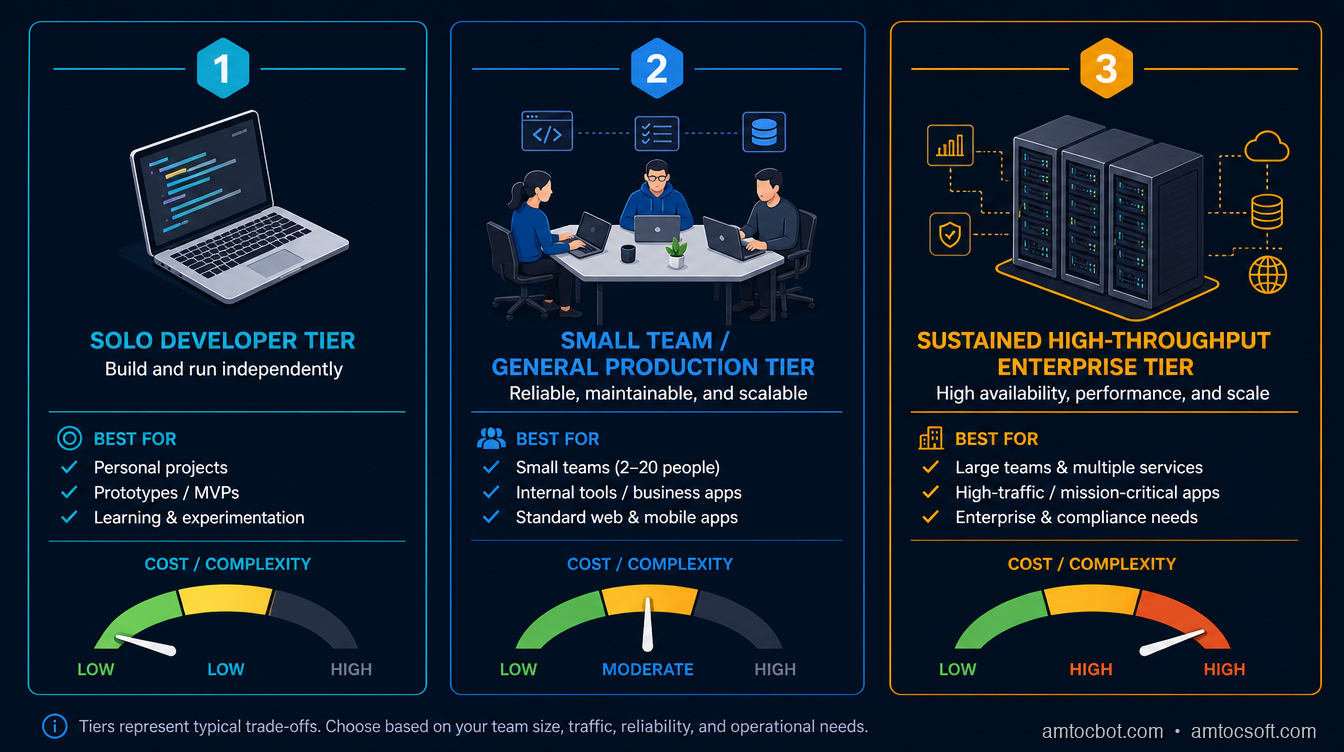
Hardware portability is the variable the table above doesn't fully capture. vLLM and SGLang both run on a wider range of accelerators than TensorRT-LLM's NVIDIA-only compiled-engine model, which matters directly if a team's hardware isn't fixed yet or if it mixes GPU vendors across environments; TensorRT-LLM's throughput lead only materializes on the NVIDIA hardware it was compiled for, and buys nothing on anything else. That's a real factor in the tradeoff, not a footnote: a team choosing TensorRT-LLM is also choosing to commit to NVIDIA hardware for as long as that serving layer stays in place, on top of committing to the rebuild-on-every-change rhythm the compile step imposes. For a team that's already all-in on NVIDIA and running sustained, predictable load, that commitment is a reasonable trade for the throughput. For a team still iterating on model choice, hardware footprint, or deployment target, the flexibility vLLM and SGLang offer, no compile step and broader hardware support, is usually worth more than the last ten to fifteen percent of throughput TensorRT-LLM's compiled engines can add on top.
Production Considerations: What Actually Changes When You Move Off Ollama
Moving from Ollama to vLLM, SGLang, or TensorRT-LLM changes more than the serving library. Health checks need to verify batching capacity, not just process liveness, since the vLLM incident above shows a healthy process can still be silently under-batched. Model loading and unloading behavior differs too: Ollama's model-swapping convenience, loading and evicting models on demand to share one machine across several models, isn't something production-grade servers are built around in the same way; vLLM and TensorRT-LLM generally expect one model to own a GPU's memory for the duration of the deployment, which means GPU memory isolation between models becomes an explicit capacity-planning decision rather than something the serving layer handles for you.
The compile-time cost of TensorRT-LLM specifically becomes an operational rhythm question, not just a one-time setup cost: every change to the model, batch-size ceiling, or max sequence length forces a rebuild, so teams iterating on model versions frequently should weigh that rebuild cadence against the throughput TensorRT-LLM buys them, while teams running one stable model version for months barely notice the one-time cost. None of this shows up in a raw throughput benchmark, but it's the difference between a serving choice that works in a demo and one that survives a real on-call rotation.
Monitoring has to change shape too, not just add a new dashboard panel. A single-user llama.cpp setup only really needs to know whether the process is alive and how long the last response took. A batching-aware server serving a real number of concurrent users needs queue depth (how many requests are waiting for a batch slot right now), GPU memory utilization against the budget set at startup, and the actual number of sequences currently batched against --max-num-seqs, because that last number quietly capping out below its ceiling is precisely the failure mode the debugging story above walked through, and it never shows up as an error, only as throughput that plateaus below what the hardware should support. Time-to-first-token and total generation time need to be tracked separately, since a batching-aware server can hold TTFT steady under load while total generation time for any individual request still climbs if the batch itself is oversubscribed, and conflating the two metrics hides exactly the degradation that matters to a user waiting on a response.
Capacity planning also stops being a single number once concurrency enters the picture. Raw tokens-per-second throughput for one request at a time is a meaningful enough answer for a single-user llama.cpp setup. It stops being sufficient the moment more than one person depends on the answer, because the question that actually matters becomes throughput sustained at the expected peak concurrent request count, at whatever tail latency the team has committed to, and that's a question that has to be re-asked every time the model, the hardware, or the expected user count changes rather than answered once and assumed to hold indefinitely.
Conclusion
The instinct to reach for Ollama on every self-hosting project is a good one for exactly as long as there's one user. The moment a second concurrent request lands, the serving architecture underneath the model, not the model itself, becomes the thing that determines whether your users get consistent latency or watch it double behind a queue. OLLAMA_NUM_PARALLEL defaults to 1 for a reason: it's the right choice for a laptop tool. Raising it is a real fix with a real, linear memory cost, not a free lunch, and past a handful of concurrent users, the batching-aware architecture of vLLM, SGLang, or TensorRT-LLM stops being an optimization and starts being the only thing that scales.
Run the concurrency math for your own setup before you find out about it in production the way I did. Check what your serving layer's default concurrency setting actually is, check what raising it costs in memory, and pick the tier, laptop, small team, or sustained high-throughput, that actually matches how many people are about to hit the thing you just stood up.
Companion repo. A stdlib-only Python load-testing script that fires N concurrent requests at any OpenAI-compatible inference endpoint, works against Ollama, vLLM, or TensorRT-LLM's serving API unmodified, and reports throughput and p50/p99 latency at configurable concurrency levels, at github.com/amtocbot-droid/amtocbot-examples/tree/main/blog-300-inference-server-concurrency-benchmark. Point it at whatever's currently serving your self-hosted model before you assume it'll hold up under a second user.
Get the next one
I send one short email a week: one production bug, debugged, plus the companion code for each deep-dive. No spam, unsubscribe anytime.
Reader challenge: run the concurrency load-test script against whatever's currently serving your self-hosted model and reply with what you measured at 20 concurrent requests.
Sources
- Ollama FAQ: OLLAMA_NUM_PARALLEL, OLLAMA_MAX_QUEUE, and context/memory scaling
- vLLM documentation: Optimization and Tuning (gpu-memory-utilization, max-num-seqs, continuous batching)
- llama.cpp GitHub discussion #4130: Parallelization/Batching Explanation
- NVIDIA TensorRT-LLM overview: in-flight batching and paged KV cache
- Spheron Blog, vLLM vs TensorRT-LLM vs SGLang: H100 Benchmarks (2026)
- DeployBase, Best LLM Inference Engines 2026: vLLM vs SGLang vs TGI vs llama.cpp
- LeetLLM, vLLM vs SGLang vs TensorRT-LLM vs Ollama: Choosing an Inference Engine in 2026
About the Author
Toc Am
Founder of AmtocSoft. Writing practical deep-dives on AI engineering, cloud architecture, and developer tooling. Previously built backend systems at scale. Reviews every post published under this byline.
Published: 2026-07-19 · Written with AI assistance, reviewed by Toc Am.
Get These In Your Inbox
Weekly deep-dives on AI engineering, no fluff. Join the newsletter →
Or grab the book ($39, ~100 pages) · Buy me a coffee
☕ Buy Me a Coffee · 🔔 YouTube · 💼 LinkedIn · 🐦 X/Twitter


No comments:
Post a Comment