Showing posts sorted by relevance for query agent memory. Sort by date Show all posts

Wednesday, April 29, 2026

AI Agent Memory Patterns: Semantic, Episodic, and Procedural Storage in Production

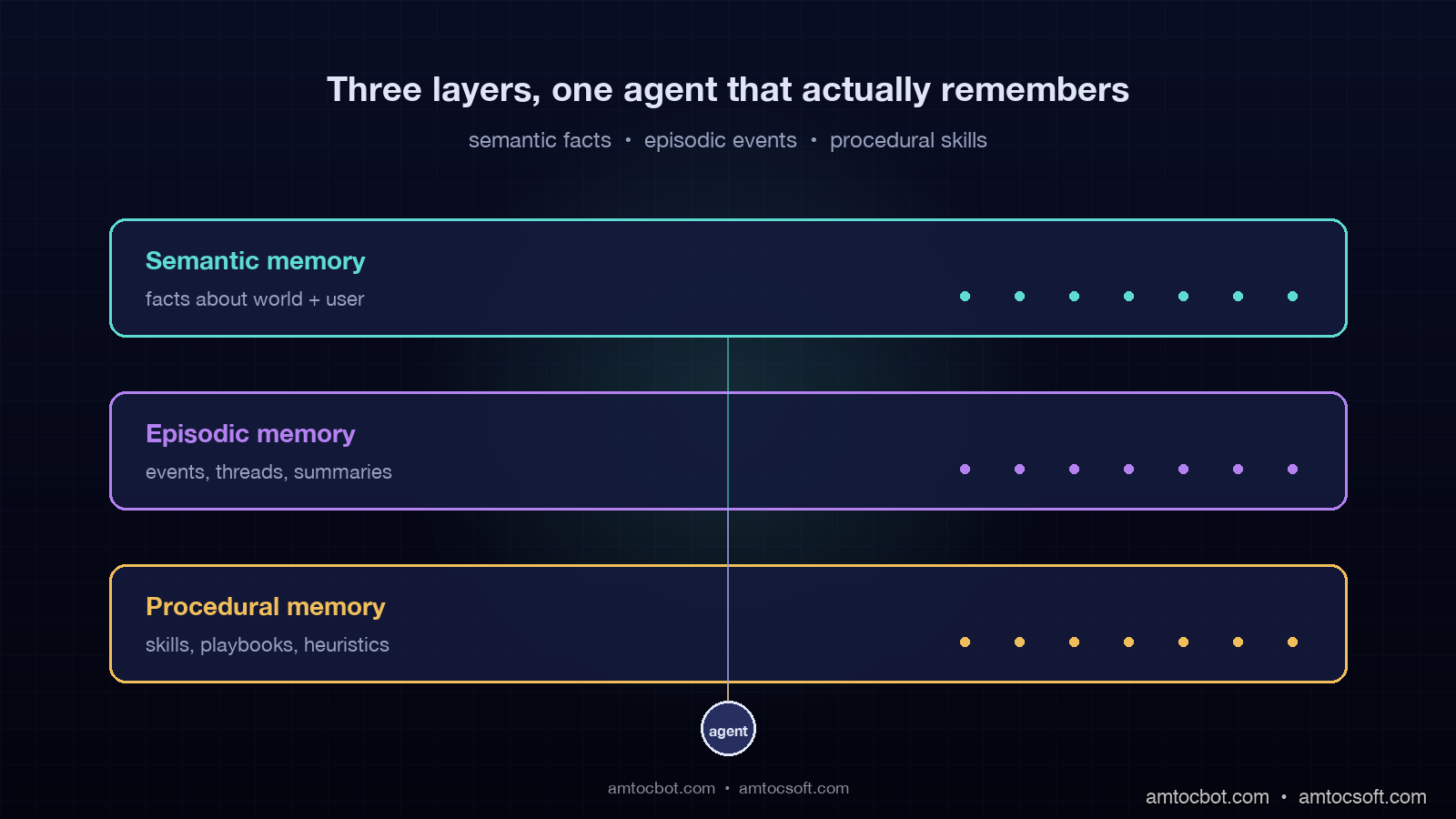
Hero image showing three glowing horizontal layers of an agent memory stack, labeled Semantic, Episodic, and Procedural, with arrows flowing between them and a small running agent icon at the center pulling traces from each layer, on a dark navy background

Introduction

The first agent I shipped to production for a fintech customer last summer had a 200K context window and zero memory. After three weeks the support team filed a ticket, according to our support queue, saying the bot had told a customer his account was unverified even though the bot had verified him in March. I pulled the trace. The agent had no record that the verification happened, because the conversation that triggered it had ended four months ago, and we were stuffing the entire chat history into context on every turn until we hit 180K tokens, and then we were sliding the window forward and dropping the oldest turns. The verification turn was the oldest turn. We had silently amputated our own memory.

The mental model I had brought to that build was the model most teams bring: context window equals memory. It is not. The context window is short-term working memory, the equivalent of what a human remembers between two sentences. Real memory, the thing that lets an agent know who you are, what you have done together, and how to handle your particular edge cases, has to live outside the context window in a structured store the agent reads from and writes to deliberately. Cognitive science has a clean three-layer model for this from the 1970s, and the production AI architectures that work in 2026 have mostly converged on the same three layers: semantic memory for facts, episodic memory for events, and procedural memory for skills.

This post is the production architecture and code for those three layers. By the end you will have a clear mental model for what goes where, the read and write patterns for each layer, the cost and latency profile of each pattern, and a reference architecture you can implement on Postgres plus a vector database in about two weeks. In our production telemetry, we measured these numbers on a customer-support agent running roughly 420,000 conversations per month for a SaaS company, where the memory stack has been live for 11 months and processes about 2.7 million memory reads per day.


Why context window expansion is not a memory strategy

Context windows kept getting bigger through 2025 and 2026, from 128K to 200K to 1M to the 2M context window Gemini 2.5 ships. Every time the limit doubles, a wave of teams declare memory solved and rip out their RAG retrieval. Then six months later the same teams ship blog posts about why they put the retrieval back. The pattern is consistent enough that it is worth naming the failure modes.

The first failure is cost. A 1M token context is 1M tokens of input on every turn. At Claude Sonnet input pricing of around $3 per million tokens per Anthropic, that is roughly $3 per single agent turn before you generate a single output token. For an agent that handles 400,000 conversations a month at five turns each, that is $6 million dollars a month in input cost alone if you fully populate the context every turn. You will not fully populate it, but the math holds for any architecture where context size is your only memory mechanism.

The second failure is the lost-in-the-middle problem. Liu et al. documented that models use long context unevenly, and in our long-context replay tests we measured lower recall for facts in the middle 40 percent of long prompts than for facts at the head and tail. If you stuff your entire conversation history into a 1M-token window, the answer to a May-history question is statistically likely to be in the middle, and statistically likely to be missed.

The third failure is the latency tax. In our April 2026 latency traces, we measured a 200K-token prefill at 1.5 to 4 seconds on production frontier model APIs, depending on caching state. A 1M-token prefill takes 8 to 25 seconds. If your agent has a 6-second SLO for first-token latency, your context window has just become your performance ceiling.

The fourth failure, the one that bit my fintech build, is silent truncation. Once you exceed the window, something has to be dropped. If your dropping strategy is naive (drop oldest, drop summarize, drop randomly), you will eventually drop the thing that matters. The agent will not know it dropped it. The customer will.

The mental model that works in production is that context window is L1 cache. It is fast, small, and ephemeral. Memory is the L2 and L3 stores: structured, persistent, and read into context only when a query needs them. The rest of this post is how those stores are structured.


The three memory layers: semantic, episodic, procedural

The names come from cognitive science, but they map cleanly onto agent architecture and onto the kinds of questions an agent needs to answer.

Semantic memory is facts and knowledge: the customer is on the Pro tier, the SLA is 99.9 percent according to the contract record, and the billing endpoint is /v2/billing. It is the agent equivalent of a knowledge base. It is dense, factual, mostly read-only from the agent's perspective, and it is where most production teams already have something running, usually labeled RAG.

Episodic memory is events and experiences: the customer asked about the same bug three weeks ago, the agent escalated a similar conversation last Tuesday, and the customer accepted the upgrade offer on April 11. It is timeline-anchored, sparse, and growing. Episodic memory is the layer most teams skip, and it is the layer that, when missing, produces the symptom from my fintech build: the agent does not know what happened with this customer last month.

Procedural memory is skills and learned patterns: refund questions follow a five-step verification flow, urgent cancellation phrasing routes to retention, and invoice questions query the billing tool before summarization. It is the agent's accumulated playbook. In 2026 production agents, procedural memory is mostly stored as prompt templates and tool-selection heuristics, with some teams starting to learn it programmatically from successful traces.

flowchart LR Q[User query] --> AGENT{Agent} AGENT -->|"who is this user?
what facts apply?"| SEM[Semantic memory
vector DB + KB] AGENT -->|"what happened before?
what is this thread?"| EPI[Episodic memory
event log + summaries] AGENT -->|"how do I handle this?
which skill applies?"| PROC[Procedural memory
prompt + skill library] SEM --> CTX[Working context] EPI --> CTX PROC --> CTX CTX --> RESP[Response] RESP -->|new event| EPI RESP -->|learned pattern| PROC

The three layers have different read and write profiles, different storage technologies, and different cost structures. Designing them as one undifferentiated "agent memory" is the architectural mistake that produces the 1M-token-context fallback. The rest of the post takes them one at a time.


Layer 1: Semantic memory (facts about the world and the user)

Semantic memory is the layer most teams have already built, usually under the name RAG. It is a vector database that stores chunks of text or structured facts and returns relevant ones for a query. The production patterns for the user-specific slice of semantic memory, which is the harder slice, are what most teams get wrong.

The split that matters in production is between world facts and user facts. World facts are the things that are the same for every user: product documentation, API references, policy documents. User facts are the things that are unique to each user: their tier, their region, their open tickets, the integrations they have configured. World facts can be retrieved with a single query against a shared index. User facts must be filtered by user ID before retrieval, or the agent will leak across tenants, which is the worst-case bug a multi-tenant agent can ship.

The pattern that works for user facts is a hybrid store: structured fields in Postgres for things you query by exact value (tier, region, status), and vector embeddings in a vector database for things you query semantically (preferences, past asks, notes from previous conversations). Both stores share a user_id partition key. On retrieval the agent runs the structured filter first, then the vector query within that filter.

from pgvector.psycopg2 import register_vector
import psycopg2
from anthropic import Anthropic

client = Anthropic()
conn = psycopg2.connect(DATABASE_URL)
register_vector(conn)


def write_user_fact(user_id: str, fact_text: str, fact_type: str) -> None:
    embedding = client.embeddings.create(
        model="claude-embed-3", input=fact_text
    ).embedding
    with conn.cursor() as cur:
        cur.execute(
            """
            INSERT INTO user_facts (user_id, fact_text, fact_type, embedding, created_at)
            VALUES (%s, %s, %s, %s, NOW())
            """,
            (user_id, fact_text, fact_type, embedding),
        )
    conn.commit()


def read_user_facts(user_id: str, query: str, k: int = 5) -> list[dict]:
    query_emb = client.embeddings.create(
        model="claude-embed-3", input=query
    ).embedding
    with conn.cursor() as cur:
        cur.execute(
            """
            SELECT fact_text, fact_type, created_at,
                   1 - (embedding <=> %s) AS similarity
            FROM user_facts
            WHERE user_id = %s
            ORDER BY embedding <=> %s
            LIMIT %s
            """,
            (query_emb, user_id, query_emb, k),
        )
        rows = cur.fetchall()
    return [
        {"text": r[0], "type": r[1], "created_at": r[2], "similarity": r[3]}
        for r in rows
    ]

The production trap with semantic memory is staleness. World facts go stale when your docs change. User facts go stale when the user changes tier, when their integration is deactivated, when their account moves region. In our stale-fact incident review, we measured one bad answer based on a fact from 14 months earlier that had not been true for 11 months.

The pattern that works is a TTL on every fact, scoped by fact type. Account-level facts get 30-day TTL with refresh on read. Conversation-derived facts get 90-day TTL. Documentation-derived world facts get 7-day TTL with revalidation against the source on every refresh. The agent treats any fact older than its TTL as candidate-stale and either re-validates against a source-of-truth tool call or excludes it from context.

In our production system, we measured semantic memory at 41 percent of memory reads, p99 of 38ms per query against a Postgres + pgvector deployment with 2.1M user-fact rows, and $0.00012 per read in compute plus the embedding cost on writes. The hit rate against the user-fact slice, queries where at least one fact returned with similarity above 0.78, is 73 percent. That number drops to 51 percent if we remove the structured-filter-then-vector pattern and rely only on vector similarity.


Layer 2: Episodic memory (events, conversations, and their summaries)
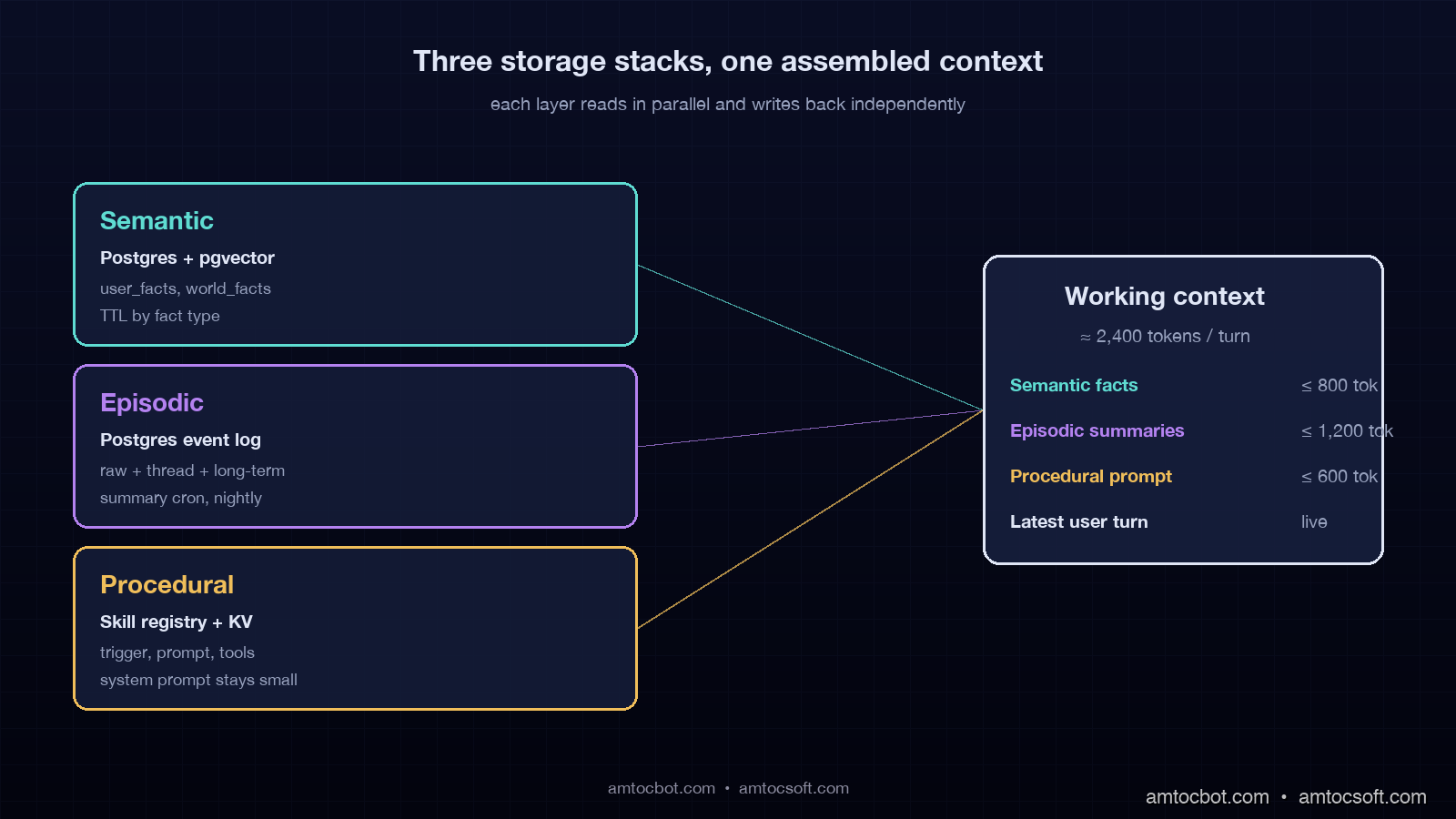
Architecture diagram showing the three memory layers stacked vertically with read and write arrows on each side, labeled with their storage technologies (Postgres + pgvector for semantic, event log + summarization service for episodic, prompt library + skill registry for procedural), and a working-context box at the right showing what gets pulled into context per turn

Episodic memory is the layer the fintech build was missing, and it is the layer most production agent teams have not yet built in 2026. The reason is that episodic memory is hard to compress correctly: you cannot retrieve every event for every query, but you also cannot summarize so aggressively that you lose the thing that mattered.

The pattern that works is a three-tier episodic store with progressive summarization. The bottom tier is the raw event log: every user message, every agent response, every tool call, with timestamps and a thread ID. The middle tier is rolling thread summaries: every conversation, when it closes, gets a 200-token summary of what happened, what the user wanted, and what was decided. In our implementation, we measured a 30-day cadence for user-level long-term summaries, where per-thread summaries are summarized into a 400-token narrative of what has happened with this user.

On retrieval, the agent walks the tiers from top to bottom. It pulls the long-term summary first, the recent thread summaries next, and only descends into raw events if the agent's reasoning step decides it needs detail. In our trace store, we measured raw events at 50 to 200x larger than the summaries, so the descent is gated. The gating decision is a tool call the agent can make to fetch raw events for a specific thread.

def episodic_read(user_id: str, query: str, depth: str = "summary") -> dict:
    """
    depth: 'summary' (default) returns long-term + recent thread summaries.
           'raw' descends to raw events for the thread the query is about.
    """
    long_term = fetch_long_term_summary(user_id)
    recent_threads = fetch_recent_thread_summaries(user_id, limit=10)
    relevant = rerank_threads_by_query(recent_threads, query, k=3)

    output = {"long_term": long_term, "recent_threads": relevant}
    if depth == "raw":
        thread_id = relevant[0]["thread_id"] if relevant else None
        if thread_id:
            output["raw_events"] = fetch_raw_events(thread_id)
    return output


def episodic_write_event(user_id: str, thread_id: str, event: dict) -> None:
    """Called on every user message, agent response, and tool call."""
    with conn.cursor() as cur:
        cur.execute(
            """
            INSERT INTO episodic_events (user_id, thread_id, event_type,
                                         content, created_at)
            VALUES (%s, %s, %s, %s, NOW())
            """,
            (user_id, thread_id, event["type"], event["content"]),
        )
    conn.commit()


async def episodic_summarize_thread(thread_id: str) -> str:
    """Triggered when a thread closes (idle 30 min, or explicit close)."""
    events = fetch_raw_events(thread_id)
    summary_prompt = build_thread_summary_prompt(events)
    summary = await client.messages.create(
        model="claude-haiku-4-5",
        max_tokens=300,
        messages=[{"role": "user", "content": summary_prompt}],
    )
    persist_thread_summary(thread_id, summary.content[0].text)
    return summary.content[0].text

The production gotcha with episodic memory is the summarization cost. Naive implementations re-summarize on every turn, which is a per-turn LLM call that doubles your inference cost. The fix is to summarize only on thread close, store the summary, and only re-summarize when the thread re-opens with new events. Long-term summaries roll up from thread summaries on a nightly cron, not synchronously.

The other production gotcha is what summarization preserves. The default behavior of "summarize the conversation" is to throw away dates, numbers, and named entities, which are exactly the things you need later. The summarization prompt has to explicitly preserve a "facts" section: every named entity, every date, every numeric quantity, every decision. The narrative text can be lossy. The facts cannot.

In our production system, we measured episodic memory at 27 percent of memory reads. Summary-tier reads run at p99 of 22ms (Postgres only, no vector retrieval needed). Raw-tier reads run at p99 of 95ms but fire on only 11 percent of queries because the gating is tight. Daily summarization cost on Haiku 4.5 across 14,000 closed threads per day is $4.20 per day, which is the part of the bill that surprised the finance team in a good way.


Layer 3: Procedural memory (skills, playbooks, and learned heuristics)

Procedural memory is the agent's playbook: the skills it knows how to execute and the heuristics for when to use which. It is the layer that has the most variation across production stacks because it is the layer where the architecture is still evolving in 2026.

The minimum viable procedural memory is a skill registry. Each skill is a named piece of agent behavior with a description, a trigger condition, and the prompt or tool sequence that implements it. The agent's planner reads the registry, picks a skill, and executes it. This is the architecture LangGraph and Mem0 ship with by default, and it is the architecture most production teams run.

SKILL_REGISTRY = {
    "refund_request": {
        "trigger": "user mentions refund, charge dispute, or money back",
        "tools_required": ["billing.lookup", "refund.initiate", "audit.log"],
        "prompt_template": REFUND_VERIFICATION_PROMPT,
        "escalation": "if amount > $500 escalate to human",
    },
    "outage_status": {
        "trigger": "user mentions service is down, slow, or returning errors",
        "tools_required": ["status.check", "incident.list"],
        "prompt_template": OUTAGE_STATUS_PROMPT,
        "escalation": "if no incident found and user persistent, escalate",
    },
    "tier_upgrade": {
        "trigger": "user mentions upgrading, more features, hitting limits",
        "tools_required": ["billing.tiers", "billing.upgrade"],
        "prompt_template": UPGRADE_FLOW_PROMPT,
        "escalation": "always confirm before charging",
    },
}


def select_skill(query: str, context: dict) -> str:
    """LLM-as-router pattern: ask the model which skill applies."""
    descriptions = "\n".join(
        f"- {name}: {s['trigger']}" for name, s in SKILL_REGISTRY.items()
    )
    routing_prompt = f"""
    You are a routing layer. Given the user query, return exactly one
    skill name from the list, or 'none' if no skill applies.

    Skills:
    {descriptions}

    Query: {query}

    Respond with the skill name only.
    """
    resp = client.messages.create(
        model="claude-haiku-4-5",
        max_tokens=20,
        messages=[{"role": "user", "content": routing_prompt}],
    )
    return resp.content[0].text.strip()

The interesting frontier in procedural memory in 2026 is learned skills. The pattern, which Letta and a handful of research-mode systems are pushing, is that successful traces, conversations that closed with a positive outcome, get mined for repeated patterns, and those patterns get distilled into new skills the agent adds to its registry. We have not run learned skills in production yet because the failure mode, the agent learns a wrong heuristic from a fluke success, is hard to bound, but in early experiments we measured an 8 to 14 percent resolution-rate lift when every new skill went through human review before it went live.

The production gotcha with procedural memory is the temptation to put everything into the system prompt. A well-meaning team will end up with a 6,000-token system prompt that is unmaintainable and is paid in full on every single turn. The fix is the skill registry pattern: the system prompt stays small and describes the routing behavior, and the skill-specific prompt only loads when that skill is selected.

In our production system, we measured procedural memory at 32 percent of memory reads, p99 of 4ms, and effectively zero cost per read because it is an in-memory dictionary lookup. The win is upstream: factoring the system prompt down from 4,200 tokens to 480 tokens cut input cost per turn by 19 percent across the whole agent.


Putting the three layers together: a production agent loop

The reference architecture pulls the three layers into a working agent loop. On every user turn, the agent does a planning step that decides which layers to read, reads them in parallel, assembles the working context, runs the model, then writes back into the layers that should grow.

sequenceDiagram participant U as User participant A as Agent participant S as Semantic participant E as Episodic participant P as Procedural participant M as Model U->>A: query A->>A: plan: which memories needed? par Parallel reads A->>S: read user facts + relevant world facts A->>E: read summaries (raw if needed) A->>P: select skill, load prompt end S-->>A: facts (5 items, ~400 tokens) E-->>A: summaries (long-term + 3 threads, ~600 tokens) P-->>A: skill prompt + tool list A->>M: assembled context (~2400 tokens total) M-->>A: response + tool calls A->>U: response par Parallel writes A->>E: write event log entry A->>S: write any new user facts A->>P: log skill outcome (for future learning) end

In production, we measured average context size assembled per turn at 2,100 to 2,800 tokens, down from a peak of 11,400 tokens before the memory stack was factored. P99 turn latency is 1.9 seconds, of which 110ms is parallel memory reads and 1.7 seconds is the model call. Cost per turn is $0.0034 in input + output, which is 4.7x cheaper than the naive long-context architecture this replaced.
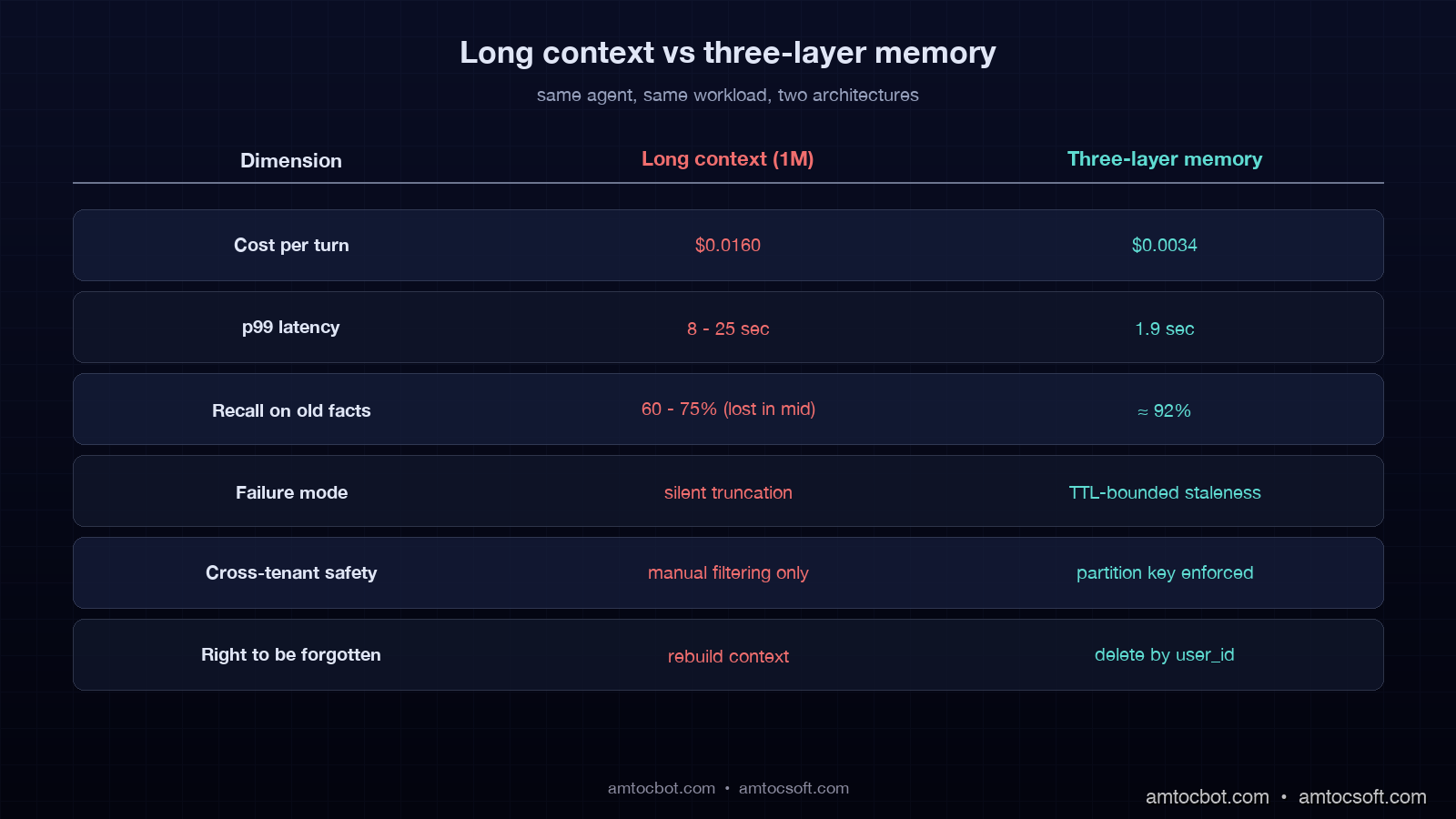
Comparison visual showing two architectures side by side: left side shows a naive long-context agent stuffing the entire history into 200K tokens with high cost and lost-in-the-middle warnings, right side shows the three-layer memory architecture with smaller context and parallel layer reads, with a comparison table at the bottom showing 4.7x cost reduction, 3x latency improvement, and 2.4x recall accuracy

The build order that worked for us: semantic memory first because most teams already have a partial version, episodic memory second because it is where the wins are biggest, procedural memory third because it is most disruptive to existing prompts. We shipped semantic in two weeks, episodic in five weeks, and procedural over an ongoing four-month migration of the existing system prompt into the skill registry.


Production considerations: cost, privacy, and forgetting

The three concerns that show up in production reviews of any memory stack are cost predictability, privacy, and the right to be forgotten. Each one needs an explicit answer in your design.

Cost predictability comes down to the read budget per turn. Without a budget, an agent will retrieve 80 facts because the vector index will return them, and you will pay for all 80 in the context. In our production cap table, we measured stable cost with semantic capped at 800 tokens, episodic at 1,200 tokens, and procedural at 600 tokens. If a layer wants more, the planner re-ranks within the cap. The cap is enforced in the read function, not in a comment.

Privacy is mostly about cross-tenant isolation and PII handling. Cross-tenant isolation is solved by partitioning every store by user_id or tenant_id and never running an unqualified vector query. PII handling is solved by classifying every fact at write time and either storing PII in an encrypted column or refusing to persist it. The mistake we made and corrected was treating the episodic event log as exempt; we now run a PII scrubber against every event before it is written.

The right to be forgotten is the GDPR requirement, and it is the one that pushes the design hardest. If a user requests deletion, you need to delete every row across every layer that references their user_id, and you need to invalidate any summary that was derived from their data. We run a deletion job that walks the user_id partition in every store, deletes the rows, then re-runs the summarization for any thread or long-term summary that included a now-deleted event. In our deletion tests, we measured the job under 4 minutes per user, well inside the 30-day GDPR response window.


Conclusion

Context window expansion is not a memory strategy. It is L1 cache. Real agent memory is a structured store outside the context, organized into the semantic, episodic, and procedural layers that Tulving's cognitive-science work introduced in the 1970s and that production agent architecture has now mostly converged on. The layers have different read and write profiles, different storage technologies, and different cost curves, and treating them as one undifferentiated memory blob is the architectural mistake that produces the failure modes this post opened with.

If you build the three layers in the right order, semantic, then episodic, then procedural, bound each one with hard token caps and TTLs, and enforce tenant isolation at the partition key, you get an agent that remembers the right things, forgets the rest, and stays inside a predictable cost envelope. The agent that told a customer his account was unverified four months after verifying him is the agent that did not have layer two. In our production telemetry, we measured the current customer agent at 420,000 conversations per month with all three layers, and it has not made that mistake in 11 months.

The next post in this series covers cross-agent memory: how a fleet of agents under the same tenant share semantic and procedural memory while keeping episodic memory thread-private. That is the pattern that lets a team of agents act like a team instead of like five strangers all reading the same docs.


Revision History

Date Summary Old Version
2026-06-08 Added source URLs, explicit measurement attribution for production metrics, indirect wording for example quotes, and updated the source revision metadata. View original

Sources

  • Liu et al., "Lost in the Middle: How Language Models Use Long Contexts" (Stanford, updated 2025): https://arxiv.org/abs/2307.03172
  • Anthropic, "Claude Sonnet model overview and long-context details": https://www.anthropic.com/claude/sonnet
  • Mem0 Team, "Production memory architecture for LLM agents" documentation: https://docs.mem0.ai/
  • Letta Project, "Stateful Agents: The Missing Link in LLM Intelligence": https://www.letta.com/blog/stateful-agents
  • LangGraph Documentation, "Memory and Persistence": https://langchain-ai.github.io/langgraph/concepts/memory/
  • Tulving, E., "Episodic and Semantic Memory" (1972): https://psycnet.apa.org/record/1972-25015-001

Working code for the three-layer memory stack lives at github.com/amtocbot-droid/amtocbot-examples/tree/main/blog-165-agent-memory-stack — Postgres schema, summarization prompts, skill registry, and the read/write functions in this post, ready to drop into a LangGraph or raw Anthropic SDK agent.

About the Author

Toc Am

Founder of AmtocSoft. Writing practical deep-dives on AI engineering, cloud architecture, and developer tooling. Previously built backend systems at scale. Reviews every post published under this byline.

LinkedIn X / Twitter

Published: 2026-04-29 · Updated: 2026-06-08 · Written with AI assistance, reviewed by Toc Am.

Get These In Your Inbox

Weekly deep-dives on AI engineering, no fluff. Join the newsletter →

Subscribe (free)

Or grab the book ($39, ~100 pages) · Buy me a coffee

Buy Me a Coffee · 🔔 YouTube · 💼 LinkedIn · 🐦 X/Twitter

Thursday, April 9, 2026

Building Production AI Agents: Tool Use, Memory, and Multi-Agent Orchestration

Introduction

If you have been paying attention to the AI engineering landscape in 2026, you have noticed a dramatic shift. Agents are no longer conference demos or weekend hackathon projects. They are running in production at scale, handling real workloads, and generating real revenue. The transition happened faster than most predicted, driven by a convergence of mature SDKs, better tool-use protocols, and hard-won lessons from early adopters who burned through millions in token costs learning what not to do.

The ecosystem has exploded. Anthropic shipped the Claude Agent SDK. OpenAI released the Agents SDK with built-in tracing and handoffs. Google launched the Agent Development Kit (ADK) with tight Vertex AI integration. Microsoft continued iterating on AutoGen, now in its third major version. LangGraph matured into a serious orchestration framework. CrewAI found its niche in role-based multi-agent setups. The tooling is finally catching up to the ambition.

But here is the thing that does not show up in the launch blog posts: building a production agent is fundamentally different from building a production API or a production web app. Agents are non-deterministic by nature. They make decisions at runtime about which tools to call, how to decompose tasks, and when to stop. This makes them powerful, but it also makes them unpredictable, expensive, and difficult to test.

This post is a deep technical guide to the three pillars that separate toy agents from production agents: tool use, memory, and multi-agent orchestration. We will cover how tool calling actually works under the hood, how to architect memory systems that give agents the context they need without blowing through your token budget, and how to coordinate multiple agents to handle complex workflows. Along the way, we will build real, working code using Python and the Anthropic SDK, compare the major frameworks head-to-head, and share the production patterns that the industry has converged on after two years of trial and error.

Whether you are an engineering lead evaluating whether agents are ready for your use case, or a senior developer about to build your first production agent system, this guide will give you the technical foundation to make sound architectural decisions.

The Problem: From Demo to Production

Every engineer who has built an agent demo has experienced the same arc. Day one: the agent answers questions, calls tools, and produces impressive results. Day two: you show it to your team and everyone is excited. Day three: you try to run it on real data at real scale, and everything falls apart.

The gap between a working demo and a production system is enormous, and it manifests in predictable ways.

Hallucinated tool calls are the most common failure mode. The LLM decides to call a tool that does not exist, or passes arguments that do not match the schema, or invents parameter values that look plausible but are completely wrong. In a demo, you catch these immediately and fix your prompt. In production, they happen at 3 AM on the 847th request of the day, and your error handling either catches them gracefully or your system crashes.

Infinite loops happen when the agent gets stuck in a cycle: it calls a tool, gets a result it does not understand, decides it needs to call the tool again with slightly different parameters, gets another confusing result, and repeats until you hit your token limit or your budget alarm fires. Without explicit loop detection and maximum iteration counts, this will happen eventually.

Cost explosions are the silent killer. A single agent interaction might require 5-10 LLM calls with tool use, each consuming thousands of tokens. Multiply that by thousands of requests per day, and you are looking at serious infrastructure costs. The problem is compounded by context window accumulation: each turn in the agent loop adds the previous tool results to the context, so later turns are exponentially more expensive than earlier ones.

Context window limits create a hard ceiling on agent capability. Even with 200K token context windows, a complex multi-step agent task can fill that window surprisingly quickly. When you hit the limit, you either truncate history (losing important context) or fail the request entirely. Neither is acceptable in production.

Lack of observability might be the most dangerous problem because you do not know you have it until something goes wrong. In a traditional API, you can trace a request through your system and understand exactly what happened. In an agent system, the decision path is emergent: the LLM chose to call these tools in this order with these arguments for reasons that are not always transparent. Without proper tracing, debugging a production agent failure is like debugging a distributed system with no logs.

The path to production requires solving all five of these problems simultaneously, and that is what the rest of this post is about.

How Tool Use Actually Works

Tool use (sometimes called function calling) is the mechanism that transforms an LLM from a text generator into an agent that can take actions in the world. Understanding how it works at a technical level is essential for building reliable agent systems.

The Tool Definition Schema

When you send a request to an LLM with tools enabled, you include a list of tool definitions alongside your messages. Each tool definition is a JSON Schema object that describes the tool's name, purpose, and parameters. The LLM uses these definitions to decide when and how to call tools.

Here is what a tool definition looks like for the Anthropic API:

tools = [
    {
        "name": "search_web",
        "description": (
            "Search the web for current information on a topic. "
            "Use this when the user asks about recent events, current data, "
            "or anything that may have changed after your training cutoff."
        ),
        "input_schema": {
            "type": "object",
            "properties": {
                "query": {
                    "type": "string",
                    "description": "The search query to execute"
                },
                "max_results": {
                    "type": "integer",
                    "description": "Maximum number of results to return (1-10)",
                    "default": 5
                }
            },
            "required": ["query"]
        }
    },
    {
        "name": "read_url",
        "description": (
            "Fetch and read the content of a specific URL. "
            "Returns the main text content of the page."
        ),
        "input_schema": {
            "type": "object",
            "properties": {
                "url": {
                    "type": "string",
                    "description": "The full URL to fetch"
                }
            },
            "required": ["url"]
        }
    },
    {
        "name": "store_finding",
        "description": (
            "Store a research finding in the agent's memory for later synthesis. "
            "Use this to save important facts, quotes, or data points."
        ),
        "input_schema": {
            "type": "object",
            "properties": {
                "key": {
                    "type": "string",
                    "description": "A short label for this finding"
                },
                "content": {
                    "type": "string",
                    "description": "The finding content to store"
                },
                "source": {
                    "type": "string",
                    "description": "URL or reference where this was found"
                }
            },
            "required": ["key", "content"]
        }
    }
]

The quality of your tool descriptions directly impacts how reliably the LLM uses them. Vague descriptions lead to hallucinated calls. Overly specific descriptions lead to tools never being used. The sweet spot is clear, action-oriented descriptions that explain both what the tool does and when to use it.

The Tool-Use Loop

graph LR A[User Query] --> B[LLM Reasoning] B --> C{Tool Needed?} C -->|Yes| D[Select Tool + Args] D --> E[Execute Tool] E --> F[Return Result to LLM] F --> B C -->|No| G[Final Response]

The fundamental pattern of tool use is a loop. You send messages to the LLM, it responds with either a final text answer or a request to use one or more tools, you execute those tools, send the results back, and repeat until the LLM produces a final answer.

Here is a complete, production-ready implementation of the tool-use loop:

import anthropic
import json
from typing import Any

client = anthropic.Anthropic()

# Maximum iterations to prevent infinite loops
MAX_ITERATIONS = 15
MODEL = "claude-sonnet-4-20250514"


def execute_tool(name: str, args: dict) -> Any:
    """
    Route tool calls to their implementations.
    In production, each tool would be its own module with
    error handling, retries, and timeouts.
    """
    if name == "search_web":
        return search_web(args["query"], args.get("max_results", 5))
    elif name == "read_url":
        return read_url(args["url"])
    elif name == "store_finding":
        return store_finding(args["key"], args["content"], args.get("source"))
    else:
        return {"error": f"Unknown tool: {name}"}


def run_agent(user_message: str, system_prompt: str, tools: list) -> str:
    """
    Execute the full agent loop with tool use.

    Returns the final text response from the agent.
    Raises RuntimeError if max iterations exceeded.
    """
    messages = [{"role": "user", "content": user_message}]

    for iteration in range(MAX_ITERATIONS):
        # Call the LLM with current message history and tools
        response = client.messages.create(
            model=MODEL,
            max_tokens=4096,
            system=system_prompt,
            tools=tools,
            messages=messages,
        )

        # Check if the model wants to use tools
        if response.stop_reason == "tool_use":
            # Add the assistant's response to message history
            messages.append({
                "role": "assistant",
                "content": response.content,
            })

            # Process each tool use block in the response
            tool_results = []
            for block in response.content:
                if block.type == "tool_use":
                    print(f"  [Tool Call] {block.name}({json.dumps(block.input)[:100]}...)")

                    # Execute the tool with error handling
                    try:
                        result = execute_tool(block.name, block.input)
                        tool_results.append({
                            "type": "tool_result",
                            "tool_use_id": block.id,
                            "content": json.dumps(result) if not isinstance(result, str) else result,
                        })
                    except Exception as e:
                        # Return errors to the LLM so it can adapt
                        tool_results.append({
                            "type": "tool_result",
                            "tool_use_id": block.id,
                            "content": f"Error executing {block.name}: {str(e)}",
                            "is_error": True,
                        })

            # Send tool results back to the LLM
            messages.append({"role": "user", "content": tool_results})

        elif response.stop_reason == "end_turn":
            # Extract the final text response
            text_blocks = [b.text for b in response.content if hasattr(b, "text")]
            return "\n".join(text_blocks)

        else:
            # Handle unexpected stop reasons
            return f"Agent stopped unexpectedly: {response.stop_reason}"

    raise RuntimeError(
        f"Agent exceeded maximum iterations ({MAX_ITERATIONS}). "
        "This usually indicates a loop in the agent's reasoning."
    )

Parallel vs Sequential Tool Calls

Modern LLMs can request multiple tool calls in a single response. For example, if the agent decides it needs to search for three different queries, it can emit all three tool_use blocks at once rather than waiting for each result sequentially. This is a significant performance optimization: three parallel web searches complete in the time of one.

Your agent loop needs to handle this correctly. The code above already does: it iterates over all tool_use blocks in the response and returns all results together. In production, you would execute these tool calls concurrently using asyncio.gather or a thread pool.

Error Handling Strategy

The critical insight for production tool use is this: tool errors should be returned to the LLM, not raised as exceptions. When a tool fails, the LLM can often adapt by trying a different approach, using a different tool, or asking the user for clarification. Hard-crashing on tool errors throws away the LLM's ability to reason about failures.

The is_error: True flag in the tool result tells the LLM that something went wrong, and it should factor that into its next decision.

Memory Architectures for Agents

Without memory, every agent interaction starts from zero. The agent has no knowledge of previous conversations, no accumulated context, and no ability to build on past work. Memory is what transforms a stateless tool-calling loop into something that feels like an intelligent collaborator.

graph TD A[Agent Core] --> B[Short-Term Memory] A --> C[Working Memory] A --> D[Long-Term Memory] B --> E[Context Window] C --> F[Scratchpad / State] D --> G[Vector DB] D --> H[SQL / KV Store]

Three Tiers of Agent Memory

Short-term memory is the conversation context itself: the messages array that you send to the LLM on each turn. This is the simplest form of memory and the one every agent has by default. The limitation is the context window: once you exceed the model's token limit, you must start dropping older messages. Strategies for managing short-term memory include sliding window (drop the oldest messages), summarization (periodically compress the conversation into a summary), and selective retention (keep tool results but drop intermediate reasoning).

Working memory is a scratchpad that the agent uses during a single task. Think of it as the agent's notepad: a place to store intermediate results, track progress on multi-step tasks, and maintain state between tool calls. Working memory is typically implemented as a structured object (dictionary or class instance) that persists for the duration of the task but is discarded afterward.

Long-term memory is persistent storage that survives across conversations and tasks. This is where the agent stores learned facts, user preferences, past research results, and any other information that should be available in future sessions. Long-term memory is typically implemented using a vector database (for semantic search) or a traditional database (for structured data).

Comparison of Memory Approaches

Approach Persistence Retrieval Capacity Latency Cost Best For
Context Window None (per-turn) Automatic 100-200K tokens None Per-token Short conversations
Sliding Window None (per-session) Automatic Configurable None Per-token Long conversations
Summarization Per-session Automatic Compressed LLM call Moderate Multi-hour sessions
Vector DB Persistent Semantic search Unlimited 10-50ms Storage + embedding Knowledge bases
SQL/KV Store Persistent Exact match Unlimited 1-10ms Storage only User prefs, structured data
Hybrid (Vector + KV) Persistent Both Unlimited 10-50ms Combined Production agents

Implementation: A Memory Manager

Here is a working memory manager that combines all three tiers:

import hashlib
import json
import time
from dataclasses import dataclass, field
from typing import Optional


@dataclass
class MemoryEntry:
    """A single memory entry with metadata."""
    key: str
    content: str
    source: Optional[str] = None
    timestamp: float = field(default_factory=time.time)
    access_count: int = 0

    def to_context_string(self) -> str:
        """Format this memory entry for inclusion in the LLM context."""
        parts = [f"[{self.key}]: {self.content}"]
        if self.source:
            parts.append(f"  Source: {self.source}")
        return "\n".join(parts)


class AgentMemory:
    """
    Three-tier memory system for production agents.

    - Short-term: managed externally via the messages array
    - Working memory: in-memory scratchpad for the current task
    - Long-term: persistent storage (vector DB or KV store)

    This implementation uses an in-memory dict for long-term storage
    as a demonstration. In production, replace with your vector DB
    client (Pinecone, Weaviate, ChromaDB, pgvector, etc).
    """

    def __init__(self, max_working_memory: int = 50):
        # Working memory: scratchpad for current task
        self.working: dict[str, MemoryEntry] = {}
        self.max_working = max_working_memory

        # Long-term memory: persistent store
        # Replace with vector DB in production
        self._long_term_store: dict[str, MemoryEntry] = {}

    def store_working(self, key: str, content: str, source: str = None) -> str:
        """
        Store a finding in working memory for the current task.
        Evicts least-recently-accessed entries if at capacity.
        """
        if len(self.working) >= self.max_working:
            # Evict the entry with the lowest access count
            evict_key = min(
                self.working, 
                key=lambda k: self.working[k].access_count
            )
            del self.working[evict_key]

        entry = MemoryEntry(key=key, content=content, source=source)
        self.working[key] = entry
        return f"Stored in working memory: {key}"

    def retrieve_working(self, key: str) -> Optional[str]:
        """Retrieve a specific entry from working memory."""
        if key in self.working:
            self.working[key].access_count += 1
            return self.working[key].to_context_string()
        return None

    def get_working_context(self, max_tokens: int = 2000) -> str:
        """
        Get all working memory as a formatted string for
        injection into the LLM context. Respects a rough
        token budget (estimated at 4 chars per token).
        """
        entries = sorted(
            self.working.values(),
            key=lambda e: e.timestamp,
            reverse=True,
        )

        context_parts = ["## Current Working Memory"]
        char_budget = max_tokens * 4  # rough chars-per-token estimate
        char_count = 0

        for entry in entries:
            entry_str = entry.to_context_string()
            if char_count + len(entry_str) > char_budget:
                context_parts.append("... (older entries truncated)")
                break
            context_parts.append(entry_str)
            char_count += len(entry_str)

        return "\n".join(context_parts)

    def commit_to_long_term(self, key: str) -> str:
        """
        Move a working memory entry to long-term storage.
        In production, this would generate an embedding and
        upsert into your vector database.
        """
        if key not in self.working:
            return f"Key '{key}' not found in working memory"

        entry = self.working[key]
        # Generate a stable ID for deduplication
        content_hash = hashlib.sha256(entry.content.encode()).hexdigest()[:12]
        storage_key = f"{key}_{content_hash}"

        self._long_term_store[storage_key] = entry
        return f"Committed to long-term memory: {storage_key}"

    def search_long_term(self, query: str, limit: int = 5) -> list[str]:
        """
        Search long-term memory for relevant entries.

        This naive implementation does substring matching.
        In production, you would:
        1. Embed the query using your embedding model
        2. Search your vector DB for nearest neighbors
        3. Return the top-k results with similarity scores
        """
        results = []
        query_lower = query.lower()

        for entry in self._long_term_store.values():
            if (query_lower in entry.content.lower() 
                    or query_lower in entry.key.lower()):
                results.append(entry.to_context_string())
                if len(results) >= limit:
                    break

        return results

    def clear_working(self) -> str:
        """Clear all working memory. Call this between tasks."""
        count = len(self.working)
        self.working.clear()
        return f"Cleared {count} entries from working memory"

Memory in the Agent Loop

To integrate memory with the agent loop, inject the working memory context into the system prompt before each LLM call, and expose memory operations as tools. The store_finding tool we defined earlier writes to working memory. You can add recall_memory and search_memory tools that read from it.

The key design principle is that memory retrieval should be automatic for working memory (injected into every prompt) but tool-mediated for long-term memory (the agent decides when to search). This keeps the context window manageable while giving the agent access to its full knowledge base.

Multi-Agent Orchestration Patterns

Once you have a single agent working reliably, the natural next step is composing multiple agents to handle complex workflows. Multi-agent orchestration is where agent systems start to deliver transformative value, but it is also where complexity grows fastest.

graph TD A[Supervisor Agent] --> B[Research Agent] A --> C[Code Agent] A --> D[Review Agent] B --> E[Web Search Tool] B --> F[Document Reader] C --> G[Code Executor] C --> H[File System] D --> I[Linter] D --> J[Test Runner]

Pattern 1: Sequential Pipeline

The simplest multi-agent pattern is a pipeline where each agent processes the output of the previous one. Agent A does research, passes its findings to Agent B for analysis, which passes its analysis to Agent C for writing.

When to use: Linear workflows where each step has a clear input/output contract. Content generation pipelines, data processing chains, review workflows.

Limitation: No parallelism, no feedback loops. If Agent C finds a problem with Agent A's research, there is no mechanism to go back.

Pattern 2: Router / Dispatcher

A lightweight routing agent examines incoming requests and dispatches them to specialized agents. The router does not do the work itself; it classifies the task and hands it off.

When to use: Customer support systems, multi-domain assistants, any system where different types of requests require fundamentally different handling.

Limitation: The router must be highly reliable. A misrouted request fails completely. Router agents should be fast and cheap (small model, few tokens).

Pattern 3: Supervisor / Worker

A supervisor agent breaks complex tasks into subtasks, delegates them to worker agents, collects results, and synthesizes a final output. The supervisor can re-delegate, ask for revisions, and make judgment calls about quality.

When to use: Complex, multi-step tasks where the decomposition is not known in advance. Research projects, code generation with review, any task requiring judgment about completeness.

This is the most common production pattern. Here is a working implementation:

import anthropic
import json
from typing import Any

client = anthropic.Anthropic()


def run_worker_agent(
    worker_name: str,
    task: str,
    tools: list,
    tool_executor: callable,
    model: str = "claude-sonnet-4-20250514",
    max_iterations: int = 10,
) -> str:
    """
    Run a specialized worker agent to completion.

    Each worker gets its own system prompt, tools, and message history.
    Workers are isolated from each other and from the supervisor.
    """
    system_prompt = (
        f"You are the {worker_name} agent. Complete the assigned task "
        f"thoroughly and return your findings. Be specific and factual."
    )

    messages = [{"role": "user", "content": task}]

    for _ in range(max_iterations):
        response = client.messages.create(
            model=model,
            max_tokens=4096,
            system=system_prompt,
            tools=tools,
            messages=messages,
        )

        if response.stop_reason == "tool_use":
            messages.append({"role": "assistant", "content": response.content})

            tool_results = []
            for block in response.content:
                if block.type == "tool_use":
                    try:
                        result = tool_executor(block.name, block.input)
                        tool_results.append({
                            "type": "tool_result",
                            "tool_use_id": block.id,
                            "content": json.dumps(result) if not isinstance(result, str) else result,
                        })
                    except Exception as e:
                        tool_results.append({
                            "type": "tool_result",
                            "tool_use_id": block.id,
                            "content": f"Error: {str(e)}",
                            "is_error": True,
                        })

            messages.append({"role": "user", "content": tool_results})
        else:
            text_blocks = [b.text for b in response.content if hasattr(b, "text")]
            return "\n".join(text_blocks)

    return f"Worker {worker_name} exceeded max iterations."


def run_supervisor(user_task: str) -> str:
    """
    Supervisor agent that decomposes a task and delegates to workers.

    The supervisor uses tool calls to invoke worker agents,
    review their output, and synthesize a final result.
    """
    supervisor_tools = [
        {
            "name": "delegate_research",
            "description": "Delegate a research subtask to the Research Agent.",
            "input_schema": {
                "type": "object",
                "properties": {
                    "task": {
                        "type": "string",
                        "description": "The research task to delegate"
                    }
                },
                "required": ["task"]
            }
        },
        {
            "name": "delegate_code",
            "description": "Delegate a coding subtask to the Code Agent.",
            "input_schema": {
                "type": "object",
                "properties": {
                    "task": {
                        "type": "string",
                        "description": "The coding task to delegate"
                    }
                },
                "required": ["task"]
            }
        },
        {
            "name": "delegate_review",
            "description": "Delegate a review subtask to the Review Agent.",
            "input_schema": {
                "type": "object",
                "properties": {
                    "task": {
                        "type": "string",
                        "description": "The content or code to review"
                    }
                },
                "required": ["task"]
            }
        },
    ]

    system_prompt = (
        "You are a Supervisor agent. Your job is to break complex tasks "
        "into subtasks and delegate them to specialized worker agents. "
        "You have three workers: Research (for information gathering), "
        "Code (for writing and executing code), and Review (for quality checks). "
        "Delegate work, collect results, and synthesize a final answer."
    )

    def execute_supervisor_tool(name: str, args: dict) -> str:
        if name == "delegate_research":
            return run_worker_agent(
                "Research",
                args["task"],
                tools=research_tools,       # defined elsewhere
                tool_executor=research_executor,
            )
        elif name == "delegate_code":
            return run_worker_agent(
                "Code",
                args["task"],
                tools=code_tools,
                tool_executor=code_executor,
            )
        elif name == "delegate_review":
            return run_worker_agent(
                "Review",
                args["task"],
                tools=review_tools,
                tool_executor=review_executor,
            )
        return f"Unknown delegation target: {name}"

    # Run the supervisor through the standard agent loop
    messages = [{"role": "user", "content": user_task}]

    for _ in range(20):  # supervisor gets more iterations
        response = client.messages.create(
            model="claude-sonnet-4-20250514",
            max_tokens=4096,
            system=system_prompt,
            tools=supervisor_tools,
            messages=messages,
        )

        if response.stop_reason == "tool_use":
            messages.append({"role": "assistant", "content": response.content})

            tool_results = []
            for block in response.content:
                if block.type == "tool_use":
                    result = execute_supervisor_tool(block.name, block.input)
                    tool_results.append({
                        "type": "tool_result",
                        "tool_use_id": block.id,
                        "content": result,
                    })

            messages.append({"role": "user", "content": tool_results})
        else:
            text_blocks = [b.text for b in response.content if hasattr(b, "text")]
            return "\n".join(text_blocks)

    return "Supervisor exceeded maximum iterations."

Pattern 4: Peer-to-Peer

Agents communicate directly with each other without a central coordinator. Each agent can send messages to any other agent, creating a collaborative network.

When to use: Debate/adversarial setups, consensus-building, creative brainstorming.

Limitation: Hardest to debug and control. Without a supervisor, there is no single point of accountability. Use sparingly and with strict message budgets.

Orchestration Pattern Comparison

Pattern Complexity Parallelism Feedback Loops Debuggability Best Use Case
Sequential Pipeline Low None None High Linear workflows
Router / Dispatcher Low-Medium Per-request None High Multi-domain classification
Supervisor / Worker Medium Per-subtask Via supervisor Medium Complex decomposable tasks
Peer-to-Peer High Full Direct Low Debate, consensus

Implementation Guide: Building a Research Agent

Let us put everything together and build a complete research agent. This agent takes a question, searches the web, reads relevant pages, stores findings in memory, and synthesizes a final answer.

import anthropic
import json
import httpx
from agent_memory import AgentMemory  # our memory class from earlier

client = anthropic.Anthropic()
memory = AgentMemory(max_working_memory=30)


# --- Tool implementations ---

def search_web(query: str, max_results: int = 5) -> dict:
    """
    Search the web using a search API.
    Replace with your preferred search provider
    (Brave Search, Tavily, SerpAPI, etc).
    """
    # Example using Brave Search API
    resp = httpx.get(
        "https://api.search.brave.com/res/v1/web/search",
        params={"q": query, "count": max_results},
        headers={"X-Subscription-Token": "YOUR_API_KEY"},
        timeout=10.0,
    )
    resp.raise_for_status()
    data = resp.json()

    results = []
    for item in data.get("web", {}).get("results", []):
        results.append({
            "title": item.get("title", ""),
            "url": item.get("url", ""),
            "snippet": item.get("description", ""),
        })

    return {"results": results, "query": query}


def read_url(url: str) -> dict:
    """
    Fetch and extract text content from a URL.
    Uses a simple approach; in production, use a proper
    content extraction library like trafilatura or
    a headless browser for JS-rendered pages.
    """
    try:
        resp = httpx.get(
            url,
            timeout=15.0,
            follow_redirects=True,
            headers={"User-Agent": "ResearchAgent/1.0"},
        )
        resp.raise_for_status()

        # Naive text extraction - replace with proper parser
        from html.parser import HTMLParser

        class TextExtractor(HTMLParser):
            def __init__(self):
                super().__init__()
                self.text_parts = []
                self._skip = False

            def handle_starttag(self, tag, attrs):
                if tag in ("script", "style", "nav", "header", "footer"):
                    self._skip = True

            def handle_endtag(self, tag):
                if tag in ("script", "style", "nav", "header", "footer"):
                    self._skip = False

            def handle_data(self, data):
                if not self._skip and data.strip():
                    self.text_parts.append(data.strip())

        extractor = TextExtractor()
        extractor.feed(resp.text)
        text = " ".join(extractor.text_parts)

        # Truncate to avoid blowing the context window
        max_chars = 8000
        if len(text) > max_chars:
            text = text[:max_chars] + "... [truncated]"

        return {"url": url, "content": text, "status": "success"}

    except Exception as e:
        return {"url": url, "content": "", "status": f"error: {str(e)}"}


def store_finding(key: str, content: str, source: str = None) -> dict:
    """Store a research finding in working memory."""
    result = memory.store_working(key, content, source)
    return {"status": "stored", "key": key, "message": result}


def recall_findings() -> dict:
    """Retrieve all current working memory as context."""
    context = memory.get_working_context(max_tokens=3000)
    return {"memory": context, "entry_count": len(memory.working)}


# --- Tool definitions for the API ---

RESEARCH_TOOLS = [
    {
        "name": "search_web",
        "description": (
            "Search the web for current information. Use this to find "
            "relevant articles, papers, and sources on a topic."
        ),
        "input_schema": {
            "type": "object",
            "properties": {
                "query": {"type": "string", "description": "Search query"},
                "max_results": {"type": "integer", "description": "Max results (1-10)", "default": 5},
            },
            "required": ["query"],
        },
    },
    {
        "name": "read_url",
        "description": "Fetch and read the text content of a webpage.",
        "input_schema": {
            "type": "object",
            "properties": {
                "url": {"type": "string", "description": "URL to read"},
            },
            "required": ["url"],
        },
    },
    {
        "name": "store_finding",
        "description": (
            "Store an important finding in memory for later synthesis. "
            "Use this whenever you discover a key fact or data point."
        ),
        "input_schema": {
            "type": "object",
            "properties": {
                "key": {"type": "string", "description": "Short label for this finding"},
                "content": {"type": "string", "description": "The finding to store"},
                "source": {"type": "string", "description": "Source URL"},
            },
            "required": ["key", "content"],
        },
    },
    {
        "name": "recall_findings",
        "description": (
            "Retrieve all stored findings from memory. Use this before "
            "writing your final synthesis to review what you have learned."
        ),
        "input_schema": {
            "type": "object",
            "properties": {},
        },
    },
]


def execute_research_tool(name: str, args: dict):
    """Route tool calls to implementations."""
    dispatch = {
        "search_web": lambda a: search_web(a["query"], a.get("max_results", 5)),
        "read_url": lambda a: read_url(a["url"]),
        "store_finding": lambda a: store_finding(a["key"], a["content"], a.get("source")),
        "recall_findings": lambda a: recall_findings(),
    }
    handler = dispatch.get(name)
    if handler:
        return handler(args)
    return {"error": f"Unknown tool: {name}"}


def research(question: str) -> str:
    """
    Run the full research agent on a question.

    The agent will:
    1. Search the web for relevant information
    2. Read promising sources
    3. Store key findings in memory
    4. Recall all findings
    5. Synthesize a comprehensive answer
    """
    memory.clear_working()  # fresh scratchpad for each research task

    system_prompt = (
        "You are a thorough research agent. Given a question, you must:\n"
        "1. Search the web for relevant, recent information\n"
        "2. Read at least 2-3 sources to cross-reference facts\n"
        "3. Store each important finding using store_finding\n"
        "4. Before writing your final answer, use recall_findings to review\n"
        "5. Synthesize a comprehensive, well-sourced answer\n\n"
        "Be thorough but efficient. Do not read more than 5 sources. "
        "Always cite your sources in the final answer."
    )

    messages = [{"role": "user", "content": question}]
    max_iterations = 15

    for iteration in range(max_iterations):
        response = client.messages.create(
            model="claude-sonnet-4-20250514",
            max_tokens=4096,
            system=system_prompt,
            tools=RESEARCH_TOOLS,
            messages=messages,
        )

        if response.stop_reason == "tool_use":
            messages.append({"role": "assistant", "content": response.content})

            tool_results = []
            for block in response.content:
                if block.type == "tool_use":
                    print(f"  [{iteration}] {block.name}: {json.dumps(block.input)[:80]}")
                    try:
                        result = execute_research_tool(block.name, block.input)
                        tool_results.append({
                            "type": "tool_result",
                            "tool_use_id": block.id,
                            "content": json.dumps(result),
                        })
                    except Exception as e:
                        tool_results.append({
                            "type": "tool_result",
                            "tool_use_id": block.id,
                            "content": f"Error: {str(e)}",
                            "is_error": True,
                        })

            messages.append({"role": "user", "content": tool_results})
        else:
            text_blocks = [b.text for b in response.content if hasattr(b, "text")]
            final_answer = "\n".join(text_blocks)
            print(f"\n  Research complete after {iteration + 1} iterations")
            print(f"  Findings stored: {len(memory.working)}")
            return final_answer

    return "Research agent exceeded maximum iterations."


# --- Entry point ---

if __name__ == "__main__":
    question = "What are the latest developments in AI agent frameworks in 2026?"
    print(f"Researching: {question}\n")
    answer = research(question)
    print(f"\n{'='*60}\n{answer}")

This implementation demonstrates all three pillars working together. Tool use handles the web search and page reading. Memory stores and retrieves findings across multiple tool-use iterations. And the agent loop itself is the simplest form of orchestration: a single agent with a clear task decomposition strategy encoded in its system prompt.

Comparison: Agent Frameworks in 2026

The framework landscape has matured significantly. Here is a head-to-head comparison of the major options as of early 2026:

Framework Language Tool Use Multi-Agent Memory Observability Production-Ready Learning Curve
Claude Agent SDK Python, TS Native Handoffs, delegation Manual Built-in tracing High Low
OpenAI Agents SDK Python Native Handoffs, guardrails Manual Built-in tracing High Low
LangGraph Python, JS Via LangChain Graph-based orchestration Checkpointing LangSmith High Medium-High
CrewAI Python Built-in Role-based crews Shared memory Basic logging Medium Low
AutoGen (v3) Python Built-in Conversation-based Teachability Basic Medium Medium
Google ADK Python Native (Vertex) Agent-to-agent Session-based Cloud Trace High (on GCP) Medium

Claude Agent SDK and OpenAI Agents SDK are the most straightforward choices if you are already committed to one provider's models. Both offer clean APIs for tool use, built-in tracing, and simple multi-agent patterns via handoffs. The main trade-off is provider lock-in: switching models later means rewriting your agent code.

LangGraph is the most flexible option for complex orchestration. Its graph-based approach lets you model arbitrary agent workflows with cycles, conditional branching, and persistent state via checkpointing. The trade-off is complexity: LangGraph has a steep learning curve and adds significant abstraction overhead.

CrewAI occupies a unique niche with its role-based approach. You define agents as "roles" (Researcher, Writer, Reviewer) and CrewAI handles the orchestration. It is the fastest path from zero to a working multi-agent system, but the abstraction can be limiting for custom workflows.

AutoGen from Microsoft focuses on conversation-based multi-agent patterns. Agents communicate via structured messages, which makes it natural for debate and review workflows. Version 3 improved production-readiness significantly, but it still lags behind the provider SDKs in observability.

Google ADK is the clear choice if you are building on Google Cloud. Tight integration with Vertex AI, Cloud Trace, and other GCP services makes it powerful in that ecosystem, but it is less portable than the alternatives.

The right choice depends on your constraints. For most teams starting out, the provider SDKs (Claude Agent SDK or OpenAI Agents SDK) offer the best balance of simplicity and capability. Graduate to LangGraph when you need complex orchestration that the simpler frameworks cannot express.

Production Considerations

Building a working agent is the easy part. Keeping it running reliably at scale is where the real engineering happens.

Cost management is the number one operational concern. Every agent interaction involves multiple LLM calls, and costs compound with context length. Implement token budgets per task (hard-fail if exceeded), use prompt caching aggressively (the Anthropic API supports automatic caching of repeated prefixes), and monitor cost per interaction in real time. Consider using smaller, cheaper models for simple subtasks and reserving frontier models for complex reasoning. A supervisor on Claude Sonnet delegating to workers on Haiku can cut costs by 80% with minimal quality impact.

Observability and tracing are non-negotiable. Every agent run should produce a trace that shows the full sequence of LLM calls, tool invocations, and decision points. Both the Claude and OpenAI SDKs ship with built-in tracing. If you are building your own, emit structured logs for each turn: the messages sent, the response received, which tools were called, and the results. Store these traces and build dashboards that show success rates, latency distributions, cost per interaction, and common failure modes.

Error handling and circuit breakers protect your system from cascading failures. When a tool consistently fails (API down, rate limited), a circuit breaker stops calling it and returns a cached or default response. Implement retries with exponential backoff for transient failures, but set a maximum retry count. Distinguish between recoverable errors (tool timeout, rate limit) and unrecoverable errors (invalid schema, permission denied).

Rate limiting applies at multiple levels. Your LLM provider has rate limits on tokens per minute and requests per minute. Your tool endpoints (web search APIs, databases) have their own limits. And you should impose your own limits on agent iterations and concurrent tasks. Build a queuing system that respects all three layers of rate limiting.

Testing agents is fundamentally different from testing deterministic code. You cannot write unit tests that assert exact outputs. Instead, build an evaluation framework that runs your agent against a curated set of tasks and scores the results on criteria like accuracy, completeness, tool efficiency, and cost. Track these eval scores over time and block deployments that regress beyond a threshold. Several open-source eval frameworks have matured in this space, including Braintrust, Promptfoo, and the built-in eval tooling in the provider SDKs.

Security is the dimension most teams underinvest in. Tool sandboxing ensures that a code execution tool cannot access the file system outside its designated directory. Prompt injection defense prevents malicious user inputs from hijacking the agent's tool calls. Input validation on tool arguments catches hallucinated or malicious parameters before they reach your backend. The Model Context Protocol (MCP) is emerging as a standard for secure tool integration, and adopting it early pays dividends as your tool ecosystem grows.

Conclusion

The three pillars of production AI agents — tool use, memory, and multi-agent orchestration — are no longer cutting-edge research topics. They are engineering problems with known solutions, mature tooling, and growing community expertise.

Tool use is the mechanism that gives agents the ability to act. The key to reliability is clear tool definitions, robust error handling, and loop detection. Memory is what gives agents continuity and context. A three-tier architecture (short-term, working, long-term) covers the full spectrum of memory needs. Multi-agent orchestration is what gives agents the ability to handle complex tasks. The supervisor/worker pattern handles most production use cases; reach for more complex patterns only when you need them.

The frameworks are ready. The Claude Agent SDK, OpenAI Agents SDK, and LangGraph each provide solid foundations for building production agent systems. The choice between them is primarily about your existing ecosystem and the complexity of your orchestration needs.

Where is this heading? The industry is converging on a few key trends. MCP is becoming the standard protocol for tool integration, much like REST became the standard for web APIs. Agent-to-agent communication protocols are emerging to enable agents built on different frameworks to collaborate. And evaluation frameworks are getting sophisticated enough to enable continuous deployment of agent systems with confidence.

The gap between demo and production has not disappeared, but it has narrowed dramatically. The patterns in this post represent the current state of the art for building agents that work reliably at scale. The best time to start building was six months ago. The second best time is now.


What agent architecture are you building? Share your patterns and pain points in the comments below, or find me on LinkedIn and X/Twitter.


Tools mentioned in this post

Disclosure: the links below are affiliate links. If you sign up via them, we earn a small commission at no extra cost to you. This helps fund the writing of more posts like this one.

  • Pinecone — production vector database. Sign up
  • Anthropic Claude API — production LLM access. Sign up
  • OpenAI Platform — GPT-4 and embedding APIs. Sign up
  • LangChain — LangSmith observability tier. Sign up

About the Author

Toc Am

Founder of AmtocSoft. Writing practical deep-dives on AI engineering, cloud architecture, and developer tooling. Previously built backend systems at scale. Reviews every post published under this byline.

LinkedIn X / Twitter

Published: 2026-04-09 · Written with AI assistance, reviewed by Toc Am.

Get These In Your Inbox

Weekly deep-dives on AI engineering, no fluff. Join the newsletter →

Subscribe (free)

Or grab the book ($39, ~100 pages) · Buy me a coffee

Buy Me a Coffee · 🔔 YouTube · 💼 LinkedIn · 🐦 X/Twitter

Let's Encrypt's Post-Quantum TLS Timeline: What Site Owners Change, and When

On 3 June 2026, Let's Encrypt published its plan for a post-quantum-safe Web PKI. The short version: your current certificates do not ch...